


WHITE BALANCE
Jo Lowes
UNDERSTANDING WHITE BALANCE
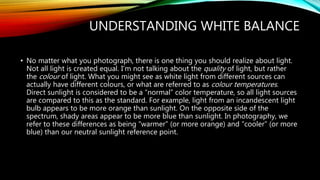
• No matter what you photograph, there is one thing you should realize about light.
Not all light is created equal. I’m not talking about the quality of light, but rather
the colour of light. What you might see as white light from different sources can
actually have different colours, or what are referred to as colour temperatures.
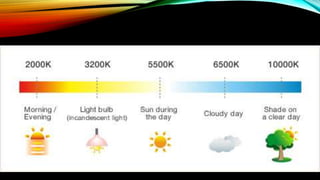
Direct sunlight is considered to be a “normal” color temperature, so all light sources
are compared to this as the standard. For example, light from an incandescent light
bulb appears to be more orange than sunlight. On the opposite side of the
spectrum, shady areas appear to be more blue than sunlight. In photography, we
refer to these differences as being “warmer” (or more orange) and “cooler” (or more
blue) than our neutral sunlight reference point.
UNDERSTANDING WHITE BALANCE
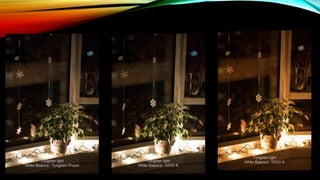
• So how does this apply to photography? Have you ever taken a photo that came
out looking too orange or blue? When you looked at the scene with your eyes, it
probably didn’t look orange or blue. It looked normal. That’s because our brains
compensate for different colour temperatures so that we just see normal colours.
Our cameras don’t automatically compensate for different colour temperatures.
WHAT IS WHITE BALANCE?
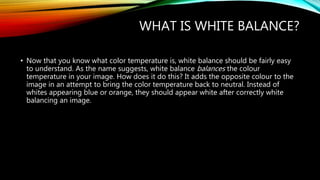
• Now that you know what color temperature is, white balance should be fairly easy
to understand. As the name suggests, white balance balances the colour
temperature in your image. How does it do this? It adds the opposite colour to the
image in an attempt to bring the color temperature back to neutral. Instead of
whites appearing blue or orange, they should appear white after correctly white
balancing an image.
IN CAMERA WHITE BALANCE
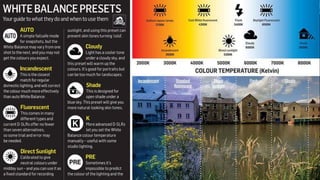
• Most cameras come with the option to manually set or adjust white balance. Typical
settings include “sun”, “shade”, “tungsten” and “fluorescent”. Some cameras come
with the option to manually set a colour temperature by choosing a specific Kelvin
value.
HOW TO CHANGE WHITE BALANCE IN
YOUR CAMERA
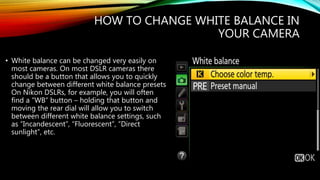
• White balance can be changed very easily on
most cameras. On most DSLR cameras there
should be a button that allows you to quickly
change between different white balance presets.
On Nikon DSLRs, for example, you will often
find a “WB” button – holding that button and
moving the rear dial will allow you to switch
between different white balance settings, such
as “Incandescent”, “Fluorescent”, “Direct
sunlight”, etc.
HOW TO CHANGE WHITE BALANCE IN
YOUR CAMERA
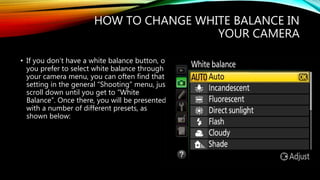
• If you don’t have a white balance button, or
you prefer to select white balance through
your camera menu, you can often find that
setting in the general “Shooting” menu, just
scroll down until you get to “White
Balance”. Once there, you will be presented
with a number of different presets, as
shown below:

White balance

  • 1.
  • 2.
    UNDERSTANDING WHITE BALANCE •No matter what you photograph, there is one thing you should realize about light. Not all light is created equal. I’m not talking about the quality of light, but rather the colour of light. What you might see as white light from different sources can actually have different colours, or what are referred to as colour temperatures. Direct sunlight is considered to be a “normal” color temperature, so all light sources are compared to this as the standard. For example, light from an incandescent light bulb appears to be more orange than sunlight. On the opposite side of the spectrum, shady areas appear to be more blue than sunlight. In photography, we refer to these differences as being “warmer” (or more orange) and “cooler” (or more blue) than our neutral sunlight reference point.
  • 3.
    UNDERSTANDING WHITE BALANCE •So how does this apply to photography? Have you ever taken a photo that came out looking too orange or blue? When you looked at the scene with your eyes, it probably didn’t look orange or blue. It looked normal. That’s because our brains compensate for different colour temperatures so that we just see normal colours. Our cameras don’t automatically compensate for different colour temperatures.
  • 5.
    WHAT IS WHITEBALANCE? • Now that you know what color temperature is, white balance should be fairly easy to understand. As the name suggests, white balance balances the colour temperature in your image. How does it do this? It adds the opposite colour to the image in an attempt to bring the color temperature back to neutral. Instead of whites appearing blue or orange, they should appear white after correctly white balancing an image.
  • 8.
    IN CAMERA WHITEBALANCE • Most cameras come with the option to manually set or adjust white balance. Typical settings include “sun”, “shade”, “tungsten” and “fluorescent”. Some cameras come with the option to manually set a colour temperature by choosing a specific Kelvin value.
  • 10.
    HOW TO CHANGEWHITE BALANCE IN YOUR CAMERA • White balance can be changed very easily on most cameras. On most DSLR cameras there should be a button that allows you to quickly change between different white balance presets. On Nikon DSLRs, for example, you will often find a “WB” button – holding that button and moving the rear dial will allow you to switch between different white balance settings, such as “Incandescent”, “Fluorescent”, “Direct sunlight”, etc.
  • 12.
    HOW TO CHANGEWHITE BALANCE IN YOUR CAMERA • If you don’t have a white balance button, or you prefer to select white balance through your camera menu, you can often find that setting in the general “Shooting” menu, just scroll down until you get to “White Balance”. Once there, you will be presented with a number of different presets, as shown below: