Demystifying SharePoint Server 2016
Notes:
 If you experience audio issues during the webinar, you can dial in through telephone details provided to you in your
registration confirmation email.
 Please feel free to post questions in the questions dialog and we will try to answer as many as we can at the end.
 Recording of this session will be shared in next 24-48 hours.
 You can also write to us at marketing@winwire.com for any clarifications or information.
Madan M
Enterprise Consultant
WinWire Technologies Inc.
Session Speaker
Agenda
Exciting New Features
Installation and Configuration
SharePoint 2016 Overview
SharePoint Evolution
Deprecated Features
1
2
3
4
5
Migration Options6
Q & A7
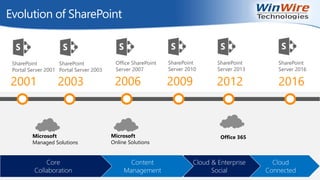
Evolution of SharePoint
Cloud
Connected
Cloud & Enterprise
Social
Content
Management
Core
Collaboration
2001
SharePoint
Portal Server 2001
2003
SharePoint
Portal Server 2003
2006
Office SharePoint
Server 2007
2009
SharePoint
Server 2010
2012
SharePoint
Server 2013
2016
SharePoint
Server 2016
Microsoft
Managed Solutions
Microsoft
Online Solutions
Office 365
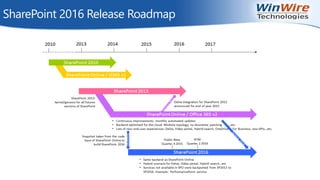
SharePoint 2016 Release Roadmap
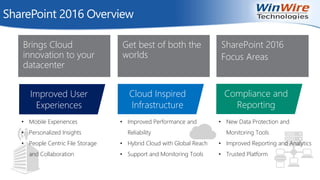
Improved User
Experiences
Cloud Inspired
Infrastructure
Compliance and
Reporting
• Mobile Experiences
• Personalized Insights
• People Centric File Storage
and Collaboration
• Improved Performance and
Reliability
• Hybrid Cloud with Global Reach
• Support and Monitoring Tools
• New Data Protection and
Monitoring Tools
• Improved Reporting and Analytics
• Trusted Platform
Brings Cloud
innovation to your
datacenter
Get best of both the
worlds
SharePoint 2016
Focus Areas
SharePoint 2016 Overview
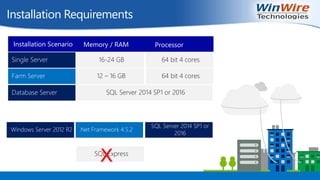
Installation Requirements
Single Server
Farm Server
Database Server
16-24 GB 64 bit 4 cores
12 – 16 GB 64 bit 4 cores
SQL Server 2014 SP1 or 2016
Installation Scenario Memory / RAM Processor
Windows Server 2012 R2 .Net Framework 4.5.2
SQL Server 2014 SP1 or
2016
SQL Express
X
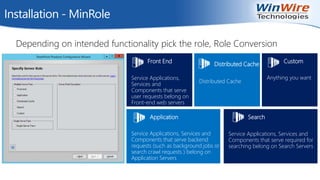
Installation - MinRole
Depending on intended functionality pick the role, Role Conversion
Distributed Cache
Distributed Cache
Application
Service Applications, Services and
Components that serve backend
requests (such as background jobs or
search crawl requests ) belong on
Application Servers
Search
Service Applications, Services and
Components that serve required for
searching belong on Search Servers
Front End
Service Applications,
Services and
Components that serve
user requests belong on
Front-end web servers
Custom
Anything you want
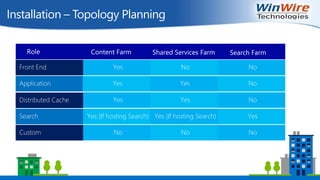
Installation – Topology Planning
Front End
Application
Distributed Cache
Search
Custom
Yes No No
Yes Yes No
Yes Yes No
Yes (If hosting Search) Yes (If hosting Search) Yes
No No No
Role Content Farm Shared Services Farm Search Farm
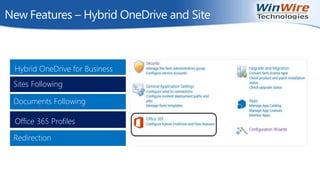
New Features – Hybrid OneDrive and Site
Hybrid OneDrive for Business
Office 365 Profiles
Documents Following
Sites Following
Redirection
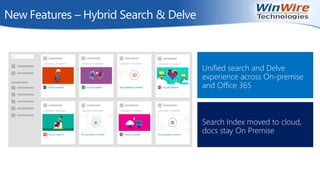
New Features – Hybrid Search & Delve
Unified search and Delve
experience across On-premise
and Office 365
Search Index moved to cloud,
docs stay On Premise
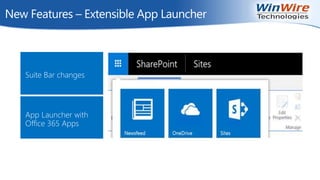
New Features – Extensible App Launcher
Suite Bar changes
App Launcher with
Office 365 Apps
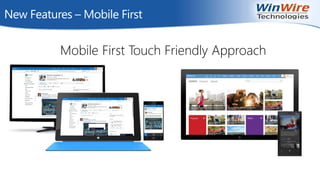
New Features – Mobile First
Mobile First Touch Friendly Approach
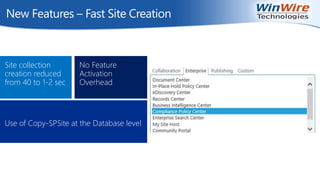
New Features – Fast Site Creation
Site collection
creation reduced
from 40 to 1-2 sec
No Feature
Activation
Overhead
Use of Copy-SPSite at the Database level
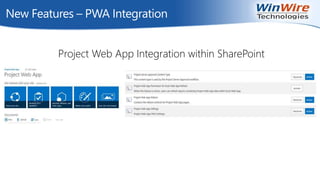
New Features – PWA Integration
Project Web App Integration within SharePoint
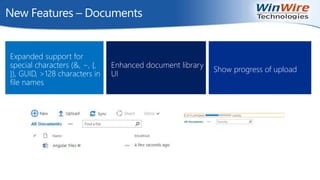
New Features – Documents
Expanded support for
special characters (&, ~, {,
}), GUID, >128 characters in
file names
Enhanced document library
UI
Show progress of upload
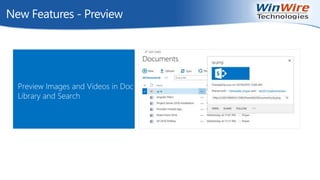
New Features - Preview
Preview Images and Videos in Doc
Library and Search
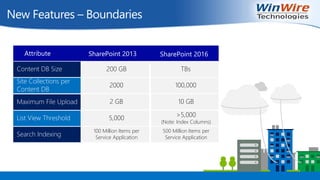
New Features – Boundaries
Content DB Size
Site Collections per
Content DB
Maximum File Upload
List View Threshold
Search Indexing
200 GB TBs
2000 100,000
2 GB 10 GB
5,000 >5,000
(Note: Index Columns)
100 Million Items per
Service Application
500 Million Items per
Service Application
Attribute SharePoint 2013 SharePoint 2016
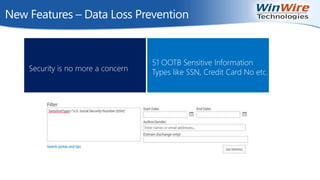
New Features – Data Loss Prevention
Security is no more a concern
51 OOTB Sensitive Information
Types like SSN, Credit Card No etc.
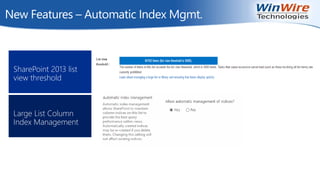
New Features – Automatic Index Mgmt.
SharePoint 2013 list
view threshold
Large List Column
Index Management
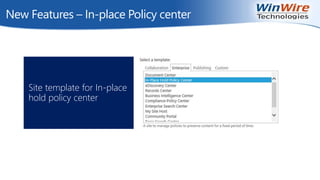
New Features – In-place Policy center
Site template for In-place
hold policy center
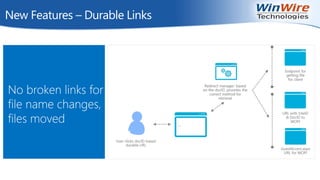
New Features – Durable Links
No broken links for
file name changes,
files moved
New Features – Contd..
Zero downtime patching
Profile Redirection – One
Profile for Hybrid
Environment
Document discussions in
Yammer
ODF Default File Template –
Edit using program of user’s
choice
Authentication
• SAML based Authentication
• Claims based authentication
• No more Classic
Authentication
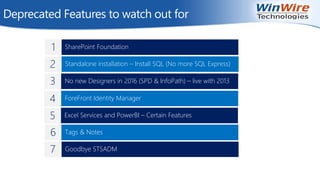
Deprecated Features to watch out for
ForeFront Identity Manager
No new Designers in 2016 (SPD & InfoPath) – live with 2013
Standalone installation – Install SQL (No more SQL Express)
SharePoint Foundation
Excel Services and PowerBI – Certain Features
1
2
3
4
5
Tags & Notes6
Goodbye STSADM7
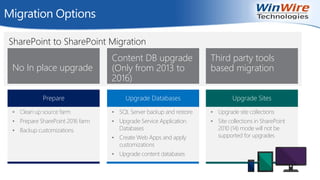
SharePoint to SharePoint Migration
Migration Options
No In place upgrade
Content DB upgrade
(Only from 2013 to
2016)
Third party tools
based migration
Prepare
• Clean up source farm
• Prepare SharePoint 2016 farm
• Backup customizations
Upgrade Databases
• SQL Server backup and restore
• Upgrade Service Application
Databases
• Create Web Apps and apply
customizations
• Upgrade content databases
Upgrade Sites
• Upgrade site collections
• Site collections in SharePoint
2010 (14) mode will not be
supported for upgrades
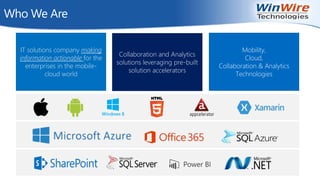
Who We Are
IT solutions company making
information actionable for the
enterprises in the mobile-
cloud world
Mobility,
Cloud,
Collaboration & Analytics
Technologies
Collaboration and Analytics
solutions leveraging pre-built
solution accelerators
Q & A
http://www.winwire.com/blog-winsights/
www.twitter.com/winwire
marketing@winwire.com
www.winwire.com

Demystifying SharePoint Server 2016

  • 1.
    Demystifying SharePoint Server2016 Notes:  If you experience audio issues during the webinar, you can dial in through telephone details provided to you in your registration confirmation email.  Please feel free to post questions in the questions dialog and we will try to answer as many as we can at the end.  Recording of this session will be shared in next 24-48 hours.  You can also write to us at marketing@winwire.com for any clarifications or information.
  • 2.
    Madan M Enterprise Consultant WinWireTechnologies Inc. Session Speaker
  • 3.
    Agenda Exciting New Features Installationand Configuration SharePoint 2016 Overview SharePoint Evolution Deprecated Features 1 2 3 4 5 Migration Options6 Q & A7
  • 4.
    Evolution of SharePoint Cloud Connected Cloud& Enterprise Social Content Management Core Collaboration 2001 SharePoint Portal Server 2001 2003 SharePoint Portal Server 2003 2006 Office SharePoint Server 2007 2009 SharePoint Server 2010 2012 SharePoint Server 2013 2016 SharePoint Server 2016 Microsoft Managed Solutions Microsoft Online Solutions Office 365
  • 5.
  • 6.
    Improved User Experiences Cloud Inspired Infrastructure Complianceand Reporting • Mobile Experiences • Personalized Insights • People Centric File Storage and Collaboration • Improved Performance and Reliability • Hybrid Cloud with Global Reach • Support and Monitoring Tools • New Data Protection and Monitoring Tools • Improved Reporting and Analytics • Trusted Platform Brings Cloud innovation to your datacenter Get best of both the worlds SharePoint 2016 Focus Areas SharePoint 2016 Overview
  • 7.
    Installation Requirements Single Server FarmServer Database Server 16-24 GB 64 bit 4 cores 12 – 16 GB 64 bit 4 cores SQL Server 2014 SP1 or 2016 Installation Scenario Memory / RAM Processor Windows Server 2012 R2 .Net Framework 4.5.2 SQL Server 2014 SP1 or 2016 SQL Express X
  • 8.
    Installation - MinRole Dependingon intended functionality pick the role, Role Conversion Distributed Cache Distributed Cache Application Service Applications, Services and Components that serve backend requests (such as background jobs or search crawl requests ) belong on Application Servers Search Service Applications, Services and Components that serve required for searching belong on Search Servers Front End Service Applications, Services and Components that serve user requests belong on Front-end web servers Custom Anything you want
  • 9.
    Installation – TopologyPlanning Front End Application Distributed Cache Search Custom Yes No No Yes Yes No Yes Yes No Yes (If hosting Search) Yes (If hosting Search) Yes No No No Role Content Farm Shared Services Farm Search Farm
  • 10.
    New Features –Hybrid OneDrive and Site Hybrid OneDrive for Business Office 365 Profiles Documents Following Sites Following Redirection
  • 11.
    New Features –Hybrid Search & Delve Unified search and Delve experience across On-premise and Office 365 Search Index moved to cloud, docs stay On Premise
  • 12.
    New Features –Extensible App Launcher Suite Bar changes App Launcher with Office 365 Apps
  • 13.
    New Features –Mobile First Mobile First Touch Friendly Approach
  • 14.
    New Features –Fast Site Creation Site collection creation reduced from 40 to 1-2 sec No Feature Activation Overhead Use of Copy-SPSite at the Database level
  • 15.
    New Features –PWA Integration Project Web App Integration within SharePoint
  • 16.
    New Features –Documents Expanded support for special characters (&, ~, {, }), GUID, >128 characters in file names Enhanced document library UI Show progress of upload
  • 17.
    New Features -Preview Preview Images and Videos in Doc Library and Search
  • 18.
    New Features –Boundaries Content DB Size Site Collections per Content DB Maximum File Upload List View Threshold Search Indexing 200 GB TBs 2000 100,000 2 GB 10 GB 5,000 >5,000 (Note: Index Columns) 100 Million Items per Service Application 500 Million Items per Service Application Attribute SharePoint 2013 SharePoint 2016
  • 19.
    New Features –Data Loss Prevention Security is no more a concern 51 OOTB Sensitive Information Types like SSN, Credit Card No etc.
  • 20.
    New Features –Automatic Index Mgmt. SharePoint 2013 list view threshold Large List Column Index Management
  • 21.
    New Features –In-place Policy center Site template for In-place hold policy center
  • 22.
    New Features –Durable Links No broken links for file name changes, files moved
  • 23.
    New Features –Contd.. Zero downtime patching Profile Redirection – One Profile for Hybrid Environment Document discussions in Yammer ODF Default File Template – Edit using program of user’s choice Authentication • SAML based Authentication • Claims based authentication • No more Classic Authentication
  • 24.
    Deprecated Features towatch out for ForeFront Identity Manager No new Designers in 2016 (SPD & InfoPath) – live with 2013 Standalone installation – Install SQL (No more SQL Express) SharePoint Foundation Excel Services and PowerBI – Certain Features 1 2 3 4 5 Tags & Notes6 Goodbye STSADM7
  • 25.
    SharePoint to SharePointMigration Migration Options No In place upgrade Content DB upgrade (Only from 2013 to 2016) Third party tools based migration Prepare • Clean up source farm • Prepare SharePoint 2016 farm • Backup customizations Upgrade Databases • SQL Server backup and restore • Upgrade Service Application Databases • Create Web Apps and apply customizations • Upgrade content databases Upgrade Sites • Upgrade site collections • Site collections in SharePoint 2010 (14) mode will not be supported for upgrades
  • 26.
    Who We Are ITsolutions company making information actionable for the enterprises in the mobile- cloud world Mobility, Cloud, Collaboration & Analytics Technologies Collaboration and Analytics solutions leveraging pre-built solution accelerators
  • 27.