

Azure Search
Notes:
 If you experience audio issues during the webinar, you can dial in through telephone details provided to you in your
registration confirmation email.
 Please feel free to post questions in the questions dialog and we will try to answer as many as we can at the end.
 Recording of this session will be shared in next 24-48 hours.
 You can also write to us at marketing@winwire.com for any clarifications or information.
Session Speaker
Abhishek Chandra
Sr. Consultant
WinWire Technologies
Agenda
Demo
Create and populate Index
Benefits
What is Azure Search
Questions
1
2
3
4
5
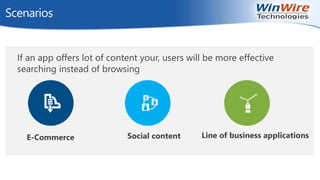
Scenarios
If an app offers lot of content your, users will be more effective
searching instead of browsing
Line of business applicationsSocial contentE-Commerce
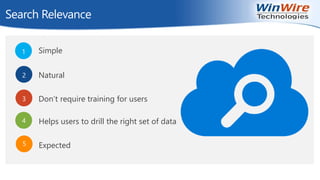
Search Relevance
Simple
Natural
Don’t require training for users
Helps users to drill the right set of data
Expected
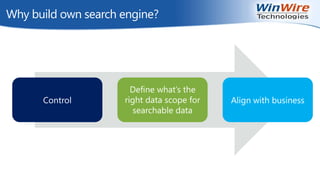
Why build own search engine?
Control
Define what’s the
right data scope for
searchable data
Align with business
Azure Search
Azure search is a fully managed search service for mobile
and web app development. It offers the experience user
expects and the features developer require.
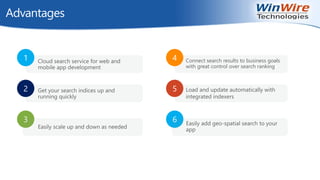
Advantages
1 Cloud search service for web and
mobile app development
2 Get your search indices up and
running quickly
3
Easily scale up and down as needed
4 Connect search results to business goals
with great control over search ranking
5 Load and update automatically with
integrated indexers
6 Easily add geo-spatial search to your
app
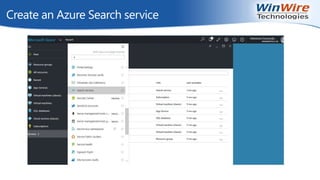
Create an Azure Search service
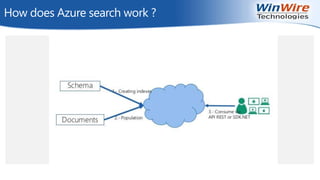
How does Azure search work ?
Index
What is an Index ?
Field types and attributes
in an Azure Search index
Creating an Index
Create a new Index
You can create a new index within an Azure Search service using an HTTP POST or
PUT request.
POST
POST
https://[servicename].search.windows.net/indexes?api-version=[api-version]
Content-Type: application/json
api-key: [admin key]
PUT
PUT
https://[servicename].search.windows.net/indexes/[index name]?api-version=[api-
version]
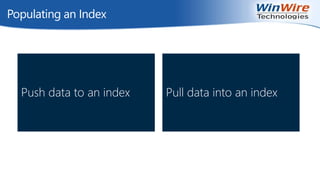
Populating an Index
Push data to an index Pull data into an index
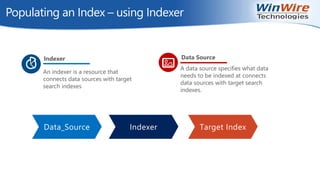
Populating an Index – using Indexer
Data_Source Indexer Target Index
An indexer is a resource that
connects data sources with target
search indexes
Indexer
A data source specifies what data
needs to be indexed at connects
data sources with target search
indexes.
Data Source
Populating an Index - Azure Search Service REST API
● POST /indexes/[index name]/docs/index?api-version=[api-version]
● Request Body
{ "value": [
{
"@search.action": "upload (default) | merge | mergeOrUpload | delete",
"key_field_name": "unique_key_of_document", (key/value pair for key field from index schema)
"field_name": field_value (key/value pairs matching index schema)
...
}, ...
]}
● Response
Status code: 200 OK
Status code: 207
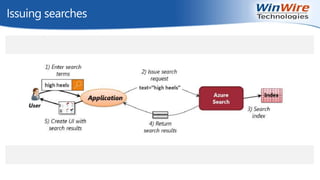
Issuing searches
Demo
Q & A
Next Webinar
Topic : Azure Service Fabric
When: June 15th at 9am PT
http://www.winwire.com/blog-winsights/
www.twitter.com/winwire
marketing@winwire.com
www.winwire.com

Azure Search

  • 1.
    Azure Search Notes:  Ifyou experience audio issues during the webinar, you can dial in through telephone details provided to you in your registration confirmation email.  Please feel free to post questions in the questions dialog and we will try to answer as many as we can at the end.  Recording of this session will be shared in next 24-48 hours.  You can also write to us at marketing@winwire.com for any clarifications or information.
  • 2.
    Session Speaker Abhishek Chandra Sr.Consultant WinWire Technologies
  • 3.
    Agenda Demo Create and populateIndex Benefits What is Azure Search Questions 1 2 3 4 5
  • 4.
    Scenarios If an appoffers lot of content your, users will be more effective searching instead of browsing Line of business applicationsSocial contentE-Commerce
  • 5.
    Search Relevance Simple Natural Don’t requiretraining for users Helps users to drill the right set of data Expected
  • 6.
    Why build ownsearch engine? Control Define what’s the right data scope for searchable data Align with business
  • 7.
    Azure Search Azure searchis a fully managed search service for mobile and web app development. It offers the experience user expects and the features developer require.
  • 8.
    Advantages 1 Cloud searchservice for web and mobile app development 2 Get your search indices up and running quickly 3 Easily scale up and down as needed 4 Connect search results to business goals with great control over search ranking 5 Load and update automatically with integrated indexers 6 Easily add geo-spatial search to your app
  • 9.
    Create an AzureSearch service
  • 10.
    How does Azuresearch work ?
  • 11.
    Index What is anIndex ? Field types and attributes in an Azure Search index
  • 12.
    Creating an Index Createa new Index You can create a new index within an Azure Search service using an HTTP POST or PUT request. POST POST https://[servicename].search.windows.net/indexes?api-version=[api-version] Content-Type: application/json api-key: [admin key] PUT PUT https://[servicename].search.windows.net/indexes/[index name]?api-version=[api- version]
  • 13.
    Populating an Index Pushdata to an index Pull data into an index
  • 14.
    Populating an Index– using Indexer Data_Source Indexer Target Index An indexer is a resource that connects data sources with target search indexes Indexer A data source specifies what data needs to be indexed at connects data sources with target search indexes. Data Source
  • 15.
    Populating an Index- Azure Search Service REST API ● POST /indexes/[index name]/docs/index?api-version=[api-version] ● Request Body { "value": [ { "@search.action": "upload (default) | merge | mergeOrUpload | delete", "key_field_name": "unique_key_of_document", (key/value pair for key field from index schema) "field_name": field_value (key/value pairs matching index schema) ... }, ... ]} ● Response Status code: 200 OK Status code: 207
  • 16.
  • 17.
  • 18.
    Q & A NextWebinar Topic : Azure Service Fabric When: June 15th at 9am PT http://www.winwire.com/blog-winsights/ www.twitter.com/winwire marketing@winwire.com www.winwire.com

Editor's Notes

  • #7 Control To define what’s the right data scope for searchable data To align with business