
© 2010 WinWire Technologies
Azure Container Service
Notes:
 If you experience audio issues during the webinar, you can dial in through telephone details provided to you in your
registration confirmation email.
 Please feel free to post questions in the questions dialog and we will try to answer as many as we can at the end.
 Recording of this session will be shared in next 24-48 hours.
 You can also write to us at marketing@winwire.com for any clarifications or information.
© 2010 WinWire Technologies
Session Speaker
Amit Dubay
Director – Cloud & Mobility
WinWire Technologies
Microsoft Azure Certified Developer
© 2010 WinWire Technologies
Agenda
Scaling and Orchestration
Containers Advantages
Containers vs VMs
Introduction to Containers
Demo
1
2
3
4
5
Questions6
© 2010 WinWire Technologies
Introducing Containers
Put simply, a container consists of an entire runtime
environment: an application, plus all its dependencies,
libraries and other binaries, and configuration files
needed to run it, bundled into one package.
Containers are a solution to the problem of how to get
software to run reliably when moved from one
computing environment to another.
© 2010 WinWire Technologies
Containers
Containers wrap up a piece of software in
a complete filesystem that contains
everything it needs to run: code, runtime,
system tools, system libraries – anything
you can install on a server. This guarantees
that it will always run the same, regardless
of the environment it is running in.
By creating a common toolset, packaging
model and deployment mechanism, Docker
greatly simplified the containerization and
distribution of applications that can then run
anywhere on any Linux host.
© 2010 WinWire Technologies
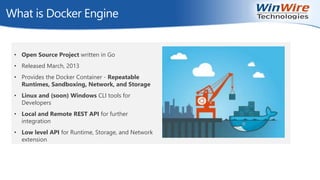
What is Docker Engine
• Open Source Project written in Go
• Released March, 2013
• Provides the Docker Container - Repeatable
Runtimes, Sandboxing, Network, and Storage
• Linux and (soon) Windows CLI tools for
Developers
• Local and Remote REST API for further
integration
• Low level API for Runtime, Storage, and Network
extension
© 2010 WinWire Technologies
Containers vs Virtual Machines
Pack many more containers on a host
machine than you can virtual machines
Each VM is a self-contained system in its
own right, with its own operating system
and virtualized hardware and its own
unique resources.
…result is significantly faster deployment,
much less overhead, easier migration, faster
restart
© 2010 WinWire Technologies
Containers Advantages
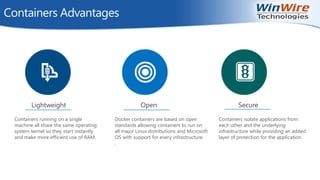
Secure
Containers isolate applications from
each other and the underlying
infrastructure while providing an added
layer of protection for the application.
Open
Docker containers are based on open
standards allowing containers to run on
all major Linux distributions and Microsoft
OS with support for every infrastructure.
.
Lightweight
Containers running on a single
machine all share the same operating
system kernel so they start instantly
and make more efficient use of RAM.
© 2010 WinWire Technologies
Containers Advantages
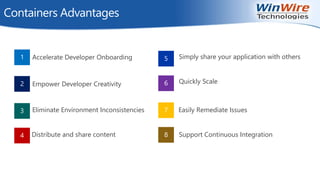
1
2
3
4
5
6
7
8
Accelerate Developer Onboarding
Empower Developer Creativity
Eliminate Environment Inconsistencies
Distribute and share content
Simply share your application with others
Quickly Scale
Easily Remediate Issues
Support Continuous Integration
© 2010 WinWire Technologies
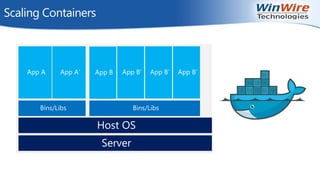
Scaling Containers
Host OS
Server
Bins/Libs Bins/Libs
App A App A’ App B App B’ App B’ App B’
© 2010 WinWire Technologies
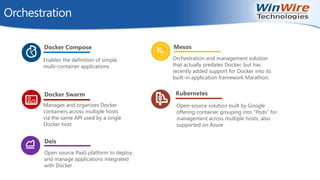
Orchestration
Enables the definition of simple
multi-container applications
Docker Compose
Manages and organizes Docker
containers across multiple hosts
via the same API used by a single
Docker host
Docker Swarm
Open-source solution built by Google
offering container grouping into “Pods” for
management across multiple hosts, also
supported on Azure
Kubernetes
Orchestration and management solution
that actually predates Docker, but has
recently added support for Docker into its
built-in application framework Marathon.
Mesos
Deis
Open source PaaS platform to deploy
and manage applications integrated
with Docker
© 2010 WinWire Technologies
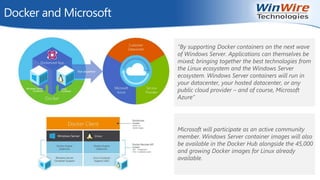
Docker and Microsoft
“By supporting Docker containers on the next wave
of Windows Server. Applications can themselves be
mixed; bringing together the best technologies from
the Linux ecosystem and the Windows Server
ecosystem. Windows Server containers will run in
your datacenter, your hosted datacenter, or any
public cloud provider – and of course, Microsoft
Azure”
Microsoft will participate as an active community
member. Windows Server container images will also
be available in the Docker Hub alongside the 45,000
and growing Docker images for Linux already
available.
© 2010 WinWire Technologies
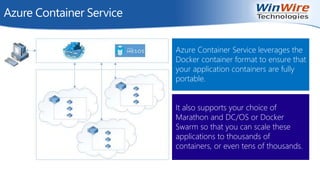
Azure Container Service
Azure Container Service leverages the
Docker container format to ensure that
your application containers are fully
portable.
It also supports your choice of
Marathon and DC/OS or Docker
Swarm so that you can scale these
applications to thousands of
containers, or even tens of thousands.
© 2010 WinWire Technologies
Running an ASP .NET 5 Application on Linux
using a Docker Container
Demo
© 2010 WinWire Technologies
Install Docker Toolbox
© 2010 WinWire Technologies
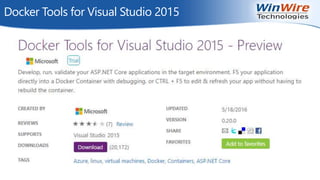
Docker Tools for Visual Studio 2015
© 2010 WinWire Technologies
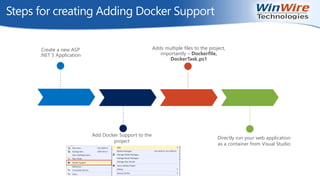
Steps for creating Adding Docker Support
Create a new ASP
.NET 5 Application
Adds multiple files to the project,
importantly – Dockerfile,
DockerTask.ps1
Add Docker Support to the
project
Directly run your web application
as a container from Visual Studio
© 2010 WinWire Technologies
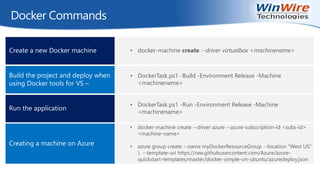
Docker Commands
Create a new Docker machine • docker-machine create --driver virtualbox <machinename>
Build the project and deploy when
using Docker tools for VS –
• DockerTask.ps1 -Build -Environment Release -Machine
<machinename>
Run the application
• DockerTask.ps1 -Run -Environment Release -Machine
<machinename>
Creating a machine on Azure
• docker-machine create --driver azure --azure-subscription-id <subs-id>
<machine-name>
• azure group create --name myDockerResourceGroup --location "West US"
 --template-uri https://raw.githubusercontent.com/Azure/azure-
quickstart-templates/master/docker-simple-on-ubuntu/azuredeploy.json
© 2010 WinWire Technologies
Q & A
Next Webinar
http://www.winwire.com/blog-winsights/
www.twitter.com/winwire
marketing@winwire.com
www.winwire.com
Topic : Azure Search - Cloud search service for web
and mobile app development
When: June 8th, 2016 at 9am PT

Azure Container Services

  • 1.
    © 2010 WinWireTechnologies Azure Container Service Notes:  If you experience audio issues during the webinar, you can dial in through telephone details provided to you in your registration confirmation email.  Please feel free to post questions in the questions dialog and we will try to answer as many as we can at the end.  Recording of this session will be shared in next 24-48 hours.  You can also write to us at marketing@winwire.com for any clarifications or information.
  • 2.
    © 2010 WinWireTechnologies Session Speaker Amit Dubay Director – Cloud & Mobility WinWire Technologies Microsoft Azure Certified Developer
  • 3.
    © 2010 WinWireTechnologies Agenda Scaling and Orchestration Containers Advantages Containers vs VMs Introduction to Containers Demo 1 2 3 4 5 Questions6
  • 4.
    © 2010 WinWireTechnologies Introducing Containers Put simply, a container consists of an entire runtime environment: an application, plus all its dependencies, libraries and other binaries, and configuration files needed to run it, bundled into one package. Containers are a solution to the problem of how to get software to run reliably when moved from one computing environment to another.
  • 5.
    © 2010 WinWireTechnologies Containers Containers wrap up a piece of software in a complete filesystem that contains everything it needs to run: code, runtime, system tools, system libraries – anything you can install on a server. This guarantees that it will always run the same, regardless of the environment it is running in. By creating a common toolset, packaging model and deployment mechanism, Docker greatly simplified the containerization and distribution of applications that can then run anywhere on any Linux host.
  • 6.
    © 2010 WinWireTechnologies What is Docker Engine • Open Source Project written in Go • Released March, 2013 • Provides the Docker Container - Repeatable Runtimes, Sandboxing, Network, and Storage • Linux and (soon) Windows CLI tools for Developers • Local and Remote REST API for further integration • Low level API for Runtime, Storage, and Network extension
  • 7.
    © 2010 WinWireTechnologies Containers vs Virtual Machines Pack many more containers on a host machine than you can virtual machines Each VM is a self-contained system in its own right, with its own operating system and virtualized hardware and its own unique resources. …result is significantly faster deployment, much less overhead, easier migration, faster restart
  • 8.
    © 2010 WinWireTechnologies Containers Advantages Secure Containers isolate applications from each other and the underlying infrastructure while providing an added layer of protection for the application. Open Docker containers are based on open standards allowing containers to run on all major Linux distributions and Microsoft OS with support for every infrastructure. . Lightweight Containers running on a single machine all share the same operating system kernel so they start instantly and make more efficient use of RAM.
  • 9.
    © 2010 WinWireTechnologies Containers Advantages 1 2 3 4 5 6 7 8 Accelerate Developer Onboarding Empower Developer Creativity Eliminate Environment Inconsistencies Distribute and share content Simply share your application with others Quickly Scale Easily Remediate Issues Support Continuous Integration
  • 10.
    © 2010 WinWireTechnologies Scaling Containers Host OS Server Bins/Libs Bins/Libs App A App A’ App B App B’ App B’ App B’
  • 11.
    © 2010 WinWireTechnologies Orchestration Enables the definition of simple multi-container applications Docker Compose Manages and organizes Docker containers across multiple hosts via the same API used by a single Docker host Docker Swarm Open-source solution built by Google offering container grouping into “Pods” for management across multiple hosts, also supported on Azure Kubernetes Orchestration and management solution that actually predates Docker, but has recently added support for Docker into its built-in application framework Marathon. Mesos Deis Open source PaaS platform to deploy and manage applications integrated with Docker
  • 12.
    © 2010 WinWireTechnologies Docker and Microsoft “By supporting Docker containers on the next wave of Windows Server. Applications can themselves be mixed; bringing together the best technologies from the Linux ecosystem and the Windows Server ecosystem. Windows Server containers will run in your datacenter, your hosted datacenter, or any public cloud provider – and of course, Microsoft Azure” Microsoft will participate as an active community member. Windows Server container images will also be available in the Docker Hub alongside the 45,000 and growing Docker images for Linux already available.
  • 13.
    © 2010 WinWireTechnologies Azure Container Service Azure Container Service leverages the Docker container format to ensure that your application containers are fully portable. It also supports your choice of Marathon and DC/OS or Docker Swarm so that you can scale these applications to thousands of containers, or even tens of thousands.
  • 14.
    © 2010 WinWireTechnologies Running an ASP .NET 5 Application on Linux using a Docker Container Demo
  • 15.
    © 2010 WinWireTechnologies Install Docker Toolbox
  • 16.
    © 2010 WinWireTechnologies Docker Tools for Visual Studio 2015
  • 17.
    © 2010 WinWireTechnologies Steps for creating Adding Docker Support Create a new ASP .NET 5 Application Adds multiple files to the project, importantly – Dockerfile, DockerTask.ps1 Add Docker Support to the project Directly run your web application as a container from Visual Studio
  • 18.
    © 2010 WinWireTechnologies Docker Commands Create a new Docker machine • docker-machine create --driver virtualbox <machinename> Build the project and deploy when using Docker tools for VS – • DockerTask.ps1 -Build -Environment Release -Machine <machinename> Run the application • DockerTask.ps1 -Run -Environment Release -Machine <machinename> Creating a machine on Azure • docker-machine create --driver azure --azure-subscription-id <subs-id> <machine-name> • azure group create --name myDockerResourceGroup --location "West US" --template-uri https://raw.githubusercontent.com/Azure/azure- quickstart-templates/master/docker-simple-on-ubuntu/azuredeploy.json
  • 19.
    © 2010 WinWireTechnologies Q & A Next Webinar http://www.winwire.com/blog-winsights/ www.twitter.com/winwire marketing@winwire.com www.winwire.com Topic : Azure Search - Cloud search service for web and mobile app development When: June 8th, 2016 at 9am PT