SharePoint 2010  - Administration 101SharePoint Saturday the ConferenceAugust 2011Chris McNulty
SharePoint SpeedMetal [Admin 101](S5A-104)Admin – 200Chris McNultyKMAWelcome to SharePoint Saturday—The Conference
Welcome to SharePoint Saturday—The ConferenceThank you for being a part of the first SharePoint Saturday conferencePlease turn off all electronic devices or set them to vibrate.If you must take a phone call, please do so in the hall so as not to disturb others.Open wireless access is available at SSID:  SPSTC2011Feel free to “tweet and blog” during the sessionThanks to our Diamond and Platinum Sponsors:
About KMAFounded 199529 employees4 partners, including 2 co-foundersPrincipal lines of business:Professional ServicesSharePoint ConsultingSharePoint Managed ServicesCustom Application DevelopmentSoftware ProductMekko Graphics advanced charting softwareRoots in academia (MIT, Harvard, BU)Chris McNultyKMA SharePoint Practice Lead/Manager
Working with SharePoint technologies since 2000/2001
20 years consulting and financial services technology (Santander, John Hancock, GMO, State Street)

MBA in Investment Management from Boston College Carroll School of Management
Write and speak often on Microsoft IW technologies (blogs & books)
Microsoft MCSE/MCTS/MSA/MVTSP
Hiking, cooking, playing guitar, colonial history, photography
My family: Hayley, three kids (16, 7, 4) and my dog Stan
Out Of ScopeDeep Dives (e.g. PowerShell, BI, Upgrade, SQL DBA)DevelopmentCustomizationDesign & ArchitecturePower User (e.g. Library Customization, Designer Workflows, etc.)Office 365RulesMove fast, PowerPoint is sharedQuestions – time permitting during sessionAny time after session – email etc.Objectives
The dilemmaArchitecture, Design & PlanningInstallation and UpgradePost Installation Best PracticesService/Feature PlacementSupportMonitoring and OptimizationBackupPowerShellDevelopment FunctionsOptimizationPatchingSQL MaintenanceBest PracticesAgenda
You’re the new SharePoint Administrator!!!
But…
You’re still responsible for:
Exchange
Active Directory
SQL
Desktop
Help Desk
Network/Firewall
Cooking & Cleaning
Etc.Congratulations!
SharePoint administration is often an ‘add-on’ for other IT professionals (SQL DBAs, AD Admins, Exchange Engineers)
Time and focus are scarce resources!
Common pain points include
Upgrades are complex and hard to monitor
Dispersed workforce, little control of browsers and Office versions
Hard to understand and troubleshoot “behind the scenes” performance and capacity planning
Best practices not always understood or compared to system health
“All or nothing” administration means IT must be engaged for all admin responsibilities, even searchThe Dilemma
Microsoft SharePoint Server 2010 … the bright frontierEastern Long Island, July 4, 2010
Microsoft SharePoint 2010Ribbon UISharePoint WorkspaceSharePoint MobileOffice Client and Office Web App IntegrationStandards SupportBusiness Connectivity ServicesInfoPath Form ServicesExternal ListsWorkflowSharePoint DesignerVisual StudioAPI EnhancementsREST/ATOM/RSSSitesTagging, Tag Cloud, RatingsSocial BookmarkingBlogs and WikisMy SitesActivity FeedsProfiles and ExpertiseOrg BrowserCommunitiesCompositesPerformancePoint ServicesExcel ServicesChart Web PartVisio ServicesWeb AnalyticsSQL Server IntegrationPowerPivotContentInsightsEnterprise Content TypesMetadata and NavigationDocument SetsMulti-stage DispositionAudio and Video Content TypesRemote Blob StorageList EnhancementsSearchSocial RelevancePhonetic SearchNavigationFAST IntegrationEnhanced Pipeline
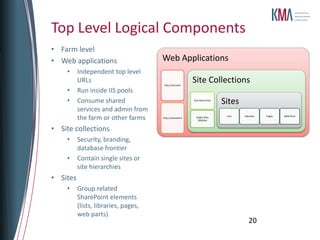
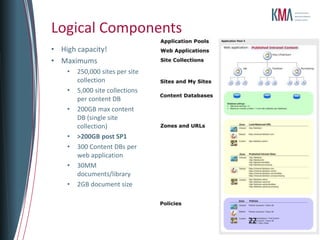
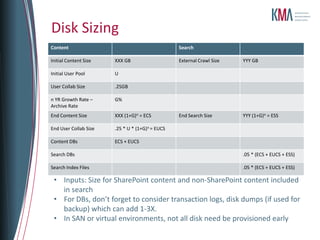
Architecture and Design
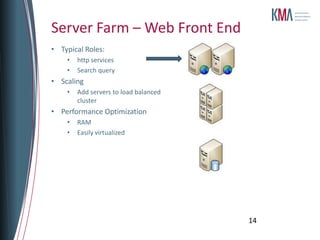
Typical Roles:
http services
Search query
Scaling
Add servers to load balanced cluster
Performance Optimization
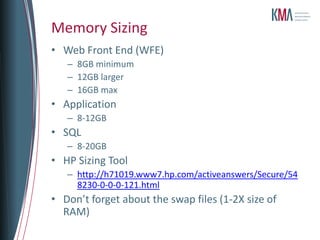
RAM
Easily virtualizedServer Farm – Web Front End14
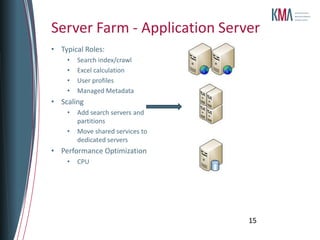
Typical Roles:
Search index/crawl
Excel calculation
User profiles
Managed Metadata
Scaling
Add search servers and partitions
Move shared services to dedicated servers
Performance Optimization
CPUServer Farm - Application Server15
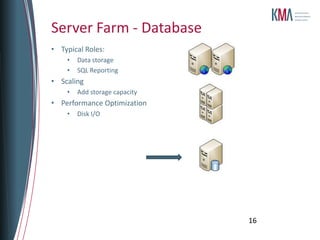
Typical Roles:
Data storage
SQL Reporting
Scaling
Add storage capacity
Performance Optimization
Disk I/OServer Farm - Database16
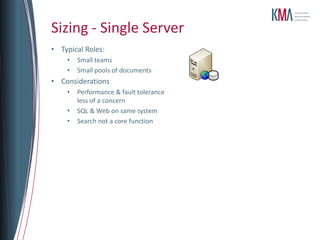
Typical Roles:
Small teams
Small pools of documents
Considerations
Performance & fault tolerance less of a concern
SQL & Web on same system
Search not a core functionSizing - Single Server
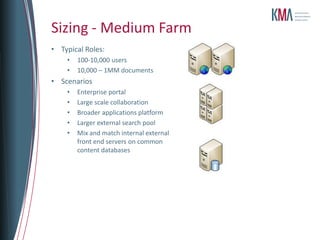
Typical Roles:
100-10,000 users
10,000 – 1MM documents
Scenarios
Enterprise portal

SPSPTCDC - SharePoint Admin 101 - SpeedMetal - PowerUser to Admin in 75 Minutes

Editor's Notes

  • #10 Typical
  • #11 Walkthrough examplesWe sometime work closely w business, sometimes ITSometimes IT has dedicated SP resourcingSample – Midwestern manufacturer – sponsor is a program manager (electronics) – core team includes C# developers for their product team, some knowledge of SQL, no other time
  • #13 Let’s break down investments by workloads…SitesCommunitiesContentSearchInsightsComposites
  • #37 IF YOU DON’T NEED IT – DON’T USE ITPLUS YOU CAN GIVE IT AWAY!
  • #41 These are the domain accounts that are generally needed in a standard SharePoint installation. These accounts are shown with suggested names; names can be adjusted to confirm to any corporate naming standard for service accounts. For example, you may wish to designate ALL service accounts with a sv- or svc- prefix. Similarly, you may want to designate “regions” with a suffix, such as –dev, -tst, or –prd. Likewise, if you have already established SQL service account conventions, those accounts are fine as well.
  • #80 Keep?
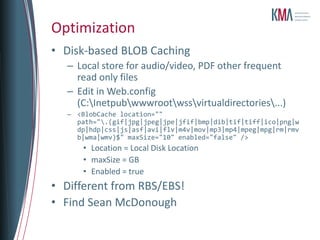
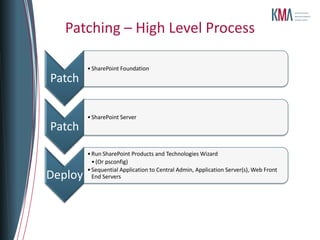
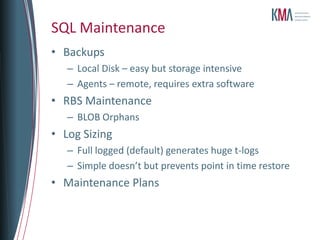
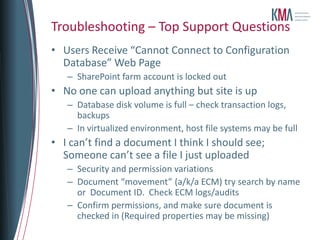
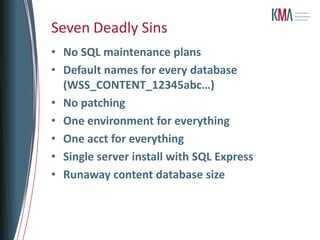
  • #81  No SQL maintenance plansAll gardens need weeding. SQL databases need tending too. Left on their own, content databases and config databases will generate runaway transaction logs. Combined with overzealous local backup retention plans and you’ll quickly fill up you storage. Take a little time to understand Full Recovery vs. Simple Recovery in SQL. Or, more importantly, use a maintenance plan to backup and truncate your logs – it’s not that hard.Default names for every databaseThe default database name for a SharePoint content database is “WSS_Content”, and if you take the defaults, all subsequent databases will take the default format WSS_Content_[really-long-GUID]. Don’t do this – down the road, during backup, restore or SQL maintenance operations you'll be constantly jumping into Central Admin to figure out which sites use “WSS_Content_abdc1234-1111-2222-878adf0e”. Much better to name the databases according to a person- friendly standard – “WSS-Content-HRPortal”, etc. Even if it’s obvious to you, it may not be obvious to your DBA or someone else who has to support it in the future. No patchingGiven my crazed obsession with SharePoint version numbers (see http://blogs.kma-llc.net/microknowledge/version-build-numbers/) this is not a stretch. Microsoft has made it as easy as possible to stay in sync with the latest patches, Service Packs and Cumulative Updates. Do you need to update your systems every two months? Probably not. Should you still be running the nearly four year old RTM version of SharePoint 2007? Definitely not.One environment for everythingDon’t build a development environment. Don’t build a test environment. Just make all changes live, in production. What could ever go wrong?One acct for everythingBig, big no-no here. If you don’t pay attention, you may be tempted to use one master account for the SQL service, for the installation, for the farm account, for search, for content access, and for the IIS pools. Then, when you administer the site, it’s always easy to work around security restrictions by handing out those account credentials to a wide group of people. Next thing you know, someone forgets the password and locks out the account. The great news is that you don’t need to build a monitoring system for this alert, because everyone and I mean everyone, will get the dreaded web page that reads:Cannot connect to configuration database.So don’t give out the admin accounts, and, especially, don’t reuse the farm account.Single server install with SQL ExpressIf you don’t pay close attention on the original installation sequence, you may pick a “standalone” single server installation. You’re starting with only one server for now, right? Unfortunately, you’ll wind up with a server that can’t be expanded, running SQL Express Edition. And limited to 4GB of content database size. Well, at least you’ll avoid the next problem:Runaway content database sizeMicrosoft recommends that SharePoint content databases stay below 100GB (200GB if it’s the only content DB in a SharePoint 2010 site collection). But SharePoint doesn’t stop you from adding more – it’s a recommendation for optimal user performance. However, I’ve seen too many installations that grew grew grew to 250GB, 500GB or more. Plan your content database sizes in advance of critical sizes. You can add databases and site collections to create more manageable units, or use Remote Blob Storage (RBS) to pull those file of attachments out of the databases and into external storage, reducing file sizes.
  • #82 Keep?
  • #83 Use SP to managed SPBusiness owns home page
  • #84 Typical