INTRODUCTION TO THE DIGITAL TOOLBOX
PRODUCTION SCHEDULE

   STORYBOARD
   ANIMATIC
   MOTION NARRATIVE
   AUDIO NARRATIVE
PROJECT 5 :: STORYBOARDING

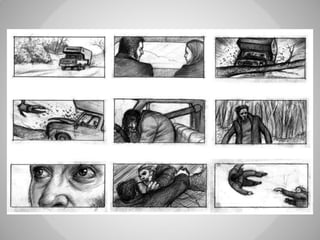
   Storyboarding is a design system for communicating motion
    graphic events. The practice forces decisions regarding scene
    selection, setting, camera angle, transitions, and much more.
   In this project each group will create a sketched storyboard
    that will be digitized and organized for print out and
    presentation.
PROJECT 6 :: ANIMATIC

   Animatics are motion graphic interpretations of static
    storyboards that allow film makers to visualize the timing of
    shots and scenes. For this project students will scan
    storyboards into Photoshop, aligning the shots and putting
    them into a sequence of layers. This Photoshop Document will
    then be exported into Final Cut and edited into animatic form.
PROJECT 7 :: MOTION NARRATIVE

   Using the Animatic as a guide, create a motion graphic of the
    narrative. This can be live action video, a slide show, a simple
    animation or a combination of all three. Keep the length of the
    film between 60 and 120 seconds.
PROJECT 7 :: AUDIO NARRATIVE

   Using ProTools, edit your Motion Narrative for sound. This
    could include re-recording dialog, creating sound effects, or
    adding music.
WHAT IS A STORYBOARD?

Once a concept or script is written for a film or animation, the next
  step is to make a storyboard. A storyboard visually tells the
  story of an animation panel by panel, kind of like a comic book.

Your storyboard will should convey some of the following
  information:

   What characters are in the frame, and how are they moving?
   What are the characters saying to each other, if anything?
   How much time has passed between the last frame of the
    storyboard and the current one?
   Where the "camera" is in the scene? Close or far away? Is the
    camera moving?
WHY MAKE A STORYBOARD?

   Creating a storyboard will help you plan your
    animation out shot by shot.
   You can make changes to your storyboard
    before you start animating, instead of
    changing your mind later.
   You will also be able to talk about your
    animation and show your storyboard to other
    people to get feedback on your ideas.
HOW DO I MAKE A STORYBOARD?

   Most commonly, storyboards are drawn in
    pen or pencil.
   Keep in mind that your drawings don't have
    to be fancy! In fact, you want to spend just a
    few minutes drawing each frame.
   Use basic shapes, stick figures, and simple
    backgrounds. If you draw your storyboard
    frames on index cards, you can rearrange
    them to move parts of the the story around.
STORYBOARD LANGUAGE
   CLOSE-UP SHOT:
     – A close range of distance between the camera and the subject.
   DISSOVLE:
     – A transition between two shots, where one shot fades away
       and simultaneously another shot fades in.
   FADE –
     – A transition from a shot to black where the image gradually
       becomes darker is a Fade Out; or from black where the image
       gradually becomes brighter is a Fade In.
   HIGH CAMERA ANGLE:
     – A camera angle which looks down on its subject making it look
       small, weak or unimportant.
   JUMP CUT:
     – A rapid, jerky transition from one frame to the next, either
       disrupting the flow of time or movement within a scene or
       making an abrupt transition from one scene to another.
   LEVEL CAMERA ANGLE:
     – A camera angle which is even with the subject; it may be used
       as a neutral shot.
STORYBOARD LANGUAGE
   LONG SHOT:
     – A long range of distance between the camera and the
       subject, often providing a broader range of the setting.
   LOW CAMERA ANGLE:
     – A camera angle which looks up at its subject; it makes the
       subject seem important and powerful.
   PAN:
     – A steady, sweeping movement from one point in a scene to
       another.
   POV (point of view shot):
     – A shot which is understood to be seen from the point of view of
       a character within the scene.
   REACTION SHOT-
     – 1.: A shot of someone looking off screen. 2.: A reaction shot
       can also be a shot of someone in a conversation where they
       are not given a line of dialogue but are just listening to the
       other person speak.
   TILT:
     – Using a camera on a tripod, the camera moves up or down to
       follow the action.
   ZOOM:
RESOURCES on BLACKBOARD

DD101 Storyboards

  • 1.
    INTRODUCTION TO THEDIGITAL TOOLBOX
  • 2.
    PRODUCTION SCHEDULE  STORYBOARD  ANIMATIC  MOTION NARRATIVE  AUDIO NARRATIVE
  • 3.
    PROJECT 5 ::STORYBOARDING  Storyboarding is a design system for communicating motion graphic events. The practice forces decisions regarding scene selection, setting, camera angle, transitions, and much more.  In this project each group will create a sketched storyboard that will be digitized and organized for print out and presentation.
  • 4.
    PROJECT 6 ::ANIMATIC  Animatics are motion graphic interpretations of static storyboards that allow film makers to visualize the timing of shots and scenes. For this project students will scan storyboards into Photoshop, aligning the shots and putting them into a sequence of layers. This Photoshop Document will then be exported into Final Cut and edited into animatic form.
  • 5.
    PROJECT 7 ::MOTION NARRATIVE  Using the Animatic as a guide, create a motion graphic of the narrative. This can be live action video, a slide show, a simple animation or a combination of all three. Keep the length of the film between 60 and 120 seconds.
  • 6.
    PROJECT 7 ::AUDIO NARRATIVE  Using ProTools, edit your Motion Narrative for sound. This could include re-recording dialog, creating sound effects, or adding music.
  • 7.
    WHAT IS ASTORYBOARD? Once a concept or script is written for a film or animation, the next step is to make a storyboard. A storyboard visually tells the story of an animation panel by panel, kind of like a comic book. Your storyboard will should convey some of the following information:  What characters are in the frame, and how are they moving?  What are the characters saying to each other, if anything?  How much time has passed between the last frame of the storyboard and the current one?  Where the "camera" is in the scene? Close or far away? Is the camera moving?
  • 9.
    WHY MAKE ASTORYBOARD?  Creating a storyboard will help you plan your animation out shot by shot.  You can make changes to your storyboard before you start animating, instead of changing your mind later.  You will also be able to talk about your animation and show your storyboard to other people to get feedback on your ideas.
  • 11.
    HOW DO IMAKE A STORYBOARD?  Most commonly, storyboards are drawn in pen or pencil.  Keep in mind that your drawings don't have to be fancy! In fact, you want to spend just a few minutes drawing each frame.  Use basic shapes, stick figures, and simple backgrounds. If you draw your storyboard frames on index cards, you can rearrange them to move parts of the the story around.
  • 14.
    STORYBOARD LANGUAGE  CLOSE-UP SHOT: – A close range of distance between the camera and the subject.  DISSOVLE: – A transition between two shots, where one shot fades away and simultaneously another shot fades in.  FADE – – A transition from a shot to black where the image gradually becomes darker is a Fade Out; or from black where the image gradually becomes brighter is a Fade In.  HIGH CAMERA ANGLE: – A camera angle which looks down on its subject making it look small, weak or unimportant.  JUMP CUT: – A rapid, jerky transition from one frame to the next, either disrupting the flow of time or movement within a scene or making an abrupt transition from one scene to another.  LEVEL CAMERA ANGLE: – A camera angle which is even with the subject; it may be used as a neutral shot.
  • 18.
    STORYBOARD LANGUAGE  LONG SHOT: – A long range of distance between the camera and the subject, often providing a broader range of the setting.  LOW CAMERA ANGLE: – A camera angle which looks up at its subject; it makes the subject seem important and powerful.  PAN: – A steady, sweeping movement from one point in a scene to another.  POV (point of view shot): – A shot which is understood to be seen from the point of view of a character within the scene.  REACTION SHOT- – 1.: A shot of someone looking off screen. 2.: A reaction shot can also be a shot of someone in a conversation where they are not given a line of dialogue but are just listening to the other person speak.  TILT: – Using a camera on a tripod, the camera moves up or down to follow the action.  ZOOM:
  • 24.

Editor's Notes

  • #9 http://www.smashboxstudios.com/yello/?p=858