

Digital Class Rooms
Why Digital -learning ?
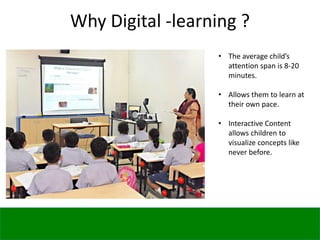
• The average child’s
attention span is 8-20
minutes.
• Allows them to learn at
their own pace.
• Interactive Content
allows children to
visualize concepts like
never before.
Empowering children through education
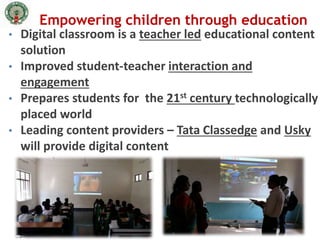
• Digital classroom is a teacher led educational content
solution
• Improved student-teacher interaction and
engagement
• Prepares students for the 21st century technologically
placed world
• Leading content providers – Tata Classedge and Usky
will provide digital content
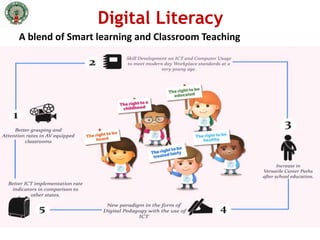
Digital Literacy
A blend of Smart learning and Classroom Teaching
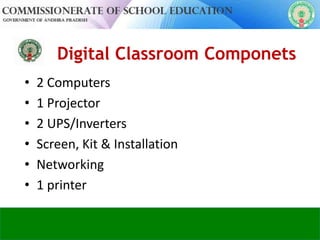
Digital Classroom Componets
• 2 Computers
• 1 Projector
• 2 UPS/Inverters
• Screen, Kit & Installation
• Networking
• 1 printer
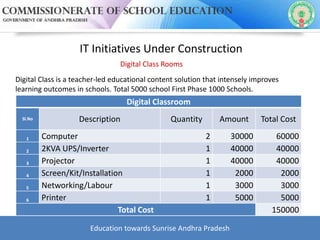
IT Initiatives Under Construction
Digital Class Rooms
Digital Class is a teacher-led educational content solution that intensely improves
learning outcomes in schools. Total 5000 school First Phase 1000 Schools.
Digital Classroom
Sl.No Description Quantity Amount Total Cost
1 Computer 2 30000 60000
2 2KVA UPS/Inverter 1 40000 40000
3 Projector 1 40000 40000
4 Screen/Kit/Installation 1 2000 2000
5 Networking/Labour 1 3000 3000
6 Printer 1 5000 5000
Total Cost 150000
Education towards Sunrise Andhra Pradesh
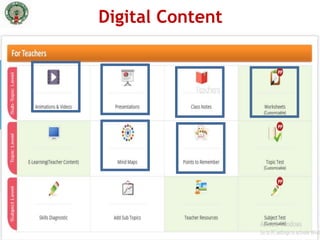
• Digital content refers
• Digital content includes -
– Videos
– Animations
– Assessments data
Digital Content
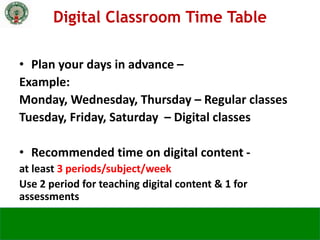
• Plan your days in advance –
Example:
Monday, Wednesday, Thursday – Regular classes
Tuesday, Friday, Saturday – Digital classes
• Recommended time on digital content -
at least 3 periods/subject/week
Use 2 period for teaching digital content & 1 for
assessments
Digital Classroom Time Table
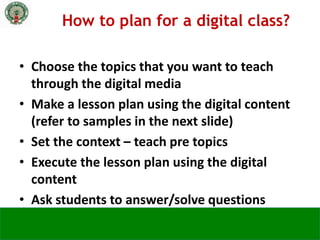
• Choose the topics that you want to teach
through the digital media
• Make a lesson plan using the digital content
(refer to samples in the next slide)
• Set the context – teach pre topics
• Execute the lesson plan using the digital
content
• Ask students to answer/solve questions
How to plan for a digital class?
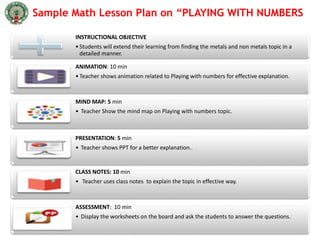
INSTRUCTIONAL OBJECTIVE
•Students will extend their learning from finding the metals and non metals topic in a
detailed manner.
ANIMATION: 10 min
•Teacher shows animation related to Playing with numbers for effective explanation.
MIND MAP: 5 min
• Teacher Show the mind map on Playing with numbers topic.
PRESENTATION: 5 min
• Teacher shows PPT for a better explanation..
CLASS NOTES: 10 min
• Teacher uses class notes to explain the topic in effective way.
ASSESSMENT: 10 min
• Display the worksheets on the board and ask the students to answer the questions.
Sample Math Lesson Plan on “PLAYING WITH NUMBERS
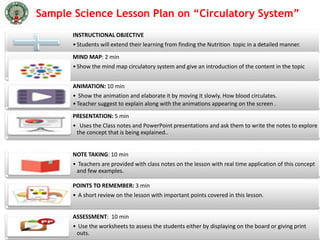
Sample Science Lesson Plan on “Circulatory System”
INSTRUCTIONAL OBJECTIVE
•Students will extend their learning from finding the Nutrition topic in a detailed manner.
MIND MAP: 2 min
•Show the mind map circulatory system and give an introduction of the content in the topic
ANIMATION: 10 min
• Show the animation and elaborate it by moving it slowly. How blood circulates.
•Teacher suggest to explain along with the animations appearing on the screen .
PRESENTATION: 5 min
• Uses the Class notes and PowerPoint presentations and ask them to write the notes to explore
the concept that is being explained..
NOTE TAKING: 10 min
• Teachers are provided with class notes on the lesson with real time application of this concept
and few examples.
POINTS TO REMEMBER: 3 min
• A short review on the lesson with important points covered in this lesson.
ASSESSMENT: 10 min
• Use the worksheets to assess the students either by displaying on the board or giving print
outs.
Dos
• Smart board and black board on same side
• View the content before you show to class
• Pause in between video for questions
Don’ts
• Not being in class while video is playing
• Using digital content only once in a
decade/century
Best Practises
Govt of AP recently launched Subject Teacher
Forums.
You can use it to:
• Share & view e-content
• Share lesson plans
• Connect to students
Please visit www.apekx.in to know more
Subject Teacher Forums
Education towards Sunrise Andhra Pradesh

Dcr

  • 1.
  • 2.
    Why Digital -learning? • The average child’s attention span is 8-20 minutes. • Allows them to learn at their own pace. • Interactive Content allows children to visualize concepts like never before.
  • 3.
    Empowering children througheducation • Digital classroom is a teacher led educational content solution • Improved student-teacher interaction and engagement • Prepares students for the 21st century technologically placed world • Leading content providers – Tata Classedge and Usky will provide digital content
  • 4.
    Digital Literacy A blendof Smart learning and Classroom Teaching
  • 5.
    Digital Classroom Componets •2 Computers • 1 Projector • 2 UPS/Inverters • Screen, Kit & Installation • Networking • 1 printer
  • 6.
    IT Initiatives UnderConstruction Digital Class Rooms Digital Class is a teacher-led educational content solution that intensely improves learning outcomes in schools. Total 5000 school First Phase 1000 Schools. Digital Classroom Sl.No Description Quantity Amount Total Cost 1 Computer 2 30000 60000 2 2KVA UPS/Inverter 1 40000 40000 3 Projector 1 40000 40000 4 Screen/Kit/Installation 1 2000 2000 5 Networking/Labour 1 3000 3000 6 Printer 1 5000 5000 Total Cost 150000 Education towards Sunrise Andhra Pradesh
  • 7.
    • Digital contentrefers • Digital content includes - – Videos – Animations – Assessments data Digital Content
  • 8.
    • Plan yourdays in advance – Example: Monday, Wednesday, Thursday – Regular classes Tuesday, Friday, Saturday – Digital classes • Recommended time on digital content - at least 3 periods/subject/week Use 2 period for teaching digital content & 1 for assessments Digital Classroom Time Table
  • 9.
    • Choose thetopics that you want to teach through the digital media • Make a lesson plan using the digital content (refer to samples in the next slide) • Set the context – teach pre topics • Execute the lesson plan using the digital content • Ask students to answer/solve questions How to plan for a digital class?
  • 10.
    INSTRUCTIONAL OBJECTIVE •Students willextend their learning from finding the metals and non metals topic in a detailed manner. ANIMATION: 10 min •Teacher shows animation related to Playing with numbers for effective explanation. MIND MAP: 5 min • Teacher Show the mind map on Playing with numbers topic. PRESENTATION: 5 min • Teacher shows PPT for a better explanation.. CLASS NOTES: 10 min • Teacher uses class notes to explain the topic in effective way. ASSESSMENT: 10 min • Display the worksheets on the board and ask the students to answer the questions. Sample Math Lesson Plan on “PLAYING WITH NUMBERS
  • 11.
    Sample Science LessonPlan on “Circulatory System” INSTRUCTIONAL OBJECTIVE •Students will extend their learning from finding the Nutrition topic in a detailed manner. MIND MAP: 2 min •Show the mind map circulatory system and give an introduction of the content in the topic ANIMATION: 10 min • Show the animation and elaborate it by moving it slowly. How blood circulates. •Teacher suggest to explain along with the animations appearing on the screen . PRESENTATION: 5 min • Uses the Class notes and PowerPoint presentations and ask them to write the notes to explore the concept that is being explained.. NOTE TAKING: 10 min • Teachers are provided with class notes on the lesson with real time application of this concept and few examples. POINTS TO REMEMBER: 3 min • A short review on the lesson with important points covered in this lesson. ASSESSMENT: 10 min • Use the worksheets to assess the students either by displaying on the board or giving print outs.
  • 12.
    Dos • Smart boardand black board on same side • View the content before you show to class • Pause in between video for questions Don’ts • Not being in class while video is playing • Using digital content only once in a decade/century Best Practises
  • 13.
    Govt of APrecently launched Subject Teacher Forums. You can use it to: • Share & view e-content • Share lesson plans • Connect to students Please visit www.apekx.in to know more Subject Teacher Forums
  • 14.

Editor's Notes

  • #4 Vision of government is to digitise all schools to improve the standard of education, so that students are able better adapt to the technological paced world. TIME: 1.5 min
  • #5 Digital content helps in - Easy learning Quick analysis Better engagement TIME: 1.5 min
  • #6 Digital content includes … Subject Level resources like skills diagnostic, add, subtopics, teacher resources, subject tests Topic Level resources like e-learning teacher content, mind maps, PTRs, topic test Sub-topic Level resources like animations, videos, presentations, class notes, worksheets etc. Time: 3 mins
  • #8 Digital content includes … Subject Level resources like skills diagnostic, add, subtopics, teacher resources, subject tests Topic Level resources like e-learning teacher content, mind maps, PTRs, topic test Sub-topic Level resources like animations, videos, presentations, class notes, worksheets etc. Time: 3 mins
  • #9 Recommended time on tech
  • #10 TIME: 1.5 MINS
  • #11 TIME: 1.5 MINS
  • #12 TIME: 1.5 MINS