STUDENT INFORMATION SYSTEM
U DISE
Child Info
Ravi Gotteti, S.R.P.
Headmaster,
Z.P.H.S., YENDADA,
Visakhapatnam Dt.
---------------------------
Facebook/Ravi Gotteti
U DISE
• Previously in manual
• AP is the first of doing online DISE in the
country.
• This is annual Return of the school
• We have to submitte once an year
• Includes Infrastructure, Students with all
categories, teaching faculty etc.,
STUDENT INFORMATION SYSTEM
Student information system (SIS) is a management
information system for education establishments
to manage student data.
Student information system capture the complete
details of the student and it provide capabilities
for registering students in different classes,
Students grading, Analysis of students
performance in different assessments and
assessment of other scores, building student
schedules, tracking student attendance, and
managing many other student-related data needs
in a school.
The Child information is linked with Aadhar data
base of the student and also provide a unique
ID number to the student called as child ID. If
the student transferred or promoted to
another school the whole data of the student
will be shifted to the next school on uploading
details in TC issue option and then admit
student option.
Procedure to login and update Students Data.
• Open proper internet browser ( Google
chrome/Mozilla/internet explorer 9.0 etc.)
and login to the website http://cse.ap.gov.in
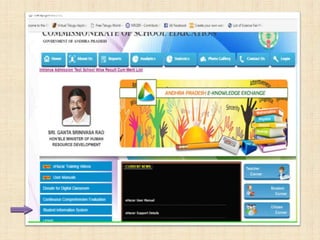
• Click on the button Student Information
System provided left side of the home page
Official login page will appear as follows. Enter School
UDISE code as user name and enter Admin@ [first four digits of
DISE code] as password or enter the code provided to you by the
department as password – enter captcha code provided in the
given box – click on submit.
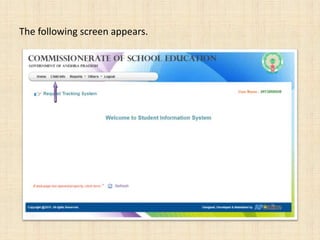
The following screen appears.
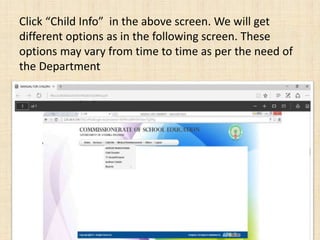
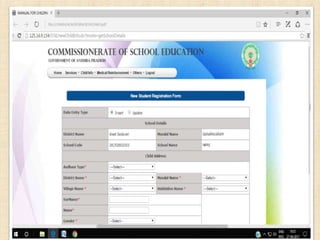
Click “Child Info” in the above screen. We will get
different options as in the following screen. These
options may vary from time to time as per the need of
the Department
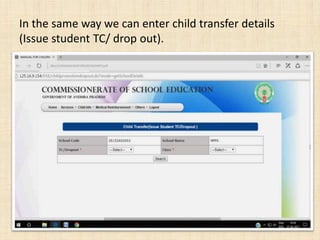
In the same way we can enter child transfer details
(Issue student TC/ drop out).
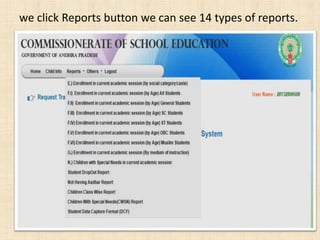
we click Reports button we can see 14 types of reports.
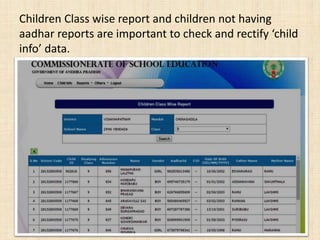
Children Class wise report and children not having
aadhar reports are important to check and rectify ‘child
info’ data.
• As per the recent House hold survey of the
government of Andhra Pradesh 1.5 lakhs
school age children are missing (not enrolled)
in student information system. These children
not enrolled in any school as per survey
records. Some errors arise because of wrong
entry of student’s aadhar number or not
finding out of school children properly.
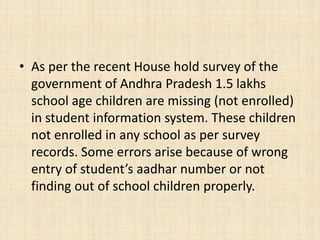
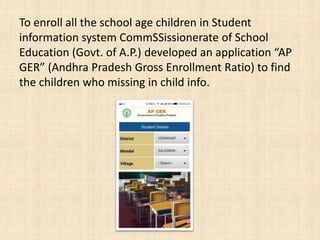
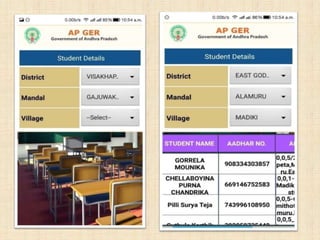
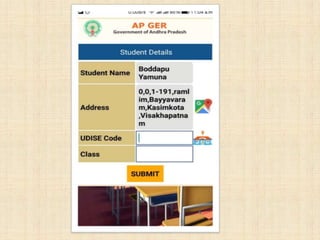
To enroll all the school age children in Student
information system CommSSissionerate of School
Education (Govt. of A.P.) developed an application “AP
GER” (Andhra Pradesh Gross Enrollment Ratio) to find
the children who missing in child info.
Thank you
…… Ravi Gotteti, S.R.P.
Headmaster,
Z.P.H.S., Yendada,
Vizag-45
Cell: 7396164919

SIS

  • 1.
    STUDENT INFORMATION SYSTEM UDISE Child Info Ravi Gotteti, S.R.P. Headmaster, Z.P.H.S., YENDADA, Visakhapatnam Dt. --------------------------- Facebook/Ravi Gotteti
  • 2.
    U DISE • Previouslyin manual • AP is the first of doing online DISE in the country. • This is annual Return of the school • We have to submitte once an year • Includes Infrastructure, Students with all categories, teaching faculty etc.,
  • 3.
    STUDENT INFORMATION SYSTEM Studentinformation system (SIS) is a management information system for education establishments to manage student data. Student information system capture the complete details of the student and it provide capabilities for registering students in different classes, Students grading, Analysis of students performance in different assessments and assessment of other scores, building student schedules, tracking student attendance, and managing many other student-related data needs in a school.
  • 4.
    The Child informationis linked with Aadhar data base of the student and also provide a unique ID number to the student called as child ID. If the student transferred or promoted to another school the whole data of the student will be shifted to the next school on uploading details in TC issue option and then admit student option.
  • 5.
    Procedure to loginand update Students Data. • Open proper internet browser ( Google chrome/Mozilla/internet explorer 9.0 etc.) and login to the website http://cse.ap.gov.in • Click on the button Student Information System provided left side of the home page
  • 7.
    Official login pagewill appear as follows. Enter School UDISE code as user name and enter Admin@ [first four digits of DISE code] as password or enter the code provided to you by the department as password – enter captcha code provided in the given box – click on submit.
  • 8.
  • 9.
    Click “Child Info”in the above screen. We will get different options as in the following screen. These options may vary from time to time as per the need of the Department
  • 11.
    In the sameway we can enter child transfer details (Issue student TC/ drop out).
  • 12.
    we click Reportsbutton we can see 14 types of reports.
  • 13.
    Children Class wisereport and children not having aadhar reports are important to check and rectify ‘child info’ data.
  • 14.
    • As perthe recent House hold survey of the government of Andhra Pradesh 1.5 lakhs school age children are missing (not enrolled) in student information system. These children not enrolled in any school as per survey records. Some errors arise because of wrong entry of student’s aadhar number or not finding out of school children properly.
  • 15.
    To enroll allthe school age children in Student information system CommSSissionerate of School Education (Govt. of A.P.) developed an application “AP GER” (Andhra Pradesh Gross Enrollment Ratio) to find the children who missing in child info.
  • 18.
    Thank you …… RaviGotteti, S.R.P. Headmaster, Z.P.H.S., Yendada, Vizag-45 Cell: 7396164919