COURSE: Technology in
Language Education
DOXOLOGY
ATTENDANCE CHECK (MONITOR)
Technology Integration in
English Classes
LEARNING AGENDA
USING TECHNOLOGY IN THE
CLASSROOM
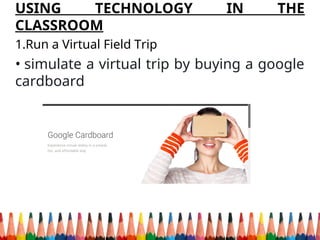
1.Run a Virtual Field Trip
• simulate a virtual trip by buying a google
cardboard
• ask: “How will this connect with a learning objective?”
•visit a foreign landmark, holding a mock conversation in
that country’s language
• study the area itself from a geographic perspective.
These can add a new, engaging element to your lessons.
2. Preview Field Trips Virtually
•use Google Earth to explore locations before actually
visiting them.
•Let’s say your class is set to go to the Zoo. Find the
location, traveling through it using Street View to see which
exhibits pique the most student interest. You can quickly
discuss what they’re looking forward to, boosting
excitement levels for the trip.
•Popular field trip destinations will also have websites filled
with visual media you can use to complement the preview.
•All it takes is a device connected to a projector or large
screen.
3. Quiet a Noisy Classroom
To make it easier to give lessons and presentations, use a
tool that tracks and displays classroom noise.
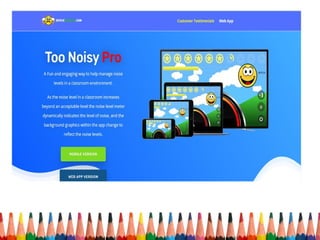
For example, Too Noisy is an accurate noise meter. You’ll
likely find that — without having to tell them — students
will become quiet when the meter spikes.
This means most of them won’t be as disruptive when you
give a lesson or run an independent work activity. They may
even shush each other.
4. Use Videos for Mini-Lessons
•You can bolster your lesson plans by using videos as
stand-alone overviews for some topics.
•Also available as skill reviews and previews, there are
many websites that host teacher-made video content.
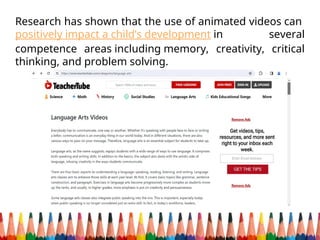
•Teacher Tube is an example of an education-only
version of YouTube, covering core school subjects.
•You can search for a specific topic or browse by
category, quickly finding relevant videos
•This easy way to use technology in the classroom adds a
multimedia element to your lessons, which
can effectively resonate with visual learners.
Research has shown that the use of animated videos can
positively impact a child’s development in several
competence areas including memory, creativity, critical
thinking, and problem solving.
5. Co-ordinate Live Video
•You don’t have to limit yourself to pre-recorded videos,
as conferencing technology can allow subject matter
experts to deliver lessons.
•Whether it’s a contact from another school or a
seasoned lecturer you reach out to, bringing an expert
into your classroom will expose your students to new
ideas and can lighten your workload.
•You can add the person as a contact on Zoom, Microsoft
Teams or whichever platform your school users!
•Ask your students to prepare questions, helping them
enjoy — and fulling participate in — this modern take on
traditional lessons.
6. Play Podcasts
•Playing relevant podcasts for kids can not only
supplement your lessons, but engage auditory learners
and act as a learning station.
•Made by groups ranging from media giants to ordinary
people passionate about a particular subject, you can
find podcasts that are:
•Interviews with the author of a book your students are
reading
Lessons about studying techniques and strategies
Explorations of a curriculum-related topic
Lectures from professors
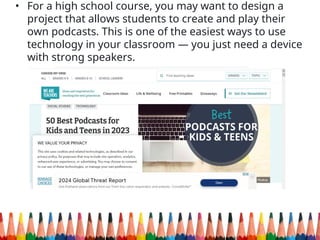
• For a high school course, you may want to design a
project that allows students to create and play their
own podcasts. This is one of the easiest ways to use
technology in your classroom — you just need a device
with strong speakers.
7. Add Multimedia Elements to Presentations
Whereas slideshow presentations entirely made up of
text can disengage students, ones with multimedia
elements can effectively hold their attention by varying
content delivery. When applicable, try to include:
•Images
•Graphs
•Pictographs
•Podcast clips
•Sound effects
•Short video lessons
•News, movie and television show clips
• You don’t have to scour the Internet to find relevant
graphs and pictographs — you can make them
yourself. There are free online tools that take you
through steps to input data, adjust labels and modify
your design.
8. Send Adaptive Content
•If each of your students has a smartphone and is always
on it, why not use the situation to your advantage by
delivering content through the phones? There are
adaptive learning programs that students can access
through tablets and smartphones.
•For example, ClassK12 offers a mix of adaptive math
and English exercises for students. It’s made up of mobile
apps that students can download onto their personal
devices.
•As a teacher, you can create virtual classrooms, deliver
assignments and run reports. Delivering appropriate
content through such programs may seem difficult, but
the process is usually intuitive and automated.
9. Share an Online Class Calendar
To keep students informed regarding the content they’ll
be tackling, create and share a class calendar that details
lessons and highlights important dates.
You can use a program such as Google Calendar,
emailing your calendar’s hyperlink to your students or
their parents. This not only keeps them informed, but
helps you stay organized — you’ll quickly see if you’ve set
too many due dates in a short period.
And by keeping students in the loop, you’ll help them
come prepared for each class.
HELPING STUDENTS PROCESS CONTNT
10. Use Virtual Manipulatives
•When teaching and reinforcing some math concepts,
students can use virtual manipulatives in more ways than
physical ones.
•For example, a 6th grade geometry activity from the
National Library of Virtual Manipulatives involves using
geoboards to illustrate area, perimeter and rational
concepts.
•Check which ones may apply in the context of language
and literature.
11. Run Learning Stations
•Learning stations are a method of both delivering a
range of content and giving students different ways to
process it. With a device at each station, you can provide
videos, podcasts, slideshows and other digital media.
Students can then solve challenges to build
understanding of the material. This can involve:
•Using virtual manipulatives
•Solving relevant problems in a computer game
•Recording their thoughts about, and responses to, a
podcast
•Contributing notes to a group Wiki page, which this
guide explains in a later section
12. Provide Online Activities for Students Who
Complete Work Early
•Similarly, you can set up stations for students to use
when they complete work early, giving them engaging
ways to further process content.
•Set up a few devices that have videos, websites and
educational games open. Take time to ensure that this
material is aligned with your lesson, allowing students to
delve into relevant topics. By doing so, you’ll encourage
them to wisely use every bit of class time. Even those few
minutes before the bell rings.
13. Save Time for Exit Tickets
Saving ten minutes at the end of class for exit tickets opens
the door for easy technology use. Exit tickets can take the
form of:
•Online Journal Entries — Using an online notepad,
students can write a journal entry to summarize what they
learned.
•Slideshow Comments — Sharing copies of slideshows
from the day’s lesson, students can make comments
through PowerPoint or Google Slides to review and expand
on important points.
•Tweets — In 280 characters or less, students can
summarize the most important point they learned in class.
You can easily see what they wrote by asking them to use a
class-exclusive hashtag.
Exit tickets are not only quick from a student perspective,
but you should find them easy to introduce and oversee.
14. Use Twitter Hashtags to Take Questions
•Just as you can use a class-exclusive hashtag for exit
tickets, you can use it to take questions throughout the
day. By inputting the hashtag in Twitter’s search bar, you
can display the feed on a screen during class or check it
periodically on your device.
•You can choose to answer all the questions at once, or
as they pop up. Either way, you don’t want to see an
empty feed. Encourage students to ask inquiry questions,
as well as specific ones related to lessons, presentations,
homework and more.
•This use of technology can be especially beneficial for
introverts, who may not be comfortable asking questions
in front of the class.
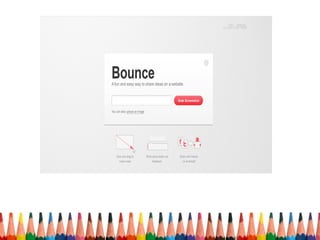
15. Study, Review and Critique Content on Web Pages
•Here’s a technology-focused spin on notetaking: Find a
web page with content reflecting or related to your lessons,
and get students to make notes directly on the page. Using
a program such as Bounce, you can create an interactive
screenshot of any page just by inputting its URL.
•When students open the screenshot, they’ll see commands
to create notes, feedback and other edits. In classrooms
with one-to-one device use, students can do this
individually. In classrooms without one-to-one device use,
you can make it a group activity. Ask each group to make
notes and feedback aimed at improving the web page’s
content. Once each group is done, compare the edits to see
which group improved the page the most. Who knew
writing notes could be so engaging?
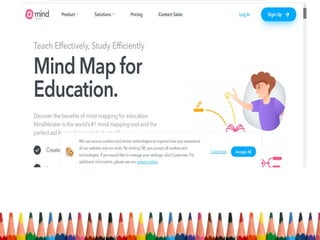
16. Use Online Mind Maps for Class Brainstorms
•A digital take on brainstorming, there are websites you
can use to create clear and detailed mind maps faster
than written ones.
•For example, many teachers use MindMeister, as its
features are designed for students and educators. Put
the program on a screen that everyone can see. Work
with your students to brainstorm ideas as a way to
reinforce lessons or launch a problem-based learning
exercise. It should only take a few minutes to set up this
kind of classroom technology.
17. Gather Student Feedback
To encourage student input about content-processing
activities, create and distribute surveys. In a few minutes,
you can create forms and polls using applications such as:
•Socrative
•Google Forms
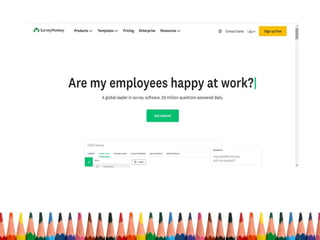
•SurveyMonkey
•Poll Everywhere
Students can give responses through personal or
classroom devices, giving you insight about the activities
they prefer. Based on the results, you may find an easy
way to improve lessons. This could even involve using new
technologies in the classroom.
18. Launch a Wiki Page for a Collaborative Assignment
•Collaboration doesn’t have to take place face-to-face, as
you can give group assignments focused on creating a
wiki page. There are many programs you can use to
create wiki pages, which are web pages that different
people can edit.
•As a project, students can create one about a relevant
topic. This process inherently encourages collaboration
— students must contribute their own content to the
page, editing and refining each other’s work.
•This version of a group paper may also prove to be more
engaging than its classic counterpart.
19. Set Up Student Blogs
Blogging can be a creative outlet for students, lending
itself especially well to language arts classes and other
writing-heavy subjects. There are free templates and
comprehensive privacy settings on platforms such as
WordPress, which you can use to host each student’s blog.
As for the products they can create? Some popular options
are:
•Poems
•Short essays
•Diary entries from the perspective of a historical figure or
character from a novel
Blogging takes some time to set up, but — once you’re
rolling — it’s one of the easiest ways to introduce and use
technology in the classroom.
20. Offer Open-Ended Projects
When it comes time to start a new project, give students
a list of options to choose from. This way, you can appeal
to their distinct learning styles and they can effectively
demonstrate their knowledge. The projects can involve:
•Designing web content
•Putting together ebooks
•Creating original artwork
•Composing musical tunes
•Crafting multimedia products
Students can use widely-accessible software to complete
these projects, which you may want to provide on
classroom devices. This way, you can dedicate in-class
time to project work while giving students some
autonomy over how they use technology in school.
21. Use Online Sign-Ups
When it comes time for students to deliver presentations,
using digital signup forms is an easy way to incorporate
technology. Like sharing a class calendar, send students a link
to a survey. It should just contain a list of dates to choose
from, so they can schedule a presentation time that works for
them. They’ll likely be happy to complete the project on their
own paces.
22. Base Assignments on Technology-Focused Subjects
Worried that students will find it too hard to use specific
technologies when creating products? Instead, you can base
assignments on subjects related to software and other
technology. For example, students can write guides explaining
how to use their favourite computer programs. For a greater
challenge, they can investigate and report how certain
technologies have impacted history, politics or any other
subject. They may develop a new appreciation for the
technologies in question.
Offering a Unique Learning Experience
23. Introduce a Game-Based Learning Platform
An ambitious way to use technology in the classroom is
to introduce a game-based learning platform. Most are
designed to engage students, enlivening difficult topics
and subjects. Research backs up other benefits, too.
•For example, video games stimulate an increase in
midbrain dopamine to help store and recall information,
according to a 2014 article in the journal of Learning,
Media and Technology.
•Prodigy Education offers adaptive game-based learning
through Prodigy Math and Prodigy English. Teachers can
create classrooms, track student progress and deliver
custom questions through plans and assignments.
24. Play Simulations
Geared to solo and group use, online simulation games
can add context and real-world applicability to your
lessons. Most simulations deal with subjects such as
business and economics, which require the player to
have math skills higher than the elementary level. But it
is possible to find ones that appeal to younger students.
Regardless, as simulation programs become more
advanced, they grow more engaging by teaching
students how to apply their knowledge in a greater range
of scenarios. And, because many of these programs work
on most devices, you’ll have an easy time testing and
using them.
25. Participate in a Webquest
Webquests encourage students to find and process
information in engaging contexts, adding an interesting
spin to the research process.
These free online adventures could, for example, place
students in the role of a detective. To solve a specific
case, they may have to collect clues — and information —
related to a curriculum topic by scouring certain sources
and web pages. You can create your own adventure, but
you should find webquests through some Google
searches. By the end of it, your students will surprised by
how much research they did.
References:
https://drexel.edu/soe/resources/student-teaching/advice/how-to-us
e-technology-in-the-classroom/
https://www.prodigygame.com/main-en/blog/25-easy-ways-to-use-te
chnology-in-the-classroom--downloadable-list/
FOR PAPER 4
Choose 1 way of integrating technology
in your class. Provide a comprehensive
context on the lesson that you have, and
how technology integration can be
assistive in unpacking the content to
achieve the set learning goals.
TECHNOLOGY INTEGRATION IN CLASS strategy .ppt

TECHNOLOGY INTEGRATION IN CLASS strategy .ppt

  • 1.
  • 2.
  • 4.
  • 5.
    Technology Integration in EnglishClasses LEARNING AGENDA
  • 6.
    USING TECHNOLOGY INTHE CLASSROOM 1.Run a Virtual Field Trip • simulate a virtual trip by buying a google cardboard
  • 7.
    • ask: “Howwill this connect with a learning objective?” •visit a foreign landmark, holding a mock conversation in that country’s language • study the area itself from a geographic perspective. These can add a new, engaging element to your lessons. 2. Preview Field Trips Virtually •use Google Earth to explore locations before actually visiting them. •Let’s say your class is set to go to the Zoo. Find the location, traveling through it using Street View to see which exhibits pique the most student interest. You can quickly discuss what they’re looking forward to, boosting excitement levels for the trip.
  • 8.
    •Popular field tripdestinations will also have websites filled with visual media you can use to complement the preview. •All it takes is a device connected to a projector or large screen. 3. Quiet a Noisy Classroom To make it easier to give lessons and presentations, use a tool that tracks and displays classroom noise. For example, Too Noisy is an accurate noise meter. You’ll likely find that — without having to tell them — students will become quiet when the meter spikes. This means most of them won’t be as disruptive when you give a lesson or run an independent work activity. They may even shush each other.
  • 10.
    4. Use Videosfor Mini-Lessons •You can bolster your lesson plans by using videos as stand-alone overviews for some topics. •Also available as skill reviews and previews, there are many websites that host teacher-made video content. •Teacher Tube is an example of an education-only version of YouTube, covering core school subjects. •You can search for a specific topic or browse by category, quickly finding relevant videos •This easy way to use technology in the classroom adds a multimedia element to your lessons, which can effectively resonate with visual learners.
  • 11.
    Research has shownthat the use of animated videos can positively impact a child’s development in several competence areas including memory, creativity, critical thinking, and problem solving.
  • 12.
    5. Co-ordinate LiveVideo •You don’t have to limit yourself to pre-recorded videos, as conferencing technology can allow subject matter experts to deliver lessons. •Whether it’s a contact from another school or a seasoned lecturer you reach out to, bringing an expert into your classroom will expose your students to new ideas and can lighten your workload. •You can add the person as a contact on Zoom, Microsoft Teams or whichever platform your school users! •Ask your students to prepare questions, helping them enjoy — and fulling participate in — this modern take on traditional lessons.
  • 13.
    6. Play Podcasts •Playingrelevant podcasts for kids can not only supplement your lessons, but engage auditory learners and act as a learning station. •Made by groups ranging from media giants to ordinary people passionate about a particular subject, you can find podcasts that are: •Interviews with the author of a book your students are reading Lessons about studying techniques and strategies Explorations of a curriculum-related topic Lectures from professors
  • 14.
    • For ahigh school course, you may want to design a project that allows students to create and play their own podcasts. This is one of the easiest ways to use technology in your classroom — you just need a device with strong speakers.
  • 15.
    7. Add MultimediaElements to Presentations Whereas slideshow presentations entirely made up of text can disengage students, ones with multimedia elements can effectively hold their attention by varying content delivery. When applicable, try to include: •Images •Graphs •Pictographs •Podcast clips •Sound effects •Short video lessons •News, movie and television show clips
  • 16.
    • You don’thave to scour the Internet to find relevant graphs and pictographs — you can make them yourself. There are free online tools that take you through steps to input data, adjust labels and modify your design.
  • 17.
    8. Send AdaptiveContent •If each of your students has a smartphone and is always on it, why not use the situation to your advantage by delivering content through the phones? There are adaptive learning programs that students can access through tablets and smartphones. •For example, ClassK12 offers a mix of adaptive math and English exercises for students. It’s made up of mobile apps that students can download onto their personal devices. •As a teacher, you can create virtual classrooms, deliver assignments and run reports. Delivering appropriate content through such programs may seem difficult, but the process is usually intuitive and automated.
  • 18.
    9. Share anOnline Class Calendar To keep students informed regarding the content they’ll be tackling, create and share a class calendar that details lessons and highlights important dates. You can use a program such as Google Calendar, emailing your calendar’s hyperlink to your students or their parents. This not only keeps them informed, but helps you stay organized — you’ll quickly see if you’ve set too many due dates in a short period. And by keeping students in the loop, you’ll help them come prepared for each class.
  • 19.
    HELPING STUDENTS PROCESSCONTNT 10. Use Virtual Manipulatives •When teaching and reinforcing some math concepts, students can use virtual manipulatives in more ways than physical ones. •For example, a 6th grade geometry activity from the National Library of Virtual Manipulatives involves using geoboards to illustrate area, perimeter and rational concepts. •Check which ones may apply in the context of language and literature.
  • 20.
    11. Run LearningStations •Learning stations are a method of both delivering a range of content and giving students different ways to process it. With a device at each station, you can provide videos, podcasts, slideshows and other digital media. Students can then solve challenges to build understanding of the material. This can involve: •Using virtual manipulatives •Solving relevant problems in a computer game •Recording their thoughts about, and responses to, a podcast •Contributing notes to a group Wiki page, which this guide explains in a later section
  • 22.
    12. Provide OnlineActivities for Students Who Complete Work Early •Similarly, you can set up stations for students to use when they complete work early, giving them engaging ways to further process content. •Set up a few devices that have videos, websites and educational games open. Take time to ensure that this material is aligned with your lesson, allowing students to delve into relevant topics. By doing so, you’ll encourage them to wisely use every bit of class time. Even those few minutes before the bell rings.
  • 23.
    13. Save Timefor Exit Tickets Saving ten minutes at the end of class for exit tickets opens the door for easy technology use. Exit tickets can take the form of: •Online Journal Entries — Using an online notepad, students can write a journal entry to summarize what they learned. •Slideshow Comments — Sharing copies of slideshows from the day’s lesson, students can make comments through PowerPoint or Google Slides to review and expand on important points. •Tweets — In 280 characters or less, students can summarize the most important point they learned in class. You can easily see what they wrote by asking them to use a class-exclusive hashtag. Exit tickets are not only quick from a student perspective, but you should find them easy to introduce and oversee.
  • 24.
    14. Use TwitterHashtags to Take Questions •Just as you can use a class-exclusive hashtag for exit tickets, you can use it to take questions throughout the day. By inputting the hashtag in Twitter’s search bar, you can display the feed on a screen during class or check it periodically on your device. •You can choose to answer all the questions at once, or as they pop up. Either way, you don’t want to see an empty feed. Encourage students to ask inquiry questions, as well as specific ones related to lessons, presentations, homework and more. •This use of technology can be especially beneficial for introverts, who may not be comfortable asking questions in front of the class.
  • 25.
    15. Study, Reviewand Critique Content on Web Pages •Here’s a technology-focused spin on notetaking: Find a web page with content reflecting or related to your lessons, and get students to make notes directly on the page. Using a program such as Bounce, you can create an interactive screenshot of any page just by inputting its URL. •When students open the screenshot, they’ll see commands to create notes, feedback and other edits. In classrooms with one-to-one device use, students can do this individually. In classrooms without one-to-one device use, you can make it a group activity. Ask each group to make notes and feedback aimed at improving the web page’s content. Once each group is done, compare the edits to see which group improved the page the most. Who knew writing notes could be so engaging?
  • 27.
    16. Use OnlineMind Maps for Class Brainstorms •A digital take on brainstorming, there are websites you can use to create clear and detailed mind maps faster than written ones. •For example, many teachers use MindMeister, as its features are designed for students and educators. Put the program on a screen that everyone can see. Work with your students to brainstorm ideas as a way to reinforce lessons or launch a problem-based learning exercise. It should only take a few minutes to set up this kind of classroom technology.
  • 29.
    17. Gather StudentFeedback To encourage student input about content-processing activities, create and distribute surveys. In a few minutes, you can create forms and polls using applications such as: •Socrative •Google Forms •SurveyMonkey •Poll Everywhere Students can give responses through personal or classroom devices, giving you insight about the activities they prefer. Based on the results, you may find an easy way to improve lessons. This could even involve using new technologies in the classroom.
  • 31.
    18. Launch aWiki Page for a Collaborative Assignment •Collaboration doesn’t have to take place face-to-face, as you can give group assignments focused on creating a wiki page. There are many programs you can use to create wiki pages, which are web pages that different people can edit. •As a project, students can create one about a relevant topic. This process inherently encourages collaboration — students must contribute their own content to the page, editing and refining each other’s work. •This version of a group paper may also prove to be more engaging than its classic counterpart.
  • 32.
    19. Set UpStudent Blogs Blogging can be a creative outlet for students, lending itself especially well to language arts classes and other writing-heavy subjects. There are free templates and comprehensive privacy settings on platforms such as WordPress, which you can use to host each student’s blog. As for the products they can create? Some popular options are: •Poems •Short essays •Diary entries from the perspective of a historical figure or character from a novel Blogging takes some time to set up, but — once you’re rolling — it’s one of the easiest ways to introduce and use technology in the classroom.
  • 33.
    20. Offer Open-EndedProjects When it comes time to start a new project, give students a list of options to choose from. This way, you can appeal to their distinct learning styles and they can effectively demonstrate their knowledge. The projects can involve: •Designing web content •Putting together ebooks •Creating original artwork •Composing musical tunes •Crafting multimedia products Students can use widely-accessible software to complete these projects, which you may want to provide on classroom devices. This way, you can dedicate in-class time to project work while giving students some autonomy over how they use technology in school.
  • 34.
    21. Use OnlineSign-Ups When it comes time for students to deliver presentations, using digital signup forms is an easy way to incorporate technology. Like sharing a class calendar, send students a link to a survey. It should just contain a list of dates to choose from, so they can schedule a presentation time that works for them. They’ll likely be happy to complete the project on their own paces. 22. Base Assignments on Technology-Focused Subjects Worried that students will find it too hard to use specific technologies when creating products? Instead, you can base assignments on subjects related to software and other technology. For example, students can write guides explaining how to use their favourite computer programs. For a greater challenge, they can investigate and report how certain technologies have impacted history, politics or any other subject. They may develop a new appreciation for the technologies in question.
  • 35.
    Offering a UniqueLearning Experience 23. Introduce a Game-Based Learning Platform An ambitious way to use technology in the classroom is to introduce a game-based learning platform. Most are designed to engage students, enlivening difficult topics and subjects. Research backs up other benefits, too. •For example, video games stimulate an increase in midbrain dopamine to help store and recall information, according to a 2014 article in the journal of Learning, Media and Technology. •Prodigy Education offers adaptive game-based learning through Prodigy Math and Prodigy English. Teachers can create classrooms, track student progress and deliver custom questions through plans and assignments.
  • 37.
    24. Play Simulations Gearedto solo and group use, online simulation games can add context and real-world applicability to your lessons. Most simulations deal with subjects such as business and economics, which require the player to have math skills higher than the elementary level. But it is possible to find ones that appeal to younger students. Regardless, as simulation programs become more advanced, they grow more engaging by teaching students how to apply their knowledge in a greater range of scenarios. And, because many of these programs work on most devices, you’ll have an easy time testing and using them.
  • 38.
    25. Participate ina Webquest Webquests encourage students to find and process information in engaging contexts, adding an interesting spin to the research process. These free online adventures could, for example, place students in the role of a detective. To solve a specific case, they may have to collect clues — and information — related to a curriculum topic by scouring certain sources and web pages. You can create your own adventure, but you should find webquests through some Google searches. By the end of it, your students will surprised by how much research they did. References: https://drexel.edu/soe/resources/student-teaching/advice/how-to-us e-technology-in-the-classroom/ https://www.prodigygame.com/main-en/blog/25-easy-ways-to-use-te chnology-in-the-classroom--downloadable-list/
  • 39.
    FOR PAPER 4 Choose1 way of integrating technology in your class. Provide a comprehensive context on the lesson that you have, and how technology integration can be assistive in unpacking the content to achieve the set learning goals.