Introduction to Cassandra
DuyHai DOAN
Apache Cassandra Evangelist
@doanduyhai
Datastax
•  Founded in April 2010
•  We contribute a lot to Apache Cassandra™
•  400+ customers (25 of the Fortune 100), 450+ employees
•  Headquarter in San Francisco Bay area
•  EU headquarter in London, offices in France and Germany
•  Datastax Enterprise = OSS Cassandra + extra features
2
@doanduyhai
Cassandra history
•  created at Facebook
•  open-sourced since 2008
•  current version: 3.4
•  column-oriented ☞ distributed table
3
5 Cassandra key points
•  Linear scalability
•  Continuous availability
•  Multi Data-center native
•  Operational simplicity
•  Spark integration
@doanduyhai
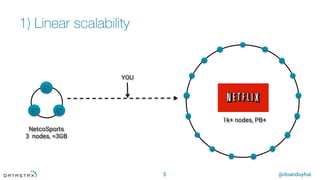
1) Linear scalability
5
C*
C*	C*
NetcoSports
3 nodes, ≈3GB
1k+ nodes, PB+
YOU
@doanduyhai
2) Continuous availability
6
•  thanks to the Dynamo architecture
@doanduyhai
3) Multi Data-centers
7
•  out-of-the-box (config only)
•  AWS config for multi-regions DCs
•  GCE support
•  Microsoft Azure support
•  CloudStack support
@doanduyhai
Multi DC usages
Data locality, disaster recovery
8
C*
C*
C*
C*
C* C*
C* C* C*
C*
C*
C*
C*
New York (DC1) London (DC2)
Async
replication
@doanduyhai
Multi DC usages
Virtual DC for workload segregation
9
C*
C*
C*
C*
C* C*
C* C* C*
C*
C*
C*
C*
Production
(LIVE)
Analytics
(Spark)
Async
replication
Same room
@doanduyhai
Multi DC usages
Prod data copy for back-up/benchmark
10
C*
C*
C*
C*
C* C*
C* C* C*
C*
C*
C*
C*
Use
LOCAL_XXX
Consistency
Levels
My tiny test DC
READ-ONLY!!!
Async
replication
@doanduyhai
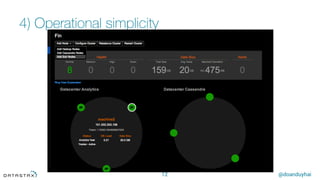
4) Operational simplicity
11
•  1 node = 1 process + 2 config files (cassandra.yaml + cassandra-rackdc.properties)
•  No role between nodes, perfect symmetry
•  deployment automation
•  OpsCenter* for
•  monitoring
•  provisioning
•  services (repair, performance, …)
* only with Datastax Enterprise from Cassandra 3.x
@doanduyhai
4) Operational simplicity
12
@doanduyhai
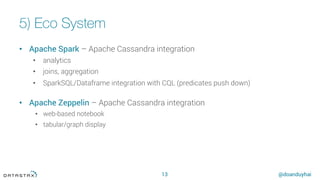
5) Eco System
13
•  Apache Spark – Apache Cassandra integration
•  analytics
•  joins, aggregation
•  SparkSQL/Dataframe integration with CQL (predicates push down)
•  Apache Zeppelin – Apache Cassandra integration
•  web-based notebook
•  tabular/graph display
14
Q & A
! "
Main Cassandra use-cases
@doanduyhai
Cassandra use-cases
16
Messaging
Collections/
Playlists
Fraud
detection
Recommendation/
Personalization
Internet of things/
Sensor data
@doanduyhai
Cassandra use-cases
17
Messaging
Collections/
Playlists
Fraud
detection
Recommendation/
Personalization
Internet of things/
Sensor data
18
Q & A
! "
Data Distribution
@doanduyhai
The tokens
20
Random hash of #partition à token = hash(#p)
Hash: ] –x, x ]
hash range: 264 values
x = 264/2
C*
C*
C*
C*
C* C*
C* C*
@doanduyhai
Token ranges
21
A: −x,−
3x
4
⎤
⎦
⎥
⎥
⎤
⎦
⎥
⎥
B: −
3x
4
,−
2x
4
⎤
⎦
⎥
⎥
⎤
⎦
⎥
⎥
C: −
2x
4
,−
x
4
⎤
⎦
⎥
⎥
⎤
⎦
⎥
⎥
D: −
x
4
,0
⎤
⎦
⎥
⎥
⎤
⎦
⎥
⎥
E: 0,
x
4
⎤
⎦
⎥
⎥
⎤
⎦
⎥
⎥
F:
x
4
,
2x
4
⎤
⎦
⎥
⎥
⎤
⎦
⎥
⎥
G:
2x
4
,
3x
4
⎤
⎦
⎥
⎥
⎤
⎦
⎥
⎥
H :
3x
4
,x
⎤
⎦
⎥
⎥
⎤
⎦
⎥
⎥
C*
C*
C*
C*
C* C*
C* C*
@doanduyhai
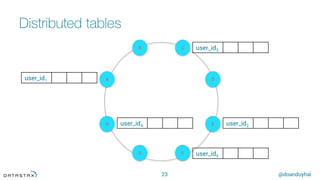
Distributed tables
22
H
A
E
D
B C
G F
user_id1
user_id2
user_id3
user_id4
user_id5
CREATE TABLE users(
user_id int,
…,
PRIMARY KEY(user_id)
),
@doanduyhai
Distributed tables
23
H
A
E
D
B C
G F
user_id1
user_id2
user_id3
user_id4
user_id5
@doanduyhai
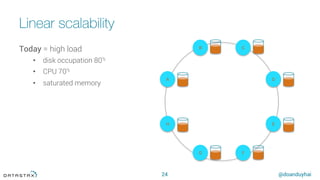
Linear scalability
24
H
A
E
D
B C
G F
Today = high load
•  disk occupation 80%
•  CPU 70%
•  saturated memory
@doanduyhai
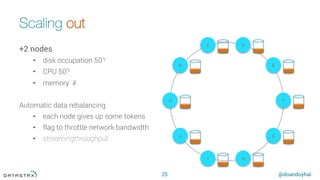
Scaling out
25
H
A
E
D
B
C
G
F
I
J
+2 nodes
•  disk occupation 50%
•  CPU 50%
•  memory ✌︎
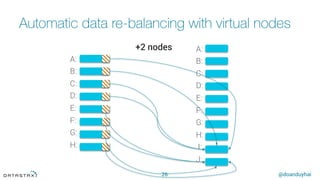
Automatic data rebalancing
•  each node gives up some tokens
•  flag to throttle network bandwidth
•  streamingthroughput
@doanduyhai
Automatic data re-balancing with virtual nodes
26
A:
B:
C:
D:
E:
F:
G:
H:
A:
B:
C:
D:
E:
F:
G:
H:
I:
J:
+2 nodes
27
Q & A
! "
Replication Model & Consistency
@doanduyhai
Failure tolerance
29
Replication factor (RF) = 3
H
A
E
D
B C
G F
1
2 3
{A, H, G}
{B, A, H} {C, B, A}
@doanduyhai
Coordinator node
30
Responsible for handling requests (read/write)
Every node can be coordinator
•  masterless
•  no SPOF
•  proxy role
H
A
E
D
B C
G F
coordinator
request
1
2 3
@doanduyhai
Consistency level
31
Tunable at runtime
•  ONE
•  QUORUM (strict majority w.r.t RF)
•  ALL
Applicable to any request (read/write)
@doanduyhai
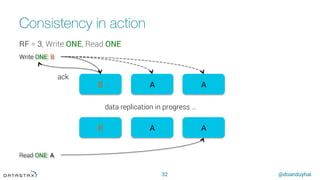
Consistency in action
32
B A A
B A A
Read ONE: A
data replication in progress …
Write ONE: B
ack
RF = 3, Write ONE, Read ONE
@doanduyhai
Consistency in action
33
B A A
B A A
Read QUORUM: A
data replication in progress …
Write ONE: B
ack
RF = 3, Write ONE, Read QUORUM
@doanduyhai
Consistency in action
34
B A A
B A A
Read ALL: B
data replication in progress …
Write ONE: B
ack
RF = 3, Write ONE, Read ALL
@doanduyhai
Last Write Win
35
H
A
E
D
B C
G F
coordinator
Read the
value back
1
2 3
B (t2) A (t1)
A (t1)
@doanduyhai
Consistency in action
36
B B A
B B A
Read ONE: A
data replication in progress …
Write QUORUM: B
ack
RF = 3, Write QUORUM, Read ONE
@doanduyhai
Consistency in action
37
B B A
B B A
Read QUORUM: A
data replication in progress …
Write QUORUM: B
ack
RF = 3, Write QUORUM, Read QUORUM
@doanduyhai
Consistency level = trade-off
38
@doanduyhai
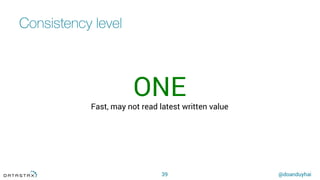
Consistency level
39
ONE
Fast, may not read latest written value
@doanduyhai
Consistency level
40
QUORUM
Strict majority w.r.t. Replication Factor
Good balance
@doanduyhai
Consistency level
41
ALL
Paranoid
Slow, lost of high availability
@doanduyhai
Consistency level common patterns
42
ONERead + ONEWrite
☞ available for read/write even (N-1) replicas down
QUORUMRead + QUORUMWrite
☞ available for read/write even if (RF - 1) replica (s) down
43
Q & A
! "
Last Write Win & Compaction
@doanduyhai
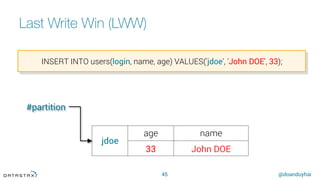
Last Write Win (LWW)
45
jdoe
age name
33 John DOE
INSERT INTO users(login, name, age) VALUES('jdoe', 'John DOE', 33);
#partition
@doanduyhai
Last Write Win (LWW)
46
INSERT INTO users(login, name, age) VALUES('jdoe', 'John DOE', 33);
jdoe
age (t1) name (t1)
33 John DOE
auto-generated timestamp (μs)
.
@doanduyhai
Last Write Win (LWW)
47
UPDATE users SET age = 34 WHERE login = 'jdoe';
jdoe
age (t1) name (t1)
33 John DOE
jdoe
age (t2)
34
SSTable1 SSTable2
@doanduyhai
Last Write Win (LWW)
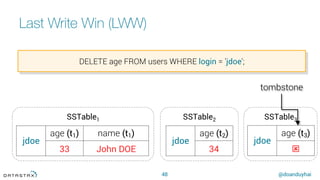
48
DELETE age FROM users WHERE login = 'jdoe';
jdoe
age (t1) name (t1)
33 John DOE
jdoe
age (t2)
34
SSTable1 SSTable2
tombstone
SSTable3
jdoe
age (t3)
ý
@doanduyhai
Last Write Win (LWW)
49
SELECT age FROM users WHERE login = 'jdoe';
jdoe
age (t1) name (t1)
33 John DOE
jdoe
age (t2)
34
SSTable1 SSTable2 SSTable3
jdoe
age (t3)
ý
???
@doanduyhai
Last Write Win (LWW)
50
SELECT age FROM users WHERE login = 'jdoe';
jdoe
age (t1) name (t1)
33 John DOE
jdoe
age (t2)
34
SSTable1 SSTable2 SSTable3
jdoe
age (t3)
ý
✓✕✕
@doanduyhai
Compaction
51
SSTable1 SSTable2 SSTable3
jdoe
age (t3)
ý
jdoe
age (t1) name (t1)
33 John DOE
jdoe
age (t2)
34
New SSTable
jdoe
age (t3) name (t1)
ý John DOE
Basic Data Modeling
@doanduyhai
Table creation
53
CREATE TABLE users (
login text,
name text,
age int,
…
PRIMARY KEY(login));
partition key (#partition)
@doanduyhai
DML statements
54
INSERT INTO users(login, name, age) VALUES('jdoe', 'John DOE', 33);
UPDATE users SET age = 34 WHERE login = 'jdoe';
DELETE age FROM users WHERE login = 'jdoe';
SELECT age FROM users WHERE login = 'jdoe';
@doanduyhai
What’s about joins ?
55
How can I join data between tables ?
How can I model 1 – N relationships ?
How to model a mailbox ?
EmailsUser
1 n
@doanduyhai
Compound primary key
56
CREATE TABLE mailbox (
login text,
message_id timeuuid,
interlocutor text,
message text,
PRIMARY KEY((login), message_id));
partition key clustering column unicity
@doanduyhai
Compound primary key
57
rsmith	
2014-11-21 16:00:00
‘bobm’, ‘It’s really…’
2014-11-21 17:32:12
‘bobm’, ‘It depends..’
2014-11-21 21:21:09
‘bobm’, ‘Don’t do…’
…	
hsue	
2014-11-21 11:04:43
‘jdoe’, ‘Hi, …’
2014-11-21 11:22:43
‘rsmith’, ‘Hello,…’
jdoe	
2014-11-21 11:00:00
‘hsue’, ‘Hi there!’
2014-11-21 11:22:43
‘rsmith’, ‘Hello,…’
2014-11-21 13:06:19
‘bobm’, ‘Do you…’
ordered by clustering column (date)
Not
ordered
@doanduyhai
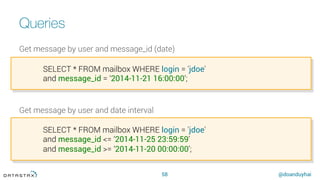
Queries
58
Get message by user and message_id (date)
Get message by user and date interval
SELECT * FROM mailbox WHERE login = 'jdoe'
and message_id = ‘2014-11-21 16:00:00’;
SELECT * FROM mailbox WHERE login = 'jdoe'
and message_id <= ‘2014-11-25 23:59:59’
and message_id >= ‘2014-11-20 00:00:00’;
@doanduyhai
Queries
59
Get message by message_id only
Get message by date interval
SELECT * FROM mailbox WHERE message_id = ‘2014-11-21 16:00:00’; ???
SELECT * FROM mailbox WHERE
and message_id <= ‘2014-11-25 23:59:59’ ???
and message_id >= ‘2014-11-20 00:00:00’;
@doanduyhai
Queries
60
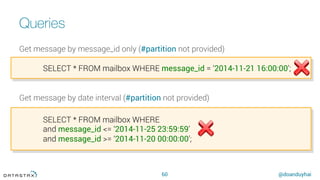
Get message by message_id only (#partition not provided)
Get message by date interval (#partition not provided)
SELECT * FROM mailbox WHERE message_id = ‘2014-11-21 16:00:00’;
SELECT * FROM mailbox WHERE
and message_id <= ‘2014-11-25 23:59:59’
and message_id >= ‘2014-11-20 00:00:00’;
@doanduyhai
Without #partition
61
No #partition
☞ no token
☞ where are my data ?
C*
C*
C*
C*
C* C*
C* C*
❓ ❓
❓ ❓
❓
❓
❓
❓
@doanduyhai
Queries
62
Get message by user range (range query on #partition)
Get message by user pattern (non exact match on #partition)
SELECT * FROM mailbox WHERE login >= 'hsue' and login <= 'jdoe';
SELECT * FROM mailbox WHERE login like ‘%doe%‘;
@doanduyhai
WHERE clause restrictions
63
All DML queries must provide #partition
Only exact match (=) on #partition, range queries (<, ≤, >, ≥) not allowed
•  ☞ full cluster scan
On clustering columns, only range queries (<, ≤, >, ≥) and exact match (=)
WHERE clause only possible
•  on columns defined in PRIMARY KEY
•  on indexed columns ( )
@doanduyhai
WHERE clause restrictions
64
What if I want to perform "arbitrary" WHERE clause ?
•  search form scenario, dynamic search fields
@doanduyhai
WHERE clause restrictions
65
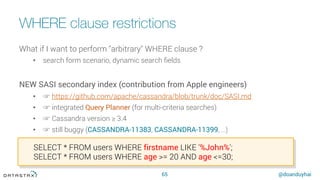
What if I want to perform "arbitrary" WHERE clause ?
•  search form scenario, dynamic search fields
NEW SASI secondary index (contribution from Apple engineers)
•  ☞ https://github.com/apache/cassandra/blob/trunk/doc/SASI.md
•  ☞ integrated Query Planner (for multi-criteria searches)
•  ☞ Cassandra version ≥ 3.4
•  ☞ still buggy (CASSANDRA-11383, CASSANDRA-11399, …)
SELECT * FROM users WHERE firstname LIKE '%John%';
SELECT * FROM users WHERE age >= 20 AND age <=30;
@doanduyhai
WHERE clause restrictions
66
What if I want to perform "arbitrary" WHERE clause ?
•  search form scenario, dynamic search fields
Or Datastax Enterprise Search (battle field proven)
•  ☞ Apache Solr (Lucene) integration (Datastax Enterprise Search)
•  ☞ Same JVM, 1-cluster-2-products (Solr & Cassandra)
SELECT * FROM users WHERE solr_query = 'age:[33 TO *] AND gender:male';
SELECT * FROM users WHERE solr_query = 'lastname:*schwei?er';
67
Q & A
! "
Advanced Data Modeling
@doanduyhai
Collection types
69
CREATE TABLE users (
login text,
name text,
age int,
friends set<text>,
hobbies list<text>,
languages map<int, text>,
…
PRIMARY KEY(login));
@doanduyhai
User Defined Type (UDT)
70
Instead of
CREATE TABLE users (
login text,
…
street_number int,
street_name text,
postcode int,
country text,
…
PRIMARY KEY(login));
@doanduyhai
User Defined Type (UDT)
71
CREATE TYPE address (
street_number int,
street_name text,
postcode int,
country text);
CREATE TABLE users (
login text,
…
location frozen <address>,
…
PRIMARY KEY(login));
@doanduyhai
UDT Insert
72
INSERT INTO users(login,name, location) VALUES (
'jdoe',
'John DOE',
{
'street_number': 124,
'street_name': 'Congress Avenue',
'postcode': 95054,
'country': ‘USA’
});
@doanduyhai
JSON syntax for INSERT/UPDATE/DELETE
73
CREATE TABLE users (
id text PRIMARY KEY,
age int,
state text );
INSERT INTO users JSON '{"id": "user123", "age": 42, "state": "TX"}’;
INSERT INTO users(id, age, state) VALUES('me', fromJson('20'), 'CA');
UPDATE users SET age = fromJson('25’) WHERE id = fromJson('"me"');
DELETE FROM users WHERE id = fromJson('"me"');
@doanduyhai
JSON syntax for SELECT
74
> SELECT JSON * FROM users WHERE id = 'me';
[json]
----------------------------------------
{"id": "me", "age": 25, "state": "CA”}
> SELECT JSON age,state FROM users WHERE id = 'me';
[json]
----------------------------------------
{"age": 25, "state": "CA"}
> SELECT age, toJson(state) FROM users WHERE id = 'me';
age | system.tojson(state)
-----+----------------------
25 | "CA"
@doanduyhai
Why Materialized Views ?
Relieve the pain of manual denormalization
75
CREATE TABLE user(
id int PRIMARY KEY,
country text,
…);
CREATE TABLE user_by_country(
country text,
id int,
…,
PRIMARY KEY(country, id));
@doanduyhai
Materialzed View In Action
76
CREATE MATERIALIZED VIEW user_by_country
AS SELECT country, id, firstname, lastname
FROM user
WHERE country IS NOT NULL AND id IS NOT NULL
PRIMARY KEY(country, id)
CREATE TABLE user_by_country (
country text,
id int,
firstname text,
lastname text,
PRIMARY KEY(country, id));
@doanduyhai
User Defined Functions (UDF)
77
CREATE [OR REPLACE] FUNCTION [IF NOT EXISTS]
maxOf (col1 int, col2 int)
CALL ON NULL INPUT | RETURNS NULL ON NULL INPUT
RETURN int
LANGUAGE java
AS $$
return Math.max(col1, col2);
$$;
SELECT maxOf(col1, col2) FROM table WHERE id = xxx;
@doanduyhai
User Defined Aggregates (UDA)
78
CREATE [OR REPLACE] AGGREGATE [IF NOT EXISTS]
sum(bigint)
SFUNC accumulatorFunction
STYPE bigint
[FINALFUNC finalFunction]
INITCOND 0;
CREATE FUNCTION accumulatorFunction(accu bigint, column bigint)
RETURNS NULL ON NULL INPUT RETURN bigint LANGUAGE java
AS $$ return accu + colum; $$;
79
Q & A
! "
80
@doanduyhai
duy_hai.doan@datastax.com
https://academy.datastax.com/
Thank You

Cassandra introduction 2016