Week 02
Data Models
Database System
COSC-2103
1
Session Objectives
A classification of data models
Concept and Evaluation Of Database Model
Types of Data Models
Relational Model
Components of Relational Model
Characteristics of Relational Database Model
Difference between a DBMS and RDBMS
2
3
DATA MODEL
A data model is a “description” of both a container for
data and a methodology for storing and retrieving data
from container.
“you can think of a data model as the infrastructure of the
data organizations, in other words, the way data is
presented to the user.”
Data model is…..
Not a thing
You cannot touch it
Data model are abstractions, mathematical algorithms &
Concepts.
You can not touch a data model.
4
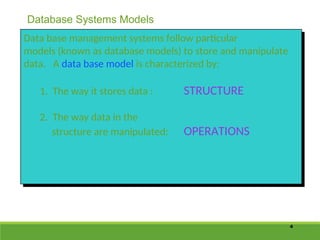
Data base management systems follow particular
models (known as database models) to store and manipulate
data. A data base model is characterized by:
1. The way it stores data : STRUCTURE
2. The way data in the
structure are manipulated: OPERATIONS
Database Systems Models
Choosing Data Model
• There are four different styles of database management systems, each
characterized by the way data are defined and structured, called
database model.
• A particular database management system supports one of the four
different architecture.
5
6
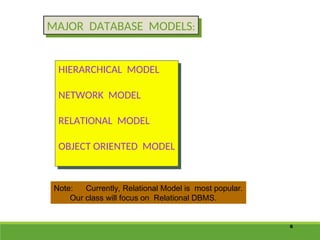
MAJOR DATABASE MODELS:
HIERARCHICAL MODEL
NETWORK MODEL
RELATIONAL MODEL
OBJECT ORIENTED MODEL
Note: Currently, Relational Model is most popular.
Our class will focus on Relational DBMS.
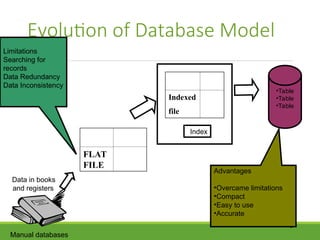
Evolution of Database Model
7
Limitations
Searching for
records
Data Redundancy
Data Inconsistency
FLAT
FILE
Indexed
file
Index
•Table
•Table
•Table
Advantages
•Overcame limitations
•Compact
•Easy to use
•Accurate
Data in books
and registers
Manual databases
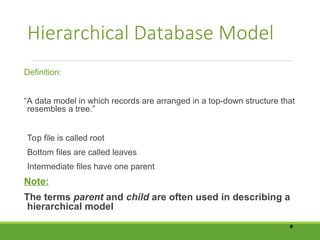
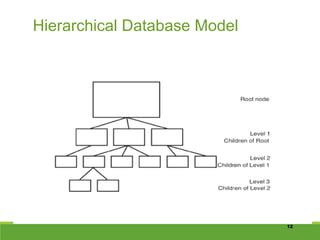
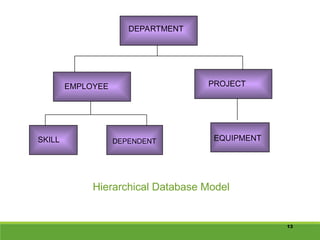
Hierarchical Database Model
Definition:
“A data model in which records are arranged in a top-down structure that
resembles a tree.”
Top file is called root
Bottom files are called leaves
Intermediate files have one parent
Note:
The terms parent and child are often used in describing a
hierarchical model
8
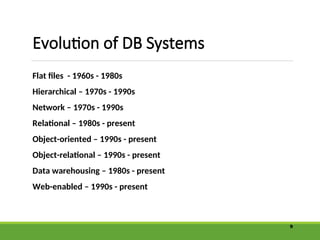
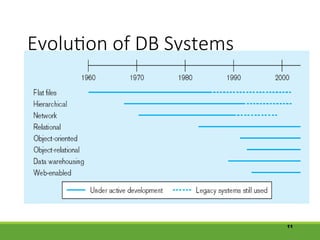
Evolution of DB Systems
Flat files - 1960s - 1980s
Hierarchical – 1970s - 1990s
Network – 1970s - 1990s
Relational – 1980s - present
Object-oriented – 1990s - present
Object-relational – 1990s - present
Data warehousing – 1980s - present
Web-enabled – 1990s - present
9
10
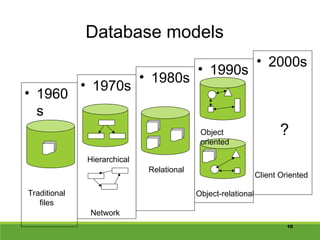
Database models
• 1960
s
• 1970s
• 1990s
Traditional
files
Hierarchical
Network
• 1980s
Relational
Object
oriented
Object-relational
• 2000s
Client Oriented
?
Evolution of DB Systems
11
12
Hierarchical Database Model
13
DEPARTMENT
EMPLOYEE PROJECT
SKILL DEPENDENT EQUIPMENT
Hierarchical Database Model
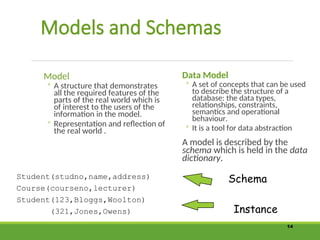
Models and Schemas
Model
◦ A structure that demonstrates
all the required features of the
parts of the real world which is
of interest to the users of the
information in the model.
◦ Representation and reflection of
the real world .
Data Model
◦ A set of concepts that can be used
to describe the structure of a
database: the data types,
relationships, constraints,
semantics and operational
behaviour.
◦ It is a tool for data abstraction
A model is described by the
schema which is held in the data
dictionary.
14
Student(studno,name,address)
Course(courseno,lecturer)
Student(123,Bloggs,Woolton)
(321,Jones,Owens)
Schema
Instance
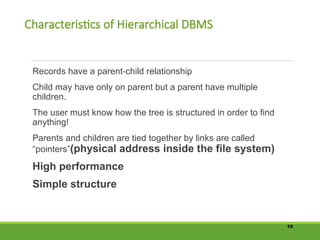
Characteristics of Hierarchical DBMS
Records have a parent-child relationship
Child may have only on parent but a parent have multiple
children.
The user must know how the tree is structured in order to find
anything!
Parents and children are tied together by links are called
“pointers”(physical address inside the file system)
High performance
Simple structure
15
Tedious to reorganize
Real life requirements are more complex
Example:
Hierarchical database technology is used for high-volume
transaction processing and MIS applications.
IBM’s information Management System(IMS) (1968) on IBM
mainframes.
16
Drawbacks:
Network Database Model
A data model in which each child may have multiple parents.
The network model is very similar to the hierarchical model actually
The hierarchical model is a subset of the network model.
17
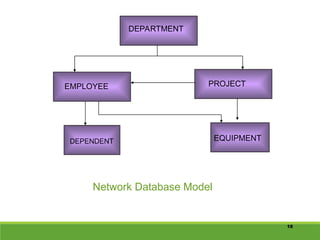
18
DEPARTMENT
EMPLOYEE PROJECT
DEPENDENT EQUIPMENT
Network Database Model
Characteristics of Network DBMS
Network model solves the problem of data redundancy by
representing relationships in terms of sets rather than hierarchy.
Computer programmers rather than users used implementations
of network model.
Relationships are pre-defined
Navigation done by the programmer
19
File Based Systems
File based Systems
Data is stored in files
Each file has special
format
Programs that use these
files depend upon
knowledge about that
format
Problems
No standers
Data duplication
Data dependence
No provision for
security,recovery,
concurrency etc….
20
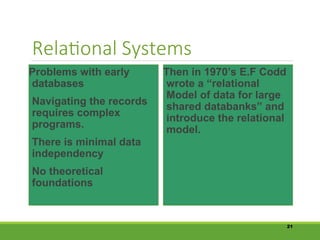
Relational Systems
Problems with early
databases
Navigating the records
requires complex
programs.
There is minimal data
independency
No theoretical
foundations
Then in 1970’s E.F Codd
wrote a “relational
Model of data for large
shared databanks” and
introduce the relational
model.
21
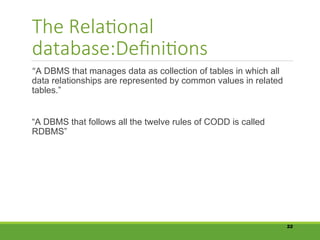
The Relational
database:Definitions
“A DBMS that manages data as collection of tables in which all
data relationships are represented by common values in related
tables.”
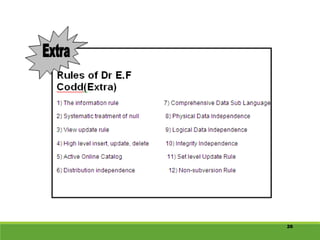
“A DBMS that follows all the twelve rules of CODD is called
RDBMS”
22
23
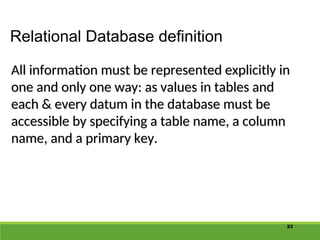
Relational Database definition
All information must be represented explicitly in
one and only one way: as values in tables and
each & every datum in the database must be
accessible by specifying a table name, a column
name, and a primary key.
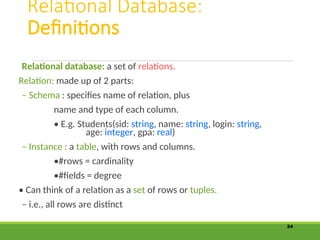
Relational Database:
Definitions
Relational database: a set of relations.
Relation: made up of 2 parts:
– Schema : specifies name of relation, plus
name and type of each column.
• E.g. Students(sid: string, name: string, login: string,
age: integer, gpa: real)
– Instance : a table, with rows and columns.
•#rows = cardinality
•#fields = degree
• Can think of a relation as a set of rows or tuples.
– i.e., all rows are distinct
24
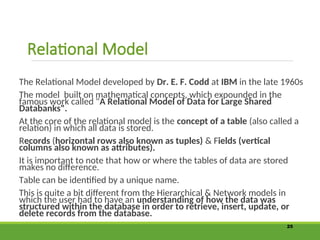
Relational Model
The Relational Model developed by Dr. E. F. Codd at IBM in the late 1960s
The model built on mathematical concepts, which expounded in the
famous work called "A Relational Model of Data for Large Shared
Databanks".
At the core of the relational model is the concept of a table (also called a
relation) in which all data is stored.
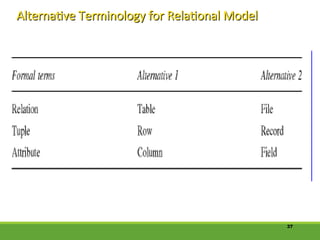
Records (horizontal rows also known as tuples) & Fields (vertical
columns also known as attributes).
It is important to note that how or where the tables of data are stored
makes no difference.
Table can be identified by a unique name.
This is quite a bit different from the Hierarchical & Network models in
which the user had to have an understanding of how the data was
structured within the database in order to retrieve, insert, update, or
delete records from the database.
25
26
Advantages:
The data access methodology in relational model is quite different from and
better than the earlier database models .
Another benefit of the relational system is that it provides extremely useful
tools for database administration.
Meta-data (data about the table and field names which form the database
structure, access rights to the database, integrity and data validation rules
etc).
Thus everything within the relational model can be stored in tables. This
means that many relational systems can use operations recursively in order to
provide information about the database.
27
28
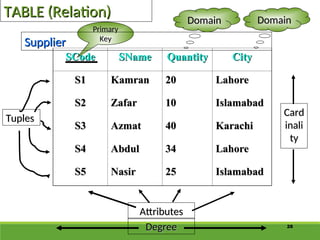
TABLE (Relation)
TABLE (Relation)
Degree
Degree
Attributes
Attributes
Card
Card
inali
inali
ty
ty
Primary
Primary
Key
Key
Tuples
Tuples
Supplier
Supplier
Domain
Domain
Domain
Domain
SCode
SCode SName
SName Quantity
Quantity City
City
S1
S1 Kamran
Kamran 20
20 Lahore
Lahore
S2
S2 Zafar
Zafar 10
10 Islamabad
Islamabad
S3
S3 Azmat
Azmat 40
40 Karachi
Karachi
S4
S4 Abdul
Abdul 34
34 Lahore
Lahore
S5
S5 Nasir
Nasir 25
25 Islamabad
Islamabad
29
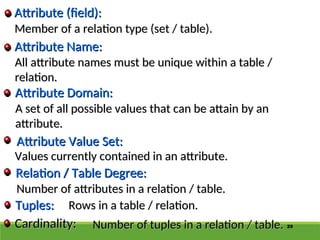
Member of a relation type (set / table).
Tuples:
Tuples:
Relation / Table Degree:
Attribute Value Set:
Attribute Domain:
Attribute Domain:
Attribute Name:
Attribute Name:
Attribute (field):
Attribute (field):
All attribute names must be unique within a table /
relation.
relation.
A set of all possible values that can be attain by an
attribute.
attribute.
Values currently contained in an attribute.
Number of attributes in a relation / table.
Rows in a table / relation.
Cardinality:
Cardinality: Number of tuples in a relation / table.
Number of tuples in a relation / table.
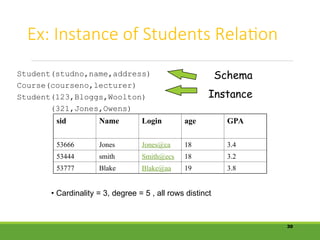
Ex: Instance of Students Relation
30
sid Name Login age GPA
53666 Jones Jones@ca 18 3.4
53444 smith Smith@ecs 18 3.2
53777 Blake Blake@aa 19 3.8
• Cardinality = 3, degree = 5 , all rows distinct
Student(studno,name,address)
Course(courseno,lecturer)
Student(123,Bloggs,Woolton)
(321,Jones,Owens)
Schema
Instance
31
Database Schema
Database Schema
The description of the database is called
database schema. A database schema is
describe during database design and not
expected to change frequently.
Schema Diagram
Schema Diagram
Displayed schema is called schema diagram.
Each object in schema is called a schema
construct.
construct.
32
Database instance (occurrence or state)
The data in a database at a particular
moment of time.
moment of time.
Intension & Extension
The schema is sometimes called the intension
and a database instance is called an
extension of the schema.
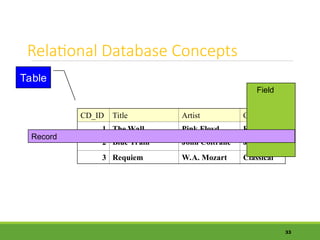
Relational Database Concepts
CD_ID Title Artist Genre
1 The Wall Pink Floyd Rock
2 Blue Train John Coltrane Jazz
3 Requiem W.A. Mozart Classical
33
Field
Record
Table
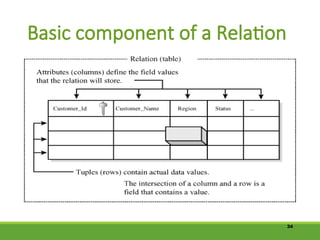
Basic component of a Relation
34
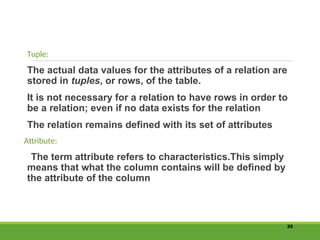
Tuple:
The actual data values for the attributes of a relation are
stored in tuples, or rows, of the table.
It is not necessary for a relation to have rows in order to
be a relation; even if no data exists for the relation
The relation remains defined with its set of attributes
Attribute:
The term attribute refers to characteristics.This simply
means that what the column contains will be defined by
the attribute of the column
35
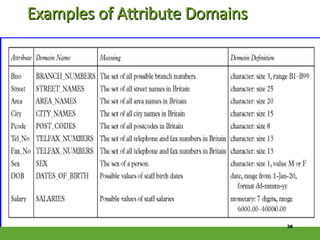
Examples of Attribute Domains
36
Alternative Terminology for Relational Model
37
Characteristics of Relational
Database Model
Built in data integrity
Data consistency and accuracy
Easy data retrieval and data sharing
How and where the tables of data stored make no difference
You can access child table with out accessing parent table.
Non-navigational in nature
Find the data on the basis of the data values themselves.
One point data administration
Controlling redundancy
Data abstraction
38
Continue……..
Provide security
Data entry , update and deletion will be efficient.
Changes to the of the database is somewhat self-
documenting.
Support multiple users
39
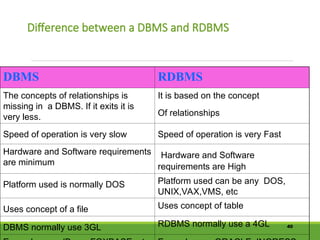
Difference between a DBMS and RDBMS
40
DBMS RDBMS
The concepts of relationships is
missing in a DBMS. If it exits it is
very less.
It is based on the concept
Of relationships
Speed of operation is very slow Speed of operation is very Fast
Hardware and Software requirements
are minimum
Hardware and Software
requirements are High
Platform used is normally DOS Platform used can be any DOS,
UNIX,VAX,VMS, etc
Uses concept of a file Uses concept of table
DBMS normally use 3GL RDBMS normally use a 4GL
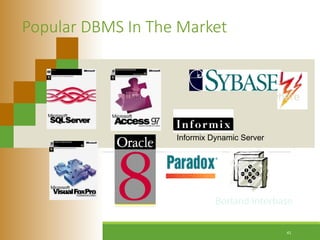
Popular DBMS In The Market
Sybase SQL Anywhere
Informix Dynamic Server
Borland Interbase
41
Popular RDBMS that support
SQL
 Oracle
 Sybase
 Microsoft SQL Server
 Informix
 Ingress
 DB2
42
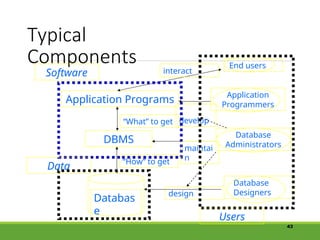
Typical
Components
43
DBMS
Databas
e
“How” to get
Application Programs
“What” to get
End users
interact
Application
Programmers
develop
Database
Designers
design
Software
Users
Data
maintai
n
Database
Administrators
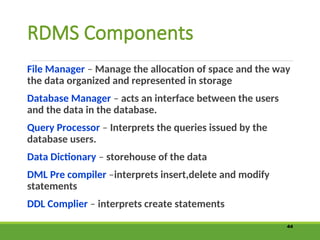
RDMS Components
File Manager – Manage the allocation of space and the way
the data organized and represented in storage
Database Manager – acts an interface between the users
and the data in the database.
Query Processor – Interprets the queries issued by the
database users.
Data Dictionary – storehouse of the data
DML Pre compiler –interprets insert,delete and modify
statements
DDL Complier – interprets create statements
44
45
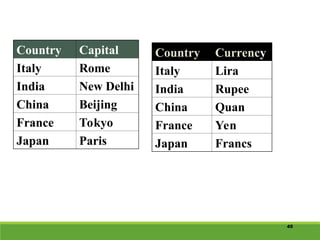
Country Capital
Italy Rome
India New Delhi
China Beijing
France Tokyo
Japan Paris
Country Currency
Italy Lira
India Rupee
China Quan
France Yen
Japan Francs
46
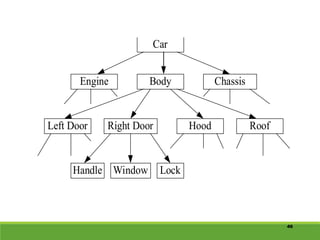
Left Door Right Door Hood Roof
Handle Window Lock
Engine Body Chassis
Car
47
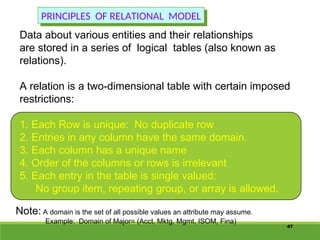
Data about various entities and their relationships
are stored in a series of logical tables (also known as
relations).
A relation is a two-dimensional table with certain imposed
restrictions:
1. Each Row is unique: No duplicate row
2. Entries in any column have the same domain.
3. Each column has a unique name
4. Order of the columns or rows is irrelevant
5. Each entry in the table is single valued:
No group item, repeating group, or array is allowed.
PRINCIPLES OF RELATIONAL MODEL
Note: A domain is the set of all possible values an attribute may assume.
Example: Domain of Major= (Acct, Mktg, Mgmt, ISOM, Fina)

DBMS-Week-2about hardware and software.PPT

  • 1.
    Week 02 Data Models DatabaseSystem COSC-2103 1
  • 2.
    Session Objectives A classificationof data models Concept and Evaluation Of Database Model Types of Data Models Relational Model Components of Relational Model Characteristics of Relational Database Model Difference between a DBMS and RDBMS 2
  • 3.
    3 DATA MODEL A datamodel is a “description” of both a container for data and a methodology for storing and retrieving data from container. “you can think of a data model as the infrastructure of the data organizations, in other words, the way data is presented to the user.” Data model is….. Not a thing You cannot touch it Data model are abstractions, mathematical algorithms & Concepts. You can not touch a data model.
  • 4.
    4 Data base managementsystems follow particular models (known as database models) to store and manipulate data. A data base model is characterized by: 1. The way it stores data : STRUCTURE 2. The way data in the structure are manipulated: OPERATIONS Database Systems Models
  • 5.
    Choosing Data Model •There are four different styles of database management systems, each characterized by the way data are defined and structured, called database model. • A particular database management system supports one of the four different architecture. 5
  • 6.
    6 MAJOR DATABASE MODELS: HIERARCHICALMODEL NETWORK MODEL RELATIONAL MODEL OBJECT ORIENTED MODEL Note: Currently, Relational Model is most popular. Our class will focus on Relational DBMS.
  • 7.
    Evolution of DatabaseModel 7 Limitations Searching for records Data Redundancy Data Inconsistency FLAT FILE Indexed file Index •Table •Table •Table Advantages •Overcame limitations •Compact •Easy to use •Accurate Data in books and registers Manual databases
  • 8.
    Hierarchical Database Model Definition: “Adata model in which records are arranged in a top-down structure that resembles a tree.” Top file is called root Bottom files are called leaves Intermediate files have one parent Note: The terms parent and child are often used in describing a hierarchical model 8
  • 9.
    Evolution of DBSystems Flat files - 1960s - 1980s Hierarchical – 1970s - 1990s Network – 1970s - 1990s Relational – 1980s - present Object-oriented – 1990s - present Object-relational – 1990s - present Data warehousing – 1980s - present Web-enabled – 1990s - present 9
  • 10.
    10 Database models • 1960 s •1970s • 1990s Traditional files Hierarchical Network • 1980s Relational Object oriented Object-relational • 2000s Client Oriented ?
  • 11.
    Evolution of DBSystems 11
  • 12.
  • 13.
    13 DEPARTMENT EMPLOYEE PROJECT SKILL DEPENDENTEQUIPMENT Hierarchical Database Model
  • 14.
    Models and Schemas Model ◦A structure that demonstrates all the required features of the parts of the real world which is of interest to the users of the information in the model. ◦ Representation and reflection of the real world . Data Model ◦ A set of concepts that can be used to describe the structure of a database: the data types, relationships, constraints, semantics and operational behaviour. ◦ It is a tool for data abstraction A model is described by the schema which is held in the data dictionary. 14 Student(studno,name,address) Course(courseno,lecturer) Student(123,Bloggs,Woolton) (321,Jones,Owens) Schema Instance
  • 15.
    Characteristics of HierarchicalDBMS Records have a parent-child relationship Child may have only on parent but a parent have multiple children. The user must know how the tree is structured in order to find anything! Parents and children are tied together by links are called “pointers”(physical address inside the file system) High performance Simple structure 15
  • 16.
    Tedious to reorganize Reallife requirements are more complex Example: Hierarchical database technology is used for high-volume transaction processing and MIS applications. IBM’s information Management System(IMS) (1968) on IBM mainframes. 16 Drawbacks:
  • 17.
    Network Database Model Adata model in which each child may have multiple parents. The network model is very similar to the hierarchical model actually The hierarchical model is a subset of the network model. 17
  • 18.
  • 19.
    Characteristics of NetworkDBMS Network model solves the problem of data redundancy by representing relationships in terms of sets rather than hierarchy. Computer programmers rather than users used implementations of network model. Relationships are pre-defined Navigation done by the programmer 19
  • 20.
    File Based Systems Filebased Systems Data is stored in files Each file has special format Programs that use these files depend upon knowledge about that format Problems No standers Data duplication Data dependence No provision for security,recovery, concurrency etc…. 20
  • 21.
    Relational Systems Problems withearly databases Navigating the records requires complex programs. There is minimal data independency No theoretical foundations Then in 1970’s E.F Codd wrote a “relational Model of data for large shared databanks” and introduce the relational model. 21
  • 22.
    The Relational database:Definitions “A DBMSthat manages data as collection of tables in which all data relationships are represented by common values in related tables.” “A DBMS that follows all the twelve rules of CODD is called RDBMS” 22
  • 23.
    23 Relational Database definition Allinformation must be represented explicitly in All information must be represented explicitly in one and only one way: as values in tables and one and only one way: as values in tables and each & every datum in the database must be each & every datum in the database must be accessible by specifying a table name, a column accessible by specifying a table name, a column name, and a primary key. name, and a primary key.
  • 24.
    Relational Database: Definitions Relational database:a set of relations. Relation: made up of 2 parts: – Schema : specifies name of relation, plus name and type of each column. • E.g. Students(sid: string, name: string, login: string, age: integer, gpa: real) – Instance : a table, with rows and columns. •#rows = cardinality •#fields = degree • Can think of a relation as a set of rows or tuples. – i.e., all rows are distinct 24
  • 25.
    Relational Model The RelationalModel developed by Dr. E. F. Codd at IBM in the late 1960s The model built on mathematical concepts, which expounded in the famous work called "A Relational Model of Data for Large Shared Databanks". At the core of the relational model is the concept of a table (also called a relation) in which all data is stored. Records (horizontal rows also known as tuples) & Fields (vertical columns also known as attributes). It is important to note that how or where the tables of data are stored makes no difference. Table can be identified by a unique name. This is quite a bit different from the Hierarchical & Network models in which the user had to have an understanding of how the data was structured within the database in order to retrieve, insert, update, or delete records from the database. 25
  • 26.
  • 27.
    Advantages: The data accessmethodology in relational model is quite different from and better than the earlier database models . Another benefit of the relational system is that it provides extremely useful tools for database administration. Meta-data (data about the table and field names which form the database structure, access rights to the database, integrity and data validation rules etc). Thus everything within the relational model can be stored in tables. This means that many relational systems can use operations recursively in order to provide information about the database. 27
  • 28.
    28 TABLE (Relation) TABLE (Relation) Degree Degree Attributes Attributes Card Card inali inali ty ty Primary Primary Key Key Tuples Tuples Supplier Supplier Domain Domain Domain Domain SCode SCodeSName SName Quantity Quantity City City S1 S1 Kamran Kamran 20 20 Lahore Lahore S2 S2 Zafar Zafar 10 10 Islamabad Islamabad S3 S3 Azmat Azmat 40 40 Karachi Karachi S4 S4 Abdul Abdul 34 34 Lahore Lahore S5 S5 Nasir Nasir 25 25 Islamabad Islamabad
  • 29.
    29 Member of arelation type (set / table). Member of a relation type (set / table). Tuples: Tuples: Relation / Table Degree: Relation / Table Degree: Attribute Value Set: Attribute Value Set: Attribute Domain: Attribute Domain: Attribute Name: Attribute Name: Attribute (field): Attribute (field): All attribute names must be unique within a table / All attribute names must be unique within a table / relation. relation. A set of all possible values that can be attain by an A set of all possible values that can be attain by an attribute. attribute. Values currently contained in an attribute. Values currently contained in an attribute. Number of attributes in a relation / table. Number of attributes in a relation / table. Rows in a table / relation. Rows in a table / relation. Cardinality: Cardinality: Number of tuples in a relation / table. Number of tuples in a relation / table.
  • 30.
    Ex: Instance ofStudents Relation 30 sid Name Login age GPA 53666 Jones Jones@ca 18 3.4 53444 smith Smith@ecs 18 3.2 53777 Blake Blake@aa 19 3.8 • Cardinality = 3, degree = 5 , all rows distinct Student(studno,name,address) Course(courseno,lecturer) Student(123,Bloggs,Woolton) (321,Jones,Owens) Schema Instance
  • 31.
    31 Database Schema Database Schema Thedescription of the database is called The description of the database is called database schema. A database schema is database schema. A database schema is describe during database design and not describe during database design and not expected to change frequently. expected to change frequently. Schema Diagram Schema Diagram Displayed schema is called schema diagram. Displayed schema is called schema diagram. Each object in schema is called a schema Each object in schema is called a schema construct. construct.
  • 32.
    32 Database instance (occurrenceor state) Database instance (occurrence or state) The data in a database at a particular The data in a database at a particular moment of time. moment of time. Intension & Extension Intension & Extension The schema is sometimes called the intension The schema is sometimes called the intension and a database instance is called an and a database instance is called an extension of the schema. extension of the schema.
  • 33.
    Relational Database Concepts CD_IDTitle Artist Genre 1 The Wall Pink Floyd Rock 2 Blue Train John Coltrane Jazz 3 Requiem W.A. Mozart Classical 33 Field Record Table
  • 34.
    Basic component ofa Relation 34
  • 35.
    Tuple: The actual datavalues for the attributes of a relation are stored in tuples, or rows, of the table. It is not necessary for a relation to have rows in order to be a relation; even if no data exists for the relation The relation remains defined with its set of attributes Attribute: The term attribute refers to characteristics.This simply means that what the column contains will be defined by the attribute of the column 35
  • 36.
    Examples of AttributeDomains Examples of Attribute Domains 36
  • 37.
    Alternative Terminology forRelational Model Alternative Terminology for Relational Model 37
  • 38.
    Characteristics of Relational DatabaseModel Built in data integrity Data consistency and accuracy Easy data retrieval and data sharing How and where the tables of data stored make no difference You can access child table with out accessing parent table. Non-navigational in nature Find the data on the basis of the data values themselves. One point data administration Controlling redundancy Data abstraction 38
  • 39.
    Continue…….. Provide security Data entry, update and deletion will be efficient. Changes to the of the database is somewhat self- documenting. Support multiple users 39
  • 40.
    Difference between aDBMS and RDBMS 40 DBMS RDBMS The concepts of relationships is missing in a DBMS. If it exits it is very less. It is based on the concept Of relationships Speed of operation is very slow Speed of operation is very Fast Hardware and Software requirements are minimum Hardware and Software requirements are High Platform used is normally DOS Platform used can be any DOS, UNIX,VAX,VMS, etc Uses concept of a file Uses concept of table DBMS normally use 3GL RDBMS normally use a 4GL
  • 41.
    Popular DBMS InThe Market Sybase SQL Anywhere Informix Dynamic Server Borland Interbase 41
  • 42.
    Popular RDBMS thatsupport SQL  Oracle  Sybase  Microsoft SQL Server  Informix  Ingress  DB2 42
  • 43.
    Typical Components 43 DBMS Databas e “How” to get ApplicationPrograms “What” to get End users interact Application Programmers develop Database Designers design Software Users Data maintai n Database Administrators
  • 44.
    RDMS Components File Manager– Manage the allocation of space and the way the data organized and represented in storage Database Manager – acts an interface between the users and the data in the database. Query Processor – Interprets the queries issued by the database users. Data Dictionary – storehouse of the data DML Pre compiler –interprets insert,delete and modify statements DDL Complier – interprets create statements 44
  • 45.
    45 Country Capital Italy Rome IndiaNew Delhi China Beijing France Tokyo Japan Paris Country Currency Italy Lira India Rupee China Quan France Yen Japan Francs
  • 46.
    46 Left Door RightDoor Hood Roof Handle Window Lock Engine Body Chassis Car
  • 47.
    47 Data about variousentities and their relationships are stored in a series of logical tables (also known as relations). A relation is a two-dimensional table with certain imposed restrictions: 1. Each Row is unique: No duplicate row 2. Entries in any column have the same domain. 3. Each column has a unique name 4. Order of the columns or rows is irrelevant 5. Each entry in the table is single valued: No group item, repeating group, or array is allowed. PRINCIPLES OF RELATIONAL MODEL Note: A domain is the set of all possible values an attribute may assume. Example: Domain of Major= (Acct, Mktg, Mgmt, ISOM, Fina)