TOPIC 6
DATABASE
6.1 Introduction to Database
6.2 Basic Concept of Database
6.3 Database Object
DATABASE
6.1 Introduction to Database
At the end of this topic,
students should be able to:
1. Define
● Database
● Database Management System (DBMS)
2. Describe advantages and disadvantages of database
DATABASE
Learning Outcomes
DATABASE
6.1 Introduction to Database
Database
● Can be define as ;
● An integrated collection of related data OR
● Collection of data organized in a manner that allows access,
retrieval, and use of that data – Shelly & Varmaat, 2012, OR
● A collection of data, manage and organized by a database
management system – Petersen, 2002
● Related data, e.g. : information stored in University
(students, courses, faculty, students taking
courses, faculty teaching courses … )
● Integrated: all data is stored in a uniform way on
secondary storage.
DATABASE
6.1 Introduction to Database
Database Management System (DBMS)
● Can be define as ;
● A collection of programs that is used to create, maintain and
manipulate data in the database, OR
● Specific type of software for creating, storing, organizing and
accessing data from a database.
● Provide an interface between the database and its
users and other application programs
● DBA, a database administrator is the people
responsible for managing database, who sets up and
manage a database.
DATABASE
6.1 Introduction to Database
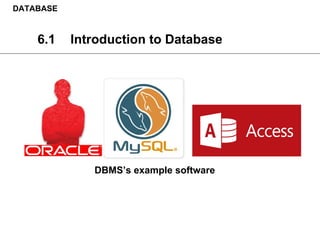
DBMS’s example software
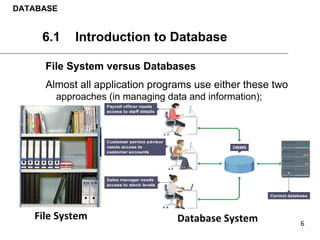
File System versus Databases
Almost all application programs use either these two
approaches (in managing data and information);
DATABASE
6.1 Introduction to Database
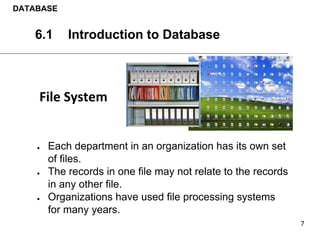
● Each department in an organization has its own set
of files.
● The records in one file may not relate to the records
in any other file.
● Organizations have used file processing systems
for many years.
DATABASE
6.1 Introduction to Database
● Weakness 1 , redundancy of data
Each department in an organization has its own set
of files
● Weakness 2 , isolation of data
The records in one file may not relate to the records
in any other file.
● Weakness 3 , hard to maintain security of data and
information stored in files
Organizations have used file processing systems
for many years.
DATABASE
6.1 Introduction to Database
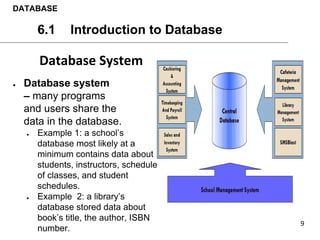
● Database system
– many programs
and users share the
data in the database.
● Example 1: a school’s
database most likely at a
minimum contains data about
students, instructors, schedule
of classes, and student
schedules.
● Example 2: a library’s
database stored data about
book’s title, the author, ISBN
number.
DATABASE
6.1 Introduction to Database
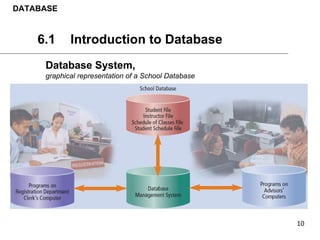
Database System,
graphical representation of a School Database
DATABASE
6.1 Introduction to Database
DATABASE
6.1 Introduction to Database
Advantages
1. Sharing data
- data in a database environment is shared over a
network.
2. Easier Access
- better data accessibility using standard data query
language (SQL). allows end-user to access and
maintain data.
3. Reduced data redundancy
- reduce data redundancy/duplication by improving
data sharing.
DATABASE
6.1 Introduction to Database
Advantages (continued)
4. Security
- improved data security (backup recovery, concurrency, access control)
5. Reduced development time
- is easy and fast to develop programs
6. Higher data integrity
- increasing data integrity through data independence from applications
program
7. improve data quality
- reducing update errors (using same format) thus increasing data consistency
DATABASE
6.1 Introduction to Database
Disadvantages
1. Complex, difficult, and time consuming to design
2. Special training required for all programmers and users
3. Require more memory, storage and processing power
4. Expensive hardware and software cost to setup database
5. Extensive conversion costs in moving from a file-based
system to a database system
DATABASE
6.1 Introduction to Database
6.2 Basic Concept of Database
At the end of this topic,
students should be able to:
1. Explain the basic concept of database
DATABASE
Learning Outcomes
6.2 Basic Concept of Database
Data
Hierarchy
6.2 Basic Concept of Database
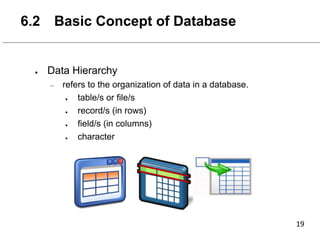
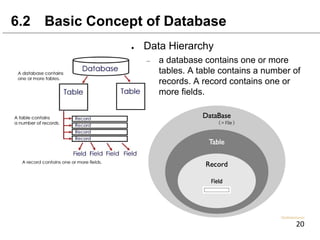
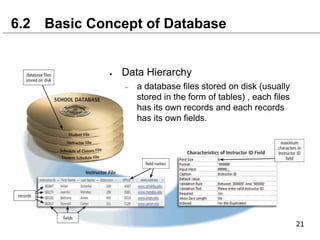
● Data Hierarchy
– refers to the organization of data in a database.
● table/s or file/s
● record/s (in rows)
● field/s (in columns)
● character
6.2 Basic Concept of Database
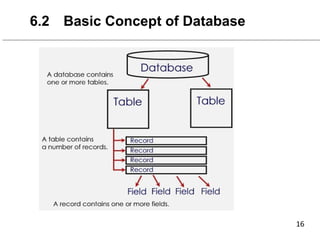
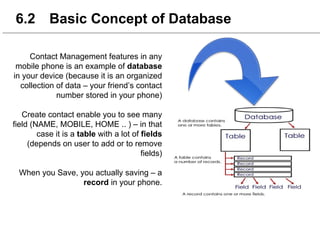
● Data Hierarchy
– a database contains one or more
tables. A table contains a number of
records. A record contains one or
more fields.
6.2 Basic Concept of Database
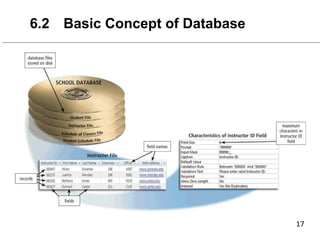
● Data Hierarchy
– a database files stored on disk (usually
stored in the form of tables) , each files
has its own records and each records
has its own fields.
6.2 Basic Concept of Database
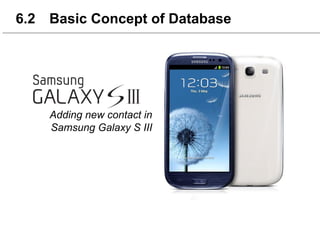
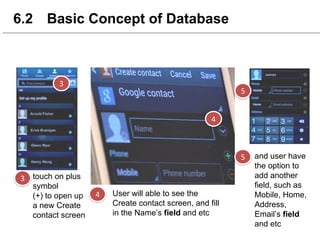
Adding new contact in
Samsung Galaxy S III
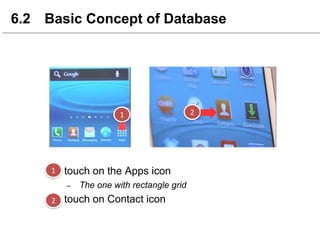
6.2 Basic Concept of Database
● touch on the Apps icon
– The one with rectangle grid
● touch on Contact icon
6.2 Basic Concept of Database
touch on plus
symbol
(+) to open up
a new Create
contact screen
User will able to see the
Create contact screen, and fill
in the Name’s field and etc
and user have
the option to
add another
field, such as
Mobile, Home,
Address,
Email’s field
and etc
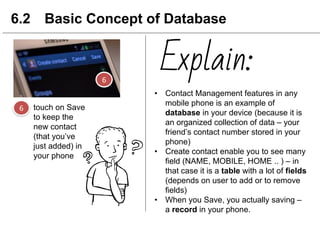
touch on Save
to keep the
new contact
(that you’ve
just added) in
your phone
6.2 Basic Concept of Database
• Contact Management features in any
mobile phone is an example of
database in your device (because it is
an organized collection of data – your
friend’s contact number stored in your
phone)
• Create contact enable you to see many
field (NAME, MOBILE, HOME .. ) – in
that case it is a table with a lot of fields
(depends on user to add or to remove
fields)
• When you Save, you actually saving –
a record in your phone.
Explain:
6.2 Basic Concept of Database
Contact Management features in any
mobile phone is an example of database
in your device (because it is an organized
collection of data – your friend’s contact
number stored in your phone)
Create contact enable you to see many
field (NAME, MOBILE, HOME .. ) – in that
case it is a table with a lot of fields
(depends on user to add or to remove
fields)
When you Save, you actually saving – a
record in your phone.
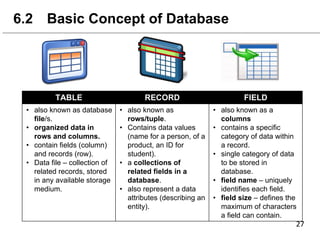
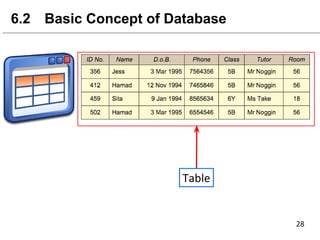
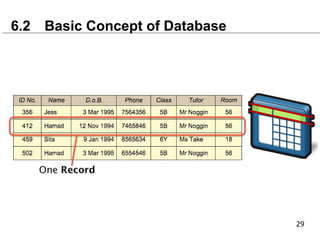
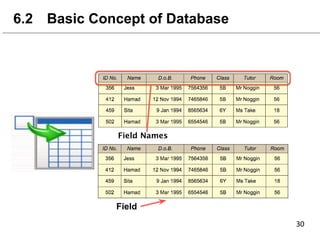
TABLE RECORD FIELD
• also known as database
file/s.
• organized data in
rows and columns.
• contain fields (column)
and records (row).
• Data file – collection of
related records, stored
in any available storage
medium.
• also known as
rows/tuple.
• Contains data values
(name for a person, of a
product, an ID for
student).
• a collections of
related fields in a
database.
• also represent a data
attributes (describing an
entity).
• also known as a
columns
• contains a specific
category of data within
a record.
• single category of data
to be stored in
database.
• field name – uniquely
identifies each field.
• field size – defines the
maximum of characters
a field can contain.
6.2 Basic Concept of Database
Field
Data
Dictionary
and
Data Type
6.2 Basic Concept of Database
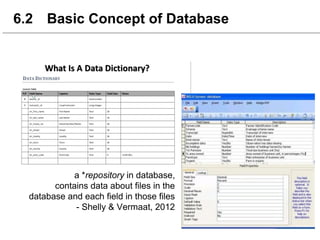
a *repository in database,
contains data about files in the
database and each field in those files
- Shelly & Vermaat, 2012
6.2 Basic Concept of Database
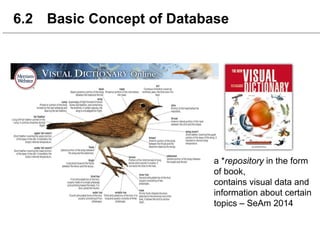
a *repository in the form
of book,
contains visual data and
information about certain
topics – SeAm 2014
6.2 Basic Concept of Database
List 3 - 4 examples of
data that can be extract
from student.
Imagine you are at the bus stop, suddenly
one female student that you’ve already
admire, walk to the bus stop and sit near
you. Ok man, what will you do ?
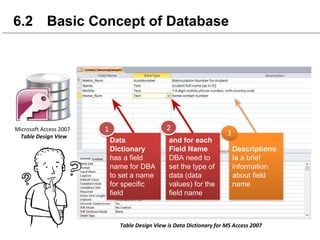
6.2 Basic Concept of Database
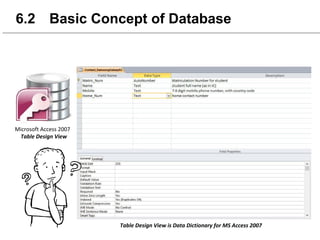
Data
Dictionary
has a field
name for DBA
to set a name
for specific
field
and for each
Field Name
DBA need to
set the type of
data (data
values) for the
field name
Descriptions
is a brief
information
about field
name
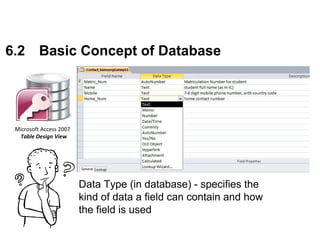
Data Type (in database) - specifies the
kind of data a field can contain and how
the field is used
6.2 Basic Concept of Database
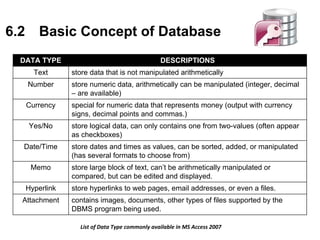
DATA TYPE DESCRIPTIONS
Text store data that is not manipulated arithmetically
Number store numeric data, arithmetically can be manipulated (integer, decimal
– are available)
Currency special for numeric data that represents money (output with currency
signs, decimal points and commas.)
Yes/No store logical data, can only contains one from two-values (often appear
as checkboxes)
Date/Time store dates and times as values, can be sorted, added, or manipulated
(has several formats to choose from)
Memo store large block of text, can’t be arithmetically manipulated or
compared, but can be edited and displayed.
Hyperlink store hyperlinks to web pages, email addresses, or even a files.
Attachment contains images, documents, other types of files supported by the
DBMS program being used.
6.2 Basic Concept of Database
Primary Key
and
Foreign Key
6.2 Basic Concept of Database
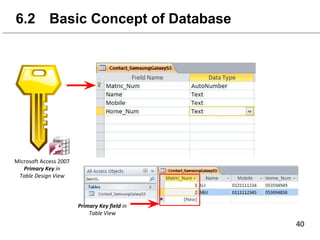
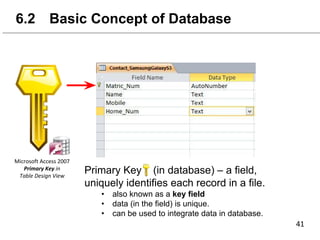
Primary Key (in database) – a field,
uniquely identifies each record in a file.
• also known as a key field
• data (in the field) is unique.
• can be used to integrate data in database.
6.2 Basic Concept of Database
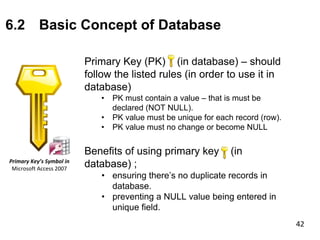
Primary Key (PK) (in database) – should
follow the listed rules (in order to use it in
database)
• PK must contain a value – that is must be
declared (NOT NULL).
• PK value must be unique for each record (row).
• PK value must no change or become NULL
Benefits of using primary key (in
database) ;
• ensuring there’s no duplicate records in
database.
• preventing a NULL value being entered in
unique field.
6.2 Basic Concept of Database
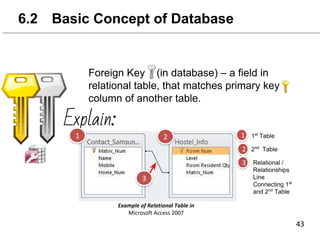
Foreign Key (in database) – a field in
relational table, that matches primary key
column of another table.
Explain:
1st
Table
2nd
Table
Relational /
Relationships
Line
Connecting 1st
and 2nd
Table
6.2 Basic Concept of Database
Explain:
Foreign Key (in database) – a field in
relational table, that matches primary
key column of another table.
Remember !
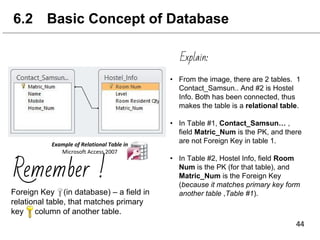
• From the image, there are 2 tables. 1
Contact_Samsun.. And #2 is Hostel
Info. Both has been connected, thus
makes the table is a relational table.
• In Table #1, Contact_Samsun… ,
field Matric_Num is the PK, and there
are not Foreign Key in table 1.
• In Table #2, Hostel Info, field Room
Num is the PK (for that table), and
Matric_Num is the Foreign Key
(because it matches primary key form
another table ,Table #1).
6.2 Basic Concept of Database
Conclusion:
Foreign Key (in database) – a field in
relational table, that matches primary key
column of another table.
Remember !
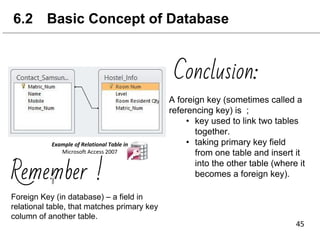
A foreign key (sometimes called a
referencing key) is ;
• key used to link two tables
together.
• taking primary key field
from one table and insert it
into the other table (where it
becomes a foreign key).
6.2 Basic Concept of Database
Primary Key & Foreign Key
Differences of primary key and foreign key;
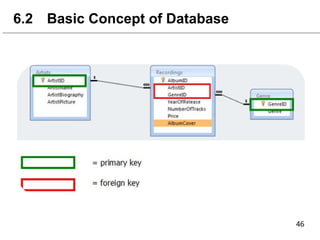
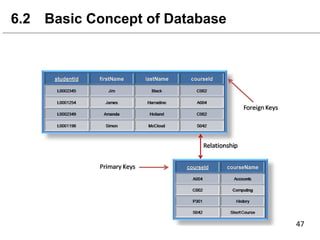
- Primary can contain only unique value while foreign
key may contain duplicate value.
Importance of relationship between the Primary Key
and Foreign Key
- The primary key of one table becomes a foreign of
other table (by matching a foreign key with a primary
key, there is no need to enter data repeatedly)
- Making the process (query, form, reports) easier.
- Improves data performance by relating smaller tables
into meaningful databases.
6.2 Basic Concept of Database
Entity Relationship
6.2 Basic Concept of Database
- A data model that describes data and
information, implemented in a
relational database
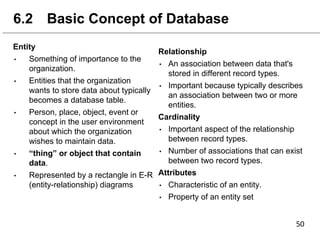
Entity
• Something of importance to the
organization.
• Entities that the organization
wants to store data about typically
becomes a database table.
• Person, place, object, event or
concept in the user environment
about which the organization
wishes to maintain data.
• “thing” or object that contain
data.
• Represented by a rectangle in E-R
(entity-relationship) diagrams
6.2 Basic Concept of Database
Relationship
• An association between data that's
stored in different record types.
• Important because typically describes
an association between two or more
entities.
Cardinality
• Important aspect of the relationship
between record types.
• Number of associations that can exist
between two record types.
Attributes
• Characteristic of an entity.
• Property of an entity set
6.2 Basic Concept of Database
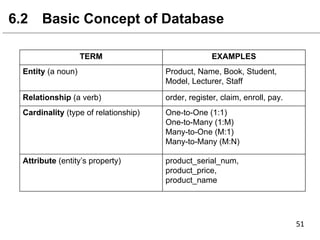
TERM EXAMPLES
Entity (a noun) Product, Name, Book, Student,
Model, Lecturer, Staff
Relationship (a verb) order, register, claim, enroll, pay.
Cardinality (type of relationship) One-to-One (1:1)
One-to-Many (1:M)
Many-to-One (M:1)
Many-to-Many (M:N)
Attribute (entity’s property) product_serial_num,
product_price,
product_name
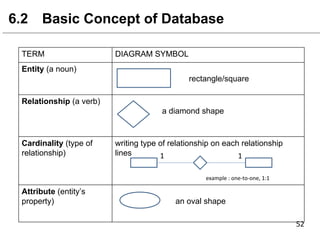
TERM DIAGRAM SYMBOL
Entity (a noun)
rectangle/square
Relationship (a verb)
a diamond shape
Cardinality (type of
relationship)
writing type of relationship on each relationship
lines
Attribute (entity’s
property) an oval shape
6.2 Basic Concept of Database
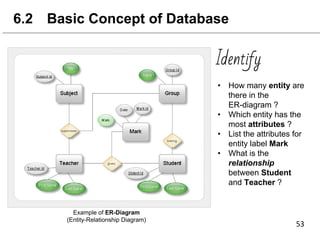
Example of ER-Diagram
(Entity-Relationship Diagram)
Identify
• How many entity are
there in the
ER-diagram ?
• Which entity has the
most attributes ?
• List the attributes for
entity label Mark
• What is the
relationship
between Student
and Teacher ?
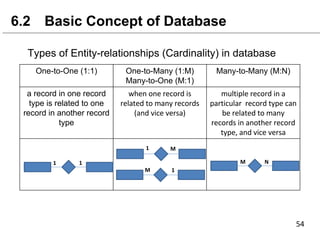
Types of Entity-relationships (Cardinality) in database
6.2 Basic Concept of Database
One-to-One (1:1) One-to-Many (1:M)
Many-to-One (M:1)
Many-to-Many (M:N)
a record in one record
type is related to one
record in another record
type
6.2 Basic Concept of Database
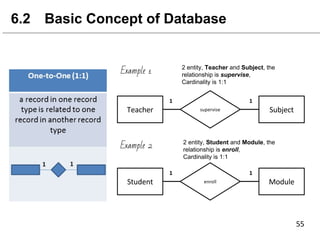
Example 1
Example 2
2 entity, Teacher and Subject, the
relationship is supervise,
Cardinality is 1:1
2 entity, Student and Module, the
relationship is enroll,
Cardinality is 1:1
6.2 Basic Concept of Database
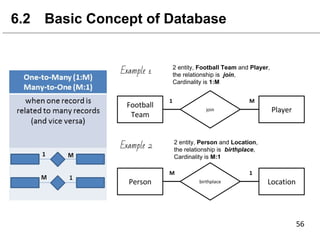
Example 1
Example 2
2 entity, Football Team and Player,
the relationship is join,
Cardinality is 1:M
2 entity, Person and Location,
the relationship is birthplace,
Cardinality is M:1
6.2 Basic Concept of Database
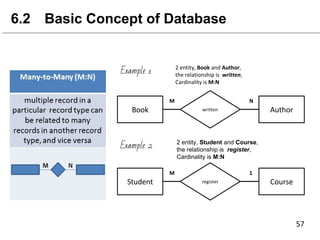
Example 1
Example 2 2 entity, Student and Course,
the relationship is register,
Cardinality is M:N
DATABASE
6.3 Database Object
Learning Outcome:
At the end of this topic,
students should be able to:
1. Explain the functions of database object
1
DATABASE
6.3 Database Object
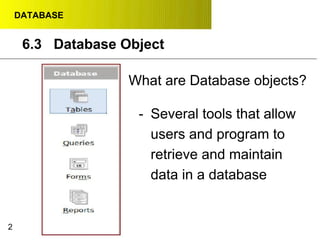
What are Database objects?
- Several tools that allow
users and program to
retrieve and maintain
data in a database
2
DATABASE
6.3 Database Object
Definition :
● A collection of records that identify a
category of data, such as Students,
Lecturers or Academic
● A collection of computer data that is
organized, defined and stored as rows and column
● Functions :
○ To arrange data in rows and columns.
○ To describe the characteristics of data
3
T
A
B
L
E
DATABASE
6.3 Database Object
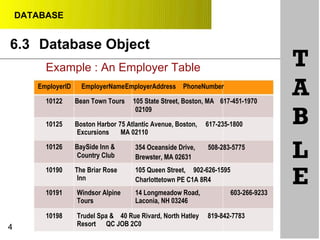
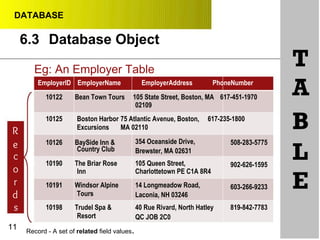
Example : An Employer Table
EmployerID EmployerNameEmployerAddress PhoneNumber
10122 Bean Town Tours 105 State Street, Boston, MA 617-451-1970
02109
10125 Boston Harbor 75 Atlantic Avenue, Boston, 617-235-1800
Excursions MA 02110
T
A
B
10126 BaySide Inn &
Country Club
10190 The Briar Rose
Inn
354 Oceanside Drive, 508-283-5775
Brewster, MA 02631
105 Queen Street, 902-626-1595
Charlottetown PE C1A 8R4
L
E10191 Windsor Alpine 14 Longmeadow Road, 603-266-9233
Tours Laconia, NH 03246
10198
4
Trudel Spa & 40 Rue Rivard, North Hatley 819-842-7783
Resort QC JOB 2C0
DATABASE
6.3 Database Object
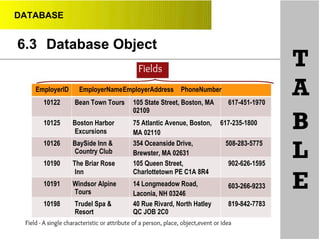
Fields
EmployerID EmployerNameEmployerAddress PhoneNumber
T
A10122 Bean Town Tours 105 State Street, Boston, MA 617-451-1970
02109
10125 Boston Harbor
Excursions
10126 BaySide Inn &
Country Club
75 Atlantic Avenue, Boston, 617-235-1800
MA 02110
354 Oceanside Drive, 508-283-5775
Brewster, MA 02631
B
L10190 The Briar Rose
Inn
10191 Windsor Alpine
Tours
105 Queen Street,
Charlottetown PE C1A 8R4
14 Longmeadow Road,
Laconia, NH 03246
902-626-1595
E603-266-9233
10198 Trudel Spa & 40 Rue Rivard, North Hatley 819-842-7783
Resort QC JOB 2C0
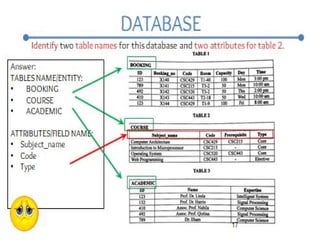
Field - A single characteristic or attribute of a person, place, object,event or idea
DATABASE
6.3 Database Object
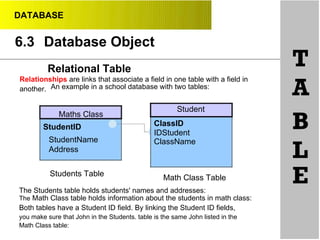
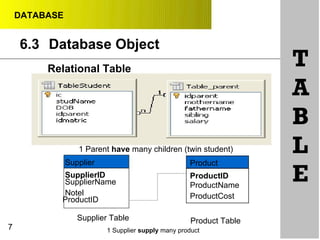
Relational Table
Relationships are links that associate a field in one table with a field in
another. An example in a school database with two tables:
T
A
Student
StudentID
StudentName
Address
Students Table
ClassID
IDStudent
ClassName
Math Class Table
B
L
EThe Students table holds students' names and addresses:
The Math Class table holds information about the students in math class:
Both tables have a Student ID field. By linking the Student ID fields,
you make sure that John in the Students. table is the same John listed in the
Math Class table:
Maths Class
DATABASE
6.3 Database Object
Relational Table
1 Parent have many children (twin student)
T
A
B
L
7
Supplier
SupplierID
SupplierName
Notel
ProductID
Supplier Table
Product
ProductID
ProductName
ProductCost
Product Table
E
1 Supplier supply many product
DATABASE
6.3 Database Object
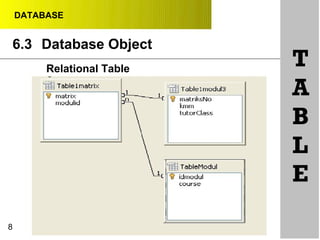
Relational Table
8
T
A
B
L
E
DATABASE
6.3 Database Object
•
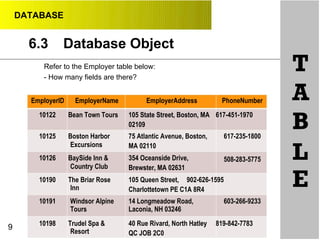
Refer to the Employer table below:
- How many fields are there?
T
AEmployerID EmployerName EmployerAddress PhoneNumber
10122 Bean Town Tours 105 State Street, Boston, MA 617-451-1970
02109 B10125 Boston Harbor
Excursions
10126 BaySide Inn &
Country Club
75 Atlantic Avenue, Boston,
MA 02110
354 Oceanside Drive,
Brewster, MA 02631
617-235-1800
L508-283-5775
10190 The Briar Rose
Inn
105 Queen Street, 902-626-1595
Charlottetown PE C1A 8R4
E
10191 Windsor Alpine 14 Longmeadow Road, 603-266-9233
Tours Laconia, NH 03246
9 10198 Trudel Spa &
Resort
40 Rue Rivard, North Hatley 819-842-7783
QC JOB 2C0
DATABASE
6.3 Database Object
10
T
A
B
L
E
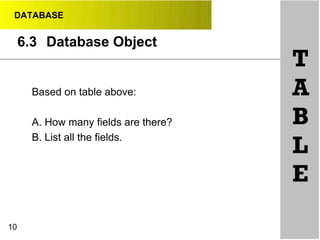
Based on table above:
A. How many fields are there?
B. List all the fields.
DATABASE
6.3 Database Object
Eg: An Employer Table
EmployerID EmployerName EmployerAddress PhoneNumber
10122 Bean Town Tours 105 State Street, Boston, MA 617-451-1970
02109
T
A
10125
R
Boston Harbor 75 Atlantic Avenue, Boston, 617-235-1800
Excursions MA 02110 B
e
c
o
r
d
s
11
10126 BaySide Inn &
Country Club
10190 The Briar Rose
Inn
10191 Windsor Alpine
Tours
10198 Trudel Spa &
Resort
354 Oceanside Drive,
Brewster, MA 02631
105 Queen Street,
Charlottetown PE C1A 8R4
14 Longmeadow Road,
Laconia, NH 03246
40 Rue Rivard, North Hatley
QC JOB 2C0
508-283-5775
L902-626-1595
E603-266-9233
819-842-7783
Record - A set of related field values.
DATABASE
6.3
12
Database Object
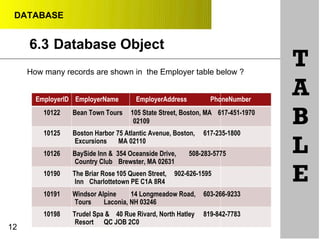
How many records are shown in the Employer table below ?
EmployerID EmployerName EmployerAddress PhoneNumber
10122 Bean Town Tours 105 State Street, Boston, MA 617-451-1970
02109
10125 Boston Harbor 75 Atlantic Avenue, Boston, 617-235-1800
Excursions MA 02110
10126 BaySide Inn & 354 Oceanside Drive, 508-283-5775
Country Club Brewster, MA 02631
10190 The Briar Rose 105 Queen Street, 902-626-1595
Inn Charlottetown PE C1A 8R4
10191 Windsor Alpine 14 Longmeadow Road, 603-266-9233
Tours Laconia, NH 03246
10198 Trudel Spa & 40 Rue Rivard, North Hatley 819-842-7783
Resort QC JOB 2C0
T
A
B
L
E
DATABASE
6.3 Database Object
Description characteristic of data
•
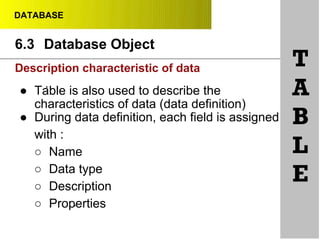
● Table is also used to describe the
characteristics of data (data definition)
● During data definition, each field is assigned
with :
○ Name
○ Data type
○ Description
○ Properties•
T
A
B
L
E
DATABASE
6.3 Database Object
•
•
Definition:
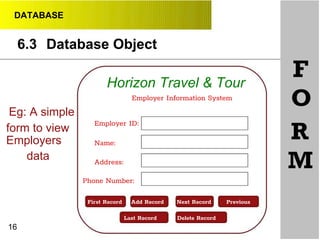
● A window on the screen that provides areas
for entering or modifying data in a database
● Functions :
○ To retrieve and maintaining, viewing and
printing records in a database.
○ Present a friendlier interface than a table.
○ Allows viewing data one record at a time
F
O
R
M
15
DATABASE
6.3 Database Object
Horizon Travel & Tour
Employer Information System
Eg: A simple
Employer ID:
F
O
form to view
Employers
data
16
Name:
Address:
Phone Number:
First Record
R
M
Add Record
Delete RecordLast Record
PreviousNext Record
DATABASE
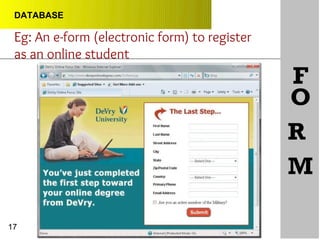
Eg: An e-form (electronic form) to register
as an online student
F
O
R
M
17
DATABASE
6.3
18
Database Object
Definition
- A request for specific data from the database (retrieve
data) such as display the Employer which located in
Boston.
A query is essentialy a question. For example, you
might ask, “Which records in the Student table live
in Ipoh?”the DBMS will look for the records in the
tables you have specified, find those that match
the criteria you have defined, and displays them in
a datasheet
Q
U
E
R
Y
DATABASE
6.3 Database Object
•
19
Functions:
- Specifies which records should be retrieved by
specifying criteria.
eg: Display the Employer which
located in Boston.
- Can specify the fields to be displayed.
eg: User only want to know the
Employer Name and Phone
Number, so query will select ONLY
the EmployerName and
PhoneNumber fields to be displayed.
Q
U
E
R
Y
DATABASE
6.3 Database Object
20
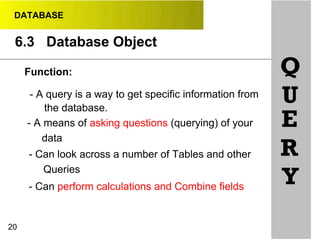
Function:
- A query is a way to get specific information from
the database.
- A means of asking questions (querying) of your
data
- Can look across a number of Tables and other
Queries
- Can perform calculations and Combine fields
Q
U
E
R
Y
DATABASE
•
•
•
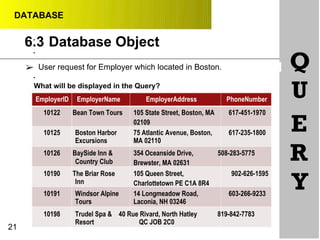
➢ User request for Employer which located in Boston.
What will be displayed in the Query?
EmployerID EmployerName EmployerAddress PhoneNumber
Q
U
10122 Bean Town Tours 105 State Street, Boston, MA
02109
617-451-1970
E10125 Boston Harbor 75 Atlantic Avenue, Boston, 617-235-1800
Excursions MA 02110
10126 BaySide Inn &
Country Club
10190 The Briar Rose
Inn
354 Oceanside Drive, 508-283-5775
Brewster, MA 02631
105 Queen Street, 902-626-1595
Charlottetown PE C1A 8R4
R
Y10191 Windsor Alpine 14 Longmeadow Road, 603-266-9233
Tours Laconia, NH 03246
10198
21
Trudel Spa & 40 Rue Rivard, North Hatley 819-842-7783
Resort QC JOB 2C0
Database Object6.3
DATABASE
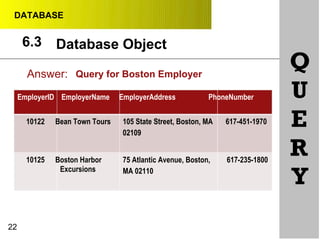
Answer:
EmployerID EmployerName EmployerAddress PhoneNumber
Q
U
10122 Bean Town Tours
10125 Boston Harbor
Excursions
105 State Street, Boston, MA 617-451-1970
02109
75 Atlantic Avenue, Boston, 617-235-1800
MA 02110
E
R
Y
22
Query for Boston Employer
Database Object6.3
DATABASE
•
•
•
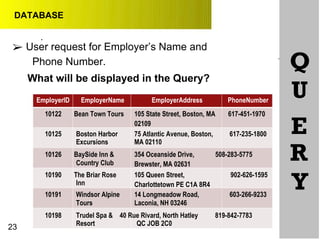
➢ User request for Employer’s Name and
Phone Number.
What will be displayed in the Query?
Q
UEmployerID EmployerName EmployerAddress PhoneNumber
10122 Bean Town Tours 105 State Street, Boston, MA 617-451-1970
02109
E10125 Boston Harbor 75 Atlantic Avenue, Boston, 617-235-1800
Excursions MA 02110
10126 BaySide Inn &
Country Club
10190 The Briar Rose
Inn
354 Oceanside Drive, 508-283-5775
Brewster, MA 02631
105 Queen Street, 902-626-1595
Charlottetown PE C1A 8R4
R
Y10191 Windsor Alpine 14 Longmeadow Road, 603-266-9233
Tours Laconia, NH 03246
10198
23
Trudel Spa & 40 Rue Rivard, North Hatley 819-842-7783
Resort QC JOB 2C0
DATABASE
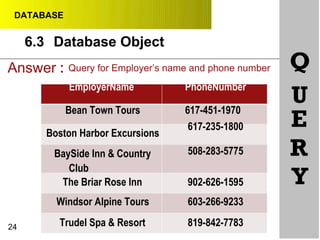
Answer : Query for Employer’s name and phone number Q
EmployerName
Bean Town Tours
Boston Harbor Excursions
BaySide Inn & Country
Club
The Briar Rose Inn
PhoneNumber
617-451-1970
617-235-1800
508-283-5775
902-626-1595
U
E
R
Y
Windsor Alpine Tours 603-266-9233
24 Trudel Spa & Resort 819-842-7783
Database Object6.3
DATABASE
6.3 Database Object
R•
•
25
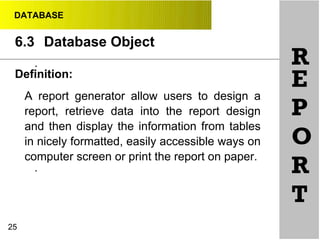
Definition:
A report generator allow users to design a
report, retrieve data into the report design
and then display the information from tables
in nicely formatted, easily accessible ways on
computer screen or print the report on paper.
E
P
O
R
T
DATABASE
6.3 Database Object
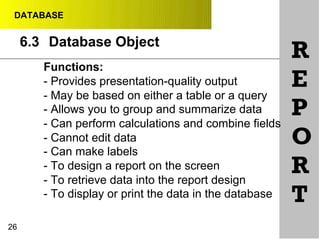
Functions:
- Provides presentation-quality output
- May be based on either a table or a query
- Allows you to group and summarize data
- Can perform calculations and combine fields
- Cannot edit data
- Can make labels
- To design a report on the screen
- To retrieve data into the report design
- To display or print the data in the database
26
R
E
P
O
R
T
DATABASE
6.3 Database Object
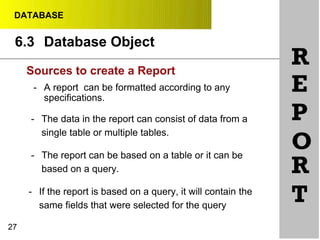
RSources to create a Report
27
- A report can be formatted according to any
specifications.
- The data in the report can consist of data from a
single table or multiple tables.
- The report can be based on a table or it can be
based on a query.
- If the report is based on a query, it will contain the
same fields that were selected for the query
E
P
O
R
T
DATABASE
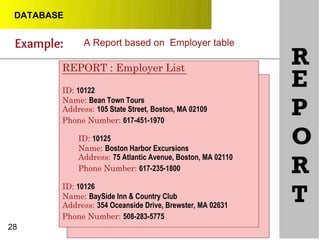
Example:
RREPORT : Employer List
ID: 10122
Name: Bean Town Tours
Address: 105 State Street, Boston, MA 02109
Phone Number: 617-451-1970
ID: 10125
Name: Boston Harbor Excursions
Address: 75 Atlantic Avenue, Boston, MA 02110
Phone Number: 617-235-1800
ID: 10126
Name: BaySide Inn & Country Club
Address: 354 Oceanside Drive, Brewster, MA 02631
Phone Number: 508-283-5775
28
E
P
O
R
T
A Report based on Employer table
DATABASE
R
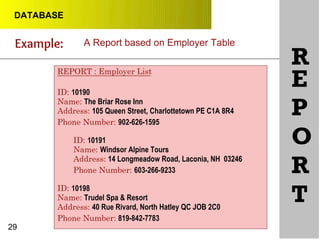
29
REPORT : Employer List
ID: 10190
Name: The Briar Rose Inn
Address: 105 Queen Street, Charlottetown PE C1A 8R4
Phone Number: 902-626-1595
ID: 10191
Name: Windsor Alpine Tours
Address: 14 Longmeadow Road, Laconia, NH 03246
Phone Number: 603-266-9233
ID: 10198
Name: Trudel Spa & Resort
Address: 40 Rue Rivard, North Hatley QC JOB 2C0
Phone Number: 819-842-7783
E
P
O
R
T
Example: A Report based on Employer Table
DATABASE
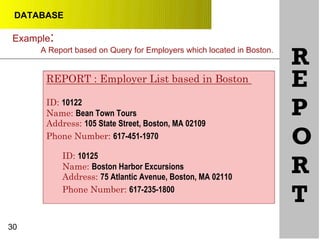
Example:
A Report based on Query for Employers which located in Boston.
R
30
REPORT : Employer List based in Boston
ID: 10122
Name: Bean Town Tours
Address: 105 State Street, Boston, MA 02109
Phone Number: 617-451-1970
ID: 10125
Name: Boston Harbor Excursions
Address: 75 Atlantic Avenue, Boston, MA 02110
Phone Number: 617-235-1800
E
P
O
R
T
DATABASE
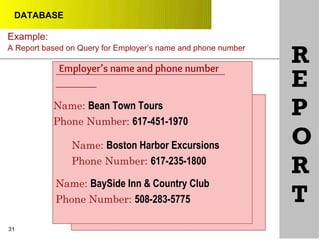
Example:
A Report based on Query for Employer’s name and phone number
Name: Bean Town Tours
Phone Number: 617-451-1970
Name: Boston Harbor Excursions
Phone Number: 617-235-1800
Name: BaySide Inn & Country Club
Phone Number: 508-283-5775
R
E
P
O
R
T
31
Employer’s name and phone number
DATABASE
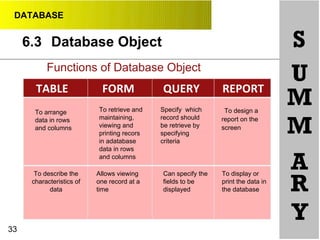
6.3 Database Object S
Functions of Database Object
To design a
report on the
screen
U
M
M
A
R
Y33
To arrange
data in rows
and columns
To describe the
characteristics of
data
To retrieve and
maintaining,
viewing and
printing recors
in adatabase
data in rows
and columns
Allows viewing
one record at a
time
Specify which
record should
be retrieve by
specifying
criteria
Can specify the
fields to be
displayed
To display or
print the data in
the database
Tips !!!
Database
DATABASE
REFERENCES
Petersen, J. V. (2002). Absolute Beginner's Guide to
Databases. Indianapolis, IN: Que.
Shelly, G.B., & Vermaat, M. (2012). Discovering computers:
Your interactive guide to the digital world. Boston, MA:
Course Technology/ Cengage Learning.
Vaughan, T. (2011). Multimedia: Making it work. New York:
McGraw-Hill.
34

Chapter 6 Database SC025 2017/2018

  • 1.
    TOPIC 6 DATABASE 6.1 Introductionto Database 6.2 Basic Concept of Database 6.3 Database Object DATABASE
  • 2.
    6.1 Introduction toDatabase At the end of this topic, students should be able to: 1. Define ● Database ● Database Management System (DBMS) 2. Describe advantages and disadvantages of database DATABASE Learning Outcomes
  • 3.
    DATABASE 6.1 Introduction toDatabase Database ● Can be define as ; ● An integrated collection of related data OR ● Collection of data organized in a manner that allows access, retrieval, and use of that data – Shelly & Varmaat, 2012, OR ● A collection of data, manage and organized by a database management system – Petersen, 2002 ● Related data, e.g. : information stored in University (students, courses, faculty, students taking courses, faculty teaching courses … ) ● Integrated: all data is stored in a uniform way on secondary storage.
  • 4.
    DATABASE 6.1 Introduction toDatabase Database Management System (DBMS) ● Can be define as ; ● A collection of programs that is used to create, maintain and manipulate data in the database, OR ● Specific type of software for creating, storing, organizing and accessing data from a database. ● Provide an interface between the database and its users and other application programs ● DBA, a database administrator is the people responsible for managing database, who sets up and manage a database.
  • 5.
    DATABASE 6.1 Introduction toDatabase DBMS’s example software
  • 6.
    File System versusDatabases Almost all application programs use either these two approaches (in managing data and information); DATABASE 6.1 Introduction to Database
  • 7.
    ● Each departmentin an organization has its own set of files. ● The records in one file may not relate to the records in any other file. ● Organizations have used file processing systems for many years. DATABASE 6.1 Introduction to Database
  • 8.
    ● Weakness 1, redundancy of data Each department in an organization has its own set of files ● Weakness 2 , isolation of data The records in one file may not relate to the records in any other file. ● Weakness 3 , hard to maintain security of data and information stored in files Organizations have used file processing systems for many years. DATABASE 6.1 Introduction to Database
  • 9.
    ● Database system –many programs and users share the data in the database. ● Example 1: a school’s database most likely at a minimum contains data about students, instructors, schedule of classes, and student schedules. ● Example 2: a library’s database stored data about book’s title, the author, ISBN number. DATABASE 6.1 Introduction to Database
  • 10.
    Database System, graphical representationof a School Database DATABASE 6.1 Introduction to Database
  • 11.
  • 12.
    Advantages 1. Sharing data -data in a database environment is shared over a network. 2. Easier Access - better data accessibility using standard data query language (SQL). allows end-user to access and maintain data. 3. Reduced data redundancy - reduce data redundancy/duplication by improving data sharing. DATABASE 6.1 Introduction to Database
  • 13.
    Advantages (continued) 4. Security -improved data security (backup recovery, concurrency, access control) 5. Reduced development time - is easy and fast to develop programs 6. Higher data integrity - increasing data integrity through data independence from applications program 7. improve data quality - reducing update errors (using same format) thus increasing data consistency DATABASE 6.1 Introduction to Database
  • 14.
    Disadvantages 1. Complex, difficult,and time consuming to design 2. Special training required for all programmers and users 3. Require more memory, storage and processing power 4. Expensive hardware and software cost to setup database 5. Extensive conversion costs in moving from a file-based system to a database system DATABASE 6.1 Introduction to Database
  • 15.
    6.2 Basic Conceptof Database At the end of this topic, students should be able to: 1. Explain the basic concept of database DATABASE Learning Outcomes
  • 16.
    6.2 Basic Conceptof Database
  • 17.
    6.2 Basic Conceptof Database
  • 18.
  • 19.
    ● Data Hierarchy –refers to the organization of data in a database. ● table/s or file/s ● record/s (in rows) ● field/s (in columns) ● character 6.2 Basic Concept of Database
  • 20.
    ● Data Hierarchy –a database contains one or more tables. A table contains a number of records. A record contains one or more fields. 6.2 Basic Concept of Database
  • 21.
    ● Data Hierarchy –a database files stored on disk (usually stored in the form of tables) , each files has its own records and each records has its own fields. 6.2 Basic Concept of Database
  • 22.
    6.2 Basic Conceptof Database Adding new contact in Samsung Galaxy S III 6.2 Basic Concept of Database
  • 23.
    ● touch onthe Apps icon – The one with rectangle grid ● touch on Contact icon 6.2 Basic Concept of Database
  • 24.
    6.2 Basic Conceptof Database touch on plus symbol (+) to open up a new Create contact screen User will able to see the Create contact screen, and fill in the Name’s field and etc and user have the option to add another field, such as Mobile, Home, Address, Email’s field and etc
  • 25.
    touch on Save tokeep the new contact (that you’ve just added) in your phone 6.2 Basic Concept of Database • Contact Management features in any mobile phone is an example of database in your device (because it is an organized collection of data – your friend’s contact number stored in your phone) • Create contact enable you to see many field (NAME, MOBILE, HOME .. ) – in that case it is a table with a lot of fields (depends on user to add or to remove fields) • When you Save, you actually saving – a record in your phone. Explain:
  • 26.
    6.2 Basic Conceptof Database Contact Management features in any mobile phone is an example of database in your device (because it is an organized collection of data – your friend’s contact number stored in your phone) Create contact enable you to see many field (NAME, MOBILE, HOME .. ) – in that case it is a table with a lot of fields (depends on user to add or to remove fields) When you Save, you actually saving – a record in your phone.
  • 27.
    TABLE RECORD FIELD •also known as database file/s. • organized data in rows and columns. • contain fields (column) and records (row). • Data file – collection of related records, stored in any available storage medium. • also known as rows/tuple. • Contains data values (name for a person, of a product, an ID for student). • a collections of related fields in a database. • also represent a data attributes (describing an entity). • also known as a columns • contains a specific category of data within a record. • single category of data to be stored in database. • field name – uniquely identifies each field. • field size – defines the maximum of characters a field can contain. 6.2 Basic Concept of Database
  • 28.
    6.2 Basic Conceptof Database
  • 29.
    6.2 Basic Conceptof Database
  • 30.
    6.2 Basic Conceptof Database Field
  • 31.
  • 32.
    6.2 Basic Conceptof Database a *repository in database, contains data about files in the database and each field in those files - Shelly & Vermaat, 2012
  • 33.
    6.2 Basic Conceptof Database a *repository in the form of book, contains visual data and information about certain topics – SeAm 2014
  • 34.
    6.2 Basic Conceptof Database List 3 - 4 examples of data that can be extract from student. Imagine you are at the bus stop, suddenly one female student that you’ve already admire, walk to the bus stop and sit near you. Ok man, what will you do ?
  • 35.
    6.2 Basic Conceptof Database
  • 36.
    6.2 Basic Conceptof Database Data Dictionary has a field name for DBA to set a name for specific field and for each Field Name DBA need to set the type of data (data values) for the field name Descriptions is a brief information about field name
  • 37.
    Data Type (indatabase) - specifies the kind of data a field can contain and how the field is used 6.2 Basic Concept of Database
  • 38.
    DATA TYPE DESCRIPTIONS Textstore data that is not manipulated arithmetically Number store numeric data, arithmetically can be manipulated (integer, decimal – are available) Currency special for numeric data that represents money (output with currency signs, decimal points and commas.) Yes/No store logical data, can only contains one from two-values (often appear as checkboxes) Date/Time store dates and times as values, can be sorted, added, or manipulated (has several formats to choose from) Memo store large block of text, can’t be arithmetically manipulated or compared, but can be edited and displayed. Hyperlink store hyperlinks to web pages, email addresses, or even a files. Attachment contains images, documents, other types of files supported by the DBMS program being used. 6.2 Basic Concept of Database
  • 39.
    Primary Key and Foreign Key 6.2Basic Concept of Database
  • 40.
    6.2 Basic Conceptof Database
  • 41.
    6.2 Basic Conceptof Database Primary Key (in database) – a field, uniquely identifies each record in a file. • also known as a key field • data (in the field) is unique. • can be used to integrate data in database.
  • 42.
    6.2 Basic Conceptof Database Primary Key (PK) (in database) – should follow the listed rules (in order to use it in database) • PK must contain a value – that is must be declared (NOT NULL). • PK value must be unique for each record (row). • PK value must no change or become NULL Benefits of using primary key (in database) ; • ensuring there’s no duplicate records in database. • preventing a NULL value being entered in unique field.
  • 43.
    6.2 Basic Conceptof Database Foreign Key (in database) – a field in relational table, that matches primary key column of another table. Explain: 1st Table 2nd Table Relational / Relationships Line Connecting 1st and 2nd Table
  • 44.
    6.2 Basic Conceptof Database Explain: Foreign Key (in database) – a field in relational table, that matches primary key column of another table. Remember ! • From the image, there are 2 tables. 1 Contact_Samsun.. And #2 is Hostel Info. Both has been connected, thus makes the table is a relational table. • In Table #1, Contact_Samsun… , field Matric_Num is the PK, and there are not Foreign Key in table 1. • In Table #2, Hostel Info, field Room Num is the PK (for that table), and Matric_Num is the Foreign Key (because it matches primary key form another table ,Table #1).
  • 45.
    6.2 Basic Conceptof Database Conclusion: Foreign Key (in database) – a field in relational table, that matches primary key column of another table. Remember ! A foreign key (sometimes called a referencing key) is ; • key used to link two tables together. • taking primary key field from one table and insert it into the other table (where it becomes a foreign key).
  • 46.
    6.2 Basic Conceptof Database
  • 47.
    6.2 Basic Conceptof Database
  • 48.
    Primary Key &Foreign Key Differences of primary key and foreign key; - Primary can contain only unique value while foreign key may contain duplicate value. Importance of relationship between the Primary Key and Foreign Key - The primary key of one table becomes a foreign of other table (by matching a foreign key with a primary key, there is no need to enter data repeatedly) - Making the process (query, form, reports) easier. - Improves data performance by relating smaller tables into meaningful databases. 6.2 Basic Concept of Database
  • 49.
    Entity Relationship 6.2 BasicConcept of Database - A data model that describes data and information, implemented in a relational database
  • 50.
    Entity • Something ofimportance to the organization. • Entities that the organization wants to store data about typically becomes a database table. • Person, place, object, event or concept in the user environment about which the organization wishes to maintain data. • “thing” or object that contain data. • Represented by a rectangle in E-R (entity-relationship) diagrams 6.2 Basic Concept of Database Relationship • An association between data that's stored in different record types. • Important because typically describes an association between two or more entities. Cardinality • Important aspect of the relationship between record types. • Number of associations that can exist between two record types. Attributes • Characteristic of an entity. • Property of an entity set
  • 51.
    6.2 Basic Conceptof Database TERM EXAMPLES Entity (a noun) Product, Name, Book, Student, Model, Lecturer, Staff Relationship (a verb) order, register, claim, enroll, pay. Cardinality (type of relationship) One-to-One (1:1) One-to-Many (1:M) Many-to-One (M:1) Many-to-Many (M:N) Attribute (entity’s property) product_serial_num, product_price, product_name
  • 52.
    TERM DIAGRAM SYMBOL Entity(a noun) rectangle/square Relationship (a verb) a diamond shape Cardinality (type of relationship) writing type of relationship on each relationship lines Attribute (entity’s property) an oval shape 6.2 Basic Concept of Database
  • 53.
    6.2 Basic Conceptof Database Example of ER-Diagram (Entity-Relationship Diagram) Identify • How many entity are there in the ER-diagram ? • Which entity has the most attributes ? • List the attributes for entity label Mark • What is the relationship between Student and Teacher ?
  • 54.
    Types of Entity-relationships(Cardinality) in database 6.2 Basic Concept of Database One-to-One (1:1) One-to-Many (1:M) Many-to-One (M:1) Many-to-Many (M:N) a record in one record type is related to one record in another record type
  • 55.
    6.2 Basic Conceptof Database Example 1 Example 2 2 entity, Teacher and Subject, the relationship is supervise, Cardinality is 1:1 2 entity, Student and Module, the relationship is enroll, Cardinality is 1:1
  • 56.
    6.2 Basic Conceptof Database Example 1 Example 2 2 entity, Football Team and Player, the relationship is join, Cardinality is 1:M 2 entity, Person and Location, the relationship is birthplace, Cardinality is M:1
  • 57.
    6.2 Basic Conceptof Database Example 1 Example 2 2 entity, Student and Course, the relationship is register, Cardinality is M:N
  • 58.
    DATABASE 6.3 Database Object LearningOutcome: At the end of this topic, students should be able to: 1. Explain the functions of database object 1
  • 59.
    DATABASE 6.3 Database Object Whatare Database objects? - Several tools that allow users and program to retrieve and maintain data in a database 2
  • 60.
    DATABASE 6.3 Database Object Definition: ● A collection of records that identify a category of data, such as Students, Lecturers or Academic ● A collection of computer data that is organized, defined and stored as rows and column ● Functions : ○ To arrange data in rows and columns. ○ To describe the characteristics of data 3 T A B L E
  • 61.
    DATABASE 6.3 Database Object Example: An Employer Table EmployerID EmployerNameEmployerAddress PhoneNumber 10122 Bean Town Tours 105 State Street, Boston, MA 617-451-1970 02109 10125 Boston Harbor 75 Atlantic Avenue, Boston, 617-235-1800 Excursions MA 02110 T A B 10126 BaySide Inn & Country Club 10190 The Briar Rose Inn 354 Oceanside Drive, 508-283-5775 Brewster, MA 02631 105 Queen Street, 902-626-1595 Charlottetown PE C1A 8R4 L E10191 Windsor Alpine 14 Longmeadow Road, 603-266-9233 Tours Laconia, NH 03246 10198 4 Trudel Spa & 40 Rue Rivard, North Hatley 819-842-7783 Resort QC JOB 2C0
  • 62.
    DATABASE 6.3 Database Object Fields EmployerIDEmployerNameEmployerAddress PhoneNumber T A10122 Bean Town Tours 105 State Street, Boston, MA 617-451-1970 02109 10125 Boston Harbor Excursions 10126 BaySide Inn & Country Club 75 Atlantic Avenue, Boston, 617-235-1800 MA 02110 354 Oceanside Drive, 508-283-5775 Brewster, MA 02631 B L10190 The Briar Rose Inn 10191 Windsor Alpine Tours 105 Queen Street, Charlottetown PE C1A 8R4 14 Longmeadow Road, Laconia, NH 03246 902-626-1595 E603-266-9233 10198 Trudel Spa & 40 Rue Rivard, North Hatley 819-842-7783 Resort QC JOB 2C0 Field - A single characteristic or attribute of a person, place, object,event or idea
  • 63.
    DATABASE 6.3 Database Object RelationalTable Relationships are links that associate a field in one table with a field in another. An example in a school database with two tables: T A Student StudentID StudentName Address Students Table ClassID IDStudent ClassName Math Class Table B L EThe Students table holds students' names and addresses: The Math Class table holds information about the students in math class: Both tables have a Student ID field. By linking the Student ID fields, you make sure that John in the Students. table is the same John listed in the Math Class table: Maths Class
  • 64.
    DATABASE 6.3 Database Object RelationalTable 1 Parent have many children (twin student) T A B L 7 Supplier SupplierID SupplierName Notel ProductID Supplier Table Product ProductID ProductName ProductCost Product Table E 1 Supplier supply many product
  • 65.
  • 66.
    DATABASE 6.3 Database Object • Referto the Employer table below: - How many fields are there? T AEmployerID EmployerName EmployerAddress PhoneNumber 10122 Bean Town Tours 105 State Street, Boston, MA 617-451-1970 02109 B10125 Boston Harbor Excursions 10126 BaySide Inn & Country Club 75 Atlantic Avenue, Boston, MA 02110 354 Oceanside Drive, Brewster, MA 02631 617-235-1800 L508-283-5775 10190 The Briar Rose Inn 105 Queen Street, 902-626-1595 Charlottetown PE C1A 8R4 E 10191 Windsor Alpine 14 Longmeadow Road, 603-266-9233 Tours Laconia, NH 03246 9 10198 Trudel Spa & Resort 40 Rue Rivard, North Hatley 819-842-7783 QC JOB 2C0
  • 67.
    DATABASE 6.3 Database Object 10 T A B L E Basedon table above: A. How many fields are there? B. List all the fields.
  • 68.
    DATABASE 6.3 Database Object Eg:An Employer Table EmployerID EmployerName EmployerAddress PhoneNumber 10122 Bean Town Tours 105 State Street, Boston, MA 617-451-1970 02109 T A 10125 R Boston Harbor 75 Atlantic Avenue, Boston, 617-235-1800 Excursions MA 02110 B e c o r d s 11 10126 BaySide Inn & Country Club 10190 The Briar Rose Inn 10191 Windsor Alpine Tours 10198 Trudel Spa & Resort 354 Oceanside Drive, Brewster, MA 02631 105 Queen Street, Charlottetown PE C1A 8R4 14 Longmeadow Road, Laconia, NH 03246 40 Rue Rivard, North Hatley QC JOB 2C0 508-283-5775 L902-626-1595 E603-266-9233 819-842-7783 Record - A set of related field values.
  • 69.
    DATABASE 6.3 12 Database Object How manyrecords are shown in the Employer table below ? EmployerID EmployerName EmployerAddress PhoneNumber 10122 Bean Town Tours 105 State Street, Boston, MA 617-451-1970 02109 10125 Boston Harbor 75 Atlantic Avenue, Boston, 617-235-1800 Excursions MA 02110 10126 BaySide Inn & 354 Oceanside Drive, 508-283-5775 Country Club Brewster, MA 02631 10190 The Briar Rose 105 Queen Street, 902-626-1595 Inn Charlottetown PE C1A 8R4 10191 Windsor Alpine 14 Longmeadow Road, 603-266-9233 Tours Laconia, NH 03246 10198 Trudel Spa & 40 Rue Rivard, North Hatley 819-842-7783 Resort QC JOB 2C0 T A B L E
  • 70.
    DATABASE 6.3 Database Object Descriptioncharacteristic of data • ● Table is also used to describe the characteristics of data (data definition) ● During data definition, each field is assigned with : ○ Name ○ Data type ○ Description ○ Properties• T A B L E
  • 71.
    DATABASE 6.3 Database Object • • Definition: ●A window on the screen that provides areas for entering or modifying data in a database ● Functions : ○ To retrieve and maintaining, viewing and printing records in a database. ○ Present a friendlier interface than a table. ○ Allows viewing data one record at a time F O R M 15
  • 72.
    DATABASE 6.3 Database Object HorizonTravel & Tour Employer Information System Eg: A simple Employer ID: F O form to view Employers data 16 Name: Address: Phone Number: First Record R M Add Record Delete RecordLast Record PreviousNext Record
  • 73.
    DATABASE Eg: An e-form(electronic form) to register as an online student F O R M 17
  • 74.
    DATABASE 6.3 18 Database Object Definition - Arequest for specific data from the database (retrieve data) such as display the Employer which located in Boston. A query is essentialy a question. For example, you might ask, “Which records in the Student table live in Ipoh?”the DBMS will look for the records in the tables you have specified, find those that match the criteria you have defined, and displays them in a datasheet Q U E R Y
  • 75.
    DATABASE 6.3 Database Object • 19 Functions: -Specifies which records should be retrieved by specifying criteria. eg: Display the Employer which located in Boston. - Can specify the fields to be displayed. eg: User only want to know the Employer Name and Phone Number, so query will select ONLY the EmployerName and PhoneNumber fields to be displayed. Q U E R Y
  • 76.
    DATABASE 6.3 Database Object 20 Function: -A query is a way to get specific information from the database. - A means of asking questions (querying) of your data - Can look across a number of Tables and other Queries - Can perform calculations and Combine fields Q U E R Y
  • 77.
    DATABASE • • • ➢ User requestfor Employer which located in Boston. What will be displayed in the Query? EmployerID EmployerName EmployerAddress PhoneNumber Q U 10122 Bean Town Tours 105 State Street, Boston, MA 02109 617-451-1970 E10125 Boston Harbor 75 Atlantic Avenue, Boston, 617-235-1800 Excursions MA 02110 10126 BaySide Inn & Country Club 10190 The Briar Rose Inn 354 Oceanside Drive, 508-283-5775 Brewster, MA 02631 105 Queen Street, 902-626-1595 Charlottetown PE C1A 8R4 R Y10191 Windsor Alpine 14 Longmeadow Road, 603-266-9233 Tours Laconia, NH 03246 10198 21 Trudel Spa & 40 Rue Rivard, North Hatley 819-842-7783 Resort QC JOB 2C0 Database Object6.3
  • 78.
    DATABASE Answer: EmployerID EmployerName EmployerAddressPhoneNumber Q U 10122 Bean Town Tours 10125 Boston Harbor Excursions 105 State Street, Boston, MA 617-451-1970 02109 75 Atlantic Avenue, Boston, 617-235-1800 MA 02110 E R Y 22 Query for Boston Employer Database Object6.3
  • 79.
    DATABASE • • • ➢ User requestfor Employer’s Name and Phone Number. What will be displayed in the Query? Q UEmployerID EmployerName EmployerAddress PhoneNumber 10122 Bean Town Tours 105 State Street, Boston, MA 617-451-1970 02109 E10125 Boston Harbor 75 Atlantic Avenue, Boston, 617-235-1800 Excursions MA 02110 10126 BaySide Inn & Country Club 10190 The Briar Rose Inn 354 Oceanside Drive, 508-283-5775 Brewster, MA 02631 105 Queen Street, 902-626-1595 Charlottetown PE C1A 8R4 R Y10191 Windsor Alpine 14 Longmeadow Road, 603-266-9233 Tours Laconia, NH 03246 10198 23 Trudel Spa & 40 Rue Rivard, North Hatley 819-842-7783 Resort QC JOB 2C0
  • 80.
    DATABASE Answer : Queryfor Employer’s name and phone number Q EmployerName Bean Town Tours Boston Harbor Excursions BaySide Inn & Country Club The Briar Rose Inn PhoneNumber 617-451-1970 617-235-1800 508-283-5775 902-626-1595 U E R Y Windsor Alpine Tours 603-266-9233 24 Trudel Spa & Resort 819-842-7783 Database Object6.3
  • 81.
    DATABASE 6.3 Database Object R• • 25 Definition: Areport generator allow users to design a report, retrieve data into the report design and then display the information from tables in nicely formatted, easily accessible ways on computer screen or print the report on paper. E P O R T
  • 82.
    DATABASE 6.3 Database Object Functions: -Provides presentation-quality output - May be based on either a table or a query - Allows you to group and summarize data - Can perform calculations and combine fields - Cannot edit data - Can make labels - To design a report on the screen - To retrieve data into the report design - To display or print the data in the database 26 R E P O R T
  • 83.
    DATABASE 6.3 Database Object RSourcesto create a Report 27 - A report can be formatted according to any specifications. - The data in the report can consist of data from a single table or multiple tables. - The report can be based on a table or it can be based on a query. - If the report is based on a query, it will contain the same fields that were selected for the query E P O R T
  • 84.
    DATABASE Example: RREPORT : EmployerList ID: 10122 Name: Bean Town Tours Address: 105 State Street, Boston, MA 02109 Phone Number: 617-451-1970 ID: 10125 Name: Boston Harbor Excursions Address: 75 Atlantic Avenue, Boston, MA 02110 Phone Number: 617-235-1800 ID: 10126 Name: BaySide Inn & Country Club Address: 354 Oceanside Drive, Brewster, MA 02631 Phone Number: 508-283-5775 28 E P O R T A Report based on Employer table
  • 85.
    DATABASE R 29 REPORT : EmployerList ID: 10190 Name: The Briar Rose Inn Address: 105 Queen Street, Charlottetown PE C1A 8R4 Phone Number: 902-626-1595 ID: 10191 Name: Windsor Alpine Tours Address: 14 Longmeadow Road, Laconia, NH 03246 Phone Number: 603-266-9233 ID: 10198 Name: Trudel Spa & Resort Address: 40 Rue Rivard, North Hatley QC JOB 2C0 Phone Number: 819-842-7783 E P O R T Example: A Report based on Employer Table
  • 86.
    DATABASE Example: A Report basedon Query for Employers which located in Boston. R 30 REPORT : Employer List based in Boston ID: 10122 Name: Bean Town Tours Address: 105 State Street, Boston, MA 02109 Phone Number: 617-451-1970 ID: 10125 Name: Boston Harbor Excursions Address: 75 Atlantic Avenue, Boston, MA 02110 Phone Number: 617-235-1800 E P O R T
  • 87.
    DATABASE Example: A Report basedon Query for Employer’s name and phone number Name: Bean Town Tours Phone Number: 617-451-1970 Name: Boston Harbor Excursions Phone Number: 617-235-1800 Name: BaySide Inn & Country Club Phone Number: 508-283-5775 R E P O R T 31 Employer’s name and phone number
  • 88.
    DATABASE 6.3 Database ObjectS Functions of Database Object To design a report on the screen U M M A R Y33 To arrange data in rows and columns To describe the characteristics of data To retrieve and maintaining, viewing and printing recors in adatabase data in rows and columns Allows viewing one record at a time Specify which record should be retrieve by specifying criteria Can specify the fields to be displayed To display or print the data in the database
  • 89.
  • 93.
    DATABASE REFERENCES Petersen, J. V.(2002). Absolute Beginner's Guide to Databases. Indianapolis, IN: Que. Shelly, G.B., & Vermaat, M. (2012). Discovering computers: Your interactive guide to the digital world. Boston, MA: Course Technology/ Cengage Learning. Vaughan, T. (2011). Multimedia: Making it work. New York: McGraw-Hill. 34