Data Data - raw facts/details Entity: a thing of significance about which information needs to be known. Attributes :The characteristics that describe or qualify an entity are called its attributes
  Data  Continued: In case of a  student , the basic entity is the student. Entity attributes (information recorded about that entity) may  include: First and last name Home address Current address Date of birth Course opted Grade point average  etc…
Data  Continued: Field: A field consists of a group of characters. Record : All the details related to an entity is combined to form a record. File : A collection of related records  Example: For a student, Admission file, Fee detail file, exam detail file etc… Database: Collection of logically related records & files.
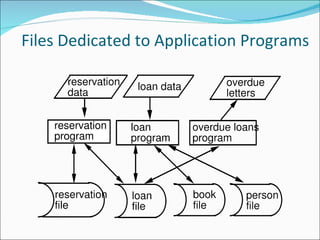
Traditional Approach Applications developed in an ad-hoc and opportunistic manner Data files developed for individual applications
Files Dedicated to Application Programs
Database What is a database? A database is an organized  collection of related files and records designed to meet the needs of an organization.
Database System  Components Data Hardware Software Users
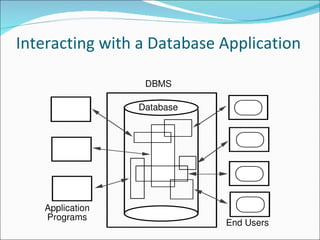
Interacting with a Database Application
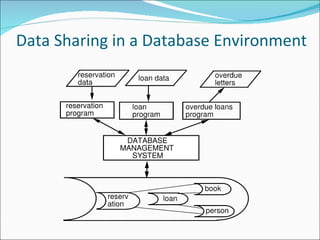
Data Sharing in a Database Environment
DBMS The  Database Management System  (DBMS) software that enables users to define, create  and maintain the database and provides  flexible management of the data.
Why We Need DBMS There is an information explosion in today’s society Need to have right information at the right time to make  accurate decisions
Using DBMS Centralization of information management Data shared by different groups of users and application programs  Provision of multiple interfaces Advanced facilities for backup and recovery
  DBMS Advantages Controlled redundancy Data Consistency/Integrity Sharing of data Enforcement of security Enforcement of development and maintenance standards Data independence
DBMS Disadvantages Centralized Database More Disk Space Operationality of the system Security Risk
DBMS-Users There are a number of users who can access or retrieve data on demand using the applications and interfaces provided by the DBMS. Each type of user needs different software capabilities: DDL-The application programmers interact with the database by accessing the data from programs written in  high-level languages DML– The end users are the people who sit at workstations and interact directly with the system. DCL– The database administrator (DBA) is the person or group in charge of implementing the database system within the organization.
The Entity Relationship Model The ER model is a graphic representation to concisely present the data requirements of an application in a way that is easy to understand Today ER model is a standard for the design methodologies of software systems
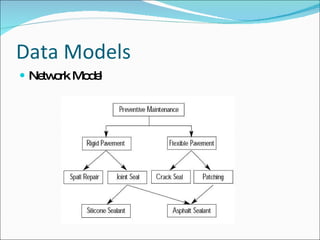
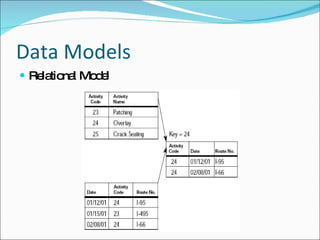
Data Models Models generally allow people to conceptualize  an abstract idea more easily Model airplanes  Model homes A data model is a way of explaining the logical  layout of the data and the relationship of various parts to each other and the whole.
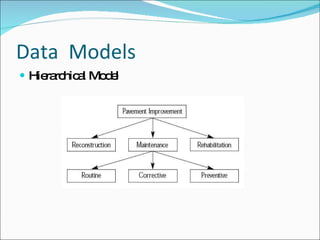
Data  Models Hierarchical Model
Data Models Network Model
Data Models Relational Model
Data Models The Relational Database Model: Relational database model, where all data are kept in tables or relations. More flexible & easy to use. Almost any item of data can be accessed more quickly than the other models. Retrieval time is reduced so that interactive access becomes more feasible. This is what is referred to as Relational Database Management System(RDBMS)
Relational DBMS Edgar F. Codd at IBM invented the relational database in 1970. Called Father of RDBMS. RDBMS allows operations in a human logical environment. The main elements of RDBMS are based on Codd’s 13 rules for a relational system. The relational database is perceived as a collection of tables. Each table consists of a series of row/column intersections. Tables (or relations) are related to each other by sharing  common characteristics
H  How do I design a database? „  Logical design ™ Determine and define fields, tables, keys, and  data integrity „  Physical implementation ™ Creating tables, establishing key fields, and  table relationships „  Application development ™ Determine end-user tasks
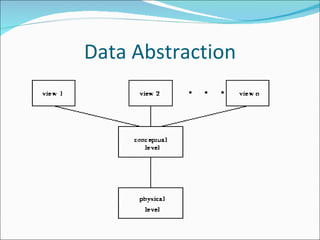
Data Abstraction The major purpose of a database system is to provide users with an  abstract view  of the system. The system hides certain details of how data is stored and created and maintained  Complexity should be hidden from database users. 1.Physical level :- The lowest level of abstraction that describes how the data is actually stored.
Data Abstraction 2.Logical Level :-The next level of abstraction that describes  the relationships among data.  3.View level :- Highest level  of abstraction that  describes  part  of the database for a particular group of users Can be many different views of a database.
Data Abstraction
Instances & Schemas Instance :- The information that is currently being stored in the database is called an instance of the database Schema  :- Overall design of the database is called schema. At the lowest level is the physical schema, followed by Logical schema & the highest level is the subschema. Database Systems will support only one Physical & Logical Schema but can have several subschemas.
RDBMS A database management system that  stores data in the form of related tables is called Relational Database Management System. The goal of RDBMS is to make  data easy to store & retrieve Relational databases help solve problems as they are designed to create tables & then combine  the information in interesting ways to create valid information.
RDBMS Typical RDBMS include  Microsoft Access  Microsoft SQL Server  Sybase (The forerunner of Microsoft SQL Server)  IBM DB2  Oracle  Ingres  MySQL  Postgresql  etc
RDBMS Constraints  are conditions  that must hold on all  valid relation instances. There are different  types of constraints: Entity integrity  constraints, and  referential integrity  constraints A candidate key  is one that can identify each row of a table uniquely. Generally a candidate key becomes the primary key of the table.
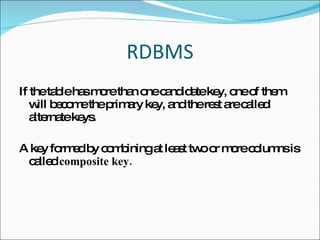
RDBMS If the table has more than one candidate key, one of them will become the primary key, and the rest are called alternate keys. A key formed by combining at least two or more columns is called  composite key.
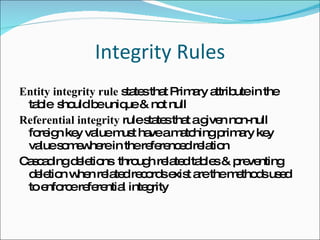
Integrity Rules Entity integrity rule  states that Primary attribute in the table  should be unique & not null Referential integrity  rule states that a given non-null foreign key value must have a matching primary key value somewhere in the referenced relation Cascading deletions  through related tables & preventing deletion when related records exist are the methods used to enforce referential integrity
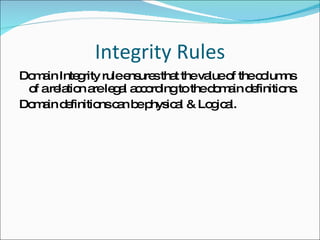
Integrity Rules Domain Integrity rule ensures that the value of the columns of a relation are legal according to the domain definitions. Domain definitions can be physical & Logical.
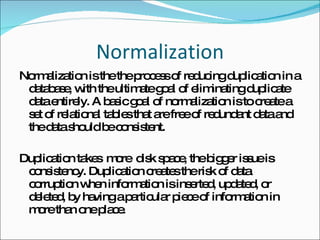
Normalization Normalization is the the process of reducing duplication in a database, with the ultimate goal of eliminating duplicate data entirely. A basic goal of normalization is to create a set of relational tables that are free of redundant data and the data should be consistent. Duplication takes  more  disk space, the bigger issue is consistency. Duplication creates the risk of data corruption when information is inserted, updated, or deleted, by having a particular piece of information in more than one place.
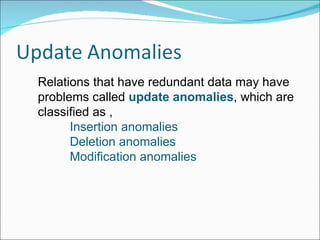
Relations that have redundant data may have problems called  update anomalies , which are classified as , Insertion anomalies Deletion anomalies Modification anomalies
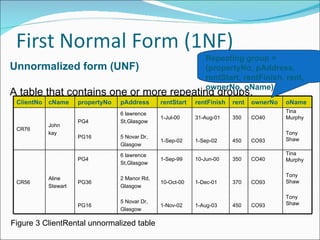
Unnormalized form (UNF) A table that contains one or more repeating groups. Figure 3 ClientRental unnormalized table Repeating group = (propertyNo, pAddress, rentStart, rentFinish, rent, ownerNo, oName) ClientNo cName propertyNo pAddress rentStart rentFinish rent ownerNo oName CR76 John kay PG4 PG16 6 lawrence St,Glasgow 5 Novar Dr, Glasgow 1-Jul-00 1-Sep-02 31-Aug-01 1-Sep-02 350 450 CO40 CO93 Tina Murphy Tony Shaw CR56 Aline Stewart PG4 PG36 PG16 6 lawrence St,Glasgow 2 Manor Rd, Glasgow 5 Novar Dr, Glasgow 1-Sep-99 10-Oct-00 1-Nov-02 10-Jun-00 1-Dec-01 1-Aug-03 350 370 450 CO40 CO93 CO93 Tina Murphy Tony Shaw Tony Shaw
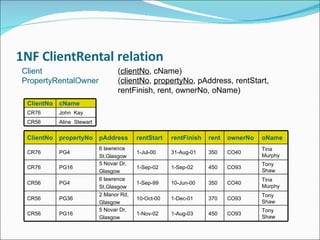
First Normal Form (1NF) First Normal Form  is a relation in which the intersection of each row and column contains one and only one value. There are two approaches to removing repeating groups from  unnormalized tables: Removes the repeating groups by entering appropriate data  in the empty columns of rows containing the repeating data. 2. Removes the repeating group by placing the repeating data, along with a copy of the original key attribute(s), in a separate  relation. A primary key is identified for the new relation.
Client ( clientNo , cName) PropertyRentalOwner  ( clientNo ,  propertyNo , pAddress, rentStart,  rentFinish, rent, ownerNo, oName) ClientNo cName CR76 John  Kay CR56 Aline  Stewart ClientNo propertyNo pAddress rentStart rentFinish rent ownerNo oName CR76 PG4 6 lawrence St,Glasgow 1-Jul-00 31-Aug-01 350 CO40 Tina Murphy CR76 PG16 5 Novar Dr, Glasgow 1-Sep-02 1-Sep-02 450 CO93 Tony Shaw CR56 PG4 6 lawrence St,Glasgow 1-Sep-99 10-Jun-00 350 CO40 Tina Murphy CR56 PG36 2 Manor Rd, Glasgow 10-Oct-00 1-Dec-01 370 CO93 Tony Shaw CR56 PG16 5 Novar Dr, Glasgow 1-Nov-02 1-Aug-03 450 CO93 Tony Shaw
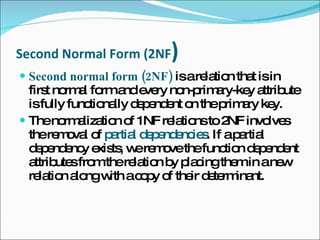
Second Normal Form (2NF ) Second normal form (2NF)   is a relation that is in first normal form and every non-primary-key attribute is fully functionally dependent on the primary key. The normalization of 1NF relations to 2NF involves the removal of  partial dependencies . If a partial dependency exists, we remove the function dependent attributes from the relation by placing them in a new relation along with a copy of their determinant.
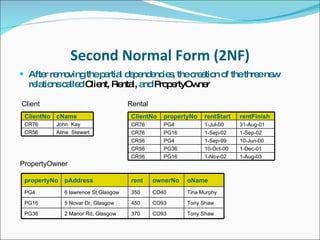
Second Normal Form (2NF) After removing the partial dependencies, the creation of the three new relations called  Client, Rental,  and  PropertyOwner Client Rental PropertyOwner ClientNo cName CR76 John  Kay CR56 Aline  Stewart ClientNo propertyNo rentStart rentFinish CR76 PG4 1-Jul-00 31-Aug-01 CR76 PG16 1-Sep-02 1-Sep-02 CR56 PG4 1-Sep-99 10-Jun-00 CR56 PG36 10-Oct-00 1-Dec-01 CR56 PG16 1-Nov-02 1-Aug-03 propertyNo pAddress rent ownerNo oName PG4 6 lawrence St,Glasgow 350 CO40 Tina Murphy PG16 5 Novar Dr, Glasgow 450 CO93 Tony Shaw PG36 2 Manor Rd, Glasgow 370 CO93 Tony Shaw
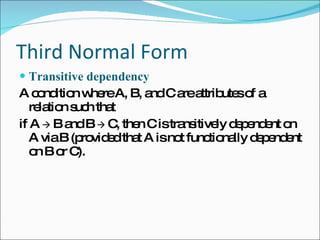
Third Normal Form Transitive dependency  A condition where A, B, and C are attributes of a relation such that if A     B and B     C, then C is transitively dependent on A via B (provided that A is not functionally dependent on B or C).
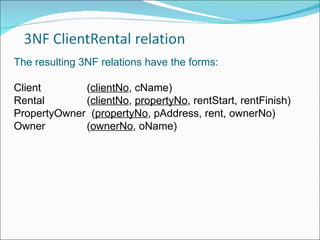
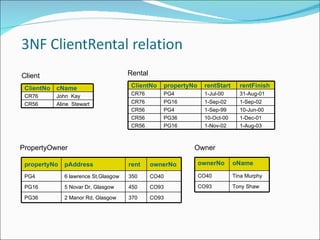
The resulting 3NF relations have the forms: Client   ( clientNo , cName) Rental   ( clientNo ,  propertyNo , rentStart, rentFinish) PropertyOwner  ( propertyNo , pAddress, rent, ownerNo) Owner   ( ownerNo , oName)
Client Rental PropertyOwner Owner ClientNo cName CR76 John  Kay CR56 Aline  Stewart ClientNo propertyNo rentStart rentFinish CR76 PG4 1-Jul-00 31-Aug-01 CR76 PG16 1-Sep-02 1-Sep-02 CR56 PG4 1-Sep-99 10-Jun-00 CR56 PG36 10-Oct-00 1-Dec-01 CR56 PG16 1-Nov-02 1-Aug-03 propertyNo pAddress rent ownerNo PG4 6 lawrence St,Glasgow 350 CO40 PG16 5 Novar Dr, Glasgow 450 CO93 PG36 2 Manor Rd, Glasgow 370 CO93 ownerNo oName CO40 Tina Murphy CO93 Tony Shaw
 
INTRODUCTION SQL (Structured Query Language) is a computer language aimed to store, manipulate, and retrieve data stored in relational databases.  The first incarnation of SQL appeared in 1974, when a group in IBM developed the first prototype of a relational database.  The first commercial relational database was released by Relational Software later becoming  Oracle.
DDL DDL - Data Definition Language:  Statements used to define the database structure or schema. Some examples: CREATE - to create objects in the database ALTER - alters the structure of the database DROP - delete objects from the database RENAME - rename an object
Data Manipulation Language DML- Data Manipulation Language: Statements used for managing data within schema objects.  SELECT - retrieve data from the a database INSERT - insert data into a table UPDATE - updates existing data within a table DELETE - deletes all records from a table, the space for the records remain CALL - call a PL/SQL or Java subprogram
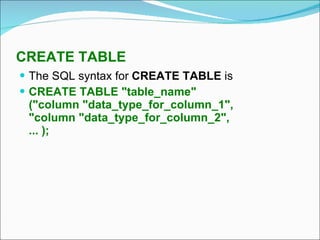
CREATE TABLE The SQL syntax for  CREATE TABLE  is CREATE TABLE "table_name" ("column "data_type_for_column_1", "column "data_type_for_column_2", ... );
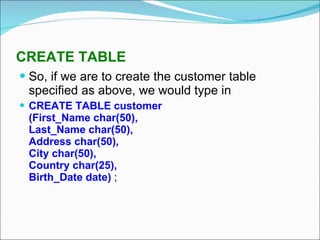
CREATE TABLE So, if we are to create the customer table specified as above, we would type in CREATE TABLE customer (First_Name char(50), Last_Name char(50), Address char(50), City char(50), Country char(25), Birth_Date date)  ;
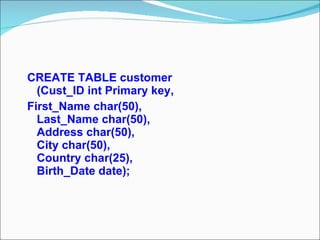
CREATE TABLE customer (Cust_ID int Primary key, First_Name char(50), Last_Name char(50), Address char(50), City char(50), Country char(25), Birth_Date date);
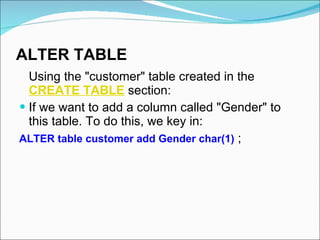
ALTER TABLE   Using the "customer" table created in the  CREATE TABLE  section:  If we want to add a column called "Gender" to this table. To do this, we key in:  ALTER table customer add Gender char(1)  ;
DROP TABLE   Sometimes we may decide that we need to get rid of a table in the database for some reason. The syntax for  DROP TABLE  is DROP TABLE "table_name" So, if we wanted to drop the table called customer that we created in the  CREATE TABLE  section, we simply type DROP TABLE customer .
TRUNCATE TABLE   Sometimes we wish to get rid of all the data in a table. One way of doing this is with  DROP TABLE . But here we get rid of the data but not the table itself ? For this, we can use the  TRUNCATE TABLE  command. The syntax for  TRUNCATE TABLE  is TRUNCATE TABLE "table_name" So, if we wanted to truncate the table called customer that we created ,we simply type, TRUNCATE TABLE customer
RENAME TABLE  If  we want the change the name of the table we have created ,use the rename command The syntax for RENAME TABLE is  RENAME TABLE customer TO new table name   So if we want to change the name to persons ,type in  RENAME TABLE customer TO Person
Data manipulation language are used for managing data within schema objects
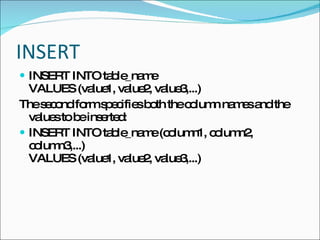
INSERT INSERT INTO table_name VALUES (value1, value2, value3,...)  The second form specifies both the column names and the values to be inserted: INSERT INTO table_name (column1, column2, column3,...) VALUES (value1, value2, value3,...)
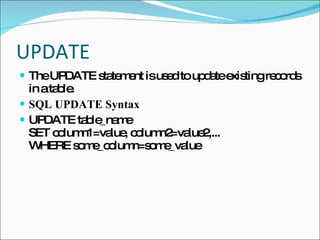
UPDATE The UPDATE statement is used to update existing records in a table. SQL UPDATE Syntax UPDATE table_name SET column1=value, column2=value2,... WHERE some_column=some_value
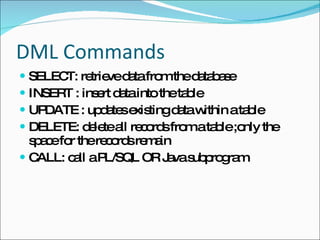
DML Commands SELECT: retrieve data from the database INSERT : insert data into the table  UPDATE : updates existing data within a table  DELETE: delete all records from a table ;only the space for the records remain CALL: call a PL/SQL OR Java subprogram
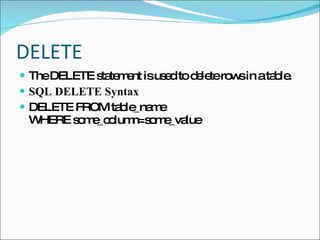
DELETE The DELETE statement is used to delete rows in a table. SQL DELETE Syntax DELETE FROM table_name WHERE some_column=some_value
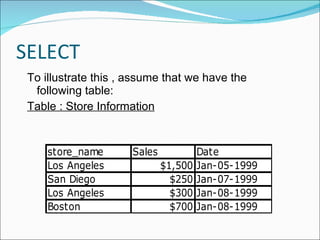
SELECT To illustrate this , assume that we have the following table: Table : Store Information
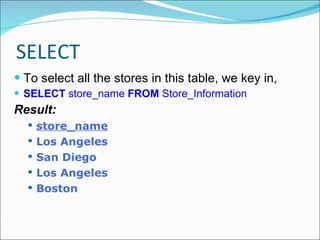
SELECT To select all the stores in this table, we key in,  SELECT  store_name  FROM  Store_Information Result: store_name Los Angeles San Diego Los Angeles Boston
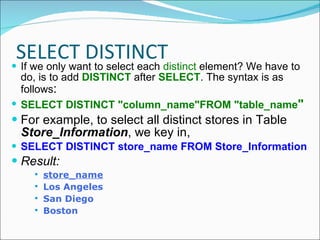
SELECT DISTINCT If we only want to select each  distinct  element? We have to do, is to add  DISTINCT  after  SELECT . The syntax is as follows : SELECT DISTINCT "column_name"FROM "table_name " For example, to select all distinct stores in Table  Store_Information , we key in, SELECT DISTINCT store_name FROM Store_Information Result: store_name Los Angeles San Diego Boston
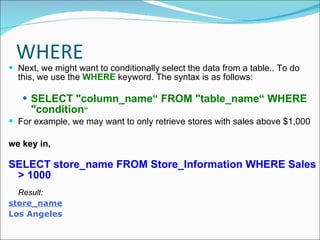
WHERE Next, we might want to conditionally select the data from a table.. To do this, we use the  WHERE  keyword. The syntax is as follows: SELECT "column_name“ FROM "table_name“ WHERE "condition “ For example, we may want to only retrieve stores with sales above $1,000 we key in, SELECT store_name FROM Store_Information WHERE Sales > 1000 Result: store_name Los Angeles
 
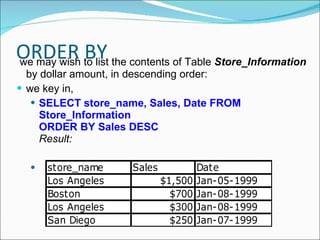
ORDER BY  We want  to list the output in a particular order. This could be in ascending order, in descending order, or could be based on either numerical value or text value. In such cases, we can use the  ORDER BY  keyword. The syntax for an  ORDER BY  statement is as follows: SELECT "column_name“ FROM "table_name" [WHERE "condition"] ORDER BY "column_name" [ASC, DESC]
ORDER BY we may wish to list the contents of Table  Store_Information  by dollar amount, in descending order: we key in, SELECT store_name, Sales, Date FROM Store_Information ORDER BY Sales DESC Result:   
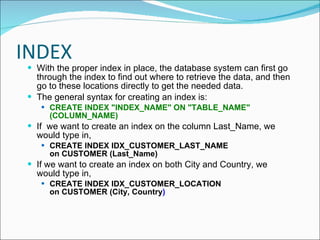
INDEX With the proper index in place, the database system can first go through the index to find out where to retrieve the data, and then go to these locations directly to get the needed data. The general syntax for creating an index is: CREATE INDEX "INDEX_NAME" ON "TABLE_NAME" (COLUMN_NAME) If  we want to create an index on the column Last_Name, we would type in, CREATE INDEX IDX_CUSTOMER_LAST_NAME on CUSTOMER (Last_Name) If we want to create an index on both City and Country, we would type in, CREATE INDEX IDX_CUSTOMER_LOCATION on CUSTOMER (City, Country )
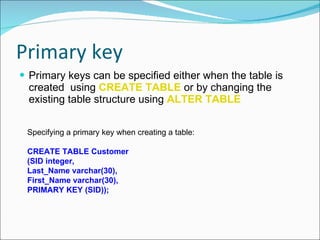
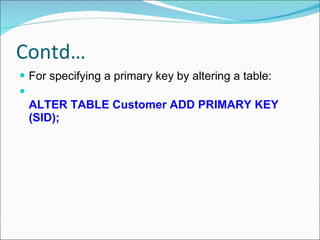
Primary key  Primary keys can be specified either when the table is created  using  CREATE TABLE   or by changing the existing table structure using  ALTER TABLE Specifying a primary key when creating a table:  CREATE TABLE Customer  (SID integer,  Last_Name varchar(30),  First_Name varchar(30),  PRIMARY KEY (SID));
Contd… For specifying a primary key by altering a table:  ALTER TABLE Customer ADD PRIMARY KEY (SID);
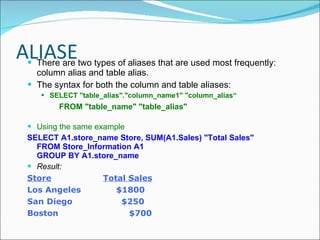
ALIASE There are two types of aliases that are used most frequently: column alias and table alias.  The syntax for both the column and table aliases: SELECT "table_alias"."column_name1" "column_alias“  FROM "table_name" "table_alias" Using the same example  SELECT A1.store_name Store, SUM(A1.Sales) "Total Sales" FROM Store_Information A1 GROUP BY A1.store_name Result: Store    Total Sales Los Angeles   $1800 San Diego   $250 Boston   $700
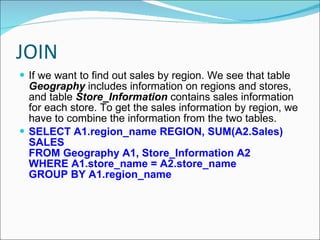
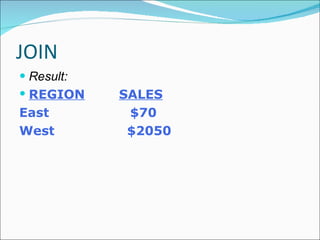
JOIN If we want to find out sales by region. We see that table  Geography  includes information on regions and stores, and table  Store_Information  contains sales information for each store. To get the sales information by region, we have to combine the information from the two tables.  SELECT A1.region_name REGION, SUM(A2.Sales) SALES FROM Geography A1, Store_Information A2 WHERE A1.store_name = A2.store_name GROUP BY A1.region_name
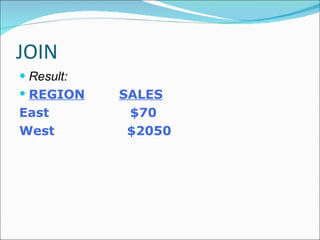
JOIN Result: REGION    SALES East   $70 West   $2050
Thank You

D B M S Animate

  • 1.
  • 2.
    Data Data -raw facts/details Entity: a thing of significance about which information needs to be known. Attributes :The characteristics that describe or qualify an entity are called its attributes
  • 3.
    Data Continued: In case of a student , the basic entity is the student. Entity attributes (information recorded about that entity) may include: First and last name Home address Current address Date of birth Course opted Grade point average etc…
  • 4.
    Data Continued:Field: A field consists of a group of characters. Record : All the details related to an entity is combined to form a record. File : A collection of related records Example: For a student, Admission file, Fee detail file, exam detail file etc… Database: Collection of logically related records & files.
  • 5.
    Traditional Approach Applicationsdeveloped in an ad-hoc and opportunistic manner Data files developed for individual applications
  • 6.
    Files Dedicated toApplication Programs
  • 7.
    Database What isa database? A database is an organized collection of related files and records designed to meet the needs of an organization.
  • 8.
    Database System Components Data Hardware Software Users
  • 9.
    Interacting with aDatabase Application
  • 10.
    Data Sharing ina Database Environment
  • 11.
    DBMS The Database Management System (DBMS) software that enables users to define, create and maintain the database and provides flexible management of the data.
  • 12.
    Why We NeedDBMS There is an information explosion in today’s society Need to have right information at the right time to make accurate decisions
  • 13.
    Using DBMS Centralizationof information management Data shared by different groups of users and application programs Provision of multiple interfaces Advanced facilities for backup and recovery
  • 14.
    DBMSAdvantages Controlled redundancy Data Consistency/Integrity Sharing of data Enforcement of security Enforcement of development and maintenance standards Data independence
  • 15.
    DBMS Disadvantages CentralizedDatabase More Disk Space Operationality of the system Security Risk
  • 16.
    DBMS-Users There area number of users who can access or retrieve data on demand using the applications and interfaces provided by the DBMS. Each type of user needs different software capabilities: DDL-The application programmers interact with the database by accessing the data from programs written in high-level languages DML– The end users are the people who sit at workstations and interact directly with the system. DCL– The database administrator (DBA) is the person or group in charge of implementing the database system within the organization.
  • 17.
    The Entity RelationshipModel The ER model is a graphic representation to concisely present the data requirements of an application in a way that is easy to understand Today ER model is a standard for the design methodologies of software systems
  • 18.
    Data Models Modelsgenerally allow people to conceptualize an abstract idea more easily Model airplanes Model homes A data model is a way of explaining the logical layout of the data and the relationship of various parts to each other and the whole.
  • 19.
    Data ModelsHierarchical Model
  • 20.
  • 21.
  • 22.
    Data Models TheRelational Database Model: Relational database model, where all data are kept in tables or relations. More flexible & easy to use. Almost any item of data can be accessed more quickly than the other models. Retrieval time is reduced so that interactive access becomes more feasible. This is what is referred to as Relational Database Management System(RDBMS)
  • 23.
    Relational DBMS EdgarF. Codd at IBM invented the relational database in 1970. Called Father of RDBMS. RDBMS allows operations in a human logical environment. The main elements of RDBMS are based on Codd’s 13 rules for a relational system. The relational database is perceived as a collection of tables. Each table consists of a series of row/column intersections. Tables (or relations) are related to each other by sharing common characteristics
  • 24.
    H Howdo I design a database? „ Logical design ™ Determine and define fields, tables, keys, and data integrity „ Physical implementation ™ Creating tables, establishing key fields, and table relationships „ Application development ™ Determine end-user tasks
  • 25.
    Data Abstraction Themajor purpose of a database system is to provide users with an abstract view of the system. The system hides certain details of how data is stored and created and maintained Complexity should be hidden from database users. 1.Physical level :- The lowest level of abstraction that describes how the data is actually stored.
  • 26.
    Data Abstraction 2.LogicalLevel :-The next level of abstraction that describes the relationships among data. 3.View level :- Highest level of abstraction that describes part of the database for a particular group of users Can be many different views of a database.
  • 27.
  • 28.
    Instances & SchemasInstance :- The information that is currently being stored in the database is called an instance of the database Schema :- Overall design of the database is called schema. At the lowest level is the physical schema, followed by Logical schema & the highest level is the subschema. Database Systems will support only one Physical & Logical Schema but can have several subschemas.
  • 29.
    RDBMS A databasemanagement system that stores data in the form of related tables is called Relational Database Management System. The goal of RDBMS is to make data easy to store & retrieve Relational databases help solve problems as they are designed to create tables & then combine the information in interesting ways to create valid information.
  • 30.
    RDBMS Typical RDBMSinclude Microsoft Access Microsoft SQL Server Sybase (The forerunner of Microsoft SQL Server) IBM DB2 Oracle Ingres MySQL Postgresql etc
  • 31.
    RDBMS Constraints are conditions that must hold on all valid relation instances. There are different types of constraints: Entity integrity constraints, and referential integrity constraints A candidate key is one that can identify each row of a table uniquely. Generally a candidate key becomes the primary key of the table.
  • 32.
    RDBMS If thetable has more than one candidate key, one of them will become the primary key, and the rest are called alternate keys. A key formed by combining at least two or more columns is called composite key.
  • 33.
    Integrity Rules Entityintegrity rule states that Primary attribute in the table should be unique & not null Referential integrity rule states that a given non-null foreign key value must have a matching primary key value somewhere in the referenced relation Cascading deletions through related tables & preventing deletion when related records exist are the methods used to enforce referential integrity
  • 34.
    Integrity Rules DomainIntegrity rule ensures that the value of the columns of a relation are legal according to the domain definitions. Domain definitions can be physical & Logical.
  • 35.
    Normalization Normalization isthe the process of reducing duplication in a database, with the ultimate goal of eliminating duplicate data entirely. A basic goal of normalization is to create a set of relational tables that are free of redundant data and the data should be consistent. Duplication takes more disk space, the bigger issue is consistency. Duplication creates the risk of data corruption when information is inserted, updated, or deleted, by having a particular piece of information in more than one place.
  • 36.
    Relations that haveredundant data may have problems called update anomalies , which are classified as , Insertion anomalies Deletion anomalies Modification anomalies
  • 37.
    Unnormalized form (UNF)A table that contains one or more repeating groups. Figure 3 ClientRental unnormalized table Repeating group = (propertyNo, pAddress, rentStart, rentFinish, rent, ownerNo, oName) ClientNo cName propertyNo pAddress rentStart rentFinish rent ownerNo oName CR76 John kay PG4 PG16 6 lawrence St,Glasgow 5 Novar Dr, Glasgow 1-Jul-00 1-Sep-02 31-Aug-01 1-Sep-02 350 450 CO40 CO93 Tina Murphy Tony Shaw CR56 Aline Stewart PG4 PG36 PG16 6 lawrence St,Glasgow 2 Manor Rd, Glasgow 5 Novar Dr, Glasgow 1-Sep-99 10-Oct-00 1-Nov-02 10-Jun-00 1-Dec-01 1-Aug-03 350 370 450 CO40 CO93 CO93 Tina Murphy Tony Shaw Tony Shaw
  • 38.
    First Normal Form(1NF) First Normal Form is a relation in which the intersection of each row and column contains one and only one value. There are two approaches to removing repeating groups from unnormalized tables: Removes the repeating groups by entering appropriate data in the empty columns of rows containing the repeating data. 2. Removes the repeating group by placing the repeating data, along with a copy of the original key attribute(s), in a separate relation. A primary key is identified for the new relation.
  • 39.
    Client ( clientNo, cName) PropertyRentalOwner ( clientNo , propertyNo , pAddress, rentStart, rentFinish, rent, ownerNo, oName) ClientNo cName CR76 John Kay CR56 Aline Stewart ClientNo propertyNo pAddress rentStart rentFinish rent ownerNo oName CR76 PG4 6 lawrence St,Glasgow 1-Jul-00 31-Aug-01 350 CO40 Tina Murphy CR76 PG16 5 Novar Dr, Glasgow 1-Sep-02 1-Sep-02 450 CO93 Tony Shaw CR56 PG4 6 lawrence St,Glasgow 1-Sep-99 10-Jun-00 350 CO40 Tina Murphy CR56 PG36 2 Manor Rd, Glasgow 10-Oct-00 1-Dec-01 370 CO93 Tony Shaw CR56 PG16 5 Novar Dr, Glasgow 1-Nov-02 1-Aug-03 450 CO93 Tony Shaw
  • 40.
    Second Normal Form(2NF ) Second normal form (2NF) is a relation that is in first normal form and every non-primary-key attribute is fully functionally dependent on the primary key. The normalization of 1NF relations to 2NF involves the removal of partial dependencies . If a partial dependency exists, we remove the function dependent attributes from the relation by placing them in a new relation along with a copy of their determinant.
  • 41.
    Second Normal Form(2NF) After removing the partial dependencies, the creation of the three new relations called Client, Rental, and PropertyOwner Client Rental PropertyOwner ClientNo cName CR76 John Kay CR56 Aline Stewart ClientNo propertyNo rentStart rentFinish CR76 PG4 1-Jul-00 31-Aug-01 CR76 PG16 1-Sep-02 1-Sep-02 CR56 PG4 1-Sep-99 10-Jun-00 CR56 PG36 10-Oct-00 1-Dec-01 CR56 PG16 1-Nov-02 1-Aug-03 propertyNo pAddress rent ownerNo oName PG4 6 lawrence St,Glasgow 350 CO40 Tina Murphy PG16 5 Novar Dr, Glasgow 450 CO93 Tony Shaw PG36 2 Manor Rd, Glasgow 370 CO93 Tony Shaw
  • 42.
    Third Normal FormTransitive dependency A condition where A, B, and C are attributes of a relation such that if A  B and B  C, then C is transitively dependent on A via B (provided that A is not functionally dependent on B or C).
  • 43.
    The resulting 3NFrelations have the forms: Client ( clientNo , cName) Rental ( clientNo , propertyNo , rentStart, rentFinish) PropertyOwner ( propertyNo , pAddress, rent, ownerNo) Owner ( ownerNo , oName)
  • 44.
    Client Rental PropertyOwnerOwner ClientNo cName CR76 John Kay CR56 Aline Stewart ClientNo propertyNo rentStart rentFinish CR76 PG4 1-Jul-00 31-Aug-01 CR76 PG16 1-Sep-02 1-Sep-02 CR56 PG4 1-Sep-99 10-Jun-00 CR56 PG36 10-Oct-00 1-Dec-01 CR56 PG16 1-Nov-02 1-Aug-03 propertyNo pAddress rent ownerNo PG4 6 lawrence St,Glasgow 350 CO40 PG16 5 Novar Dr, Glasgow 450 CO93 PG36 2 Manor Rd, Glasgow 370 CO93 ownerNo oName CO40 Tina Murphy CO93 Tony Shaw
  • 45.
  • 46.
    INTRODUCTION SQL (StructuredQuery Language) is a computer language aimed to store, manipulate, and retrieve data stored in relational databases. The first incarnation of SQL appeared in 1974, when a group in IBM developed the first prototype of a relational database. The first commercial relational database was released by Relational Software later becoming Oracle.
  • 47.
    DDL DDL -Data Definition Language: Statements used to define the database structure or schema. Some examples: CREATE - to create objects in the database ALTER - alters the structure of the database DROP - delete objects from the database RENAME - rename an object
  • 48.
    Data Manipulation LanguageDML- Data Manipulation Language: Statements used for managing data within schema objects. SELECT - retrieve data from the a database INSERT - insert data into a table UPDATE - updates existing data within a table DELETE - deletes all records from a table, the space for the records remain CALL - call a PL/SQL or Java subprogram
  • 49.
    CREATE TABLE TheSQL syntax for CREATE TABLE is CREATE TABLE "table_name" ("column "data_type_for_column_1", "column "data_type_for_column_2", ... );
  • 50.
    CREATE TABLE So,if we are to create the customer table specified as above, we would type in CREATE TABLE customer (First_Name char(50), Last_Name char(50), Address char(50), City char(50), Country char(25), Birth_Date date) ;
  • 51.
    CREATE TABLE customer(Cust_ID int Primary key, First_Name char(50), Last_Name char(50), Address char(50), City char(50), Country char(25), Birth_Date date);
  • 52.
    ALTER TABLE Using the "customer" table created in the CREATE TABLE section: If we want to add a column called "Gender" to this table. To do this, we key in: ALTER table customer add Gender char(1) ;
  • 53.
    DROP TABLE Sometimes we may decide that we need to get rid of a table in the database for some reason. The syntax for DROP TABLE is DROP TABLE "table_name" So, if we wanted to drop the table called customer that we created in the CREATE TABLE section, we simply type DROP TABLE customer .
  • 54.
    TRUNCATE TABLE Sometimes we wish to get rid of all the data in a table. One way of doing this is with DROP TABLE . But here we get rid of the data but not the table itself ? For this, we can use the TRUNCATE TABLE command. The syntax for TRUNCATE TABLE is TRUNCATE TABLE "table_name" So, if we wanted to truncate the table called customer that we created ,we simply type, TRUNCATE TABLE customer
  • 55.
    RENAME TABLE If we want the change the name of the table we have created ,use the rename command The syntax for RENAME TABLE is RENAME TABLE customer TO new table name So if we want to change the name to persons ,type in RENAME TABLE customer TO Person
  • 56.
    Data manipulation languageare used for managing data within schema objects
  • 57.
    INSERT INSERT INTOtable_name VALUES (value1, value2, value3,...) The second form specifies both the column names and the values to be inserted: INSERT INTO table_name (column1, column2, column3,...) VALUES (value1, value2, value3,...)
  • 58.
    UPDATE The UPDATEstatement is used to update existing records in a table. SQL UPDATE Syntax UPDATE table_name SET column1=value, column2=value2,... WHERE some_column=some_value
  • 59.
    DML Commands SELECT:retrieve data from the database INSERT : insert data into the table UPDATE : updates existing data within a table DELETE: delete all records from a table ;only the space for the records remain CALL: call a PL/SQL OR Java subprogram
  • 60.
    DELETE The DELETEstatement is used to delete rows in a table. SQL DELETE Syntax DELETE FROM table_name WHERE some_column=some_value
  • 61.
    SELECT To illustratethis , assume that we have the following table: Table : Store Information
  • 62.
    SELECT To selectall the stores in this table, we key in, SELECT store_name FROM Store_Information Result: store_name Los Angeles San Diego Los Angeles Boston
  • 63.
    SELECT DISTINCT Ifwe only want to select each distinct element? We have to do, is to add DISTINCT after SELECT . The syntax is as follows : SELECT DISTINCT "column_name"FROM "table_name " For example, to select all distinct stores in Table Store_Information , we key in, SELECT DISTINCT store_name FROM Store_Information Result: store_name Los Angeles San Diego Boston
  • 64.
    WHERE Next, wemight want to conditionally select the data from a table.. To do this, we use the WHERE keyword. The syntax is as follows: SELECT "column_name“ FROM "table_name“ WHERE "condition “ For example, we may want to only retrieve stores with sales above $1,000 we key in, SELECT store_name FROM Store_Information WHERE Sales > 1000 Result: store_name Los Angeles
  • 65.
  • 66.
    ORDER BY We want to list the output in a particular order. This could be in ascending order, in descending order, or could be based on either numerical value or text value. In such cases, we can use the ORDER BY keyword. The syntax for an ORDER BY statement is as follows: SELECT "column_name“ FROM "table_name" [WHERE "condition"] ORDER BY "column_name" [ASC, DESC]
  • 67.
    ORDER BY wemay wish to list the contents of Table Store_Information by dollar amount, in descending order: we key in, SELECT store_name, Sales, Date FROM Store_Information ORDER BY Sales DESC Result:   
  • 68.
    INDEX With theproper index in place, the database system can first go through the index to find out where to retrieve the data, and then go to these locations directly to get the needed data. The general syntax for creating an index is: CREATE INDEX "INDEX_NAME" ON "TABLE_NAME" (COLUMN_NAME) If we want to create an index on the column Last_Name, we would type in, CREATE INDEX IDX_CUSTOMER_LAST_NAME on CUSTOMER (Last_Name) If we want to create an index on both City and Country, we would type in, CREATE INDEX IDX_CUSTOMER_LOCATION on CUSTOMER (City, Country )
  • 69.
    Primary key Primary keys can be specified either when the table is created using CREATE TABLE or by changing the existing table structure using ALTER TABLE Specifying a primary key when creating a table: CREATE TABLE Customer (SID integer, Last_Name varchar(30), First_Name varchar(30), PRIMARY KEY (SID));
  • 70.
    Contd… For specifyinga primary key by altering a table: ALTER TABLE Customer ADD PRIMARY KEY (SID);
  • 71.
    ALIASE There aretwo types of aliases that are used most frequently: column alias and table alias. The syntax for both the column and table aliases: SELECT "table_alias"."column_name1" "column_alias“ FROM "table_name" "table_alias" Using the same example SELECT A1.store_name Store, SUM(A1.Sales) "Total Sales" FROM Store_Information A1 GROUP BY A1.store_name Result: Store   Total Sales Los Angeles  $1800 San Diego  $250 Boston  $700
  • 72.
    JOIN If wewant to find out sales by region. We see that table Geography includes information on regions and stores, and table Store_Information contains sales information for each store. To get the sales information by region, we have to combine the information from the two tables. SELECT A1.region_name REGION, SUM(A2.Sales) SALES FROM Geography A1, Store_Information A2 WHERE A1.store_name = A2.store_name GROUP BY A1.region_name
  • 73.
    JOIN Result: REGION  SALES East  $70 West  $2050
  • 74.
    JOIN Result: REGION  SALES East  $70 West  $2050
  • 75.