Introduction to databases
➢Information management
➢Databases
➢Data model
➢Design of a database
➢Data independence
➢Data access
➢Advantages and disadvantages of a DBMS
1
Information
management
Introduction to databases
Information
management
• Information is recorded and exchanged
in different forms.
• Over time, different methods and
formats to organize and codify
information have been introduced
3
Computer systems
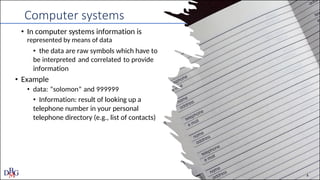
• In computer systems information is
represented by means of data
• the data are raw symbols which have to
be interpreted and correlated to provide
information
• Example
• data: “solomon” and 999999
• Information: result of looking up a
telephone number in your personal
telephone directory (e.g., list of contacts)
4
Data characteristics
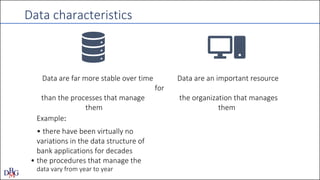
Data are far more stable over time Data are an important resource
for
than the processes that manage the organization that manages
them them
Example:
• there have been virtually no
variations in the data structure of
bank applications for decades
• the procedures that manage the
data vary from year to year
Databases
Introduction to databases
6
Database
• General definition
• a database is a collection of data that represents information of interest for
a computer system
• “Technical” definition
• A database is a collection of data managed by a DBMS (Database
Management System)
7
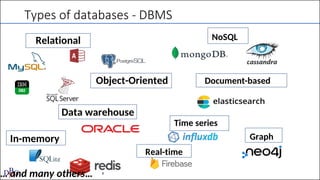
Types of databases - DBMS
Relational NoSQL
Object-Oriented Document-based
Data warehouse
Time series
In-memory Graph
Real-time
… and many others… 8
Data Base Management System - DBMS
• A DBMS (Data Base Management System) is a software system able to
manage collections of data that are
• large
• shared
• persistent
ensuring their reliability and privacy
9
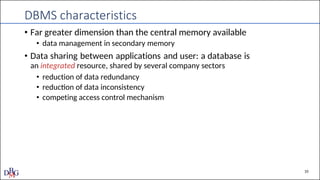
DBMS characteristics
• Far greater dimension than the central memory available
• data management in secondary memory
• Data sharing between applications and user: a database is
an integrated resource, shared by several company sectors
• reduction of data redundancy
• reduction of data inconsistency
• competing access control mechanism
10
the case of
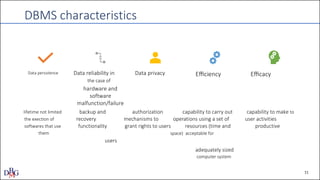
DBMS characteristics
Data persistence Data reliability in Data privacy Efficiency Efficacy
hardware and
software
malfunction/failure
lifetime not limited backup and authorization capability to carry out capability to make to
the exection of recovery mechanisms to operations using a set of user activities
softwares that use functionality grant rights to users resources (time and productive
them space) acceptable for
users
adequately sized
computer system
11
DBMS or file system?
• “Simplified” approach to data: data stored in a persistent mode in the
mass/secondary memory inside a file
• it is possible to memorize and look for data
• simple access mechanisms ( sequential reading)
• simple sharing mechanisms (read only sharing, blocking write access rights)
• DBMS extends the functionalities of the file system, providing more
integrated services
12
Data model
Introduction to databases
13
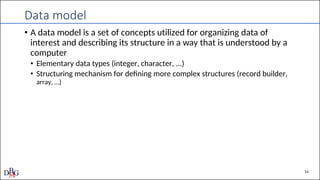
Data model
• A data model is a set of concepts utilized for organizing data of
interest and describing its structure in a way that is understood by a
computer
• Elementary data types (integer, character, ...)
• Structuring mechanism for defining more complex structures (record builder,
array, …)
14
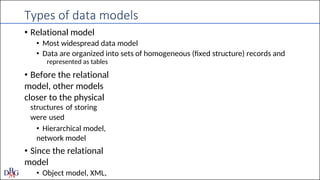
Types of data models
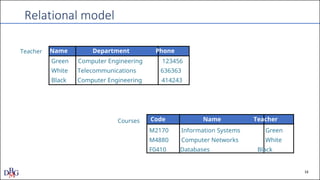
• Relational model
• Most widespread data model
• Data are organized into sets of homogeneous (fixed structure) records and
represented as tables
• Before the relational
model, other models
closer to the physical
structures of storing
were used
• Hierarchical model,
network model
• Since the relational
model
• Object model, XML,
Relational model
Teacher Name Department Phone
Green Computer Engineering 123456
White Telecommunications 636363
Black Computer Engineering 414243
Courses Code Name Teacher
M2170 Information Systems Green
M4880 Computer Networks White
F0410 Databases Black
16
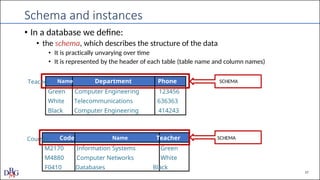
Schema and instances
• In a database we define:
• the schema, which describes the structure of the data
• It is practically unvarying over time
• It is represented by the header of each table (table name and column names)
Teacher Name Department Phone SCHEMA
Green Computer Engineering 123456
White Telecommunications 636363
Black Computer Engineering 414243
Courses Code Name Teacher SCHEMA
M2170 Information Systems Green
M4880 Computer Networks White
F0410 Databases Black
17
Schema and instances
• In a database we define:
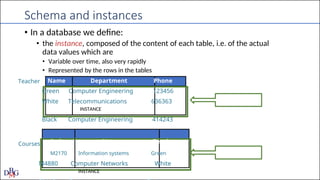
• the instance, composed of the content of each table, i.e. of the actual
data values which are
• Variable over time, also very rapidly
• Represented by the rows in the tables
Teacher Name Department Phone
Green Computer Engineering 123456
White Telecommunications 636363
INSTANCE
Black Computer Engineering 414243
Courses Code Name Teacher
M2170 Information systems Green
M4880 Computer Networks White
INSTANCE
19
Example of other data models: Database NOSQL
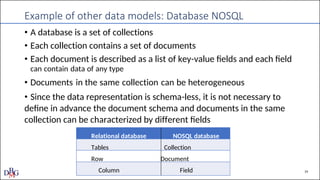
• A database is a set of collections
• Each collection contains a set of documents
• Each document is described as a list of key-value fields and each field
can contain data of any type
• Documents in the same collection can be heterogeneous
• Since the data representation is schema-less, it is not necessary to
define in advance the document schema and documents in the same
collection can be characterized by different fields
Relational database NOSQL database
Tables Collection
Row Document
Column Field
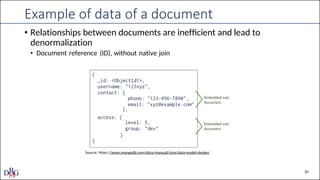
Example of data of a document
• Relationships between documents are inefficient and lead to
denormalization
• Document reference (ID), without native join
Source: https://www.mongodb.com/docs/manual/core/data-model-design/
20
Types of model
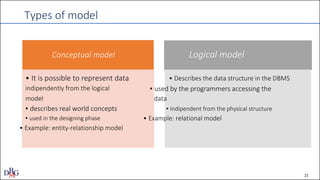
Conceptual model Logical model
• It is possible to represent data • Describes the data structure in the DBMS
indipendently from the logical ▪ used by the programmers accessing the
model data
▪ describes real world concepts ▪ Indipendent from the physical structure
▪ used in the designing phase • Example: relational model
• Example: entity-relationship model
21
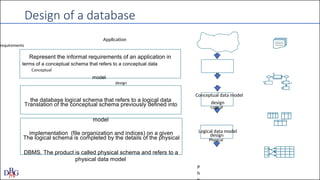
design
implementation (file organization and indices) on a given
design
the database logical schema that refers to a logical data
Design of a database
Application
requirements
Represent the informal requirements of an application in
terms of a conceptual schema that refers to a conceptual data
Conceptual
model
design
Conceptual data model
Translation of the conceptual schema previously defined into Logical
model
Logical data model
The logical schema is completed by the details of the physical Physical
DBMS. The product is called physical schema and refers to a
physical data model
P
h
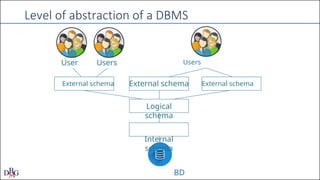
Level of abstraction of a DBMS
User Users Users
External schema External schema External schema
Logical
schema
Internal
schema
BD
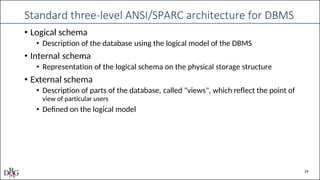
Standard three-level ANSI/SPARC architecture for DBMS
• Logical schema
• Description of the database using the logical model of the DBMS
• Internal schema
• Representation of the logical schema on the physical storage structure
• External schema
• Description of parts of the database, called "views", which reflect the point of
view of particular users
• Defined on the logical model
24
Data independence
Introduction to databases
25
Data independence
• Data independence guarantees that users and application software
which utilize a database can ignore the designing details used in the
construction of the database
• It is a consequence of dividing the design process at different
abstraction levels
• Levels of data independence:
• Physical independence
• Logical independence
26
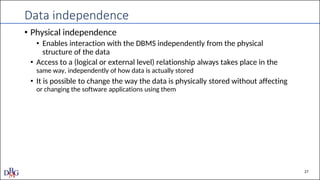
Data independence
• Physical independence
• Enables interaction with the DBMS independently from the physical
structure of the data
• Access to a (logical or external level) relationship always takes place in the
same way, independently of how data is actually stored
• It is possible to change the way the data is physically stored without affecting
or changing the software applications using them
27
Data independence
• Logical independence
• Enables interaction with the external level independently of the logical level
• It is possible to change the logical level maintaining the external structures
unaltered (as long as the correspondences are unaltered)
• It is possible to add new views or alter existing views without changing the
logical schema
28
Data access
Introduction to databases
29
Data access languages
• User-friendly interfaces that enable specific queries without using a
textual language
• Interactive languages (es., SQL, DSL)
• Command similar to interactive commands introduced into traditional
programming (C, C++, COBOL, Java, Python, …), so-called host
languages
• ORM (Object-Relational Mapping): mapping objects into
programming languages with database tables/documents
• Commands similar to interactive commands introduced into ad hoc
programming languages, often with specific functionalities
(generation of graphs, printed documents, complex pages, etc.)
30
Data access languages
• Languages are divided into two categories
• Data Definition Languages ( DDL) used to define the logical, external and
physical schemas, and access authorizations
• Data Manipulation Languages (DML) used for querying and updating
database instances
31
management of the databse
activities
the interactive access languages of the database
Users
• Database administrator: in charge of (centralized) control and
• guarantees sufficient performance
• ensures system reliability
• manages authorizations and access to data
• Designers and programmers: they define and realize
• the structure of the database
• the programmes accesing the database
• Users: they use the database for their activities
• end users: they use transactions, i.e. programmes that carry out predefined
• casual users: they formulate queries (or updates) which are not predefined by
32
Transactions
• Applications that carry out frequent predefined activities
• Example
• Flight bookings
• Bank transfers
• E-commerce purchase
• Generally realized by introducing SQL into a host language
33
Advantages and disadvantages
of
DBSM
Introduction to databases
DBMS advantages
35
• Data as a common resource of the whole organization
• Reduction of redundancies and inconsistencies
• Unified and precise data model of facts of interest to the
organization
• Possible centralized control of data
• standardization, economies of scale
• Data independence
DBMS disadvantages
36
• These are expensive, complex products that require
• direct investment
• purchasing the product
• indirect investments
• purchasing the necessary hardware and software resources
• adapting existing applications
• training personnel
• They provide a set of services in an integrated form
• it is not possible to separate out unused services, which increases
costs and may reduce performance
01.-Introduction-to-databases and relational db

  • 1.
  • 2.
    Introduction to databases ➢Informationmanagement ➢Databases ➢Data model ➢Design of a database ➢Data independence ➢Data access ➢Advantages and disadvantages of a DBMS 1
  • 3.
  • 4.
    Information management • Information isrecorded and exchanged in different forms. • Over time, different methods and formats to organize and codify information have been introduced 3
  • 5.
    Computer systems • Incomputer systems information is represented by means of data • the data are raw symbols which have to be interpreted and correlated to provide information • Example • data: “solomon” and 999999 • Information: result of looking up a telephone number in your personal telephone directory (e.g., list of contacts) 4
  • 6.
    Data characteristics Data arefar more stable over time Data are an important resource for than the processes that manage the organization that manages them them Example: • there have been virtually no variations in the data structure of bank applications for decades • the procedures that manage the data vary from year to year
  • 7.
  • 8.
    Database • General definition •a database is a collection of data that represents information of interest for a computer system • “Technical” definition • A database is a collection of data managed by a DBMS (Database Management System) 7
  • 9.
    Types of databases- DBMS Relational NoSQL Object-Oriented Document-based Data warehouse Time series In-memory Graph Real-time … and many others… 8
  • 10.
    Data Base ManagementSystem - DBMS • A DBMS (Data Base Management System) is a software system able to manage collections of data that are • large • shared • persistent ensuring their reliability and privacy 9
  • 11.
    DBMS characteristics • Fargreater dimension than the central memory available • data management in secondary memory • Data sharing between applications and user: a database is an integrated resource, shared by several company sectors • reduction of data redundancy • reduction of data inconsistency • competing access control mechanism 10
  • 12.
    the case of DBMScharacteristics Data persistence Data reliability in Data privacy Efficiency Efficacy hardware and software malfunction/failure lifetime not limited backup and authorization capability to carry out capability to make to the exection of recovery mechanisms to operations using a set of user activities softwares that use functionality grant rights to users resources (time and productive them space) acceptable for users adequately sized computer system 11
  • 13.
    DBMS or filesystem? • “Simplified” approach to data: data stored in a persistent mode in the mass/secondary memory inside a file • it is possible to memorize and look for data • simple access mechanisms ( sequential reading) • simple sharing mechanisms (read only sharing, blocking write access rights) • DBMS extends the functionalities of the file system, providing more integrated services 12
  • 14.
  • 15.
    Data model • Adata model is a set of concepts utilized for organizing data of interest and describing its structure in a way that is understood by a computer • Elementary data types (integer, character, ...) • Structuring mechanism for defining more complex structures (record builder, array, …) 14
  • 16.
    Types of datamodels • Relational model • Most widespread data model • Data are organized into sets of homogeneous (fixed structure) records and represented as tables • Before the relational model, other models closer to the physical structures of storing were used • Hierarchical model, network model • Since the relational model • Object model, XML,
  • 17.
    Relational model Teacher NameDepartment Phone Green Computer Engineering 123456 White Telecommunications 636363 Black Computer Engineering 414243 Courses Code Name Teacher M2170 Information Systems Green M4880 Computer Networks White F0410 Databases Black 16
  • 18.
    Schema and instances •In a database we define: • the schema, which describes the structure of the data • It is practically unvarying over time • It is represented by the header of each table (table name and column names) Teacher Name Department Phone SCHEMA Green Computer Engineering 123456 White Telecommunications 636363 Black Computer Engineering 414243 Courses Code Name Teacher SCHEMA M2170 Information Systems Green M4880 Computer Networks White F0410 Databases Black 17
  • 19.
    Schema and instances •In a database we define: • the instance, composed of the content of each table, i.e. of the actual data values which are • Variable over time, also very rapidly • Represented by the rows in the tables Teacher Name Department Phone Green Computer Engineering 123456 White Telecommunications 636363 INSTANCE Black Computer Engineering 414243 Courses Code Name Teacher M2170 Information systems Green M4880 Computer Networks White INSTANCE
  • 20.
    19 Example of otherdata models: Database NOSQL • A database is a set of collections • Each collection contains a set of documents • Each document is described as a list of key-value fields and each field can contain data of any type • Documents in the same collection can be heterogeneous • Since the data representation is schema-less, it is not necessary to define in advance the document schema and documents in the same collection can be characterized by different fields Relational database NOSQL database Tables Collection Row Document Column Field
  • 21.
    Example of dataof a document • Relationships between documents are inefficient and lead to denormalization • Document reference (ID), without native join Source: https://www.mongodb.com/docs/manual/core/data-model-design/ 20
  • 22.
    Types of model Conceptualmodel Logical model • It is possible to represent data • Describes the data structure in the DBMS indipendently from the logical ▪ used by the programmers accessing the model data ▪ describes real world concepts ▪ Indipendent from the physical structure ▪ used in the designing phase • Example: relational model • Example: entity-relationship model 21
  • 23.
    design implementation (file organizationand indices) on a given design the database logical schema that refers to a logical data Design of a database Application requirements Represent the informal requirements of an application in terms of a conceptual schema that refers to a conceptual data Conceptual model design Conceptual data model Translation of the conceptual schema previously defined into Logical model Logical data model The logical schema is completed by the details of the physical Physical DBMS. The product is called physical schema and refers to a physical data model P h
  • 24.
    Level of abstractionof a DBMS User Users Users External schema External schema External schema Logical schema Internal schema BD
  • 25.
    Standard three-level ANSI/SPARCarchitecture for DBMS • Logical schema • Description of the database using the logical model of the DBMS • Internal schema • Representation of the logical schema on the physical storage structure • External schema • Description of parts of the database, called "views", which reflect the point of view of particular users • Defined on the logical model 24
  • 26.
  • 27.
    Data independence • Dataindependence guarantees that users and application software which utilize a database can ignore the designing details used in the construction of the database • It is a consequence of dividing the design process at different abstraction levels • Levels of data independence: • Physical independence • Logical independence 26
  • 28.
    Data independence • Physicalindependence • Enables interaction with the DBMS independently from the physical structure of the data • Access to a (logical or external level) relationship always takes place in the same way, independently of how data is actually stored • It is possible to change the way the data is physically stored without affecting or changing the software applications using them 27
  • 29.
    Data independence • Logicalindependence • Enables interaction with the external level independently of the logical level • It is possible to change the logical level maintaining the external structures unaltered (as long as the correspondences are unaltered) • It is possible to add new views or alter existing views without changing the logical schema 28
  • 30.
  • 31.
    Data access languages •User-friendly interfaces that enable specific queries without using a textual language • Interactive languages (es., SQL, DSL) • Command similar to interactive commands introduced into traditional programming (C, C++, COBOL, Java, Python, …), so-called host languages • ORM (Object-Relational Mapping): mapping objects into programming languages with database tables/documents • Commands similar to interactive commands introduced into ad hoc programming languages, often with specific functionalities (generation of graphs, printed documents, complex pages, etc.) 30
  • 32.
    Data access languages •Languages are divided into two categories • Data Definition Languages ( DDL) used to define the logical, external and physical schemas, and access authorizations • Data Manipulation Languages (DML) used for querying and updating database instances 31
  • 33.
    management of thedatabse activities the interactive access languages of the database Users • Database administrator: in charge of (centralized) control and • guarantees sufficient performance • ensures system reliability • manages authorizations and access to data • Designers and programmers: they define and realize • the structure of the database • the programmes accesing the database • Users: they use the database for their activities • end users: they use transactions, i.e. programmes that carry out predefined • casual users: they formulate queries (or updates) which are not predefined by 32
  • 34.
    Transactions • Applications thatcarry out frequent predefined activities • Example • Flight bookings • Bank transfers • E-commerce purchase • Generally realized by introducing SQL into a host language 33
  • 35.
  • 36.
    DBMS advantages 35 • Dataas a common resource of the whole organization • Reduction of redundancies and inconsistencies • Unified and precise data model of facts of interest to the organization • Possible centralized control of data • standardization, economies of scale • Data independence
  • 37.
    DBMS disadvantages 36 • Theseare expensive, complex products that require • direct investment • purchasing the product • indirect investments • purchasing the necessary hardware and software resources • adapting existing applications • training personnel • They provide a set of services in an integrated form • it is not possible to separate out unused services, which increases costs and may reduce performance