24-Nov-2010www.eazynotes.com
1
DATA TRANSMISSIN IN COMPUTER ARCHITECTURE
PRESENTED BY:
SADAF RASHEED (2K15-CSE-72)
Ab: Jabbar Tunyo (2K15-CSE-04)
UNIVERSITY OF SINDH JAMSHORO
2
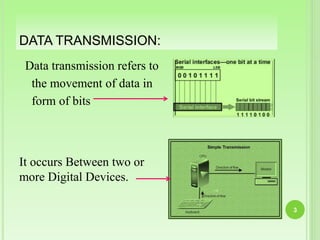
Data transmission refers to
the movement of data in
form of bits
3
DATA TRANSMISSION:
It occurs Between two or
more Digital Devices.
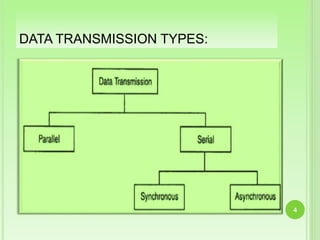
DATA TRANSMISSION TYPES:
.
4
PARALLEL TRANSMISSION:
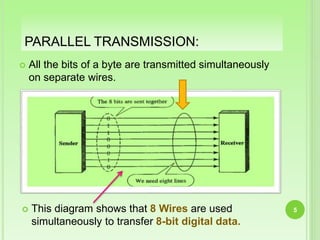
 All the bits of a byte are transmitted simultaneously
on separate wires.
5 This diagram shows that 8 Wires are used
simultaneously to transfer 8-bit digital data.
PARALLEL TRANSMISSION: CONT’D:
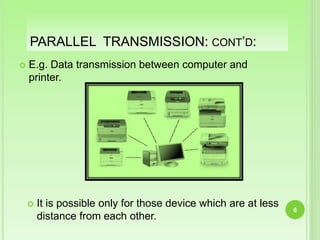
 E.g. Data transmission between computer and
printer.
6
 It is possible only for those device which are at less
distance from each other.
ADVANTAGES OF PARALLEL TRANSMISSION:
All the data bits will be
transmitted simultaneously, so
time required for transmission
of N number of bits will be
only one clock cycle.
Due to transmission in only
one clock cycle, clock
frequency can be kept low
without affecting speed of
operation.
7
DISADVANTAGES OF PARALLEL TRANSMISSION:
Transmission of N bits
will require N number
of wires.
With increase of users
these wires will be too
difficult to handle.
8
SERIAL TRANSMISSION:
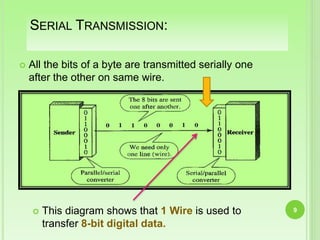
 All the bits of a byte are transmitted serially one
after the other on same wire.
9 This diagram shows that 1 Wire is used to
transfer 8-bit digital data.
SERIAL TRANSMISSION:
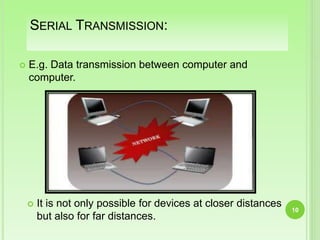
 E.g. Data transmission between computer and
computer.
10
 It is not only possible for devices at closer distances
but also for far distances.
ADVANTAGES OF SERIAL TRANSMISSION:
Only one wire is
required.
Reduced cost due
to less number of
conductors.
11
DISADVANTAGES OF SERIAL TRANSMISSION:
Speed of data transfer is
low.
To increase speed of
data transfer, clock
frequency needs to be
increased.
12
TYPES OF SERIAL TRANSMISSION
 In data communication, Timing control of the
reception of bits is important.
 There are two methods of timing control for
reception of bits.
13
SYNCHRONOUS &
ASYNCHRONOUS DATA
TRANSFER
14
SYNCHRONOUS DATA TRANSFER
 Synchronous means “at the same time”. In this
format of data transfer transmitter and receiver
device are synchronized with the same clock pulse.
 It is used in between the devices that match in
speed. It is invariably used in between memory and
microprocessor when they are compatible.
15
SYNCHRONOUS DATA TRANSFER :
CONT’D
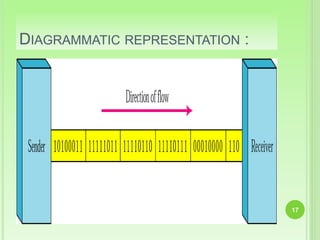
 In synchronous transmission, data transmission is
carried out under the control of a common master
clock.
 Bytes are transmitted as a block in a continuous
stream of bits.
 Transmitter and Receiver operate at synchronised
clock frequencies.
 No ‘start’ and ‘stop’ bits are used.
 No need of ideal time between data bytes.
 In synchronous transmission timing of signal is
important. 16
DIAGRAMMATIC REPRESENTATION :
17
NOTE:
18
In synchronous transmission,
we send bits one after another without
start/stop bits or gaps.
It is the responsibility of the receiver to
group the bits.
ASYNCHRONOUS DATA TRANSFER:
 Asynchronous means “at a regular interval”.
In this method data transfer is not based on
predetermined timing pattern in this technique the
status of the IO device is checked by the
microprocessor before the data is transferred.
 It is used in between the devices that are not match
in speed. Invariably used in between
microprocessor and IO devices.
19
ASYNCHRONOUS DATA TRANSFER :
CONT’D
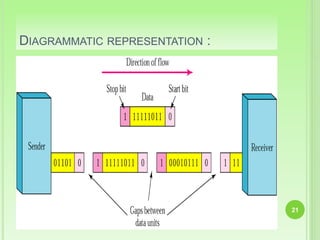
 In asynchronous transmission, the transmitter
transmits data bytes at any instant of time .
 Only one byte is sent at a time. There is ideal time
between two data bytes.
 Transmitter and Receiver operate at different clock
frequencies.
 To help receiver ‘start’ and ‘stop’ bits are used along
with data in middle.
 Ideal time between byte is not constant. They are
also known as gaps.
 In asynchronous transmission timing of signal is not
important.
20
DIAGRAMMATIC REPRESENTATION :
21
NOTE:
22
In asynchronous transmission, we
send 1 start bit (0) at the beginning
and 1 stop bits (1s) at the end of each
byte. There may be a gap between each
byte.
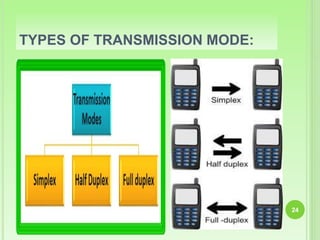
TRANSMISSION MODE:
 The term transmission mode defines the direction
of the flow of information between two
communication devices.
 It tells the direction of signal flow between the two
devices.
23
TYPES OF TRANSMISSION MODE:
24
SIMPLEX MODE
 In simplex mode transmission information sent in
only one direction.
 Device connected in simplex mode is either sent
only or received only that is one device can only
send, other device can only receive.
 Communication is unidirectional.
 Example:
Television ,
Radio,
Keyboard,
Monitors etc. 25
HALF DUPLEX
26
 In half duplex transmission data can be sent in both
the directions, but only in one direction at a time.
 Both the connected device can transmit and receive
but not simultaneously.
 When one device is sending the other can only
receive and vice-versa.
 Example:
Walkie talkie,
Weireless systems
etc.
FULL DUPLEX
 In full duplex transmission, data can be sent in both
the directions simultaneously.
 Both the connected devices can transmit and
receive at the same time.
 Therefore it represents truly bi-directional system.
 Example:
Telephone.
27
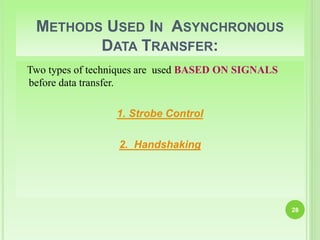
METHODS USED IN ASYNCHRONOUS
DATA TRANSFER:
Two types of techniques are used BASED ON SIGNALS
before data transfer.
1. Strobe Control
2. Handshaking
28
STROBE CONTROL:
 Strobe control method of data transfer uses a single
control signal for each transfer.
 The strobe may be
 Source Initiated Strobe
 Destination Initiated Strobe
29
SOURCE INITIATED STROBE:
 The Data Bus carries the binary information from source unit
to the destination unit.
30
 The Strobe Pulse informs the destination unit when a
valid data word is available in the bus.
Block diagram
Source
Unit
Destination
Unit
Data bus
Strobe
 Typically, the bus has multiple lines to transfer an
entire byte or word.
SOURCE INITIATED STROBE:
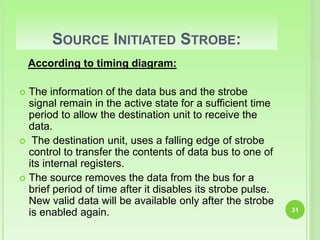
According to timing diagram:
 The information of the data bus and the strobe
signal remain in the active state for a sufficient time
period to allow the destination unit to receive the
data.
 The destination unit, uses a falling edge of strobe
control to transfer the contents of data bus to one of
its internal registers.
 The source removes the data from the bus for a
brief period of time after it disables its strobe pulse.
New valid data will be available only after the strobe
is enabled again. 31
SOURCE INITIATED STROBE:
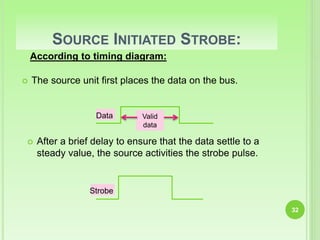
According to timing diagram:
 The source unit first places the data on the bus.
32
 After a brief delay to ensure that the data settle to a
steady value, the source activities the strobe pulse.
Valid
data
Data
Strobe
REAL LIFE EXAMPLE:
 This is analogous to having a teacher (the source)
write an assignment on the blackboard (the data)
and the students (the destination) read the
blackboard without letting the teacher know if they
understood what the teacher wrote.
33
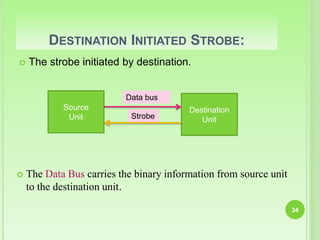
DESTINATION INITIATED STROBE:
 The Data Bus carries the binary information from source unit
to the destination unit.
34
Source
Unit
Destination
Unit
Data bus
Strobe
 The strobe initiated by destination.
DESTINATION INITIATED STROBE:
 The data is made available for enough period to allow the
destination unit to receive it.
 The destination receive the data in destination register.
 The destination unit then disables the strobe. The source
removes the data from the bus after a brief
time interval.
35
DESTINATION INITIATED STROBE:
According to timing diagram:
 First, the destination unit activates the strobe pulse,
informing the source to provide the data.
36
 The source unit response to strobe pulse by placing the valid
data on data bus.
Strobe
Valid
data
Data
DISADVANTAGE OF STROBE SIGNAL
In SOURCE INITIATED DATA TRANSFER the source unit
has no way of knowing whether destination unit has
received the data or not.
Similarly, DESTINATION INITIATED TRANSFER has no
way of knowing whether the source unit has placed
the data on the data bus.
The Handshaking method solves this problem.
37
REAL LIFE EXAMPLE:
 This is similar to having a student (the destination)
ask a teacher (the source) a question. The teacher
gives the student an answer (the data) and then
continues lecturing without confirming whether or
not the student heard the answer.
38
HANDSHAKING
 Handshaking mechanism solves the problem of
strobe method by introducing a second control
signal that provides a reply to the unit that initiate
the transfer.
 The handshaking may be:
 Source to destination unit
 Destination to source unit
39
SOURCE INITIATED TRANSFER USING
HANDSHAKING:
 Handshaking signals are used to synchronize the
bus activities.
According to block diagram:
The two handshaking lines (Control Lines) are
40
Source
Unit
Destination
Unit
Data valid
Data accepted
Data bus
, which is generated by the source unit
2) , generated by the destination unit.
SOURCE INITIATED TRANSFER USING
HANDSHAKING:
Place data on bus.
Enable data valid
Accept data from bus. Enable
data accepted
Disable data valid.
Invalidate data on bus. Disable data accepted.
Ready to accept data.
Destination Unit
Source Unit
Sequence of events
41
REAL LIFE EXAMPLE:
 This is analogous to having a teacher write
something on a blackboard and then waits for the
students to say that they have copied down what he
has written. After the students confirm that they
have copied down everything, the teacher erases
the information on the blackboard and continues
lecturing.
42
DESTINATION INITIATED TRANSFER USING
HANDSHAKING:
 In this case the name of the signal generated by the
destination unit is READY FOR DATA.
 The source unit does not place the data on the bus
until it receives the READY FOR DATA signal from
the destination unit.
43
DESTINATION INITIATED TRANSFER USING
HANDSHAKING:
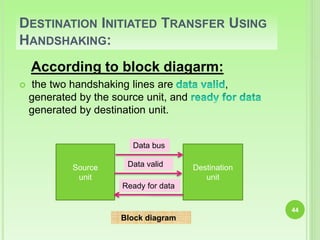
According to block diagarm:
 the two handshaking lines are ,
generated by the source unit, and
generated by destination unit.
44
Block diagram
Source
unit
Destination
unit
Data bus
Data valid
Ready for data
DESTINATION INITIATED TRANSFER USING
HANDSHAKING:
45
 The sequence of events:
This handshaking procedure follows the same
pattern as in source initiated case.
The sequence of events in both the cases is almost
same
except the has been
converted from in case of
source initiated.
DESTINATION INITIATED TRANSFER USING
HANDSHAKING
Place data on bus. Enable
data valid.
Ready to accept data. Enable
ready for data
Disable data valid. Invalidate
data on bus.
Accept data from bus.
Disable ready for data.
Destination Unit
Source Unit
46
Sequence of events
ADVANTAGE OF THE HANDSHAKING
METHOD:
 The Handshaking scheme provides Degree Of
Flexibility and Reliability because the successful
completion of data transfer relies on active participation
by both units.
 If any of one unit is faulty, the data transfer will not be
completed. Such an error can be detected by means of a
Timeout Mechanism which provides an alarm if the
data is not completed within time. 47
REAL LIFE EXAMPLE:
 This is similar to having the students ask the
teacher a question. The teacher answers the
question by writing the answer on the blackboard.
The students copy the answer in their notes and let
the teacher know that they are done writing it down.
The teacher then erases the blackboard and
continues the lecture.
48
DATA TRANSMISSION, Synchronous & Asynchronous Data Transfer

DATA TRANSMISSION, Synchronous & Asynchronous Data Transfer

  • 1.
  • 2.
    DATA TRANSMISSIN INCOMPUTER ARCHITECTURE PRESENTED BY: SADAF RASHEED (2K15-CSE-72) Ab: Jabbar Tunyo (2K15-CSE-04) UNIVERSITY OF SINDH JAMSHORO 2
  • 3.
    Data transmission refersto the movement of data in form of bits 3 DATA TRANSMISSION: It occurs Between two or more Digital Devices.
  • 4.
  • 5.
    PARALLEL TRANSMISSION:  Allthe bits of a byte are transmitted simultaneously on separate wires. 5 This diagram shows that 8 Wires are used simultaneously to transfer 8-bit digital data.
  • 6.
    PARALLEL TRANSMISSION: CONT’D: E.g. Data transmission between computer and printer. 6  It is possible only for those device which are at less distance from each other.
  • 7.
    ADVANTAGES OF PARALLELTRANSMISSION: All the data bits will be transmitted simultaneously, so time required for transmission of N number of bits will be only one clock cycle. Due to transmission in only one clock cycle, clock frequency can be kept low without affecting speed of operation. 7
  • 8.
    DISADVANTAGES OF PARALLELTRANSMISSION: Transmission of N bits will require N number of wires. With increase of users these wires will be too difficult to handle. 8
  • 9.
    SERIAL TRANSMISSION:  Allthe bits of a byte are transmitted serially one after the other on same wire. 9 This diagram shows that 1 Wire is used to transfer 8-bit digital data.
  • 10.
    SERIAL TRANSMISSION:  E.g.Data transmission between computer and computer. 10  It is not only possible for devices at closer distances but also for far distances.
  • 11.
    ADVANTAGES OF SERIALTRANSMISSION: Only one wire is required. Reduced cost due to less number of conductors. 11
  • 12.
    DISADVANTAGES OF SERIALTRANSMISSION: Speed of data transfer is low. To increase speed of data transfer, clock frequency needs to be increased. 12
  • 13.
    TYPES OF SERIALTRANSMISSION  In data communication, Timing control of the reception of bits is important.  There are two methods of timing control for reception of bits. 13
  • 14.
  • 15.
    SYNCHRONOUS DATA TRANSFER Synchronous means “at the same time”. In this format of data transfer transmitter and receiver device are synchronized with the same clock pulse.  It is used in between the devices that match in speed. It is invariably used in between memory and microprocessor when they are compatible. 15
  • 16.
    SYNCHRONOUS DATA TRANSFER: CONT’D  In synchronous transmission, data transmission is carried out under the control of a common master clock.  Bytes are transmitted as a block in a continuous stream of bits.  Transmitter and Receiver operate at synchronised clock frequencies.  No ‘start’ and ‘stop’ bits are used.  No need of ideal time between data bytes.  In synchronous transmission timing of signal is important. 16
  • 17.
  • 18.
    NOTE: 18 In synchronous transmission, wesend bits one after another without start/stop bits or gaps. It is the responsibility of the receiver to group the bits.
  • 19.
    ASYNCHRONOUS DATA TRANSFER: Asynchronous means “at a regular interval”. In this method data transfer is not based on predetermined timing pattern in this technique the status of the IO device is checked by the microprocessor before the data is transferred.  It is used in between the devices that are not match in speed. Invariably used in between microprocessor and IO devices. 19
  • 20.
    ASYNCHRONOUS DATA TRANSFER: CONT’D  In asynchronous transmission, the transmitter transmits data bytes at any instant of time .  Only one byte is sent at a time. There is ideal time between two data bytes.  Transmitter and Receiver operate at different clock frequencies.  To help receiver ‘start’ and ‘stop’ bits are used along with data in middle.  Ideal time between byte is not constant. They are also known as gaps.  In asynchronous transmission timing of signal is not important. 20
  • 21.
  • 22.
    NOTE: 22 In asynchronous transmission,we send 1 start bit (0) at the beginning and 1 stop bits (1s) at the end of each byte. There may be a gap between each byte.
  • 23.
    TRANSMISSION MODE:  Theterm transmission mode defines the direction of the flow of information between two communication devices.  It tells the direction of signal flow between the two devices. 23
  • 24.
  • 25.
    SIMPLEX MODE  Insimplex mode transmission information sent in only one direction.  Device connected in simplex mode is either sent only or received only that is one device can only send, other device can only receive.  Communication is unidirectional.  Example: Television , Radio, Keyboard, Monitors etc. 25
  • 26.
    HALF DUPLEX 26  Inhalf duplex transmission data can be sent in both the directions, but only in one direction at a time.  Both the connected device can transmit and receive but not simultaneously.  When one device is sending the other can only receive and vice-versa.  Example: Walkie talkie, Weireless systems etc.
  • 27.
    FULL DUPLEX  Infull duplex transmission, data can be sent in both the directions simultaneously.  Both the connected devices can transmit and receive at the same time.  Therefore it represents truly bi-directional system.  Example: Telephone. 27
  • 28.
    METHODS USED INASYNCHRONOUS DATA TRANSFER: Two types of techniques are used BASED ON SIGNALS before data transfer. 1. Strobe Control 2. Handshaking 28
  • 29.
    STROBE CONTROL:  Strobecontrol method of data transfer uses a single control signal for each transfer.  The strobe may be  Source Initiated Strobe  Destination Initiated Strobe 29
  • 30.
    SOURCE INITIATED STROBE: The Data Bus carries the binary information from source unit to the destination unit. 30  The Strobe Pulse informs the destination unit when a valid data word is available in the bus. Block diagram Source Unit Destination Unit Data bus Strobe  Typically, the bus has multiple lines to transfer an entire byte or word.
  • 31.
    SOURCE INITIATED STROBE: Accordingto timing diagram:  The information of the data bus and the strobe signal remain in the active state for a sufficient time period to allow the destination unit to receive the data.  The destination unit, uses a falling edge of strobe control to transfer the contents of data bus to one of its internal registers.  The source removes the data from the bus for a brief period of time after it disables its strobe pulse. New valid data will be available only after the strobe is enabled again. 31
  • 32.
    SOURCE INITIATED STROBE: Accordingto timing diagram:  The source unit first places the data on the bus. 32  After a brief delay to ensure that the data settle to a steady value, the source activities the strobe pulse. Valid data Data Strobe
  • 33.
    REAL LIFE EXAMPLE: This is analogous to having a teacher (the source) write an assignment on the blackboard (the data) and the students (the destination) read the blackboard without letting the teacher know if they understood what the teacher wrote. 33
  • 34.
    DESTINATION INITIATED STROBE: The Data Bus carries the binary information from source unit to the destination unit. 34 Source Unit Destination Unit Data bus Strobe  The strobe initiated by destination.
  • 35.
    DESTINATION INITIATED STROBE: The data is made available for enough period to allow the destination unit to receive it.  The destination receive the data in destination register.  The destination unit then disables the strobe. The source removes the data from the bus after a brief time interval. 35
  • 36.
    DESTINATION INITIATED STROBE: Accordingto timing diagram:  First, the destination unit activates the strobe pulse, informing the source to provide the data. 36  The source unit response to strobe pulse by placing the valid data on data bus. Strobe Valid data Data
  • 37.
    DISADVANTAGE OF STROBESIGNAL In SOURCE INITIATED DATA TRANSFER the source unit has no way of knowing whether destination unit has received the data or not. Similarly, DESTINATION INITIATED TRANSFER has no way of knowing whether the source unit has placed the data on the data bus. The Handshaking method solves this problem. 37
  • 38.
    REAL LIFE EXAMPLE: This is similar to having a student (the destination) ask a teacher (the source) a question. The teacher gives the student an answer (the data) and then continues lecturing without confirming whether or not the student heard the answer. 38
  • 39.
    HANDSHAKING  Handshaking mechanismsolves the problem of strobe method by introducing a second control signal that provides a reply to the unit that initiate the transfer.  The handshaking may be:  Source to destination unit  Destination to source unit 39
  • 40.
    SOURCE INITIATED TRANSFERUSING HANDSHAKING:  Handshaking signals are used to synchronize the bus activities. According to block diagram: The two handshaking lines (Control Lines) are 40 Source Unit Destination Unit Data valid Data accepted Data bus , which is generated by the source unit 2) , generated by the destination unit.
  • 41.
    SOURCE INITIATED TRANSFERUSING HANDSHAKING: Place data on bus. Enable data valid Accept data from bus. Enable data accepted Disable data valid. Invalidate data on bus. Disable data accepted. Ready to accept data. Destination Unit Source Unit Sequence of events 41
  • 42.
    REAL LIFE EXAMPLE: This is analogous to having a teacher write something on a blackboard and then waits for the students to say that they have copied down what he has written. After the students confirm that they have copied down everything, the teacher erases the information on the blackboard and continues lecturing. 42
  • 43.
    DESTINATION INITIATED TRANSFERUSING HANDSHAKING:  In this case the name of the signal generated by the destination unit is READY FOR DATA.  The source unit does not place the data on the bus until it receives the READY FOR DATA signal from the destination unit. 43
  • 44.
    DESTINATION INITIATED TRANSFERUSING HANDSHAKING: According to block diagarm:  the two handshaking lines are , generated by the source unit, and generated by destination unit. 44 Block diagram Source unit Destination unit Data bus Data valid Ready for data
  • 45.
    DESTINATION INITIATED TRANSFERUSING HANDSHAKING: 45  The sequence of events: This handshaking procedure follows the same pattern as in source initiated case. The sequence of events in both the cases is almost same except the has been converted from in case of source initiated.
  • 46.
    DESTINATION INITIATED TRANSFERUSING HANDSHAKING Place data on bus. Enable data valid. Ready to accept data. Enable ready for data Disable data valid. Invalidate data on bus. Accept data from bus. Disable ready for data. Destination Unit Source Unit 46 Sequence of events
  • 47.
    ADVANTAGE OF THEHANDSHAKING METHOD:  The Handshaking scheme provides Degree Of Flexibility and Reliability because the successful completion of data transfer relies on active participation by both units.  If any of one unit is faulty, the data transfer will not be completed. Such an error can be detected by means of a Timeout Mechanism which provides an alarm if the data is not completed within time. 47
  • 48.
    REAL LIFE EXAMPLE: This is similar to having the students ask the teacher a question. The teacher answers the question by writing the answer on the blackboard. The students copy the answer in their notes and let the teacher know that they are done writing it down. The teacher then erases the blackboard and continues the lecture. 48