‫المادة‬ ‫من‬ ‫الهدف‬:
‫اساسي‬ ‫فهم‬ ‫تقديم‬‫البيانات‬ ‫هياكل‬ ‫لمفهوم‬‫و‬‫انواعها‬‫هذا‬ ‫في‬ ‫المستخدمة‬ ‫التقنيات‬ ‫بعض‬ ‫و‬
‫المجال‬‫عن‬ ‫اوليه‬ ‫مقدمه‬ ‫الى‬ ‫باالضافه‬‫مف‬‫هوم‬‫الخوارزميات‬‫و‬‫البيانات‬ ‫بهياكل‬ ‫عالقتها‬.
‫مصادر‬:
- Mark A. Weiss, “Data Structures and Algorithm Analysis in C++, 4th
Edition”, Pearson, 2013.
- Clifford A. Shaffer, “A Practical Introduction to Data Structures and
Algorithm Analysis, 3rd Edition (C++ Version)”, Department of
Computer Science, Virginia Polytechnic Institute and State University,
Virginia, USA, 2010.
- Isam Al-Saffar, “Data Structures (for computer science students) 2nd
Edition”, 2001.
‫اب‬‫م‬‫و‬‫ل‬‫مع‬‫ل‬‫ا‬‫ا‬‫ي‬‫ج‬‫و‬‫ل‬‫و‬‫ن‬‫ك‬‫ت‬‫و‬‫وب‬‫س‬‫ا‬‫ح‬‫ل‬‫ا‬‫وم‬‫ل‬‫ع‬‫ة‬‫ي‬‫ل‬‫ك‬
‫البيانات‬ ‫هياكل‬1
Data Structures 1
‫الدراسي‬ ‫للعام‬5112-5112
‫األعسم‬ ‫باسم‬ ‫أمير‬ .‫م.م‬
alaasam.ameer.b@gmail.com
‫القادسية‬ ‫جامعة‬
http://qu.edu.iq/
‫القادسية‬ ‫جامعة‬–‫الدراسي‬ ‫العام‬ / ‫المعلومات‬ ‫تكنولوجيا‬ ‫و‬ ‫الحاسوب‬ ‫علوم‬ ‫كلية‬50002-5002
‫البيانات‬ ‫هياكل‬0
Data Structures 1
1
‫م.م‬.‫األعسم‬ ‫باسم‬ ‫أمير‬
alaasam.ameer.b@gmail.com
1. Lecture one
1.1 Introduction to data structures
The primary purpose of most computer programs is not to perform
calculations, but to store and retrieve information — usually as fast as
possible. For this reason, the study of data structures and the algorithms
that manipulate them is at the heart of computer science, in the most
general sense; the large amount of information that is to be processed in
some sense represents an abstraction of a part of reality. The data
represent an abstraction of reality in the sense that certain properties and
characteristics of the real objects are ignored because they are peripheral
and irrelevant to the particular problem. An abstraction is thereby also a
simplification of facts. We may regard a personnel file of an employer as an
example. Every employee is represented (abstracted) on this file by a set of
data relevant either to the employer or to his accounting procedures. This
set may include some identification of the employee, for example, his or
her name and salary. But it will most probably not include irrelevant data
such as the hair color, weight, and height. The information that is available
to the computer consists of a selected set of data about the actual problem,
namely that set that is considered relevant to the problem at hand. A data
structure is any (data representation) and (its associated operations) while
even an integer or floating point number stored on the computer can be
viewed as a simple data structure. More typically, a data structure is meant
to be an organization or structuring for a collection of data items.
To solve the problem in computer science we need to apply a set of
operations (arranged as steps) on the data structure, this concept represent
the algorithm. The algorithms + data structures = programs.
1.2 Fundamental data type in C++
When programming, we store the variables in our computer's
memory, but the computer has to know what kind of data we want to store
in them, since it is not going to occupy the same amount of memory to
store a simple number than to store a single letter or a large number, and
‫القادسية‬ ‫جامعة‬–‫الدراسي‬ ‫العام‬ / ‫المعلومات‬ ‫تكنولوجيا‬ ‫و‬ ‫الحاسوب‬ ‫علوم‬ ‫كلية‬50002-5002
‫البيانات‬ ‫هياكل‬0
Data Structures 1
2
‫م.م‬.‫األعسم‬ ‫باسم‬ ‫أمير‬
alaasam.ameer.b@gmail.com
they are not going to be interpreted the same way. The memory in our
computers is organized in bytes. A byte is the minimum amount of memory
that we can manage in C++. A byte can store a relatively small amount of
data. In addition, the computer can manipulate more complex data types
that come from grouping several bytes, such as long numbers or non-
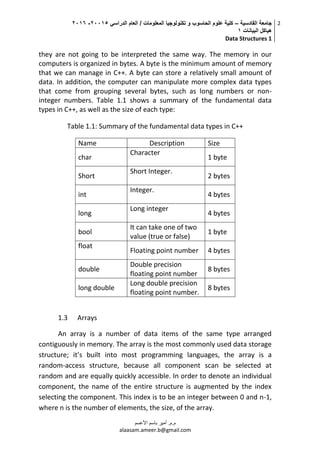
integer numbers. Table 1.1 shows a summary of the fundamental data
types in C++, as well as the size of each type:
Table 1.1: Summary of the fundamental data types in C++
Name Description Size
char
Character
1 byte
Short
Short Integer.
2 bytes
int
Integer.
4 bytes
long
Long integer
4 bytes
bool
It can take one of two
value (true or false)
1 byte
float
Floating point number 4 bytes
double
Double precision
floating point number
8 bytes
long double
Long double precision
floating point number.
8 bytes
1.3 Arrays
An array is a number of data items of the same type arranged
contiguously in memory. The array is the most commonly used data storage
structure; it’s built into most programming languages, the array is a
random-access structure, because all component scan be selected at
random and are equally quickly accessible. In order to denote an individual
component, the name of the entire structure is augmented by the index
selecting the component. This index is to be an integer between 0 and n-1,
where n is the number of elements, the size, of the array.
‫القادسية‬ ‫جامعة‬–‫الدراسي‬ ‫العام‬ / ‫المعلومات‬ ‫تكنولوجيا‬ ‫و‬ ‫الحاسوب‬ ‫علوم‬ ‫كلية‬50002-5002
‫البيانات‬ ‫هياكل‬0
Data Structures 1
3
‫م.م‬.‫األعسم‬ ‫باسم‬ ‫أمير‬
alaasam.ameer.b@gmail.com
1.3.1 One-dimensional array
One- dimensional array is array with one row, in order to declare
one- dimensional array we use the following:
ARRAY_TYPE ARRAY_NAME {ROW_LEANGTH};
Let suppose we need to declare integer array named x with 4
elements:
Int x [4];
This array may visualize as shown in in figure 1.1:
Figure 1.1: Visualization for one- dimensional array with 4 integer
elements
To select any single element in this array we use the name of the
array in addition to the index value for this element which represents the
element position in the array, for instance, to assign value 30 to the third
element in x array we use:
x[2] = 30;
Note: the index for the third element is 2 because the arrays start the
indexing from 0.
Now let suppose that we need to fill the array with the following
values (Sequentially) 10,20,30,40:
x[0]=10;
‫القادسية‬ ‫جامعة‬–‫الدراسي‬ ‫العام‬ / ‫المعلومات‬ ‫تكنولوجيا‬ ‫و‬ ‫الحاسوب‬ ‫علوم‬ ‫كلية‬50002-5002
‫البيانات‬ ‫هياكل‬0
Data Structures 1
4
‫م.م‬.‫األعسم‬ ‫باسم‬ ‫أمير‬
alaasam.ameer.b@gmail.com
x[1]=20;
x[2]=30;
x[3]=40;
Figure 1.2: elements of array and its values
Exercise1: Explain the following C++ program?
1.3.2 Two-dimensional array
Multidimensional arrays may be initialized by specifying bracketed
values for each row. Following is an integer array with 3 rows and each row
#include <iostream>
using namespace std;
int main ()
{
int x[5];
int
for ( int i = 0; i < 4; i++ )
{
x[i]= i+1;
cout << x[i]<< endl;
}
return 0;
}
‫القادسية‬ ‫جامعة‬–‫الدراسي‬ ‫العام‬ / ‫المعلومات‬ ‫تكنولوجيا‬ ‫و‬ ‫الحاسوب‬ ‫علوم‬ ‫كلية‬50002-5002
‫البيانات‬ ‫هياكل‬0
Data Structures 1
5
‫م.م‬.‫األعسم‬ ‫باسم‬ ‫أمير‬
alaasam.ameer.b@gmail.com
has 5 columns: int z [3][5]; a two-dimensional array can be think as a table,
which will have x number of rows and y number of columns. A two-
dimensional array z, which contains three rows and five columns, can be
shown as in the figure 1.3:
Figure 1.3: table representation for two-dimensional z array.
To assign value to an element in the array we use the following
formula:
Array-name [row-index] [column-index] = value;
The following C++ programs fill the z array with value from 0 to 15:
Homework 1.1: Draw a table (consists of rows and columns)
represents the array in the next C++ program, with the values for each array
item, after we have implemented the next C++ program:
#include <iostream>
using namespace std;
int main ()
{
int z[3][5];
int eval =0;
for ( int i = 0; i < 3; i++ )
for ( int j = 0; j < 5; j++ )
{
z[i][j]=eval;
eval++;
}
return 0;
}
‫القادسية‬ ‫جامعة‬–‫الدراسي‬ ‫العام‬ / ‫المعلومات‬ ‫تكنولوجيا‬ ‫و‬ ‫الحاسوب‬ ‫علوم‬ ‫كلية‬50002-5002
‫البيانات‬ ‫هياكل‬0
Data Structures 1
6
‫م.م‬.‫األعسم‬ ‫باسم‬ ‫أمير‬
alaasam.ameer.b@gmail.com
1.4 Array representation and the address of elements
Dimension reference to the linear representation. One- dimensional
array represents as a set of elements arranged contiguously in memory.
Two-dimensional array also represents as a set of elements arranged
contiguously in memory but based on one of two major representation
methods, first one is row-major and second one is column-major:
1- Row-Major method: the first row of the array occupies the first set
of memory address reserved for the array, the second row
occupies in next set, and so forth.
2- Column-Major method: the first column of the array occupies the
first set of memory address reserved for the array, the second
column occupies in next set, and so forth.
Note that, by declaring an array the compiler reserve a set of
sequential memory address. In any case, the Address of the first element of
the array is known as base address (BA), for instance; if we have array (x),
then (BA) is the address of the first element of x array and (by assuming the
size of each element is equal to 1), the second element of array have an
address equal to (BA+1), third element have an address equal to (BA+2),
#include <iostream>
using namespace std;
int main ()
{
int z[5][3];
int eval =15;
for ( int i = 0; i < 5; i++ )
for ( int j = 0; j < 3; j++ )
{
z[i][j]=eval;
eval++;
}
return 0;
}
‫القادسية‬ ‫جامعة‬–‫الدراسي‬ ‫العام‬ / ‫المعلومات‬ ‫تكنولوجيا‬ ‫و‬ ‫الحاسوب‬ ‫علوم‬ ‫كلية‬50002-5002
‫البيانات‬ ‫هياكل‬0
Data Structures 1
7
‫م.م‬.‫األعسم‬ ‫باسم‬ ‫أمير‬
alaasam.ameer.b@gmail.com
and so forth, figure 1.4 show the representation methods of two-
dimensional array.
Figure 1.4: Representation methods of two-dimensional array
1.4.1 Element address in one-dimensional array
Simply, the one-dimensional array is a one row. And by known the BA
we can calculate the address of any given element in the array by using the
next formula:
Address of A [ I ] = BA + W * ( I – Li )
‫القادسية‬ ‫جامعة‬–‫الدراسي‬ ‫العام‬ / ‫المعلومات‬ ‫تكنولوجيا‬ ‫و‬ ‫الحاسوب‬ ‫علوم‬ ‫كلية‬50002-5002
‫البيانات‬ ‫هياكل‬0
Data Structures 1
8
‫م.م‬.‫األعسم‬ ‫باسم‬ ‫أمير‬
alaasam.ameer.b@gmail.com
Where:
BA = Base address
W = Storage Size of one element stored in the array (in byte)
I = Subscript of element (index of the element)
Li = Lower element subscript in the array (index for the first element
in array)
Example: The array (char x [5]), find the address of the x[3] where the BA is
equal to 200? Storage Size of one char element is 1 and assumes that the
index of the first element in the array begins with 0?
Address of x[ 3 ] = BA + W * ( I – Li )
= 200+1*(3-0)
= 203
Figure 1.5: Address of the element in one-dimensional array
‫القادسية‬ ‫جامعة‬–‫الدراسي‬ ‫العام‬ / ‫المعلومات‬ ‫تكنولوجيا‬ ‫و‬ ‫الحاسوب‬ ‫علوم‬ ‫كلية‬50002-5002
‫البيانات‬ ‫هياكل‬0
Data Structures 1
9
‫م.م‬.‫األعسم‬ ‫باسم‬ ‫أمير‬
alaasam.ameer.b@gmail.com
1.4.2 Element address in two-dimensional array
1- By using Row-major method:
Address of A [ I ][ J ] = BA + W * [ N * ( I – Lr ) + ( J – Lc )]
2- By using column-major method:
Address of A [ I ][ J ] = BA + W * [( I – Lr ) + M * ( J – Lc )]
Where in the two methods:
BA = Base address
I = Row subscript (index) of element whose address is to be found.
J = Column subscript (index) of element whose address is to be found.
W = Storage Size of one element stored in the array (in byte).
Lr = Lower limit of row/index for the first element in the first row (if not
given then assume it 0).
Lc = Lower limit of column/ index for the first element in the first column (if
not given then assume it 0).
M = Number of row of the given array.
N = Number of column of the given array.
Example: the char int x [6] [9] have the base address equal to 700;
find the address of x [3][5] by using row-major method and column-major
method also ?
row-major method: Address of A [ I ][ J ] = BA + W * [ N * ( I – Lr ) + ( J – Lc )]
BA=700, W=1 (because the size of the type char is equal to 1 byte),
N=6, Lr=0, Lc=0:
Address of x [ 3][ 5 ] = 700 + 1 * [ 6 * ( 3– 0 ) + ( 5 – 0 )]
= 723
‫القادسية‬ ‫جامعة‬–‫الدراسي‬ ‫العام‬ / ‫المعلومات‬ ‫تكنولوجيا‬ ‫و‬ ‫الحاسوب‬ ‫علوم‬ ‫كلية‬50002-5002
‫البيانات‬ ‫هياكل‬0
Data Structures 1
10
‫م.م‬.‫األعسم‬ ‫باسم‬ ‫أمير‬
alaasam.ameer.b@gmail.com
Column-major method:
Address of A [ I ][ J ] = BA + W * [( I – Lr ) + M*( J – Lc )]
BA=700, W=1 (because the size of the type char is equal to 1 byte),
M=9, Lr=0, Lc=0:
Address of x [ 3][ 5 ] = 700 + 1 * [ ( 3– 0 ) + 9*( 5 – 0 )]
= 748
‫القادسية‬ ‫جامعة‬–‫الدراسي‬ ‫العام‬ / ‫المعلومات‬ ‫تكنولوجيا‬ ‫و‬ ‫الحاسوب‬ ‫علوم‬ ‫كلية‬50002-5002
‫البيانات‬ ‫هياكل‬0
Data Structures 1
11
‫م.م‬.‫األعسم‬ ‫باسم‬ ‫أمير‬
alaasam.ameer.b@gmail.com
2. Lecture two
2.1 String
The string is a one-dimensional array of characters which is
terminated by a null character '0'. Thus a null-terminated string contains
the characters that comprise the string followed by a null.
The following declaration and initialization creates a string consisting
of the word "Hello". To hold the null character at the end of the array, the
size of the character array containing the string is one more than the
number of characters in the word "Hello"’
char greeting[6] = {'H', 'e', 'l', 'l', 'o', '0'};
or
char greeting[] =”hello”;
Actually, you do not place the null character at the end of a string
constant. The C++ compiler automatically places the '0' at the end of the
string when it initializes the array. Let us try to print above-mentioned
string:
#include <iostream>
using namespace std;
int main ()
{
char greeting[6] = {'H', 'e', 'l', 'l', 'o',
'0'};
cout << "Greeting message: ";
cout << greeting << endl;
return 0;
}
‫القادسية‬ ‫جامعة‬–‫الدراسي‬ ‫العام‬ / ‫المعلومات‬ ‫تكنولوجيا‬ ‫و‬ ‫الحاسوب‬ ‫علوم‬ ‫كلية‬50002-5002
‫البيانات‬ ‫هياكل‬0
Data Structures 1
12
‫م.م‬.‫األعسم‬ ‫باسم‬ ‫أمير‬
alaasam.ameer.b@gmail.com
2.1.1 The main built-in (string and character) function supported by C++
The table 2.1 shows the main (not all) built-in (string and character) function
supported by C++ (Visual C++ 2010).
Table 2.1: The main built-in (string and character) function supported by C++
Function Purpose
For example :
Output
char s1 [10] =”Hello”;
char s2 [10] =
“World”;
char s3 [10];
String
function
strcpy(s1, s2);
Copies string s2
into string s1.
strcpy(s3, s1); S3 : Hello
strcat(s1, s2);
Concatenates s2
onto the end of
string s1.
strcat(s3, s2); S3: HelloWorld
strlen(s1);
Returns the
length of string
s1.
int x= strlen(s1); x = 5
strcmp(s1, s2);
Returns 0 if s1
and s2 are the
same; less than
0 if s1<s2;
greater than 0 if
s1>s2.
strcmp(s1, s2); -1
strrev(s1) Reverse string strrev(s3); S3: dlroWolleH
strupr(s1);
From lowercase
to uppercase
strupr(s2); S2: HELLO
strlwr(s1);
From uppercase
to lowercase
strlwr(s2); S2: hello
Character
function
isalpha(ch);
checks if the
character is
alphabetic(1)
if ( isalpha(s1[0])) true
isdigit(ch);
checks if the
character ch is a
numeric
if (isdigit(s1[0])) false
isalnum(ch);
checks the
character is
alphanumeric(2)
if ( isalnum(s1[0])) true
islower(ch);
checks if the
character ch is
lowercase
if (islower(s1[0])) false
isupper(ch);
checks if the
character ch is
Uppercase
if (isupper(s1[0])) true
‫القادسية‬ ‫جامعة‬–‫الدراسي‬ ‫العام‬ / ‫المعلومات‬ ‫تكنولوجيا‬ ‫و‬ ‫الحاسوب‬ ‫علوم‬ ‫كلية‬50002-5002
‫البيانات‬ ‫هياكل‬0
Data Structures 1
13
‫م.م‬.‫األعسم‬ ‫باسم‬ ‫أمير‬
alaasam.ameer.b@gmail.com
(1)
: Alphabetic is a standard set of letters (basic written symbols or graphemes) which is
used to write one or more languages based on the general principle that the letters represent
phonemes (basic significant sounds) of the spoken language.
(2)
: Alphanumeric is a combination of alphabetic and numeric characters, and is
used to describe the collection of Latin letters and Arabic digits or a text constructed
from this collection.
Example 2.1 :
The above code produces result as follows:
#include <iostream>
using namespace std;
int main ()
{
char str1[10] = "Hello";
char str2[10] = "World";
char str3[10];
int len ;
// copy str1 into str3
strcpy( str3, str1);
cout << "strcpy( str3, str1) : " << str3 << endl;
// concatenates str1 and str2
strcat( str1, str2);
cout << "strcat( str1, str2): " << str1 << endl;
// total length of str1 after concatenation
len = strlen(str1);
cout << "strlen(str1) : " << len << endl;
return 0;
}
strcpy( str3, str1) : Hello
strcat( str1, str2): HelloWorld
strlen(str1) : 10
‫القادسية‬ ‫جامعة‬–‫الدراسي‬ ‫العام‬ / ‫المعلومات‬ ‫تكنولوجيا‬ ‫و‬ ‫الحاسوب‬ ‫علوم‬ ‫كلية‬50002-5002
‫البيانات‬ ‫هياكل‬0
Data Structures 1
14
‫م.م‬.‫األعسم‬ ‫باسم‬ ‫أمير‬
alaasam.ameer.b@gmail.com
2.1.2 String Class in C++
The standard C++ library provides a string class type that supports all
the operations mentioned above (which is C-style), additionally much more
functionality. Note that you should include ( <string> ) library in your code
in order to use standard C++ library string class, let us check some
differences which is shows in table 2.2 in respect to the example 2.1:
Table 2.2: C-style vs standard C++ library in respect to the example 2.1
C-style (Supported by C++) C++
declaration char str1[10] = "Hello";
char str2[10] = "World";
char str3[10];
int len;
string str1 = "Hello";
string str2 = "World";
string str3;
int len;
copy str into
other str
strcpy( str3, str1); str3 = str1;
concatenates str strcat( str1, str2); str3 = str1 + str2;
total length of str len = strlen(str1); len = str3.size();
One of the aspects in C++ string class is that we can use the
operators, for instance, to compare between the string objects we can use
the operator ==, !=, <, <=, >, >= .
2.2 Structure (struct)
C/C++ arrays allow you to define variables that combine several data items
of the same kind but structure is another user defined data type which allows you
to combine data items of different kinds.
Structures are used to represent a record, suppose you want to keep track
of your books in a library. You might want to track the following attributes about
each book:
1. Title
2. Year
‫القادسية‬ ‫جامعة‬–‫الدراسي‬ ‫العام‬ / ‫المعلومات‬ ‫تكنولوجيا‬ ‫و‬ ‫الحاسوب‬ ‫علوم‬ ‫كلية‬50002-5002
‫البيانات‬ ‫هياكل‬0
Data Structures 1
15
‫م.م‬.‫األعسم‬ ‫باسم‬ ‫أمير‬
alaasam.ameer.b@gmail.com
To define a structure, you must use the struct statement. The struct
statement defines a new data type, with more than one member, for your
program. The format of the struct statement is this:
Figure 2.1 show the concept of structure in respect to our example about
the books.
Figure 2.1: The concept of structure (struct)
struct [definition structure tag]
{
member definition;
member;
...
member definition;
} [one or more objects of struct];
‫القادسية‬ ‫جامعة‬–‫الدراسي‬ ‫العام‬ / ‫المعلومات‬ ‫تكنولوجيا‬ ‫و‬ ‫الحاسوب‬ ‫علوم‬ ‫كلية‬50002-5002
‫البيانات‬ ‫هياكل‬0
Data Structures 1
16
‫م.م‬.‫األعسم‬ ‫باسم‬ ‫أمير‬
alaasam.ameer.b@gmail.com
2.2.1 Accessing structure members
To access any member of a structure, we use the member access operator
(.). The member access operator is coded as a period between the structure
variable name and the structure member that we wish to access. You would use
struct keyword to define variables of structure type. Following is the example 2.2
to explain usage of structure:
#include <iostream>
#include <cstring>
using namespace std;
struct Books
{
char title[50];
int year;
};
int main( )
{
struct Books Book1; // Declare Book1 of type Book
struct Books Book2; // Declare Book2 of type Book
// book 1 specification
strcpy( Book1.title, "Learn C++");
Book1.year = 2015;
// book 2 specification
strcpy( Book2.title, "Algorithm");
Book2.year = 1998;
// Print Book1 info
cout << "Book 1 title : " << Book1.title <<endl;
cout << "Book 1 year : " << Book1.year <<endl;
// Print Book2 info
cout << "Book 2 title : " << Book2.title <<endl;
cout << "Book 2 year : " << Book2.year <<endl;
system ("pause");
return 0;
}
‫القادسية‬ ‫جامعة‬–‫الدراسي‬ ‫العام‬ / ‫المعلومات‬ ‫تكنولوجيا‬ ‫و‬ ‫الحاسوب‬ ‫علوم‬ ‫كلية‬50002-5002
‫البيانات‬ ‫هياكل‬0
Data Structures 1
17
‫م.م‬.‫األعسم‬ ‫باسم‬ ‫أمير‬
alaasam.ameer.b@gmail.com
2.3 Stack
Stack is a collection of items which is
organized in a sequential manner. Example:
stack of books or stack of plates. All
additions and deletions are restricted at
one end, called top. A stack is open at one
end (the top) only. You can push entry onto
the top, or pop the top entry out of the
stack.
Example of Stack
• Long and narrow home garage (have a
one car width) – BMW comes in first,
Mercedes Benz follows, OPEL enters in
last. – When the cars come out, OPEL
comes out first, then Mercedes follows,
and BMW comes out last.
• Page-visited history in a Web browser.
 Undo operation in many editor tools.
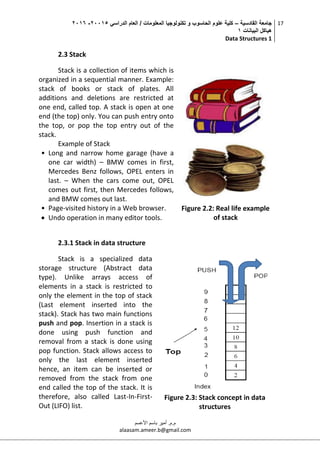
Figure 2.2: Real life example
of stack
2.3.1 Stack in data structure
Stack is a specialized data
storage structure (Abstract data
type). Unlike arrays access of
elements in a stack is restricted to
only the element in the top of stack
(Last element inserted into the
stack). Stack has two main functions
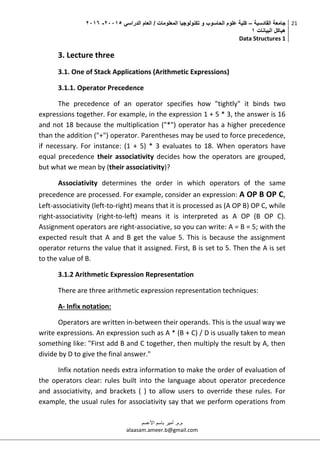
push and pop. Insertion in a stack is
done using push function and
removal from a stack is done using
pop function. Stack allows access to
only the last element inserted
hence, an item can be inserted or
removed from the stack from one
end called the top of the stack. It is
therefore, also called Last-In-First-
Out (LIFO) list.
Figure 2.3: Stack concept in data
structures
‫القادسية‬ ‫جامعة‬–‫الدراسي‬ ‫العام‬ / ‫المعلومات‬ ‫تكنولوجيا‬ ‫و‬ ‫الحاسوب‬ ‫علوم‬ ‫كلية‬50002-5002
‫البيانات‬ ‫هياكل‬0
Data Structures 1
18
‫م.م‬.‫األعسم‬ ‫باسم‬ ‫أمير‬
alaasam.ameer.b@gmail.com
2.3.2 Two operations applicable to all stacks
 A push operation: in which a data item is placed at the location
pointed to by the stack pointer, and the address in the stack
pointer is adjusted by the size of the data item;
 A pop operation: a data item at the current location pointed to by
the stack pointer is removed, and the stack pointer is adjusted by
the size of the data item.
Figure 2.4 shows the concept of two stack operations applicable to all
stacks
Figure 2.4: Two operations applicable to all stacks
2.3.3 Array stack implementation
In most high level languages, a stack can be easily implemented
either through an array or a linked list. The following will demonstrate Array
implementations: The first element (usually at the zero offset) is the
bottom, resulting in array[0] being the first element pushed onto the stack
and the last element popped off. The program must keep track of the size
(length) of the stack, using a variable top that records the number of items
‫القادسية‬ ‫جامعة‬–‫الدراسي‬ ‫العام‬ / ‫المعلومات‬ ‫تكنولوجيا‬ ‫و‬ ‫الحاسوب‬ ‫علوم‬ ‫كلية‬50002-5002
‫البيانات‬ ‫هياكل‬0
Data Structures 1
19
‫م.م‬.‫األعسم‬ ‫باسم‬ ‫أمير‬
alaasam.ameer.b@gmail.com
pushed so far, therefore pointing to the place in the array where the next
element is to be inserted (assuming a zero-based index convention). Thus,
the stack can be effectively implemented as a five procedure:
1- Stack initializing: there are 3 main stack properties:
 Size: the maximum integer number of data item can push it
into stack.
 Top: integer value that records the number of items pushed so
far, therefore pointing to the place in the array where the next
element is to be inserted.
 Items: element/array of items which will use to store the stack
elements.
integer size ← maximum stack size
integer top ← -1
type items[size]
2- Check if the stacks is full:
If top+1 ← Size then stack are full
3- Check if the stacks is empty:
If top ← -1 then stack are empty
4- Push:
If stack not full then {
top ← top+1
items [top] ← new item
}
5- Pop:
If stack not empty then {
new items ← items [top]
top ← top-1
}
The following example shows the implementation of stack through
array:
‫القادسية‬ ‫جامعة‬–‫الدراسي‬ ‫العام‬ / ‫المعلومات‬ ‫تكنولوجيا‬ ‫و‬ ‫الحاسوب‬ ‫علوم‬ ‫كلية‬50002-5002
‫البيانات‬ ‫هياكل‬0
Data Structures 1
20
‫م.م‬.‫األعسم‬ ‫باسم‬ ‫أمير‬
alaasam.ameer.b@gmail.com
#include <iostream>
using namespace std;
//Stack initializing
#define SIZE 10
int top = -1;
char items[SIZE];
//used to check if the stacks is full
bool full() {
return top+1 == SIZE;
}
//used to check if the stacks is empty
bool empty() {
return top == -1;
}
//push item
void push(char c) {
top=top+1;
items[top] = c;
}
//pop item
char pop() {
char R= items[top];
top=top-1;
return R;
}
int main() {
char ch;
while ((ch = cin.get()) != 'n')
if (!full()) push(ch);
while (!empty())
cout<<pop();
cout<<endl;
system ("pause");
return 0;
}
‫القادسية‬ ‫جامعة‬–‫الدراسي‬ ‫العام‬ / ‫المعلومات‬ ‫تكنولوجيا‬ ‫و‬ ‫الحاسوب‬ ‫علوم‬ ‫كلية‬50002-5002
‫البيانات‬ ‫هياكل‬0
Data Structures 1
21
‫م.م‬.‫األعسم‬ ‫باسم‬ ‫أمير‬
alaasam.ameer.b@gmail.com
3. Lecture three
3.1. One of Stack Applications (Arithmetic Expressions)
3.1.1. Operator Precedence
The precedence of an operator specifies how "tightly" it binds two
expressions together. For example, in the expression 1 + 5 * 3, the answer is 16
and not 18 because the multiplication ("*") operator has a higher precedence
than the addition ("+") operator. Parentheses may be used to force precedence,
if necessary. For instance: (1 + 5) * 3 evaluates to 18. When operators have
equal precedence their associativity decides how the operators are grouped,
but what we mean by (their associativity)?
Associativity determines the order in which operators of the same
precedence are processed. For example, consider an expression: A OP B OP C,
Left-associativity (left-to-right) means that it is processed as (A OP B) OP C, while
right-associativity (right-to-left) means it is interpreted as A OP (B OP C).
Assignment operators are right-associative, so you can write: A = B = 5; with the
expected result that A and B get the value 5. This is because the assignment
operator returns the value that it assigned. First, B is set to 5. Then the A is set
to the value of B.
3.1.2 Arithmetic Expression Representation
There are three arithmetic expression representation techniques:
A- Infix notation:
Operators are written in-between their operands. This is the usual way we
write expressions. An expression such as A * (B + C) / D is usually taken to mean
something like: "First add B and C together, then multiply the result by A, then
divide by D to give the final answer."
Infix notation needs extra information to make the order of evaluation of
the operators clear: rules built into the language about operator precedence
and associativity, and brackets ( ) to allow users to override these rules. For
example, the usual rules for associativity say that we perform operations from
‫القادسية‬ ‫جامعة‬–‫الدراسي‬ ‫العام‬ / ‫المعلومات‬ ‫تكنولوجيا‬ ‫و‬ ‫الحاسوب‬ ‫علوم‬ ‫كلية‬50002-5002
‫البيانات‬ ‫هياكل‬0
Data Structures 1
22
‫م.م‬.‫األعسم‬ ‫باسم‬ ‫أمير‬
alaasam.ameer.b@gmail.com
left to right, so the multiplication by A is assumed to come before the division by
D. Similarly, the usual rules for precedence say that we perform multiplication
and division before we perform addition and subtraction.
B- Postfix notation:
Operators are written after their operands. The infix expression given
above is A * (B + C) / D, next steps show how to convert infix to postfix:
1- Completely parenthesize the infix expression: ((A * (B + C)) / D )
2- Move each operator to the space hold by its corresponding right
parenthesis: ( (A (B C +) *) D /)
3- Remove all parentheses: A B C + * D /
C- Prefix notation:
Operators are written before their operands .The infix expression given
above is A * (B + C) / D, next steps show how to convert infix to prefix:
1- Completely parenthesize the infix expression: ((A * (B + C)) / D )
2- Move each operator to the space hold by its corresponding left
parenthesis: (/ (* A (+ B C) ) D)
3- Remove all parentheses: /* A + B C D
Because Postfix operators use values to their left, any values involving
computations will already have been calculated as we go left-to-right, and so the
order of evaluation of the operators is not disrupted in the same way as in Prefix
expressions.
3.1.3. Conversion from Infix to Postfix by Using Stack
Stacks are wildly used in the design and implementation of compilers for
example they are used to convert arithmetic expression from Infix to postfix, but
how? Let A*(B+C)-D/E which is Infix and we need to convert it to Postfix by
using stack, the following steps (or stages):
‫القادسية‬ ‫جامعة‬–‫الدراسي‬ ‫العام‬ / ‫المعلومات‬ ‫تكنولوجيا‬ ‫و‬ ‫الحاسوب‬ ‫علوم‬ ‫كلية‬50002-5002
‫البيانات‬ ‫هياكل‬0
Data Structures 1
23
‫م.م‬.‫األعسم‬ ‫باسم‬ ‫أمير‬
alaasam.ameer.b@gmail.com
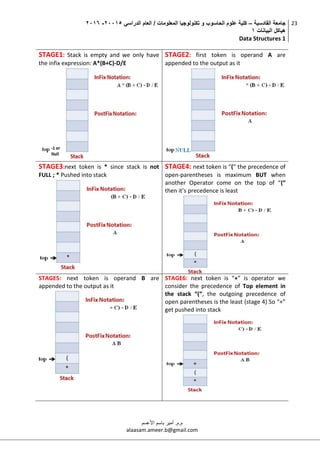
STAGE1: Stack is empty and we only have
the infix expression: A*(B+C)-D/E
STAGE2: first token is operand A are
appended to the output as it
STAGE3:next token is * since stack is not
FULL ; * Pushed into stack
STAGE4: next token is “(“ the precedence of
open-parentheses is maximum BUT when
another Operator come on the top of “(“
then it’s precedence is least
STAGE5: next token is operand B are
appended to the output as it
STAGE6: next token is “+” is operator we
consider the precedence of Top element in
the stack “(“, the outgoing precedence of
open parentheses is the least (stage 4) So “+”
get pushed into stack
‫القادسية‬ ‫جامعة‬–‫الدراسي‬ ‫العام‬ / ‫المعلومات‬ ‫تكنولوجيا‬ ‫و‬ ‫الحاسوب‬ ‫علوم‬ ‫كلية‬50002-5002
‫البيانات‬ ‫هياكل‬0
Data Structures 1
24
‫م.م‬.‫األعسم‬ ‫باسم‬ ‫أمير‬
alaasam.ameer.b@gmail.com
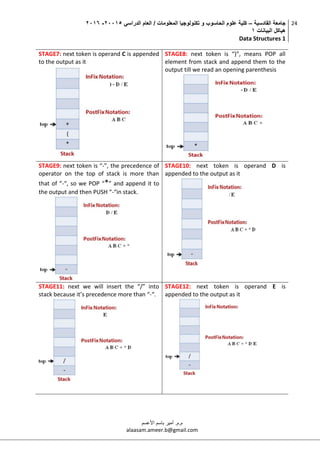
STAGE7: next token is operand C is appended
to the output as it
STAGE8: next token is “)”, means POP all
element from stack and append them to the
output till we read an opening parenthesis
STAGE9: next token is “-”, the precedence of
operator on the top of stack is more than
that of “-“, so we POP “*” and append it to
the output and then PUSH “-“in stack.
STAGE10: next token is operand D is
appended to the output as it
STAGE11: next we will insert the “/” into
stack because it’s precedence more than “-“.
STAGE12: next token is operand E is
appended to the output as it
‫القادسية‬ ‫جامعة‬–‫الدراسي‬ ‫العام‬ / ‫المعلومات‬ ‫تكنولوجيا‬ ‫و‬ ‫الحاسوب‬ ‫علوم‬ ‫كلية‬50002-5002
‫البيانات‬ ‫هياكل‬0
Data Structures 1
25
‫م.م‬.‫األعسم‬ ‫باسم‬ ‫أمير‬
alaasam.ameer.b@gmail.com
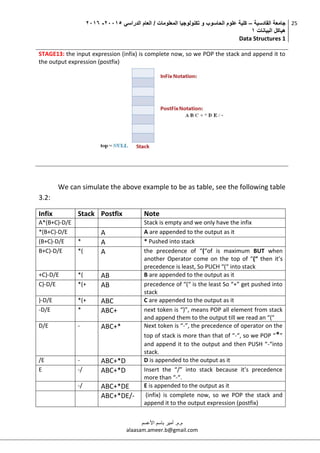
STAGE13: the input expression (infix) is complete now, so we POP the stack and append it to
the output expression (postfix)
We can simulate the above example to be as table, see the following table
3.2:
Infix Stack Postfix Note
A*(B+C)-D/E Stack is empty and we only have the infix
*(B+C)-D/E A A are appended to the output as it
(B+C)-D/E * A * Pushed into stack
B+C)-D/E *( A the precedence of “(“of is maximum BUT when
another Operator come on the top of “(“ then it’s
precedence is least, So PUCH “(“ into stack
+C)-D/E *( AB B are appended to the output as it
C)-D/E *(+ AB precedence of “(“ is the least So “+” get pushed into
stack
)-D/E *(+ ABC C are appended to the output as it
-D/E * ABC+ next token is “)”, means POP all element from stack
and append them to the output till we read an “("
D/E - ABC+* Next token is “-”, the precedence of operator on the
top of stack is more than that of “-“, so we POP “*”
and append it to the output and then PUSH “-“into
stack.
/E - ABC+*D D is appended to the output as it
E -/ ABC+*D Insert the “/” into stack because it’s precedence
more than “-“.
-/ ABC+*DE E is appended to the output as it
ABC+*DE/- (infix) is complete now, so we POP the stack and
append it to the output expression (postfix)
‫القادسية‬ ‫جامعة‬–‫الدراسي‬ ‫العام‬ / ‫المعلومات‬ ‫تكنولوجيا‬ ‫و‬ ‫الحاسوب‬ ‫علوم‬ ‫كلية‬50002-5002
‫البيانات‬ ‫هياكل‬0
Data Structures 1
26
‫م.م‬.‫األعسم‬ ‫باسم‬ ‫أمير‬
alaasam.ameer.b@gmail.com
C++ code to convert infix to postfix can be as follow:
#include <iostream>
using namespace std;
#define SIZE 50
char s[SIZE];
int top=-1;
void PUSH(char elem)
{
s[++top]=elem;
}
char POP()
{
return(s[top--]);
}
int Precedence(char elem)
{
switch(elem)
{
case '#': return 0;
case '(': return 1;
case '+':
case '-': return 2;
case '*':
case '/': return 3;
}
}
void main()
{
char Infix[50],Postfix[50],ch,elem;
int i=0,k=0;
cout<<"nnRead the Infix ExPrecedenceession ? ";
cin>>Infix;
PUSH('#');
while( (ch=Infix[i++]) != '0')
{
if( ch == '(')
PUSH(ch);
else
if(isalnum(ch)) // if ch is alphanumeric
Postfix[k++]=ch;
else // if is not alphanumeric
if( ch == ')')
{
while( s[top] != '(')
Postfix[k++]=POP();
elem=POP();
}
‫القادسية‬ ‫جامعة‬–‫الدراسي‬ ‫العام‬ / ‫المعلومات‬ ‫تكنولوجيا‬ ‫و‬ ‫الحاسوب‬ ‫علوم‬ ‫كلية‬50002-5002
‫البيانات‬ ‫هياكل‬0
Data Structures 1
27
‫م.م‬.‫األعسم‬ ‫باسم‬ ‫أمير‬
alaasam.ameer.b@gmail.com
else
{
while( Precedence(s[top]) >= Precedence(ch) )
Postfix[k++]=POP();
PUSH(ch);
}
}
while( s[top] != '#')
Postfix[k++]=POP();
Postfix[k]='0';
printf("nnGiven Infix Expn: %s Postfix Expn:
%sn",Infix,Postfix);
system ("pause");
}
3.2. Queue
A queue is a data structure where we add elements at the back and
remove elements from the front. In that way a queue is like “waiting in line”: the
first one to be added to the queue will be the first one to be removed from the
queue. This is also called a FIFO (First In First Out) data structure.
Queues are common in
many applications such as :
Real world applications
- Queues in super market,
petrol bunks, ticket
counters, and any other
service stations
Computers
- Job scheduling in operating
systems, Job scheduling in
printers, Packet scheduling
in network routers
3.2.1. Queue implementation concept
As in the case of a stack, a queue can be stored in an array or in a linked
structure, anyway, because elements are added at one end and removed from
the other end, we need two pointers to keep track of the front and rear of the
‫القادسية‬ ‫جامعة‬–‫الدراسي‬ ‫العام‬ / ‫المعلومات‬ ‫تكنولوجيا‬ ‫و‬ ‫الحاسوب‬ ‫علوم‬ ‫كلية‬50002-5002
‫البيانات‬ ‫هياكل‬0
Data Structures 1
28
‫م.م‬.‫األعسم‬ ‫باسم‬ ‫أمير‬
alaasam.ameer.b@gmail.com
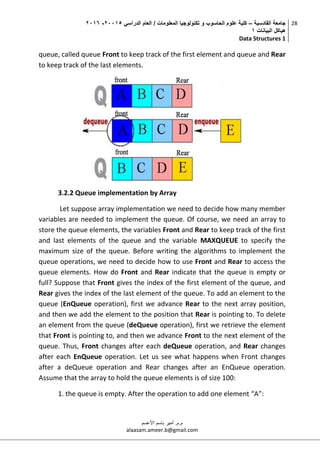
queue, called queue Front to keep track of the first element and queue and Rear
to keep track of the last elements.
3.2.2 Queue implementation by Array
Let suppose array implementation we need to decide how many member
variables are needed to implement the queue. Of course, we need an array to
store the queue elements, the variables Front and Rear to keep track of the first
and last elements of the queue and the variable MAXQUEUE to specify the
maximum size of the queue. Before writing the algorithms to implement the
queue operations, we need to decide how to use Front and Rear to access the
queue elements. How do Front and Rear indicate that the queue is empty or
full? Suppose that Front gives the index of the first element of the queue, and
Rear gives the index of the last element of the queue. To add an element to the
queue (EnQueue operation), first we advance Rear to the next array position,
and then we add the element to the position that Rear is pointing to. To delete
an element from the queue (deQueue operation), first we retrieve the element
that Front is pointing to, and then we advance Front to the next element of the
queue. Thus, Front changes after each deQueue operation, and Rear changes
after each EnQueue operation. Let us see what happens when Front changes
after a deQueue operation and Rear changes after an EnQueue operation.
Assume that the array to hold the queue elements is of size 100:
1. the queue is empty. After the operation to add one element “A”:
‫القادسية‬ ‫جامعة‬–‫الدراسي‬ ‫العام‬ / ‫المعلومات‬ ‫تكنولوجيا‬ ‫و‬ ‫الحاسوب‬ ‫علوم‬ ‫كلية‬50002-5002
‫البيانات‬ ‫هياكل‬0
Data Structures 1
29
‫م.م‬.‫األعسم‬ ‫باسم‬ ‫أمير‬
alaasam.ameer.b@gmail.com
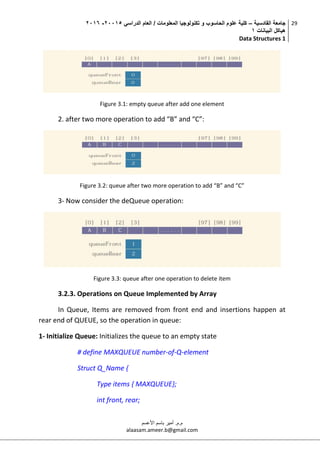
Figure 3.1: empty queue after add one element
2. after two more operation to add “B” and “C”:
Figure 3.2: queue after two more operation to add “B” and “C”
3- Now consider the deQueue operation:
Figure 3.3: queue after one operation to delete item
3.2.3. Operations on Queue Implemented by Array
In Queue, Items are removed from front end and insertions happen at
rear end of QUEUE, so the operation in queue:
1- Initialize Queue: Initializes the queue to an empty state
# define MAXQUEUE number-of-Q-element
Struct Q_Name {
Type items { MAXQUEUE};
int front, rear;
‫القادسية‬ ‫جامعة‬–‫الدراسي‬ ‫العام‬ / ‫المعلومات‬ ‫تكنولوجيا‬ ‫و‬ ‫الحاسوب‬ ‫علوم‬ ‫كلية‬50002-5002
‫البيانات‬ ‫هياكل‬0
Data Structures 1
30
‫م.م‬.‫األعسم‬ ‫باسم‬ ‫أمير‬
alaasam.ameer.b@gmail.com
{ Q;
Q.front=-1;
Q.rear=-1;
2- EnQueue(elemType e): inserts element e at the end
If (Q.rear == MAXQUEUE - 1 ) then Print “Queue Overflow”
Else
If (Q.front == -1) then Q.front = 0
Q.rear = Q.rear + 1
Q.items [Q.rear] = e
3- DeQueue ( ) : deletes first element from queue
If Q.front == -1 OR Q.front > Q.rear then Print “Queue Underflow”
Else
Delete Q.items [Q.front]
Q.front = Q.front + 1
The C++ code to implement queue it can be as follow:
#include <iostream>
using namespace std;
#define QSIZE 50
struct Que {
int qElem [QSIZE];
int rear,front;
};
void QueueIn(Que &Q)
{
Q.front=-1;
Q.rear=-1;
}
void EnQueue(Que &Q)
{
int add_item;
if (Q.rear == QSIZE - 1)
‫القادسية‬ ‫جامعة‬–‫الدراسي‬ ‫العام‬ / ‫المعلومات‬ ‫تكنولوجيا‬ ‫و‬ ‫الحاسوب‬ ‫علوم‬ ‫كلية‬50002-5002
‫البيانات‬ ‫هياكل‬0
Data Structures 1
31
‫م.م‬.‫األعسم‬ ‫باسم‬ ‫أمير‬
alaasam.ameer.b@gmail.com
cout<<"Queue Overflow n";
else
{
if (Q.front == - 1)/*If queue is initially empty */
Q.front = 0;
cout<<"Insert the element in queue : ";
scanf("%d", &add_item);
Q.rear = Q.rear + 1;
Q.qElem[Q.rear] = add_item;
}
} /*End of EnQueue()*/
void DQueue(Que &Q)
{
if (Q.front == - 1 || Q.front > Q.rear)
{
cout<<"Queue Underflow n";
return ;
}
else
{
cout<<"Element DQueued from queue is
:"<<Q.qElem[Q.front]<<endl;
Q.front = Q.front + 1;
}
} /*End of DQueue() */
void display(Que &Q)
{
int i;
if (Q.front == - 1)
cout<<"Queue is empty n";
else
{
cout<<"Queue is : n";
for (i = Q.front; i <= Q.rear; i++)
cout<<Q.qElem[i];
cout<<"n";
}
} /*End of display() */
void main()
{
Que Q1;
QueueIn(Q1);
int choice;
while (1)
{
cout<<"1.EnQueue element to queue n";
‫القادسية‬ ‫جامعة‬–‫الدراسي‬ ‫العام‬ / ‫المعلومات‬ ‫تكنولوجيا‬ ‫و‬ ‫الحاسوب‬ ‫علوم‬ ‫كلية‬50002-5002
‫البيانات‬ ‫هياكل‬0
Data Structures 1
32
‫م.م‬.‫األعسم‬ ‫باسم‬ ‫أمير‬
alaasam.ameer.b@gmail.com
cout<<"2.DQueue element from queue n";
cout<<"3.Display all elements of queue n";
cout<<"4.Quit n";
cout<<"Enter your choice : ";
scanf("%d", &choice);
switch (choice)
{
case 1:EnQueue(Q1);
break;
case 2:DQueue(Q1);
break;
case 3:display(Q1);
break;
case 4:return;
default:cout<<"Wrong choice n";
} /*End of switch*/
} /*End of while*/
} /*End of main()*/
‫القادسية‬ ‫جامعة‬–‫الدراسي‬ ‫العام‬ / ‫المعلومات‬ ‫تكنولوجيا‬ ‫و‬ ‫الحاسوب‬ ‫علوم‬ ‫كلية‬50002-5002
‫البيانات‬ ‫هياكل‬0
Data Structures 1
33
‫م.م‬.‫األعسم‬ ‫باسم‬ ‫أمير‬
alaasam.ameer.b@gmail.com
4. Lecture four
4.1. Re-buffering Problem in Standard Queue Implemented By Array
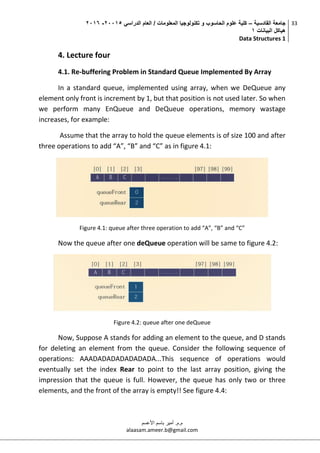
In a standard queue, implemented using array, when we DeQueue any
element only front is increment by 1, but that position is not used later. So when
we perform many EnQueue and DeQueue operations, memory wastage
increases, for example:
Assume that the array to hold the queue elements is of size 100 and after
three operations to add “A”, “B” and “C” as in figure 4.1:
Figure 4.1: queue after three operation to add “A”, “B” and “C”
Now the queue after one deQueue operation will be same to figure 4.2:
Figure 4.2: queue after one deQueue
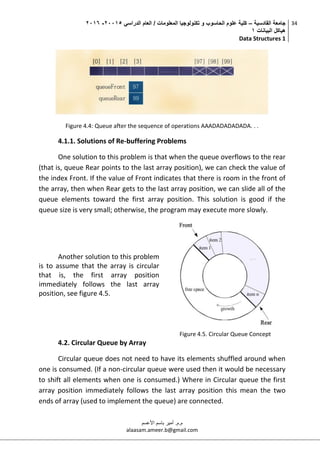
Now, Suppose A stands for adding an element to the queue, and D stands
for deleting an element from the queue. Consider the following sequence of
operations: AAADADADADADADADA...This sequence of operations would
eventually set the index Rear to point to the last array position, giving the
impression that the queue is full. However, the queue has only two or three
elements, and the front of the array is empty!! See figure 4.4:
‫القادسية‬ ‫جامعة‬–‫الدراسي‬ ‫العام‬ / ‫المعلومات‬ ‫تكنولوجيا‬ ‫و‬ ‫الحاسوب‬ ‫علوم‬ ‫كلية‬50002-5002
‫البيانات‬ ‫هياكل‬0
Data Structures 1
34
‫م.م‬.‫األعسم‬ ‫باسم‬ ‫أمير‬
alaasam.ameer.b@gmail.com
Figure 4.4: Queue after the sequence of operations AAADADADADADA. . .
4.1.1. Solutions of Re-buffering Problems
One solution to this problem is that when the queue overflows to the rear
(that is, queue Rear points to the last array position), we can check the value of
the index Front. If the value of Front indicates that there is room in the front of
the array, then when Rear gets to the last array position, we can slide all of the
queue elements toward the first array position. This solution is good if the
queue size is very small; otherwise, the program may execute more slowly.
Another solution to this problem
is to assume that the array is circular
that is, the first array position
immediately follows the last array
position, see figure 4.5.
Figure 4.5. Circular Queue Concept
4.2. Circular Queue by Array
Circular queue does not need to have its elements shuffled around when
one is consumed. (If a non-circular queue were used then it would be necessary
to shift all elements when one is consumed.) Where in Circular queue the first
array position immediately follows the last array position this mean the two
ends of array (used to implement the queue) are connected.
‫القادسية‬ ‫جامعة‬–‫الدراسي‬ ‫العام‬ / ‫المعلومات‬ ‫تكنولوجيا‬ ‫و‬ ‫الحاسوب‬ ‫علوم‬ ‫كلية‬50002-5002
‫البيانات‬ ‫هياكل‬0
Data Structures 1
35
‫م.م‬.‫األعسم‬ ‫باسم‬ ‫أمير‬
alaasam.ameer.b@gmail.com
4.2.1. Operations of Circular Queue by Array
1- Initialize Queue: Initializes the queue to an empty state
# define MAXQUEUE number-of-Q-element
Struct Q_Name {
Type items { MAXQUEUE};
int front, rear;
{ Q; Q.front=-1; Q.rear=-1;
2- Full_queue(): to check if the queue full or not
If (Q.front == (Q.rear+1)% MAXQUEUE) Return True
Else return false
3- empty_queue(): to check if the queue empty or not
If (Q.front== - 1) return True
Else return false
4- EnQueue(elemType e): inserts element e at the end
If (Full_queue()) cout<<“Queue is Full”;
Else{
If (Q.front == -1) Q.front = Q.rear =0;
Else Q.rear = (Q.rear+1)% MAXQUEUE;
Q.items [Q.rear] = e }
5- DeQueue ( ): deletes first element from queue
If (empty_queue()) cout<< “Queue is Empty”;
Else { cout<<”delete: ”<<Q.items[Q.front];
if (Q.front == Q.rear) then Q.front=Q.rear=-1
else Q.front = (Q.front + 1)% MAXQUEUE; }
‫القادسية‬ ‫جامعة‬–‫الدراسي‬ ‫العام‬ / ‫المعلومات‬ ‫تكنولوجيا‬ ‫و‬ ‫الحاسوب‬ ‫علوم‬ ‫كلية‬50002-5002
‫البيانات‬ ‫هياكل‬0
Data Structures 1
36
‫م.م‬.‫األعسم‬ ‫باسم‬ ‫أمير‬
alaasam.ameer.b@gmail.com
C++ example to implement circular queue; it can be as in the follow:
#include <iostream>
using namespace std;
#define QSIZE 3
struct Que {
int qElem [QSIZE];
int rear,front;
};
void QueueIn(Que &Q)
{
Q.front=-1;
Q.rear=-1;
}
int isFullQ (Que &Q)
{
if (Q.front == (Q.rear+1)% QSIZE)
return 1;
else return 0;
}
int isEmptyQ (Que &Q)
{
if (Q.front== - 1)
return 1;
else return 0;
}
void EnQueue (Que &Q)
{
int add_item;
if (isFullQ(Q))
{
cout<<".................. Queue is Full n";
return;
}
else
{
if (Q.front == - 1)Q.front =Q.rear= 0; /*If queue is initially
else
Q.rear = (Q.rear+1)% QSIZE;
cout<<".................. Insert : ";
cin>>add_item;
Q.qElem[Q.rear] = add_item;
}
} /*End of EnQueue()*/
void DeQueue(Que &Q)
{
if (isEmptyQ(Q))
{
cout<<".................. Queue is Empty n";
return ;
}
else
‫القادسية‬ ‫جامعة‬–‫الدراسي‬ ‫العام‬ / ‫المعلومات‬ ‫تكنولوجيا‬ ‫و‬ ‫الحاسوب‬ ‫علوم‬ ‫كلية‬50002-5002
‫البيانات‬ ‫هياكل‬0
Data Structures 1
37
‫م.م‬.‫األعسم‬ ‫باسم‬ ‫أمير‬
alaasam.ameer.b@gmail.com
{
cout<<".................. delete :"<<Q.qElem[Q.front]<<endl;
if (Q.front == Q.rear)
{
Q.front=Q.rear=-1;
}else
Q.front = (Q.front + 1)% QSIZE;
}
} /*End of DeQueue() */
void display(Que &Q)
{
int i;
if (isEmptyQ(Q))
cout<<".................. Queue is empty n";
else
{
cout<<".................. Queue is : n";
i=Q.front;
while (i!= Q.rear)
{
cout<<Q.qElem[i];
i=(i+1)% QSIZE;
}
cout<<Q.qElem[i]<<endl;
}
} /*End of display() */
void main()
{
Que Q1;
QueueIn(Q1);
int choice;
while (1)
{
cout<<"## 1.EnQueue ## n";
cout<<"## 2.DeQueue ##n";
cout<<"## 3.Display ##n";
cout<<"## 4.Quit ##n";
cout<<"## Enter your choice : ";
cin>>choice;
switch (choice)
{
case 1:EnQueue(Q1);
break;
case 2:DeQueue(Q1);
break;
case 3:display(Q1);
break;
case 4:return;
default:cout<<"Wrong choice n";
} /*End of switch*/
} /*End of while*/
} /*End of main()*/
‫القادسية‬ ‫جامعة‬–‫الدراسي‬ ‫العام‬ / ‫المعلومات‬ ‫تكنولوجيا‬ ‫و‬ ‫الحاسوب‬ ‫علوم‬ ‫كلية‬50002-5002
‫البيانات‬ ‫هياكل‬0
Data Structures 1
38
‫م.م‬.‫األعسم‬ ‫باسم‬ ‫أمير‬
alaasam.ameer.b@gmail.com
4.3. Dynamic and Static Data Structures
A static data structure (SDS) is an organization or collection of data in
memory that is fixed in size. This results in the maximum size needing to be
known in advance, as memory cannot be reallocated at a later point. Arrays are
a prominent example of a static data structure.
A dynamic data structure (DDS) refers to an organization or collection of
data in memory that has the flexibility to grow or shrink in size, enabling a
programmer to control exactly how much memory is utilized. Dynamic data
structures change in size by having unused memory allocated or de-allocated as
needed.
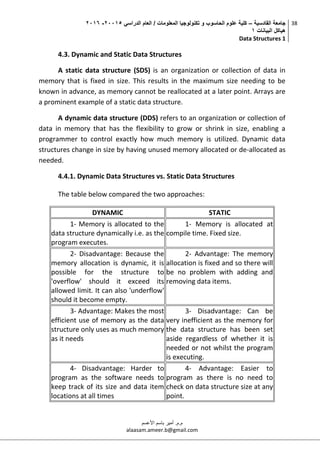
4.4.1. Dynamic Data Structures vs. Static Data Structures
The table below compared the two approaches:
DYNAMIC STATIC
1- Memory is allocated to the
data structure dynamically i.e. as the
program executes.
1- Memory is allocated at
compile time. Fixed size.
2- Disadvantage: Because the
memory allocation is dynamic, it is
possible for the structure to
'overflow' should it exceed its
allowed limit. It can also 'underflow'
should it become empty.
2- Advantage: The memory
allocation is fixed and so there will
be no problem with adding and
removing data items.
3- Advantage: Makes the most
efficient use of memory as the data
structure only uses as much memory
as it needs
3- Disadvantage: Can be
very inefficient as the memory for
the data structure has been set
aside regardless of whether it is
needed or not whilst the program
is executing.
4- Disadvantage: Harder to
program as the software needs to
keep track of its size and data item
locations at all times
4- Advantage: Easier to
program as there is no need to
check on data structure size at any
point.
‫القادسية‬ ‫جامعة‬–‫الدراسي‬ ‫العام‬ / ‫المعلومات‬ ‫تكنولوجيا‬ ‫و‬ ‫الحاسوب‬ ‫علوم‬ ‫كلية‬50002-5002
‫البيانات‬ ‫هياكل‬0
Data Structures 1
39
‫م.م‬.‫األعسم‬ ‫باسم‬ ‫أمير‬
alaasam.ameer.b@gmail.com
4.4. Pointers
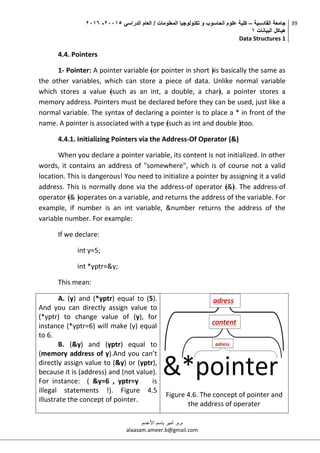
1- Pointer: A pointer variable ﴾or pointer in short ﴿is basically the same as
the other variables, which can store a piece of data. Unlike normal variable
which stores a value ﴾such as an int, a double, a char﴿, a pointer stores a
memory address. Pointers must be declared before they can be used, just like a
normal variable. The syntax of declaring a pointer is to place a * in front of the
name. A pointer is associated with a type ﴾such as int and double ﴿too.
4.4.1. Initializing Pointers via the Address‐Of Operator (&)
When you declare a pointer variable, its content is not initialized. In other
words, it contains an address of "somewhere", which is of course not a valid
location. This is dangerous! You need to initialize a pointer by assigning it a valid
address. This is normally done via the address‐of operator ﴾&﴿. The address‐of
operator ﴾& ﴿operates on a variable, and returns the address of the variable. For
example, if number is an int variable, &number returns the address of the
variable number. For example:
If we declare:
int y=5;
int *yptr=&y;
This mean:
A. (y) and (*yptr) equal to (5).
And you can directly assign value to
(*yptr) to change value of (y), for
instance (*yptr=6) will make (y) equal
to 6.
B. (&y) and (yptr) equal to
(memory address of y).And you can’t
directly assign value to (&y) or (yptr),
because it is (address) and (not value).
For instance: ( &y=6 , yptr=y is
illegal statements !). Figure 4.5
illustrate the concept of pointer.
Figure 4.6. The concept of pointer and
the address of operater
‫القادسية‬ ‫جامعة‬–‫الدراسي‬ ‫العام‬ / ‫المعلومات‬ ‫تكنولوجيا‬ ‫و‬ ‫الحاسوب‬ ‫علوم‬ ‫كلية‬50002-5002
‫البيانات‬ ‫هياكل‬0
Data Structures 1
40
‫م.م‬.‫األعسم‬ ‫باسم‬ ‫أمير‬
alaasam.ameer.b@gmail.com
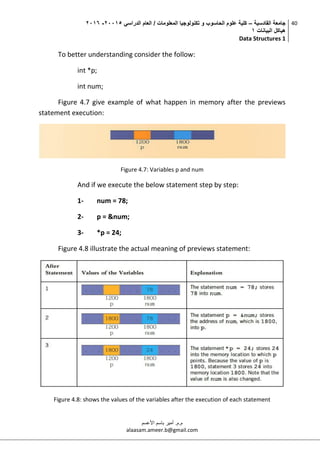
To better understanding consider the follow:
int *p;
int num;
Figure 4.7 give example of what happen in memory after the previews
statement execution:
Figure 4.7: Variables p and num
And if we execute the below statement step by step:
1- num = 78;
2- p = &num;
3- *p = 24;
Figure 4.8 illustrate the actual meaning of previews statement:
Figure 4.8: shows the values of the variables after the execution of each statement
‫القادسية‬ ‫جامعة‬–‫الدراسي‬ ‫العام‬ / ‫المعلومات‬ ‫تكنولوجيا‬ ‫و‬ ‫الحاسوب‬ ‫علوم‬ ‫كلية‬50002-5002
‫البيانات‬ ‫هياكل‬0
Data Structures 1
41
‫م.م‬.‫األعسم‬ ‫باسم‬ ‫أمير‬
alaasam.ameer.b@gmail.com
4.4.2. Some advantages of using pointers
They can be used to return multiple values from a function via function
arguments. Pointers permit references to functions and thereby facilitating
passing of functions as arguments to other functions. The use of pointer arrays
to character strings results in saving of data storage space in memory. pointers
allow C to support dynamic memory management. Pointers provide an efficient
tool for manipulating dynamic data structures such as structures, linked lists,
queues, stacks and trees. Pointers reduce length and complexity of programs.
They increases the execution speed and thus reduce the program execution
time.
4.5. Call/pass by value and call/pass by reference
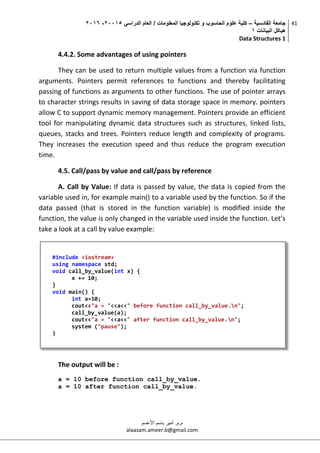
A. Call by Value: If data is passed by value, the data is copied from the
variable used in, for example main() to a variable used by the function. So if the
data passed (that is stored in the function variable) is modified inside the
function, the value is only changed in the variable used inside the function. Let’s
take a look at a call by value example:
The output will be :
a = 10 before function call_by_value.
a = 10 after function call_by_value.
#include <iostream>
using namespace std;
void call_by_value(int x) {
x += 10;
}
void main() {
int a=10;
cout<<"a = "<<a<<" before function call_by_value.n";
call_by_value(a);
cout<<"a = "<<a<<" after function call_by_value.n";
system ("pause");
}
‫القادسية‬ ‫جامعة‬–‫الدراسي‬ ‫العام‬ / ‫المعلومات‬ ‫تكنولوجيا‬ ‫و‬ ‫الحاسوب‬ ‫علوم‬ ‫كلية‬50002-5002
‫البيانات‬ ‫هياكل‬0
Data Structures 1
42
‫م.م‬.‫األعسم‬ ‫باسم‬ ‫أمير‬
alaasam.ameer.b@gmail.com
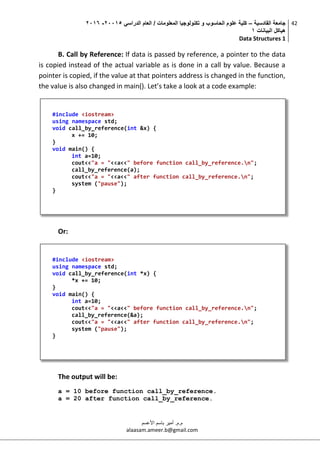
B. Call by Reference: If data is passed by reference, a pointer to the data
is copied instead of the actual variable as is done in a call by value. Because a
pointer is copied, if the value at that pointers address is changed in the function,
the value is also changed in main(). Let’s take a look at a code example:
Or:
The output will be:
a = 10 before function call_by_reference.
a = 20 after function call_by_reference.
#include <iostream>
using namespace std;
void call_by_reference(int &x) {
x += 10;
}
void main() {
int a=10;
cout<<"a = "<<a<<" before function call_by_reference.n";
call_by_reference(a);
cout<<"a = "<<a<<" after function call_by_reference.n";
system ("pause");
}
#include <iostream>
using namespace std;
void call_by_reference(int *x) {
*x += 10;
}
void main() {
int a=10;
cout<<"a = "<<a<<" before function call_by_reference.n";
call_by_reference(&a);
cout<<"a = "<<a<<" after function call_by_reference.n";
system ("pause");
}
‫القادسية‬ ‫جامعة‬–‫الدراسي‬ ‫العام‬ / ‫المعلومات‬ ‫تكنولوجيا‬ ‫و‬ ‫الحاسوب‬ ‫علوم‬ ‫كلية‬50002-5002
‫البيانات‬ ‫هياكل‬0
Data Structures 1
43
‫م.م‬.‫األعسم‬ ‫باسم‬ ‫أمير‬
alaasam.ameer.b@gmail.com
5. Lecture five
5.1. Dynamic Memory Allocation
When we declare an array, we need to reserve some memory to store the
elements of this array. This memory allocation and it is static. That is when we
declare an array, we specify the number of elements in that array and a fixed
memory is allocated. Once declared the size of the array cannot be changed.
But in many times, we are not aware in advance how much memory in this case
we will need to store particular information in a defined variable and the size of
required memory can be determined at run time, in other words, we can
allocate memory at run time for the variable of a given type and if we are not in
need of dynamically allocated memory anymore, we can de-allocates memory
previously allocated. Dynamic allocate and de-allocate in C++:
1- Allocate Memory by Operator “new”
In C++ dynamic memory is allocated using operator new. new is followed
by a data type and it returns a pointer to the beginning of the new block of
memory allocated. Its syntax is:
dataType * pointer;
pointer = new dataType;
2- De-allocate Memory by Operator “delete”
In most cases, memory allocated dynamically by new is only needed
during specific periods of time within a program; once it is no longer needed, it
can be freed so that the memory becomes available again this is the purpose of
operator delete, whose syntax is: delete pointer;
double* pvalue = NULL;
if( !(pvalue = new double ))
{
cout << "Error: out of memory." <<endl;
}
‫القادسية‬ ‫جامعة‬–‫الدراسي‬ ‫العام‬ / ‫المعلومات‬ ‫تكنولوجيا‬ ‫و‬ ‫الحاسوب‬ ‫علوم‬ ‫كلية‬50002-5002
‫البيانات‬ ‫هياكل‬0
Data Structures 1
44
‫م.م‬.‫األعسم‬ ‫باسم‬ ‫أمير‬
alaasam.ameer.b@gmail.com
5.2. Single Linked List
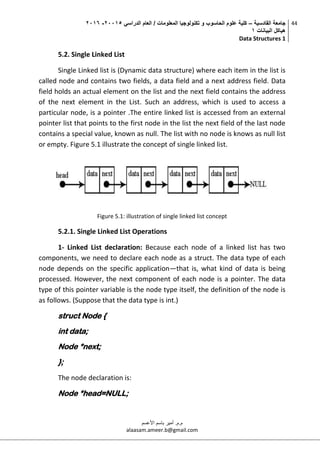
Single Linked list is (Dynamic data structure) where each item in the list is
called node and contains two fields, a data field and a next address field. Data
field holds an actual element on the list and the next field contains the address
of the next element in the List. Such an address, which is used to access a
particular node, is a pointer .The entire linked list is accessed from an external
pointer list that points to the first node in the list the next field of the last node
contains a special value, known as null. The list with no node is knows as null list
or empty. Figure 5.1 illustrate the concept of single linked list.
Figure 5.1: illustration of single linked list concept
5.2.1. Single Linked List Operations
1- Linked List declaration: Because each node of a linked list has two
components, we need to declare each node as a struct. The data type of each
node depends on the specific application—that is, what kind of data is being
processed. However, the next component of each node is a pointer. The data
type of this pointer variable is the node type itself, the definition of the node is
as follows. (Suppose that the data type is int.)
struct Node {
int data;
Node *next;
};
The node declaration is:
Node *head=NULL;
‫القادسية‬ ‫جامعة‬–‫الدراسي‬ ‫العام‬ / ‫المعلومات‬ ‫تكنولوجيا‬ ‫و‬ ‫الحاسوب‬ ‫علوم‬ ‫كلية‬50002-5002
‫البيانات‬ ‫هياكل‬0
Data Structures 1
45
‫م.م‬.‫األعسم‬ ‫باسم‬ ‫أمير‬
alaasam.ameer.b@gmail.com
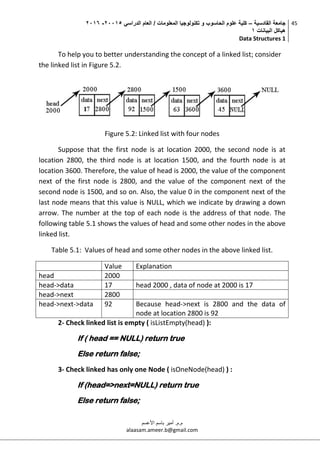
To help you to better understanding the concept of a linked list; consider
the linked list in Figure 5.2.
Figure 5.2: Linked list with four nodes
Suppose that the first node is at location 2000, the second node is at
location 2800, the third node is at location 1500, and the fourth node is at
location 3600. Therefore, the value of head is 2000, the value of the component
next of the first node is 2800, and the value of the component next of the
second node is 1500, and so on. Also, the value 0 in the component next of the
last node means that this value is NULL, which we indicate by drawing a down
arrow. The number at the top of each node is the address of that node. The
following table 5.1 shows the values of head and some other nodes in the above
linked list.
Table 5.1: Values of head and some other nodes in the above linked list.
Value Explanation
head 2000
head->data 17 head 2000 , data of node at 2000 is 17
head->next 2800
head->next->data 92 Because head->next is 2800 and the data of
node at location 2800 is 92
2- Check linked list is empty ( isListEmpty(head) ):
If ( head == NULL) return true
Else return false;
3- Check linked has only one Node ( isOneNode(head) ) :
If (head=>next=NULL) return true
Else return false;
‫القادسية‬ ‫جامعة‬–‫الدراسي‬ ‫العام‬ / ‫المعلومات‬ ‫تكنولوجيا‬ ‫و‬ ‫الحاسوب‬ ‫علوم‬ ‫كلية‬50002-5002
‫البيانات‬ ‫هياكل‬0
Data Structures 1
46
‫م.م‬.‫األعسم‬ ‫باسم‬ ‫أمير‬
alaasam.ameer.b@gmail.com
4- Insert Node at first location in Linked List:
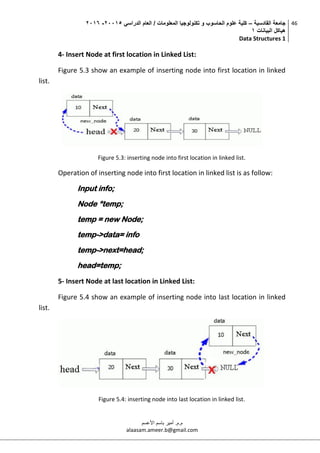
Figure 5.3 show an example of inserting node into first location in linked
list.
Figure 5.3: inserting node into first location in linked list.
Operation of inserting node into first location in linked list is as follow:
Input info;
Node *temp;
temp = new Node;
temp->data= info
temp->next=head;
head=temp;
5- Insert Node at last location in Linked List:
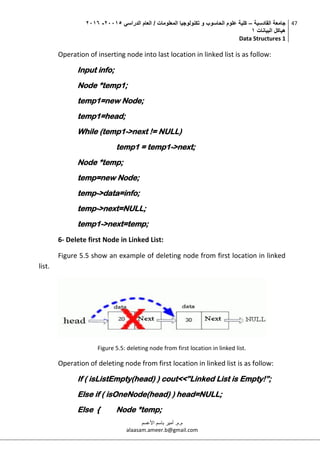
Figure 5.4 show an example of inserting node into last location in linked
list.
Figure 5.4: inserting node into last location in linked list.
‫القادسية‬ ‫جامعة‬–‫الدراسي‬ ‫العام‬ / ‫المعلومات‬ ‫تكنولوجيا‬ ‫و‬ ‫الحاسوب‬ ‫علوم‬ ‫كلية‬50002-5002
‫البيانات‬ ‫هياكل‬0
Data Structures 1
47
‫م.م‬.‫األعسم‬ ‫باسم‬ ‫أمير‬
alaasam.ameer.b@gmail.com
Operation of inserting node into last location in linked list is as follow:
Input info;
Node *temp1;
temp1=new Node;
temp1=head;
While (temp1->next != NULL)
temp1 = temp1->next;
Node *temp;
temp=new Node;
temp->data=info;
temp->next=NULL;
temp1->next=temp;
6- Delete first Node in Linked List:
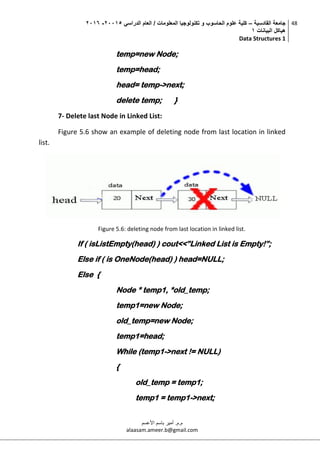
Figure 5.5 show an example of deleting node from first location in linked
list.
Figure 5.5: deleting node from first location in linked list.
Operation of deleting node from first location in linked list is as follow:
If ( isListEmpty(head) ) cout<<”Linked List is Empty!”;
Else if ( isOneNode(head) ) head=NULL;
Else { Node *temp;
‫القادسية‬ ‫جامعة‬–‫الدراسي‬ ‫العام‬ / ‫المعلومات‬ ‫تكنولوجيا‬ ‫و‬ ‫الحاسوب‬ ‫علوم‬ ‫كلية‬50002-5002
‫البيانات‬ ‫هياكل‬0
Data Structures 1
48
‫م.م‬.‫األعسم‬ ‫باسم‬ ‫أمير‬
alaasam.ameer.b@gmail.com
temp=new Node;
temp=head;
head= temp->next;
delete temp; }
7- Delete last Node in Linked List:
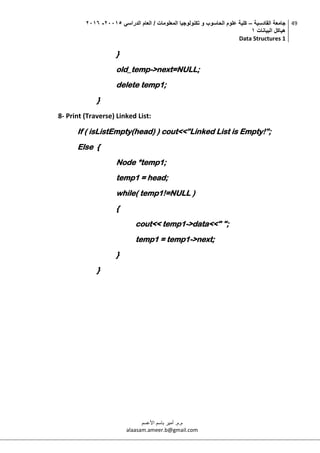
Figure 5.6 show an example of deleting node from last location in linked
list.
Figure 5.6: deleting node from last location in linked list.
If ( isListEmpty(head) ) cout<<”Linked List is Empty!”;
Else if ( is OneNode(head) ) head=NULL;
Else {
Node * temp1, *old_temp;
temp1=new Node;
old_temp=new Node;
temp1=head;
While (temp1->next != NULL)
{
old_temp = temp1;
temp1 = temp1->next;
‫القادسية‬ ‫جامعة‬–‫الدراسي‬ ‫العام‬ / ‫المعلومات‬ ‫تكنولوجيا‬ ‫و‬ ‫الحاسوب‬ ‫علوم‬ ‫كلية‬50002-5002
‫البيانات‬ ‫هياكل‬0
Data Structures 1
49
‫م.م‬.‫األعسم‬ ‫باسم‬ ‫أمير‬
alaasam.ameer.b@gmail.com
}
old_temp->next=NULL;
delete temp1;
}
8- Print (Traverse) Linked List:
If ( isListEmpty(head) ) cout<<”Linked List is Empty!”;
Else {
Node *temp1;
temp1 = head;
while( temp1!=NULL )
{
cout<< temp1->data<<" ";
temp1 = temp1->next;
}
}
‫القادسية‬ ‫جامعة‬–‫الدراسي‬ ‫العام‬ / ‫المعلومات‬ ‫تكنولوجيا‬ ‫و‬ ‫الحاسوب‬ ‫علوم‬ ‫كلية‬50002-5002
‫البيانات‬ ‫هياكل‬0
Data Structures 1
50
‫م.م‬.‫األعسم‬ ‫باسم‬ ‫أمير‬
alaasam.ameer.b@gmail.com
6.
6.1. Circular linked list
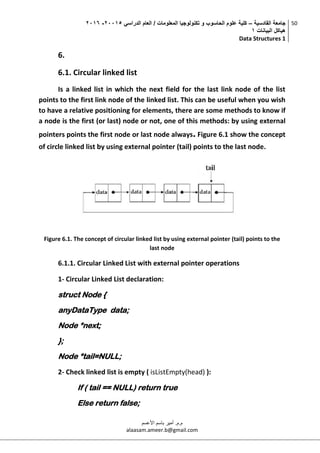
Is a linked list in which the next field for the last link node of the list
points to the first link node of the linked list. This can be useful when you wish
to have a relative positioning for elements, there are some methods to know if
a node is the first (or last) node or not, one of this methods: by using external
pointers points the first node or last node always. Figure 6.1 show the concept
of circle linked list by using external pointer (tail) points to the last node.
Figure 6.1. The concept of circular linked list by using external pointer (tail) points to the
last node
6.1.1. Circular Linked List with external pointer operations
1- Circular Linked List declaration:
struct Node {
anyDataType data;
Node *next;
};
Node *tail=NULL;
2- Check linked list is empty ( isListEmpty(head) ):
If ( tail == NULL) return true
Else return false;
‫القادسية‬ ‫جامعة‬–‫الدراسي‬ ‫العام‬ / ‫المعلومات‬ ‫تكنولوجيا‬ ‫و‬ ‫الحاسوب‬ ‫علوم‬ ‫كلية‬50002-5002
‫البيانات‬ ‫هياكل‬0
Data Structures 1
51
‫م.م‬.‫األعسم‬ ‫باسم‬ ‫أمير‬
alaasam.ameer.b@gmail.com
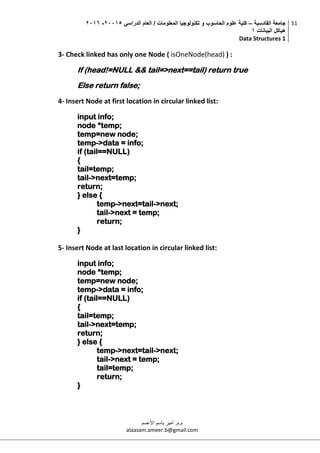
3- Check linked has only one Node ( isOneNode(head) ) :
If (head!=NULL && tail=>next==tail) return true
Else return false;
4- Insert Node at first location in circular linked list:
input info;
node *temp;
temp=new node;
temp->data = info;
if (tail==NULL)
{
tail=temp;
tail->next=temp;
return;
} else {
temp->next=tail->next;
tail->next = temp;
return;
}
5- Insert Node at last location in circular linked list:
input info;
node *temp;
temp=new node;
temp->data = info;
if (tail==NULL)
{
tail=temp;
tail->next=temp;
return;
} else {
temp->next=tail->next;
tail->next = temp;
tail=temp;
return;
}
‫القادسية‬ ‫جامعة‬–‫الدراسي‬ ‫العام‬ / ‫المعلومات‬ ‫تكنولوجيا‬ ‫و‬ ‫الحاسوب‬ ‫علوم‬ ‫كلية‬50002-5002
‫البيانات‬ ‫هياكل‬0
Data Structures 1
52
‫م.م‬.‫األعسم‬ ‫باسم‬ ‫أمير‬
alaasam.ameer.b@gmail.com
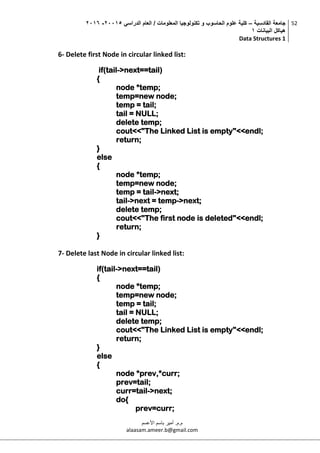
6- Delete first Node in circular linked list:
if(tail->next==tail)
{
node *temp;
temp=new node;
temp = tail;
tail = NULL;
delete temp;
cout<<"The Linked List is empty"<<endl;
return;
}
else
{
node *temp;
temp=new node;
temp = tail->next;
tail->next = temp->next;
delete temp;
cout<<"The first node is deleted"<<endl;
return;
}
7- Delete last Node in circular linked list:
if(tail->next==tail)
{
node *temp;
temp=new node;
temp = tail;
tail = NULL;
delete temp;
cout<<"The Linked List is empty"<<endl;
return;
}
else
{
node *prev,*curr;
prev=tail;
curr=tail->next;
do{
prev=curr;
‫القادسية‬ ‫جامعة‬–‫الدراسي‬ ‫العام‬ / ‫المعلومات‬ ‫تكنولوجيا‬ ‫و‬ ‫الحاسوب‬ ‫علوم‬ ‫كلية‬50002-5002
‫البيانات‬ ‫هياكل‬0
Data Structures 1
53
‫م.م‬.‫األعسم‬ ‫باسم‬ ‫أمير‬
alaasam.ameer.b@gmail.com
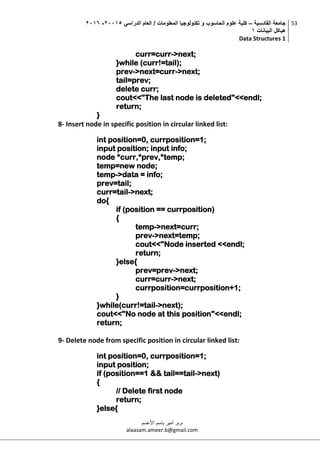
curr=curr->next;
}while (curr!=tail);
prev->next=curr->next;
tail=prev;
delete curr;
cout<<"The last node is deleted"<<endl;
return;
}
8- Insert node in specific position in circular linked list:
int position=0, currposition=1;
input position; input info;
node *curr,*prev,*temp;
temp=new node;
temp->data = info;
prev=tail;
curr=tail->next;
do{
if (position == currposition)
{
temp->next=curr;
prev->next=temp;
cout<<"Node inserted <<endl;
return;
}else{
prev=prev->next;
curr=curr->next;
currposition=currposition+1;
}
}while(curr!=tail->next);
cout<<"No node at this position"<<endl;
return;
9- Delete node from specific position in circular linked list:
int position=0, currposition=1;
input position;
if (position==1 && tail==tail->next)
{
// Delete first node
return;
}else{
‫القادسية‬ ‫جامعة‬–‫الدراسي‬ ‫العام‬ / ‫المعلومات‬ ‫تكنولوجيا‬ ‫و‬ ‫الحاسوب‬ ‫علوم‬ ‫كلية‬50002-5002
‫البيانات‬ ‫هياكل‬0
Data Structures 1
54
‫م.م‬.‫األعسم‬ ‫باسم‬ ‫أمير‬
alaasam.ameer.b@gmail.com
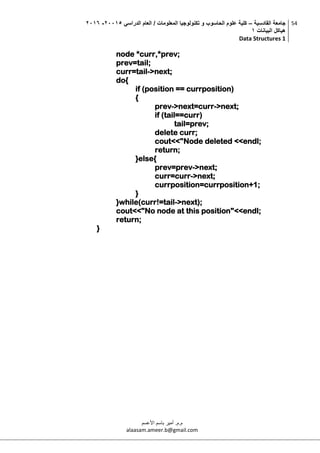
node *curr,*prev;
prev=tail;
curr=tail->next;
do{
if (position == currposition)
{
prev->next=curr->next;
if (tail==curr)
tail=prev;
delete curr;
cout<<"Node deleted <<endl;
return;
}else{
prev=prev->next;
curr=curr->next;
currposition=currposition+1;
}
}while(curr!=tail->next);
cout<<"No node at this position"<<endl;
return;
}
‫القادسية‬ ‫جامعة‬–‫الدراسي‬ ‫العام‬ / ‫المعلومات‬ ‫تكنولوجيا‬ ‫و‬ ‫الحاسوب‬ ‫علوم‬ ‫كلية‬50002-5002
‫البيانات‬ ‫هياكل‬0
Data Structures 1
55
‫م.م‬.‫األعسم‬ ‫باسم‬ ‫أمير‬
alaasam.ameer.b@gmail.com
7.
7.1. Recursion
The process of solving a problem by reducing it to smaller versions of
itself is called recursion, for example, write functions that calls themselves. Let
us consider a factorial problem that is familiar to most everyone.
7.1.1. Factorial function
Factorial function plays an important role in mathematics and statistics.
Given a positive integer, n, factorial is defined as the product of all integers
between n and 1. For example 5 factorial equals 5 * 4 * 3 * 2 * 1 = 120. In
mathematics, the exclamation mark (!) is often used to doubt the factorial
function. We may write the definition of this function as follows:
if n = 0 then n! = 1
if n > 0 then n! = n * (n-1) * (n-2) * …. * 1
0! = 1
1! = 1
2! = 2 * 1
3! = 3 * 2 * 1
The recursive algorithm to compute n! in C may be as follow:
int fact (int n) {
if (n = = 0) return (1) ;
else return n * fact(n-1);
}
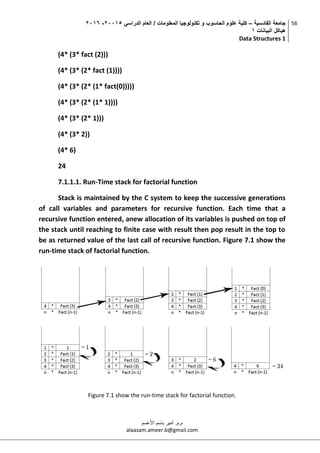
For example; call of the above function: fact(4), the execution of this
call can be follow:
fact(4)
(4* fact(3))
‫القادسية‬ ‫جامعة‬–‫الدراسي‬ ‫العام‬ / ‫المعلومات‬ ‫تكنولوجيا‬ ‫و‬ ‫الحاسوب‬ ‫علوم‬ ‫كلية‬50002-5002
‫البيانات‬ ‫هياكل‬0
Data Structures 1
56
‫م.م‬.‫األعسم‬ ‫باسم‬ ‫أمير‬
alaasam.ameer.b@gmail.com
(4* (3* fact (2)))
(4* (3* (2* fact (1))))
(4* (3* (2* (1* fact(0)))))
(4* (3* (2* (1* 1))))
(4* (3* (2* 1)))
(4* (3* 2))
(4* 6)
24
7.1.1.1. Run-Time stack for factorial function
Stack is maintained by the C system to keep the successive generations
of call variables and parameters for recursive function. Each time that a
recursive function entered, anew allocation of its variables is pushed on top of
the stack until reaching to finite case with result then pop result in the top to
be as returned value of the last call of recursive function. Figure 7.1 show the
run-time stack of factorial function.
Figure 7.1 show the run-time stack for factorial function.

Data structures "1" (Lectures 2015-2016)

  • 1.
    ‫المادة‬ ‫من‬ ‫الهدف‬: ‫اساسي‬‫فهم‬ ‫تقديم‬‫البيانات‬ ‫هياكل‬ ‫لمفهوم‬‫و‬‫انواعها‬‫هذا‬ ‫في‬ ‫المستخدمة‬ ‫التقنيات‬ ‫بعض‬ ‫و‬ ‫المجال‬‫عن‬ ‫اوليه‬ ‫مقدمه‬ ‫الى‬ ‫باالضافه‬‫مف‬‫هوم‬‫الخوارزميات‬‫و‬‫البيانات‬ ‫بهياكل‬ ‫عالقتها‬. ‫مصادر‬: - Mark A. Weiss, “Data Structures and Algorithm Analysis in C++, 4th Edition”, Pearson, 2013. - Clifford A. Shaffer, “A Practical Introduction to Data Structures and Algorithm Analysis, 3rd Edition (C++ Version)”, Department of Computer Science, Virginia Polytechnic Institute and State University, Virginia, USA, 2010. - Isam Al-Saffar, “Data Structures (for computer science students) 2nd Edition”, 2001. ‫اب‬‫م‬‫و‬‫ل‬‫مع‬‫ل‬‫ا‬‫ا‬‫ي‬‫ج‬‫و‬‫ل‬‫و‬‫ن‬‫ك‬‫ت‬‫و‬‫وب‬‫س‬‫ا‬‫ح‬‫ل‬‫ا‬‫وم‬‫ل‬‫ع‬‫ة‬‫ي‬‫ل‬‫ك‬ ‫البيانات‬ ‫هياكل‬1 Data Structures 1 ‫الدراسي‬ ‫للعام‬5112-5112 ‫األعسم‬ ‫باسم‬ ‫أمير‬ .‫م.م‬ alaasam.ameer.b@gmail.com ‫القادسية‬ ‫جامعة‬ http://qu.edu.iq/
  • 2.
    ‫القادسية‬ ‫جامعة‬–‫الدراسي‬ ‫العام‬/ ‫المعلومات‬ ‫تكنولوجيا‬ ‫و‬ ‫الحاسوب‬ ‫علوم‬ ‫كلية‬50002-5002 ‫البيانات‬ ‫هياكل‬0 Data Structures 1 1 ‫م.م‬.‫األعسم‬ ‫باسم‬ ‫أمير‬ alaasam.ameer.b@gmail.com 1. Lecture one 1.1 Introduction to data structures The primary purpose of most computer programs is not to perform calculations, but to store and retrieve information — usually as fast as possible. For this reason, the study of data structures and the algorithms that manipulate them is at the heart of computer science, in the most general sense; the large amount of information that is to be processed in some sense represents an abstraction of a part of reality. The data represent an abstraction of reality in the sense that certain properties and characteristics of the real objects are ignored because they are peripheral and irrelevant to the particular problem. An abstraction is thereby also a simplification of facts. We may regard a personnel file of an employer as an example. Every employee is represented (abstracted) on this file by a set of data relevant either to the employer or to his accounting procedures. This set may include some identification of the employee, for example, his or her name and salary. But it will most probably not include irrelevant data such as the hair color, weight, and height. The information that is available to the computer consists of a selected set of data about the actual problem, namely that set that is considered relevant to the problem at hand. A data structure is any (data representation) and (its associated operations) while even an integer or floating point number stored on the computer can be viewed as a simple data structure. More typically, a data structure is meant to be an organization or structuring for a collection of data items. To solve the problem in computer science we need to apply a set of operations (arranged as steps) on the data structure, this concept represent the algorithm. The algorithms + data structures = programs. 1.2 Fundamental data type in C++ When programming, we store the variables in our computer's memory, but the computer has to know what kind of data we want to store in them, since it is not going to occupy the same amount of memory to store a simple number than to store a single letter or a large number, and
  • 3.
    ‫القادسية‬ ‫جامعة‬–‫الدراسي‬ ‫العام‬/ ‫المعلومات‬ ‫تكنولوجيا‬ ‫و‬ ‫الحاسوب‬ ‫علوم‬ ‫كلية‬50002-5002 ‫البيانات‬ ‫هياكل‬0 Data Structures 1 2 ‫م.م‬.‫األعسم‬ ‫باسم‬ ‫أمير‬ alaasam.ameer.b@gmail.com they are not going to be interpreted the same way. The memory in our computers is organized in bytes. A byte is the minimum amount of memory that we can manage in C++. A byte can store a relatively small amount of data. In addition, the computer can manipulate more complex data types that come from grouping several bytes, such as long numbers or non- integer numbers. Table 1.1 shows a summary of the fundamental data types in C++, as well as the size of each type: Table 1.1: Summary of the fundamental data types in C++ Name Description Size char Character 1 byte Short Short Integer. 2 bytes int Integer. 4 bytes long Long integer 4 bytes bool It can take one of two value (true or false) 1 byte float Floating point number 4 bytes double Double precision floating point number 8 bytes long double Long double precision floating point number. 8 bytes 1.3 Arrays An array is a number of data items of the same type arranged contiguously in memory. The array is the most commonly used data storage structure; it’s built into most programming languages, the array is a random-access structure, because all component scan be selected at random and are equally quickly accessible. In order to denote an individual component, the name of the entire structure is augmented by the index selecting the component. This index is to be an integer between 0 and n-1, where n is the number of elements, the size, of the array.
  • 4.
    ‫القادسية‬ ‫جامعة‬–‫الدراسي‬ ‫العام‬/ ‫المعلومات‬ ‫تكنولوجيا‬ ‫و‬ ‫الحاسوب‬ ‫علوم‬ ‫كلية‬50002-5002 ‫البيانات‬ ‫هياكل‬0 Data Structures 1 3 ‫م.م‬.‫األعسم‬ ‫باسم‬ ‫أمير‬ alaasam.ameer.b@gmail.com 1.3.1 One-dimensional array One- dimensional array is array with one row, in order to declare one- dimensional array we use the following: ARRAY_TYPE ARRAY_NAME {ROW_LEANGTH}; Let suppose we need to declare integer array named x with 4 elements: Int x [4]; This array may visualize as shown in in figure 1.1: Figure 1.1: Visualization for one- dimensional array with 4 integer elements To select any single element in this array we use the name of the array in addition to the index value for this element which represents the element position in the array, for instance, to assign value 30 to the third element in x array we use: x[2] = 30; Note: the index for the third element is 2 because the arrays start the indexing from 0. Now let suppose that we need to fill the array with the following values (Sequentially) 10,20,30,40: x[0]=10;
  • 5.
    ‫القادسية‬ ‫جامعة‬–‫الدراسي‬ ‫العام‬/ ‫المعلومات‬ ‫تكنولوجيا‬ ‫و‬ ‫الحاسوب‬ ‫علوم‬ ‫كلية‬50002-5002 ‫البيانات‬ ‫هياكل‬0 Data Structures 1 4 ‫م.م‬.‫األعسم‬ ‫باسم‬ ‫أمير‬ alaasam.ameer.b@gmail.com x[1]=20; x[2]=30; x[3]=40; Figure 1.2: elements of array and its values Exercise1: Explain the following C++ program? 1.3.2 Two-dimensional array Multidimensional arrays may be initialized by specifying bracketed values for each row. Following is an integer array with 3 rows and each row #include <iostream> using namespace std; int main () { int x[5]; int for ( int i = 0; i < 4; i++ ) { x[i]= i+1; cout << x[i]<< endl; } return 0; }
  • 6.
    ‫القادسية‬ ‫جامعة‬–‫الدراسي‬ ‫العام‬/ ‫المعلومات‬ ‫تكنولوجيا‬ ‫و‬ ‫الحاسوب‬ ‫علوم‬ ‫كلية‬50002-5002 ‫البيانات‬ ‫هياكل‬0 Data Structures 1 5 ‫م.م‬.‫األعسم‬ ‫باسم‬ ‫أمير‬ alaasam.ameer.b@gmail.com has 5 columns: int z [3][5]; a two-dimensional array can be think as a table, which will have x number of rows and y number of columns. A two- dimensional array z, which contains three rows and five columns, can be shown as in the figure 1.3: Figure 1.3: table representation for two-dimensional z array. To assign value to an element in the array we use the following formula: Array-name [row-index] [column-index] = value; The following C++ programs fill the z array with value from 0 to 15: Homework 1.1: Draw a table (consists of rows and columns) represents the array in the next C++ program, with the values for each array item, after we have implemented the next C++ program: #include <iostream> using namespace std; int main () { int z[3][5]; int eval =0; for ( int i = 0; i < 3; i++ ) for ( int j = 0; j < 5; j++ ) { z[i][j]=eval; eval++; } return 0; }
  • 7.
    ‫القادسية‬ ‫جامعة‬–‫الدراسي‬ ‫العام‬/ ‫المعلومات‬ ‫تكنولوجيا‬ ‫و‬ ‫الحاسوب‬ ‫علوم‬ ‫كلية‬50002-5002 ‫البيانات‬ ‫هياكل‬0 Data Structures 1 6 ‫م.م‬.‫األعسم‬ ‫باسم‬ ‫أمير‬ alaasam.ameer.b@gmail.com 1.4 Array representation and the address of elements Dimension reference to the linear representation. One- dimensional array represents as a set of elements arranged contiguously in memory. Two-dimensional array also represents as a set of elements arranged contiguously in memory but based on one of two major representation methods, first one is row-major and second one is column-major: 1- Row-Major method: the first row of the array occupies the first set of memory address reserved for the array, the second row occupies in next set, and so forth. 2- Column-Major method: the first column of the array occupies the first set of memory address reserved for the array, the second column occupies in next set, and so forth. Note that, by declaring an array the compiler reserve a set of sequential memory address. In any case, the Address of the first element of the array is known as base address (BA), for instance; if we have array (x), then (BA) is the address of the first element of x array and (by assuming the size of each element is equal to 1), the second element of array have an address equal to (BA+1), third element have an address equal to (BA+2), #include <iostream> using namespace std; int main () { int z[5][3]; int eval =15; for ( int i = 0; i < 5; i++ ) for ( int j = 0; j < 3; j++ ) { z[i][j]=eval; eval++; } return 0; }
  • 8.
    ‫القادسية‬ ‫جامعة‬–‫الدراسي‬ ‫العام‬/ ‫المعلومات‬ ‫تكنولوجيا‬ ‫و‬ ‫الحاسوب‬ ‫علوم‬ ‫كلية‬50002-5002 ‫البيانات‬ ‫هياكل‬0 Data Structures 1 7 ‫م.م‬.‫األعسم‬ ‫باسم‬ ‫أمير‬ alaasam.ameer.b@gmail.com and so forth, figure 1.4 show the representation methods of two- dimensional array. Figure 1.4: Representation methods of two-dimensional array 1.4.1 Element address in one-dimensional array Simply, the one-dimensional array is a one row. And by known the BA we can calculate the address of any given element in the array by using the next formula: Address of A [ I ] = BA + W * ( I – Li )
  • 9.
    ‫القادسية‬ ‫جامعة‬–‫الدراسي‬ ‫العام‬/ ‫المعلومات‬ ‫تكنولوجيا‬ ‫و‬ ‫الحاسوب‬ ‫علوم‬ ‫كلية‬50002-5002 ‫البيانات‬ ‫هياكل‬0 Data Structures 1 8 ‫م.م‬.‫األعسم‬ ‫باسم‬ ‫أمير‬ alaasam.ameer.b@gmail.com Where: BA = Base address W = Storage Size of one element stored in the array (in byte) I = Subscript of element (index of the element) Li = Lower element subscript in the array (index for the first element in array) Example: The array (char x [5]), find the address of the x[3] where the BA is equal to 200? Storage Size of one char element is 1 and assumes that the index of the first element in the array begins with 0? Address of x[ 3 ] = BA + W * ( I – Li ) = 200+1*(3-0) = 203 Figure 1.5: Address of the element in one-dimensional array
  • 10.
    ‫القادسية‬ ‫جامعة‬–‫الدراسي‬ ‫العام‬/ ‫المعلومات‬ ‫تكنولوجيا‬ ‫و‬ ‫الحاسوب‬ ‫علوم‬ ‫كلية‬50002-5002 ‫البيانات‬ ‫هياكل‬0 Data Structures 1 9 ‫م.م‬.‫األعسم‬ ‫باسم‬ ‫أمير‬ alaasam.ameer.b@gmail.com 1.4.2 Element address in two-dimensional array 1- By using Row-major method: Address of A [ I ][ J ] = BA + W * [ N * ( I – Lr ) + ( J – Lc )] 2- By using column-major method: Address of A [ I ][ J ] = BA + W * [( I – Lr ) + M * ( J – Lc )] Where in the two methods: BA = Base address I = Row subscript (index) of element whose address is to be found. J = Column subscript (index) of element whose address is to be found. W = Storage Size of one element stored in the array (in byte). Lr = Lower limit of row/index for the first element in the first row (if not given then assume it 0). Lc = Lower limit of column/ index for the first element in the first column (if not given then assume it 0). M = Number of row of the given array. N = Number of column of the given array. Example: the char int x [6] [9] have the base address equal to 700; find the address of x [3][5] by using row-major method and column-major method also ? row-major method: Address of A [ I ][ J ] = BA + W * [ N * ( I – Lr ) + ( J – Lc )] BA=700, W=1 (because the size of the type char is equal to 1 byte), N=6, Lr=0, Lc=0: Address of x [ 3][ 5 ] = 700 + 1 * [ 6 * ( 3– 0 ) + ( 5 – 0 )] = 723
  • 11.
    ‫القادسية‬ ‫جامعة‬–‫الدراسي‬ ‫العام‬/ ‫المعلومات‬ ‫تكنولوجيا‬ ‫و‬ ‫الحاسوب‬ ‫علوم‬ ‫كلية‬50002-5002 ‫البيانات‬ ‫هياكل‬0 Data Structures 1 10 ‫م.م‬.‫األعسم‬ ‫باسم‬ ‫أمير‬ alaasam.ameer.b@gmail.com Column-major method: Address of A [ I ][ J ] = BA + W * [( I – Lr ) + M*( J – Lc )] BA=700, W=1 (because the size of the type char is equal to 1 byte), M=9, Lr=0, Lc=0: Address of x [ 3][ 5 ] = 700 + 1 * [ ( 3– 0 ) + 9*( 5 – 0 )] = 748
  • 12.
    ‫القادسية‬ ‫جامعة‬–‫الدراسي‬ ‫العام‬/ ‫المعلومات‬ ‫تكنولوجيا‬ ‫و‬ ‫الحاسوب‬ ‫علوم‬ ‫كلية‬50002-5002 ‫البيانات‬ ‫هياكل‬0 Data Structures 1 11 ‫م.م‬.‫األعسم‬ ‫باسم‬ ‫أمير‬ alaasam.ameer.b@gmail.com 2. Lecture two 2.1 String The string is a one-dimensional array of characters which is terminated by a null character '0'. Thus a null-terminated string contains the characters that comprise the string followed by a null. The following declaration and initialization creates a string consisting of the word "Hello". To hold the null character at the end of the array, the size of the character array containing the string is one more than the number of characters in the word "Hello"’ char greeting[6] = {'H', 'e', 'l', 'l', 'o', '0'}; or char greeting[] =”hello”; Actually, you do not place the null character at the end of a string constant. The C++ compiler automatically places the '0' at the end of the string when it initializes the array. Let us try to print above-mentioned string: #include <iostream> using namespace std; int main () { char greeting[6] = {'H', 'e', 'l', 'l', 'o', '0'}; cout << "Greeting message: "; cout << greeting << endl; return 0; }
  • 13.
    ‫القادسية‬ ‫جامعة‬–‫الدراسي‬ ‫العام‬/ ‫المعلومات‬ ‫تكنولوجيا‬ ‫و‬ ‫الحاسوب‬ ‫علوم‬ ‫كلية‬50002-5002 ‫البيانات‬ ‫هياكل‬0 Data Structures 1 12 ‫م.م‬.‫األعسم‬ ‫باسم‬ ‫أمير‬ alaasam.ameer.b@gmail.com 2.1.1 The main built-in (string and character) function supported by C++ The table 2.1 shows the main (not all) built-in (string and character) function supported by C++ (Visual C++ 2010). Table 2.1: The main built-in (string and character) function supported by C++ Function Purpose For example : Output char s1 [10] =”Hello”; char s2 [10] = “World”; char s3 [10]; String function strcpy(s1, s2); Copies string s2 into string s1. strcpy(s3, s1); S3 : Hello strcat(s1, s2); Concatenates s2 onto the end of string s1. strcat(s3, s2); S3: HelloWorld strlen(s1); Returns the length of string s1. int x= strlen(s1); x = 5 strcmp(s1, s2); Returns 0 if s1 and s2 are the same; less than 0 if s1<s2; greater than 0 if s1>s2. strcmp(s1, s2); -1 strrev(s1) Reverse string strrev(s3); S3: dlroWolleH strupr(s1); From lowercase to uppercase strupr(s2); S2: HELLO strlwr(s1); From uppercase to lowercase strlwr(s2); S2: hello Character function isalpha(ch); checks if the character is alphabetic(1) if ( isalpha(s1[0])) true isdigit(ch); checks if the character ch is a numeric if (isdigit(s1[0])) false isalnum(ch); checks the character is alphanumeric(2) if ( isalnum(s1[0])) true islower(ch); checks if the character ch is lowercase if (islower(s1[0])) false isupper(ch); checks if the character ch is Uppercase if (isupper(s1[0])) true
  • 14.
    ‫القادسية‬ ‫جامعة‬–‫الدراسي‬ ‫العام‬/ ‫المعلومات‬ ‫تكنولوجيا‬ ‫و‬ ‫الحاسوب‬ ‫علوم‬ ‫كلية‬50002-5002 ‫البيانات‬ ‫هياكل‬0 Data Structures 1 13 ‫م.م‬.‫األعسم‬ ‫باسم‬ ‫أمير‬ alaasam.ameer.b@gmail.com (1) : Alphabetic is a standard set of letters (basic written symbols or graphemes) which is used to write one or more languages based on the general principle that the letters represent phonemes (basic significant sounds) of the spoken language. (2) : Alphanumeric is a combination of alphabetic and numeric characters, and is used to describe the collection of Latin letters and Arabic digits or a text constructed from this collection. Example 2.1 : The above code produces result as follows: #include <iostream> using namespace std; int main () { char str1[10] = "Hello"; char str2[10] = "World"; char str3[10]; int len ; // copy str1 into str3 strcpy( str3, str1); cout << "strcpy( str3, str1) : " << str3 << endl; // concatenates str1 and str2 strcat( str1, str2); cout << "strcat( str1, str2): " << str1 << endl; // total length of str1 after concatenation len = strlen(str1); cout << "strlen(str1) : " << len << endl; return 0; } strcpy( str3, str1) : Hello strcat( str1, str2): HelloWorld strlen(str1) : 10
  • 15.
    ‫القادسية‬ ‫جامعة‬–‫الدراسي‬ ‫العام‬/ ‫المعلومات‬ ‫تكنولوجيا‬ ‫و‬ ‫الحاسوب‬ ‫علوم‬ ‫كلية‬50002-5002 ‫البيانات‬ ‫هياكل‬0 Data Structures 1 14 ‫م.م‬.‫األعسم‬ ‫باسم‬ ‫أمير‬ alaasam.ameer.b@gmail.com 2.1.2 String Class in C++ The standard C++ library provides a string class type that supports all the operations mentioned above (which is C-style), additionally much more functionality. Note that you should include ( <string> ) library in your code in order to use standard C++ library string class, let us check some differences which is shows in table 2.2 in respect to the example 2.1: Table 2.2: C-style vs standard C++ library in respect to the example 2.1 C-style (Supported by C++) C++ declaration char str1[10] = "Hello"; char str2[10] = "World"; char str3[10]; int len; string str1 = "Hello"; string str2 = "World"; string str3; int len; copy str into other str strcpy( str3, str1); str3 = str1; concatenates str strcat( str1, str2); str3 = str1 + str2; total length of str len = strlen(str1); len = str3.size(); One of the aspects in C++ string class is that we can use the operators, for instance, to compare between the string objects we can use the operator ==, !=, <, <=, >, >= . 2.2 Structure (struct) C/C++ arrays allow you to define variables that combine several data items of the same kind but structure is another user defined data type which allows you to combine data items of different kinds. Structures are used to represent a record, suppose you want to keep track of your books in a library. You might want to track the following attributes about each book: 1. Title 2. Year
  • 16.
    ‫القادسية‬ ‫جامعة‬–‫الدراسي‬ ‫العام‬/ ‫المعلومات‬ ‫تكنولوجيا‬ ‫و‬ ‫الحاسوب‬ ‫علوم‬ ‫كلية‬50002-5002 ‫البيانات‬ ‫هياكل‬0 Data Structures 1 15 ‫م.م‬.‫األعسم‬ ‫باسم‬ ‫أمير‬ alaasam.ameer.b@gmail.com To define a structure, you must use the struct statement. The struct statement defines a new data type, with more than one member, for your program. The format of the struct statement is this: Figure 2.1 show the concept of structure in respect to our example about the books. Figure 2.1: The concept of structure (struct) struct [definition structure tag] { member definition; member; ... member definition; } [one or more objects of struct];
  • 17.
    ‫القادسية‬ ‫جامعة‬–‫الدراسي‬ ‫العام‬/ ‫المعلومات‬ ‫تكنولوجيا‬ ‫و‬ ‫الحاسوب‬ ‫علوم‬ ‫كلية‬50002-5002 ‫البيانات‬ ‫هياكل‬0 Data Structures 1 16 ‫م.م‬.‫األعسم‬ ‫باسم‬ ‫أمير‬ alaasam.ameer.b@gmail.com 2.2.1 Accessing structure members To access any member of a structure, we use the member access operator (.). The member access operator is coded as a period between the structure variable name and the structure member that we wish to access. You would use struct keyword to define variables of structure type. Following is the example 2.2 to explain usage of structure: #include <iostream> #include <cstring> using namespace std; struct Books { char title[50]; int year; }; int main( ) { struct Books Book1; // Declare Book1 of type Book struct Books Book2; // Declare Book2 of type Book // book 1 specification strcpy( Book1.title, "Learn C++"); Book1.year = 2015; // book 2 specification strcpy( Book2.title, "Algorithm"); Book2.year = 1998; // Print Book1 info cout << "Book 1 title : " << Book1.title <<endl; cout << "Book 1 year : " << Book1.year <<endl; // Print Book2 info cout << "Book 2 title : " << Book2.title <<endl; cout << "Book 2 year : " << Book2.year <<endl; system ("pause"); return 0; }
  • 18.
    ‫القادسية‬ ‫جامعة‬–‫الدراسي‬ ‫العام‬/ ‫المعلومات‬ ‫تكنولوجيا‬ ‫و‬ ‫الحاسوب‬ ‫علوم‬ ‫كلية‬50002-5002 ‫البيانات‬ ‫هياكل‬0 Data Structures 1 17 ‫م.م‬.‫األعسم‬ ‫باسم‬ ‫أمير‬ alaasam.ameer.b@gmail.com 2.3 Stack Stack is a collection of items which is organized in a sequential manner. Example: stack of books or stack of plates. All additions and deletions are restricted at one end, called top. A stack is open at one end (the top) only. You can push entry onto the top, or pop the top entry out of the stack. Example of Stack • Long and narrow home garage (have a one car width) – BMW comes in first, Mercedes Benz follows, OPEL enters in last. – When the cars come out, OPEL comes out first, then Mercedes follows, and BMW comes out last. • Page-visited history in a Web browser.  Undo operation in many editor tools. Figure 2.2: Real life example of stack 2.3.1 Stack in data structure Stack is a specialized data storage structure (Abstract data type). Unlike arrays access of elements in a stack is restricted to only the element in the top of stack (Last element inserted into the stack). Stack has two main functions push and pop. Insertion in a stack is done using push function and removal from a stack is done using pop function. Stack allows access to only the last element inserted hence, an item can be inserted or removed from the stack from one end called the top of the stack. It is therefore, also called Last-In-First- Out (LIFO) list. Figure 2.3: Stack concept in data structures
  • 19.
    ‫القادسية‬ ‫جامعة‬–‫الدراسي‬ ‫العام‬/ ‫المعلومات‬ ‫تكنولوجيا‬ ‫و‬ ‫الحاسوب‬ ‫علوم‬ ‫كلية‬50002-5002 ‫البيانات‬ ‫هياكل‬0 Data Structures 1 18 ‫م.م‬.‫األعسم‬ ‫باسم‬ ‫أمير‬ alaasam.ameer.b@gmail.com 2.3.2 Two operations applicable to all stacks  A push operation: in which a data item is placed at the location pointed to by the stack pointer, and the address in the stack pointer is adjusted by the size of the data item;  A pop operation: a data item at the current location pointed to by the stack pointer is removed, and the stack pointer is adjusted by the size of the data item. Figure 2.4 shows the concept of two stack operations applicable to all stacks Figure 2.4: Two operations applicable to all stacks 2.3.3 Array stack implementation In most high level languages, a stack can be easily implemented either through an array or a linked list. The following will demonstrate Array implementations: The first element (usually at the zero offset) is the bottom, resulting in array[0] being the first element pushed onto the stack and the last element popped off. The program must keep track of the size (length) of the stack, using a variable top that records the number of items
  • 20.
    ‫القادسية‬ ‫جامعة‬–‫الدراسي‬ ‫العام‬/ ‫المعلومات‬ ‫تكنولوجيا‬ ‫و‬ ‫الحاسوب‬ ‫علوم‬ ‫كلية‬50002-5002 ‫البيانات‬ ‫هياكل‬0 Data Structures 1 19 ‫م.م‬.‫األعسم‬ ‫باسم‬ ‫أمير‬ alaasam.ameer.b@gmail.com pushed so far, therefore pointing to the place in the array where the next element is to be inserted (assuming a zero-based index convention). Thus, the stack can be effectively implemented as a five procedure: 1- Stack initializing: there are 3 main stack properties:  Size: the maximum integer number of data item can push it into stack.  Top: integer value that records the number of items pushed so far, therefore pointing to the place in the array where the next element is to be inserted.  Items: element/array of items which will use to store the stack elements. integer size ← maximum stack size integer top ← -1 type items[size] 2- Check if the stacks is full: If top+1 ← Size then stack are full 3- Check if the stacks is empty: If top ← -1 then stack are empty 4- Push: If stack not full then { top ← top+1 items [top] ← new item } 5- Pop: If stack not empty then { new items ← items [top] top ← top-1 } The following example shows the implementation of stack through array:
  • 21.
    ‫القادسية‬ ‫جامعة‬–‫الدراسي‬ ‫العام‬/ ‫المعلومات‬ ‫تكنولوجيا‬ ‫و‬ ‫الحاسوب‬ ‫علوم‬ ‫كلية‬50002-5002 ‫البيانات‬ ‫هياكل‬0 Data Structures 1 20 ‫م.م‬.‫األعسم‬ ‫باسم‬ ‫أمير‬ alaasam.ameer.b@gmail.com #include <iostream> using namespace std; //Stack initializing #define SIZE 10 int top = -1; char items[SIZE]; //used to check if the stacks is full bool full() { return top+1 == SIZE; } //used to check if the stacks is empty bool empty() { return top == -1; } //push item void push(char c) { top=top+1; items[top] = c; } //pop item char pop() { char R= items[top]; top=top-1; return R; } int main() { char ch; while ((ch = cin.get()) != 'n') if (!full()) push(ch); while (!empty()) cout<<pop(); cout<<endl; system ("pause"); return 0; }
  • 22.
    ‫القادسية‬ ‫جامعة‬–‫الدراسي‬ ‫العام‬/ ‫المعلومات‬ ‫تكنولوجيا‬ ‫و‬ ‫الحاسوب‬ ‫علوم‬ ‫كلية‬50002-5002 ‫البيانات‬ ‫هياكل‬0 Data Structures 1 21 ‫م.م‬.‫األعسم‬ ‫باسم‬ ‫أمير‬ alaasam.ameer.b@gmail.com 3. Lecture three 3.1. One of Stack Applications (Arithmetic Expressions) 3.1.1. Operator Precedence The precedence of an operator specifies how "tightly" it binds two expressions together. For example, in the expression 1 + 5 * 3, the answer is 16 and not 18 because the multiplication ("*") operator has a higher precedence than the addition ("+") operator. Parentheses may be used to force precedence, if necessary. For instance: (1 + 5) * 3 evaluates to 18. When operators have equal precedence their associativity decides how the operators are grouped, but what we mean by (their associativity)? Associativity determines the order in which operators of the same precedence are processed. For example, consider an expression: A OP B OP C, Left-associativity (left-to-right) means that it is processed as (A OP B) OP C, while right-associativity (right-to-left) means it is interpreted as A OP (B OP C). Assignment operators are right-associative, so you can write: A = B = 5; with the expected result that A and B get the value 5. This is because the assignment operator returns the value that it assigned. First, B is set to 5. Then the A is set to the value of B. 3.1.2 Arithmetic Expression Representation There are three arithmetic expression representation techniques: A- Infix notation: Operators are written in-between their operands. This is the usual way we write expressions. An expression such as A * (B + C) / D is usually taken to mean something like: "First add B and C together, then multiply the result by A, then divide by D to give the final answer." Infix notation needs extra information to make the order of evaluation of the operators clear: rules built into the language about operator precedence and associativity, and brackets ( ) to allow users to override these rules. For example, the usual rules for associativity say that we perform operations from
  • 23.
    ‫القادسية‬ ‫جامعة‬–‫الدراسي‬ ‫العام‬/ ‫المعلومات‬ ‫تكنولوجيا‬ ‫و‬ ‫الحاسوب‬ ‫علوم‬ ‫كلية‬50002-5002 ‫البيانات‬ ‫هياكل‬0 Data Structures 1 22 ‫م.م‬.‫األعسم‬ ‫باسم‬ ‫أمير‬ alaasam.ameer.b@gmail.com left to right, so the multiplication by A is assumed to come before the division by D. Similarly, the usual rules for precedence say that we perform multiplication and division before we perform addition and subtraction. B- Postfix notation: Operators are written after their operands. The infix expression given above is A * (B + C) / D, next steps show how to convert infix to postfix: 1- Completely parenthesize the infix expression: ((A * (B + C)) / D ) 2- Move each operator to the space hold by its corresponding right parenthesis: ( (A (B C +) *) D /) 3- Remove all parentheses: A B C + * D / C- Prefix notation: Operators are written before their operands .The infix expression given above is A * (B + C) / D, next steps show how to convert infix to prefix: 1- Completely parenthesize the infix expression: ((A * (B + C)) / D ) 2- Move each operator to the space hold by its corresponding left parenthesis: (/ (* A (+ B C) ) D) 3- Remove all parentheses: /* A + B C D Because Postfix operators use values to their left, any values involving computations will already have been calculated as we go left-to-right, and so the order of evaluation of the operators is not disrupted in the same way as in Prefix expressions. 3.1.3. Conversion from Infix to Postfix by Using Stack Stacks are wildly used in the design and implementation of compilers for example they are used to convert arithmetic expression from Infix to postfix, but how? Let A*(B+C)-D/E which is Infix and we need to convert it to Postfix by using stack, the following steps (or stages):
  • 24.
    ‫القادسية‬ ‫جامعة‬–‫الدراسي‬ ‫العام‬/ ‫المعلومات‬ ‫تكنولوجيا‬ ‫و‬ ‫الحاسوب‬ ‫علوم‬ ‫كلية‬50002-5002 ‫البيانات‬ ‫هياكل‬0 Data Structures 1 23 ‫م.م‬.‫األعسم‬ ‫باسم‬ ‫أمير‬ alaasam.ameer.b@gmail.com STAGE1: Stack is empty and we only have the infix expression: A*(B+C)-D/E STAGE2: first token is operand A are appended to the output as it STAGE3:next token is * since stack is not FULL ; * Pushed into stack STAGE4: next token is “(“ the precedence of open-parentheses is maximum BUT when another Operator come on the top of “(“ then it’s precedence is least STAGE5: next token is operand B are appended to the output as it STAGE6: next token is “+” is operator we consider the precedence of Top element in the stack “(“, the outgoing precedence of open parentheses is the least (stage 4) So “+” get pushed into stack
  • 25.
    ‫القادسية‬ ‫جامعة‬–‫الدراسي‬ ‫العام‬/ ‫المعلومات‬ ‫تكنولوجيا‬ ‫و‬ ‫الحاسوب‬ ‫علوم‬ ‫كلية‬50002-5002 ‫البيانات‬ ‫هياكل‬0 Data Structures 1 24 ‫م.م‬.‫األعسم‬ ‫باسم‬ ‫أمير‬ alaasam.ameer.b@gmail.com STAGE7: next token is operand C is appended to the output as it STAGE8: next token is “)”, means POP all element from stack and append them to the output till we read an opening parenthesis STAGE9: next token is “-”, the precedence of operator on the top of stack is more than that of “-“, so we POP “*” and append it to the output and then PUSH “-“in stack. STAGE10: next token is operand D is appended to the output as it STAGE11: next we will insert the “/” into stack because it’s precedence more than “-“. STAGE12: next token is operand E is appended to the output as it
  • 26.
    ‫القادسية‬ ‫جامعة‬–‫الدراسي‬ ‫العام‬/ ‫المعلومات‬ ‫تكنولوجيا‬ ‫و‬ ‫الحاسوب‬ ‫علوم‬ ‫كلية‬50002-5002 ‫البيانات‬ ‫هياكل‬0 Data Structures 1 25 ‫م.م‬.‫األعسم‬ ‫باسم‬ ‫أمير‬ alaasam.ameer.b@gmail.com STAGE13: the input expression (infix) is complete now, so we POP the stack and append it to the output expression (postfix) We can simulate the above example to be as table, see the following table 3.2: Infix Stack Postfix Note A*(B+C)-D/E Stack is empty and we only have the infix *(B+C)-D/E A A are appended to the output as it (B+C)-D/E * A * Pushed into stack B+C)-D/E *( A the precedence of “(“of is maximum BUT when another Operator come on the top of “(“ then it’s precedence is least, So PUCH “(“ into stack +C)-D/E *( AB B are appended to the output as it C)-D/E *(+ AB precedence of “(“ is the least So “+” get pushed into stack )-D/E *(+ ABC C are appended to the output as it -D/E * ABC+ next token is “)”, means POP all element from stack and append them to the output till we read an “(" D/E - ABC+* Next token is “-”, the precedence of operator on the top of stack is more than that of “-“, so we POP “*” and append it to the output and then PUSH “-“into stack. /E - ABC+*D D is appended to the output as it E -/ ABC+*D Insert the “/” into stack because it’s precedence more than “-“. -/ ABC+*DE E is appended to the output as it ABC+*DE/- (infix) is complete now, so we POP the stack and append it to the output expression (postfix)
  • 27.
    ‫القادسية‬ ‫جامعة‬–‫الدراسي‬ ‫العام‬/ ‫المعلومات‬ ‫تكنولوجيا‬ ‫و‬ ‫الحاسوب‬ ‫علوم‬ ‫كلية‬50002-5002 ‫البيانات‬ ‫هياكل‬0 Data Structures 1 26 ‫م.م‬.‫األعسم‬ ‫باسم‬ ‫أمير‬ alaasam.ameer.b@gmail.com C++ code to convert infix to postfix can be as follow: #include <iostream> using namespace std; #define SIZE 50 char s[SIZE]; int top=-1; void PUSH(char elem) { s[++top]=elem; } char POP() { return(s[top--]); } int Precedence(char elem) { switch(elem) { case '#': return 0; case '(': return 1; case '+': case '-': return 2; case '*': case '/': return 3; } } void main() { char Infix[50],Postfix[50],ch,elem; int i=0,k=0; cout<<"nnRead the Infix ExPrecedenceession ? "; cin>>Infix; PUSH('#'); while( (ch=Infix[i++]) != '0') { if( ch == '(') PUSH(ch); else if(isalnum(ch)) // if ch is alphanumeric Postfix[k++]=ch; else // if is not alphanumeric if( ch == ')') { while( s[top] != '(') Postfix[k++]=POP(); elem=POP(); }
  • 28.
    ‫القادسية‬ ‫جامعة‬–‫الدراسي‬ ‫العام‬/ ‫المعلومات‬ ‫تكنولوجيا‬ ‫و‬ ‫الحاسوب‬ ‫علوم‬ ‫كلية‬50002-5002 ‫البيانات‬ ‫هياكل‬0 Data Structures 1 27 ‫م.م‬.‫األعسم‬ ‫باسم‬ ‫أمير‬ alaasam.ameer.b@gmail.com else { while( Precedence(s[top]) >= Precedence(ch) ) Postfix[k++]=POP(); PUSH(ch); } } while( s[top] != '#') Postfix[k++]=POP(); Postfix[k]='0'; printf("nnGiven Infix Expn: %s Postfix Expn: %sn",Infix,Postfix); system ("pause"); } 3.2. Queue A queue is a data structure where we add elements at the back and remove elements from the front. In that way a queue is like “waiting in line”: the first one to be added to the queue will be the first one to be removed from the queue. This is also called a FIFO (First In First Out) data structure. Queues are common in many applications such as : Real world applications - Queues in super market, petrol bunks, ticket counters, and any other service stations Computers - Job scheduling in operating systems, Job scheduling in printers, Packet scheduling in network routers 3.2.1. Queue implementation concept As in the case of a stack, a queue can be stored in an array or in a linked structure, anyway, because elements are added at one end and removed from the other end, we need two pointers to keep track of the front and rear of the
  • 29.
    ‫القادسية‬ ‫جامعة‬–‫الدراسي‬ ‫العام‬/ ‫المعلومات‬ ‫تكنولوجيا‬ ‫و‬ ‫الحاسوب‬ ‫علوم‬ ‫كلية‬50002-5002 ‫البيانات‬ ‫هياكل‬0 Data Structures 1 28 ‫م.م‬.‫األعسم‬ ‫باسم‬ ‫أمير‬ alaasam.ameer.b@gmail.com queue, called queue Front to keep track of the first element and queue and Rear to keep track of the last elements. 3.2.2 Queue implementation by Array Let suppose array implementation we need to decide how many member variables are needed to implement the queue. Of course, we need an array to store the queue elements, the variables Front and Rear to keep track of the first and last elements of the queue and the variable MAXQUEUE to specify the maximum size of the queue. Before writing the algorithms to implement the queue operations, we need to decide how to use Front and Rear to access the queue elements. How do Front and Rear indicate that the queue is empty or full? Suppose that Front gives the index of the first element of the queue, and Rear gives the index of the last element of the queue. To add an element to the queue (EnQueue operation), first we advance Rear to the next array position, and then we add the element to the position that Rear is pointing to. To delete an element from the queue (deQueue operation), first we retrieve the element that Front is pointing to, and then we advance Front to the next element of the queue. Thus, Front changes after each deQueue operation, and Rear changes after each EnQueue operation. Let us see what happens when Front changes after a deQueue operation and Rear changes after an EnQueue operation. Assume that the array to hold the queue elements is of size 100: 1. the queue is empty. After the operation to add one element “A”:
  • 30.
    ‫القادسية‬ ‫جامعة‬–‫الدراسي‬ ‫العام‬/ ‫المعلومات‬ ‫تكنولوجيا‬ ‫و‬ ‫الحاسوب‬ ‫علوم‬ ‫كلية‬50002-5002 ‫البيانات‬ ‫هياكل‬0 Data Structures 1 29 ‫م.م‬.‫األعسم‬ ‫باسم‬ ‫أمير‬ alaasam.ameer.b@gmail.com Figure 3.1: empty queue after add one element 2. after two more operation to add “B” and “C”: Figure 3.2: queue after two more operation to add “B” and “C” 3- Now consider the deQueue operation: Figure 3.3: queue after one operation to delete item 3.2.3. Operations on Queue Implemented by Array In Queue, Items are removed from front end and insertions happen at rear end of QUEUE, so the operation in queue: 1- Initialize Queue: Initializes the queue to an empty state # define MAXQUEUE number-of-Q-element Struct Q_Name { Type items { MAXQUEUE}; int front, rear;
  • 31.
    ‫القادسية‬ ‫جامعة‬–‫الدراسي‬ ‫العام‬/ ‫المعلومات‬ ‫تكنولوجيا‬ ‫و‬ ‫الحاسوب‬ ‫علوم‬ ‫كلية‬50002-5002 ‫البيانات‬ ‫هياكل‬0 Data Structures 1 30 ‫م.م‬.‫األعسم‬ ‫باسم‬ ‫أمير‬ alaasam.ameer.b@gmail.com { Q; Q.front=-1; Q.rear=-1; 2- EnQueue(elemType e): inserts element e at the end If (Q.rear == MAXQUEUE - 1 ) then Print “Queue Overflow” Else If (Q.front == -1) then Q.front = 0 Q.rear = Q.rear + 1 Q.items [Q.rear] = e 3- DeQueue ( ) : deletes first element from queue If Q.front == -1 OR Q.front > Q.rear then Print “Queue Underflow” Else Delete Q.items [Q.front] Q.front = Q.front + 1 The C++ code to implement queue it can be as follow: #include <iostream> using namespace std; #define QSIZE 50 struct Que { int qElem [QSIZE]; int rear,front; }; void QueueIn(Que &Q) { Q.front=-1; Q.rear=-1; } void EnQueue(Que &Q) { int add_item; if (Q.rear == QSIZE - 1)
  • 32.
    ‫القادسية‬ ‫جامعة‬–‫الدراسي‬ ‫العام‬/ ‫المعلومات‬ ‫تكنولوجيا‬ ‫و‬ ‫الحاسوب‬ ‫علوم‬ ‫كلية‬50002-5002 ‫البيانات‬ ‫هياكل‬0 Data Structures 1 31 ‫م.م‬.‫األعسم‬ ‫باسم‬ ‫أمير‬ alaasam.ameer.b@gmail.com cout<<"Queue Overflow n"; else { if (Q.front == - 1)/*If queue is initially empty */ Q.front = 0; cout<<"Insert the element in queue : "; scanf("%d", &add_item); Q.rear = Q.rear + 1; Q.qElem[Q.rear] = add_item; } } /*End of EnQueue()*/ void DQueue(Que &Q) { if (Q.front == - 1 || Q.front > Q.rear) { cout<<"Queue Underflow n"; return ; } else { cout<<"Element DQueued from queue is :"<<Q.qElem[Q.front]<<endl; Q.front = Q.front + 1; } } /*End of DQueue() */ void display(Que &Q) { int i; if (Q.front == - 1) cout<<"Queue is empty n"; else { cout<<"Queue is : n"; for (i = Q.front; i <= Q.rear; i++) cout<<Q.qElem[i]; cout<<"n"; } } /*End of display() */ void main() { Que Q1; QueueIn(Q1); int choice; while (1) { cout<<"1.EnQueue element to queue n";
  • 33.
    ‫القادسية‬ ‫جامعة‬–‫الدراسي‬ ‫العام‬/ ‫المعلومات‬ ‫تكنولوجيا‬ ‫و‬ ‫الحاسوب‬ ‫علوم‬ ‫كلية‬50002-5002 ‫البيانات‬ ‫هياكل‬0 Data Structures 1 32 ‫م.م‬.‫األعسم‬ ‫باسم‬ ‫أمير‬ alaasam.ameer.b@gmail.com cout<<"2.DQueue element from queue n"; cout<<"3.Display all elements of queue n"; cout<<"4.Quit n"; cout<<"Enter your choice : "; scanf("%d", &choice); switch (choice) { case 1:EnQueue(Q1); break; case 2:DQueue(Q1); break; case 3:display(Q1); break; case 4:return; default:cout<<"Wrong choice n"; } /*End of switch*/ } /*End of while*/ } /*End of main()*/
  • 34.
    ‫القادسية‬ ‫جامعة‬–‫الدراسي‬ ‫العام‬/ ‫المعلومات‬ ‫تكنولوجيا‬ ‫و‬ ‫الحاسوب‬ ‫علوم‬ ‫كلية‬50002-5002 ‫البيانات‬ ‫هياكل‬0 Data Structures 1 33 ‫م.م‬.‫األعسم‬ ‫باسم‬ ‫أمير‬ alaasam.ameer.b@gmail.com 4. Lecture four 4.1. Re-buffering Problem in Standard Queue Implemented By Array In a standard queue, implemented using array, when we DeQueue any element only front is increment by 1, but that position is not used later. So when we perform many EnQueue and DeQueue operations, memory wastage increases, for example: Assume that the array to hold the queue elements is of size 100 and after three operations to add “A”, “B” and “C” as in figure 4.1: Figure 4.1: queue after three operation to add “A”, “B” and “C” Now the queue after one deQueue operation will be same to figure 4.2: Figure 4.2: queue after one deQueue Now, Suppose A stands for adding an element to the queue, and D stands for deleting an element from the queue. Consider the following sequence of operations: AAADADADADADADADA...This sequence of operations would eventually set the index Rear to point to the last array position, giving the impression that the queue is full. However, the queue has only two or three elements, and the front of the array is empty!! See figure 4.4:
  • 35.
    ‫القادسية‬ ‫جامعة‬–‫الدراسي‬ ‫العام‬/ ‫المعلومات‬ ‫تكنولوجيا‬ ‫و‬ ‫الحاسوب‬ ‫علوم‬ ‫كلية‬50002-5002 ‫البيانات‬ ‫هياكل‬0 Data Structures 1 34 ‫م.م‬.‫األعسم‬ ‫باسم‬ ‫أمير‬ alaasam.ameer.b@gmail.com Figure 4.4: Queue after the sequence of operations AAADADADADADA. . . 4.1.1. Solutions of Re-buffering Problems One solution to this problem is that when the queue overflows to the rear (that is, queue Rear points to the last array position), we can check the value of the index Front. If the value of Front indicates that there is room in the front of the array, then when Rear gets to the last array position, we can slide all of the queue elements toward the first array position. This solution is good if the queue size is very small; otherwise, the program may execute more slowly. Another solution to this problem is to assume that the array is circular that is, the first array position immediately follows the last array position, see figure 4.5. Figure 4.5. Circular Queue Concept 4.2. Circular Queue by Array Circular queue does not need to have its elements shuffled around when one is consumed. (If a non-circular queue were used then it would be necessary to shift all elements when one is consumed.) Where in Circular queue the first array position immediately follows the last array position this mean the two ends of array (used to implement the queue) are connected.
  • 36.
    ‫القادسية‬ ‫جامعة‬–‫الدراسي‬ ‫العام‬/ ‫المعلومات‬ ‫تكنولوجيا‬ ‫و‬ ‫الحاسوب‬ ‫علوم‬ ‫كلية‬50002-5002 ‫البيانات‬ ‫هياكل‬0 Data Structures 1 35 ‫م.م‬.‫األعسم‬ ‫باسم‬ ‫أمير‬ alaasam.ameer.b@gmail.com 4.2.1. Operations of Circular Queue by Array 1- Initialize Queue: Initializes the queue to an empty state # define MAXQUEUE number-of-Q-element Struct Q_Name { Type items { MAXQUEUE}; int front, rear; { Q; Q.front=-1; Q.rear=-1; 2- Full_queue(): to check if the queue full or not If (Q.front == (Q.rear+1)% MAXQUEUE) Return True Else return false 3- empty_queue(): to check if the queue empty or not If (Q.front== - 1) return True Else return false 4- EnQueue(elemType e): inserts element e at the end If (Full_queue()) cout<<“Queue is Full”; Else{ If (Q.front == -1) Q.front = Q.rear =0; Else Q.rear = (Q.rear+1)% MAXQUEUE; Q.items [Q.rear] = e } 5- DeQueue ( ): deletes first element from queue If (empty_queue()) cout<< “Queue is Empty”; Else { cout<<”delete: ”<<Q.items[Q.front]; if (Q.front == Q.rear) then Q.front=Q.rear=-1 else Q.front = (Q.front + 1)% MAXQUEUE; }
  • 37.
    ‫القادسية‬ ‫جامعة‬–‫الدراسي‬ ‫العام‬/ ‫المعلومات‬ ‫تكنولوجيا‬ ‫و‬ ‫الحاسوب‬ ‫علوم‬ ‫كلية‬50002-5002 ‫البيانات‬ ‫هياكل‬0 Data Structures 1 36 ‫م.م‬.‫األعسم‬ ‫باسم‬ ‫أمير‬ alaasam.ameer.b@gmail.com C++ example to implement circular queue; it can be as in the follow: #include <iostream> using namespace std; #define QSIZE 3 struct Que { int qElem [QSIZE]; int rear,front; }; void QueueIn(Que &Q) { Q.front=-1; Q.rear=-1; } int isFullQ (Que &Q) { if (Q.front == (Q.rear+1)% QSIZE) return 1; else return 0; } int isEmptyQ (Que &Q) { if (Q.front== - 1) return 1; else return 0; } void EnQueue (Que &Q) { int add_item; if (isFullQ(Q)) { cout<<".................. Queue is Full n"; return; } else { if (Q.front == - 1)Q.front =Q.rear= 0; /*If queue is initially else Q.rear = (Q.rear+1)% QSIZE; cout<<".................. Insert : "; cin>>add_item; Q.qElem[Q.rear] = add_item; } } /*End of EnQueue()*/ void DeQueue(Que &Q) { if (isEmptyQ(Q)) { cout<<".................. Queue is Empty n"; return ; } else
  • 38.
    ‫القادسية‬ ‫جامعة‬–‫الدراسي‬ ‫العام‬/ ‫المعلومات‬ ‫تكنولوجيا‬ ‫و‬ ‫الحاسوب‬ ‫علوم‬ ‫كلية‬50002-5002 ‫البيانات‬ ‫هياكل‬0 Data Structures 1 37 ‫م.م‬.‫األعسم‬ ‫باسم‬ ‫أمير‬ alaasam.ameer.b@gmail.com { cout<<".................. delete :"<<Q.qElem[Q.front]<<endl; if (Q.front == Q.rear) { Q.front=Q.rear=-1; }else Q.front = (Q.front + 1)% QSIZE; } } /*End of DeQueue() */ void display(Que &Q) { int i; if (isEmptyQ(Q)) cout<<".................. Queue is empty n"; else { cout<<".................. Queue is : n"; i=Q.front; while (i!= Q.rear) { cout<<Q.qElem[i]; i=(i+1)% QSIZE; } cout<<Q.qElem[i]<<endl; } } /*End of display() */ void main() { Que Q1; QueueIn(Q1); int choice; while (1) { cout<<"## 1.EnQueue ## n"; cout<<"## 2.DeQueue ##n"; cout<<"## 3.Display ##n"; cout<<"## 4.Quit ##n"; cout<<"## Enter your choice : "; cin>>choice; switch (choice) { case 1:EnQueue(Q1); break; case 2:DeQueue(Q1); break; case 3:display(Q1); break; case 4:return; default:cout<<"Wrong choice n"; } /*End of switch*/ } /*End of while*/ } /*End of main()*/
  • 39.
    ‫القادسية‬ ‫جامعة‬–‫الدراسي‬ ‫العام‬/ ‫المعلومات‬ ‫تكنولوجيا‬ ‫و‬ ‫الحاسوب‬ ‫علوم‬ ‫كلية‬50002-5002 ‫البيانات‬ ‫هياكل‬0 Data Structures 1 38 ‫م.م‬.‫األعسم‬ ‫باسم‬ ‫أمير‬ alaasam.ameer.b@gmail.com 4.3. Dynamic and Static Data Structures A static data structure (SDS) is an organization or collection of data in memory that is fixed in size. This results in the maximum size needing to be known in advance, as memory cannot be reallocated at a later point. Arrays are a prominent example of a static data structure. A dynamic data structure (DDS) refers to an organization or collection of data in memory that has the flexibility to grow or shrink in size, enabling a programmer to control exactly how much memory is utilized. Dynamic data structures change in size by having unused memory allocated or de-allocated as needed. 4.4.1. Dynamic Data Structures vs. Static Data Structures The table below compared the two approaches: DYNAMIC STATIC 1- Memory is allocated to the data structure dynamically i.e. as the program executes. 1- Memory is allocated at compile time. Fixed size. 2- Disadvantage: Because the memory allocation is dynamic, it is possible for the structure to 'overflow' should it exceed its allowed limit. It can also 'underflow' should it become empty. 2- Advantage: The memory allocation is fixed and so there will be no problem with adding and removing data items. 3- Advantage: Makes the most efficient use of memory as the data structure only uses as much memory as it needs 3- Disadvantage: Can be very inefficient as the memory for the data structure has been set aside regardless of whether it is needed or not whilst the program is executing. 4- Disadvantage: Harder to program as the software needs to keep track of its size and data item locations at all times 4- Advantage: Easier to program as there is no need to check on data structure size at any point.
  • 40.
    ‫القادسية‬ ‫جامعة‬–‫الدراسي‬ ‫العام‬/ ‫المعلومات‬ ‫تكنولوجيا‬ ‫و‬ ‫الحاسوب‬ ‫علوم‬ ‫كلية‬50002-5002 ‫البيانات‬ ‫هياكل‬0 Data Structures 1 39 ‫م.م‬.‫األعسم‬ ‫باسم‬ ‫أمير‬ alaasam.ameer.b@gmail.com 4.4. Pointers 1- Pointer: A pointer variable ﴾or pointer in short ﴿is basically the same as the other variables, which can store a piece of data. Unlike normal variable which stores a value ﴾such as an int, a double, a char﴿, a pointer stores a memory address. Pointers must be declared before they can be used, just like a normal variable. The syntax of declaring a pointer is to place a * in front of the name. A pointer is associated with a type ﴾such as int and double ﴿too. 4.4.1. Initializing Pointers via the Address‐Of Operator (&) When you declare a pointer variable, its content is not initialized. In other words, it contains an address of "somewhere", which is of course not a valid location. This is dangerous! You need to initialize a pointer by assigning it a valid address. This is normally done via the address‐of operator ﴾&﴿. The address‐of operator ﴾& ﴿operates on a variable, and returns the address of the variable. For example, if number is an int variable, &number returns the address of the variable number. For example: If we declare: int y=5; int *yptr=&y; This mean: A. (y) and (*yptr) equal to (5). And you can directly assign value to (*yptr) to change value of (y), for instance (*yptr=6) will make (y) equal to 6. B. (&y) and (yptr) equal to (memory address of y).And you can’t directly assign value to (&y) or (yptr), because it is (address) and (not value). For instance: ( &y=6 , yptr=y is illegal statements !). Figure 4.5 illustrate the concept of pointer. Figure 4.6. The concept of pointer and the address of operater
  • 41.
    ‫القادسية‬ ‫جامعة‬–‫الدراسي‬ ‫العام‬/ ‫المعلومات‬ ‫تكنولوجيا‬ ‫و‬ ‫الحاسوب‬ ‫علوم‬ ‫كلية‬50002-5002 ‫البيانات‬ ‫هياكل‬0 Data Structures 1 40 ‫م.م‬.‫األعسم‬ ‫باسم‬ ‫أمير‬ alaasam.ameer.b@gmail.com To better understanding consider the follow: int *p; int num; Figure 4.7 give example of what happen in memory after the previews statement execution: Figure 4.7: Variables p and num And if we execute the below statement step by step: 1- num = 78; 2- p = &num; 3- *p = 24; Figure 4.8 illustrate the actual meaning of previews statement: Figure 4.8: shows the values of the variables after the execution of each statement
  • 42.
    ‫القادسية‬ ‫جامعة‬–‫الدراسي‬ ‫العام‬/ ‫المعلومات‬ ‫تكنولوجيا‬ ‫و‬ ‫الحاسوب‬ ‫علوم‬ ‫كلية‬50002-5002 ‫البيانات‬ ‫هياكل‬0 Data Structures 1 41 ‫م.م‬.‫األعسم‬ ‫باسم‬ ‫أمير‬ alaasam.ameer.b@gmail.com 4.4.2. Some advantages of using pointers They can be used to return multiple values from a function via function arguments. Pointers permit references to functions and thereby facilitating passing of functions as arguments to other functions. The use of pointer arrays to character strings results in saving of data storage space in memory. pointers allow C to support dynamic memory management. Pointers provide an efficient tool for manipulating dynamic data structures such as structures, linked lists, queues, stacks and trees. Pointers reduce length and complexity of programs. They increases the execution speed and thus reduce the program execution time. 4.5. Call/pass by value and call/pass by reference A. Call by Value: If data is passed by value, the data is copied from the variable used in, for example main() to a variable used by the function. So if the data passed (that is stored in the function variable) is modified inside the function, the value is only changed in the variable used inside the function. Let’s take a look at a call by value example: The output will be : a = 10 before function call_by_value. a = 10 after function call_by_value. #include <iostream> using namespace std; void call_by_value(int x) { x += 10; } void main() { int a=10; cout<<"a = "<<a<<" before function call_by_value.n"; call_by_value(a); cout<<"a = "<<a<<" after function call_by_value.n"; system ("pause"); }
  • 43.
    ‫القادسية‬ ‫جامعة‬–‫الدراسي‬ ‫العام‬/ ‫المعلومات‬ ‫تكنولوجيا‬ ‫و‬ ‫الحاسوب‬ ‫علوم‬ ‫كلية‬50002-5002 ‫البيانات‬ ‫هياكل‬0 Data Structures 1 42 ‫م.م‬.‫األعسم‬ ‫باسم‬ ‫أمير‬ alaasam.ameer.b@gmail.com B. Call by Reference: If data is passed by reference, a pointer to the data is copied instead of the actual variable as is done in a call by value. Because a pointer is copied, if the value at that pointers address is changed in the function, the value is also changed in main(). Let’s take a look at a code example: Or: The output will be: a = 10 before function call_by_reference. a = 20 after function call_by_reference. #include <iostream> using namespace std; void call_by_reference(int &x) { x += 10; } void main() { int a=10; cout<<"a = "<<a<<" before function call_by_reference.n"; call_by_reference(a); cout<<"a = "<<a<<" after function call_by_reference.n"; system ("pause"); } #include <iostream> using namespace std; void call_by_reference(int *x) { *x += 10; } void main() { int a=10; cout<<"a = "<<a<<" before function call_by_reference.n"; call_by_reference(&a); cout<<"a = "<<a<<" after function call_by_reference.n"; system ("pause"); }
  • 44.
    ‫القادسية‬ ‫جامعة‬–‫الدراسي‬ ‫العام‬/ ‫المعلومات‬ ‫تكنولوجيا‬ ‫و‬ ‫الحاسوب‬ ‫علوم‬ ‫كلية‬50002-5002 ‫البيانات‬ ‫هياكل‬0 Data Structures 1 43 ‫م.م‬.‫األعسم‬ ‫باسم‬ ‫أمير‬ alaasam.ameer.b@gmail.com 5. Lecture five 5.1. Dynamic Memory Allocation When we declare an array, we need to reserve some memory to store the elements of this array. This memory allocation and it is static. That is when we declare an array, we specify the number of elements in that array and a fixed memory is allocated. Once declared the size of the array cannot be changed. But in many times, we are not aware in advance how much memory in this case we will need to store particular information in a defined variable and the size of required memory can be determined at run time, in other words, we can allocate memory at run time for the variable of a given type and if we are not in need of dynamically allocated memory anymore, we can de-allocates memory previously allocated. Dynamic allocate and de-allocate in C++: 1- Allocate Memory by Operator “new” In C++ dynamic memory is allocated using operator new. new is followed by a data type and it returns a pointer to the beginning of the new block of memory allocated. Its syntax is: dataType * pointer; pointer = new dataType; 2- De-allocate Memory by Operator “delete” In most cases, memory allocated dynamically by new is only needed during specific periods of time within a program; once it is no longer needed, it can be freed so that the memory becomes available again this is the purpose of operator delete, whose syntax is: delete pointer; double* pvalue = NULL; if( !(pvalue = new double )) { cout << "Error: out of memory." <<endl; }
  • 45.
    ‫القادسية‬ ‫جامعة‬–‫الدراسي‬ ‫العام‬/ ‫المعلومات‬ ‫تكنولوجيا‬ ‫و‬ ‫الحاسوب‬ ‫علوم‬ ‫كلية‬50002-5002 ‫البيانات‬ ‫هياكل‬0 Data Structures 1 44 ‫م.م‬.‫األعسم‬ ‫باسم‬ ‫أمير‬ alaasam.ameer.b@gmail.com 5.2. Single Linked List Single Linked list is (Dynamic data structure) where each item in the list is called node and contains two fields, a data field and a next address field. Data field holds an actual element on the list and the next field contains the address of the next element in the List. Such an address, which is used to access a particular node, is a pointer .The entire linked list is accessed from an external pointer list that points to the first node in the list the next field of the last node contains a special value, known as null. The list with no node is knows as null list or empty. Figure 5.1 illustrate the concept of single linked list. Figure 5.1: illustration of single linked list concept 5.2.1. Single Linked List Operations 1- Linked List declaration: Because each node of a linked list has two components, we need to declare each node as a struct. The data type of each node depends on the specific application—that is, what kind of data is being processed. However, the next component of each node is a pointer. The data type of this pointer variable is the node type itself, the definition of the node is as follows. (Suppose that the data type is int.) struct Node { int data; Node *next; }; The node declaration is: Node *head=NULL;
  • 46.
    ‫القادسية‬ ‫جامعة‬–‫الدراسي‬ ‫العام‬/ ‫المعلومات‬ ‫تكنولوجيا‬ ‫و‬ ‫الحاسوب‬ ‫علوم‬ ‫كلية‬50002-5002 ‫البيانات‬ ‫هياكل‬0 Data Structures 1 45 ‫م.م‬.‫األعسم‬ ‫باسم‬ ‫أمير‬ alaasam.ameer.b@gmail.com To help you to better understanding the concept of a linked list; consider the linked list in Figure 5.2. Figure 5.2: Linked list with four nodes Suppose that the first node is at location 2000, the second node is at location 2800, the third node is at location 1500, and the fourth node is at location 3600. Therefore, the value of head is 2000, the value of the component next of the first node is 2800, and the value of the component next of the second node is 1500, and so on. Also, the value 0 in the component next of the last node means that this value is NULL, which we indicate by drawing a down arrow. The number at the top of each node is the address of that node. The following table 5.1 shows the values of head and some other nodes in the above linked list. Table 5.1: Values of head and some other nodes in the above linked list. Value Explanation head 2000 head->data 17 head 2000 , data of node at 2000 is 17 head->next 2800 head->next->data 92 Because head->next is 2800 and the data of node at location 2800 is 92 2- Check linked list is empty ( isListEmpty(head) ): If ( head == NULL) return true Else return false; 3- Check linked has only one Node ( isOneNode(head) ) : If (head=>next=NULL) return true Else return false;
  • 47.
    ‫القادسية‬ ‫جامعة‬–‫الدراسي‬ ‫العام‬/ ‫المعلومات‬ ‫تكنولوجيا‬ ‫و‬ ‫الحاسوب‬ ‫علوم‬ ‫كلية‬50002-5002 ‫البيانات‬ ‫هياكل‬0 Data Structures 1 46 ‫م.م‬.‫األعسم‬ ‫باسم‬ ‫أمير‬ alaasam.ameer.b@gmail.com 4- Insert Node at first location in Linked List: Figure 5.3 show an example of inserting node into first location in linked list. Figure 5.3: inserting node into first location in linked list. Operation of inserting node into first location in linked list is as follow: Input info; Node *temp; temp = new Node; temp->data= info temp->next=head; head=temp; 5- Insert Node at last location in Linked List: Figure 5.4 show an example of inserting node into last location in linked list. Figure 5.4: inserting node into last location in linked list.
  • 48.
    ‫القادسية‬ ‫جامعة‬–‫الدراسي‬ ‫العام‬/ ‫المعلومات‬ ‫تكنولوجيا‬ ‫و‬ ‫الحاسوب‬ ‫علوم‬ ‫كلية‬50002-5002 ‫البيانات‬ ‫هياكل‬0 Data Structures 1 47 ‫م.م‬.‫األعسم‬ ‫باسم‬ ‫أمير‬ alaasam.ameer.b@gmail.com Operation of inserting node into last location in linked list is as follow: Input info; Node *temp1; temp1=new Node; temp1=head; While (temp1->next != NULL) temp1 = temp1->next; Node *temp; temp=new Node; temp->data=info; temp->next=NULL; temp1->next=temp; 6- Delete first Node in Linked List: Figure 5.5 show an example of deleting node from first location in linked list. Figure 5.5: deleting node from first location in linked list. Operation of deleting node from first location in linked list is as follow: If ( isListEmpty(head) ) cout<<”Linked List is Empty!”; Else if ( isOneNode(head) ) head=NULL; Else { Node *temp;
  • 49.
    ‫القادسية‬ ‫جامعة‬–‫الدراسي‬ ‫العام‬/ ‫المعلومات‬ ‫تكنولوجيا‬ ‫و‬ ‫الحاسوب‬ ‫علوم‬ ‫كلية‬50002-5002 ‫البيانات‬ ‫هياكل‬0 Data Structures 1 48 ‫م.م‬.‫األعسم‬ ‫باسم‬ ‫أمير‬ alaasam.ameer.b@gmail.com temp=new Node; temp=head; head= temp->next; delete temp; } 7- Delete last Node in Linked List: Figure 5.6 show an example of deleting node from last location in linked list. Figure 5.6: deleting node from last location in linked list. If ( isListEmpty(head) ) cout<<”Linked List is Empty!”; Else if ( is OneNode(head) ) head=NULL; Else { Node * temp1, *old_temp; temp1=new Node; old_temp=new Node; temp1=head; While (temp1->next != NULL) { old_temp = temp1; temp1 = temp1->next;
  • 50.
    ‫القادسية‬ ‫جامعة‬–‫الدراسي‬ ‫العام‬/ ‫المعلومات‬ ‫تكنولوجيا‬ ‫و‬ ‫الحاسوب‬ ‫علوم‬ ‫كلية‬50002-5002 ‫البيانات‬ ‫هياكل‬0 Data Structures 1 49 ‫م.م‬.‫األعسم‬ ‫باسم‬ ‫أمير‬ alaasam.ameer.b@gmail.com } old_temp->next=NULL; delete temp1; } 8- Print (Traverse) Linked List: If ( isListEmpty(head) ) cout<<”Linked List is Empty!”; Else { Node *temp1; temp1 = head; while( temp1!=NULL ) { cout<< temp1->data<<" "; temp1 = temp1->next; } }
  • 51.
    ‫القادسية‬ ‫جامعة‬–‫الدراسي‬ ‫العام‬/ ‫المعلومات‬ ‫تكنولوجيا‬ ‫و‬ ‫الحاسوب‬ ‫علوم‬ ‫كلية‬50002-5002 ‫البيانات‬ ‫هياكل‬0 Data Structures 1 50 ‫م.م‬.‫األعسم‬ ‫باسم‬ ‫أمير‬ alaasam.ameer.b@gmail.com 6. 6.1. Circular linked list Is a linked list in which the next field for the last link node of the list points to the first link node of the linked list. This can be useful when you wish to have a relative positioning for elements, there are some methods to know if a node is the first (or last) node or not, one of this methods: by using external pointers points the first node or last node always. Figure 6.1 show the concept of circle linked list by using external pointer (tail) points to the last node. Figure 6.1. The concept of circular linked list by using external pointer (tail) points to the last node 6.1.1. Circular Linked List with external pointer operations 1- Circular Linked List declaration: struct Node { anyDataType data; Node *next; }; Node *tail=NULL; 2- Check linked list is empty ( isListEmpty(head) ): If ( tail == NULL) return true Else return false;
  • 52.
    ‫القادسية‬ ‫جامعة‬–‫الدراسي‬ ‫العام‬/ ‫المعلومات‬ ‫تكنولوجيا‬ ‫و‬ ‫الحاسوب‬ ‫علوم‬ ‫كلية‬50002-5002 ‫البيانات‬ ‫هياكل‬0 Data Structures 1 51 ‫م.م‬.‫األعسم‬ ‫باسم‬ ‫أمير‬ alaasam.ameer.b@gmail.com 3- Check linked has only one Node ( isOneNode(head) ) : If (head!=NULL && tail=>next==tail) return true Else return false; 4- Insert Node at first location in circular linked list: input info; node *temp; temp=new node; temp->data = info; if (tail==NULL) { tail=temp; tail->next=temp; return; } else { temp->next=tail->next; tail->next = temp; return; } 5- Insert Node at last location in circular linked list: input info; node *temp; temp=new node; temp->data = info; if (tail==NULL) { tail=temp; tail->next=temp; return; } else { temp->next=tail->next; tail->next = temp; tail=temp; return; }
  • 53.
    ‫القادسية‬ ‫جامعة‬–‫الدراسي‬ ‫العام‬/ ‫المعلومات‬ ‫تكنولوجيا‬ ‫و‬ ‫الحاسوب‬ ‫علوم‬ ‫كلية‬50002-5002 ‫البيانات‬ ‫هياكل‬0 Data Structures 1 52 ‫م.م‬.‫األعسم‬ ‫باسم‬ ‫أمير‬ alaasam.ameer.b@gmail.com 6- Delete first Node in circular linked list: if(tail->next==tail) { node *temp; temp=new node; temp = tail; tail = NULL; delete temp; cout<<"The Linked List is empty"<<endl; return; } else { node *temp; temp=new node; temp = tail->next; tail->next = temp->next; delete temp; cout<<"The first node is deleted"<<endl; return; } 7- Delete last Node in circular linked list: if(tail->next==tail) { node *temp; temp=new node; temp = tail; tail = NULL; delete temp; cout<<"The Linked List is empty"<<endl; return; } else { node *prev,*curr; prev=tail; curr=tail->next; do{ prev=curr;
  • 54.
    ‫القادسية‬ ‫جامعة‬–‫الدراسي‬ ‫العام‬/ ‫المعلومات‬ ‫تكنولوجيا‬ ‫و‬ ‫الحاسوب‬ ‫علوم‬ ‫كلية‬50002-5002 ‫البيانات‬ ‫هياكل‬0 Data Structures 1 53 ‫م.م‬.‫األعسم‬ ‫باسم‬ ‫أمير‬ alaasam.ameer.b@gmail.com curr=curr->next; }while (curr!=tail); prev->next=curr->next; tail=prev; delete curr; cout<<"The last node is deleted"<<endl; return; } 8- Insert node in specific position in circular linked list: int position=0, currposition=1; input position; input info; node *curr,*prev,*temp; temp=new node; temp->data = info; prev=tail; curr=tail->next; do{ if (position == currposition) { temp->next=curr; prev->next=temp; cout<<"Node inserted <<endl; return; }else{ prev=prev->next; curr=curr->next; currposition=currposition+1; } }while(curr!=tail->next); cout<<"No node at this position"<<endl; return; 9- Delete node from specific position in circular linked list: int position=0, currposition=1; input position; if (position==1 && tail==tail->next) { // Delete first node return; }else{
  • 55.
    ‫القادسية‬ ‫جامعة‬–‫الدراسي‬ ‫العام‬/ ‫المعلومات‬ ‫تكنولوجيا‬ ‫و‬ ‫الحاسوب‬ ‫علوم‬ ‫كلية‬50002-5002 ‫البيانات‬ ‫هياكل‬0 Data Structures 1 54 ‫م.م‬.‫األعسم‬ ‫باسم‬ ‫أمير‬ alaasam.ameer.b@gmail.com node *curr,*prev; prev=tail; curr=tail->next; do{ if (position == currposition) { prev->next=curr->next; if (tail==curr) tail=prev; delete curr; cout<<"Node deleted <<endl; return; }else{ prev=prev->next; curr=curr->next; currposition=currposition+1; } }while(curr!=tail->next); cout<<"No node at this position"<<endl; return; }
  • 56.
    ‫القادسية‬ ‫جامعة‬–‫الدراسي‬ ‫العام‬/ ‫المعلومات‬ ‫تكنولوجيا‬ ‫و‬ ‫الحاسوب‬ ‫علوم‬ ‫كلية‬50002-5002 ‫البيانات‬ ‫هياكل‬0 Data Structures 1 55 ‫م.م‬.‫األعسم‬ ‫باسم‬ ‫أمير‬ alaasam.ameer.b@gmail.com 7. 7.1. Recursion The process of solving a problem by reducing it to smaller versions of itself is called recursion, for example, write functions that calls themselves. Let us consider a factorial problem that is familiar to most everyone. 7.1.1. Factorial function Factorial function plays an important role in mathematics and statistics. Given a positive integer, n, factorial is defined as the product of all integers between n and 1. For example 5 factorial equals 5 * 4 * 3 * 2 * 1 = 120. In mathematics, the exclamation mark (!) is often used to doubt the factorial function. We may write the definition of this function as follows: if n = 0 then n! = 1 if n > 0 then n! = n * (n-1) * (n-2) * …. * 1 0! = 1 1! = 1 2! = 2 * 1 3! = 3 * 2 * 1 The recursive algorithm to compute n! in C may be as follow: int fact (int n) { if (n = = 0) return (1) ; else return n * fact(n-1); } For example; call of the above function: fact(4), the execution of this call can be follow: fact(4) (4* fact(3))
  • 57.
    ‫القادسية‬ ‫جامعة‬–‫الدراسي‬ ‫العام‬/ ‫المعلومات‬ ‫تكنولوجيا‬ ‫و‬ ‫الحاسوب‬ ‫علوم‬ ‫كلية‬50002-5002 ‫البيانات‬ ‫هياكل‬0 Data Structures 1 56 ‫م.م‬.‫األعسم‬ ‫باسم‬ ‫أمير‬ alaasam.ameer.b@gmail.com (4* (3* fact (2))) (4* (3* (2* fact (1)))) (4* (3* (2* (1* fact(0))))) (4* (3* (2* (1* 1)))) (4* (3* (2* 1))) (4* (3* 2)) (4* 6) 24 7.1.1.1. Run-Time stack for factorial function Stack is maintained by the C system to keep the successive generations of call variables and parameters for recursive function. Each time that a recursive function entered, anew allocation of its variables is pushed on top of the stack until reaching to finite case with result then pop result in the top to be as returned value of the last call of recursive function. Figure 7.1 show the run-time stack of factorial function. Figure 7.1 show the run-time stack for factorial function.