DFC 30153
DATA STRUCTURES
CHAPTER 1
Learning Outcomes
■ Understand data structure
– Define data structure
– Describe with example the types of data
structures
■ Primitive and non primitive
■ Linear and non-linear
■ Statuc and dynamic
– Describe the Abstract Data Type (ADT)
– Define and declare structures
– Demonstrate structures in memories
■ Understand Array Data Structure
– Describe array as basic data structure
– Identify the disadvantage of arrays
1.1.1 Define Data Structure
■ In computer science, a data structure is a
particular way of storing and organizing data in a
computer so that it can be used efficiently.
• Data structures are generally based on the
ability of a computer to fetch and store data
at any place in its memory, specified by an
address.
• The implementation of a data
structure usually requires writing a
set of procedures that create and
manipulate instances of that
structure.
Define Data Structure
• In a general sense, any data
representation is a data structure.
Example: An integer
• More typically, a data structure
is meant to be an organization
for a collection of data items.
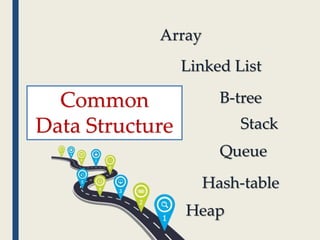
Common
Data Structure
Array
Linked List
B-tree
Stack
Queue
Hash-table
Heap
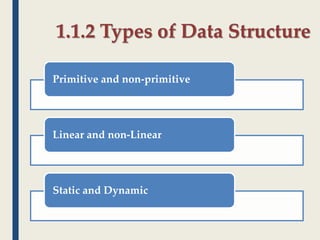
1.1.2 Types of Data Structure
Primitive and non-primitive
Linear and non-Linear
Static and Dynamic
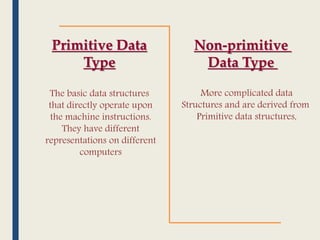
Primitive Data
Type
Non-primitive
Data Type
The basic data structures
that directly operate upon
the machine instructions.
They have different
representations on different
computers
More complicated data
Structures and are derived from
Primitive data structures,
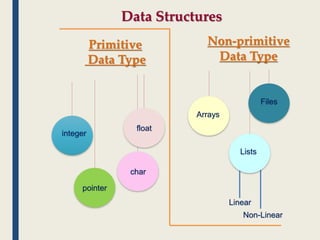
Primitive
Data Type
Non-primitive
Data Type
Data Structures
integer
float
char
pointer
Arrays
Lists
Files
Linear
Non-Linear
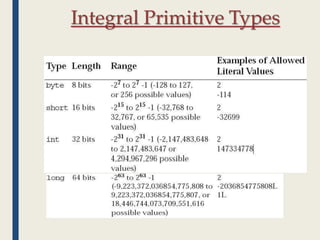
Integral Primitive Types
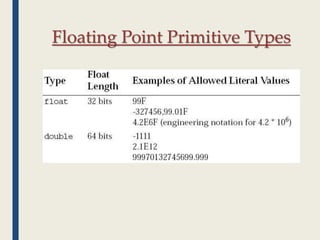
Floating Point Primitive Types
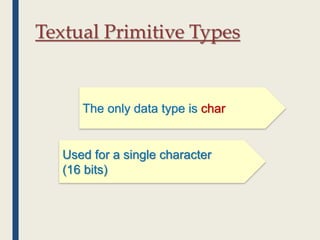
Textual Primitive Types
The only data type is
Used for a single character
(16 bits)
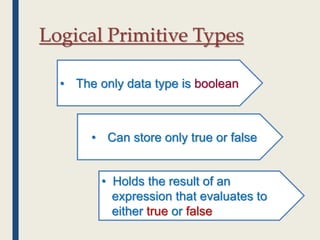
Logical Primitive Types
• The only data type is boolean
• Can store only true or false
• Holds the result of an
expression that evaluates to
either true or false
Data Structures
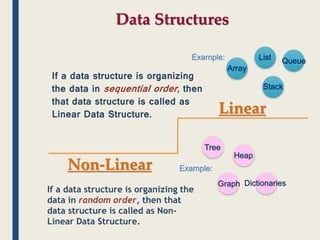
Linear
Non-Linear
If a data structure is organizing
the data in sequential order, then
that data structure is called as
Linear Data Structure.
If a data structure is organizing the
data in random order, then that
data structure is called as Non-
Linear Data Structure.
Array
List
Stack
Queue
Tree
Graph
Heap
Dictionaries
Example:
Example:
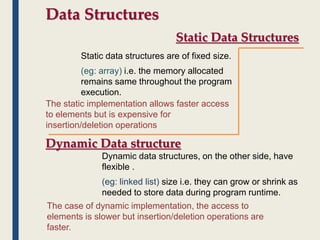
Data Structures
Static Data Structures
Dynamic Data structure
Static data structures are of fixed size.
(eg: array) i.e. the memory allocated
remains same throughout the program
execution.
Dynamic data structures, on the other side, have
flexible .
(eg: linked list) size i.e. they can grow or shrink as
needed to store data during program runtime.
The static implementation allows faster access
to elements but is expensive for
insertion/deletion operations
The case of dynamic implementation, the access to
elements is slower but insertion/deletion operations are
faster.
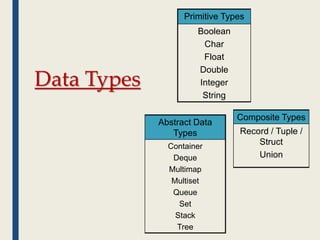
Data Types
Primitive Types
Boolean
Char
Float
Double
Integer
String
Composite Types
Record / Tuple /
Struct
Union
Abstract Data
Types
Container
Deque
Multimap
Multiset
Queue
Set
Stack
Tree
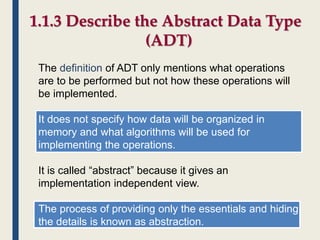
1.1.3 Describe the Abstract Data Type
(ADT)
The definition of ADT only mentions what operations
are to be performed but not how these operations will
be implemented.
It does not specify how data will be organized in
memory and what algorithms will be used for
implementing the operations.
It is called “abstract” because it gives an
implementation independent view.
The process of providing only the essentials and hiding
the details is known as abstraction.
The user of data type need not know that data type is
implemented, for example, we have been using int, float,
char data types only with the knowledge with values
that can take and operations that can be performed on
them without any idea of how these types are
implemented.
So a user only needs to know what a data type can do
but not how it will do it. We can think of ADT as a black
box which hides the inner structure and design of the
data type. Now we’ll define three ADTs
namely List ADT, Stack ADT, Queue ADT.
Describe the Abstract Data Type (ADT)
There are two parts to each ADT:
1.The public or external part, which consists of:
1. the conceptual picture (the user's view of what
the object looks like, how the structure is
organized)
2. the conceptual operations (what the user can do
to the ADT)
2.The private or internal part, which consists of:
1. the representation (how the structure is actually
stored)
2. the implementation of the operations (the actual
code)
Describe the Abstract Data Type (ADT)
In general, there are many possible operations that
could be defined for each ADT; however, they often
fall into these categories:
1.initialize
2.add data
3.access data
4.remove data
Describe the Abstract Data Type (ADT)
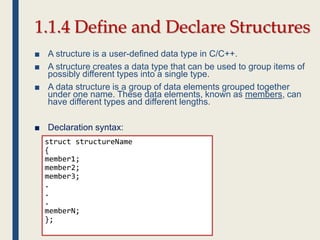
struct structureName
{
member1;
member2;
member3;
.
.
.
memberN;
};
1.1.4 Define and Declare Structures
■ A structure is a user-defined data type in C/C++.
■ A structure creates a data type that can be used to group items of
possibly different types into a single type.
■ A data structure is a group of data elements grouped together
under one name. These data elements, known as members, can
have different types and different lengths.
■ Declaration syntax:
Declaration Samples
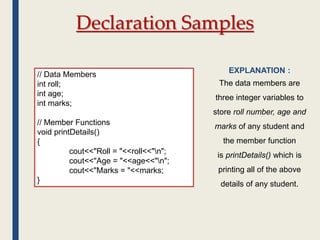
// Data Members
int roll;
int age;
int marks;
// Member Functions
void printDetails()
{
cout<<"Roll = "<<roll<<"n";
cout<<"Age = "<<age<<"n";
cout<<"Marks = "<<marks;
}
EXPLANATION :
The data members are
three integer variables to
store roll number, age and
marks of any student and
the member function
is printDetails() which is
printing all of the above
details of any student.
Declaration Samples
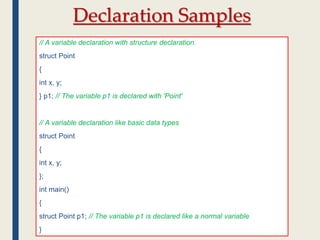
// A variable declaration with structure declaration.
struct Point
{
int x, y;
} p1; // The variable p1 is declared with 'Point'
// A variable declaration like basic data types
struct Point
{
int x, y;
};
int main()
{
struct Point p1; // The variable p1 is declared like a normal variable
}
How to Access Data Members
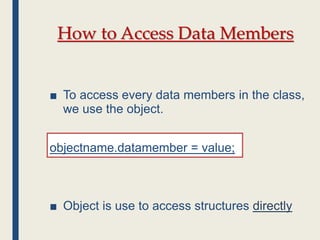
■ To access every data members in the class,
we use the object.
objectname.datamember = value;
■ Object is use to access structures directly
How to Access Data Members
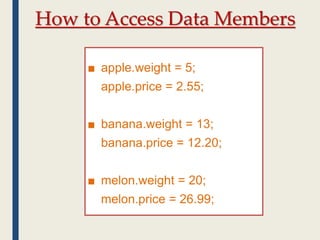
■ apple.weight = 5;
apple.price = 2.55;
■ banana.weight = 13;
banana.price = 12.20;
■ melon.weight = 20;
melon.price = 26.99;
1.1.5 Demonstrate
structures in memories
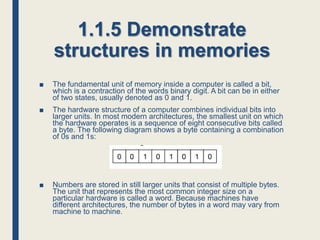
■ The fundamental unit of memory inside a computer is called a bit,
which is a contraction of the words binary digit. A bit can be in either
of two states, usually denoted as 0 and 1.
■ The hardware structure of a computer combines individual bits into
larger units. In most modern architectures, the smallest unit on which
the hardware operates is a sequence of eight consecutive bits called
a byte. The following diagram shows a byte containing a combination
of 0s and 1s:
■ Numbers are stored in still larger units that consist of multiple bytes.
The unit that represents the most common integer size on a
particular hardware is called a word. Because machines have
different architectures, the number of bytes in a word may vary from
machine to machine.
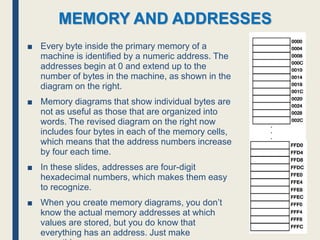
■ Every byte inside the primary memory of a
machine is identified by a numeric address. The
addresses begin at 0 and extend up to the
number of bytes in the machine, as shown in the
diagram on the right.
■ Memory diagrams that show individual bytes are
not as useful as those that are organized into
words. The revised diagram on the right now
includes four bytes in each of the memory cells,
which means that the address numbers increase
by four each time.
■ In these slides, addresses are four-digit
hexadecimal numbers, which makes them easy
to recognize.
■ When you create memory diagrams, you don’t
know the actual memory addresses at which
values are stored, but you do know that
everything has an address. Just make
MEMORY AND ADDRESSES
The Allocation of Memory to
Variables
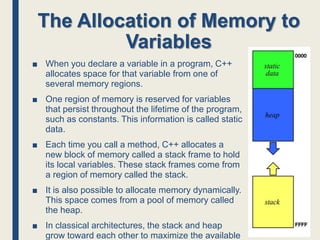
■ When you declare a variable in a program, C++
allocates space for that variable from one of
several memory regions.
■ One region of memory is reserved for variables
that persist throughout the lifetime of the program,
such as constants. This information is called static
data.
■ Each time you call a method, C++ allocates a
new block of memory called a stack frame to hold
its local variables. These stack frames come from
a region of memory called the stack.
■ It is also possible to allocate memory dynamically.
This space comes from a pool of memory called
the heap.
■ In classical architectures, the stack and heap
grow toward each other to maximize the available
1.2.1 Array As a Basic Data
Structure
■ Array are probably the most common data structure
used to stored collections of elements.
■ In most languages, arrays are convenient to declare and
the provide the handy [ ] syntax to access any element
by its index number.
Review Array???
■ Sample :
– int a [ 5 ] = { 10, 20, 30, 40, 50 };
10 20 30 40 50
a
[ 0 ] [ 1 ] [ 2 ] [ 3 ] [ 4 ]
What is array
Insertion data in array??
■ Here is a drawing of how the scores
array might look like in memory.
■ The key point is that the entire array
is allocated as one block of memory.
■ Each element in the array gets its
own space in the array.
■ Any element can be accessed
directly using the [ ] syntax.
#include <iostream>
void main() {
int scores [ 100 ];
scores [ 0 ] = 1;
scores [ 1 ] = 2;
scores [ 2 ] = 3;
}
1 2 3 -3451 23142
scores
[ 0 ] [ 1 ] [ 2 ] [ 3 ] [ 99 ]
Example to accessed the value of 2 in array of scores
cout<< scores[1];
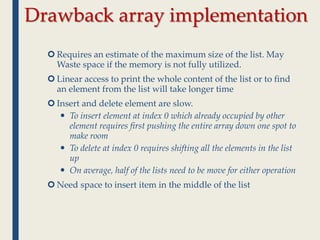
Drawback array implementation
 Requires an estimate of the maximum size of the list. May
Waste space if the memory is not fully utilized.
 Linear access to print the whole content of the list or to find
an element from the list will take longer time
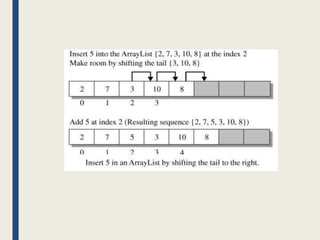
 Insert and delete element are slow.
 To insert element at index 0 which already occupied by other
element requires first pushing the entire array down one spot to
make room
 To delete at index 0 requires shifting all the elements in the list
up
 On average, half of the lists need to be move for either operation
 Need space to insert item in the middle of the list
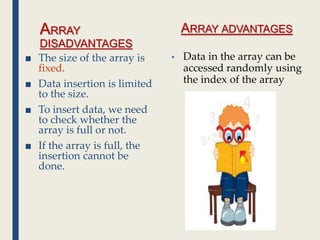
ARRAY
DISADVANTAGES
■ The size of the array is
fixed.
■ Data insertion is limited
to the size.
■ To insert data, we need
to check whether the
array is full or not.
■ If the array is full, the
insertion cannot be
done.
ARRAY ADVANTAGES
 Data in the array can be
accessed randomly using
the index of the array
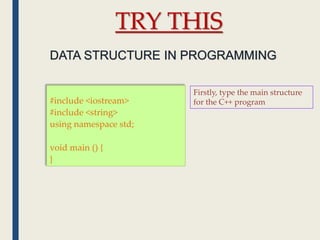
#include <iostream>
#include <string>
using namespace std;
void main () {
}
TRY THIS
Firstly, type the main structure
for the C++ program
DATA STRUCTURE IN PROGRAMMING
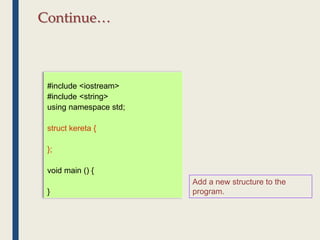
Continue…
#include <iostream>
#include <string>
using namespace std;
struct kereta {
};
void main () {
}
Add a new structure to the
program.
Continue…
#include <iostream>
#include <string>
using namespace std;
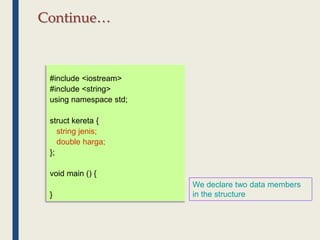
struct kereta {
string jenis;
double harga;
};
void main () {
}
We declare two data members
in the structure
#include <iostream>
#include <string>
using namespace std;
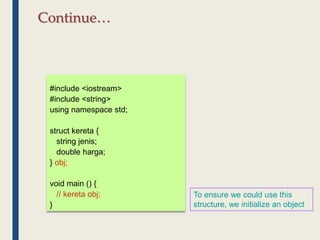
struct kereta {
string jenis;
double harga;
} obj;
void main () {
// kereta obj;
}
To ensure we could use this
structure, we initialize an object
Continue…
Continue…
#include <iostream>
#include <string>
using namespace std;
struct kereta {
string jenis;
double harga;
} obj;
void main () {
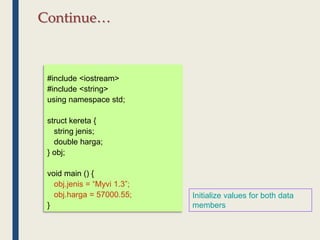
obj.jenis = “Myvi 1.3”;
obj.harga = 57000.55;
}
Initialize values for both data
members
#include <iostream>
#include <string>
using namespace std;
struct kereta {
string jenis;
double harga;
} obj;
void main () {
obj.jenis = “Myvi 1.3”;
obj.harga = 57000.55;
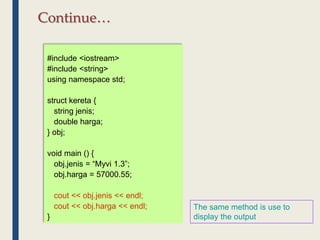
cout << obj.jenis << endl;
cout << obj.harga << endl;
}
The same method is use to
display the output
Continue…
#include <iostream>
#include <string>
using namespace std;
struct kereta {
string jenis;
double harga;
} obj;
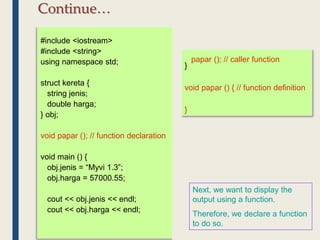
void papar (); // function declaration
void main () {
obj.jenis = “Myvi 1.3”;
obj.harga = 57000.55;
cout << obj.jenis << endl;
cout << obj.harga << endl;
papar (); // caller function
}
void papar () { // function definition
}
Next, we want to display the
output using a function.
Therefore, we declare a function
to do so.
Continue…
#include <iostream>
#include <string>
using namespace std;
struct kereta {
string jenis;
double harga;
} obj;
void papar ();
void main () {
obj.jenis = “Myvi 1.3”;
obj.harga = 57000.55;
papar ();
}
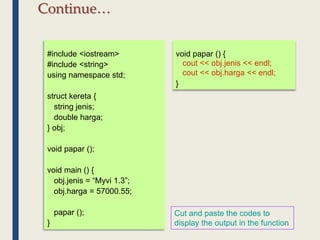
void papar () {
cout << obj.jenis << endl;
cout << obj.harga << endl;
}
Cut and paste the codes to
display the output in the function
Continue…
#include <iostream>
#include <string>
using namespace std;
struct kereta {
string jenis;
double harga;
} obj;
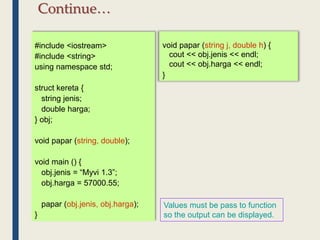
void papar (string, double);
void main () {
obj.jenis = “Myvi 1.3”;
obj.harga = 57000.55;
papar (obj.jenis, obj.harga);
}
void papar (string j, double h) {
cout << obj.jenis << endl;
cout << obj.harga << endl;
}
Values must be pass to function
so the output can be displayed.
Continue…
#include <iostream>
#include <string>
using namespace std;
struct kereta {
string jenis;
double harga;
} obj;
void papar (string, double);
void main () {
obj.jenis = “Myvi 1.3”;
obj.harga = 57000.55;
papar (obj.jenis, obj.harga);
}
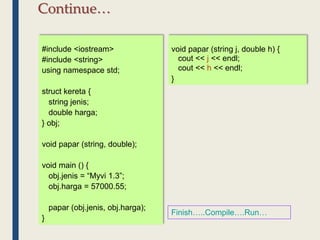
void papar (string j, double h) {
cout << j << endl;
cout << h << endl;
}
Finish…..Compile….Run…
Continue…
#include <iostream>
#include <string>
using namespace std;
struct kereta {
string jenis;
double harga;
} obj;
void papar (string, double);
void main () {
obj.jenis = “Myvi 1.3”;
obj.harga = 57000.55;
papar (obj);
}
void papar (string j, double h) {
cout << j << endl;
cout << h << endl;
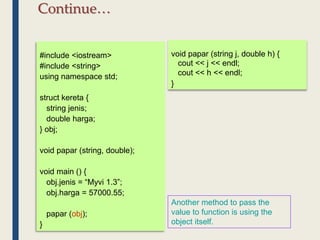
}
Another method to pass the
value to function is using the
object itself.
Continue…
#include <iostream>
#include <string>
using namespace std;
struct kereta {
string jenis;
double harga;
} obj;
void papar (kereta);
void main () {
obj.jenis = “Myvi 1.3”;
obj.harga = 57000.55;
papar (obj);
}
void papar (kereta z) {
cout << j << endl;
cout << h << endl;
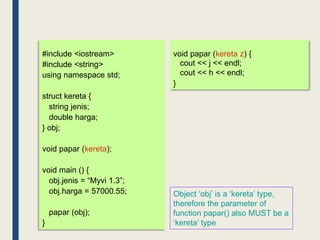
}
Object ‘obj’ is a ‘kereta’ type,
therefore the parameter of
function papar() also MUST be a
‘kereta’ type
#include <iostream>
#include <string>
using namespace std;
struct kereta {
string jenis;
double harga;
} obj;
void papar (kereta);
void main () {
obj.jenis = “Myvi 1.3”;
obj.harga = 57000.55;
papar (obj);
}
void papar (kereta z) {
cout << z.jenis << endl;
cout << z.harga << endl;
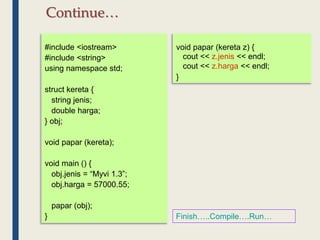
}
Finish…..Compile….Run…
Continue…
#include <iostream>
#include <string>
using namespace std;
struct kereta {
string jenis;
double harga;
} obj [ 3 ];
void papar (kereta);
void main () {
obj.jenis = “Myvi 1.3”;
obj.harga = 57000.55;
papar (obj);
}
void papar (kereta z) {
cout << z.jenis << endl;
cout << z.harga << endl;
}
The object/objects can also be
an array.
Continue… (To make the object as an Array)
#include <iostream>
#include <string>
using namespace std;
struct kereta {
string jenis;
double harga;
} obj [ 3 ];
void papar (kereta);
void main () {
for ( int i = 0 ; i < 3 ; i++ ) {
obj [ i ].jenis = “Myvi 1.3”;
obj [ i ].harga = 57000.55;
papar (obj [ i ]);
}
}
void papar (kereta z) {
cout << z.jenis << endl;
cout << z.harga << endl;
}
Finish…..Compile….Run…
You should get the same output
3 times.
Lets change the program so that
it can receive values from the
user and display them.
Continue…
#include <iostream>
#include <string>
using namespace std;
struct kereta {
string jenis;
double harga;
} obj [ 3 ];
void papar (kereta);
void main () {
for ( int i = 0 ; i < 3 ; i++ ) {
cout << "Masukkan jenis kereta : ";
getline (cin, obj [ i ].jenis);
cout << "Masukkan harga : ";
cin >> obj [ i ].harga;
papar (obj [ i ]);
cin.get();
}
}
void papar (kereta z) {
cout << z.jenis << endl;
cout << z.harga << endl;
}
Notes : getline() function is more
suitable for char or string type.
Finish…..Compile….Run…
Continue…
#include <iostream>
#include <string>
using namespace std;
struct kereta {
string jenis;
double harga;
} obj;
void papar (kereta);
void main () {
cout << "Masukkan jenis kereta : ";
getline (cin, obj.jenis);
cout << "Masukkan harga : ";
cin >> obj.harga;
papar (obj);
cin.get();
}
void papar (kereta z) {
cout << z.jenis << endl;
cout << z.harga << endl;
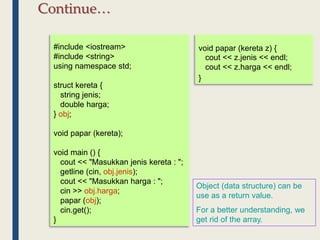
}
Object (data structure) can be
use as a return value.
For a better understanding, we
get rid of the array.
Continue…
#include <iostream>
#include <string>
using namespace std;
struct kereta {
string jenis;
double harga;
} obj;
void papar (kereta);
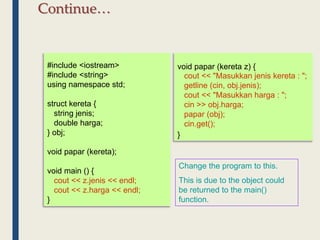
void main () {
cout << z.jenis << endl;
cout << z.harga << endl;
}
void papar (kereta z) {
cout << "Masukkan jenis kereta : ";
getline (cin, obj.jenis);
cout << "Masukkan harga : ";
cin >> obj.harga;
papar (obj);
cin.get();
}
Change the program to this.
This is due to the object could
be returned to the main()
function.
Continue…
#include <iostream>
#include <string>
using namespace std;
struct kereta {
string jenis;
double harga;
} obj;
void papar (kereta);
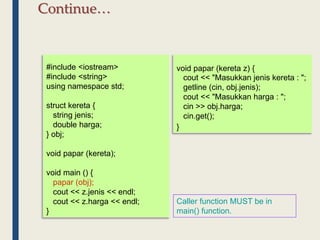
void main () {
papar (obj);
cout << z.jenis << endl;
cout << z.harga << endl;
}
void papar (kereta z) {
cout << "Masukkan jenis kereta : ";
getline (cin, obj.jenis);
cout << "Masukkan harga : ";
cin >> obj.harga;
cin.get();
}
Caller function MUST be in
main() function.
Continue…
#include <iostream>
#include <string>
using namespace std;
struct kereta {
string jenis;
double harga;
} obj;
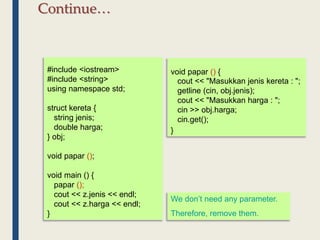
void papar ();
void main () {
papar ();
cout << z.jenis << endl;
cout << z.harga << endl;
}
void papar () {
cout << "Masukkan jenis kereta : ";
getline (cin, obj.jenis);
cout << "Masukkan harga : ";
cin >> obj.harga;
cin.get();
}
We don’t need any parameter.
Therefore, remove them.
Continue…
#include <iostream>
#include <string>
using namespace std;
struct kereta {
string jenis;
double harga;
} obj;
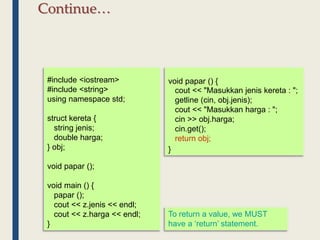
void papar ();
void main () {
papar ();
cout << z.jenis << endl;
cout << z.harga << endl;
}
void papar () {
cout << "Masukkan jenis kereta : ";
getline (cin, obj.jenis);
cout << "Masukkan harga : ";
cin >> obj.harga;
cin.get();
return obj;
}
To return a value, we MUST
have a ‘return’ statement.
Continue…
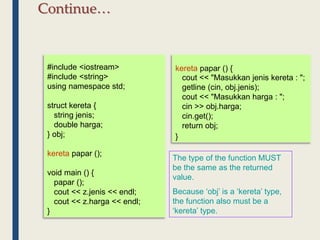
#include <iostream>
#include <string>
using namespace std;
struct kereta {
string jenis;
double harga;
} obj;
kereta papar ();
void main () {
papar ();
cout << z.jenis << endl;
cout << z.harga << endl;
}
kereta papar () {
cout << "Masukkan jenis kereta : ";
getline (cin, obj.jenis);
cout << "Masukkan harga : ";
cin >> obj.harga;
cin.get();
return obj;
}
The type of the function MUST
be the same as the returned
value.
Because ‘obj’ is a ‘kereta’ type,
the function also must be a
‘kereta’ type.
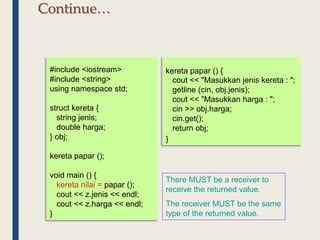
Continue…
#include <iostream>
#include <string>
using namespace std;
struct kereta {
string jenis;
double harga;
} obj;
kereta papar ();
void main () {
kereta nilai = papar ();
cout << z.jenis << endl;
cout << z.harga << endl;
}
kereta papar () {
cout << "Masukkan jenis kereta : ";
getline (cin, obj.jenis);
cout << "Masukkan harga : ";
cin >> obj.harga;
cin.get();
return obj;
}
There MUST be a receiver to
receive the returned value.
The receiver MUST be the same
type of the returned value.
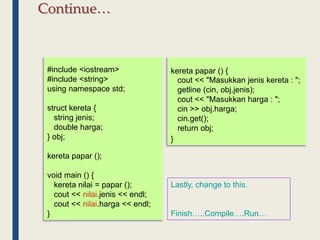
Continue…
#include <iostream>
#include <string>
using namespace std;
struct kereta {
string jenis;
double harga;
} obj;
kereta papar ();
void main () {
kereta nilai = papar ();
cout << nilai.jenis << endl;
cout << nilai.harga << endl;
}
kereta papar () {
cout << "Masukkan jenis kereta : ";
getline (cin, obj.jenis);
cout << "Masukkan harga : ";
cin >> obj.harga;
cin.get();
return obj;
}
Lastly, change to this.
Finish…..Compile….Run…
Continue…
Do It Yourself
■ You are required to build a complete C++
program as shown below :
– Input : data for student
– Output : displays all inputted data
Understand Data Structures
And Array
Is Struct equal to Database ?
#include <iostream>
using namespace std;
struct pelajar {
char nopend[12];
char noic[12];
char nama[30];
char kursus[3];
} obj;
void main () {
cout << "No Pend : ";
cin.getline (obj.nopend,12);
cout << "No IC : ";
cin.getline (obj.noic,12);
cout << "Nama : ";
cin.getline (obj.nama,30);
cout << "Kursus : ";
cin.getline (obj.kursus,3);
}
Is Struct equal to Database ?
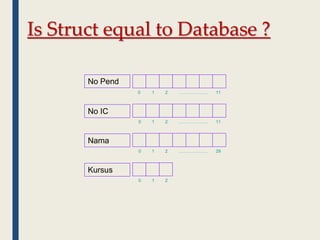
No Pend
No IC
Nama
Kursus
0
0
0
0
1
1
1
1
2
2
2
2
………………..
………………..
………………..
11
11
29
Is Struct equal to Database ?
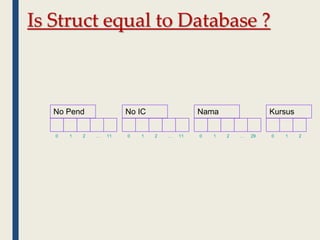
No Pend No IC Nama Kursus
0 1 2 … 11 0 1 2 … 11 0 1 2 … 29 0 1 2
Is Struct equal to Database ?
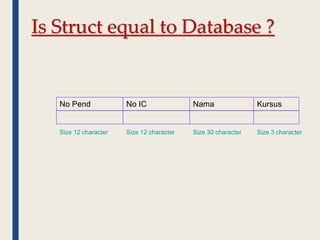
No Pend No IC Nama Kursus
Size 12 character Size 12 character Size 30 character Size 3 character
Is Struct equal to Database ?
#include <iostream>
using namespace std;
struct pelajar {
char nopend[12];
char noic[12];
char nama[30];
char kursus[3];
} obj [10];
void main () {
for ( int i = 0; i < 10; i++ ) {
cout << "No Pend : ";
cin.getline (obj[ i ].nopend,12);
cout << "No IC : ";
cin.getline (obj[ i ].noic,12);
cout << "Nama : ";
cin.getline (obj[ i ].nama,30);
cout << "Kursus : ";
cin.getline (obj[ i ].kursus,3);
}
}
Is Struct equal to Database ?
No Pend No IC Nama Kursus
Size 12 character Size 12 character Size 30 character Size 3 character
obj [ 0 ]
obj [ 1 ]
obj [ 2 ]
obj [ 9 ]
.
.
.
Your Conclusion ???
Is Struct equal to Database ?
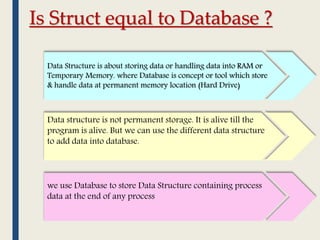
Data Structure is about storing data or handling data into RAM or
Temporary Memory. where Database is concept or tool which store
& handle data at permanent memory location (Hard Drive)
Data structure is not permanent storage. It is alive till the
program is alive. But we can use the different data structure
to add data into database.
we use Database to store Data Structure containing process
data at the end of any process
Data Structures as a Function
Arguments
■ Any data structures can also be use as a
function arguments.
■ We will use our previous program to show
this.
#include <iostream>
using namespace std;
struct pelajar {
char nopend[12], noic[12],
nama[30], kursus[3];
} obj [10];
void main () {
for ( int i = 0; i < 10; i++ ) {
cout << "No Pend : ";
cin.getline (obj [ i ].nopend,12);
cout << "No IC : ";
cin.getline (obj [ i ].noic,12);
cout << "Nama : ";
cin.getline (obj [ i ].nama,30);
cout << "Kursus : ";
cin.getline (obj [ i ].kursus,3);
}
}
#include <iostream>
using namespace std;
struct pelajar {
char nopend[12], noic[12], nama[30],
kursus[3];
} obj [10];
void papar (); // function declaration
void main () {
for ( int i = 0; i < 10; i++ ) {
cout << "No Pend : ";
cin.getline (obj [ i ].nopend,12);
cout << "No IC : ";
cin.getline (obj [ i ].noic,12);
cout << "Nama : ";
cin.getline (obj [ i ].nama,30);
cout << "Kursus : ";
cin.getline (obj [ i ].kursus,3);
}
papar ( ); // caller function
}
void papar () { // function definition
}
#include <iostream>
using namespace std;
struct pelajar {
char nopend[12], noic[12], nama[30],
kursus[3];
} obj [10];
void papar ();
void main () {
for ( int i = 0; i < 10; i++ ) {
cout << "No Pend : ";
cin.getline (obj [ i ].nopend,12);
cout << "No IC : ";
cin.getline (obj [ i ].noic,12);
cout << "Nama : ";
cin.getline (obj [ i ].nama,30);
cout << "Kursus : ";
cin.getline (obj [ i ].kursus,3);
}
papar ( obj );
}
void papar () {
}
#include <iostream>
using namespace std;
struct pelajar {
char nopend[12], noic[12], nama[30],
kursus[3];
} obj [10];
void papar ();
void main () {
for ( int i = 0; i < 10; i++ ) {
cout << "No Pend : ";
cin.getline (obj [ i ].nopend,12);
cout << "No IC : ";
cin.getline (obj [ i ].noic,12);
cout << "Nama : ";
cin.getline (obj [ i ].nama,30);
cout << "Kursus : ";
cin.getline (obj [ i ].kursus,3);
}
papar ( obj );
}
void papar ( pelajar stud [ ] ) {
}
#include <iostream>
using namespace std;
struct pelajar {
char nopend[12], noic[12], nama[30],
kursus[3];
} obj [10];
void papar ( pelajar [ ] );
void main () {
for ( int i = 0; i < 10; i++ ) {
cout << "No Pend : ";
cin.getline (obj [ i ].nopend,12);
cout << "No IC : ";
cin.getline (obj [ i ].noic,12);
cout << "Nama : ";
cin.getline (obj [ i ].nama,30);
cout << "Kursus : ";
cin.getline (obj [ i ].kursus,3);
}
papar ( obj );
}
void papar ( pelajar stud [ ] ) {
}
#include <iostream>
using namespace std;
struct pelajar {
char nopend[12], noic[12], nama[30],
kursus[3];
} obj [10];
void papar ( pelajar [ ] );
void main () {
for ( int i = 0; i < 10; i++ ) {
cout << "No Pend : ";
cin.getline (obj [ i ].nopend,12);
cout << "No IC : ";
cin.getline (obj [ i ].noic,12);
cout << "Nama : ";
cin.getline (obj [ i ].nama,30);
cout << "Kursus : ";
cin.getline (obj [ i ].kursus,3);
}
papar ( obj );
}
void papar ( pelajar stud [ ] ) {
for ( int i = 0; i < 10; i++ ) {
cout << "nNo Pend : " << stud
[i].nopend;
cout << "nNo IC : " << stud [i].noic;
cout << "nNama : " << stud [i].nama;
cout << "nKursus : " << stud [i].kursus;
}
}
Do It Yourself
■ You are required to build a complete C++
program as shown below :
– Input : data for 5 cars
■ car_id with string type
■ car_brand with string type
■ car_price with double type
■ car_cc with integer type
■ car_year with integer type
– Output : displays all inputted data
Pointer
■ There are other way to access data structure
by using a pointer.
■ Pointer is used to access structures indirectly.
■ Pointer is a variable that stores the address of
the variable its point, not the value.
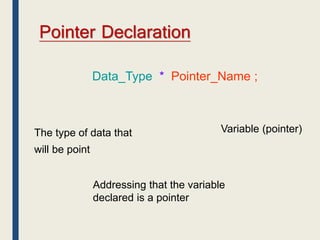
Pointer Declaration
Data_Type * Pointer_Name ;
The type of data that
will be point
Addressing that the variable
declared is a pointer
Variable (pointer)
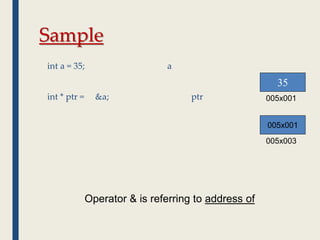
Sample
int a = 35; a
int * ptr = &a; ptr
35
005x001
005x003
005x001
Operator & is referring to address of
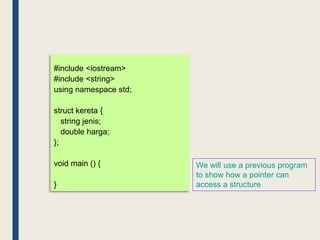
#include <iostream>
#include <string>
using namespace std;
struct kereta {
string jenis;
double harga;
};
void main () {
}
We will use a previous program
to show how a pointer can
access a structure
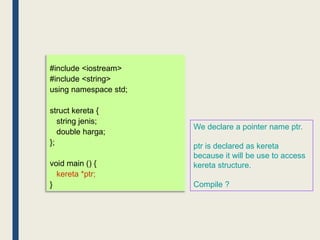
#include <iostream>
#include <string>
using namespace std;
struct kereta {
string jenis;
double harga;
};
void main () {
kereta *ptr;
}
We declare a pointer name ptr.
ptr is declared as kereta
because it will be use to access
kereta structure.
Compile ?
#include <iostream>
#include <string>
using namespace std;
struct kereta {
string jenis;
double harga;
};
void main () {
kereta *ptr;
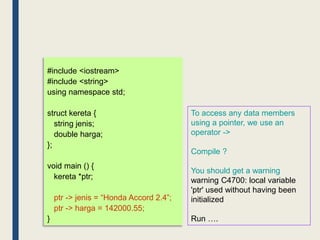
ptr -> jenis = “Honda Accord 2.4”;
ptr -> harga = 142000.55;
}
To access any data members
using a pointer, we use an
operator ->
Compile ?
You should get a warning
warning C4700: local variable
'ptr' used without having been
initialized
Run ….
#include <iostream>
#include <string>
using namespace std;
struct kereta {
string jenis;
double harga;
};
void main () {
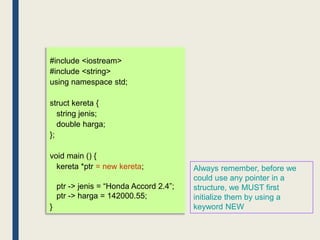
kereta *ptr = new kereta;
ptr -> jenis = “Honda Accord 2.4”;
ptr -> harga = 142000.55;
}
Always remember, before we
could use any pointer in a
structure, we MUST first
initialize them by using a
keyword NEW
#include <iostream>
#include <string>
using namespace std;
struct kereta {
string jenis;
double harga;
};
void main () {
kereta *ptr = new kereta;
ptr -> jenis = “Honda Accord 2.4”;
ptr -> harga = 142000.55;
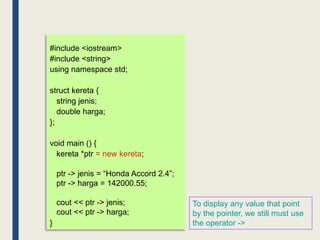
cout << ptr -> jenis;
cout << ptr -> harga;
}
To display any value that point
by the pointer, we still must use
the operator ->
END OF
CHAPTER 1

Chapter 1 - Introduction to Data Structure.ppt

  • 1.
  • 2.
    Learning Outcomes ■ Understanddata structure – Define data structure – Describe with example the types of data structures ■ Primitive and non primitive ■ Linear and non-linear ■ Statuc and dynamic – Describe the Abstract Data Type (ADT) – Define and declare structures – Demonstrate structures in memories ■ Understand Array Data Structure – Describe array as basic data structure – Identify the disadvantage of arrays
  • 3.
    1.1.1 Define DataStructure ■ In computer science, a data structure is a particular way of storing and organizing data in a computer so that it can be used efficiently. • Data structures are generally based on the ability of a computer to fetch and store data at any place in its memory, specified by an address. • The implementation of a data structure usually requires writing a set of procedures that create and manipulate instances of that structure.
  • 4.
    Define Data Structure •In a general sense, any data representation is a data structure. Example: An integer • More typically, a data structure is meant to be an organization for a collection of data items.
  • 5.
  • 6.
    1.1.2 Types ofData Structure Primitive and non-primitive Linear and non-Linear Static and Dynamic
  • 7.
    Primitive Data Type Non-primitive Data Type Thebasic data structures that directly operate upon the machine instructions. They have different representations on different computers More complicated data Structures and are derived from Primitive data structures,
  • 8.
    Primitive Data Type Non-primitive Data Type DataStructures integer float char pointer Arrays Lists Files Linear Non-Linear
  • 9.
  • 10.
  • 11.
    Textual Primitive Types Theonly data type is Used for a single character (16 bits)
  • 12.
    Logical Primitive Types •The only data type is boolean • Can store only true or false • Holds the result of an expression that evaluates to either true or false
  • 13.
    Data Structures Linear Non-Linear If adata structure is organizing the data in sequential order, then that data structure is called as Linear Data Structure. If a data structure is organizing the data in random order, then that data structure is called as Non- Linear Data Structure. Array List Stack Queue Tree Graph Heap Dictionaries Example: Example:
  • 14.
    Data Structures Static DataStructures Dynamic Data structure Static data structures are of fixed size. (eg: array) i.e. the memory allocated remains same throughout the program execution. Dynamic data structures, on the other side, have flexible . (eg: linked list) size i.e. they can grow or shrink as needed to store data during program runtime. The static implementation allows faster access to elements but is expensive for insertion/deletion operations The case of dynamic implementation, the access to elements is slower but insertion/deletion operations are faster.
  • 15.
    Data Types Primitive Types Boolean Char Float Double Integer String CompositeTypes Record / Tuple / Struct Union Abstract Data Types Container Deque Multimap Multiset Queue Set Stack Tree
  • 16.
    1.1.3 Describe theAbstract Data Type (ADT) The definition of ADT only mentions what operations are to be performed but not how these operations will be implemented. It does not specify how data will be organized in memory and what algorithms will be used for implementing the operations. It is called “abstract” because it gives an implementation independent view. The process of providing only the essentials and hiding the details is known as abstraction.
  • 17.
    The user ofdata type need not know that data type is implemented, for example, we have been using int, float, char data types only with the knowledge with values that can take and operations that can be performed on them without any idea of how these types are implemented. So a user only needs to know what a data type can do but not how it will do it. We can think of ADT as a black box which hides the inner structure and design of the data type. Now we’ll define three ADTs namely List ADT, Stack ADT, Queue ADT. Describe the Abstract Data Type (ADT)
  • 18.
    There are twoparts to each ADT: 1.The public or external part, which consists of: 1. the conceptual picture (the user's view of what the object looks like, how the structure is organized) 2. the conceptual operations (what the user can do to the ADT) 2.The private or internal part, which consists of: 1. the representation (how the structure is actually stored) 2. the implementation of the operations (the actual code) Describe the Abstract Data Type (ADT)
  • 19.
    In general, thereare many possible operations that could be defined for each ADT; however, they often fall into these categories: 1.initialize 2.add data 3.access data 4.remove data Describe the Abstract Data Type (ADT)
  • 20.
    struct structureName { member1; member2; member3; . . . memberN; }; 1.1.4 Defineand Declare Structures ■ A structure is a user-defined data type in C/C++. ■ A structure creates a data type that can be used to group items of possibly different types into a single type. ■ A data structure is a group of data elements grouped together under one name. These data elements, known as members, can have different types and different lengths. ■ Declaration syntax:
  • 21.
    Declaration Samples // DataMembers int roll; int age; int marks; // Member Functions void printDetails() { cout<<"Roll = "<<roll<<"n"; cout<<"Age = "<<age<<"n"; cout<<"Marks = "<<marks; } EXPLANATION : The data members are three integer variables to store roll number, age and marks of any student and the member function is printDetails() which is printing all of the above details of any student.
  • 22.
    Declaration Samples // Avariable declaration with structure declaration. struct Point { int x, y; } p1; // The variable p1 is declared with 'Point' // A variable declaration like basic data types struct Point { int x, y; }; int main() { struct Point p1; // The variable p1 is declared like a normal variable }
  • 23.
    How to AccessData Members ■ To access every data members in the class, we use the object. objectname.datamember = value; ■ Object is use to access structures directly
  • 24.
    How to AccessData Members ■ apple.weight = 5; apple.price = 2.55; ■ banana.weight = 13; banana.price = 12.20; ■ melon.weight = 20; melon.price = 26.99;
  • 25.
    1.1.5 Demonstrate structures inmemories ■ The fundamental unit of memory inside a computer is called a bit, which is a contraction of the words binary digit. A bit can be in either of two states, usually denoted as 0 and 1. ■ The hardware structure of a computer combines individual bits into larger units. In most modern architectures, the smallest unit on which the hardware operates is a sequence of eight consecutive bits called a byte. The following diagram shows a byte containing a combination of 0s and 1s: ■ Numbers are stored in still larger units that consist of multiple bytes. The unit that represents the most common integer size on a particular hardware is called a word. Because machines have different architectures, the number of bytes in a word may vary from machine to machine.
  • 26.
    ■ Every byteinside the primary memory of a machine is identified by a numeric address. The addresses begin at 0 and extend up to the number of bytes in the machine, as shown in the diagram on the right. ■ Memory diagrams that show individual bytes are not as useful as those that are organized into words. The revised diagram on the right now includes four bytes in each of the memory cells, which means that the address numbers increase by four each time. ■ In these slides, addresses are four-digit hexadecimal numbers, which makes them easy to recognize. ■ When you create memory diagrams, you don’t know the actual memory addresses at which values are stored, but you do know that everything has an address. Just make MEMORY AND ADDRESSES
  • 27.
    The Allocation ofMemory to Variables ■ When you declare a variable in a program, C++ allocates space for that variable from one of several memory regions. ■ One region of memory is reserved for variables that persist throughout the lifetime of the program, such as constants. This information is called static data. ■ Each time you call a method, C++ allocates a new block of memory called a stack frame to hold its local variables. These stack frames come from a region of memory called the stack. ■ It is also possible to allocate memory dynamically. This space comes from a pool of memory called the heap. ■ In classical architectures, the stack and heap grow toward each other to maximize the available
  • 28.
    1.2.1 Array Asa Basic Data Structure ■ Array are probably the most common data structure used to stored collections of elements. ■ In most languages, arrays are convenient to declare and the provide the handy [ ] syntax to access any element by its index number.
  • 29.
    Review Array??? ■ Sample: – int a [ 5 ] = { 10, 20, 30, 40, 50 }; 10 20 30 40 50 a [ 0 ] [ 1 ] [ 2 ] [ 3 ] [ 4 ] What is array
  • 30.
    Insertion data inarray?? ■ Here is a drawing of how the scores array might look like in memory. ■ The key point is that the entire array is allocated as one block of memory. ■ Each element in the array gets its own space in the array. ■ Any element can be accessed directly using the [ ] syntax. #include <iostream> void main() { int scores [ 100 ]; scores [ 0 ] = 1; scores [ 1 ] = 2; scores [ 2 ] = 3; } 1 2 3 -3451 23142 scores [ 0 ] [ 1 ] [ 2 ] [ 3 ] [ 99 ] Example to accessed the value of 2 in array of scores cout<< scores[1];
  • 32.
    Drawback array implementation Requires an estimate of the maximum size of the list. May Waste space if the memory is not fully utilized.  Linear access to print the whole content of the list or to find an element from the list will take longer time  Insert and delete element are slow.  To insert element at index 0 which already occupied by other element requires first pushing the entire array down one spot to make room  To delete at index 0 requires shifting all the elements in the list up  On average, half of the lists need to be move for either operation  Need space to insert item in the middle of the list
  • 33.
    ARRAY DISADVANTAGES ■ The sizeof the array is fixed. ■ Data insertion is limited to the size. ■ To insert data, we need to check whether the array is full or not. ■ If the array is full, the insertion cannot be done. ARRAY ADVANTAGES  Data in the array can be accessed randomly using the index of the array
  • 34.
    #include <iostream> #include <string> usingnamespace std; void main () { } TRY THIS Firstly, type the main structure for the C++ program DATA STRUCTURE IN PROGRAMMING
  • 35.
    Continue… #include <iostream> #include <string> usingnamespace std; struct kereta { }; void main () { } Add a new structure to the program.
  • 36.
    Continue… #include <iostream> #include <string> usingnamespace std; struct kereta { string jenis; double harga; }; void main () { } We declare two data members in the structure
  • 37.
    #include <iostream> #include <string> usingnamespace std; struct kereta { string jenis; double harga; } obj; void main () { // kereta obj; } To ensure we could use this structure, we initialize an object Continue…
  • 38.
    Continue… #include <iostream> #include <string> usingnamespace std; struct kereta { string jenis; double harga; } obj; void main () { obj.jenis = “Myvi 1.3”; obj.harga = 57000.55; } Initialize values for both data members
  • 39.
    #include <iostream> #include <string> usingnamespace std; struct kereta { string jenis; double harga; } obj; void main () { obj.jenis = “Myvi 1.3”; obj.harga = 57000.55; cout << obj.jenis << endl; cout << obj.harga << endl; } The same method is use to display the output Continue…
  • 40.
    #include <iostream> #include <string> usingnamespace std; struct kereta { string jenis; double harga; } obj; void papar (); // function declaration void main () { obj.jenis = “Myvi 1.3”; obj.harga = 57000.55; cout << obj.jenis << endl; cout << obj.harga << endl; papar (); // caller function } void papar () { // function definition } Next, we want to display the output using a function. Therefore, we declare a function to do so. Continue…
  • 41.
    #include <iostream> #include <string> usingnamespace std; struct kereta { string jenis; double harga; } obj; void papar (); void main () { obj.jenis = “Myvi 1.3”; obj.harga = 57000.55; papar (); } void papar () { cout << obj.jenis << endl; cout << obj.harga << endl; } Cut and paste the codes to display the output in the function Continue…
  • 42.
    #include <iostream> #include <string> usingnamespace std; struct kereta { string jenis; double harga; } obj; void papar (string, double); void main () { obj.jenis = “Myvi 1.3”; obj.harga = 57000.55; papar (obj.jenis, obj.harga); } void papar (string j, double h) { cout << obj.jenis << endl; cout << obj.harga << endl; } Values must be pass to function so the output can be displayed. Continue…
  • 43.
    #include <iostream> #include <string> usingnamespace std; struct kereta { string jenis; double harga; } obj; void papar (string, double); void main () { obj.jenis = “Myvi 1.3”; obj.harga = 57000.55; papar (obj.jenis, obj.harga); } void papar (string j, double h) { cout << j << endl; cout << h << endl; } Finish…..Compile….Run… Continue…
  • 44.
    #include <iostream> #include <string> usingnamespace std; struct kereta { string jenis; double harga; } obj; void papar (string, double); void main () { obj.jenis = “Myvi 1.3”; obj.harga = 57000.55; papar (obj); } void papar (string j, double h) { cout << j << endl; cout << h << endl; } Another method to pass the value to function is using the object itself. Continue…
  • 45.
    #include <iostream> #include <string> usingnamespace std; struct kereta { string jenis; double harga; } obj; void papar (kereta); void main () { obj.jenis = “Myvi 1.3”; obj.harga = 57000.55; papar (obj); } void papar (kereta z) { cout << j << endl; cout << h << endl; } Object ‘obj’ is a ‘kereta’ type, therefore the parameter of function papar() also MUST be a ‘kereta’ type
  • 46.
    #include <iostream> #include <string> usingnamespace std; struct kereta { string jenis; double harga; } obj; void papar (kereta); void main () { obj.jenis = “Myvi 1.3”; obj.harga = 57000.55; papar (obj); } void papar (kereta z) { cout << z.jenis << endl; cout << z.harga << endl; } Finish…..Compile….Run… Continue…
  • 47.
    #include <iostream> #include <string> usingnamespace std; struct kereta { string jenis; double harga; } obj [ 3 ]; void papar (kereta); void main () { obj.jenis = “Myvi 1.3”; obj.harga = 57000.55; papar (obj); } void papar (kereta z) { cout << z.jenis << endl; cout << z.harga << endl; } The object/objects can also be an array. Continue… (To make the object as an Array)
  • 48.
    #include <iostream> #include <string> usingnamespace std; struct kereta { string jenis; double harga; } obj [ 3 ]; void papar (kereta); void main () { for ( int i = 0 ; i < 3 ; i++ ) { obj [ i ].jenis = “Myvi 1.3”; obj [ i ].harga = 57000.55; papar (obj [ i ]); } } void papar (kereta z) { cout << z.jenis << endl; cout << z.harga << endl; } Finish…..Compile….Run… You should get the same output 3 times. Lets change the program so that it can receive values from the user and display them. Continue…
  • 49.
    #include <iostream> #include <string> usingnamespace std; struct kereta { string jenis; double harga; } obj [ 3 ]; void papar (kereta); void main () { for ( int i = 0 ; i < 3 ; i++ ) { cout << "Masukkan jenis kereta : "; getline (cin, obj [ i ].jenis); cout << "Masukkan harga : "; cin >> obj [ i ].harga; papar (obj [ i ]); cin.get(); } } void papar (kereta z) { cout << z.jenis << endl; cout << z.harga << endl; } Notes : getline() function is more suitable for char or string type. Finish…..Compile….Run… Continue…
  • 50.
    #include <iostream> #include <string> usingnamespace std; struct kereta { string jenis; double harga; } obj; void papar (kereta); void main () { cout << "Masukkan jenis kereta : "; getline (cin, obj.jenis); cout << "Masukkan harga : "; cin >> obj.harga; papar (obj); cin.get(); } void papar (kereta z) { cout << z.jenis << endl; cout << z.harga << endl; } Object (data structure) can be use as a return value. For a better understanding, we get rid of the array. Continue…
  • 51.
    #include <iostream> #include <string> usingnamespace std; struct kereta { string jenis; double harga; } obj; void papar (kereta); void main () { cout << z.jenis << endl; cout << z.harga << endl; } void papar (kereta z) { cout << "Masukkan jenis kereta : "; getline (cin, obj.jenis); cout << "Masukkan harga : "; cin >> obj.harga; papar (obj); cin.get(); } Change the program to this. This is due to the object could be returned to the main() function. Continue…
  • 52.
    #include <iostream> #include <string> usingnamespace std; struct kereta { string jenis; double harga; } obj; void papar (kereta); void main () { papar (obj); cout << z.jenis << endl; cout << z.harga << endl; } void papar (kereta z) { cout << "Masukkan jenis kereta : "; getline (cin, obj.jenis); cout << "Masukkan harga : "; cin >> obj.harga; cin.get(); } Caller function MUST be in main() function. Continue…
  • 53.
    #include <iostream> #include <string> usingnamespace std; struct kereta { string jenis; double harga; } obj; void papar (); void main () { papar (); cout << z.jenis << endl; cout << z.harga << endl; } void papar () { cout << "Masukkan jenis kereta : "; getline (cin, obj.jenis); cout << "Masukkan harga : "; cin >> obj.harga; cin.get(); } We don’t need any parameter. Therefore, remove them. Continue…
  • 54.
    #include <iostream> #include <string> usingnamespace std; struct kereta { string jenis; double harga; } obj; void papar (); void main () { papar (); cout << z.jenis << endl; cout << z.harga << endl; } void papar () { cout << "Masukkan jenis kereta : "; getline (cin, obj.jenis); cout << "Masukkan harga : "; cin >> obj.harga; cin.get(); return obj; } To return a value, we MUST have a ‘return’ statement. Continue…
  • 55.
    #include <iostream> #include <string> usingnamespace std; struct kereta { string jenis; double harga; } obj; kereta papar (); void main () { papar (); cout << z.jenis << endl; cout << z.harga << endl; } kereta papar () { cout << "Masukkan jenis kereta : "; getline (cin, obj.jenis); cout << "Masukkan harga : "; cin >> obj.harga; cin.get(); return obj; } The type of the function MUST be the same as the returned value. Because ‘obj’ is a ‘kereta’ type, the function also must be a ‘kereta’ type. Continue…
  • 56.
    #include <iostream> #include <string> usingnamespace std; struct kereta { string jenis; double harga; } obj; kereta papar (); void main () { kereta nilai = papar (); cout << z.jenis << endl; cout << z.harga << endl; } kereta papar () { cout << "Masukkan jenis kereta : "; getline (cin, obj.jenis); cout << "Masukkan harga : "; cin >> obj.harga; cin.get(); return obj; } There MUST be a receiver to receive the returned value. The receiver MUST be the same type of the returned value. Continue…
  • 57.
    #include <iostream> #include <string> usingnamespace std; struct kereta { string jenis; double harga; } obj; kereta papar (); void main () { kereta nilai = papar (); cout << nilai.jenis << endl; cout << nilai.harga << endl; } kereta papar () { cout << "Masukkan jenis kereta : "; getline (cin, obj.jenis); cout << "Masukkan harga : "; cin >> obj.harga; cin.get(); return obj; } Lastly, change to this. Finish…..Compile….Run… Continue…
  • 58.
    Do It Yourself ■You are required to build a complete C++ program as shown below : – Input : data for student – Output : displays all inputted data
  • 59.
  • 60.
    Is Struct equalto Database ? #include <iostream> using namespace std; struct pelajar { char nopend[12]; char noic[12]; char nama[30]; char kursus[3]; } obj; void main () { cout << "No Pend : "; cin.getline (obj.nopend,12); cout << "No IC : "; cin.getline (obj.noic,12); cout << "Nama : "; cin.getline (obj.nama,30); cout << "Kursus : "; cin.getline (obj.kursus,3); }
  • 61.
    Is Struct equalto Database ? No Pend No IC Nama Kursus 0 0 0 0 1 1 1 1 2 2 2 2 ……………….. ……………….. ……………….. 11 11 29
  • 62.
    Is Struct equalto Database ? No Pend No IC Nama Kursus 0 1 2 … 11 0 1 2 … 11 0 1 2 … 29 0 1 2
  • 63.
    Is Struct equalto Database ? No Pend No IC Nama Kursus Size 12 character Size 12 character Size 30 character Size 3 character
  • 64.
    Is Struct equalto Database ? #include <iostream> using namespace std; struct pelajar { char nopend[12]; char noic[12]; char nama[30]; char kursus[3]; } obj [10]; void main () { for ( int i = 0; i < 10; i++ ) { cout << "No Pend : "; cin.getline (obj[ i ].nopend,12); cout << "No IC : "; cin.getline (obj[ i ].noic,12); cout << "Nama : "; cin.getline (obj[ i ].nama,30); cout << "Kursus : "; cin.getline (obj[ i ].kursus,3); } }
  • 65.
    Is Struct equalto Database ? No Pend No IC Nama Kursus Size 12 character Size 12 character Size 30 character Size 3 character obj [ 0 ] obj [ 1 ] obj [ 2 ] obj [ 9 ] . . . Your Conclusion ???
  • 66.
    Is Struct equalto Database ? Data Structure is about storing data or handling data into RAM or Temporary Memory. where Database is concept or tool which store & handle data at permanent memory location (Hard Drive) Data structure is not permanent storage. It is alive till the program is alive. But we can use the different data structure to add data into database. we use Database to store Data Structure containing process data at the end of any process
  • 67.
    Data Structures asa Function Arguments ■ Any data structures can also be use as a function arguments. ■ We will use our previous program to show this.
  • 68.
    #include <iostream> using namespacestd; struct pelajar { char nopend[12], noic[12], nama[30], kursus[3]; } obj [10]; void main () { for ( int i = 0; i < 10; i++ ) { cout << "No Pend : "; cin.getline (obj [ i ].nopend,12); cout << "No IC : "; cin.getline (obj [ i ].noic,12); cout << "Nama : "; cin.getline (obj [ i ].nama,30); cout << "Kursus : "; cin.getline (obj [ i ].kursus,3); } }
  • 69.
    #include <iostream> using namespacestd; struct pelajar { char nopend[12], noic[12], nama[30], kursus[3]; } obj [10]; void papar (); // function declaration void main () { for ( int i = 0; i < 10; i++ ) { cout << "No Pend : "; cin.getline (obj [ i ].nopend,12); cout << "No IC : "; cin.getline (obj [ i ].noic,12); cout << "Nama : "; cin.getline (obj [ i ].nama,30); cout << "Kursus : "; cin.getline (obj [ i ].kursus,3); } papar ( ); // caller function } void papar () { // function definition }
  • 70.
    #include <iostream> using namespacestd; struct pelajar { char nopend[12], noic[12], nama[30], kursus[3]; } obj [10]; void papar (); void main () { for ( int i = 0; i < 10; i++ ) { cout << "No Pend : "; cin.getline (obj [ i ].nopend,12); cout << "No IC : "; cin.getline (obj [ i ].noic,12); cout << "Nama : "; cin.getline (obj [ i ].nama,30); cout << "Kursus : "; cin.getline (obj [ i ].kursus,3); } papar ( obj ); } void papar () { }
  • 71.
    #include <iostream> using namespacestd; struct pelajar { char nopend[12], noic[12], nama[30], kursus[3]; } obj [10]; void papar (); void main () { for ( int i = 0; i < 10; i++ ) { cout << "No Pend : "; cin.getline (obj [ i ].nopend,12); cout << "No IC : "; cin.getline (obj [ i ].noic,12); cout << "Nama : "; cin.getline (obj [ i ].nama,30); cout << "Kursus : "; cin.getline (obj [ i ].kursus,3); } papar ( obj ); } void papar ( pelajar stud [ ] ) { }
  • 72.
    #include <iostream> using namespacestd; struct pelajar { char nopend[12], noic[12], nama[30], kursus[3]; } obj [10]; void papar ( pelajar [ ] ); void main () { for ( int i = 0; i < 10; i++ ) { cout << "No Pend : "; cin.getline (obj [ i ].nopend,12); cout << "No IC : "; cin.getline (obj [ i ].noic,12); cout << "Nama : "; cin.getline (obj [ i ].nama,30); cout << "Kursus : "; cin.getline (obj [ i ].kursus,3); } papar ( obj ); } void papar ( pelajar stud [ ] ) { }
  • 73.
    #include <iostream> using namespacestd; struct pelajar { char nopend[12], noic[12], nama[30], kursus[3]; } obj [10]; void papar ( pelajar [ ] ); void main () { for ( int i = 0; i < 10; i++ ) { cout << "No Pend : "; cin.getline (obj [ i ].nopend,12); cout << "No IC : "; cin.getline (obj [ i ].noic,12); cout << "Nama : "; cin.getline (obj [ i ].nama,30); cout << "Kursus : "; cin.getline (obj [ i ].kursus,3); } papar ( obj ); } void papar ( pelajar stud [ ] ) { for ( int i = 0; i < 10; i++ ) { cout << "nNo Pend : " << stud [i].nopend; cout << "nNo IC : " << stud [i].noic; cout << "nNama : " << stud [i].nama; cout << "nKursus : " << stud [i].kursus; } }
  • 74.
    Do It Yourself ■You are required to build a complete C++ program as shown below : – Input : data for 5 cars ■ car_id with string type ■ car_brand with string type ■ car_price with double type ■ car_cc with integer type ■ car_year with integer type – Output : displays all inputted data
  • 75.
    Pointer ■ There areother way to access data structure by using a pointer. ■ Pointer is used to access structures indirectly. ■ Pointer is a variable that stores the address of the variable its point, not the value.
  • 76.
    Pointer Declaration Data_Type *Pointer_Name ; The type of data that will be point Addressing that the variable declared is a pointer Variable (pointer)
  • 77.
    Sample int a =35; a int * ptr = &a; ptr 35 005x001 005x003 005x001 Operator & is referring to address of
  • 78.
    #include <iostream> #include <string> usingnamespace std; struct kereta { string jenis; double harga; }; void main () { } We will use a previous program to show how a pointer can access a structure
  • 79.
    #include <iostream> #include <string> usingnamespace std; struct kereta { string jenis; double harga; }; void main () { kereta *ptr; } We declare a pointer name ptr. ptr is declared as kereta because it will be use to access kereta structure. Compile ?
  • 80.
    #include <iostream> #include <string> usingnamespace std; struct kereta { string jenis; double harga; }; void main () { kereta *ptr; ptr -> jenis = “Honda Accord 2.4”; ptr -> harga = 142000.55; } To access any data members using a pointer, we use an operator -> Compile ? You should get a warning warning C4700: local variable 'ptr' used without having been initialized Run ….
  • 81.
    #include <iostream> #include <string> usingnamespace std; struct kereta { string jenis; double harga; }; void main () { kereta *ptr = new kereta; ptr -> jenis = “Honda Accord 2.4”; ptr -> harga = 142000.55; } Always remember, before we could use any pointer in a structure, we MUST first initialize them by using a keyword NEW
  • 82.
    #include <iostream> #include <string> usingnamespace std; struct kereta { string jenis; double harga; }; void main () { kereta *ptr = new kereta; ptr -> jenis = “Honda Accord 2.4”; ptr -> harga = 142000.55; cout << ptr -> jenis; cout << ptr -> harga; } To display any value that point by the pointer, we still must use the operator ->
  • 83.