Data Structures
and
Algorithms
Assoc. Prof.
Ahmed Moustafa Elmahalawy
Computer Science and Engineering Department
Faculty of Electronics Engineering
Menoufia University
‫المحاضرة‬ ‫ميثاق‬
‫المتبادل‬ ‫االحترام‬ ‫المحمول‬ ‫إغالق‬
‫الهدف‬ ‫تحديد‬ ‫المشاركة‬ ‫بالوق‬ ‫االلتزام‬
‫ت‬
Lecture 2
Array Data Structures
Data Structures and Algorithms Lecture 2: Array data Structures
Contents:-
1. Defining and Declaring Arrays
2. Operations on Arrays
3. Advantages and Disadvantages
4. Example Code
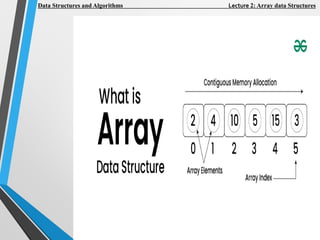
Arrays are one of the fundamental data
structures in programming. They are used
to store collections of elements of the
same type in contiguous memory
locations.
In C++, arrays are straightforward and
versatile, providing efficient indexing and
easy management of collections.
Data Structures and Algorithms Lecture 2: Array data Structures
1. Defining and Declaring Arrays
In C++, arrays are defined by
specifying the type of their elements and
the number of elements they can hold.
1.1. Single-Dimensional Arrays
1.2. Multi-Dimensional Arrays
Data Structures and Algorithms Lecture 2: Array data Structures
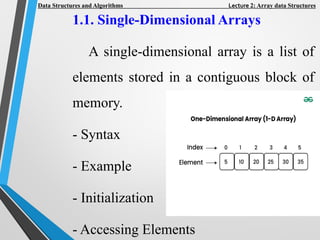
1.1. Single-Dimensional Arrays
A single-dimensional array is a list of
elements stored in a contiguous block of
memory.
- Syntax
- Example
- Initialization
- Accessing Elements
Data Structures and Algorithms Lecture 2: Array data Structures
*Syntax:
type arrayName[arraySize];
*Example:
int numbers[5];
// An array of 5 integers
*Initialization:
int numbers[5] = {1, 2, 3, 4, 5};
// Array with initialized values
Data Structures and Algorithms Lecture 2: Array data Structures
*Accessing Elements
numbers[0] = 10;
// Assigns 10 to the first element
int x = numbers[1];
// Retrieves the second element
Data Structures and Algorithms Lecture 2: Array data Structures
1.2. Multi-Dimensional Arrays
Multi-dimensional arrays are arrays of
arrays.
The most common is the two-
dimensional array, which can be
visualized as a matrix.
- Syntax
- Example
- Initialization
- Accessing Elements
Data Structures and Algorithms Lecture 2: Array data Structures
*Syntax
type arrayName[rowSize][columnSize];
*Example
int matrix[3][4]; // A 3x4 matrix of integers
Data Structures and Algorithms Lecture 2: Array data Structures
*Initialization
int matrix[3][4] = {
{1, 2, 3, 4},
{5, 6, 7, 8},
{9, 10, 11, 12}
};
Data Structures and Algorithms Lecture 2: Array data Structures
*Accessing Elements
matrix[0][0] = 1;
// Assigns 1 to the first element of the first
row
int y = matrix[1][2];
// Retrieves the element in the second
row, third column
Data Structures and Algorithms Lecture 2: Array data Structures
2. Operations on Arrays
2.1. Traversal
2.2. Insertion
2.3. Deletion
2.4. Searching
Data Structures and Algorithms Lecture 2: Array data Structures
2.1. Traversal
To traverse an array means to visit each
element in the array, usually to perform
some operation.
Example:
// Traversing a single-dimensional array
for (int i = 0; i < 5; ++i) {
cout << numbers[i] << " ";
}
cout << endl;
Data Structures and Algorithms Lecture 2: Array data Structures
// Traversing a two-dimensional array
for (int i = 0; i < 3; ++i) {
for (int j = 0; j < 4; ++j) {
cout << matrix[i][j] << " ";
}
cout << endl;
}
Data Structures and Algorithms Lecture 2: Array data Structures
2.2. Insertion
Inserting an element in an array
typically involves placing the element at a
specific position.
Data Structures and Algorithms Lecture 2: Array data Structures
Example
// Inserting in a single-dimensional array
(if the array has space)
int arr[6] = {1, 2, 3, 4, 5};
int position = 2;
// Position where 10 should be inserted
int value = 10;
for (int i = 5; i >= position; --i) {
arr[i] = arr[i - 1];}
arr[position] = value;
Data Structures and Algorithms Lecture 2: Array data Structures
// Inserting in a two-dimensional array (if the array
has space)
#include<iostream>
using namespace std; main( )
{ int s[2][2]; int i, j; cout<<"n2D Array
Input:n"; for(i=0;i<2;i++)
{ for(j=0;j<2;j++)
{ cout<<"ns["<<i<<"]["<<j<<"]= ";
cin>>s[i][j]; } } cout<<"nThe
2-D Array is:n"; for(i=0;i<2;i++)
{ for(j=0;j<2;j++)
{
cout<<"t"<<s[i][j]; } cout<<endl; }}
Data Structures and Algorithms Lecture 2: Array data Structures
2.3. Deletion
Deleting an element from an array
involves removing the element and
shifting subsequent elements.
Data Structures and Algorithms Lecture 2: Array data Structures
Example
// Deleting from a single-
dimensional array
int arr[6] = {1, 2, 3, 4, 5, 6};
int position = 2;
// Position of the element to be deleted
for (int i = position; i < 5; ++i) {
arr[i] = arr[i + 1];
}
Data Structures and Algorithms Lecture 2: Array data Structures
Exercise
Show how to delete a value
from a two-dimensional array
Data Structures and Algorithms Lecture 2: Array data Structures
Example (Linear Search):
bool linearSearch(int arr[], int size, int
key) {
for (int i = 0; i < size; ++i) {
if (arr[i] == key) {
return true;
}
}
return false;
Data Structures and Algorithms Lecture 2: Array data Structures
Example (Binary Search):
bool binarySearch(int arr[], int size, int key) {
int left = 0, right = size - 1;
while (left <= right) {
int mid = left + (right - left) / 2;
if (arr[mid] == key) {
return true; }
if (arr[mid] < key) {
left = mid + 1; } else {
right = mid - 1; } }
return false; }
Data Structures and Algorithms Lecture 2: Array data Structures
3. Advantages and Disadvantages
3.1. Advantages
- Efficient Access: Direct indexing allows
quick access to elements.
- Simplicity: Easy to implement and use
for fixed-size data collections.
Data Structures and Algorithms Lecture 2: Array data Structures
3.2. Disadvantages
- Fixed Size: Size must be defined at
compile-time and cannot be changed
dynamically.
- Memory Allocation: Allocates memory
for the entire array, which may lead to
wasted space if not fully used.
- Insertion/Deletion Overhead: Expensive
operations if not performed at the end
of the array.
Data Structures and Algorithms Lecture 2: Array data Structures
4. Example Code
Here's a complete C++ program
demonstrating array operations:
#include <iostream>
using namespace std;
int main() {
// Single-dimensional array
int numbers[5] = {1, 2, 3, 4, 5};
Data Structures and Algorithms Lecture 2: Array data Structures
// Traversal
cout << "Single-dimensional array
elements:" << endl;
for (int i = 0; i < 5; ++i) {
cout << numbers[i] << " ";
}
cout << endl;
Data Structures and Algorithms Lecture 2: Array data Structures
// Two-dimensional array
int matrix[3][4] = {
{1, 2, 3, 4},
{5, 6, 7, 8},
{9, 10, 11, 12}
};
Data Structures and Algorithms Lecture 2: Array data Structures
// Traversal
cout << "Two-dimensional array
elements:" << endl;
for (int i = 0; i < 3; ++i) {
for (int j = 0; j < 4; ++j) {
cout << matrix[i][j] << " ";
}
cout << endl;
}
return 0; }
Data Structures and Algorithms Lecture 2: Array data Structures
Exercises
1- Find the Minimum and Maximum
Element in an Array
2- Array Reverse
3- Write a Program to Cyclically Rotate
an Array by One
4- Find the Factorial of a Large Number
5- First missing positive number
Computer Programming Lecture 2: Array Data Structure
33

DS-lect2.pdf data structure in c ++ engineering

  • 1.
    Data Structures and Algorithms Assoc. Prof. AhmedMoustafa Elmahalawy Computer Science and Engineering Department Faculty of Electronics Engineering Menoufia University
  • 2.
    ‫المحاضرة‬ ‫ميثاق‬ ‫المتبادل‬ ‫االحترام‬‫المحمول‬ ‫إغالق‬ ‫الهدف‬ ‫تحديد‬ ‫المشاركة‬ ‫بالوق‬ ‫االلتزام‬ ‫ت‬
  • 3.
  • 4.
    Data Structures andAlgorithms Lecture 2: Array data Structures Contents:- 1. Defining and Declaring Arrays 2. Operations on Arrays 3. Advantages and Disadvantages 4. Example Code
  • 5.
    Arrays are oneof the fundamental data structures in programming. They are used to store collections of elements of the same type in contiguous memory locations. In C++, arrays are straightforward and versatile, providing efficient indexing and easy management of collections. Data Structures and Algorithms Lecture 2: Array data Structures
  • 6.
    Data Structures andAlgorithms Lecture 2: Array data Structures
  • 7.
    1. Defining andDeclaring Arrays In C++, arrays are defined by specifying the type of their elements and the number of elements they can hold. 1.1. Single-Dimensional Arrays 1.2. Multi-Dimensional Arrays Data Structures and Algorithms Lecture 2: Array data Structures
  • 8.
    1.1. Single-Dimensional Arrays Asingle-dimensional array is a list of elements stored in a contiguous block of memory. - Syntax - Example - Initialization - Accessing Elements Data Structures and Algorithms Lecture 2: Array data Structures
  • 9.
    *Syntax: type arrayName[arraySize]; *Example: int numbers[5]; //An array of 5 integers *Initialization: int numbers[5] = {1, 2, 3, 4, 5}; // Array with initialized values Data Structures and Algorithms Lecture 2: Array data Structures
  • 10.
    *Accessing Elements numbers[0] =10; // Assigns 10 to the first element int x = numbers[1]; // Retrieves the second element Data Structures and Algorithms Lecture 2: Array data Structures
  • 11.
    1.2. Multi-Dimensional Arrays Multi-dimensionalarrays are arrays of arrays. The most common is the two- dimensional array, which can be visualized as a matrix. - Syntax - Example - Initialization - Accessing Elements Data Structures and Algorithms Lecture 2: Array data Structures
  • 12.
    *Syntax type arrayName[rowSize][columnSize]; *Example int matrix[3][4];// A 3x4 matrix of integers Data Structures and Algorithms Lecture 2: Array data Structures
  • 13.
    *Initialization int matrix[3][4] ={ {1, 2, 3, 4}, {5, 6, 7, 8}, {9, 10, 11, 12} }; Data Structures and Algorithms Lecture 2: Array data Structures
  • 14.
    *Accessing Elements matrix[0][0] =1; // Assigns 1 to the first element of the first row int y = matrix[1][2]; // Retrieves the element in the second row, third column Data Structures and Algorithms Lecture 2: Array data Structures
  • 15.
    2. Operations onArrays 2.1. Traversal 2.2. Insertion 2.3. Deletion 2.4. Searching Data Structures and Algorithms Lecture 2: Array data Structures
  • 16.
    2.1. Traversal To traversean array means to visit each element in the array, usually to perform some operation. Example: // Traversing a single-dimensional array for (int i = 0; i < 5; ++i) { cout << numbers[i] << " "; } cout << endl; Data Structures and Algorithms Lecture 2: Array data Structures
  • 17.
    // Traversing atwo-dimensional array for (int i = 0; i < 3; ++i) { for (int j = 0; j < 4; ++j) { cout << matrix[i][j] << " "; } cout << endl; } Data Structures and Algorithms Lecture 2: Array data Structures
  • 18.
    2.2. Insertion Inserting anelement in an array typically involves placing the element at a specific position. Data Structures and Algorithms Lecture 2: Array data Structures
  • 19.
    Example // Inserting ina single-dimensional array (if the array has space) int arr[6] = {1, 2, 3, 4, 5}; int position = 2; // Position where 10 should be inserted int value = 10; for (int i = 5; i >= position; --i) { arr[i] = arr[i - 1];} arr[position] = value; Data Structures and Algorithms Lecture 2: Array data Structures
  • 20.
    // Inserting ina two-dimensional array (if the array has space) #include<iostream> using namespace std; main( ) { int s[2][2]; int i, j; cout<<"n2D Array Input:n"; for(i=0;i<2;i++) { for(j=0;j<2;j++) { cout<<"ns["<<i<<"]["<<j<<"]= "; cin>>s[i][j]; } } cout<<"nThe 2-D Array is:n"; for(i=0;i<2;i++) { for(j=0;j<2;j++) { cout<<"t"<<s[i][j]; } cout<<endl; }} Data Structures and Algorithms Lecture 2: Array data Structures
  • 21.
    2.3. Deletion Deleting anelement from an array involves removing the element and shifting subsequent elements. Data Structures and Algorithms Lecture 2: Array data Structures
  • 22.
    Example // Deleting froma single- dimensional array int arr[6] = {1, 2, 3, 4, 5, 6}; int position = 2; // Position of the element to be deleted for (int i = position; i < 5; ++i) { arr[i] = arr[i + 1]; } Data Structures and Algorithms Lecture 2: Array data Structures
  • 23.
    Exercise Show how todelete a value from a two-dimensional array Data Structures and Algorithms Lecture 2: Array data Structures
  • 24.
    Example (Linear Search): boollinearSearch(int arr[], int size, int key) { for (int i = 0; i < size; ++i) { if (arr[i] == key) { return true; } } return false; Data Structures and Algorithms Lecture 2: Array data Structures
  • 25.
    Example (Binary Search): boolbinarySearch(int arr[], int size, int key) { int left = 0, right = size - 1; while (left <= right) { int mid = left + (right - left) / 2; if (arr[mid] == key) { return true; } if (arr[mid] < key) { left = mid + 1; } else { right = mid - 1; } } return false; } Data Structures and Algorithms Lecture 2: Array data Structures
  • 26.
    3. Advantages andDisadvantages 3.1. Advantages - Efficient Access: Direct indexing allows quick access to elements. - Simplicity: Easy to implement and use for fixed-size data collections. Data Structures and Algorithms Lecture 2: Array data Structures
  • 27.
    3.2. Disadvantages - FixedSize: Size must be defined at compile-time and cannot be changed dynamically. - Memory Allocation: Allocates memory for the entire array, which may lead to wasted space if not fully used. - Insertion/Deletion Overhead: Expensive operations if not performed at the end of the array. Data Structures and Algorithms Lecture 2: Array data Structures
  • 28.
    4. Example Code Here'sa complete C++ program demonstrating array operations: #include <iostream> using namespace std; int main() { // Single-dimensional array int numbers[5] = {1, 2, 3, 4, 5}; Data Structures and Algorithms Lecture 2: Array data Structures
  • 29.
    // Traversal cout <<"Single-dimensional array elements:" << endl; for (int i = 0; i < 5; ++i) { cout << numbers[i] << " "; } cout << endl; Data Structures and Algorithms Lecture 2: Array data Structures
  • 30.
    // Two-dimensional array intmatrix[3][4] = { {1, 2, 3, 4}, {5, 6, 7, 8}, {9, 10, 11, 12} }; Data Structures and Algorithms Lecture 2: Array data Structures
  • 31.
    // Traversal cout <<"Two-dimensional array elements:" << endl; for (int i = 0; i < 3; ++i) { for (int j = 0; j < 4; ++j) { cout << matrix[i][j] << " "; } cout << endl; } return 0; } Data Structures and Algorithms Lecture 2: Array data Structures
  • 32.
    Exercises 1- Find theMinimum and Maximum Element in an Array 2- Array Reverse 3- Write a Program to Cyclically Rotate an Array by One 4- Find the Factorial of a Large Number 5- First missing positive number Computer Programming Lecture 2: Array Data Structure
  • 33.