Data Structures
What is Data Structure?
Data Structures are a specialized means of
organizing and storing data in computers in such
a way that we can perform operations on the
stored data more efficiently.
What mean by Efficiently?
•
•
•
•
An efficient program executes faster and helps minimize the usage
of resources like memory, disk.
Computers are getting more powerful with the passage of time with
the increase in CPU speed in GHz, availability of faster network and
the maximization of disk space. Therefore people have started
solving more and more complex problems. As computer
applications are becoming complex, so there is need for more
resources.
This does not mean that we should buy a new computer to make the
application execute faster.
Our effort should be to ensue that the solution is achieved with the
help of programming, data structures and algorithm.
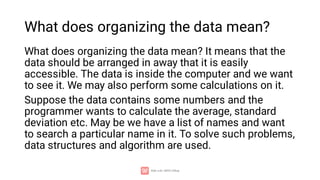
What does organizing the data mean?
What does organizing the data mean? It means that the
data should be arranged in away that it is easily
accessible. The data is inside the computer and we want
to see it. We may also perform some calculations on it.
Suppose the data contains some numbers and the
programmer wants to calculate the average, standard
deviation etc. May be we have a list of names and want
to search a particular name in it. To solve such problems,
data structures and algorithm are used.
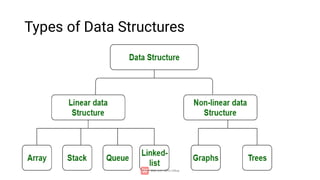
Types of Data Structures
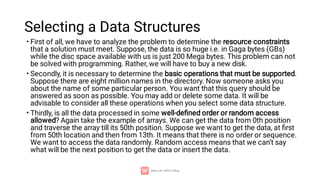
Selecting a Data Structures
•
•
•
First of all, we have to analyze the problem to determine the resource constraints
that a solution must meet. Suppose, the data is so huge i.e. in Gaga bytes (GBs)
while the disc space available with us is just 200 Mega bytes. This problem can not
be solved with programming. Rather, we will have to buy a new disk.
Secondly, it is necessary to determine the basic operations that must be supported.
Suppose there are eight million names in the directory. Now someone asks you
about the name of some particular person. You want that this query should be
answered as soon as possible. You may add or delete some data. It will be
advisable to consider all these operations when you select some data structure.
Thirdly, is all the data processed in some well-defined order or random access
allowed? Again take the example of arrays. We can get the data from 0th position
and traverse the array till its 50th position. Suppose we want to get the data, at first
from 50th location and then from 13th. It means that there is no order or sequence.
We want to access the data randomly. Random access means that we can’t say
what will be the next position to get the data or insert the data.
•
•
•
•
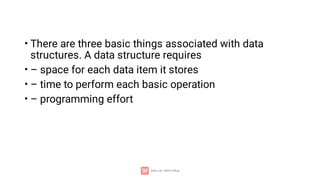
There are three basic things associated with data
structures. A data structure requires
– space for each data item it stores
– time to perform each basic operation
– programming effort
Array
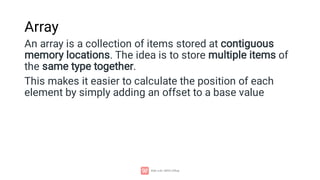
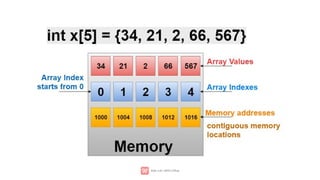
An array is a collection of items stored at contiguous
memory locations. The idea is to store multiple items of
the same type together.
This makes it easier to calculate the position of each
element by simply adding an offset to a base value
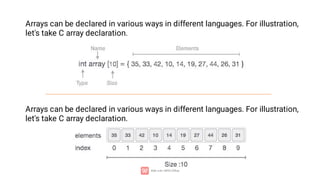
Arrays can be declared in various ways in different languages. For illustration,
let's take C array declaration.
Arrays can be declared in various ways in different languages. For illustration,
let's take C array declaration.
‘x’ is a name of array and not an lvalue. So it cannot be
used on the left hand side in
an assignment statement. Consider the following
statements
int x[6];
int n;
x[0] = 5; x[1] = 2;
x = 3; //not allowed
x = a + b; // not allowed
x = &n; // not allowed
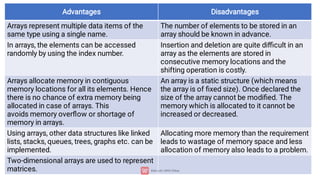
Advantages Disadvantages
Arrays represent multiple data items of the
same type using a single name.
The number of elements to be stored in an
array should be known in advance.
In arrays, the elements can be accessed
randomly by using the index number.
Insertion and deletion are quite difficult in an
array as the elements are stored in
consecutive memory locations and the
shifting operation is costly.
Arrays allocate memory in contiguous
memory locations for all its elements. Hence
there is no chance of extra memory being
allocated in case of arrays. This
avoids memory overflow or shortage of
memory in arrays.
An array is a static structure (which means
the array is of fixed size). Once declared the
size of the array cannot be modified. The
memory which is allocated to it cannot be
increased or decreased.
Using arrays, other data structures like linked
lists, stacks, queues, trees, graphs etc. can be
implemented.
Allocating more memory than the requirement
leads to wastage of memory space and less
allocation of memory also leads to a problem.
Two-dimensional arrays are used to represent
matrices.
#include <iostream>
using namespace std;
int main()
{
// Creating an integer array named arr of size 10.
int arr[10];
// accessing element at 0 index and setting its value to 5.
arr[0] = 5;
// access and print value at 0 index we get the output as 5.
cout << arr[0];
return 0;
}
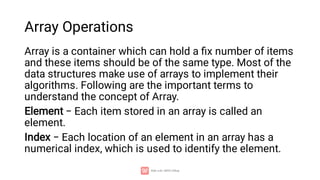
Array Operations
Array is a container which can hold a fix number of items
and these items should be of the same type. Most of the
data structures make use of arrays to implement their
algorithms. Following are the important terms to
understand the concept of Array.
Element − Each item stored in an array is called an
element.
Index − Each location of an element in an array has a
numerical index, which is used to identify the element.
•
•
•
•
•
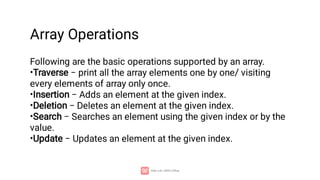
Following are the basic operations supported by an array.
Traverse − print all the array elements one by one/ visiting
every elements of array only once.
Insertion − Adds an element at the given index.
Deletion − Deletes an element at the given index.
Search − Searches an element using the given index or by the
value.
Update − Updates an element at the given index.
Array Operations
Traverse
Traverse means print all the array elements one by one/ visiting every
elements of array only once.
#include <iostream>
using namespace std;
int main()
{
int arr[5]={10, 0, 20, 0, 30}; //creating and initializing array
//traversing array
for (int i = 0; i < 5; i++)
{
cout<<arr[i]<<"n";
}
}
-
-
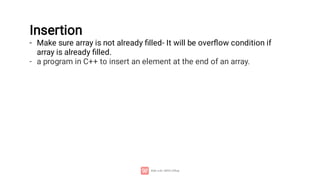
Insertion
Make sure array is not already filled- It will be overflow condition if
array is already filled.
a program in C++ to insert an element at the end of an array.
#include<iostream>
using namespace std;
int main()
{
int arr[6], i, elem;
cout<<"Enter 5 Array Elements: ";
for(i=0; i<5; i++){
cin>>arr[i];
}
cout<<"nEnter Element to Insert: ";
cin>>elem;
arr[i] = elem;
cout<<"nThe New Array is:n";
for(i=0; i<6; i++){
cout<<arr[i]<<" ";
cout<<endl;
}
return 0;
}
Insert
Element
in
Array
at
a
Specific
Position
#include<iostream>
using namespace std;
int main()
{
int arr[50], i, elem, pos, size;
cout<<"Enter the Size for Array: ";
cin>>size;
cout<<"Enter "<<size<<" Array Elements: ";
for(i=0; i<size; i++){
cin>>arr[i];
}
cout<<"nEnter Element to Insert: ";
cin>>elem;
cout<<"At What Position ? ";
cin>>pos;
for(i=size; i>=pos; i--){
arr[i] = arr[i-1];
}
arr[i] = elem;
size++;
cout<<"nThe New Array is:n";
for(i=0; i<size; i++){
cout<<arr[i]<<" ";
cout<<endl;
}
return 0;
}
Deletion
int main()
{
int arr[10], size=4, i, elem, j, found=0;
cout<<"Enter 4 Array Elements: " << endl;
for(i=0; i<size; i++)
cin>>arr[i];
cout<<"nEnter Element to Delete: " << endl;
cin>>elem;
for(i=0; i<size; i++)
{
if(arr[i]==elem)
{
for(j=i; j<(size-1); j++)
arr[j] = arr[j+1];
found++;
i--;
size--;
}
}
if(found==0) {
cout<<"nElement doesn't found in the Array!"<< endl;
}
else
cout<<"nElement Deleted Successfully!" << endl;
cout<<endl;
cout << "Updated Values Are" << endl;
for (i= 0; i<size; i++){
cout<< arr[i] << endl;
}
return 0;
}
Pointers and Array
Arrays and pointers work based on a related concept. There
are different things to note when working with arrays having
pointers. The array name itself denotes the base address of
the array. This means that to assign the address of an array
to a pointer, you should not use an ampersand (&).
int arr[2]= {1,2}; int a=3;
int *p= arr; VALID int *q= &a;
Int *p= &arr; INVALID int *q= a;
As you know every variable is a memory location and every memory location has its address
defined which can be accessed using ampersand (&) operator which denotes an address in
memory. Consider the following which will print the address of the variables defined-
#include <iostream>
using namespace std;
int main () {
int var1;
char var2[10];
cout << "Address of var1 variable: ";
cout << &var1 << endl;
cout << "Address of var2 variable: ";
cout << &var2 << endl;
return 0;
}
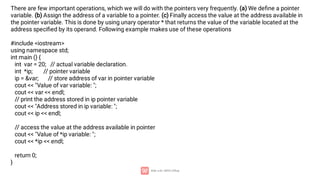
There are few important operations, which we will do with the pointers very frequently. (a) We define a pointer
variable. (b) Assign the address of a variable to a pointer. (c) Finally access the value at the address available in
the pointer variable. This is done by using unary operator * that returns the value of the variable located at the
address specified by its operand. Following example makes use of these operations
#include <iostream>
using namespace std;
int main () {
int var = 20; // actual variable declaration.
int *ip; // pointer variable
ip = &var; // store address of var in pointer variable
cout << "Value of var variable: ";
cout << var << endl;
// print the address stored in ip pointer variable
cout << "Address stored in ip variable: ";
cout << ip << endl;
// access the value at the address available in pointer
cout << "Value of *ip variable: ";
cout << *ip << endl;
return 0;
}
Pointers Vs Array
#include <iostream>
using namespace std;
int main() {
int *ip;
int arr[6] = { 10, 34, 13, 76, 5, 46 };
ip = arr;
for (int i = 0; i < 6; i++) {
cout << *ip << endl; // shows values in array
cout << &ip << endl; // shows ip addresses of
each element of array
ip++;
}
return 0;
}
Multidimensional Array
2-D Array
int x[3][4]; // deceleration
int test[2][3] = { {2, 4, 5}, {9, 0, 19}}; // Initialization
#include <iostream>
using namespace std;
int main() {
int test[3][2] = {{2, -5},
{4, 0},
{9, 1}};
// use of nested for loop
// access rows of the array
for (int i = 0; i < 3; ++i) {
// access columns of the array
for (int j = 0; j < 2; ++j) {
cout << "test[" << i << "][" << j << "] = " << test[i][j] <<
endl;
}
}
return 0;
}
2-D Array
C++ Program to display all elements of 2-D Array
2-D Array
Get 2D array elements from user and print them
{
int row, col, i, j, arr[10][10];
cout<<"Enter the Row and Column Size for Array: ";
cin>>row>>col;
cout<<"Enter "<<row*col<<" Array Elements: ";
for(i=0; i<row; i++)
{
for(j=0; j<col; j++)
cin>>arr[i][j];
}
cout<<"nThe Array is:n";
for(i=0; i<row; i++)
{
for(j=0; j<col; j++)
cout<<arr[i][j]<<" ";
cout<<endl;
}
cout<<"nArray Elements with its Index:n";
for(i=0; i<row; i++)
{
for(j=0; j<col; j++)
cout<<"arr["<<i<<"]["<<j<<"] = "<<arr[i][j]<<" ";
cout<<endl;
}
cout<<endl;
Multidimensional Array
3-D Array
int x[2][3][4]; // deceleration
int test[2][3][4] = {
{ {3, 4, 2, 3}, {0, -3, 9, 11}, {23, 12, 23, 2} },
{ {13, 4, 56, 3}, {5, 9, 3, 5}, {5, 1, 4, 9} }
}; // Initialization
#include<iostream>
using namespace std;
int main()
{
int i, j, k;
int threeDimArr[3][4][2] = {
{ {1, 2}, {3, 4}, {5, 6}, {7, 8} },
{ {9, 8}, {7, 6}, {5, 4}, {3, 2} },
{ {0, 3}, {5, 7}, {9, 2}, {4, 6} }
};
for(i=0; i<3; i++)
{
for(j=0; j<4; j++)
{
for(k=0; k<2; k++)
cout<<threeDimArr[i][j][k]<<" ";
cout<<endl;
}
cout<<endl;
}
cout<<endl;
return 0;
}

1-Intoduction ------------- Array in C++

  • 1.
  • 2.
    What is DataStructure? Data Structures are a specialized means of organizing and storing data in computers in such a way that we can perform operations on the stored data more efficiently.
  • 3.
    What mean byEfficiently? • • • • An efficient program executes faster and helps minimize the usage of resources like memory, disk. Computers are getting more powerful with the passage of time with the increase in CPU speed in GHz, availability of faster network and the maximization of disk space. Therefore people have started solving more and more complex problems. As computer applications are becoming complex, so there is need for more resources. This does not mean that we should buy a new computer to make the application execute faster. Our effort should be to ensue that the solution is achieved with the help of programming, data structures and algorithm.
  • 4.
    What does organizingthe data mean? What does organizing the data mean? It means that the data should be arranged in away that it is easily accessible. The data is inside the computer and we want to see it. We may also perform some calculations on it. Suppose the data contains some numbers and the programmer wants to calculate the average, standard deviation etc. May be we have a list of names and want to search a particular name in it. To solve such problems, data structures and algorithm are used.
  • 5.
    Types of DataStructures
  • 6.
    Selecting a DataStructures • • • First of all, we have to analyze the problem to determine the resource constraints that a solution must meet. Suppose, the data is so huge i.e. in Gaga bytes (GBs) while the disc space available with us is just 200 Mega bytes. This problem can not be solved with programming. Rather, we will have to buy a new disk. Secondly, it is necessary to determine the basic operations that must be supported. Suppose there are eight million names in the directory. Now someone asks you about the name of some particular person. You want that this query should be answered as soon as possible. You may add or delete some data. It will be advisable to consider all these operations when you select some data structure. Thirdly, is all the data processed in some well-defined order or random access allowed? Again take the example of arrays. We can get the data from 0th position and traverse the array till its 50th position. Suppose we want to get the data, at first from 50th location and then from 13th. It means that there is no order or sequence. We want to access the data randomly. Random access means that we can’t say what will be the next position to get the data or insert the data.
  • 7.
    • • • • There are threebasic things associated with data structures. A data structure requires – space for each data item it stores – time to perform each basic operation – programming effort
  • 8.
    Array An array isa collection of items stored at contiguous memory locations. The idea is to store multiple items of the same type together. This makes it easier to calculate the position of each element by simply adding an offset to a base value
  • 9.
    Arrays can bedeclared in various ways in different languages. For illustration, let's take C array declaration. Arrays can be declared in various ways in different languages. For illustration, let's take C array declaration.
  • 11.
    ‘x’ is aname of array and not an lvalue. So it cannot be used on the left hand side in an assignment statement. Consider the following statements int x[6]; int n; x[0] = 5; x[1] = 2; x = 3; //not allowed x = a + b; // not allowed x = &n; // not allowed
  • 12.
    Advantages Disadvantages Arrays representmultiple data items of the same type using a single name. The number of elements to be stored in an array should be known in advance. In arrays, the elements can be accessed randomly by using the index number. Insertion and deletion are quite difficult in an array as the elements are stored in consecutive memory locations and the shifting operation is costly. Arrays allocate memory in contiguous memory locations for all its elements. Hence there is no chance of extra memory being allocated in case of arrays. This avoids memory overflow or shortage of memory in arrays. An array is a static structure (which means the array is of fixed size). Once declared the size of the array cannot be modified. The memory which is allocated to it cannot be increased or decreased. Using arrays, other data structures like linked lists, stacks, queues, trees, graphs etc. can be implemented. Allocating more memory than the requirement leads to wastage of memory space and less allocation of memory also leads to a problem. Two-dimensional arrays are used to represent matrices.
  • 13.
    #include <iostream> using namespacestd; int main() { // Creating an integer array named arr of size 10. int arr[10]; // accessing element at 0 index and setting its value to 5. arr[0] = 5; // access and print value at 0 index we get the output as 5. cout << arr[0]; return 0; }
  • 14.
    Array Operations Array isa container which can hold a fix number of items and these items should be of the same type. Most of the data structures make use of arrays to implement their algorithms. Following are the important terms to understand the concept of Array. Element − Each item stored in an array is called an element. Index − Each location of an element in an array has a numerical index, which is used to identify the element.
  • 15.
    • • • • • Following are thebasic operations supported by an array. Traverse − print all the array elements one by one/ visiting every elements of array only once. Insertion − Adds an element at the given index. Deletion − Deletes an element at the given index. Search − Searches an element using the given index or by the value. Update − Updates an element at the given index. Array Operations
  • 16.
    Traverse Traverse means printall the array elements one by one/ visiting every elements of array only once. #include <iostream> using namespace std; int main() { int arr[5]={10, 0, 20, 0, 30}; //creating and initializing array //traversing array for (int i = 0; i < 5; i++) { cout<<arr[i]<<"n"; } }
  • 17.
    - - Insertion Make sure arrayis not already filled- It will be overflow condition if array is already filled. a program in C++ to insert an element at the end of an array.
  • 18.
    #include<iostream> using namespace std; intmain() { int arr[6], i, elem; cout<<"Enter 5 Array Elements: "; for(i=0; i<5; i++){ cin>>arr[i]; } cout<<"nEnter Element to Insert: "; cin>>elem; arr[i] = elem; cout<<"nThe New Array is:n"; for(i=0; i<6; i++){ cout<<arr[i]<<" "; cout<<endl; } return 0; }
  • 19.
    Insert Element in Array at a Specific Position #include<iostream> using namespace std; intmain() { int arr[50], i, elem, pos, size; cout<<"Enter the Size for Array: "; cin>>size; cout<<"Enter "<<size<<" Array Elements: "; for(i=0; i<size; i++){ cin>>arr[i]; } cout<<"nEnter Element to Insert: "; cin>>elem; cout<<"At What Position ? "; cin>>pos; for(i=size; i>=pos; i--){ arr[i] = arr[i-1]; } arr[i] = elem; size++; cout<<"nThe New Array is:n"; for(i=0; i<size; i++){ cout<<arr[i]<<" "; cout<<endl; } return 0; }
  • 20.
    Deletion int main() { int arr[10],size=4, i, elem, j, found=0; cout<<"Enter 4 Array Elements: " << endl; for(i=0; i<size; i++) cin>>arr[i]; cout<<"nEnter Element to Delete: " << endl; cin>>elem; for(i=0; i<size; i++) { if(arr[i]==elem) { for(j=i; j<(size-1); j++) arr[j] = arr[j+1]; found++; i--; size--; } } if(found==0) { cout<<"nElement doesn't found in the Array!"<< endl; } else cout<<"nElement Deleted Successfully!" << endl; cout<<endl; cout << "Updated Values Are" << endl; for (i= 0; i<size; i++){ cout<< arr[i] << endl; } return 0; }
  • 21.
    Pointers and Array Arraysand pointers work based on a related concept. There are different things to note when working with arrays having pointers. The array name itself denotes the base address of the array. This means that to assign the address of an array to a pointer, you should not use an ampersand (&). int arr[2]= {1,2}; int a=3; int *p= arr; VALID int *q= &a; Int *p= &arr; INVALID int *q= a;
  • 22.
    As you knowevery variable is a memory location and every memory location has its address defined which can be accessed using ampersand (&) operator which denotes an address in memory. Consider the following which will print the address of the variables defined- #include <iostream> using namespace std; int main () { int var1; char var2[10]; cout << "Address of var1 variable: "; cout << &var1 << endl; cout << "Address of var2 variable: "; cout << &var2 << endl; return 0; }
  • 23.
    There are fewimportant operations, which we will do with the pointers very frequently. (a) We define a pointer variable. (b) Assign the address of a variable to a pointer. (c) Finally access the value at the address available in the pointer variable. This is done by using unary operator * that returns the value of the variable located at the address specified by its operand. Following example makes use of these operations #include <iostream> using namespace std; int main () { int var = 20; // actual variable declaration. int *ip; // pointer variable ip = &var; // store address of var in pointer variable cout << "Value of var variable: "; cout << var << endl; // print the address stored in ip pointer variable cout << "Address stored in ip variable: "; cout << ip << endl; // access the value at the address available in pointer cout << "Value of *ip variable: "; cout << *ip << endl; return 0; }
  • 24.
    Pointers Vs Array #include<iostream> using namespace std; int main() { int *ip; int arr[6] = { 10, 34, 13, 76, 5, 46 }; ip = arr; for (int i = 0; i < 6; i++) { cout << *ip << endl; // shows values in array cout << &ip << endl; // shows ip addresses of each element of array ip++; } return 0; }
  • 25.
    Multidimensional Array 2-D Array intx[3][4]; // deceleration int test[2][3] = { {2, 4, 5}, {9, 0, 19}}; // Initialization
  • 26.
    #include <iostream> using namespacestd; int main() { int test[3][2] = {{2, -5}, {4, 0}, {9, 1}}; // use of nested for loop // access rows of the array for (int i = 0; i < 3; ++i) { // access columns of the array for (int j = 0; j < 2; ++j) { cout << "test[" << i << "][" << j << "] = " << test[i][j] << endl; } } return 0; } 2-D Array C++ Program to display all elements of 2-D Array
  • 27.
    2-D Array Get 2Darray elements from user and print them { int row, col, i, j, arr[10][10]; cout<<"Enter the Row and Column Size for Array: "; cin>>row>>col; cout<<"Enter "<<row*col<<" Array Elements: "; for(i=0; i<row; i++) { for(j=0; j<col; j++) cin>>arr[i][j]; } cout<<"nThe Array is:n"; for(i=0; i<row; i++) { for(j=0; j<col; j++) cout<<arr[i][j]<<" "; cout<<endl; } cout<<"nArray Elements with its Index:n"; for(i=0; i<row; i++) { for(j=0; j<col; j++) cout<<"arr["<<i<<"]["<<j<<"] = "<<arr[i][j]<<" "; cout<<endl; } cout<<endl;
  • 28.
    Multidimensional Array 3-D Array intx[2][3][4]; // deceleration int test[2][3][4] = { { {3, 4, 2, 3}, {0, -3, 9, 11}, {23, 12, 23, 2} }, { {13, 4, 56, 3}, {5, 9, 3, 5}, {5, 1, 4, 9} } }; // Initialization
  • 29.
    #include<iostream> using namespace std; intmain() { int i, j, k; int threeDimArr[3][4][2] = { { {1, 2}, {3, 4}, {5, 6}, {7, 8} }, { {9, 8}, {7, 6}, {5, 4}, {3, 2} }, { {0, 3}, {5, 7}, {9, 2}, {4, 6} } }; for(i=0; i<3; i++) { for(j=0; j<4; j++) { for(k=0; k<2; k++) cout<<threeDimArr[i][j][k]<<" "; cout<<endl; } cout<<endl; } cout<<endl; return 0; }