Training Center
for Automation and Drives
SIMATIC PCS 7 System Training
Blocks with SCLPage 1
Date: 09.01.2007
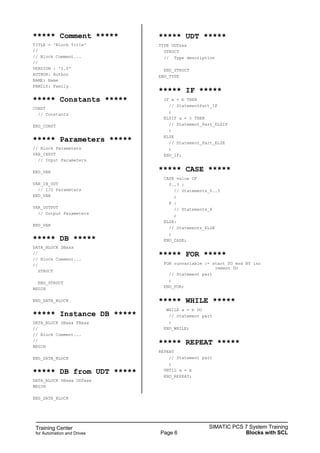
File: ST-PCS7SYS_V70_scl.1
SIMATIC PCS 7
Siemens AG, 2003. All rights reserved.
SITRAIN Training for
Automation and Drives
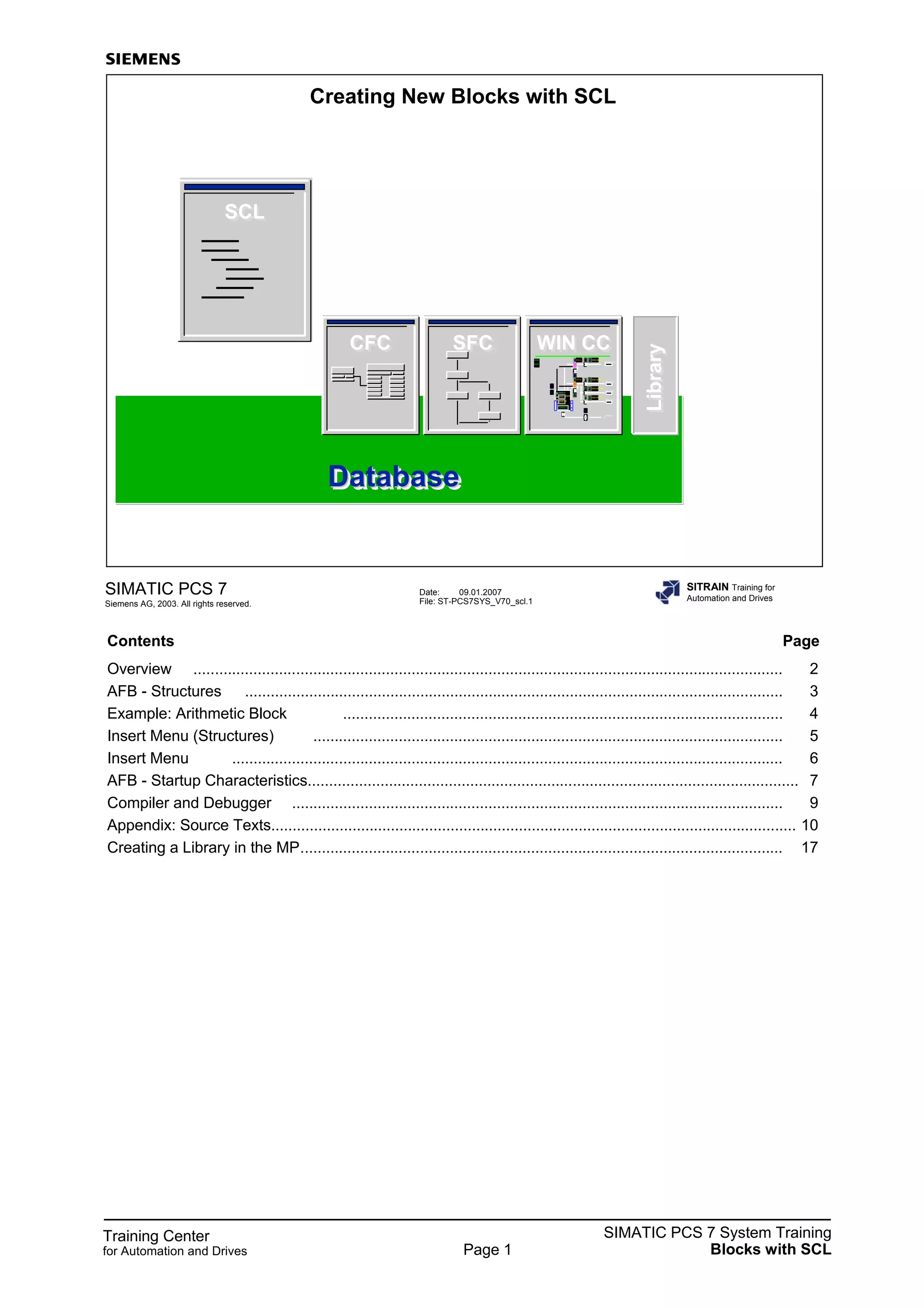
Creating New Blocks with SCL
SFCSFCCFCCFC
SCLSCL
WIN CCWIN CC
DatabaseDatabaseDatabase
Y2
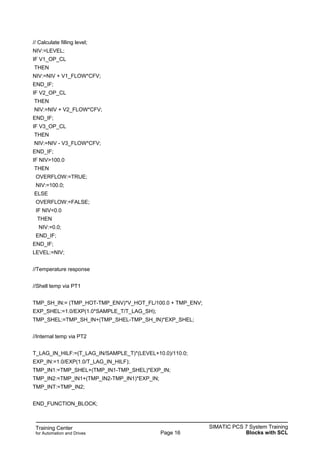
V5
V4
V3
0000.0MBARP4
0000.0MBARP5
0000.0MBARP6
0000.0MBARP1
INERTGAS
ABLUFT1
ABLUFT2
ABLUFT3
V6
V1Y1
V2
MBAR
PC/
%A1 0000.0
Reactor 01
0000.0
%000.0
%000.0
0000.0
Product
M1
R1
0000
0000
F1
LibraryLibrary
Contents Page
Overview .......................................................................................................................................... 2
AFB - Structures .............................................................................................................................. 3
Example: Arithmetic Block ....................................................................................................... 4
Insert Menu (Structures) .............................................................................................................. 5
Insert Menu ................................................................................................................................. 6
AFB - Startup Characteristics................................................................................................................... 7
Compiler and Debugger ................................................................................................................... 9
Appendix: Source Texts........................................................................................................................... 10
Creating a Library in the MP................................................................................................................. 17
Training Center
for Automation and Drives
SIMATIC PCS 7 System Training
Blocks with SCLPage 2
Date: 09.01.2007
File: ST-PCS7SYS_V70_scl.2
SIMATIC PCS 7
Siemens AG, 2003. All rights reserved.
SITRAIN Training for
Automation and Drives
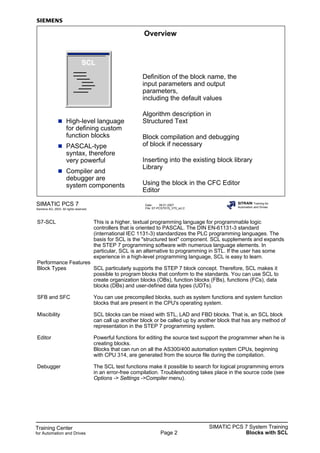
Overview
High-level language
for defining custom
function blocks
PASCAL-type
syntax, therefore
very powerful
Compiler and
debugger are
system components
Definition of the block name, the
input parameters and output
parameters,
including the default values
Algorithm description in
Structured Text
Block compilation and debugging
of block if necessary
Inserting into the existing block library
Library
Using the block in the CFC Editor
Editor
SCLSCL
S7-SCL This is a higher, textual programming language for programmable logic
controllers that is oriented to PASCAL. The DIN EN-61131-3 standard
(international IEC 1131-3) standardizes the PLC programming languages. The
basis for SCL is the "structured text" component. SCL supplements and expands
the STEP 7 programming software with numerous language elements. In
particular, SCL is an alternative to programming in STL. If the user has some
experience in a high-level programming language, SCL is easy to learn.
Performance Features
Block Types SCL particularly supports the STEP 7 block concept. Therefore, SCL makes it
possible to program blocks that conform to the standards. You can use SCL to
create organization blocks (OBs), function blocks (FBs), functions (FCs), data
blocks (DBs) and user-defined data types (UDTs).
SFB and SFC You can use precompiled blocks, such as system functions and system function
blocks that are present in the CPU's operating system.
Miscibility SCL blocks can be mixed with STL, LAD and FBD blocks. That is, an SCL block
can call up another block or be called up by another block that has any method of
representation in the STEP 7 programming system.
Editor Powerful functions for editing the source text support the programmer when he is
creating blocks.
Blocks that can run on all the AS300/400 automation system CPUs, beginning
with CPU 314, are generated from the source file during the compilation.
Debugger The SCL test functions make it possible to search for logical programming errors
in an error-free compilation. Troubleshooting takes place in the source code (see
Options -> Settings ->Compiler menu).
Training Center
for Automation and Drives
SIMATIC PCS 7 System Training
Blocks with SCLPage 3
Date: 09.01.2007
File: ST-PCS7SYS_V70_scl.3
SIMATIC PCS 7
Siemens AG, 2003. All rights reserved.
SITRAIN Training for
Automation and Drives
AFB - Structures
Block type
Block attributes
VAR_INPUT
VAR_OUPUT
VAR_IN_OUT
VAR
VAR_TEMP
Algorithm
IF
CASE
FOR
WHILE
REPEAT
CONTINUE
EXIT
GOTO
RETURN
FB
FC
OB
DB
UDT
?
Block Types You can create various block types with the help of SCL. This section deals with
creating function blocks (FBs), that is, algorithms of "user blocks" conform to
SIMATIC PCS 7).
Declaration Area The declaration area is subdivided into several declaration fields. The main
fields for FBs are described below.
VAR_INPUT Inputting an FB for setting parameters and combining with the output of another
FB "input"
VAR_OUTPUT Outputting an FB as a source for combining with inputs of other blocks ("output")
VAR_IN_OUT Inputting an FB for setting parameters and assigning values is possible via the
block program ("input/output")
VAR Internal parameters for an FB, available in the instance DB, not available for CFC
configuring ("internal static variables")
VAR_TEMP Temporary variables, not available in the instance DB (->local data stack -
>"internal dynamic variables")
Algorithm The code section contains the program instructions. Logical and arithmetic
results are assigned to the output. Use It is possible to use various control
structures.
Training Center
for Automation and Drives
SIMATIC PCS 7 System Training
Blocks with SCLPage 4
Date: 09.01.2007
File: ST-PCS7SYS_V70_scl.4
SIMATIC PCS 7
Siemens AG, 2003. All rights reserved.
SITRAIN Training for
Automation and Drives
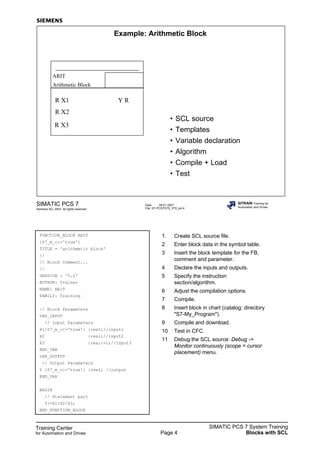
Example: Arithmetic Block
ARIT
Arithmetic Block
R X2
R X1 Y R
• SCL source
• Templates
• Variable declaration
• Algorithm
• Compile + Load
• Test
R X3
FUNCTION_BLOCK ARIT
{S7_m_c:='true'}
TITLE = 'arithmetic block'
//
// Block Comment...
//
VERSION : '5.2'
AUTHOR: Trainer
NAME: ARIT
FAMILY: Training
// Block Parameters
VAR_INPUT
// Input Parameters
X1{S7_m_c:='true'} :real;//input1
X2 :real;//input2
X3 :real:=1;//input3
END_VAR
VAR_OUTPUT
// Output Parameters
Y {S7_m_c:='true'} :real; //output
END_VAR
BEGIN
// Statement part
Y:=X1+X2/X3;
END_FUNCTION_BLOCK
1. Create SCL source file.
2 Enter block data in the symbol table.
3 Insert the block template for the FB,
comment and parameter.
4 Declare the inputs and outputs.
5 Specify the instruction
section/algorithm.
6 Adjust the compilation options.
7 Compile.
8 Insert block in chart (catalog: directory
"S7-My_Program").
9 Compile and download.
10 Test in CFC.
11 Debug the SCL source: Debug ->
Monitor continuously (scope = cursor
placement) menu.
Training Center
for Automation and Drives
SIMATIC PCS 7 System Training
Blocks with SCLPage 5
Date: 09.01.2007
File: ST-PCS7SYS_V70_scl.5
SIMATIC PCS 7
Siemens AG, 2003. All rights reserved.
SITRAIN Training for
Automation and Drives
Menu Insert
-> Block Template
OB
FB
FC
Comment
Constant
Parameters
DB
Instance DB
DB Referencing UDT
UDT
-> Control Structure
IF
CASE
FOR
WHILE
REPEAT
***** OB *****
ORGANIZATION_BLOCK OBxxx
VAR_TEMP
// Reserved
Info: ARRAY[0..19] OF BYTE;
// Temporary Variables
END_VAR
BEGIN
// Statements
;
END_ORGANIZATION_BLOCK
***** FB *****
FUNCTION_BLOCK FBxxx
VAR_TEMP
// Temporary Variables
END_VAR
VAR
// Static Variables
END_VAR
BEGIN
// Statement part
;
END_FUNCTION_BLOCK
***** FC *****
FUNCTION FCxxx : INT
VAR_TEMP
// Temporary Variables
END_VAR
BEGIN
// Statement part
;
FCxxx := 100;
END_FUNCTION
Training Center
for Automation and Drives
SIMATIC PCS 7 System Training
Blocks with SCLPage 6
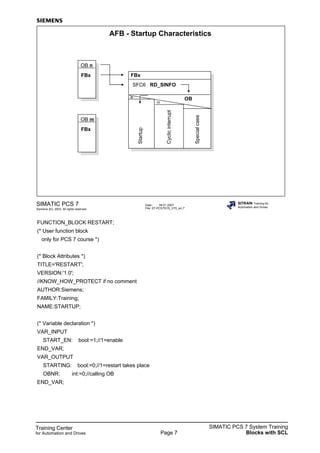
***** Comment *****
TITLE = 'Block Title'
//
// Block Comment...
//
VERSION : '1.0'
AUTHOR: Author
NAME: Name
FAMILY: Family
***** Constants *****
CONST
// Constants
END_CONST
***** Parameters *****
// Block Parameters
VAR_INPUT
// Input Parameters
END_VAR
VAR_IN_OUT
// I/O Parameters
END_VAR
VAR_OUTPUT
// Output Parameters
END_VAR
***** DB *****
DATA_BLOCK DBxxx
//
// Block Comment...
//
STRUCT
END_STRUCT
BEGIN
END_DATA_BLOCK
***** Instance DB *****
DATA_BLOCK DBxxx FBxxx
//
// Block Comment...
//
BEGIN
END_DATA_BLOCK
***** DB from UDT *****
DATA_BLOCK DBxxx UDTxxx
BEGIN
END_DATA_BLOCK
***** UDT *****
TYPE UDTxxx
STRUCT
// Type description
END_STRUCT
END_TYPE
***** IF *****
IF a = b THEN
// StatementPart_IF
;
ELSIF a = c THEN
// Statement_Part_ELSIF
;
ELSE
// Statement_Part_ELSE
;
END_IF;
***** CASE *****
CASE value OF
0..3 :
// Statements_0..3
;
8 :
// Statements_8
;
ELSE:
// Statements_ELSE
;
END_CASE;
***** FOR *****
FOR runvariable := start TO end BY inc
rement DO
// Statement part
;
END_FOR;
***** WHILE *****
WHILE a = b DO
// Statement part
;
END_WHILE;
***** REPEAT *****
REPEAT
// Statement part
;
UNTIL a = b
END_REPEAT;
Training Center
for Automation and Drives
SIMATIC PCS 7 System Training
Blocks with SCLPage 7
Date: 09.01.2007
File: ST-PCS7SYS_V70_scl.7
SIMATIC PCS 7
Siemens AG, 2003. All rights reserved.
SITRAIN Training for
Automation and Drives
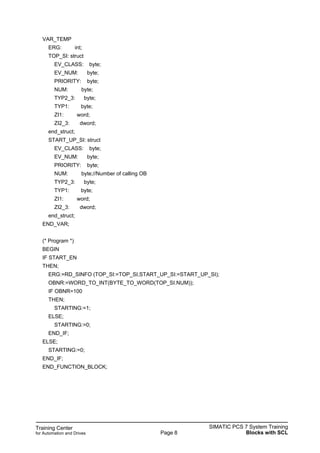
AFB - Startup Characteristics
OB n
FBx FBx
SFC6 RD_SINFO
OB
Startup
Cyclicinterrupt
Specialcase
OB m
FBx
n
m
FUNCTION_BLOCK RESTART;
(* User function block
only for PCS 7 course *)
(* Block Attributes *)
TITLE='RESTART';
VERSION:'1.0';
//KNOW_HOW_PROTECT if no comment
AUTHOR:Siemens;
FAMILY:Training;
NAME:STARTUP;
(* Variable declaration *)
VAR_INPUT
START_EN: bool:=1;//1=enable
END_VAR;
VAR_OUTPUT
STARTING: bool:=0;//1=restart takes place
OBNR: int:=0;//calling OB
END_VAR;
Training Center
for Automation and Drives
SIMATIC PCS 7 System Training
Blocks with SCLPage 8
VAR_TEMP
ERG: int;
TOP_SI: struct
EV_CLASS: byte;
EV_NUM: byte;
PRIORITY: byte;
NUM: byte;
TYP2_3: byte;
TYP1: byte;
ZI1: word;
ZI2_3: dword;
end_struct;
START_UP_SI: struct
EV_CLASS: byte;
EV_NUM: byte;
PRIORITY: byte;
NUM: byte;//Number of calling OB
TYP2_3: byte;
TYP1: byte;
ZI1: word;
ZI2_3: dword;
end_struct;
END_VAR;
(* Program *)
BEGIN
IF START_EN
THEN;
ERG:=RD_SINFO (TOP_SI:=TOP_SI,START_UP_SI:=START_UP_SI);
OBNR:=WORD_TO_INT(BYTE_TO_WORD(TOP_SI.NUM));
IF OBNR=100
THEN;
STARTING:=1;
ELSE;
STARTING:=0;
END_IF;
ELSE;
STARTING:=0;
END_IF;
END_FUNCTION_BLOCK;
Training Center
for Automation and Drives
SIMATIC PCS 7 System Training
Blocks with SCLPage 9
Date: 09.01.2007
File: ST-PCS7SYS_V70_scl.9
SIMATIC PCS 7
Siemens AG, 2003. All rights reserved.
SITRAIN Training for
Automation and Drives
Compiler and Debugger
Project
S7 station
CPU
S7 program
Source files
Blocks
SCL
1. Edit block
2. Compile
3. Download to CPU
Symbols
4. Debug
Edit Block Use the editor for the SCL environment to create the source text in SCL.
Attitudes You can use the Options -> Settings menu command to customize the compiler
and editor. Check the settings for "Debug Info" and "OK Flag."
Compile The source text is checked. If there is an error, there is a reaction with messages,
including error localization. If you double click the error message, the cursor will
jump to the location of the error in the source text. Correct text is compiled in
object code and is stored in the block folder as the relevant block (such as FB or
FC).
Compile/Download CPU You can also download an individual block into the CPU for test purposes. An
appropriate data structure (data block) must be present in the CPU for the input
data. In case of an FB, for example, the FB must be called up from an OB and
access an instance DB. STEP 7 tools (STL Editor, PLC -> Monitor/Modify
Variables... menu command) must be used for changes to the values in this DB.
You can monitor the program that is running in the SLC Editor. A second window
is displayed when you activate the Debug -> Continuously Monitor menu
command. If you mouse click a location in the text window pane, the compiler
selects an area to this location and highlights the area. The variables that relate to
the highlighted text are displayed in the other window pane.
Turn off monitoring before you make changes to the source text. When you have
finished, you must compile again and download the information to the CPU.
Target System (CPU) When you activate this menu command in the SCL environment, you can scan
the module information (CPU), change the operating mode (RUN/STOP), perform
an overall reset, and set the date and time.
Training Center
for Automation and Drives
SIMATIC PCS 7 System Training
Blocks with SCLPage 10
Date: 09.01.2007
File: ST-PCS7SYS_V70_scl.10
SIMATIC PCS 7
Siemens AG, 2003. All rights reserved.
SITRAIN Training for
Automation and Drives
Appendix: Source Texts
Simulation block
Reactor
•
Training Center
for Automation and Drives
SIMATIC PCS 7 System Training
Blocks with SCLPage 11
FUNCTION_BLOCK Reactor
(* Simulation block with feedback signals
for PCS 7 course only *)
(* Block Attributes *)
TITLE ='REAC';
VERSION:'5.0';
//KNOW_HOW_PROTECT if no comment
AUTHOR:Siemens;
FAMILY:Training;
NAME:PLANT;
(* Variable Declaration *)
VAR_IN_OUT
V1_OP_CL: BOOL; //Filling1
V2_OP_CL: BOOL; //Filling2
V3_OP_CL: BOOL; //Filling3
M1_ON_OF: BOOL; //Mixer motor
RS_COOL : BOOL; //Container empty and cold
SET_HOT : BOOL; //Container full and warm
V_RESET : BOOL; //Valves closed, motor off
END_VAR
VAR_INPUT
V1_FLOW: REAL := 100.0; //Flow V1 0..100%
V2_FLOW: REAL := 100.0; //Flow V2
V3_FLOW: REAL := 100.0; //Flow V3
CFV: REAL := 0.002; //Correction factor valves
V_HOT_FL: REAL := 0.0; //Flow heating 0..100%
TMP_ENV: REAL := 20.0; //Environment temperature
TMP_HOT: REAL := 120.0; //Heating medium temperature
T_LAG_SH: REAL := 10.0; //T_PT1-Shell[s]
T_LAG_IN: REAL := 30.0; //T_PT2-Inside[s] full reactor
SAMPLE_T: REAL := 1.0; //Sampling time[s]
END_VAR
Simulation block
REACTOR (FB600)
Training Center
for Automation and Drives
SIMATIC PCS 7 System Training
Blocks with SCLPage 12
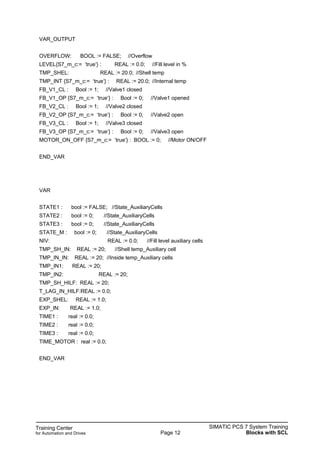
VAR_OUTPUT
OVERFLOW: BOOL := FALSE; //Overflow
LEVEL{S7_m_c:= ‘true‘} : REAL := 0.0; //Fill level in %
TMP_SHEL: REAL := 20.0; //Shell temp
TMP_INT {S7_m_c:= ‘true‘} : REAL := 20.0; //Internal temp
FB_V1_CL : Bool := 1; //Valve1 closed
FB_V1_OP {S7_m_c:= ‘true‘} : Bool := 0; //Valve1 opened
FB_V2_CL : Bool := 1; //Valve2 closed
FB_V2_OP {S7_m_c:= ‘true‘} : Bool := 0; //Valve2 open
FB_V3_CL : Bool := 1; //Valve3 closed
FB_V3_OP {S7_m_c:= ‘true‘} : Bool := 0; //Valve3 open
MOTOR_ON_OFF {S7_m_c:= ‘true‘} : BOOL := 0; //Motor ON/OFF
END_VAR
VAR
STATE1 : bool := FALSE; //State_AuxiliaryCells
STATE2 : bool := 0; //State_AuxiliaryCells
STATE3 : bool := 0; //State_AuxiliaryCells
STATE_M : bool := 0; //State_AuxiliaryCells
NIV: REAL := 0.0; //Fill level auxiliary cells
TMP_SH_IN: REAL := 20; //Shell temp_Auxiliary cell
TMP_IN_IN: REAL := 20; //Inside temp_Auxiliary cells
TMP_IN1: REAL := 20;
TMP_IN2: REAL := 20;
TMP_SH_HILF: REAL := 20;
T_LAG_IN_HILF:REAL := 0.0;
EXP_SHEL: REAL := 1.0;
EXP_IN: REAL := 1.0;
TIME1 : real := 0.0;
TIME2 : real := 0.0;
TIME3 : real := 0.0;
TIME_MOTOR : real := 0.0;
END_VAR
Training Center
for Automation and Drives
SIMATIC PCS 7 System Training
Blocks with SCLPage 13
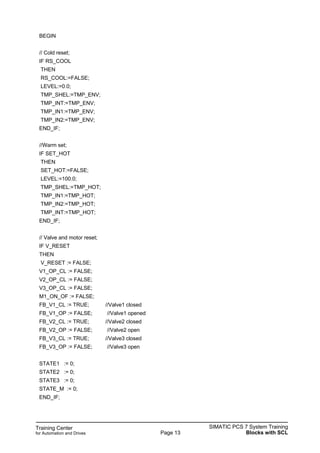
BEGIN
// Cold reset;
IF RS_COOL
THEN
RS_COOL:=FALSE;
LEVEL:=0.0;
TMP_SHEL:=TMP_ENV;
TMP_INT:=TMP_ENV;
TMP_IN1:=TMP_ENV;
TMP_IN2:=TMP_ENV;
END_IF;
//Warm set;
IF SET_HOT
THEN
SET_HOT:=FALSE;
LEVEL:=100.0;
TMP_SHEL:=TMP_HOT;
TMP_IN1:=TMP_HOT;
TMP_IN2:=TMP_HOT;
TMP_INT:=TMP_HOT;
END_IF;
// Valve and motor reset;
IF V_RESET
THEN
V_RESET := FALSE;
V1_OP_CL := FALSE;
V2_OP_CL := FALSE;
V3_OP_CL := FALSE;
M1_ON_OF := FALSE;
FB_V1_CL := TRUE; //Valve1 closed
FB_V1_OP := FALSE; //Valve1 opened
FB_V2_CL := TRUE; //Valve2 closed
FB_V2_OP := FALSE; //Valve2 open
FB_V3_CL := TRUE; //Valve3 closed
FB_V3_OP := FALSE; //Valve3 open
STATE1 := 0;
STATE2 := 0;
STATE3 := 0;
STATE_M := 0;
END_IF;
Training Center
for Automation and Drives
SIMATIC PCS 7 System Training
Blocks with SCLPage 14
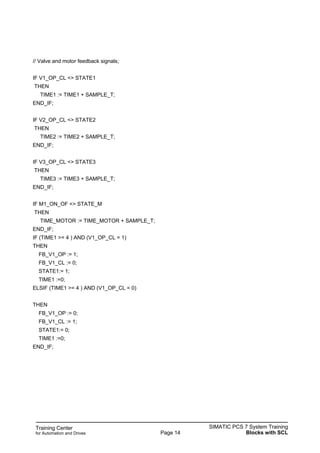
// Valve and motor feedback signals;
IF V1_OP_CL <> STATE1
THEN
TIME1 := TIME1 + SAMPLE_T;
END_IF;
IF V2_OP_CL <> STATE2
THEN
TIME2 := TIME2 + SAMPLE_T;
END_IF;
IF V3_OP_CL <> STATE3
THEN
TIME3 := TIME3 + SAMPLE_T;
END_IF;
IF M1_ON_OF <> STATE_M
THEN
TIME_MOTOR := TIME_MOTOR + SAMPLE_T;
END_IF;
IF (TIME1 >= 4 ) AND (V1_OP_CL = 1)
THEN
FB_V1_OP := 1;
FB_V1_CL := 0;
STATE1:= 1;
TIME1 :=0;
ELSIF (TIME1 >= 4 ) AND (V1_OP_CL = 0)
THEN
FB_V1_OP := 0;
FB_V1_CL := 1;
STATE1:= 0;
TIME1 :=0;
END_IF;
Training Center
for Automation and Drives
SIMATIC PCS 7 System Training
Blocks with SCLPage 15
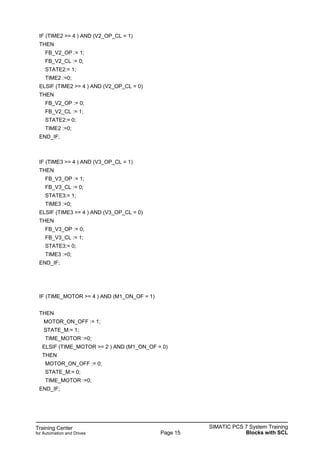
IF (TIME2 >= 4 ) AND (V2_OP_CL = 1)
THEN
FB_V2_OP := 1;
FB_V2_CL := 0;
STATE2:= 1;
TIME2 :=0;
ELSIF (TIME2 >= 4 ) AND (V2_OP_CL = 0)
THEN
FB_V2_OP := 0;
FB_V2_CL := 1;
STATE2:= 0;
TIME2 :=0;
END_IF;
IF (TIME3 >= 4 ) AND (V3_OP_CL = 1)
THEN
FB_V3_OP := 1;
FB_V3_CL := 0;
STATE3:= 1;
TIME3 :=0;
ELSIF (TIME3 >= 4 ) AND (V3_OP_CL = 0)
THEN
FB_V3_OP := 0;
FB_V3_CL := 1;
STATE3:= 0;
TIME3 :=0;
END_IF;
IF (TIME_MOTOR >= 4 ) AND (M1_ON_OF = 1)
THEN
MOTOR_ON_OFF := 1;
STATE_M:= 1;
TIME_MOTOR :=0;
ELSIF (TIME_MOTOR >= 2 ) AND (M1_ON_OF = 0)
THEN
MOTOR_ON_OFF := 0;
STATE_M:= 0;
TIME_MOTOR :=0;
END_IF;
Training Center
for Automation and Drives
SIMATIC PCS 7 System Training
Blocks with SCLPage 16
// Calculate filling level;
NIV:=LEVEL;
IF V1_OP_CL
THEN
NIV:=NIV + V1_FLOW*CFV;
END_IF;
IF V2_OP_CL
THEN
NIV:=NIV + V2_FLOW*CFV;
END_IF;
IF V3_OP_CL
THEN
NIV:=NIV - V3_FLOW*CFV;
END_IF;
IF NIV>100.0
THEN
OVERFLOW:=TRUE;
NIV:=100.0;
ELSE
OVERFLOW:=FALSE;
IF NIV<0.0
THEN
NIV:=0.0;
END_IF;
END_IF;
LEVEL:=NIV;
//Temperature response
//Shell temp via PT1
TMP_SH_IN:= (TMP_HOT-TMP_ENV)*V_HOT_FL/100.0 + TMP_ENV;
EXP_SHEL:=1.0/EXP(1.0*SAMPLE_T/T_LAG_SH);
TMP_SHEL:=TMP_SH_IN+(TMP_SHEL-TMP_SH_IN)*EXP_SHEL;
//Internal temp via PT2
T_LAG_IN_HILF:=(T_LAG_IN/SAMPLE_T)*(LEVEL+10.0)/110.0;
EXP_IN:=1.0/EXP(1.0/T_LAG_IN_HILF);
TMP_IN1:=TMP_SHEL+(TMP_IN1-TMP_SHEL)*EXP_IN;
TMP_IN2:=TMP_IN1+(TMP_IN2-TMP_IN1)*EXP_IN;
TMP_INT:=TMP_IN2;
END_FUNCTION_BLOCK;
Training Center
for Automation and Drives
SIMATIC PCS 7 System Training
Blocks with SCLPage 17
Date: 09.01.2007
File: ST-PCS7SYS_V70_scl.17
SIMATIC PCS 7
Siemens AG, 2003. All rights reserved.
SITRAIN Training for
Automation and Drives
Creating a Library in the MP
Right-click: Multiproject
Create in Multiproject
Master data library
Master data library
Standard library
Standard library
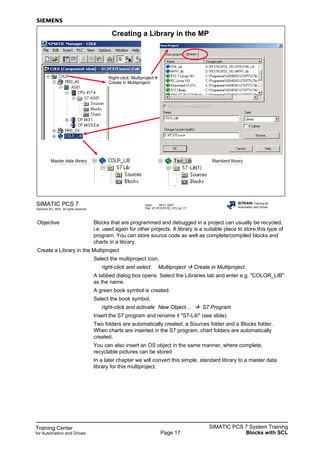
Objective Blocks that are programmed and debugged in a project can usually be recycled,
i.e. used again for other projects. A library is a suitable place to store this type of
program. You can store source code as well as complete/compiled blocks and
charts in a library.
Create a Library in the Multiproject
Select the multiproject icon,
right-click and select Multiproject Create in Multiproject.
A tabbed dialog box opens. Select the Libraries tab and enter e.g. "COLOR_LIB"
as the name.
A green book symbol is created.
Select the book symbol,
right-click and activate New Object… S7 Program
Insert the S7 program and rename it "S7-Lib" (see slide).
Two folders are automatically created, a Sources folder and a Blocks folder.
When charts are inserted in the S7 program, chart folders are automatically
created.
You can also insert an OS object in the same manner, where complete,
recyclable pictures can be stored.
In a later chapter we will convert this simple, standard library to a master data
library for this multiproject.
Training Center
for Automation and Drives
SIMATIC PCS 7 System Training
Blocks with SCLPage 18
Date: 09.01.2007
File: ST-PCS7SYS_V70_scl.18
SIMATIC PCS 7
Siemens AG, 2003. All rights reserved.
SITRAIN Training for
Automation and Drives
Drag and drop
Copying Blocks in Library
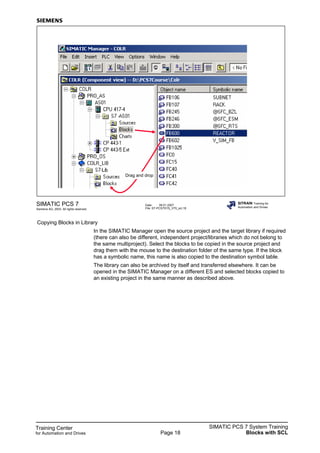
In the SIMATIC Manager open the source project and the target library if required
(there can also be different, independent project/libraries which do not belong to
the same multiproject). Select the blocks to be copied in the source project and
drag them with the mouse to the destination folder of the same type. If the block
has a symbolic name, this name is also copied to the destination symbol table.
The library can also be archived by itself and transferred elsewhere. It can be
opened in the SIMATIC Manager on a different ES and selected blocks copied to
an existing project in the same manner as described above.

Ch7 v70 scl_en

  • 1.
    Training Center for Automationand Drives SIMATIC PCS 7 System Training Blocks with SCLPage 1 Date: 09.01.2007 File: ST-PCS7SYS_V70_scl.1 SIMATIC PCS 7 Siemens AG, 2003. All rights reserved. SITRAIN Training for Automation and Drives Creating New Blocks with SCL SFCSFCCFCCFC SCLSCL WIN CCWIN CC DatabaseDatabaseDatabase Y2 V5 V4 V3 0000.0MBARP4 0000.0MBARP5 0000.0MBARP6 0000.0MBARP1 INERTGAS ABLUFT1 ABLUFT2 ABLUFT3 V6 V1Y1 V2 MBAR PC/ %A1 0000.0 Reactor 01 0000.0 %000.0 %000.0 0000.0 Product M1 R1 0000 0000 F1 LibraryLibrary Contents Page Overview .......................................................................................................................................... 2 AFB - Structures .............................................................................................................................. 3 Example: Arithmetic Block ....................................................................................................... 4 Insert Menu (Structures) .............................................................................................................. 5 Insert Menu ................................................................................................................................. 6 AFB - Startup Characteristics................................................................................................................... 7 Compiler and Debugger ................................................................................................................... 9 Appendix: Source Texts........................................................................................................................... 10 Creating a Library in the MP................................................................................................................. 17
  • 2.
    Training Center for Automationand Drives SIMATIC PCS 7 System Training Blocks with SCLPage 2 Date: 09.01.2007 File: ST-PCS7SYS_V70_scl.2 SIMATIC PCS 7 Siemens AG, 2003. All rights reserved. SITRAIN Training for Automation and Drives Overview High-level language for defining custom function blocks PASCAL-type syntax, therefore very powerful Compiler and debugger are system components Definition of the block name, the input parameters and output parameters, including the default values Algorithm description in Structured Text Block compilation and debugging of block if necessary Inserting into the existing block library Library Using the block in the CFC Editor Editor SCLSCL S7-SCL This is a higher, textual programming language for programmable logic controllers that is oriented to PASCAL. The DIN EN-61131-3 standard (international IEC 1131-3) standardizes the PLC programming languages. The basis for SCL is the "structured text" component. SCL supplements and expands the STEP 7 programming software with numerous language elements. In particular, SCL is an alternative to programming in STL. If the user has some experience in a high-level programming language, SCL is easy to learn. Performance Features Block Types SCL particularly supports the STEP 7 block concept. Therefore, SCL makes it possible to program blocks that conform to the standards. You can use SCL to create organization blocks (OBs), function blocks (FBs), functions (FCs), data blocks (DBs) and user-defined data types (UDTs). SFB and SFC You can use precompiled blocks, such as system functions and system function blocks that are present in the CPU's operating system. Miscibility SCL blocks can be mixed with STL, LAD and FBD blocks. That is, an SCL block can call up another block or be called up by another block that has any method of representation in the STEP 7 programming system. Editor Powerful functions for editing the source text support the programmer when he is creating blocks. Blocks that can run on all the AS300/400 automation system CPUs, beginning with CPU 314, are generated from the source file during the compilation. Debugger The SCL test functions make it possible to search for logical programming errors in an error-free compilation. Troubleshooting takes place in the source code (see Options -> Settings ->Compiler menu).
  • 3.
    Training Center for Automationand Drives SIMATIC PCS 7 System Training Blocks with SCLPage 3 Date: 09.01.2007 File: ST-PCS7SYS_V70_scl.3 SIMATIC PCS 7 Siemens AG, 2003. All rights reserved. SITRAIN Training for Automation and Drives AFB - Structures Block type Block attributes VAR_INPUT VAR_OUPUT VAR_IN_OUT VAR VAR_TEMP Algorithm IF CASE FOR WHILE REPEAT CONTINUE EXIT GOTO RETURN FB FC OB DB UDT ? Block Types You can create various block types with the help of SCL. This section deals with creating function blocks (FBs), that is, algorithms of "user blocks" conform to SIMATIC PCS 7). Declaration Area The declaration area is subdivided into several declaration fields. The main fields for FBs are described below. VAR_INPUT Inputting an FB for setting parameters and combining with the output of another FB "input" VAR_OUTPUT Outputting an FB as a source for combining with inputs of other blocks ("output") VAR_IN_OUT Inputting an FB for setting parameters and assigning values is possible via the block program ("input/output") VAR Internal parameters for an FB, available in the instance DB, not available for CFC configuring ("internal static variables") VAR_TEMP Temporary variables, not available in the instance DB (->local data stack - >"internal dynamic variables") Algorithm The code section contains the program instructions. Logical and arithmetic results are assigned to the output. Use It is possible to use various control structures.
  • 4.
    Training Center for Automationand Drives SIMATIC PCS 7 System Training Blocks with SCLPage 4 Date: 09.01.2007 File: ST-PCS7SYS_V70_scl.4 SIMATIC PCS 7 Siemens AG, 2003. All rights reserved. SITRAIN Training for Automation and Drives Example: Arithmetic Block ARIT Arithmetic Block R X2 R X1 Y R • SCL source • Templates • Variable declaration • Algorithm • Compile + Load • Test R X3 FUNCTION_BLOCK ARIT {S7_m_c:='true'} TITLE = 'arithmetic block' // // Block Comment... // VERSION : '5.2' AUTHOR: Trainer NAME: ARIT FAMILY: Training // Block Parameters VAR_INPUT // Input Parameters X1{S7_m_c:='true'} :real;//input1 X2 :real;//input2 X3 :real:=1;//input3 END_VAR VAR_OUTPUT // Output Parameters Y {S7_m_c:='true'} :real; //output END_VAR BEGIN // Statement part Y:=X1+X2/X3; END_FUNCTION_BLOCK 1. Create SCL source file. 2 Enter block data in the symbol table. 3 Insert the block template for the FB, comment and parameter. 4 Declare the inputs and outputs. 5 Specify the instruction section/algorithm. 6 Adjust the compilation options. 7 Compile. 8 Insert block in chart (catalog: directory "S7-My_Program"). 9 Compile and download. 10 Test in CFC. 11 Debug the SCL source: Debug -> Monitor continuously (scope = cursor placement) menu.
  • 5.
    Training Center for Automationand Drives SIMATIC PCS 7 System Training Blocks with SCLPage 5 Date: 09.01.2007 File: ST-PCS7SYS_V70_scl.5 SIMATIC PCS 7 Siemens AG, 2003. All rights reserved. SITRAIN Training for Automation and Drives Menu Insert -> Block Template OB FB FC Comment Constant Parameters DB Instance DB DB Referencing UDT UDT -> Control Structure IF CASE FOR WHILE REPEAT ***** OB ***** ORGANIZATION_BLOCK OBxxx VAR_TEMP // Reserved Info: ARRAY[0..19] OF BYTE; // Temporary Variables END_VAR BEGIN // Statements ; END_ORGANIZATION_BLOCK ***** FB ***** FUNCTION_BLOCK FBxxx VAR_TEMP // Temporary Variables END_VAR VAR // Static Variables END_VAR BEGIN // Statement part ; END_FUNCTION_BLOCK ***** FC ***** FUNCTION FCxxx : INT VAR_TEMP // Temporary Variables END_VAR BEGIN // Statement part ; FCxxx := 100; END_FUNCTION
  • 6.
    Training Center for Automationand Drives SIMATIC PCS 7 System Training Blocks with SCLPage 6 ***** Comment ***** TITLE = 'Block Title' // // Block Comment... // VERSION : '1.0' AUTHOR: Author NAME: Name FAMILY: Family ***** Constants ***** CONST // Constants END_CONST ***** Parameters ***** // Block Parameters VAR_INPUT // Input Parameters END_VAR VAR_IN_OUT // I/O Parameters END_VAR VAR_OUTPUT // Output Parameters END_VAR ***** DB ***** DATA_BLOCK DBxxx // // Block Comment... // STRUCT END_STRUCT BEGIN END_DATA_BLOCK ***** Instance DB ***** DATA_BLOCK DBxxx FBxxx // // Block Comment... // BEGIN END_DATA_BLOCK ***** DB from UDT ***** DATA_BLOCK DBxxx UDTxxx BEGIN END_DATA_BLOCK ***** UDT ***** TYPE UDTxxx STRUCT // Type description END_STRUCT END_TYPE ***** IF ***** IF a = b THEN // StatementPart_IF ; ELSIF a = c THEN // Statement_Part_ELSIF ; ELSE // Statement_Part_ELSE ; END_IF; ***** CASE ***** CASE value OF 0..3 : // Statements_0..3 ; 8 : // Statements_8 ; ELSE: // Statements_ELSE ; END_CASE; ***** FOR ***** FOR runvariable := start TO end BY inc rement DO // Statement part ; END_FOR; ***** WHILE ***** WHILE a = b DO // Statement part ; END_WHILE; ***** REPEAT ***** REPEAT // Statement part ; UNTIL a = b END_REPEAT;
  • 7.
    Training Center for Automationand Drives SIMATIC PCS 7 System Training Blocks with SCLPage 7 Date: 09.01.2007 File: ST-PCS7SYS_V70_scl.7 SIMATIC PCS 7 Siemens AG, 2003. All rights reserved. SITRAIN Training for Automation and Drives AFB - Startup Characteristics OB n FBx FBx SFC6 RD_SINFO OB Startup Cyclicinterrupt Specialcase OB m FBx n m FUNCTION_BLOCK RESTART; (* User function block only for PCS 7 course *) (* Block Attributes *) TITLE='RESTART'; VERSION:'1.0'; //KNOW_HOW_PROTECT if no comment AUTHOR:Siemens; FAMILY:Training; NAME:STARTUP; (* Variable declaration *) VAR_INPUT START_EN: bool:=1;//1=enable END_VAR; VAR_OUTPUT STARTING: bool:=0;//1=restart takes place OBNR: int:=0;//calling OB END_VAR;
  • 8.
    Training Center for Automationand Drives SIMATIC PCS 7 System Training Blocks with SCLPage 8 VAR_TEMP ERG: int; TOP_SI: struct EV_CLASS: byte; EV_NUM: byte; PRIORITY: byte; NUM: byte; TYP2_3: byte; TYP1: byte; ZI1: word; ZI2_3: dword; end_struct; START_UP_SI: struct EV_CLASS: byte; EV_NUM: byte; PRIORITY: byte; NUM: byte;//Number of calling OB TYP2_3: byte; TYP1: byte; ZI1: word; ZI2_3: dword; end_struct; END_VAR; (* Program *) BEGIN IF START_EN THEN; ERG:=RD_SINFO (TOP_SI:=TOP_SI,START_UP_SI:=START_UP_SI); OBNR:=WORD_TO_INT(BYTE_TO_WORD(TOP_SI.NUM)); IF OBNR=100 THEN; STARTING:=1; ELSE; STARTING:=0; END_IF; ELSE; STARTING:=0; END_IF; END_FUNCTION_BLOCK;
  • 9.
    Training Center for Automationand Drives SIMATIC PCS 7 System Training Blocks with SCLPage 9 Date: 09.01.2007 File: ST-PCS7SYS_V70_scl.9 SIMATIC PCS 7 Siemens AG, 2003. All rights reserved. SITRAIN Training for Automation and Drives Compiler and Debugger Project S7 station CPU S7 program Source files Blocks SCL 1. Edit block 2. Compile 3. Download to CPU Symbols 4. Debug Edit Block Use the editor for the SCL environment to create the source text in SCL. Attitudes You can use the Options -> Settings menu command to customize the compiler and editor. Check the settings for "Debug Info" and "OK Flag." Compile The source text is checked. If there is an error, there is a reaction with messages, including error localization. If you double click the error message, the cursor will jump to the location of the error in the source text. Correct text is compiled in object code and is stored in the block folder as the relevant block (such as FB or FC). Compile/Download CPU You can also download an individual block into the CPU for test purposes. An appropriate data structure (data block) must be present in the CPU for the input data. In case of an FB, for example, the FB must be called up from an OB and access an instance DB. STEP 7 tools (STL Editor, PLC -> Monitor/Modify Variables... menu command) must be used for changes to the values in this DB. You can monitor the program that is running in the SLC Editor. A second window is displayed when you activate the Debug -> Continuously Monitor menu command. If you mouse click a location in the text window pane, the compiler selects an area to this location and highlights the area. The variables that relate to the highlighted text are displayed in the other window pane. Turn off monitoring before you make changes to the source text. When you have finished, you must compile again and download the information to the CPU. Target System (CPU) When you activate this menu command in the SCL environment, you can scan the module information (CPU), change the operating mode (RUN/STOP), perform an overall reset, and set the date and time.
  • 10.
    Training Center for Automationand Drives SIMATIC PCS 7 System Training Blocks with SCLPage 10 Date: 09.01.2007 File: ST-PCS7SYS_V70_scl.10 SIMATIC PCS 7 Siemens AG, 2003. All rights reserved. SITRAIN Training for Automation and Drives Appendix: Source Texts Simulation block Reactor •
  • 11.
    Training Center for Automationand Drives SIMATIC PCS 7 System Training Blocks with SCLPage 11 FUNCTION_BLOCK Reactor (* Simulation block with feedback signals for PCS 7 course only *) (* Block Attributes *) TITLE ='REAC'; VERSION:'5.0'; //KNOW_HOW_PROTECT if no comment AUTHOR:Siemens; FAMILY:Training; NAME:PLANT; (* Variable Declaration *) VAR_IN_OUT V1_OP_CL: BOOL; //Filling1 V2_OP_CL: BOOL; //Filling2 V3_OP_CL: BOOL; //Filling3 M1_ON_OF: BOOL; //Mixer motor RS_COOL : BOOL; //Container empty and cold SET_HOT : BOOL; //Container full and warm V_RESET : BOOL; //Valves closed, motor off END_VAR VAR_INPUT V1_FLOW: REAL := 100.0; //Flow V1 0..100% V2_FLOW: REAL := 100.0; //Flow V2 V3_FLOW: REAL := 100.0; //Flow V3 CFV: REAL := 0.002; //Correction factor valves V_HOT_FL: REAL := 0.0; //Flow heating 0..100% TMP_ENV: REAL := 20.0; //Environment temperature TMP_HOT: REAL := 120.0; //Heating medium temperature T_LAG_SH: REAL := 10.0; //T_PT1-Shell[s] T_LAG_IN: REAL := 30.0; //T_PT2-Inside[s] full reactor SAMPLE_T: REAL := 1.0; //Sampling time[s] END_VAR Simulation block REACTOR (FB600)
  • 12.
    Training Center for Automationand Drives SIMATIC PCS 7 System Training Blocks with SCLPage 12 VAR_OUTPUT OVERFLOW: BOOL := FALSE; //Overflow LEVEL{S7_m_c:= ‘true‘} : REAL := 0.0; //Fill level in % TMP_SHEL: REAL := 20.0; //Shell temp TMP_INT {S7_m_c:= ‘true‘} : REAL := 20.0; //Internal temp FB_V1_CL : Bool := 1; //Valve1 closed FB_V1_OP {S7_m_c:= ‘true‘} : Bool := 0; //Valve1 opened FB_V2_CL : Bool := 1; //Valve2 closed FB_V2_OP {S7_m_c:= ‘true‘} : Bool := 0; //Valve2 open FB_V3_CL : Bool := 1; //Valve3 closed FB_V3_OP {S7_m_c:= ‘true‘} : Bool := 0; //Valve3 open MOTOR_ON_OFF {S7_m_c:= ‘true‘} : BOOL := 0; //Motor ON/OFF END_VAR VAR STATE1 : bool := FALSE; //State_AuxiliaryCells STATE2 : bool := 0; //State_AuxiliaryCells STATE3 : bool := 0; //State_AuxiliaryCells STATE_M : bool := 0; //State_AuxiliaryCells NIV: REAL := 0.0; //Fill level auxiliary cells TMP_SH_IN: REAL := 20; //Shell temp_Auxiliary cell TMP_IN_IN: REAL := 20; //Inside temp_Auxiliary cells TMP_IN1: REAL := 20; TMP_IN2: REAL := 20; TMP_SH_HILF: REAL := 20; T_LAG_IN_HILF:REAL := 0.0; EXP_SHEL: REAL := 1.0; EXP_IN: REAL := 1.0; TIME1 : real := 0.0; TIME2 : real := 0.0; TIME3 : real := 0.0; TIME_MOTOR : real := 0.0; END_VAR
  • 13.
    Training Center for Automationand Drives SIMATIC PCS 7 System Training Blocks with SCLPage 13 BEGIN // Cold reset; IF RS_COOL THEN RS_COOL:=FALSE; LEVEL:=0.0; TMP_SHEL:=TMP_ENV; TMP_INT:=TMP_ENV; TMP_IN1:=TMP_ENV; TMP_IN2:=TMP_ENV; END_IF; //Warm set; IF SET_HOT THEN SET_HOT:=FALSE; LEVEL:=100.0; TMP_SHEL:=TMP_HOT; TMP_IN1:=TMP_HOT; TMP_IN2:=TMP_HOT; TMP_INT:=TMP_HOT; END_IF; // Valve and motor reset; IF V_RESET THEN V_RESET := FALSE; V1_OP_CL := FALSE; V2_OP_CL := FALSE; V3_OP_CL := FALSE; M1_ON_OF := FALSE; FB_V1_CL := TRUE; //Valve1 closed FB_V1_OP := FALSE; //Valve1 opened FB_V2_CL := TRUE; //Valve2 closed FB_V2_OP := FALSE; //Valve2 open FB_V3_CL := TRUE; //Valve3 closed FB_V3_OP := FALSE; //Valve3 open STATE1 := 0; STATE2 := 0; STATE3 := 0; STATE_M := 0; END_IF;
  • 14.
    Training Center for Automationand Drives SIMATIC PCS 7 System Training Blocks with SCLPage 14 // Valve and motor feedback signals; IF V1_OP_CL <> STATE1 THEN TIME1 := TIME1 + SAMPLE_T; END_IF; IF V2_OP_CL <> STATE2 THEN TIME2 := TIME2 + SAMPLE_T; END_IF; IF V3_OP_CL <> STATE3 THEN TIME3 := TIME3 + SAMPLE_T; END_IF; IF M1_ON_OF <> STATE_M THEN TIME_MOTOR := TIME_MOTOR + SAMPLE_T; END_IF; IF (TIME1 >= 4 ) AND (V1_OP_CL = 1) THEN FB_V1_OP := 1; FB_V1_CL := 0; STATE1:= 1; TIME1 :=0; ELSIF (TIME1 >= 4 ) AND (V1_OP_CL = 0) THEN FB_V1_OP := 0; FB_V1_CL := 1; STATE1:= 0; TIME1 :=0; END_IF;
  • 15.
    Training Center for Automationand Drives SIMATIC PCS 7 System Training Blocks with SCLPage 15 IF (TIME2 >= 4 ) AND (V2_OP_CL = 1) THEN FB_V2_OP := 1; FB_V2_CL := 0; STATE2:= 1; TIME2 :=0; ELSIF (TIME2 >= 4 ) AND (V2_OP_CL = 0) THEN FB_V2_OP := 0; FB_V2_CL := 1; STATE2:= 0; TIME2 :=0; END_IF; IF (TIME3 >= 4 ) AND (V3_OP_CL = 1) THEN FB_V3_OP := 1; FB_V3_CL := 0; STATE3:= 1; TIME3 :=0; ELSIF (TIME3 >= 4 ) AND (V3_OP_CL = 0) THEN FB_V3_OP := 0; FB_V3_CL := 1; STATE3:= 0; TIME3 :=0; END_IF; IF (TIME_MOTOR >= 4 ) AND (M1_ON_OF = 1) THEN MOTOR_ON_OFF := 1; STATE_M:= 1; TIME_MOTOR :=0; ELSIF (TIME_MOTOR >= 2 ) AND (M1_ON_OF = 0) THEN MOTOR_ON_OFF := 0; STATE_M:= 0; TIME_MOTOR :=0; END_IF;
  • 16.
    Training Center for Automationand Drives SIMATIC PCS 7 System Training Blocks with SCLPage 16 // Calculate filling level; NIV:=LEVEL; IF V1_OP_CL THEN NIV:=NIV + V1_FLOW*CFV; END_IF; IF V2_OP_CL THEN NIV:=NIV + V2_FLOW*CFV; END_IF; IF V3_OP_CL THEN NIV:=NIV - V3_FLOW*CFV; END_IF; IF NIV>100.0 THEN OVERFLOW:=TRUE; NIV:=100.0; ELSE OVERFLOW:=FALSE; IF NIV<0.0 THEN NIV:=0.0; END_IF; END_IF; LEVEL:=NIV; //Temperature response //Shell temp via PT1 TMP_SH_IN:= (TMP_HOT-TMP_ENV)*V_HOT_FL/100.0 + TMP_ENV; EXP_SHEL:=1.0/EXP(1.0*SAMPLE_T/T_LAG_SH); TMP_SHEL:=TMP_SH_IN+(TMP_SHEL-TMP_SH_IN)*EXP_SHEL; //Internal temp via PT2 T_LAG_IN_HILF:=(T_LAG_IN/SAMPLE_T)*(LEVEL+10.0)/110.0; EXP_IN:=1.0/EXP(1.0/T_LAG_IN_HILF); TMP_IN1:=TMP_SHEL+(TMP_IN1-TMP_SHEL)*EXP_IN; TMP_IN2:=TMP_IN1+(TMP_IN2-TMP_IN1)*EXP_IN; TMP_INT:=TMP_IN2; END_FUNCTION_BLOCK;
  • 17.
    Training Center for Automationand Drives SIMATIC PCS 7 System Training Blocks with SCLPage 17 Date: 09.01.2007 File: ST-PCS7SYS_V70_scl.17 SIMATIC PCS 7 Siemens AG, 2003. All rights reserved. SITRAIN Training for Automation and Drives Creating a Library in the MP Right-click: Multiproject Create in Multiproject Master data library Master data library Standard library Standard library Objective Blocks that are programmed and debugged in a project can usually be recycled, i.e. used again for other projects. A library is a suitable place to store this type of program. You can store source code as well as complete/compiled blocks and charts in a library. Create a Library in the Multiproject Select the multiproject icon, right-click and select Multiproject Create in Multiproject. A tabbed dialog box opens. Select the Libraries tab and enter e.g. "COLOR_LIB" as the name. A green book symbol is created. Select the book symbol, right-click and activate New Object… S7 Program Insert the S7 program and rename it "S7-Lib" (see slide). Two folders are automatically created, a Sources folder and a Blocks folder. When charts are inserted in the S7 program, chart folders are automatically created. You can also insert an OS object in the same manner, where complete, recyclable pictures can be stored. In a later chapter we will convert this simple, standard library to a master data library for this multiproject.
  • 18.
    Training Center for Automationand Drives SIMATIC PCS 7 System Training Blocks with SCLPage 18 Date: 09.01.2007 File: ST-PCS7SYS_V70_scl.18 SIMATIC PCS 7 Siemens AG, 2003. All rights reserved. SITRAIN Training for Automation and Drives Drag and drop Copying Blocks in Library In the SIMATIC Manager open the source project and the target library if required (there can also be different, independent project/libraries which do not belong to the same multiproject). Select the blocks to be copied in the source project and drag them with the mouse to the destination folder of the same type. If the block has a symbolic name, this name is also copied to the destination symbol table. The library can also be archived by itself and transferred elsewhere. It can be opened in the SIMATIC Manager on a different ES and selected blocks copied to an existing project in the same manner as described above.