

Yana Berkovich Data Platform MVP
@yana_Berkovich
YanaBerkovich.com
Seattle CODECAMP
DAX & SQL in PowerBI
About Me
BI Analyst& DEV, Microsoft Data Platform MVP
Consultant, Product Manager
BusinessIntelligenceand Data Visualization Consultant
https://www.linkedin.com/in/yanaberkovich
http://yanaberkovich.com
@Yana_Berkovich
AGENDA
• What is PowerBI?
• Where can we find the data?
• SQL
• DAX
• DAX editor tool
• Creating Slicers sample
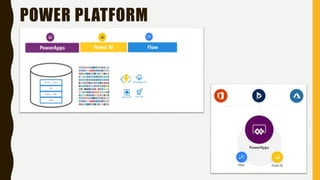
POWER PLATFORM
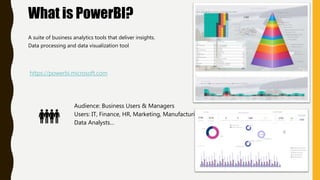
What is PowerBI?
A suite of business analytics tools that deliver insights.
Data processing and data visualization tool
https://powerbi.microsoft.com
Audience: Business Users & Managers
Users: IT, Finance, HR, Marketing, Manufacturing,
Data Analysts…
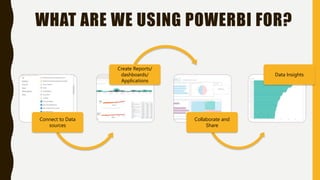
WHAT ARE WE USING POWERBI FOR?
Connect to Data
sources
Create Reports/
dashboards/
Applications
Collaborate and
Share
Data Insights
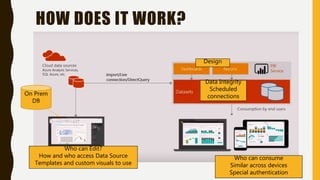
HOW DOES IT WORK?
Who can Edit?
How and who access Data Source
Templates and custom visuals to use
On Prem
DB
Who can consume
Similar across devices
Special authentication
Design
Data Integrity
Scheduled
connections
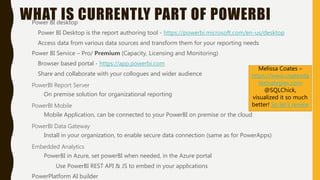
WHAT IS CURRENTLY PART OF POWERBIPower BI desktop
Power BI Desktop is the report authoring tool - https://powerbi.microsoft.com/en-us/desktop
Access data from various data sources and transform them for your reporting needs
Power BI Service – Pro/ Premium (Capacity, Licensing and Monitoring)
Browser based portal - https://app.powerbi.com
Share and collaborate with your collogues and wider audience
PowerBI Report Server
On premise solution for organizational reporting
PowerBI Mobile
Mobile Application, can be connected to your PowerBI on premise or the cloud
PowerBI Data Gateway
Install in your organization, to enable secure data connection (same as for PowerApps)
Embedded Analytics
PowerBI in Azure, set powerBI when needed, in the Azure portal
Use PowerBI REST API & JS to embed in your applications
PowerPlatform AI builder
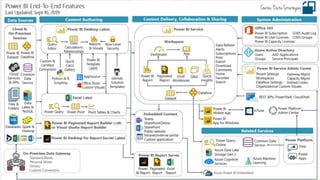
Melissa Coates –
https://www.coatesda
tastrategies.com
@SQLChick,
visualized it so much
better! So let’s review
THE MOST IMPORTANT THING….
Ask WHY???
Why are we doing this visualization?
What is the business question
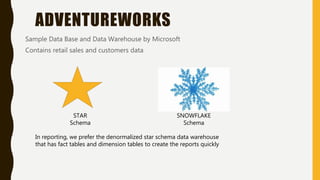
ADVENTUREWORKS
Sample Data Base and Data Warehouse by Microsoft
Contains retail sales and customers data
In reporting, we prefer the denormalized star schema data warehouse
that has fact tables and dimension tables to create the reports quickly
STAR
Schema
SNOWFLAKE
Schema
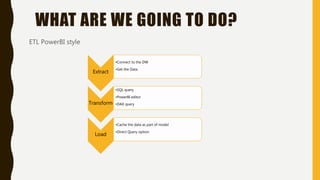
WHAT ARE WE GOING TO DO?
ETL PowerBI style
Extract
•Connect to the DW
•Get the Data
Transform
•SQL query
•PowerBI editor
•DAX query
Load
•Cache the data as part of model
•Direct Query option
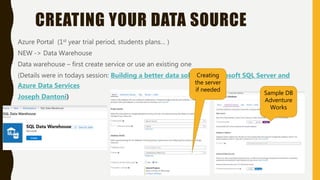
CREATING YOUR DATA SOURCE
Azure Portal (1st year trial period, students plans… )
NEW -> Data Warehouse
Data warehouse – first create service or use an existing one
(Details were in todays session: Building a better data solution: Microsoft SQL Server and
Azure Data Services
Joseph Dantoni)
Sample DB
Adventure
Works
Creating
the server
if needed
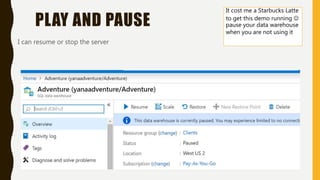
PLAY AND PAUSE
I can resume or stop the server
It cost me a Starbucks Latte
to get this demo running 
pause your data warehouse
when you are not using it
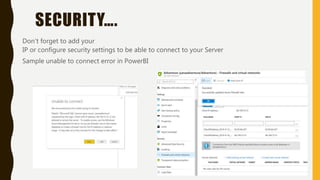
SECURITY….
Don’t forget to add your
IP or configure security settings to be able to connect to your Server
Sample unable to connect error in PowerBI
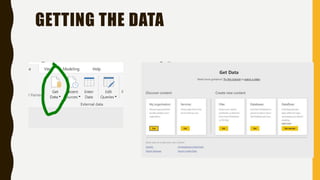
GETTING THE DATA
• Desktop: Online:
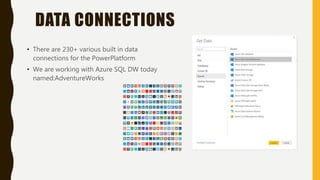
DATA CONNECTIONS
• There are 230+ various built in data
connections for the PowerPlatform
• We are working with Azure SQL DW today
named:AdventureWorks
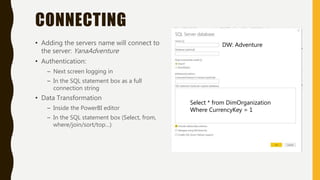
CONNECTING
• Adding the servers name will connect to
the server: YanaAdventure
• Authentication:
– Next screen logging in
– In the SQL statement box as a full
connection string
• Data Transformation
– Inside the PowerBI editor
– In the SQL statement box (Select, from,
where/join/sort/top…)
Select * from DimOrganization
Where CurrencyKey = 1
DW: Adventure
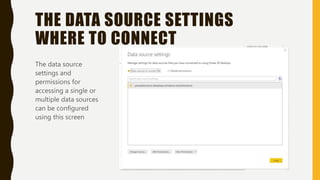
THE DATA SOURCE SETTINGS
WHERE TO CONNECT
The data source
settings and
permissions for
accessing a single or
multiple data sources
can be configured
using this screen
SQL & TSQL
• TSQL statements are used to perform the transactions to the databases. TSQL is
mainly used to build the application logic.
• SQL is a programming language which focuses on managing relational databases. T-
SQL is a procedural extension used by SQL Server
(www.complexsql.com )
• In Power BI
– We can write SQL queries
– When we get and transform the data we can do it manually or write a SQL query
– It is actually TSQL… since we are building the application logic
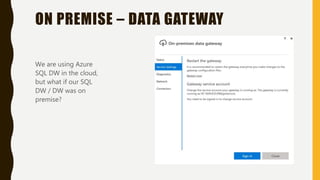
ON PREMISE – DATA GATEWAY
We are using Azure
SQL DW in the cloud,
but what if our SQL
DW / DW was on
premise?
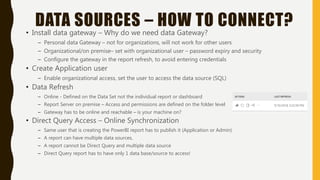
DATA SOURCES – HOW TO CONNECT?
• Install data gateway – Why do we need data Gateway?
– Personal data Gateway – not for organizations, will not work for other users
– Organizational/on premise– set with organizational user – password expiry and security
– Configure the gateway in the report refresh, to avoid entering credentials
• Create Application user
– Enable organizational access, set the user to access the data source (SQL)
• Data Refresh
– Online - Defined on the Data Set not the individual report or dashboard
– Report Server on premise – Access and permissions are defined on the folder level
– Gateway has to be online and reachable – is your machine on?
• Direct Query Access – Online Synchronization
– Same user that is creating the PowerBI report has to publish it (Application or Admin)
– A report can have multiple data sources,
– A report cannot be Direct Query and multiple data source
– Direct Query report has to have only 1 data base/source to access!
THE POWER OF EXCEL - POWERQUERY
• Power Query - cleansing and shaping the data – shape your data before load
• Power Pivot - modelling and reporting
Power Query also provides a Custom Connectors SDK so that third parties can create their
own data connectors
PowerBI is built on top of those 2 queries
2 great resources for PowerQuery and excel Training:
https://exceleratorbi.com.au/shaping-modelling-power-bi/
ExcelGuru in Vancouver
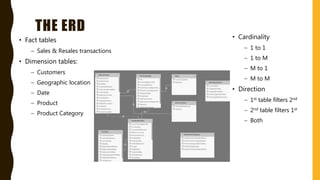
THE ERD
• Fact tables
– Sales & Resales transactions
• Dimension tables:
– Customers
– Geographic location
– Date
– Product
– Product Category
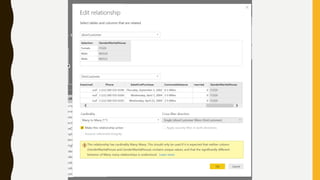
• Cardinality
– 1 to 1
– 1 to M
– M to 1
– M to M
• Direction
– 1st table filters 2nd
– 2nd table filters 1st
– Both
SHOULDN’T WE JUST CREATE A VIEW
IN SQL?
• YES! – but it is not always possible – DBA might not be on your side
• Not always the best option if it is for certain visualizations
• Maybe you just want a fragment of the data
• Performance will improve on the PowerBI side if you do, but there are additional
resources back in SQL
WHAT IS DAX?
DAX is a formula language.
Used to define custom calculations
for Calculated Columns and for
Measures (also known as calculated
fields)
Includes some of the Excel functions
+ Aggregations
Helps get the most out of your data
THE DAX EXPERTS
• The Definitive Guide to DAX
Marco Russo & Alberto Ferrari
DAX tools –
https://www.sqlbi.com/tools/
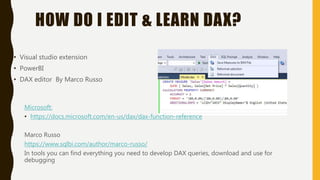
HOW DO I EDIT & LEARN DAX?
• Visual studio extension
• PowerBI
• DAX editor By Marco Russo
Microsoft:
• https://docs.microsoft.com/en-us/dax/dax-function-reference
Marco Russo
https://www.sqlbi.com/author/marco-russo/
In tools you can find everything you need to develop DAX queries, download and use for
debugging
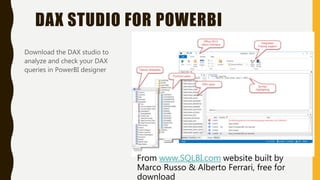
DAX STUDIO FOR POWERBI
Download the DAX studio to
analyze and check your DAX
queries in PowerBI designer
From www.SQLBI.com website built by
Marco Russo & Alberto Ferrari, free for
download
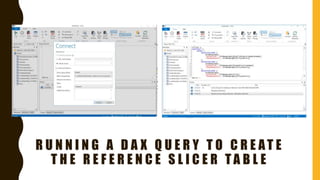
R U N N I N G A D A X Q U E R Y T O C R E AT E
T H E R E F E R E N C E S L I C E R T A B L E
WHAT CAN WE DO?
• Select and calculate the number of distinct rows –
The Business Question: How many different currencies the company is currently
supporting?
Answer:
Diffrent Currency = COUNTROWS(DISTINCT(FactResellerSales[CurrencyKey]))
= COUNTROWS(DISTINCT(FactResellerSales[ResellerKey]))
OR built in PowerBI visual that does the same
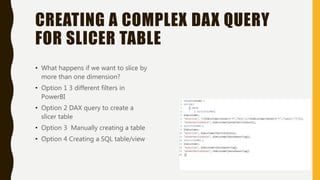
CREATING A COMPLEX DAX QUERY
FOR SLICER TABLE
• What happens if we want to slice by
more than one dimension?
• Option 1 3 different filters in
PowerBI
• Option 2 DAX query to create a
slicer table
• Option 3 Manually creating a table
• Option 4 Creating a SQL table/view
MORE DEV OPTIONS
• M – for most of the queries that contain a TSQL statement inside the query
• Json
– creating the custom themes for your report
– Building custom visuals, the visual part
• Python
– Using the custom editor to create data analytics with Python scripting
– Working with Azure ML studio
– Creating Python visuals
• R
– Using the custom editor to create data analytics with R scripting
– Creating R visuals
– Working with Azure ML studio
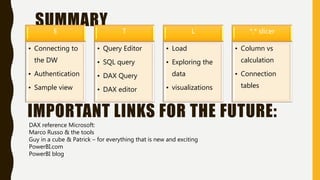
SUMMARYE
• Connecting to
the DW
• Authentication
• Sample view
T
• Query Editor
• SQL query
• DAX Query
• DAX editor
L
• Load
• Exploring the
data
• visualizations
*,* slicer
• Column vs
calculation
• Connection
tables
IMPORTANT LINKS FOR THE FUTURE:
DAX reference Microsoft:
Marco Russo & the tools
Guy in a cube & Patrick – for everything that is new and exciting
PowerBI.com
PowerBI blog

Dax & sql in power bi

  • 1.
    Yana Berkovich DataPlatform MVP @yana_Berkovich YanaBerkovich.com Seattle CODECAMP DAX & SQL in PowerBI
  • 2.
    About Me BI Analyst&DEV, Microsoft Data Platform MVP Consultant, Product Manager BusinessIntelligenceand Data Visualization Consultant https://www.linkedin.com/in/yanaberkovich http://yanaberkovich.com @Yana_Berkovich
  • 3.
    AGENDA • What isPowerBI? • Where can we find the data? • SQL • DAX • DAX editor tool • Creating Slicers sample
  • 4.
  • 5.
    What is PowerBI? Asuite of business analytics tools that deliver insights. Data processing and data visualization tool https://powerbi.microsoft.com Audience: Business Users & Managers Users: IT, Finance, HR, Marketing, Manufacturing, Data Analysts…
  • 6.
    WHAT ARE WEUSING POWERBI FOR? Connect to Data sources Create Reports/ dashboards/ Applications Collaborate and Share Data Insights
  • 7.
    HOW DOES ITWORK? Who can Edit? How and who access Data Source Templates and custom visuals to use On Prem DB Who can consume Similar across devices Special authentication Design Data Integrity Scheduled connections
  • 8.
    WHAT IS CURRENTLYPART OF POWERBIPower BI desktop Power BI Desktop is the report authoring tool - https://powerbi.microsoft.com/en-us/desktop Access data from various data sources and transform them for your reporting needs Power BI Service – Pro/ Premium (Capacity, Licensing and Monitoring) Browser based portal - https://app.powerbi.com Share and collaborate with your collogues and wider audience PowerBI Report Server On premise solution for organizational reporting PowerBI Mobile Mobile Application, can be connected to your PowerBI on premise or the cloud PowerBI Data Gateway Install in your organization, to enable secure data connection (same as for PowerApps) Embedded Analytics PowerBI in Azure, set powerBI when needed, in the Azure portal Use PowerBI REST API & JS to embed in your applications PowerPlatform AI builder Melissa Coates – https://www.coatesda tastrategies.com @SQLChick, visualized it so much better! So let’s review
  • 10.
    THE MOST IMPORTANTTHING…. Ask WHY??? Why are we doing this visualization? What is the business question
  • 11.
    ADVENTUREWORKS Sample Data Baseand Data Warehouse by Microsoft Contains retail sales and customers data In reporting, we prefer the denormalized star schema data warehouse that has fact tables and dimension tables to create the reports quickly STAR Schema SNOWFLAKE Schema
  • 12.
    WHAT ARE WEGOING TO DO? ETL PowerBI style Extract •Connect to the DW •Get the Data Transform •SQL query •PowerBI editor •DAX query Load •Cache the data as part of model •Direct Query option
  • 13.
    CREATING YOUR DATASOURCE Azure Portal (1st year trial period, students plans… ) NEW -> Data Warehouse Data warehouse – first create service or use an existing one (Details were in todays session: Building a better data solution: Microsoft SQL Server and Azure Data Services Joseph Dantoni) Sample DB Adventure Works Creating the server if needed
  • 14.
    PLAY AND PAUSE Ican resume or stop the server It cost me a Starbucks Latte to get this demo running  pause your data warehouse when you are not using it
  • 15.
    SECURITY…. Don’t forget toadd your IP or configure security settings to be able to connect to your Server Sample unable to connect error in PowerBI
  • 16.
    GETTING THE DATA •Desktop: Online:
  • 17.
    DATA CONNECTIONS • Thereare 230+ various built in data connections for the PowerPlatform • We are working with Azure SQL DW today named:AdventureWorks
  • 18.
    CONNECTING • Adding theservers name will connect to the server: YanaAdventure • Authentication: – Next screen logging in – In the SQL statement box as a full connection string • Data Transformation – Inside the PowerBI editor – In the SQL statement box (Select, from, where/join/sort/top…) Select * from DimOrganization Where CurrencyKey = 1 DW: Adventure
  • 19.
    THE DATA SOURCESETTINGS WHERE TO CONNECT The data source settings and permissions for accessing a single or multiple data sources can be configured using this screen
  • 20.
    SQL & TSQL •TSQL statements are used to perform the transactions to the databases. TSQL is mainly used to build the application logic. • SQL is a programming language which focuses on managing relational databases. T- SQL is a procedural extension used by SQL Server (www.complexsql.com ) • In Power BI – We can write SQL queries – When we get and transform the data we can do it manually or write a SQL query – It is actually TSQL… since we are building the application logic
  • 21.
    ON PREMISE –DATA GATEWAY We are using Azure SQL DW in the cloud, but what if our SQL DW / DW was on premise?
  • 22.
    DATA SOURCES –HOW TO CONNECT? • Install data gateway – Why do we need data Gateway? – Personal data Gateway – not for organizations, will not work for other users – Organizational/on premise– set with organizational user – password expiry and security – Configure the gateway in the report refresh, to avoid entering credentials • Create Application user – Enable organizational access, set the user to access the data source (SQL) • Data Refresh – Online - Defined on the Data Set not the individual report or dashboard – Report Server on premise – Access and permissions are defined on the folder level – Gateway has to be online and reachable – is your machine on? • Direct Query Access – Online Synchronization – Same user that is creating the PowerBI report has to publish it (Application or Admin) – A report can have multiple data sources, – A report cannot be Direct Query and multiple data source – Direct Query report has to have only 1 data base/source to access!
  • 23.
    THE POWER OFEXCEL - POWERQUERY • Power Query - cleansing and shaping the data – shape your data before load • Power Pivot - modelling and reporting Power Query also provides a Custom Connectors SDK so that third parties can create their own data connectors PowerBI is built on top of those 2 queries 2 great resources for PowerQuery and excel Training: https://exceleratorbi.com.au/shaping-modelling-power-bi/ ExcelGuru in Vancouver
  • 24.
    THE ERD • Facttables – Sales & Resales transactions • Dimension tables: – Customers – Geographic location – Date – Product – Product Category • Cardinality – 1 to 1 – 1 to M – M to 1 – M to M • Direction – 1st table filters 2nd – 2nd table filters 1st – Both
  • 25.
    SHOULDN’T WE JUSTCREATE A VIEW IN SQL? • YES! – but it is not always possible – DBA might not be on your side • Not always the best option if it is for certain visualizations • Maybe you just want a fragment of the data • Performance will improve on the PowerBI side if you do, but there are additional resources back in SQL
  • 26.
    WHAT IS DAX? DAXis a formula language. Used to define custom calculations for Calculated Columns and for Measures (also known as calculated fields) Includes some of the Excel functions + Aggregations Helps get the most out of your data
  • 27.
    THE DAX EXPERTS •The Definitive Guide to DAX Marco Russo & Alberto Ferrari DAX tools – https://www.sqlbi.com/tools/
  • 28.
    HOW DO IEDIT & LEARN DAX? • Visual studio extension • PowerBI • DAX editor By Marco Russo Microsoft: • https://docs.microsoft.com/en-us/dax/dax-function-reference Marco Russo https://www.sqlbi.com/author/marco-russo/ In tools you can find everything you need to develop DAX queries, download and use for debugging
  • 29.
    DAX STUDIO FORPOWERBI Download the DAX studio to analyze and check your DAX queries in PowerBI designer From www.SQLBI.com website built by Marco Russo & Alberto Ferrari, free for download
  • 30.
    R U NN I N G A D A X Q U E R Y T O C R E AT E T H E R E F E R E N C E S L I C E R T A B L E
  • 31.
    WHAT CAN WEDO? • Select and calculate the number of distinct rows – The Business Question: How many different currencies the company is currently supporting? Answer: Diffrent Currency = COUNTROWS(DISTINCT(FactResellerSales[CurrencyKey])) = COUNTROWS(DISTINCT(FactResellerSales[ResellerKey])) OR built in PowerBI visual that does the same
  • 32.
    CREATING A COMPLEXDAX QUERY FOR SLICER TABLE • What happens if we want to slice by more than one dimension? • Option 1 3 different filters in PowerBI • Option 2 DAX query to create a slicer table • Option 3 Manually creating a table • Option 4 Creating a SQL table/view
  • 34.
    MORE DEV OPTIONS •M – for most of the queries that contain a TSQL statement inside the query • Json – creating the custom themes for your report – Building custom visuals, the visual part • Python – Using the custom editor to create data analytics with Python scripting – Working with Azure ML studio – Creating Python visuals • R – Using the custom editor to create data analytics with R scripting – Creating R visuals – Working with Azure ML studio
  • 35.
    SUMMARYE • Connecting to theDW • Authentication • Sample view T • Query Editor • SQL query • DAX Query • DAX editor L • Load • Exploring the data • visualizations *,* slicer • Column vs calculation • Connection tables IMPORTANT LINKS FOR THE FUTURE: DAX reference Microsoft: Marco Russo & the tools Guy in a cube & Patrick – for everything that is new and exciting PowerBI.com PowerBI blog

Editor's Notes

  • #9 How to design reports in Power Bi Desktop How to publish to Power BI Service