Vancouver PowerBI User Group
Get the most Visual Power
By
Yana Berkovich
YanaBerkovich.com
Who am I?
Data Platform MVP, BI Consultant,
entrepreneur, Product Manager & Office 365
expert
User group activist 
Working with several clients on BI and O365
projects, looking for new opportunties
Experimenting with O365
Will happily share my insights!
https://www.linkedin.com/in/yanaberkovich
http://yanaberkovich.com
@Yana_Berkovich
What am I here to talk about?
• Latest & Greatest released in September
• Intro to custom visuals
• Visuals about visuals
• Let’s check some visuals
• Advantages / Disadvantages
• How & Why should I create a custom visual?
Latest and Greatest in
September (Release link)
• Ribbon
• Similar to the columns stack but pretty
• Theme
• Colors
• Fonts
• Text Size
• Data Labels control (not for the custom visuals)
• Report Theme Generator for the UI Designers LINK
• Theme creation for the color match challenged LINK
(Thank you Chuck!!!)
• Drill down
• Add drill down column and the pages accordingly
• Timeline Storytelling
Data Storytelling – Time Line by Microsoft
• Timeline Storyteller is an expressive visual storytelling environment
for presenting timelines.
• You can use Timeline Storyteller to present different aspects of your
data using a palette of timeline representations, scales, and layouts,
as well as controls for filtering, highlighting, and annotation
• Combine pictures in the story
• The by far most pretty custom visual is the timeline storyteller,
information can be found here: LINK
• There is a Timeline Storyteller Contests Sep 5-18 LINK
• https://timelinesrevisited.github.io/
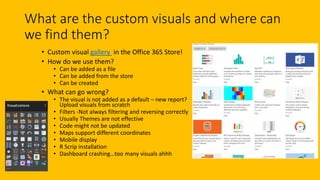
What are the custom visuals and where can
we find them?
• Custom visual gallery in the Office 365 Store!
• How do we use them?
• Can be added as a file
• Can be added from the store
• Can be created
• What can go wrong?
• The visual is not added as a default – new report?
Upload visuals from scratch
• Filters -Not always filtering and reversing correctly
• Usually Themes are not effective
• Code might not be updated
• Maps support different coordinates
• Mobile display
• R Scrip installation
• Dashboard crashing…too many visuals ahhh
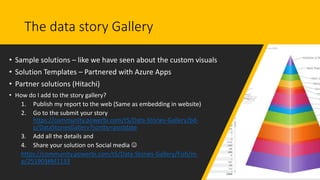
The data story Gallery
• Sample solutions – like we have seen about the custom visuals
• Solution Templates – Partnered with Azure Apps
• Partner solutions (Hitachi)
• How do I add to the story gallery?
1. Publish my report to the web (Same as embedding in website)
2. Go to the submit your story
https://community.powerbi.com/t5/Data-Stories-Gallery/bd-
p/DataStoriesGallery?sortby=postdate
3. Add all the details and
4. Share your solution on Social media 
https://community.powerbi.com/t5/Data-Stories-Gallery/Fish/m-
p/251903#M1133
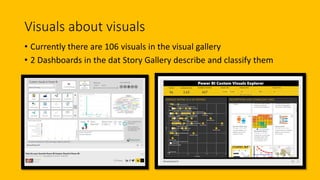
Visuals about visuals
• Currently there are 106 visuals in the visual gallery
• 2 Dashboards in the dat Story Gallery describe and classify them
The power of …security…
A closer look…
• Closer look at visuals about visuals
• Finding the Custom Visuals Gallery
• Finding the Data Stories Gallery
• Fish Data Story
• Anime Rating data story – the ribbon looks great in pink!
Data Story Gallery current Limitations
• Once submitted…can’t be edited or removed
• The datasets are not always refreshed
• If you don’t upload the pbix file…users cannot really access it
• Mobile, only downloading, adding than browsing
• R scripted visuals are currently not supports
I believe all that is very temporary and will be fixed soon
Demo – Comparing the visuals
• Sales Dashboard and custom visuals for
• Time
• Pie
• Heatmap
• Scatter
• Anime Dashboard and custom visuals for
• Slicers
• Cluster
• Summary
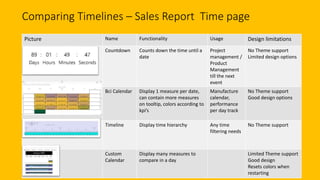
Comparing Timelines – Sales Report Time page
Picture Name Functionality Usage Design limitations
Countdown Counts down the time until a
date
Project
management /
Product
Management
till the next
event
No Theme support
Limited design options
Bci Calendar Display 1 measure per date,
can contain more measures
on tooltip, colors according to
kpi’s
Manufacture
calendar,
performance
per day track
No Theme support
Good design options
Timeline Display time hierarchy Any time
filtering needs
No Theme support
Custom
Calendar
Display many measures to
compare in a day
Limited Theme support
Good design
Resets colors when
restarting
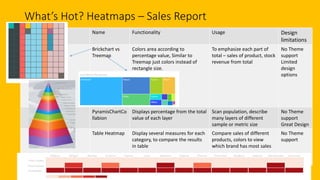
What’s Hot? Heatmaps – Sales Report
Picture Name Functionality Usage Design
limitations
Brickchart vs
Treemap
Colors area according to
percentage value, Similar to
Treemap just colors instead of
rectangle size.
To emphasize each part of
total – sales of product, stock
revenue from total
No Theme
support
Limited
design
options
PyramisChartCo
llabion
Displays percentage from the total
value of each layer
Scan population, describe
many layers of different
sample or metric size
No Theme
support
Great Design
Table Heatmap Display several measures for each
category, to compare the results
in table
Compare sales of different
products, colors to view
which brand has most sales
No Theme
support
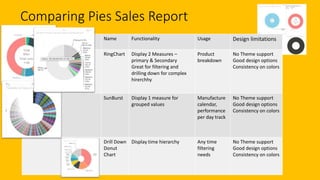
Comparing Pies Sales Report
Picture Name Functionality Usage Design limitations
RingChart Display 2 Measures –
primary & Secondary
Great for filtering and
drilling down for complex
hirerchhy
Product
breakdown
No Theme support
Good design options
Consistency on colors
SunBurst Display 1 measure for
grouped values
Manufacture
calendar,
performance
per day track
No Theme support
Good design options
Consistency on colors
Drill Down
Donut
Chart
Display time hierarchy Any time
filtering
needs
No Theme support
Good design options
Consistency on colors
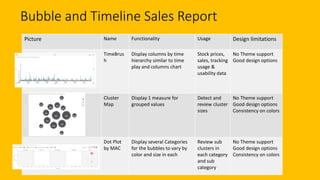
Bubble and Timeline Sales Report
Picture Name Functionality Usage Design limitations
TimeBrus
h
Display columns by time
hierarchy similar to time
play and columns chart
Stock prices,
sales, tracking
usage &
usability data
No Theme support
Good design options
Cluster
Map
Display 1 measure for
grouped values
Detect and
review cluster
sizes
No Theme support
Good design options
Consistency on colors
Dot Plot
by MAC
Display several Categories
for the bubbles to vary by
color and size in each
Review sub
clusters in
each category
and sub
category
No Theme support
Good design options
Consistency on colors
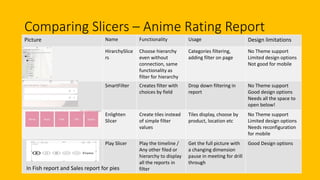
Comparing Slicers – Anime Rating Report
Picture Name Functionality Usage Design limitations
HirarchySlice
rs
Choose hierarchy
even without
connection, same
functionality as
filter for hierarchy
Categories filtering,
adding filter on page
No Theme support
Limited design options
Not good for mobile
SmartFilter Creates filter with
choices by field
Drop down filtering in
report
No Theme support
Good design options
Needs all the space to
open below!
Enlighten
Slicer
Create tiles instead
of simple filter
values
Tiles display, choose by
product, location etc
No Theme support
Limited design options
Needs reconfiguration
for mobile
Play Slicer Play the timeline /
Any other filed or
hierarchy to display
all the reports in
filter
Get the full picture with
a changing dimension
pause in meeting for drill
through
Good Design options
In Fish report and Sales report for pies
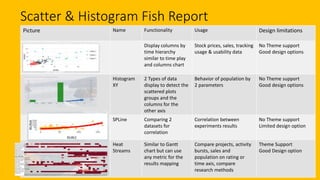
Scatter & Histogram Fish Report
Picture Name Functionality Usage Design limitations
Display columns by
time hierarchy
similar to time play
and columns chart
Stock prices, sales, tracking
usage & usability data
No Theme support
Good design options
Histogram
XY
2 Types of data
display to detect the
scattered plots
groups and the
columns for the
other axis
Behavior of population by
2 parameters
No Theme support
Good design options
SPLine Comparing 2
datasets for
correlation
Correlation between
experiments results
No Theme support
Limited design option
Heat
Streams
Similar to Gantt
chart but can use
any metric for the
results mapping
Compare projects, activity
bursts, sales and
population on rating or
time axis, compare
research methods
Theme Support
Good Design option
How to build my own?
• PowerBI custom visual designer has retired.
• There is a whole repository in GitHub that has the visuals library
https://github.com/Microsoft/PowerBI-visuals
• A readme file there and you can install VS and try to implement
• The user binds data from any of the sources to the visualization
• Can build with a specific .json data
• There are built in tools (the color menus etc.) that help
• Visualization can cross filter and highlight – visuals that meet the users needs API
is exposed
• Integration with data and formatting properties
• Fork the repo use gulp to build it – JS with D3
• Write the visualizations in type script and allows to build unit tests
Where can I get the
data for all of this?
• I have promised free data sets so…
• This is the key to all the datasets:
https://www.dataquest.io/blog/free-datasets-for-
projects/
• Kaggle datasets : https://www.kaggle.com/datasets
• Google Cloud Platform
https://cloud.google.com/bigquery/public-data/
• WebEx- Microsoft Data Analysis program contains the
Sales data
• The government – Any Government
• publish free data
• The Great Britain Fish survey in the ministry of
agriculture – csv file,
• Elections is BC - can be connected as html,
• it’s free!
Summary – did we really get here?
• We have scanned 20 or so custom visuals…that’s like 20 fish in a sea!
• Visuals are great! Try to use and reuse
• Add to existing missing functionalities
• Theme
• Drill Down
• Navigation
• Performance…
• There is so much more to explore…
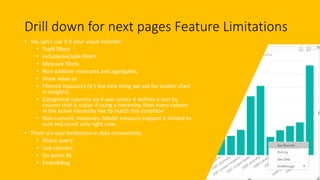
Drill down for next pages Feature Limitations
• You can’t use it if your visual includes:
• TopN filters
• Include/exclude filters
• Measure filters
• Non-additive measures and aggregates
• Show value as
• Filtered measures (it’s the new thing we use for scatter chart
in insights)
• Categorical columns on X-axis unless it defines a sort by
column that is scalar. If using a hierarchy, then every column
in the active hierarchy has to match this condition
• Non-numeric measures: Model measure support is limited to
sum and count only right now.
• There are also limitations in data connectivity:
• Direct query
• Live connect
• On-prem RS
• Embedding

Get more Visual Power

  • 1.
    Vancouver PowerBI UserGroup Get the most Visual Power By Yana Berkovich YanaBerkovich.com
  • 2.
    Who am I? DataPlatform MVP, BI Consultant, entrepreneur, Product Manager & Office 365 expert User group activist  Working with several clients on BI and O365 projects, looking for new opportunties Experimenting with O365 Will happily share my insights! https://www.linkedin.com/in/yanaberkovich http://yanaberkovich.com @Yana_Berkovich
  • 3.
    What am Ihere to talk about? • Latest & Greatest released in September • Intro to custom visuals • Visuals about visuals • Let’s check some visuals • Advantages / Disadvantages • How & Why should I create a custom visual?
  • 4.
    Latest and Greatestin September (Release link) • Ribbon • Similar to the columns stack but pretty • Theme • Colors • Fonts • Text Size • Data Labels control (not for the custom visuals) • Report Theme Generator for the UI Designers LINK • Theme creation for the color match challenged LINK (Thank you Chuck!!!) • Drill down • Add drill down column and the pages accordingly • Timeline Storytelling
  • 5.
    Data Storytelling –Time Line by Microsoft • Timeline Storyteller is an expressive visual storytelling environment for presenting timelines. • You can use Timeline Storyteller to present different aspects of your data using a palette of timeline representations, scales, and layouts, as well as controls for filtering, highlighting, and annotation • Combine pictures in the story • The by far most pretty custom visual is the timeline storyteller, information can be found here: LINK • There is a Timeline Storyteller Contests Sep 5-18 LINK • https://timelinesrevisited.github.io/
  • 6.
    What are thecustom visuals and where can we find them? • Custom visual gallery in the Office 365 Store! • How do we use them? • Can be added as a file • Can be added from the store • Can be created • What can go wrong? • The visual is not added as a default – new report? Upload visuals from scratch • Filters -Not always filtering and reversing correctly • Usually Themes are not effective • Code might not be updated • Maps support different coordinates • Mobile display • R Scrip installation • Dashboard crashing…too many visuals ahhh
  • 7.
    The data storyGallery • Sample solutions – like we have seen about the custom visuals • Solution Templates – Partnered with Azure Apps • Partner solutions (Hitachi) • How do I add to the story gallery? 1. Publish my report to the web (Same as embedding in website) 2. Go to the submit your story https://community.powerbi.com/t5/Data-Stories-Gallery/bd- p/DataStoriesGallery?sortby=postdate 3. Add all the details and 4. Share your solution on Social media  https://community.powerbi.com/t5/Data-Stories-Gallery/Fish/m- p/251903#M1133
  • 8.
    Visuals about visuals •Currently there are 106 visuals in the visual gallery • 2 Dashboards in the dat Story Gallery describe and classify them
  • 9.
    The power of…security…
  • 10.
    A closer look… •Closer look at visuals about visuals • Finding the Custom Visuals Gallery • Finding the Data Stories Gallery • Fish Data Story • Anime Rating data story – the ribbon looks great in pink!
  • 11.
    Data Story Gallerycurrent Limitations • Once submitted…can’t be edited or removed • The datasets are not always refreshed • If you don’t upload the pbix file…users cannot really access it • Mobile, only downloading, adding than browsing • R scripted visuals are currently not supports I believe all that is very temporary and will be fixed soon
  • 12.
    Demo – Comparingthe visuals • Sales Dashboard and custom visuals for • Time • Pie • Heatmap • Scatter • Anime Dashboard and custom visuals for • Slicers • Cluster • Summary
  • 13.
    Comparing Timelines –Sales Report Time page Picture Name Functionality Usage Design limitations Countdown Counts down the time until a date Project management / Product Management till the next event No Theme support Limited design options Bci Calendar Display 1 measure per date, can contain more measures on tooltip, colors according to kpi’s Manufacture calendar, performance per day track No Theme support Good design options Timeline Display time hierarchy Any time filtering needs No Theme support Custom Calendar Display many measures to compare in a day Limited Theme support Good design Resets colors when restarting
  • 14.
    What’s Hot? Heatmaps– Sales Report Picture Name Functionality Usage Design limitations Brickchart vs Treemap Colors area according to percentage value, Similar to Treemap just colors instead of rectangle size. To emphasize each part of total – sales of product, stock revenue from total No Theme support Limited design options PyramisChartCo llabion Displays percentage from the total value of each layer Scan population, describe many layers of different sample or metric size No Theme support Great Design Table Heatmap Display several measures for each category, to compare the results in table Compare sales of different products, colors to view which brand has most sales No Theme support
  • 15.
    Comparing Pies SalesReport Picture Name Functionality Usage Design limitations RingChart Display 2 Measures – primary & Secondary Great for filtering and drilling down for complex hirerchhy Product breakdown No Theme support Good design options Consistency on colors SunBurst Display 1 measure for grouped values Manufacture calendar, performance per day track No Theme support Good design options Consistency on colors Drill Down Donut Chart Display time hierarchy Any time filtering needs No Theme support Good design options Consistency on colors
  • 16.
    Bubble and TimelineSales Report Picture Name Functionality Usage Design limitations TimeBrus h Display columns by time hierarchy similar to time play and columns chart Stock prices, sales, tracking usage & usability data No Theme support Good design options Cluster Map Display 1 measure for grouped values Detect and review cluster sizes No Theme support Good design options Consistency on colors Dot Plot by MAC Display several Categories for the bubbles to vary by color and size in each Review sub clusters in each category and sub category No Theme support Good design options Consistency on colors
  • 17.
    Comparing Slicers –Anime Rating Report Picture Name Functionality Usage Design limitations HirarchySlice rs Choose hierarchy even without connection, same functionality as filter for hierarchy Categories filtering, adding filter on page No Theme support Limited design options Not good for mobile SmartFilter Creates filter with choices by field Drop down filtering in report No Theme support Good design options Needs all the space to open below! Enlighten Slicer Create tiles instead of simple filter values Tiles display, choose by product, location etc No Theme support Limited design options Needs reconfiguration for mobile Play Slicer Play the timeline / Any other filed or hierarchy to display all the reports in filter Get the full picture with a changing dimension pause in meeting for drill through Good Design options In Fish report and Sales report for pies
  • 18.
    Scatter & HistogramFish Report Picture Name Functionality Usage Design limitations Display columns by time hierarchy similar to time play and columns chart Stock prices, sales, tracking usage & usability data No Theme support Good design options Histogram XY 2 Types of data display to detect the scattered plots groups and the columns for the other axis Behavior of population by 2 parameters No Theme support Good design options SPLine Comparing 2 datasets for correlation Correlation between experiments results No Theme support Limited design option Heat Streams Similar to Gantt chart but can use any metric for the results mapping Compare projects, activity bursts, sales and population on rating or time axis, compare research methods Theme Support Good Design option
  • 19.
    How to buildmy own? • PowerBI custom visual designer has retired. • There is a whole repository in GitHub that has the visuals library https://github.com/Microsoft/PowerBI-visuals • A readme file there and you can install VS and try to implement • The user binds data from any of the sources to the visualization • Can build with a specific .json data • There are built in tools (the color menus etc.) that help • Visualization can cross filter and highlight – visuals that meet the users needs API is exposed • Integration with data and formatting properties • Fork the repo use gulp to build it – JS with D3 • Write the visualizations in type script and allows to build unit tests
  • 20.
    Where can Iget the data for all of this? • I have promised free data sets so… • This is the key to all the datasets: https://www.dataquest.io/blog/free-datasets-for- projects/ • Kaggle datasets : https://www.kaggle.com/datasets • Google Cloud Platform https://cloud.google.com/bigquery/public-data/ • WebEx- Microsoft Data Analysis program contains the Sales data • The government – Any Government • publish free data • The Great Britain Fish survey in the ministry of agriculture – csv file, • Elections is BC - can be connected as html, • it’s free!
  • 21.
    Summary – didwe really get here? • We have scanned 20 or so custom visuals…that’s like 20 fish in a sea! • Visuals are great! Try to use and reuse • Add to existing missing functionalities • Theme • Drill Down • Navigation • Performance… • There is so much more to explore…
  • 22.
    Drill down fornext pages Feature Limitations • You can’t use it if your visual includes: • TopN filters • Include/exclude filters • Measure filters • Non-additive measures and aggregates • Show value as • Filtered measures (it’s the new thing we use for scatter chart in insights) • Categorical columns on X-axis unless it defines a sort by column that is scalar. If using a hierarchy, then every column in the active hierarchy has to match this condition • Non-numeric measures: Model measure support is limited to sum and count only right now. • There are also limitations in data connectivity: • Direct query • Live connect • On-prem RS • Embedding