CSCI 101
Advanced Selection
Nested if-else, if-elseif, operators
precedence, while loop
Overview
• if-else statement
• Nested if-else statements
• If-elseif statement
• Operators Precedence
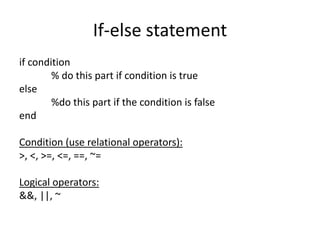
If-else statement
if condition
% do this part if condition is true
else
%do this part if the condition is false
end
Condition (use relational operators):
>, <, >=, <=, ==, ~=
Logical operators:
&&, ||, ~
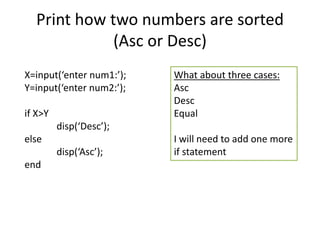
Print how two numbers are sorted
(Asc or Desc)
X=input(‘enter num1:’);
Y=input(‘enter num2:’);
if X>Y
disp(‘Desc’);
else
disp(‘Asc’);
end
What about three cases:
Asc
Desc
Equal
I will need to add one more
if statement
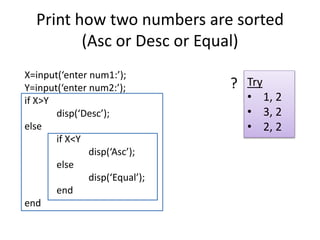
Print how two numbers are sorted
(Asc or Desc or Equal)
X=input(‘enter num1:’);
Y=input(‘enter num2:’);
if X>Y
disp(‘Desc’);
else
if X<Y
disp(‘Asc’);
else
disp(‘Equal’);
end
end
Try
• 1, 2
• 3, 2
• 2, 2
?
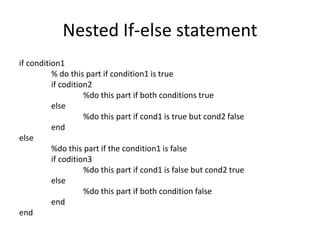
Nested If-else statement
if condition1
% do this part if condition1 is true
if codition2
%do this part if both conditions true
else
%do this part if cond1 is true but cond2 false
end
else
%do this part if the condition1 is false
if codition3
%do this part if cond1 is false but cond2 true
else
%do this part if both condition false
end
end
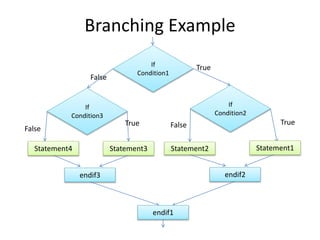
Branching Example
False
TrueIf
Condition1
False True
If
Condition2
False
True
If
Condition3
Statement1Statement2Statement3Statement4
endif2endif3
endif1
Print how three numbers are sorted
(Algorithm)
Given X, Y, Z print if they are sorted Ascending, descending or not
sorted. [1, 2, 3 are sorted Asc 3, 2, 1 Desc 2,1,3 not sorted]
1. Get number1 as X
2. Get number2 as Y
3. Get number3 as Z
4. If X > Y > Z
disp(‘Desc’);
Otherwise
if X<Y<Z
display ‘Asc’
Otherwise
display ‘Not Sorted’
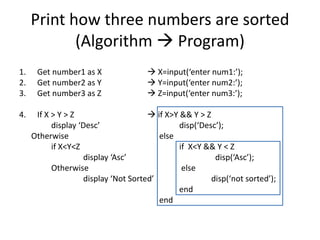
Print how three numbers are sorted
(Algorithm  Program)
1. Get number1 as X  X=input(‘enter num1:’);
2. Get number2 as Y  Y=input(‘enter num2:’);
3. Get number3 as Z  Z=input(‘enter num3:’);
4. If X > Y > Z  if X>Y && Y > Z
display ‘Desc’ disp(‘Desc’);
Otherwise else
if X<Y<Z if X<Y && Y < Z
display ‘Asc’ disp(‘Asc’);
Otherwise else
display ‘Not Sorted’ disp(‘not sorted’);
end
end
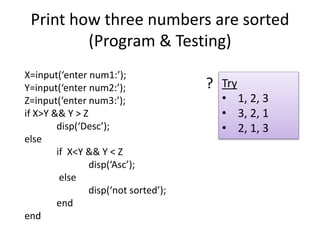
Print how three numbers are sorted
(Program & Testing)
X=input(‘enter num1:’);
Y=input(‘enter num2:’);
Z=input(‘enter num3:’);
if X>Y && Y > Z
disp(‘Desc’);
else
if X<Y && Y < Z
disp(‘Asc’);
else
disp(‘not sorted’);
end
end
Try
• 1, 2, 3
• 3, 2, 1
• 2, 1, 3
?
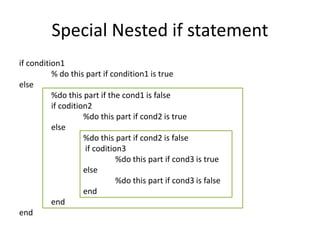
Special Nested if statement
if condition1
% do this part if condition1 is true
else
%do this part if the cond1 is false
if codition2
%do this part if cond2 is true
else
%do this part if cond2 is false
if codition3
%do this part if cond3 is true
else
%do this part if cond3 is false
end
end
end
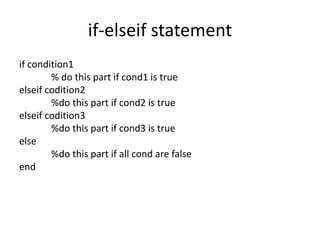
if-elseif statement
if condition1
% do this part if cond1 is true
elseif codition2
%do this part if cond2 is true
elseif codition3
%do this part if cond3 is true
else
%do this part if all cond are false
end
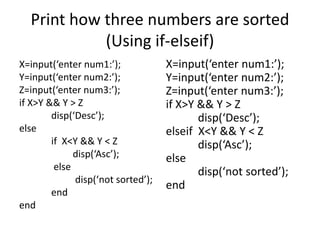
Print how three numbers are sorted
(Using if-elseif)
X=input(‘enter num1:’);
Y=input(‘enter num2:’);
Z=input(‘enter num3:’);
if X>Y && Y > Z
disp(‘Desc’);
elseif X<Y && Y < Z
disp(‘Asc’);
else
disp(‘not sorted’);
end
X=input(‘enter num1:’);
Y=input(‘enter num2:’);
Z=input(‘enter num3:’);
if X>Y && Y > Z
disp(‘Desc’);
else
if X<Y && Y < Z
disp(‘Asc’);
else
disp(‘not sorted’);
end
end
Print how three numbers are sorted
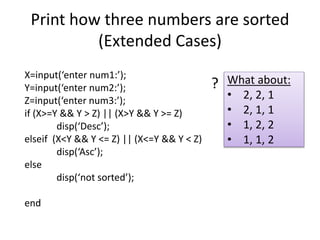
(Extended Cases)
X=input(‘enter num1:’);
Y=input(‘enter num2:’);
Z=input(‘enter num3:’);
if (X>=Y && Y > Z) || (X>Y && Y >= Z)
disp(‘Desc’);
elseif (X<Y && Y <= Z) || (X<=Y && Y < Z)
disp(‘Asc’);
else
disp(‘not sorted’);
end
What about:
• 2, 2, 1
• 2, 1, 1
• 1, 2, 2
• 1, 1, 2
?
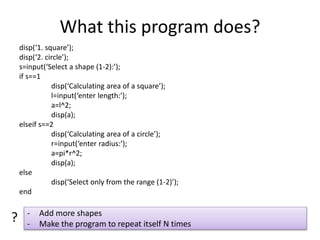
What this program does?
disp(‘1. square’);
disp(‘2. circle’);
s=input(‘Select a shape (1-2):’);
if s==1
disp(‘Calculating area of a square’);
l=input(‘enter length:’);
a=l^2;
disp(a);
elseif s==2
disp(‘Calculating area of a circle’);
r=input(‘enter radius:’);
a=pi*r^2;
disp(a);
else
disp(‘Select only from the range (1-2)’);
end
- Add more shapes
- Make the program to repeat itself N times
?
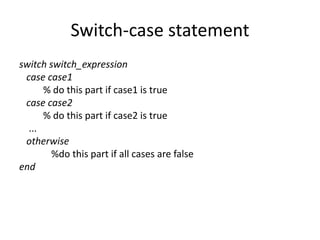
Switch-case statement
switch switch_expression
case case1
% do this part if case1 is true
case case2
% do this part if case2 is true
...
otherwise
%do this part if all cases are false
end
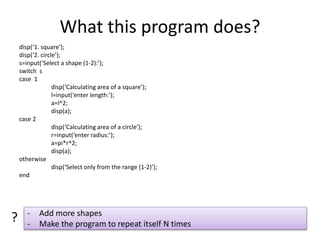
What this program does?
disp(‘1. square’);
disp(‘2. circle’);
s=input(‘Select a shape (1-2):’);
switch s
case 1
disp(‘Calculating area of a square’);
l=input(‘enter length:’);
a=l^2;
disp(a);
case 2
disp(‘Calculating area of a circle’);
r=input(‘enter radius:’);
a=pi*r^2;
disp(a);
otherwise
disp(‘Select only from the range (1-2)’);
end
- Add more shapes
- Make the program to repeat itself N times
?
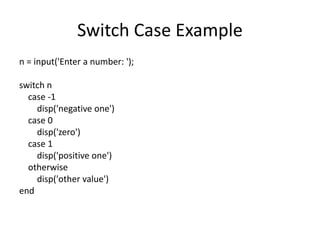
Switch Case Example
n = input('Enter a number: ');
switch n
case -1
disp('negative one')
case 0
disp('zero')
case 1
disp('positive one')
otherwise
disp('other value')
end
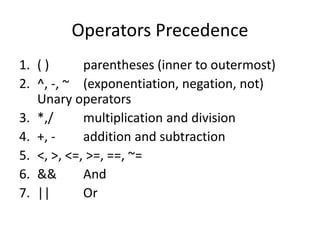
Operators Precedence
1. ( ) parentheses (inner to outermost)
2. ^, -, ~ (exponentiation, negation, not)
Unary operators
3. *,/ multiplication and division
4. +, - addition and subtraction
5. <, >, <=, >=, ==, ~=
6. && And
7. || Or
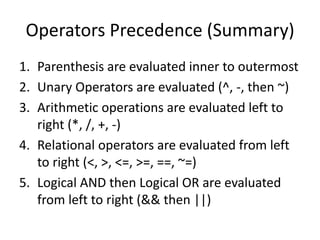
Operators Precedence (Summary)
1. Parenthesis are evaluated inner to outermost
2. Unary Operators are evaluated (^, -, then ~)
3. Arithmetic operations are evaluated left to
right (*, /, +, -)
4. Relational operators are evaluated from left
to right (<, >, <=, >=, ==, ~=)
5. Logical AND then Logical OR are evaluated
from left to right (&& then ||)
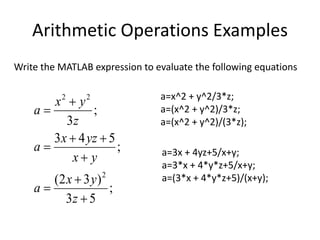
Arithmetic Operations Examples
;
53
)32(
;
543
;
3
2
22








z
yx
a
yx
yzx
a
z
yx
a
Write the MATLAB expression to evaluate the following equations
a=x^2 + y^2/3*z;
a=(x^2 + y^2)/3*z;
a=(x^2 + y^2)/(3*z);
a=3x + 4yz+5/x+y;
a=3*x + 4*y*z+5/x+y;
a=(3*x + 4*y*z+5)/(x+y);
Etter/Ingber
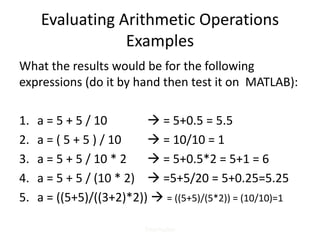
Evaluating Arithmetic Operations
Examples
What the results would be for the following
expressions (do it by hand then test it on MATLAB):
1. a = 5 + 5 / 10  = 5+0.5 = 5.5
2. a = ( 5 + 5 ) / 10  = 10/10 = 1
3. a = 5 + 5 / 10 * 2  = 5+0.5*2 = 5+1 = 6
4. a = 5 + 5 / (10 * 2)  =5+5/20 = 5+0.25=5.25
5. a = ((5+5)/((3+2)*2))  = ((5+5)/(5*2)) = (10/10)=1
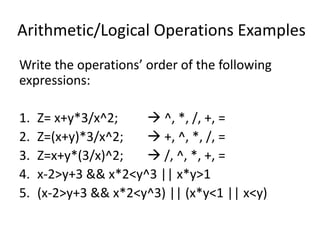
Arithmetic/Logical Operations Examples
Write the operations’ order of the following
expressions:
1. Z= x+y*3/x^2;  ^, *, /, +, =
2. Z=(x+y)*3/x^2;  +, ^, *, /, =
3. Z=x+y*(3/x)^2;  /, ^, *, +, =
4. x-2>y+3 && x*2<y^3 || x*y>1
5. (x-2>y+3 && x*2<y^3) || (x*y<1 || x<y)
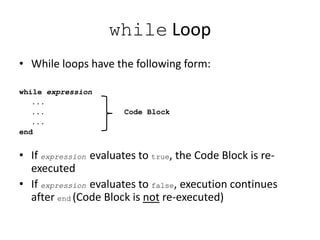
while Loop
• While loops have the following form:
while expression
...
... Code Block
...
end
• If expression evaluates to true, the Code Block is re-
executed
• If expression evaluates to false, execution continues
after end (Code Block is not re-executed)
X=input(‘enter num1:’);
Y=input(‘enter num2:’);
if X>Y
disp(X);
else
disp(Y);
end
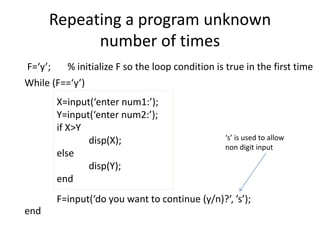
Repeating a program unknown
number of times
F=input(‘do you want to continue (y/n)?’, ’s’);
While (F==‘y’)
end
F=‘y’; % initialize F so the loop condition is true in the first time
‘s’ is used to allow
non digit input

Csci101 lect04 advanced_selection

  • 1.
    CSCI 101 Advanced Selection Nestedif-else, if-elseif, operators precedence, while loop
  • 2.
    Overview • if-else statement •Nested if-else statements • If-elseif statement • Operators Precedence
  • 3.
    If-else statement if condition %do this part if condition is true else %do this part if the condition is false end Condition (use relational operators): >, <, >=, <=, ==, ~= Logical operators: &&, ||, ~
  • 4.
    Print how twonumbers are sorted (Asc or Desc) X=input(‘enter num1:’); Y=input(‘enter num2:’); if X>Y disp(‘Desc’); else disp(‘Asc’); end What about three cases: Asc Desc Equal I will need to add one more if statement
  • 5.
    Print how twonumbers are sorted (Asc or Desc or Equal) X=input(‘enter num1:’); Y=input(‘enter num2:’); if X>Y disp(‘Desc’); else if X<Y disp(‘Asc’); else disp(‘Equal’); end end Try • 1, 2 • 3, 2 • 2, 2 ?
  • 6.
    Nested If-else statement ifcondition1 % do this part if condition1 is true if codition2 %do this part if both conditions true else %do this part if cond1 is true but cond2 false end else %do this part if the condition1 is false if codition3 %do this part if cond1 is false but cond2 true else %do this part if both condition false end end
  • 7.
  • 8.
    Print how threenumbers are sorted (Algorithm) Given X, Y, Z print if they are sorted Ascending, descending or not sorted. [1, 2, 3 are sorted Asc 3, 2, 1 Desc 2,1,3 not sorted] 1. Get number1 as X 2. Get number2 as Y 3. Get number3 as Z 4. If X > Y > Z disp(‘Desc’); Otherwise if X<Y<Z display ‘Asc’ Otherwise display ‘Not Sorted’
  • 9.
    Print how threenumbers are sorted (Algorithm  Program) 1. Get number1 as X  X=input(‘enter num1:’); 2. Get number2 as Y  Y=input(‘enter num2:’); 3. Get number3 as Z  Z=input(‘enter num3:’); 4. If X > Y > Z  if X>Y && Y > Z display ‘Desc’ disp(‘Desc’); Otherwise else if X<Y<Z if X<Y && Y < Z display ‘Asc’ disp(‘Asc’); Otherwise else display ‘Not Sorted’ disp(‘not sorted’); end end
  • 10.
    Print how threenumbers are sorted (Program & Testing) X=input(‘enter num1:’); Y=input(‘enter num2:’); Z=input(‘enter num3:’); if X>Y && Y > Z disp(‘Desc’); else if X<Y && Y < Z disp(‘Asc’); else disp(‘not sorted’); end end Try • 1, 2, 3 • 3, 2, 1 • 2, 1, 3 ?
  • 11.
    Special Nested ifstatement if condition1 % do this part if condition1 is true else %do this part if the cond1 is false if codition2 %do this part if cond2 is true else %do this part if cond2 is false if codition3 %do this part if cond3 is true else %do this part if cond3 is false end end end
  • 12.
    if-elseif statement if condition1 %do this part if cond1 is true elseif codition2 %do this part if cond2 is true elseif codition3 %do this part if cond3 is true else %do this part if all cond are false end
  • 13.
    Print how threenumbers are sorted (Using if-elseif) X=input(‘enter num1:’); Y=input(‘enter num2:’); Z=input(‘enter num3:’); if X>Y && Y > Z disp(‘Desc’); elseif X<Y && Y < Z disp(‘Asc’); else disp(‘not sorted’); end X=input(‘enter num1:’); Y=input(‘enter num2:’); Z=input(‘enter num3:’); if X>Y && Y > Z disp(‘Desc’); else if X<Y && Y < Z disp(‘Asc’); else disp(‘not sorted’); end end
  • 14.
    Print how threenumbers are sorted (Extended Cases) X=input(‘enter num1:’); Y=input(‘enter num2:’); Z=input(‘enter num3:’); if (X>=Y && Y > Z) || (X>Y && Y >= Z) disp(‘Desc’); elseif (X<Y && Y <= Z) || (X<=Y && Y < Z) disp(‘Asc’); else disp(‘not sorted’); end What about: • 2, 2, 1 • 2, 1, 1 • 1, 2, 2 • 1, 1, 2 ?
  • 15.
    What this programdoes? disp(‘1. square’); disp(‘2. circle’); s=input(‘Select a shape (1-2):’); if s==1 disp(‘Calculating area of a square’); l=input(‘enter length:’); a=l^2; disp(a); elseif s==2 disp(‘Calculating area of a circle’); r=input(‘enter radius:’); a=pi*r^2; disp(a); else disp(‘Select only from the range (1-2)’); end - Add more shapes - Make the program to repeat itself N times ?
  • 16.
    Switch-case statement switch switch_expression casecase1 % do this part if case1 is true case case2 % do this part if case2 is true ... otherwise %do this part if all cases are false end
  • 17.
    What this programdoes? disp(‘1. square’); disp(‘2. circle’); s=input(‘Select a shape (1-2):’); switch s case 1 disp(‘Calculating area of a square’); l=input(‘enter length:’); a=l^2; disp(a); case 2 disp(‘Calculating area of a circle’); r=input(‘enter radius:’); a=pi*r^2; disp(a); otherwise disp(‘Select only from the range (1-2)’); end - Add more shapes - Make the program to repeat itself N times ?
  • 18.
    Switch Case Example n= input('Enter a number: '); switch n case -1 disp('negative one') case 0 disp('zero') case 1 disp('positive one') otherwise disp('other value') end
  • 19.
    Operators Precedence 1. () parentheses (inner to outermost) 2. ^, -, ~ (exponentiation, negation, not) Unary operators 3. *,/ multiplication and division 4. +, - addition and subtraction 5. <, >, <=, >=, ==, ~= 6. && And 7. || Or
  • 20.
    Operators Precedence (Summary) 1.Parenthesis are evaluated inner to outermost 2. Unary Operators are evaluated (^, -, then ~) 3. Arithmetic operations are evaluated left to right (*, /, +, -) 4. Relational operators are evaluated from left to right (<, >, <=, >=, ==, ~=) 5. Logical AND then Logical OR are evaluated from left to right (&& then ||)
  • 21.
    Arithmetic Operations Examples ; 53 )32( ; 543 ; 3 2 22         z yx a yx yzx a z yx a Writethe MATLAB expression to evaluate the following equations a=x^2 + y^2/3*z; a=(x^2 + y^2)/3*z; a=(x^2 + y^2)/(3*z); a=3x + 4yz+5/x+y; a=3*x + 4*y*z+5/x+y; a=(3*x + 4*y*z+5)/(x+y);
  • 22.
    Etter/Ingber Evaluating Arithmetic Operations Examples Whatthe results would be for the following expressions (do it by hand then test it on MATLAB): 1. a = 5 + 5 / 10  = 5+0.5 = 5.5 2. a = ( 5 + 5 ) / 10  = 10/10 = 1 3. a = 5 + 5 / 10 * 2  = 5+0.5*2 = 5+1 = 6 4. a = 5 + 5 / (10 * 2)  =5+5/20 = 5+0.25=5.25 5. a = ((5+5)/((3+2)*2))  = ((5+5)/(5*2)) = (10/10)=1
  • 23.
    Arithmetic/Logical Operations Examples Writethe operations’ order of the following expressions: 1. Z= x+y*3/x^2;  ^, *, /, +, = 2. Z=(x+y)*3/x^2;  +, ^, *, /, = 3. Z=x+y*(3/x)^2;  /, ^, *, +, = 4. x-2>y+3 && x*2<y^3 || x*y>1 5. (x-2>y+3 && x*2<y^3) || (x*y<1 || x<y)
  • 24.
    while Loop • Whileloops have the following form: while expression ... ... Code Block ... end • If expression evaluates to true, the Code Block is re- executed • If expression evaluates to false, execution continues after end (Code Block is not re-executed)
  • 25.
    X=input(‘enter num1:’); Y=input(‘enter num2:’); ifX>Y disp(X); else disp(Y); end Repeating a program unknown number of times F=input(‘do you want to continue (y/n)?’, ’s’); While (F==‘y’) end F=‘y’; % initialize F so the loop condition is true in the first time ‘s’ is used to allow non digit input