Tutorial 1 Browser Basics
Objectives Learn about the Internet and the World Wide Web Learn how Web browser software displays Web pages Learn how Web page addresses are constructed Become familiar with Web browsers and the main functions found in this type of software New Perspectives on the Internet, 8 th  Edition
Objectives Configure and use the Microsoft Internet Explorer Web browser to navigate the Web Save and organize Web addresses using Internet Explorer Save Web page text and graphics using Internet Explorer New Perspectives on the Internet, 8 th  Edition
Objectives Configure and use the Mozilla Firefox Web browser to navigate the Web Save and organize Web addresses using Firefox Save Web page text and graphics using Firefox New Perspectives on the Internet, 8 th  Edition
Understanding the Internet and the World Wide Web Computers can be connected to each other in a configuration called a  network If the computers are near each other (usually in the same building), the network is called a  local area network  or a  LAN Networked computers that are not located near each other form a  wide area network , or a  WAN When networks are connected to each other, the system is called an  interconnected network  or  internet  (with a lowercase “i”) New Perspectives on the Internet, 8 th  Edition
Understanding the Internet and the World Wide Web The  Internet  (with an uppercase “i”) is a specific interconnected network that connects computers all over the world using a common set of interconnection standards The part of the Internet known as the  World Wide Web  (or the  Web ) is a subset of the computers on the Internet that use software to make their contents easily accessible to each other The Web is a collection of files that reside on computers, called  Web servers , that are located all over the world and are connected to each other through the Internet New Perspectives on the Internet, 8 th  Edition
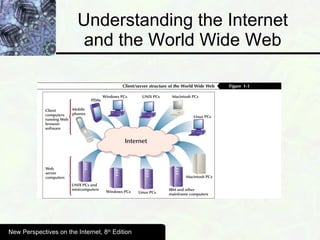
Understanding the Internet and the World Wide Web When you use your Internet connection to become part of the Web, your computer becomes a  Web client  in a worldwide client/server network A  Web browser  is the software that you run on your computer to make it work as a Web client New Perspectives on the Internet, 8 th  Edition
Understanding the Internet and the World Wide Web New Perspectives on the Internet, 8 th  Edition
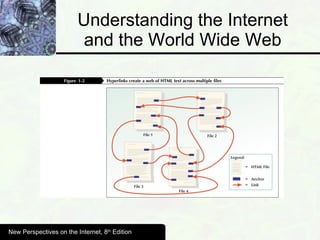
Understanding the Internet and the World Wide Web The standard used on the Web is  Hypertext Markup Language (HTML) Anchor tags in HTML documents create  hypertext links , or  hyperlinks  or  links , which are instructions that point to other HTML documents or to another section of the same document New Perspectives on the Internet, 8 th  Edition
Understanding the Internet and the World Wide Web New Perspectives on the Internet, 8 th  Edition
Understanding the Internet and the World Wide Web When a Web browser displays an HTML document, it is often referred to as a  Web page Hyperlinks that connect to files that contain pictures, graphics, and media objects are often are called  hypermedia links New Perspectives on the Internet, 8 th  Edition
Web Site Organization A collection of linked Web pages that has a common theme or focus is called a  Web site The main page that all of the other pages on a particular Web site are organized around and link back to is called the site’s  home page Home pages that meet the second or third definitions are sometimes called  start pages New Perspectives on the Internet, 8 th  Edition
Addresses on the Web Each computer on the Internet has a unique identification number, called an  IP (Internet Protocol) address A  domain name  is a unique name associated with a specific IP address by a program that runs on an Internet host computer The program that coordinates the IP addresses and domain names for all computers attached to it is called  DNS (domain name system) software , and the host computer that runs this software is called a  domain name server New Perspectives on the Internet, 8 th  Edition
Addresses on the Web The last part of a domain name is called its  top-level domain (TLD) Since 1998, the  Internet Corporation for Assigned Names and Numbers (ICANN)  has had responsibility for managing domain names New Perspectives on the Internet, 8 th  Edition
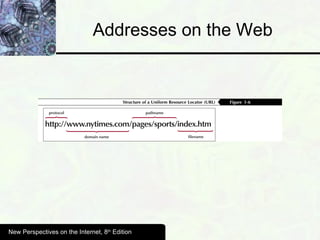
Addresses on the Web A  Uniform Resource Locator (URL)  is a four-part addressing scheme that tells the Web browser: The transfer protocol to use when transporting the file The domain name of the computer on which the file resides The pathname of the folder or directory on which the file resides The name of the file New Perspectives on the Internet, 8 th  Edition
Addresses on the Web The  transfer protocol  is the set of rules that the computers use to move files from one computer to another on an internet The most common transfer protocol used on the Internet is the  hypertext transfer protocol (HTTP) Two protocols that you still might see on the Internet are the  file transfer protocol (FTP) , which is indicated in a URL as ftp://, and the  Telnet protocol , which is indicated in a URL as telnet:// New Perspectives on the Internet, 8 th  Edition
Addresses on the Web New Perspectives on the Internet, 8 th  Edition
Main Elements of Web Browsers The two most popular browsers in use today are  Microsoft Internet Explorer  and  Mozilla Firefox New Perspectives on the Internet, 8 th  Edition
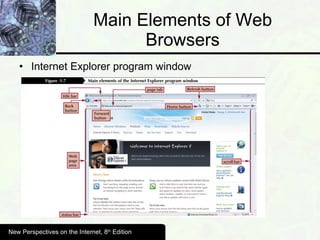
Main Elements of Web Browsers Internet Explorer program window New Perspectives on the Internet, 8 th  Edition
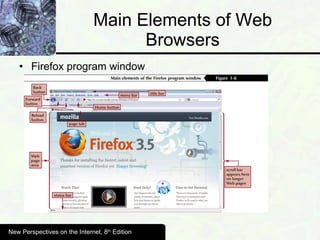
Main Elements of Web Browsers Firefox program window New Perspectives on the Internet, 8 th  Edition
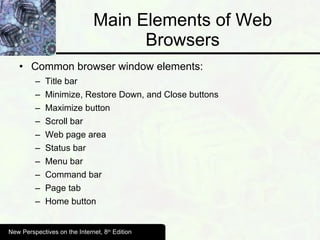
Main Elements of Web Browsers Common browser window elements:  Title bar Minimize, Restore Down, and Close buttons Maximize button Scroll bar Web page area Status bar Menu bar Command bar Page tab Home button New Perspectives on the Internet, 8 th  Edition
Finding Information on the Web Using Search Engines and Web Directories Web search engines  are Web pages that conduct searches of the Web to find the words or expressions that you enter You can use a  Web directory , a Web page that contains a list of Web page categories, such as education or recreation, to narrow the results returned for a particular search New Perspectives on the Internet, 8 th  Edition
Returning to Web Pages Previously Visited In Internet Explorer, you can save the URL of a site you would like to revisit as a  favorite  In Firefox, you can use a  bookmark  to save the URL of a specific page so you can return to it As you click hyperlinks to go to new Web pages, the browser stores the location of each page you visit during a single session in a  history list You click the  Back button  and the  Forward button  in either Internet Explorer or Firefox to move through the history list Clicking the  Refresh button  in Internet Explorer or the Reload button in Firefox loads the same Web page that appears in the browser window again New Perspectives on the Internet, 8 th  Edition
Cookies A  cookie  is a small file that a Web server writes to the disk drive of the client computer (the computer on which the Web browser is running)  Cookies can contain information about the user, such as login names and passwords New Perspectives on the Internet, 8 th  Edition
Other Web Browser Choices Mosaic Netscape Navigator Mozilla Project Gecko engine SeaMonkey Project Opera Chromium Project Google Chrome iRider New Perspectives on the Internet, 8 th  Edition
Starting Microsoft Internet Explorer The status bar at the bottom of the window includes several panels that give you information about Internet Explorer’s operations The menu bar gives you access to list menus that contain all of the menu commands available in Internet Explorer When the window is in  Full Screen , the toolbars and menu bar are no longer visible New Perspectives on the Internet, 8 th  Edition
Entering a URL in the Address Window You can use the  Address window , which is located on the Navigation toolbar, to enter URLs directly into Internet Explorer New Perspectives on the Internet, 8 th  Edition
Navigating Web Pages Using the Mouse The easiest way to move from one Web page to another is to use the mouse to click hyperlinks that the authors of Web pages include in their HTML documents You can also right-click the mouse on the background of a Web page to open a shortcut menu that includes navigation options. New Perspectives on the Internet, 8 th  Edition
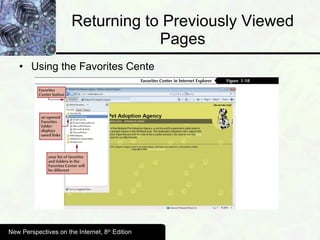
Returning to Previously Viewed Pages Using the Favorites Cente New Perspectives on the Internet, 8 th  Edition
Printing a Web Page Clicking the Print button on the Command bar opens a menu that gives you choices for printing the current Web page, viewing the page as it will appear when printed (Print Preview), or accessing the Page Setup dialog box, which provides options for adjusting the margins, header, footer, and other attributes of the pages you print New Perspectives on the Internet, 8 th  Edition
Checking Web Page Security Encryption  is a way of scrambling and encoding data transmissions that reduces the risk that a person who intercepts the Web page as it travels across the Internet will be able to decode and read the page’s contents A  certification authority  is a company that attests to a Web site’s identity. A Web site that has obtained the attestation of a certificate authority has the right to display information about the certification authority when you load its Web page New Perspectives on the Internet, 8 th  Edition
Private Web Browsing When in  private browsing mode , Internet Explorer does not store History, cookies, or copies of the Web pages you visit New Perspectives on the Internet, 8 th  Edition
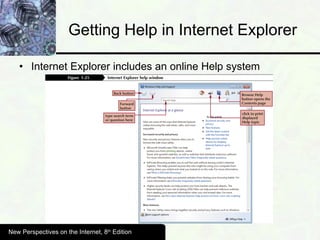
Getting Help in Internet Explorer Internet Explorer includes an online Help system New Perspectives on the Internet, 8 th  Edition
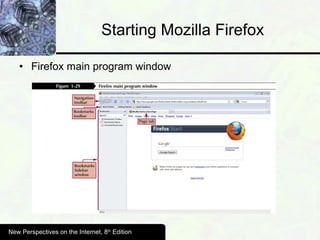
Starting Mozilla Firefox Firefox main program window New Perspectives on the Internet, 8 th  Edition
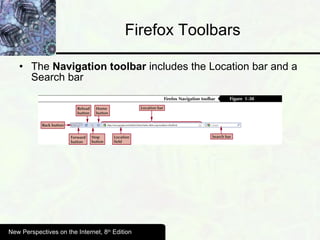
Firefox Toolbars The  Navigation toolbar  includes the Location bar and a Search bar New Perspectives on the Internet, 8 th  Edition
Navigating Web Pages Using the Location Field You can use the Location field to enter URLs directly into Firefox New Perspectives on the Internet, 8 th  Edition
Navigating Web Pages Using the Mouse The easiest way to move from one Web page to another is to use the mouse to click hyperlinks that the authors of Web pages embed in their HTML documents You can also right-click the mouse on the background of a Web page to open a shortcut menu that includes navigation options New Perspectives on the Internet, 8 th  Edition
Returning to Web Pages Previously Visited Bookmarks in Firefox are stored, along with the History list, in the Firefox  Library The History menu commands enable you to move back and forward through a portion of the history list and allow you to choose a specific Web page from the list Firefox stores a copy of every Web page it displays on your computer’s hard drive in a  Temporary Internet Files folder  in the Windows folder New Perspectives on the Internet, 8 th  Edition
Checking Web Page Security Encryption  is a way of scrambling and encoding data transmissions that reduces the risk that a person who intercepts the Web page as it travels across the Internet will be able to decode and read the page’s contents The  Security indicator button  is a small picture of a padlock that appears at the right edge of the status bar at the bottom of the Firefox browser window when a secure Web page is loaded New Perspectives on the Internet, 8 th  Edition
Private Web Browsing When in  private browsing mode , Firefox does not store History, cookies, or copies of the Web pages you visit New Perspectives on the Internet, 8 th  Edition
Summary The Internet and the World Wide Web How Web browser software displays Web pages  How Web page addresses are constructed The main functions of Web browsers Configure and use Microsoft Internet Explorer and Mozilla Firefox Save and organize Web addresses in both browsers Save Web page text and graphics in both browsers New Perspectives on the Internet, 8 th  Edition

CSCI 16 ~ Tutorial 01

  • 1.
  • 2.
    Objectives Learn aboutthe Internet and the World Wide Web Learn how Web browser software displays Web pages Learn how Web page addresses are constructed Become familiar with Web browsers and the main functions found in this type of software New Perspectives on the Internet, 8 th Edition
  • 3.
    Objectives Configure anduse the Microsoft Internet Explorer Web browser to navigate the Web Save and organize Web addresses using Internet Explorer Save Web page text and graphics using Internet Explorer New Perspectives on the Internet, 8 th Edition
  • 4.
    Objectives Configure anduse the Mozilla Firefox Web browser to navigate the Web Save and organize Web addresses using Firefox Save Web page text and graphics using Firefox New Perspectives on the Internet, 8 th Edition
  • 5.
    Understanding the Internetand the World Wide Web Computers can be connected to each other in a configuration called a network If the computers are near each other (usually in the same building), the network is called a local area network or a LAN Networked computers that are not located near each other form a wide area network , or a WAN When networks are connected to each other, the system is called an interconnected network or internet (with a lowercase “i”) New Perspectives on the Internet, 8 th Edition
  • 6.
    Understanding the Internetand the World Wide Web The Internet (with an uppercase “i”) is a specific interconnected network that connects computers all over the world using a common set of interconnection standards The part of the Internet known as the World Wide Web (or the Web ) is a subset of the computers on the Internet that use software to make their contents easily accessible to each other The Web is a collection of files that reside on computers, called Web servers , that are located all over the world and are connected to each other through the Internet New Perspectives on the Internet, 8 th Edition
  • 7.
    Understanding the Internetand the World Wide Web When you use your Internet connection to become part of the Web, your computer becomes a Web client in a worldwide client/server network A Web browser is the software that you run on your computer to make it work as a Web client New Perspectives on the Internet, 8 th Edition
  • 8.
    Understanding the Internetand the World Wide Web New Perspectives on the Internet, 8 th Edition
  • 9.
    Understanding the Internetand the World Wide Web The standard used on the Web is Hypertext Markup Language (HTML) Anchor tags in HTML documents create hypertext links , or hyperlinks or links , which are instructions that point to other HTML documents or to another section of the same document New Perspectives on the Internet, 8 th Edition
  • 10.
    Understanding the Internetand the World Wide Web New Perspectives on the Internet, 8 th Edition
  • 11.
    Understanding the Internetand the World Wide Web When a Web browser displays an HTML document, it is often referred to as a Web page Hyperlinks that connect to files that contain pictures, graphics, and media objects are often are called hypermedia links New Perspectives on the Internet, 8 th Edition
  • 12.
    Web Site OrganizationA collection of linked Web pages that has a common theme or focus is called a Web site The main page that all of the other pages on a particular Web site are organized around and link back to is called the site’s home page Home pages that meet the second or third definitions are sometimes called start pages New Perspectives on the Internet, 8 th Edition
  • 13.
    Addresses on theWeb Each computer on the Internet has a unique identification number, called an IP (Internet Protocol) address A domain name is a unique name associated with a specific IP address by a program that runs on an Internet host computer The program that coordinates the IP addresses and domain names for all computers attached to it is called DNS (domain name system) software , and the host computer that runs this software is called a domain name server New Perspectives on the Internet, 8 th Edition
  • 14.
    Addresses on theWeb The last part of a domain name is called its top-level domain (TLD) Since 1998, the Internet Corporation for Assigned Names and Numbers (ICANN) has had responsibility for managing domain names New Perspectives on the Internet, 8 th Edition
  • 15.
    Addresses on theWeb A Uniform Resource Locator (URL) is a four-part addressing scheme that tells the Web browser: The transfer protocol to use when transporting the file The domain name of the computer on which the file resides The pathname of the folder or directory on which the file resides The name of the file New Perspectives on the Internet, 8 th Edition
  • 16.
    Addresses on theWeb The transfer protocol is the set of rules that the computers use to move files from one computer to another on an internet The most common transfer protocol used on the Internet is the hypertext transfer protocol (HTTP) Two protocols that you still might see on the Internet are the file transfer protocol (FTP) , which is indicated in a URL as ftp://, and the Telnet protocol , which is indicated in a URL as telnet:// New Perspectives on the Internet, 8 th Edition
  • 17.
    Addresses on theWeb New Perspectives on the Internet, 8 th Edition
  • 18.
    Main Elements ofWeb Browsers The two most popular browsers in use today are Microsoft Internet Explorer and Mozilla Firefox New Perspectives on the Internet, 8 th Edition
  • 19.
    Main Elements ofWeb Browsers Internet Explorer program window New Perspectives on the Internet, 8 th Edition
  • 20.
    Main Elements ofWeb Browsers Firefox program window New Perspectives on the Internet, 8 th Edition
  • 21.
    Main Elements ofWeb Browsers Common browser window elements: Title bar Minimize, Restore Down, and Close buttons Maximize button Scroll bar Web page area Status bar Menu bar Command bar Page tab Home button New Perspectives on the Internet, 8 th Edition
  • 22.
    Finding Information onthe Web Using Search Engines and Web Directories Web search engines are Web pages that conduct searches of the Web to find the words or expressions that you enter You can use a Web directory , a Web page that contains a list of Web page categories, such as education or recreation, to narrow the results returned for a particular search New Perspectives on the Internet, 8 th Edition
  • 23.
    Returning to WebPages Previously Visited In Internet Explorer, you can save the URL of a site you would like to revisit as a favorite In Firefox, you can use a bookmark to save the URL of a specific page so you can return to it As you click hyperlinks to go to new Web pages, the browser stores the location of each page you visit during a single session in a history list You click the Back button and the Forward button in either Internet Explorer or Firefox to move through the history list Clicking the Refresh button in Internet Explorer or the Reload button in Firefox loads the same Web page that appears in the browser window again New Perspectives on the Internet, 8 th Edition
  • 24.
    Cookies A cookie is a small file that a Web server writes to the disk drive of the client computer (the computer on which the Web browser is running) Cookies can contain information about the user, such as login names and passwords New Perspectives on the Internet, 8 th Edition
  • 25.
    Other Web BrowserChoices Mosaic Netscape Navigator Mozilla Project Gecko engine SeaMonkey Project Opera Chromium Project Google Chrome iRider New Perspectives on the Internet, 8 th Edition
  • 26.
    Starting Microsoft InternetExplorer The status bar at the bottom of the window includes several panels that give you information about Internet Explorer’s operations The menu bar gives you access to list menus that contain all of the menu commands available in Internet Explorer When the window is in Full Screen , the toolbars and menu bar are no longer visible New Perspectives on the Internet, 8 th Edition
  • 27.
    Entering a URLin the Address Window You can use the Address window , which is located on the Navigation toolbar, to enter URLs directly into Internet Explorer New Perspectives on the Internet, 8 th Edition
  • 28.
    Navigating Web PagesUsing the Mouse The easiest way to move from one Web page to another is to use the mouse to click hyperlinks that the authors of Web pages include in their HTML documents You can also right-click the mouse on the background of a Web page to open a shortcut menu that includes navigation options. New Perspectives on the Internet, 8 th Edition
  • 29.
    Returning to PreviouslyViewed Pages Using the Favorites Cente New Perspectives on the Internet, 8 th Edition
  • 30.
    Printing a WebPage Clicking the Print button on the Command bar opens a menu that gives you choices for printing the current Web page, viewing the page as it will appear when printed (Print Preview), or accessing the Page Setup dialog box, which provides options for adjusting the margins, header, footer, and other attributes of the pages you print New Perspectives on the Internet, 8 th Edition
  • 31.
    Checking Web PageSecurity Encryption is a way of scrambling and encoding data transmissions that reduces the risk that a person who intercepts the Web page as it travels across the Internet will be able to decode and read the page’s contents A certification authority is a company that attests to a Web site’s identity. A Web site that has obtained the attestation of a certificate authority has the right to display information about the certification authority when you load its Web page New Perspectives on the Internet, 8 th Edition
  • 32.
    Private Web BrowsingWhen in private browsing mode , Internet Explorer does not store History, cookies, or copies of the Web pages you visit New Perspectives on the Internet, 8 th Edition
  • 33.
    Getting Help inInternet Explorer Internet Explorer includes an online Help system New Perspectives on the Internet, 8 th Edition
  • 34.
    Starting Mozilla FirefoxFirefox main program window New Perspectives on the Internet, 8 th Edition
  • 35.
    Firefox Toolbars The Navigation toolbar includes the Location bar and a Search bar New Perspectives on the Internet, 8 th Edition
  • 36.
    Navigating Web PagesUsing the Location Field You can use the Location field to enter URLs directly into Firefox New Perspectives on the Internet, 8 th Edition
  • 37.
    Navigating Web PagesUsing the Mouse The easiest way to move from one Web page to another is to use the mouse to click hyperlinks that the authors of Web pages embed in their HTML documents You can also right-click the mouse on the background of a Web page to open a shortcut menu that includes navigation options New Perspectives on the Internet, 8 th Edition
  • 38.
    Returning to WebPages Previously Visited Bookmarks in Firefox are stored, along with the History list, in the Firefox Library The History menu commands enable you to move back and forward through a portion of the history list and allow you to choose a specific Web page from the list Firefox stores a copy of every Web page it displays on your computer’s hard drive in a Temporary Internet Files folder in the Windows folder New Perspectives on the Internet, 8 th Edition
  • 39.
    Checking Web PageSecurity Encryption is a way of scrambling and encoding data transmissions that reduces the risk that a person who intercepts the Web page as it travels across the Internet will be able to decode and read the page’s contents The Security indicator button is a small picture of a padlock that appears at the right edge of the status bar at the bottom of the Firefox browser window when a secure Web page is loaded New Perspectives on the Internet, 8 th Edition
  • 40.
    Private Web BrowsingWhen in private browsing mode , Firefox does not store History, cookies, or copies of the Web pages you visit New Perspectives on the Internet, 8 th Edition
  • 41.
    Summary The Internetand the World Wide Web How Web browser software displays Web pages How Web page addresses are constructed The main functions of Web browsers Configure and use Microsoft Internet Explorer and Mozilla Firefox Save and organize Web addresses in both browsers Save Web page text and graphics in both browsers New Perspectives on the Internet, 8 th Edition