Introduction to the Internet and the World Wide WebHeather LambertKingston Springs Public LibraryJanuary 2010
PurposeDefine the Internet Define the World Wide Web Learn how to use a web browser Surf the web with a search engineEvaluate a web page
Internet DefinedThe Internet has been described as a huge "network of networks”. A network is a number of computers that are connected so that they may communicate with one another and share data. The Internet is made up of millions of local, regional, national and international computer networks, including home computers.http://www.mpl.org/file/computer_curriculums.htm#internet
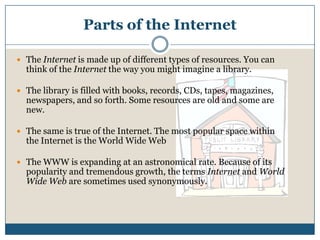
Parts of the InternetThe Internet is made up of different types of resources. You can think of the Internet the way you might imagine a library. The library is filled with books, records, CDs, tapes, magazines, newspapers, and so forth. Some resources are old and some are new. The same is true of the Internet. The most popular space within the Internet is the World Wide WebThe WWW is expanding at an astronomical rate. Because of its popularity and tremendous growth, the terms Internet and World Wide Web are sometimes used synonymously.
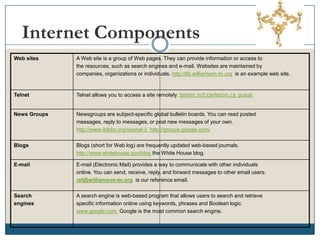
Internet Components
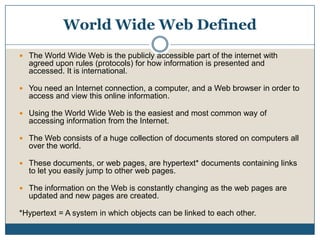
World Wide Web DefinedThe World Wide Web is the publicly accessible part of the internet with agreed upon rules (protocols) for how information is presented and accessed. It is international.You need an Internet connection, a computer, and a Web browser in order to access and view this online information. Using the World Wide Web is the easiest and most common way of accessing information from the Internet. The Web consists of a huge collection of documents stored on computers all over the world. These documents, or web pages, are hypertext* documents containing links to let you easily jump to other web pages. The information on the Web is constantly changing as the web pages are updated and new pages are created.*Hypertext = A system in which objects can be linked to each other.
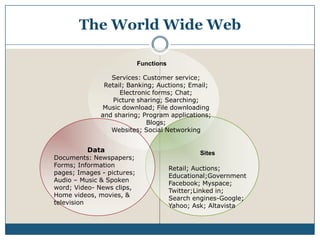
The World Wide WebServices: Customer service;Retail; Banking; Auctions; Email;Electronic forms; Chat;             Picture sharing; Searching; Music download; File downloading and sharing; Program applications; Blogs;Websites; Social Networking DataDocuments: Newspapers; Forms; Information pages; Images - pictures; Audio – Music & Spoken word; Video- News clips, Home videos, movies, &       televisionRetail; Auctions; Educational;GovernmentFacebook; Myspace; Twitter;Linked in;    Search engines-Google; Yahoo; Ask; Altavista
What can be found on the Web?Information on many topics can be found on the Internet.Everything is not on the Internet. Someone has to be interested enough to put the information into an electronic file and make it accessible For example, courthouse records and many county government archives are not accessible – there are just not enough resources to pay staff to put these files online.
Weaknesses of web searchingLack of authorityTime consumingOverwhelming number of sourcesIncomplete informationAdvertisingTechnical issuesInformation may be out of date There is no one to police and determine that only factual things get posted. Things can be pulled off at any time with no permanent record – historic record ability to change with technology.
Strengths of Web Searching You can have access to your needed information almost anywhere (and experts can post from anywhere).Broad coverage/Access to sources outside communityCurrent informationSome information only available on the Web (government info, special interest info)Interactive media sourcesFast results
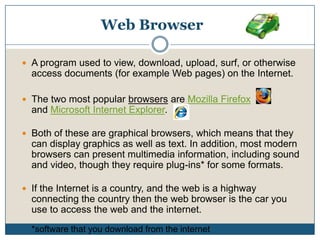
Web BrowserA program used to view, download, upload, surf, or otherwise access documents (for example Web pages) on the Internet. The two most popular browsers are Mozilla Firefox              and Microsoft Internet Explorer.Both of these are graphical browsers, which means that they can display graphics as well as text. In addition, most modern browsers can present multimedia information, including sound and video, though they require plug-ins* for some formats. If the Internet is a country, and the web is a highway connecting the country then the web browser is the car you use to access the web and the internet.*software that you download from the internet
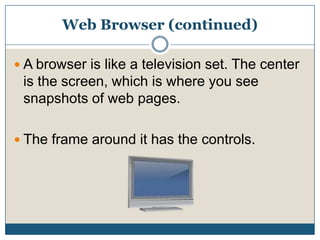
Web Browser (continued)A browser is like a television set. The center is the screen, which is where you see snapshots of web pages. The frame around it has the controls.
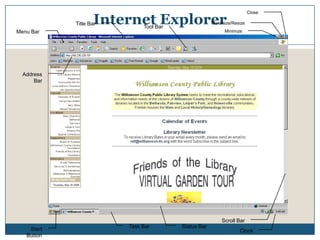
Internet ExplorerCloseMaximize/ResizeTitle BarTool BarMinimizeMenu BarAddress BarScroll BarTask BarStatus BarStart ButtonClock
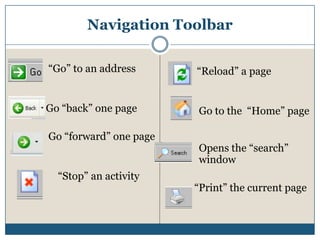
Navigation Toolbar“Go” to an addressGo “back” one pageGo “forward” one page“Stop” an activity   “Reload” a pageGo to the  “Home” pageOpens the “search” window  “Print” the current page
Internet ExplorerMost common web browserAvailable with all Windows versions.Most people create web pages best viewed on this browser. Other browsers are available for free to download from the Web.
Web Page vs. Web SiteA web site is a collection of web pages that are linked together and share the same domain name. A web site is much like a magazine and a web page is a like an article within that magazine.Each web page within a web site does not necessarily have to be related in the same way that articles in a magazine are not all about the same topic. A home page is the front page or first page of a website.Example website
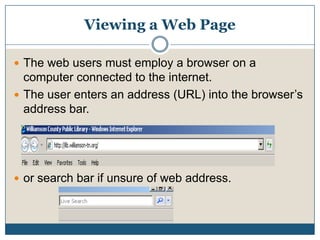
Viewing a Web PageThe web users must employ a browser on a computer connected to the internet.The user enters an address (URL) into the browser’s address bar. or search bar if unsure of web address.
URLUniform Resource LocatorLike a street address for websites.  All are unique.http://www.cnn.com/World/index.htmlhttp: = protocol (programming language)cnn.com = domain name (website name)World = folder (where the information is stored inside the website)index = file name (directory of the web page)html = file extension (program used to write the web page)
Types of Sites.com – commercial.edu – educational facility/institution.org – non-profit.net – network operations (ISPs).mil – military.gov – government.tv- television stationsWeb addresses from other countries may end with country-specific codes i.e.: Ie., .uk, .sp, .it
Remember:There are no spaces in a web addressBe careful of misspellingsYou do not need to type the “http://” portion of the web address in most web browsersThere is no dot (.) at the end of a web addressWeb addresses are most often typed in lowercase.You may begin to see new endings for web addresses such as .biz,.museum, .tv, .pro, .infohttp://www.mpl.org/file/computer_curriculums.htm#internet
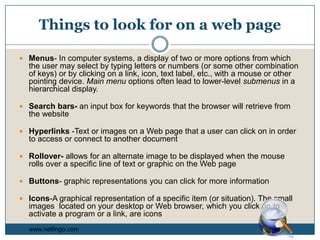
Things to look for on a web pageMenus- In computer systems, a display of two or more options from which the user may select by typing letters or numbers (or some other combination of keys) or by clicking on a link, icon, text label, etc., with a mouse or other pointing device. Main menu options often lead to lower-level submenus in a hierarchical display. Search bars- an input box for keywords that the browser will retrieve from the websiteHyperlinks -Text or images on a Web page that a user can click on in order to access or connect to another documentRollover- allows for an alternate image to be displayed when the mouse rolls over a specific line of text or graphic on the Web pageButtons- graphic representations you can click for more informationIcons-A graphical representation of a specific item (or situation). The small images  located on your desktop or Web browser, which you click on to activate a program or a link, are iconswww.netlingo.com
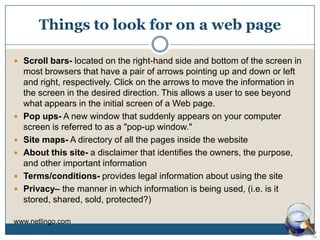
Things to look for on a web pageScroll bars- located on the right-hand side and bottom of the screen in most browsers that have a pair of arrows pointing up and down or left and right, respectively. Click on the arrows to move the information in the screen in the desired direction. This allows a user to see beyond what appears in the initial screen of a Web page. Pop ups- A new window that suddenly appears on your computer screen is referred to as a "pop-up window." Site maps- A directory of all the pages inside the websiteAbout this site- a disclaimer that identifies the owners, the purpose, and other important informationTerms/conditions- provides legal information about using the sitePrivacy– the manner in which information is being used, (i.e. is it stored, shared, sold, protected?)www.netlingo.com
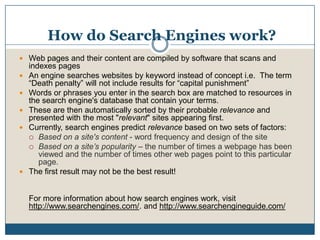
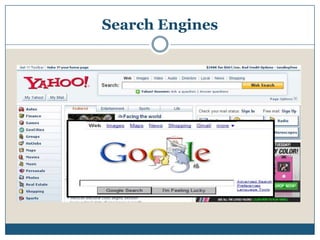
How do Search Engines work? Web pages and their content are compiled by software that scans and indexes pagesAn engine searches websites by keyword instead of concept i.e.  The term “Death penalty” will not include results for “capital punishment”Words or phrases you enter in the search box are matched to resources in the search engine's database that contain your terms.These are then automatically sorted by their probable relevance and presented with the most "relevant" sites appearing first. Currently, search engines predict relevance based on two sets of factors: Based on a site's content - word frequency and design of the site Based on a site’s popularity – the number of times a webpage has been viewed and the number of times other web pages point to this particular page. The first result may not be the best result!For more information about how search engines work, visit http://www.searchengines.com/. and http://www.searchengineguide.com/
Search Engines
Searching TipsTo look for information enter a word or term into the search box. Keep phrases in quotesUse specific search termsCapitalization is not importantUse synonymsSome search engines have an “advanced search” option where you can specify dates, formats, etc. Read the help menu on your search engine
More about Searching ToolsThere is no one comprehensive search engine or directory. Many things are never indexed by a search engine and exist in the “deep web”. There will be broken links in your results.There will be an overwhelming number of results.Watch for advertisements listed as “sponsored links”.Use multiple search engines
Five Criteria for Evaluating a WebsiteAuthority: author’s credentialsAccuracy: quality of the information is reliable and error-freeObjectivity: the reason and for whom the information is writtenCurrency: timeliness of the informationCoverage: the amount and depth of information providedhttp://lib.nmsu.edu/instruction/evalcrit.html

Introtointernet1

  • 1.
    Introduction to theInternet and the World Wide WebHeather LambertKingston Springs Public LibraryJanuary 2010
  • 2.
    PurposeDefine the InternetDefine the World Wide Web Learn how to use a web browser Surf the web with a search engineEvaluate a web page
  • 3.
    Internet DefinedThe Internethas been described as a huge "network of networks”. A network is a number of computers that are connected so that they may communicate with one another and share data. The Internet is made up of millions of local, regional, national and international computer networks, including home computers.http://www.mpl.org/file/computer_curriculums.htm#internet
  • 4.
    Parts of theInternetThe Internet is made up of different types of resources. You can think of the Internet the way you might imagine a library. The library is filled with books, records, CDs, tapes, magazines, newspapers, and so forth. Some resources are old and some are new. The same is true of the Internet. The most popular space within the Internet is the World Wide WebThe WWW is expanding at an astronomical rate. Because of its popularity and tremendous growth, the terms Internet and World Wide Web are sometimes used synonymously.
  • 5.
  • 6.
    World Wide WebDefinedThe World Wide Web is the publicly accessible part of the internet with agreed upon rules (protocols) for how information is presented and accessed. It is international.You need an Internet connection, a computer, and a Web browser in order to access and view this online information. Using the World Wide Web is the easiest and most common way of accessing information from the Internet. The Web consists of a huge collection of documents stored on computers all over the world. These documents, or web pages, are hypertext* documents containing links to let you easily jump to other web pages. The information on the Web is constantly changing as the web pages are updated and new pages are created.*Hypertext = A system in which objects can be linked to each other.
  • 7.
    The World WideWebServices: Customer service;Retail; Banking; Auctions; Email;Electronic forms; Chat; Picture sharing; Searching; Music download; File downloading and sharing; Program applications; Blogs;Websites; Social Networking DataDocuments: Newspapers; Forms; Information pages; Images - pictures; Audio – Music & Spoken word; Video- News clips, Home videos, movies, & televisionRetail; Auctions; Educational;GovernmentFacebook; Myspace; Twitter;Linked in; Search engines-Google; Yahoo; Ask; Altavista
  • 8.
    What can befound on the Web?Information on many topics can be found on the Internet.Everything is not on the Internet. Someone has to be interested enough to put the information into an electronic file and make it accessible For example, courthouse records and many county government archives are not accessible – there are just not enough resources to pay staff to put these files online.
  • 9.
    Weaknesses of websearchingLack of authorityTime consumingOverwhelming number of sourcesIncomplete informationAdvertisingTechnical issuesInformation may be out of date There is no one to police and determine that only factual things get posted. Things can be pulled off at any time with no permanent record – historic record ability to change with technology.
  • 10.
    Strengths of WebSearching You can have access to your needed information almost anywhere (and experts can post from anywhere).Broad coverage/Access to sources outside communityCurrent informationSome information only available on the Web (government info, special interest info)Interactive media sourcesFast results
  • 11.
    Web BrowserA programused to view, download, upload, surf, or otherwise access documents (for example Web pages) on the Internet. The two most popular browsers are Mozilla Firefox and Microsoft Internet Explorer.Both of these are graphical browsers, which means that they can display graphics as well as text. In addition, most modern browsers can present multimedia information, including sound and video, though they require plug-ins* for some formats. If the Internet is a country, and the web is a highway connecting the country then the web browser is the car you use to access the web and the internet.*software that you download from the internet
  • 12.
    Web Browser (continued)Abrowser is like a television set. The center is the screen, which is where you see snapshots of web pages. The frame around it has the controls.
  • 13.
    Internet ExplorerCloseMaximize/ResizeTitle BarToolBarMinimizeMenu BarAddress BarScroll BarTask BarStatus BarStart ButtonClock
  • 14.
    Navigation Toolbar“Go” toan addressGo “back” one pageGo “forward” one page“Stop” an activity “Reload” a pageGo to the “Home” pageOpens the “search” window “Print” the current page
  • 15.
    Internet ExplorerMost commonweb browserAvailable with all Windows versions.Most people create web pages best viewed on this browser. Other browsers are available for free to download from the Web.
  • 16.
    Web Page vs.Web SiteA web site is a collection of web pages that are linked together and share the same domain name. A web site is much like a magazine and a web page is a like an article within that magazine.Each web page within a web site does not necessarily have to be related in the same way that articles in a magazine are not all about the same topic. A home page is the front page or first page of a website.Example website
  • 17.
    Viewing a WebPageThe web users must employ a browser on a computer connected to the internet.The user enters an address (URL) into the browser’s address bar. or search bar if unsure of web address.
  • 18.
    URLUniform Resource LocatorLikea street address for websites. All are unique.http://www.cnn.com/World/index.htmlhttp: = protocol (programming language)cnn.com = domain name (website name)World = folder (where the information is stored inside the website)index = file name (directory of the web page)html = file extension (program used to write the web page)
  • 19.
    Types of Sites.com– commercial.edu – educational facility/institution.org – non-profit.net – network operations (ISPs).mil – military.gov – government.tv- television stationsWeb addresses from other countries may end with country-specific codes i.e.: Ie., .uk, .sp, .it
  • 20.
    Remember:There are nospaces in a web addressBe careful of misspellingsYou do not need to type the “http://” portion of the web address in most web browsersThere is no dot (.) at the end of a web addressWeb addresses are most often typed in lowercase.You may begin to see new endings for web addresses such as .biz,.museum, .tv, .pro, .infohttp://www.mpl.org/file/computer_curriculums.htm#internet
  • 21.
    Things to lookfor on a web pageMenus- In computer systems, a display of two or more options from which the user may select by typing letters or numbers (or some other combination of keys) or by clicking on a link, icon, text label, etc., with a mouse or other pointing device. Main menu options often lead to lower-level submenus in a hierarchical display. Search bars- an input box for keywords that the browser will retrieve from the websiteHyperlinks -Text or images on a Web page that a user can click on in order to access or connect to another documentRollover- allows for an alternate image to be displayed when the mouse rolls over a specific line of text or graphic on the Web pageButtons- graphic representations you can click for more informationIcons-A graphical representation of a specific item (or situation). The small images located on your desktop or Web browser, which you click on to activate a program or a link, are iconswww.netlingo.com
  • 22.
    Things to lookfor on a web pageScroll bars- located on the right-hand side and bottom of the screen in most browsers that have a pair of arrows pointing up and down or left and right, respectively. Click on the arrows to move the information in the screen in the desired direction. This allows a user to see beyond what appears in the initial screen of a Web page. Pop ups- A new window that suddenly appears on your computer screen is referred to as a "pop-up window." Site maps- A directory of all the pages inside the websiteAbout this site- a disclaimer that identifies the owners, the purpose, and other important informationTerms/conditions- provides legal information about using the sitePrivacy– the manner in which information is being used, (i.e. is it stored, shared, sold, protected?)www.netlingo.com
  • 23.
    How do SearchEngines work? Web pages and their content are compiled by software that scans and indexes pagesAn engine searches websites by keyword instead of concept i.e. The term “Death penalty” will not include results for “capital punishment”Words or phrases you enter in the search box are matched to resources in the search engine's database that contain your terms.These are then automatically sorted by their probable relevance and presented with the most "relevant" sites appearing first. Currently, search engines predict relevance based on two sets of factors: Based on a site's content - word frequency and design of the site Based on a site’s popularity – the number of times a webpage has been viewed and the number of times other web pages point to this particular page. The first result may not be the best result!For more information about how search engines work, visit http://www.searchengines.com/. and http://www.searchengineguide.com/
  • 24.
  • 25.
    Searching TipsTo lookfor information enter a word or term into the search box. Keep phrases in quotesUse specific search termsCapitalization is not importantUse synonymsSome search engines have an “advanced search” option where you can specify dates, formats, etc. Read the help menu on your search engine
  • 26.
    More about SearchingToolsThere is no one comprehensive search engine or directory. Many things are never indexed by a search engine and exist in the “deep web”. There will be broken links in your results.There will be an overwhelming number of results.Watch for advertisements listed as “sponsored links”.Use multiple search engines
  • 27.
    Five Criteria forEvaluating a WebsiteAuthority: author’s credentialsAccuracy: quality of the information is reliable and error-freeObjectivity: the reason and for whom the information is writtenCurrency: timeliness of the informationCoverage: the amount and depth of information providedhttp://lib.nmsu.edu/instruction/evalcrit.html