Chapter 2 The Internet and World Wide Web
Chapter 2 Objectives Discuss the history of the Internet Explain how to access and connect to the Internet Analyze an IP address Identify the components of a Web address Explain the purpose of a Web browser Search for information on the Web Describe the types of Web sites Recognize how Web pages use graphics, animation, audio, video, virtual reality, and plug-ins Identify the steps required for Web publishing Explain how e-mail, FTP, newsgroups and message boards, mailing lists, chat rooms, instant messaging, and Internet telephony work Identify the rules of netiquette Next Describe the types of e-commerce
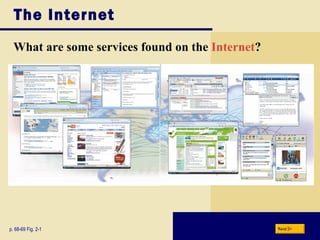
The Internet What are some services found on the  Internet ? p. 68-69 Fig. 2-1 Next
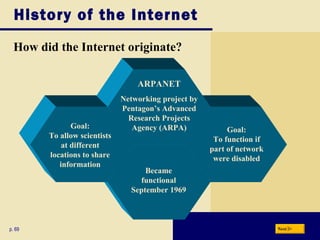
History of the Internet How did the Internet originate? p. 69 Next Goal: To function if part of network were disabled Became functional September 1969 ARPANET Networking project by Pentagon’s Advanced Research Projects Agency (ARPA) Goal: To allow scientists at different locations to share information
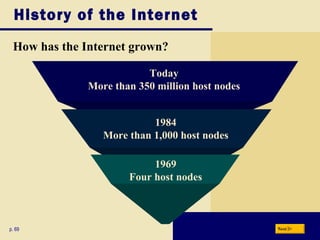
History of the Internet How has the Internet grown? p. 69 Today More than 350 million host nodes 1984 More than 1,000 host nodes 1969 Four host nodes Next
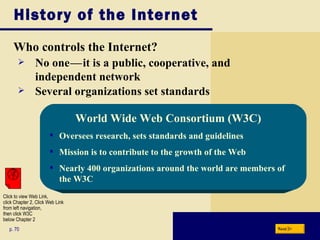
History of the Internet Who controls the Internet? p. 70 No one c — c it is a public, cooperative, and independent network Several organizations set standards World Wide Web Consortium (W3C) Oversees research, sets standards and guidelines Mission is to contribute to the growth of the Web Nearly 400 organizations around the world are members of the W3C Next Click to view Web Link, click Chapter 2, Click Web Link from left navigation,  then click W3C below Chapter 2
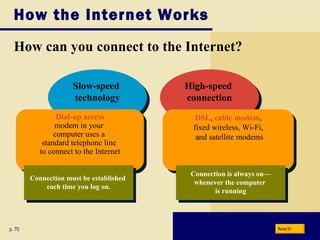
How the Internet Works How can you connect to the Internet? High-speed  connection Slow-speed  technology p. 70 Dial-up access modem in your  computer uses a  standard telephone line  to connect to the Internet DSL ,  cable modem , fixed wireless, Wi-Fi,  and satellite modems Connection is always on— whenever the computer  is running Connection must be established  each time you log on. Next
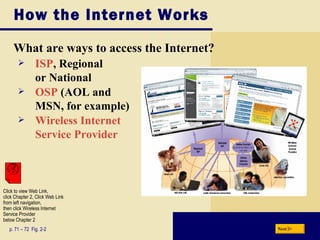
How the Internet Works What are ways to access the Internet? p. 71 – 72  Fig. 2-2 ISP , Regional  or National OSP  (AOL and  MSN, for example) Wireless Internet  Service Provider Next Click to view Web Link, click Chapter 2, Click Web Link from left navigation,  then click Wireless Internet Service Provider below Chapter 2
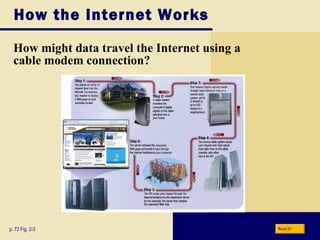
How the Internet Works How might data travel the Internet using a cable modem connection? p. 73 Fig. 2-3 Next
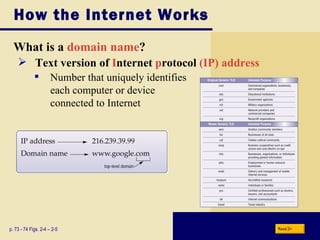
How the Internet Works What is a  domain name ? p. 73 - 74 Figs. 2-4 – 2-5 Text version of   I nternet  p rotocol  (IP) address Number that uniquely identifies  each computer or device  connected to Internet Next
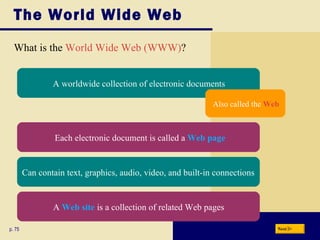
The World Wide Web p. 75 What is the  World Wide Web (WWW) ? Next A worldwide collection of electronic documents Each electronic document is called a  Web page Also called the  Web Can contain text, graphics, audio, video, and built-in connections A  Web site  is a collection of related Web pages
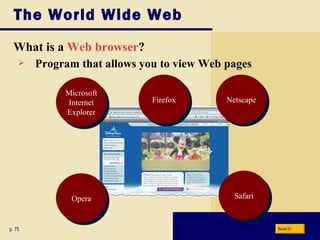
The World Wide Web What is a  Web browser ? p. 75 Program that allows you to view Web pages  Next Microsoft Internet Explorer Netscape Firefox Opera Safari
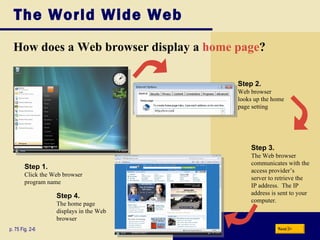
The World Wide Web How does a Web browser display a  home page ? p. 75 Fig. 2-6 Step 3. The Web browser communicates with the access provider’s server to retrieve the IP address.  The IP address is sent to your computer. Next Step 1. Click the Web browser program name Step 2. Web browser looks up the home page setting Step 4. The home page displays in the Web browser
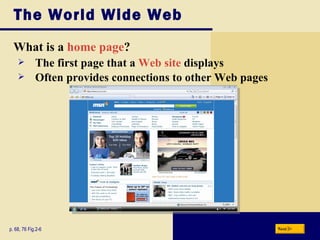
The World Wide Web What is a  home page ? p. 68, 76 Fig.2-6 The first page that a  Web site  displays  Often provides connections to other Web pages Next
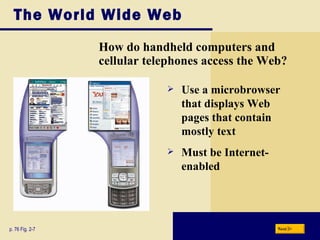
The World Wide Web How do handheld computers and cellular telephones access the Web? p. 76 Fig. 2-7 Use a microbrowser that displays Web pages that contain mostly text Must be Internet-enabled Next
The World Wide Web What is  downloading ? p. 76 The process of a computer receiving information Depending upon connection speed, downloading can take from a few seconds to several minutes Next
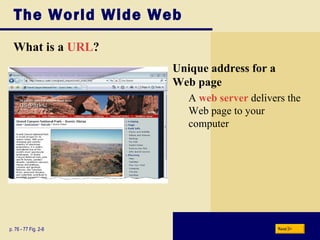
The World Wide Web What is a  URL ? p. 76 - 77 Fig. 2-8 Unique address for a  Web page A  web server  delivers the Web page to your computer Next
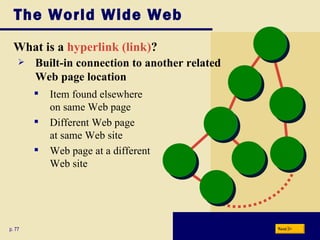
The World Wide Web What is a  hyperlink (link) ? p. 77 Item found elsewhere  on same Web page Different Web page  at same Web site Web page at a different  Web site Built-in connection to another related  Web page location Next
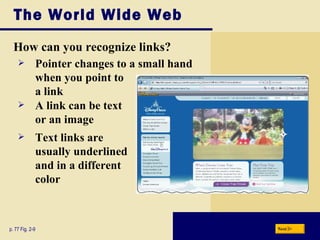
The World Wide Web How can you recognize links? p. 77 Fig. 2-9 A link can be text  or an image Pointer changes to a small hand when you point to a link Text links are usually underlined and in a different color Next
The World Wide Web What is a  subject directory ? p. 78 – 79 Search tool with organized set of categories and subcategories Lets you find information by clicking links rather than entering keywords Next
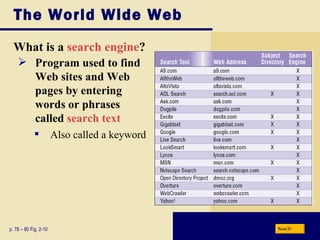
The World Wide Web What is a  search engine ? p. 78 – 80 Fig. 2-10 Program used to find  Web sites and Web pages by entering  words or phrases  called  search text Also called a keyword Next
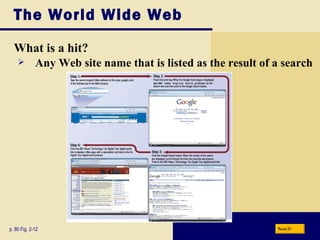
The World Wide Web What is a hit? p. 80 Fig. 2-12 Any Web site name that is listed as the result of a search Next
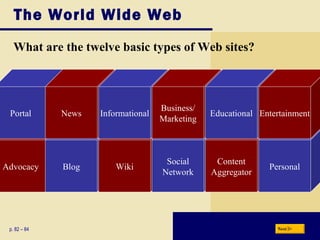
The World Wide Web What are the twelve basic types of Web sites? Advocacy Blog Wiki Social Network Content Aggregator Personal Portal p. 82 – 84 News Informational Business/ Marketing Educational Entertainment Next
The World Wide Web What is a  portal ? p. 82 - 83 A Web site that offers a variety of services from one, convenient location, usually for free Searching, sports, e-mail,  news, weather, auctions,  online communities   (Web sites that join  people with similar  interests) Next
The World Wide Web What is a news Web site? p. 82 - 83 Contains newsworthy material Stories and articles relating to current events, life, money, sports, and the weather Next
The World Wide Web What is an informational Web site? p. 82 - 83 Contains factual information Created by organizations and government agencies Next
The World Wide Web What is a business/marketing Web site? p. 82 - 83 Contains content that promotes products or services Allows you to purchase products or services online Next
The World Wide Web What is an educational Web site? p. 82 - 83 Learn how airplanes fly or how to cook a meal Some colleges offer  online classes and  degrees Offers avenues for formal and informal teaching and learning Next
The World Wide Web What is an entertainment Web site? p. 82 - 83 Offers an interactive and engaging environment featuring music, video, sports, games, and more Next
The World Wide Web What is an advocacy Web site? p. 82 - 83 Contains content that describes a cause, opinion, or idea Next
The World Wide Web What is a  blog ? p. 82 - 83 Uses a regularly updated journal format to reflect the interests, opinions, and personalities of the author and sometimes site visitors vlogs, blogospheres, and vlogospheres Next
The World Wide Web What is a  wiki ? p. 82-84 Collaborative Web site that allows users to create, add to, modify, or delete the Web site content via their Web browser Next
The World Wide Web What is an  online social network ? p. 83 - 84 Encourages members to share their interests, ideas, stories, photos, music, and photos Media sharing Web site Next Click to view Web Link, click Chapter 2, Click Web Link from left navigation,  then click MySpace below Chapter 2
The World Wide Web What is a content aggregator? p. 83 - 84 Business that gathers and organizes Web content and then distributes, or feeds, the content to subscribers for free or a fee Next
The World Wide Web What is a personal Web site? p. 83 - 84 Web page maintained by private individual or family Reasons: sharing life experience with the world or job hunting Next
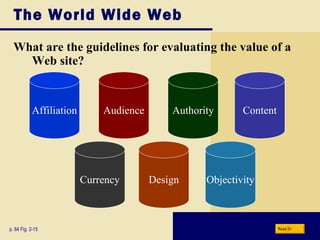
The World Wide Web What are the guidelines for evaluating the value of a Web site? p. 84 Fig. 2-15 Affiliation Audience Authority Content Currency Design Objectivity Next
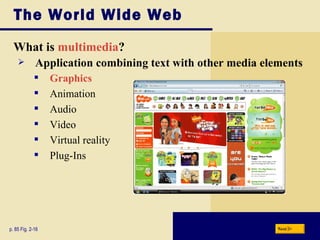
The World Wide Web What is  multimedia ? p. 85 Fig. 2-16 Application combining text with other media elements Graphics Animation Audio Video Virtual reality Plug-Ins Next
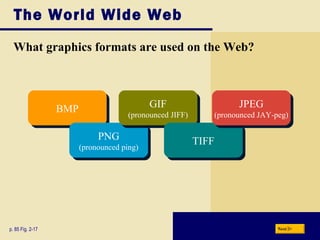
The World Wide Web What graphics formats are used on the Web? p. 85 Fig. 2-17 BMP PNG (pronounced ping) GIF (pronounced JIFF) TIFF JPEG (pronounced JAY-peg) Next
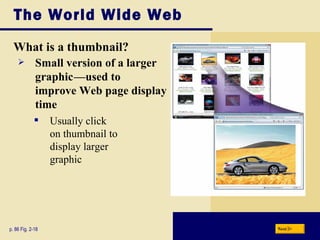
The World Wide Web What is a thumbnail? p. 86 Fig. 2-18 Small version of a larger  graphic c —used to  improve Web page display  time Usually click  on thumbnail to  display larger  graphic Next
The World Wide Web What is  animation ? p. 86 Appearance of motion created by displaying a series of still images in sequence Next
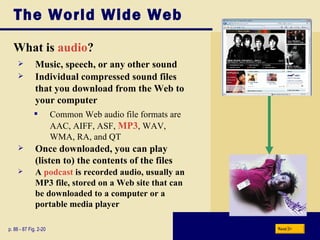
The World Wide Web What is  audio ? p. 86 - 87 Fig. 2-20 Music, speech, or any other sound Individual compressed sound files that you download from the Web to your computer Common Web audio file formats are AAC, AIFF, ASF,  MP3 , WAV, WMA, RA, and QT Once downloaded, you can play (listen to) the contents of the files A  podcast  is recorded audio, usually an MP3 file, stored on a Web site that can be downloaded to a computer or a portable media player Next
The World Wide Web What is  streaming  audio ? p. 86 The process of transferring audio in a continuous and even flow Enables you to listen to music as it downloads to your computer Next
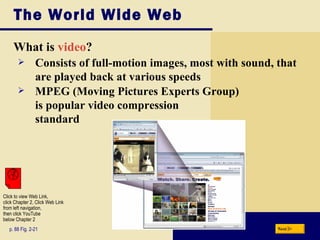
The World Wide Web What is  video ? p. 88 Fig. 2-21 Consists of full-motion images, most with sound, that are played back at various speeds MPEG (Moving Pictures Experts Group)  is popular video compression standard Next Click to view Web Link, click Chapter 2, Click Web Link from left navigation,  then click YouTube below Chapter 2
The World Wide Web Video: Tell Your Stores via Vlog Next CLICK TO START
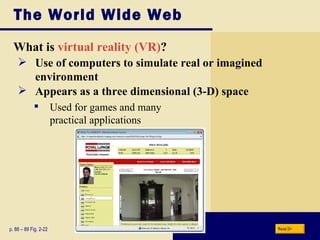
The World Wide Web What is  virtual reality (VR) ? p. 88 – 89 Fig. 2-22 Use of computers to simulate real or imagined environment Appears as a three dimensional (3-D) space Used for games and many  practical applications Next
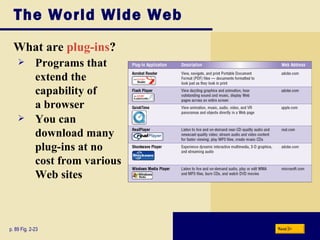
The World Wide Web What are  plug-ins ? p. 89 Fig. 2-23 Programs that  extend the  capability of  a browser You can  download many  plug-ins at no cost from various Web sites Next
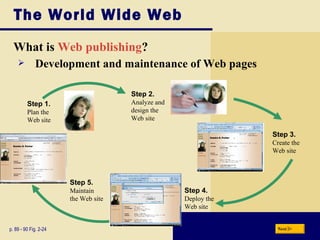
The World Wide Web What is  Web publishing ? p. 89 - 90 Fig. 2-24 Development and maintenance of Web pages Next Step 1. Plan the Web site Step 2. Analyze and design the Web site Step 3. Create the Web site Step 4. Deploy the Web site Step 5. Maintain the Web site
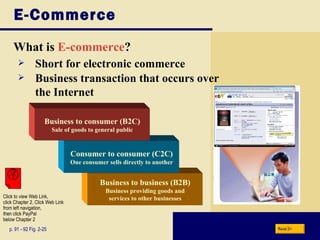
E-Commerce What is  E-commerce ? Business to business (B2B) Business providing goods and services to other businesses Consumer to consumer (C2C) One consumer sells directly to another p. 91 - 92 Fig. 2-25 Business to consumer (B2C) Sale of goods to general public Short for electronic commerce Business transaction that occurs over  the Internet Next Click to view Web Link, click Chapter 2, Click Web Link from left navigation,  then click PayPal below Chapter 2
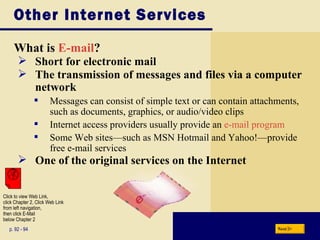
Other Internet Services What is  E-mail ? p. 92 - 94 Short for electronic mail The transmission of messages and files via a computer network Messages can consist of simple text or can contain attachments, such as documents, graphics, or audio/video clips Internet access providers usually provide an  e-mail program Some Web sites—such as MSN Hotmail and Yahoo!—provide free e-mail services One of the original services on the Internet Next Click to view Web Link, click Chapter 2, Click Web Link from left navigation,  then click E-Mail  below Chapter 2
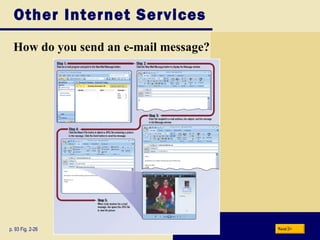
Other Internet Services How do you send an e-mail message? p. 93 Fig. 2-26 Next
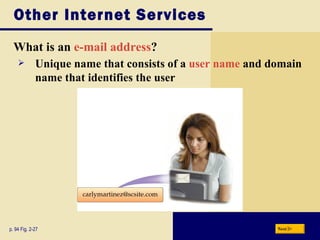
Other Internet Services What is an  e-mail address ? p. 94 Fig. 2-27 Unique name that consists of a  user name  and domain name that identifies the user Next
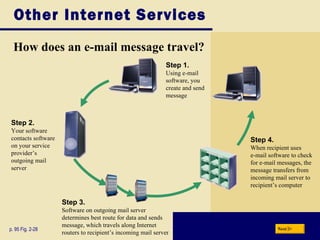
Other Internet Services How does an e-mail message travel? p. 95 Fig. 2-28 Next Step 4. When recipient uses  e-mail software to check for e-mail messages, the message transfers from incoming mail server to recipient’s computer Step 2. Your software contacts software on your service provider’s outgoing mail server Step 3. Software on outgoing mail server  determines best route for data and sends message, which travels along Internet  routers to recipient’s incoming mail server Step 1. Using e-mail  software, you  create and send  message
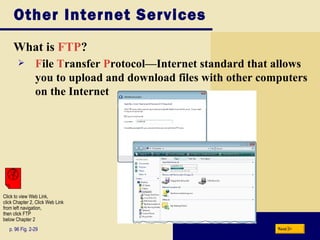
Other Internet Services What is  FTP ? p. 96 Fig. 2-29 F ile  T ransfer  P rotocol — Internet standard that allows you to upload and download files with other computers on the Internet Next Click to view Web Link, click Chapter 2, Click Web Link from left navigation,  then click FTP  below Chapter 2
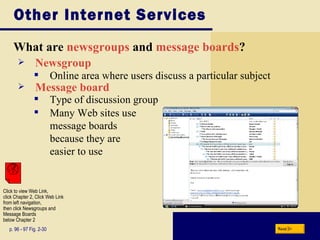
Other Internet Services What are  newsgroups   and   message boards ? p. 96 - 97 Fig. 2-30 Newsgroup Many Web sites use  message boards  because they are  easier to use Online area where users discuss a particular subject Message board Type of discussion group Next Click to view Web Link, click Chapter 2, Click Web Link from left navigation,  then click Newsgroups and Message Boards  below Chapter 2
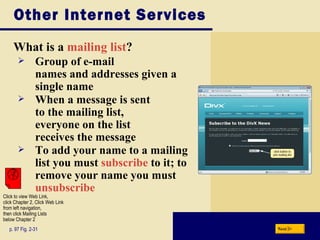
Other Internet Services What is a  mailing list ? p. 97 Fig. 2-31 Group of e-mail  names and addresses given a single name When a message is sent  to the mailing list,  everyone on the list  receives the message To add your name to a mailing list you must  subscribe  to it; to remove your name you must  unsubscribe Next Click to view Web Link, click Chapter 2, Click Web Link from left navigation,  then click Mailing Lists below Chapter 2
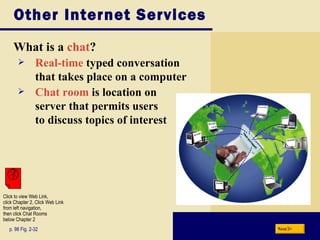
Other Internet Services What is a  chat ? p. 98 Fig. 2-32 Real-time  typed conversation  that takes place on a computer Chat room  is location on  server that permits users  to discuss topics of interest Next Click to view Web Link, click Chapter 2, Click Web Link from left navigation,  then click Chat Rooms below Chapter 2
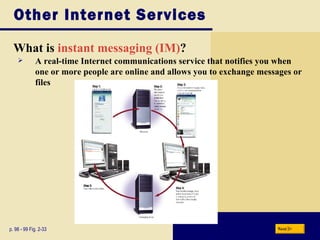
Other Internet Services What is  instant messaging (IM) ? p. 98 - 99 Fig. 2-33 A real-time Internet communications service that notifies you when one or more people are online and allows you to exchange messages or files Next
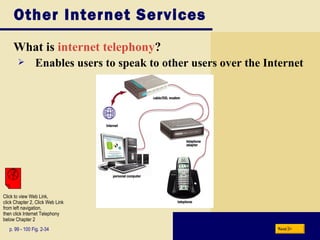
Other Internet Services What is  internet telephony ? Enables users to speak to other users over the Internet p. 99 - 100 Fig. 2-34 Next Click to view Web Link, click Chapter 2, Click Web Link from left navigation,  then click Internet Telephony below Chapter 2
Netiquette What is  netiquette ? p. 100 Golden Rule: Treat others as  you would like them to treat you. Code of acceptable behaviors users should follow while on the Internet Next
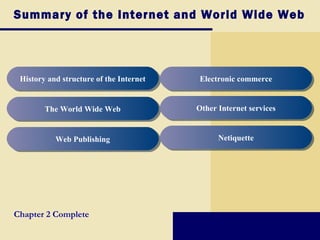
Summary of the Internet and World Wide Web History and structure of the Internet The World Wide Web Web Publishing Electronic commerce Other Internet services Netiquette Chapter 2 Complete

Chapter02

  • 1.
    Chapter 2 TheInternet and World Wide Web
  • 2.
    Chapter 2 ObjectivesDiscuss the history of the Internet Explain how to access and connect to the Internet Analyze an IP address Identify the components of a Web address Explain the purpose of a Web browser Search for information on the Web Describe the types of Web sites Recognize how Web pages use graphics, animation, audio, video, virtual reality, and plug-ins Identify the steps required for Web publishing Explain how e-mail, FTP, newsgroups and message boards, mailing lists, chat rooms, instant messaging, and Internet telephony work Identify the rules of netiquette Next Describe the types of e-commerce
  • 3.
    The Internet Whatare some services found on the Internet ? p. 68-69 Fig. 2-1 Next
  • 4.
    History of theInternet How did the Internet originate? p. 69 Next Goal: To function if part of network were disabled Became functional September 1969 ARPANET Networking project by Pentagon’s Advanced Research Projects Agency (ARPA) Goal: To allow scientists at different locations to share information
  • 5.
    History of theInternet How has the Internet grown? p. 69 Today More than 350 million host nodes 1984 More than 1,000 host nodes 1969 Four host nodes Next
  • 6.
    History of theInternet Who controls the Internet? p. 70 No one c — c it is a public, cooperative, and independent network Several organizations set standards World Wide Web Consortium (W3C) Oversees research, sets standards and guidelines Mission is to contribute to the growth of the Web Nearly 400 organizations around the world are members of the W3C Next Click to view Web Link, click Chapter 2, Click Web Link from left navigation, then click W3C below Chapter 2
  • 7.
    How the InternetWorks How can you connect to the Internet? High-speed connection Slow-speed technology p. 70 Dial-up access modem in your computer uses a standard telephone line to connect to the Internet DSL , cable modem , fixed wireless, Wi-Fi, and satellite modems Connection is always on— whenever the computer is running Connection must be established each time you log on. Next
  • 8.
    How the InternetWorks What are ways to access the Internet? p. 71 – 72 Fig. 2-2 ISP , Regional or National OSP (AOL and MSN, for example) Wireless Internet Service Provider Next Click to view Web Link, click Chapter 2, Click Web Link from left navigation, then click Wireless Internet Service Provider below Chapter 2
  • 9.
    How the InternetWorks How might data travel the Internet using a cable modem connection? p. 73 Fig. 2-3 Next
  • 10.
    How the InternetWorks What is a domain name ? p. 73 - 74 Figs. 2-4 – 2-5 Text version of I nternet p rotocol (IP) address Number that uniquely identifies each computer or device connected to Internet Next
  • 11.
    The World WideWeb p. 75 What is the World Wide Web (WWW) ? Next A worldwide collection of electronic documents Each electronic document is called a Web page Also called the Web Can contain text, graphics, audio, video, and built-in connections A Web site is a collection of related Web pages
  • 12.
    The World WideWeb What is a Web browser ? p. 75 Program that allows you to view Web pages Next Microsoft Internet Explorer Netscape Firefox Opera Safari
  • 13.
    The World WideWeb How does a Web browser display a home page ? p. 75 Fig. 2-6 Step 3. The Web browser communicates with the access provider’s server to retrieve the IP address. The IP address is sent to your computer. Next Step 1. Click the Web browser program name Step 2. Web browser looks up the home page setting Step 4. The home page displays in the Web browser
  • 14.
    The World WideWeb What is a home page ? p. 68, 76 Fig.2-6 The first page that a Web site displays Often provides connections to other Web pages Next
  • 15.
    The World WideWeb How do handheld computers and cellular telephones access the Web? p. 76 Fig. 2-7 Use a microbrowser that displays Web pages that contain mostly text Must be Internet-enabled Next
  • 16.
    The World WideWeb What is downloading ? p. 76 The process of a computer receiving information Depending upon connection speed, downloading can take from a few seconds to several minutes Next
  • 17.
    The World WideWeb What is a URL ? p. 76 - 77 Fig. 2-8 Unique address for a Web page A web server delivers the Web page to your computer Next
  • 18.
    The World WideWeb What is a hyperlink (link) ? p. 77 Item found elsewhere on same Web page Different Web page at same Web site Web page at a different Web site Built-in connection to another related Web page location Next
  • 19.
    The World WideWeb How can you recognize links? p. 77 Fig. 2-9 A link can be text or an image Pointer changes to a small hand when you point to a link Text links are usually underlined and in a different color Next
  • 20.
    The World WideWeb What is a subject directory ? p. 78 – 79 Search tool with organized set of categories and subcategories Lets you find information by clicking links rather than entering keywords Next
  • 21.
    The World WideWeb What is a search engine ? p. 78 – 80 Fig. 2-10 Program used to find Web sites and Web pages by entering words or phrases called search text Also called a keyword Next
  • 22.
    The World WideWeb What is a hit? p. 80 Fig. 2-12 Any Web site name that is listed as the result of a search Next
  • 23.
    The World WideWeb What are the twelve basic types of Web sites? Advocacy Blog Wiki Social Network Content Aggregator Personal Portal p. 82 – 84 News Informational Business/ Marketing Educational Entertainment Next
  • 24.
    The World WideWeb What is a portal ? p. 82 - 83 A Web site that offers a variety of services from one, convenient location, usually for free Searching, sports, e-mail, news, weather, auctions, online communities (Web sites that join people with similar interests) Next
  • 25.
    The World WideWeb What is a news Web site? p. 82 - 83 Contains newsworthy material Stories and articles relating to current events, life, money, sports, and the weather Next
  • 26.
    The World WideWeb What is an informational Web site? p. 82 - 83 Contains factual information Created by organizations and government agencies Next
  • 27.
    The World WideWeb What is a business/marketing Web site? p. 82 - 83 Contains content that promotes products or services Allows you to purchase products or services online Next
  • 28.
    The World WideWeb What is an educational Web site? p. 82 - 83 Learn how airplanes fly or how to cook a meal Some colleges offer online classes and degrees Offers avenues for formal and informal teaching and learning Next
  • 29.
    The World WideWeb What is an entertainment Web site? p. 82 - 83 Offers an interactive and engaging environment featuring music, video, sports, games, and more Next
  • 30.
    The World WideWeb What is an advocacy Web site? p. 82 - 83 Contains content that describes a cause, opinion, or idea Next
  • 31.
    The World WideWeb What is a blog ? p. 82 - 83 Uses a regularly updated journal format to reflect the interests, opinions, and personalities of the author and sometimes site visitors vlogs, blogospheres, and vlogospheres Next
  • 32.
    The World WideWeb What is a wiki ? p. 82-84 Collaborative Web site that allows users to create, add to, modify, or delete the Web site content via their Web browser Next
  • 33.
    The World WideWeb What is an online social network ? p. 83 - 84 Encourages members to share their interests, ideas, stories, photos, music, and photos Media sharing Web site Next Click to view Web Link, click Chapter 2, Click Web Link from left navigation, then click MySpace below Chapter 2
  • 34.
    The World WideWeb What is a content aggregator? p. 83 - 84 Business that gathers and organizes Web content and then distributes, or feeds, the content to subscribers for free or a fee Next
  • 35.
    The World WideWeb What is a personal Web site? p. 83 - 84 Web page maintained by private individual or family Reasons: sharing life experience with the world or job hunting Next
  • 36.
    The World WideWeb What are the guidelines for evaluating the value of a Web site? p. 84 Fig. 2-15 Affiliation Audience Authority Content Currency Design Objectivity Next
  • 37.
    The World WideWeb What is multimedia ? p. 85 Fig. 2-16 Application combining text with other media elements Graphics Animation Audio Video Virtual reality Plug-Ins Next
  • 38.
    The World WideWeb What graphics formats are used on the Web? p. 85 Fig. 2-17 BMP PNG (pronounced ping) GIF (pronounced JIFF) TIFF JPEG (pronounced JAY-peg) Next
  • 39.
    The World WideWeb What is a thumbnail? p. 86 Fig. 2-18 Small version of a larger graphic c —used to improve Web page display time Usually click on thumbnail to display larger graphic Next
  • 40.
    The World WideWeb What is animation ? p. 86 Appearance of motion created by displaying a series of still images in sequence Next
  • 41.
    The World WideWeb What is audio ? p. 86 - 87 Fig. 2-20 Music, speech, or any other sound Individual compressed sound files that you download from the Web to your computer Common Web audio file formats are AAC, AIFF, ASF, MP3 , WAV, WMA, RA, and QT Once downloaded, you can play (listen to) the contents of the files A podcast is recorded audio, usually an MP3 file, stored on a Web site that can be downloaded to a computer or a portable media player Next
  • 42.
    The World WideWeb What is streaming audio ? p. 86 The process of transferring audio in a continuous and even flow Enables you to listen to music as it downloads to your computer Next
  • 43.
    The World WideWeb What is video ? p. 88 Fig. 2-21 Consists of full-motion images, most with sound, that are played back at various speeds MPEG (Moving Pictures Experts Group) is popular video compression standard Next Click to view Web Link, click Chapter 2, Click Web Link from left navigation, then click YouTube below Chapter 2
  • 44.
    The World WideWeb Video: Tell Your Stores via Vlog Next CLICK TO START
  • 45.
    The World WideWeb What is virtual reality (VR) ? p. 88 – 89 Fig. 2-22 Use of computers to simulate real or imagined environment Appears as a three dimensional (3-D) space Used for games and many practical applications Next
  • 46.
    The World WideWeb What are plug-ins ? p. 89 Fig. 2-23 Programs that extend the capability of a browser You can download many plug-ins at no cost from various Web sites Next
  • 47.
    The World WideWeb What is Web publishing ? p. 89 - 90 Fig. 2-24 Development and maintenance of Web pages Next Step 1. Plan the Web site Step 2. Analyze and design the Web site Step 3. Create the Web site Step 4. Deploy the Web site Step 5. Maintain the Web site
  • 48.
    E-Commerce What is E-commerce ? Business to business (B2B) Business providing goods and services to other businesses Consumer to consumer (C2C) One consumer sells directly to another p. 91 - 92 Fig. 2-25 Business to consumer (B2C) Sale of goods to general public Short for electronic commerce Business transaction that occurs over the Internet Next Click to view Web Link, click Chapter 2, Click Web Link from left navigation, then click PayPal below Chapter 2
  • 49.
    Other Internet ServicesWhat is E-mail ? p. 92 - 94 Short for electronic mail The transmission of messages and files via a computer network Messages can consist of simple text or can contain attachments, such as documents, graphics, or audio/video clips Internet access providers usually provide an e-mail program Some Web sites—such as MSN Hotmail and Yahoo!—provide free e-mail services One of the original services on the Internet Next Click to view Web Link, click Chapter 2, Click Web Link from left navigation, then click E-Mail below Chapter 2
  • 50.
    Other Internet ServicesHow do you send an e-mail message? p. 93 Fig. 2-26 Next
  • 51.
    Other Internet ServicesWhat is an e-mail address ? p. 94 Fig. 2-27 Unique name that consists of a user name and domain name that identifies the user Next
  • 52.
    Other Internet ServicesHow does an e-mail message travel? p. 95 Fig. 2-28 Next Step 4. When recipient uses e-mail software to check for e-mail messages, the message transfers from incoming mail server to recipient’s computer Step 2. Your software contacts software on your service provider’s outgoing mail server Step 3. Software on outgoing mail server determines best route for data and sends message, which travels along Internet routers to recipient’s incoming mail server Step 1. Using e-mail software, you create and send message
  • 53.
    Other Internet ServicesWhat is FTP ? p. 96 Fig. 2-29 F ile T ransfer P rotocol — Internet standard that allows you to upload and download files with other computers on the Internet Next Click to view Web Link, click Chapter 2, Click Web Link from left navigation, then click FTP below Chapter 2
  • 54.
    Other Internet ServicesWhat are newsgroups and message boards ? p. 96 - 97 Fig. 2-30 Newsgroup Many Web sites use message boards because they are easier to use Online area where users discuss a particular subject Message board Type of discussion group Next Click to view Web Link, click Chapter 2, Click Web Link from left navigation, then click Newsgroups and Message Boards below Chapter 2
  • 55.
    Other Internet ServicesWhat is a mailing list ? p. 97 Fig. 2-31 Group of e-mail names and addresses given a single name When a message is sent to the mailing list, everyone on the list receives the message To add your name to a mailing list you must subscribe to it; to remove your name you must unsubscribe Next Click to view Web Link, click Chapter 2, Click Web Link from left navigation, then click Mailing Lists below Chapter 2
  • 56.
    Other Internet ServicesWhat is a chat ? p. 98 Fig. 2-32 Real-time typed conversation that takes place on a computer Chat room is location on server that permits users to discuss topics of interest Next Click to view Web Link, click Chapter 2, Click Web Link from left navigation, then click Chat Rooms below Chapter 2
  • 57.
    Other Internet ServicesWhat is instant messaging (IM) ? p. 98 - 99 Fig. 2-33 A real-time Internet communications service that notifies you when one or more people are online and allows you to exchange messages or files Next
  • 58.
    Other Internet ServicesWhat is internet telephony ? Enables users to speak to other users over the Internet p. 99 - 100 Fig. 2-34 Next Click to view Web Link, click Chapter 2, Click Web Link from left navigation, then click Internet Telephony below Chapter 2
  • 59.
    Netiquette What is netiquette ? p. 100 Golden Rule: Treat others as you would like them to treat you. Code of acceptable behaviors users should follow while on the Internet Next
  • 60.
    Summary of theInternet and World Wide Web History and structure of the Internet The World Wide Web Web Publishing Electronic commerce Other Internet services Netiquette Chapter 2 Complete