The Internet
Web Browsing and
Communication
What is the Internet?
 The Internet is the worldwide, publicly accessible network of
interconnected computer networks that transmit data by packet
switching.
 It is a "network of networks" that consists of millions of smaller
domestic, academic, business, and government networks, which
together carry various information and services, such as email,
online chat, file transfer, and the interlinked Web pages and other
documents of the World Wide Web.
What does WWW
stand for?
 WWW = World Wide Web
 The Internet and the World Wide Web are not synonymous: Web is
actually something that is available via the Internet
 The Internet is a collection of interconnected computer networks
 The Web is a collection of interconnected documents, linked by
hyperlinks and URLs.
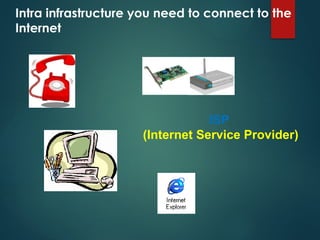
Intra infrastructure you need to connect to the
Internet
ISP
(Internet Service Provider)
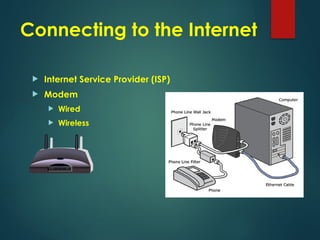
Connecting to the Internet
 Internet Service Provider (ISP)
 Modem
 Wired
 Wireless
Understanding Basic Terminology
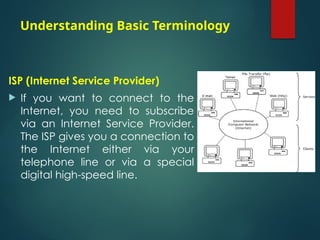
ISP (Internet Service Provider)
 If you want to connect to the
Internet, you need to subscribe
via an Internet Service Provider.
The ISP gives you a connection to
the Internet either via your
telephone line or via a special
digital high-speed line.
FTP (File Transfer Protocol)
 a way of transferring data from one place to another
over the Internet.
A Web site
 is a collection of pages containing information about
a company
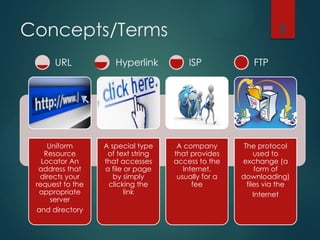
Concepts/Terms
Uniform
Resource
Locator An
address that
directs your
request to the
appropriate
server
and directory
A special type
of text string
that accesses
a file or page
by simply
clicking the
link
A company
that provides
access to the
Internet,
usually for a
fee
The protocol
used to
exchange (a
form of
downloading)
files via the
Internet
8
URL Hyperlink ISP FTP
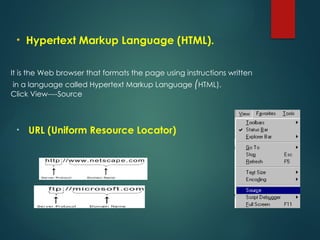
It is the Web browser that formats the page using instructions written
in a language called Hypertext Markup Language (HTML).
Click View----Source
• URL (Uniform Resource Locator)
• Hypertext Markup Language (HTML).
Web Address Structure
 http://www.ITdesk.com.eg
• HTTP (Hypertext Transfer Protocol)
This is the language your web browser uses to request pages & graphics from the web server.
 http - protocol (rules of transmission )
 www – type of service available on the Internet
 ITdesk –domain name info –top-level domain
 Site types (.com, .gov, .edu, .org)
.com  commercial . edu  education . TV  watching &YouTube
.Org  organization . Gov  government .Mill  military
.NET  network
 International domains
(.eg , .fr , .hr, .si , .it, .de…) are ccTLD = country code top-level domain
10
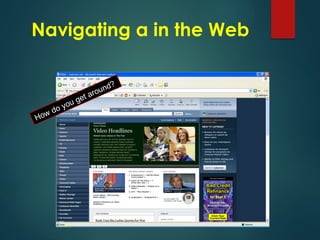
How do you get around?
Navigating a in the Web
Using Web Browser
What is a web browser?
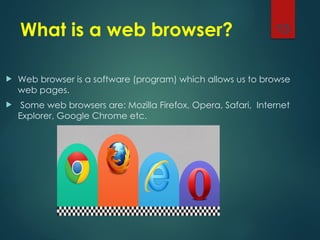
 Web browser is a software (program) which allows us to browse
web pages.
 Some web browsers are: Mozilla Firefox, Opera, Safari, Internet
Explorer, Google Chrome etc.
13
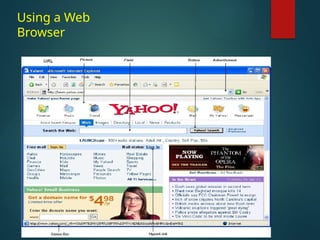
Using a Web
Browser
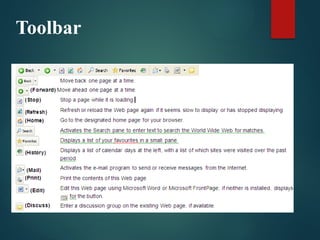
Toolbar
is a piece of text
1. Take you to a different part of the same page
2. Take you to a different page within the Web
site
3. Take you to a page in a different Web site
4. Enable you to download a file
5. Launch an application, video or sound
Hyperlink
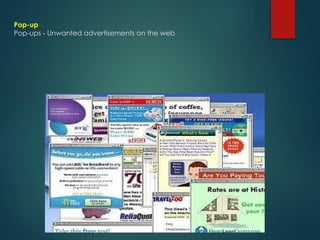
Pop-up
Pop-ups - Unwanted advertisements on the web
What is Shareware?
 Software that you can obtain for free on a trial
basis
 May require some payment for continued use
What is Freeware?
 Software that is distributed at no cost to the user
 The author maintains the copyright
 Basically: Software that is copyrighted but can
be used freely
Identifying Other Elements
Cookies
 A cookie is a piece of text stored on your hard drive so a
Web site can retrieve information about which sites you
visited and what information interests you. Cookies can
be useful .
Web Cache(temporary internet file)
 It is stored on the computer every timeYou visit a website
• Speed up site revisits
• These files take up space on computer until you
• Can be deleted to free up space
Pop-ups
 These ads can appear on your screen as a separate
window from the Web browser, or appear similar to a
window on the actual Web page
What Are Firewalls?
 A Hardware or software blocking mechanism that block
unauthorized intruders into a computer system
 Blocks potential hackers from your invading your computer
or your network.
 Any computer that is connected to the internet should
have a firewall
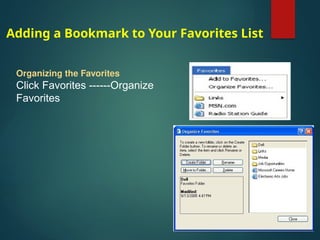
Adding a Bookmark to Your Favorites List
Organizing the Favorites
Click Favorites ------Organize
Favorites
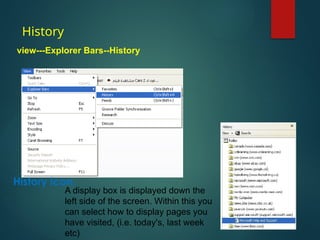
History
view---Explorer Bars--History
A display box is displayed down the
left side of the screen. Within this you
can select how to display pages you
have visited, (i.e. today's, last week
etc)
History icon.
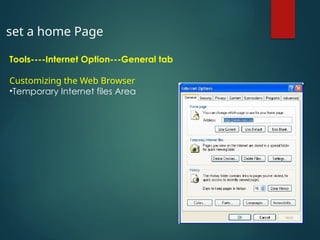
set a home Page
Tools----Internet Option---General tab
Customizing the Web Browser
•Temporary Internet files Area
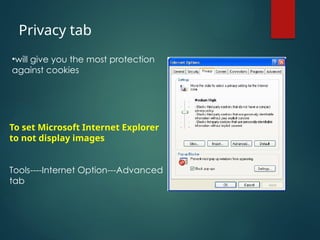
To set Microsoft Internet Explorer
to not display images
Tools----Internet Option---Advanced
tab
Privacy tab
•will give you the most protection
against cookies
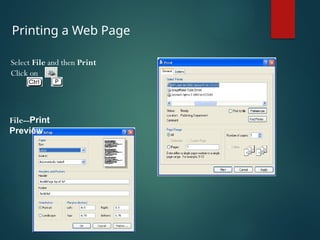
Printing a Web Page
Select File and then Print
Click on
+
File--Print
Preview

The Internet Web Browsing and Communication

  • 1.
    The Internet Web Browsingand Communication
  • 2.
    What is theInternet?  The Internet is the worldwide, publicly accessible network of interconnected computer networks that transmit data by packet switching.  It is a "network of networks" that consists of millions of smaller domestic, academic, business, and government networks, which together carry various information and services, such as email, online chat, file transfer, and the interlinked Web pages and other documents of the World Wide Web.
  • 3.
    What does WWW standfor?  WWW = World Wide Web  The Internet and the World Wide Web are not synonymous: Web is actually something that is available via the Internet  The Internet is a collection of interconnected computer networks  The Web is a collection of interconnected documents, linked by hyperlinks and URLs.
  • 4.
    Intra infrastructure youneed to connect to the Internet ISP (Internet Service Provider)
  • 5.
    Connecting to theInternet  Internet Service Provider (ISP)  Modem  Wired  Wireless
  • 6.
    Understanding Basic Terminology ISP(Internet Service Provider)  If you want to connect to the Internet, you need to subscribe via an Internet Service Provider. The ISP gives you a connection to the Internet either via your telephone line or via a special digital high-speed line.
  • 7.
    FTP (File TransferProtocol)  a way of transferring data from one place to another over the Internet. A Web site  is a collection of pages containing information about a company
  • 8.
    Concepts/Terms Uniform Resource Locator An address that directsyour request to the appropriate server and directory A special type of text string that accesses a file or page by simply clicking the link A company that provides access to the Internet, usually for a fee The protocol used to exchange (a form of downloading) files via the Internet 8 URL Hyperlink ISP FTP
  • 9.
    It is theWeb browser that formats the page using instructions written in a language called Hypertext Markup Language (HTML). Click View----Source • URL (Uniform Resource Locator) • Hypertext Markup Language (HTML).
  • 10.
    Web Address Structure http://www.ITdesk.com.eg • HTTP (Hypertext Transfer Protocol) This is the language your web browser uses to request pages & graphics from the web server.  http - protocol (rules of transmission )  www – type of service available on the Internet  ITdesk –domain name info –top-level domain  Site types (.com, .gov, .edu, .org) .com  commercial . edu  education . TV  watching &YouTube .Org  organization . Gov  government .Mill  military .NET  network  International domains (.eg , .fr , .hr, .si , .it, .de…) are ccTLD = country code top-level domain 10
  • 11.
    How do youget around? Navigating a in the Web
  • 12.
  • 13.
    What is aweb browser?  Web browser is a software (program) which allows us to browse web pages.  Some web browsers are: Mozilla Firefox, Opera, Safari, Internet Explorer, Google Chrome etc. 13
  • 14.
  • 15.
  • 16.
    is a pieceof text 1. Take you to a different part of the same page 2. Take you to a different page within the Web site 3. Take you to a page in a different Web site 4. Enable you to download a file 5. Launch an application, video or sound Hyperlink
  • 17.
    Pop-up Pop-ups - Unwantedadvertisements on the web
  • 18.
    What is Shareware? Software that you can obtain for free on a trial basis  May require some payment for continued use
  • 19.
    What is Freeware? Software that is distributed at no cost to the user  The author maintains the copyright  Basically: Software that is copyrighted but can be used freely
  • 20.
    Identifying Other Elements Cookies A cookie is a piece of text stored on your hard drive so a Web site can retrieve information about which sites you visited and what information interests you. Cookies can be useful . Web Cache(temporary internet file)  It is stored on the computer every timeYou visit a website • Speed up site revisits • These files take up space on computer until you • Can be deleted to free up space Pop-ups  These ads can appear on your screen as a separate window from the Web browser, or appear similar to a window on the actual Web page
  • 21.
    What Are Firewalls? A Hardware or software blocking mechanism that block unauthorized intruders into a computer system  Blocks potential hackers from your invading your computer or your network.  Any computer that is connected to the internet should have a firewall
  • 22.
    Adding a Bookmarkto Your Favorites List Organizing the Favorites Click Favorites ------Organize Favorites
  • 23.
    History view---Explorer Bars--History A displaybox is displayed down the left side of the screen. Within this you can select how to display pages you have visited, (i.e. today's, last week etc) History icon.
  • 24.
    set a homePage Tools----Internet Option---General tab Customizing the Web Browser •Temporary Internet files Area
  • 25.
    To set MicrosoftInternet Explorer to not display images Tools----Internet Option---Advanced tab Privacy tab •will give you the most protection against cookies
  • 26.
    Printing a WebPage Select File and then Print Click on + File--Print Preview