Sending Cross Platform Notifications
using Azure Notifications Hub &
Xamarin
Anubhav Ranjan
Consultant at Xamarin,
Microsoft MVP
@anubhavr05
Sukriti Sharma
Technical Evangelist
@suksharma
Agenda
• Push Notifications
• Notification Hub
• Tags: Send Targeted Notifications
• Templates
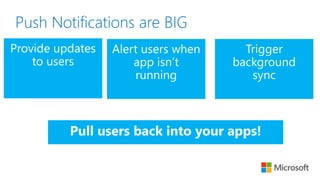
Push Notifications are BIG
Push notification lifecycle
Registration at app launch
1. Client app to retrieve PNS Handle (e.g. Channel Uris,
device tokens, registration IDs)
2. Updates back-end
Sending Notification
1. Back-end sends notification to PNS
2. PNS pushes the notification to the app on the device
Maintenance
1. Delete expired handles when PNS rejects them
Platform
Notification
Service
App back-end
Challenges of push notifications
• Different protocols to PNS’ (e.g. HTTP vs TCP, xml payload vs json
payload)
• Tiles vs toasts vs badges
• Maintaining ChannelURI/ RegistrationID/ Token provided by PNS
• Back-end complications (Storage) and Cost
• Scalability
Azure Notification Hubs (advantages)
• X-plat: from any back-end to any mobile platform
• No need to store device information in the app back-end (managed)
• Routing and interest groups
• Personalization and localization
• Broadcast at scale, multicast, unicast
• Telemetry
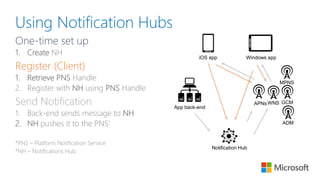
Using Notification Hubs
One-time set up
1. Create NH
Register (Client)
1. Retrieve PNS Handle
2. Register with NH using PNS Handle
Send Notification
1. Back-end sends message to NH
2. NH pushes it to the PNS’
*PNS – Platform Notification Service
*NH – Notifications Hub
APNsWNS
Notification Hub
App back-end
iOS app Windows app
MPNS
GCM
ADM
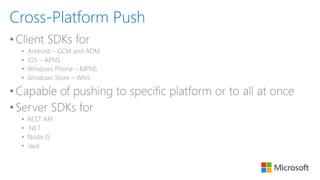
•Client SDKs for
• Android – GCM and ADM
• iOS – APNS
• Windows Phone – MPNS
• Windows Store – WNS
•Capable of pushing to specific platform or to all at once
•Server SDKs for
• REST API
• .NET
• Node.JS
• Java
Cross-Platform Push
Some snippets
Register Send
await
[hub
registerNativeWithDeviceToken:deviceToken
tags:nil
completion:^(NSError* error) {…}];
hub.register(regid);
var toast = @“<notification payload>";
hub.SendWindowsNativeNotificationAsync(toas
t);
hubService.wns.sendToastText01(null,
{
text1: 'Hello from Node!'
},
function (error)
{
…
}
);
Send Targeted Notifications
Tags
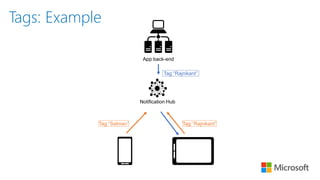
Tags as interest groups
1. Client app registers with tags
2. Tags are simple strings (no pre-provisioning is required)
3. Back-end can target all clients with the same tag
You can use tags also for
• Multiple type of interest groups, e.g.
• Follow movie stars: tag “followactor:Rajnikant”
• Follow users: tag “followuser:SachinTendulkar”
• Tags can be user preferences or system information
Notification Hub
App back-end
Tag:”Rajnikant”Tag:”Salman”
Tag:”Rajnikant”
Tags: Example
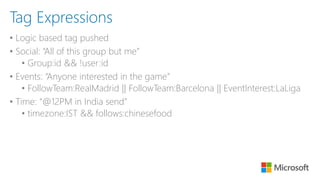
• Logic based tag pushed
• Social: “All of this group but me”
• Group:id && !user:id
• Events: “Anyone interested in the game”
• FollowTeam:RealMadrid || FollowTeam:Barcelona || EventInterest:LaLiga
• Time: “@12PM in India send”
• timezone:IST && follows:chinesefood
Tag Expressions
Some snippets
Register
await new string[] {"myTag", "myOtherTag"}
[hub registerNativeWithDeviceToken:deviceToken tags:@[@"myTag", @"myOtherTag"] completion:
^(NSError* error) {
…
}];
hub.register(regid, "myTag“, "myOtherTag");
Demo: Get Started
- Portal Demo
- Google Console
- Configure your Notification Hub
- Connecting your app to the Notification Hub
- Send notifications from your back-end
- Register with Tags
Notification Templates
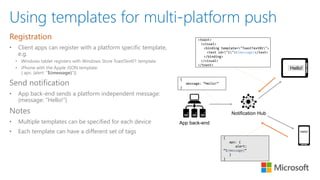
Using templates for multi-platform push
Registration
• Client apps can register with a platform specific template,
e.g.
• Windows tablet registers with Windows Store ToastText01 template
• iPhone with the Apple JSON template:
{ aps: {alert: “$(message)”}}
Send notification
• App back-end sends a platform independent message:
{message: “Hello!”}
Notes
• Multiple templates can be specified for each device
• Each template can have a different set of tags
Notification Hub
App back-end
<toast>
<visual>
<binding template="ToastText01">
<text id="1">$(message)</text>
</binding>
</visual>
</toast>
{
aps: {
alert:
“$(message)”
}
}
{
message: “Hello!”
}
Hello!
Hello!
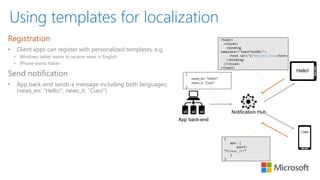
Using templates for localization
Registration
• Client apps can register with personalized templates, e.g.
• Windows tablet wants to receive news in English
• iPhone wants Italian
Send notification
• App back-end sends a message including both languages:
{news_en: “Hello!”, news_it: “Ciao!”}
Notification Hub
App back-end
<toast>
<visual>
<binding
template="ToastText01">
<text id="1">$(news_en)</text>
</binding>
</visual>
</toast>
{
aps: {
alert:
“$(news_it)”
}
}
{
news_en: “Hello!”,
news_it: “Ciao!”
}
Hello!
Ciao!
Sending geo-targeted notifications with
Windows Azure Notification Hubs
Some examples are:
• Send coupons to all my customers in Mumbai
• Send notifications of new mortgage rates/open houses in a
specific locality
• Notify people in a town/city about a concert they might be
interested in
• Notify people in a town/city of a charity/recycling event
“How do I read tags from my hub?”
• Notification Hubs is not a storage system
• No cleanup needed, expires registrations automatically
• In the device
• Every platform provides apps a way to store user information locally or in the
cloud
• E.g. Roaming settings, iCloud
• In your app back-end
• Usually stored by user id
• Try not to replicate device information
• Register methods always overwrite tags
• Each time you update the channel, overwrite all the tags
Managing devices from your back-end
When to register from your app back-end
• To secure Tags
• App back-end can authenticate the user before registering the device
• When back-end has to modify tags
• Adding a tag from the web app
• Manager adding an employee to a work group
• Tags are derived from analytics or other user data
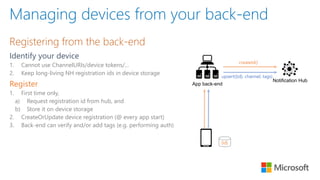
Registering from the back-end
Identify your device
1. Cannot use ChannelURIs/device tokens/…
2. Keep long-living NH registration ids in device storage
Register
1. First time only,
a) Request registration id from hub, and
b) Store it on device storage
2. CreateOrUpdate device registration (@ every app start)
3. Back-end can verify and/or add tags (e.g. performing auth)
Notification Hub
App back-end
{id}
upsert({id}, channel, tags)
createId()
Managing devices from your back-end
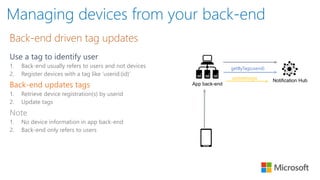
Back-end driven tag updates
Use a tag to identify user
1. Back-end usually refers to users and not devices
2. Register devices with a tag like ‘userid:{id}’
Back-end updates tags
1. Retrieve device registration(s) by userid
2. Update tags
Note
1. No device information in app back-end
2. Back-end only refers to users
Notification Hub
App back-end
getByTag(userid)
update(tags)
Managing devices from your back-end
Advanced scenarios: “Push to Sync”, Retargeting
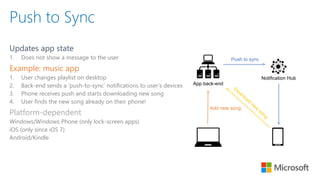
Push to Sync
Updates app state
1. Does not show a message to the user
Example: music app
1. User changes playlist on desktop
2. Back-end sends a ‘push-to-sync’ notifications to user’s devices
3. Phone receives push and starts downloading new song
4. User finds the new song already on their phone!
Platform-dependent
Windows/Windows Phone (only lock-screen apps)
iOS (only since iOS 7)
Android/Kindle
App back-end
Notification Hub
Push to sync
Add new song
Pulling it all together - Retargeting
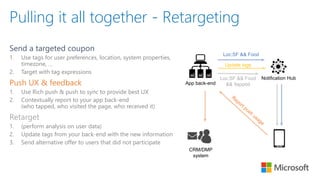
Send a targeted coupon
1. Use tags for user preferences, location, system properties,
timezone, …
2. Target with tag expressions
Push UX & feedback
1. Use Rich push & push to sync to provide best UX
2. Contextually report to your app back-end
(who tapped, who visited the page, who received it)
Retarget
1. (perform analysis on user data)
2. Update tags from your back-end with the new information
3. Send alternative offer to users that did not participate
App back-end
Notification Hub
Loc:SF && Food
Update tags
Loc:SF && Food
&& !tapped
CRM/DMP
system
Follow us online
Facebook
facebook.com/MicrosoftDeveloper.India
twitter.com/msdevindia
Twitter
@anubhavr05
@suksharma
Cross Platform Mobile Push Notifications with Azure Notifications Hub

Cross Platform Mobile Push Notifications with Azure Notifications Hub

  • 1.
    Sending Cross PlatformNotifications using Azure Notifications Hub & Xamarin Anubhav Ranjan Consultant at Xamarin, Microsoft MVP @anubhavr05 Sukriti Sharma Technical Evangelist @suksharma
  • 2.
    Agenda • Push Notifications •Notification Hub • Tags: Send Targeted Notifications • Templates
  • 3.
  • 4.
    Push notification lifecycle Registrationat app launch 1. Client app to retrieve PNS Handle (e.g. Channel Uris, device tokens, registration IDs) 2. Updates back-end Sending Notification 1. Back-end sends notification to PNS 2. PNS pushes the notification to the app on the device Maintenance 1. Delete expired handles when PNS rejects them Platform Notification Service App back-end
  • 5.
    Challenges of pushnotifications • Different protocols to PNS’ (e.g. HTTP vs TCP, xml payload vs json payload) • Tiles vs toasts vs badges • Maintaining ChannelURI/ RegistrationID/ Token provided by PNS • Back-end complications (Storage) and Cost • Scalability
  • 6.
    Azure Notification Hubs(advantages) • X-plat: from any back-end to any mobile platform • No need to store device information in the app back-end (managed) • Routing and interest groups • Personalization and localization • Broadcast at scale, multicast, unicast • Telemetry
  • 7.
    Using Notification Hubs One-timeset up 1. Create NH Register (Client) 1. Retrieve PNS Handle 2. Register with NH using PNS Handle Send Notification 1. Back-end sends message to NH 2. NH pushes it to the PNS’ *PNS – Platform Notification Service *NH – Notifications Hub APNsWNS Notification Hub App back-end iOS app Windows app MPNS GCM ADM
  • 8.
    •Client SDKs for •Android – GCM and ADM • iOS – APNS • Windows Phone – MPNS • Windows Store – WNS •Capable of pushing to specific platform or to all at once •Server SDKs for • REST API • .NET • Node.JS • Java Cross-Platform Push
  • 9.
    Some snippets Register Send await [hub registerNativeWithDeviceToken:deviceToken tags:nil completion:^(NSError*error) {…}]; hub.register(regid); var toast = @“<notification payload>"; hub.SendWindowsNativeNotificationAsync(toas t); hubService.wns.sendToastText01(null, { text1: 'Hello from Node!' }, function (error) { … } );
  • 10.
  • 11.
    Tags Tags as interestgroups 1. Client app registers with tags 2. Tags are simple strings (no pre-provisioning is required) 3. Back-end can target all clients with the same tag You can use tags also for • Multiple type of interest groups, e.g. • Follow movie stars: tag “followactor:Rajnikant” • Follow users: tag “followuser:SachinTendulkar” • Tags can be user preferences or system information
  • 12.
  • 13.
    • Logic basedtag pushed • Social: “All of this group but me” • Group:id && !user:id • Events: “Anyone interested in the game” • FollowTeam:RealMadrid || FollowTeam:Barcelona || EventInterest:LaLiga • Time: “@12PM in India send” • timezone:IST && follows:chinesefood Tag Expressions
  • 14.
    Some snippets Register await newstring[] {"myTag", "myOtherTag"} [hub registerNativeWithDeviceToken:deviceToken tags:@[@"myTag", @"myOtherTag"] completion: ^(NSError* error) { … }]; hub.register(regid, "myTag“, "myOtherTag");
  • 15.
    Demo: Get Started -Portal Demo - Google Console - Configure your Notification Hub - Connecting your app to the Notification Hub - Send notifications from your back-end - Register with Tags
  • 16.
  • 17.
    Using templates formulti-platform push Registration • Client apps can register with a platform specific template, e.g. • Windows tablet registers with Windows Store ToastText01 template • iPhone with the Apple JSON template: { aps: {alert: “$(message)”}} Send notification • App back-end sends a platform independent message: {message: “Hello!”} Notes • Multiple templates can be specified for each device • Each template can have a different set of tags Notification Hub App back-end <toast> <visual> <binding template="ToastText01"> <text id="1">$(message)</text> </binding> </visual> </toast> { aps: { alert: “$(message)” } } { message: “Hello!” } Hello! Hello!
  • 18.
    Using templates forlocalization Registration • Client apps can register with personalized templates, e.g. • Windows tablet wants to receive news in English • iPhone wants Italian Send notification • App back-end sends a message including both languages: {news_en: “Hello!”, news_it: “Ciao!”} Notification Hub App back-end <toast> <visual> <binding template="ToastText01"> <text id="1">$(news_en)</text> </binding> </visual> </toast> { aps: { alert: “$(news_it)” } } { news_en: “Hello!”, news_it: “Ciao!” } Hello! Ciao!
  • 19.
    Sending geo-targeted notificationswith Windows Azure Notification Hubs Some examples are: • Send coupons to all my customers in Mumbai • Send notifications of new mortgage rates/open houses in a specific locality • Notify people in a town/city about a concert they might be interested in • Notify people in a town/city of a charity/recycling event
  • 20.
    “How do Iread tags from my hub?” • Notification Hubs is not a storage system • No cleanup needed, expires registrations automatically • In the device • Every platform provides apps a way to store user information locally or in the cloud • E.g. Roaming settings, iCloud • In your app back-end • Usually stored by user id • Try not to replicate device information • Register methods always overwrite tags • Each time you update the channel, overwrite all the tags
  • 21.
    Managing devices fromyour back-end When to register from your app back-end • To secure Tags • App back-end can authenticate the user before registering the device • When back-end has to modify tags • Adding a tag from the web app • Manager adding an employee to a work group • Tags are derived from analytics or other user data
  • 22.
    Registering from theback-end Identify your device 1. Cannot use ChannelURIs/device tokens/… 2. Keep long-living NH registration ids in device storage Register 1. First time only, a) Request registration id from hub, and b) Store it on device storage 2. CreateOrUpdate device registration (@ every app start) 3. Back-end can verify and/or add tags (e.g. performing auth) Notification Hub App back-end {id} upsert({id}, channel, tags) createId() Managing devices from your back-end
  • 23.
    Back-end driven tagupdates Use a tag to identify user 1. Back-end usually refers to users and not devices 2. Register devices with a tag like ‘userid:{id}’ Back-end updates tags 1. Retrieve device registration(s) by userid 2. Update tags Note 1. No device information in app back-end 2. Back-end only refers to users Notification Hub App back-end getByTag(userid) update(tags) Managing devices from your back-end
  • 24.
    Advanced scenarios: “Pushto Sync”, Retargeting
  • 25.
    Push to Sync Updatesapp state 1. Does not show a message to the user Example: music app 1. User changes playlist on desktop 2. Back-end sends a ‘push-to-sync’ notifications to user’s devices 3. Phone receives push and starts downloading new song 4. User finds the new song already on their phone! Platform-dependent Windows/Windows Phone (only lock-screen apps) iOS (only since iOS 7) Android/Kindle App back-end Notification Hub Push to sync Add new song
  • 26.
    Pulling it alltogether - Retargeting Send a targeted coupon 1. Use tags for user preferences, location, system properties, timezone, … 2. Target with tag expressions Push UX & feedback 1. Use Rich push & push to sync to provide best UX 2. Contextually report to your app back-end (who tapped, who visited the page, who received it) Retarget 1. (perform analysis on user data) 2. Update tags from your back-end with the new information 3. Send alternative offer to users that did not participate App back-end Notification Hub Loc:SF && Food Update tags Loc:SF && Food && !tapped CRM/DMP system
  • 27.