Template designed by
Azure Notification Hub
Luca Di Fino
dev.luke2375@live.it
@luke2375
luke2375.wordpress.com
http://www.key2.it/
Sviluppatore Windows / Windows Phone
Analisi, Progettazione, Sviluppo
Eventi
chi sono
#NotificationHub #dotnetcampus @luke2375 @dotnecampus
Overview
Azure Notification Hub
Let’s start
• Hub
• App
• Push
Something more
• More notifications
• More channels
• More apps
Q&A
agenda
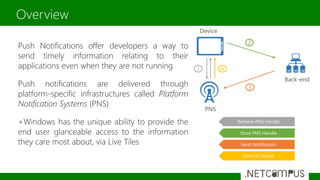
Overview
Push Notifications offer developers a way to
send timely information relating to their
applications even when they are not running
Push notifications are delivered through
platform-specific infrastructures called Platform
Notification Systems (PNS)
+Windows has the unique ability to provide the
end user glanceable access to the information
they care most about, via Live Tiles
Back-end
PNS
Device
1
2
3
4
Retrieve PNS Handle
Store PNS Handle
Send Notification
Send to Device
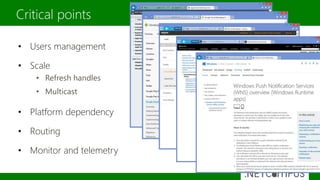
Critical points
• Users management
• Scale
• Refresh handles
• Multicast
• Platform dependency
• Routing
• Monitor and telemetry
A lot of time spent in topics unrelated to
the main business logic of the app !!!
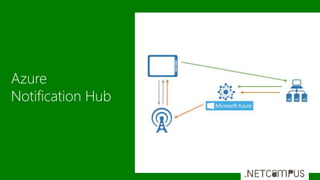
Azure
Notification Hub
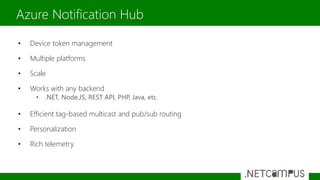
Azure Notification Hub
• Device token management
• Multiple platforms
• Scale
• Works with any backend
• .NET, Node.JS, REST API, PHP, Java, etc.
• Efficient tag-based multicast and pub/sub routing
• Personalization
• Rich telemetry
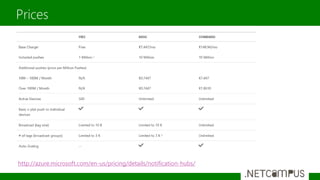
Prices
http://azure.microsoft.com/en-us/pricing/details/notification-hubs/
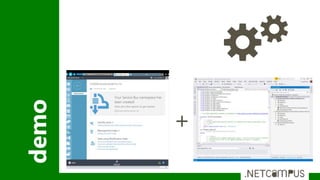
demo
+
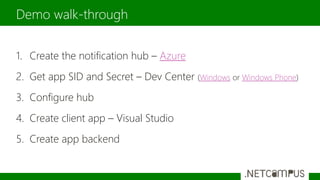
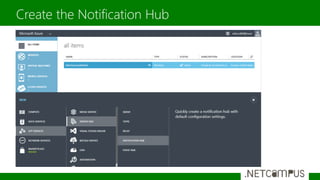
1. Create the notification hub – Azure
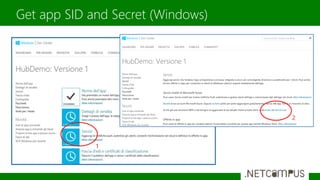
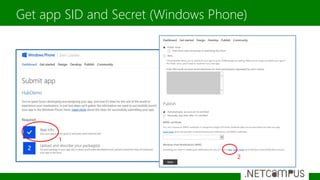
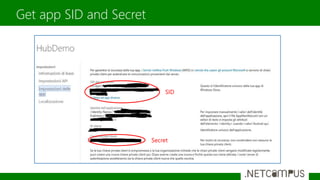
2. Get app SID and Secret – Dev Center (Windows or Windows Phone)
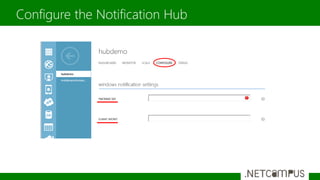
3. Configure hub
4. Create client app – Visual Studio
5. Create app backend
Demo walk-through
Create the Notification Hub
Get app SID and Secret (Windows)
1
2
Get app SID and Secret (Windows Phone)
1
2
Get app SID and Secret
SID
Secret
Configure the Notification Hub
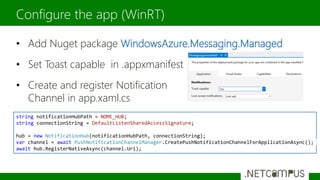
• Add Nuget package WindowsAzure.Messaging.Managed
• Set Toast capable in .appxmanifest
• Create and register Notification
Channel in app.xaml.cs
Configure the app (WinRT)
string notificationHubPath = NOME_HUB;
string connectionString = DefaultListenSharedAccessSignature;
hub = new NotificationHub(notificationHubPath, connectionString);
var channel = await PushNotificationChannelManager.CreatePushNotificationChannelForApplicationAsync();
await hub.RegisterNativeAsync(channel.Uri);
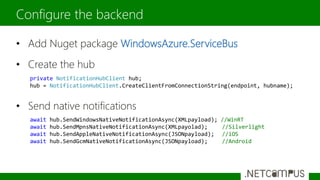
• Add Nuget package WindowsAzure.ServiceBus
• Create the hub
• Send native notifications
Configure the backend
private NotificationHubClient hub;
hub = NotificationHubClient.CreateClientFromConnectionString(endpoint, hubname);
await hub.SendWindowsNativeNotificationAsync(XMLpayload); //WinRT
await hub.SendMpnsNativeNotificationAsync(XMLpayolad); //Silverlight
await hub.SendAppleNativeNotificationAsync(JSONpayload); //iOS
await hub.SendGcmNativeNotificationAsync(JSONpayload); //Android
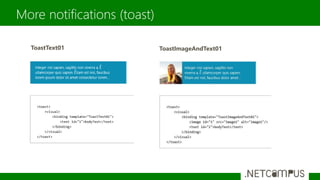
More notifications (toast)
ToastText01 ToastImageAndText01
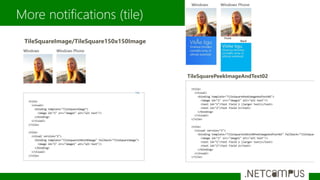
More notifications (tile)
TileSquareImage/TileSquare150x150Image
TileSquarePeekImageAndText02
What if we want more granular control over notifications?
If we want to push notifications only to people who are subscribed to a
specific category, we use tags.
App
Backend
Combine tags with AND (&&), OR (||), NOT (!) and parentheses.
Tag expressions are limited to 20 tags if they contain only ORs; otherwise they are limited to 6 tags
More channels
string[] tagsToSubscribeTo = { "phone", "news" };
await hub.RegisterNativeAsync(channel.Uri, tagsToSubscribeTo);
await hub.SendWindowsNativeNotificationAsync(toast, "phone");
await hub.SendWindowsNativeNotificationAsync(toast, "phone && news");
await hub.SendWindowsNativeNotificationAsync(toast, "phone || news");
Be polite! Let users disable notifications.
Or they will disable you (your app)
;-)
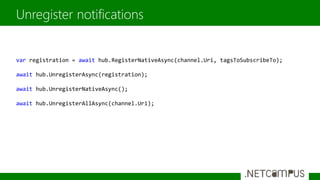
Unregister notifications
var registration = await hub.RegisterNativeAsync(channel.Uri, tagsToSubscribeTo);
await hub.UnregisterAsync(registration);
await hub.UnregisterNativeAsync();
await hub.UnregisterAllAsync(channel.Uri);
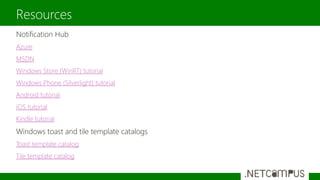
Notification Hub
Azure
MSDN
Windows Store (WinRT) tutorial
Windows Phone (Silverlight) tutorial
Android tutorial
iOS tutorial
Kindle tutorial
Windows toast and tile template catalogs
Toast template catalog
Tile template catalog
Resources
Grazie a tutti per la partecipazione
Riceverete il link per il download a slide e demo via email nei
prossimi giorni
Per contattarmi
Grazie e Q&A
Luca Di Fino
dev.luke2375@live.it
@luke2375
luke2375.wordpress.com
#NotificationHub #dotnetcampus @luke2375 @dotnecampus

AZURE NOTIFICATION HUB

  • 1.
    Template designed by AzureNotification Hub Luca Di Fino dev.luke2375@live.it @luke2375 luke2375.wordpress.com
  • 2.
    http://www.key2.it/ Sviluppatore Windows /Windows Phone Analisi, Progettazione, Sviluppo Eventi chi sono #NotificationHub #dotnetcampus @luke2375 @dotnecampus
  • 3.
    Overview Azure Notification Hub Let’sstart • Hub • App • Push Something more • More notifications • More channels • More apps Q&A agenda
  • 4.
    Overview Push Notifications offerdevelopers a way to send timely information relating to their applications even when they are not running Push notifications are delivered through platform-specific infrastructures called Platform Notification Systems (PNS) +Windows has the unique ability to provide the end user glanceable access to the information they care most about, via Live Tiles Back-end PNS Device 1 2 3 4 Retrieve PNS Handle Store PNS Handle Send Notification Send to Device
  • 5.
    Critical points • Usersmanagement • Scale • Refresh handles • Multicast • Platform dependency • Routing • Monitor and telemetry
  • 6.
    A lot oftime spent in topics unrelated to the main business logic of the app !!!
  • 7.
  • 8.
    Azure Notification Hub •Device token management • Multiple platforms • Scale • Works with any backend • .NET, Node.JS, REST API, PHP, Java, etc. • Efficient tag-based multicast and pub/sub routing • Personalization • Rich telemetry
  • 9.
  • 10.
  • 11.
    1. Create thenotification hub – Azure 2. Get app SID and Secret – Dev Center (Windows or Windows Phone) 3. Configure hub 4. Create client app – Visual Studio 5. Create app backend Demo walk-through
  • 12.
  • 13.
    Get app SIDand Secret (Windows) 1 2
  • 14.
    Get app SIDand Secret (Windows Phone) 1 2
  • 15.
    Get app SIDand Secret SID Secret
  • 16.
  • 17.
    • Add Nugetpackage WindowsAzure.Messaging.Managed • Set Toast capable in .appxmanifest • Create and register Notification Channel in app.xaml.cs Configure the app (WinRT) string notificationHubPath = NOME_HUB; string connectionString = DefaultListenSharedAccessSignature; hub = new NotificationHub(notificationHubPath, connectionString); var channel = await PushNotificationChannelManager.CreatePushNotificationChannelForApplicationAsync(); await hub.RegisterNativeAsync(channel.Uri);
  • 18.
    • Add Nugetpackage WindowsAzure.ServiceBus • Create the hub • Send native notifications Configure the backend private NotificationHubClient hub; hub = NotificationHubClient.CreateClientFromConnectionString(endpoint, hubname); await hub.SendWindowsNativeNotificationAsync(XMLpayload); //WinRT await hub.SendMpnsNativeNotificationAsync(XMLpayolad); //Silverlight await hub.SendAppleNativeNotificationAsync(JSONpayload); //iOS await hub.SendGcmNativeNotificationAsync(JSONpayload); //Android
  • 19.
  • 20.
  • 21.
    What if wewant more granular control over notifications? If we want to push notifications only to people who are subscribed to a specific category, we use tags. App Backend Combine tags with AND (&&), OR (||), NOT (!) and parentheses. Tag expressions are limited to 20 tags if they contain only ORs; otherwise they are limited to 6 tags More channels string[] tagsToSubscribeTo = { "phone", "news" }; await hub.RegisterNativeAsync(channel.Uri, tagsToSubscribeTo); await hub.SendWindowsNativeNotificationAsync(toast, "phone"); await hub.SendWindowsNativeNotificationAsync(toast, "phone && news"); await hub.SendWindowsNativeNotificationAsync(toast, "phone || news");
  • 22.
    Be polite! Letusers disable notifications. Or they will disable you (your app) ;-)
  • 23.
    Unregister notifications var registration= await hub.RegisterNativeAsync(channel.Uri, tagsToSubscribeTo); await hub.UnregisterAsync(registration); await hub.UnregisterNativeAsync(); await hub.UnregisterAllAsync(channel.Uri);
  • 24.
    Notification Hub Azure MSDN Windows Store(WinRT) tutorial Windows Phone (Silverlight) tutorial Android tutorial iOS tutorial Kindle tutorial Windows toast and tile template catalogs Toast template catalog Tile template catalog Resources
  • 26.
    Grazie a tuttiper la partecipazione Riceverete il link per il download a slide e demo via email nei prossimi giorni Per contattarmi Grazie e Q&A Luca Di Fino dev.luke2375@live.it @luke2375 luke2375.wordpress.com #NotificationHub #dotnetcampus @luke2375 @dotnecampus