Push Notification Service
Increase User 
Engagement 
Calendar Events 
Message 
Pop-Up 
Latest 
Updates 
Push Notifications
Benefits of Push Notification 
Increases user-engagement 
e.g. In a turn-based game like Tic-Tac-Toe, it can notify a user of his turn (suppose he gets a phone call in between and forgets that he was playing!!) 
Allows to send messages to users even when the app is not running; thus helps in reminding them of your App 
Helps to build a fan community around your game by pushing to a targeted audience –like your regular gamers 
Allows an App to notify its users of new events without needing to actually open it, i.e. by a sound or a screen pop up
App42 Push Notification supports 
iOS 
Android 
Windows 
Unity 
Flash 
HTML 5 
Cocos2dx 
Corona.. And more
Our Push Notification API can be used to send cross- platformpush messages to devices running on iOS, Androidand WindowsPhonewith a single API call 
•Send Image/Text/URLstext-based Push Notifications 
•Send messages in Channel Subscription Mode 
•Send ScheduledPush as per Time-Zone 
No infrastructure & scalability worries 
Push Analytics•Analyzeyour Push Campaign with App42 Analytics 
•Evaluate the number of Push messages sent, delivered and opened 
Why App42 Push Notification?
Push for Marketing Automation 
Segment your Users and send targeted Push Notifications 
•Segmentation based on User Profile, Interests, Channel Subscription, etc. 
•Geo-Location based Push Notifications 
Track User Activity, set custom events and trigger Push Notifications based on Users’ Current/Real-time or Previous Sessions’ Activity 
•Set custom events such as App Open, Click on a Link, App Session Close, In-App Purchase, Add to Cart, etc. 
•Trigger real-time Push Notifications based on Event occurrences
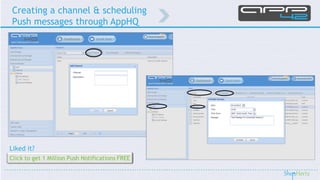
Creating a channel & scheduling 
Push messages through AppHQ
A very useful feature that can track: 
These analytics can be viewed from our AppHQconsole. 
Why Push Analytics? 
When you use our Push Notification Service, each Push goes from the App42 server to GCM/APNS/MPNS and then to the user device. 
Thus, Analytics gives you a better insight of your Push Notification campaign. 
Push Analytics 
•Delivery of Push Notification is not guaranteed even from the service provider 
•Once delivered, there might be a chance that user just clears it without opening the message 
How many Push Notifications were sent from your side 
How many were delivered, and 
How many users opened the message 
100% 
74% 
31% 
Push Notification Campaign 
Sent 
Delivered 
Opened
Integrate Push Notificationwith Unity3d on iOS
Steps to Integrate Push Notificationwith Unity3d on iOS 
Download our Sample App Source Code from ourGitHub Repo. 
To configure Push Notifications for iOS Apps/games; the prerequisites are: 
•Create a new App ID and provisioning profile for each App that uses push as wellas an SSL certificate for the server. For this, you should havean iOS Developer Program Membership oniOS Dev Center 
•Create .p12 file from the SSL certificate, which was downloaded from the iOS Dev Center 
•You require a server! 
Note:If you are new to Push Notifications for iOS or App42 , you can go through ourprevious blog(Configure & Send Push Notification on iOS Device)
How the sample code implements the Push Notifications by examining the key code snippets? 
•Open the downloaded folder, go to the assets folder and double click PushSample.unityfile to open the sample 
•To implement ‘Push’, drag and drop our “App42PushHandlerInternal.h/.m” classes to “Assets/Plugins/iOS” folder and “PushScript.cs”C# script to “Assets” folder. 
•Assign PushScript.csto a game object; in demo it was assigned to the main camera. So, let’s browse through the PushScript.cscode. 
•To receive push notifications, iOSneeds to be notified that your App wants to receive push notifications, and “App42PushHandlerInternal.m”class does it by default . 
•In PushScript, all the required call backs are defined and to get the call backs, set a listener game object as: 
Contd.. 
1 
// Use this for initialization 
2 
voidStart () 
3 
{ 
4 
setListenerGameObject(this.gameObject.name); 
5 
}
•As “App42PushHandlerInternal.m” sends a request to register this device for push notification service; the device token is received from Apple Push Service on the successful response. 
•It is available via “onDidRegisterForRemoteNotificationsWithDeviceToken” call back of PushScript.cs. 
Contd.. 
1 
//Sent when the application successfully registered with Apple Push Notification Service (APNS). 
2 
voidonDidRegisterForRemoteNotificationsWithDeviceToken(string deviceToken) 
3 
{ 
4 
if(deviceToken !=null&&deviceToken.Length!=0) 
5 
{ 
6 
registerDeviceTokenToApp42PushNotificationService(deviceToken,"User Name"); 
7 
} 
8 
}
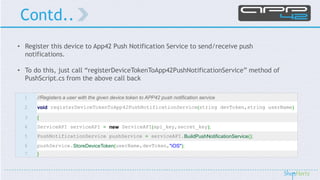
•Register this device to App42 Push Notification Service to send/receive push notifications. 
•To do this, just call “registerDeviceTokenToApp42PushNotificationService” method of PushScript.csfrom the above call back 
Contd.. 
1 
//Registers a user with the given device token to APP42 push notification service 
2 
voidregisterDeviceTokenToApp42PushNotificationService(string devToken,string userName) 
3 
{ 
4 
ServiceAPI serviceAPI =newServiceAPI(api_key,secret_key); 
5 
PushNotificationService pushService =serviceAPI.BuildPushNotificationService(); 
6 
pushService.StoreDeviceToken(userName,devToken,"iOS"); 
7 
}
•The SendPushToUsermethod of this script can be written/called to send a request to App42 serverto send a Push Notification to a specific user 
Contd.. 
1 
//Sends push to a given user 
2 
voidSendPushToUser(string userName,string message) 
3 
{ 
4 
ServiceAPI serviceAPI =newServiceAPI(api_key,secret_key); 
5 
PushNotificationService pushService =serviceAPI.BuildPushNotificationService(); 
6 
pushService.SendPushMessageToUser(userName,message); 
7 
}
•The “onPushNotificationsReceived” call back of the PushScriptwill be called when you receive a push notification 
Contd.. 
1 
//Sent when the application Receives a push notification 
2 
voidonPushNotificationsReceived(string pushMessageString) 
3 
{ 
4 
Console.WriteLine("onPushNotificationsReceived"); 
5 
//dump you code here to handle the pushMessageString 
6 
Debug.Log(pushMessageString); 
7 
}
Now, 
•Your App is successfully set up to receive/send push notifications through our App42 Server usingApp42 Push Notification Service 
•If you have any questions or need further assistance to integrate Push Notification in your App, do write back atsupport@shephertz.com 
Contd..
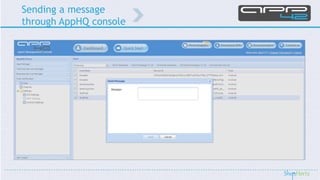
Sending a message 
through AppHQconsole
IT IS THAT SIMPLE!!!
Some useful links 
Getting Started: 
Quick Start GuideSign-up for Free 
Game Development Center 
Concepts: 
Backend as a Service 
Massive Multiplayer Gaming Engine 
App Analytics 
Products: App42 Cloud APIs -BaaSAppWarp –Multiplayer Gaming EngineAppHQ –Management Console 
Downloads: 
App42 Cloud SDKs 
App 42 Modules 
Blogs: 
Why BaaS? 
Push Notification for iOS 
Push Notification for AndroidReal-time Multiplayer Games using Unity3D 
Integrating Facebook in your Android AppMaking a Turn-based Game 
Using Query Interface 
When to use NoSQL? 
Add ‘Social’ to your Game
Links for Reference : 
http://www.shephertz.com 
http://api.shephertz.com 
http://appwarp.shephertz.com 
http://app42paas.shephertz.com 
Follow us on: 
Contact: sales@shephertz.com 
Skype: ShepHertz

Push Notification with Unity in iOS using App42 Backend

  • 1.
  • 2.
    Increase User Engagement Calendar Events Message Pop-Up Latest Updates Push Notifications
  • 3.
    Benefits of PushNotification Increases user-engagement e.g. In a turn-based game like Tic-Tac-Toe, it can notify a user of his turn (suppose he gets a phone call in between and forgets that he was playing!!) Allows to send messages to users even when the app is not running; thus helps in reminding them of your App Helps to build a fan community around your game by pushing to a targeted audience –like your regular gamers Allows an App to notify its users of new events without needing to actually open it, i.e. by a sound or a screen pop up
  • 4.
    App42 Push Notificationsupports iOS Android Windows Unity Flash HTML 5 Cocos2dx Corona.. And more
  • 5.
    Our Push NotificationAPI can be used to send cross- platformpush messages to devices running on iOS, Androidand WindowsPhonewith a single API call •Send Image/Text/URLstext-based Push Notifications •Send messages in Channel Subscription Mode •Send ScheduledPush as per Time-Zone No infrastructure & scalability worries Push Analytics•Analyzeyour Push Campaign with App42 Analytics •Evaluate the number of Push messages sent, delivered and opened Why App42 Push Notification?
  • 6.
    Push for MarketingAutomation Segment your Users and send targeted Push Notifications •Segmentation based on User Profile, Interests, Channel Subscription, etc. •Geo-Location based Push Notifications Track User Activity, set custom events and trigger Push Notifications based on Users’ Current/Real-time or Previous Sessions’ Activity •Set custom events such as App Open, Click on a Link, App Session Close, In-App Purchase, Add to Cart, etc. •Trigger real-time Push Notifications based on Event occurrences
  • 7.
    Creating a channel& scheduling Push messages through AppHQ
  • 8.
    A very usefulfeature that can track: These analytics can be viewed from our AppHQconsole. Why Push Analytics? When you use our Push Notification Service, each Push goes from the App42 server to GCM/APNS/MPNS and then to the user device. Thus, Analytics gives you a better insight of your Push Notification campaign. Push Analytics •Delivery of Push Notification is not guaranteed even from the service provider •Once delivered, there might be a chance that user just clears it without opening the message How many Push Notifications were sent from your side How many were delivered, and How many users opened the message 100% 74% 31% Push Notification Campaign Sent Delivered Opened
  • 9.
  • 10.
    Steps to IntegratePush Notificationwith Unity3d on iOS Download our Sample App Source Code from ourGitHub Repo. To configure Push Notifications for iOS Apps/games; the prerequisites are: •Create a new App ID and provisioning profile for each App that uses push as wellas an SSL certificate for the server. For this, you should havean iOS Developer Program Membership oniOS Dev Center •Create .p12 file from the SSL certificate, which was downloaded from the iOS Dev Center •You require a server! Note:If you are new to Push Notifications for iOS or App42 , you can go through ourprevious blog(Configure & Send Push Notification on iOS Device)
  • 11.
    How the samplecode implements the Push Notifications by examining the key code snippets? •Open the downloaded folder, go to the assets folder and double click PushSample.unityfile to open the sample •To implement ‘Push’, drag and drop our “App42PushHandlerInternal.h/.m” classes to “Assets/Plugins/iOS” folder and “PushScript.cs”C# script to “Assets” folder. •Assign PushScript.csto a game object; in demo it was assigned to the main camera. So, let’s browse through the PushScript.cscode. •To receive push notifications, iOSneeds to be notified that your App wants to receive push notifications, and “App42PushHandlerInternal.m”class does it by default . •In PushScript, all the required call backs are defined and to get the call backs, set a listener game object as: Contd.. 1 // Use this for initialization 2 voidStart () 3 { 4 setListenerGameObject(this.gameObject.name); 5 }
  • 12.
    •As “App42PushHandlerInternal.m” sendsa request to register this device for push notification service; the device token is received from Apple Push Service on the successful response. •It is available via “onDidRegisterForRemoteNotificationsWithDeviceToken” call back of PushScript.cs. Contd.. 1 //Sent when the application successfully registered with Apple Push Notification Service (APNS). 2 voidonDidRegisterForRemoteNotificationsWithDeviceToken(string deviceToken) 3 { 4 if(deviceToken !=null&&deviceToken.Length!=0) 5 { 6 registerDeviceTokenToApp42PushNotificationService(deviceToken,"User Name"); 7 } 8 }
  • 13.
    •Register this deviceto App42 Push Notification Service to send/receive push notifications. •To do this, just call “registerDeviceTokenToApp42PushNotificationService” method of PushScript.csfrom the above call back Contd.. 1 //Registers a user with the given device token to APP42 push notification service 2 voidregisterDeviceTokenToApp42PushNotificationService(string devToken,string userName) 3 { 4 ServiceAPI serviceAPI =newServiceAPI(api_key,secret_key); 5 PushNotificationService pushService =serviceAPI.BuildPushNotificationService(); 6 pushService.StoreDeviceToken(userName,devToken,"iOS"); 7 }
  • 14.
    •The SendPushToUsermethod ofthis script can be written/called to send a request to App42 serverto send a Push Notification to a specific user Contd.. 1 //Sends push to a given user 2 voidSendPushToUser(string userName,string message) 3 { 4 ServiceAPI serviceAPI =newServiceAPI(api_key,secret_key); 5 PushNotificationService pushService =serviceAPI.BuildPushNotificationService(); 6 pushService.SendPushMessageToUser(userName,message); 7 }
  • 15.
    •The “onPushNotificationsReceived” callback of the PushScriptwill be called when you receive a push notification Contd.. 1 //Sent when the application Receives a push notification 2 voidonPushNotificationsReceived(string pushMessageString) 3 { 4 Console.WriteLine("onPushNotificationsReceived"); 5 //dump you code here to handle the pushMessageString 6 Debug.Log(pushMessageString); 7 }
  • 16.
    Now, •Your Appis successfully set up to receive/send push notifications through our App42 Server usingApp42 Push Notification Service •If you have any questions or need further assistance to integrate Push Notification in your App, do write back atsupport@shephertz.com Contd..
  • 17.
    Sending a message through AppHQconsole
  • 18.
    IT IS THATSIMPLE!!!
  • 19.
    Some useful links Getting Started: Quick Start GuideSign-up for Free Game Development Center Concepts: Backend as a Service Massive Multiplayer Gaming Engine App Analytics Products: App42 Cloud APIs -BaaSAppWarp –Multiplayer Gaming EngineAppHQ –Management Console Downloads: App42 Cloud SDKs App 42 Modules Blogs: Why BaaS? Push Notification for iOS Push Notification for AndroidReal-time Multiplayer Games using Unity3D Integrating Facebook in your Android AppMaking a Turn-based Game Using Query Interface When to use NoSQL? Add ‘Social’ to your Game
  • 20.
    Links for Reference: http://www.shephertz.com http://api.shephertz.com http://appwarp.shephertz.com http://app42paas.shephertz.com Follow us on: Contact: sales@shephertz.com Skype: ShepHertz