



Presenters
Garrett Hogan,
CRM Sales & Engineering
at BrainSell
Kate Priddy,
Marketing Manager
at BrainSell
Agenda
● About BrainSell
● Round 1: Features Comparison for all 3 CRMs
● Round 2: Implementation Comparison for all 3 CRMs
● Round 3: Price Comparison for all 3 CRMs
● Demo
● Q & A
About BrainSell
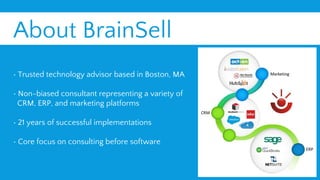
• Trusted technology advisor based in Boston, MA
• Non-biased consultant representing a variety of
CRM, ERP, and marketing platforms
• 21 years of successful implementations
• Core focus on consulting before software
ROUND 1
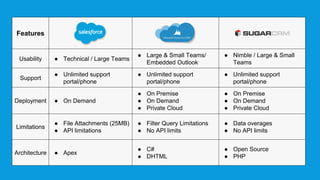
Features
Features
Usability ● Technical / Large Teams
● Large & Small Teams/
Embedded Outlook
● Nimble / Large & Small
Teams
Support
● Unlimited support
portal/phone
● Unlimited support
portal/phone
● Unlimited support
portal/phone
Deployment ● On Demand
● On Premise
● On Demand
● Private Cloud
● On Premise
● On Demand
● Private Cloud
Limitations
● File Attachments (25MB)
● API limitations
● Filter Query Limitations
● No API limits
● Data overages
● No API limits
Architecture ● Apex
● C#
● DHTML
● Open Source
● PHP
ROUND 2
Implementation
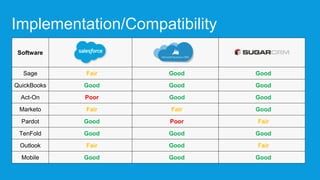
Implementation/Compatibility
Software
Sage Fair Good Good
QuickBooks Good Good Good
Act-On Poor Good Good
Marketo Fair Fair Good
Pardot Good Poor Fair
TenFold Good Good Good
Outlook Fair Good Fair
Mobile Good Good Good
ROUND 3
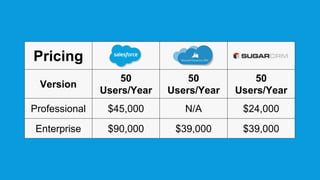
Pricing
Pricing
Version
50
Users/Year
50
Users/Year
50
Users/Year
Professional $45,000 N/A $24,000
Enterprise $90,000 $39,000 $39,000
Demo
Who Wins?
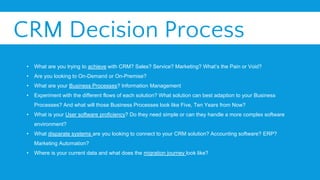
CRM Decision Process
• What are you trying to achieve with CRM? Sales? Service? Marketing? What’s the Pain or Void?
• Are you looking to On-Demand or On-Premise?
• What are your Business Processes? Information Management
• Experiment with the different flows of each solution? What solution can best adaption to your Business
Processes? And what will those Business Processes look like Five, Ten Years from Now?
• What is your User software proficiency? Do they need simple or can they handle a more complex software
environment?
• What disparate systems are you looking to connect to your CRM solution? Accounting software? ERP?
Marketing Automation?
• Where is your current data and what does the migration journey look like?
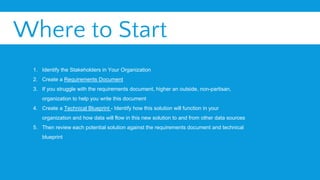
Where to Start
1. Identify the Stakeholders in Your Organization
2. Create a Requirements Document
3. If you struggle with the requirements document, higher an outside, non-partisan,
organization to help you write this document
4. Create a Technical Blueprint - Identify how this solution will function in your
organization and how data will flow in this new solution to and from other data sources
5. Then review each potential solution against the requirements document and technical
blueprint
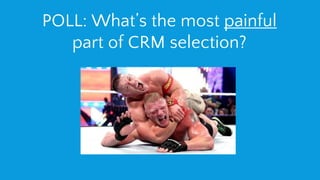
POLL: What’s the most painful
part of CRM selection?
Q&A
Thank You!
Follow up questions can be directed to:
Kate Priddy
kpriddy@brainsell.net
(978) 887-3870 ext 205
Garrett Hogan,
CRM Sales & Engineering
at BrainSell
Kate Priddy,
Marketing Manager
at BrainSell

CRM SUMMER SLAM: SalesForce vs MS Dynamics vs SugarCRM

  • 2.
    Presenters Garrett Hogan, CRM Sales& Engineering at BrainSell Kate Priddy, Marketing Manager at BrainSell
  • 3.
    Agenda ● About BrainSell ●Round 1: Features Comparison for all 3 CRMs ● Round 2: Implementation Comparison for all 3 CRMs ● Round 3: Price Comparison for all 3 CRMs ● Demo ● Q & A
  • 4.
    About BrainSell • Trustedtechnology advisor based in Boston, MA • Non-biased consultant representing a variety of CRM, ERP, and marketing platforms • 21 years of successful implementations • Core focus on consulting before software
  • 6.
  • 7.
    Features Usability ● Technical/ Large Teams ● Large & Small Teams/ Embedded Outlook ● Nimble / Large & Small Teams Support ● Unlimited support portal/phone ● Unlimited support portal/phone ● Unlimited support portal/phone Deployment ● On Demand ● On Premise ● On Demand ● Private Cloud ● On Premise ● On Demand ● Private Cloud Limitations ● File Attachments (25MB) ● API limitations ● Filter Query Limitations ● No API limits ● Data overages ● No API limits Architecture ● Apex ● C# ● DHTML ● Open Source ● PHP
  • 8.
  • 9.
    Implementation/Compatibility Software Sage Fair GoodGood QuickBooks Good Good Good Act-On Poor Good Good Marketo Fair Fair Good Pardot Good Poor Fair TenFold Good Good Good Outlook Fair Good Fair Mobile Good Good Good
  • 10.
  • 11.
  • 12.
  • 13.
  • 14.
    CRM Decision Process •What are you trying to achieve with CRM? Sales? Service? Marketing? What’s the Pain or Void? • Are you looking to On-Demand or On-Premise? • What are your Business Processes? Information Management • Experiment with the different flows of each solution? What solution can best adaption to your Business Processes? And what will those Business Processes look like Five, Ten Years from Now? • What is your User software proficiency? Do they need simple or can they handle a more complex software environment? • What disparate systems are you looking to connect to your CRM solution? Accounting software? ERP? Marketing Automation? • Where is your current data and what does the migration journey look like?
  • 15.
    Where to Start 1.Identify the Stakeholders in Your Organization 2. Create a Requirements Document 3. If you struggle with the requirements document, higher an outside, non-partisan, organization to help you write this document 4. Create a Technical Blueprint - Identify how this solution will function in your organization and how data will flow in this new solution to and from other data sources 5. Then review each potential solution against the requirements document and technical blueprint
  • 16.
    POLL: What’s themost painful part of CRM selection?
  • 17.
  • 18.
    Thank You! Follow upquestions can be directed to: Kate Priddy kpriddy@brainsell.net (978) 887-3870 ext 205 Garrett Hogan, CRM Sales & Engineering at BrainSell Kate Priddy, Marketing Manager at BrainSell