Outgrowing
QuickBooks
Key Signs It's Time To Move
On
Housekeepin
g
• 30-Minute Presentation with Q&A
• Type questions into the “Question Box” to
submit them throughout the
presentation
• We’ll send a copy of the deck and
recording of the webinar in a follow-up
email after the event
• Virtual Meal Delivery Service gift cards
will also be sent out via email following
the event
Some key items before we get started
About BrainSell
Blueprint for Digital
Transformation
• People
• Process Mapping
• Change Management
• Technology
Data for Better Business
Decisions
• Modern Data Platform
• Unified Reporting
• Executive Dashboards
Technology for Scale
• CRM, MA, and CX
• ERP
• Business Intelligence
• AI
Key Technology Partners
Meet the
Expert
Cloud ERP Account Executive
Troy
Hollings
Agend
a
01 Key Signs You've Outgrown
QuickBooks
02 Benefits of a modern ERP
solution
03 How to evaluate solutions
04 Side by Side Comparison
05 Audience Q&A
06 Next Steps
Let’s Take a Poll
Key Signs It's Time To
Move Off QuickBooks
Have you Outgrown
QuickBooks?
• Manual reporting and
workarounds
• Lack of real-time visibility into
financials
• Pain scaling with multi-entity or
multi-location
• Inadequate audit trails or
compliance controls
• Difficulty integrating with other
business systems
Key Signs It's Time To Move On
Benefits of Modern
ERP
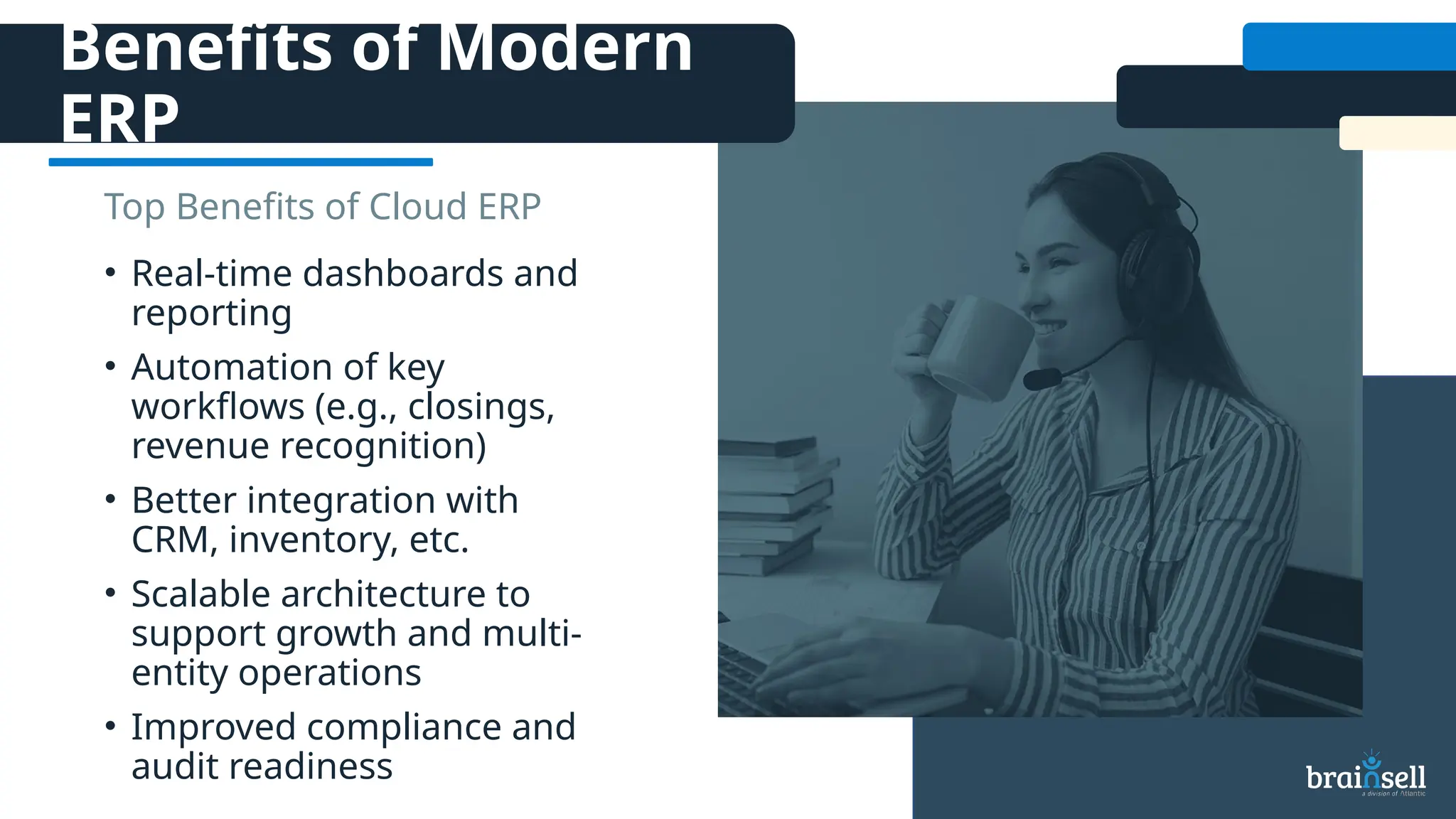
• Real-time dashboards and
reporting
• Automation of key
workflows (e.g., closings,
revenue recognition)
• Better integration with
CRM, inventory, etc.
• Scalable architecture to
support growth and multi-
entity operations
• Improved compliance and
audit readiness
Top Benefits of Cloud ERP
How to Evaluate
Solutions
☐ Current state vs Future
State
☐ Budget/Cost
☐ Objectives
☐ Integrations
☐ Relationship & workflow
management
☐ Reporting capabilities
☐ Deployment
☐ Industry-specific
requirements
☐ Ease of use
☐ Flexibility & ability to scale
☐ Upgrades & enhancements
☐ Automation & AI capabilities
Side by Side
Comparison
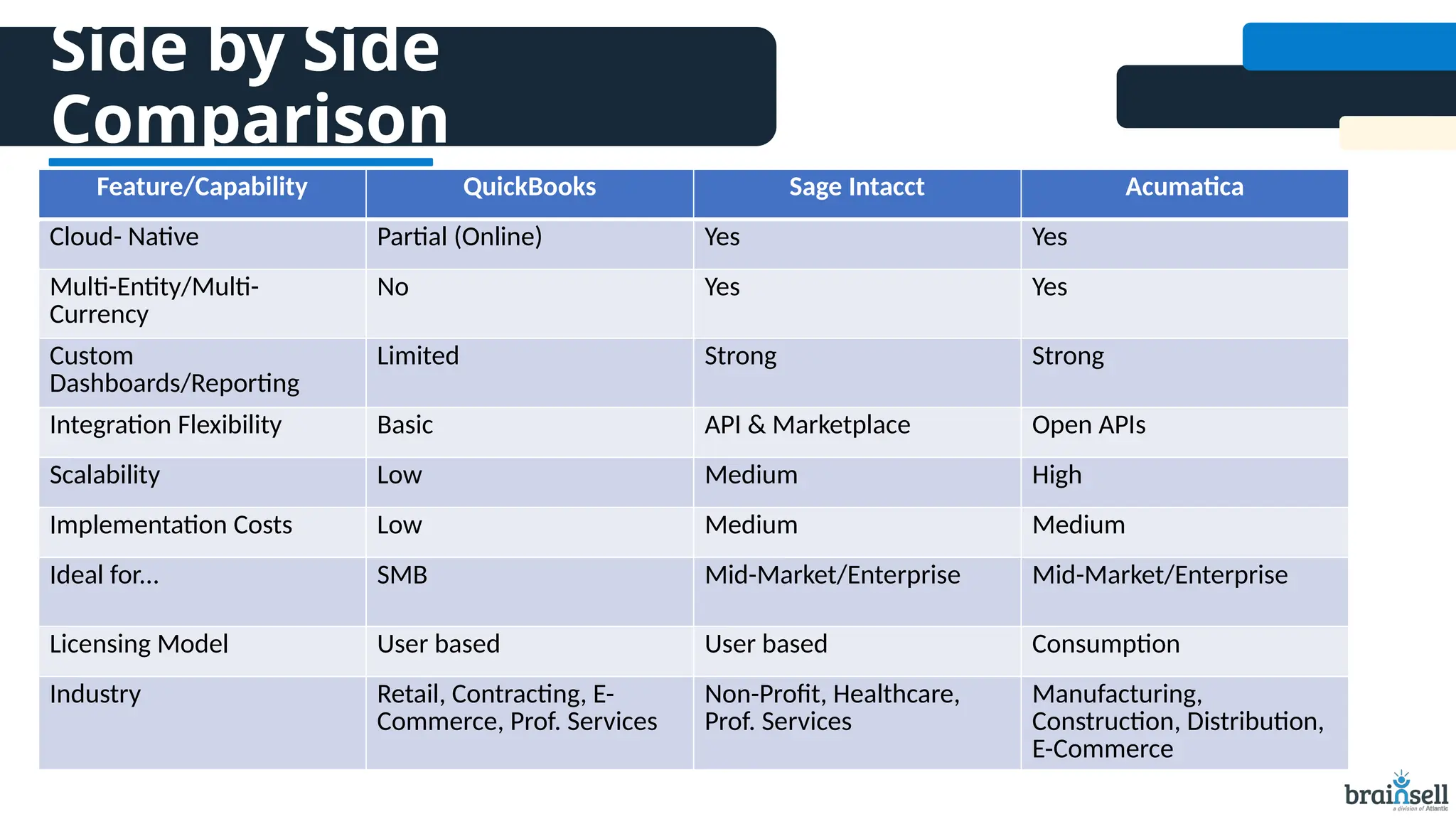
Feature/Capability QuickBooks Sage Intacct Acumatica
Cloud- Native Partial (Online) Yes Yes
Multi-Entity/Multi-
Currency
No Yes Yes
Custom
Dashboards/Reporting
Limited Strong Strong
Integration Flexibility Basic API & Marketplace Open APIs
Scalability Low Medium High
Implementation Costs Low Medium Medium
Ideal for... SMB Mid-Market/Enterprise Mid-Market/Enterprise
Licensing Model User based User based Consumption
Industry Retail, Contracting, E-
Commerce, Prof. Services
Non-Profit, Healthcare,
Prof. Services
Manufacturing,
Construction, Distribution,
E-Commerce
Audience Q&A
Next Step
Schedule your complimentary
QuickBooks assessment today!
Email us at marketing@brainsell.com with
your availability.
Get your FREE
QuickBooks Assessment
THANK YOU FOR
JOINING US!
(866) 356-2654 growth@brainsell.com www.brainsell.com

Outgrowing QuickBooks: Key Signs It's Time to Move On

  • 1.
  • 2.
    Housekeepin g • 30-Minute Presentationwith Q&A • Type questions into the “Question Box” to submit them throughout the presentation • We’ll send a copy of the deck and recording of the webinar in a follow-up email after the event • Virtual Meal Delivery Service gift cards will also be sent out via email following the event Some key items before we get started
  • 3.
    About BrainSell Blueprint forDigital Transformation • People • Process Mapping • Change Management • Technology Data for Better Business Decisions • Modern Data Platform • Unified Reporting • Executive Dashboards Technology for Scale • CRM, MA, and CX • ERP • Business Intelligence • AI Key Technology Partners
  • 4.
    Meet the Expert Cloud ERPAccount Executive Troy Hollings
  • 5.
    Agend a 01 Key SignsYou've Outgrown QuickBooks 02 Benefits of a modern ERP solution 03 How to evaluate solutions 04 Side by Side Comparison 05 Audience Q&A 06 Next Steps
  • 6.
  • 7.
    Key Signs It'sTime To Move Off QuickBooks
  • 8.
    Have you Outgrown QuickBooks? •Manual reporting and workarounds • Lack of real-time visibility into financials • Pain scaling with multi-entity or multi-location • Inadequate audit trails or compliance controls • Difficulty integrating with other business systems Key Signs It's Time To Move On
  • 9.
    Benefits of Modern ERP •Real-time dashboards and reporting • Automation of key workflows (e.g., closings, revenue recognition) • Better integration with CRM, inventory, etc. • Scalable architecture to support growth and multi- entity operations • Improved compliance and audit readiness Top Benefits of Cloud ERP
  • 10.
    How to Evaluate Solutions ☐Current state vs Future State ☐ Budget/Cost ☐ Objectives ☐ Integrations ☐ Relationship & workflow management ☐ Reporting capabilities ☐ Deployment ☐ Industry-specific requirements ☐ Ease of use ☐ Flexibility & ability to scale ☐ Upgrades & enhancements ☐ Automation & AI capabilities
  • 11.
    Side by Side Comparison Feature/CapabilityQuickBooks Sage Intacct Acumatica Cloud- Native Partial (Online) Yes Yes Multi-Entity/Multi- Currency No Yes Yes Custom Dashboards/Reporting Limited Strong Strong Integration Flexibility Basic API & Marketplace Open APIs Scalability Low Medium High Implementation Costs Low Medium Medium Ideal for... SMB Mid-Market/Enterprise Mid-Market/Enterprise Licensing Model User based User based Consumption Industry Retail, Contracting, E- Commerce, Prof. Services Non-Profit, Healthcare, Prof. Services Manufacturing, Construction, Distribution, E-Commerce
  • 12.
  • 13.
    Next Step Schedule yourcomplimentary QuickBooks assessment today! Email us at marketing@brainsell.com with your availability. Get your FREE QuickBooks Assessment
  • 14.
    THANK YOU FOR JOININGUS! (866) 356-2654 growth@brainsell.com www.brainsell.com

Editor's Notes

  • #2 Katie to run through housekeeping
  • #3 We help businesses modernize their entire tech stack—from finance and operations to sales, marketing, and customer service—so your systems work better together. Whether you're exploring data strategy or building toward AI readiness, we're here to help you take that next step.
  • #5 Katie to review agenda
  • #6 Takes forever to get up to date reports Closing times/revenue recognition Can't scale- no multientity Doesn't work with other systems Tracking inventory
  • #8 📘 Case Study: ABC Speciality Foods – Outgrowing QuickBooks Company Overview Name: ABC Specialty Foods Industry: Food Manufacturing & Distribution Location: Denver, CO Employees: 85 Annual Revenue: $22M Current System: QuickBooks Desktop Enterprise Background ABC Specialty Foods began as a local organic snack producer but rapidly grew into a multi-state distribution powerhouse with multiple product lines. The company’s operations include in-house production, third-party warehousing, and a sales presence in over 30 states. QuickBooks, which initially handled their basic accounting, has become a bottleneck to their scalability. Pain Points Driving the Need for Change 1. Lack of Multi-Entity Support ABD expanded to open a second manufacturing plant in Texas and began operating under two legal entities. QuickBooks forced the team to manage each entity in separate files, making consolidated financial reporting time-consuming and error-prone. Impact: The finance team spent over 40 hours per month manually consolidating financials. Consequence: Delayed monthly close and inconsistent data for the executive team. 2. Inventory Management Nightmares With a growing SKU list and two production facilities, QuickBooks couldn’t handle inventory tracking effectively across multiple locations. Impact: Manual spreadsheets were used to reconcile inventory, leading to discrepancies and stockouts. Consequence: $150,000 lost in revenue last year due to missed sales from stock issues. 3. No Real-Time Insights or Dashboards QuickBooks offered limited reporting capabilities. The leadership team lacked real-time visibility into performance metrics like cost of goods sold (COGS), profitability by product line, and inventory turnover. Impact: Decisions were based on outdated data. Consequence: Slower strategic pivots and inability to forecast accurately. 4. Audit and Compliance Challenges As ABC pursued larger wholesale contracts and explored outside investors, the need for audit-ready financials and GAAP compliance grew. Impact: External auditors had to spend extra time validating data due to lack of audit trails. Consequence: Higher audit fees and a red flag for potential investors. 5. System Crashes and Data Corruption QuickBooks Desktop, installed on a local server, became unreliable as data volume grew. Frequent crashes and file size limits risked data integrity. Impact: Weekly downtime and productivity losses. Consequence: IT support costs rose by 25% year-over-year.
  • #9 -monthly close down from 15 to 5 days -grant compliance reports grants tracked by donor restrictions, program, and location -reduce finance department overtime – client who had 7 locations, drank a whole bottle of wine to do her reports -remote ready operations -
  • #12 Katie to review poll question, Sarah will launch Poll 1 – meal delivery gc Poll 2 – related to reporting
  • #13 Katie to review Next Steps