CREATING THE
ANCILLARY
PRODUCTS
Emma Collins, COWA
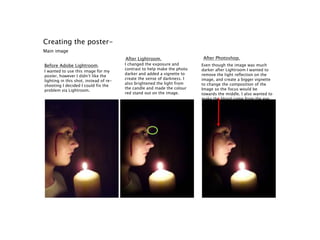
Creating the poster-
Main image
Before Adobe Lightroom.
After Lightroom. After Photoshop.
I wanted to use this image for my
poster, however I didn’t like the
lighting in this shot, instead of re-
shooting I decided I could fix the
problem via Lightroom.
I changed the exposure and
contrast to help make the photo
darker and added a vignette to
create the sense of darkness. I
also brightened the light from
the candle and made the colour
red stand out on the image.
Even though the image was much
darker after Lightroom I wanted to
remove the light reflection on the
image, and create a bigger vignette
to change the composition of the
Image so the focus would be
towards the middle. I also wanted to
make the blood come from the eye,
and stand out even more.
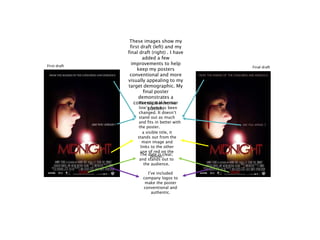
Final draftFirst draft
The date is clear,
and stands out to
the audience.
a visible title, it
stands out from the
main image and
links to the other
use of red on the
poster.
These images show my
first draft (left) and my
final draft (right) . I have
added a few
improvements to help
keep my posters
conventional and more
visually appealing to my
target demographic. My
final poster
demonstrates a
conventional horror
poster.
I’ve included
company logos to
make the poster
conventional and
authentic.
The tag & incentive
line’s font has been
changed. It doesn’t
stand out as much
and fits in better with
the poster.
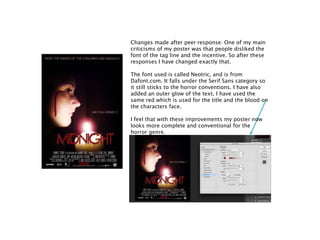
Changes made after peer response: One of my main
criticisms of my poster was that people disliked the
font of the tag line and the incentive. So after these
responses I have changed exactly that.
The font used is called Neotric, and is from
Dafont.com. It falls under the Serif Sans category so
it still sticks to the horror conventions. I have also
added an outer glow of the text, I have used the
same red which is used for the title and the blood on
the characters face.
I feel that with these improvements my poster now
looks more complete and conventional for the
horror genre.
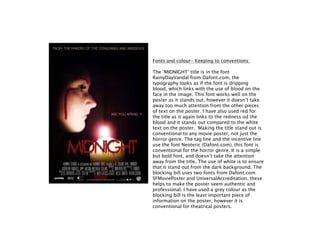
Fonts and colour- Keeping to conventions:
The ‘MIDNIGHT’ title is in the font
RainyDayVandal from Dafont.com, the
typography looks as if the font is dripping
blood, which links with the use of blood on the
face in the image. This font works well on the
poster as it stands out, however it doesn’t take
away too much attention from the other pieces
of text on the poster. I have also used red for
the title as it again links to the redness od the
blood and it stands out compared to the white
text on the poster. Making the title stand out is
conventional to any movie poster, not just the
horror genre. The tag line and the incentive line
use the font Neoteric (Dafont.com), this font is
conventional for the horror genre. It is a simple
but bold font, and doesn’t take the attention
away from the title. The use of white is to ensure
that it stand out from the dark background. The
blocking bill uses two fonts from Dafont.com
SFMoviePoster and UniversalAccreditation, these
helps to make the poster seem authentic and
professional. I have used a grey colour as the
blocking bill is the least important piece of
information on the poster, however it is
conventional for theatrical posters.
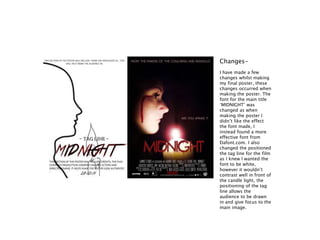
I have made a few
changes whilst making
my final poster, these
changes occurred when
making the poster. The
font for the main title
‘MIDNIGHT’ was
changed as when
making the poster I
didn’t like the effect
the font made, I
instead found a more
effective font from
Dafont.com. I also
changed the positioned
the tag line for the film
as I knew I wanted the
font to be white,
however it wouldn’t
contrast well in front of
the candle light, the
positioning of the tag
line allows the
audience to be drawn
in and give focus to the
main image.
Changes-
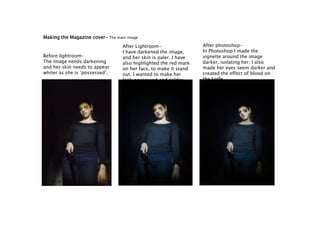
Making the Magazine cover- The main image
Before lightroom-
The image needs darkening
and her skin needs to appear
whiter as she is ‘possessed’.
After Lightroom-
I have darkened the image,
and her skin is paler. I have
also highlighted the red mark
on her face, to make it stand
out. I wanted to make her
look possessed and colder.
After photoshop-
In Photoshop I made the
vignette around the image
darker, isolating her. I also
made her eyes seem darker and
created the effect of blood on
the knife.
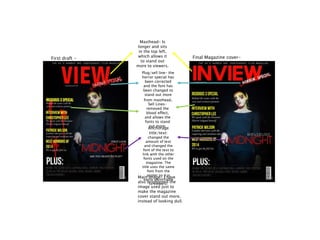
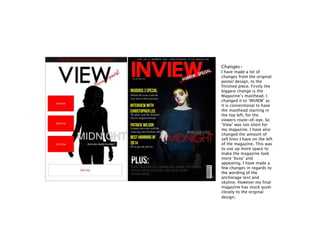
Masthead- Is
longer and sits
in the top left,
which allows it
to stand out
more to viewers.
Plug/sell line- the
horror special has
been corrected
and the font has
been changed to
stand out more
from masthead.
Sell Lines-
removed the
blood effect,
and allows the
fonts to stand
out more.
Anchorage
title/text:
changed the
amount of text
and changed the
font of the text to
link with the other
fonts used on the
magazine. The
title uses the same
font from the
poster so it is
easily identifiable
to viewers.
Main image- I have
also brightened the
image used just to
make the magazine
cover stand out more,
instead of looking dull.
First draft - Final Magazine cover-
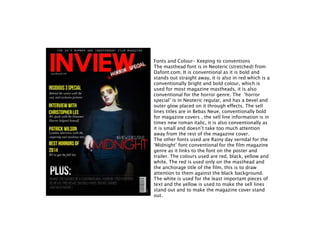
Fonts and Colour- Keeping to conventions
The masthead font is in Neoteric (stretched) from
Dafont.com. It is conventional as it is bold and
stands out straight away, it is also in red which is a
conventionally bright and bold colour, which is
used for most magazine mastheads, it is also
conventional for the horror genre. The ‘horror
special’ is in Neoteric regular, and has a bevel and
outer glow placed on it through effects. The sell
lines titles are in Bebas Neue, conventionally bold
for magazine covers , the sell line information is in
times new roman italic, it is also conventionally as
it is small and doesn’t take too much attention
away from the rest of the magazine cover.
The other fonts used are Rainy day verndal for the
‘Midnight’ font conventional for the film magazine
genre as it links to the font on the poster and
trailer. The colours used are red, black, yellow and
white. The red is used only on the masthead and
the anchorage title of the film, this is to draw
attention to them against the black background.
The white is used for the least important pieces of
text and the yellow is used to make the sell lines
stand out and to make the magazine cover stand
out.
Changes-
I have made a lot of
changes from the original
poster design, to the
finished piece. Firstly the
biggest change is the
Magazine’s masthead. I
changed it to ‘INVIEW’ as
it is conventional to have
the masthead starting in
the top left, for the
viewers route-of-eye. So
‘View’ was too short for
my magazine. I have also
changed the amount of
sell lines I have on the left
of the magazine. This was
to use up more space to
make the magazine look
more ‘busy’ and
appealing. I have made a
few changes in regards to
the wording of the
anchorage text and
skyline. However my final
magazine has stuck quiet
closely to the original
design.

Creating the ancillary products

  • 1.
  • 2.
    Creating the poster- Mainimage Before Adobe Lightroom. After Lightroom. After Photoshop. I wanted to use this image for my poster, however I didn’t like the lighting in this shot, instead of re- shooting I decided I could fix the problem via Lightroom. I changed the exposure and contrast to help make the photo darker and added a vignette to create the sense of darkness. I also brightened the light from the candle and made the colour red stand out on the image. Even though the image was much darker after Lightroom I wanted to remove the light reflection on the image, and create a bigger vignette to change the composition of the Image so the focus would be towards the middle. I also wanted to make the blood come from the eye, and stand out even more.
  • 3.
    Final draftFirst draft Thedate is clear, and stands out to the audience. a visible title, it stands out from the main image and links to the other use of red on the poster. These images show my first draft (left) and my final draft (right) . I have added a few improvements to help keep my posters conventional and more visually appealing to my target demographic. My final poster demonstrates a conventional horror poster. I’ve included company logos to make the poster conventional and authentic. The tag & incentive line’s font has been changed. It doesn’t stand out as much and fits in better with the poster.
  • 4.
    Changes made afterpeer response: One of my main criticisms of my poster was that people disliked the font of the tag line and the incentive. So after these responses I have changed exactly that. The font used is called Neotric, and is from Dafont.com. It falls under the Serif Sans category so it still sticks to the horror conventions. I have also added an outer glow of the text, I have used the same red which is used for the title and the blood on the characters face. I feel that with these improvements my poster now looks more complete and conventional for the horror genre.
  • 5.
    Fonts and colour-Keeping to conventions: The ‘MIDNIGHT’ title is in the font RainyDayVandal from Dafont.com, the typography looks as if the font is dripping blood, which links with the use of blood on the face in the image. This font works well on the poster as it stands out, however it doesn’t take away too much attention from the other pieces of text on the poster. I have also used red for the title as it again links to the redness od the blood and it stands out compared to the white text on the poster. Making the title stand out is conventional to any movie poster, not just the horror genre. The tag line and the incentive line use the font Neoteric (Dafont.com), this font is conventional for the horror genre. It is a simple but bold font, and doesn’t take the attention away from the title. The use of white is to ensure that it stand out from the dark background. The blocking bill uses two fonts from Dafont.com SFMoviePoster and UniversalAccreditation, these helps to make the poster seem authentic and professional. I have used a grey colour as the blocking bill is the least important piece of information on the poster, however it is conventional for theatrical posters.
  • 6.
    I have madea few changes whilst making my final poster, these changes occurred when making the poster. The font for the main title ‘MIDNIGHT’ was changed as when making the poster I didn’t like the effect the font made, I instead found a more effective font from Dafont.com. I also changed the positioned the tag line for the film as I knew I wanted the font to be white, however it wouldn’t contrast well in front of the candle light, the positioning of the tag line allows the audience to be drawn in and give focus to the main image. Changes-
  • 7.
    Making the Magazinecover- The main image Before lightroom- The image needs darkening and her skin needs to appear whiter as she is ‘possessed’. After Lightroom- I have darkened the image, and her skin is paler. I have also highlighted the red mark on her face, to make it stand out. I wanted to make her look possessed and colder. After photoshop- In Photoshop I made the vignette around the image darker, isolating her. I also made her eyes seem darker and created the effect of blood on the knife.
  • 8.
    Masthead- Is longer andsits in the top left, which allows it to stand out more to viewers. Plug/sell line- the horror special has been corrected and the font has been changed to stand out more from masthead. Sell Lines- removed the blood effect, and allows the fonts to stand out more. Anchorage title/text: changed the amount of text and changed the font of the text to link with the other fonts used on the magazine. The title uses the same font from the poster so it is easily identifiable to viewers. Main image- I have also brightened the image used just to make the magazine cover stand out more, instead of looking dull. First draft - Final Magazine cover-
  • 9.
    Fonts and Colour-Keeping to conventions The masthead font is in Neoteric (stretched) from Dafont.com. It is conventional as it is bold and stands out straight away, it is also in red which is a conventionally bright and bold colour, which is used for most magazine mastheads, it is also conventional for the horror genre. The ‘horror special’ is in Neoteric regular, and has a bevel and outer glow placed on it through effects. The sell lines titles are in Bebas Neue, conventionally bold for magazine covers , the sell line information is in times new roman italic, it is also conventionally as it is small and doesn’t take too much attention away from the rest of the magazine cover. The other fonts used are Rainy day verndal for the ‘Midnight’ font conventional for the film magazine genre as it links to the font on the poster and trailer. The colours used are red, black, yellow and white. The red is used only on the masthead and the anchorage title of the film, this is to draw attention to them against the black background. The white is used for the least important pieces of text and the yellow is used to make the sell lines stand out and to make the magazine cover stand out.
  • 10.
    Changes- I have madea lot of changes from the original poster design, to the finished piece. Firstly the biggest change is the Magazine’s masthead. I changed it to ‘INVIEW’ as it is conventional to have the masthead starting in the top left, for the viewers route-of-eye. So ‘View’ was too short for my magazine. I have also changed the amount of sell lines I have on the left of the magazine. This was to use up more space to make the magazine look more ‘busy’ and appealing. I have made a few changes in regards to the wording of the anchorage text and skyline. However my final magazine has stuck quiet closely to the original design.