Creating Your First Classroom BlogBlogging In Education
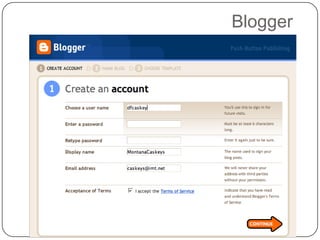
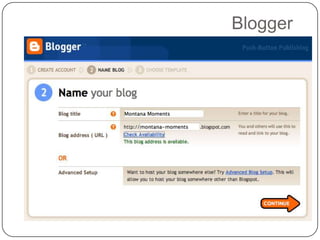
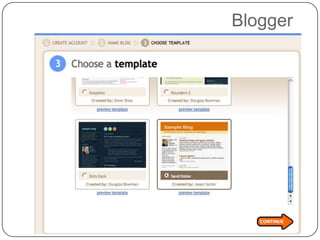
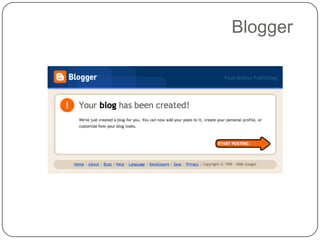
Steps in Creating a BlogDecide your purposeCommunication with parentsCommunication to parentsCommunication with studentsCommunication to studentsSetup an accountCreate a postShare your blog
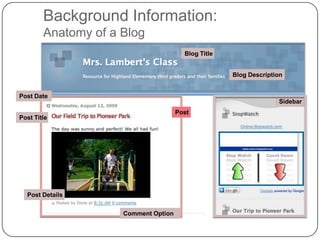
Background Information:Anatomy of a BlogBlog TitleBlog DescriptionPost DateSidebarPostPost TitlePost DetailsComment Option
Blogger
Blogger
Blogger
Blogger
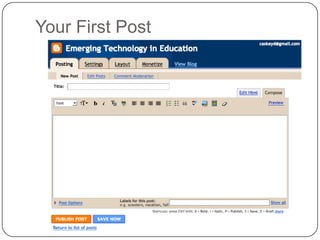
Your First Post
Steps in PostingAdd a TitleType your contentFormat your contentAdd a label (tag)Publish your post
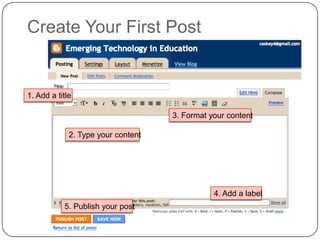
Create Your First Post1. Add a title3. Format your content2. Type your content4. Add a label5. Publish your post
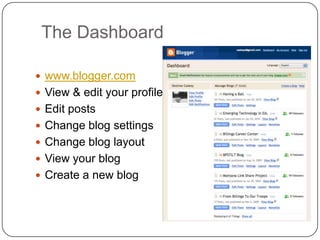
The Dashboardwww.blogger.comView & edit your profileEdit postsChange blog settingsChange blog layoutView your blogCreate a new blog
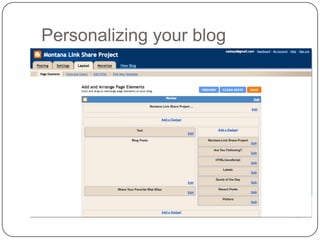
Personalizing your blog
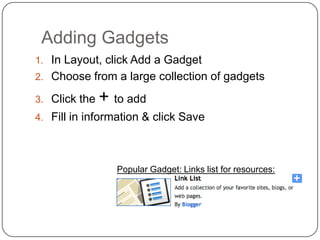
Adding GadgetsIn Layout, click Add a GadgetChoose from a large collection of gadgetsClick the + to addFill in information & click SavePopular Gadget: Links list for resources:
What’s next?  Start blogging!Add postsCustomize your lookLayouthttp://btemplates.comhttp://www.thecutestblogontheblock.com/Invite people to read and/or comment
Blogs to visit & explorehttp://tiltlinkshare.blogspot.com/http://emergingt.blogspot.comhttp://www.freetech4teachers.com/http://www.angelamaiers.com/http://blog.ted.com/http://www.tommarch.com/ozblog/
Creating A Blog
Creating A Blog
Creating A Blog

Creating A Blog

  • 1.
    Creating Your FirstClassroom BlogBlogging In Education
  • 2.
    Steps in Creatinga BlogDecide your purposeCommunication with parentsCommunication to parentsCommunication with studentsCommunication to studentsSetup an accountCreate a postShare your blog
  • 3.
    Background Information:Anatomy ofa BlogBlog TitleBlog DescriptionPost DateSidebarPostPost TitlePost DetailsComment Option
  • 4.
  • 5.
  • 6.
  • 7.
  • 8.
  • 9.
    Steps in PostingAdda TitleType your contentFormat your contentAdd a label (tag)Publish your post
  • 10.
    Create Your FirstPost1. Add a title3. Format your content2. Type your content4. Add a label5. Publish your post
  • 11.
    The Dashboardwww.blogger.comView &edit your profileEdit postsChange blog settingsChange blog layoutView your blogCreate a new blog
  • 12.
  • 13.
    Adding GadgetsIn Layout,click Add a GadgetChoose from a large collection of gadgetsClick the + to addFill in information & click SavePopular Gadget: Links list for resources:
  • 14.
    What’s next? Start blogging!Add postsCustomize your lookLayouthttp://btemplates.comhttp://www.thecutestblogontheblock.com/Invite people to read and/or comment
  • 15.
    Blogs to visit& explorehttp://tiltlinkshare.blogspot.com/http://emergingt.blogspot.comhttp://www.freetech4teachers.com/http://www.angelamaiers.com/http://blog.ted.com/http://www.tommarch.com/ozblog/