For more Https://www.ThesisScientist.com
Unit 5
Controls & Loops
Control Statements
The control statements enable us to specify the order in which the various instructions in a program are to
be executed by the computer. They determine the flow of control in a program.
There are 4 types of control statements in C. They are:
a) Sequence control statements
b) Decision control statements or conditional statement
c) Case control statements
d) Repetition or loop control statements
Conditional Statements
C has two major decision making statements.
1. If_else statement
2. Switch statement
If_else Statement
The if_else statement is a powerful decision making tool. It allows the computer to evaluate the expression.
Depending on whether the value of expression is 'True' or 'False' certain group of statements are executed.
The syntax of if_else statement is:
if (condition is true)
statement 1;
else
statement 2;
The condition following the keyword is always enclosed in parenthesis. If the condition is true, statements
in then part are executed, i.e., statement1, otherwise statement2 in else part is executed. There may be a
number of statements in then and else parts.
e.g.:
/* magic number program * /
main( )
{
int magic = 223;
int guess;
printf ("Enter your guess for the number n");
scanf ("% d" &guess);
if (guess = = magic)
printf ("n Congratulation ! Right guess");
else
printf ("n wrong guess");
}
Nesting of if_else Statement
When a series of decisions are involved in the statement, we may have to use more than one if_else
statement in nested form. This can be described by the flowchart in the following figure:
Is
Condition
One True
Statement 1
Statement 2
Statement 3
Statement x
N
N
Y
Y
Is
Condition
One True
Is
Condition 2
True
Statement 1
Statement 2
Statement 3
Statement x
N
N
Y
Y
Figure 5.1: Flow Chart of if_else statement in Nested Form
e.g.: / * finding the largest of 3 numbers * /
main( )
{
float a = 5, b = 2, c = 7;
if (a > b)
{
if (a > c)
printf ("a is greatest");
else
printf ("c is greatest");
}
else
{
if (b > c) printf ("b is greatest");
else printf ("c is greatest");
}
}
else if Ladder
There is another way of putting ifs together when multipath decisions are involved. Multipath decision is a
chain of ifs in which statement associated with each else is an if.
It takes the following general form:
if (condition 1)
statement1;
else if (condition 2)
statement 2;
else if (condition 3)
statement 3;
statement x;
The conditions in elseif ladder are evaluated from the top (of the ladder) downwards. As soon as the true
condition is found, associated statement is executed and control is transferred to statement x.
e.g.: main( )
{
int unit, custom;
float charges;
printf ("Enter Customer No. and Units Consumered: n");
scanf ("% d % d", & custnum, & unit);
if (unit < = 200)
charges = 0.5 *units;
else if (units < = 400)
charges = 100 + 0.65* (units - 200);
else if (units < = 600)
charges = 230 + 0.8 * (units - 600);
printf ("n n Customer No: % charges: %0.2f n" Custnum, Charges);
}
The Switch Statement
In multiway decision construct the complexity of a program increases with the increase in number of
alternatives. The program becomes difficult to read and follow. C has a built-in multiway decision
statement known as switch. The switch statement tests the value of a given variable or expression against a
list of case values and when a match is found a block of statement associated with that case is executed.
The general form is:
switch (expression)
{
case constant_1:
statements;
case constant_2:
statements;
default:
statements;
}
First, the integer expression following the keyword switch is evaluated. The value it gives is then matched,
one by one, against the constant values that follow the case statements. Whenever a match is formed, the
program executes the statements following the case, and all subsequent cases and default statements as
well.
/* Find whether number is even or odd */
main( )
{
int n, ch;
printf ("Enter the number: n");
scanf ("%d; &n);
if (n%2 = = 0)
ch = 1;
else
ch = 2;
switch (ch)
{
case 1:
printf ("number is even n");
break;
case 2:
printf ("Number is odd n");
}
}
Loops in C
Loops in C allow a set of instructions to be performed until a certain condition is reached. There are three
types of loops in C:
1. for loop
2. while loop
3. do-while loop
The for Loop
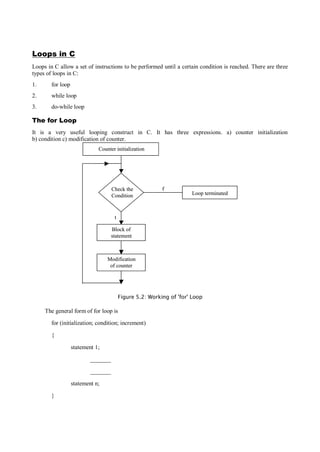
It is a very useful looping construct in C. It has three expressions. a) counter initialization
b) condition c) modification of counter.
Counter initialization
Loop terminated
fCheck the
Condition
Block of
statement
t
Modification
of counter
Counter initialization
Loop terminated
fCheck the
Condition
Block of
statement
t
Modification
of counter
Figure 5.2: Working of 'for' Loop
The general form of for loop is
for (initialization; condition; increment)
{
statement 1;
_______
_______
statement n;
}
The initialization is usually an assignment statement that is used to set the loop control variable. The
condition is a relational expression that determines when the loop will exit. The increment defines how loop
control variable will change each time the loop is repeated. These three sections are seperated by a
semicolon. The for loop will execute as long as the condition holds true. Once the condition becomes false,
program execution will resume on the statement following the block.
e.g.: /* program to print a message 5 times */
main( )
{
int i;
for (i = 1; i < = 5; i ++)
{
printf ("n In the loop % d times", i);
}
}
The While Loop
While is an entry controlled Loop statement. The basic format of the while statement is:
while (test condition)
{
body of Loop;
}
The test condition is evaluated and if the condition is true, the body of loop will be executed. That is why,
while Loop is an entry controlled statement.
Out of Loop
f
Condition
Block of
statement
t
Out of Loop
f
Condition
Block of
statement
t
Figure 5.3: The while Loop
e.g.:1 /* print the numbers 1 to 10 */
# include <stdio.h>
main( )
{
int n = 1;
while (n < = 10)
{
printf ("%d n", n);
n ++;
}
}
The Do-while Loop
The general form of do-while Loop is:
do
{
body of Loop;
}
while (test condition);
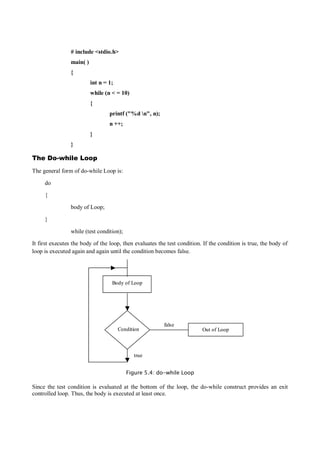
It first executes the body of the loop, then evaluates the test condition. If the condition is true, the body of
loop is executed again and again until the condition becomes false.
Out of Loop
false
Condition
Body of Loop
true
Out of Loop
false
Condition
Body of Loop
true
Figure 5.4: do-while Loop
Since the test condition is evaluated at the bottom of the loop, the do-while construct provides an exit
controlled loop. Thus, the body is executed at least once.
e.g.: /* Find the factorial of any number * /
# include <stdio.h>
main( )
{
int n, no, fact = 1;
printf ("Enter the number:");
scanf ("% d", & n);
no = n;
if (n < 0)
printf ("n factorial of negative number not possible:");
else
if (n = = 0)
printf ("Factorial of 0 is 1 n");
else
do
{
fact * = n;
n - -;
}
while (n > i)
printf ("factorial of % d = % d", no, fact);
}
The Continue Statement
The continue statement is used to bypass the remainder of the current pass through a loop. The loop does
not terminate when a continue statement is encountered. Rather, the remaining loop statements are skipped
and the computation proceeds directly to the next pass through the loop. The continue statement tells the
compiler to skip the following statements and continue with the next iteration. The continue statement can
be included within a while, a do-while or a for statement. It is written simply as continue; without any
embedded statements or expressions.
Some illustrations of loops that contain continue statements are given below. In each case, the processing of
the current value of x will be bypassed if the value of x is negative. Execution of a loop will then continue
with the next pass.
do-while Loop
do
{
scanf ("%f", &x);
if (x < 0)
{
printf ("Error-negative value for X");
continue;
};
The exit( ) Function
The exit( ) function is used for terminating the execution of C program. It is a standard library function and
uses header file stdlib.h.
The general form of exit( ) function is
exit (int status);
The difference between break and exit( ) is that former terminates the execution of loop in which it is
written while exit( ) terminates the execution of program itself.
The status (in the general form of exit( )) is a value returned to the operation system after the termination of
the program.
.
The goto Statement
C supports the goto statement to branch unconditionally from one point to another in the program. A goto
statement breaks the normal sequential execution of the program. The goto requires a label in order to
identify the place where the branch is to be made. A label is any valid variable name, and must be followed
by a colon. A label is placed immediately before the statement where the control is to be transferred.
The general forms of goto and label statements are shown below:
goto label; label:
. . . . . . . . statements;
label: . . . . . . . .
statement; goto label;
The label: can by anywhere in the program either before or after the goto label; statement.
During running of a program when a statement like goto begin; is met, the flow of control will jump to the
statement immediately following the label begin. The following program is written to evaluate the square
root of numbers read from the terminal. Due to the unconditional goto statement at the end, the control is
always transferred back to the input statement. It puts the computer in a permanent loop as infinite loop.
main( )
{
double x, y;
read: scanf ("%f", &x);
if (x < 0) goto read;
y = sqrt (x);
printf ("%f %f n", x, y);
goto read;
}

Controls & Loops in C

  • 1.
    For more Https://www.ThesisScientist.com Unit5 Controls & Loops Control Statements The control statements enable us to specify the order in which the various instructions in a program are to be executed by the computer. They determine the flow of control in a program. There are 4 types of control statements in C. They are: a) Sequence control statements b) Decision control statements or conditional statement c) Case control statements d) Repetition or loop control statements Conditional Statements C has two major decision making statements. 1. If_else statement 2. Switch statement If_else Statement The if_else statement is a powerful decision making tool. It allows the computer to evaluate the expression. Depending on whether the value of expression is 'True' or 'False' certain group of statements are executed. The syntax of if_else statement is: if (condition is true) statement 1; else statement 2; The condition following the keyword is always enclosed in parenthesis. If the condition is true, statements in then part are executed, i.e., statement1, otherwise statement2 in else part is executed. There may be a number of statements in then and else parts. e.g.: /* magic number program * / main( ) { int magic = 223; int guess;
  • 2.
    printf ("Enter yourguess for the number n"); scanf ("% d" &guess); if (guess = = magic) printf ("n Congratulation ! Right guess"); else printf ("n wrong guess"); } Nesting of if_else Statement When a series of decisions are involved in the statement, we may have to use more than one if_else statement in nested form. This can be described by the flowchart in the following figure: Is Condition One True Statement 1 Statement 2 Statement 3 Statement x N N Y Y Is Condition One True Is Condition 2 True Statement 1 Statement 2 Statement 3 Statement x N N Y Y Figure 5.1: Flow Chart of if_else statement in Nested Form
  • 3.
    e.g.: / *finding the largest of 3 numbers * / main( ) { float a = 5, b = 2, c = 7; if (a > b) { if (a > c) printf ("a is greatest"); else printf ("c is greatest"); } else { if (b > c) printf ("b is greatest"); else printf ("c is greatest"); } } else if Ladder There is another way of putting ifs together when multipath decisions are involved. Multipath decision is a chain of ifs in which statement associated with each else is an if. It takes the following general form: if (condition 1) statement1; else if (condition 2) statement 2; else if (condition 3) statement 3; statement x; The conditions in elseif ladder are evaluated from the top (of the ladder) downwards. As soon as the true condition is found, associated statement is executed and control is transferred to statement x. e.g.: main( ) { int unit, custom; float charges; printf ("Enter Customer No. and Units Consumered: n"); scanf ("% d % d", & custnum, & unit); if (unit < = 200) charges = 0.5 *units; else if (units < = 400) charges = 100 + 0.65* (units - 200); else if (units < = 600) charges = 230 + 0.8 * (units - 600); printf ("n n Customer No: % charges: %0.2f n" Custnum, Charges); }
  • 4.
    The Switch Statement Inmultiway decision construct the complexity of a program increases with the increase in number of alternatives. The program becomes difficult to read and follow. C has a built-in multiway decision statement known as switch. The switch statement tests the value of a given variable or expression against a list of case values and when a match is found a block of statement associated with that case is executed. The general form is: switch (expression) { case constant_1: statements; case constant_2: statements; default: statements; } First, the integer expression following the keyword switch is evaluated. The value it gives is then matched, one by one, against the constant values that follow the case statements. Whenever a match is formed, the program executes the statements following the case, and all subsequent cases and default statements as well. /* Find whether number is even or odd */ main( ) { int n, ch; printf ("Enter the number: n"); scanf ("%d; &n); if (n%2 = = 0) ch = 1; else ch = 2; switch (ch) { case 1: printf ("number is even n"); break; case 2: printf ("Number is odd n"); } }
  • 5.
    Loops in C Loopsin C allow a set of instructions to be performed until a certain condition is reached. There are three types of loops in C: 1. for loop 2. while loop 3. do-while loop The for Loop It is a very useful looping construct in C. It has three expressions. a) counter initialization b) condition c) modification of counter. Counter initialization Loop terminated fCheck the Condition Block of statement t Modification of counter Counter initialization Loop terminated fCheck the Condition Block of statement t Modification of counter Figure 5.2: Working of 'for' Loop The general form of for loop is for (initialization; condition; increment) { statement 1; _______ _______ statement n; }
  • 6.
    The initialization isusually an assignment statement that is used to set the loop control variable. The condition is a relational expression that determines when the loop will exit. The increment defines how loop control variable will change each time the loop is repeated. These three sections are seperated by a semicolon. The for loop will execute as long as the condition holds true. Once the condition becomes false, program execution will resume on the statement following the block. e.g.: /* program to print a message 5 times */ main( ) { int i; for (i = 1; i < = 5; i ++) { printf ("n In the loop % d times", i); } } The While Loop While is an entry controlled Loop statement. The basic format of the while statement is: while (test condition) { body of Loop; } The test condition is evaluated and if the condition is true, the body of loop will be executed. That is why, while Loop is an entry controlled statement. Out of Loop f Condition Block of statement t Out of Loop f Condition Block of statement t Figure 5.3: The while Loop e.g.:1 /* print the numbers 1 to 10 */
  • 7.
    # include <stdio.h> main() { int n = 1; while (n < = 10) { printf ("%d n", n); n ++; } } The Do-while Loop The general form of do-while Loop is: do { body of Loop; } while (test condition); It first executes the body of the loop, then evaluates the test condition. If the condition is true, the body of loop is executed again and again until the condition becomes false. Out of Loop false Condition Body of Loop true Out of Loop false Condition Body of Loop true Figure 5.4: do-while Loop Since the test condition is evaluated at the bottom of the loop, the do-while construct provides an exit controlled loop. Thus, the body is executed at least once.
  • 8.
    e.g.: /* Findthe factorial of any number * / # include <stdio.h> main( ) { int n, no, fact = 1; printf ("Enter the number:"); scanf ("% d", & n); no = n; if (n < 0) printf ("n factorial of negative number not possible:"); else if (n = = 0) printf ("Factorial of 0 is 1 n"); else do { fact * = n; n - -; } while (n > i) printf ("factorial of % d = % d", no, fact); } The Continue Statement The continue statement is used to bypass the remainder of the current pass through a loop. The loop does not terminate when a continue statement is encountered. Rather, the remaining loop statements are skipped and the computation proceeds directly to the next pass through the loop. The continue statement tells the compiler to skip the following statements and continue with the next iteration. The continue statement can be included within a while, a do-while or a for statement. It is written simply as continue; without any embedded statements or expressions. Some illustrations of loops that contain continue statements are given below. In each case, the processing of the current value of x will be bypassed if the value of x is negative. Execution of a loop will then continue with the next pass. do-while Loop do { scanf ("%f", &x); if (x < 0) {
  • 9.
    printf ("Error-negative valuefor X"); continue; }; The exit( ) Function The exit( ) function is used for terminating the execution of C program. It is a standard library function and uses header file stdlib.h. The general form of exit( ) function is exit (int status); The difference between break and exit( ) is that former terminates the execution of loop in which it is written while exit( ) terminates the execution of program itself. The status (in the general form of exit( )) is a value returned to the operation system after the termination of the program. . The goto Statement C supports the goto statement to branch unconditionally from one point to another in the program. A goto statement breaks the normal sequential execution of the program. The goto requires a label in order to identify the place where the branch is to be made. A label is any valid variable name, and must be followed by a colon. A label is placed immediately before the statement where the control is to be transferred. The general forms of goto and label statements are shown below: goto label; label: . . . . . . . . statements; label: . . . . . . . . statement; goto label; The label: can by anywhere in the program either before or after the goto label; statement. During running of a program when a statement like goto begin; is met, the flow of control will jump to the statement immediately following the label begin. The following program is written to evaluate the square root of numbers read from the terminal. Due to the unconditional goto statement at the end, the control is always transferred back to the input statement. It puts the computer in a permanent loop as infinite loop. main( ) { double x, y; read: scanf ("%f", &x); if (x < 0) goto read; y = sqrt (x); printf ("%f %f n", x, y);
  • 10.