Basic Computer Programming
Chapter II: C-Control Statements
Dr. D.H. Kisanga
November 2019
1.0 DECISION STATEMENTS
 Sometimes we need to tell the computer to do something only
when some conditions are satisfied.
 C gives you a choice of two types of decision statements:
1. if statement, and
2. switch statement
1.1 The if Statement
 Most programs need to make decisions. There are several
statements available in the C language for this. The IF statement is
one of them.
 The format for the if statement in a C program is,
if (expression)
statement;
For eg.
if (number>5)
printf("Your number is larger than 5.n");
Eg 1.
#include <stdio.h>
#include<conio.h>
main()
{
int num;
printf("Give me a number between 1 and 10 ");
scanf("%d",&num);
if (num > 5)
printf("Your number is larger than 5.n");
printf("%d was the number you entered.n",num);
getch();
}
The expression or condition (number > 5 ) is evaluated to see if
it's true:
• When the condition is true, the program statement will be
executed.
• If the condition is false, then the program statement will be
ignored.
 The expression inside the if compares one value with another
using a relational operator.
 The RELATIONAL OPERATORS, listed below, allow the
programmer to test various variables against other variables or
values.
== Equal to
!= Not equal to
< Less than
<= Less than or equal to
> Greater than
>= Greater than or equal to
Eg 2:
#include<stdio.h>
#include<conio.h>
/*Program demonstrating an IF statement*/
main() {
int number, guess; number = 2;
printf(“Guess a number between 1 and 10”);
scanf( “%d”, &guess );
if (number == guess)
printf(“You guessed correctly!”);
if (number != guess)
printf(“Sorry, you guessed wrong.”);
getch();
}
 The IF statement can also include an ELSE statement.
 An ELSE statement (or a block/group of ELSE statements) are
executed when the condition associated with the IF statement is
false.
 The general form of an if…else statement is;
if(expression)
statement1;
else
statement2;
 Rewrite the previous program using an IF ….. ELSE statement
1.2 The if …else Statement
#include<stdio.h>
#include<conio.h>
/*Program demonstrating IF THEN ELSE statement*/
main()
{
int number, guess;
number = 2;
printf(“Guess a number between 1 and 10”);
scanf( “%d”, &guess );
if (number == guess)
printf(“You guessed correctly!”);
else
printf(“Sorry, you guessed wrong!!”);
getch();
}
Eg 2. This program computes the maximum of num1, num2
#include<stdio.h>
#include<conio.h>
main(void)
{
int num1, num2, max;
printf("Enter two integers:");
scanf("%d %d", &num1, &num2);
if (num1 > num2)
max = num1;
else
max = num2;
printf("The maximum is %dn",
max);
getch();
}
CLASS EXERCISE
What is displayed when the following program is executed?
#include<stdio.h>
main()
{
int a, b, c, d ;
a = 5; b = 3; c = 99; d = 5;
if (a > 6)
printf(“A”);
if (a > b)
printf(“M”);
if (b == c)
{
printf(“C”);
printf(“D”);
}
Q1. Write a program which inputs an examination mark. Compare
the entered mark with 50. If greater than 50 display pass, else display
fail.
Q2. Write program that inputs an examination mark. Compare the
mark against the following range of scores and display its grade on a
monitor screen.
Q3. Write a program which inputs two numbers, call
them value1 and value2. Print the largest number.
Q4. Modify the program in Q1 above, to accept three
values, A, B, and C, and print the largest value.
1.3. The SWITCH (CASE) statement
 While if is good for choosing between two alternatives, it quickly
becomes cumbersome when several alternatives are needed.
 Solution to this problem is the switch statement. The switch
statement is C’s multiple selection statement used to select one of
several alternative paths in program execution.
The general form of a switch statement is
switch (value)
{
case constant 1:
Statement sequence
break;
case constant 2:
Statement sequence
break;
default:
Statement sequence
break;
Eg1: This program recognizes the numbers 1,2,3 and 4 and prints
the name of one you enter.
#include<stdio.h>
#include<conio.h>
main()
{
int i;
printf ("Enter a number between 1 & 4:");
scanf("%d", &i);
switch (i)
{
case 1:
printf("one");
break;
case 2:
printf ("Two");
break;
case 3:
printf("three");
break;
case 4:
printf ("four");
break;
default:
printf ("Unrecogniezed input!");
}
getch();
}
Eg2. A simple bank transaction program
#include<stdio.h>
#include<conio.h>
main()
{
int I, accnum, tsh;
printf (“nn*** Welcome to ATM Machine ***”);
printf (“nn MENU:”);
printf (“n 1: Check Balance:”);
printf (“n 2: Withdraw:”);
printf (“n 3: Deposit:”);
printf (“nn Enter a number between 1 & 3:”);
scanf(“%d”, &I);
switch (I)
{
case 1:
printf(“n Enter Your Account Number: ”);
scanf(“%d”, &accnum);
printf(“n Balace is TSH: 1000/=”);
break;
case 2:
printf(“n Enter Your Account Number: ”);
scanf(“%d”, &accnum);
printf(“n How much do you want to withdraw: ”);
scanf(“%d”, &tsh);
printf(“n You have withdraw TSH: %d”,tsh);
break;
case 3:
printf(“n Enter Your Account Number: ”);
scanf(“%d”, &accnum);
printf(“n How much do you want to Deposit: ”);
scanf(“%d”, &tsh);
printf(“n You have deposited TSH: %d”,tsh);
break;
default:
printf (“unrecognized input!”);
}
getch();
}
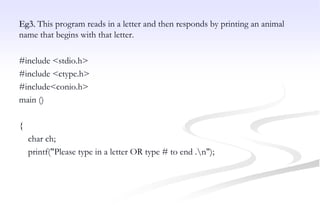
Eg3. This program reads in a letter and then responds by printing an animal
name that begins with that letter.
#include <stdio.h>
#include <ctype.h>
#include<conio.h>
main ()
{
char ch;
printf("Please type in a letter OR type # to end .n");
while ((ch = getchar()) != '#')
{
if('n' == ch)
continue;
if (islower(ch)) /* lowercase only */
switch (ch)
{
case 'a' : printf("argali, a wild sheep of Asian");
break;
case 'b' : printf("babirusa, a wild pig of Malayn");
break;
case 'c' : printf("coati, racoonlike mammaln");
break;
case 'd' : printf("desman, aquatic, molelike crittern");
break;
case 'e' : printf("echidna, the spiny anteatern");
break;
case 'f' : printf("fisher, brownish martenn");
break;
default : printf("That's a stumper!n");
} /* end of switch */
else
printf("I recognize only lowercase letters.n");
while (getchar() != 'n')
continue; /* skip rest of input line */
printf("Please type another letter or a #.n");
} /* while loop end */
printf("Bye!n");
getch();
}
Homework
Q1. Calculate the gross pay for an employee. Input the rate of pay, hours
worked and the service record in years. When the service record is greater than
10 years, an allowance of $15 is given. Verify that the program works by
supplying appropriate test data.
Q2. Write a program which inputs two values, call them A and B. Print the value
of the largest variable.
Q3.Modify the program you wrote above , to accept three values, A B C, and
print the largest value.
Q4.Write a program which inputs the ordinary time and overtime worked,
calculating the gross pay. The rate is 4.20 per hour, and overtime is time and a
half.
2.0 LOOP STATEMENTS
 C gives you a choice of three types of loops:
1. for loop,
2. do-while loop and
3. while loop.
2.1 The for loop
 The for loop is the most common loop in C. The statement inside
the for block is executed a number of times depending on the
control condition.
 The format for the FOR loop is,
for (initialization; conditional test; increment)
statement;
Where;
- the initialization section is used to give an initial value to the loop-
control variable
-The conditional test is used to test the loop control variable against a
target value. If the conditional test evaluates true, the loop repeats, if
it is false, the loop stops and the program execution picks up with
the next line of code that follow the loop,
-The increment is used to increase (or decrease) the loop-control
value by a certain amount.
Example 1
#include <stdio.h>
#include<conio.h>
main() /* Program introduces the for statement, counts to ten */
{
int count;
for( count = 1; count <= 10; count = count + 1 )
printf("%d ", count );
printf("n");
getch();
}
How it works:
• The program declares an integer variable count.
• The first part of the for statement, for( count = 1; initialises the value
of count to 1.
• The for loop continues whilst the condition count <= 10;
evaluates as TRUE. As the variable count has just been initialised to 1,
this condition is TRUE and so the program statement
printf("%d ", count ); is executed, which prints the value of count to the
screen, followed by a space character.
• Next, the remaining statement of the for is executed, i.e
count = count + 1 ); which adds one to the current value of count.
Control now passes back to the conditional test, count <= 10;
which evaluates as true, so the program statement, printf("%d ", count
); is executed.
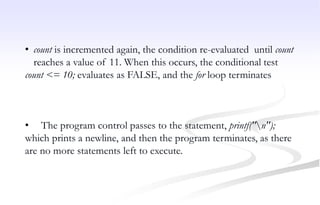
• count is incremented again, the condition re-evaluated until count
reaches a value of 11. When this occurs, the conditional test
count <= 10; evaluates as FALSE, and the for loop terminates
• The program control passes to the statement, printf("n");
which prints a newline, and then the program terminates, as there
are no more statements left to execute.
Example 2: Determine the output of this program.
#include<stdio.h>
#include<conio.h>
main()
{
int num;
printf(" N N cubed n");
for (num = 1; num <= 6; num++)
printf(" %d %dn", num, num*num*num);
getch();
}
Output:
N N cubed
1 1
2 8
3 27
4 64
5 125
6 216
Example 3. Determine the output of this program.
#include<stdio.h>
#include<conio.h>
main()
{
int celcius;
float Fahrenheit;
printf(“Degrees Celcius Degrees Fahrenheit”);
for (celcius = 1; celcius< 20; celcius ++)
{ Fahrenheit = ( 9 / 5 ) * celcius + 32;
printf( “ncelcius: %d = Fahrenheit %fn”,celcius, Fahrenheit );
}
getch();
}
Example 4:
You can also use the decrement operator to count down instead of
up. Determine the output of this program.
#include <stdio.h>
#include<conio.h>
main()
{
int secs;
for (secs = 5; secs > 0; secs--)
printf("%d seconds!n", secs);
printf("We have ignition!n");
getch();
Here is the output:
5 seconds!
4 seconds!
3 seconds!
2 seconds!
1 seconds!
We have ignition!
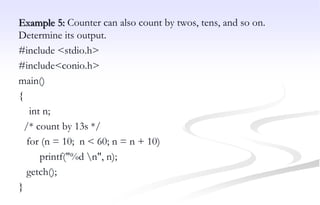
Example 5: Counter can also count by twos, tens, and so on.
Determine its output.
#include <stdio.h>
#include<conio.h>
main()
{
int n;
/* count by 13s */
for (n = 10; n < 60; n = n + 10)
printf("%d n", n);
getch();
}
Example 6:
You can count by characters instead of by numbers. Use a computer
to determine the output of this program.
#include <stdio.h>
#include<conio.h>
main ()
{
char ch;
for (ch = 'a'; ch <= 'z'; ch++)
printf("The ASCII value for %c is %d.n", ch, ch);
getch();
}
Here's the condensed output:
The ASCII value for a is 97.
The ASCII value for b is 98.
...
The ASCII value for x is 120.
The ASCII value for y is 121.
The ASCII value for z is 122.
The program works because characters are stored as integers, so this
loop really counts by integers anyway.
Example 7:
You can even leave one or more expressions blank (but don't omit
the semicolons). Just be sure to include within the loop itself some
statement that eventually causes the loop to terminate. Determine its
output.
#include <stdio.h>
#include<conio.h>
main()
{
int ans=2, n;
for (n = 3; ans <= 25; )
ans = ans * n; /* An increment statement and a loop terminator*/
printf("n = %d; ans = %d.n", n, ans); getch();
}
Here is the output:
n = 3; ans = 54.
How it works:
The loop keeps the value of n at 3. The variable ans starts with the
value 2, and then increases to 6 and 18 and obtains a final value of
54. (The value 18 is less than 25, so the for loop goes through one
more iteration, multiplying 18 by 3 to get 54.)
Example 8: Run this program using a computer
#include <stdio.h>
#include<conio.h>
main ()
{
int num = 0;
for (printf("Keep entering numbers!n"); num != 6; )
scanf("%d", &num);
printf("That's the one I want!n");
getch();
}
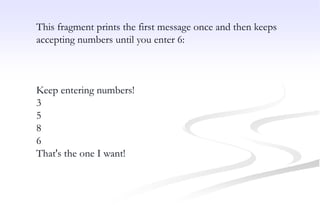
This fragment prints the first message once and then keeps
accepting numbers until you enter 6:
Keep entering numbers!
3
5
8
6
That's the one I want!
2.2 Nested for loop
 A nested loop is one loop inside another loop.
 A for loop can occur within another, so that the inner
loop (which contains a block of statements) is
repeated by the outer loop.
Rules Related To Nested For Loops
1. Each loop must use a separate variable
2. The inner loop must begin and end entirely within
the outer loop.
 A common use for nested loops is to display data in
rows and columns. One loop can handle, say, all the
columns in a row, and the second loop handles the
rows.
 The following examples demonstrate the nested for
loop programs.
Eg 1: Determine the output of the following nested for loop program.
#include<stdio.h>
#include<conio.h>
main(){ int line, column;
printf("LINE");
for(line = 1;line<= 6; line++)
{ printf( "n%d",line);
for(column = 1; column<=4;column++)
{
printf("ttCOLUMN"); printf("%d",column);
}
printf("n");
}
getch();
}
output of program NESTED_FOR_LOOPS is,
LINE
1 COLUMN 1 COLUMN 2 COLUMN 3 COLUMN 4
2 COLUMN 1 COLUMN 2 COLUMN 3 COLUMN 4
3 COLUMN 1 COLUMN 2 COLUMN 3 COLUMN 4
4 COLUMN 1 COLUMN 2 COLUMN 3 COLUMN 4
5 COLUMN 1 COLUMN 2 COLUMN 3 COLUMN 4
Eg 2: Determine the output of the following nested for loop program.
Line 1: #include<stdio.h>
Line 2. #include<conio.h>
Line 3. #define ROWS 6
Line 4. #define CHARS 10
Line 5: main(){
Line 6: int row;
Line 7: char ch;
Line 8: for (row = 0; row < ROWS; row++)
Line 9: {
Line 10; for (ch = 'A'; ch < ('A' + CHARS); ch++)
Line 11: printf("%c", ch);
Line 12: printf("n");
Line 13: } getch();
}
How the program works:
 The for loop beginning on line 8 is called an outer loop, and the loop
beginning on line 10 is called an inner loop because it is inside the other
loop. The outer loop starts with row having a value of 0 and terminates when
row reaches 7. Therefore, the outer loop goes through six cycles, with row
having the values 0 through 5. The first statement in each cycle is the inner
for loop. This loop goes through 10 cycles, printing the characters A through
J on the same line. The second statement of the outer loop is printf("n");.
This statement starts a new line so that the next time the inner loop is run,
the output is on a new line.
 Note that, with a nested loop, the inner loop runs through its full range of
iterations for each single iteration of the outer loop. In the last example, the
inner loop prints 10 characters to a row, and the outer loop creates six rows.
Homework
Q1. The factorial of an integer is the product of all integers up to
and including that integer, except that the factorial of 0 is 1.
eg, 3! = 1 * 2 * 3 (answer=6)
Evaluate the factorial of an integer less than 15, for five numbers
input successively via the keyboard.
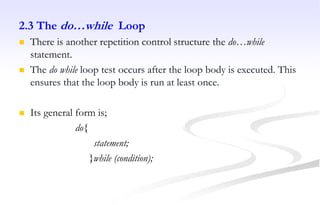
2.3 The do…while Loop
 There is another repetition control structure the do…while
statement.
 The do while loop test occurs after the loop body is executed. This
ensures that the loop body is run at least once.
 Its general form is;
do{
statement;
}while (condition);
 The ‘do’ loop repeats the statement or statements while the
condition is true. It stops when the condition becomes false.
 The ‘do’ loop is unique because it will always execute the code
within the loop at least once, since the condition controlling the
loop is tested at the bottom of the loop.
 This structure is used much more rarely than the while statement,
but is occasionally useful if we want to ensure that the loop
statement is executed at least once.
Eg.1 This program prints the numbers 1 to 5 using a do-while loop.
# include <stdio.h>
#include<conio.h>
main ()
{
int I; I=0;
do{
printf (“The value of I is now %d n”, I);
I=I+1;
}while (I<6);
getch();
}
Eg 2. The do-loop is especially useful when your program is waiting
for some event to occur. This program waits for the user to type a q.
#include <stdio.h>
#include<conio.h>
main ()
{
char ch;
do{ printf("nEnter any character (q to stop)n");
ch=getche();
} while (ch!= 'q');
printf ("nn Found the q");
getch();
}
Eg3. The program reads input values until the user enters 13.
#include <stdio.h>
#include<conio.h>
main()
{
int secret_code = 13;
int code_entered;
do
{
printf(“n Please enter the secret code number: ");
scanf("%d", &code_entered);
} while (code_entered != secret_code);
printf(“nn Congratulations! You are cured! n"); getch();
}
Homework
Q.1 Write a program that converts miles to kms using a ‘do’ loop, allow
the user to repeat the conversion until when 0 is entered (1 mile =
1.6093km)
Q.2 Write a program that displays the menu below and uses a do loop to
check for valid responses (your program does not need to implement the
actual function shown in the menu).
Mailing list Menu
1. Enter addresses
2. Delete address
3. Search the list
4. Print the list
5. Quit
Enter the No. of your choice (1-5):
2.4 The while Loop
 The while loop is similar to do loop, but keeps repeating an action
until an associated test returns false. This is useful where the
programmer does not know in advance how many times the loop
will be passed through.
 The structure of the while statement is,
while (expression)
statement;
How it works:
 The while loop works by repeating its target as long as the
expression is true. When it becomes false, the loop stops. The
value of the expression is checked at the top of the loop. If the
expression is false to begin with, the loop will not execute even
once.
NB: The while loop and the for loop are both entry-
condition loops. The test condition is checked before each
iteration of the loop, so it is possible for the statements in
the loop to never execute.
Eg1: Use a while loop to display numbers from 1 to 10.
#include<stdio.h>
#include<conio.h>
main()
{
int x = 1;
while( x <= 10 )
{
printf("%d", x);
x++;
}
getch();
}
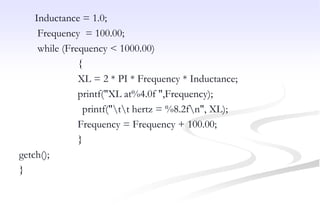
Eg2: Write a program using a while loop to calculate inductive
reactance, XL given that
XL = 2 * PI * Frequency * Inductance.
Display the value of XL for each frequency (frequency should be
incremented by 100 and should not exceed 1000).
#include<stdio.h>
#include<conio.h>
main()
{ float PI = 3.14, XL, Frequency, Inductance;
Inductance = 1.0;
Frequency = 100.00;
while (Frequency < 1000.00)
{
XL = 2 * PI * Frequency * Inductance;
printf("XL at%4.0f ",Frequency);
printf("tt hertz = %8.2fn", XL);
Frequency = Frequency + 100.00;
}
getch();
}
Thank you for your attention.
Questions

computer programming Control Statements.pptx

  • 1.
    Basic Computer Programming ChapterII: C-Control Statements Dr. D.H. Kisanga November 2019
  • 2.
    1.0 DECISION STATEMENTS Sometimes we need to tell the computer to do something only when some conditions are satisfied.  C gives you a choice of two types of decision statements: 1. if statement, and 2. switch statement
  • 3.
    1.1 The ifStatement  Most programs need to make decisions. There are several statements available in the C language for this. The IF statement is one of them.  The format for the if statement in a C program is, if (expression) statement; For eg. if (number>5) printf("Your number is larger than 5.n");
  • 4.
    Eg 1. #include <stdio.h> #include<conio.h> main() { intnum; printf("Give me a number between 1 and 10 "); scanf("%d",&num); if (num > 5) printf("Your number is larger than 5.n"); printf("%d was the number you entered.n",num); getch(); }
  • 5.
    The expression orcondition (number > 5 ) is evaluated to see if it's true: • When the condition is true, the program statement will be executed. • If the condition is false, then the program statement will be ignored.
  • 6.
     The expressioninside the if compares one value with another using a relational operator.  The RELATIONAL OPERATORS, listed below, allow the programmer to test various variables against other variables or values. == Equal to != Not equal to < Less than <= Less than or equal to > Greater than >= Greater than or equal to
  • 7.
    Eg 2: #include<stdio.h> #include<conio.h> /*Program demonstratingan IF statement*/ main() { int number, guess; number = 2; printf(“Guess a number between 1 and 10”); scanf( “%d”, &guess ); if (number == guess) printf(“You guessed correctly!”); if (number != guess) printf(“Sorry, you guessed wrong.”); getch(); }
  • 8.
     The IFstatement can also include an ELSE statement.  An ELSE statement (or a block/group of ELSE statements) are executed when the condition associated with the IF statement is false.  The general form of an if…else statement is; if(expression) statement1; else statement2;  Rewrite the previous program using an IF ….. ELSE statement 1.2 The if …else Statement
  • 9.
    #include<stdio.h> #include<conio.h> /*Program demonstrating IFTHEN ELSE statement*/ main() { int number, guess; number = 2; printf(“Guess a number between 1 and 10”); scanf( “%d”, &guess ); if (number == guess) printf(“You guessed correctly!”); else printf(“Sorry, you guessed wrong!!”); getch(); }
  • 10.
    Eg 2. Thisprogram computes the maximum of num1, num2 #include<stdio.h> #include<conio.h> main(void) { int num1, num2, max; printf("Enter two integers:"); scanf("%d %d", &num1, &num2); if (num1 > num2) max = num1; else max = num2; printf("The maximum is %dn", max); getch(); }
  • 11.
    CLASS EXERCISE What isdisplayed when the following program is executed? #include<stdio.h> main() { int a, b, c, d ; a = 5; b = 3; c = 99; d = 5; if (a > 6) printf(“A”); if (a > b) printf(“M”); if (b == c) { printf(“C”); printf(“D”); }
  • 12.
    Q1. Write aprogram which inputs an examination mark. Compare the entered mark with 50. If greater than 50 display pass, else display fail. Q2. Write program that inputs an examination mark. Compare the mark against the following range of scores and display its grade on a monitor screen.
  • 13.
    Q3. Write aprogram which inputs two numbers, call them value1 and value2. Print the largest number. Q4. Modify the program in Q1 above, to accept three values, A, B, and C, and print the largest value.
  • 14.
    1.3. The SWITCH(CASE) statement  While if is good for choosing between two alternatives, it quickly becomes cumbersome when several alternatives are needed.  Solution to this problem is the switch statement. The switch statement is C’s multiple selection statement used to select one of several alternative paths in program execution.
  • 15.
    The general formof a switch statement is switch (value) { case constant 1: Statement sequence break; case constant 2: Statement sequence break; default: Statement sequence break;
  • 16.
    Eg1: This programrecognizes the numbers 1,2,3 and 4 and prints the name of one you enter. #include<stdio.h> #include<conio.h> main() { int i; printf ("Enter a number between 1 & 4:"); scanf("%d", &i); switch (i) { case 1: printf("one"); break;
  • 17.
    case 2: printf ("Two"); break; case3: printf("three"); break; case 4: printf ("four"); break; default: printf ("Unrecogniezed input!"); } getch(); }
  • 18.
    Eg2. A simplebank transaction program #include<stdio.h> #include<conio.h> main() { int I, accnum, tsh; printf (“nn*** Welcome to ATM Machine ***”); printf (“nn MENU:”); printf (“n 1: Check Balance:”); printf (“n 2: Withdraw:”); printf (“n 3: Deposit:”); printf (“nn Enter a number between 1 & 3:”); scanf(“%d”, &I);
  • 19.
    switch (I) { case 1: printf(“nEnter Your Account Number: ”); scanf(“%d”, &accnum); printf(“n Balace is TSH: 1000/=”); break; case 2: printf(“n Enter Your Account Number: ”); scanf(“%d”, &accnum); printf(“n How much do you want to withdraw: ”); scanf(“%d”, &tsh); printf(“n You have withdraw TSH: %d”,tsh); break;
  • 20.
    case 3: printf(“n EnterYour Account Number: ”); scanf(“%d”, &accnum); printf(“n How much do you want to Deposit: ”); scanf(“%d”, &tsh); printf(“n You have deposited TSH: %d”,tsh); break; default: printf (“unrecognized input!”); } getch(); }
  • 21.
    Eg3. This programreads in a letter and then responds by printing an animal name that begins with that letter. #include <stdio.h> #include <ctype.h> #include<conio.h> main () { char ch; printf("Please type in a letter OR type # to end .n");
  • 22.
    while ((ch =getchar()) != '#') { if('n' == ch) continue; if (islower(ch)) /* lowercase only */ switch (ch) { case 'a' : printf("argali, a wild sheep of Asian"); break; case 'b' : printf("babirusa, a wild pig of Malayn"); break; case 'c' : printf("coati, racoonlike mammaln"); break;
  • 23.
    case 'd' :printf("desman, aquatic, molelike crittern"); break; case 'e' : printf("echidna, the spiny anteatern"); break; case 'f' : printf("fisher, brownish martenn"); break; default : printf("That's a stumper!n"); } /* end of switch */
  • 24.
    else printf("I recognize onlylowercase letters.n"); while (getchar() != 'n') continue; /* skip rest of input line */ printf("Please type another letter or a #.n"); } /* while loop end */ printf("Bye!n"); getch(); }
  • 25.
    Homework Q1. Calculate thegross pay for an employee. Input the rate of pay, hours worked and the service record in years. When the service record is greater than 10 years, an allowance of $15 is given. Verify that the program works by supplying appropriate test data. Q2. Write a program which inputs two values, call them A and B. Print the value of the largest variable. Q3.Modify the program you wrote above , to accept three values, A B C, and print the largest value. Q4.Write a program which inputs the ordinary time and overtime worked, calculating the gross pay. The rate is 4.20 per hour, and overtime is time and a half.
  • 26.
    2.0 LOOP STATEMENTS C gives you a choice of three types of loops: 1. for loop, 2. do-while loop and 3. while loop.
  • 27.
    2.1 The forloop  The for loop is the most common loop in C. The statement inside the for block is executed a number of times depending on the control condition.  The format for the FOR loop is, for (initialization; conditional test; increment) statement; Where; - the initialization section is used to give an initial value to the loop- control variable
  • 28.
    -The conditional testis used to test the loop control variable against a target value. If the conditional test evaluates true, the loop repeats, if it is false, the loop stops and the program execution picks up with the next line of code that follow the loop, -The increment is used to increase (or decrease) the loop-control value by a certain amount.
  • 29.
    Example 1 #include <stdio.h> #include<conio.h> main()/* Program introduces the for statement, counts to ten */ { int count; for( count = 1; count <= 10; count = count + 1 ) printf("%d ", count ); printf("n"); getch(); } How it works: • The program declares an integer variable count. • The first part of the for statement, for( count = 1; initialises the value of count to 1.
  • 30.
    • The forloop continues whilst the condition count <= 10; evaluates as TRUE. As the variable count has just been initialised to 1, this condition is TRUE and so the program statement printf("%d ", count ); is executed, which prints the value of count to the screen, followed by a space character. • Next, the remaining statement of the for is executed, i.e count = count + 1 ); which adds one to the current value of count. Control now passes back to the conditional test, count <= 10; which evaluates as true, so the program statement, printf("%d ", count ); is executed.
  • 31.
    • count isincremented again, the condition re-evaluated until count reaches a value of 11. When this occurs, the conditional test count <= 10; evaluates as FALSE, and the for loop terminates • The program control passes to the statement, printf("n"); which prints a newline, and then the program terminates, as there are no more statements left to execute.
  • 32.
    Example 2: Determinethe output of this program. #include<stdio.h> #include<conio.h> main() { int num; printf(" N N cubed n"); for (num = 1; num <= 6; num++) printf(" %d %dn", num, num*num*num); getch(); } Output: N N cubed 1 1 2 8 3 27 4 64 5 125 6 216
  • 33.
    Example 3. Determinethe output of this program. #include<stdio.h> #include<conio.h> main() { int celcius; float Fahrenheit; printf(“Degrees Celcius Degrees Fahrenheit”); for (celcius = 1; celcius< 20; celcius ++) { Fahrenheit = ( 9 / 5 ) * celcius + 32; printf( “ncelcius: %d = Fahrenheit %fn”,celcius, Fahrenheit ); } getch(); }
  • 34.
    Example 4: You canalso use the decrement operator to count down instead of up. Determine the output of this program. #include <stdio.h> #include<conio.h> main() { int secs; for (secs = 5; secs > 0; secs--) printf("%d seconds!n", secs); printf("We have ignition!n"); getch(); Here is the output: 5 seconds! 4 seconds! 3 seconds! 2 seconds! 1 seconds! We have ignition!
  • 35.
    Example 5: Countercan also count by twos, tens, and so on. Determine its output. #include <stdio.h> #include<conio.h> main() { int n; /* count by 13s */ for (n = 10; n < 60; n = n + 10) printf("%d n", n); getch(); }
  • 36.
    Example 6: You cancount by characters instead of by numbers. Use a computer to determine the output of this program. #include <stdio.h> #include<conio.h> main () { char ch; for (ch = 'a'; ch <= 'z'; ch++) printf("The ASCII value for %c is %d.n", ch, ch); getch(); }
  • 37.
    Here's the condensedoutput: The ASCII value for a is 97. The ASCII value for b is 98. ... The ASCII value for x is 120. The ASCII value for y is 121. The ASCII value for z is 122. The program works because characters are stored as integers, so this loop really counts by integers anyway.
  • 38.
    Example 7: You caneven leave one or more expressions blank (but don't omit the semicolons). Just be sure to include within the loop itself some statement that eventually causes the loop to terminate. Determine its output. #include <stdio.h> #include<conio.h> main() { int ans=2, n; for (n = 3; ans <= 25; ) ans = ans * n; /* An increment statement and a loop terminator*/ printf("n = %d; ans = %d.n", n, ans); getch(); }
  • 39.
    Here is theoutput: n = 3; ans = 54. How it works: The loop keeps the value of n at 3. The variable ans starts with the value 2, and then increases to 6 and 18 and obtains a final value of 54. (The value 18 is less than 25, so the for loop goes through one more iteration, multiplying 18 by 3 to get 54.)
  • 40.
    Example 8: Runthis program using a computer #include <stdio.h> #include<conio.h> main () { int num = 0; for (printf("Keep entering numbers!n"); num != 6; ) scanf("%d", &num); printf("That's the one I want!n"); getch(); }
  • 41.
    This fragment printsthe first message once and then keeps accepting numbers until you enter 6: Keep entering numbers! 3 5 8 6 That's the one I want!
  • 42.
    2.2 Nested forloop  A nested loop is one loop inside another loop.  A for loop can occur within another, so that the inner loop (which contains a block of statements) is repeated by the outer loop. Rules Related To Nested For Loops 1. Each loop must use a separate variable 2. The inner loop must begin and end entirely within the outer loop.
  • 43.
     A commonuse for nested loops is to display data in rows and columns. One loop can handle, say, all the columns in a row, and the second loop handles the rows.  The following examples demonstrate the nested for loop programs.
  • 44.
    Eg 1: Determinethe output of the following nested for loop program. #include<stdio.h> #include<conio.h> main(){ int line, column; printf("LINE"); for(line = 1;line<= 6; line++) { printf( "n%d",line); for(column = 1; column<=4;column++) { printf("ttCOLUMN"); printf("%d",column); } printf("n"); } getch(); } output of program NESTED_FOR_LOOPS is, LINE 1 COLUMN 1 COLUMN 2 COLUMN 3 COLUMN 4 2 COLUMN 1 COLUMN 2 COLUMN 3 COLUMN 4 3 COLUMN 1 COLUMN 2 COLUMN 3 COLUMN 4 4 COLUMN 1 COLUMN 2 COLUMN 3 COLUMN 4 5 COLUMN 1 COLUMN 2 COLUMN 3 COLUMN 4
  • 45.
    Eg 2: Determinethe output of the following nested for loop program. Line 1: #include<stdio.h> Line 2. #include<conio.h> Line 3. #define ROWS 6 Line 4. #define CHARS 10 Line 5: main(){ Line 6: int row; Line 7: char ch; Line 8: for (row = 0; row < ROWS; row++) Line 9: { Line 10; for (ch = 'A'; ch < ('A' + CHARS); ch++) Line 11: printf("%c", ch); Line 12: printf("n"); Line 13: } getch(); }
  • 46.
    How the programworks:  The for loop beginning on line 8 is called an outer loop, and the loop beginning on line 10 is called an inner loop because it is inside the other loop. The outer loop starts with row having a value of 0 and terminates when row reaches 7. Therefore, the outer loop goes through six cycles, with row having the values 0 through 5. The first statement in each cycle is the inner for loop. This loop goes through 10 cycles, printing the characters A through J on the same line. The second statement of the outer loop is printf("n");. This statement starts a new line so that the next time the inner loop is run, the output is on a new line.  Note that, with a nested loop, the inner loop runs through its full range of iterations for each single iteration of the outer loop. In the last example, the inner loop prints 10 characters to a row, and the outer loop creates six rows.
  • 47.
    Homework Q1. The factorialof an integer is the product of all integers up to and including that integer, except that the factorial of 0 is 1. eg, 3! = 1 * 2 * 3 (answer=6) Evaluate the factorial of an integer less than 15, for five numbers input successively via the keyboard.
  • 48.
    2.3 The do…whileLoop  There is another repetition control structure the do…while statement.  The do while loop test occurs after the loop body is executed. This ensures that the loop body is run at least once.  Its general form is; do{ statement; }while (condition);
  • 49.
     The ‘do’loop repeats the statement or statements while the condition is true. It stops when the condition becomes false.  The ‘do’ loop is unique because it will always execute the code within the loop at least once, since the condition controlling the loop is tested at the bottom of the loop.  This structure is used much more rarely than the while statement, but is occasionally useful if we want to ensure that the loop statement is executed at least once.
  • 50.
    Eg.1 This programprints the numbers 1 to 5 using a do-while loop. # include <stdio.h> #include<conio.h> main () { int I; I=0; do{ printf (“The value of I is now %d n”, I); I=I+1; }while (I<6); getch(); }
  • 51.
    Eg 2. Thedo-loop is especially useful when your program is waiting for some event to occur. This program waits for the user to type a q. #include <stdio.h> #include<conio.h> main () { char ch; do{ printf("nEnter any character (q to stop)n"); ch=getche(); } while (ch!= 'q'); printf ("nn Found the q"); getch(); }
  • 52.
    Eg3. The programreads input values until the user enters 13. #include <stdio.h> #include<conio.h> main() { int secret_code = 13; int code_entered; do { printf(“n Please enter the secret code number: "); scanf("%d", &code_entered); } while (code_entered != secret_code); printf(“nn Congratulations! You are cured! n"); getch(); }
  • 53.
    Homework Q.1 Write aprogram that converts miles to kms using a ‘do’ loop, allow the user to repeat the conversion until when 0 is entered (1 mile = 1.6093km) Q.2 Write a program that displays the menu below and uses a do loop to check for valid responses (your program does not need to implement the actual function shown in the menu). Mailing list Menu 1. Enter addresses 2. Delete address 3. Search the list 4. Print the list 5. Quit Enter the No. of your choice (1-5):
  • 54.
    2.4 The whileLoop  The while loop is similar to do loop, but keeps repeating an action until an associated test returns false. This is useful where the programmer does not know in advance how many times the loop will be passed through.  The structure of the while statement is, while (expression) statement;
  • 55.
    How it works: The while loop works by repeating its target as long as the expression is true. When it becomes false, the loop stops. The value of the expression is checked at the top of the loop. If the expression is false to begin with, the loop will not execute even once. NB: The while loop and the for loop are both entry- condition loops. The test condition is checked before each iteration of the loop, so it is possible for the statements in the loop to never execute.
  • 56.
    Eg1: Use awhile loop to display numbers from 1 to 10. #include<stdio.h> #include<conio.h> main() { int x = 1; while( x <= 10 ) { printf("%d", x); x++; } getch(); }
  • 57.
    Eg2: Write aprogram using a while loop to calculate inductive reactance, XL given that XL = 2 * PI * Frequency * Inductance. Display the value of XL for each frequency (frequency should be incremented by 100 and should not exceed 1000). #include<stdio.h> #include<conio.h> main() { float PI = 3.14, XL, Frequency, Inductance;
  • 58.
    Inductance = 1.0; Frequency= 100.00; while (Frequency < 1000.00) { XL = 2 * PI * Frequency * Inductance; printf("XL at%4.0f ",Frequency); printf("tt hertz = %8.2fn", XL); Frequency = Frequency + 100.00; } getch(); }
  • 59.
    Thank you foryour attention. Questions

Editor's Notes

  • #39 Criterion validity is also divided into two: Concurrent validity refers to a comparison between the measure in the question and an outcome assessed at the same time. Predictive validity compares the scale in question with an outcome assessed at a later time (Wikipedia)].