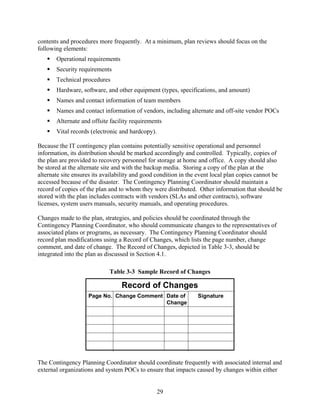
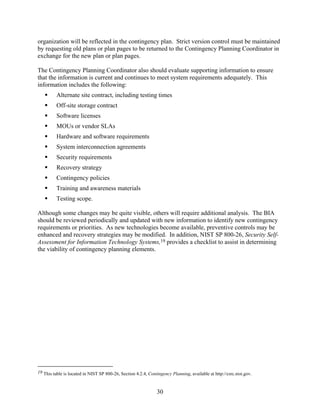
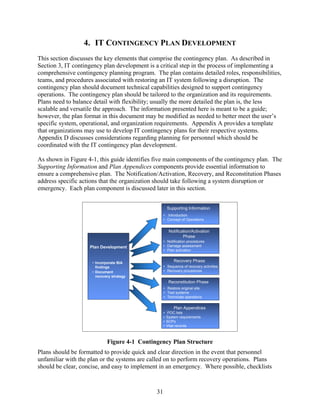
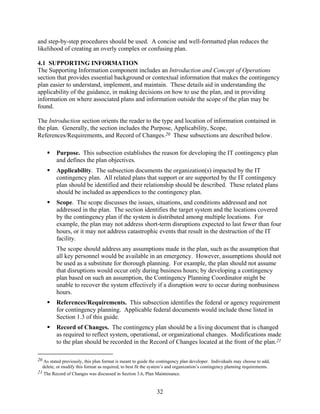
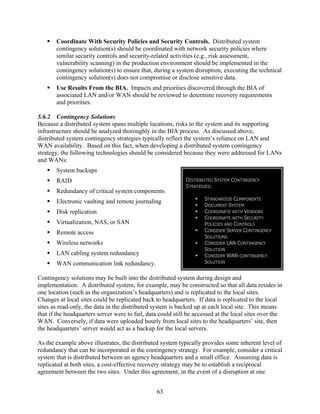
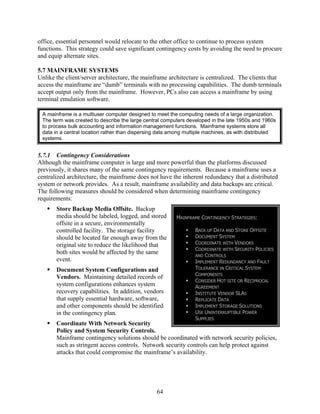
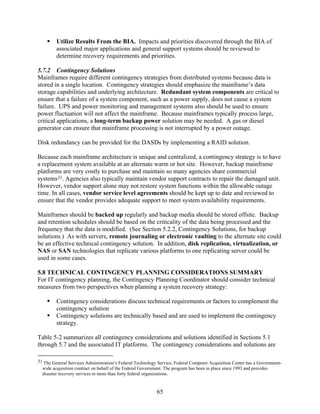
NIST Special Publication 800-34   Contingency Planning Guide for
                                  Information Technology Systems
                                  Recommendations of the National Institute
                                  of Standards and Technology

                                  Marianne Swanson, Amy Wohl, Lucinda Pope,
                                  Tim Grance, Joan Hash, Ray Thomas,
NIST Special Publication 800-34   Contingency Planning Guide for
                                  Information Technology Systems


                                  Recommendations of the National Institute
                                  of Standards and Technology

                                  Marianne Swanson, Amy Wohl, Lucinda Pope,
                                  Tim Grance, Joan Hash, Ray Thomas,


                                        June 2002


                                        U.S. Department of Commerce
                                        Donald L. Evans, Secretary


                                        Technology Administration
                                        Phillip J. Bond, Under Secretary for Technology


                                        National Institute of Standards and
                                        Technology
                                        Arden L. Bement, Jr., Director
Reports on Computer Systems Technology
The Information Technology Laboratory (ITL) at the National Institute of Standards and Technology
(NIST) promotes the U.S. economy and public welfare by providing technical leadership for the Nation’s
measurement and standards infrastructure. ITL develops tests, test methods, reference data, proof of
concept implementations, and technical analyses to advance the development and productive use of
information technology. ITL’s responsibilities include the development of technical, physical,
administrative, and management standards and guidelines for the cost-effective security and privacy of
sensitive unclassified information in Federal computer systems. This Special Publication 800-series reports
on ITL’s research, guidance, and outreach efforts in computer security, and its collaborative activities with
industry, government, and academic organizations.


                                 U.S. GOVERNMENT PRINTING OFFICE
                                         WASHINGTON: 2001


               For sale by the Superintendent of Documents, U.S. Government Printing Office
               Internet: bookstore.gpo.gov — Phone: (202) 512-1800 — Fax: (202) 512-2250
                               Mail: Stop SSOP, Washington, DC 20402-0001


                                                     ii
Acknowledgements

The authors would like to express their thanks to Elizabeth Lennon, the NIST Technical Editor
for her thorough review of this document. Additionally, we would like to thank Mark Wilson
and Richard Korchak, NIST for assisting in the development of the document.


Any mention of commercial products or reference to commercial organizations is for information
   only; it does not imply recommendation or endorsement by NIST nor does it imply that the
              products mentioned are necessarily the best available for the purpose.


                                              iii
EXECUTIVE SUMMARY

NIST Special Publication 800-34, Contingency Planning Guide for Information Technology (IT)
Systems provides instructions, recommendations, and considerations for government IT
contingency planning. Contingency planning refers to interim measures to recover IT services
following an emergency or system disruption. Interim measures may include the relocation of IT
systems and operations to an alternate site, the recovery of IT functions using alternate
equipment, or the performance of IT functions using manual methods.

IT systems are vulnerable to a variety of disruptions, ranging from mild (e.g., short-term power
outage, disk drive failure) to severe (e.g., equipment destruction, fire) from a variety of sources
such as natural disasters to terrorists actions. While many vulnerabilities may be minimized or
eliminated through technical, management, or operational solutions as part of the organization’s
risk management effort, it is virtually impossible to completely eliminate all risks. In many
cases, critical resources may reside outside the organization’s control (such as electric power or
telecommunications), and the organization may be unable to ensure their availability. Thus
effective contingency planning, execution, and testing are essential to mitigate the risk of system
and service unavailability. Accordingly, in order for contingency planning to be successful
agency management must ensure the following:

    1. Understand the IT Contingency Planning Process and its place within the overall
       Continuity of Operations Plan and Business Continuity Plan process.
    2. Develop or reexamine their contingency policy and planning process and apply the
       elements of the planning cycle, including preliminary planning, business impact analysis,
       alternate site selection, and recovery strategies.
    3. Develop or reexamine their IT contingency planning policies and plans with emphasis on
       maintenance, training, and exercising the contingency plan.

This document addresses specific contingency planning recommendations for seven IT platform
types1 and provides strategies and techniques common to all systems.
         Desktops and portable systems
         Servers
         Web sites
         Local area networks
         Wide area networks
         Distributed systems
         Mainframe systems.


1 In this document, IT platforms or IT systems are considered any major application or general support system; the terms are
   used interchangeably.


                                                               iv
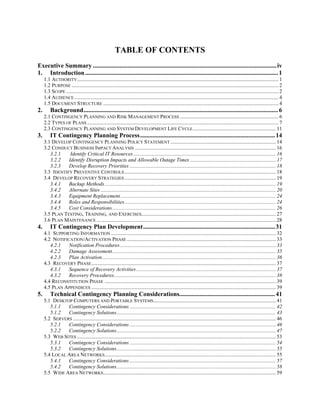
The document also defines the following seven-step contingency process that an agency may
apply to develop and maintain a viable contingency planning program for their IT systems.
These seven progressive steps are designed to be integrated into each stage of the system
development life cycle.
   1. Develop the contingency planning policy statement. A formal department or agency
      policy provides the authority and guidance necessary to develop an effective contingency
      plan.
   2. Conduct the business impact analysis (BIA). The BIA helps to identify and prioritize
      critical IT systems and components. A template for developing the BIA is also provided
      to assist the user.
   3. Identify preventive controls. Measures taken to reduce the effects of system disruptions
      can increase system availability and reduce contingency life cycle costs.
   4. Develop recovery strategies. Thorough recovery strategies ensure that the system may
      be recovered quickly and effectively following a disruption.
   5. Develop an IT contingency plan. The contingency plan should contain detailed
      guidance and procedures for restoring a damaged system.
   6. Plan testing, training, and exercises. Testing the plan identifies planning gaps, whereas
      training prepares recovery personnel for plan activation; both activities improve plan
      effectiveness and overall agency preparedness.
   7. Plan maintenance. The plan should be a living document that is updated regularly to
      remain current with system enhancements.

The document presents a sample format for developing an IT contingency plan. The format
defines three phases that govern the actions to be taken following a system disruption. The
Notification/Activation Phase describes the process of notifying recovery personnel and
performing a damage assessment. The Recovery Phase discusses a suggested course of action
for recovery teams and personnel to restore IT operations at an alternate site or using
contingency capabilities. The final phase, Reconstitution, outlines actions that can be taken to
return the system to normal operating conditions.


                                                v
TABLE OF CONTENTS
Executive Summary .....................................................................................................................iv
1. Introduction ........................................................................................................................... 1
     1.1 AUTHORITY......................................................................................................................................................... 1
     1.2 PURPOSE ............................................................................................................................................................. 2
     1.3 SCOPE ................................................................................................................................................................. 2
     1.4 AUDIENCE ........................................................................................................................................................... 4
     1.5 DOCUMENT STRUCTURE ..................................................................................................................................... 4
2.       Background............................................................................................................................ 6
     2.1 CONTINGENCY PLANNING AND RISK MANAGEMENT PROCESS ........................................................................... 6
     2.2 TYPES OF PLANS ................................................................................................................................................. 7
     2.3 CONTINGENCY PLANNING AND SYSTEM DEVELOPMENT LIFE CYCLE ............................................................... 11
3.       IT Contingency Planning Process...................................................................................... 14
     3.1 DEVELOP CONTINGENCY PLANNING POLICY STATEMENT ................................................................................ 14
     3.2 CONDUCT BUSINESS IMPACT ANALYSIS ........................................................................................................... 16
        3.2.1    Identify Critical IT Resources ............................................................................................................ 16
        3.2.2   Identify Disruption Impacts and Allowable Outage Times ................................................................. 17
        3.2.3   Develop Recovery Priorities ............................................................................................................... 18
     3.3 IDENTIFY PREVENTIVE CONTROLS ................................................................................................................... 18
     3.4 DEVELOP RECOVERY STRATEGIES ................................................................................................................... 19
        3.4.1   Backup Methods .................................................................................................................................. 19
        3.4.2   Alternate Sites ..................................................................................................................................... 20
        3.4.3   Equipment Replacement...................................................................................................................... 24
        3.4.4   Roles and Responsibilities................................................................................................................... 24
        3.4.5   Cost Considerations ............................................................................................................................ 26
     3.5 PLAN TESTING, TRAINING, AND EXERCISES...................................................................................................... 27
     3.6 PLAN MAINTENANCE ........................................................................................................................................ 28
4.       IT Contingency Plan Development.................................................................................... 31
     4.1 SUPPORTING INFORMATION ............................................................................................................................. 32
     4.2 NOTIFICATION/ACTIVATION PHASE ................................................................................................................. 33
        4.2.1   Notification Procedures ...................................................................................................................... 33
        4.2.2   Damage Assessment ............................................................................................................................ 35
        4.2.3   Plan Activation.................................................................................................................................... 36
     4.3 RECOVERY PHASE ............................................................................................................................................ 37
        4.3.1   Sequence of Recovery Activities .......................................................................................................... 37
        4.3.2   Recovery Procedures........................................................................................................................... 38
     4.4 RECONSTITUTION PHASE .................................................................................................................................. 39
     4.5 PLAN APPENDICES ............................................................................................................................................ 39
5.       Technical Contingency Planning Considerations............................................................. 41
     5.1 DESKTOP COMPUTERS AND PORTABLE SYSTEMS............................................................................................. 41
        5.1.1  Contingency Considerations ............................................................................................................... 42
        5.1.2  Contingency Solutions......................................................................................................................... 43
     5.2 SERVERS .......................................................................................................................................................... 46
        5.2.1  Contingency Considerations ............................................................................................................... 46
        5.2.2  Contingency Solutions......................................................................................................................... 47
     5.3 WEB SITES ....................................................................................................................................................... 53
        5.3.1  Contingency Considerations ............................................................................................................... 54
        5.3.2  Contingency Solutions......................................................................................................................... 55
     5.4 LOCAL AREA NETWORKS.................................................................................................................................. 55
        5.4.1  Contingency Considerations ............................................................................................................... 57
        5.4.2  Contingency Solutions......................................................................................................................... 58
     5.5 WIDE AREA NETWORKS ................................................................................................................................... 59
5.5.1   Contingency Considerations ............................................................................................................... 60
      5.5.2   Contingency Solutions......................................................................................................................... 61
   5.6 DISTRIBUTED SYSTEMS .................................................................................................................................... 62
      5.6.1   Contingency Considerations ............................................................................................................... 62
      5.6.2   Contingency Solutions......................................................................................................................... 63
   5.7 MAINFRAME SYSTEMS ...................................................................................................................................... 64
      5.7.1   Contingency Considerations ............................................................................................................... 64
      5.7.2   Contingency Solutions......................................................................................................................... 65
   5.8 TECHNICAL CONTINGENCY PLANNING CONSIDERATIONS SUMMARY ............................................................... 65

APPENDIX A: SAMPLE IT CONTINGENCY PLAN FORMAT ........................................................ A-1
APPENDIX B: SAMPLE BUSINESS IMPACT ANALYSIS (BIA) AND BIA TEMPLATE ................... B-1
APPENDIX C: FREQUENTLY ASKED QUESTIONS ....................................................................... C-1
APPENDIX D: PERSONNEL CONSIDERATIONS IN CONTINUITY PLANNING ............................... D-1
APPENDIX E: GLOSSARY ............................................................................................................ E-1
APPENDIX F: SUGGESTED RESOURCES ...................................................................................... F-1
APPENDIX G: REFERENCES ........................................................................................................G-1
APPENDIX H: INDEX ...................................................................................................................H-1

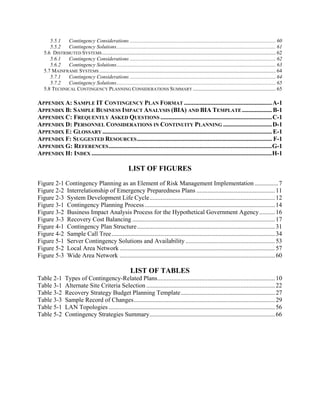
                                                           LIST OF FIGURES
Figure 2-1 Contingency Planning as an Element of Risk Management Implementation ............... 7
Figure 2-2 Interrelationship of Emergency Preparedness Plans .................................................. 11
Figure 2-3 System Development Life Cycle................................................................................ 12
Figure 3-1 Contingency Planning Process ................................................................................... 14
Figure 3-2 Business Impact Analysis Process for the Hypothetical Government Agency.......... 16
Figure 3-3 Recovery Cost Balancing ........................................................................................... 17
Figure 4-1 Contingency Plan Structure........................................................................................ 31
Figure 4-2 Sample Call Tree ........................................................................................................ 34
Figure 5-1 Server Contingency Solutions and Availability ......................................................... 53
Figure 5-2 Local Area Network ................................................................................................... 57
Figure 5-3 Wide Area Network ................................................................................................... 60

                                                            LIST OF TABLES
Table 2-1        Types of Contingency-Related Plans........................................................................... 10
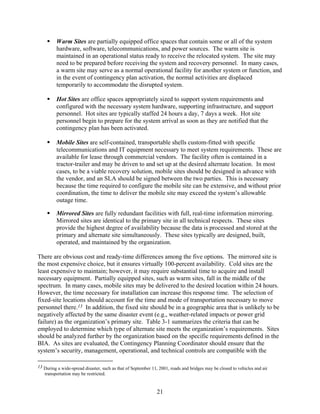
Table 3-1        Alternate Site Criteria Selection .................................................................................. 22
Table 3-2        Recovery Strategy Budget Planning Template............................................................ 27
Table 3-3        Sample Record of Changes.......................................................................................... 29
Table 5-1        LAN Topologies .......................................................................................................... 56
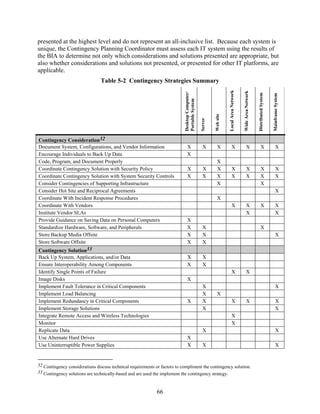
Table 5-2        Contingency Strategies Summary................................................................................ 66
1. INTRODUCTION
Information technology (IT) and automated information systems are vital elements in most
business processes. Because these IT resources are so essential to an organization’s success, it is
critical that the services provided by these systems are able to operate effectively without
excessive interruption. Contingency planning supports this requirement by establishing thorough
plans and procedures and technical measures that can enable a system to be recovered quickly
and effectively following a service disruption or disaster.


 IT contingency planning refers to a coordinated strategy involving plans, procedures, and technical
 measures that enable the recovery of IT systems, operations, and data after a disruption. Contingency
 planning generally includes one or more of the approaches to restore disrupted IT services:

         Restoring IT operations at an alternate location

         Recovering IT operations using alternate equipment

         Performing some or all of the affected business processes using non-IT (manual) means
         (typically acceptable for only short-term disruptions).


This document provides guidance to individuals responsible for preparing and maintaining IT
contingency plans. The document discusses essential contingency plan elements and processes,
highlights specific considerations and concerns associated with contingency planning for various
types of IT systems, and provides examples to assist readers in developing their own IT
contingency plans. This document supersedes Federal Information Processing Standard
Publication (FIPS PUB) 87, Guidelines for ADP Contingency Planning.

1.1 AUTHORITY
This document has been developed by the National Institute of Standards and Technology
(NIST) in furtherance of its statutory responsibilities under the Computer Security Act of 1987
and the Information Technology Management Reform Act of 1996 (specifically, 15 United
States Code [U.S.C.] 278 g-3 (a)(5)). This is not a guideline within the meaning of 15 U.S.C.
278 g-3 (a)(3). These guidelines are for use by federal organizations that process sensitive
information. They are consistent with the requirements of the Office of Management and Budget
(OMB) Circular A-130, Appendix III.

This document may be used by nongovernmental organizations on a voluntary basis. It is not
subject to copyright.

Nothing in this document should be taken to contradict standards and guidelines made
mandatory and binding upon federal agencies by the Secretary of Commerce under statutory
authority. Nor should these guidelines be interpreted as altering or superseding the existing
authorities of the Secretary of Commerce; the Director, OMB; or any other federal official.


                                                    1
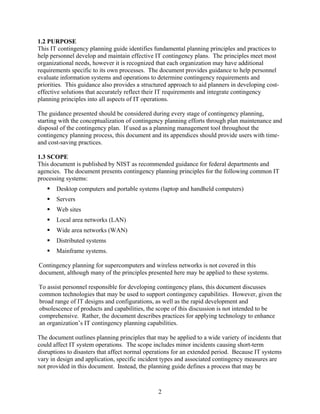
1.2 PURPOSE
This IT contingency planning guide identifies fundamental planning principles and practices to
help personnel develop and maintain effective IT contingency plans. The principles meet most
organizational needs, however it is recognized that each organization may have additional
requirements specific to its own processes. The document provides guidance to help personnel
evaluate information systems and operations to determine contingency requirements and
priorities. This guidance also provides a structured approach to aid planners in developing cost-
effective solutions that accurately reflect their IT requirements and integrate contingency
planning principles into all aspects of IT operations.

The guidance presented should be considered during every stage of contingency planning,
starting with the conceptualization of contingency planning efforts through plan maintenance and
disposal of the contingency plan. If used as a planning management tool throughout the
contingency planning process, this document and its appendices should provide users with time-
and cost-saving practices.

1.3 SCOPE
This document is published by NIST as recommended guidance for federal departments and
agencies. The document presents contingency planning principles for the following common IT
processing systems:
       Desktop computers and portable systems (laptop and handheld computers)
       Servers
       Web sites
       Local area networks (LAN)
       Wide area networks (WAN)
       Distributed systems
       Mainframe systems.

Contingency planning for supercomputers and wireless networks is not covered in this
document, although many of the principles presented here may be applied to these systems.

To assist personnel responsible for developing contingency plans, this document discusses
common technologies that may be used to support contingency capabilities. However, given the
broad range of IT designs and configurations, as well as the rapid development and
obsolescence of products and capabilities, the scope of this discussion is not intended to be
comprehensive. Rather, the document describes practices for applying technology to enhance
an organization’s IT contingency planning capabilities.

The document outlines planning principles that may be applied to a wide variety of incidents that
could affect IT system operations. The scope includes minor incidents causing short-term
disruptions to disasters that affect normal operations for an extended period. Because IT systems
vary in design and application, specific incident types and associated contingency measures are
not provided in this document. Instead, the planning guide defines a process that may be


                                                2
followed for any IT system to identify planning requirements and develop an effective
contingency plan for the disaster.

This planning guide does not address facility-level or organizational contingency planning,
except for those issues required to restore information systems and their processing capabilities.
Facility-level and organization contingency planning are normally the topic of a continuity of
operations plan (COOP) rather than an IT contingency plan. In addition, this document does not
address contingency planning for business processes because that subject would normally be
addressed in a business resumption or business continuity plan. Although information systems
typically support business processes, the processes also depend on a variety of other resources
and capabilities not associated with information systems. Continuity of operations, business
resumption, and business continuity plans are part of a suite of emergency management plans
further described in Section 2.2.

Information in this guide is consistent with guidance provided in other NIST documents,
including NIST Special Publication 800-12, An Introduction to Computer Security: The NIST
Handbook, Chapter 11, Preparing for Contingencies and Disasters. The guidance proposed is
also consistent with federal mandates affecting contingency, continuity of operations, and
disaster recovery planning, including—
       The Computer Security Act of 1987
       Office of Management and Budget (OMB) Circular A-130, Management of Federal
       Information Resources, Appendix III, November 2000
       Federal Information Processing Standards Publication (FIPS PUB) 87, Guidelines for
       ADP Contingency Planning, March 1981 (superseded by this publication)
       Federal Preparedness Circular (FPC) 65, Federal Executive Branch Continuity of
       Operations, July 1999
       Presidential Decision Directive (PDD) 67, Enduring Constitutional Government and
       Continuity of Government Operations, October 1998
       PDD 63, Critical Infrastructure Protection, May 1998
       Federal Emergency Management Agency (FEMA) Federal Response Plan (FRP),
       April 1999.

Federal departments and agencies are subject to complying with the above federal policies in
addition to internal departmental policies. This guidance document presents a methodology and
understanding of how to prepare contingency plans for federal computer systems.


                                                3
IT System: *

  An IT system is identified by defining boundaries around a set of processes, communications, storage,
  and related resources (an architecture).

  All components of an IT system need not be physically connected (e.g., [1] a group of stand-alone
  personal computers (PCs) in an office; [2] a group of PCs placed in employees’ homes under defined
  telecommuting program rules; [3] a group of portable PCs provided to employees who require mobile
  computing capability for their jobs; and [4] a system with multiple identical configurations that are
  installed in locations with the same environmental and physical controls.

  * As defined in NIST Special Publication 800-18, Guide for Developing Security Plans for Information
  Technology Systems


1.4 AUDIENCE
Managers within federal organizations and those individuals responsible for IT security at system
and operational levels can use the principles presented in this document. This description
includes the following personnel:
       Managers responsible for overseeing IT operations or business processes that rely on IT
       systems
       System administrators responsible for maintaining daily IT operations
       Information System Security Officers (ISSOs) and other staff responsible for
       developing, implementing, and maintaining an organization’s IT security activities
       System engineers and architects responsible for designing, implementing, or modifying
       information systems
       Users who employ desktop and portable systems to perform their assigned job functions
       Other personnel responsible for designing, managing, operating, maintaining, or using
       information systems.

In addition, emergency management personnel who may need to coordinate facility-level
contingency may use this document with IT contingency planning activities. The concepts
presented in this document are not specific to government systems and may be used by private
and commercial organizations.

1.5 DOCUMENT STRUCTURE
This document is designed to logically lead the reader through the process of designing an IT
contingency planning program applicable to a wide range of organizations, evaluating the
organization’s needs against recovery strategy options and technical considerations, and
documenting the recovery strategy into an IT contingency plan. The contingency plan would
serve as a “user’s manual” for executing the strategy in the event of a disruption. Where
possible, examples or hypothetical situations are included to provide greater understanding.


                                                   4
The remaining sections of this document address the following areas of contingency planning:

       Section 2, Background, provides background information about contingency planning,
       including the purpose of contingency plans, various types of contingency plans, and how
       these plans are integrated into an organization’s risk management and system
       development life-cycle management programs.

       Section 3, IT Contingency Planning Process, details the fundamental planning
       principles necessary for developing an effective contingency capability. The principles
       outlined in this section are universal to all IT systems. The section presents contingency
       planning guidance for all elements of the planning cycle, including preliminary planning,
       business impact analysis, alternate site selection, and recovery strategies. The section
       also discusses the development of contingency teams and the roles and responsibilities
       commonly assigned to team personnel.

       Section 4, IT Contingency Plan Development, breaks down the activities necessary to
       document the contingency strategy. This documentation becomes the IT contingency
       plan. Maintaining, testing, training, and exercising the contingency plan are also
       discussed in this section.

       Section 5, Technical Contingency Planning Considerations, describes contingency
       planning concerns specific to the IT systems listed in Section 1.3, Scope. The section
       helps contingency planners identify, select, and implement the appropriate technical
       contingency measures for their given systems.

This document includes eight appendices. Appendix A provides a sample IT contingency plan
format. Appendix B presents a sample business impact analysis (BIA) template. Appendix C
contains a list of Frequently Asked Questions about IT contingency planning. Issues relevant to
planning for personnel considerations are discussed in Appendix D. Appendix E provides a
glossary of terms. Appendices F and G contain suggested Internet resources and a list of
references. Appendix H is an index of the document.


                                               5
2. BACKGROUND
IT systems are vulnerable to a variety of disruptions, ranging from mild (e.g., short-term power
outage, disk drive failure) to severe (e.g., equipment destruction, fire). Many vulnerabilities may
be minimized or eliminated through technical, management, or operational solutions as part of
the organization’s risk management effort; however, it is virtually impossible to completely
eliminate all risks.2 Contingency planning is designed to mitigate the risk of system and service
unavailability by focusing effective and efficient recovery solutions.

This section discusses the ways in which IT contingency planning fits into an organization’s
larger risk management, security, and emergency preparedness programs. Other types of
emergency-related plans and their relationship to IT contingency planning are also described.
Finally, the section discusses how integrating contingency planning principles throughout the
system development life cycle promotes system compatibility and a cost-effective means to
increase an organization’s ability to respond quickly and effectively to a disruptive event.

2.1 CONTINGENCY PLANNING AND RISK MANAGEMENT PROCESS
Risk management encompasses a broad range of activities to identify, control, and mitigate risks
to an IT system. Risk management activities from the IT contingency planning perspective have
two primary functions. First, risk management should identify threats and vulnerabilities so that
appropriate controls can be put into place to either prevent incidents from happening or to limit
the effects of an incident. These security controls protect an IT system against three
classifications of threats
          Natural—e.g., hurricane, tornado, flood, and fire
          Human3—e.g., operator error, sabotage, implant of malicious code, and terrorist attacks
          Environmental—e.g., equipment failure, software error, telecommunications network
          outage, and electric power failure.

Second, risk management should identify residual risks for which contingency plans must be put
into place. The contingency plan, therefore, is very closely tied to the results of the risk
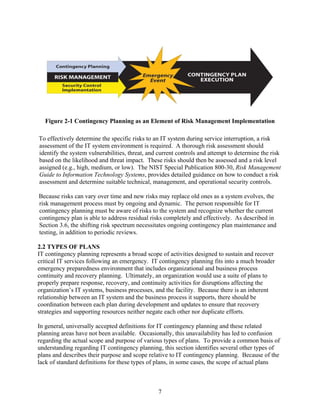
assessment and its mitigation process. Figure 2-1 illustrates the relationship between identifying
and implementing security controls, developing and maintaining the contingency plan, and
implementing the contingency plan once the event has occurred.


2 For example, in many cases, critical resources may reside outside the organization’s control (such as electric power or
  telecommunications), and the organization may be unable to ensure their availability.
3 Responses to cyber attacks (denial-of-service, viruses, etc.) are not covered in this document. Responses to these types of
  incidents involve activities outside the scope of IT contingency planning. Similarly, this document does not address incident
  response activities associated with preserving evidence for computer forensics analysis following an illegal intrusion, denial-
  of-service attack, introduction of malicious logic, or other cyber crime.


                                                                6
Figure 2-1 Contingency Planning as an Element of Risk Management Implementation

To effectively determine the specific risks to an IT system during service interruption, a risk
assessment of the IT system environment is required. A thorough risk assessment should
identify the system vulnerabilities, threat, and current controls and attempt to determine the risk
based on the likelihood and threat impact. These risks should then be assessed and a risk level
assigned (e.g., high, medium, or low). The NIST Special Publication 800-30, Risk Management
Guide to Information Technology Systems, provides detailed guidance on how to conduct a risk
assessment and determine suitable technical, management, and operational security controls.

Because risks can vary over time and new risks may replace old ones as a system evolves, the
risk management process must by ongoing and dynamic. The person responsible for IT
contingency planning must be aware of risks to the system and recognize whether the current
contingency plan is able to address residual risks completely and effectively. As described in
Section 3.6, the shifting risk spectrum necessitates ongoing contingency plan maintenance and
testing, in addition to periodic reviews.

2.2 TYPES OF PLANS
IT contingency planning represents a broad scope of activities designed to sustain and recover
critical IT services following an emergency. IT contingency planning fits into a much broader
emergency preparedness environment that includes organizational and business process
continuity and recovery planning. Ultimately, an organization would use a suite of plans to
properly prepare response, recovery, and continuity activities for disruptions affecting the
organization’s IT systems, business processes, and the facility. Because there is an inherent
relationship between an IT system and the business process it supports, there should be
coordination between each plan during development and updates to ensure that recovery
strategies and supporting resources neither negate each other nor duplicate efforts.

In general, universally accepted definitions for IT contingency planning and these related
planning areas have not been available. Occasionally, this unavailability has led to confusion
regarding the actual scope and purpose of various types of plans. To provide a common basis of
understanding regarding IT contingency planning, this section identifies several other types of
plans and describes their purpose and scope relative to IT contingency planning. Because of the
lack of standard definitions for these types of plans, in some cases, the scope of actual plans


                                                7
developed by organizations may vary from the descriptions below. However, when these plans
are discussed in this document, the following descriptions apply.

Business Continuity Plan (BCP). The BCP focuses on sustaining an organization’s business
functions during and after a disruption. An example of a business function may be an
organization’s payroll process or consumer information process. A BCP may be written for a
specific business process or may address all key business processes. IT systems are considered
in the BCP in terms of their support to the business processes. In some cases, the BCP may not
address long-term recovery of processes and return to normal operations, solely covering interim
business continuity requirements. A disaster recovery plan, business resumption plan, and
occupant emergency plan may be appended to the BCP. Responsibilities and priorities set in the
BCP should be coordinated with those in the Continuity of Operations Plan (COOP) to eliminate
possible conflicts.

Business Recovery Plan (BRP), also Business Resumption Plan. The BRP addresses the
restoration of business processes after an emergency, but unlike the BCP, lacks procedures to
ensure continuity of critical processes throughout an emergency or disruption. Development of
the BRP should be coordinated with the disaster recovery plan and BCP. The BRP may be
appended to the BCP.

Continuity of Operations Plan (COOP). The COOP4 focuses on restoring an organization’s
(usually a headquarters element) essential functions at an alternate site and performing those
functions for up to 30 days before returning to normal operations. Because a COOP addresses
headquarters-level issues, it is developed and executed independently from the BCP.
Implementation of a viable COOP capability is mandated by PDD 67, Enduring Constitutional
Government and Continuity of Government Operations. FEMA, which is the Federal
Government’s executive agent for COOP, provides COOP guidance in FPC 65, Federal
Executive Branch Continuity of Operations. Standard elements of a COOP include Delegation
of Authority statements, Orders of Succession, and Vital Records and Databases. Because the
COOP emphasizes the recovery of an organization’s operational capability at an alternate site,
the plan does not necessarily include IT operations. In addition, minor disruptions that do not
require relocation to an alternate site are typically not addressed. However, COOP may include
the BCP, BRP, and disaster recovery plan as appendices. In accordance with PDD-63, Critical
Infrastructure Protection, COOP plans for systems that are critical to supporting the nation’s
infrastructure are to be in place by May 2003.

Continuity of Support Plan/IT Contingency Plan. OMB Circular A-130, Appendix III, requires
the development and maintenance of continuity of support plans for general support systems and
contingency plans for major applications. This planning guide considers continuity of support
planning to be synonymous with IT contingency planning. Because an IT contingency plan
should be developed for each major application and general support system, multiple
contingency plans may be maintained within the organization’s BCP.


4 Some organizations use COOP to indicate Continuity of Operations, rather than Continuity of Operations Plan.


                                                              8
Crisis Communications Plan. Organizations should prepare their internal and external
communications procedures prior to a disaster. A crisis communications plan is often developed
by the organization responsible for public outreach. The crisis communication plan procedures
should be coordinated with all other plans to ensure that only approved statements are released to
the public. Plan procedures should be included as an appendix to the BCP. The communications
plan typically designates specific individuals as the only authority for answering questions from
the public regarding disaster response. It may also include procedures for disseminating status
reports to personnel and to the public. Templates for press releases are included in the plan.
Appendix D provides further discussion of issues included in the crisis communications plan and
informational resources.

Cyber Incident Response Plan. The Cyber Incident Response Plan establishes procedures to
address cyber attacks against an organization’s IT system(s). These procedures are designed to
enable security personnel to identify, mitigate, and recover from malicious computer incidents,
such as unauthorized access to a system or data, denial of service, or unauthorized changes to
system hardware, software, or data (e.g., malicious logic, such as a virus, worm, or Trojan
horse). This plan may be included among the appendices of the BCP.

Disaster Recovery Plan (DRP). As suggested by its name, the DRP applies to major, usually
catastrophic, events that deny access to the normal facility for an extended period. Frequently,
DRP refers to an IT-focused plan designed to restore operability of the target system, application,
or computer facility at an alternate site after an emergency. The DRP scope may overlap that of
an IT contingency plan; however, the DRP is narrower in scope and does not address minor
disruptions that do not require relocation. Dependent on the organization’s needs, several DRPs
may be appended to the BCP.

Occupant Emergency Plan (OEP). The OEP provides the response procedures for occupants of
a facility in the event of a situation posing a potential threat to the health and safety of personnel,
the environment, or property. Such events would include a fire, hurricane, criminal attack, or a
medical emergency. OEPs are developed at the facility level, specific to the geographic location
and structural design of the building. General Services Administration (GSA)-owned facilities
maintain plans based on the GSA OEP template. The facility OEP may be appended to the BCP,
but is executed separately. Aspects of planning for personnel safety and evacuation are
discussed in Appendix D.
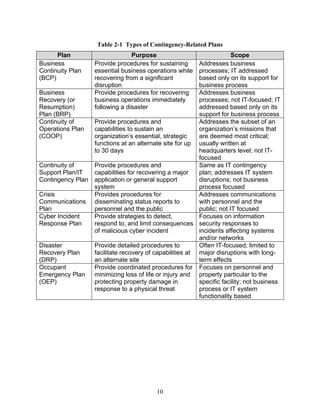
Table 2-1 summarizes the types of plans discussed above.


                                                   9
Table 2-1 Types of Contingency-Related Plans
      Plan                       Purpose                               Scope
Business           Provide procedures for sustaining      Addresses business
Continuity Plan    essential business operations while    processes; IT addressed
(BCP)              recovering from a significant          based only on its support for
                   disruption                             business process
Business           Provide procedures for recovering      Addresses business
Recovery (or       business operations immediately        processes; not IT-focused; IT
Resumption)        following a disaster                   addressed based only on its
Plan (BRP)                                                support for business process
Continuity of      Provide procedures and                 Addresses the subset of an
Operations Plan    capabilities to sustain an             organization’s missions that
(COOP)             organization’s essential, strategic    are deemed most critical;
                   functions at an alternate site for up usually written at
                   to 30 days                             headquarters level; not IT-
                                                          focused
Continuity of      Provide procedures and                 Same as IT contingency
Support Plan/IT    capabilities for recovering a major    plan; addresses IT system
Contingency Plan   application or general support         disruptions; not business
                   system                                 process focused
Crisis             Provides procedures for                Addresses communications
Communications     disseminating status reports to        with personnel and the
Plan               personnel and the public               public; not IT focused
Cyber Incident     Provide strategies to detect,          Focuses on information
Response Plan      respond to, and limit consequences security responses to
                   of malicious cyber incident            incidents affecting systems
                                                          and/or networks
Disaster           Provide detailed procedures to         Often IT-focused; limited to
Recovery Plan      facilitate recovery of capabilities at major disruptions with long-
(DRP)              an alternate site                      term effects
Occupant           Provide coordinated procedures for Focuses on personnel and
Emergency Plan     minimizing loss of life or injury and property particular to the
(OEP)              protecting property damage in          specific facility; not business
                   response to a physical threat          process or IT system
                                                          functionality based


                                          10
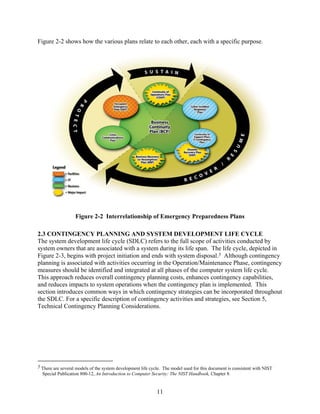
Figure 2-2 shows how the various plans relate to each other, each with a specific purpose.


                   Figure 2-2 Interrelationship of Emergency Preparedness Plans

2.3 CONTINGENCY PLANNING AND SYSTEM DEVELOPMENT LIFE CYCLE
The system development life cycle (SDLC) refers to the full scope of activities conducted by
system owners that are associated with a system during its life span. The life cycle, depicted in
Figure 2-3, begins with project initiation and ends with system disposal.5 Although contingency
planning is associated with activities occurring in the Operation/Maintenance Phase, contingency
measures should be identified and integrated at all phases of the computer system life cycle.
This approach reduces overall contingency planning costs, enhances contingency capabilities,
and reduces impacts to system operations when the contingency plan is implemented. This
section introduces common ways in which contingency strategies can be incorporated throughout
the SDLC. For a specific description of contingency activities and strategies, see Section 5,
Technical Contingency Planning Considerations.


5 There are several models of the system development life cycle. The model used for this document is consistent with NIST
  Special Publication 800-12, An Introduction to Computer Security: The NIST Handbook, Chapter 8.


                                                             11
Development/    System is designed, purchased, programmed,
                                                     Acquisition    developed, or otherwise constructed. This phase often
                                                       Phase        consists of other defined cycles, such as the system
                                                                    development cycle or the acquisition cycle.
          The need for a system is expressed
          and the system purpose and high-level
          requirements are documented.


               Initiation                                                      Implementation
                 Phase                                                             Phase

                                                                                                 After initial system
                                                                                                 testing, the system is
                                                                                                 installed or fielded.


                                                                        Operation/
                             Disposal                                  Maintenance
                              Phase                                       Phase
                   System is disposed of once the                   System performs the work
                   transition to a new computer                     for which it was
                   system is completed.                             developed.


                                Figure 2-3 System Development Life Cycle

Initiation Phase. Contingency planning requirements should be considered when a new IT
system is being conceived. In the Initiation Phase, system requirements are identified and
matched to their related operational processes, and initial contingency requirements may become
apparent. Very high system availability requirements may indicate that redundant, real-time
mirroring at an alternate site and fail-over capabilities should be built into the system design.
Similarly, if the system is intended to operate in unusual conditions, such as in a mobile
application or an inaccessible location, the design may need to include additional features, such
as remote diagnostic or self-healing capabilities. During this phase, the new IT system also
should be evaluated against all other existing and planned IT systems to determine its appropriate
recovery priority. This priority will be used for developing the sequence for recovering multiple
IT systems.

Development/Acquisition Phase. As initial concepts evolve into system designs, specific
contingency solutions may be incorporated. As in the Initiation Phase, contingency measures
included in this phase should reflect system and operational requirements. The design should
incorporate redundancy and robustness directly into the system architecture to optimize
reliability, maintainability, and availability during the Operation/Maintenance Phase. By
including them in the initial design, costs are reduced, and problems associated with retrofitting
or modifying the system during the Operation/Maintenance Phase are reduced. If multiple
applications are hosted within the new general support system, individual priorities for those
applications should be set to assist with selecting the appropriate contingency measures and
sequencing for the recovery execution. Examples of contingency measures that should be


                                                               12
considered in this phase are redundant communications paths, lack of single points of failure,
enhanced fault tolerance of network components and interfaces, power management systems
with appropriately sized backup power sources, load balancing, and data mirroring and
replication to ensure a uniformly robust system. If an alternate site is chosen as a contingency
measure, requirements for the alternate site should be addressed in this phase.

Implementation Phase. Although the system is undergoing initial testing, contingency strategies
also should be tested to ensure that technical features and recovery procedures are accurate and
effective. Testing the contingency strategies will require developing a test plan. When these
contingency measures have been verified, they should be clearly documented in the contingency
plan.

Operation/Maintenance Phase. When the system is operational, users, administrators, and
managers should maintain a training and awareness program which covers the contingency plan
procedures. Exercises and tests should be conducted to ensure that the procedures continue to be
effective. Regular backups should be conducted and stored offsite. The plan should be updated
to reflect changes to procedures based on lessons learned. When the IT system undergoes
upgrades or any other modifications, such as changes to external interfaces, these modifications
should be reflected in the contingency plan. Coordinating and documenting changes in the plan
should be performed in a timely manner to maintain an effective plan.

Disposal Phase. Contingency considerations should not be neglected because a computer
system is retired and another system replaces it. Until the new system is operational and fully
tested (including its contingency capabilities), the original system’s contingency plan should be
ready for implementation. As legacy systems are replaced, they may provide a valuable backup
capability if a loss or failure of the new system should occur. In some cases, equipment parts
(e.g., hard drives, power supplies, memory chips, or network cards) from hardware that has been
replaced by new systems can be used as spare parts for new, operational equipment. In addition,
legacy systems can be used as test systems for new applications, allowing potentially disruptive
system flaws to be identified and corrected on nonoperational systems.


                                                13
3. IT CONTINGENCY PLANNING PROCESS
         This section describes the process to develop and maintain an effective IT contingency plan. The
         process presented here is common to all IT systems. The seven steps in the process are as
         follows:
                             1. Develop the contingency planning policy statement
                             2. Conduct the business impact analysis (BIA)
                             3. Identify preventive controls
                             4. Develop recovery strategies
                             5. Develop an IT contingency plan
                             6. Plan testing, training, and exercises
                             7. Plan maintenance.
         These steps represent key elements in a comprehensive IT contingency planning capability. Six
         of the seven steps of the planning process are discussed in this section. Because plan
         development represents the core of IT contingency planning, including the individual sections
         that comprise the plan, plan development is addressed in its own chapter (Section 4). The
         responsibility for the planning process generally falls under the auspice of the “Contingency
         Planning Coordinator” or “Contingency Planner,” who is typically a functional or resource
         manager within the agency. The coordinator develops the strategy in cooperation with other
         functional and resource managers associated with the system or the business processes supported
         by the system. The Contingency Planning Coordinator also typically manages development and
         execution of the contingency plan. All major applications and general support systems should
         have a contingency plan. Figure 3-1 illustrates the contingency planning process.


 Develop
                                Conduct                        Identify                Develop                     Develop                  Plan Testing,
Contingency                                                                                                                                                                     Plan
                             Business Impact                  Preventive              Recovery                    Contingency               Training, and
 Planning                                                                                                                                                                    Maintenance
                                Analysis                       Controls               Strategies                     Plan*                   Exercises
  Policy
   • Identify statutory or        • Identify critical IT       • Implement controls     • Identify methods          • Document recovery        • Develop test objectives        • Review and update plan
     regulatory                     resources                  • Maintain controls      • Integrate into system       strategy                 • Develop success criteria       • Coordinate with
     requirements for             • Identify outage impacts                               architecture                                         • Document lessons                 internal/external
     contingency plans              and allowable outage                                                                                         learned                          organizations
   • Develop IT                     times                                                                                                      • Incorporate into the plan      • Control distribution
     contingency planning         • Develop recovery                                                                                           • Train personnel                • Document changes
     policy statement               priorities
   • Obtain approval of
     policy
   • Publish policy
                                                                                                                  *Discussed in Section 4


                                                              Figure 3-1 Contingency Planning Process

         3.1 DEVELOP CONTINGENCY PLANNING POLICY STATEMENT
         To be effective and to ensure that personnel fully understand the agency’s contingency planning
         requirements, the contingency plan must be based on a clearly defined policy. The contingency
         planning policy statement should define the agency’s overall contingency objectives and
         establish the organizational framework and responsibilities for IT contingency planning. To be


                                                                                              14
successful, senior management, most likely the Chief Information Officer (CIO), must support a
contingency program. These officials should be included in the process to develop the program
policy, structure, objectives, and roles and responsibilities. At a minimum, the contingency
policy should comply with federal guidance contained in the documents listed in Section 1.1;
agencies should evaluate their respective IT systems, operations, and requirements to determine
if additional contingency planning requirements are necessary. Key policy elements are as
follows:
       Roles and responsibilities
       Scope as applies to the type(s) of platform(s) and organization functions subject to
       contingency planning
       Resource requirements
       Training requirements
       Exercise and testing schedules
       Plan maintenance schedule
       Frequency of backups and storage of backup media.

Sample IT Contingency Policy for Hypothetical Government Agency (HGA):*

All HGA organizations shall develop contingency plans for each major application or general
support system to meet the needs of critical IT operations in the event of a disruption
extending beyond 72 hours. The procedures for execution of such a capability shall be
documented in a formal contingency plan by the Contingency Planning Coordinator and shall
be reviewed annually and updated as necessary by the Contingency Planning Coordinator.
The procedures must account for full nightly backups to be conducted and sent to the
designated off-site facility. The plan should assign specific responsibilities to designated staff
or positions to facilitate the recovery and/or continuity of essential IT functions. Resources
necessary to ensure viability of the procedures shall be acquired and maintained. Personnel
responsible for target systems shall be trained to execute contingency procedures. The plan,
recovery capabilities, and personnel shall be tested annually to identify weaknesses of the
capability.

* HGA and associated specific policies are for illustrative purposes only. NIST SP 800-12
Chapter 13 presents a case study of HGA’s computer security.


As the IT contingency policy and program are developed, they should be coordinated with
related agency activities, including IT security, physical security, human resources, IT
operations, and emergency preparedness functions. IT contingency activities should be
compatible with program requirements for these areas, and contingency personnel should
coordinate with representatives from each area to remain aware of new or evolving policies,
programs, or capabilities. Contingency plans must be written in coordination with other existing
plans associated with systems. Such plans include the following:
       Security-related plans, such as system security plans
       Facility-level plans, such as the OEP and COOP


                                                     15
Agency-level plans, such as business resumption and critical infrastructure protection
                      (CIP) plans.

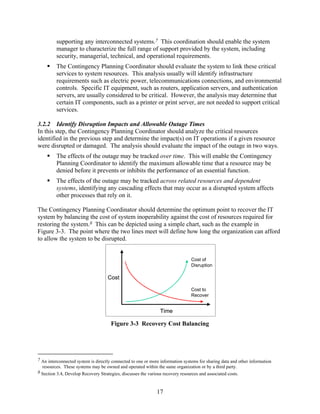
       3.2 CONDUCT BUSINESS IMPACT ANALYSIS
       The BIA is a key step in the contingency planning process. The BIA enables the Contingency
       Planning Coordinator to fully characterize the system requirements, processes, and
       interdependencies and use this information to determine contingency requirements and priorities.
       The BIA purpose is to correlate specific system components with the critical services that they
       provide, and based on that information, to characterize the consequences of a disruption to the
       system components. Results from the BIA should be appropriately incorporated into the analysis
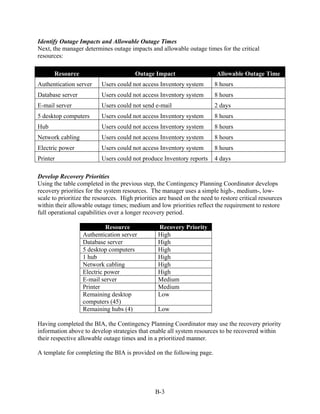
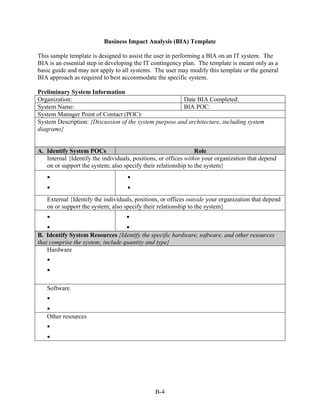
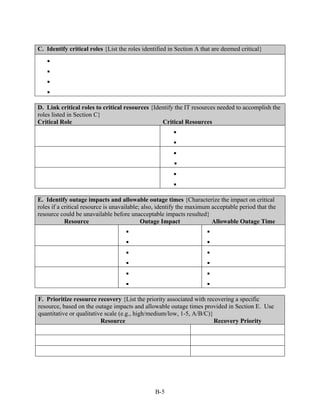
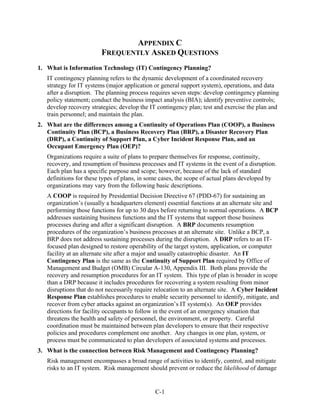
       and strategy development efforts for the organization’s COOP, BCP, and BRP. The sample BIA
       process outlined in this section, illustrated in Figure 3-2, helps Contingency Planning
       Coordinators streamline and focus their contingency plan development activities to achieve a
       more effective plan.6 An example of the BIA process and a sample BIA template are provided in
       Appendix B.


                                      Identify Critical IT Resources                      Identify Disruption Impacts and              Develop Recovery
                                                                                             Allowable Outage Times                        Priorities
Input from users,
                                                                                    PROCESS: 2. Time and Attendance Reporting          Resource        Recovery
business process        Critical Business Process         Critical Resources
owners, application                                                                                  Max Allowable                                      Priority
owners, and other                                                               Critical Resource       Outage        Impact
                         1.   Payroll Processing
associated groups                                                                                                                    • LAN Server        High
                                                         • LAN Server           • LAN Server
                         2. Time and Attendance                                                         8 hours • Delay in time
                                                         • WAN Access                                             sheet processing   • WAN Access      Medium
                           Reporting                                            • WAN Access
                         3. Time and Attendance          • E-mail                                               • Inability to       • E-mail            Low
                                                                                • Mainframe
                           Verification                                           Access                          perform routine    • Mainframe         High
                                                         • Mainframe Access
                                                                                                                  payroll              Access
                         4. Time and Attendance                                 • E-mail Server
                                                         • E-mail Server                                          operations
                           Approval                        .                      .                                                  • E-mail Server     High
                                                           .                      .                             • Delay in payroll     .
                         .                                 .                      .                                                    .
                         .
                         .                                 .                      .                                processing          .
                                                                                                                                       .
                         X                                                                                        .
                                                                                                                  .
                                                                                                                  .


           Figure 3-2 Business Impact Analysis Process for the Hypothetical Government Agency

       3.2.1 Identify Critical IT Resources
       IT systems can be very complex, with numerous components, interfaces, and processes. A
       system often has multiple missions resulting in different perspectives on the importance of
       system services or capabilities. This first BIA step evaluates the IT system to determine the
       critical functions performed by the system and to identify the specific system resources required
       to perform them. Two activities usually are needed to complete this step:
                      The Contingency Planning Coordinator should identify and coordinate with internal and
                      external points of contact (POC) associated with the system to characterize the ways that
                      they depend on or support the IT system. When identifying contacts, it is important to
                      include organizations that provide or receive data from the system as well as contacts


       6 For completeness and to assist Contingency Planning Coordinators who may be new to or unfamiliar with the major application
         or general support system, the sample BIA process presented here includes basic steps. In many cases, the Contingency
         Planning Coordinator will be very familiar with specific system components and the ways in which they support business
         processes. This is especially true with respect to small systems. In these cases, not all BIA steps may be necessary; the
         Contingency Planning Coordinator may modify the approach to fit the respective system and contingency planning needs.


                                                                               16
supporting any interconnected systems.7 This coordination should enable the system
         manager to characterize the full range of support provided by the system, including
         security, managerial, technical, and operational requirements.
         The Contingency Planning Coordinator should evaluate the system to link these critical
         services to system resources. This analysis usually will identify infrastructure
         requirements such as electric power, telecommunications connections, and environmental
         controls. Specific IT equipment, such as routers, application servers, and authentication
         servers, are usually considered to be critical. However, the analysis may determine that
         certain IT components, such as a printer or print server, are not needed to support critical
         services.

3.2.2 Identify Disruption Impacts and Allowable Outage Times
In this step, the Contingency Planning Coordinator should analyze the critical resources
identified in the previous step and determine the impact(s) on IT operations if a given resource
were disrupted or damaged. The analysis should evaluate the impact of the outage in two ways.
         The effects of the outage may be tracked over time. This will enable the Contingency
         Planning Coordinator to identify the maximum allowable time that a resource may be
         denied before it prevents or inhibits the performance of an essential function.
         The effects of the outage may be tracked across related resources and dependent
         systems, identifying any cascading effects that may occur as a disrupted system affects
         other processes that rely on it.

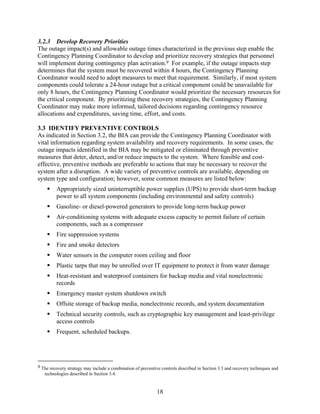
The Contingency Planning Coordinator should determine the optimum point to recover the IT
system by balancing the cost of system inoperability against the cost of resources required for
restoring the system.8 This can be depicted using a simple chart, such as the example in
Figure 3-3. The point where the two lines meet will define how long the organization can afford
to allow the system to be disrupted.


                                                                                Cost of
                                                                                Disruption

                                    Cost

                                                                                Cost to
                                                                                Recover


                                                               Time

                                      Figure 3-3 Recovery Cost Balancing


7 An interconnected system is directly connected to one or more information systems for sharing data and other information
  resources. These systems may be owned and operated within the same organization or by a third party.
8 Section 3.4, Develop Recovery Strategies, discusses the various recovery resources and associated costs.


                                                              17
3.2.3 Develop Recovery Priorities
The outage impact(s) and allowable outage times characterized in the previous step enable the
Contingency Planning Coordinator to develop and prioritize recovery strategies that personnel
will implement during contingency plan activation.9 For example, if the outage impacts step
determines that the system must be recovered within 4 hours, the Contingency Planning
Coordinator would need to adopt measures to meet that requirement. Similarly, if most system
components could tolerate a 24-hour outage but a critical component could be unavailable for
only 8 hours, the Contingency Planning Coordinator would prioritize the necessary resources for
the critical component. By prioritizing these recovery strategies, the Contingency Planning
Coordinator may make more informed, tailored decisions regarding contingency resource
allocations and expenditures, saving time, effort, and costs.

3.3 IDENTIFY PREVENTIVE CONTROLS
As indicated in Section 3.2, the BIA can provide the Contingency Planning Coordinator with
vital information regarding system availability and recovery requirements. In some cases, the
outage impacts identified in the BIA may be mitigated or eliminated through preventive
measures that deter, detect, and/or reduce impacts to the system. Where feasible and cost-
effective, preventive methods are preferable to actions that may be necessary to recover the
system after a disruption. A wide variety of preventive controls are available, depending on
system type and configuration; however, some common measures are listed below:
         Appropriately sized uninterruptible power supplies (UPS) to provide short-term backup
         power to all system components (including environmental and safety controls)
         Gasoline- or diesel-powered generators to provide long-term backup power
         Air-conditioning systems with adequate excess capacity to permit failure of certain
         components, such as a compressor
         Fire suppression systems
         Fire and smoke detectors
         Water sensors in the computer room ceiling and floor
         Plastic tarps that may be unrolled over IT equipment to protect it from water damage
         Heat-resistant and waterproof containers for backup media and vital nonelectronic
         records
         Emergency master system shutdown switch
         Offsite storage of backup media, nonelectronic records, and system documentation
         Technical security controls, such as cryptographic key management and least-privilege
         access controls
         Frequent, scheduled backups.


9 The recovery strategy may include a combination of preventive controls described in Section 3.3 and recovery techniques and
   technologies described in Section 3.4.


                                                             18
Preventive controls should be documented in the contingency plan, and personnel associated
with the system should be trained on how and when to use the controls. These controls should
be maintained in good condition to ensure their effectiveness in an emergency.

3.4 DEVELOP RECOVERY STRATEGIES
Recovery strategies provide a means to restore IT operations quickly and effectively following a
service disruption. The strategies should address disruption impacts and allowable outage times
identified in the BIA. Several alternatives should be considered when developing the strategy,
including cost, allowable outage time, security, and integration with larger, organization-level
contingency plans.

The selected recovery strategy should address the potential impacts identified in the BIA and
should be integrated into the system architecture during the design and implementation phases of
the system life cycle. The strategy should include a combination of methods that complement
one another to provide recovery capability over the full spectrum of incidents. A wide variety of
recovery approaches may be considered; the appropriate choice depends on the incident, type of
system and its operational requirements.10 Specific recovery methods further described in
Section 3.4.2 should be considered and may include commercial contracts with cold, warm, or
hot site vendors, mobile sites, mirrored sites, reciprocal agreements with internal or external
organizations, and service level agreements (SLAs) with the equipment vendors. In addition,
technologies such as Redundant Arrays of Independent Disks (RAID), automatic fail-over,
uninterruptible power supply (UPS), and mirrored systems should be considered when
developing a system recovery strategy.

3.4.1 Backup Methods
System data should be backed up regularly. Policies should specify the frequency of backups
(e.g., daily or weekly, incremental or full), based on data criticality and the frequency that new
information is introduced. Data backup policies should designate the location of stored data,
file-naming conventions, media rotation frequency, and method for transporting data offsite.
Data may be backed up on magnetic disk, tape, or optical disks (such as compact disks [CDs]).
The specific method chosen for conducting backups should be based on system and data
availability and integrity requirements. These methods include electronic vaulting, mirrored
disks (using direct access storage devices [DASD] or RAID),11 and floppy disks.

It is good business practice to store backed-up data offsite. Commercial data storage facilities
are specially designed to archive media and protect data from threatening elements. If using
offsite storage, data is backed up at the organization’s facility and then labeled, packed, and
transported to the storage facility. If the data is required for recovery or testing purposes, the
organization contacts the storage facility requesting specific data to be transported to the


10 Section 5.0, IT System Specific Contingency Considerations, provides detailed discussion of recovery methods applicable to
   specific IT systems.
11 DASD and RAID are discussed in Section 5.0.


                                                              19
organization or to an alternate facility.12 Commercial storage facilities often offer media
transportation and response and recovery services.

When selecting an offsite storage facility and vendor, the following criteria should be
considered—
          Geographic area—distance from the organization and the probability of the storage site
          being affected by the same disaster as the organization
          Accessibility—length of time necessary to retrieve the data from storage and the storage
          facility’s operating hours
          Security—security capabilities of the storage facility and employee confidentiality,
          which must meet the data’s sensitivity and security requirements
          Environment—structural and environmental conditions of the storage facility (i.e.,
          temperature, humidity, fire prevention, and power management controls)
          Cost—cost of shipping, operational fees, and disaster response/recovery services.

3.4.2 Alternate Sites
Although major disruptions with long-term effects may be rare, they should be accounted for in
the contingency plan. Thus, the plan must include a strategy to recover and perform system
operations at an alternate facility for an extended period. In general, three types of alternate sites
are available:
          Dedicated site owned or operated by the organization
          Reciprocal agreement or memorandum of agreement with an internal or external entity
          Commercially leased facility.

Regardless of the type of alternate site chosen, the facility must be able to support system
operations as defined in the contingency plan. The three alternate site types may be categorized
in terms of their operational readiness. Based on this factor, sites may be identified as cold sites,
warm sites, hot sites, mobile sites, and mirrored sites. Progressing from basic to advanced, the
sites are described below.

          Cold Sites typically consist of a facility with adequate space and infrastructure (electric
          power, telecommunications connections, and environmental controls) to support the IT
          system. The space may have raised floors and other attributes suited for IT operations.
          The site does not contain IT equipment and usually does not contain office automation
          equipment, such as telephones, facsimile machines, or copiers. The organization using
          the cold site is responsible for providing and installing necessary equipment and
          telecommunications capabilities.


12 Backup tapes should be tested regularly to ensure that data are being stored correctly and that the files may be retrieved
   without errors or lost data. Also, the Contingency Planning Coordinator should test the backup tapes at the alternate site, if
   applicable, to ensure that the site supports the same backup configuration that the organization has implemented.


                                                                20
Warm Sites are partially equipped office spaces that contain some or all of the system
         hardware, software, telecommunications, and power sources. The warm site is
         maintained in an operational status ready to receive the relocated system. The site may
         need to be prepared before receiving the system and recovery personnel. In many cases,
         a warm site may serve as a normal operational facility for another system or function, and
         in the event of contingency plan activation, the normal activities are displaced
         temporarily to accommodate the disrupted system.

         Hot Sites are office spaces appropriately sized to support system requirements and
         configured with the necessary system hardware, supporting infrastructure, and support
         personnel. Hot sites are typically staffed 24 hours a day, 7 days a week. Hot site
         personnel begin to prepare for the system arrival as soon as they are notified that the
         contingency plan has been activated.

         Mobile Sites are self-contained, transportable shells custom-fitted with specific
         telecommunications and IT equipment necessary to meet system requirements. These are
         available for lease through commercial vendors. The facility often is contained in a
         tractor-trailer and may be driven to and set up at the desired alternate location. In most
         cases, to be a viable recovery solution, mobile sites should be designed in advance with
         the vendor, and an SLA should be signed between the two parties. This is necessary
         because the time required to configure the mobile site can be extensive, and without prior
         coordination, the time to deliver the mobile site may exceed the system’s allowable
         outage time.

         Mirrored Sites are fully redundant facilities with full, real-time information mirroring.
         Mirrored sites are identical to the primary site in all technical respects. These sites
         provide the highest degree of availability because the data is processed and stored at the
         primary and alternate site simultaneously. These sites typically are designed, built,
         operated, and maintained by the organization.

There are obvious cost and ready-time differences among the five options. The mirrored site is
the most expensive choice, but it ensures virtually 100-percent availability. Cold sites are the
least expensive to maintain; however, it may require substantial time to acquire and install
necessary equipment. Partially equipped sites, such as warm sites, fall in the middle of the
spectrum. In many cases, mobile sites may be delivered to the desired location within 24 hours.
However, the time necessary for installation can increase this response time. The selection of
fixed-site locations should account for the time and mode of transportation necessary to move
personnel there.13 In addition, the fixed site should be in a geographic area that is unlikely to be
negatively affected by the same disaster event (e.g., weather-related impacts or power grid
failure) as the organization’s primary site. Table 3-1 summarizes the criteria that can be
employed to determine which type of alternate site meets the organization’s requirements. Sites
should be analyzed further by the organization based on the specific requirements defined in the
BIA. As sites are evaluated, the Contingency Planning Coordinator should ensure that the
system’s security, management, operational, and technical controls are compatible with the

13 During a wide-spread disaster, such as that of September 11, 2001, roads and bridges may be closed to vehicles and air
   transportation may be restricted.


                                                              21
prospective site. Such controls may include firewalls and physical access controls, data
remenance controls, and security clearance level of the site and staff supporting the site.
                                  Table 3-1 Alternate Site Criteria Selection14
                              Cost            Hardware                Telecom-                  Setup       Location
         Site                                 Equipment               munications               Time
     Cold Site                Low             None                    None                      Long        Fixed
     Warm Site                Medium          Partial                 Partial/Full              Medium      Fixed
     Hot Site                 Medium/         Full                    Full                      Short       Fixed
                              High
     Mobile Site              High            Dependent               Dependent                 Dependent   Not Fixed
     Mirrored Site            High            Full                    Full                      None        Fixed

These alternate sites may be owned and operated by the organization (internal recovery), or
commercial sites may be available under contract. If contracting for the site with a commercial
vendor, adequate testing time, workspace, security requirements, hardware requirements,
telecommunications requirements, support services, and recovery days (how long the
organization can occupy the space during the recovery period) must be negotiated and clearly
stated in the contract. Customers should be aware that multiple organizations may contract with
a vendor for the same alternate site; as a result, the site may be unable to accommodate all of the
customers if a disaster affects enough of those customers simultaneously. The vendor’s policy
on how this situation should be addressed and how priority status is determined should be
negotiated.

Two or more organizations with similar or identical IT configurations and backup technologies
may enter a formal agreement to serve as alternate sites for each other or enter into a joint
contract for an alternate site. This type of site is set up via a reciprocal agreement or
memorandum of understanding (MOU). A reciprocal agreement should be entered into carefully
because each site must be able to support the other, in addition to its own workload, in the event
of a disaster. This type of agreement requires the recovery sequence for the applications from
both organizations to be prioritized from a joint perspective, favorable to both parties. Testing
should be conducted at the partnering sites to evaluate the extra processing thresholds,
compatible system and backup configurations, sufficient telecommunications connections,
compatible security measures, and the sensitivity of data that might be accessible by other
privileged users, in addition to functionality of the recovery strategy.

An MOU, memorandum of agreement (MOA), or an SLA for an alternate site should be
developed specific to the organization’s needs and the partner organization’s capabilities. The
legal department of each party must review and approve the agreement. In general, the
agreement should address at a minimum, each of the following elements
          Contract/agreement duration
          Cost/fee structure for disaster declaration and occupancy (daily usage), administration,
          maintenance, testing, annual cost/fee increases, transportation support cost (receipt and


14 The analysis represented in Table 3-1 is relative in terms and value to each type of site.


                                                                 22
return of offsite data/supplies, as applicable), cost/expense allocation (as applicable), and
billing and payment schedules
Disaster declaration (i.e., circumstances constituting a disaster, notification procedures)
Site/facility priority access and/or use
Site availability
Site guarantee
Other clients subscribing to same resources and site, and the total number of site
subscribers, as applicable
Contract/agreement change or modification process
Contract/agreement termination conditions
Process to negotiate extension of service
Guarantee of compatibility
IT system requirements (including data and telecommunication requirements) for
hardware, software, and any special system needs (hardware and software)
Change management and notification requirements, including hardware, software, and
infrastructure
Security requirements, including special security needs
Staff support provided/not provided
Facility services provided/not provided (use of on-site office equipment, cafeteria, etc.)
Testing, including scheduling, availability, test time duration, and additional testing, if
required
Records management (on-site and off-site), including electronic media and hardcopy
Service level management (performance measures and management of quality of IT
services provided)
Workspace requirements (e.g., chairs, desks, telephone, PCs)
Supplies provided/not provided (e.g., office supplies)
Additional costs not covered elsewhere
Other contractual issues, as applicable
Other technical requirements, as applicable.


                                           23
3.4.3 Equipment Replacement
If the IT system is damaged or destroyed or the primary site is unavailable, necessary hardware
and software will need to be activated or procured quickly and delivered to the alternate location.
Three basic strategies exist to prepare for equipment replacement. When selecting the most
appropriate strategy, note that the availability of transportation may be limited or temporarily
halted in the event of a catastrophic disaster.
         Vendor Agreements. As the contingency plan is being developed, SLAs with hardware,
         software, and support vendors may be made for emergency maintenance service. The
         SLA should specify how quickly the vendor must respond after being notified. The
         agreement should also give the organization priority status for the shipment of
         replacement equipment over equipment being purchased for normal operations. SLAs
         should further discuss what priority status the organization will receive in the event of a
         catastrophic disaster involving multiple vendor clients. In such cases, organizations with
         health- and safety-dependent processes will often receive the highest priority for
         shipment. The details of these negotiations should be documented in the SLA, which
         should be maintained with the contingency plan.
         Equipment Inventory. Required equipment may be purchased in advance and stored at a
         secure off-site location, such as an alternate site where recovery operations will take
         place (warm or mobile site) or at another location where they will be stored and then
         shipped to the alternate site. This solution has certain drawbacks, however. An
         organization must commit financial resources to purchase this equipment in advance,15
         and the equipment could become obsolete or unsuitable for use over time because system
         technologies and requirements change.
         Existing Compatible Equipment. Equipment currently housed and used by the contracted
         hot site or by another organization within the agency may be used by the organization.
         Agreements made with hot sites and reciprocal internal sites stipulate that similar and
         compatible equipment will be available for contingency use by the organization.

When evaluating the choices, the Contingency Planning Coordinator should consider that
purchasing equipment when needed is cost-effective, but can add significant overhead time to
recovery while waiting for shipment and setup; conversely, storing unused equipment is costly,
but allows recovery operations to begin more quickly. Based on impacts discovered through the
BIA, consideration should be given to the possibility of a widespread disaster requiring mass
equipment replacement and transportation delays that would extend the recovery period.
Regardless of the strategy selected, detailed lists of equipment needs and specifications should be
maintained within the contingency plan. Documentation of equipment lists is discussed further
in Section 4.1, Supporting Information.

3.4.4 Roles and Responsibilities
Having selected and implemented the system recovery strategy, the Contingency Planning
Coordinator must designate appropriate teams to implement the strategy. Each team should be
trained and ready to deploy in the event of a disruptive situation requiring plan activation.
Recovery personnel should be assigned to one of several specific teams that will respond to the

15 Retired equipment may be suitable for use as spare or backup hardware; this strategy would reduce capital replacement costs.


                                                              24
event, recover capabilities, and return the system to normal operations. To do so, they will need
to clearly understand the team’s goal in the recovery effort, each step they are to execute, and
how their team relates to other teams.

The specific types of teams required are based on the system affected. The size of each team,
specific team titles, and hierarchy designs depend on the organization. In addition to a single
authoritative role for overall decision-making responsibility, including plan activation, a capable
strategy will require some or all of the following functional groups:

           Senior Management Official                            Alternate Site Recovery
                                                                 Coordination Team
           Management Team
                                                                 Original Site Restoration/Salvage
           Damage Assessment Team
                                                                 Coordination Team
           Operating System Administration
                                                                 Test Team
           Team
                                                                 Administrative Support Team
           Systems Software Team
                                                                 Transportation and Relocation
           Server Recovery Team (e.g.,
                                                                 Team
           client server, Web server)
                                                                 Media Relations Team
           LAN/WAN Recovery Team
                                                                 Legal Affairs Team
           Database Recovery Team
                                                                 Physical/Personnel Security
           Network Operations Recovery
                                                                 Team
           Team
                                                                 Procurement Team (equipment
           Application Recovery Team(s)
                                                                 and supplies)
           Telecommunications Team
           Hardware Salvage Team

Personnel should be chosen to staff these teams based on their skills and knowledge. Ideally,
teams would be staffed with the personnel responsible for the same or similar operation under
normal conditions. For example, Server Recovery Team members should include the server
administrators. Team members must understand not only the contingency plan purpose, but also
the procedures necessary for executing the recovery strategy. Teams should be sufficient in size
to remain viable if some members are unavailable to respond or alternate team members may be
designated. Similarly, team members should be familiar with the goals and procedures of other
teams to facilitate interteam coordination. The Contingency Planning Coordinator should also
consider that a disaster could occur that would render a majority or all personnel unavailable to
respond. In this situation, executing the plan may be possible only by using personnel from
another geographic area of the organization or by hiring contractors or vendors. Such personnel
may be coordinated and trained as an alternate team.

Each team is led by a team leader who directs overall team operations and acts as the team’s
representative to management and liaisons with other team leaders. The team leader
disseminates information to team members and approves any decisions that must be made within


                                                25
the team. Team leaders should have a designated alternate to act as the leader if the primary
leader is unavailable.

For most systems, a Management Team is necessary for providing overall guidance following a
major system disruption or emergency. The team is responsible for activating the contingency
plan and supervises the execution of contingency operations. The Management Team also
facilitates communications among other teams and supervises IT contingency plan tests and
exercises. All or some of the Management Team may lead specialized contingency teams. A
senior management official, such as the CIO, has the ultimate authority to activate the plan, and
to make decisions regarding spending levels, acceptable risk, and interagency coordination,
typically leads the Management Team.

Line of succession planning, typically reserved for COOPs, may also be included in an IT
contingency plan. The order of succession will define who assumes responsibility for
contingency plan execution in the event that the highest authority (usually starting with the CIO)
is unavailable or unable to do so. For example, if the CIO has been injured or killed, the Deputy
CIO will assume plan responsibility; if the CIO and Deputy CIO have been injured or killed, the
Information Systems Security Manager will assume plan responsibility. The line of succession
may continue down to the level necessary based on the organization’s needs, but must be
carefully coordinated with the COOP to ensure there are no responsibility conflicts.

3.4.5 Cost Considerations
The Contingency Planning Coordinator should ensure that the strategy chosen can be
implemented effectively with available personnel and financial resources. The cost of each type
of alternate site, equipment replacement, and storage option under consideration should be
weighed against budget limitations.16 The coordinator should determine known contingency
planning expenses, such as alternate site contract fees, and those that are less obvious, such as
the cost of implementing an agencywide contingency awareness program and contractor support.
The budget must be sufficient to encompass software, hardware, travel and shipping, testing,
plan training programs, awareness programs, labor hours, other contracted services, and any
other applicable resources (e.g., desks, telephones, fax machines, pens, and paper). The agency
should perform a cost-benefit analysis to identify the optimum recovery strategy. Table 3-2
provides a template for evaluating cost considerations.


16 If possible, the costs and benefits of technical recovery methods should be evaluated during system development.


                                                              26
Table 3-2 Recovery Strategy Budget Planning Template
                                Vendor   Hardware    Software    Travel /    Labor /     Testing    Supply
                                 Costs    Costs       Costs     Shipping    Contractor    Costs     Costs
                                                                  Costs       Costs
                Cold Site
 Alternate
    Site        Warm Site
                Hot Site
                Mobile Site
                Mirrored Site
                Commercial
  Offsite
  Storage       Internal
                SLAs
 Equipment
Replacement     Storage
                Existing Use


   3.5 PLAN TESTING, TRAINING, AND EXERCISES
   Plan testing is a critical element of a viable contingency capability. Testing enables plan
   deficiencies to be identified and addressed. Testing also helps evaluate the ability of the
   recovery staff to implement the plan quickly and effectively. Each IT contingency plan element
   should be tested to confirm the accuracy of individual recovery procedures and the overall
   effectiveness of the plan. The following areas should be addressed in a contingency test:
             System recovery on an alternate platform from backup media
             Coordination among recovery teams
             Internal and external connectivity
             System performance using alternate equipment
             Restoration of normal operations
             Notification procedures.

   To derive the most value from the test, the Contingency Planning Coordinator should develop a
   test plan designed to test the selected element(s) against explicit test objectives and success
   criteria. The use of test objectives and success criteria enable the effectiveness of each plan
   element and the overall plan to be assessed. The test plan should include a schedule detailing the
   time frames for each test and test participants. The test plan should also delineate clear scope,
   scenario, and logistics. The scenario chosen may be a worst-case incident, or an incident most
   likely to occur. It should mimic reality as closely as possible. There are two basic formats for
   exercises:
             Classroom Exercises. Participants in classroom exercises, often called tabletop, walk
             through the procedures without any actual recovery operations occurring. Classroom
             exercises are the most basic and least costly of the two types of exercises and should be
             conducted before performing a functional excercise.
             Functional Exercises. Functional exercises are more extensive than tabletops, requiring
             the event to be faked. Functional exercises include simulations and wargaming. Often,
             scripts are written out for role players pretending to be external organization contacts, or


                                                      27
there may be actual interagency and vendor participation. A functional exercise might
          include actual relocation to the alternate site and/or system cutover.

Announcing the test in advance is a benefit to team members so that they can prepare for it
mentally and have time to prioritize their workload. It is likely that some team members will not
be available because of absence or because the test may be disruptive to their workload.
Personnel availability issues are beneficial to the plan to capture how a real response may play
out, thus providing critical input to plan modifications. It is important that an exercise must
never disrupt normal operations. If testing at the alternate facility, the Contingency Planning
Coordinator should coordinate test dates and operations with the facility.17 Test results and
lessons learned should be documented and reviewed by test participants and other personnel as
appropriate. Information collected during the test and post-test reviews that improve plan
effectiveness should be incorporated into the contingency plan.

Training for personnel with contingency plan responsibilities should complement testing.
Training should be provided at least annually; new hires who will have plan responsibilities
should receive training shortly after they are hired. Ultimately, contingency plan personnel
should be trained to the extent that that they are able to execute their respective recovery
procedures without aid of the actual document. This is an important goal in the event that paper
or electronic versions of the plan are unavailable for the first few hours resulting from the extent
of the disaster.18 Recovery personnel should be trained on the following plan elements:
          Purpose of the plan
          Cross-team coordination and communication
          Reporting procedures
          Security requirements
          Team-specific processes (Notification/Activation, Recovery, and Reconstitution Phases)
          Individual responsibilities (Notification/Activation, Recovery, and Reconstitution
          Phases).

3.6 PLAN MAINTENANCE
To be effective, the plan must be maintained in a ready state that accurately reflects system
requirements, procedures, organizational structure, and policies. IT systems undergo frequent
changes because of shifting business needs, technology upgrades, or new internal or external
policies. Therefore, it is essential that the contingency plan be reviewed and updated regularly,
as part of the organization’s change management process, to ensure new information is
documented and contingency measures are revised if required. As a general rule, the plan should
be reviewed for accuracy and completeness at least annually or whenever significant changes
occur to any element of the plan. Certain elements will require more frequent reviews, such as
contact lists. Based on the system type and criticality, it may be reasonable to evaluate plan

17 Testing time and exercise support may be incorporated into the contract. This is also discussed in Section 3.4.2, Alternate
   Sites.
18 This situation might exist if local copies are destroyed or inaccessible and the offsite plan is received after recovery operations
   have already begun.


                                                                 28
contents and procedures more frequently. At a minimum, plan reviews should focus on the
following elements:
       Operational requirements
       Security requirements
       Technical procedures
       Hardware, software, and other equipment (types, specifications, and amount)
       Names and contact information of team members
       Names and contact information of vendors, including alternate and off-site vendor POCs
       Alternate and offsite facility requirements
       Vital records (electronic and hardcopy).

Because the IT contingency plan contains potentially sensitive operational and personnel
information, its distribution should be marked accordingly and controlled. Typically, copies of
the plan are provided to recovery personnel for storage at home and office. A copy should also
be stored at the alternate site and with the backup media. Storing a copy of the plan at the
alternate site ensures its availability and good condition in the event local plan copies cannot be
accessed because of the disaster. The Contingency Planning Coordinator should maintain a
record of copies of the plan and to whom they were distributed. Other information that should be
stored with the plan includes contracts with vendors (SLAs and other contracts), software
licenses, system users manuals, security manuals, and operating procedures.

Changes made to the plan, strategies, and policies should be coordinated through the
Contingency Planning Coordinator, who should communicate changes to the representatives of
associated plans or programs, as necessary. The Contingency Planning Coordinator should
record plan modifications using a Record of Changes, which lists the page number, change
comment, and date of change. The Record of Changes, depicted in Table 3-3, should be
integrated into the plan as discussed in Section 4.1.

                             Table 3-3 Sample Record of Changes

                                  Record of Changes
                    Page No. Change Comment Date of             Signature
                                            Change


The Contingency Planning Coordinator should coordinate frequently with associated internal and
external organizations and system POCs to ensure that impacts caused by changes within either


                                                  29
organization will be reflected in the contingency plan. Strict version control must be maintained
by requesting old plans or plan pages to be returned to the Contingency Planning Coordinator in
exchange for the new plan or plan pages.

The Contingency Planning Coordinator also should evaluate supporting information to ensure
that the information is current and continues to meet system requirements adequately. This
information includes the following:
          Alternate site contract, including testing times
          Off-site storage contract
          Software licenses
          MOUs or vendor SLAs
          Hardware and software requirements
          System interconnection agreements
          Security requirements
          Recovery strategy
          Contingency policies
          Training and awareness materials
          Testing scope.

Although some changes may be quite visible, others will require additional analysis. The BIA
should be reviewed periodically and updated with new information to identify new contingency
requirements or priorities. As new technologies become available, preventive controls may be
enhanced and recovery strategies may be modified. In addition, NIST SP 800-26, Security Self-
Assessment for Information Technology Systems,19 provides a checklist to assist in determining
the viability of contingency planning elements.


19 This table is located in NIST SP 800-26, Section 4.2.4, Contingency Planning, available at http://csrc.nist.gov.


                                                                30
4. IT CONTINGENCY PLAN DEVELOPMENT
This section discusses the key elements that comprise the contingency plan. As described in
Section 3, IT contingency plan development is a critical step in the process of implementing a
comprehensive contingency planning program. The plan contains detailed roles, responsibilities,
teams, and procedures associated with restoring an IT system following a disruption. The
contingency plan should document technical capabilities designed to support contingency
operations. The contingency plan should be tailored to the organization and its requirements.
Plans need to balance detail with flexibility; usually the more detailed the plan is, the less
scalable and versatile the approach. The information presented here is meant to be a guide;
however, the plan format in this document may be modified as needed to better meet the user’s
specific system, operational, and organization requirements. Appendix A provides a template
that organizations may use to develop IT contingency plans for their respective systems.
Appendix D discusses considerations regarding planning for personnel which should be
coordinated with the IT contingency plan development.

As shown in Figure 4-1, this guide identifies five main components of the contingency plan. The
Supporting Information and Plan Appendices components provide essential information to
ensure a comprehensive plan. The Notification/Activation, Recovery, and Reconstitution Phases
address specific actions that the organization should take following a system disruption or
emergency. Each plan component is discussed later in this section.


                                                       Supporting Information
                                                   • Introduction
                                                   • Concept of Operations


                                                        Notification/Activation
                                                                Phase
                                                   • Notification procedures
                    Plan Development               • Damage assessment
                                                   • Plan activation


                     • Incorporate BIA                     Recovery Phase
                       findings                    • Sequence of recovery activities
                     • Document                    • Recovery procedures
                       recovery strategy
                                                        Reconstitution Phase
                                                   • Restore original site
                                                   • Test systems
                                                   • Terminate operations


                                                           Plan Appendices
                                                   •   POC lists
                                                   •   System requirements
                                                   •   SOPs
                                                   •   Vital records


                             Figure 4-1 Contingency Plan Structure
Plans should be formatted to provide quick and clear direction in the event that personnel
unfamiliar with the plan or the systems are called on to perform recovery operations. Plans
should be clear, concise, and easy to implement in an emergency. Where possible, checklists


                                              31
and step-by-step procedures should be used. A concise and well-formatted plan reduces the
likelihood of creating an overly complex or confusing plan.

4.1 SUPPORTING INFORMATION
The Supporting Information component includes an Introduction and Concept of Operations
section that provides essential background or contextual information that makes the contingency
plan easier to understand, implement, and maintain. These details aid in understanding the
applicability of the guidance, in making decisions on how to use the plan, and in providing
information on where associated plans and information outside the scope of the plan may be
found.

The Introduction section orients the reader to the type and location of information contained in
the plan. Generally, the section includes the Purpose, Applicability, Scope,
References/Requirements, and Record of Changes.20 These subsections are described below.

         Purpose. This subsection establishes the reason for developing the IT contingency plan
         and defines the plan objectives.
         Applicability. The subsection documents the organization(s) impacted by the IT
         contingency plan. All related plans that support or are supported by the IT contingency
         plan should be identified and their relationship should be described. These related plans
         should be included as appendices to the contingency plan.
         Scope. The scope discusses the issues, situations, and conditions addressed and not
         addressed in the plan. The section identifies the target system and the locations covered
         by the contingency plan if the system is distributed among multiple locations. For
         example, the plan may not address short-term disruptions expected to last fewer than four
         hours, or it may not address catastrophic events that result in the destruction of the IT
         facility.
         The scope should address any assumptions made in the plan, such as the assumption that
         all key personnel would be available in an emergency. However, assumptions should not
         be used as a substitute for thorough planning. For example, the plan should not assume
         that disruptions would occur only during business hours; by developing a contingency
         plan based on such an assumption, the Contingency Planning Coordinator might be
         unable to recover the system effectively if a disruption were to occur during nonbusiness
         hours.
         References/Requirements. This subsection identifies the federal or agency requirement
         for contingency planning. Applicable federal documents would include those listed in
         Section 1.3 of this guide.
         Record of Changes. The contingency plan should be a living document that is changed
         as required to reflect system, operational, or organizational changes. Modifications made
         to the plan should be recorded in the Record of Changes located at the front of the plan.21

20 As stated previously, this plan format is meant to guide the contingency plan developer. Individuals may choose to add,
  delete, or modify this format as required, to best fit the system’s and organization’s contingency planning requirements.
21 The Record of Changes was discussed in Section 3.6, Plan Maintenance.


                                                               32
The Concept of Operations section provides additional details about the IT system, the
contingency planning framework; and response, recovery, and resumption activities. This
section may include the following elements:

         System Description. It is necessary to include a general description of the IT system
         covered in the contingency plan. The description should include the IT system
         architecture, location(s), and any other important technical considerations.22 A system
         architecture diagram, including security devices (e.g., firewalls, internal and external
         connections) is useful. The content for the system description can usually be gleaned
         from the System Security Plan.
         Line of Succession. The order of succession identifies personnel responsible to assume
         authority for executing the contingency plan in the event the designated person is
         unavailable or unable to do so.23
         Responsibilities. The Responsibilities section presents the overall structure of
         contingency teams, including the hierarchy and coordination mechanisms and
         requirements among the teams. The section also provides an overview of team member
         roles and responsibilities in a contingency situation. Teams and team members should be
         designated for specific response and recovery roles during contingency plan activation.
         Roles should be assigned to team positions rather than to a specific individual. Listing
         team members by role rather than by name not only reduces confusion if the member is
         unavailable to respond but also helps reduce the number of changes that would have to be
         made to the document because of personnel turnover.

4.2 NOTIFICATION/ACTIVATION PHASE
The Notification/Activation Phase defines the initial actions taken once a system disruption or
emergency has been detected or appears to be imminent. This phase includes activities to notify
recovery personnel, assess system damage, and implement the plan. At the completion of the
Notification/Activation Phase, recovery staff will be prepared to perform contingency measures
to restore system functions on a temporary basis.

4.2.1 Notification Procedures
An event may occur with or without prior notice. For example, advanced notice is often given
that a hurricane will affect an area or that a computer virus is expected on a certain date.
However, there may be no notice of equipment failure or a criminal act. Notification procedures
should be documented in the plan for both types of situation. The procedures should describe the
methods used to notify recovery personnel during business and nonbusiness hours. Prompt
notification is important for reducing the effects on the IT system; in some cases, it may provide
enough time to allow system personnel to shut down the system gracefully to avoid a hard crash.
Following the disaster, notification should be sent to the Damage Assessment Team so that it
may determine the status of the situation and appropriate next steps. Damage assessment


22 NIST Special Publication 800-18, Guide for Developing Security Plans for Information Technology Systems, December 1998,
  provides guidance for formatting the system description.
23 Line of Succession planning was also discussed in Section, 3.4.4, Roles and Responsibilities.


                                                           33
procedures are described in Section 4.2.2. When damage assessment is complete, the
appropriate recovery and support teams should be notified.

Notifications can be accomplished through a variety of methods, including telephone, pager,
electronic mail (e-mail), or cell phone.24 Notifications sent via e-mail should be done so with
caution because there is no way to ensure positive feedback. Although e-mail has potential as an
effective method of disseminating notifications to work or personal accounts, there is no way to
ensure that the message will be read. Work e-mail accounts often receive prolific amounts of
messages resulting in personnel screening their accounts; personal e-mail accounts are often
checked as infrequently as once a week or less. If using an e-mail notification method, recovery
personnel should be informed of the necessity to frequently and regularly check their accounts.
Notifications sent during business hours should be sent to the work address, whereas personal
e-mail messaging may be useful in the event that the LAN is down. Notification tools that are
effective during widespread disasters are radio and television announcements and Web sites.

The notification strategy should define procedures to be followed in the event that specific
personnel cannot be contacted. Notification procedures should be documented clearly in the
contingency plan. A common notification method is a call tree. This technique involves
assigning notification duties to specific individuals, who in turn are responsible for notifying
other recovery personnel. The call tree should account for primary and alternate contact methods
and should discuss procedures to be followed if an individual cannot be contacted. Figure 4-2
presents a sample call tree.


                                                           Contingency Planning
                                                                Coordinator

                                                     Alternate
                                               Contingency Planning
                                                    Coordinator


                       Network Recovery        Database Recovery       Telecommunications      Server Recovery
                        Team Leader              Team Leader              Team Leader           Team Leader


                            Network O/S                DBMS                  WAN Engineer          E-Mail System
                            Administrator            Administrator                                 Administrator

                           Desktop Support            SQL Admin                   Jr Systems
                             Technician                                            Engineer        Server Support
                                                                                                    Technician
                           Desktop Support            Database                     Telecom
                             Technician                Analyst                    Technician         App Server
                                                                                                    Administrator
                              Help Desk                                            Telecom
                              Technician                                          Technician
                                                                                                   Server Support
                                                                                                     Technician


                                             Figure 4-2 Sample Call Tree


24 A combination of notification methods may be employed to counteract flooded cell and telephone services during and
  immediately after a disaster.


                                                                       34
Personnel to be notified should be clearly identified in the contact lists appended to the plan.
This list should identify personnel by their team position, name, and contact information (e.g.,
home, work, and pager numbers, e-mail addresses, and home addresses). An entry may resemble
the following format:


         Systems Software Team
         Team Leader—Primary
         Jane Jones
         1234 Any Street
         Town, State, Zip Code
         Home: (123) 456-7890
         Work: (123) 567-8901
         Cell: (123) 678-9012
         E-mail: jones@organization.ext; jones@home.ext

Notifications also should be sent to POCs of external organizations or interconnected system
partners that may be adversely affected if they are unaware of the situation. Dependent on the
type of disruption, the POC may have recovery responsibilities. Therefore, for each system
interconnection with an external organization, a POC should be identified to the extent that the
organizations will assist each other and the terms under which the assistance, in accordance with
the system interconnection agreement, will be provided. These POCs should be listed in an
appendix to the plan.25

The type of information to be relayed to those being notified should be documented in the plan.
The amount and detail of information relayed may depend on the specific team being notified.
As necessary, notification information may include the following:
         Nature of the emergency that has occurred or is impending
         Loss of life or injuries
         Any known damage estimates
         Response and recovery details
         Where and when to convene for briefing or further response instructions
         Instructions to prepare for relocation for estimated time period
         Instructions to complete notifications using the call tree (if applicable).

4.2.2 Damage Assessment
To determine how the contingency plan will be implemented following an emergency, it is
essential to assess the nature and extent of the damage to the system. This damage assessment
should be completed as quickly as the given conditions permit, with personnel safety remaining
the highest priority. Therefore, when possible, the Damage Assessment Team is the first team

25 The contact lists generally contain sensitive information and should be marked and stored appropriately and disseminated only
   to those requiring access. The lists should be dated and frequently reviewed to ensure names, positions, and contact
   information are up to date.


                                                              35
notified of the incident. Damage assessment procedures may be unique for the particular system;
however, the following areas should be addressed:
          Cause of the emergency or disruption
          Potential for additional disruptions or damage
          Area affected by the emergency
          Status of physical infrastructure (e.g., structural integrity of computer room, condition of
          electric power, telecommunications, and heating, ventilation, and air-conditioning
          [HVAC])
          Inventory and functional status of IT equipment (e.g., fully functional, partially
          functional, and nonfunctional)
          Type of damage to IT equipment or data (e.g., water damage, fire and heat, physical
          impact, and electrical surge)
          Items to be replaced (e.g., hardware, software, firmware, and supporting materials)
          Estimated time to restore normal services.

Personnel with damage assessment responsibilities should understand and be able to perform
these procedures in the event the paper plan is unavailable during the situation. Once the impact
to the system has been determined, the appropriate teams should be notified of updated
information and planned response to the situation. Notifications should be executed using the
procedures described in Section 4.2.1.

4.2.3 Plan Activation
The IT contingency plan should be activated only when the damage assessment indicates that
one or more of the activation criteria for that system are met. If an activation criterion is met, the
Contingency Planning Coordinator or CIO (as appropriate) should activate the plan.26
Activation criteria for events are unique for each organization and should be stated in the
contingency planning policy statement. Criteria may be based on—
          Safety of personnel and/or extent of damage to the facility
          Extent of damage to system (e.g., physical, operational, or cost)
          Criticality of the system to the organization’s mission (e.g., critical infrastructure
          protection asset)
          Anticipated duration of disruption.


26 For this document, it is assumed that either the IT Contingency Planning Coordinator or the CIO has the authority to
  implement the contingency plan. That authority may vary based on the organization or system; however, the individual with
  this authority should be designated clearly in the plan. Only one individual should have this authority and a successor should
  be clearly identified to assume that responsibility if necessary.


                                                               36
Once the system damage has been characterized, the Contingency Planning Coordinator may
select the appropriate recovery strategy,27 and the associated recovery teams may be notified.
Notification should follow the procedures outlined in Section 4.2.1.28

4.3 RECOVERY PHASE
Recovery operations begin after the contingency plan has been activated, damage assessment has
been completed (if possible), personnel have been notified, and appropriate teams have been
mobilized. Recovery phase activities focus on contingency measures to execute temporary IT
processing capabilities, repair damage to the original system, and restore operational capabilities
at the original or new facility. At the completion of the Recovery Phase, the IT system will be
operational and performing the functions designated in the plan. Depending on the recovery
strategies defined in the plan, these functions could include temporary manual processing,
recovery and operation on an alternate system, or relocation and recovery at an alternate site.
Teams with recovery responsibilities should understand and be able to perform these recovery
strategies well enough that if the paper plan is unavailable during the initial stages of the event,
they can still perform the necessary activities.

4.3.1 Sequence of Recovery Activities
When recovering a complex system, such as a WAN involving multiple independent
components, recovery procedures should reflect system priorities identified in the BIA. The
sequence of activities should reflect the system’s allowable outage time to avoid significant
impacts to related systems and their application. Procedures should be written in a stepwise,
sequential format so system components may be restored in a logical manner. For example, if a
LAN is being recovered after a disruption, the most critical servers should be recovered before
other, less critical devices, such as printers. Similarly, to recover an application server,
procedures first should address operating system restoration and verification before the
application and its data are recovered. The procedures should also include instructions to
coordinate with other teams when certain situations occur, such as—
         An action is not completed within the expected time frame
         A key step has been completed
         Item(s) must be procured
         Other system-specific concerns.

If conditions require the system to be recovered at an alternate site, certain materials will need to
be transferred or procured. These items may include shipment of data backup media from offsite
storage, hardware, copies of the recovery plan, and software programs. Procedures should
designate the appropriate team or team members to coordinate shipment of equipment, data, and
vital records. References to applicable appendices, such as equipment lists or vendor contact

27 For example, if the incident is expected to cause only a short-term disruption and physical damage is limited to a particular
  hardware device, the Contingency Planning Coordinator may choose to recover the system on-site, using another device.
  However, if the damage assessment reveals extensive damage to the facility, the Contingency Planning Coordinator may need
  to relocate the system and recovery teams to an alternate site for an extended period.
28 If the event requires IT operations to be relocated temporarily to an alternate site, travel arrangements should be made for
  recovery team members. Consider the use of pre-approved travel authorizations for certain key personnel. Travel information
  such as preferred travel agency, hotels, and car rental companies may be included as a contingency plan appendix.


                                                              37
information, should be made in the plan where necessary. Procedures should clearly describe
 requirements to package, transport, and purchase materials required to recover the system.

 4.3.2 Recovery Procedures
 To facilitate Recovery Phase operations, the contingency plan should provide detailed
 procedures to restore the IT system or system components. Given the extensive variety of
 system types, configurations, and applications, this planning guide does not provide specific
 recovery procedures. However, recovery considerations are detailed for each IT system type in
 Section 5.

 Procedures should be assigned to the appropriate recovery team and typically address the
 following actions:
         Obtaining authorization to access damaged facilities and/or geographic area
         Notifying internal and external business partners associated with the system
         Obtaining necessary office supplies and work space
         Obtaining and installing necessary hardware components
         Obtaining and loading backup media
         Restoring critical operating system and application software
         Restoring system data
         Testing system functionality including security controls
         Connecting system to network or other external systems
         Operating alternate equipment successfully.

 Recovery procedures should be written in a straightforward, step-by-step style. To prevent
 difficulty or confusion in an emergency, no procedural steps should be assumed or omitted. A
 checklist format is useful for documenting the sequential recovery procedures and for
 troubleshooting problems if the system cannot be recovered properly. The following example
 provides a subset of a procedural checklist for a LAN Recovery Team.

Recovery Process for the LAN Recovery Team:
These procedures are used for recovering a file from backup tapes. The LAN Recovery Team is
responsible for reloading all critical files necessary to continue production.
    • Identify file and date from which file is to be recovered                     Time:__ :__
    • Identify tape number using tape log book                                      Time: __:__
    • If tape is not in tape library, request tape from recovery facility; fill out
        with appropriate authorizing signature                                      Time: __:__
    • When tape is received, log date and time                                      Time: __:__
    • Place tape into drive and begin recovery process                              Time: __:__
    • When file is recovered, notify LAN Recovery Team Leader                       Time: __:__


                                                   38
4.4 RECONSTITUTION PHASE
In the Reconstitution Phase, recovery activities are terminated and normal operations are
transferred back to the organization’s facility. If the original facility is unrecoverable, the
activities in this phase can also be applied to preparing a new facility to support system
processing requirements. Once the original or new site is restored to the level that it can support
the IT system and its normal processes, the system may be transitioned back to the original or to
the new site. Until the primary system is restored and tested, the contingency system should
continue to be operated. The Reconstitution Phase should specify teams responsible for restoring
or replacing both the site and the IT system. The following major activities occur in this phase:
       Ensuring adequate infrastructure support, such as electric power, water,
       telecommunications, security, environmental controls, office equipment, and supplies
       Installing system hardware, software, and firmware. This activity should include detailed
       restoration procedures similar to those followed in the Recovery Phase
       Establishing connectivity and interfaces with network components and external systems
       Testing system operations to ensure full functionality
       Backing up operational data on the contingency system and uploading to restored system
       Shutting down the contingency system
       Terminating contingency operations
       Securing, removing, and/or relocating all sensitive materials at the contingency site
       Arranging for recovery personnel to return to the original facility.

These teams should understand and be able to perform their required functions without a paper
plan in the event such documentation is unavailable.

4.5 PLAN APPENDICES
Contingency plan appendices provide key details not contained in the main body of the plan.
The appendices should reflect the specific technical, operational, and management contingency
requirements of the given system; however, some appendices are frequently found within the IT
contingency plans. Common contingency plan appendices include the following:

       Contact information for contingency planning team personnel
       Vendor contact information, including offsite storage and alternate site POCs
       Standard operating procedures and checklists for system recovery or processes
       Equipment and system requirements lists of the hardware, software, firmware, and other
       resources required to support system operations. Details should be provided for each
       entry, including model or version number, specifications, and quantity
       Vendor SLAs, reciprocal agreements with other organizations, and other vital records
       Description of, and directions to, the alternate site


                                                 39
The BIA, conducted during the planning phases, contains valuable information about the
interrelationships, risks, prioritization, and impacts to each element of the system. The
BIA should be included as an appendix for reference should the plan be activated.


                                        40
5. TECHNICAL CONTINGENCY PLANNING CONSIDERATIONS
This section complements the process and framework guidelines presented in earlier sections by
discussing technical contingency planning considerations for specific types of IT systems. The
information presented in this section will assist the reader in selecting, developing, and
implementing specific technical contingency strategies based on the type of IT system. Because
each system is unique, information is provided at a level that may be used by the widest
audience. All of the information presented may not apply to a specific IT system; therefore, the
Contingency Planning Coordinator should draw on the information as appropriate and modify it
to meet the system’s particular contingency requirements. The following IT platforms are
addressed in this section:
       Desktop computers and portable systems
       Servers
       Web sites
       Local area networks
       Wide area networks
       Distributed systems
       Mainframe systems.

For each IT platform type, technical measures are considered from two perspectives. First, the
document discusses technical requirements or factors that the Contingency Planning Coordinator
should consider when planning a system recovery strategy. Second, technology-based solutions
are provided for each platform. The technical considerations and solutions addressed in this
section include preventive measures discussed in Section 3.3 and recovery measures described in
Section 3.4. Several of these contingency measures are common to all IT systems. Common
considerations include the following:
       Frequency of backup and offsite storage of data, applications, and the operating system
       Redundancy of critical system components or capabilities
       Documentation of system configurations and requirements
       Interoperability between system components and between primary and alternate site
       equipment to expedite system recovery
       Appropriately sized and configured power management systems and environmental
       controls.

Each of these considerations is discussed throughout Section 5.

5.1 DESKTOP COMPUTERS AND PORTABLE SYSTEMS
A desktop computer or portable system (e.g., laptop or handheld device) typically consists of a
central processing unit (CPU), memory, disk storage, and various input and output devices. A
PC is designed for use by one person at a time.


                                               41
Desktop computers are stationary PCs that fit conveniently on top of an office desk or table. They
 are not well suited to move or travel. Most desktops are networked to allow for communications with
 other networked devices, applications, and the Internet. Portable systems, such as laptops (also
 called notebook computers) or handheld computers, are PCs that can be carried for convenience and
 travel purposes. Portable systems are compact desktop computers that can have comparable
 processing, memory, and disk storage to desktop computers or limited processing memory and disk
 storage, such as a handheld computer. Portable systems can connect with other networked devices,
 applications, and the Internet through various mechanisms, such as dialup lines.


PCs are ubiquitous in most organizations’ IT infrastructures. Because the desktop and portable
computers are the most common platform for routine automated processes, they are important
elements in a contingency plan. PCs can be physically connected to an organization’s LAN, can
dial into the organization’s network from a remote location, or can act as a stand-alone system.

5.1.1 Contingency Considerations
Contingency considerations for desktop and portable systems should emphasize data availability,
confidentiality, and integrity. To address these requirements, the systems manager should
consider each of the following practices:
       Store Backups Offsite. As mentioned in Section 3.4.1, backup media should be stored
       offsite in a secure, environmentally controlled facility. If users back up data on a stand-
       alone system rather than saving data to the network, a means should be provided for
       storing the media at an alternate site. A copy of the contingency plan, software licenses,
       vendor SLAs and contracts, and other important documents should be stored with the
       backup media. The BIA conducted by the Contingency Planning Coordinator should
       help to ascertain how often to send backups offsite.
       Encourage Individuals to Back Up Data. If the PC backup process is not automated
       from the network, users should be encouraged to back up data on a regular basis. This
       task can be conducted through employee security training and awareness.
       Provide Guidance on Saving Data on Personal Computers. Instructing users to save
       data to a particular folder eases the IT department’s desktop support requirements. If a
       machine must be rebuilt, the technician will know which folders to copy and preserve
       while the system is being reloaded.
       Standardize Hardware, Software, and Peripherals. System recovery is faster if
       hardware, software, and peripherals are standardized throughout the organization. If
       standard configurations are not possible throughout the organization, then configurations
       should be standardized by department or by machine type or model if possible.
       Additionally, critical hardware components that would need to be recovered immediately
       in the event of a disaster should be compatible with off-the-shelf computer components.
       This compatibility will avoid delays in ordering custom-built equipment from a vendor.
       Document System Configurations and Vendor Information. Well-documented
       system configurations ease recovery. Similarly, vendor names and emergency contact
       information should be listed in the contingency plan so that replacement equipment may
       be purchased quickly.


                                                 42
Coordinate With Security Policies and System Security Controls. Desktop and
       portable computer contingency solutions described below should be coordinated with
       security policies and system security controls. Therefore, in choosing the appropriate
       technical contingency solution(s), similar security controls and security-related activities
       (e.g., risk assessment, vulnerability scanning) in the production systems should be
       implemented in the contingency solution(s) to ensure that, during a system disruption or
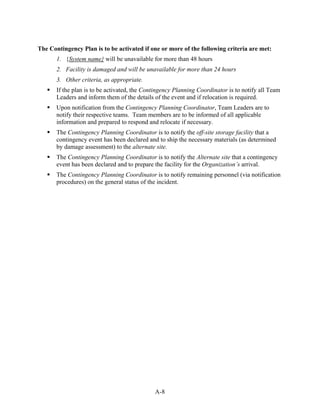
       emergency, executing the technical contingency solution(s) does not compromise or
       disclose sensitive data.
       Use Results From the BIA. Impacts and priorities discovered through the BIA of
       associated major applications and general support systems should be reviewed to
       determine related requirements.

5.1.2 Contingency Solutions
Wide ranges of technical contingency solutions
are available for desktop computers; several
                                                       DESKTOP COMPUTER AND PORTABLE SYSTEM
efficient practices are discussed here. Data from
                                                       CONTINGENCY STRATEGIES:
the BIA of major applications and general
support systems should be used to determine the               DOCUMENT SYSTEM AND APPLICATION
recovery requirements and priorities to                       CONFIGURATIONS
implement.                                                    STANDARDIZE HARDWARE, SOFTWARE
                                                              AND PERIPHERALS
Backups are the most common means to ensure                   PROVIDE GUIDANCE ON BACKING UP
                                                              DATA
data availability on PCs. Certain factors should
                                                              ENSURE INTEROPERABILITY AMONG
be considered when choosing the appropriate                   COMPONENTS
backup solution.                                              COORDINATE WITH SECURITY POLICIES
                                                              AND CONTROLS
       Equipment Interoperability. To
                                                              BACK UP DATA AND STORE OFFSITE
       facilitate recovery, the backup device
                                                              BACK UP APPLICATIONS AND STORE
       must be compatible with platform                       OFFSITE
       operating system and applications and                  USE ALTERNATE HARD DRIVES
       should be easy to install onto different               IMAGE DISKS
       models or types of PCs.                                IMPLEMENT REDUNDANCY IN CRITICAL
                                                              SYSTEM COMPONENTS
       Storage Volume. To ensure adequate                     USE UNINTERRUPTIBLE POWER SUPPLIES
       storage, the amount of data to be backed
       up should determine the appropriate backup solution.
       Media Life. Each type of media has a different use and storage life beyond which the
       media cannot be relied on for effective data recovery.
       Backup Software. When choosing the appropriate backup solution, the software or
       method used to back up data should be considered. In some cases, the backup application
       can be as simple as a file copy using the operating system file manager; in cases
       involving larger data transfers, a third-party application may be needed to automate and
       schedule the file backup.


                                                  43
PC data backups can be accomplished in various ways, including those listed below:29
          Floppy Diskettes. Floppy diskette drives come standard with most desktop computers
          and represent the cheapest backup solution; however, these drives have a low storage
          capacity and are slow.
          Tape Drives. Tape drives are not common in desktop computers, but are an option for a
          high-capacity backup solution. Tape drives are automated and require a third-party
          backup application or backup capabilities in the operating system. Tape media are
          relatively low cost.
          Removable Cartridges. Removable cartridges are not common in desktop computers
          and are often offered as a backup solution as a portable or external device. Removable
          cartridges, such as Iomega Zip® and Jaz® storage drives, are more expensive than floppy
          diskettes and are comparable in cost to tape media depending on the media model and
          make. However, removable cartridges are fast, and their portability allows for flexibility.
          The portable devices come with special drivers and application to facilitate data backups.
          Compact Disk. CD, read-only memory (CD-ROM) drives come standard in most
          desktop computers; however, not all computers are equipped with writable CD drives.
          CDs are low-cost storage media and have a higher storage capacity than floppy diskettes.
          To read from a CD, the operating system’s file manager is sufficient; however, to write to
          a CD, a rewritable CD (CD-RW) drive and the appropriate software is required.
          Network Storage. Data stored on networked PCs can be backed up to a networked disk
          or a networked storage device:
          − Networked disk. A server with data storage capacity is a networked disk. The
            amount of data that can be backed up from a PC is limited by the network disk
            storage capacity or disk allocation to the particular user. However, if users are
            instructed to save files to a networked disk, the networked disk itself should be
            backed up through the network or server backup program.
          − Networked storage device. A network backup system can be configured to back up
            the local drives on networked PCs. The backup can be started from either the
            networked backup system or the actual PC.
          Replication or Synchronization. Data replication or synchronization is a common
          backup method for portable computers. Handheld computers or laptops may be
          connected to a PC and replicate the desired data from the portable system to the desktop
          computer.


29 Section 5.2.2 discusses various backup methods that can be used: full, incremental, and differential.


                                                               44
Internet Backup. Internet Backup, or Online Backup, is a commercial service that
         allows PC users to back up data to a remote location over the Internet for a fee. A utility
         is installed onto the PC that allows the user to schedule backups, select files and folders
         to be backed up, and establish an “archiving” scheme to prevent files from being
         overwritten. Data can be encrypted for transmission; however, this will impede the data
         transfer speed over a modem connection. The advantage of Internet Backup is that the
         user is not required to purchase data backup hardware or media.
In addition to backing up data, organizations should also back up system drivers. Organizations
should store software and software licenses in a secondary location. If the software is
commercial off-the-shelf (COTS), it can be purchased through a vendor if the copy or license
installed before the destruction is unavailable. However, at a minimum, custom-built
applications installed on desktops should be saved and stored at an alternate location or backed
up through one of the methods described above. Instructions on recovering custom-built
applications at an alternate site also should be documented, particularly if the application has
hard-coded drive mappings (for the PC or network server). Code that prevents the application
from running on a different system should be discouraged. If driver mappings are hard-coded,
the application should be modified to enable the application to be restored on another system
other than the original.

The popularity of encryption as a security tool used on portable computers is growing. With
increased use of digital signatures for nonrepudiation and the use of encryption for
confidentiality, organizations should consider including encryption key pairs in their backup
strategy.30 If the encryption key pair and verification key are stored on the PC, data can become
unrecoverable or unverifiable if the PC becomes corrupted.

Because portable computers are vulnerable to theft, encryption can be used to protect data from
being disclosed on a stolen computer. Portable computer users can also be provided a second
hard drive to be used while on travel. The second hard drive should contain only the minimum
applications and data necessary. By using a second hard drive, if the laptop is stolen, the amount
of data loss is minimized.

Imaging represents another contingency solution. A standard desktop computer image can be
stored, and the corrupted computer can be reloaded. Imaging will install the applications and
setting stored in the image; however, all data currently on the disk will be lost. Therefore, PC
users should be encouraged to back up their data files. Because disk images can be large,
dedicated storage, such as a server or server partition, may need to be allocated for the disk
images alone. To decrease the number of images necessary for recovery in the event that
multiple PCs are corrupted, standardizing PC models and configurations across all organizations
will save space and ease the process of rebuilding computers. If site relocation is necessary, PC
configurations and basic applications needed for mission-critical processing should be
documented in the contingency plan.


30 For further information on encryption, see NIST SP 800-21, Guideline for Implementing Cryptography in the Federal
  Government, November 1999.


                                                            45
The system and its data can become corrupt as a result of a power failure. A PC can be
configured with dual power supplies to prevent corruption. The two power supplies should be
used simultaneously so that if the main power supply becomes overheated or unusable, the
second unit will become the main power source, resulting in no system disruption.

The second power supply will protect against hardware failure, but not power failure. However,
a UPS can protect the system if power is lost. A UPS usually provides 30 to 60 minutes of
backup temporary power which may be enough to permit a graceful shutdown. A cost-benefit
analysis should be conducted to compare the dual power supply and UPS combination to other
contingency solutions. Although dual power supplies and UPS are cost-effective for a server,
they might not be so for a PC.

5.2 SERVERS
Servers support file sharing and storage, data processing, central application hosting (such as e-
mail or a central database), printing, access control, user authentication, remote access
connectivity, and other shared network services. Local users log into the server through
networked PCs to access resources that the server provides.

 A server is a computer that runs software to provide access to a resource or part of the network and
 network resources, such as disk storage, printers, and network applications. A server can be any type
 of computer running a network operating system. A server may be a standard PC, or it can be a large
 computer containing multiple disk drives and a vast amount of memory that will allow the computer to
 process hundreds of requests at once.


5.2.1 Contingency Considerations
Because servers can support or host numerous critical applications, server loss could cause
significant problems to business processes. To address server vulnerabilities, the following
practices should be considered:
       Store Backup Media and Software Offsite. As described previously, backup media
       and software should be stored offsite in a secure, environmentally controlled facility.
       The storage facility should be located far enough away from the original site to reduce
       the likelihood that both sites would be affected by the same event.
       Standardize Hardware, Software, and Peripherals. System recovery may be
       expedited if hardware, software, and peripherals are standardized throughout the
       organization or site. Standard configurations should be documented in the contingency
       plan.
       Document System Configurations and Vendors. Maintaining detailed records of
       system configurations enhances system recovery capabilities. Additionally, vendors that
       supply essential hardware, software, and other components should be identified in the
       contingency plan.
       Coordinate With Security Policies and System Security Controls. Server contingency
       solutions should be coordinated with security policies and system security controls.
       Thus, in choosing the appropriate technical contingency solution(s), similar security
       controls and security-related activities (e.g., risk assessment, vulnerability scanning) in


                                                  46
the production environment should be implemented in the contingency solution(s) to
       ensure that, during a system disruption or emergency, executing the technical
       contingency solution(s) does not compromise or disclose sensitive data.
       Use Results From the BIA. Impacts and priorities discovered through the BIA of
       associated major applications and general support systems should be reviewed to
       determine related requirements.

5.2.2 Contingency Solutions
Several technical measures are available to
enhance server recovery capabilities. The
BIA of major applications and general              SERVER CONTINGENCY STRATEGIES:
support systems should provide information
                                                           DOCUMENT SYSTEM AND APPLICATION
to assist in determining the recovery                      CONFIGURATIONS
requirements and priorities. Server                        STANDARDIZE HARDWARE, SOFTWARE, AND
contingency planning should emphasize                      PERIPHERALS
reliability and availability of the network                COORDINATE WITH SECURITY POLICIES AND
services provided by the server. When                      CONTROLS
selecting the appropriate technical                        ENSURE INTEROPERABILITY AMONG
                                                           COMPONENTS
contingency solution, data confidentiality and
                                                           BACK UP DATA AND STORE OFFSITE
sensitivity requirements should also be                    BACK UP APPLICATIONS AND STORE OFFSITE
considered. Additionally, when selecting the               USE UNINTERRUPTIBLE POWER SUPPLIES
appropriate server contingency solution, the               IMPLEMENT REDUNDANCY IN CRITICAL
availability requirements for the server, its              SYSTEM COMPONENTS
applications, and data should be assessed. As              IMPLEMENT FAULT TOLERANCE IN CRITICAL
a preventive contingency measure, critical                 SYSTEM COMPONENTS
                                                           REPLICATE DATA
functions should not be co-located on servers              IMPLEMENT STORAGE SOLUTIONS
with noncritical functions if possible. For
example, a server hosting a critical
application should be dedicated to that application and not provide other resources.

As with PCs, servers should be backed up regularly. Servers can be backed up through a
distributed system, in which each server has its own drive, or through a centralized system,
where a centralized backup device is attached to one server. Three types of system backup
methods are available to preserve server data:
       Full. A full backup captures all files on the disk or within the folder selected for backup.
       Because all backed-up files were recorded to a single media or media set, locating a
       particular file or group of files is simple. However, the time required to perform a full
       backup can be lengthy. In addition, full backups of files that do not change frequently
       (such as system files) could lead to excessive, unnecessary media storage requirements.
       Incremental. An incremental backup captures files that were created or changed since
       the last backup, regardless of backup type. Incremental backups afford more efficient use
       of storage media, and backup times are reduced. However, to recover a system from an
       incremental backup, media from different backup operations may be required. For
       example, consider a case in which a directory needed to be recovered. If the last full
       backup was performed three days prior and one file had changed each day, then the


                                                 47
media for the full backup and for each day’s incremental backups would be needed to
       restore the entire directory.
       Differential. A differential backup stores files that were created or modified since the
       last full backup. Therefore, if a file is changed after the previous full backup, a
       differential backup will save the file each time until the next full backup is completed.
       The differential backup takes less time to complete than a full backup. Restoring from a
       differential backup may require less media than an incremental backup because only the
       full backup media and the last differential media would be needed. As a disadvantage,
       differential backups take longer to complete than incremental backups because the
       amount of data since the last full backup increases each day until the next full backup is
       executed.

A combination of backup operations can be used depending on the system configuration and
recovery requirements. For example, a full backup can be conducted on the weekend with
differential backups conducted each evening. In developing the server backup schedule, the
following questions should be considered:
       Where will media be stored?
       What data should be backed up?
       How frequent are backups conducted?
       How quickly are the backups to be retrieved in the event of an emergency?
       Who is authorized to retrieve the media?
       How long will it take to retrieve the media?
       Where will the media be delivered?
       Who will restore the data from the media?
       What is the media-labeling scheme?
       How long will the backup media be retained?
       When the media are stored on-site, what environmental controls are provided to preserve
       the media?
       What is the appropriate backup media?
       What types of media readers are used at the alternate site?

Backup media should be stored off-site in a secure, environmentally controlled location. When
selecting the off-site location, hours of the location, ease of accessibility to backup media,
physical storage limitations, and the contract terms should be taken into account. It is
important that media be retrieved on a regular basis from off-site storage and tested to
ensure that the backups are being performed correctly. The Contingency Planning
Coordinator should reference the BIA to assist in determining how often backup media should be
tested. Each backup tape, cartridge, or disk should be uniquely labeled to ensure that the required
data can be identified quickly in an emergency. This requires that the agency develop an
effective marking and tracking strategy. One method might be to label the media by month, day,


                                                48
and the year that the backup was created. Other strategies can be more complex, involving
multiple sets of media that are rotated as old data is either appended to or overwritten. The
marking strategy should be consistent with the media retention guidelines that dictate how long
the media should be stored before they are destroyed.

Though off-site storage of backup media enables the system to be recovered, data added to or
modified on the server since the previous backup could be lost during a disruption or disaster.
To avoid this potential data loss, a backup strategy may need to be complemented by redundancy
solutions, such as disk mirroring, RAID, and load balancing. These solutions are discussed
below. Data from the BIA may assist the Contingency Planning Coordinator in determining the
appropriate length of time for data rotation.

RAID provides disk redundancy and fault tolerance for data storage and decreases mean time
between failures (MTBF). RAID is used to mask disk drive and disk controller failures. In
addition, RAID increases performance and reliability by spreading data storage across multiple
disk drives, rather than a single disk. RAID can be implemented through hardware or software;
in either case, the solution appears to the operating system as a single logical hard drive. With a
RAID system, hot swappable drives can be used—that is, disk drives can be swapped without
shutting down the system when a disk drive fails. RAID technology uses three data redundancy
techniques: mirroring, parity, and striping.
       Mirroring. With this technique, the system writes the data simultaneously to separate
       hard drives or drive arrays. The advantages of mirroring are minimal downtime, simple
       data recovery, and increased performance in reading from the disk. If one hard drive or
       disk array fails, the system can operate from the working hard drive or disk array, or the
       system can use one disk to process a read request and another disk for a different
       processing request. The disadvantage of mirroring is that both drives or disk arrays are
       processing in the writing-to-disks function, which can hinder system performance.
       Mirroring has a high fault tolerance and can be implemented through a hardware RAID
       controller or through the operating system.
       Parity. Parity refers to a technique of determining whether data has been lost or
       overwritten. Parity has a lower fault tolerance than mirroring. The advantage of parity is
       that data can be protected without having to store a copy of the data, as is required with
       mirroring.
       Striping. Striping improves the performance of the hardware array controller by
       distributing data across all the drives. In striping, a data element is broken into multiple
       pieces, and a piece is distributed to each hard drive. Data transfer performance is
       increased using striping because the drives may access each data piece simultaneously.
       Striping can be implemented in bytes or blocks. Byte-level striping breaks the data into
       bytes and stores the bytes sequentially across the hard drives. Block-level striping breaks
       the data into a given-size block, and each block is distributed to a disk.

RAID solutions rely on mirroring, parity, and striping techniques. Currently, six RAID levels
are available, with each level providing a different configuration. RAID-1 and RAID-5 are the
most popular levels for data redundancy.


                                                49
RAID-0 is the simplest RAID level, relying solely on striping. RAID-0 has a higher
       performance in read/write speeds than the other levels, but it does not provide data
       redundancy. Thus, RAID-0 is not recommended as a data recovery solution.
       RAID-1 uses mirroring to create and store identical copies on two drives. RAID-1 is
       simple and inexpensive to implement; however, 50 percent of storage space is lost
       because of data duplication.
       RAID-2 uses bit-level striping; however, the solution is not often employed because the
       RAID controller is expensive and difficult to implement.
       RAID-3 uses byte-level striping with dedicated parity. RAID-3 is an effective solution
       for applications handling large files; however, fault tolerance for the parity information is
       not provided because that parity data is stored on one drive.
       RAID-4 is similar to RAID-3, but it uses block-level rather than byte-level striping. The
       advantage of this technique is that the block size can be changed to meet the application’s
       needs. With RAID-4, the storage space of one disk drive is lost.
       RAID-5 uses block-level striping and distributed parity. This solution removes the
       bottleneck caused by saving parity data to a single disk in RAID-3 and RAID-4. In
       RAID-5, parity is written across all drives along with the data. Separating the parity
       information block from the actual data block provides fault tolerance. If one drive fails,
       the data from the failed drive can be rebuilt from the data stored on the other drives in the
       array. Additionally, the stripe set can be changed to fit the application’s needs. With
       RAID-5, the storage space of one disk drive is lost.

If a particular RAID level does not meet the Contingency Planning Coordinator’s contingency
requirements, RAID levels may be combined to derive the benefits of both RAID levels. The
most common combination is RAID-0+1 and RAID-1+0. For example, in RAID-0+1, eight hard
drives could be split into two separate arrays of four hard drives each. Then, RAID-1 could be
applied and the two arrays would be mirrored to provide data redundancy. Thus, the high fault
tolerance of RAID-1 is combined with the improved performance speeds of RAID-0. For RAID-
1+0, the eight drives would be mirrored to make four sets of two drives a piece, or four mirrored
sets. Then, RAID-0 could be applied across all four sets to make a striped array across mirrored
sets. However, in both cases, 50 percent of the possible drive storage space is lost.

RAID is an effective strategy for disk redundancy. However, redundancy for other critical
server parts, such as the power supply, also should be provided. The server may be equipped
with two power supplies, so that the second power supply may continue to support the server if
the main power supply becomes overheated or unusable.

Although a second power supply can protect against hardware failure, it is not an effective
preventive measure against power failure. To ensure short-term power and to protect against
power fluctuations, a UPS should be installed. The UPS often provides enough backup power to
enable the system to shut down gracefully. If high availability is required, a gas- or diesel-
powered generator may be needed. The generator can be wired directly into the site’s power
system and can be configured to start automatically when a power interruption is detected.


                                                50
Electronic vaulting and remote journaling are similar technologies that provide additional
data backup capabilities, with backups made to remote tape drives over communication links.
Remote journaling and electronic vaulting enable shorter recovery times and reduced data loss
should the server be damaged between backups. With electronic vaulting, the system is
connected to an electronic vaulting provider to allow backups to be created off-site
automatically. The electronic vault could use optical disks, magnetic disks, mass storage
devices, or an automated tape library as the storage devices. With this technology, data is
transmitted to the electronic vault as changes occur on the servers between regular backups.
These transmissions between backups are sometimes referred to as electronic journaling.

With remote journaling, transaction logs or journals are transmitted to a remote location. If the
server needed to be recovered, the logs or journals could be used to recover transactions,
applications, or database changes that occurred after the last server backup. Remote journaling
can either be conducted through batches or be communicated continuously using buffering
software. Remote journaling and electronic vaulting require a dedicated off-site location to
receive the transmissions. The site can be the system’s hot site, off-site storage site, or another
suitable location. Depending on the volume and frequency of the data transmissions, remote
journaling or electronic vaulting could be conducted over a connection with limited bandwidth.

Server load balancing increases server and application availability. Through load balancing,
traffic can be distributed dynamically across groups of servers running a common application so
that no one server is overwhelmed. With this technique, a group of servers appears as a single
server to the network. Load balancing systems monitor each server to determine the best path to
route traffic to increase performance and availability so that one server is not overwhelmed with
traffic. Load balancing can be implemented among servers within a site or among servers in
different sites. Using load balancing among different sites can enable the application to continue
to operate as long as one or more sites remain operational. Thus, load balancing could be a
viable contingency measure depending on system availability requirements.

With disk replication, recovery windows are minimized because data is written to two different
disks to ensure that two valid copies of the data are always available. The two disks are called
the protected server (the main server) and the replicating server (the backup server). Disk
replication can be implemented locally or between different locations. Two different data
replication techniques are available, and each provides different recovery time objectives (RTOs)
and recovery point objectives (RPOs). The RTO is the maximum acceptable length of time that
elapses before the unavailability of the system severely affects the organization. The RPO is the
point in time in which data must be restored in order to resume processing. Disk replication
techniques are described below.
       Synchronous or Mirroring. This method uses a disk-to-disk copy and maintains a
       replica of the database or file system by applying changes to the replicating server at the
       same time changes are applied to the protected server. The synchronous mode can
       degrade performance on the protected server and should be implemented only over short
       physical distances where bandwidth will not restrict data transfers between servers. With
       synchronous mirroring, the RTO can be minutes to several hours, and the RPO may be
       reduced to the loss of uncommitted work. Mirroring should be used for critical
       applications that can accept little or no data loss.


                                                 51
Asynchronous or Shadowing. This technique maintains a replica of the database or file
       system by continuously capturing changes to a log and applying the changes in the log to
       the replicating server. With asynchronous shadowing, the RTO can range from hours to a
       day, depending on the time that is required to implement the changes in the unapplied
       logs. An acceptable RPO is the last data transfer the shadowing server received.
       Asynchronous replication is useful over smaller bandwidth connections and longer
       distances where network latency could occur. As a result, shadowing helps to preserve
       the protected server’s performance.

Replication solutions also can be operating system-dependent, called host-based replication, and
can use both synchronous and asynchronous replication. To choose the appropriate disk
replication technique and product, the Contingency Planning Coordinator should evaluate
platform support, integration with other complementary products, cost, speed of deployment,
performance impact, and product completeness and manageability.

Disk replication also can act as a load balancer, where traffic is directed to the server with the
most resources available. With disk replication, the protected server sends status messages to the
replicating server. If the protected server stops replicating or sends a “distress” call, the
replicating machine automatically assumes the protected server’s functions. If the replication
ceases, a resynchronization will have to be conducted between the protected server and mirroring
server before beginning the replication.

If the Contingency Planning Coordinator is considering implementing replication between two
sites, the supporting infrastructure for the protected and replicating server also should be
considered. Redundant communications paths should be provided if adequate resources are
available. The Contingency Planning Coordinator should be aware of potential disadvantages of
disk replication, including the possibility that a corrupted disk or data could be replicated, which
could destroy the replicated copy.

The storage virtualization concept is the process of combining multiple physical storage devices
into a logical, virtual storage device that can be centrally managed and is presented to the
network applications, operating systems, and users as a single storage pool. Benefits of storage
virtualization are that storage devices can be added without requiring network downtime, storage
volumes from a downed server or a storage device can be reassigned, and the assigned storage
for a server can be easily created, deleted, or expanded on to meet the server's requirements.
Virtualization technologies can complement network-attached storage (NAS) environments.
NAS environments are file-oriented and offer a common storage area for multiple servers. NAS
environments are beneficial for file-server applications or storage, such as file sharing or Web
and mail services. A NAS device, or server, runs from a minimal operating system and is
designed to facilitate data movement. Using file-oriented protocols, any application residing on
or any client using virtually any operating system can send data to or receive data from a NAS
device.

Virtualization technology can also complement a storage area network (SAN), which is a high-
speed, high-performance network that enables computers with different operating systems to
communicate with one storage device. As opposed to a NAS, a SAN provides data access in


                                                 52
blocks and is built to handle storage and backup traffic as opposed to file-oriented traffic. A
SAN can be local or remote (within a limited distance) and usually communicates with the server
over a fiber channel. The SAN solution moves data storage off the LAN, thus enabling backup
data to be streamed to high-speed tape drives, which does not affect network resources as
distributed and centralized backup architecture does. Virtualization, NAS, and SAN move away
from the client/server architecture and toward the data-centric architecture. If the system
manager is considering implementing a data-centric architecture, the advantages and
disadvantages of the technologies and the system manager’s needs of a data-centric network
should be considered. The Internet Small Computer System Interface (iSCSI) is a
Transmission Control Protocol/Internet Protocol (TCP/IP)-based storage networking
specification that complements NAS and SAN technology. iSCSI transmits native SCSI over a
layer of the Internet Protocol (IP) stack, which facilitates long-distance storage deployment,
management, and data transfer over the IP network. iSCSI enables any storage connected to an
IP network to be backed up from any point on that network. With iSCSI, storage and servers can
be added at any location and not be restricted by distances, as with SAN.

Figure 5-1 presents a scale that maps the relative availability of the server contingency solutions
discussed in this section. High availability is measured in terms of minutes of lost data or server
downtime; low availability implies that server recovery could require days to be completed.


                                                                                Virtualization
                                                                                NAS or SAN
                                                                  Load Balancing or
                                                                   Disk Replication
                                             Electronic Vaulting or
                                              Remote Journaling
                        Redundant Array of
                        Independent Disks
       System Backups


     Low Availability                                                          High Availability


                   Figure 5-1 Server Contingency Solutions and Availability

5.3 WEB SITES
Web sites present information to the public or authorized personnel via the World Wide Web
(Web) or a private intranet. An external Web site also may be an electronic commerce (e-
commerce) portal, through which the organization may provide services over the Internet. A
Web site may be used internally within an organization to provide information, such as corporate
policies, human resources forms, or a phone directory to its employees.


                                                     53
A Web site is used for information dissemination on the Internet or an intranet. The Web site is created
 in Hypertext Markup Language (HTML) code that may be read by a Web browser on a client machine.
 A Web site is hosted on a computer (Web server) that serves Web pages to the requesting client
 browser. The Web server hosts the components of a Web site (e.g., pages, scripts, programs, and
 multimedia files) and serves them using the Hypertext Transfer Protocol (HTTP). Web sites can
 present static or dynamic content. A Web site can be either internal to an organization (an intranet) or
 published to the public over the Internet.


5.3.1 Contingency Considerations
In addition to the information presented in Section 5.2, Servers, several factors should be
considered when determining the Web site recovery strategy. Practices for Web site contingency
planning include the following measures:
       Document Web Site. Document the hardware, software, and their configurations used to
       create and host the Web site.
       Web Site Programming. As with other applications, Web sites should undergo
       thorough testing on test servers before production. A configuration management program
       should be maintained, and changes should be documented appropriately. Approved
       versions should be recorded on CDs for easy storage.
       Web Site Coding. A Web site is hosted on a server that is assigned an IP address. That
       IP address maps to a domain name, or Uniform Resource Locator (URL), by a Domain
       Name Server (DNS). Because the IP address and domain name can be assigned
       randomly, the Web site should not have IP addresses or domain names programmed into
       the code. If the Web site were recovered at an alternate site, the server could be assigned
       a different IP address. If the Web site contained hard-coded IP addresses, domain names,
       or drive letters, the system recovery could be delayed.
       Coordinate Contingency Solutions With Appropriate Security Policies and Security
       Controls. A Web site often is the entry point for a hacker into an organization’s
       network. Thus, the Web server and supporting infrastructure must be protected through
       strong security controls. Contingency planning measures should be coordinated with
       these controls to ensure that security is not compromised during system recovery. Thus,
       the appropriate security controls and patches must be implemented on the Web sites that
       are rebuilt after being compromised.
       Coordinate Contingency Solutions with Incident Response Procedures. Because an
       external Web site provides an image of the organization to the public, the organization’s
       public image could be damaged if the Web site were defaced or taken down by a cyber
       attack. To reduce the consequences of such an attack, contingency solutions listed below
       should be coordinated closely with incident response procedures designed to limit the
       impacts of a cyber incident.
       Use Results From the BIA. Impacts and priorities discovered through the BIA of
       associated major applications and general support systems should be reviewed to
       determine related requirements.


                                                  54
5.3.2 Contingency Solutions
Web site contingency solutions should ensure the
reliability and availability of the Web site and its
resources. Web pages that do not change in content         WEB SITE CONTINGENCY STRATEGIES:
are considered static, whereas Web pages that
                                                                 DOCUMENT WEB SITE
change in content are called dynamic pages.                      CODE, PROGRAM, AND DOCUMENT
Dynamic pages are a result of multiple transactions              WEB SITE PROPERLY
initiated from either or both the client and the server.         COORDINATE WITH SECURITY
The content presented in dynamic pages may be                    POLICIES AND CONTROLS
stored on a server other than the Web site, such as a            CONSIDER CONTINGENCIES OF
protected server behind a firewall. Thus, when                   SUPPORTING INFRASTRUCTURE
choosing contingency solutions for a Web site, the               IMPLEMENT LOAD BALANCING
                                                                 COORDINATE WITH INCIDENT
Web site’s supporting infrastructure must be                     RESPONSE PROCEDURES
considered carefully. In addition to servers, the
supporting infrastructure could include the LAN
hosting the Web site.

Because of the number of requests Web sites could receive and process, load balancing is a
popular contingency solution. Load balancing uses the cluster approach, in which Web traffic
is balanced across at least two servers. Web clustering is not apparent to the user because it
appears as if one server is answering the request. Therefore, if one server were to fail, traffic
would be directed to the operational server. Load balancing can be accomplished through two
approaches:
       DNS. When a user enters a URL using the Web browser, the request is directed to a
       DNS server that maps the URL to an IP address. The IP address is assigned to the Web
       server. The DNS server then directs the request to one of the clustered servers. One
       common DNS approach is the “round robin” method used by the Berkeley Internet Name
       Daemon (BIND).
       Reverse Proxy. The reverse proxy approach bundles the requests of the browsers and
       reduces bandwidth by performing data caching. The proxy server is logically located
       between the client and the Web servers, where it receives client requests and forwards
       them to the Web servers. The server returns the response to the proxy, and the proxy
       forwards the response to the requesting client. With this method, one IP addresses is
       needed. To further segment traffic, the servers can be placed on different subnets to
       prevent a single subnet from being overloaded. In addition, logs can be collected and
       monitored in one location, which is the reverse proxy. The administrator also can
       determine the delegation configuration; therefore, if one machine crashes, the delegation
       configuration of the reverse proxy can be reconfigured. The result is that the crashed
       server will not return errors to the requesting browser.

5.4 LOCAL AREA NETWORKS
A LAN is owned by a single organization; it can be as small as two PCs attached to a single hub,
or it may support hundreds of users and multiple servers. As shown in Table 5-1, several
topologies are possible when designing a LAN.


                                                  55
Table 5-1 LAN Topologies
                         Topology                                           Diagram
                            Mesh
   Networked components are connected with many
redundant interconnections between network nodes. In
 a true mesh topology, every node has a connection to
           every other node in the network.

                            Star
        All nodes are connected to a central hub.

                            Bus
 All nodes are connected to a central cable, called the
                  bus or backbone.
                            Ring
 All nodes are connected to one another in the shape of
a closed loop, so that each node is connected directly to
        two other nodes, one on either side of it.


                            Tree
A tree is a hybrid topology where a linear bus backbone
           connects star-configured networks.


A protocol, an agreed-on format for transmitting data, facilitates communication between nodes.
The protocol determines how the sending and receiving nodes format the data packet. One of the
main network standards, Ethernet, may be implemented on a LAN, in addition to Token Ring,
asynchronous transfer mode (ATM), and fiber distributed data interface (FDDI).

LANs can also be implemented in two main architectures:
       Peer-to-Peer — each node has equivalent capabilities and responsibilities. For example,
       five PCs can be networked through a hub to share data.
       Client/Server — each node on the network is either a client or a server. A client can be a
       PC or a printer where a client relies on a server for resources.

A LAN’s topology, protocol, architecture, and nodes will vary depending on the organization.
Thus, contingency solutions for each organization will be different. Figure 5-2 illustrates a LAN
with a client/server architecture and a star topology running the Ethernet protocol. The LAN


                                               56
consists of five desktop computers, one server, one networked printer, one local desktop printer,
and dial-in access over the public switched telephone network to the server.


                                                                           PSTN


                                           LAN Back Bone


                                Figure 5-2 Local Area Network

5.4.1 Contingency Considerations
When developing the LAN recovery strategy, the Contingency Planning Coordinator should
follow the information presented earlier in Section 5, regarding desktops, servers, and Web sites.
In addition, the following practices should be considered:
       LAN Documentation. The physical and logical LAN diagram should be up to date. The
       physical diagram should display the physical layout of the facility that houses the LAN,
       and cable jack numbers should be documented on the physical diagram. The logical
       diagram should present the LAN and its nodes. Network discovery software can provide
       an accurate picture of the LAN. Both diagrams help recovery personnel to restore LAN
       services more quickly.
       System Configuration and Vendor Information Documentation. Document
       configurations of network connective devices that facilitate LAN communication (e.g.,
       switches, bridges, and hubs) to ease recovery. Vendors and their contact information
       should be documented in the contingency plan to provide for prompt hardware and
       software resupply.
       Coordinate With Security Policies and Security Controls. LAN contingency
       solution(s) should be coordinated with network security policies to protect against threats
       that could disrupt the network. Therefore, in choosing the appropriate technical LAN
       contingency solution(s), similar security controls and security-related activities (e.g., risk
       assessment, vulnerability scanning) in the production systems should be implemented in
       the contingency solution(s) to ensure that, during a network disruption, executing the
       technical contingency solution(s) does not compromise or disclose sensitive data.


                                                 57
Use Results From the BIA. Impacts and priorities discovered through the BIA of
        associated major applications and general support systems should be reviewed to
        determine LAN recovery priorities.

5.4.2   Contingency Solutions
When developing the LAN contingency plan, the Contingency Planning Coordinator should
identify single points of failure that affect critical systems or processes outlined in the BIA.
This analysis could include threats to the cabling system, such as cable cuts, electromagnetic
and radio frequency interference, and damage resulting from fire, water, and other hazards. As a
solution, redundant cables may be installed when appropriate. For example, it might not be cost-
effective to install duplicate cables to desktops. However, it might be cost-effective to install a
100-megabit cable between floors so that hosts on both floors could be reconnected if the
primary cable were cut.
Often, it is not cost-effective to run duplicate cables to
each computer jack. However, each desktop jack usually         LAN CONTINGENCY STRATEGIES:
is equipped with at least one phone jack and computer
jack. When cables are installed, an organization may                   DOCUMENT LAN
choose to install an extra data or phone jack every few                COORDINATE WITH VENDORS
drops; then, if a problem does occur in a cable run, an                COORDINATE WITH SECURITY
extra jack within a short distance would be available as               POLICIES AND CONTROLS
backup. In this case, temporary cable can be run from the              IDENTIFY SINGLE POINTS OF
                                                                       FAILURE
desktop to the extra jack to provide connectivity for the              IMPLEMENT REDUNDANCY IN
desktop until a new cable can be run to the problem jack.              CRITICAL COMPONENTS
Also, if the phone system’s connectivity block is located              MONITOR LAN
in the same location as the backbone hubs, a phone jack                INTEGRATE REMOTE ACCESS AND
can be converted easily into a data jack, if the phone jack            WIRELESS LOCAL AREA NETWORK
provides the appropriate bandwidth.                                    TECHNOLOGY

Contingency planning also should consider network
connecting devices, such as hubs, switches, routers, and bridges. The BIA should characterize
the roles that each device serves in the network, and a contingency solution should be developed
for each device based on its BIA criticality. As an example of a contingency strategy for
network connecting devices, redundant intelligent network routers may be installed in a network,
enabling a router to assume the full traffic workload if the other router failed.
Remote access is a service provided by servers and devices on the LAN. Remote access
provides a convenience for users working off-site or allows for a means for servers and devices
to communicate between sites. Remote access can be conducted through various methods,
including dialup access and virtual private network (VPN). If an emergency or serious system
disruption occurs, remote access may serve as an important contingency capability by providing
access to organizationwide data for recovery teams or users from another location. If remote
access is established as a contingency strategy, data bandwidth requirements should be identified
and used to scale the remote access solution. Additionally, security controls such as one-time
passwords and data encryption should be implemented if the communications contains sensitive
information.


                                                58
Wireless local area networks can serve as an effective contingency solution to restore network
services following a wired LAN disruption. Wireless networks do not require the cabling
infrastructure of conventional LANs; therefore, they may be installed quickly as an interim or
permanent solution. However, wireless networks broadcast the data over a radio signal, enabling
the data to be intercepted. When implementing a wireless network, security controls, such as
data encryption, should be implemented if the communications traffic contains sensitive
information.
To reduce the effects of a LAN disruption through prompt detection, monitoring software can
be installed. The monitoring software issues an alert if a node begins to fail or is not responding.
The monitoring software can facilitate troubleshooting and often provides the administrator with
a warning before users and other nodes notice problems. Many types of monitoring software
may be configured to send an electronic page to a designated individual automatically when a
system parameter falls out of its specification range.

5.5 WIDE AREA NETWORKS

 A wide area network (WAN) is a data communications network that consists of two or more LANs that
 are dispersed over a wide geographical area. Communications links, usually provided by a public
 carrier, enable one LAN to interact with other LANs.


In addition to connecting LANs, a WAN also can connect to another WAN, or it can connect a
LAN to the Internet. Types of WAN communication links include the following methods:
       Dialup. Dialup connections over modems can provide minimal data transfer over a
       nonpermanent connection. The speed will depend on the modems used, up to 56 kilobits
       per second (kbps).
       Integrated Services Digital Network (ISDN). ISDN is an international
       communications standard for sending voice, video, and data over digital or standard
       telephone wires. ISDN supports data transfer rates of 64 or 128 kbps.
       T-1. T-1 is a dedicated phone connection supporting data rates of 1.544 Megabits per
       second (Mbps). A T-1 line consists of 24 individual 64-kbps channels, and each channel
       can be configured to carry voice or data signals. Fractional T-1 access also can be
       provided when multiples of 64-kbps lines are required.
       T-3. T-3 is a dedicated phone connection supporting data rates of about 43 Mbps. A T-3
       line consists of 672 individual channels, each of which supports 64 kbps. T-3 is also
       referred to as DS3.
       Frame Relay. Frame relay is a packet-switching protocol for connecting devices on a
       WAN. In frame relay, data is routed over virtual circuits. Frame relay networks support
       data transfer rates at T-1 and T-3 speeds.
       ATM. ATM is a network technology that transfers data at high speeds using packets of
       fixed size. Implementations of ATM support data transfer rates of from 25 to 622 Mbps
       and provides guaranteed throughput.


                                                59
Synchronous Optical Network (SONET). SONET is the standard for synchronous data
        transmission on optical media. SONET supports gigabit transmission rates.
        Wireless. A wireless LAN bridge can connect multiple LANs to form a WAN. Wireless
        supports distances of 20 to 30 miles with a direct line of sight.
        Virtual Private Network (VPN). A VPN is an encrypted channel between nodes on the
        Internet.

Figure 5-3 depicts a corporate WAN, linking the Headquarters LAN to two satellite LANs. The
WAN also maintains a link to the Internet.


                                                              Internet

                                         HQ LAN


                            SITE
                             A                         SITE
                                                        B


                               Figure 5-3 Wide Area Network
5.5.1   Contingency Considerations

WAN contingency considerations should enhance           WAN CONTINGENCY STRATEGIES:
the ability of recovery personnel to restore WAN
services after a disruption. The practices listed              DOCUMENT WAN
below complement the WAN recovery strategies in                COORDINATE WITH VENDORS
Section 5.5.2 to create a more comprehensive WAN               COORDINATE WITH SECURITY
                                                               POLICIES AND CONTROLS
contingency capability.
                                                               IDENTIFY SINGLE POINTS OF FAILURE
        Document WAN. The WAN architecture                     INSTALL REDUNDANCY IN CRITICAL
        diagram should be kept up to date and should           COMPONENTS
                                                               INSTITUTE SLAS
        identify network connecting devices, unit
        addresses (IP addresses), and types of
        communication links and vendors.


                                                  60
Document Systems Configurations and Vendors. Document configurations of media
       access unit devices that facilitate WAN communication to ease recovery. The
       contingency plan should include a vendor list to enable rapid replacement of hardware,
       software, and other WAN components following a disruption. The plan also should
       document the communications providers, including POC and contract information.
       Coordinate With Security Policies and Security Controls. WAN contingency
       solution(s) should be coordinated with network security policies to protect against threats
       that could compromise network availability. Thus, in choosing the appropriate technical
       contingency solution(s), similar security controls and security-related activities (e.g., risk
       assessment, vulnerability scanning) in the production environment should be
       implemented in the contingency solution(s) to ensure that, during a disruption to WAN
       connectivity, executing the technical contingency solution(s) does not compromise or
       disclose sensitive data.
       Use Results From the BIA. Impacts and priorities discovered through the BIA of
       associated major applications and general support systems should be reviewed to
       determine related requirements.

5.5.2 Contingency Solutions
WAN contingency solutions include all of the measures discussed for PCs, servers, Web sites,
and LANs. In addition, WAN contingency planning must consider the communications links
that connect the disparate LANs. WAN contingency strategies are influenced by the type of data
routed on the network. A WAN that hosts a mission-critical distributed system (see Section 5.6)
may require a more robust recovery strategy than a WAN that connects multiple LANs for
simple resource sharing purposes. Organizations should consider the following contingency
solutions for ensuring WAN availability:
       Redundant Communications Links. Redundant communications links usually are
       necessary when the network processes critical data. The redundant links could be the
       same type, such as two T-1 connections, or the backup link could provide reduced
       bandwidth to accommodate only critical transmissions in a contingency situation. For
       example, an ISDN line could be used as a contingency communications link for a
       primary T-1 connection. If redundant links are used, the Contingency Planning
       Coordinator should ensure that the links have physical separation and do not follow the
       same path; otherwise, a single incident, such as a cable cut, could disrupt both links.
       Redundant Network Service Providers. If 100-percent data availability is required,
       redundant communications links can be provided through multiple Network Service
       Providers (NSPs). If this solution is chosen, the manager should ensure that the NSPs do
       not share common facilities at any point, including building entries or demarcations.
       Redundant Network Connecting Devices. Duplicate network connecting devices, such
       as routers, switches, and firewalls, can create high availability at the LAN interfaces and
       provide redundancy if one device fails. Duplicate devices also provide load balancing in
       routing traffic.
       Redundancy From NSP or Internet Service Provider. The Contingency Planning
       Coordinator should consult with the selected NSP or Internet Service Provide (ISP) to


                                                 61
assess the robustness and reliability within their core networks (e.g., redundant network
       connecting devices and power protection).
To provide further redundancy, independent Internet connections may be established from two
geographically separated LANs. If one connection were to fail, Internet traffic could be routed
through the remaining connection. However, this strategy highlights the balance that must be
maintained between security and availability. Multiple Internet connections increase a network’s
vulnerability to hackers. Therefore, as emphasized previously, contingency strategies must be
weighed against security considerations at all times.

SLAs can facilitate prompt recovery following software or hardware problems associated with
the network. An SLA also may be developed with the NSP or ISP to guarantee the desired
network availability and establish tariffs if the vendor’s network is unavailable. If the NSP or
ISP is contracted to provide network-connecting devices, such as routers, the availability of these
devices should be included in the SLA.

5.6 DISTRIBUTED SYSTEMS
Distributed systems are implemented in environments in which clients and users are widely
dispersed. These systems rely on LAN and WAN resources to facilitate user access, and the
elements comprising the distributed system require synchronization and coordination to prevent
disruptions and processing errors. A common form of distributed systems is a large database
management system (DBMS) that supports agencywide business functions in multiple
geographic locations. In this type of application, data is replicated among servers at each
location, and users access the system from their local server.

  A distributed system is an interconnected set of multiple autonomous processing elements,
  configured to exchange and process data to complete a single business function. To the user, a
  distributed system appears to be a single source. Distributed systems use the client-server
  relationship model to make the application more accessible to users in different locations.


5.6.1 Contingency Considerations
Contingency considerations for the distributed system draw on the concepts discussed for the
previous platforms. Because the distributed system relies extensively on local and wide area
network connectivity, distributed system contingency measures are similar to those discussed for
LANs and WANs.
       Standardize Hardware, Software, and Peripherals. System recovery may be
       expedited if hardware, software, and peripherals are standardized throughout the
       distributed system. Recovery costs may be reduced because standard configurations may
       be designated and resources may be shared. Standardized components also reduce
       system maintenance across the organization.
       Document Systems Configurations and Vendors. Document the distributed system’s
       architecture and the configurations of its various components. In addition, the
       contingency plan should identify vendors and model specifications to facilitate rapid
       equipment replacement after a disruption.


                                                  62
Coordinate With Security Policies and Security Controls. Distributed system
       contingency solution(s) should be coordinated with network security policies where
       similar security controls and security-related activities (e.g., risk assessment,
       vulnerability scanning) in the production environment should be implemented in the
       contingency solution(s) to ensure that, during a system disruption, executing the technical
       contingency solution(s) does not compromise or disclose sensitive data.
       Use Results From the BIA. Impacts and priorities discovered through the BIA of
       associated LAN and/or WAN should be reviewed to determine recovery requirements
       and priorities.

5.6.2 Contingency Solutions
Because a distributed system spans multiple locations, risks to the system and its supporting
infrastructure should be analyzed thoroughly in the BIA process. As discussed above,
distributed system contingency strategies typically reflect the system’s reliance on LAN and
WAN availability. Based on this fact, when developing a distributed system contingency
strategy, the following technologies should be considered because they were addressed for LANs
and WANs:
       System backups
       RAID                                                  DISTRIBUTED SYSTEM CONTINGENCY
                                                             STRATEGIES:
       Redundancy of critical system components
                                                                     STANDARDIZE COMPONENTS
       Electronic vaulting and remote journaling
                                                                     DOCUMENT SYSTEM
       Disk replication                                              COORDINATE WITH VENDORS
                                                                     COORDINATE WITH SECURITY
       Virtualization, NAS, or SAN                                   POLICIES AND CONTROLS
       Remote access                                                 CONSIDER SERVER CONTINGENCY
                                                                     SOLUTIONS
       Wireless networks                                             CONSIDER LAN CONTINGENCY
                                                                     SOLUTION
       LAN cabling system redundancy                                 CONSIDER WAN CONTINGENCY
       WAN communication link redundancy.                            SOLUTION


Contingency solutions may be built into the distributed system during design and
implementation. A distributed system, for example, may be constructed so that all data resides in
one location (such as the organization’s headquarters) and is replicated to the local sites.
Changes at local sites could be replicated back to headquarters. If data is replicated to the local
sites as read-only, the data in the distributed system is backed up at each local site. This means
that if the headquarters server were to fail, data could still be accessed at the local sites over the
WAN. Conversely, if data were uploaded hourly from local sites to the headquarters’ site, then
the headquarters’ server would act as a backup for the local servers.

As the example above illustrates, the distributed system typically provides some inherent level of
redundancy that can be incorporated in the contingency strategy. For example, consider a critical
system that is distributed between an agency headquarters and a small office. Assuming data is
replicated at both sites, a cost-effective recovery strategy may be to establish a reciprocal
agreement between the two sites. Under this agreement, in the event of a disruption at one


                                                 63
office, essential personnel would relocate to the other office to continue to process system
functions. This strategy could save significant contingency costs by avoiding the need to procure
and equip alternate sites.

5.7 MAINFRAME SYSTEMS
Unlike the client/server architecture, the mainframe architecture is centralized. The clients that
access the mainframe are “dumb” terminals with no processing capabilities. The dumb terminals
accept output only from the mainframe. However, PCs also can access a mainframe by using
terminal emulation software.

 A mainframe is a multiuser computer designed to meet the computing needs of a large organization.
 The term was created to describe the large central computers developed in the late 1950s and 1960s
 to process bulk accounting and information management functions. Mainframe systems store all
 data in a central location rather than dispersing data among multiple machines, as with distributed
 systems.


5.7.1 Contingency Considerations
Although the mainframe computer is large and more powerful than the platforms discussed
previously, it shares many of the same contingency requirements. Because a mainframe uses a
centralized architecture, the mainframe does not have the inherent redundancy that a distributed
system or network provides. As a result, mainframe availability and data backups are critical.
The following measures should be considered when determining mainframe contingency
requirements:
       Store Backup Media Offsite. Backup
       media should be labeled, logged, and stored       MAINFRAME CONTINGENCY STRATEGIES:
       offsite in a secure, environmentally
       controlled facility. The storage facility                 BACK UP DATA AND STORE OFFSITE
       should be located far enough away from the                DOCUMENT SYSTEM
       original site to reduce the likelihood that               COORDINATE WITH VENDORS
                                                                 COORDINATE WITH SECURITY POLICIES
       both sites would be affected by the same                  AND CONTROLS
       event.                                                    IMPLEMENT REDUNDANCY AND FAULT
       Document System Configurations and                        TOLERANCE IN CRITICAL SYSTEM
                                                                 COMPONENTS
       Vendors. Maintaining detailed records of
                                                                 CONSIDER HOT SITE OR RECIPROCAL
       system configurations enhances system                     AGREEMENT
       recovery capabilities. In addition, vendors               INSTITUTE VENDOR SLAS
       that supply essential hardware, software,                 REPLICATE DATA
       and other components should be identified                 IMPLEMENT STORAGE SOLUTIONS
       in the contingency plan.                                  USE UNINTERRUPTIBLE POWER
                                                                 SUPPLIES
       Coordinate With Network Security
       Policy and System Security Controls.
       Mainframe contingency solutions should be coordinated with network security policies,
       such as stringent access controls. Network security controls can help protect against
       attacks that could compromise the mainframe’s availability.


                                                 64
Utilize Results From the BIA. Impacts and priorities discovered through the BIA of
         associated major applications and general support systems should be reviewed to
         determine recovery requirements and priorities.

5.7.2 Contingency Solutions
Mainframes require different contingency strategies from distributed systems because data is
stored in a single location. Contingency strategies should emphasize the mainframe’s data
storage capabilities and underlying architecture. Redundant system components are critical to
ensure that a failure of a system component, such as a power supply, does not cause a system
failure. UPS and power monitoring and management systems also should be used to ensure
power fluctuation will not affect the mainframe. Because mainframes typically process large,
critical applications, a long-term backup power solution may be needed. A gas or diesel
generator can ensure that mainframe processing is not interrupted by a power outage.

Disk redundancy can be provided for the DASDs by implementing a RAID solution.

Because each mainframe architecture is unique and centralized, a contingency strategy is to have
a replacement system available at an alternate warm or hot site. However, backup mainframe
platforms are very costly to purchase and maintain so many agencies share commercial
systems31. Agencies also typically maintain vendor support contracts to repair the damaged unit.
However, vendor support alone may not restore system functions within the allowable outage
time. In all cases, vendor service level agreements should be kept up to date and reviewed to
ensure that the vendor provides adequate support to meet system availability requirements.

Mainframes should be backed up regularly and backup media should be stored offsite. Backup
and retention schedules should be based on the criticality of the data being processed and the
frequency that the data is modified. (See Section 5.2.2, Contingency Solutions, for backup
solutions.) As with servers, remote journaling or electronic vaulting to the alternate site could
be an effective technical contingency solution. In addition, disk replication, virtualization, or
NAS or SAN technologies that replicate various platforms to one replicating server could be
used in some cases.

5.8 TECHNICAL CONTINGENCY PLANNING CONSIDERATIONS SUMMARY
For IT contingency planning, the Contingency Planning Coordinator should consider technical
measures from two perspectives when planning a system recovery strategy:

         Contingency considerations discuss technical requirements or factors to complement the
         contingency solution
         Contingency solutions are technically based and are used to implement the contingency
         strategy.

Table 5-2 summarizes all contingency considerations and solutions identified in Sections 5.1
through 5.7 and the associated IT platforms. The contingency considerations and solutions are

31 The General Services Administration’s Federal Technology Service, Federal Computer Acquisition Center has a Government-
  wide acquisition contract on behalf of the Federal Government. The program has been in place since 1993 and provides
  disaster recovery services to more than forty federal organizations.


                                                           65
presented at the highest level and do not represent an all-inclusive list. Because each system is
unique, the Contingency Planning Coordinator must assess each IT system using the results of
the BIA to determine not only which considerations and solutions presented are appropriate, but
also whether considerations and solutions not presented, or presented for other IT platforms, are
applicable.
                                Table 5-2 Contingency Strategies Summary


                                                                                                                    Local Area Network


                                                                                                                                         Wide Area Network
                                                                            Desktop Computer/


                                                                                                                                                             Distributed System


                                                                                                                                                                                  Mainframe System
                                                                            Portable System


                                                                                                         Web site
                                                                                                Server
Contingency Consideration32
Document System, Configurations, and Vendor Information                         X                 X         X              X                    X                   X                    X
Encourage Individuals to Back Up Data                                           X
Code, Program, and Document Properly                                                                        X
Coordinate Contingency Solution with Security Policy                            X                 X         X              X                    X                   X                    X
Coordinate Contingency Solution with System Security Controls                   X                 X         X              X                    X                   X                    X
Consider Contingencies of Supporting Infrastructure                                                         X                                                       X
Consider Hot Site and Reciprocal Agreements                                                                                                                                              X
Coordinate With Incident Response Procedures                                                                X
Coordinate With Vendors                                                                                                    X                    X                   X                    X
Institute Vendor SLAs                                                                                                                           X                                        X
Provide Guidance on Saving Data on Personal Computers                           X
Standardize Hardware, Software, and Peripherals                                 X                 X                                                                 X
Store Backup Media Offsite                                                      X                 X                                                                                      X
Store Software Offsite                                                          X                 X
Contingency Solution33
Back Up System, Applications, and/or Data                                       X                 X
Ensure Interoperability Among Components                                        X                 X
Identify Single Points of Failure                                                                                          X                    X
Image Disks                                                                     X
Implement Fault Tolerance in Critical Components                                                  X                                                                                      X
Implement Load Balancing                                                                          X         X
Implement Redundancy in Critical Components                                     X                 X                         X                   X                                        X
Implement Storage Solutions                                                                       X                                                                                      X
Integrate Remote Access and Wireless Technologies                                                                          X
Monitor                                                                                                                    X
Replicate Data                                                                                    X                                                                                      X
Use Alternate Hard Drives                                                       X
Use Uninterruptible Power Supplies                                              X                 X                                                                                      X


32 Contingency considerations discuss technical requirements or factors to compliment the contingency solution.
33 Contingency solutions are technically-based and are used the implement the contingency strategy.


                                                              66
LIST OF APPENDICES


Appendix A: Sample IT Contingency Plan Format

Appendix B: Sample Business Impact Analysis (BIA) and BIA Template

Appendix C: Frequently Asked Questions

Appendix D: Personnel Considerations in Contigency Planning

Appendix E: Glossary

Appendix F: Suggested Resources

Appendix G: References

Appendix H: Index


                              67
APPENDIX A
                   SAMPLE IT CONTINGENCY PLAN FORMAT

This sample format provides a template for preparing an information technology (IT)
contingency plan. The template is intended to be used as a guide, and the Contingency Planning
Coordinator should modify the format as necessary to meet the system’s contingency
requirements and comply with internal policies. Where practical, the guide provides instructions
for completing specific sections. Text is added in certain sections; however, this information is
intended only to suggest the type of information that may be found in that section. The text is
not comprehensive and should be modified to meet specific agency and system considerations.
The IT contingency plan should be marked with the appropriate security label, such as Official
Use Only.


                                              A-1
1. INTRODUCTION

1.1 PURPOSE
This {system name} Contingency Plan establishes procedures to recover the {system name}
following a disruption. The following objectives have been established for this plan:
        Maximize the effectiveness of contingency operations through an established plan that
        consists of the following phases:
        − Notification/Activation phase to detect and assess damage and to activate the plan
        − Recovery phase to restore temporary IT operations and recover damage done to the
          original system
        − Reconstitution phase to restore IT system processing capabilities to normal
          operations.
        Identify the activities, resources, and procedures needed to carry out {system name}
        processing requirements during prolonged interruptions to normal operations.
        Assign responsibilities to designated {Organization name} personnel and provide
        guidance for recovering {system name} during prolonged periods of interruption to
        normal operations.
        Ensure coordination with other {Organization name} staff who will participate in the
        contingency planning strategies. Ensure coordination with external points of contact and
        vendors who will participate in the contingency planning strategies.

1.2 APPLICABILITY
The {system name} Contingency Plan applies to the functions, operations, and resources
necessary to restore and resume {Organization name}’s {system name} operations as it is
installed at primary location name, City, State. The {system name} Contingency Plan applies to
{Organization name} and all other persons associated with {system name} as identified under
Section 2.3, Responsibilities.

The {system name} Contingency Plan is supported by plan name, which provides the purpose of
plan. Procedures outlined in this plan are coordinated with and support the plan name, which
provides purpose of plan.

1.3 SCOPE
1.3.1   Planning Principles
Various scenarios were considered to form a basis for the plan, and multiple assumptions were
made. The applicability of the plan is predicated on two key principles

        The {Organization name}’s facility in City, State, is inaccessible; therefore,
        {Organization name} is unable to perform {system name} processing for the Department.


                                               A-2
A valid contract exists with the alternate site that designates that site in City, State, as the
        {Organization name}’s alternate operating facility.
        –    {Organization name} will use the alternate site building and IT resources to recover
             {system name} functionality during an emergency situation that prevents access to
             the original facility.
        –    The designated computer system at the alternate site has been configured to begin
             processing {system name} information.
        –    The alternate site will be used to continue {system name} recovery and processing
             throughout the period of disruption, until the return to normal operations.

1.3.2   Assumptions
Based on these principles, the following assumptions were used when developing the IT
Contingency Plan

        The {system name} is inoperable at the {Organization name} computer center and cannot
        be recovered within 48 hours.
        Key {system name} personnel have been identified and trained in their emergency
        response and recovery roles; they are available to activate the {system name}
        Contingency Plan.
        Preventive controls (e.g., generators, environmental controls, waterproof tarps, sprinkler
        systems, fire extinguishers, and fire department assistance) are fully operational at the
        time of the disaster.
        Computer center equipment, including components supporting {system name}, are
        connected to an uninterruptible power supply (UPS) that provides 45 minutes to 1 hour of
        electricity during a power failure.
        {system name} hardware and software at the {Organization name} original site are
        unavailable for at least 48 hours.
        Current backups of the application software and data are intact and available at the offsite
        storage facility.
        The equipment, connections, and capabilities required to operate {system name} are
        available at the alternate site in City, State.
        Service agreements are maintained with {system name} hardware, software, and
        communications providers to support the emergency system recovery.

The {system name} Contingency Plan does not apply to the following situations:

        Overall recovery and continuity of business operations. The Business Resumption
        Plan (BRP) and Continuity of Operations Plan (COOP) are appended to the plan.


                                                  A-3
Emergency evacuation of personnel. The Occupant Evacuation Plan (OEP) is
       appended to the plan.
       Any additional constraints should be added to this list.

1.4 REFERENCES/REQUIREMENTS
This {system name} Contingency Plan complies with the {Organization name}’s IT contingency
planning policy as follows:
       The organization shall develop a contingency planning capability to meet the needs of
       critical supporting operations in the event of a disruption extending beyond 72 hours.
       The procedures for execution of such a capability shall be documented in a formal
       contingency plan and shall be reviewed at least annually and updated as necessary.
       Personnel responsible for target systems shall be trained to execute contingency
       procedures. The plan, recovery capabilities, and personnel shall be tested to identify
       weaknesses of the capability at least annually.

The {system name} Contingency Plan also complies with the following federal and departmental
policies:

          The Computer Security Act of 1987
          OMB Circular A-130, Management of Federal Information Resources, Appendix III,
          November 2000.
          Federal Preparedness Circular (FPC) 65, Federal Executive Branch Continuity of
          Operations, July 1999
          Presidential Decision Directive (PDD) 67, Enduring Constitutional Government and
          Continuity of Government Operations, October 1998
          PDD 63, Critical Infrastructure Protection, May 1998
          Federal Emergency Management Agency (FEMA), The Federal Response Plan
          (FRP), April 1999
          Defense Authorization Act (Public Law 106-398), Title X, Subtitle G, “Government
          Information Security Reform,” October 30, 2000
          Any other applicable federal policies should be added
          Any other applicable departmental policies should be added.


                                               A-4
1.5 RECORD OF CHANGES
Modifications made to this plan since the last printing are as follows:

                                     Record of Changes
         Page No.             Change Comment             Date of Change   Signature


                                                A-5
2. CONCEPT OF OPERATIONS

2.1 SYSTEM DESCRIPTION AND ARCHITECTURE
Provide a general description of system architecture and functionality. Indicate the operating
environment, physical location, general location of users, and partnerships with external
organizations/systems. Include information regarding any other technical considerations that
are important for recovery purposes, such as backup procedures. Provide a diagram of the
architecture, including security controls and telecommunications connections.

2.2 LINE OF SUCCESSION
The {organization name} sets forth an order of succession, in coordination with the order set
forth by the department to ensure that decision-making authority for the {system name}
Contingency Plan is uninterrupted. The Chief Information Officer (CIO), {organization name}
is responsible for ensuring the safety of personnel and the execution of procedures documented
within this {system name} Contingency Plan. If the CIO is unable to function as the overall
authority or chooses to delegate this responsibility to a successor, the Deputy CIO shall function
as that authority. Continue description of succession as applicable.

2.3 RESPONSIBILITIES
The following teams have been developed and trained to respond to a contingency event
affecting the IT system.
The Contingency Plan establishes several teams assigned to participate in recovering {system
name} operations. The {team name} is responsible for recovery of the {system name} computer
environment and all applications. Members of the team name include personnel who are also
responsible for the daily operations and maintenance of {system name}. The team leader title
directs the {team name}.

Continue to describe each team, their responsibilities, leadership, and coordination with other
applicable teams during a recovery operation.

The relationships of the team leaders involved in system recovery and their member teams are
illustrated in Figure XX below.

(Insert hierarchical diagram of recovery teams. Show team names and leaders; do not include
actual names of personnel.)

Describe each team separately, highlighting overall recovery goals and specific responsibilities.
Do not detail the procedures that will be used to execute these responsibilities. These
procedures will be itemized in the appropriate phase sections.


                                               A-6
3. NOTIFICATION AND ACTIVATION PHASE

This phase addresses the initial actions taken to detect and assess damage inflicted by a
disruption to {system name}. Based on the assessment of the event, the plan may be activated by
the Contingency Planning Coordinator.
       In an emergency, the {Organization name}’s top priority is to preserve
       the health and safety of its staff before proceeding to the Notification
       and Activation procedures.
Contact information for key personnel is located in Appendix A. The notification sequence is
listed below:

       The first responder is to notify the Contingency Planning Coordinator. All known
       information must be relayed to the Contingency Planning Coordinator.
       The systems manager is to contact the Damage Assessment Team Leader and inform
       them of the event. The Contingency Planning Coordinator is to instruct the Team Leader
       to begin assessment procedures.
       The Damage Assessment Team Leader is to notify team members and direct them to
       complete the assessment procedures outlined below to determine the extent of damage
       and estimated recovery time. If damage assessment cannot be performed locally because
       of unsafe conditions, the Damage Assessment Team is to follow the outline below.

       Damage Assessment Procedures:
       (Detailed procedures should be outlined to include activities to determine the cause of
       the disruption; potential for additional disruption or damage; affected physical area and
       status of physical infrastructure; status of IT equipment functionality and inventory,
       including items that will need to be replaced; and estimated time to repair services to
       normal operations.)
           Upon notification from the Contingency Planning Coordinator, the Damage
           Assessment Team Leader is to …
           The Damage Assessment Team is to ….

       Alternate Assessment Procedures:
           Upon notification from the Contingency Planning Coordinator, the Damage
           Assessment Team Leader is to …
           The Damage Assessment Team is to ….
           − When damage assessment has been completed, the Damage Assessment Team
             Leader is to notify the Contingency Planning Coordinator of the results.
           − The Contingency Planning Coordinator is to evaluate the results and determine
             whether the contingency plan is to be activated and if relocation is required.
           − Based on assessment results, the Contingency Planning Coordinator is to notify
             assessment results to civil emergency personnel (e.g., police, fire) as appropriate.


                                              A-7
The Contingency Plan is to be activated if one or more of the following criteria are met:
       1. {System name} will be unavailable for more than 48 hours
       2. Facility is damaged and will be unavailable for more than 24 hours
       3. Other criteria, as appropriate.
       If the plan is to be activated, the Contingency Planning Coordinator is to notify all Team
       Leaders and inform them of the details of the event and if relocation is required.
       Upon notification from the Contingency Planning Coordinator, Team Leaders are to
       notify their respective teams. Team members are to be informed of all applicable
       information and prepared to respond and relocate if necessary.
       The Contingency Planning Coordinator is to notify the off-site storage facility that a
       contingency event has been declared and to ship the necessary materials (as determined
       by damage assessment) to the alternate site.
       The Contingency Planning Coordinator is to notify the Alternate site that a contingency
       event has been declared and to prepare the facility for the Organization’s arrival.
       The Contingency Planning Coordinator is to notify remaining personnel (via notification
       procedures) on the general status of the incident.


                                              A-8
4. RECOVERY OPERATIONS
This section provides procedures for recovering the application at the alternate site, whereas
other efforts are directed to repair damage to the original system and capabilities.

The following procedures are for recovering the {system name} at the alternate site. Procedures
are outlined per team required. Each procedure should be executed in the sequence it is
presented to maintain efficient operations.

   Recovery Goal. State the first recovery objective as determined by the Business Impact
   Assessment (BIA). For each team responsible for executing a function to meet this objective,
   state the team names and list their respective procedures.
       {team name}
       − Team Recovery Procedures
       {team name}
       − Team Recovery Procedures
       {team name}
        − Team Recovery Procedures

   Recovery Goal. State the second recovery objective as determined by the BIA. For each
   team responsible for executing a function to meet this objective, state the team names and list
   their respective procedures.
       {team name}
       − Team Recovery Procedures
       {team name}
       − Team Recovery Procedures
       {team name}
       − Team Recovery Procedures

   Recovery Goal. State the remaining recovery objectives (as determined by the BIA). For
   each team responsible for executing a function to meet this objective, state the team names
   and list their respective procedures.


                                               A-9
5. RETURN TO NORMAL OPERATIONS

This section discusses activities necessary for restoring {system name} operations at the
{Organization name}’s original or new site. When the computer center at the original or new
site has been restored, {system name} operations at the alternate site must be transitioned back.
The goal is to provide a seamless transition of operations from the alternate site to the computer
center.
    Original or New Site Restoration
   Procedures should be outlined, per necessary team, to restore or replace the original site so
   that normal operations may be transferred. IT equipment and telecommunications
   connections should be tested.

       {team name}
       − Team Resumption Procedures
       {team name}
       − Team Resumption Procedures

5.1 CONCURRENT PROCESSING
Procedures should be outlined, per necessary team, to operate the system in coordination with
the system at the original or new site. These procedures should include testing the original or
new system until it is functioning properly and the contingency system is shut down gracefully.

       {team name}
       − Team Resumption Procedures
       {team name}
       − Team Resumption Procedures

5.2 PLAN DEACTIVATION
Procedures should be outlined, per necessary team, to clean the alternate site of any equipment
or other materials belonging to the organization, with a focus on handling sensitive information.
Materials, equipment, and backup media should be properly packaged, labeled, and shipped to
the appropriate location(s). Team members should be instructed to return to the original or new
site.

       {team name}
       − Team Testing Procedures
       {team name}
       − Team Testing Procedures


                                               A-10
6. PLAN APPENDICES

The appendices included should be based on system and plan requirements.
       Personnel Contact List
       Vendor Contact List
       Equipment and Specifications
       Service Level Agreements and Memorandums of Understanding
       IT Standard Operating Procedures
       Business Impact Analysis
       Related Contingency Plans
       Emergency Management Plan
       Occupant Evacuation Plan
       Continuity of Operations Plan.


                                           A-11
APPENDIX B
    SAMPLE BUSINESS IMPACT ANALYSIS (BIA) AND BIA TEMPLATE
In this example, an agency maintains a small field office with a local area network (LAN) that
supports about 50 users. The office relies on the LAN and its components for standard
automated processes, such as developing and using spreadsheets, word processing, and electronic
mail (e-mail). The office also maintains a customized database application that supports
Inventory, a key resource management process. The network manager is responsible for
developing a LAN contingency plan and begins with the business impact analysis (BIA).34 The
LAN includes the following components:
         Authentication/network operating system server
         Database server (supports customized Inventory database application)
         File server (stores general, non-Inventory files)
         Application server (supports office automation software)
         Networked printer
         E-mail server and application
         50 desktop computers
         Five hubs.

The Contingency Planning Coordinator begins the BIA process by identifying the network
stakeholders. In this case, the coordinator identifies and consults with the following individuals:
         Field office manager
         Inventory process manager
         Sampling of network users
         System administrators for each network server.

Based on subsequent discussions, the coordinator learns the following information:
         The Inventory system is critical to the parent agency’s master resource management
         operations; the system provides updated data to the larger system at the end of each
         business day. If the system were unavailable for more than 1 working day (8 hours),
         significant business impacts would result at the parent agency. Inventory requires a
         minimum of five personnel with desktop computers and access to the system database to
         process data.
         Other non-Inventory processes may be considered noncritical and could be allowed to
         lapse for up to 10 days.


34 Although the LAN connects to the agency wide area network (WAN), because the plan scope is limited to the local network,
  WAN components are not addressed here.


                                                            B-1
The field office manager and Inventory manager indicate that e-mail is an essential
       service; however, staff can operate effectively without e-mail access for up to 3 days.
       Staff could function without access to the spreadsheet application for up to 15 working
       days without affecting business processes significantly.
       Word processing access would need to be restored within 5 working days; however,
       individuals could use manual processes for up to 10 days if the required forms were
       available in hard-copy format.
       Outputs from the day’s Inventory system records normally are printed daily; the data to
       be printed may be stored on any desktop computer used by the Inventory system staff. In
       an emergency, the Inventory system output could be transmitted electronically via e-mail
       for up to 3 days before significantly affecting business operations. Other printing
       functions would not be considered essential and could be unavailable for up to 10 days
       with no impact on business functions.

Based on the information gathered in discussions with stakeholders, the Contingency Planning
Coordinator follows the three-step BIA process to identify critical information technology (IT)
resources, identify outage impacts and allowable outage times, and develop recovery priorities.

Identify Critical IT Resources
The manager identifies the following resources as critical, meaning that they support critical
business processes:
       Authentication/network operating system server (required for users to have LAN access)
       Database server (required to process the Inventory system)
       E-mail server and application
       Five desktop computers (to support five Inventory users)
       One hub (to support five Inventory users)
       Network cabling
       Electric power
       Heating, ventilation, and air conditioning (HVAC)
       Physical security
       Facility.


                                               B-2
Identify Outage Impacts and Allowable Outage Times
Next, the manager determines outage impacts and allowable outage times for the critical
resources:

       Resource                         Outage Impact                     Allowable Outage Time
Authentication server     Users could not access Inventory system        8 hours
Database server           Users could not access Inventory system        8 hours
E-mail server             Users could not send e-mail                    2 days
5 desktop computers       Users could not access Inventory system        8 hours
Hub                       Users could not access Inventory system        8 hours
Network cabling           Users could not access Inventory system        8 hours
Electric power            Users could not access Inventory system        8 hours
Printer                   Users could not produce Inventory reports      4 days

Develop Recovery Priorities
Using the table completed in the previous step, the Contingency Planning Coordinator develops
recovery priorities for the system resources. The manager uses a simple high-, medium-, low-
scale to prioritize the resources. High priorities are based on the need to restore critical resources
within their allowable outage times; medium and low priorities reflect the requirement to restore
full operational capabilities over a longer recovery period.

                           Resource               Recovery Priority
                  Authentication server           High
                  Database server                 High
                  5 desktop computers             High
                  1 hub                           High
                  Network cabling                 High
                  Electric power                  High
                  E-mail server                   Medium
                  Printer                         Medium
                  Remaining desktop               Low
                  computers (45)
                  Remaining hubs (4)              Low

Having completed the BIA, the Contingency Planning Coordinator may use the recovery priority
information above to develop strategies that enable all system resources to be recovered within
their respective allowable outage times and in a prioritized manner.

A template for completing the BIA is provided on the following page.


                                                 B-3
Business Impact Analysis (BIA) Template

This sample template is designed to assist the user in performing a BIA on an IT system. The
BIA is an essential step in developing the IT contingency plan. The template is meant only as a
basic guide and may not apply to all systems. The user may modify this template or the general
BIA approach as required to best accommodate the specific system.

Preliminary System Information
Organization:                                           Date BIA Completed:
System Name:                                            BIA POC:
System Manager Point of Contact (POC):
System Description: {Discussion of the system purpose and architecture, including system
diagrams}


A. Identify System POCs                                          Role
   Internal {Identify the individuals, positions, or offices within your organization that depend
   on or support the system; also specify their relationship to the system}


   External {Identify the individuals, positions, or offices outside your organization that depend
   on or support the system; also specify their relationship to the system}


B. Identify System Resources {Identify the specific hardware, software, and other resources
that comprise the system; include quantity and type}
    Hardware


   Software


   Other resources


                                               B-4
C. Identify critical roles {List the roles identified in Section A that are deemed critical}


D. Link critical roles to critical resources {Identify the IT resources needed to accomplish the
roles listed in Section C}
Critical Role                                    Critical Resources


E. Identify outage impacts and allowable outage times {Characterize the impact on critical
roles if a critical resource is unavailable; also, identify the maximum acceptable period that the
resource could be unavailable before unacceptable impacts resulted}
            Resource                        Outage Impact               Allowable Outage Time


F. Prioritize resource recovery {List the priority associated with recovering a specific
resource, based on the outage impacts and allowable outage times provided in Section E. Use
quantitative or qualitative scale (e.g., high/medium/low, 1-5, A/B/C)}
                          Resource                                     Recovery Priority


                                                B-5
APPENDIX C
                        FREQUENTLY ASKED QUESTIONS
1. What is Information Technology (IT) Contingency Planning?
   IT contingency planning refers to the dynamic development of a coordinated recovery
   strategy for IT systems (major application or general support system), operations, and data
   after a disruption. The planning process requires seven steps: develop contingency planning
   policy statement; conduct the business impact analysis (BIA); identify preventive controls;
   develop recovery strategies; develop the IT contingency plan; test and exercise the plan and
   train personnel; and maintain the plan.
2. What are the differences among a Continuity of Operations Plan (COOP), a Business
   Continuity Plan (BCP), a Business Recovery Plan (BRP), a Disaster Recovery Plan
   (DRP), a Continuity of Support Plan, a Cyber Incident Response Plan, and an
   Occupant Emergency Plan (OEP)?
   Organizations require a suite of plans to prepare themselves for response, continuity,
   recovery, and resumption of business processes and IT systems in the event of a disruption.
   Each plan has a specific purpose and scope; however, because of the lack of standard
   definitions for these types of plans, in some cases, the scope of actual plans developed by
   organizations may vary from the following basic descriptions.
   A COOP is required by Presidential Decision Directive 67 (PDD-67) for sustaining an
   organization’s (usually a headquarters element) essential functions at an alternate site and
   performing those functions for up to 30 days before returning to normal operations. A BCP
   addresses sustaining business functions and the IT systems that support those business
   processes during and after a significant disruption. A BRP documents resumption
   procedures of the organization’s business processes at an alternate site. Unlike a BCP, a
   BRP does not address sustaining processes during the disruption. A DRP refers to an IT-
   focused plan designed to restore operability of the target system, application, or computer
   facility at an alternate site after a major and usually catastrophic disaster. An IT
   Contingency Plan is the same as the Continuity of Support Plan required by Office of
   Management and Budget (OMB) Circular A-130, Appendix III. Both plans provide the
   recovery and resumption procedures for an IT system. This type of plan is broader in scope
   than a DRP because it includes procedures for recovering a system resulting from minor
   disruptions that do not necessarily require relocation to an alternate site. A Cyber Incident
   Response Plan establishes procedures to enable security personnel to identify, mitigate, and
   recover from cyber attacks against an organization’s IT system(s). An OEP provides
   directions for facility occupants to follow in the event of an emergency situation that
   threatens the health and safety of personnel, the environment, or property. Careful
   coordination must be maintained between plan developers to ensure that their respective
   policies and procedures complement one another. Any changes in one plan, system, or
   process must be communicated to plan developers of associated systems and processes.
3. What is the connection between Risk Management and Contingency Planning?
   Risk management encompasses a broad range of activities to identify, control, and mitigate
   risks to an IT system. Risk management should prevent or reduce the likelihood of damage


                                              C-1
through implementation of security controls to protect a system against natural, human, and
   environmental threats. Risk management also should encompass actions to reduce or limit
   the consequences of risks in the event that they successfully disrupt a system. These
   measures form the basis for contingency planning because the measures are developed in
   anticipation of a possible event and then executed after that event has occurred.
4. Into what phase of the System Development Life Cycle (SDLC) should Contingency
   Planning be incorporated?
   Although contingency planning is associated with activities occurring in the
   operation/maintenance phase, contingency measures should be identified and integrated into
   ALL phases of the SDLC. Incorporating contingency planning into the SDLC reduces
   overall contingency planning costs, enhances contingency capabilities, and reduces impacts
   to system operations when the contingency plan is implemented.
5. What is the first step I need to take before writing an IT Contingency Plan?
   The first step in the contingency planning process is to develop a contingency planning
   policy statement supported by senior management (typically the Chief Information Officer).
   This policy should define the agency’s overall contingency objectives and should establish
   the organizational framework and responsibilities for IT contingency planning. The policy
   statement should also address roles and responsibilities. The policy should be supported with
   procedures covering training requirements, frequency of backups, offsite storage shipments,
   plan exercises, testing, and maintenance.
6. How can I determine which contingency solutions I should implement to ensure
   availability of my IT systems?
   The BIA, which is the second step in the contingency planning process, is central to
   determining what recovery strategies should be implemented to ensure availability. The BIA
   enables the Contingency Planning Coordinator to characterize fully the system requirements,
   processes, and interdependencies to determine contingency requirements and priorities. The
   BIA should be developed with input from all associated system owners, end users, and
   internal and external interconnected system partners. Critical resources for accomplishing
   the IT system’s mission(s) should be identified through data calls with these points of
   contact. Possible impacts attributed to the unavailability of these resources over time and
   across associated systems and processes can then be determined, leading to sequencing the
   recovery of the resources based on potential impacts. Thus, the resource requirements and
   recovery prioritization will form the basis for developing appropriate contingency solutions.
7. What type of alternate site should I choose as a recovery strategy?
   The type of alternate site should be determined through the BIA. The alternate site choice
   must be cost-effective and match the availability needs of the organization’s IT systems.
   Thus, if a system requires 100 percent availability, then a mirrored site might be the right
   choice. However, if the system can allow for multiple days of downtime, then a cold site
   might be a better option.


                                              C-2
8. What is the standard distance an alternate site or off-site storage location should be
   from my primary site?
   The distance between an alternate site or off-site storage facility from the primary site should
   be determined by the scope of the potential threat being considered rather than a specific
   distance. The Contingency Planning Coordinator should use the risk assessment to
   determine what geographic area, accessibility requirements, security requirements,
   environmental conditions, and cost factors are necessary for selecting a safe and practical off-
   site facility.
9. When an event occurs, who should be notified?
   Notification procedures must be outlined in the contingency plan. The Contingency Planning
   Coordinator should determine who should be notified if a disruption occurs to the IT system
   and in what sequence they should be contacted. Parties notified typically include the system
   owners, users, and interconnected major application and general support system points of
   contact. External entities that might be interconnected to the IT system should also be
   included in the notification procedures. Design of a call tree will assist the sequence and
   responsibilities of executing notifications to appropriate contacts.
10. What is the Reconstitution Phase?
   The Reconstitution Phase, also called the Resumption Phase, is implemented after the
   Recovery Phase is executed. In the Reconstitution Phase, procedures are carried out to
   restore the original facility and IT system to normal operating conditions. If use of the
   original site or system is not feasible as a result of extensive damage, actions should be taken
   during the Reconstitution Phase to procure and prepare a new facility or IT system. When
   the original or new site and system are ready, recovery activities are terminated, and normal
   operations are transferred back to the organization’s facility.
11. How often should my IT Contingency Plan be tested?
   Testing helps to evaluate the viability of plan procedures, determine the ability of recovery
   staff to implement the plan, and identify deficiencies in the plan. Testing should occur at
   least annually and when significant changes are made to the IT system, supported business
   process(s), or the IT contingency plan. Each element of the contingency plan should be
   tested first individually and then as a whole to confirm the accuracy of recovery procedures
   and the overall effectiveness. Test and exercise schedules should be stated in the
   contingency plan policy statement.
12. How often should my Contingency Plan be updated?
   An up-to-date plan is essential for successful plan operations. As a general rule, the plan
   should be reviewed for accuracy and completeness at least annually, as well as upon
   significant changes to any element of the plan, system, business processes supported by the
   system, or resources used for recovery procedures. Deficiencies identified through testing
   (see Question 9) should be addressed during plan maintenance. Elements of the plan subject
   to frequent changes, such as contact lists, should be reviewed and updated more frequently.
   Maintenance schedules should be stated in the contingency planning policy statement.


                                               C-3
13. With what other activities should the Contingency Plan and the recovery solutions be
    coordinated?
   In addition to integrating contingency planning into the system development life cycle
   (SDLC), contingency planning should be coordinated with network security policies. System
   security controls can help to protect against malicious code or attacks that could compromise
   system availability, closely coordinated with the incident response procedures. The IT
   contingency plan should be closely coordinated with all other emergency preparedness plans
   related to the IT system or interconnected systems and business processes.


                                             C-4
APPENDIX D
        PERSONNEL CONSIDERATIONS IN CONTINUITY PLANNING

Information Technology (IT) contingency planning is specific to recovery measures for general
support systems and major applications; however, such plans are rarely developed or executed on
their own. When an incident occurs that impacts IT operations, it often impacts the
organization’s personnel. Proper considerations for the safety, security, and well being of
personnel should be planned for in anticipation of a disruptive event. Evacuation procedures and
regaining access to the facility should be coordinated and jointly exercised with local response
organizations and federal authorities. Organizations should also have in place methods and
standards for interfacing with media inquiries and for sending out responsive messages to
personnel. Planning for these factors typically fall within the scope of an occupant emergency
plan (OEP), business continuity plan, or crisis communications plan, which are all plans
coordinated with the IT contingency plan. In light of heightened awareness of these issues due
to the terrorist attacks in 2001 and general increased security, these “personnel considerations”
warrant further discussion by all related planning areas.

Personnel Safety and Evacuation
Personnel safety and evacuation during and after a disruption is typically addressed in an OEP.
Personnel should be aware of their physical security and exit procedures and should practice
these procedures during regular fire drill exercises. OEPs and IT contingency plans may include
instructions for securing office spaces, personal workstations, and laptop computers to prevent
access to information and to reduce the likelihood of vandalism or theft. Plans may also include
reminders to collect identification, car keys, and other important belongings if the nature of the
incident and time allows. In addition, procedures may need to address how to regain access.
Instructions for the most appropriate ways to exit the facility are based on specific site
requirements and local fire code regulations. A “floor warden” methodology may be
incorporated into the plan and instituted as a normal practice. This methodology involves
designating and training one or two specific people from each floor to be responsible for the
evacuation of all personnel. This responsibility usually rotates so that the same people are not
responsible for overseeing evacuations all year.

The OEP should also include procedures and multiple contact methods for collecting a personnel
headcount after the disaster. It is important for senior management to know who was in the
building prior to the event and who has been accounted for (both on- and off-site personnel) so
that civil authorities (fire, police, rescue) and families can be properly informed of the situation.
Procedures should be developed to instruct personnel to meet and be accounted for at a specific
preplanned site, away from the building. Personnel should be provided alternate procedures to
contact the organization and provide information on their whereabouts in the event the
preplanned location is not safe. A centralized reporting methodology to one person or to a team
will reduce possible confusion and conflicting information. During the September 11, 2001
terrorist attacks, many organizations were successful using television and radio announcements
or Internet Web sites as a means to communicate accounting procedures to staff. Contact
methods may be developed to be sent out and/or received by telephone, answering service,
electronic mail (e-mail), instant messenger (IM), Web site, meeting at a physical location, or by a


                                                D-1
combination of methods. This information can be printed on small cards, along with contact
information of co-workers, and issued to personnel to be stored with their identification badges
as a normal practice.

Resources for occupant safety and evacuation planning can be found through gsa.gov, fema.gov,
and americanredcross.org

Personnel Welfare
During a serious situation, addressing personnel and family matters often takes priority over
resuming business. Planning for such matters may involve pre-identification of temporary
housing, workspace, and staffing. In some situations, the organization may need to use
personnel from associated organizations or contract with vendors or consultants if both primary
and alternate team members are unavailable or unable to fulfill responsibilities. Preparations
should be made during contingency planning development for this possibility to ensure the
vendors or consultants can achieve the same access as the team members could in the event of a
disaster. Once personnel are ready to return to work, arrangements should be made for them to
work at an alternate site or at home if the facility is unsafe or unavailable for use. This is an
alternate space in addition to the alternate site for IT contingency operations. Personnel with
home computers or laptops should be given instruction, if appropriate, on how to access the
organization’s network from home. It may also be necessary to assist personnel with procuring
temporary housing.

Disasters may take a heavy psychological toll on personnel, especially if there has been loss of
life or extensive physical destruction. Organizations should be prepared to provide grief
counseling and other mental health support. The Employee Assistance Program (EAP), which is
available to all federal agencies, is a useful and confidential resource for these issues. Nonprofit
organizations, such as the American Red Cross, also provide referrals for counseling services as
well as food, clothing, and other assistance programs. Personnel will be most interested in the
status of the health benefits and resumption of payroll. It is very important that the organization
communicate this status. Every effort should be made to continue to pay personnel as per
normal operations. Due to grief and stress, productivity may also be low during the adjustment
period.

Information on the Federal Employee Assistance Program can be found at
www.opm.gov/ehs/Eappage.htm. Non-profit disaster assistance information is available at
www.americanredcross.org/services/disaster.

Relationships with Response Organizations
A relationship should be built with local fire and police departments in order to achieve a
thorough understanding of the procedures as well as to achieve a trust relationship so that the
organization is not first meeting local fire and police departments in a disaster. Fire and police
officials or federal authorities may assume authority over the facility if the situation warrants.
The organization should be aware of why this may happen and what points of contact (POC) and
documentation will be needed to regain access to their facility. Fire, police, and rescue
organizations are often willing to work with the organization to develop safe and coordinated
procedures and participate in the organization’s exercises. Based on the organization’s


                                                D-2
requirements, joint planning and exercises with federal or military respondents may also be
necessary.

Local response organizations should be contacted directly or through state emergency
management.

Communication Planning
The crisis communication plan typically addresses internal communication flows to personnel
and management and external communication with the public. The most effective way to
provide helpful information and to reduce rumors is to communicate clearly and often. The plan
should also prepare the organization for the possibility that during a significant disaster the
organization may be a communication-forwarding point between personnel, civil and federal
authorities, and affected families and friends.

One of the most important activities is internal communication within the organization. Staff
and management need to know what has occurred, the status of the situation, what actions they
should take, and who is in charge of the situation. One person or team should be responsible for
internal communication. This person should have access to the organization’s senior leadership.
In addition, the organization should be prepared to use multiple communication methods such as
voicemail, e-mail, flyers, or Web site announcements. Clear and frequent communications from
senior executives to all personnel, interconnected POCs, and end users is necessary after a
disruption to assist calming internal anxiousness, worry, and answering general questions.

Like internal communication, organization should pay deliberate attention to the message being
communicated to external parties. Again, an effective method is to designate a specific POC or
team from the organization to be responsible for press releases and media communication. The
POC or team’s procedures often involve input from Counsel in approving public statements.
This ensures that there is a single responsible message delivered stating the facts of the situation,
as known, and what actions are being taken. Personnel should be trained to refer all media
requests to a single POC or public information office without making any of their own comments
on behalf of the organization. These procedures may also be stated in the OEP or in public
information office guidance.

The Department of State International Information Programs offers advice and helpful tips on
creating a communications plan at http://usinfo.state.gov/products/pubs/pressoffice/plan.htm.


Additional resources for planning for personnel considerations during and after a disaster are:

Contingency Planning and Management           www.contingencyplanning.com
Disaster Recovery Institute International     www.dr.org
Disaster Recovery Journal                     www.drj.com


                                                D-3
APPENDIX E
                                        GLOSSARY
Backup: A copy of files and programs made to facilitate recovery if necessary.

Business Continuity Plan (BCP): The documentation of a predetermined set of instructions or
procedures that describe how an organization’s business functions will be sustained during and
after a significant disruption.

Business Impact Analysis (BIA): An analysis of an information technology (IT) system’s
requirements, processes, and interdependencies used to characterize system contingency
requirements and priorities in the event of a significant disruption.

Business Recovery/Resumption Plan (BRP): The documentation of a predetermined set of
instructions or procedures that describe how business processes will be restored after a
significant disruption has occurred.

Cold Site: A backup facility that has the necessary electrical and physical components of a
computer facility, but does not have the computer equipment in place. The site is ready to
receive the necessary replacement computer equipment in the event that the user has to move
from their main computing location to an alternate site.

Computer: A device that accepts digital data and manipulates the information based on a
program or sequence of instructions for how data is to be processed.

Contingency Plan: Management policy and procedures designed to maintain or restore business
operations, including computer operations, possibly at an alternate location, in the event of
emergencies, system failures, or disaster.

Contingency Planning: See Contingency Plan.

Continuity of Operations Plan (COOP): A predetermined set of instructions or procedures that
describe how an organization’s essential functions will be sustained for up to 30 days as a result
of a disaster event before returning to normal operations.

Continuity of Support Plan: The documentation of a predetermined set of instructions or
procedures mandated by Office of Management and Budget (OMB) A-130 that describe how to
sustain major applications and general support systems in the event of a significant disruption.

Disaster Recovery Plan (DRP): A written plan for processing critical applications in the event
of a major hardware or software failure or destruction of facilities.


                                               E-1
Disruption: An unplanned event that causes the general system or major application to be
inoperable for an unacceptable length of time (e.g., minor or extended power outage, extended
unavailable network, or equipment or facility damage or destruction).

General Support System: An interconnected information resource under the same direct
management control that shares common functionality. It usually includes hardware, software,
information, data, applications, communications, facilities, and people and provides support for a
variety of users and/or applications. Individual applications support different mission-related
functions. Users may be from the same or different organizations.

Hot Site: A fully operational off-site data processing facility equipped with hardware and system
software to be used in the event of a disaster.

Incident Response Plan: The documentation of a predetermined set of instructions or
procedures to detect, respond to, and limit consequences of a malicious cyber attacks against an
organization’s IT systems(s).

Major Application: An application that requires special attention to security because of the risk
and magnitude of the harm resulting from the loss, misuse, or unauthorized access to, or
modification of, the information in the application. A breach in a major application might
comprise many individual application programs and hardware, software, and
telecommunications components. Major applications can be either a major software application
or a combination of hardware and software in which the only purpose of the system is to support
a specific mission-related function.

Mobile Site: A self-contained, transportable shell custom-fitted with the specific IT equipment
and telecommunications necessary to provide full recovery capabilities upon notice of a
significant disruption.

Reciprocal Agreement: An agreement that allows two organizations to back up each other.

Risk Management: The ongoing process of assessing the risk to mission/business as part of a
risk-based approach used to determine adequate security for a system by analyzing the threats
and vulnerabilities and selecting appropriate, cost-effective controls to achieve and maintain an
acceptable level or risk.

System: A generic term used for briefness to mean either a major application or a general
support system.

System Development Life Cycle: The scope of activities associated with a system,
encompassing the system’s initiation, development and acquisition, implementation, operation
and maintenance, and ultimately its disposal that instigates another system initiation.

Warm Site: An environmentally conditioned workspace that is partially equipped with IT and
telecommunications equipment to support relocated IT operations in the event of a significant
disruption.


                                               E-2
APPENDIX F
                                         RESOURCES

Information to assist information technology (IT) contingency planning efforts is available from
industry-related associations and commercial vendor Web sites. This resource list provides a
starting point for research and is in no way a complete list of all disaster planning organizations
and service providers. The service providers included in this list are for informational gathering
purposes only and does not imply recommendation or endorsement by the National Institute of
Standards and Technology (NIST).

                Associations, Publications, and Other Informational Sources

Association of Contingency Planners
www.acp-international.com
Availability.com
www.availability.com
CBS News Disaster Links
http://www.cbsnews.com/digitaldan/disaster/disasters.htm
Contingency Planning Management (CPM)
www.contingencyplanning.com
Disaster Recovery Institute International (DRII)
www.drii.org
Disaster Recovery Journal (DRJ)
www.drj.com
INFOSYSSEC
http://www.infosyssec.org/infosyssec/buscon1.htm

National Emergency Management Association
www.nemaweb.org
Survive
www.survive.com
                                      Government Agencies

Federal Emergency Management Agency (FEMA)
www.FEMA.gov
General Services Administration (GSA), Disaster Recovery Services
http://www.gsa.gov/Portal/content/offerings_content.jsp?contentOID=117666&contentType=10
04


                                                F-1
Commercial Vendors

Comdisco Recovery Services
www.comdisco.com
Gartner Incorporated
http://www3.gartner.com/Init
IBM Global Recovery Services
http://www-1.ibm.com/services/continuity/recover1.nsf/documents/home
Iron Mountain
www.ironmountain.com
Strohl Systems
www.strohl.com
SunGard
www.sungard.com


                                           F-2
APPENDIX G
                                      REFERENCES

Acharya, Soubir and Susan G. Friedman. “Backup Strategies for Networked Storage,”InfoStor,
November 2001.
http://is.pennnet.com/Articles/Article_Display.cfm?Section=Articles&Subsection=Display&AR
TICLE_ID=126595

availability.com. “IT Availability Checklist.”
http://www.availability.com/elements/information_technology/index.cfm?fuseaction=checklist

Defense Authorization Act (Public Law 106-398), Title X, Subtitle G, “Government Information
Security Reform,” October 30, 2000.

Disaster Recovery Journal. Volume 14, Issue 4, Fall 2001. http://www.drj.com/drj2/drj2.htm

DRI International. http://www.drii.org/index.htm

Computer Security Act of 1987, 40 U.S. Code 759 (Public Law 100-235), January 8, 1988.

Contingency Planning and Management Online. Volume VI, Number 5, September/October
2001. http://www.contingencyplanning.com

Contingency Planning and Management, Master Source 2001, Buyer’s Guide Issue, Volume 6,
2001.

Engelschall, Ralf. “Load Balancing Your Web Site,” Web Techniques, May 1998.
http://www.webtechniques.com/archives/1998/05/engelschall/

Federal Emergency Management Agency. Federal Preparedness Circular (FPC) 65, Federal
Executive Branch Continuity of Operations (COOP), July 1999.

Federal Emergency Management Agency. The Federal Response Plan, April 1999.

Flesher, Tom. “Remote Journaling: A New Trend in Data Recovery and Restoration,”
Contingency Planning & Management, March 2000.
http://www.contingencyplanning.com/article_index.cfm?article=243

Gartner Incorporated, “Fault-Tolerant Networks: Is There Such a Thing?” Research Note,
June 14, 2001.


                                             G-1
Gartner Incorporated, “Disaster Recovery: Weighing Data Replication Alternatives,” Research
Note, June 15, 2001.

Gartner Incorporated, “High Availability: A Perspective,” Technology Overview, June 15, 2001.

Gartner Incorporated, “Disaster Management Plan for Remote Access,” September 20, 2001.

General Accounting Office, Computer Security: Improvements needed to Reduce Risk to Critical
Federal Operations and Assets, GAO-02-23IT, November 9, 2001.

General Accounting Office, Federal Information System Control Audit Manual (FISCAM),
GAO/AIMD-12.19.6, January 1999.

General Accounting Office, Year 2000 Computing Crisis: Business Continuity and Contingency
Planning, GAO/AIMD-10..1.19, August 1998.

General Accounting Office, Year 2000 Computing Challenge: Lessons Learned Can Be Applied
to Other Management Challenges, GAO/AIMD-00-290, September 2000.

General Accounting Office, Executive Guide: Information Security Management: Learning
From Leading Organizations, GAO/AIMD-98-68, May 1998.

Information Assurance Technical Framework (IATF), Release 3.0, October 2000.
http://www.iatf.net/

INT Media Group, Incorporated. Webopedia. http://www.webopedia.com/

LoadBalancing.net. “Frequently Asked Questions.” http://www.loadbalancing.net/faq.html

Leary, Mark F., CPP. “A Rescue Plan for Your LAN,” Security Management Online.
http://www.securitymanagement.com/library/000496.html

Maxwell, John. “Part II - Storage Virtualization: Beyond the Basics,” InfoStor, October 2001.
http://is.pennnet.com/Articles/Article_Display.cfm?Section=Archives&Subsection=Display&AR
TICLE_ID=123539

National Institute of Standards and Technology, Special Publication 800-12, An Introduction to
Computer Security: The NIST Handbook, October 1995.


                                              G-2
National Institute of Standards and Technology, Special Publication 800-18, Guide for
Developing Security Plans and Information Technology Systems, December 1998.

National Institute of Standards and Technology, Special Publication 800-21, Guideline for
Implementing Cryptography in the Federal Government, November 1999.

National Institute of Standards and Technology, DRAFT Special Publication 800-47, Security
Guide for Interconnecting Information Technology Systems, December 2002.

National Institute of Standards and Technology, Special Publication 800-26, Security Self-
Assessment Guide for Information Technology Systems, August 2001.

National Institute of Standards and Technology, Special Publication 800-30, Risk Management
Guide, June 2001.

Office of Management and Budget, Security of Federal Automated Information Resources,
Appendix III to OMB Circular A-130, Management of Federal Information Resources,
February 8, 1996.

PCWorld.com. “HassleFree Backups,” PC World Magazine, October 2001.
http://www.pcworld.com/howto/article/0,aid,18040,00.asp

Presidential Decision Directive 62, Protection Against Unconventional Threats to the Homeland
and Americans Overseas, May 1998.

Presidential Decision Directive 63, Protecting America’s Critical Infrastructures, May 22, 1998.

Presidential Decision Directive 67, Enduring Constitutional Government and Continuity of
Government, October 21, 1998.

Seagate Technology. “Types of Backups,” Technical Bulletin #4062.
http://www.seagate.com/support/kb/tape/4062.html

Solinap, Tom. “RAID: An In-Depth Guide to RAID Technology,” SystemLogic.net, January 24,
2001. http://www.systemlogic.net/articles/01/1/raid/

Sun Microsystems, Inc. “Remote Mirroring,” Technical White Paper.
http://www.sun.com/storage/white-papers/remote-mirroring.wp.html


                                              G-3
Tanner, Dan. “Storage virtualization: What, how, and why,” InfoSto, March 2001.
http://is.pennnet.com/Articles/Article_Display.cfm?Section=Archives&Subsection=Display&AR
TICLE_ID=94313

U.S. Department of Commerce, National Bureau of Standards, Federal Information Processing
Standards Publication (FIPS PUB) 87, Guidelines for ADP Contingency Planning, March 1981.

Whatis.com. TechTarget.net. http://whatis.techtarget.com/


                                             G-4
APPENDIX H
                                                                         INDEX
ALTERNATE SITES ................................. 20, 22, 64                              MIRRORING...................12, 13, 21, 49, 50, 51, 52, 3
ASYNCHRONOUS SHADOWING ...................... 52                                          MOBILE SITE.................................................. 21, 24
BCP................................................................. 8, 10, 1             NAS ............................................................ 52, 63, 65
BIA.... V, II, 14, 16, 18, 19, 21, 24, 30, 37, 40, 42, 43,                                NETWORK BACKUP ........................................... 44
   47, 48, 49, 54, 58, 61, 63, 65, 9, 1, 2, 3, 4, 1, 2, 1                                 NETWORK SECURITY .................. 57, 61, 63, 64, 4
BRP................................................................. 8, 10, 1             NETWORK-ATTACHED STORAGE. 52. SEE NAS
BUSINESS CONTINUITY PLAN .................SEE BCP                                         NETWORKED DISK ............................................. 44
BUSINESS IMPACT ANALYSIS ..............SEE BRP                                            NIST SP 800-26...................................................... 30
BUSINESS RECOVERY PLAN ....................SEE BRP                                        OCCUPANT EMERGENCY PLAN..............SEE OEP
BUSINESS RESUMPTION PLAN................SEE BRP                                           OEP................................................................. 9, 10, 1
COLD SITE ............................................................ 20                 OFFSITE STORAGE19, 20, 37, 39, 41, 48, 49, 51, 2,
COMPUTER SECURITY ACT OF 1987 .... 1, 3, 4, 1                                               3
CONTINUITY OF OPERATIONS.............SEE COOP                                             OMB CIRCULAR A-130, APPENDIX III........... 1, 8
CONTINUITY OF SUPPORT ................................. 8                                 PARITY ............................................................ 49, 50
COOP................................................ 3, 8, 10, 15, 3, 1                   PDD 67 ............................................................. 3, 8, 4
CRISIS COMMUNICATIONS PLAN........................ 9                                      PDD-63 ................................................................. 8, 1
CYBER INCIDENT RESPONSE PLAN .................... 9                                       PORTABLE SYSTEMS ..................... IV, 2, 4, 41, 42
DAMAGE ASSESSMENT.......V, 34, 35, 36, 37, 7, 8                                           PREVENTIVE CONTROLS ............. V, 14, 18, 30, 1
DATA BACKUP .................................................... 19                       RAID........................................... 19, 49, 50, 63, 65, 3
DATA REPLICATION .......................................... 44                            RECIPROCAL AGREEMENT ........................ 22, 63
DIFFERENTIAL BACKUP ................................... 48                                RECORD OF CHANGES ............................ 29, 32, 5
DISASTER RECOVERY PLAN ....................SEE DRP                                        REDUNDANCY............12, 49, 50, 61, 62, 63, 64, 65
DISK REPLICATION ................................ 51, 52, 63                              REMOTE ACCESS .......................................... 58, 63
DISTRIBUTED SYSTEMS ................... IV, 2, 41, 62                                     REMOTE JOURNALING.......................... 51, 63, 65
DNS .................................................................. 54, 55             REVERSE PROXY ................................................ 55
DRP................................................................. 9, 10, 1             RISK MANAGEMENT.............................. IV, 5, 6, 7
ELECTRONIC VAULTING ...................... 19, 51, 65                                     SAN ............................................................ 52, 63, 65
ENCRYPTION ................................................. 45, 59                       SDLC .............................................................. 11, 2, 4
FEDERAL PREPAREDNESS CIRCULAR (FPC) 65                                                    SERVERS......................................... IV, 2, 41, 46, 47
   ...................................................................... 3, 4, 1         STORAGE AREA NETWORK ................. SEE SAN
FEDERAL RESPONSE PLAN .......................... 3, 4, 1                                  STORAGE VIRTUALIZATION............................ 52
FIPS PUB 87......................................................... 3, 4                 STRIPING ........................................................ 49, 50
FULL BACKUP ............................................... 47, 48                        SYSTEM DEVELOPMENT LIFE CYCLE ........ SEE
HOT SITE............................................. 19, 24, 51, 65                        SDLC
IMAGING............................................................... 45                 UPS ............................................. 18, 19, 46, 50, 65, 3
INCIDENT RESPONSE PLAN ..................... 10, 1, 2                                     VITAL RECORDS ................................................. 29
INCREMENTAL BACKUP............................. 47, 48                                    VPN .................................................................. 58, 60
LAN .....25, 42, 53, 55, 56, 57, 59, 60, 61, 62, 63, 1, 2                                 WAN......................2, 25, 37, 58, 59, 60, 61, 62, 63, 1
LOAD BALANCING ..................... 13, 49, 51, 55, 61                                   WARM SITE .......................................................... 21
LOCAL AREA NETWORKS .................... SEE LAN                                          WEB SITES .............. IV, 2, 34, 41, 53, 54, 55, 57, 61
MAINFRAME ........................................ IV, 2, 41, 64                          WIDE AREA NETWORKS ......................SEE WAN


                                                                                    H-1

Contingency Planning Guide

  • 1.
    NIST Special Publication800-34 Contingency Planning Guide for Information Technology Systems Recommendations of the National Institute of Standards and Technology Marianne Swanson, Amy Wohl, Lucinda Pope, Tim Grance, Joan Hash, Ray Thomas,
  • 2.
    NIST Special Publication800-34 Contingency Planning Guide for Information Technology Systems Recommendations of the National Institute of Standards and Technology Marianne Swanson, Amy Wohl, Lucinda Pope, Tim Grance, Joan Hash, Ray Thomas, June 2002 U.S. Department of Commerce Donald L. Evans, Secretary Technology Administration Phillip J. Bond, Under Secretary for Technology National Institute of Standards and Technology Arden L. Bement, Jr., Director
  • 3.
    Reports on ComputerSystems Technology The Information Technology Laboratory (ITL) at the National Institute of Standards and Technology (NIST) promotes the U.S. economy and public welfare by providing technical leadership for the Nation’s measurement and standards infrastructure. ITL develops tests, test methods, reference data, proof of concept implementations, and technical analyses to advance the development and productive use of information technology. ITL’s responsibilities include the development of technical, physical, administrative, and management standards and guidelines for the cost-effective security and privacy of sensitive unclassified information in Federal computer systems. This Special Publication 800-series reports on ITL’s research, guidance, and outreach efforts in computer security, and its collaborative activities with industry, government, and academic organizations. U.S. GOVERNMENT PRINTING OFFICE WASHINGTON: 2001 For sale by the Superintendent of Documents, U.S. Government Printing Office Internet: bookstore.gpo.gov — Phone: (202) 512-1800 — Fax: (202) 512-2250 Mail: Stop SSOP, Washington, DC 20402-0001 ii
  • 4.
    Acknowledgements The authors wouldlike to express their thanks to Elizabeth Lennon, the NIST Technical Editor for her thorough review of this document. Additionally, we would like to thank Mark Wilson and Richard Korchak, NIST for assisting in the development of the document. Any mention of commercial products or reference to commercial organizations is for information only; it does not imply recommendation or endorsement by NIST nor does it imply that the products mentioned are necessarily the best available for the purpose. iii
  • 5.
    EXECUTIVE SUMMARY NIST SpecialPublication 800-34, Contingency Planning Guide for Information Technology (IT) Systems provides instructions, recommendations, and considerations for government IT contingency planning. Contingency planning refers to interim measures to recover IT services following an emergency or system disruption. Interim measures may include the relocation of IT systems and operations to an alternate site, the recovery of IT functions using alternate equipment, or the performance of IT functions using manual methods. IT systems are vulnerable to a variety of disruptions, ranging from mild (e.g., short-term power outage, disk drive failure) to severe (e.g., equipment destruction, fire) from a variety of sources such as natural disasters to terrorists actions. While many vulnerabilities may be minimized or eliminated through technical, management, or operational solutions as part of the organization’s risk management effort, it is virtually impossible to completely eliminate all risks. In many cases, critical resources may reside outside the organization’s control (such as electric power or telecommunications), and the organization may be unable to ensure their availability. Thus effective contingency planning, execution, and testing are essential to mitigate the risk of system and service unavailability. Accordingly, in order for contingency planning to be successful agency management must ensure the following: 1. Understand the IT Contingency Planning Process and its place within the overall Continuity of Operations Plan and Business Continuity Plan process. 2. Develop or reexamine their contingency policy and planning process and apply the elements of the planning cycle, including preliminary planning, business impact analysis, alternate site selection, and recovery strategies. 3. Develop or reexamine their IT contingency planning policies and plans with emphasis on maintenance, training, and exercising the contingency plan. This document addresses specific contingency planning recommendations for seven IT platform types1 and provides strategies and techniques common to all systems. Desktops and portable systems Servers Web sites Local area networks Wide area networks Distributed systems Mainframe systems. 1 In this document, IT platforms or IT systems are considered any major application or general support system; the terms are used interchangeably. iv
  • 6.
    The document alsodefines the following seven-step contingency process that an agency may apply to develop and maintain a viable contingency planning program for their IT systems. These seven progressive steps are designed to be integrated into each stage of the system development life cycle. 1. Develop the contingency planning policy statement. A formal department or agency policy provides the authority and guidance necessary to develop an effective contingency plan. 2. Conduct the business impact analysis (BIA). The BIA helps to identify and prioritize critical IT systems and components. A template for developing the BIA is also provided to assist the user. 3. Identify preventive controls. Measures taken to reduce the effects of system disruptions can increase system availability and reduce contingency life cycle costs. 4. Develop recovery strategies. Thorough recovery strategies ensure that the system may be recovered quickly and effectively following a disruption. 5. Develop an IT contingency plan. The contingency plan should contain detailed guidance and procedures for restoring a damaged system. 6. Plan testing, training, and exercises. Testing the plan identifies planning gaps, whereas training prepares recovery personnel for plan activation; both activities improve plan effectiveness and overall agency preparedness. 7. Plan maintenance. The plan should be a living document that is updated regularly to remain current with system enhancements. The document presents a sample format for developing an IT contingency plan. The format defines three phases that govern the actions to be taken following a system disruption. The Notification/Activation Phase describes the process of notifying recovery personnel and performing a damage assessment. The Recovery Phase discusses a suggested course of action for recovery teams and personnel to restore IT operations at an alternate site or using contingency capabilities. The final phase, Reconstitution, outlines actions that can be taken to return the system to normal operating conditions. v
  • 7.
    TABLE OF CONTENTS ExecutiveSummary .....................................................................................................................iv 1. Introduction ........................................................................................................................... 1 1.1 AUTHORITY......................................................................................................................................................... 1 1.2 PURPOSE ............................................................................................................................................................. 2 1.3 SCOPE ................................................................................................................................................................. 2 1.4 AUDIENCE ........................................................................................................................................................... 4 1.5 DOCUMENT STRUCTURE ..................................................................................................................................... 4 2. Background............................................................................................................................ 6 2.1 CONTINGENCY PLANNING AND RISK MANAGEMENT PROCESS ........................................................................... 6 2.2 TYPES OF PLANS ................................................................................................................................................. 7 2.3 CONTINGENCY PLANNING AND SYSTEM DEVELOPMENT LIFE CYCLE ............................................................... 11 3. IT Contingency Planning Process...................................................................................... 14 3.1 DEVELOP CONTINGENCY PLANNING POLICY STATEMENT ................................................................................ 14 3.2 CONDUCT BUSINESS IMPACT ANALYSIS ........................................................................................................... 16 3.2.1 Identify Critical IT Resources ............................................................................................................ 16 3.2.2 Identify Disruption Impacts and Allowable Outage Times ................................................................. 17 3.2.3 Develop Recovery Priorities ............................................................................................................... 18 3.3 IDENTIFY PREVENTIVE CONTROLS ................................................................................................................... 18 3.4 DEVELOP RECOVERY STRATEGIES ................................................................................................................... 19 3.4.1 Backup Methods .................................................................................................................................. 19 3.4.2 Alternate Sites ..................................................................................................................................... 20 3.4.3 Equipment Replacement...................................................................................................................... 24 3.4.4 Roles and Responsibilities................................................................................................................... 24 3.4.5 Cost Considerations ............................................................................................................................ 26 3.5 PLAN TESTING, TRAINING, AND EXERCISES...................................................................................................... 27 3.6 PLAN MAINTENANCE ........................................................................................................................................ 28 4. IT Contingency Plan Development.................................................................................... 31 4.1 SUPPORTING INFORMATION ............................................................................................................................. 32 4.2 NOTIFICATION/ACTIVATION PHASE ................................................................................................................. 33 4.2.1 Notification Procedures ...................................................................................................................... 33 4.2.2 Damage Assessment ............................................................................................................................ 35 4.2.3 Plan Activation.................................................................................................................................... 36 4.3 RECOVERY PHASE ............................................................................................................................................ 37 4.3.1 Sequence of Recovery Activities .......................................................................................................... 37 4.3.2 Recovery Procedures........................................................................................................................... 38 4.4 RECONSTITUTION PHASE .................................................................................................................................. 39 4.5 PLAN APPENDICES ............................................................................................................................................ 39 5. Technical Contingency Planning Considerations............................................................. 41 5.1 DESKTOP COMPUTERS AND PORTABLE SYSTEMS............................................................................................. 41 5.1.1 Contingency Considerations ............................................................................................................... 42 5.1.2 Contingency Solutions......................................................................................................................... 43 5.2 SERVERS .......................................................................................................................................................... 46 5.2.1 Contingency Considerations ............................................................................................................... 46 5.2.2 Contingency Solutions......................................................................................................................... 47 5.3 WEB SITES ....................................................................................................................................................... 53 5.3.1 Contingency Considerations ............................................................................................................... 54 5.3.2 Contingency Solutions......................................................................................................................... 55 5.4 LOCAL AREA NETWORKS.................................................................................................................................. 55 5.4.1 Contingency Considerations ............................................................................................................... 57 5.4.2 Contingency Solutions......................................................................................................................... 58 5.5 WIDE AREA NETWORKS ................................................................................................................................... 59
  • 8.
    5.5.1 Contingency Considerations ............................................................................................................... 60 5.5.2 Contingency Solutions......................................................................................................................... 61 5.6 DISTRIBUTED SYSTEMS .................................................................................................................................... 62 5.6.1 Contingency Considerations ............................................................................................................... 62 5.6.2 Contingency Solutions......................................................................................................................... 63 5.7 MAINFRAME SYSTEMS ...................................................................................................................................... 64 5.7.1 Contingency Considerations ............................................................................................................... 64 5.7.2 Contingency Solutions......................................................................................................................... 65 5.8 TECHNICAL CONTINGENCY PLANNING CONSIDERATIONS SUMMARY ............................................................... 65 APPENDIX A: SAMPLE IT CONTINGENCY PLAN FORMAT ........................................................ A-1 APPENDIX B: SAMPLE BUSINESS IMPACT ANALYSIS (BIA) AND BIA TEMPLATE ................... B-1 APPENDIX C: FREQUENTLY ASKED QUESTIONS ....................................................................... C-1 APPENDIX D: PERSONNEL CONSIDERATIONS IN CONTINUITY PLANNING ............................... D-1 APPENDIX E: GLOSSARY ............................................................................................................ E-1 APPENDIX F: SUGGESTED RESOURCES ...................................................................................... F-1 APPENDIX G: REFERENCES ........................................................................................................G-1 APPENDIX H: INDEX ...................................................................................................................H-1 LIST OF FIGURES Figure 2-1 Contingency Planning as an Element of Risk Management Implementation ............... 7 Figure 2-2 Interrelationship of Emergency Preparedness Plans .................................................. 11 Figure 2-3 System Development Life Cycle................................................................................ 12 Figure 3-1 Contingency Planning Process ................................................................................... 14 Figure 3-2 Business Impact Analysis Process for the Hypothetical Government Agency.......... 16 Figure 3-3 Recovery Cost Balancing ........................................................................................... 17 Figure 4-1 Contingency Plan Structure........................................................................................ 31 Figure 4-2 Sample Call Tree ........................................................................................................ 34 Figure 5-1 Server Contingency Solutions and Availability ......................................................... 53 Figure 5-2 Local Area Network ................................................................................................... 57 Figure 5-3 Wide Area Network ................................................................................................... 60 LIST OF TABLES Table 2-1 Types of Contingency-Related Plans........................................................................... 10 Table 3-1 Alternate Site Criteria Selection .................................................................................. 22 Table 3-2 Recovery Strategy Budget Planning Template............................................................ 27 Table 3-3 Sample Record of Changes.......................................................................................... 29 Table 5-1 LAN Topologies .......................................................................................................... 56 Table 5-2 Contingency Strategies Summary................................................................................ 66
  • 9.
    1. INTRODUCTION Information technology(IT) and automated information systems are vital elements in most business processes. Because these IT resources are so essential to an organization’s success, it is critical that the services provided by these systems are able to operate effectively without excessive interruption. Contingency planning supports this requirement by establishing thorough plans and procedures and technical measures that can enable a system to be recovered quickly and effectively following a service disruption or disaster. IT contingency planning refers to a coordinated strategy involving plans, procedures, and technical measures that enable the recovery of IT systems, operations, and data after a disruption. Contingency planning generally includes one or more of the approaches to restore disrupted IT services: Restoring IT operations at an alternate location Recovering IT operations using alternate equipment Performing some or all of the affected business processes using non-IT (manual) means (typically acceptable for only short-term disruptions). This document provides guidance to individuals responsible for preparing and maintaining IT contingency plans. The document discusses essential contingency plan elements and processes, highlights specific considerations and concerns associated with contingency planning for various types of IT systems, and provides examples to assist readers in developing their own IT contingency plans. This document supersedes Federal Information Processing Standard Publication (FIPS PUB) 87, Guidelines for ADP Contingency Planning. 1.1 AUTHORITY This document has been developed by the National Institute of Standards and Technology (NIST) in furtherance of its statutory responsibilities under the Computer Security Act of 1987 and the Information Technology Management Reform Act of 1996 (specifically, 15 United States Code [U.S.C.] 278 g-3 (a)(5)). This is not a guideline within the meaning of 15 U.S.C. 278 g-3 (a)(3). These guidelines are for use by federal organizations that process sensitive information. They are consistent with the requirements of the Office of Management and Budget (OMB) Circular A-130, Appendix III. This document may be used by nongovernmental organizations on a voluntary basis. It is not subject to copyright. Nothing in this document should be taken to contradict standards and guidelines made mandatory and binding upon federal agencies by the Secretary of Commerce under statutory authority. Nor should these guidelines be interpreted as altering or superseding the existing authorities of the Secretary of Commerce; the Director, OMB; or any other federal official. 1
  • 10.
    1.2 PURPOSE This ITcontingency planning guide identifies fundamental planning principles and practices to help personnel develop and maintain effective IT contingency plans. The principles meet most organizational needs, however it is recognized that each organization may have additional requirements specific to its own processes. The document provides guidance to help personnel evaluate information systems and operations to determine contingency requirements and priorities. This guidance also provides a structured approach to aid planners in developing cost- effective solutions that accurately reflect their IT requirements and integrate contingency planning principles into all aspects of IT operations. The guidance presented should be considered during every stage of contingency planning, starting with the conceptualization of contingency planning efforts through plan maintenance and disposal of the contingency plan. If used as a planning management tool throughout the contingency planning process, this document and its appendices should provide users with time- and cost-saving practices. 1.3 SCOPE This document is published by NIST as recommended guidance for federal departments and agencies. The document presents contingency planning principles for the following common IT processing systems: Desktop computers and portable systems (laptop and handheld computers) Servers Web sites Local area networks (LAN) Wide area networks (WAN) Distributed systems Mainframe systems. Contingency planning for supercomputers and wireless networks is not covered in this document, although many of the principles presented here may be applied to these systems. To assist personnel responsible for developing contingency plans, this document discusses common technologies that may be used to support contingency capabilities. However, given the broad range of IT designs and configurations, as well as the rapid development and obsolescence of products and capabilities, the scope of this discussion is not intended to be comprehensive. Rather, the document describes practices for applying technology to enhance an organization’s IT contingency planning capabilities. The document outlines planning principles that may be applied to a wide variety of incidents that could affect IT system operations. The scope includes minor incidents causing short-term disruptions to disasters that affect normal operations for an extended period. Because IT systems vary in design and application, specific incident types and associated contingency measures are not provided in this document. Instead, the planning guide defines a process that may be 2
  • 11.
    followed for anyIT system to identify planning requirements and develop an effective contingency plan for the disaster. This planning guide does not address facility-level or organizational contingency planning, except for those issues required to restore information systems and their processing capabilities. Facility-level and organization contingency planning are normally the topic of a continuity of operations plan (COOP) rather than an IT contingency plan. In addition, this document does not address contingency planning for business processes because that subject would normally be addressed in a business resumption or business continuity plan. Although information systems typically support business processes, the processes also depend on a variety of other resources and capabilities not associated with information systems. Continuity of operations, business resumption, and business continuity plans are part of a suite of emergency management plans further described in Section 2.2. Information in this guide is consistent with guidance provided in other NIST documents, including NIST Special Publication 800-12, An Introduction to Computer Security: The NIST Handbook, Chapter 11, Preparing for Contingencies and Disasters. The guidance proposed is also consistent with federal mandates affecting contingency, continuity of operations, and disaster recovery planning, including— The Computer Security Act of 1987 Office of Management and Budget (OMB) Circular A-130, Management of Federal Information Resources, Appendix III, November 2000 Federal Information Processing Standards Publication (FIPS PUB) 87, Guidelines for ADP Contingency Planning, March 1981 (superseded by this publication) Federal Preparedness Circular (FPC) 65, Federal Executive Branch Continuity of Operations, July 1999 Presidential Decision Directive (PDD) 67, Enduring Constitutional Government and Continuity of Government Operations, October 1998 PDD 63, Critical Infrastructure Protection, May 1998 Federal Emergency Management Agency (FEMA) Federal Response Plan (FRP), April 1999. Federal departments and agencies are subject to complying with the above federal policies in addition to internal departmental policies. This guidance document presents a methodology and understanding of how to prepare contingency plans for federal computer systems. 3
  • 12.
    IT System: * An IT system is identified by defining boundaries around a set of processes, communications, storage, and related resources (an architecture). All components of an IT system need not be physically connected (e.g., [1] a group of stand-alone personal computers (PCs) in an office; [2] a group of PCs placed in employees’ homes under defined telecommuting program rules; [3] a group of portable PCs provided to employees who require mobile computing capability for their jobs; and [4] a system with multiple identical configurations that are installed in locations with the same environmental and physical controls. * As defined in NIST Special Publication 800-18, Guide for Developing Security Plans for Information Technology Systems 1.4 AUDIENCE Managers within federal organizations and those individuals responsible for IT security at system and operational levels can use the principles presented in this document. This description includes the following personnel: Managers responsible for overseeing IT operations or business processes that rely on IT systems System administrators responsible for maintaining daily IT operations Information System Security Officers (ISSOs) and other staff responsible for developing, implementing, and maintaining an organization’s IT security activities System engineers and architects responsible for designing, implementing, or modifying information systems Users who employ desktop and portable systems to perform their assigned job functions Other personnel responsible for designing, managing, operating, maintaining, or using information systems. In addition, emergency management personnel who may need to coordinate facility-level contingency may use this document with IT contingency planning activities. The concepts presented in this document are not specific to government systems and may be used by private and commercial organizations. 1.5 DOCUMENT STRUCTURE This document is designed to logically lead the reader through the process of designing an IT contingency planning program applicable to a wide range of organizations, evaluating the organization’s needs against recovery strategy options and technical considerations, and documenting the recovery strategy into an IT contingency plan. The contingency plan would serve as a “user’s manual” for executing the strategy in the event of a disruption. Where possible, examples or hypothetical situations are included to provide greater understanding. 4
  • 13.
    The remaining sectionsof this document address the following areas of contingency planning: Section 2, Background, provides background information about contingency planning, including the purpose of contingency plans, various types of contingency plans, and how these plans are integrated into an organization’s risk management and system development life-cycle management programs. Section 3, IT Contingency Planning Process, details the fundamental planning principles necessary for developing an effective contingency capability. The principles outlined in this section are universal to all IT systems. The section presents contingency planning guidance for all elements of the planning cycle, including preliminary planning, business impact analysis, alternate site selection, and recovery strategies. The section also discusses the development of contingency teams and the roles and responsibilities commonly assigned to team personnel. Section 4, IT Contingency Plan Development, breaks down the activities necessary to document the contingency strategy. This documentation becomes the IT contingency plan. Maintaining, testing, training, and exercising the contingency plan are also discussed in this section. Section 5, Technical Contingency Planning Considerations, describes contingency planning concerns specific to the IT systems listed in Section 1.3, Scope. The section helps contingency planners identify, select, and implement the appropriate technical contingency measures for their given systems. This document includes eight appendices. Appendix A provides a sample IT contingency plan format. Appendix B presents a sample business impact analysis (BIA) template. Appendix C contains a list of Frequently Asked Questions about IT contingency planning. Issues relevant to planning for personnel considerations are discussed in Appendix D. Appendix E provides a glossary of terms. Appendices F and G contain suggested Internet resources and a list of references. Appendix H is an index of the document. 5
  • 14.
    2. BACKGROUND IT systemsare vulnerable to a variety of disruptions, ranging from mild (e.g., short-term power outage, disk drive failure) to severe (e.g., equipment destruction, fire). Many vulnerabilities may be minimized or eliminated through technical, management, or operational solutions as part of the organization’s risk management effort; however, it is virtually impossible to completely eliminate all risks.2 Contingency planning is designed to mitigate the risk of system and service unavailability by focusing effective and efficient recovery solutions. This section discusses the ways in which IT contingency planning fits into an organization’s larger risk management, security, and emergency preparedness programs. Other types of emergency-related plans and their relationship to IT contingency planning are also described. Finally, the section discusses how integrating contingency planning principles throughout the system development life cycle promotes system compatibility and a cost-effective means to increase an organization’s ability to respond quickly and effectively to a disruptive event. 2.1 CONTINGENCY PLANNING AND RISK MANAGEMENT PROCESS Risk management encompasses a broad range of activities to identify, control, and mitigate risks to an IT system. Risk management activities from the IT contingency planning perspective have two primary functions. First, risk management should identify threats and vulnerabilities so that appropriate controls can be put into place to either prevent incidents from happening or to limit the effects of an incident. These security controls protect an IT system against three classifications of threats Natural—e.g., hurricane, tornado, flood, and fire Human3—e.g., operator error, sabotage, implant of malicious code, and terrorist attacks Environmental—e.g., equipment failure, software error, telecommunications network outage, and electric power failure. Second, risk management should identify residual risks for which contingency plans must be put into place. The contingency plan, therefore, is very closely tied to the results of the risk assessment and its mitigation process. Figure 2-1 illustrates the relationship between identifying and implementing security controls, developing and maintaining the contingency plan, and implementing the contingency plan once the event has occurred. 2 For example, in many cases, critical resources may reside outside the organization’s control (such as electric power or telecommunications), and the organization may be unable to ensure their availability. 3 Responses to cyber attacks (denial-of-service, viruses, etc.) are not covered in this document. Responses to these types of incidents involve activities outside the scope of IT contingency planning. Similarly, this document does not address incident response activities associated with preserving evidence for computer forensics analysis following an illegal intrusion, denial- of-service attack, introduction of malicious logic, or other cyber crime. 6
  • 15.
    Figure 2-1 ContingencyPlanning as an Element of Risk Management Implementation To effectively determine the specific risks to an IT system during service interruption, a risk assessment of the IT system environment is required. A thorough risk assessment should identify the system vulnerabilities, threat, and current controls and attempt to determine the risk based on the likelihood and threat impact. These risks should then be assessed and a risk level assigned (e.g., high, medium, or low). The NIST Special Publication 800-30, Risk Management Guide to Information Technology Systems, provides detailed guidance on how to conduct a risk assessment and determine suitable technical, management, and operational security controls. Because risks can vary over time and new risks may replace old ones as a system evolves, the risk management process must by ongoing and dynamic. The person responsible for IT contingency planning must be aware of risks to the system and recognize whether the current contingency plan is able to address residual risks completely and effectively. As described in Section 3.6, the shifting risk spectrum necessitates ongoing contingency plan maintenance and testing, in addition to periodic reviews. 2.2 TYPES OF PLANS IT contingency planning represents a broad scope of activities designed to sustain and recover critical IT services following an emergency. IT contingency planning fits into a much broader emergency preparedness environment that includes organizational and business process continuity and recovery planning. Ultimately, an organization would use a suite of plans to properly prepare response, recovery, and continuity activities for disruptions affecting the organization’s IT systems, business processes, and the facility. Because there is an inherent relationship between an IT system and the business process it supports, there should be coordination between each plan during development and updates to ensure that recovery strategies and supporting resources neither negate each other nor duplicate efforts. In general, universally accepted definitions for IT contingency planning and these related planning areas have not been available. Occasionally, this unavailability has led to confusion regarding the actual scope and purpose of various types of plans. To provide a common basis of understanding regarding IT contingency planning, this section identifies several other types of plans and describes their purpose and scope relative to IT contingency planning. Because of the lack of standard definitions for these types of plans, in some cases, the scope of actual plans 7
  • 16.
    developed by organizationsmay vary from the descriptions below. However, when these plans are discussed in this document, the following descriptions apply. Business Continuity Plan (BCP). The BCP focuses on sustaining an organization’s business functions during and after a disruption. An example of a business function may be an organization’s payroll process or consumer information process. A BCP may be written for a specific business process or may address all key business processes. IT systems are considered in the BCP in terms of their support to the business processes. In some cases, the BCP may not address long-term recovery of processes and return to normal operations, solely covering interim business continuity requirements. A disaster recovery plan, business resumption plan, and occupant emergency plan may be appended to the BCP. Responsibilities and priorities set in the BCP should be coordinated with those in the Continuity of Operations Plan (COOP) to eliminate possible conflicts. Business Recovery Plan (BRP), also Business Resumption Plan. The BRP addresses the restoration of business processes after an emergency, but unlike the BCP, lacks procedures to ensure continuity of critical processes throughout an emergency or disruption. Development of the BRP should be coordinated with the disaster recovery plan and BCP. The BRP may be appended to the BCP. Continuity of Operations Plan (COOP). The COOP4 focuses on restoring an organization’s (usually a headquarters element) essential functions at an alternate site and performing those functions for up to 30 days before returning to normal operations. Because a COOP addresses headquarters-level issues, it is developed and executed independently from the BCP. Implementation of a viable COOP capability is mandated by PDD 67, Enduring Constitutional Government and Continuity of Government Operations. FEMA, which is the Federal Government’s executive agent for COOP, provides COOP guidance in FPC 65, Federal Executive Branch Continuity of Operations. Standard elements of a COOP include Delegation of Authority statements, Orders of Succession, and Vital Records and Databases. Because the COOP emphasizes the recovery of an organization’s operational capability at an alternate site, the plan does not necessarily include IT operations. In addition, minor disruptions that do not require relocation to an alternate site are typically not addressed. However, COOP may include the BCP, BRP, and disaster recovery plan as appendices. In accordance with PDD-63, Critical Infrastructure Protection, COOP plans for systems that are critical to supporting the nation’s infrastructure are to be in place by May 2003. Continuity of Support Plan/IT Contingency Plan. OMB Circular A-130, Appendix III, requires the development and maintenance of continuity of support plans for general support systems and contingency plans for major applications. This planning guide considers continuity of support planning to be synonymous with IT contingency planning. Because an IT contingency plan should be developed for each major application and general support system, multiple contingency plans may be maintained within the organization’s BCP. 4 Some organizations use COOP to indicate Continuity of Operations, rather than Continuity of Operations Plan. 8
  • 17.
    Crisis Communications Plan.Organizations should prepare their internal and external communications procedures prior to a disaster. A crisis communications plan is often developed by the organization responsible for public outreach. The crisis communication plan procedures should be coordinated with all other plans to ensure that only approved statements are released to the public. Plan procedures should be included as an appendix to the BCP. The communications plan typically designates specific individuals as the only authority for answering questions from the public regarding disaster response. It may also include procedures for disseminating status reports to personnel and to the public. Templates for press releases are included in the plan. Appendix D provides further discussion of issues included in the crisis communications plan and informational resources. Cyber Incident Response Plan. The Cyber Incident Response Plan establishes procedures to address cyber attacks against an organization’s IT system(s). These procedures are designed to enable security personnel to identify, mitigate, and recover from malicious computer incidents, such as unauthorized access to a system or data, denial of service, or unauthorized changes to system hardware, software, or data (e.g., malicious logic, such as a virus, worm, or Trojan horse). This plan may be included among the appendices of the BCP. Disaster Recovery Plan (DRP). As suggested by its name, the DRP applies to major, usually catastrophic, events that deny access to the normal facility for an extended period. Frequently, DRP refers to an IT-focused plan designed to restore operability of the target system, application, or computer facility at an alternate site after an emergency. The DRP scope may overlap that of an IT contingency plan; however, the DRP is narrower in scope and does not address minor disruptions that do not require relocation. Dependent on the organization’s needs, several DRPs may be appended to the BCP. Occupant Emergency Plan (OEP). The OEP provides the response procedures for occupants of a facility in the event of a situation posing a potential threat to the health and safety of personnel, the environment, or property. Such events would include a fire, hurricane, criminal attack, or a medical emergency. OEPs are developed at the facility level, specific to the geographic location and structural design of the building. General Services Administration (GSA)-owned facilities maintain plans based on the GSA OEP template. The facility OEP may be appended to the BCP, but is executed separately. Aspects of planning for personnel safety and evacuation are discussed in Appendix D. Table 2-1 summarizes the types of plans discussed above. 9
  • 18.
    Table 2-1 Typesof Contingency-Related Plans Plan Purpose Scope Business Provide procedures for sustaining Addresses business Continuity Plan essential business operations while processes; IT addressed (BCP) recovering from a significant based only on its support for disruption business process Business Provide procedures for recovering Addresses business Recovery (or business operations immediately processes; not IT-focused; IT Resumption) following a disaster addressed based only on its Plan (BRP) support for business process Continuity of Provide procedures and Addresses the subset of an Operations Plan capabilities to sustain an organization’s missions that (COOP) organization’s essential, strategic are deemed most critical; functions at an alternate site for up usually written at to 30 days headquarters level; not IT- focused Continuity of Provide procedures and Same as IT contingency Support Plan/IT capabilities for recovering a major plan; addresses IT system Contingency Plan application or general support disruptions; not business system process focused Crisis Provides procedures for Addresses communications Communications disseminating status reports to with personnel and the Plan personnel and the public public; not IT focused Cyber Incident Provide strategies to detect, Focuses on information Response Plan respond to, and limit consequences security responses to of malicious cyber incident incidents affecting systems and/or networks Disaster Provide detailed procedures to Often IT-focused; limited to Recovery Plan facilitate recovery of capabilities at major disruptions with long- (DRP) an alternate site term effects Occupant Provide coordinated procedures for Focuses on personnel and Emergency Plan minimizing loss of life or injury and property particular to the (OEP) protecting property damage in specific facility; not business response to a physical threat process or IT system functionality based 10
  • 19.
    Figure 2-2 showshow the various plans relate to each other, each with a specific purpose. Figure 2-2 Interrelationship of Emergency Preparedness Plans 2.3 CONTINGENCY PLANNING AND SYSTEM DEVELOPMENT LIFE CYCLE The system development life cycle (SDLC) refers to the full scope of activities conducted by system owners that are associated with a system during its life span. The life cycle, depicted in Figure 2-3, begins with project initiation and ends with system disposal.5 Although contingency planning is associated with activities occurring in the Operation/Maintenance Phase, contingency measures should be identified and integrated at all phases of the computer system life cycle. This approach reduces overall contingency planning costs, enhances contingency capabilities, and reduces impacts to system operations when the contingency plan is implemented. This section introduces common ways in which contingency strategies can be incorporated throughout the SDLC. For a specific description of contingency activities and strategies, see Section 5, Technical Contingency Planning Considerations. 5 There are several models of the system development life cycle. The model used for this document is consistent with NIST Special Publication 800-12, An Introduction to Computer Security: The NIST Handbook, Chapter 8. 11
  • 20.
    Development/ System is designed, purchased, programmed, Acquisition developed, or otherwise constructed. This phase often Phase consists of other defined cycles, such as the system development cycle or the acquisition cycle. The need for a system is expressed and the system purpose and high-level requirements are documented. Initiation Implementation Phase Phase After initial system testing, the system is installed or fielded. Operation/ Disposal Maintenance Phase Phase System is disposed of once the System performs the work transition to a new computer for which it was system is completed. developed. Figure 2-3 System Development Life Cycle Initiation Phase. Contingency planning requirements should be considered when a new IT system is being conceived. In the Initiation Phase, system requirements are identified and matched to their related operational processes, and initial contingency requirements may become apparent. Very high system availability requirements may indicate that redundant, real-time mirroring at an alternate site and fail-over capabilities should be built into the system design. Similarly, if the system is intended to operate in unusual conditions, such as in a mobile application or an inaccessible location, the design may need to include additional features, such as remote diagnostic or self-healing capabilities. During this phase, the new IT system also should be evaluated against all other existing and planned IT systems to determine its appropriate recovery priority. This priority will be used for developing the sequence for recovering multiple IT systems. Development/Acquisition Phase. As initial concepts evolve into system designs, specific contingency solutions may be incorporated. As in the Initiation Phase, contingency measures included in this phase should reflect system and operational requirements. The design should incorporate redundancy and robustness directly into the system architecture to optimize reliability, maintainability, and availability during the Operation/Maintenance Phase. By including them in the initial design, costs are reduced, and problems associated with retrofitting or modifying the system during the Operation/Maintenance Phase are reduced. If multiple applications are hosted within the new general support system, individual priorities for those applications should be set to assist with selecting the appropriate contingency measures and sequencing for the recovery execution. Examples of contingency measures that should be 12
  • 21.
    considered in thisphase are redundant communications paths, lack of single points of failure, enhanced fault tolerance of network components and interfaces, power management systems with appropriately sized backup power sources, load balancing, and data mirroring and replication to ensure a uniformly robust system. If an alternate site is chosen as a contingency measure, requirements for the alternate site should be addressed in this phase. Implementation Phase. Although the system is undergoing initial testing, contingency strategies also should be tested to ensure that technical features and recovery procedures are accurate and effective. Testing the contingency strategies will require developing a test plan. When these contingency measures have been verified, they should be clearly documented in the contingency plan. Operation/Maintenance Phase. When the system is operational, users, administrators, and managers should maintain a training and awareness program which covers the contingency plan procedures. Exercises and tests should be conducted to ensure that the procedures continue to be effective. Regular backups should be conducted and stored offsite. The plan should be updated to reflect changes to procedures based on lessons learned. When the IT system undergoes upgrades or any other modifications, such as changes to external interfaces, these modifications should be reflected in the contingency plan. Coordinating and documenting changes in the plan should be performed in a timely manner to maintain an effective plan. Disposal Phase. Contingency considerations should not be neglected because a computer system is retired and another system replaces it. Until the new system is operational and fully tested (including its contingency capabilities), the original system’s contingency plan should be ready for implementation. As legacy systems are replaced, they may provide a valuable backup capability if a loss or failure of the new system should occur. In some cases, equipment parts (e.g., hard drives, power supplies, memory chips, or network cards) from hardware that has been replaced by new systems can be used as spare parts for new, operational equipment. In addition, legacy systems can be used as test systems for new applications, allowing potentially disruptive system flaws to be identified and corrected on nonoperational systems. 13
  • 22.
    3. IT CONTINGENCYPLANNING PROCESS This section describes the process to develop and maintain an effective IT contingency plan. The process presented here is common to all IT systems. The seven steps in the process are as follows: 1. Develop the contingency planning policy statement 2. Conduct the business impact analysis (BIA) 3. Identify preventive controls 4. Develop recovery strategies 5. Develop an IT contingency plan 6. Plan testing, training, and exercises 7. Plan maintenance. These steps represent key elements in a comprehensive IT contingency planning capability. Six of the seven steps of the planning process are discussed in this section. Because plan development represents the core of IT contingency planning, including the individual sections that comprise the plan, plan development is addressed in its own chapter (Section 4). The responsibility for the planning process generally falls under the auspice of the “Contingency Planning Coordinator” or “Contingency Planner,” who is typically a functional or resource manager within the agency. The coordinator develops the strategy in cooperation with other functional and resource managers associated with the system or the business processes supported by the system. The Contingency Planning Coordinator also typically manages development and execution of the contingency plan. All major applications and general support systems should have a contingency plan. Figure 3-1 illustrates the contingency planning process. Develop Conduct Identify Develop Develop Plan Testing, Contingency Plan Business Impact Preventive Recovery Contingency Training, and Planning Maintenance Analysis Controls Strategies Plan* Exercises Policy • Identify statutory or • Identify critical IT • Implement controls • Identify methods • Document recovery • Develop test objectives • Review and update plan regulatory resources • Maintain controls • Integrate into system strategy • Develop success criteria • Coordinate with requirements for • Identify outage impacts architecture • Document lessons internal/external contingency plans and allowable outage learned organizations • Develop IT times • Incorporate into the plan • Control distribution contingency planning • Develop recovery • Train personnel • Document changes policy statement priorities • Obtain approval of policy • Publish policy *Discussed in Section 4 Figure 3-1 Contingency Planning Process 3.1 DEVELOP CONTINGENCY PLANNING POLICY STATEMENT To be effective and to ensure that personnel fully understand the agency’s contingency planning requirements, the contingency plan must be based on a clearly defined policy. The contingency planning policy statement should define the agency’s overall contingency objectives and establish the organizational framework and responsibilities for IT contingency planning. To be 14
  • 23.
    successful, senior management,most likely the Chief Information Officer (CIO), must support a contingency program. These officials should be included in the process to develop the program policy, structure, objectives, and roles and responsibilities. At a minimum, the contingency policy should comply with federal guidance contained in the documents listed in Section 1.1; agencies should evaluate their respective IT systems, operations, and requirements to determine if additional contingency planning requirements are necessary. Key policy elements are as follows: Roles and responsibilities Scope as applies to the type(s) of platform(s) and organization functions subject to contingency planning Resource requirements Training requirements Exercise and testing schedules Plan maintenance schedule Frequency of backups and storage of backup media. Sample IT Contingency Policy for Hypothetical Government Agency (HGA):* All HGA organizations shall develop contingency plans for each major application or general support system to meet the needs of critical IT operations in the event of a disruption extending beyond 72 hours. The procedures for execution of such a capability shall be documented in a formal contingency plan by the Contingency Planning Coordinator and shall be reviewed annually and updated as necessary by the Contingency Planning Coordinator. The procedures must account for full nightly backups to be conducted and sent to the designated off-site facility. The plan should assign specific responsibilities to designated staff or positions to facilitate the recovery and/or continuity of essential IT functions. Resources necessary to ensure viability of the procedures shall be acquired and maintained. Personnel responsible for target systems shall be trained to execute contingency procedures. The plan, recovery capabilities, and personnel shall be tested annually to identify weaknesses of the capability. * HGA and associated specific policies are for illustrative purposes only. NIST SP 800-12 Chapter 13 presents a case study of HGA’s computer security. As the IT contingency policy and program are developed, they should be coordinated with related agency activities, including IT security, physical security, human resources, IT operations, and emergency preparedness functions. IT contingency activities should be compatible with program requirements for these areas, and contingency personnel should coordinate with representatives from each area to remain aware of new or evolving policies, programs, or capabilities. Contingency plans must be written in coordination with other existing plans associated with systems. Such plans include the following: Security-related plans, such as system security plans Facility-level plans, such as the OEP and COOP 15
  • 24.
    Agency-level plans, suchas business resumption and critical infrastructure protection (CIP) plans. 3.2 CONDUCT BUSINESS IMPACT ANALYSIS The BIA is a key step in the contingency planning process. The BIA enables the Contingency Planning Coordinator to fully characterize the system requirements, processes, and interdependencies and use this information to determine contingency requirements and priorities. The BIA purpose is to correlate specific system components with the critical services that they provide, and based on that information, to characterize the consequences of a disruption to the system components. Results from the BIA should be appropriately incorporated into the analysis and strategy development efforts for the organization’s COOP, BCP, and BRP. The sample BIA process outlined in this section, illustrated in Figure 3-2, helps Contingency Planning Coordinators streamline and focus their contingency plan development activities to achieve a more effective plan.6 An example of the BIA process and a sample BIA template are provided in Appendix B. Identify Critical IT Resources Identify Disruption Impacts and Develop Recovery Allowable Outage Times Priorities Input from users, PROCESS: 2. Time and Attendance Reporting Resource Recovery business process Critical Business Process Critical Resources owners, application Max Allowable Priority owners, and other Critical Resource Outage Impact 1. Payroll Processing associated groups • LAN Server High • LAN Server • LAN Server 2. Time and Attendance 8 hours • Delay in time • WAN Access sheet processing • WAN Access Medium Reporting • WAN Access 3. Time and Attendance • E-mail • Inability to • E-mail Low • Mainframe Verification Access perform routine • Mainframe High • Mainframe Access payroll Access 4. Time and Attendance • E-mail Server • E-mail Server operations Approval . . • E-mail Server High . . • Delay in payroll . . . . . . . . . processing . . X . . . Figure 3-2 Business Impact Analysis Process for the Hypothetical Government Agency 3.2.1 Identify Critical IT Resources IT systems can be very complex, with numerous components, interfaces, and processes. A system often has multiple missions resulting in different perspectives on the importance of system services or capabilities. This first BIA step evaluates the IT system to determine the critical functions performed by the system and to identify the specific system resources required to perform them. Two activities usually are needed to complete this step: The Contingency Planning Coordinator should identify and coordinate with internal and external points of contact (POC) associated with the system to characterize the ways that they depend on or support the IT system. When identifying contacts, it is important to include organizations that provide or receive data from the system as well as contacts 6 For completeness and to assist Contingency Planning Coordinators who may be new to or unfamiliar with the major application or general support system, the sample BIA process presented here includes basic steps. In many cases, the Contingency Planning Coordinator will be very familiar with specific system components and the ways in which they support business processes. This is especially true with respect to small systems. In these cases, not all BIA steps may be necessary; the Contingency Planning Coordinator may modify the approach to fit the respective system and contingency planning needs. 16
  • 25.
    supporting any interconnectedsystems.7 This coordination should enable the system manager to characterize the full range of support provided by the system, including security, managerial, technical, and operational requirements. The Contingency Planning Coordinator should evaluate the system to link these critical services to system resources. This analysis usually will identify infrastructure requirements such as electric power, telecommunications connections, and environmental controls. Specific IT equipment, such as routers, application servers, and authentication servers, are usually considered to be critical. However, the analysis may determine that certain IT components, such as a printer or print server, are not needed to support critical services. 3.2.2 Identify Disruption Impacts and Allowable Outage Times In this step, the Contingency Planning Coordinator should analyze the critical resources identified in the previous step and determine the impact(s) on IT operations if a given resource were disrupted or damaged. The analysis should evaluate the impact of the outage in two ways. The effects of the outage may be tracked over time. This will enable the Contingency Planning Coordinator to identify the maximum allowable time that a resource may be denied before it prevents or inhibits the performance of an essential function. The effects of the outage may be tracked across related resources and dependent systems, identifying any cascading effects that may occur as a disrupted system affects other processes that rely on it. The Contingency Planning Coordinator should determine the optimum point to recover the IT system by balancing the cost of system inoperability against the cost of resources required for restoring the system.8 This can be depicted using a simple chart, such as the example in Figure 3-3. The point where the two lines meet will define how long the organization can afford to allow the system to be disrupted. Cost of Disruption Cost Cost to Recover Time Figure 3-3 Recovery Cost Balancing 7 An interconnected system is directly connected to one or more information systems for sharing data and other information resources. These systems may be owned and operated within the same organization or by a third party. 8 Section 3.4, Develop Recovery Strategies, discusses the various recovery resources and associated costs. 17
  • 26.
    3.2.3 Develop RecoveryPriorities The outage impact(s) and allowable outage times characterized in the previous step enable the Contingency Planning Coordinator to develop and prioritize recovery strategies that personnel will implement during contingency plan activation.9 For example, if the outage impacts step determines that the system must be recovered within 4 hours, the Contingency Planning Coordinator would need to adopt measures to meet that requirement. Similarly, if most system components could tolerate a 24-hour outage but a critical component could be unavailable for only 8 hours, the Contingency Planning Coordinator would prioritize the necessary resources for the critical component. By prioritizing these recovery strategies, the Contingency Planning Coordinator may make more informed, tailored decisions regarding contingency resource allocations and expenditures, saving time, effort, and costs. 3.3 IDENTIFY PREVENTIVE CONTROLS As indicated in Section 3.2, the BIA can provide the Contingency Planning Coordinator with vital information regarding system availability and recovery requirements. In some cases, the outage impacts identified in the BIA may be mitigated or eliminated through preventive measures that deter, detect, and/or reduce impacts to the system. Where feasible and cost- effective, preventive methods are preferable to actions that may be necessary to recover the system after a disruption. A wide variety of preventive controls are available, depending on system type and configuration; however, some common measures are listed below: Appropriately sized uninterruptible power supplies (UPS) to provide short-term backup power to all system components (including environmental and safety controls) Gasoline- or diesel-powered generators to provide long-term backup power Air-conditioning systems with adequate excess capacity to permit failure of certain components, such as a compressor Fire suppression systems Fire and smoke detectors Water sensors in the computer room ceiling and floor Plastic tarps that may be unrolled over IT equipment to protect it from water damage Heat-resistant and waterproof containers for backup media and vital nonelectronic records Emergency master system shutdown switch Offsite storage of backup media, nonelectronic records, and system documentation Technical security controls, such as cryptographic key management and least-privilege access controls Frequent, scheduled backups. 9 The recovery strategy may include a combination of preventive controls described in Section 3.3 and recovery techniques and technologies described in Section 3.4. 18
  • 27.
    Preventive controls shouldbe documented in the contingency plan, and personnel associated with the system should be trained on how and when to use the controls. These controls should be maintained in good condition to ensure their effectiveness in an emergency. 3.4 DEVELOP RECOVERY STRATEGIES Recovery strategies provide a means to restore IT operations quickly and effectively following a service disruption. The strategies should address disruption impacts and allowable outage times identified in the BIA. Several alternatives should be considered when developing the strategy, including cost, allowable outage time, security, and integration with larger, organization-level contingency plans. The selected recovery strategy should address the potential impacts identified in the BIA and should be integrated into the system architecture during the design and implementation phases of the system life cycle. The strategy should include a combination of methods that complement one another to provide recovery capability over the full spectrum of incidents. A wide variety of recovery approaches may be considered; the appropriate choice depends on the incident, type of system and its operational requirements.10 Specific recovery methods further described in Section 3.4.2 should be considered and may include commercial contracts with cold, warm, or hot site vendors, mobile sites, mirrored sites, reciprocal agreements with internal or external organizations, and service level agreements (SLAs) with the equipment vendors. In addition, technologies such as Redundant Arrays of Independent Disks (RAID), automatic fail-over, uninterruptible power supply (UPS), and mirrored systems should be considered when developing a system recovery strategy. 3.4.1 Backup Methods System data should be backed up regularly. Policies should specify the frequency of backups (e.g., daily or weekly, incremental or full), based on data criticality and the frequency that new information is introduced. Data backup policies should designate the location of stored data, file-naming conventions, media rotation frequency, and method for transporting data offsite. Data may be backed up on magnetic disk, tape, or optical disks (such as compact disks [CDs]). The specific method chosen for conducting backups should be based on system and data availability and integrity requirements. These methods include electronic vaulting, mirrored disks (using direct access storage devices [DASD] or RAID),11 and floppy disks. It is good business practice to store backed-up data offsite. Commercial data storage facilities are specially designed to archive media and protect data from threatening elements. If using offsite storage, data is backed up at the organization’s facility and then labeled, packed, and transported to the storage facility. If the data is required for recovery or testing purposes, the organization contacts the storage facility requesting specific data to be transported to the 10 Section 5.0, IT System Specific Contingency Considerations, provides detailed discussion of recovery methods applicable to specific IT systems. 11 DASD and RAID are discussed in Section 5.0. 19
  • 28.
    organization or toan alternate facility.12 Commercial storage facilities often offer media transportation and response and recovery services. When selecting an offsite storage facility and vendor, the following criteria should be considered— Geographic area—distance from the organization and the probability of the storage site being affected by the same disaster as the organization Accessibility—length of time necessary to retrieve the data from storage and the storage facility’s operating hours Security—security capabilities of the storage facility and employee confidentiality, which must meet the data’s sensitivity and security requirements Environment—structural and environmental conditions of the storage facility (i.e., temperature, humidity, fire prevention, and power management controls) Cost—cost of shipping, operational fees, and disaster response/recovery services. 3.4.2 Alternate Sites Although major disruptions with long-term effects may be rare, they should be accounted for in the contingency plan. Thus, the plan must include a strategy to recover and perform system operations at an alternate facility for an extended period. In general, three types of alternate sites are available: Dedicated site owned or operated by the organization Reciprocal agreement or memorandum of agreement with an internal or external entity Commercially leased facility. Regardless of the type of alternate site chosen, the facility must be able to support system operations as defined in the contingency plan. The three alternate site types may be categorized in terms of their operational readiness. Based on this factor, sites may be identified as cold sites, warm sites, hot sites, mobile sites, and mirrored sites. Progressing from basic to advanced, the sites are described below. Cold Sites typically consist of a facility with adequate space and infrastructure (electric power, telecommunications connections, and environmental controls) to support the IT system. The space may have raised floors and other attributes suited for IT operations. The site does not contain IT equipment and usually does not contain office automation equipment, such as telephones, facsimile machines, or copiers. The organization using the cold site is responsible for providing and installing necessary equipment and telecommunications capabilities. 12 Backup tapes should be tested regularly to ensure that data are being stored correctly and that the files may be retrieved without errors or lost data. Also, the Contingency Planning Coordinator should test the backup tapes at the alternate site, if applicable, to ensure that the site supports the same backup configuration that the organization has implemented. 20
  • 29.
    Warm Sites arepartially equipped office spaces that contain some or all of the system hardware, software, telecommunications, and power sources. The warm site is maintained in an operational status ready to receive the relocated system. The site may need to be prepared before receiving the system and recovery personnel. In many cases, a warm site may serve as a normal operational facility for another system or function, and in the event of contingency plan activation, the normal activities are displaced temporarily to accommodate the disrupted system. Hot Sites are office spaces appropriately sized to support system requirements and configured with the necessary system hardware, supporting infrastructure, and support personnel. Hot sites are typically staffed 24 hours a day, 7 days a week. Hot site personnel begin to prepare for the system arrival as soon as they are notified that the contingency plan has been activated. Mobile Sites are self-contained, transportable shells custom-fitted with specific telecommunications and IT equipment necessary to meet system requirements. These are available for lease through commercial vendors. The facility often is contained in a tractor-trailer and may be driven to and set up at the desired alternate location. In most cases, to be a viable recovery solution, mobile sites should be designed in advance with the vendor, and an SLA should be signed between the two parties. This is necessary because the time required to configure the mobile site can be extensive, and without prior coordination, the time to deliver the mobile site may exceed the system’s allowable outage time. Mirrored Sites are fully redundant facilities with full, real-time information mirroring. Mirrored sites are identical to the primary site in all technical respects. These sites provide the highest degree of availability because the data is processed and stored at the primary and alternate site simultaneously. These sites typically are designed, built, operated, and maintained by the organization. There are obvious cost and ready-time differences among the five options. The mirrored site is the most expensive choice, but it ensures virtually 100-percent availability. Cold sites are the least expensive to maintain; however, it may require substantial time to acquire and install necessary equipment. Partially equipped sites, such as warm sites, fall in the middle of the spectrum. In many cases, mobile sites may be delivered to the desired location within 24 hours. However, the time necessary for installation can increase this response time. The selection of fixed-site locations should account for the time and mode of transportation necessary to move personnel there.13 In addition, the fixed site should be in a geographic area that is unlikely to be negatively affected by the same disaster event (e.g., weather-related impacts or power grid failure) as the organization’s primary site. Table 3-1 summarizes the criteria that can be employed to determine which type of alternate site meets the organization’s requirements. Sites should be analyzed further by the organization based on the specific requirements defined in the BIA. As sites are evaluated, the Contingency Planning Coordinator should ensure that the system’s security, management, operational, and technical controls are compatible with the 13 During a wide-spread disaster, such as that of September 11, 2001, roads and bridges may be closed to vehicles and air transportation may be restricted. 21
  • 30.
    prospective site. Suchcontrols may include firewalls and physical access controls, data remenance controls, and security clearance level of the site and staff supporting the site. Table 3-1 Alternate Site Criteria Selection14 Cost Hardware Telecom- Setup Location Site Equipment munications Time Cold Site Low None None Long Fixed Warm Site Medium Partial Partial/Full Medium Fixed Hot Site Medium/ Full Full Short Fixed High Mobile Site High Dependent Dependent Dependent Not Fixed Mirrored Site High Full Full None Fixed These alternate sites may be owned and operated by the organization (internal recovery), or commercial sites may be available under contract. If contracting for the site with a commercial vendor, adequate testing time, workspace, security requirements, hardware requirements, telecommunications requirements, support services, and recovery days (how long the organization can occupy the space during the recovery period) must be negotiated and clearly stated in the contract. Customers should be aware that multiple organizations may contract with a vendor for the same alternate site; as a result, the site may be unable to accommodate all of the customers if a disaster affects enough of those customers simultaneously. The vendor’s policy on how this situation should be addressed and how priority status is determined should be negotiated. Two or more organizations with similar or identical IT configurations and backup technologies may enter a formal agreement to serve as alternate sites for each other or enter into a joint contract for an alternate site. This type of site is set up via a reciprocal agreement or memorandum of understanding (MOU). A reciprocal agreement should be entered into carefully because each site must be able to support the other, in addition to its own workload, in the event of a disaster. This type of agreement requires the recovery sequence for the applications from both organizations to be prioritized from a joint perspective, favorable to both parties. Testing should be conducted at the partnering sites to evaluate the extra processing thresholds, compatible system and backup configurations, sufficient telecommunications connections, compatible security measures, and the sensitivity of data that might be accessible by other privileged users, in addition to functionality of the recovery strategy. An MOU, memorandum of agreement (MOA), or an SLA for an alternate site should be developed specific to the organization’s needs and the partner organization’s capabilities. The legal department of each party must review and approve the agreement. In general, the agreement should address at a minimum, each of the following elements Contract/agreement duration Cost/fee structure for disaster declaration and occupancy (daily usage), administration, maintenance, testing, annual cost/fee increases, transportation support cost (receipt and 14 The analysis represented in Table 3-1 is relative in terms and value to each type of site. 22
  • 31.
    return of offsitedata/supplies, as applicable), cost/expense allocation (as applicable), and billing and payment schedules Disaster declaration (i.e., circumstances constituting a disaster, notification procedures) Site/facility priority access and/or use Site availability Site guarantee Other clients subscribing to same resources and site, and the total number of site subscribers, as applicable Contract/agreement change or modification process Contract/agreement termination conditions Process to negotiate extension of service Guarantee of compatibility IT system requirements (including data and telecommunication requirements) for hardware, software, and any special system needs (hardware and software) Change management and notification requirements, including hardware, software, and infrastructure Security requirements, including special security needs Staff support provided/not provided Facility services provided/not provided (use of on-site office equipment, cafeteria, etc.) Testing, including scheduling, availability, test time duration, and additional testing, if required Records management (on-site and off-site), including electronic media and hardcopy Service level management (performance measures and management of quality of IT services provided) Workspace requirements (e.g., chairs, desks, telephone, PCs) Supplies provided/not provided (e.g., office supplies) Additional costs not covered elsewhere Other contractual issues, as applicable Other technical requirements, as applicable. 23
  • 32.
    3.4.3 Equipment Replacement Ifthe IT system is damaged or destroyed or the primary site is unavailable, necessary hardware and software will need to be activated or procured quickly and delivered to the alternate location. Three basic strategies exist to prepare for equipment replacement. When selecting the most appropriate strategy, note that the availability of transportation may be limited or temporarily halted in the event of a catastrophic disaster. Vendor Agreements. As the contingency plan is being developed, SLAs with hardware, software, and support vendors may be made for emergency maintenance service. The SLA should specify how quickly the vendor must respond after being notified. The agreement should also give the organization priority status for the shipment of replacement equipment over equipment being purchased for normal operations. SLAs should further discuss what priority status the organization will receive in the event of a catastrophic disaster involving multiple vendor clients. In such cases, organizations with health- and safety-dependent processes will often receive the highest priority for shipment. The details of these negotiations should be documented in the SLA, which should be maintained with the contingency plan. Equipment Inventory. Required equipment may be purchased in advance and stored at a secure off-site location, such as an alternate site where recovery operations will take place (warm or mobile site) or at another location where they will be stored and then shipped to the alternate site. This solution has certain drawbacks, however. An organization must commit financial resources to purchase this equipment in advance,15 and the equipment could become obsolete or unsuitable for use over time because system technologies and requirements change. Existing Compatible Equipment. Equipment currently housed and used by the contracted hot site or by another organization within the agency may be used by the organization. Agreements made with hot sites and reciprocal internal sites stipulate that similar and compatible equipment will be available for contingency use by the organization. When evaluating the choices, the Contingency Planning Coordinator should consider that purchasing equipment when needed is cost-effective, but can add significant overhead time to recovery while waiting for shipment and setup; conversely, storing unused equipment is costly, but allows recovery operations to begin more quickly. Based on impacts discovered through the BIA, consideration should be given to the possibility of a widespread disaster requiring mass equipment replacement and transportation delays that would extend the recovery period. Regardless of the strategy selected, detailed lists of equipment needs and specifications should be maintained within the contingency plan. Documentation of equipment lists is discussed further in Section 4.1, Supporting Information. 3.4.4 Roles and Responsibilities Having selected and implemented the system recovery strategy, the Contingency Planning Coordinator must designate appropriate teams to implement the strategy. Each team should be trained and ready to deploy in the event of a disruptive situation requiring plan activation. Recovery personnel should be assigned to one of several specific teams that will respond to the 15 Retired equipment may be suitable for use as spare or backup hardware; this strategy would reduce capital replacement costs. 24
  • 33.
    event, recover capabilities,and return the system to normal operations. To do so, they will need to clearly understand the team’s goal in the recovery effort, each step they are to execute, and how their team relates to other teams. The specific types of teams required are based on the system affected. The size of each team, specific team titles, and hierarchy designs depend on the organization. In addition to a single authoritative role for overall decision-making responsibility, including plan activation, a capable strategy will require some or all of the following functional groups: Senior Management Official Alternate Site Recovery Coordination Team Management Team Original Site Restoration/Salvage Damage Assessment Team Coordination Team Operating System Administration Test Team Team Administrative Support Team Systems Software Team Transportation and Relocation Server Recovery Team (e.g., Team client server, Web server) Media Relations Team LAN/WAN Recovery Team Legal Affairs Team Database Recovery Team Physical/Personnel Security Network Operations Recovery Team Team Procurement Team (equipment Application Recovery Team(s) and supplies) Telecommunications Team Hardware Salvage Team Personnel should be chosen to staff these teams based on their skills and knowledge. Ideally, teams would be staffed with the personnel responsible for the same or similar operation under normal conditions. For example, Server Recovery Team members should include the server administrators. Team members must understand not only the contingency plan purpose, but also the procedures necessary for executing the recovery strategy. Teams should be sufficient in size to remain viable if some members are unavailable to respond or alternate team members may be designated. Similarly, team members should be familiar with the goals and procedures of other teams to facilitate interteam coordination. The Contingency Planning Coordinator should also consider that a disaster could occur that would render a majority or all personnel unavailable to respond. In this situation, executing the plan may be possible only by using personnel from another geographic area of the organization or by hiring contractors or vendors. Such personnel may be coordinated and trained as an alternate team. Each team is led by a team leader who directs overall team operations and acts as the team’s representative to management and liaisons with other team leaders. The team leader disseminates information to team members and approves any decisions that must be made within 25
  • 34.
    the team. Teamleaders should have a designated alternate to act as the leader if the primary leader is unavailable. For most systems, a Management Team is necessary for providing overall guidance following a major system disruption or emergency. The team is responsible for activating the contingency plan and supervises the execution of contingency operations. The Management Team also facilitates communications among other teams and supervises IT contingency plan tests and exercises. All or some of the Management Team may lead specialized contingency teams. A senior management official, such as the CIO, has the ultimate authority to activate the plan, and to make decisions regarding spending levels, acceptable risk, and interagency coordination, typically leads the Management Team. Line of succession planning, typically reserved for COOPs, may also be included in an IT contingency plan. The order of succession will define who assumes responsibility for contingency plan execution in the event that the highest authority (usually starting with the CIO) is unavailable or unable to do so. For example, if the CIO has been injured or killed, the Deputy CIO will assume plan responsibility; if the CIO and Deputy CIO have been injured or killed, the Information Systems Security Manager will assume plan responsibility. The line of succession may continue down to the level necessary based on the organization’s needs, but must be carefully coordinated with the COOP to ensure there are no responsibility conflicts. 3.4.5 Cost Considerations The Contingency Planning Coordinator should ensure that the strategy chosen can be implemented effectively with available personnel and financial resources. The cost of each type of alternate site, equipment replacement, and storage option under consideration should be weighed against budget limitations.16 The coordinator should determine known contingency planning expenses, such as alternate site contract fees, and those that are less obvious, such as the cost of implementing an agencywide contingency awareness program and contractor support. The budget must be sufficient to encompass software, hardware, travel and shipping, testing, plan training programs, awareness programs, labor hours, other contracted services, and any other applicable resources (e.g., desks, telephones, fax machines, pens, and paper). The agency should perform a cost-benefit analysis to identify the optimum recovery strategy. Table 3-2 provides a template for evaluating cost considerations. 16 If possible, the costs and benefits of technical recovery methods should be evaluated during system development. 26
  • 35.
    Table 3-2 RecoveryStrategy Budget Planning Template Vendor Hardware Software Travel / Labor / Testing Supply Costs Costs Costs Shipping Contractor Costs Costs Costs Costs Cold Site Alternate Site Warm Site Hot Site Mobile Site Mirrored Site Commercial Offsite Storage Internal SLAs Equipment Replacement Storage Existing Use 3.5 PLAN TESTING, TRAINING, AND EXERCISES Plan testing is a critical element of a viable contingency capability. Testing enables plan deficiencies to be identified and addressed. Testing also helps evaluate the ability of the recovery staff to implement the plan quickly and effectively. Each IT contingency plan element should be tested to confirm the accuracy of individual recovery procedures and the overall effectiveness of the plan. The following areas should be addressed in a contingency test: System recovery on an alternate platform from backup media Coordination among recovery teams Internal and external connectivity System performance using alternate equipment Restoration of normal operations Notification procedures. To derive the most value from the test, the Contingency Planning Coordinator should develop a test plan designed to test the selected element(s) against explicit test objectives and success criteria. The use of test objectives and success criteria enable the effectiveness of each plan element and the overall plan to be assessed. The test plan should include a schedule detailing the time frames for each test and test participants. The test plan should also delineate clear scope, scenario, and logistics. The scenario chosen may be a worst-case incident, or an incident most likely to occur. It should mimic reality as closely as possible. There are two basic formats for exercises: Classroom Exercises. Participants in classroom exercises, often called tabletop, walk through the procedures without any actual recovery operations occurring. Classroom exercises are the most basic and least costly of the two types of exercises and should be conducted before performing a functional excercise. Functional Exercises. Functional exercises are more extensive than tabletops, requiring the event to be faked. Functional exercises include simulations and wargaming. Often, scripts are written out for role players pretending to be external organization contacts, or 27
  • 36.
    there may beactual interagency and vendor participation. A functional exercise might include actual relocation to the alternate site and/or system cutover. Announcing the test in advance is a benefit to team members so that they can prepare for it mentally and have time to prioritize their workload. It is likely that some team members will not be available because of absence or because the test may be disruptive to their workload. Personnel availability issues are beneficial to the plan to capture how a real response may play out, thus providing critical input to plan modifications. It is important that an exercise must never disrupt normal operations. If testing at the alternate facility, the Contingency Planning Coordinator should coordinate test dates and operations with the facility.17 Test results and lessons learned should be documented and reviewed by test participants and other personnel as appropriate. Information collected during the test and post-test reviews that improve plan effectiveness should be incorporated into the contingency plan. Training for personnel with contingency plan responsibilities should complement testing. Training should be provided at least annually; new hires who will have plan responsibilities should receive training shortly after they are hired. Ultimately, contingency plan personnel should be trained to the extent that that they are able to execute their respective recovery procedures without aid of the actual document. This is an important goal in the event that paper or electronic versions of the plan are unavailable for the first few hours resulting from the extent of the disaster.18 Recovery personnel should be trained on the following plan elements: Purpose of the plan Cross-team coordination and communication Reporting procedures Security requirements Team-specific processes (Notification/Activation, Recovery, and Reconstitution Phases) Individual responsibilities (Notification/Activation, Recovery, and Reconstitution Phases). 3.6 PLAN MAINTENANCE To be effective, the plan must be maintained in a ready state that accurately reflects system requirements, procedures, organizational structure, and policies. IT systems undergo frequent changes because of shifting business needs, technology upgrades, or new internal or external policies. Therefore, it is essential that the contingency plan be reviewed and updated regularly, as part of the organization’s change management process, to ensure new information is documented and contingency measures are revised if required. As a general rule, the plan should be reviewed for accuracy and completeness at least annually or whenever significant changes occur to any element of the plan. Certain elements will require more frequent reviews, such as contact lists. Based on the system type and criticality, it may be reasonable to evaluate plan 17 Testing time and exercise support may be incorporated into the contract. This is also discussed in Section 3.4.2, Alternate Sites. 18 This situation might exist if local copies are destroyed or inaccessible and the offsite plan is received after recovery operations have already begun. 28
  • 37.
    contents and proceduresmore frequently. At a minimum, plan reviews should focus on the following elements: Operational requirements Security requirements Technical procedures Hardware, software, and other equipment (types, specifications, and amount) Names and contact information of team members Names and contact information of vendors, including alternate and off-site vendor POCs Alternate and offsite facility requirements Vital records (electronic and hardcopy). Because the IT contingency plan contains potentially sensitive operational and personnel information, its distribution should be marked accordingly and controlled. Typically, copies of the plan are provided to recovery personnel for storage at home and office. A copy should also be stored at the alternate site and with the backup media. Storing a copy of the plan at the alternate site ensures its availability and good condition in the event local plan copies cannot be accessed because of the disaster. The Contingency Planning Coordinator should maintain a record of copies of the plan and to whom they were distributed. Other information that should be stored with the plan includes contracts with vendors (SLAs and other contracts), software licenses, system users manuals, security manuals, and operating procedures. Changes made to the plan, strategies, and policies should be coordinated through the Contingency Planning Coordinator, who should communicate changes to the representatives of associated plans or programs, as necessary. The Contingency Planning Coordinator should record plan modifications using a Record of Changes, which lists the page number, change comment, and date of change. The Record of Changes, depicted in Table 3-3, should be integrated into the plan as discussed in Section 4.1. Table 3-3 Sample Record of Changes Record of Changes Page No. Change Comment Date of Signature Change The Contingency Planning Coordinator should coordinate frequently with associated internal and external organizations and system POCs to ensure that impacts caused by changes within either 29
  • 38.
    organization will bereflected in the contingency plan. Strict version control must be maintained by requesting old plans or plan pages to be returned to the Contingency Planning Coordinator in exchange for the new plan or plan pages. The Contingency Planning Coordinator also should evaluate supporting information to ensure that the information is current and continues to meet system requirements adequately. This information includes the following: Alternate site contract, including testing times Off-site storage contract Software licenses MOUs or vendor SLAs Hardware and software requirements System interconnection agreements Security requirements Recovery strategy Contingency policies Training and awareness materials Testing scope. Although some changes may be quite visible, others will require additional analysis. The BIA should be reviewed periodically and updated with new information to identify new contingency requirements or priorities. As new technologies become available, preventive controls may be enhanced and recovery strategies may be modified. In addition, NIST SP 800-26, Security Self- Assessment for Information Technology Systems,19 provides a checklist to assist in determining the viability of contingency planning elements. 19 This table is located in NIST SP 800-26, Section 4.2.4, Contingency Planning, available at http://csrc.nist.gov. 30
  • 39.
    4. IT CONTINGENCYPLAN DEVELOPMENT This section discusses the key elements that comprise the contingency plan. As described in Section 3, IT contingency plan development is a critical step in the process of implementing a comprehensive contingency planning program. The plan contains detailed roles, responsibilities, teams, and procedures associated with restoring an IT system following a disruption. The contingency plan should document technical capabilities designed to support contingency operations. The contingency plan should be tailored to the organization and its requirements. Plans need to balance detail with flexibility; usually the more detailed the plan is, the less scalable and versatile the approach. The information presented here is meant to be a guide; however, the plan format in this document may be modified as needed to better meet the user’s specific system, operational, and organization requirements. Appendix A provides a template that organizations may use to develop IT contingency plans for their respective systems. Appendix D discusses considerations regarding planning for personnel which should be coordinated with the IT contingency plan development. As shown in Figure 4-1, this guide identifies five main components of the contingency plan. The Supporting Information and Plan Appendices components provide essential information to ensure a comprehensive plan. The Notification/Activation, Recovery, and Reconstitution Phases address specific actions that the organization should take following a system disruption or emergency. Each plan component is discussed later in this section. Supporting Information • Introduction • Concept of Operations Notification/Activation Phase • Notification procedures Plan Development • Damage assessment • Plan activation • Incorporate BIA Recovery Phase findings • Sequence of recovery activities • Document • Recovery procedures recovery strategy Reconstitution Phase • Restore original site • Test systems • Terminate operations Plan Appendices • POC lists • System requirements • SOPs • Vital records Figure 4-1 Contingency Plan Structure Plans should be formatted to provide quick and clear direction in the event that personnel unfamiliar with the plan or the systems are called on to perform recovery operations. Plans should be clear, concise, and easy to implement in an emergency. Where possible, checklists 31
  • 40.
    and step-by-step proceduresshould be used. A concise and well-formatted plan reduces the likelihood of creating an overly complex or confusing plan. 4.1 SUPPORTING INFORMATION The Supporting Information component includes an Introduction and Concept of Operations section that provides essential background or contextual information that makes the contingency plan easier to understand, implement, and maintain. These details aid in understanding the applicability of the guidance, in making decisions on how to use the plan, and in providing information on where associated plans and information outside the scope of the plan may be found. The Introduction section orients the reader to the type and location of information contained in the plan. Generally, the section includes the Purpose, Applicability, Scope, References/Requirements, and Record of Changes.20 These subsections are described below. Purpose. This subsection establishes the reason for developing the IT contingency plan and defines the plan objectives. Applicability. The subsection documents the organization(s) impacted by the IT contingency plan. All related plans that support or are supported by the IT contingency plan should be identified and their relationship should be described. These related plans should be included as appendices to the contingency plan. Scope. The scope discusses the issues, situations, and conditions addressed and not addressed in the plan. The section identifies the target system and the locations covered by the contingency plan if the system is distributed among multiple locations. For example, the plan may not address short-term disruptions expected to last fewer than four hours, or it may not address catastrophic events that result in the destruction of the IT facility. The scope should address any assumptions made in the plan, such as the assumption that all key personnel would be available in an emergency. However, assumptions should not be used as a substitute for thorough planning. For example, the plan should not assume that disruptions would occur only during business hours; by developing a contingency plan based on such an assumption, the Contingency Planning Coordinator might be unable to recover the system effectively if a disruption were to occur during nonbusiness hours. References/Requirements. This subsection identifies the federal or agency requirement for contingency planning. Applicable federal documents would include those listed in Section 1.3 of this guide. Record of Changes. The contingency plan should be a living document that is changed as required to reflect system, operational, or organizational changes. Modifications made to the plan should be recorded in the Record of Changes located at the front of the plan.21 20 As stated previously, this plan format is meant to guide the contingency plan developer. Individuals may choose to add, delete, or modify this format as required, to best fit the system’s and organization’s contingency planning requirements. 21 The Record of Changes was discussed in Section 3.6, Plan Maintenance. 32
  • 41.
    The Concept ofOperations section provides additional details about the IT system, the contingency planning framework; and response, recovery, and resumption activities. This section may include the following elements: System Description. It is necessary to include a general description of the IT system covered in the contingency plan. The description should include the IT system architecture, location(s), and any other important technical considerations.22 A system architecture diagram, including security devices (e.g., firewalls, internal and external connections) is useful. The content for the system description can usually be gleaned from the System Security Plan. Line of Succession. The order of succession identifies personnel responsible to assume authority for executing the contingency plan in the event the designated person is unavailable or unable to do so.23 Responsibilities. The Responsibilities section presents the overall structure of contingency teams, including the hierarchy and coordination mechanisms and requirements among the teams. The section also provides an overview of team member roles and responsibilities in a contingency situation. Teams and team members should be designated for specific response and recovery roles during contingency plan activation. Roles should be assigned to team positions rather than to a specific individual. Listing team members by role rather than by name not only reduces confusion if the member is unavailable to respond but also helps reduce the number of changes that would have to be made to the document because of personnel turnover. 4.2 NOTIFICATION/ACTIVATION PHASE The Notification/Activation Phase defines the initial actions taken once a system disruption or emergency has been detected or appears to be imminent. This phase includes activities to notify recovery personnel, assess system damage, and implement the plan. At the completion of the Notification/Activation Phase, recovery staff will be prepared to perform contingency measures to restore system functions on a temporary basis. 4.2.1 Notification Procedures An event may occur with or without prior notice. For example, advanced notice is often given that a hurricane will affect an area or that a computer virus is expected on a certain date. However, there may be no notice of equipment failure or a criminal act. Notification procedures should be documented in the plan for both types of situation. The procedures should describe the methods used to notify recovery personnel during business and nonbusiness hours. Prompt notification is important for reducing the effects on the IT system; in some cases, it may provide enough time to allow system personnel to shut down the system gracefully to avoid a hard crash. Following the disaster, notification should be sent to the Damage Assessment Team so that it may determine the status of the situation and appropriate next steps. Damage assessment 22 NIST Special Publication 800-18, Guide for Developing Security Plans for Information Technology Systems, December 1998, provides guidance for formatting the system description. 23 Line of Succession planning was also discussed in Section, 3.4.4, Roles and Responsibilities. 33
  • 42.
    procedures are describedin Section 4.2.2. When damage assessment is complete, the appropriate recovery and support teams should be notified. Notifications can be accomplished through a variety of methods, including telephone, pager, electronic mail (e-mail), or cell phone.24 Notifications sent via e-mail should be done so with caution because there is no way to ensure positive feedback. Although e-mail has potential as an effective method of disseminating notifications to work or personal accounts, there is no way to ensure that the message will be read. Work e-mail accounts often receive prolific amounts of messages resulting in personnel screening their accounts; personal e-mail accounts are often checked as infrequently as once a week or less. If using an e-mail notification method, recovery personnel should be informed of the necessity to frequently and regularly check their accounts. Notifications sent during business hours should be sent to the work address, whereas personal e-mail messaging may be useful in the event that the LAN is down. Notification tools that are effective during widespread disasters are radio and television announcements and Web sites. The notification strategy should define procedures to be followed in the event that specific personnel cannot be contacted. Notification procedures should be documented clearly in the contingency plan. A common notification method is a call tree. This technique involves assigning notification duties to specific individuals, who in turn are responsible for notifying other recovery personnel. The call tree should account for primary and alternate contact methods and should discuss procedures to be followed if an individual cannot be contacted. Figure 4-2 presents a sample call tree. Contingency Planning Coordinator Alternate Contingency Planning Coordinator Network Recovery Database Recovery Telecommunications Server Recovery Team Leader Team Leader Team Leader Team Leader Network O/S DBMS WAN Engineer E-Mail System Administrator Administrator Administrator Desktop Support SQL Admin Jr Systems Technician Engineer Server Support Technician Desktop Support Database Telecom Technician Analyst Technician App Server Administrator Help Desk Telecom Technician Technician Server Support Technician Figure 4-2 Sample Call Tree 24 A combination of notification methods may be employed to counteract flooded cell and telephone services during and immediately after a disaster. 34
  • 43.
    Personnel to benotified should be clearly identified in the contact lists appended to the plan. This list should identify personnel by their team position, name, and contact information (e.g., home, work, and pager numbers, e-mail addresses, and home addresses). An entry may resemble the following format: Systems Software Team Team Leader—Primary Jane Jones 1234 Any Street Town, State, Zip Code Home: (123) 456-7890 Work: (123) 567-8901 Cell: (123) 678-9012 E-mail: jones@organization.ext; jones@home.ext Notifications also should be sent to POCs of external organizations or interconnected system partners that may be adversely affected if they are unaware of the situation. Dependent on the type of disruption, the POC may have recovery responsibilities. Therefore, for each system interconnection with an external organization, a POC should be identified to the extent that the organizations will assist each other and the terms under which the assistance, in accordance with the system interconnection agreement, will be provided. These POCs should be listed in an appendix to the plan.25 The type of information to be relayed to those being notified should be documented in the plan. The amount and detail of information relayed may depend on the specific team being notified. As necessary, notification information may include the following: Nature of the emergency that has occurred or is impending Loss of life or injuries Any known damage estimates Response and recovery details Where and when to convene for briefing or further response instructions Instructions to prepare for relocation for estimated time period Instructions to complete notifications using the call tree (if applicable). 4.2.2 Damage Assessment To determine how the contingency plan will be implemented following an emergency, it is essential to assess the nature and extent of the damage to the system. This damage assessment should be completed as quickly as the given conditions permit, with personnel safety remaining the highest priority. Therefore, when possible, the Damage Assessment Team is the first team 25 The contact lists generally contain sensitive information and should be marked and stored appropriately and disseminated only to those requiring access. The lists should be dated and frequently reviewed to ensure names, positions, and contact information are up to date. 35
  • 44.
    notified of theincident. Damage assessment procedures may be unique for the particular system; however, the following areas should be addressed: Cause of the emergency or disruption Potential for additional disruptions or damage Area affected by the emergency Status of physical infrastructure (e.g., structural integrity of computer room, condition of electric power, telecommunications, and heating, ventilation, and air-conditioning [HVAC]) Inventory and functional status of IT equipment (e.g., fully functional, partially functional, and nonfunctional) Type of damage to IT equipment or data (e.g., water damage, fire and heat, physical impact, and electrical surge) Items to be replaced (e.g., hardware, software, firmware, and supporting materials) Estimated time to restore normal services. Personnel with damage assessment responsibilities should understand and be able to perform these procedures in the event the paper plan is unavailable during the situation. Once the impact to the system has been determined, the appropriate teams should be notified of updated information and planned response to the situation. Notifications should be executed using the procedures described in Section 4.2.1. 4.2.3 Plan Activation The IT contingency plan should be activated only when the damage assessment indicates that one or more of the activation criteria for that system are met. If an activation criterion is met, the Contingency Planning Coordinator or CIO (as appropriate) should activate the plan.26 Activation criteria for events are unique for each organization and should be stated in the contingency planning policy statement. Criteria may be based on— Safety of personnel and/or extent of damage to the facility Extent of damage to system (e.g., physical, operational, or cost) Criticality of the system to the organization’s mission (e.g., critical infrastructure protection asset) Anticipated duration of disruption. 26 For this document, it is assumed that either the IT Contingency Planning Coordinator or the CIO has the authority to implement the contingency plan. That authority may vary based on the organization or system; however, the individual with this authority should be designated clearly in the plan. Only one individual should have this authority and a successor should be clearly identified to assume that responsibility if necessary. 36
  • 45.
    Once the systemdamage has been characterized, the Contingency Planning Coordinator may select the appropriate recovery strategy,27 and the associated recovery teams may be notified. Notification should follow the procedures outlined in Section 4.2.1.28 4.3 RECOVERY PHASE Recovery operations begin after the contingency plan has been activated, damage assessment has been completed (if possible), personnel have been notified, and appropriate teams have been mobilized. Recovery phase activities focus on contingency measures to execute temporary IT processing capabilities, repair damage to the original system, and restore operational capabilities at the original or new facility. At the completion of the Recovery Phase, the IT system will be operational and performing the functions designated in the plan. Depending on the recovery strategies defined in the plan, these functions could include temporary manual processing, recovery and operation on an alternate system, or relocation and recovery at an alternate site. Teams with recovery responsibilities should understand and be able to perform these recovery strategies well enough that if the paper plan is unavailable during the initial stages of the event, they can still perform the necessary activities. 4.3.1 Sequence of Recovery Activities When recovering a complex system, such as a WAN involving multiple independent components, recovery procedures should reflect system priorities identified in the BIA. The sequence of activities should reflect the system’s allowable outage time to avoid significant impacts to related systems and their application. Procedures should be written in a stepwise, sequential format so system components may be restored in a logical manner. For example, if a LAN is being recovered after a disruption, the most critical servers should be recovered before other, less critical devices, such as printers. Similarly, to recover an application server, procedures first should address operating system restoration and verification before the application and its data are recovered. The procedures should also include instructions to coordinate with other teams when certain situations occur, such as— An action is not completed within the expected time frame A key step has been completed Item(s) must be procured Other system-specific concerns. If conditions require the system to be recovered at an alternate site, certain materials will need to be transferred or procured. These items may include shipment of data backup media from offsite storage, hardware, copies of the recovery plan, and software programs. Procedures should designate the appropriate team or team members to coordinate shipment of equipment, data, and vital records. References to applicable appendices, such as equipment lists or vendor contact 27 For example, if the incident is expected to cause only a short-term disruption and physical damage is limited to a particular hardware device, the Contingency Planning Coordinator may choose to recover the system on-site, using another device. However, if the damage assessment reveals extensive damage to the facility, the Contingency Planning Coordinator may need to relocate the system and recovery teams to an alternate site for an extended period. 28 If the event requires IT operations to be relocated temporarily to an alternate site, travel arrangements should be made for recovery team members. Consider the use of pre-approved travel authorizations for certain key personnel. Travel information such as preferred travel agency, hotels, and car rental companies may be included as a contingency plan appendix. 37
  • 46.
    information, should bemade in the plan where necessary. Procedures should clearly describe requirements to package, transport, and purchase materials required to recover the system. 4.3.2 Recovery Procedures To facilitate Recovery Phase operations, the contingency plan should provide detailed procedures to restore the IT system or system components. Given the extensive variety of system types, configurations, and applications, this planning guide does not provide specific recovery procedures. However, recovery considerations are detailed for each IT system type in Section 5. Procedures should be assigned to the appropriate recovery team and typically address the following actions: Obtaining authorization to access damaged facilities and/or geographic area Notifying internal and external business partners associated with the system Obtaining necessary office supplies and work space Obtaining and installing necessary hardware components Obtaining and loading backup media Restoring critical operating system and application software Restoring system data Testing system functionality including security controls Connecting system to network or other external systems Operating alternate equipment successfully. Recovery procedures should be written in a straightforward, step-by-step style. To prevent difficulty or confusion in an emergency, no procedural steps should be assumed or omitted. A checklist format is useful for documenting the sequential recovery procedures and for troubleshooting problems if the system cannot be recovered properly. The following example provides a subset of a procedural checklist for a LAN Recovery Team. Recovery Process for the LAN Recovery Team: These procedures are used for recovering a file from backup tapes. The LAN Recovery Team is responsible for reloading all critical files necessary to continue production. • Identify file and date from which file is to be recovered Time:__ :__ • Identify tape number using tape log book Time: __:__ • If tape is not in tape library, request tape from recovery facility; fill out with appropriate authorizing signature Time: __:__ • When tape is received, log date and time Time: __:__ • Place tape into drive and begin recovery process Time: __:__ • When file is recovered, notify LAN Recovery Team Leader Time: __:__ 38
  • 47.
    4.4 RECONSTITUTION PHASE Inthe Reconstitution Phase, recovery activities are terminated and normal operations are transferred back to the organization’s facility. If the original facility is unrecoverable, the activities in this phase can also be applied to preparing a new facility to support system processing requirements. Once the original or new site is restored to the level that it can support the IT system and its normal processes, the system may be transitioned back to the original or to the new site. Until the primary system is restored and tested, the contingency system should continue to be operated. The Reconstitution Phase should specify teams responsible for restoring or replacing both the site and the IT system. The following major activities occur in this phase: Ensuring adequate infrastructure support, such as electric power, water, telecommunications, security, environmental controls, office equipment, and supplies Installing system hardware, software, and firmware. This activity should include detailed restoration procedures similar to those followed in the Recovery Phase Establishing connectivity and interfaces with network components and external systems Testing system operations to ensure full functionality Backing up operational data on the contingency system and uploading to restored system Shutting down the contingency system Terminating contingency operations Securing, removing, and/or relocating all sensitive materials at the contingency site Arranging for recovery personnel to return to the original facility. These teams should understand and be able to perform their required functions without a paper plan in the event such documentation is unavailable. 4.5 PLAN APPENDICES Contingency plan appendices provide key details not contained in the main body of the plan. The appendices should reflect the specific technical, operational, and management contingency requirements of the given system; however, some appendices are frequently found within the IT contingency plans. Common contingency plan appendices include the following: Contact information for contingency planning team personnel Vendor contact information, including offsite storage and alternate site POCs Standard operating procedures and checklists for system recovery or processes Equipment and system requirements lists of the hardware, software, firmware, and other resources required to support system operations. Details should be provided for each entry, including model or version number, specifications, and quantity Vendor SLAs, reciprocal agreements with other organizations, and other vital records Description of, and directions to, the alternate site 39
  • 48.
    The BIA, conductedduring the planning phases, contains valuable information about the interrelationships, risks, prioritization, and impacts to each element of the system. The BIA should be included as an appendix for reference should the plan be activated. 40
  • 49.
    5. TECHNICAL CONTINGENCYPLANNING CONSIDERATIONS This section complements the process and framework guidelines presented in earlier sections by discussing technical contingency planning considerations for specific types of IT systems. The information presented in this section will assist the reader in selecting, developing, and implementing specific technical contingency strategies based on the type of IT system. Because each system is unique, information is provided at a level that may be used by the widest audience. All of the information presented may not apply to a specific IT system; therefore, the Contingency Planning Coordinator should draw on the information as appropriate and modify it to meet the system’s particular contingency requirements. The following IT platforms are addressed in this section: Desktop computers and portable systems Servers Web sites Local area networks Wide area networks Distributed systems Mainframe systems. For each IT platform type, technical measures are considered from two perspectives. First, the document discusses technical requirements or factors that the Contingency Planning Coordinator should consider when planning a system recovery strategy. Second, technology-based solutions are provided for each platform. The technical considerations and solutions addressed in this section include preventive measures discussed in Section 3.3 and recovery measures described in Section 3.4. Several of these contingency measures are common to all IT systems. Common considerations include the following: Frequency of backup and offsite storage of data, applications, and the operating system Redundancy of critical system components or capabilities Documentation of system configurations and requirements Interoperability between system components and between primary and alternate site equipment to expedite system recovery Appropriately sized and configured power management systems and environmental controls. Each of these considerations is discussed throughout Section 5. 5.1 DESKTOP COMPUTERS AND PORTABLE SYSTEMS A desktop computer or portable system (e.g., laptop or handheld device) typically consists of a central processing unit (CPU), memory, disk storage, and various input and output devices. A PC is designed for use by one person at a time. 41
  • 50.
    Desktop computers arestationary PCs that fit conveniently on top of an office desk or table. They are not well suited to move or travel. Most desktops are networked to allow for communications with other networked devices, applications, and the Internet. Portable systems, such as laptops (also called notebook computers) or handheld computers, are PCs that can be carried for convenience and travel purposes. Portable systems are compact desktop computers that can have comparable processing, memory, and disk storage to desktop computers or limited processing memory and disk storage, such as a handheld computer. Portable systems can connect with other networked devices, applications, and the Internet through various mechanisms, such as dialup lines. PCs are ubiquitous in most organizations’ IT infrastructures. Because the desktop and portable computers are the most common platform for routine automated processes, they are important elements in a contingency plan. PCs can be physically connected to an organization’s LAN, can dial into the organization’s network from a remote location, or can act as a stand-alone system. 5.1.1 Contingency Considerations Contingency considerations for desktop and portable systems should emphasize data availability, confidentiality, and integrity. To address these requirements, the systems manager should consider each of the following practices: Store Backups Offsite. As mentioned in Section 3.4.1, backup media should be stored offsite in a secure, environmentally controlled facility. If users back up data on a stand- alone system rather than saving data to the network, a means should be provided for storing the media at an alternate site. A copy of the contingency plan, software licenses, vendor SLAs and contracts, and other important documents should be stored with the backup media. The BIA conducted by the Contingency Planning Coordinator should help to ascertain how often to send backups offsite. Encourage Individuals to Back Up Data. If the PC backup process is not automated from the network, users should be encouraged to back up data on a regular basis. This task can be conducted through employee security training and awareness. Provide Guidance on Saving Data on Personal Computers. Instructing users to save data to a particular folder eases the IT department’s desktop support requirements. If a machine must be rebuilt, the technician will know which folders to copy and preserve while the system is being reloaded. Standardize Hardware, Software, and Peripherals. System recovery is faster if hardware, software, and peripherals are standardized throughout the organization. If standard configurations are not possible throughout the organization, then configurations should be standardized by department or by machine type or model if possible. Additionally, critical hardware components that would need to be recovered immediately in the event of a disaster should be compatible with off-the-shelf computer components. This compatibility will avoid delays in ordering custom-built equipment from a vendor. Document System Configurations and Vendor Information. Well-documented system configurations ease recovery. Similarly, vendor names and emergency contact information should be listed in the contingency plan so that replacement equipment may be purchased quickly. 42
  • 51.
    Coordinate With SecurityPolicies and System Security Controls. Desktop and portable computer contingency solutions described below should be coordinated with security policies and system security controls. Therefore, in choosing the appropriate technical contingency solution(s), similar security controls and security-related activities (e.g., risk assessment, vulnerability scanning) in the production systems should be implemented in the contingency solution(s) to ensure that, during a system disruption or emergency, executing the technical contingency solution(s) does not compromise or disclose sensitive data. Use Results From the BIA. Impacts and priorities discovered through the BIA of associated major applications and general support systems should be reviewed to determine related requirements. 5.1.2 Contingency Solutions Wide ranges of technical contingency solutions are available for desktop computers; several DESKTOP COMPUTER AND PORTABLE SYSTEM efficient practices are discussed here. Data from CONTINGENCY STRATEGIES: the BIA of major applications and general support systems should be used to determine the DOCUMENT SYSTEM AND APPLICATION recovery requirements and priorities to CONFIGURATIONS implement. STANDARDIZE HARDWARE, SOFTWARE AND PERIPHERALS Backups are the most common means to ensure PROVIDE GUIDANCE ON BACKING UP DATA data availability on PCs. Certain factors should ENSURE INTEROPERABILITY AMONG be considered when choosing the appropriate COMPONENTS backup solution. COORDINATE WITH SECURITY POLICIES AND CONTROLS Equipment Interoperability. To BACK UP DATA AND STORE OFFSITE facilitate recovery, the backup device BACK UP APPLICATIONS AND STORE must be compatible with platform OFFSITE operating system and applications and USE ALTERNATE HARD DRIVES should be easy to install onto different IMAGE DISKS models or types of PCs. IMPLEMENT REDUNDANCY IN CRITICAL SYSTEM COMPONENTS Storage Volume. To ensure adequate USE UNINTERRUPTIBLE POWER SUPPLIES storage, the amount of data to be backed up should determine the appropriate backup solution. Media Life. Each type of media has a different use and storage life beyond which the media cannot be relied on for effective data recovery. Backup Software. When choosing the appropriate backup solution, the software or method used to back up data should be considered. In some cases, the backup application can be as simple as a file copy using the operating system file manager; in cases involving larger data transfers, a third-party application may be needed to automate and schedule the file backup. 43
  • 52.
    PC data backupscan be accomplished in various ways, including those listed below:29 Floppy Diskettes. Floppy diskette drives come standard with most desktop computers and represent the cheapest backup solution; however, these drives have a low storage capacity and are slow. Tape Drives. Tape drives are not common in desktop computers, but are an option for a high-capacity backup solution. Tape drives are automated and require a third-party backup application or backup capabilities in the operating system. Tape media are relatively low cost. Removable Cartridges. Removable cartridges are not common in desktop computers and are often offered as a backup solution as a portable or external device. Removable cartridges, such as Iomega Zip® and Jaz® storage drives, are more expensive than floppy diskettes and are comparable in cost to tape media depending on the media model and make. However, removable cartridges are fast, and their portability allows for flexibility. The portable devices come with special drivers and application to facilitate data backups. Compact Disk. CD, read-only memory (CD-ROM) drives come standard in most desktop computers; however, not all computers are equipped with writable CD drives. CDs are low-cost storage media and have a higher storage capacity than floppy diskettes. To read from a CD, the operating system’s file manager is sufficient; however, to write to a CD, a rewritable CD (CD-RW) drive and the appropriate software is required. Network Storage. Data stored on networked PCs can be backed up to a networked disk or a networked storage device: − Networked disk. A server with data storage capacity is a networked disk. The amount of data that can be backed up from a PC is limited by the network disk storage capacity or disk allocation to the particular user. However, if users are instructed to save files to a networked disk, the networked disk itself should be backed up through the network or server backup program. − Networked storage device. A network backup system can be configured to back up the local drives on networked PCs. The backup can be started from either the networked backup system or the actual PC. Replication or Synchronization. Data replication or synchronization is a common backup method for portable computers. Handheld computers or laptops may be connected to a PC and replicate the desired data from the portable system to the desktop computer. 29 Section 5.2.2 discusses various backup methods that can be used: full, incremental, and differential. 44
  • 53.
    Internet Backup. InternetBackup, or Online Backup, is a commercial service that allows PC users to back up data to a remote location over the Internet for a fee. A utility is installed onto the PC that allows the user to schedule backups, select files and folders to be backed up, and establish an “archiving” scheme to prevent files from being overwritten. Data can be encrypted for transmission; however, this will impede the data transfer speed over a modem connection. The advantage of Internet Backup is that the user is not required to purchase data backup hardware or media. In addition to backing up data, organizations should also back up system drivers. Organizations should store software and software licenses in a secondary location. If the software is commercial off-the-shelf (COTS), it can be purchased through a vendor if the copy or license installed before the destruction is unavailable. However, at a minimum, custom-built applications installed on desktops should be saved and stored at an alternate location or backed up through one of the methods described above. Instructions on recovering custom-built applications at an alternate site also should be documented, particularly if the application has hard-coded drive mappings (for the PC or network server). Code that prevents the application from running on a different system should be discouraged. If driver mappings are hard-coded, the application should be modified to enable the application to be restored on another system other than the original. The popularity of encryption as a security tool used on portable computers is growing. With increased use of digital signatures for nonrepudiation and the use of encryption for confidentiality, organizations should consider including encryption key pairs in their backup strategy.30 If the encryption key pair and verification key are stored on the PC, data can become unrecoverable or unverifiable if the PC becomes corrupted. Because portable computers are vulnerable to theft, encryption can be used to protect data from being disclosed on a stolen computer. Portable computer users can also be provided a second hard drive to be used while on travel. The second hard drive should contain only the minimum applications and data necessary. By using a second hard drive, if the laptop is stolen, the amount of data loss is minimized. Imaging represents another contingency solution. A standard desktop computer image can be stored, and the corrupted computer can be reloaded. Imaging will install the applications and setting stored in the image; however, all data currently on the disk will be lost. Therefore, PC users should be encouraged to back up their data files. Because disk images can be large, dedicated storage, such as a server or server partition, may need to be allocated for the disk images alone. To decrease the number of images necessary for recovery in the event that multiple PCs are corrupted, standardizing PC models and configurations across all organizations will save space and ease the process of rebuilding computers. If site relocation is necessary, PC configurations and basic applications needed for mission-critical processing should be documented in the contingency plan. 30 For further information on encryption, see NIST SP 800-21, Guideline for Implementing Cryptography in the Federal Government, November 1999. 45
  • 54.
    The system andits data can become corrupt as a result of a power failure. A PC can be configured with dual power supplies to prevent corruption. The two power supplies should be used simultaneously so that if the main power supply becomes overheated or unusable, the second unit will become the main power source, resulting in no system disruption. The second power supply will protect against hardware failure, but not power failure. However, a UPS can protect the system if power is lost. A UPS usually provides 30 to 60 minutes of backup temporary power which may be enough to permit a graceful shutdown. A cost-benefit analysis should be conducted to compare the dual power supply and UPS combination to other contingency solutions. Although dual power supplies and UPS are cost-effective for a server, they might not be so for a PC. 5.2 SERVERS Servers support file sharing and storage, data processing, central application hosting (such as e- mail or a central database), printing, access control, user authentication, remote access connectivity, and other shared network services. Local users log into the server through networked PCs to access resources that the server provides. A server is a computer that runs software to provide access to a resource or part of the network and network resources, such as disk storage, printers, and network applications. A server can be any type of computer running a network operating system. A server may be a standard PC, or it can be a large computer containing multiple disk drives and a vast amount of memory that will allow the computer to process hundreds of requests at once. 5.2.1 Contingency Considerations Because servers can support or host numerous critical applications, server loss could cause significant problems to business processes. To address server vulnerabilities, the following practices should be considered: Store Backup Media and Software Offsite. As described previously, backup media and software should be stored offsite in a secure, environmentally controlled facility. The storage facility should be located far enough away from the original site to reduce the likelihood that both sites would be affected by the same event. Standardize Hardware, Software, and Peripherals. System recovery may be expedited if hardware, software, and peripherals are standardized throughout the organization or site. Standard configurations should be documented in the contingency plan. Document System Configurations and Vendors. Maintaining detailed records of system configurations enhances system recovery capabilities. Additionally, vendors that supply essential hardware, software, and other components should be identified in the contingency plan. Coordinate With Security Policies and System Security Controls. Server contingency solutions should be coordinated with security policies and system security controls. Thus, in choosing the appropriate technical contingency solution(s), similar security controls and security-related activities (e.g., risk assessment, vulnerability scanning) in 46
  • 55.
    the production environmentshould be implemented in the contingency solution(s) to ensure that, during a system disruption or emergency, executing the technical contingency solution(s) does not compromise or disclose sensitive data. Use Results From the BIA. Impacts and priorities discovered through the BIA of associated major applications and general support systems should be reviewed to determine related requirements. 5.2.2 Contingency Solutions Several technical measures are available to enhance server recovery capabilities. The BIA of major applications and general SERVER CONTINGENCY STRATEGIES: support systems should provide information DOCUMENT SYSTEM AND APPLICATION to assist in determining the recovery CONFIGURATIONS requirements and priorities. Server STANDARDIZE HARDWARE, SOFTWARE, AND contingency planning should emphasize PERIPHERALS reliability and availability of the network COORDINATE WITH SECURITY POLICIES AND services provided by the server. When CONTROLS selecting the appropriate technical ENSURE INTEROPERABILITY AMONG COMPONENTS contingency solution, data confidentiality and BACK UP DATA AND STORE OFFSITE sensitivity requirements should also be BACK UP APPLICATIONS AND STORE OFFSITE considered. Additionally, when selecting the USE UNINTERRUPTIBLE POWER SUPPLIES appropriate server contingency solution, the IMPLEMENT REDUNDANCY IN CRITICAL availability requirements for the server, its SYSTEM COMPONENTS applications, and data should be assessed. As IMPLEMENT FAULT TOLERANCE IN CRITICAL a preventive contingency measure, critical SYSTEM COMPONENTS REPLICATE DATA functions should not be co-located on servers IMPLEMENT STORAGE SOLUTIONS with noncritical functions if possible. For example, a server hosting a critical application should be dedicated to that application and not provide other resources. As with PCs, servers should be backed up regularly. Servers can be backed up through a distributed system, in which each server has its own drive, or through a centralized system, where a centralized backup device is attached to one server. Three types of system backup methods are available to preserve server data: Full. A full backup captures all files on the disk or within the folder selected for backup. Because all backed-up files were recorded to a single media or media set, locating a particular file or group of files is simple. However, the time required to perform a full backup can be lengthy. In addition, full backups of files that do not change frequently (such as system files) could lead to excessive, unnecessary media storage requirements. Incremental. An incremental backup captures files that were created or changed since the last backup, regardless of backup type. Incremental backups afford more efficient use of storage media, and backup times are reduced. However, to recover a system from an incremental backup, media from different backup operations may be required. For example, consider a case in which a directory needed to be recovered. If the last full backup was performed three days prior and one file had changed each day, then the 47
  • 56.
    media for thefull backup and for each day’s incremental backups would be needed to restore the entire directory. Differential. A differential backup stores files that were created or modified since the last full backup. Therefore, if a file is changed after the previous full backup, a differential backup will save the file each time until the next full backup is completed. The differential backup takes less time to complete than a full backup. Restoring from a differential backup may require less media than an incremental backup because only the full backup media and the last differential media would be needed. As a disadvantage, differential backups take longer to complete than incremental backups because the amount of data since the last full backup increases each day until the next full backup is executed. A combination of backup operations can be used depending on the system configuration and recovery requirements. For example, a full backup can be conducted on the weekend with differential backups conducted each evening. In developing the server backup schedule, the following questions should be considered: Where will media be stored? What data should be backed up? How frequent are backups conducted? How quickly are the backups to be retrieved in the event of an emergency? Who is authorized to retrieve the media? How long will it take to retrieve the media? Where will the media be delivered? Who will restore the data from the media? What is the media-labeling scheme? How long will the backup media be retained? When the media are stored on-site, what environmental controls are provided to preserve the media? What is the appropriate backup media? What types of media readers are used at the alternate site? Backup media should be stored off-site in a secure, environmentally controlled location. When selecting the off-site location, hours of the location, ease of accessibility to backup media, physical storage limitations, and the contract terms should be taken into account. It is important that media be retrieved on a regular basis from off-site storage and tested to ensure that the backups are being performed correctly. The Contingency Planning Coordinator should reference the BIA to assist in determining how often backup media should be tested. Each backup tape, cartridge, or disk should be uniquely labeled to ensure that the required data can be identified quickly in an emergency. This requires that the agency develop an effective marking and tracking strategy. One method might be to label the media by month, day, 48
  • 57.
    and the yearthat the backup was created. Other strategies can be more complex, involving multiple sets of media that are rotated as old data is either appended to or overwritten. The marking strategy should be consistent with the media retention guidelines that dictate how long the media should be stored before they are destroyed. Though off-site storage of backup media enables the system to be recovered, data added to or modified on the server since the previous backup could be lost during a disruption or disaster. To avoid this potential data loss, a backup strategy may need to be complemented by redundancy solutions, such as disk mirroring, RAID, and load balancing. These solutions are discussed below. Data from the BIA may assist the Contingency Planning Coordinator in determining the appropriate length of time for data rotation. RAID provides disk redundancy and fault tolerance for data storage and decreases mean time between failures (MTBF). RAID is used to mask disk drive and disk controller failures. In addition, RAID increases performance and reliability by spreading data storage across multiple disk drives, rather than a single disk. RAID can be implemented through hardware or software; in either case, the solution appears to the operating system as a single logical hard drive. With a RAID system, hot swappable drives can be used—that is, disk drives can be swapped without shutting down the system when a disk drive fails. RAID technology uses three data redundancy techniques: mirroring, parity, and striping. Mirroring. With this technique, the system writes the data simultaneously to separate hard drives or drive arrays. The advantages of mirroring are minimal downtime, simple data recovery, and increased performance in reading from the disk. If one hard drive or disk array fails, the system can operate from the working hard drive or disk array, or the system can use one disk to process a read request and another disk for a different processing request. The disadvantage of mirroring is that both drives or disk arrays are processing in the writing-to-disks function, which can hinder system performance. Mirroring has a high fault tolerance and can be implemented through a hardware RAID controller or through the operating system. Parity. Parity refers to a technique of determining whether data has been lost or overwritten. Parity has a lower fault tolerance than mirroring. The advantage of parity is that data can be protected without having to store a copy of the data, as is required with mirroring. Striping. Striping improves the performance of the hardware array controller by distributing data across all the drives. In striping, a data element is broken into multiple pieces, and a piece is distributed to each hard drive. Data transfer performance is increased using striping because the drives may access each data piece simultaneously. Striping can be implemented in bytes or blocks. Byte-level striping breaks the data into bytes and stores the bytes sequentially across the hard drives. Block-level striping breaks the data into a given-size block, and each block is distributed to a disk. RAID solutions rely on mirroring, parity, and striping techniques. Currently, six RAID levels are available, with each level providing a different configuration. RAID-1 and RAID-5 are the most popular levels for data redundancy. 49
  • 58.
    RAID-0 is thesimplest RAID level, relying solely on striping. RAID-0 has a higher performance in read/write speeds than the other levels, but it does not provide data redundancy. Thus, RAID-0 is not recommended as a data recovery solution. RAID-1 uses mirroring to create and store identical copies on two drives. RAID-1 is simple and inexpensive to implement; however, 50 percent of storage space is lost because of data duplication. RAID-2 uses bit-level striping; however, the solution is not often employed because the RAID controller is expensive and difficult to implement. RAID-3 uses byte-level striping with dedicated parity. RAID-3 is an effective solution for applications handling large files; however, fault tolerance for the parity information is not provided because that parity data is stored on one drive. RAID-4 is similar to RAID-3, but it uses block-level rather than byte-level striping. The advantage of this technique is that the block size can be changed to meet the application’s needs. With RAID-4, the storage space of one disk drive is lost. RAID-5 uses block-level striping and distributed parity. This solution removes the bottleneck caused by saving parity data to a single disk in RAID-3 and RAID-4. In RAID-5, parity is written across all drives along with the data. Separating the parity information block from the actual data block provides fault tolerance. If one drive fails, the data from the failed drive can be rebuilt from the data stored on the other drives in the array. Additionally, the stripe set can be changed to fit the application’s needs. With RAID-5, the storage space of one disk drive is lost. If a particular RAID level does not meet the Contingency Planning Coordinator’s contingency requirements, RAID levels may be combined to derive the benefits of both RAID levels. The most common combination is RAID-0+1 and RAID-1+0. For example, in RAID-0+1, eight hard drives could be split into two separate arrays of four hard drives each. Then, RAID-1 could be applied and the two arrays would be mirrored to provide data redundancy. Thus, the high fault tolerance of RAID-1 is combined with the improved performance speeds of RAID-0. For RAID- 1+0, the eight drives would be mirrored to make four sets of two drives a piece, or four mirrored sets. Then, RAID-0 could be applied across all four sets to make a striped array across mirrored sets. However, in both cases, 50 percent of the possible drive storage space is lost. RAID is an effective strategy for disk redundancy. However, redundancy for other critical server parts, such as the power supply, also should be provided. The server may be equipped with two power supplies, so that the second power supply may continue to support the server if the main power supply becomes overheated or unusable. Although a second power supply can protect against hardware failure, it is not an effective preventive measure against power failure. To ensure short-term power and to protect against power fluctuations, a UPS should be installed. The UPS often provides enough backup power to enable the system to shut down gracefully. If high availability is required, a gas- or diesel- powered generator may be needed. The generator can be wired directly into the site’s power system and can be configured to start automatically when a power interruption is detected. 50
  • 59.
    Electronic vaulting andremote journaling are similar technologies that provide additional data backup capabilities, with backups made to remote tape drives over communication links. Remote journaling and electronic vaulting enable shorter recovery times and reduced data loss should the server be damaged between backups. With electronic vaulting, the system is connected to an electronic vaulting provider to allow backups to be created off-site automatically. The electronic vault could use optical disks, magnetic disks, mass storage devices, or an automated tape library as the storage devices. With this technology, data is transmitted to the electronic vault as changes occur on the servers between regular backups. These transmissions between backups are sometimes referred to as electronic journaling. With remote journaling, transaction logs or journals are transmitted to a remote location. If the server needed to be recovered, the logs or journals could be used to recover transactions, applications, or database changes that occurred after the last server backup. Remote journaling can either be conducted through batches or be communicated continuously using buffering software. Remote journaling and electronic vaulting require a dedicated off-site location to receive the transmissions. The site can be the system’s hot site, off-site storage site, or another suitable location. Depending on the volume and frequency of the data transmissions, remote journaling or electronic vaulting could be conducted over a connection with limited bandwidth. Server load balancing increases server and application availability. Through load balancing, traffic can be distributed dynamically across groups of servers running a common application so that no one server is overwhelmed. With this technique, a group of servers appears as a single server to the network. Load balancing systems monitor each server to determine the best path to route traffic to increase performance and availability so that one server is not overwhelmed with traffic. Load balancing can be implemented among servers within a site or among servers in different sites. Using load balancing among different sites can enable the application to continue to operate as long as one or more sites remain operational. Thus, load balancing could be a viable contingency measure depending on system availability requirements. With disk replication, recovery windows are minimized because data is written to two different disks to ensure that two valid copies of the data are always available. The two disks are called the protected server (the main server) and the replicating server (the backup server). Disk replication can be implemented locally or between different locations. Two different data replication techniques are available, and each provides different recovery time objectives (RTOs) and recovery point objectives (RPOs). The RTO is the maximum acceptable length of time that elapses before the unavailability of the system severely affects the organization. The RPO is the point in time in which data must be restored in order to resume processing. Disk replication techniques are described below. Synchronous or Mirroring. This method uses a disk-to-disk copy and maintains a replica of the database or file system by applying changes to the replicating server at the same time changes are applied to the protected server. The synchronous mode can degrade performance on the protected server and should be implemented only over short physical distances where bandwidth will not restrict data transfers between servers. With synchronous mirroring, the RTO can be minutes to several hours, and the RPO may be reduced to the loss of uncommitted work. Mirroring should be used for critical applications that can accept little or no data loss. 51
  • 60.
    Asynchronous or Shadowing.This technique maintains a replica of the database or file system by continuously capturing changes to a log and applying the changes in the log to the replicating server. With asynchronous shadowing, the RTO can range from hours to a day, depending on the time that is required to implement the changes in the unapplied logs. An acceptable RPO is the last data transfer the shadowing server received. Asynchronous replication is useful over smaller bandwidth connections and longer distances where network latency could occur. As a result, shadowing helps to preserve the protected server’s performance. Replication solutions also can be operating system-dependent, called host-based replication, and can use both synchronous and asynchronous replication. To choose the appropriate disk replication technique and product, the Contingency Planning Coordinator should evaluate platform support, integration with other complementary products, cost, speed of deployment, performance impact, and product completeness and manageability. Disk replication also can act as a load balancer, where traffic is directed to the server with the most resources available. With disk replication, the protected server sends status messages to the replicating server. If the protected server stops replicating or sends a “distress” call, the replicating machine automatically assumes the protected server’s functions. If the replication ceases, a resynchronization will have to be conducted between the protected server and mirroring server before beginning the replication. If the Contingency Planning Coordinator is considering implementing replication between two sites, the supporting infrastructure for the protected and replicating server also should be considered. Redundant communications paths should be provided if adequate resources are available. The Contingency Planning Coordinator should be aware of potential disadvantages of disk replication, including the possibility that a corrupted disk or data could be replicated, which could destroy the replicated copy. The storage virtualization concept is the process of combining multiple physical storage devices into a logical, virtual storage device that can be centrally managed and is presented to the network applications, operating systems, and users as a single storage pool. Benefits of storage virtualization are that storage devices can be added without requiring network downtime, storage volumes from a downed server or a storage device can be reassigned, and the assigned storage for a server can be easily created, deleted, or expanded on to meet the server's requirements. Virtualization technologies can complement network-attached storage (NAS) environments. NAS environments are file-oriented and offer a common storage area for multiple servers. NAS environments are beneficial for file-server applications or storage, such as file sharing or Web and mail services. A NAS device, or server, runs from a minimal operating system and is designed to facilitate data movement. Using file-oriented protocols, any application residing on or any client using virtually any operating system can send data to or receive data from a NAS device. Virtualization technology can also complement a storage area network (SAN), which is a high- speed, high-performance network that enables computers with different operating systems to communicate with one storage device. As opposed to a NAS, a SAN provides data access in 52
  • 61.
    blocks and isbuilt to handle storage and backup traffic as opposed to file-oriented traffic. A SAN can be local or remote (within a limited distance) and usually communicates with the server over a fiber channel. The SAN solution moves data storage off the LAN, thus enabling backup data to be streamed to high-speed tape drives, which does not affect network resources as distributed and centralized backup architecture does. Virtualization, NAS, and SAN move away from the client/server architecture and toward the data-centric architecture. If the system manager is considering implementing a data-centric architecture, the advantages and disadvantages of the technologies and the system manager’s needs of a data-centric network should be considered. The Internet Small Computer System Interface (iSCSI) is a Transmission Control Protocol/Internet Protocol (TCP/IP)-based storage networking specification that complements NAS and SAN technology. iSCSI transmits native SCSI over a layer of the Internet Protocol (IP) stack, which facilitates long-distance storage deployment, management, and data transfer over the IP network. iSCSI enables any storage connected to an IP network to be backed up from any point on that network. With iSCSI, storage and servers can be added at any location and not be restricted by distances, as with SAN. Figure 5-1 presents a scale that maps the relative availability of the server contingency solutions discussed in this section. High availability is measured in terms of minutes of lost data or server downtime; low availability implies that server recovery could require days to be completed. Virtualization NAS or SAN Load Balancing or Disk Replication Electronic Vaulting or Remote Journaling Redundant Array of Independent Disks System Backups Low Availability High Availability Figure 5-1 Server Contingency Solutions and Availability 5.3 WEB SITES Web sites present information to the public or authorized personnel via the World Wide Web (Web) or a private intranet. An external Web site also may be an electronic commerce (e- commerce) portal, through which the organization may provide services over the Internet. A Web site may be used internally within an organization to provide information, such as corporate policies, human resources forms, or a phone directory to its employees. 53
  • 62.
    A Web siteis used for information dissemination on the Internet or an intranet. The Web site is created in Hypertext Markup Language (HTML) code that may be read by a Web browser on a client machine. A Web site is hosted on a computer (Web server) that serves Web pages to the requesting client browser. The Web server hosts the components of a Web site (e.g., pages, scripts, programs, and multimedia files) and serves them using the Hypertext Transfer Protocol (HTTP). Web sites can present static or dynamic content. A Web site can be either internal to an organization (an intranet) or published to the public over the Internet. 5.3.1 Contingency Considerations In addition to the information presented in Section 5.2, Servers, several factors should be considered when determining the Web site recovery strategy. Practices for Web site contingency planning include the following measures: Document Web Site. Document the hardware, software, and their configurations used to create and host the Web site. Web Site Programming. As with other applications, Web sites should undergo thorough testing on test servers before production. A configuration management program should be maintained, and changes should be documented appropriately. Approved versions should be recorded on CDs for easy storage. Web Site Coding. A Web site is hosted on a server that is assigned an IP address. That IP address maps to a domain name, or Uniform Resource Locator (URL), by a Domain Name Server (DNS). Because the IP address and domain name can be assigned randomly, the Web site should not have IP addresses or domain names programmed into the code. If the Web site were recovered at an alternate site, the server could be assigned a different IP address. If the Web site contained hard-coded IP addresses, domain names, or drive letters, the system recovery could be delayed. Coordinate Contingency Solutions With Appropriate Security Policies and Security Controls. A Web site often is the entry point for a hacker into an organization’s network. Thus, the Web server and supporting infrastructure must be protected through strong security controls. Contingency planning measures should be coordinated with these controls to ensure that security is not compromised during system recovery. Thus, the appropriate security controls and patches must be implemented on the Web sites that are rebuilt after being compromised. Coordinate Contingency Solutions with Incident Response Procedures. Because an external Web site provides an image of the organization to the public, the organization’s public image could be damaged if the Web site were defaced or taken down by a cyber attack. To reduce the consequences of such an attack, contingency solutions listed below should be coordinated closely with incident response procedures designed to limit the impacts of a cyber incident. Use Results From the BIA. Impacts and priorities discovered through the BIA of associated major applications and general support systems should be reviewed to determine related requirements. 54
  • 63.
    5.3.2 Contingency Solutions Website contingency solutions should ensure the reliability and availability of the Web site and its resources. Web pages that do not change in content WEB SITE CONTINGENCY STRATEGIES: are considered static, whereas Web pages that DOCUMENT WEB SITE change in content are called dynamic pages. CODE, PROGRAM, AND DOCUMENT Dynamic pages are a result of multiple transactions WEB SITE PROPERLY initiated from either or both the client and the server. COORDINATE WITH SECURITY The content presented in dynamic pages may be POLICIES AND CONTROLS stored on a server other than the Web site, such as a CONSIDER CONTINGENCIES OF protected server behind a firewall. Thus, when SUPPORTING INFRASTRUCTURE choosing contingency solutions for a Web site, the IMPLEMENT LOAD BALANCING COORDINATE WITH INCIDENT Web site’s supporting infrastructure must be RESPONSE PROCEDURES considered carefully. In addition to servers, the supporting infrastructure could include the LAN hosting the Web site. Because of the number of requests Web sites could receive and process, load balancing is a popular contingency solution. Load balancing uses the cluster approach, in which Web traffic is balanced across at least two servers. Web clustering is not apparent to the user because it appears as if one server is answering the request. Therefore, if one server were to fail, traffic would be directed to the operational server. Load balancing can be accomplished through two approaches: DNS. When a user enters a URL using the Web browser, the request is directed to a DNS server that maps the URL to an IP address. The IP address is assigned to the Web server. The DNS server then directs the request to one of the clustered servers. One common DNS approach is the “round robin” method used by the Berkeley Internet Name Daemon (BIND). Reverse Proxy. The reverse proxy approach bundles the requests of the browsers and reduces bandwidth by performing data caching. The proxy server is logically located between the client and the Web servers, where it receives client requests and forwards them to the Web servers. The server returns the response to the proxy, and the proxy forwards the response to the requesting client. With this method, one IP addresses is needed. To further segment traffic, the servers can be placed on different subnets to prevent a single subnet from being overloaded. In addition, logs can be collected and monitored in one location, which is the reverse proxy. The administrator also can determine the delegation configuration; therefore, if one machine crashes, the delegation configuration of the reverse proxy can be reconfigured. The result is that the crashed server will not return errors to the requesting browser. 5.4 LOCAL AREA NETWORKS A LAN is owned by a single organization; it can be as small as two PCs attached to a single hub, or it may support hundreds of users and multiple servers. As shown in Table 5-1, several topologies are possible when designing a LAN. 55
  • 64.
    Table 5-1 LANTopologies Topology Diagram Mesh Networked components are connected with many redundant interconnections between network nodes. In a true mesh topology, every node has a connection to every other node in the network. Star All nodes are connected to a central hub. Bus All nodes are connected to a central cable, called the bus or backbone. Ring All nodes are connected to one another in the shape of a closed loop, so that each node is connected directly to two other nodes, one on either side of it. Tree A tree is a hybrid topology where a linear bus backbone connects star-configured networks. A protocol, an agreed-on format for transmitting data, facilitates communication between nodes. The protocol determines how the sending and receiving nodes format the data packet. One of the main network standards, Ethernet, may be implemented on a LAN, in addition to Token Ring, asynchronous transfer mode (ATM), and fiber distributed data interface (FDDI). LANs can also be implemented in two main architectures: Peer-to-Peer — each node has equivalent capabilities and responsibilities. For example, five PCs can be networked through a hub to share data. Client/Server — each node on the network is either a client or a server. A client can be a PC or a printer where a client relies on a server for resources. A LAN’s topology, protocol, architecture, and nodes will vary depending on the organization. Thus, contingency solutions for each organization will be different. Figure 5-2 illustrates a LAN with a client/server architecture and a star topology running the Ethernet protocol. The LAN 56
  • 65.
    consists of fivedesktop computers, one server, one networked printer, one local desktop printer, and dial-in access over the public switched telephone network to the server. PSTN LAN Back Bone Figure 5-2 Local Area Network 5.4.1 Contingency Considerations When developing the LAN recovery strategy, the Contingency Planning Coordinator should follow the information presented earlier in Section 5, regarding desktops, servers, and Web sites. In addition, the following practices should be considered: LAN Documentation. The physical and logical LAN diagram should be up to date. The physical diagram should display the physical layout of the facility that houses the LAN, and cable jack numbers should be documented on the physical diagram. The logical diagram should present the LAN and its nodes. Network discovery software can provide an accurate picture of the LAN. Both diagrams help recovery personnel to restore LAN services more quickly. System Configuration and Vendor Information Documentation. Document configurations of network connective devices that facilitate LAN communication (e.g., switches, bridges, and hubs) to ease recovery. Vendors and their contact information should be documented in the contingency plan to provide for prompt hardware and software resupply. Coordinate With Security Policies and Security Controls. LAN contingency solution(s) should be coordinated with network security policies to protect against threats that could disrupt the network. Therefore, in choosing the appropriate technical LAN contingency solution(s), similar security controls and security-related activities (e.g., risk assessment, vulnerability scanning) in the production systems should be implemented in the contingency solution(s) to ensure that, during a network disruption, executing the technical contingency solution(s) does not compromise or disclose sensitive data. 57
  • 66.
    Use Results Fromthe BIA. Impacts and priorities discovered through the BIA of associated major applications and general support systems should be reviewed to determine LAN recovery priorities. 5.4.2 Contingency Solutions When developing the LAN contingency plan, the Contingency Planning Coordinator should identify single points of failure that affect critical systems or processes outlined in the BIA. This analysis could include threats to the cabling system, such as cable cuts, electromagnetic and radio frequency interference, and damage resulting from fire, water, and other hazards. As a solution, redundant cables may be installed when appropriate. For example, it might not be cost- effective to install duplicate cables to desktops. However, it might be cost-effective to install a 100-megabit cable between floors so that hosts on both floors could be reconnected if the primary cable were cut. Often, it is not cost-effective to run duplicate cables to each computer jack. However, each desktop jack usually LAN CONTINGENCY STRATEGIES: is equipped with at least one phone jack and computer jack. When cables are installed, an organization may DOCUMENT LAN choose to install an extra data or phone jack every few COORDINATE WITH VENDORS drops; then, if a problem does occur in a cable run, an COORDINATE WITH SECURITY extra jack within a short distance would be available as POLICIES AND CONTROLS backup. In this case, temporary cable can be run from the IDENTIFY SINGLE POINTS OF FAILURE desktop to the extra jack to provide connectivity for the IMPLEMENT REDUNDANCY IN desktop until a new cable can be run to the problem jack. CRITICAL COMPONENTS Also, if the phone system’s connectivity block is located MONITOR LAN in the same location as the backbone hubs, a phone jack INTEGRATE REMOTE ACCESS AND can be converted easily into a data jack, if the phone jack WIRELESS LOCAL AREA NETWORK provides the appropriate bandwidth. TECHNOLOGY Contingency planning also should consider network connecting devices, such as hubs, switches, routers, and bridges. The BIA should characterize the roles that each device serves in the network, and a contingency solution should be developed for each device based on its BIA criticality. As an example of a contingency strategy for network connecting devices, redundant intelligent network routers may be installed in a network, enabling a router to assume the full traffic workload if the other router failed. Remote access is a service provided by servers and devices on the LAN. Remote access provides a convenience for users working off-site or allows for a means for servers and devices to communicate between sites. Remote access can be conducted through various methods, including dialup access and virtual private network (VPN). If an emergency or serious system disruption occurs, remote access may serve as an important contingency capability by providing access to organizationwide data for recovery teams or users from another location. If remote access is established as a contingency strategy, data bandwidth requirements should be identified and used to scale the remote access solution. Additionally, security controls such as one-time passwords and data encryption should be implemented if the communications contains sensitive information. 58
  • 67.
    Wireless local areanetworks can serve as an effective contingency solution to restore network services following a wired LAN disruption. Wireless networks do not require the cabling infrastructure of conventional LANs; therefore, they may be installed quickly as an interim or permanent solution. However, wireless networks broadcast the data over a radio signal, enabling the data to be intercepted. When implementing a wireless network, security controls, such as data encryption, should be implemented if the communications traffic contains sensitive information. To reduce the effects of a LAN disruption through prompt detection, monitoring software can be installed. The monitoring software issues an alert if a node begins to fail or is not responding. The monitoring software can facilitate troubleshooting and often provides the administrator with a warning before users and other nodes notice problems. Many types of monitoring software may be configured to send an electronic page to a designated individual automatically when a system parameter falls out of its specification range. 5.5 WIDE AREA NETWORKS A wide area network (WAN) is a data communications network that consists of two or more LANs that are dispersed over a wide geographical area. Communications links, usually provided by a public carrier, enable one LAN to interact with other LANs. In addition to connecting LANs, a WAN also can connect to another WAN, or it can connect a LAN to the Internet. Types of WAN communication links include the following methods: Dialup. Dialup connections over modems can provide minimal data transfer over a nonpermanent connection. The speed will depend on the modems used, up to 56 kilobits per second (kbps). Integrated Services Digital Network (ISDN). ISDN is an international communications standard for sending voice, video, and data over digital or standard telephone wires. ISDN supports data transfer rates of 64 or 128 kbps. T-1. T-1 is a dedicated phone connection supporting data rates of 1.544 Megabits per second (Mbps). A T-1 line consists of 24 individual 64-kbps channels, and each channel can be configured to carry voice or data signals. Fractional T-1 access also can be provided when multiples of 64-kbps lines are required. T-3. T-3 is a dedicated phone connection supporting data rates of about 43 Mbps. A T-3 line consists of 672 individual channels, each of which supports 64 kbps. T-3 is also referred to as DS3. Frame Relay. Frame relay is a packet-switching protocol for connecting devices on a WAN. In frame relay, data is routed over virtual circuits. Frame relay networks support data transfer rates at T-1 and T-3 speeds. ATM. ATM is a network technology that transfers data at high speeds using packets of fixed size. Implementations of ATM support data transfer rates of from 25 to 622 Mbps and provides guaranteed throughput. 59
  • 68.
    Synchronous Optical Network(SONET). SONET is the standard for synchronous data transmission on optical media. SONET supports gigabit transmission rates. Wireless. A wireless LAN bridge can connect multiple LANs to form a WAN. Wireless supports distances of 20 to 30 miles with a direct line of sight. Virtual Private Network (VPN). A VPN is an encrypted channel between nodes on the Internet. Figure 5-3 depicts a corporate WAN, linking the Headquarters LAN to two satellite LANs. The WAN also maintains a link to the Internet. Internet HQ LAN SITE A SITE B Figure 5-3 Wide Area Network 5.5.1 Contingency Considerations WAN contingency considerations should enhance WAN CONTINGENCY STRATEGIES: the ability of recovery personnel to restore WAN services after a disruption. The practices listed DOCUMENT WAN below complement the WAN recovery strategies in COORDINATE WITH VENDORS Section 5.5.2 to create a more comprehensive WAN COORDINATE WITH SECURITY POLICIES AND CONTROLS contingency capability. IDENTIFY SINGLE POINTS OF FAILURE Document WAN. The WAN architecture INSTALL REDUNDANCY IN CRITICAL diagram should be kept up to date and should COMPONENTS INSTITUTE SLAS identify network connecting devices, unit addresses (IP addresses), and types of communication links and vendors. 60
  • 69.
    Document Systems Configurationsand Vendors. Document configurations of media access unit devices that facilitate WAN communication to ease recovery. The contingency plan should include a vendor list to enable rapid replacement of hardware, software, and other WAN components following a disruption. The plan also should document the communications providers, including POC and contract information. Coordinate With Security Policies and Security Controls. WAN contingency solution(s) should be coordinated with network security policies to protect against threats that could compromise network availability. Thus, in choosing the appropriate technical contingency solution(s), similar security controls and security-related activities (e.g., risk assessment, vulnerability scanning) in the production environment should be implemented in the contingency solution(s) to ensure that, during a disruption to WAN connectivity, executing the technical contingency solution(s) does not compromise or disclose sensitive data. Use Results From the BIA. Impacts and priorities discovered through the BIA of associated major applications and general support systems should be reviewed to determine related requirements. 5.5.2 Contingency Solutions WAN contingency solutions include all of the measures discussed for PCs, servers, Web sites, and LANs. In addition, WAN contingency planning must consider the communications links that connect the disparate LANs. WAN contingency strategies are influenced by the type of data routed on the network. A WAN that hosts a mission-critical distributed system (see Section 5.6) may require a more robust recovery strategy than a WAN that connects multiple LANs for simple resource sharing purposes. Organizations should consider the following contingency solutions for ensuring WAN availability: Redundant Communications Links. Redundant communications links usually are necessary when the network processes critical data. The redundant links could be the same type, such as two T-1 connections, or the backup link could provide reduced bandwidth to accommodate only critical transmissions in a contingency situation. For example, an ISDN line could be used as a contingency communications link for a primary T-1 connection. If redundant links are used, the Contingency Planning Coordinator should ensure that the links have physical separation and do not follow the same path; otherwise, a single incident, such as a cable cut, could disrupt both links. Redundant Network Service Providers. If 100-percent data availability is required, redundant communications links can be provided through multiple Network Service Providers (NSPs). If this solution is chosen, the manager should ensure that the NSPs do not share common facilities at any point, including building entries or demarcations. Redundant Network Connecting Devices. Duplicate network connecting devices, such as routers, switches, and firewalls, can create high availability at the LAN interfaces and provide redundancy if one device fails. Duplicate devices also provide load balancing in routing traffic. Redundancy From NSP or Internet Service Provider. The Contingency Planning Coordinator should consult with the selected NSP or Internet Service Provide (ISP) to 61
  • 70.
    assess the robustnessand reliability within their core networks (e.g., redundant network connecting devices and power protection). To provide further redundancy, independent Internet connections may be established from two geographically separated LANs. If one connection were to fail, Internet traffic could be routed through the remaining connection. However, this strategy highlights the balance that must be maintained between security and availability. Multiple Internet connections increase a network’s vulnerability to hackers. Therefore, as emphasized previously, contingency strategies must be weighed against security considerations at all times. SLAs can facilitate prompt recovery following software or hardware problems associated with the network. An SLA also may be developed with the NSP or ISP to guarantee the desired network availability and establish tariffs if the vendor’s network is unavailable. If the NSP or ISP is contracted to provide network-connecting devices, such as routers, the availability of these devices should be included in the SLA. 5.6 DISTRIBUTED SYSTEMS Distributed systems are implemented in environments in which clients and users are widely dispersed. These systems rely on LAN and WAN resources to facilitate user access, and the elements comprising the distributed system require synchronization and coordination to prevent disruptions and processing errors. A common form of distributed systems is a large database management system (DBMS) that supports agencywide business functions in multiple geographic locations. In this type of application, data is replicated among servers at each location, and users access the system from their local server. A distributed system is an interconnected set of multiple autonomous processing elements, configured to exchange and process data to complete a single business function. To the user, a distributed system appears to be a single source. Distributed systems use the client-server relationship model to make the application more accessible to users in different locations. 5.6.1 Contingency Considerations Contingency considerations for the distributed system draw on the concepts discussed for the previous platforms. Because the distributed system relies extensively on local and wide area network connectivity, distributed system contingency measures are similar to those discussed for LANs and WANs. Standardize Hardware, Software, and Peripherals. System recovery may be expedited if hardware, software, and peripherals are standardized throughout the distributed system. Recovery costs may be reduced because standard configurations may be designated and resources may be shared. Standardized components also reduce system maintenance across the organization. Document Systems Configurations and Vendors. Document the distributed system’s architecture and the configurations of its various components. In addition, the contingency plan should identify vendors and model specifications to facilitate rapid equipment replacement after a disruption. 62
  • 71.
    Coordinate With SecurityPolicies and Security Controls. Distributed system contingency solution(s) should be coordinated with network security policies where similar security controls and security-related activities (e.g., risk assessment, vulnerability scanning) in the production environment should be implemented in the contingency solution(s) to ensure that, during a system disruption, executing the technical contingency solution(s) does not compromise or disclose sensitive data. Use Results From the BIA. Impacts and priorities discovered through the BIA of associated LAN and/or WAN should be reviewed to determine recovery requirements and priorities. 5.6.2 Contingency Solutions Because a distributed system spans multiple locations, risks to the system and its supporting infrastructure should be analyzed thoroughly in the BIA process. As discussed above, distributed system contingency strategies typically reflect the system’s reliance on LAN and WAN availability. Based on this fact, when developing a distributed system contingency strategy, the following technologies should be considered because they were addressed for LANs and WANs: System backups RAID DISTRIBUTED SYSTEM CONTINGENCY STRATEGIES: Redundancy of critical system components STANDARDIZE COMPONENTS Electronic vaulting and remote journaling DOCUMENT SYSTEM Disk replication COORDINATE WITH VENDORS COORDINATE WITH SECURITY Virtualization, NAS, or SAN POLICIES AND CONTROLS Remote access CONSIDER SERVER CONTINGENCY SOLUTIONS Wireless networks CONSIDER LAN CONTINGENCY SOLUTION LAN cabling system redundancy CONSIDER WAN CONTINGENCY WAN communication link redundancy. SOLUTION Contingency solutions may be built into the distributed system during design and implementation. A distributed system, for example, may be constructed so that all data resides in one location (such as the organization’s headquarters) and is replicated to the local sites. Changes at local sites could be replicated back to headquarters. If data is replicated to the local sites as read-only, the data in the distributed system is backed up at each local site. This means that if the headquarters server were to fail, data could still be accessed at the local sites over the WAN. Conversely, if data were uploaded hourly from local sites to the headquarters’ site, then the headquarters’ server would act as a backup for the local servers. As the example above illustrates, the distributed system typically provides some inherent level of redundancy that can be incorporated in the contingency strategy. For example, consider a critical system that is distributed between an agency headquarters and a small office. Assuming data is replicated at both sites, a cost-effective recovery strategy may be to establish a reciprocal agreement between the two sites. Under this agreement, in the event of a disruption at one 63
  • 72.
    office, essential personnelwould relocate to the other office to continue to process system functions. This strategy could save significant contingency costs by avoiding the need to procure and equip alternate sites. 5.7 MAINFRAME SYSTEMS Unlike the client/server architecture, the mainframe architecture is centralized. The clients that access the mainframe are “dumb” terminals with no processing capabilities. The dumb terminals accept output only from the mainframe. However, PCs also can access a mainframe by using terminal emulation software. A mainframe is a multiuser computer designed to meet the computing needs of a large organization. The term was created to describe the large central computers developed in the late 1950s and 1960s to process bulk accounting and information management functions. Mainframe systems store all data in a central location rather than dispersing data among multiple machines, as with distributed systems. 5.7.1 Contingency Considerations Although the mainframe computer is large and more powerful than the platforms discussed previously, it shares many of the same contingency requirements. Because a mainframe uses a centralized architecture, the mainframe does not have the inherent redundancy that a distributed system or network provides. As a result, mainframe availability and data backups are critical. The following measures should be considered when determining mainframe contingency requirements: Store Backup Media Offsite. Backup media should be labeled, logged, and stored MAINFRAME CONTINGENCY STRATEGIES: offsite in a secure, environmentally controlled facility. The storage facility BACK UP DATA AND STORE OFFSITE should be located far enough away from the DOCUMENT SYSTEM original site to reduce the likelihood that COORDINATE WITH VENDORS COORDINATE WITH SECURITY POLICIES both sites would be affected by the same AND CONTROLS event. IMPLEMENT REDUNDANCY AND FAULT Document System Configurations and TOLERANCE IN CRITICAL SYSTEM COMPONENTS Vendors. Maintaining detailed records of CONSIDER HOT SITE OR RECIPROCAL system configurations enhances system AGREEMENT recovery capabilities. In addition, vendors INSTITUTE VENDOR SLAS that supply essential hardware, software, REPLICATE DATA and other components should be identified IMPLEMENT STORAGE SOLUTIONS in the contingency plan. USE UNINTERRUPTIBLE POWER SUPPLIES Coordinate With Network Security Policy and System Security Controls. Mainframe contingency solutions should be coordinated with network security policies, such as stringent access controls. Network security controls can help protect against attacks that could compromise the mainframe’s availability. 64
  • 73.
    Utilize Results Fromthe BIA. Impacts and priorities discovered through the BIA of associated major applications and general support systems should be reviewed to determine recovery requirements and priorities. 5.7.2 Contingency Solutions Mainframes require different contingency strategies from distributed systems because data is stored in a single location. Contingency strategies should emphasize the mainframe’s data storage capabilities and underlying architecture. Redundant system components are critical to ensure that a failure of a system component, such as a power supply, does not cause a system failure. UPS and power monitoring and management systems also should be used to ensure power fluctuation will not affect the mainframe. Because mainframes typically process large, critical applications, a long-term backup power solution may be needed. A gas or diesel generator can ensure that mainframe processing is not interrupted by a power outage. Disk redundancy can be provided for the DASDs by implementing a RAID solution. Because each mainframe architecture is unique and centralized, a contingency strategy is to have a replacement system available at an alternate warm or hot site. However, backup mainframe platforms are very costly to purchase and maintain so many agencies share commercial systems31. Agencies also typically maintain vendor support contracts to repair the damaged unit. However, vendor support alone may not restore system functions within the allowable outage time. In all cases, vendor service level agreements should be kept up to date and reviewed to ensure that the vendor provides adequate support to meet system availability requirements. Mainframes should be backed up regularly and backup media should be stored offsite. Backup and retention schedules should be based on the criticality of the data being processed and the frequency that the data is modified. (See Section 5.2.2, Contingency Solutions, for backup solutions.) As with servers, remote journaling or electronic vaulting to the alternate site could be an effective technical contingency solution. In addition, disk replication, virtualization, or NAS or SAN technologies that replicate various platforms to one replicating server could be used in some cases. 5.8 TECHNICAL CONTINGENCY PLANNING CONSIDERATIONS SUMMARY For IT contingency planning, the Contingency Planning Coordinator should consider technical measures from two perspectives when planning a system recovery strategy: Contingency considerations discuss technical requirements or factors to complement the contingency solution Contingency solutions are technically based and are used to implement the contingency strategy. Table 5-2 summarizes all contingency considerations and solutions identified in Sections 5.1 through 5.7 and the associated IT platforms. The contingency considerations and solutions are 31 The General Services Administration’s Federal Technology Service, Federal Computer Acquisition Center has a Government- wide acquisition contract on behalf of the Federal Government. The program has been in place since 1993 and provides disaster recovery services to more than forty federal organizations. 65
  • 74.
    presented at thehighest level and do not represent an all-inclusive list. Because each system is unique, the Contingency Planning Coordinator must assess each IT system using the results of the BIA to determine not only which considerations and solutions presented are appropriate, but also whether considerations and solutions not presented, or presented for other IT platforms, are applicable. Table 5-2 Contingency Strategies Summary Local Area Network Wide Area Network Desktop Computer/ Distributed System Mainframe System Portable System Web site Server Contingency Consideration32 Document System, Configurations, and Vendor Information X X X X X X X Encourage Individuals to Back Up Data X Code, Program, and Document Properly X Coordinate Contingency Solution with Security Policy X X X X X X X Coordinate Contingency Solution with System Security Controls X X X X X X X Consider Contingencies of Supporting Infrastructure X X Consider Hot Site and Reciprocal Agreements X Coordinate With Incident Response Procedures X Coordinate With Vendors X X X X Institute Vendor SLAs X X Provide Guidance on Saving Data on Personal Computers X Standardize Hardware, Software, and Peripherals X X X Store Backup Media Offsite X X X Store Software Offsite X X Contingency Solution33 Back Up System, Applications, and/or Data X X Ensure Interoperability Among Components X X Identify Single Points of Failure X X Image Disks X Implement Fault Tolerance in Critical Components X X Implement Load Balancing X X Implement Redundancy in Critical Components X X X X X Implement Storage Solutions X X Integrate Remote Access and Wireless Technologies X Monitor X Replicate Data X X Use Alternate Hard Drives X Use Uninterruptible Power Supplies X X X 32 Contingency considerations discuss technical requirements or factors to compliment the contingency solution. 33 Contingency solutions are technically-based and are used the implement the contingency strategy. 66
  • 75.
    LIST OF APPENDICES AppendixA: Sample IT Contingency Plan Format Appendix B: Sample Business Impact Analysis (BIA) and BIA Template Appendix C: Frequently Asked Questions Appendix D: Personnel Considerations in Contigency Planning Appendix E: Glossary Appendix F: Suggested Resources Appendix G: References Appendix H: Index 67
  • 76.
    APPENDIX A SAMPLE IT CONTINGENCY PLAN FORMAT This sample format provides a template for preparing an information technology (IT) contingency plan. The template is intended to be used as a guide, and the Contingency Planning Coordinator should modify the format as necessary to meet the system’s contingency requirements and comply with internal policies. Where practical, the guide provides instructions for completing specific sections. Text is added in certain sections; however, this information is intended only to suggest the type of information that may be found in that section. The text is not comprehensive and should be modified to meet specific agency and system considerations. The IT contingency plan should be marked with the appropriate security label, such as Official Use Only. A-1
  • 77.
    1. INTRODUCTION 1.1 PURPOSE This{system name} Contingency Plan establishes procedures to recover the {system name} following a disruption. The following objectives have been established for this plan: Maximize the effectiveness of contingency operations through an established plan that consists of the following phases: − Notification/Activation phase to detect and assess damage and to activate the plan − Recovery phase to restore temporary IT operations and recover damage done to the original system − Reconstitution phase to restore IT system processing capabilities to normal operations. Identify the activities, resources, and procedures needed to carry out {system name} processing requirements during prolonged interruptions to normal operations. Assign responsibilities to designated {Organization name} personnel and provide guidance for recovering {system name} during prolonged periods of interruption to normal operations. Ensure coordination with other {Organization name} staff who will participate in the contingency planning strategies. Ensure coordination with external points of contact and vendors who will participate in the contingency planning strategies. 1.2 APPLICABILITY The {system name} Contingency Plan applies to the functions, operations, and resources necessary to restore and resume {Organization name}’s {system name} operations as it is installed at primary location name, City, State. The {system name} Contingency Plan applies to {Organization name} and all other persons associated with {system name} as identified under Section 2.3, Responsibilities. The {system name} Contingency Plan is supported by plan name, which provides the purpose of plan. Procedures outlined in this plan are coordinated with and support the plan name, which provides purpose of plan. 1.3 SCOPE 1.3.1 Planning Principles Various scenarios were considered to form a basis for the plan, and multiple assumptions were made. The applicability of the plan is predicated on two key principles The {Organization name}’s facility in City, State, is inaccessible; therefore, {Organization name} is unable to perform {system name} processing for the Department. A-2
  • 78.
    A valid contractexists with the alternate site that designates that site in City, State, as the {Organization name}’s alternate operating facility. – {Organization name} will use the alternate site building and IT resources to recover {system name} functionality during an emergency situation that prevents access to the original facility. – The designated computer system at the alternate site has been configured to begin processing {system name} information. – The alternate site will be used to continue {system name} recovery and processing throughout the period of disruption, until the return to normal operations. 1.3.2 Assumptions Based on these principles, the following assumptions were used when developing the IT Contingency Plan The {system name} is inoperable at the {Organization name} computer center and cannot be recovered within 48 hours. Key {system name} personnel have been identified and trained in their emergency response and recovery roles; they are available to activate the {system name} Contingency Plan. Preventive controls (e.g., generators, environmental controls, waterproof tarps, sprinkler systems, fire extinguishers, and fire department assistance) are fully operational at the time of the disaster. Computer center equipment, including components supporting {system name}, are connected to an uninterruptible power supply (UPS) that provides 45 minutes to 1 hour of electricity during a power failure. {system name} hardware and software at the {Organization name} original site are unavailable for at least 48 hours. Current backups of the application software and data are intact and available at the offsite storage facility. The equipment, connections, and capabilities required to operate {system name} are available at the alternate site in City, State. Service agreements are maintained with {system name} hardware, software, and communications providers to support the emergency system recovery. The {system name} Contingency Plan does not apply to the following situations: Overall recovery and continuity of business operations. The Business Resumption Plan (BRP) and Continuity of Operations Plan (COOP) are appended to the plan. A-3
  • 79.
    Emergency evacuation ofpersonnel. The Occupant Evacuation Plan (OEP) is appended to the plan. Any additional constraints should be added to this list. 1.4 REFERENCES/REQUIREMENTS This {system name} Contingency Plan complies with the {Organization name}’s IT contingency planning policy as follows: The organization shall develop a contingency planning capability to meet the needs of critical supporting operations in the event of a disruption extending beyond 72 hours. The procedures for execution of such a capability shall be documented in a formal contingency plan and shall be reviewed at least annually and updated as necessary. Personnel responsible for target systems shall be trained to execute contingency procedures. The plan, recovery capabilities, and personnel shall be tested to identify weaknesses of the capability at least annually. The {system name} Contingency Plan also complies with the following federal and departmental policies: The Computer Security Act of 1987 OMB Circular A-130, Management of Federal Information Resources, Appendix III, November 2000. Federal Preparedness Circular (FPC) 65, Federal Executive Branch Continuity of Operations, July 1999 Presidential Decision Directive (PDD) 67, Enduring Constitutional Government and Continuity of Government Operations, October 1998 PDD 63, Critical Infrastructure Protection, May 1998 Federal Emergency Management Agency (FEMA), The Federal Response Plan (FRP), April 1999 Defense Authorization Act (Public Law 106-398), Title X, Subtitle G, “Government Information Security Reform,” October 30, 2000 Any other applicable federal policies should be added Any other applicable departmental policies should be added. A-4
  • 80.
    1.5 RECORD OFCHANGES Modifications made to this plan since the last printing are as follows: Record of Changes Page No. Change Comment Date of Change Signature A-5
  • 81.
    2. CONCEPT OFOPERATIONS 2.1 SYSTEM DESCRIPTION AND ARCHITECTURE Provide a general description of system architecture and functionality. Indicate the operating environment, physical location, general location of users, and partnerships with external organizations/systems. Include information regarding any other technical considerations that are important for recovery purposes, such as backup procedures. Provide a diagram of the architecture, including security controls and telecommunications connections. 2.2 LINE OF SUCCESSION The {organization name} sets forth an order of succession, in coordination with the order set forth by the department to ensure that decision-making authority for the {system name} Contingency Plan is uninterrupted. The Chief Information Officer (CIO), {organization name} is responsible for ensuring the safety of personnel and the execution of procedures documented within this {system name} Contingency Plan. If the CIO is unable to function as the overall authority or chooses to delegate this responsibility to a successor, the Deputy CIO shall function as that authority. Continue description of succession as applicable. 2.3 RESPONSIBILITIES The following teams have been developed and trained to respond to a contingency event affecting the IT system. The Contingency Plan establishes several teams assigned to participate in recovering {system name} operations. The {team name} is responsible for recovery of the {system name} computer environment and all applications. Members of the team name include personnel who are also responsible for the daily operations and maintenance of {system name}. The team leader title directs the {team name}. Continue to describe each team, their responsibilities, leadership, and coordination with other applicable teams during a recovery operation. The relationships of the team leaders involved in system recovery and their member teams are illustrated in Figure XX below. (Insert hierarchical diagram of recovery teams. Show team names and leaders; do not include actual names of personnel.) Describe each team separately, highlighting overall recovery goals and specific responsibilities. Do not detail the procedures that will be used to execute these responsibilities. These procedures will be itemized in the appropriate phase sections. A-6
  • 82.
    3. NOTIFICATION ANDACTIVATION PHASE This phase addresses the initial actions taken to detect and assess damage inflicted by a disruption to {system name}. Based on the assessment of the event, the plan may be activated by the Contingency Planning Coordinator. In an emergency, the {Organization name}’s top priority is to preserve the health and safety of its staff before proceeding to the Notification and Activation procedures. Contact information for key personnel is located in Appendix A. The notification sequence is listed below: The first responder is to notify the Contingency Planning Coordinator. All known information must be relayed to the Contingency Planning Coordinator. The systems manager is to contact the Damage Assessment Team Leader and inform them of the event. The Contingency Planning Coordinator is to instruct the Team Leader to begin assessment procedures. The Damage Assessment Team Leader is to notify team members and direct them to complete the assessment procedures outlined below to determine the extent of damage and estimated recovery time. If damage assessment cannot be performed locally because of unsafe conditions, the Damage Assessment Team is to follow the outline below. Damage Assessment Procedures: (Detailed procedures should be outlined to include activities to determine the cause of the disruption; potential for additional disruption or damage; affected physical area and status of physical infrastructure; status of IT equipment functionality and inventory, including items that will need to be replaced; and estimated time to repair services to normal operations.) Upon notification from the Contingency Planning Coordinator, the Damage Assessment Team Leader is to … The Damage Assessment Team is to …. Alternate Assessment Procedures: Upon notification from the Contingency Planning Coordinator, the Damage Assessment Team Leader is to … The Damage Assessment Team is to …. − When damage assessment has been completed, the Damage Assessment Team Leader is to notify the Contingency Planning Coordinator of the results. − The Contingency Planning Coordinator is to evaluate the results and determine whether the contingency plan is to be activated and if relocation is required. − Based on assessment results, the Contingency Planning Coordinator is to notify assessment results to civil emergency personnel (e.g., police, fire) as appropriate. A-7
  • 83.
    The Contingency Planis to be activated if one or more of the following criteria are met: 1. {System name} will be unavailable for more than 48 hours 2. Facility is damaged and will be unavailable for more than 24 hours 3. Other criteria, as appropriate. If the plan is to be activated, the Contingency Planning Coordinator is to notify all Team Leaders and inform them of the details of the event and if relocation is required. Upon notification from the Contingency Planning Coordinator, Team Leaders are to notify their respective teams. Team members are to be informed of all applicable information and prepared to respond and relocate if necessary. The Contingency Planning Coordinator is to notify the off-site storage facility that a contingency event has been declared and to ship the necessary materials (as determined by damage assessment) to the alternate site. The Contingency Planning Coordinator is to notify the Alternate site that a contingency event has been declared and to prepare the facility for the Organization’s arrival. The Contingency Planning Coordinator is to notify remaining personnel (via notification procedures) on the general status of the incident. A-8
  • 84.
    4. RECOVERY OPERATIONS Thissection provides procedures for recovering the application at the alternate site, whereas other efforts are directed to repair damage to the original system and capabilities. The following procedures are for recovering the {system name} at the alternate site. Procedures are outlined per team required. Each procedure should be executed in the sequence it is presented to maintain efficient operations. Recovery Goal. State the first recovery objective as determined by the Business Impact Assessment (BIA). For each team responsible for executing a function to meet this objective, state the team names and list their respective procedures. {team name} − Team Recovery Procedures {team name} − Team Recovery Procedures {team name} − Team Recovery Procedures Recovery Goal. State the second recovery objective as determined by the BIA. For each team responsible for executing a function to meet this objective, state the team names and list their respective procedures. {team name} − Team Recovery Procedures {team name} − Team Recovery Procedures {team name} − Team Recovery Procedures Recovery Goal. State the remaining recovery objectives (as determined by the BIA). For each team responsible for executing a function to meet this objective, state the team names and list their respective procedures. A-9
  • 85.
    5. RETURN TONORMAL OPERATIONS This section discusses activities necessary for restoring {system name} operations at the {Organization name}’s original or new site. When the computer center at the original or new site has been restored, {system name} operations at the alternate site must be transitioned back. The goal is to provide a seamless transition of operations from the alternate site to the computer center. Original or New Site Restoration Procedures should be outlined, per necessary team, to restore or replace the original site so that normal operations may be transferred. IT equipment and telecommunications connections should be tested. {team name} − Team Resumption Procedures {team name} − Team Resumption Procedures 5.1 CONCURRENT PROCESSING Procedures should be outlined, per necessary team, to operate the system in coordination with the system at the original or new site. These procedures should include testing the original or new system until it is functioning properly and the contingency system is shut down gracefully. {team name} − Team Resumption Procedures {team name} − Team Resumption Procedures 5.2 PLAN DEACTIVATION Procedures should be outlined, per necessary team, to clean the alternate site of any equipment or other materials belonging to the organization, with a focus on handling sensitive information. Materials, equipment, and backup media should be properly packaged, labeled, and shipped to the appropriate location(s). Team members should be instructed to return to the original or new site. {team name} − Team Testing Procedures {team name} − Team Testing Procedures A-10
  • 86.
    6. PLAN APPENDICES Theappendices included should be based on system and plan requirements. Personnel Contact List Vendor Contact List Equipment and Specifications Service Level Agreements and Memorandums of Understanding IT Standard Operating Procedures Business Impact Analysis Related Contingency Plans Emergency Management Plan Occupant Evacuation Plan Continuity of Operations Plan. A-11
  • 87.
    APPENDIX B SAMPLE BUSINESS IMPACT ANALYSIS (BIA) AND BIA TEMPLATE In this example, an agency maintains a small field office with a local area network (LAN) that supports about 50 users. The office relies on the LAN and its components for standard automated processes, such as developing and using spreadsheets, word processing, and electronic mail (e-mail). The office also maintains a customized database application that supports Inventory, a key resource management process. The network manager is responsible for developing a LAN contingency plan and begins with the business impact analysis (BIA).34 The LAN includes the following components: Authentication/network operating system server Database server (supports customized Inventory database application) File server (stores general, non-Inventory files) Application server (supports office automation software) Networked printer E-mail server and application 50 desktop computers Five hubs. The Contingency Planning Coordinator begins the BIA process by identifying the network stakeholders. In this case, the coordinator identifies and consults with the following individuals: Field office manager Inventory process manager Sampling of network users System administrators for each network server. Based on subsequent discussions, the coordinator learns the following information: The Inventory system is critical to the parent agency’s master resource management operations; the system provides updated data to the larger system at the end of each business day. If the system were unavailable for more than 1 working day (8 hours), significant business impacts would result at the parent agency. Inventory requires a minimum of five personnel with desktop computers and access to the system database to process data. Other non-Inventory processes may be considered noncritical and could be allowed to lapse for up to 10 days. 34 Although the LAN connects to the agency wide area network (WAN), because the plan scope is limited to the local network, WAN components are not addressed here. B-1
  • 88.
    The field officemanager and Inventory manager indicate that e-mail is an essential service; however, staff can operate effectively without e-mail access for up to 3 days. Staff could function without access to the spreadsheet application for up to 15 working days without affecting business processes significantly. Word processing access would need to be restored within 5 working days; however, individuals could use manual processes for up to 10 days if the required forms were available in hard-copy format. Outputs from the day’s Inventory system records normally are printed daily; the data to be printed may be stored on any desktop computer used by the Inventory system staff. In an emergency, the Inventory system output could be transmitted electronically via e-mail for up to 3 days before significantly affecting business operations. Other printing functions would not be considered essential and could be unavailable for up to 10 days with no impact on business functions. Based on the information gathered in discussions with stakeholders, the Contingency Planning Coordinator follows the three-step BIA process to identify critical information technology (IT) resources, identify outage impacts and allowable outage times, and develop recovery priorities. Identify Critical IT Resources The manager identifies the following resources as critical, meaning that they support critical business processes: Authentication/network operating system server (required for users to have LAN access) Database server (required to process the Inventory system) E-mail server and application Five desktop computers (to support five Inventory users) One hub (to support five Inventory users) Network cabling Electric power Heating, ventilation, and air conditioning (HVAC) Physical security Facility. B-2
  • 89.
    Identify Outage Impactsand Allowable Outage Times Next, the manager determines outage impacts and allowable outage times for the critical resources: Resource Outage Impact Allowable Outage Time Authentication server Users could not access Inventory system 8 hours Database server Users could not access Inventory system 8 hours E-mail server Users could not send e-mail 2 days 5 desktop computers Users could not access Inventory system 8 hours Hub Users could not access Inventory system 8 hours Network cabling Users could not access Inventory system 8 hours Electric power Users could not access Inventory system 8 hours Printer Users could not produce Inventory reports 4 days Develop Recovery Priorities Using the table completed in the previous step, the Contingency Planning Coordinator develops recovery priorities for the system resources. The manager uses a simple high-, medium-, low- scale to prioritize the resources. High priorities are based on the need to restore critical resources within their allowable outage times; medium and low priorities reflect the requirement to restore full operational capabilities over a longer recovery period. Resource Recovery Priority Authentication server High Database server High 5 desktop computers High 1 hub High Network cabling High Electric power High E-mail server Medium Printer Medium Remaining desktop Low computers (45) Remaining hubs (4) Low Having completed the BIA, the Contingency Planning Coordinator may use the recovery priority information above to develop strategies that enable all system resources to be recovered within their respective allowable outage times and in a prioritized manner. A template for completing the BIA is provided on the following page. B-3
  • 90.
    Business Impact Analysis(BIA) Template This sample template is designed to assist the user in performing a BIA on an IT system. The BIA is an essential step in developing the IT contingency plan. The template is meant only as a basic guide and may not apply to all systems. The user may modify this template or the general BIA approach as required to best accommodate the specific system. Preliminary System Information Organization: Date BIA Completed: System Name: BIA POC: System Manager Point of Contact (POC): System Description: {Discussion of the system purpose and architecture, including system diagrams} A. Identify System POCs Role Internal {Identify the individuals, positions, or offices within your organization that depend on or support the system; also specify their relationship to the system} External {Identify the individuals, positions, or offices outside your organization that depend on or support the system; also specify their relationship to the system} B. Identify System Resources {Identify the specific hardware, software, and other resources that comprise the system; include quantity and type} Hardware Software Other resources B-4
  • 91.
    C. Identify criticalroles {List the roles identified in Section A that are deemed critical} D. Link critical roles to critical resources {Identify the IT resources needed to accomplish the roles listed in Section C} Critical Role Critical Resources E. Identify outage impacts and allowable outage times {Characterize the impact on critical roles if a critical resource is unavailable; also, identify the maximum acceptable period that the resource could be unavailable before unacceptable impacts resulted} Resource Outage Impact Allowable Outage Time F. Prioritize resource recovery {List the priority associated with recovering a specific resource, based on the outage impacts and allowable outage times provided in Section E. Use quantitative or qualitative scale (e.g., high/medium/low, 1-5, A/B/C)} Resource Recovery Priority B-5
  • 92.
    APPENDIX C FREQUENTLY ASKED QUESTIONS 1. What is Information Technology (IT) Contingency Planning? IT contingency planning refers to the dynamic development of a coordinated recovery strategy for IT systems (major application or general support system), operations, and data after a disruption. The planning process requires seven steps: develop contingency planning policy statement; conduct the business impact analysis (BIA); identify preventive controls; develop recovery strategies; develop the IT contingency plan; test and exercise the plan and train personnel; and maintain the plan. 2. What are the differences among a Continuity of Operations Plan (COOP), a Business Continuity Plan (BCP), a Business Recovery Plan (BRP), a Disaster Recovery Plan (DRP), a Continuity of Support Plan, a Cyber Incident Response Plan, and an Occupant Emergency Plan (OEP)? Organizations require a suite of plans to prepare themselves for response, continuity, recovery, and resumption of business processes and IT systems in the event of a disruption. Each plan has a specific purpose and scope; however, because of the lack of standard definitions for these types of plans, in some cases, the scope of actual plans developed by organizations may vary from the following basic descriptions. A COOP is required by Presidential Decision Directive 67 (PDD-67) for sustaining an organization’s (usually a headquarters element) essential functions at an alternate site and performing those functions for up to 30 days before returning to normal operations. A BCP addresses sustaining business functions and the IT systems that support those business processes during and after a significant disruption. A BRP documents resumption procedures of the organization’s business processes at an alternate site. Unlike a BCP, a BRP does not address sustaining processes during the disruption. A DRP refers to an IT- focused plan designed to restore operability of the target system, application, or computer facility at an alternate site after a major and usually catastrophic disaster. An IT Contingency Plan is the same as the Continuity of Support Plan required by Office of Management and Budget (OMB) Circular A-130, Appendix III. Both plans provide the recovery and resumption procedures for an IT system. This type of plan is broader in scope than a DRP because it includes procedures for recovering a system resulting from minor disruptions that do not necessarily require relocation to an alternate site. A Cyber Incident Response Plan establishes procedures to enable security personnel to identify, mitigate, and recover from cyber attacks against an organization’s IT system(s). An OEP provides directions for facility occupants to follow in the event of an emergency situation that threatens the health and safety of personnel, the environment, or property. Careful coordination must be maintained between plan developers to ensure that their respective policies and procedures complement one another. Any changes in one plan, system, or process must be communicated to plan developers of associated systems and processes. 3. What is the connection between Risk Management and Contingency Planning? Risk management encompasses a broad range of activities to identify, control, and mitigate risks to an IT system. Risk management should prevent or reduce the likelihood of damage C-1
  • 93.
    through implementation ofsecurity controls to protect a system against natural, human, and environmental threats. Risk management also should encompass actions to reduce or limit the consequences of risks in the event that they successfully disrupt a system. These measures form the basis for contingency planning because the measures are developed in anticipation of a possible event and then executed after that event has occurred. 4. Into what phase of the System Development Life Cycle (SDLC) should Contingency Planning be incorporated? Although contingency planning is associated with activities occurring in the operation/maintenance phase, contingency measures should be identified and integrated into ALL phases of the SDLC. Incorporating contingency planning into the SDLC reduces overall contingency planning costs, enhances contingency capabilities, and reduces impacts to system operations when the contingency plan is implemented. 5. What is the first step I need to take before writing an IT Contingency Plan? The first step in the contingency planning process is to develop a contingency planning policy statement supported by senior management (typically the Chief Information Officer). This policy should define the agency’s overall contingency objectives and should establish the organizational framework and responsibilities for IT contingency planning. The policy statement should also address roles and responsibilities. The policy should be supported with procedures covering training requirements, frequency of backups, offsite storage shipments, plan exercises, testing, and maintenance. 6. How can I determine which contingency solutions I should implement to ensure availability of my IT systems? The BIA, which is the second step in the contingency planning process, is central to determining what recovery strategies should be implemented to ensure availability. The BIA enables the Contingency Planning Coordinator to characterize fully the system requirements, processes, and interdependencies to determine contingency requirements and priorities. The BIA should be developed with input from all associated system owners, end users, and internal and external interconnected system partners. Critical resources for accomplishing the IT system’s mission(s) should be identified through data calls with these points of contact. Possible impacts attributed to the unavailability of these resources over time and across associated systems and processes can then be determined, leading to sequencing the recovery of the resources based on potential impacts. Thus, the resource requirements and recovery prioritization will form the basis for developing appropriate contingency solutions. 7. What type of alternate site should I choose as a recovery strategy? The type of alternate site should be determined through the BIA. The alternate site choice must be cost-effective and match the availability needs of the organization’s IT systems. Thus, if a system requires 100 percent availability, then a mirrored site might be the right choice. However, if the system can allow for multiple days of downtime, then a cold site might be a better option. C-2
  • 94.
    8. What isthe standard distance an alternate site or off-site storage location should be from my primary site? The distance between an alternate site or off-site storage facility from the primary site should be determined by the scope of the potential threat being considered rather than a specific distance. The Contingency Planning Coordinator should use the risk assessment to determine what geographic area, accessibility requirements, security requirements, environmental conditions, and cost factors are necessary for selecting a safe and practical off- site facility. 9. When an event occurs, who should be notified? Notification procedures must be outlined in the contingency plan. The Contingency Planning Coordinator should determine who should be notified if a disruption occurs to the IT system and in what sequence they should be contacted. Parties notified typically include the system owners, users, and interconnected major application and general support system points of contact. External entities that might be interconnected to the IT system should also be included in the notification procedures. Design of a call tree will assist the sequence and responsibilities of executing notifications to appropriate contacts. 10. What is the Reconstitution Phase? The Reconstitution Phase, also called the Resumption Phase, is implemented after the Recovery Phase is executed. In the Reconstitution Phase, procedures are carried out to restore the original facility and IT system to normal operating conditions. If use of the original site or system is not feasible as a result of extensive damage, actions should be taken during the Reconstitution Phase to procure and prepare a new facility or IT system. When the original or new site and system are ready, recovery activities are terminated, and normal operations are transferred back to the organization’s facility. 11. How often should my IT Contingency Plan be tested? Testing helps to evaluate the viability of plan procedures, determine the ability of recovery staff to implement the plan, and identify deficiencies in the plan. Testing should occur at least annually and when significant changes are made to the IT system, supported business process(s), or the IT contingency plan. Each element of the contingency plan should be tested first individually and then as a whole to confirm the accuracy of recovery procedures and the overall effectiveness. Test and exercise schedules should be stated in the contingency plan policy statement. 12. How often should my Contingency Plan be updated? An up-to-date plan is essential for successful plan operations. As a general rule, the plan should be reviewed for accuracy and completeness at least annually, as well as upon significant changes to any element of the plan, system, business processes supported by the system, or resources used for recovery procedures. Deficiencies identified through testing (see Question 9) should be addressed during plan maintenance. Elements of the plan subject to frequent changes, such as contact lists, should be reviewed and updated more frequently. Maintenance schedules should be stated in the contingency planning policy statement. C-3
  • 95.
    13. With whatother activities should the Contingency Plan and the recovery solutions be coordinated? In addition to integrating contingency planning into the system development life cycle (SDLC), contingency planning should be coordinated with network security policies. System security controls can help to protect against malicious code or attacks that could compromise system availability, closely coordinated with the incident response procedures. The IT contingency plan should be closely coordinated with all other emergency preparedness plans related to the IT system or interconnected systems and business processes. C-4
  • 96.
    APPENDIX D PERSONNEL CONSIDERATIONS IN CONTINUITY PLANNING Information Technology (IT) contingency planning is specific to recovery measures for general support systems and major applications; however, such plans are rarely developed or executed on their own. When an incident occurs that impacts IT operations, it often impacts the organization’s personnel. Proper considerations for the safety, security, and well being of personnel should be planned for in anticipation of a disruptive event. Evacuation procedures and regaining access to the facility should be coordinated and jointly exercised with local response organizations and federal authorities. Organizations should also have in place methods and standards for interfacing with media inquiries and for sending out responsive messages to personnel. Planning for these factors typically fall within the scope of an occupant emergency plan (OEP), business continuity plan, or crisis communications plan, which are all plans coordinated with the IT contingency plan. In light of heightened awareness of these issues due to the terrorist attacks in 2001 and general increased security, these “personnel considerations” warrant further discussion by all related planning areas. Personnel Safety and Evacuation Personnel safety and evacuation during and after a disruption is typically addressed in an OEP. Personnel should be aware of their physical security and exit procedures and should practice these procedures during regular fire drill exercises. OEPs and IT contingency plans may include instructions for securing office spaces, personal workstations, and laptop computers to prevent access to information and to reduce the likelihood of vandalism or theft. Plans may also include reminders to collect identification, car keys, and other important belongings if the nature of the incident and time allows. In addition, procedures may need to address how to regain access. Instructions for the most appropriate ways to exit the facility are based on specific site requirements and local fire code regulations. A “floor warden” methodology may be incorporated into the plan and instituted as a normal practice. This methodology involves designating and training one or two specific people from each floor to be responsible for the evacuation of all personnel. This responsibility usually rotates so that the same people are not responsible for overseeing evacuations all year. The OEP should also include procedures and multiple contact methods for collecting a personnel headcount after the disaster. It is important for senior management to know who was in the building prior to the event and who has been accounted for (both on- and off-site personnel) so that civil authorities (fire, police, rescue) and families can be properly informed of the situation. Procedures should be developed to instruct personnel to meet and be accounted for at a specific preplanned site, away from the building. Personnel should be provided alternate procedures to contact the organization and provide information on their whereabouts in the event the preplanned location is not safe. A centralized reporting methodology to one person or to a team will reduce possible confusion and conflicting information. During the September 11, 2001 terrorist attacks, many organizations were successful using television and radio announcements or Internet Web sites as a means to communicate accounting procedures to staff. Contact methods may be developed to be sent out and/or received by telephone, answering service, electronic mail (e-mail), instant messenger (IM), Web site, meeting at a physical location, or by a D-1
  • 97.
    combination of methods.This information can be printed on small cards, along with contact information of co-workers, and issued to personnel to be stored with their identification badges as a normal practice. Resources for occupant safety and evacuation planning can be found through gsa.gov, fema.gov, and americanredcross.org Personnel Welfare During a serious situation, addressing personnel and family matters often takes priority over resuming business. Planning for such matters may involve pre-identification of temporary housing, workspace, and staffing. In some situations, the organization may need to use personnel from associated organizations or contract with vendors or consultants if both primary and alternate team members are unavailable or unable to fulfill responsibilities. Preparations should be made during contingency planning development for this possibility to ensure the vendors or consultants can achieve the same access as the team members could in the event of a disaster. Once personnel are ready to return to work, arrangements should be made for them to work at an alternate site or at home if the facility is unsafe or unavailable for use. This is an alternate space in addition to the alternate site for IT contingency operations. Personnel with home computers or laptops should be given instruction, if appropriate, on how to access the organization’s network from home. It may also be necessary to assist personnel with procuring temporary housing. Disasters may take a heavy psychological toll on personnel, especially if there has been loss of life or extensive physical destruction. Organizations should be prepared to provide grief counseling and other mental health support. The Employee Assistance Program (EAP), which is available to all federal agencies, is a useful and confidential resource for these issues. Nonprofit organizations, such as the American Red Cross, also provide referrals for counseling services as well as food, clothing, and other assistance programs. Personnel will be most interested in the status of the health benefits and resumption of payroll. It is very important that the organization communicate this status. Every effort should be made to continue to pay personnel as per normal operations. Due to grief and stress, productivity may also be low during the adjustment period. Information on the Federal Employee Assistance Program can be found at www.opm.gov/ehs/Eappage.htm. Non-profit disaster assistance information is available at www.americanredcross.org/services/disaster. Relationships with Response Organizations A relationship should be built with local fire and police departments in order to achieve a thorough understanding of the procedures as well as to achieve a trust relationship so that the organization is not first meeting local fire and police departments in a disaster. Fire and police officials or federal authorities may assume authority over the facility if the situation warrants. The organization should be aware of why this may happen and what points of contact (POC) and documentation will be needed to regain access to their facility. Fire, police, and rescue organizations are often willing to work with the organization to develop safe and coordinated procedures and participate in the organization’s exercises. Based on the organization’s D-2
  • 98.
    requirements, joint planningand exercises with federal or military respondents may also be necessary. Local response organizations should be contacted directly or through state emergency management. Communication Planning The crisis communication plan typically addresses internal communication flows to personnel and management and external communication with the public. The most effective way to provide helpful information and to reduce rumors is to communicate clearly and often. The plan should also prepare the organization for the possibility that during a significant disaster the organization may be a communication-forwarding point between personnel, civil and federal authorities, and affected families and friends. One of the most important activities is internal communication within the organization. Staff and management need to know what has occurred, the status of the situation, what actions they should take, and who is in charge of the situation. One person or team should be responsible for internal communication. This person should have access to the organization’s senior leadership. In addition, the organization should be prepared to use multiple communication methods such as voicemail, e-mail, flyers, or Web site announcements. Clear and frequent communications from senior executives to all personnel, interconnected POCs, and end users is necessary after a disruption to assist calming internal anxiousness, worry, and answering general questions. Like internal communication, organization should pay deliberate attention to the message being communicated to external parties. Again, an effective method is to designate a specific POC or team from the organization to be responsible for press releases and media communication. The POC or team’s procedures often involve input from Counsel in approving public statements. This ensures that there is a single responsible message delivered stating the facts of the situation, as known, and what actions are being taken. Personnel should be trained to refer all media requests to a single POC or public information office without making any of their own comments on behalf of the organization. These procedures may also be stated in the OEP or in public information office guidance. The Department of State International Information Programs offers advice and helpful tips on creating a communications plan at http://usinfo.state.gov/products/pubs/pressoffice/plan.htm. Additional resources for planning for personnel considerations during and after a disaster are: Contingency Planning and Management www.contingencyplanning.com Disaster Recovery Institute International www.dr.org Disaster Recovery Journal www.drj.com D-3
  • 99.
    APPENDIX E GLOSSARY Backup: A copy of files and programs made to facilitate recovery if necessary. Business Continuity Plan (BCP): The documentation of a predetermined set of instructions or procedures that describe how an organization’s business functions will be sustained during and after a significant disruption. Business Impact Analysis (BIA): An analysis of an information technology (IT) system’s requirements, processes, and interdependencies used to characterize system contingency requirements and priorities in the event of a significant disruption. Business Recovery/Resumption Plan (BRP): The documentation of a predetermined set of instructions or procedures that describe how business processes will be restored after a significant disruption has occurred. Cold Site: A backup facility that has the necessary electrical and physical components of a computer facility, but does not have the computer equipment in place. The site is ready to receive the necessary replacement computer equipment in the event that the user has to move from their main computing location to an alternate site. Computer: A device that accepts digital data and manipulates the information based on a program or sequence of instructions for how data is to be processed. Contingency Plan: Management policy and procedures designed to maintain or restore business operations, including computer operations, possibly at an alternate location, in the event of emergencies, system failures, or disaster. Contingency Planning: See Contingency Plan. Continuity of Operations Plan (COOP): A predetermined set of instructions or procedures that describe how an organization’s essential functions will be sustained for up to 30 days as a result of a disaster event before returning to normal operations. Continuity of Support Plan: The documentation of a predetermined set of instructions or procedures mandated by Office of Management and Budget (OMB) A-130 that describe how to sustain major applications and general support systems in the event of a significant disruption. Disaster Recovery Plan (DRP): A written plan for processing critical applications in the event of a major hardware or software failure or destruction of facilities. E-1
  • 100.
    Disruption: An unplannedevent that causes the general system or major application to be inoperable for an unacceptable length of time (e.g., minor or extended power outage, extended unavailable network, or equipment or facility damage or destruction). General Support System: An interconnected information resource under the same direct management control that shares common functionality. It usually includes hardware, software, information, data, applications, communications, facilities, and people and provides support for a variety of users and/or applications. Individual applications support different mission-related functions. Users may be from the same or different organizations. Hot Site: A fully operational off-site data processing facility equipped with hardware and system software to be used in the event of a disaster. Incident Response Plan: The documentation of a predetermined set of instructions or procedures to detect, respond to, and limit consequences of a malicious cyber attacks against an organization’s IT systems(s). Major Application: An application that requires special attention to security because of the risk and magnitude of the harm resulting from the loss, misuse, or unauthorized access to, or modification of, the information in the application. A breach in a major application might comprise many individual application programs and hardware, software, and telecommunications components. Major applications can be either a major software application or a combination of hardware and software in which the only purpose of the system is to support a specific mission-related function. Mobile Site: A self-contained, transportable shell custom-fitted with the specific IT equipment and telecommunications necessary to provide full recovery capabilities upon notice of a significant disruption. Reciprocal Agreement: An agreement that allows two organizations to back up each other. Risk Management: The ongoing process of assessing the risk to mission/business as part of a risk-based approach used to determine adequate security for a system by analyzing the threats and vulnerabilities and selecting appropriate, cost-effective controls to achieve and maintain an acceptable level or risk. System: A generic term used for briefness to mean either a major application or a general support system. System Development Life Cycle: The scope of activities associated with a system, encompassing the system’s initiation, development and acquisition, implementation, operation and maintenance, and ultimately its disposal that instigates another system initiation. Warm Site: An environmentally conditioned workspace that is partially equipped with IT and telecommunications equipment to support relocated IT operations in the event of a significant disruption. E-2
  • 101.
    APPENDIX F RESOURCES Information to assist information technology (IT) contingency planning efforts is available from industry-related associations and commercial vendor Web sites. This resource list provides a starting point for research and is in no way a complete list of all disaster planning organizations and service providers. The service providers included in this list are for informational gathering purposes only and does not imply recommendation or endorsement by the National Institute of Standards and Technology (NIST). Associations, Publications, and Other Informational Sources Association of Contingency Planners www.acp-international.com Availability.com www.availability.com CBS News Disaster Links http://www.cbsnews.com/digitaldan/disaster/disasters.htm Contingency Planning Management (CPM) www.contingencyplanning.com Disaster Recovery Institute International (DRII) www.drii.org Disaster Recovery Journal (DRJ) www.drj.com INFOSYSSEC http://www.infosyssec.org/infosyssec/buscon1.htm National Emergency Management Association www.nemaweb.org Survive www.survive.com Government Agencies Federal Emergency Management Agency (FEMA) www.FEMA.gov General Services Administration (GSA), Disaster Recovery Services http://www.gsa.gov/Portal/content/offerings_content.jsp?contentOID=117666&contentType=10 04 F-1
  • 102.
    Commercial Vendors Comdisco RecoveryServices www.comdisco.com Gartner Incorporated http://www3.gartner.com/Init IBM Global Recovery Services http://www-1.ibm.com/services/continuity/recover1.nsf/documents/home Iron Mountain www.ironmountain.com Strohl Systems www.strohl.com SunGard www.sungard.com F-2
  • 103.
    APPENDIX G REFERENCES Acharya, Soubir and Susan G. Friedman. “Backup Strategies for Networked Storage,”InfoStor, November 2001. http://is.pennnet.com/Articles/Article_Display.cfm?Section=Articles&Subsection=Display&AR TICLE_ID=126595 availability.com. “IT Availability Checklist.” http://www.availability.com/elements/information_technology/index.cfm?fuseaction=checklist Defense Authorization Act (Public Law 106-398), Title X, Subtitle G, “Government Information Security Reform,” October 30, 2000. Disaster Recovery Journal. Volume 14, Issue 4, Fall 2001. http://www.drj.com/drj2/drj2.htm DRI International. http://www.drii.org/index.htm Computer Security Act of 1987, 40 U.S. Code 759 (Public Law 100-235), January 8, 1988. Contingency Planning and Management Online. Volume VI, Number 5, September/October 2001. http://www.contingencyplanning.com Contingency Planning and Management, Master Source 2001, Buyer’s Guide Issue, Volume 6, 2001. Engelschall, Ralf. “Load Balancing Your Web Site,” Web Techniques, May 1998. http://www.webtechniques.com/archives/1998/05/engelschall/ Federal Emergency Management Agency. Federal Preparedness Circular (FPC) 65, Federal Executive Branch Continuity of Operations (COOP), July 1999. Federal Emergency Management Agency. The Federal Response Plan, April 1999. Flesher, Tom. “Remote Journaling: A New Trend in Data Recovery and Restoration,” Contingency Planning & Management, March 2000. http://www.contingencyplanning.com/article_index.cfm?article=243 Gartner Incorporated, “Fault-Tolerant Networks: Is There Such a Thing?” Research Note, June 14, 2001. G-1
  • 104.
    Gartner Incorporated, “DisasterRecovery: Weighing Data Replication Alternatives,” Research Note, June 15, 2001. Gartner Incorporated, “High Availability: A Perspective,” Technology Overview, June 15, 2001. Gartner Incorporated, “Disaster Management Plan for Remote Access,” September 20, 2001. General Accounting Office, Computer Security: Improvements needed to Reduce Risk to Critical Federal Operations and Assets, GAO-02-23IT, November 9, 2001. General Accounting Office, Federal Information System Control Audit Manual (FISCAM), GAO/AIMD-12.19.6, January 1999. General Accounting Office, Year 2000 Computing Crisis: Business Continuity and Contingency Planning, GAO/AIMD-10..1.19, August 1998. General Accounting Office, Year 2000 Computing Challenge: Lessons Learned Can Be Applied to Other Management Challenges, GAO/AIMD-00-290, September 2000. General Accounting Office, Executive Guide: Information Security Management: Learning From Leading Organizations, GAO/AIMD-98-68, May 1998. Information Assurance Technical Framework (IATF), Release 3.0, October 2000. http://www.iatf.net/ INT Media Group, Incorporated. Webopedia. http://www.webopedia.com/ LoadBalancing.net. “Frequently Asked Questions.” http://www.loadbalancing.net/faq.html Leary, Mark F., CPP. “A Rescue Plan for Your LAN,” Security Management Online. http://www.securitymanagement.com/library/000496.html Maxwell, John. “Part II - Storage Virtualization: Beyond the Basics,” InfoStor, October 2001. http://is.pennnet.com/Articles/Article_Display.cfm?Section=Archives&Subsection=Display&AR TICLE_ID=123539 National Institute of Standards and Technology, Special Publication 800-12, An Introduction to Computer Security: The NIST Handbook, October 1995. G-2
  • 105.
    National Institute ofStandards and Technology, Special Publication 800-18, Guide for Developing Security Plans and Information Technology Systems, December 1998. National Institute of Standards and Technology, Special Publication 800-21, Guideline for Implementing Cryptography in the Federal Government, November 1999. National Institute of Standards and Technology, DRAFT Special Publication 800-47, Security Guide for Interconnecting Information Technology Systems, December 2002. National Institute of Standards and Technology, Special Publication 800-26, Security Self- Assessment Guide for Information Technology Systems, August 2001. National Institute of Standards and Technology, Special Publication 800-30, Risk Management Guide, June 2001. Office of Management and Budget, Security of Federal Automated Information Resources, Appendix III to OMB Circular A-130, Management of Federal Information Resources, February 8, 1996. PCWorld.com. “HassleFree Backups,” PC World Magazine, October 2001. http://www.pcworld.com/howto/article/0,aid,18040,00.asp Presidential Decision Directive 62, Protection Against Unconventional Threats to the Homeland and Americans Overseas, May 1998. Presidential Decision Directive 63, Protecting America’s Critical Infrastructures, May 22, 1998. Presidential Decision Directive 67, Enduring Constitutional Government and Continuity of Government, October 21, 1998. Seagate Technology. “Types of Backups,” Technical Bulletin #4062. http://www.seagate.com/support/kb/tape/4062.html Solinap, Tom. “RAID: An In-Depth Guide to RAID Technology,” SystemLogic.net, January 24, 2001. http://www.systemlogic.net/articles/01/1/raid/ Sun Microsystems, Inc. “Remote Mirroring,” Technical White Paper. http://www.sun.com/storage/white-papers/remote-mirroring.wp.html G-3
  • 106.
    Tanner, Dan. “Storagevirtualization: What, how, and why,” InfoSto, March 2001. http://is.pennnet.com/Articles/Article_Display.cfm?Section=Archives&Subsection=Display&AR TICLE_ID=94313 U.S. Department of Commerce, National Bureau of Standards, Federal Information Processing Standards Publication (FIPS PUB) 87, Guidelines for ADP Contingency Planning, March 1981. Whatis.com. TechTarget.net. http://whatis.techtarget.com/ G-4
  • 107.
    APPENDIX H INDEX ALTERNATE SITES ................................. 20, 22, 64 MIRRORING...................12, 13, 21, 49, 50, 51, 52, 3 ASYNCHRONOUS SHADOWING ...................... 52 MOBILE SITE.................................................. 21, 24 BCP................................................................. 8, 10, 1 NAS ............................................................ 52, 63, 65 BIA.... V, II, 14, 16, 18, 19, 21, 24, 30, 37, 40, 42, 43, NETWORK BACKUP ........................................... 44 47, 48, 49, 54, 58, 61, 63, 65, 9, 1, 2, 3, 4, 1, 2, 1 NETWORK SECURITY .................. 57, 61, 63, 64, 4 BRP................................................................. 8, 10, 1 NETWORK-ATTACHED STORAGE. 52. SEE NAS BUSINESS CONTINUITY PLAN .................SEE BCP NETWORKED DISK ............................................. 44 BUSINESS IMPACT ANALYSIS ..............SEE BRP NIST SP 800-26...................................................... 30 BUSINESS RECOVERY PLAN ....................SEE BRP OCCUPANT EMERGENCY PLAN..............SEE OEP BUSINESS RESUMPTION PLAN................SEE BRP OEP................................................................. 9, 10, 1 COLD SITE ............................................................ 20 OFFSITE STORAGE19, 20, 37, 39, 41, 48, 49, 51, 2, COMPUTER SECURITY ACT OF 1987 .... 1, 3, 4, 1 3 CONTINUITY OF OPERATIONS.............SEE COOP OMB CIRCULAR A-130, APPENDIX III........... 1, 8 CONTINUITY OF SUPPORT ................................. 8 PARITY ............................................................ 49, 50 COOP................................................ 3, 8, 10, 15, 3, 1 PDD 67 ............................................................. 3, 8, 4 CRISIS COMMUNICATIONS PLAN........................ 9 PDD-63 ................................................................. 8, 1 CYBER INCIDENT RESPONSE PLAN .................... 9 PORTABLE SYSTEMS ..................... IV, 2, 4, 41, 42 DAMAGE ASSESSMENT.......V, 34, 35, 36, 37, 7, 8 PREVENTIVE CONTROLS ............. V, 14, 18, 30, 1 DATA BACKUP .................................................... 19 RAID........................................... 19, 49, 50, 63, 65, 3 DATA REPLICATION .......................................... 44 RECIPROCAL AGREEMENT ........................ 22, 63 DIFFERENTIAL BACKUP ................................... 48 RECORD OF CHANGES ............................ 29, 32, 5 DISASTER RECOVERY PLAN ....................SEE DRP REDUNDANCY............12, 49, 50, 61, 62, 63, 64, 65 DISK REPLICATION ................................ 51, 52, 63 REMOTE ACCESS .......................................... 58, 63 DISTRIBUTED SYSTEMS ................... IV, 2, 41, 62 REMOTE JOURNALING.......................... 51, 63, 65 DNS .................................................................. 54, 55 REVERSE PROXY ................................................ 55 DRP................................................................. 9, 10, 1 RISK MANAGEMENT.............................. IV, 5, 6, 7 ELECTRONIC VAULTING ...................... 19, 51, 65 SAN ............................................................ 52, 63, 65 ENCRYPTION ................................................. 45, 59 SDLC .............................................................. 11, 2, 4 FEDERAL PREPAREDNESS CIRCULAR (FPC) 65 SERVERS......................................... IV, 2, 41, 46, 47 ...................................................................... 3, 4, 1 STORAGE AREA NETWORK ................. SEE SAN FEDERAL RESPONSE PLAN .......................... 3, 4, 1 STORAGE VIRTUALIZATION............................ 52 FIPS PUB 87......................................................... 3, 4 STRIPING ........................................................ 49, 50 FULL BACKUP ............................................... 47, 48 SYSTEM DEVELOPMENT LIFE CYCLE ........ SEE HOT SITE............................................. 19, 24, 51, 65 SDLC IMAGING............................................................... 45 UPS ............................................. 18, 19, 46, 50, 65, 3 INCIDENT RESPONSE PLAN ..................... 10, 1, 2 VITAL RECORDS ................................................. 29 INCREMENTAL BACKUP............................. 47, 48 VPN .................................................................. 58, 60 LAN .....25, 42, 53, 55, 56, 57, 59, 60, 61, 62, 63, 1, 2 WAN......................2, 25, 37, 58, 59, 60, 61, 62, 63, 1 LOAD BALANCING ..................... 13, 49, 51, 55, 61 WARM SITE .......................................................... 21 LOCAL AREA NETWORKS .................... SEE LAN WEB SITES .............. IV, 2, 34, 41, 53, 54, 55, 57, 61 MAINFRAME ........................................ IV, 2, 41, 64 WIDE AREA NETWORKS ......................SEE WAN H-1