Photoshoot Plan Contents
Model/Object Shot
type/angle
Lighting Editing Details Mise-en-scene Connotation
George Shelley Medium Long Shot Blue spot light Make colours more vibrant Concert, George on stage
with a mic in hand and a
crowd in front
George enjoying singing in
front of fans at the concert
Luke Friend Long Shot Red/Orange Spotlight Make colours more vibrant Concert, Luke on stage at a
mic stand holding a guitar
and a crowd in front
Luke enjoying singing in
front of fans at the concert
Poppy Casson Medium Shot Light box High Contrast Poppy looking down so we
can see her eye makeup, sat
on a bed with purple sheets
and headboard
Poppy is glamourous pop
star
Poppy Casson Medium Close Up Light box High Contrast Poppy laying on a purple
background
Poppy is engaged with the
camera and therefore her
fans/the reader
Poppy Casson Medium Close Up Light box High Contrast Poppy wearing headphones
against dark background
Poppy enjoys listening to
music on the headphones
Guitar Close Up Natural light High Contrast Hand playing guitar The magazine features pop
musicians/ singer
songwriters
Piano Close Up Room lighting (warm toned) High Contrast Hands playing piano The magazine features pop
musicians/ singer
songwriters
Photo Selection contents page
I chose this photograph
because I really like the split
lighting and my model’s
expression because she is
clearly engaged with the
camera.
I chose this photograph because I
liked the angle and I liked how
clearly you can see the headphones.
I chose this image because I really like
how the right hand is blurred
I chose these 2 photographs because I love the mise en scene and
I feel like they will make my contents page look a lot more
professional because they have concert lighting.
I really like this photo because of
my model’s makeup and I think it
could look good on the contents
page
On each image, I used the shadow
and highlight tool to make them
clearer. I then used the brightness and
contrast tool to add depth to each
photo and make my photographs look
more pop/professional.
I made my contents page on
Photoshop. I used the text box tool
to insert all of my text and changed
the font colours to work with my
images. I used the shape tool to
insert my banners and the place
tool to insert my photographs. I
made sure that I had my masthead
in the top right hand corner to
create a sense of branding.
Feedback
I played with the hue of my photographs
to make them all a bit more purple
toned to match my new colour scheme
which I created with the paint bucket
tool. I also increased the levels of blue in
the photos to make a sense of house
style.
Contents

Contents

  • 1.
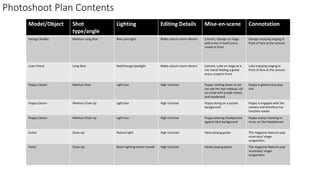
    Photoshoot Plan Contents Model/ObjectShot type/angle Lighting Editing Details Mise-en-scene Connotation George Shelley Medium Long Shot Blue spot light Make colours more vibrant Concert, George on stage with a mic in hand and a crowd in front George enjoying singing in front of fans at the concert Luke Friend Long Shot Red/Orange Spotlight Make colours more vibrant Concert, Luke on stage at a mic stand holding a guitar and a crowd in front Luke enjoying singing in front of fans at the concert Poppy Casson Medium Shot Light box High Contrast Poppy looking down so we can see her eye makeup, sat on a bed with purple sheets and headboard Poppy is glamourous pop star Poppy Casson Medium Close Up Light box High Contrast Poppy laying on a purple background Poppy is engaged with the camera and therefore her fans/the reader Poppy Casson Medium Close Up Light box High Contrast Poppy wearing headphones against dark background Poppy enjoys listening to music on the headphones Guitar Close Up Natural light High Contrast Hand playing guitar The magazine features pop musicians/ singer songwriters Piano Close Up Room lighting (warm toned) High Contrast Hands playing piano The magazine features pop musicians/ singer songwriters
  • 2.
    Photo Selection contentspage I chose this photograph because I really like the split lighting and my model’s expression because she is clearly engaged with the camera. I chose this photograph because I liked the angle and I liked how clearly you can see the headphones. I chose this image because I really like how the right hand is blurred I chose these 2 photographs because I love the mise en scene and I feel like they will make my contents page look a lot more professional because they have concert lighting. I really like this photo because of my model’s makeup and I think it could look good on the contents page
  • 4.
    On each image,I used the shadow and highlight tool to make them clearer. I then used the brightness and contrast tool to add depth to each photo and make my photographs look more pop/professional.
  • 5.
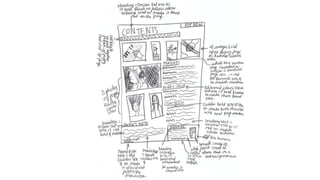
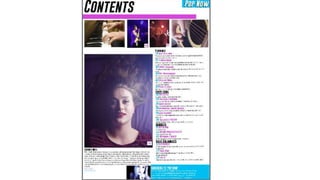
    I made mycontents page on Photoshop. I used the text box tool to insert all of my text and changed the font colours to work with my images. I used the shape tool to insert my banners and the place tool to insert my photographs. I made sure that I had my masthead in the top right hand corner to create a sense of branding.
  • 7.
  • 8.
    I played withthe hue of my photographs to make them all a bit more purple toned to match my new colour scheme which I created with the paint bucket tool. I also increased the levels of blue in the photos to make a sense of house style.