The Proper Care and Feeding of a
MySQL Database for Linux
Administrators
Dave Stokes
MySQL Community Manager
David.Stokes@Oracle.Com
Congratulations! You're the new Linux
Admin AND the MySQL DBA too!
Dave Stokes
MySQL Community Manager
David.Stokes@Oracle.Com   @stoker
Safe Harbor Statement

The following is intended to outline our general
product direction. It is intended for information
purposes only, and may not be incorporated into any
contract. It is not a commitment to deliver any
material, code, or functionality, and should not be
relied upon in making purchasing decisions.

The development, release, and timing of any
features or functionality described for Oracle’s
products remains at the sole discretion of Oracle.
Simple Introduction
This is a general introduction to running a
MySQL database server(s) for Linux
Administrator
Simple Introduction
This is a general introduction to running a
MySQL database server(s) for Linux
Administrator
Database servers have needs different than
SMTP, HTTP, or other servers
Simple Introduction
This is a general introduction to running a
MySQL database server(s) for Linux
Administrator
Database servers have needs different than
SMTP, HTTP, or other servers
Hardware choices are critical! (do not go cheap)
Simple Introduction
This is a general introduction to running a
MySQL database server(s) for Linux
Administrator
Database servers have needs different than
SMTP, HTTP, or other servers
Hardware choices are critical! (do not go cheap)
Tuning to 80% efficiency is relatively easy
Simple Introduction
This is a general introduction to running a
MySQL database server(s) for Linux
Administrator
Database servers have needs different than
SMTP, HTTP, or other servers
Hardware choices are critical! (do not go cheap)
Tuning to 80% efficiency is relatively easy (last
20% is tricky)
Session Overview
1.   Basics of a database server
2.   Hardware
3.   MySQL Configuration
4.   Monitoring Operations
5.   Backups
6.   Replication
7.   Indexes
8.   Tuning
9.   Q/A
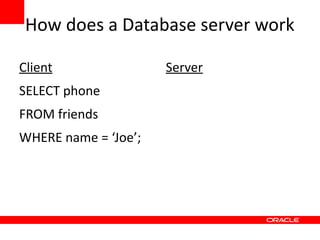
How does a Database server work

Client                Server
SELECT phone
FROM friends
WHERE name = ‘Joe’;
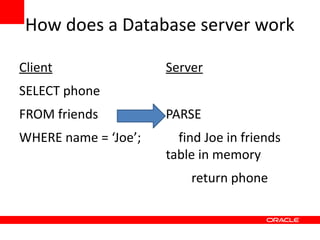
How does a Database server work

Client                Server
SELECT phone
FROM friends          PARSE
WHERE name = ‘Joe’;     find Joe in friends
                      table in memory
                          return phone
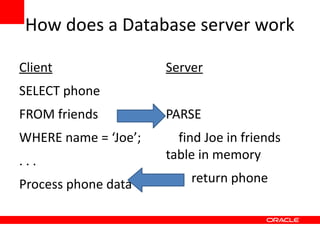
How does a Database server work

Client                Server
SELECT phone
FROM friends          PARSE
WHERE name = ‘Joe’;     find Joe in friends
...                   table in memory

Process phone data        return phone
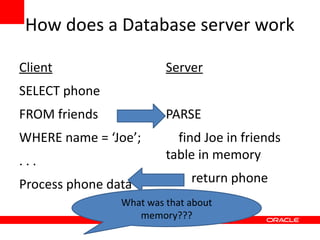
How does a Database server work

Client                   Server
SELECT phone
FROM friends             PARSE
WHERE name = ‘Joe’;        find Joe in friends
...                      table in memory

Process phone data            return phone
                What was that about
                   memory???
Rule #1
•
    Databases love data in memory
Rule #1
•
    Databases love data in memory


Corollary #1 – getting data in/out of memory will
cause you nightmares!
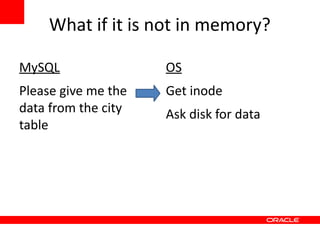
What if it is not in memory?

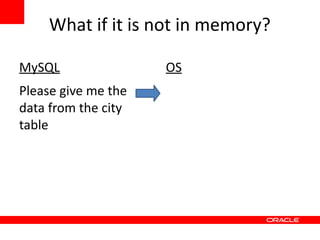
MySQL                OS
Please give me the
data from the city
table
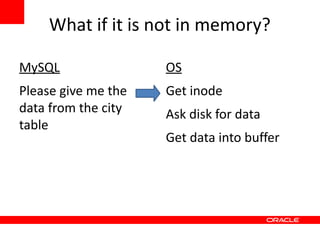
What if it is not in memory?

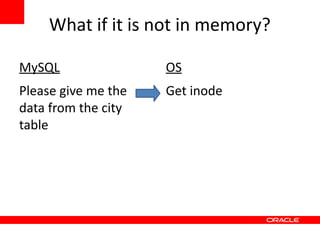
MySQL                OS
Please give me the   Get inode
data from the city
table
What if it is not in memory?

MySQL                OS
Please give me the   Get inode
data from the city   Ask disk for data
table
What if it is not in memory?

MySQL                OS
Please give me the   Get inode
data from the city   Ask disk for data
table
                     Get data into buffer
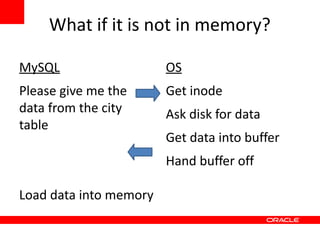
What if it is not in memory?

MySQL                   OS
Please give me the      Get inode
data from the city      Ask disk for data
table
                        Get data into buffer
                        Hand buffer off

Load data into memory
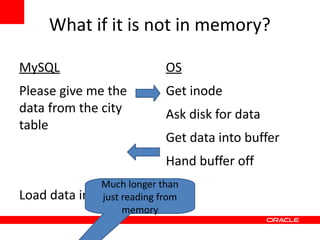
What if it is not in memory?

MySQL                          OS
Please give me the             Get inode
data from the city             Ask disk for data
table
                               Get data into buffer
                               Hand buffer off
                Much longer than
Load   data into just reading from
                  memory
                      memory
Rule #2

Databases have to do unpredictable queries,
random I/O, and sequential scans so slow I/O
kills performance
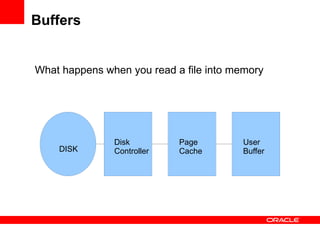
Buffers


What happens when you read a file into memory


               Disk         Page         User
    DISK       Controller   Cache        Buffer
Buffers


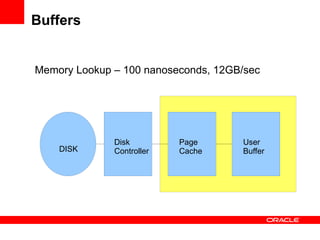
Memory Lookup – 100 nanoseconds, 12GB/sec


              Disk         Page      User
    DISK      Controller   Cache     Buffer
Buffers


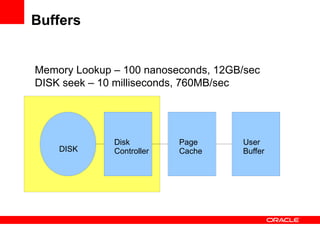
Memory Lookup – 100 nanoseconds, 12GB/sec
DISK seek – 10 milliseconds, 760MB/sec


              Disk         Page      User
    DISK      Controller   Cache     Buffer
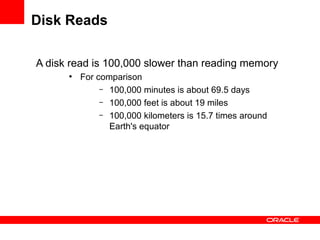
Disk Reads

A disk read is 100,000 slower than reading memory
      ●
          For comparison
               – 100,000 minutes is about 69.5 days
               – 100,000 feet is about 19 miles
               – 100,000 kilometers is 15.7 times around
                 Earth's equator
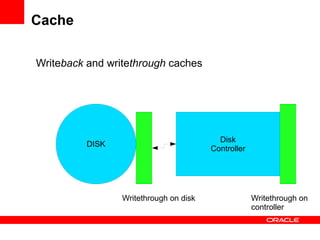
Cache

Writeback and writethrough caches


                                          Disk
          DISK
                                        Controller


                 Writethrough on disk                Writethrough on
                                                     controller
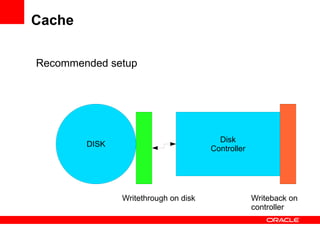
Cache

Recommended setup


                                        Disk
        DISK
                                      Controller


               Writethrough on disk                Writeback on
                                                   controller
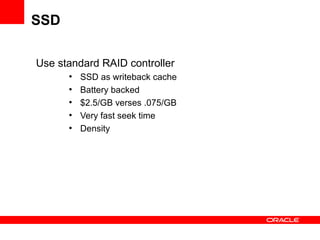
SSD

Use standard RAID controller
      ●
          SSD as writeback cache
      ●
          Battery backed
      ●
          $2.5/GB verses .075/GB
      ●
          Very fast seek time
      ●
          Density
Hardware recommendations
1.   Memory – lots of it, ecc
Hardware recommendations
1.   Memory – lots of it, ecc
2.   DISKs – more spindles, high speed, fast controllers,
     RAID 10, write back cache, and XFS/ZFS/ext4 not
     ext2/3
Hardware recommendations
1.   Memory – lots of it, ecc
2.   DISKs – more spindles, high speed, fast controllers,
     RAID 10, write back cache, and XFS/ZFS/ext4 not
     ext2/3
3.   Write-through caches with battery backup units for
     disks must be monitored, and have life span much
     longer than planned outages
Hardware recommendations
1.   Memory – lots of it, ecc
2.   DISKs – more spindles, high speed, fast controllers,
     RAID 10, write back cache, and XFS/ZFS/ext4 not
     ext2/3
3.   Write-through caches with battery backup units for
     disks must be monitored, and have life span much
     longer than planned outages
4.   CPUs, Core less important (spend money on
     Memory and IO)
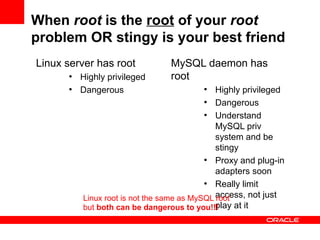
Quick Security Warning!

MySQL login security is primitive.
       ●
           Database mysql has users table
       ●
           'jsmith'@'co.com' or 'fred'@'10.10.%'
                 – Matches host, then user, then password
                   fields
                          ●
                            Be explicit
       ●
           Proxy and Pluggable logins on the way
MySQL privilege security
       ●
           GRANT functions or access
       ●
           Can get Byzantine quickly
       ●
           Use a GUI
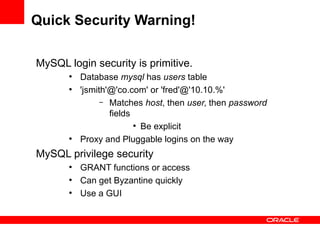
When root is the root of your root
problem OR stingy is your best friend
Linux server has root            MySQL daemon has
      ●
          Highly privileged      root
      ●
          Dangerous                      ●
                                              Highly privileged
                                           ●
                                              Dangerous
                                           ●
                                              Understand
                                              MySQL priv
                                              system and be
                                              stingy
                                           ●
                                              Proxy and plug-in
                                              adapters soon
                                           ●
                                              Really limit
          Linux root is not the same as MySQL access, not just
                                              root
          but both can be dangerous to you!!! play at it
Installation

1.   Use pre built MySQL packages
Installation

1.   Use pre built MySQL packages
2.   Don’t double up with other services
Installation

1.   Use prebuilt MySQL packages
2.   Don’t double up with other services
3.   Supplied configuration files are OLD!
Installation

1.   Use prebuilt MySQL packages
2.   Don’t double up with other services
3.   Supplied configuration files are OLD!
4.   Move logs to different disk than data
Installation

1.   Use prebuilt packages
2.   Don’t double up with other services
3.   Supplied configuration files are OLD!
4.   Move logs to different disk than data
5.   Spread data over different drives
Installation

1.   Use prebuilt packages
2.   Don’t double up with other services
3.   Supplied configuration files are OLD!
4.   Move logs to different disk than data
5.   Spread data over different drives
6.   Backups are necessary – and practice
     recovery!
Monitoring Operations

1.   Slow query log -- not all long running queries
     are bad
Monitoring Operations

1.   Slow query log -- not all long running queries
     are bad
2.   Log queries not using indexes
Monitoring Operations

1.   Slow query log -- not all long running queries
     are bad
2.   Log queries not using indexes
3.   Use monitoring software – MEM, Innotop,
     Cacti, Munin, Nagios, etc – and pay attention
     to it
Monitor!!!
Monitoring Operations

1.   Slow query log -- not all long running queries
     are bad
2.   Log queries not using indexes
3.   Use monitoring software – MEM, Innotop,
     Cacti, Munin, Nagios, etc – and pay attention
     to it
4.   More in tuning ….
Backups

Backups are usually some sort of disk snap shot
   or serializing data to a file
Backups

Backups are usually some sort of disk snap shot
   or serializing data to a file
The more the better but you need to know steps
   to recover dropped table, lost databases, or
   mangled data
Backups

Backups are usually some sort of disk snap shot
   or serializing data to a file
The more the better but you need to know steps
   to recover dropped table, lost databases, or
   mangled data.
Use data replication to a slave and then backup
  slave
Backups

Backups are usually some sort of disk snap shot
   or serializing data to a file
The more the better but you need to know steps
   to recover dropped table, lost databases, or
   mangled data.
Use data replication to a slave and then backup
  slave
Be paranoid!!!!!
Replication
Replication for MySQL is the binary log for the
  master being copied to a slave. The slave
  then updates its copy of the data
Replication
Replication for MySQL is the binary log for the
  master being copied to a slave. The slave
  then updates its copy of the data
Two types:
1.   Asynchronous – server does not check changes sent to
     slave before proceeding
Replication
Replication for MySQL is the binary log for the
  master being copied to a slave. The slave
  then updates its copy of the data
Two types:
1.   Asynchronous – server does not check changes sent to
     slave before proceeding
2.   Semi Synchronous – server checks that slave received
     changes before proceeding
Replication -- threads

Currently single threaded – 5.6 will fix that
Replication -- network
Network latency will affect MySQL replication. So plan
network topology to minimize bandwidth competition with
other systems/services.
Replication -- network
Network latency will affect MySQL replication. So plan
network topology to minimize bandwidth competition with
other systems/services.
Slaves do not need to be as fast as the master but try to
keep things reasonably close
Replication -- network
Network latency will affect MySQL replication. So plan
network topology to minimize bandwidth competition with
other systems/services.
Slaves do not need to be as fast as the master but try to
keep things reasonably close
Do not have to replicate all tables/databases to all slaves.
Cut down on traffic by replicating what is needed!
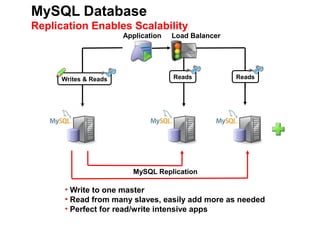
MySQL Database
Replication Enables Scalability
                       Application   Load Balancer


      Writes & Reads                 Reads           Reads


                         MySQL Replication

      • Write to one master
      • Read from many slaves, easily add more as needed
      • Perfect for read/write intensive apps
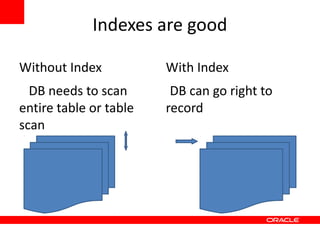
Indexes are good

Without Index           With Index
  DB needs to scan       DB can go right to
entire table or table   record
scan
Indexes, the bad
•
    Overhead -- space, speed, maintenance
Indexes, the bad
•
    Overhead -- space, speed, maintenance
•
    Not a panacea – does not cure all problems
Indexes, the bad
•
    Overhead -- space, speed, maintenance
•
    Not a panacea – does not cure all problems
•
    Will not help if you need to perform a table
    scan
Indexes, the bad
•
    Overhead -- space, speed, maintenance
•
    Not a panacea – does not cure all problems
•
    Will not help if you need to perform a table
    scan
•
    Composite indexes can be tricky – YearMonthDay
    usually better than DayMonthYear
Tuning to 80%
•
    Use InnoDB
Tuning to 80%
•
    Use InnoDB
•
    Set innodb_buffer_pool_size to 70-
    80% of memory
Tuning to 80%
•
    Use InnoDB
•
    Set innodb_buffer_pool_size to 70-
    80% of memory
•
    Use XFS/ZFS/ext4
Tuning to 80%
•
    Use InnoDB
•
    Set innodb_buffer_pool_size to 70-
    80% of memory
•
    Use XFS/ZFS/ext4
•
    Partition data -- divide and conquer
Tuning to 80%
•
    Use InnoDB
•
    Set innodb_buffer_pool_size to 70-
    80% of memory
•
    Use XFS/ZFS/ext4
•
    Partition data -- divide and conquer
•
    Architect your data
Tuning to 80%
•
    Use InnoDB
•
    Set innodb_buffer_pool_size to 70-
    80% of memory
•
    Use XFS/ZFS/ext4
•
    Partition data -- divide and conquer
•
    Architect your data
•
    Review your SQL statements
Don't hurt yourself
          Some RAID controllers
          have a battery learning
          cycle when BBU goes
          write-back. Schedule
          during off-time!

          Minimize time for most
          frequent queries

          Keep on top of
          upgrades
            - 5.5 20% faster than
          5.1
Tuning Past 80%

Will depend on your data
Tuning Past 80%

Will depend on your data
Lots of Tuning Help Available
Tuning Past 80%

Will depend on your data
Lots of Tuning Help Available
      ●
          High Performance MySQL – Schwartz et al
      ●
          MySQL Administrator's Bible – Cabral
Tuning Past 80%

Will depend on your data
Lots of Tuning Help Available
      ●
          High Performance MySQL – Schwartz et al
      ●
          MySQL Administrator's Bible – Cabral
      ●
          Effective MySQL series – Bradford
      ●
          OurSQL podcast
Tuning Past 80%

Will depend on your data
Lots of Tuning Help Available
      ●
          High Performance MySQL – Schwartz et al
      ●
          MySQL Administrator's Bible – Cabral
      ●
          Effective MySQL series – Bradford
      ●
          OurSQL podcast
      ●
          Performance forum on Forums.MySQL.Com
      ●
          Planet.MySQL.com & MySQL.Com
Tuning Past 80%

Will depend on your data
Lots of Tuning Help Available
      ●
         High Performance MySQL – Schwartz et al
       ●
         MySQL Administrator's Bible – Cabral
      – Effective MySQL series – Bradford
       ●
         OurSQL podcast
       ●
         Performance forum on Forums.MySQL.Org
       ●
         Planet.MySQL.com & MySQL.com
Skilled DBA
Tuning Past 80%

Will depend on your data
Lots of Tuning Help Available
      ●
          High Performance MySQL – Schwartz et al
      ●
          MySQL Administrator's Bible – Cabral
      ●
          OurSQL podcast
      ●
          Performance forum on Forums.MySQL.Org
      ●
          Planet.MySQL.COM & MySQL.Com
Skilled DBA
      ●
          Defined as obsessive professional looking to save
          nanoseconds off queries, possess current backups,
          helps developers rewrite queries, plans for future,
          and watches buffer hits rates compulsively.
Big hint

Seek to optimize the system as a whole. Often the
database is blamed for systemic slowness when
other components are at fault.
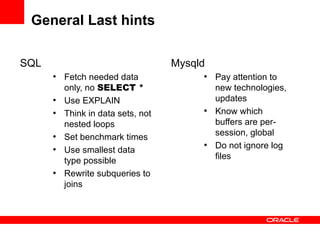
General Last hints

SQL                                 Mysqld
      ●
          Fetch needed data              ●
                                             Pay attention to
          only, no SELECT *                  new technologies,
      ●
          Use EXPLAIN                        updates
      ●
          Think in data sets, not
                                         ●
                                             Know which
          nested loops                       buffers are per-
                                             session, global
      ●
          Set benchmark times
                                         ●
                                             Do not ignore log
      ●
          Use smallest data
                                             files
          type possible
      ●
          Rewrite subqueries to
          joins
MySQL Connect Conference
      st    The Call for Proposals (CFP)
Sept 21 -   for MySQL Connect 2013 is
  rd        now open. Conference
23 in San   attendees want to hear the
            best ideas from MySQL
Francisco   experts from around the
            globe: developers,
            visionaries, customers,
            partners. Proposals must be
            submitted by April 12, so
            don’t wait to develop the
            content that only you know—
            and that MySQL attendees
            want to hear.
MySQL Marinate!

 Virtual self-study of MySQL through the Boston
               MySQL Users Group (
       http://www.meetup.com/mysqlbos/)

   http://www.meetup.com/Virtual-Tech-Self-
            Study/events/84103332/
Q&A
David.Stokes@oracle.com - slideshare.net/davestokes

Congratsyourthedbatoo

  • 1.
    The Proper Careand Feeding of a MySQL Database for Linux Administrators Dave Stokes MySQL Community Manager David.Stokes@Oracle.Com
  • 2.
    Congratulations! You're thenew Linux Admin AND the MySQL DBA too! Dave Stokes MySQL Community Manager David.Stokes@Oracle.Com @stoker
  • 3.
    Safe Harbor Statement Thefollowing is intended to outline our general product direction. It is intended for information purposes only, and may not be incorporated into any contract. It is not a commitment to deliver any material, code, or functionality, and should not be relied upon in making purchasing decisions. The development, release, and timing of any features or functionality described for Oracle’s products remains at the sole discretion of Oracle.
  • 4.
    Simple Introduction This isa general introduction to running a MySQL database server(s) for Linux Administrator
  • 5.
    Simple Introduction This isa general introduction to running a MySQL database server(s) for Linux Administrator Database servers have needs different than SMTP, HTTP, or other servers
  • 6.
    Simple Introduction This isa general introduction to running a MySQL database server(s) for Linux Administrator Database servers have needs different than SMTP, HTTP, or other servers Hardware choices are critical! (do not go cheap)
  • 7.
    Simple Introduction This isa general introduction to running a MySQL database server(s) for Linux Administrator Database servers have needs different than SMTP, HTTP, or other servers Hardware choices are critical! (do not go cheap) Tuning to 80% efficiency is relatively easy
  • 8.
    Simple Introduction This isa general introduction to running a MySQL database server(s) for Linux Administrator Database servers have needs different than SMTP, HTTP, or other servers Hardware choices are critical! (do not go cheap) Tuning to 80% efficiency is relatively easy (last 20% is tricky)
  • 9.
    Session Overview 1. Basics of a database server 2. Hardware 3. MySQL Configuration 4. Monitoring Operations 5. Backups 6. Replication 7. Indexes 8. Tuning 9. Q/A
  • 10.
    How does aDatabase server work Client Server SELECT phone FROM friends WHERE name = ‘Joe’;
  • 11.
    How does aDatabase server work Client Server SELECT phone FROM friends PARSE WHERE name = ‘Joe’; find Joe in friends table in memory return phone
  • 12.
    How does aDatabase server work Client Server SELECT phone FROM friends PARSE WHERE name = ‘Joe’; find Joe in friends ... table in memory Process phone data return phone
  • 13.
    How does aDatabase server work Client Server SELECT phone FROM friends PARSE WHERE name = ‘Joe’; find Joe in friends ... table in memory Process phone data return phone What was that about memory???
  • 14.
    Rule #1 • Databases love data in memory
  • 15.
    Rule #1 • Databases love data in memory Corollary #1 – getting data in/out of memory will cause you nightmares!
  • 16.
    What if itis not in memory? MySQL OS Please give me the data from the city table
  • 17.
    What if itis not in memory? MySQL OS Please give me the Get inode data from the city table
  • 18.
    What if itis not in memory? MySQL OS Please give me the Get inode data from the city Ask disk for data table
  • 19.
    What if itis not in memory? MySQL OS Please give me the Get inode data from the city Ask disk for data table Get data into buffer
  • 20.
    What if itis not in memory? MySQL OS Please give me the Get inode data from the city Ask disk for data table Get data into buffer Hand buffer off Load data into memory
  • 21.
    What if itis not in memory? MySQL OS Please give me the Get inode data from the city Ask disk for data table Get data into buffer Hand buffer off Much longer than Load data into just reading from memory memory
  • 22.
    Rule #2 Databases haveto do unpredictable queries, random I/O, and sequential scans so slow I/O kills performance
  • 23.
    Buffers What happens whenyou read a file into memory Disk Page User DISK Controller Cache Buffer
  • 24.
    Buffers Memory Lookup –100 nanoseconds, 12GB/sec Disk Page User DISK Controller Cache Buffer
  • 25.
    Buffers Memory Lookup –100 nanoseconds, 12GB/sec DISK seek – 10 milliseconds, 760MB/sec Disk Page User DISK Controller Cache Buffer
  • 26.
    Disk Reads A diskread is 100,000 slower than reading memory ● For comparison – 100,000 minutes is about 69.5 days – 100,000 feet is about 19 miles – 100,000 kilometers is 15.7 times around Earth's equator
  • 27.
    Cache Writeback and writethroughcaches Disk DISK Controller Writethrough on disk Writethrough on controller
  • 28.
    Cache Recommended setup Disk DISK Controller Writethrough on disk Writeback on controller
  • 29.
    SSD Use standard RAIDcontroller ● SSD as writeback cache ● Battery backed ● $2.5/GB verses .075/GB ● Very fast seek time ● Density
  • 30.
    Hardware recommendations 1. Memory – lots of it, ecc
  • 31.
    Hardware recommendations 1. Memory – lots of it, ecc 2. DISKs – more spindles, high speed, fast controllers, RAID 10, write back cache, and XFS/ZFS/ext4 not ext2/3
  • 32.
    Hardware recommendations 1. Memory – lots of it, ecc 2. DISKs – more spindles, high speed, fast controllers, RAID 10, write back cache, and XFS/ZFS/ext4 not ext2/3 3. Write-through caches with battery backup units for disks must be monitored, and have life span much longer than planned outages
  • 33.
    Hardware recommendations 1. Memory – lots of it, ecc 2. DISKs – more spindles, high speed, fast controllers, RAID 10, write back cache, and XFS/ZFS/ext4 not ext2/3 3. Write-through caches with battery backup units for disks must be monitored, and have life span much longer than planned outages 4. CPUs, Core less important (spend money on Memory and IO)
  • 34.
    Quick Security Warning! MySQLlogin security is primitive. ● Database mysql has users table ● 'jsmith'@'co.com' or 'fred'@'10.10.%' – Matches host, then user, then password fields ● Be explicit ● Proxy and Pluggable logins on the way MySQL privilege security ● GRANT functions or access ● Can get Byzantine quickly ● Use a GUI
  • 35.
    When root isthe root of your root problem OR stingy is your best friend Linux server has root MySQL daemon has ● Highly privileged root ● Dangerous ● Highly privileged ● Dangerous ● Understand MySQL priv system and be stingy ● Proxy and plug-in adapters soon ● Really limit Linux root is not the same as MySQL access, not just root but both can be dangerous to you!!! play at it
  • 36.
    Installation 1. Use pre built MySQL packages
  • 37.
    Installation 1. Use pre built MySQL packages 2. Don’t double up with other services
  • 38.
    Installation 1. Use prebuilt MySQL packages 2. Don’t double up with other services 3. Supplied configuration files are OLD!
  • 39.
    Installation 1. Use prebuilt MySQL packages 2. Don’t double up with other services 3. Supplied configuration files are OLD! 4. Move logs to different disk than data
  • 40.
    Installation 1. Use prebuilt packages 2. Don’t double up with other services 3. Supplied configuration files are OLD! 4. Move logs to different disk than data 5. Spread data over different drives
  • 41.
    Installation 1. Use prebuilt packages 2. Don’t double up with other services 3. Supplied configuration files are OLD! 4. Move logs to different disk than data 5. Spread data over different drives 6. Backups are necessary – and practice recovery!
  • 42.
    Monitoring Operations 1. Slow query log -- not all long running queries are bad
  • 43.
    Monitoring Operations 1. Slow query log -- not all long running queries are bad 2. Log queries not using indexes
  • 44.
    Monitoring Operations 1. Slow query log -- not all long running queries are bad 2. Log queries not using indexes 3. Use monitoring software – MEM, Innotop, Cacti, Munin, Nagios, etc – and pay attention to it
  • 45.
  • 46.
    Monitoring Operations 1. Slow query log -- not all long running queries are bad 2. Log queries not using indexes 3. Use monitoring software – MEM, Innotop, Cacti, Munin, Nagios, etc – and pay attention to it 4. More in tuning ….
  • 47.
    Backups Backups are usuallysome sort of disk snap shot or serializing data to a file
  • 48.
    Backups Backups are usuallysome sort of disk snap shot or serializing data to a file The more the better but you need to know steps to recover dropped table, lost databases, or mangled data
  • 49.
    Backups Backups are usuallysome sort of disk snap shot or serializing data to a file The more the better but you need to know steps to recover dropped table, lost databases, or mangled data. Use data replication to a slave and then backup slave
  • 50.
    Backups Backups are usuallysome sort of disk snap shot or serializing data to a file The more the better but you need to know steps to recover dropped table, lost databases, or mangled data. Use data replication to a slave and then backup slave Be paranoid!!!!!
  • 51.
    Replication Replication for MySQLis the binary log for the master being copied to a slave. The slave then updates its copy of the data
  • 52.
    Replication Replication for MySQLis the binary log for the master being copied to a slave. The slave then updates its copy of the data Two types: 1. Asynchronous – server does not check changes sent to slave before proceeding
  • 53.
    Replication Replication for MySQLis the binary log for the master being copied to a slave. The slave then updates its copy of the data Two types: 1. Asynchronous – server does not check changes sent to slave before proceeding 2. Semi Synchronous – server checks that slave received changes before proceeding
  • 54.
    Replication -- threads Currentlysingle threaded – 5.6 will fix that
  • 55.
    Replication -- network Networklatency will affect MySQL replication. So plan network topology to minimize bandwidth competition with other systems/services.
  • 56.
    Replication -- network Networklatency will affect MySQL replication. So plan network topology to minimize bandwidth competition with other systems/services. Slaves do not need to be as fast as the master but try to keep things reasonably close
  • 57.
    Replication -- network Networklatency will affect MySQL replication. So plan network topology to minimize bandwidth competition with other systems/services. Slaves do not need to be as fast as the master but try to keep things reasonably close Do not have to replicate all tables/databases to all slaves. Cut down on traffic by replicating what is needed!
  • 58.
    MySQL Database Replication EnablesScalability Application Load Balancer Writes & Reads Reads Reads MySQL Replication • Write to one master • Read from many slaves, easily add more as needed • Perfect for read/write intensive apps
  • 59.
    Indexes are good WithoutIndex With Index DB needs to scan DB can go right to entire table or table record scan
  • 60.
    Indexes, the bad • Overhead -- space, speed, maintenance
  • 61.
    Indexes, the bad • Overhead -- space, speed, maintenance • Not a panacea – does not cure all problems
  • 62.
    Indexes, the bad • Overhead -- space, speed, maintenance • Not a panacea – does not cure all problems • Will not help if you need to perform a table scan
  • 63.
    Indexes, the bad • Overhead -- space, speed, maintenance • Not a panacea – does not cure all problems • Will not help if you need to perform a table scan • Composite indexes can be tricky – YearMonthDay usually better than DayMonthYear
  • 64.
  • 65.
    Tuning to 80% • Use InnoDB • Set innodb_buffer_pool_size to 70- 80% of memory
  • 66.
    Tuning to 80% • Use InnoDB • Set innodb_buffer_pool_size to 70- 80% of memory • Use XFS/ZFS/ext4
  • 67.
    Tuning to 80% • Use InnoDB • Set innodb_buffer_pool_size to 70- 80% of memory • Use XFS/ZFS/ext4 • Partition data -- divide and conquer
  • 68.
    Tuning to 80% • Use InnoDB • Set innodb_buffer_pool_size to 70- 80% of memory • Use XFS/ZFS/ext4 • Partition data -- divide and conquer • Architect your data
  • 69.
    Tuning to 80% • Use InnoDB • Set innodb_buffer_pool_size to 70- 80% of memory • Use XFS/ZFS/ext4 • Partition data -- divide and conquer • Architect your data • Review your SQL statements
  • 70.
    Don't hurt yourself Some RAID controllers have a battery learning cycle when BBU goes write-back. Schedule during off-time! Minimize time for most frequent queries Keep on top of upgrades - 5.5 20% faster than 5.1
  • 71.
    Tuning Past 80% Willdepend on your data
  • 72.
    Tuning Past 80% Willdepend on your data Lots of Tuning Help Available
  • 73.
    Tuning Past 80% Willdepend on your data Lots of Tuning Help Available ● High Performance MySQL – Schwartz et al ● MySQL Administrator's Bible – Cabral
  • 74.
    Tuning Past 80% Willdepend on your data Lots of Tuning Help Available ● High Performance MySQL – Schwartz et al ● MySQL Administrator's Bible – Cabral ● Effective MySQL series – Bradford ● OurSQL podcast
  • 75.
    Tuning Past 80% Willdepend on your data Lots of Tuning Help Available ● High Performance MySQL – Schwartz et al ● MySQL Administrator's Bible – Cabral ● Effective MySQL series – Bradford ● OurSQL podcast ● Performance forum on Forums.MySQL.Com ● Planet.MySQL.com & MySQL.Com
  • 76.
    Tuning Past 80% Willdepend on your data Lots of Tuning Help Available ● High Performance MySQL – Schwartz et al ● MySQL Administrator's Bible – Cabral – Effective MySQL series – Bradford ● OurSQL podcast ● Performance forum on Forums.MySQL.Org ● Planet.MySQL.com & MySQL.com Skilled DBA
  • 77.
    Tuning Past 80% Willdepend on your data Lots of Tuning Help Available ● High Performance MySQL – Schwartz et al ● MySQL Administrator's Bible – Cabral ● OurSQL podcast ● Performance forum on Forums.MySQL.Org ● Planet.MySQL.COM & MySQL.Com Skilled DBA ● Defined as obsessive professional looking to save nanoseconds off queries, possess current backups, helps developers rewrite queries, plans for future, and watches buffer hits rates compulsively.
  • 78.
    Big hint Seek tooptimize the system as a whole. Often the database is blamed for systemic slowness when other components are at fault.
  • 79.
    General Last hints SQL Mysqld ● Fetch needed data ● Pay attention to only, no SELECT * new technologies, ● Use EXPLAIN updates ● Think in data sets, not ● Know which nested loops buffers are per- session, global ● Set benchmark times ● Do not ignore log ● Use smallest data files type possible ● Rewrite subqueries to joins
  • 80.
    MySQL Connect Conference st The Call for Proposals (CFP) Sept 21 - for MySQL Connect 2013 is rd now open. Conference 23 in San attendees want to hear the best ideas from MySQL Francisco experts from around the globe: developers, visionaries, customers, partners. Proposals must be submitted by April 12, so don’t wait to develop the content that only you know— and that MySQL attendees want to hear.
  • 81.
    MySQL Marinate! Virtualself-study of MySQL through the Boston MySQL Users Group ( http://www.meetup.com/mysqlbos/) http://www.meetup.com/Virtual-Tech-Self- Study/events/84103332/
  • 82.