Javascript
and the New
MySQL Shell
Dave Stokes
MySQL Community Manager
MySQL Community Team
Safe harbor statement
The following is intended to outline our general product direction. It is intended for information
purposes only, and may not be incorporated into any contract. It is not a commitment to deliver
any material, code, or functionality, and should not be relied upon in making purchasing
decisions.
The development, release, timing, and pricing of any features or functionality described for
Oracle’s products may change and remains at the sole discretion of Oracle Corporation.
2
Dave Stokes
MySQL Community Team
Oracle Corporation
@Stoker
https://elephantdolphin.blogspot.com/
David.Stokes@Oracle.com
Slides are available at Slideshare.net/davestokes
3
4
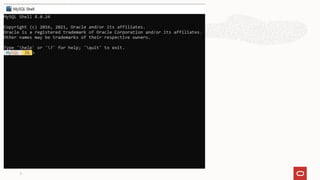
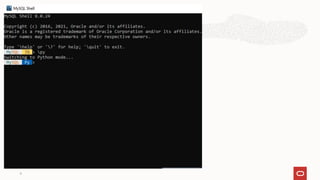
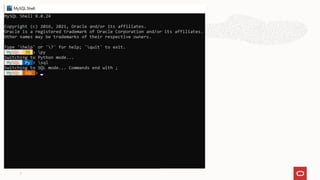
mysqlsh
MySQL Shell processes code written in
JavaScript, Python and SQL.
Any executed code is processed as one
of these languages, based on the
language that is currently active.
5
6
7
8
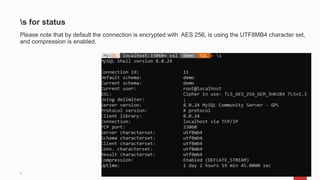
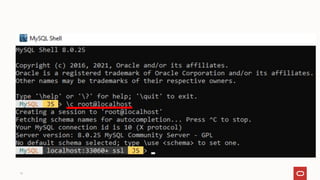
s for status
Please note that by default the connection is encrypted with AES 256, is using the UTF8MB4 character set,
and compression is enabled.
9
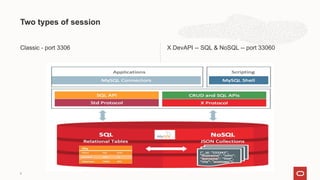
Two types of session
Classic - port 3306 X DevAPI -- SQL & NoSQL -- port 33060
10
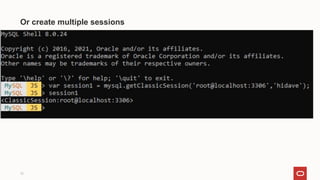
You can use functions available in JavaScript and Python mode
to create multiple session objects of your chosen types and
assign them to variables.
These session objects let you establish and manage concurrent
connections to work with multiple MySQL Server instances, or
with the same instance in multiple ways, from a single MySQL
Shell instance.
11
12
Or create multiple sessions
13
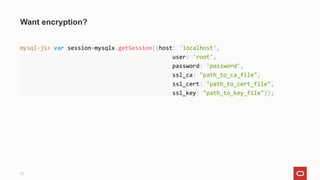
Want encryption?
mysql-js> var session=mysqlx.getSession({host: 'localhost',
user: 'root',
password: 'password',
ssl_ca: "path_to_ca_file",
ssl_cert: "path_to_cert_file",
ssl_key: "path_to_key_file"});
14
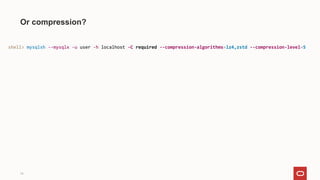
Or compression?
shell> mysqlsh --mysqlx -u user -h localhost -C required --compression-algorithms=lz4,zstd --compression-level=5
15
Optional password storage
mysql-js> connect user@localhost:3310
Creating a session to 'user@localhost:3310'
Please provide the password for 'user@localhost:3310': ********
Save password for 'user@localhost:3310'? [Y]es/[N]o/Ne[v]er (default No):
y
16
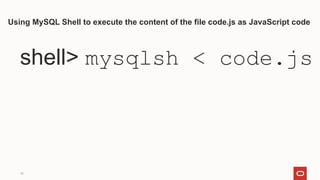
Using MySQL Shell to execute the content of the file code.js as JavaScript code
shell> mysqlsh < code.js
17
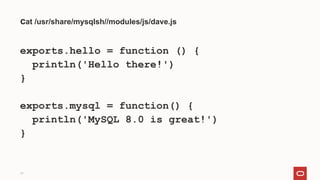
cat /usr/share/mysqlsh//modules/js/dave.js
exports.hello = function () {
println('Hello there!')
}
exports.mysql = function() {
println('MySQL 8.0 is great!')
}
18
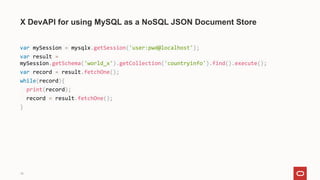
X DevAPI for using MySQL as a NoSQL JSON Document Store
var mySession = mysqlx.getSession('user:pwd@localhost');
var result =
mySession.getSchema('world_x').getCollection('countryinfo').find().execute();
var record = result.fetchOne();
while(record){
print(record);
record = result.fetchOne();
}
19
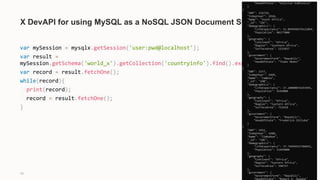
X DevAPI for using MySQL as a NoSQL JSON Document Store
var mySession = mysqlx.getSession('user:pwd@localhost');
var result =
mySession.getSchema('world_x').getCollection('countryinfo').find().execute();
var record = result.fetchOne();
while(record){
print(record);
record = result.fetchOne();
}
20
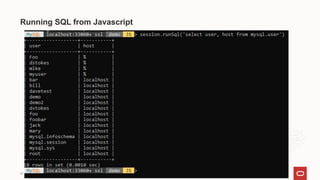
Running SQL from Javascript
21
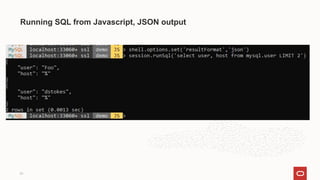
Running SQL from Javascript, JSON output
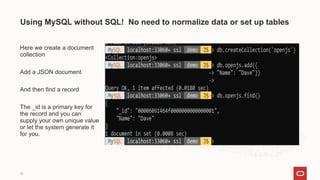
Here we create a document
collection
Add a JSON document
And then find a record
The _id is a primary key for
the record and you can
supply your own unique value
or let the system generate it
for you.
Using MySQL without SQL! No need to normalize data or set up tables
22
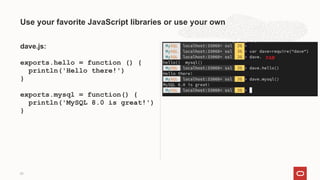
dave.js:
exports.hello = function () {
println('Hello there!')
}
exports.mysql = function() {
println('MySQL 8.0 is great!')
}
Use your favorite JavaScript libraries or use your own
23
You can define extensions to the
base functionality of MySQL Shell in
the form of reports and extension
objects.
Reports and extension objects can
be created using JavaScript or
Python, and can be used regardless
of the active MySQL Shell language.
Extensible
24
You can persist reports and
extension objects in plugins that are
loaded automatically when MySQL
Shell starts.
You can create and register a user-defined report for MySQL Shell in either of the supported scripting
languages, JavaScript and Python.
The reporting facility handles built-in reports and user-defined reports using the same API frontend
scheme.
Reports can specify a list of report-specific options that they accept, and can also accept a specified
number of additional arguments.
Your report can support both, one, or neither of these inputs.
When your request help for a report, MySQL Shell provides a listing of options and arguments, and any
available descriptions of these that are provided when the report is registered.
Registering a report
25
26
Registering MySQL Shell Reports
To register your user-defined report with MySQL Shell, call the shell.registerReport() method in
JavaScript or shell.register_report() in Python.
The syntax for the method is as follows:
shell.registerReport(name, type, report[, description])
Where:
• name is a string giving the unique name of the report.
• type is a string giving the report type which determines the output format, either “list”, “report”, or “print”.
• report is the function to be called when the report is invoked.
• description is a dictionary with options that you can use to specify the options that the report
supports, additional arguments that the report accepts, and help information that is provided in the
MySQL Shell help system.
27
Write your own reports (pardon the Python)
def sessions(session, args, options):
sys = session.get_schema('sys')
session_view = sys.get_table('session')
query = session_view.select(
'thd_id', 'conn_id', 'user', 'db', 'current_statement', 'statement_latency AS latency', 'current_memory AS memory')
if (options.has_key('limit')):
limit = int(options['limit'])
query.limit(limit)
result = query.execute()
report = [result.get_column_names()]
for row in result.fetch_all():
report.append(list(row))
return {'report': report}
shell.register_report(
'sessions',
'list',
sessions,
{
'brief': 'Shows which sessions exist.',
'details': ['You need the SELECT privilege on sys.session view and the underlying tables and functions used by
it.'],
'options': [{'name': 'limit', 'brief': 'The maximum number of rows to return.', 'shortcut': 'l', 'type': 'integer'
}
],
'argc': '0'
}
)
28
Write your own reports (pardon the Python)
def sessions(session, args, options):
sys = session.get_schema('sys')
session_view = sys.get_table('session')
query = session_view.select(
'thd_id', 'conn_id', 'user', 'db', 'current_statement',
'statement_latency AS latency', 'current_memory AS memory')
if (options.has_key('limit')):
limit = int(options['limit'])
query.limit(limit)
result = query.execute()
report = [result.get_column_names()]
for row in result.fetch_all():
report.append(list(row))
return {'report': report}
shell.register_report(
'sessions',
'list',
sessions,
{
'brief': 'Shows which sessions exist.',
'details': ['You need the SELECT privilege on sys.session view and the underlying tables and functions used by it.'],
'options': [
{
'name': 'limit',
'brief': 'The maximum number of rows to return.',
'shortcut': 'l',
'type': 'integer'
}
],
'argc': '0'
}
)
watch sessions --interval=2.0
29
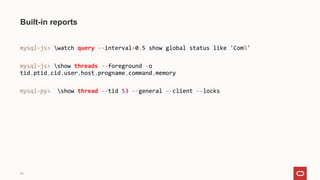
Built-in reports
mysql-js> watch query --interval=0.5 show global status like 'Com%'
mysql-js> show threads --foreground -o
tid,ptid,cid,user,host,progname,command,memory
mysql-py> show thread --tid 53 --general --client --locks
30
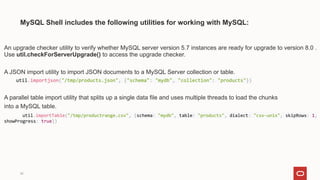
MySQL Shell includes the following utilities for working with MySQL:
An upgrade checker utility to verify whether MySQL server version 5.7 instances are ready for upgrade to version 8.0 .
Use util.checkForServerUpgrade() to access the upgrade checker.
A JSON import utility to import JSON documents to a MySQL Server collection or table.
util.importjson("/tmp/products.json", {"schema": "mydb", "collection": "products"})
A parallel table import utility that splits up a single data file and uses multiple threads to load the chunks
into a MySQL table.
util.importTable("/tmp/productrange.csv", {schema: "mydb", table: "products", dialect: "csv-unix", skipRows: 1,
showProgress: true})
31
MySQL Shell includes the following utilities for working with MySQL:
Parallel Table Import Utility
mysql-js> util.importTable("/tmp/productrange.csv", {schema: "mydb", table: "products", dialect: "csv-unix", skipRows: 1, showProgress: true})
Table export for use with MySQL Shell's parallel table import utility
shell-js> util.exportTable("hr.employees", "file:///home/hanna/exports/employees.txt")
Instance Dump Utility, Schema Dump Utility, and Table Dump Utility
shell-js> util.dumpInstance("C:/Users/hanna/worlddump", {dryRun: true, ocimds: true})
shell-js> util.dumpTables("hr", [ "employees", "salaries" ], "emp")
shell-py> util.dump_schemas(["world"], "worlddump", { "osBucketName": "hanna-bucket", "osNamespace": "idx28w1ckztq",
"ocimds": "true", "compatibility":["strip_definers", "strip_restricted_grants"]})
shell-js> util.loadDump("/mnt/data/worlddump")
32
Where To Learn More
MySQL Shell 8.0
https://docs.oracle.com/cd/E17952_01/mysql-shell-8.0-en/mysql-shell-8.0-en.pdf
Example how to write a plugin
https://developpaper.com/technology-sharing-how-to-write-mysql-shell-plug-in/
Example Plugins
https://www.slideshare.net/lefred.descamps/mysql-shell-the-best-dba-tool-197880094
Copyright © 2020, Oracle and/or its affiliates | Confidential:
Internal/Restricted/Highly Restricted
33
Get $300 in credits
and try MySQL Database Service
free for 30 days.
https://www.oracle.com/cloud/free/
Test Drive MySQL Database Service For Free Today
Follow us on Social Media
34
MySQLCommunity.slack.com
Startups get cloud credits and a 70% discount for
2 years, global exposure via marketing, events,
digital promotion, and media, plus access to
mentorship, capital and Oracle’s 430,000+
customers
Customers meet vetted startups in transformative
spaces that help them stay ahead of their
competition
Oracle stays at the competitive edge
of innovation with solutions that complement its
technology stack
We have saved around 40% of our costs and are
able to reinvest that back into the business. And
we are scaling across EMEA, and that’s basically
all because of Oracle.”
—Asser Smidt
CEO and Cofounder, BotSupply
Oracle for Startups - enroll at oracle.com/startup
A Virtuous Cycle of Innovation, Everybody Wins.
35
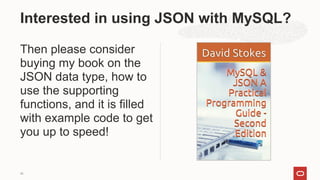
Then please consider
buying my book on the
JSON data type, how to
use the supporting
functions, and it is filled
with example code to get
you up to speed!
Interested in using JSON with MySQL?
36
Thank You!
David.Stokes@oracle.com
@Stoker
slideshare.net/davestokes
37
Q&A
JavaScript and Friends August 20th, 20201 -- MySQL Shell and JavaScript

JavaScript and Friends August 20th, 20201 -- MySQL Shell and JavaScript

  • 1.
    Javascript and the New MySQLShell Dave Stokes MySQL Community Manager MySQL Community Team
  • 2.
    Safe harbor statement Thefollowing is intended to outline our general product direction. It is intended for information purposes only, and may not be incorporated into any contract. It is not a commitment to deliver any material, code, or functionality, and should not be relied upon in making purchasing decisions. The development, release, timing, and pricing of any features or functionality described for Oracle’s products may change and remains at the sole discretion of Oracle Corporation. 2
  • 3.
    Dave Stokes MySQL CommunityTeam Oracle Corporation @Stoker https://elephantdolphin.blogspot.com/ David.Stokes@Oracle.com Slides are available at Slideshare.net/davestokes 3
  • 4.
    4 mysqlsh MySQL Shell processescode written in JavaScript, Python and SQL. Any executed code is processed as one of these languages, based on the language that is currently active.
  • 5.
  • 6.
  • 7.
  • 8.
    8 s for status Pleasenote that by default the connection is encrypted with AES 256, is using the UTF8MB4 character set, and compression is enabled.
  • 9.
    9 Two types ofsession Classic - port 3306 X DevAPI -- SQL & NoSQL -- port 33060
  • 10.
    10 You can usefunctions available in JavaScript and Python mode to create multiple session objects of your chosen types and assign them to variables. These session objects let you establish and manage concurrent connections to work with multiple MySQL Server instances, or with the same instance in multiple ways, from a single MySQL Shell instance.
  • 11.
  • 12.
  • 13.
    13 Want encryption? mysql-js> varsession=mysqlx.getSession({host: 'localhost', user: 'root', password: 'password', ssl_ca: "path_to_ca_file", ssl_cert: "path_to_cert_file", ssl_key: "path_to_key_file"});
  • 14.
    14 Or compression? shell> mysqlsh--mysqlx -u user -h localhost -C required --compression-algorithms=lz4,zstd --compression-level=5
  • 15.
    15 Optional password storage mysql-js>connect user@localhost:3310 Creating a session to 'user@localhost:3310' Please provide the password for 'user@localhost:3310': ******** Save password for 'user@localhost:3310'? [Y]es/[N]o/Ne[v]er (default No): y
  • 16.
    16 Using MySQL Shellto execute the content of the file code.js as JavaScript code shell> mysqlsh < code.js
  • 17.
    17 cat /usr/share/mysqlsh//modules/js/dave.js exports.hello =function () { println('Hello there!') } exports.mysql = function() { println('MySQL 8.0 is great!') }
  • 18.
    18 X DevAPI forusing MySQL as a NoSQL JSON Document Store var mySession = mysqlx.getSession('user:pwd@localhost'); var result = mySession.getSchema('world_x').getCollection('countryinfo').find().execute(); var record = result.fetchOne(); while(record){ print(record); record = result.fetchOne(); }
  • 19.
    19 X DevAPI forusing MySQL as a NoSQL JSON Document Store var mySession = mysqlx.getSession('user:pwd@localhost'); var result = mySession.getSchema('world_x').getCollection('countryinfo').find().execute(); var record = result.fetchOne(); while(record){ print(record); record = result.fetchOne(); }
  • 20.
  • 21.
    21 Running SQL fromJavascript, JSON output
  • 22.
    Here we createa document collection Add a JSON document And then find a record The _id is a primary key for the record and you can supply your own unique value or let the system generate it for you. Using MySQL without SQL! No need to normalize data or set up tables 22
  • 23.
    dave.js: exports.hello = function() { println('Hello there!') } exports.mysql = function() { println('MySQL 8.0 is great!') } Use your favorite JavaScript libraries or use your own 23
  • 24.
    You can defineextensions to the base functionality of MySQL Shell in the form of reports and extension objects. Reports and extension objects can be created using JavaScript or Python, and can be used regardless of the active MySQL Shell language. Extensible 24 You can persist reports and extension objects in plugins that are loaded automatically when MySQL Shell starts.
  • 25.
    You can createand register a user-defined report for MySQL Shell in either of the supported scripting languages, JavaScript and Python. The reporting facility handles built-in reports and user-defined reports using the same API frontend scheme. Reports can specify a list of report-specific options that they accept, and can also accept a specified number of additional arguments. Your report can support both, one, or neither of these inputs. When your request help for a report, MySQL Shell provides a listing of options and arguments, and any available descriptions of these that are provided when the report is registered. Registering a report 25
  • 26.
    26 Registering MySQL ShellReports To register your user-defined report with MySQL Shell, call the shell.registerReport() method in JavaScript or shell.register_report() in Python. The syntax for the method is as follows: shell.registerReport(name, type, report[, description]) Where: • name is a string giving the unique name of the report. • type is a string giving the report type which determines the output format, either “list”, “report”, or “print”. • report is the function to be called when the report is invoked. • description is a dictionary with options that you can use to specify the options that the report supports, additional arguments that the report accepts, and help information that is provided in the MySQL Shell help system.
  • 27.
    27 Write your ownreports (pardon the Python) def sessions(session, args, options): sys = session.get_schema('sys') session_view = sys.get_table('session') query = session_view.select( 'thd_id', 'conn_id', 'user', 'db', 'current_statement', 'statement_latency AS latency', 'current_memory AS memory') if (options.has_key('limit')): limit = int(options['limit']) query.limit(limit) result = query.execute() report = [result.get_column_names()] for row in result.fetch_all(): report.append(list(row)) return {'report': report} shell.register_report( 'sessions', 'list', sessions, { 'brief': 'Shows which sessions exist.', 'details': ['You need the SELECT privilege on sys.session view and the underlying tables and functions used by it.'], 'options': [{'name': 'limit', 'brief': 'The maximum number of rows to return.', 'shortcut': 'l', 'type': 'integer' } ], 'argc': '0' } )
  • 28.
    28 Write your ownreports (pardon the Python) def sessions(session, args, options): sys = session.get_schema('sys') session_view = sys.get_table('session') query = session_view.select( 'thd_id', 'conn_id', 'user', 'db', 'current_statement', 'statement_latency AS latency', 'current_memory AS memory') if (options.has_key('limit')): limit = int(options['limit']) query.limit(limit) result = query.execute() report = [result.get_column_names()] for row in result.fetch_all(): report.append(list(row)) return {'report': report} shell.register_report( 'sessions', 'list', sessions, { 'brief': 'Shows which sessions exist.', 'details': ['You need the SELECT privilege on sys.session view and the underlying tables and functions used by it.'], 'options': [ { 'name': 'limit', 'brief': 'The maximum number of rows to return.', 'shortcut': 'l', 'type': 'integer' } ], 'argc': '0' } ) watch sessions --interval=2.0
  • 29.
    29 Built-in reports mysql-js> watchquery --interval=0.5 show global status like 'Com%' mysql-js> show threads --foreground -o tid,ptid,cid,user,host,progname,command,memory mysql-py> show thread --tid 53 --general --client --locks
  • 30.
    30 MySQL Shell includesthe following utilities for working with MySQL: An upgrade checker utility to verify whether MySQL server version 5.7 instances are ready for upgrade to version 8.0 . Use util.checkForServerUpgrade() to access the upgrade checker. A JSON import utility to import JSON documents to a MySQL Server collection or table. util.importjson("/tmp/products.json", {"schema": "mydb", "collection": "products"}) A parallel table import utility that splits up a single data file and uses multiple threads to load the chunks into a MySQL table. util.importTable("/tmp/productrange.csv", {schema: "mydb", table: "products", dialect: "csv-unix", skipRows: 1, showProgress: true})
  • 31.
    31 MySQL Shell includesthe following utilities for working with MySQL: Parallel Table Import Utility mysql-js> util.importTable("/tmp/productrange.csv", {schema: "mydb", table: "products", dialect: "csv-unix", skipRows: 1, showProgress: true}) Table export for use with MySQL Shell's parallel table import utility shell-js> util.exportTable("hr.employees", "file:///home/hanna/exports/employees.txt") Instance Dump Utility, Schema Dump Utility, and Table Dump Utility shell-js> util.dumpInstance("C:/Users/hanna/worlddump", {dryRun: true, ocimds: true}) shell-js> util.dumpTables("hr", [ "employees", "salaries" ], "emp") shell-py> util.dump_schemas(["world"], "worlddump", { "osBucketName": "hanna-bucket", "osNamespace": "idx28w1ckztq", "ocimds": "true", "compatibility":["strip_definers", "strip_restricted_grants"]}) shell-js> util.loadDump("/mnt/data/worlddump")
  • 32.
    32 Where To LearnMore MySQL Shell 8.0 https://docs.oracle.com/cd/E17952_01/mysql-shell-8.0-en/mysql-shell-8.0-en.pdf Example how to write a plugin https://developpaper.com/technology-sharing-how-to-write-mysql-shell-plug-in/ Example Plugins https://www.slideshare.net/lefred.descamps/mysql-shell-the-best-dba-tool-197880094
  • 33.
    Copyright © 2020,Oracle and/or its affiliates | Confidential: Internal/Restricted/Highly Restricted 33 Get $300 in credits and try MySQL Database Service free for 30 days. https://www.oracle.com/cloud/free/ Test Drive MySQL Database Service For Free Today
  • 34.
    Follow us onSocial Media 34 MySQLCommunity.slack.com
  • 35.
    Startups get cloudcredits and a 70% discount for 2 years, global exposure via marketing, events, digital promotion, and media, plus access to mentorship, capital and Oracle’s 430,000+ customers Customers meet vetted startups in transformative spaces that help them stay ahead of their competition Oracle stays at the competitive edge of innovation with solutions that complement its technology stack We have saved around 40% of our costs and are able to reinvest that back into the business. And we are scaling across EMEA, and that’s basically all because of Oracle.” —Asser Smidt CEO and Cofounder, BotSupply Oracle for Startups - enroll at oracle.com/startup A Virtuous Cycle of Innovation, Everybody Wins. 35
  • 36.
    Then please consider buyingmy book on the JSON data type, how to use the supporting functions, and it is filled with example code to get you up to speed! Interested in using JSON with MySQL? 36
  • 37.