RAID, Replication, and You
data storage and safekeeping
save it, keep it, serve it, back it up
These slides are © 2014 Jim Salter, with license Creative Commons Attribution-ShareAlike 3.0 unported.
http://creativecommons.org/licenses/by-sa/3.0/deed.en_US
First of all: Who?
Jim Salter
Technomancer,
Mercenary Sysadmin,
Small Business Owner
● 6+ years of ZFS in production
● 6+ [units of time] of btrfs in test
Today's slides can be found at:
http://jrs-s.net/presentations/raid-replication-you/
RAID Subsystems
Isn't that just a “hardware thing?”
I heard “software RAID” sucks!
GTFO, I need PERFORMANCE.
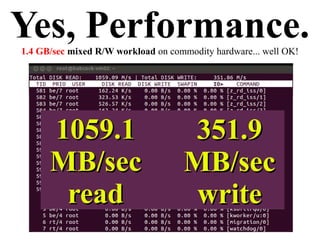
Yes, Performance.1.4 GB/sec mixed R/W workload on commodity hardware... well OK!
1059.11059.1
MB/secMB/sec
readread
351.9351.9
MB/secMB/sec
writewrite
Featuresoh, so many features
● Btrfs-raid1: n/2 redundancy over arbitrary size and number of devices
THIS IS A REALLY AMAZINGLY BIG DEAL. (Microsoft ReFS can do this too)
● Atomic COW snapshots (lol)
● N-way diagonal parity RAID, n-way mirrors
● Per-file, per-folder, per-dataset feature granularity (compression, noCOW, etc)
● On-the-fly reconfiguration of RAID levels, size, rebalancing (btrfs only, another
REALLY BIG DEAL kind of thing)
● Asynchronous incremental remote snapshot replication (Except ReFS, so GTFO
ReFS. Sorry Microsoft)
Why integrated?What can't hardware RAID do for me? Why not separate layers?
● Self-healing redundant arrays
● Stable, well-documented, reliable
interface
● Stable, well-documented, configurable,
reliable error detection and correction
● Commodity HW: performance++, price --
Visualizing RAIDprepare your eyeballs
Traditional RAID0
“Hey I'll just stripe across ALL the disks LOL”
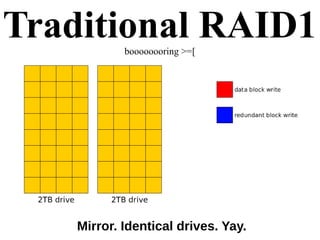
Traditional RAID1boooooooring >=[
Mirror. Identical drives. Yay.
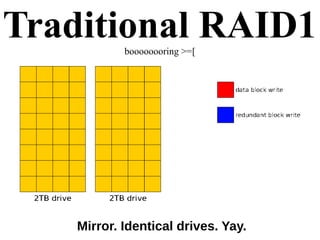
Traditional RAID1boooooooring >=[
Mirror. Identical drives. Yay.
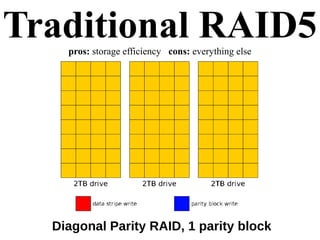
Traditional RAID5pros: storage efficiency cons: everything else
Diagonal Parity RAID, 1 parity block
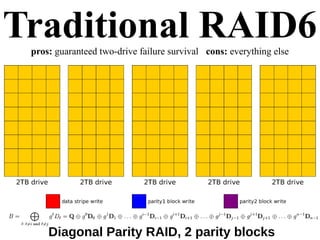
Traditional RAID6pros: guaranteed two-drive failure survival cons: everything else
Diagonal Parity RAID, 2 parity blocks
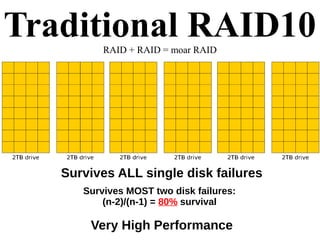
Traditional RAID10RAID + RAID = moar RAID
Survives ALL single disk failures
Survives MOST two disk failures:
(n-2)/(n-1) = 80% survival
Very High Performance
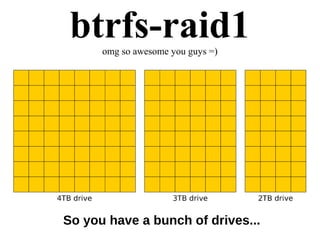
btrfs-raid1omg so awesome you guys =)
So you have a bunch of drives...
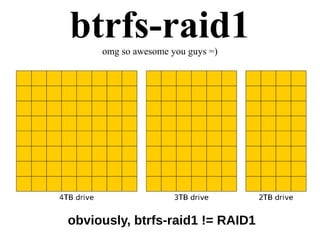
btrfs-raid1omg so awesome you guys =)
obviously, btrfs-raid1 != RAID1
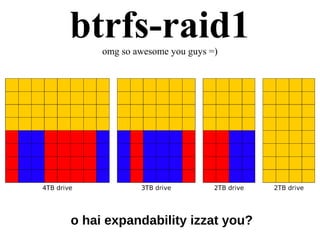
btrfs-raid1omg so awesome you guys =)
o hai expandability izzat you?
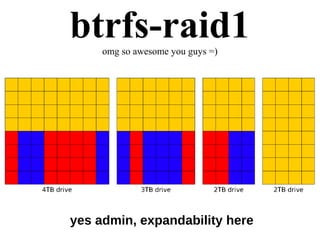
btrfs-raid1omg so awesome you guys =)
yes admin, expandability here
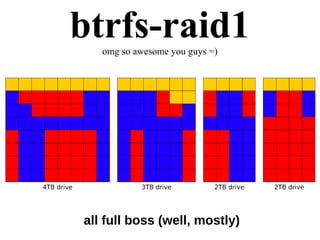
btrfs-raid1omg so awesome you guys =)
all full boss (well, mostly)
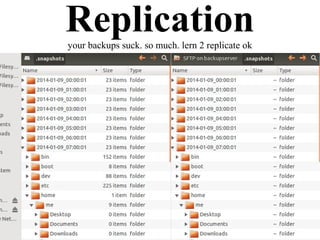
Replicationyour backups suck. so much. lern 2 replicate ok
WWW (^_^)
What is “asynchronous filesystem replication”?
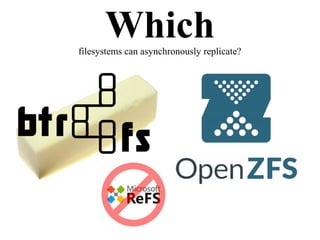
Which filesystems can do this?
Why is replication better than rsync?
Whatdoes “asynchronous filesystem replication” mean?
● You take a snapshot, copy it, and
apply it on another system
● Block-level replication
● Differential replication == awesome
● Doesn't directly know or care about
files, folders, or anything else. This is
a feature, not a bug!
Whichfilesystems can asynchronously replicate?
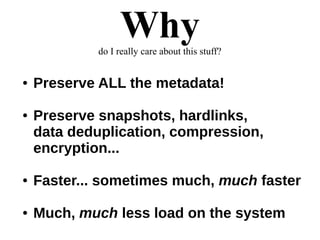
Whydo I really care about this stuff?
● Preserve ALL the metadata!
● Preserve snapshots, hardlinks,
data deduplication, compression,
encryption...
● Faster... sometimes much, much faster
● Much, much less load on the system
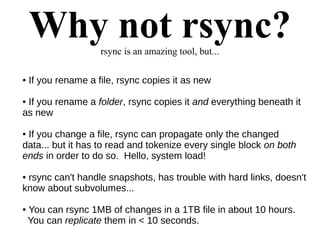
Why not rsync?rsync is an amazing tool, but...
● If you rename a file, rsync copies it as new
● If you rename a folder, rsync copies it and everything beneath it
as new
● If you change a file, rsync can propagate only the changed
data... but it has to read and tokenize every single block on both
ends in order to do so. Hello, system load!
● rsync can't handle snapshots, has trouble with hard links, doesn't
know about subvolumes...
● You can rsync 1MB of changes in a 1TB file in about 10 hours.
You can replicate them in < 10 seconds.
Sounds good but...
me@remotebackup:~$ grep zfsync /var/log/syslog.1
Mar 29 22:34:26 remotebackup zfsync[22852]: SUCCESS: Updated
backup/images from @zfsync_remotebackup_2014-03-28:22:00:01 to
@zfsync_remotebackup_2014-03-29:22:00:01
(2.2 GB transferred, 34m 25s elapsed)
me@remotebackup:~$ du -hs /backup/images
2.0T /backup/images
In a NutshellZFS replication looks like this...
you@box1:~$ sudo zfs create zpool/filesystem
you@box1:~$ [[put all your precious datas in the new
filesystem]]
you@box1:~$ sudo zfs snapshot zpool/filesystem@1
you@box2:~$ ssh root@box1 zfs send zpool/filesystem@1 |
sudo zfs receive zpool/filesystem
you@box1:~$ [[put more precious datas in the filesystem]]
you@box1:~$ sudo zfs snapshot zpool/filesystem@2
you@box2:~$ sudo zfs rollback zpool/filesystem@1
you@box2:~$ ssh root@box1 zfs send -i zpool/filesystem@1
zpool/filesystem@2 | sudo zfs receive zpool/filesystem
The Bottom Line
What was once enterprise is now small business.
If it can't protect my data, I don't want it.
If it can't replicate off-site, I don't want it.
Evolve, adapt, or die. ^_^
Today's slides can be found at:
http://jrs-s.net/presentations/raid-replication-you/

RAID, Replication, and You

  • 1.
    RAID, Replication, andYou data storage and safekeeping save it, keep it, serve it, back it up These slides are © 2014 Jim Salter, with license Creative Commons Attribution-ShareAlike 3.0 unported. http://creativecommons.org/licenses/by-sa/3.0/deed.en_US
  • 2.
    First of all:Who? Jim Salter Technomancer, Mercenary Sysadmin, Small Business Owner ● 6+ years of ZFS in production ● 6+ [units of time] of btrfs in test Today's slides can be found at: http://jrs-s.net/presentations/raid-replication-you/
  • 3.
    RAID Subsystems Isn't thatjust a “hardware thing?” I heard “software RAID” sucks! GTFO, I need PERFORMANCE.
  • 4.
    Yes, Performance.1.4 GB/secmixed R/W workload on commodity hardware... well OK! 1059.11059.1 MB/secMB/sec readread 351.9351.9 MB/secMB/sec writewrite
  • 5.
    Featuresoh, so manyfeatures ● Btrfs-raid1: n/2 redundancy over arbitrary size and number of devices THIS IS A REALLY AMAZINGLY BIG DEAL. (Microsoft ReFS can do this too) ● Atomic COW snapshots (lol) ● N-way diagonal parity RAID, n-way mirrors ● Per-file, per-folder, per-dataset feature granularity (compression, noCOW, etc) ● On-the-fly reconfiguration of RAID levels, size, rebalancing (btrfs only, another REALLY BIG DEAL kind of thing) ● Asynchronous incremental remote snapshot replication (Except ReFS, so GTFO ReFS. Sorry Microsoft)
  • 6.
    Why integrated?What can'thardware RAID do for me? Why not separate layers? ● Self-healing redundant arrays ● Stable, well-documented, reliable interface ● Stable, well-documented, configurable, reliable error detection and correction ● Commodity HW: performance++, price --
  • 7.
  • 8.
    Traditional RAID0 “Hey I'lljust stripe across ALL the disks LOL”
  • 9.
  • 10.
  • 11.
    Traditional RAID5pros: storageefficiency cons: everything else Diagonal Parity RAID, 1 parity block
  • 12.
    Traditional RAID6pros: guaranteedtwo-drive failure survival cons: everything else Diagonal Parity RAID, 2 parity blocks
  • 13.
    Traditional RAID10RAID +RAID = moar RAID Survives ALL single disk failures Survives MOST two disk failures: (n-2)/(n-1) = 80% survival Very High Performance
  • 14.
    btrfs-raid1omg so awesomeyou guys =) So you have a bunch of drives...
  • 15.
    btrfs-raid1omg so awesomeyou guys =) obviously, btrfs-raid1 != RAID1
  • 16.
    btrfs-raid1omg so awesomeyou guys =) o hai expandability izzat you?
  • 17.
    btrfs-raid1omg so awesomeyou guys =) yes admin, expandability here
  • 18.
    btrfs-raid1omg so awesomeyou guys =) all full boss (well, mostly)
  • 19.
    Replicationyour backups suck.so much. lern 2 replicate ok
  • 20.
    WWW (^_^) What is“asynchronous filesystem replication”? Which filesystems can do this? Why is replication better than rsync?
  • 21.
    Whatdoes “asynchronous filesystemreplication” mean? ● You take a snapshot, copy it, and apply it on another system ● Block-level replication ● Differential replication == awesome ● Doesn't directly know or care about files, folders, or anything else. This is a feature, not a bug!
  • 22.
  • 23.
    Whydo I reallycare about this stuff? ● Preserve ALL the metadata! ● Preserve snapshots, hardlinks, data deduplication, compression, encryption... ● Faster... sometimes much, much faster ● Much, much less load on the system
  • 24.
    Why not rsync?rsyncis an amazing tool, but... ● If you rename a file, rsync copies it as new ● If you rename a folder, rsync copies it and everything beneath it as new ● If you change a file, rsync can propagate only the changed data... but it has to read and tokenize every single block on both ends in order to do so. Hello, system load! ● rsync can't handle snapshots, has trouble with hard links, doesn't know about subvolumes... ● You can rsync 1MB of changes in a 1TB file in about 10 hours. You can replicate them in < 10 seconds.
  • 25.
    Sounds good but... me@remotebackup:~$grep zfsync /var/log/syslog.1 Mar 29 22:34:26 remotebackup zfsync[22852]: SUCCESS: Updated backup/images from @zfsync_remotebackup_2014-03-28:22:00:01 to @zfsync_remotebackup_2014-03-29:22:00:01 (2.2 GB transferred, 34m 25s elapsed) me@remotebackup:~$ du -hs /backup/images 2.0T /backup/images
  • 26.
    In a NutshellZFSreplication looks like this... you@box1:~$ sudo zfs create zpool/filesystem you@box1:~$ [[put all your precious datas in the new filesystem]] you@box1:~$ sudo zfs snapshot zpool/filesystem@1 you@box2:~$ ssh root@box1 zfs send zpool/filesystem@1 | sudo zfs receive zpool/filesystem you@box1:~$ [[put more precious datas in the filesystem]] you@box1:~$ sudo zfs snapshot zpool/filesystem@2 you@box2:~$ sudo zfs rollback zpool/filesystem@1 you@box2:~$ ssh root@box1 zfs send -i zpool/filesystem@1 zpool/filesystem@2 | sudo zfs receive zpool/filesystem
  • 27.
    The Bottom Line Whatwas once enterprise is now small business. If it can't protect my data, I don't want it. If it can't replicate off-site, I don't want it. Evolve, adapt, or die. ^_^ Today's slides can be found at: http://jrs-s.net/presentations/raid-replication-you/