Ganeti Setup & Walk-
    thru Guide
           (part 2)


       Lance Albertson
         @ramereth
      Associate Director
     OSU Open Source Lab
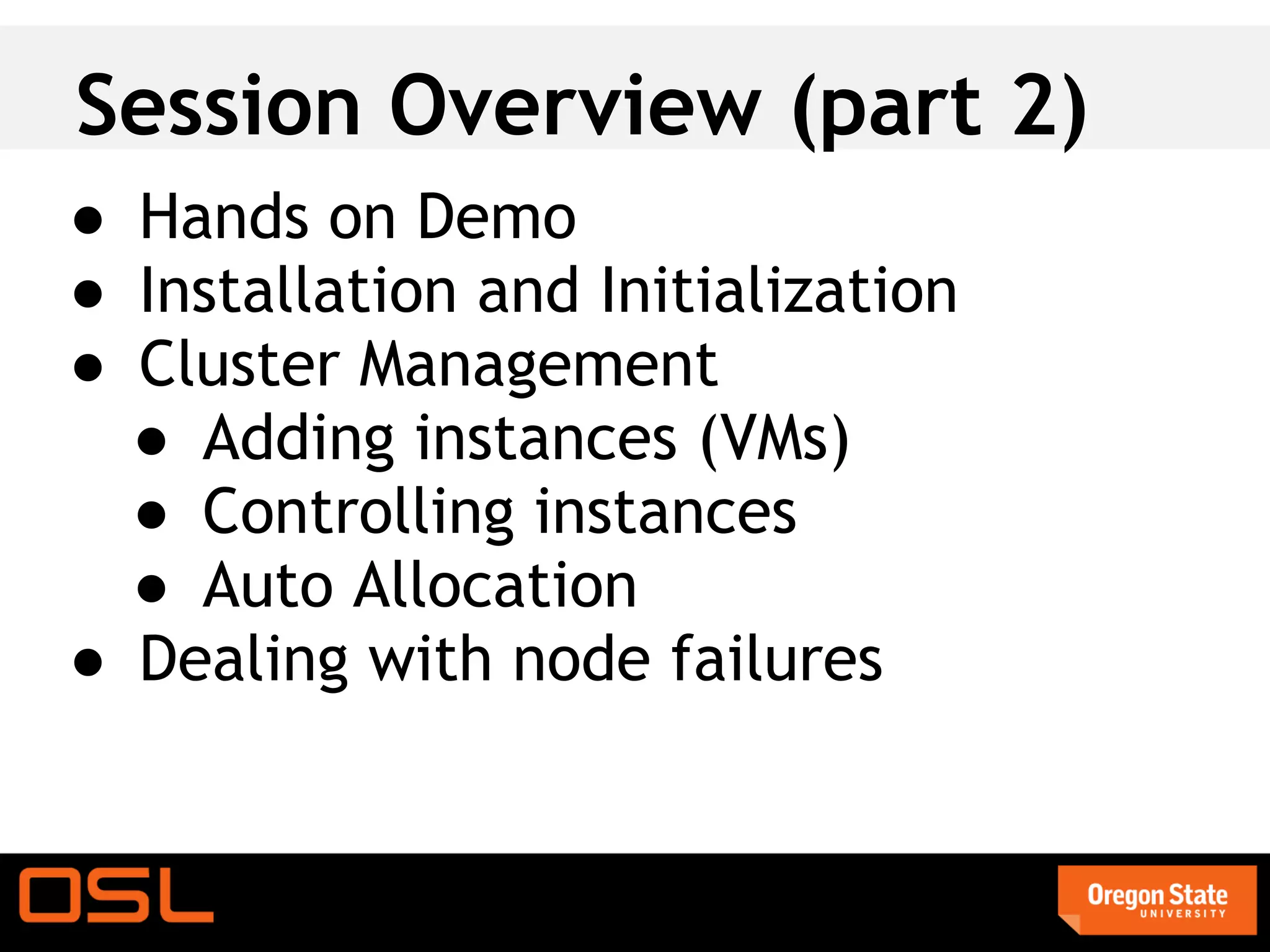
Session Overview (part 2)
● Hands on Demo
● Installation and Initialization
● Cluster Management
  ● Adding instances (VMs)
  ● Controlling instances
  ● Auto Allocation
● Dealing with node failures
Ganeti Setup & Walk-thru Guide

● 3-node cluster using Vagrant &
  VirtualBox
● Useful for testing
● Try out Ganeti on your laptop!
● Environment configured via puppet
● Installation requirements:
  ○ git, VirtualBox, & Vagrant
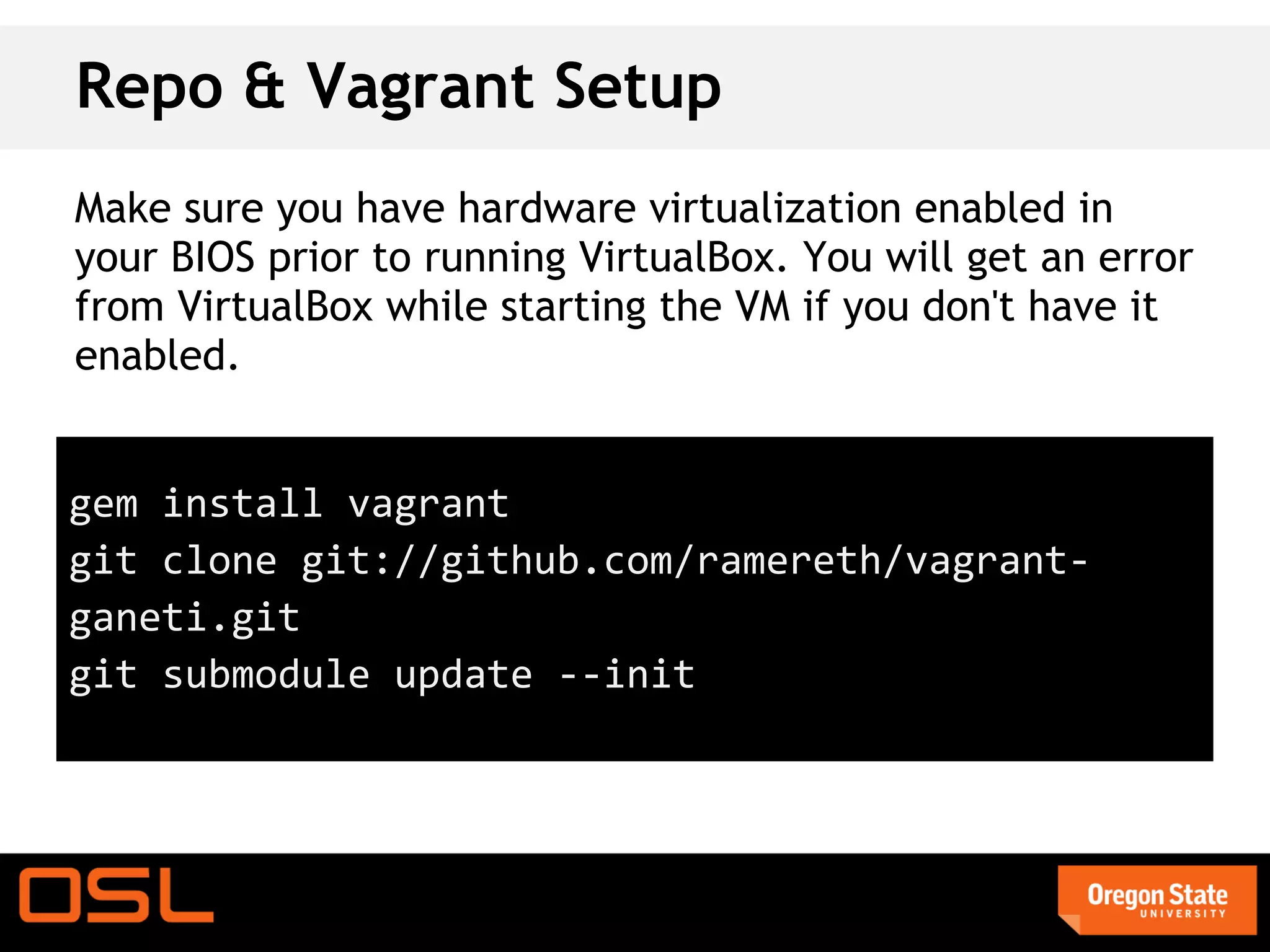
Repo & Vagrant Setup
Make sure you have hardware virtualization enabled in
your BIOS prior to running VirtualBox. You will get an error
from VirtualBox while starting the VM if you don't have it
enabled.


gem install vagrant
git clone git://github.com/ramereth/vagrant-
ganeti.git
git submodule update --init
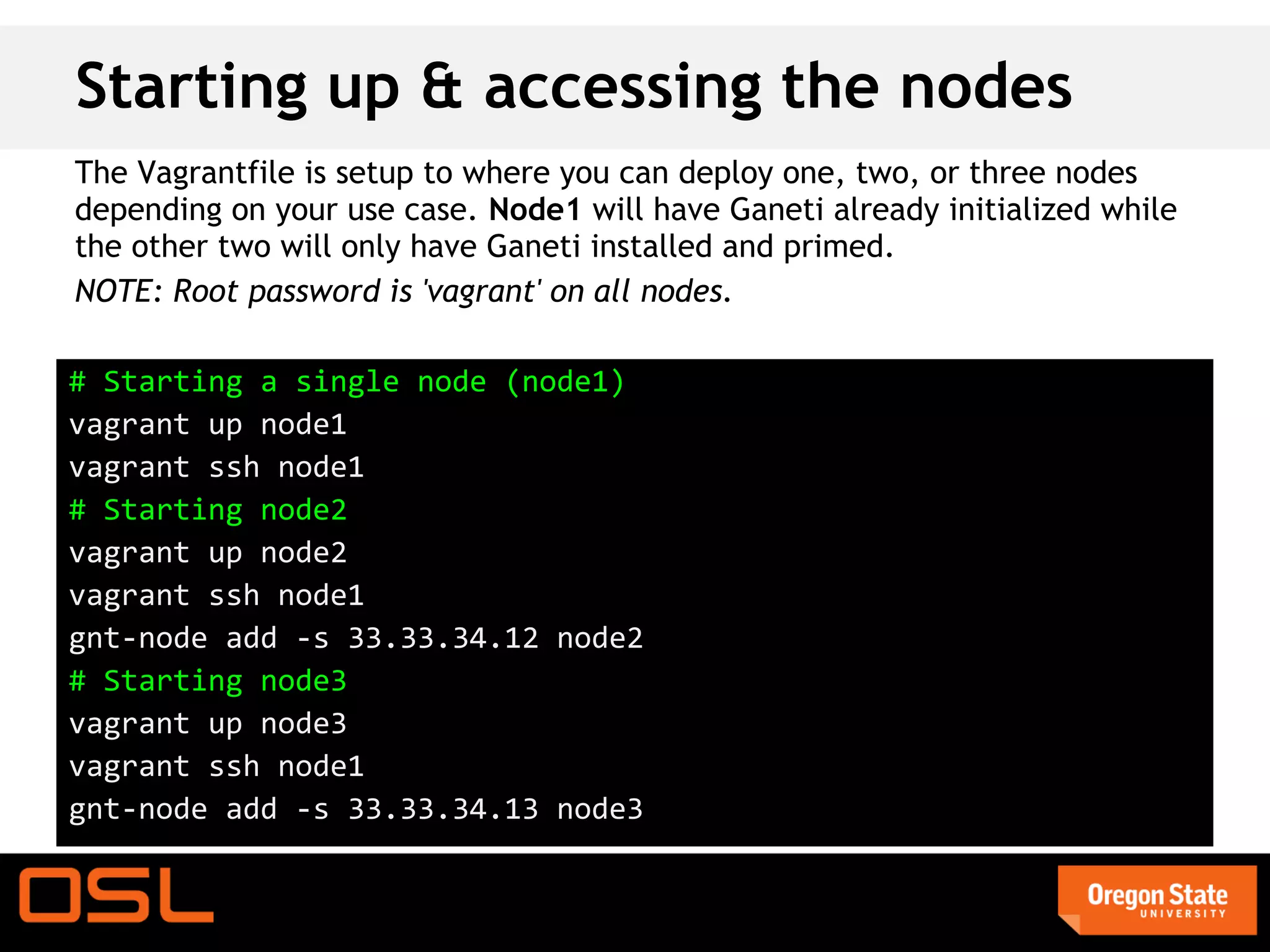
Starting up & accessing the nodes
The Vagrantfile is setup to where you can deploy one, two, or three nodes
depending on your use case. Node1 will have Ganeti already initialized while
the other two will only have Ganeti installed and primed.
NOTE: Root password is 'vagrant' on all nodes.

# Starting a single node (node1)
vagrant up node1
vagrant ssh node1
# Starting node2
vagrant up node2
vagrant ssh node1
gnt-node add -s 33.33.34.12 node2
# Starting node3
vagrant up node3
vagrant ssh node1
gnt-node add -s 33.33.34.13 node3
What Vagrant will do for you
1. Install all dependencies required for Ganeti

2. Setup the machine to function as a Ganeti
   node

3. Install Ganeti, Ganeti Htools, and Ganeti
   Instance Image

4. Setup and initialize Ganeti (node1 only)
Installing Ganeti
We’ve already installed Ganeti for you on the VMs, but
here are the steps that we did for documentation
purposes.
tar -zxvf ganeti-2.*tar.gz
cd ganeti-2.*
./configure --localstatedir=/var --sysconfdir=/etc && 
  make && make install &&

cp doc/examples/ganeti.initd /etc/init.d/ganeti
chmod +x /etc/init.d/ganeti
update-rc.d ganeti defaults 20 80
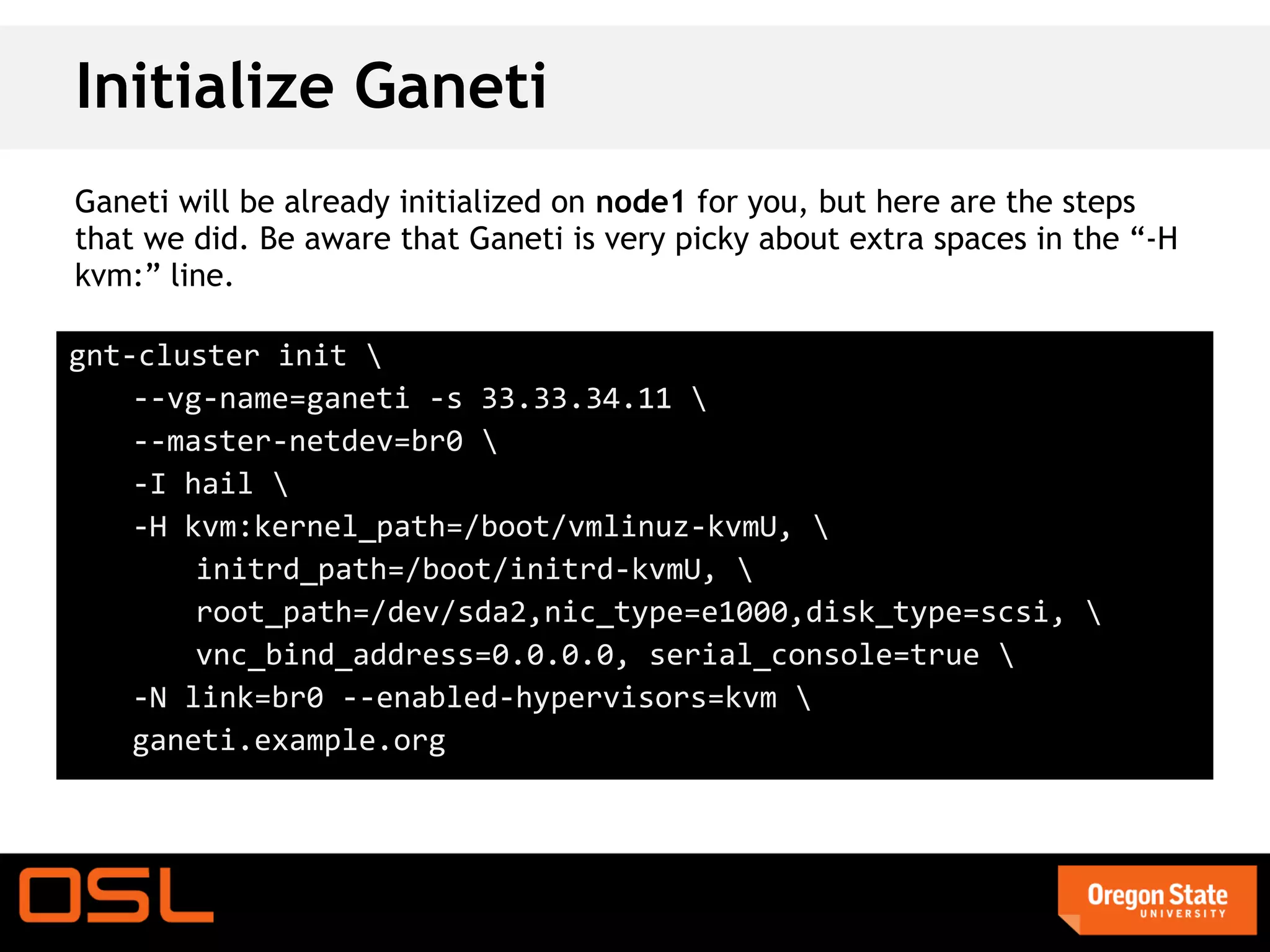
Initialize Ganeti
Ganeti will be already initialized on node1 for you, but here are the steps
that we did. Be aware that Ganeti is very picky about extra spaces in the “-H
kvm:” line.

gnt-cluster init 
    --vg-name=ganeti -s 33.33.34.11 
    --master-netdev=br0 
    -I hail 
    -H kvm:kernel_path=/boot/vmlinuz-kvmU, 
        initrd_path=/boot/initrd-kvmU, 
        root_path=/dev/sda2,nic_type=e1000,disk_type=scsi, 
        vnc_bind_address=0.0.0.0, serial_console=true 
    -N link=br0 --enabled-hypervisors=kvm 
    ganeti.example.org
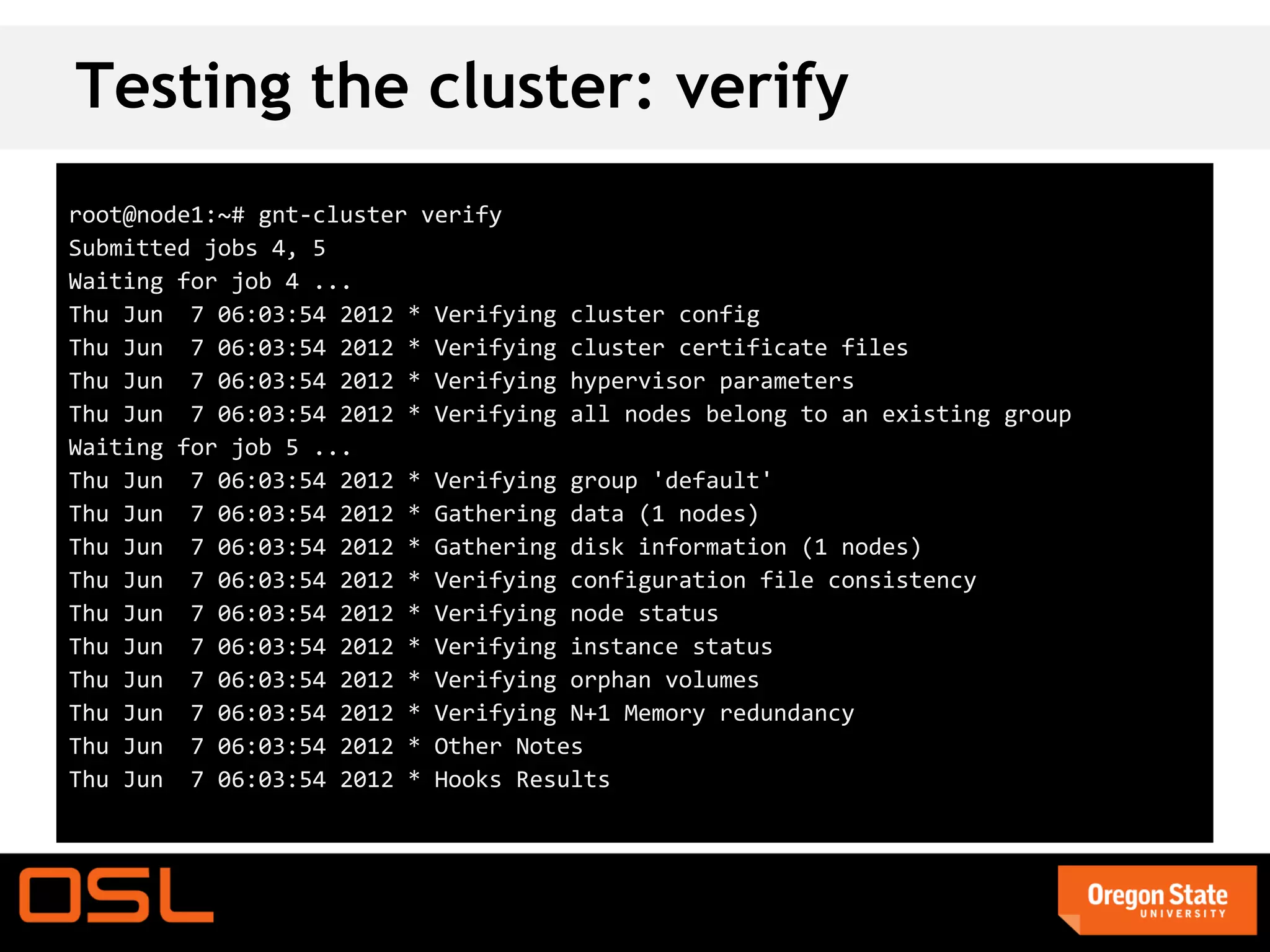
Testing the cluster: verify
root@node1:~# gnt-cluster verify
Submitted jobs 4, 5
Waiting for job 4 ...
Thu Jun 7 06:03:54 2012 * Verifying cluster config
Thu Jun 7 06:03:54 2012 * Verifying cluster certificate files
Thu Jun 7 06:03:54 2012 * Verifying hypervisor parameters
Thu Jun 7 06:03:54 2012 * Verifying all nodes belong to an existing group
Waiting for job 5 ...
Thu Jun 7 06:03:54 2012 * Verifying group 'default'
Thu Jun 7 06:03:54 2012 * Gathering data (1 nodes)
Thu Jun 7 06:03:54 2012 * Gathering disk information (1 nodes)
Thu Jun 7 06:03:54 2012 * Verifying configuration file consistency
Thu Jun 7 06:03:54 2012 * Verifying node status
Thu Jun 7 06:03:54 2012 * Verifying instance status
Thu Jun 7 06:03:54 2012 * Verifying orphan volumes
Thu Jun 7 06:03:54 2012 * Verifying N+1 Memory redundancy
Thu Jun 7 06:03:54 2012 * Other Notes
Thu Jun 7 06:03:54 2012 * Hooks Results
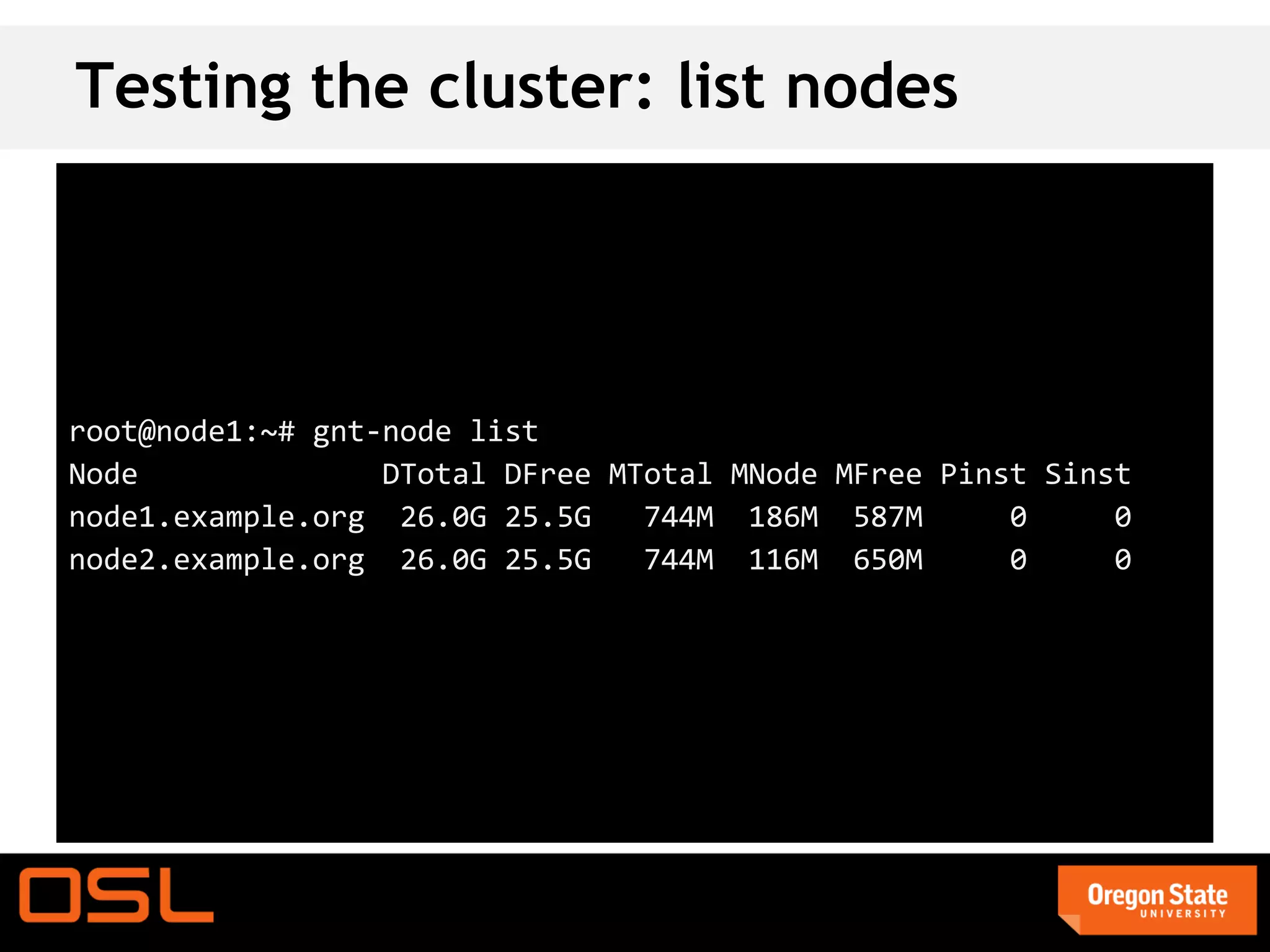
Testing the cluster: list nodes


root@node1:~# gnt-node list
Node              DTotal DFree MTotal MNode MFree Pinst Sinst
node1.example.org 26.0G 25.5G    744M 186M 587M       0     0
node2.example.org 26.0G 25.5G    744M 116M 650M       0     0
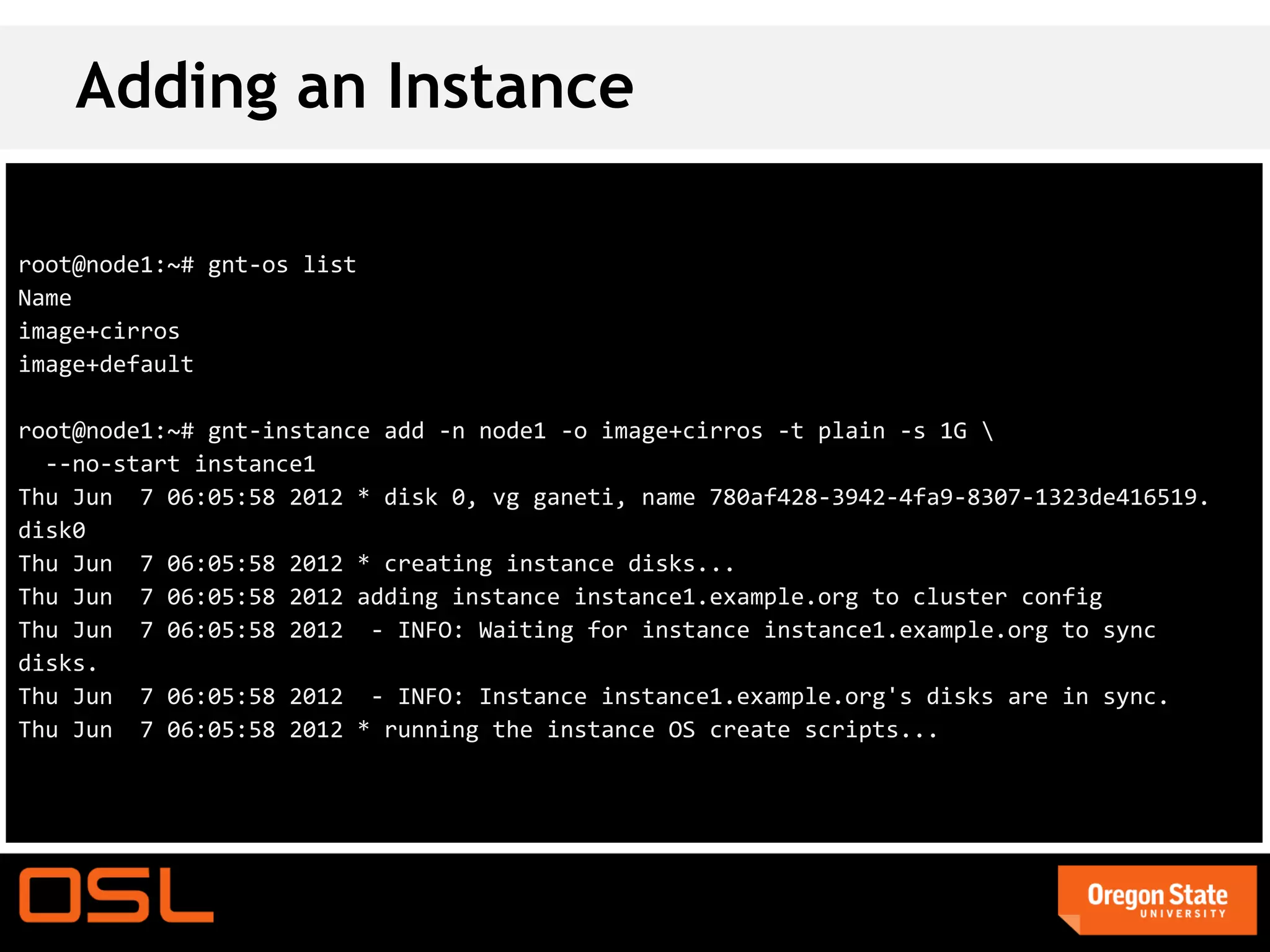
Adding an Instance

root@node1:~# gnt-os list
Name
image+cirros
image+default

root@node1:~# gnt-instance add -n node1 -o image+cirros -t plain -s 1G 
  --no-start instance1
Thu Jun 7 06:05:58 2012 * disk 0, vg ganeti, name 780af428-3942-4fa9-8307-1323de416519.
disk0
Thu Jun 7 06:05:58 2012 * creating instance disks...
Thu Jun 7 06:05:58 2012 adding instance instance1.example.org to cluster config
Thu Jun 7 06:05:58 2012 - INFO: Waiting for instance instance1.example.org to sync
disks.
Thu Jun 7 06:05:58 2012 - INFO: Instance instance1.example.org's disks are in sync.
Thu Jun 7 06:05:58 2012 * running the instance OS create scripts...
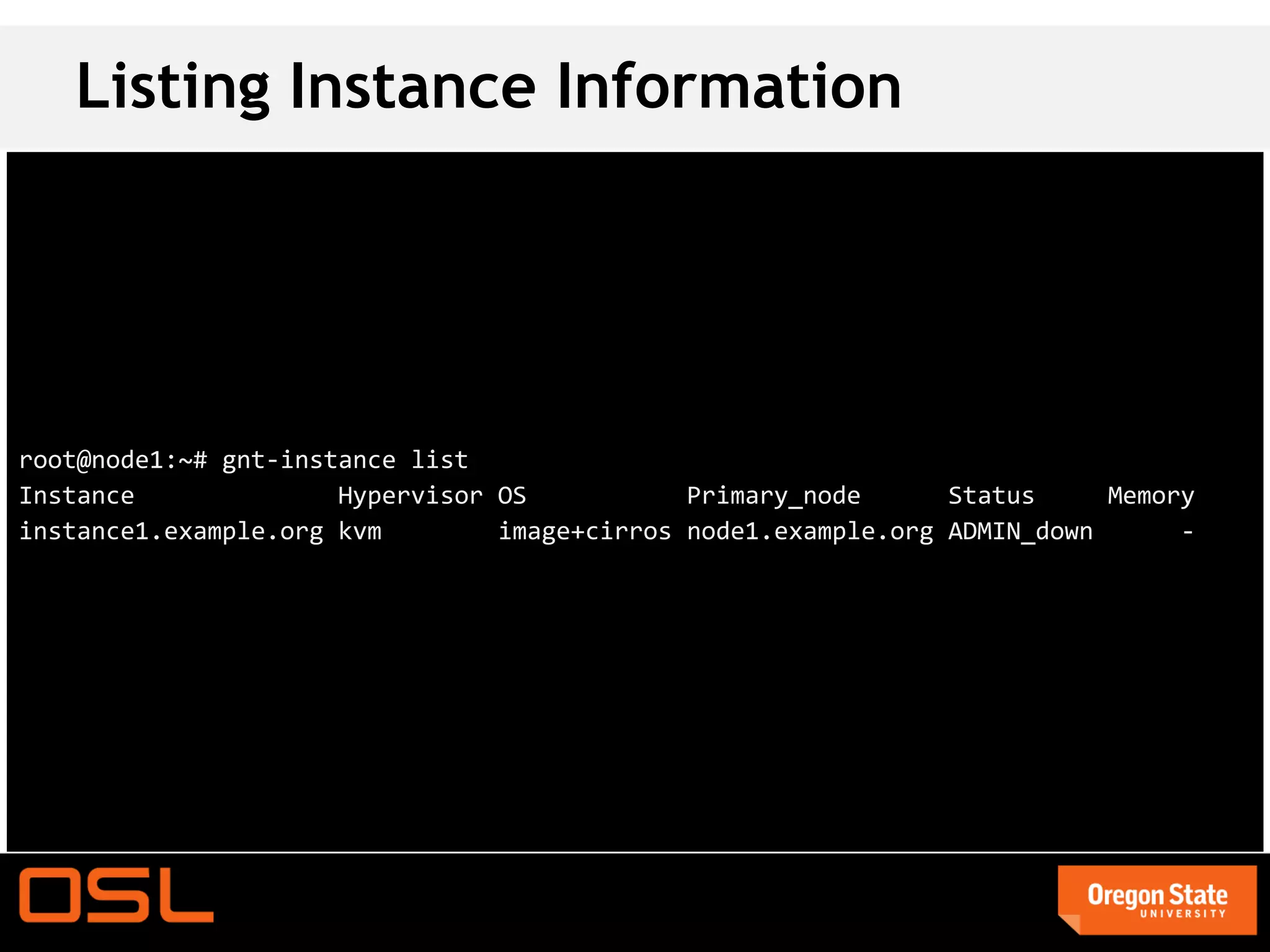
Listing Instance Information


root@node1:~# gnt-instance list
Instance              Hypervisor OS           Primary_node      Status     Memory
instance1.example.org kvm        image+cirros node1.example.org ADMIN_down      -
Listing Instance Information
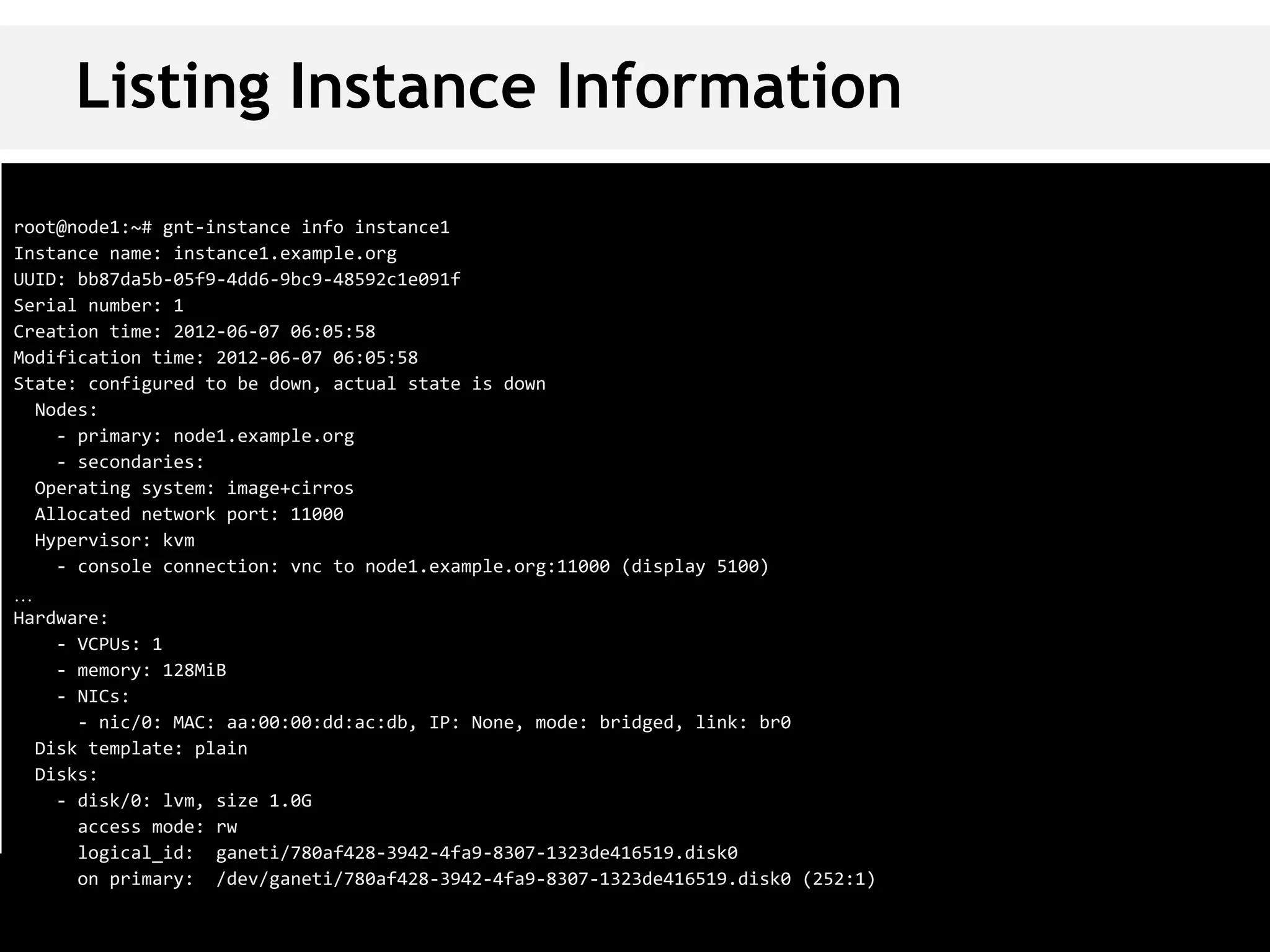
root@node1:~# gnt-instance info instance1
Instance name: instance1.example.org
UUID: bb87da5b-05f9-4dd6-9bc9-48592c1e091f
Serial number: 1
Creation time: 2012-06-07 06:05:58
Modification time: 2012-06-07 06:05:58
State: configured to be down, actual state is down
  Nodes:
    - primary: node1.example.org
    - secondaries:
  Operating system: image+cirros
  Allocated network port: 11000
  Hypervisor: kvm
    - console connection: vnc to node1.example.org:11000 (display 5100)
…
Hardware:
    - VCPUs: 1
    - memory: 128MiB
    - NICs:
      - nic/0: MAC: aa:00:00:dd:ac:db, IP: None, mode: bridged, link: br0
  Disk template: plain
  Disks:
    - disk/0: lvm, size 1.0G
      access mode: rw
      logical_id: ganeti/780af428-3942-4fa9-8307-1323de416519.disk0
      on primary: /dev/ganeti/780af428-3942-4fa9-8307-1323de416519.disk0 (252:1)
Controlling Instances

root@node1:~# gnt-instance start instance1
Waiting for job 10 for instance1.example.org ...

root@node1:~# gnt-instance console instance1

login as 'vagrant' user. default password: 'vagrant'. use 'sudo' for root.
cirros login:

# Press crtl+] to escape console.

root@node1:~# gnt-instance shutdown instance1
Waiting for job 11 for instance1.example.org ...
Changing the Disk Type
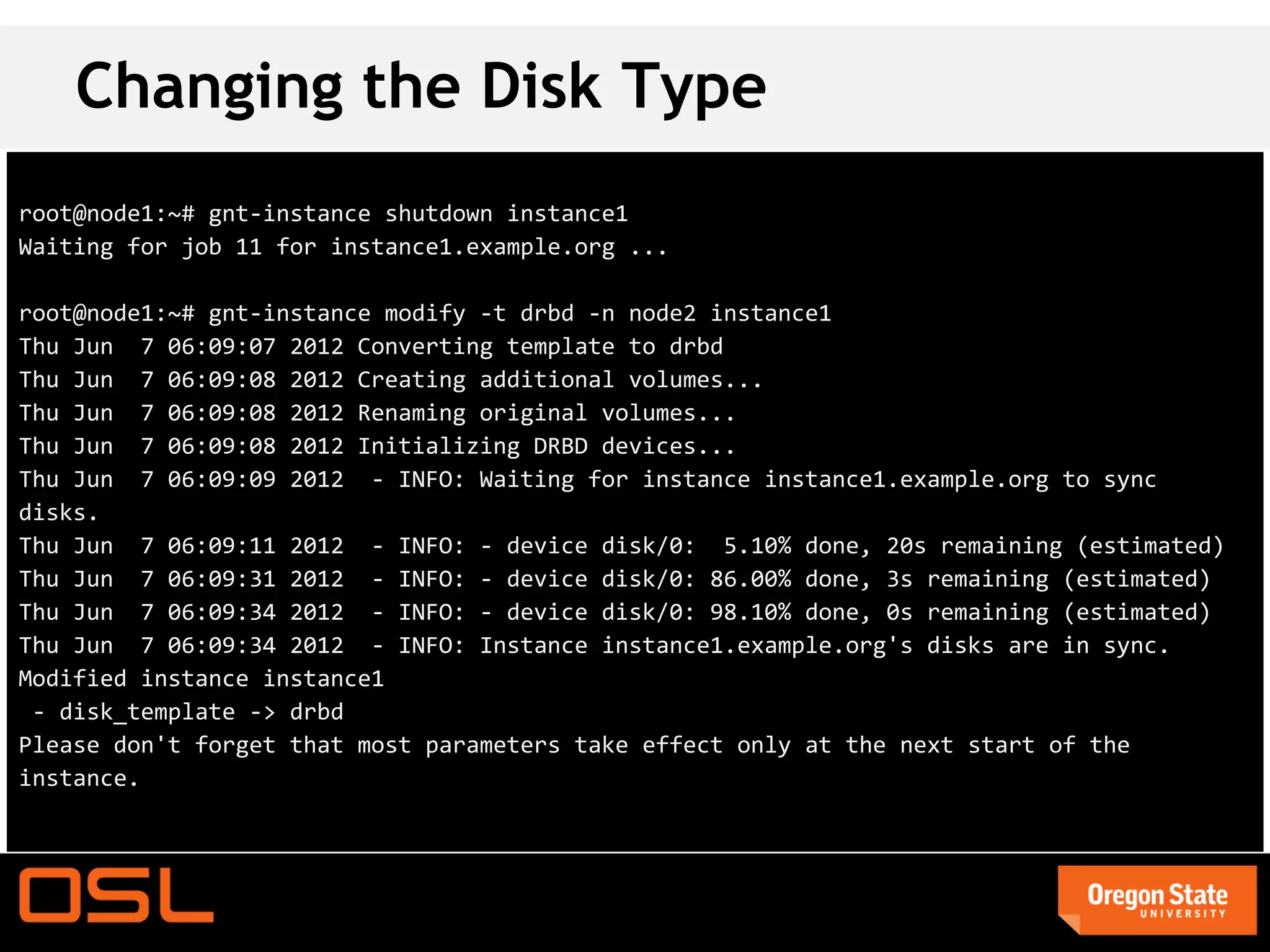
root@node1:~# gnt-instance shutdown instance1
Waiting for job 11 for instance1.example.org ...

root@node1:~# gnt-instance modify -t drbd -n node2 instance1
Thu Jun 7 06:09:07 2012 Converting template to drbd
Thu Jun 7 06:09:08 2012 Creating additional volumes...
Thu Jun 7 06:09:08 2012 Renaming original volumes...
Thu Jun 7 06:09:08 2012 Initializing DRBD devices...
Thu Jun 7 06:09:09 2012 - INFO: Waiting for instance instance1.example.org to sync
disks.
Thu Jun 7 06:09:11 2012 - INFO: - device disk/0: 5.10% done, 20s remaining (estimated)
Thu Jun 7 06:09:31 2012 - INFO: - device disk/0: 86.00% done, 3s remaining (estimated)
Thu Jun 7 06:09:34 2012 - INFO: - device disk/0: 98.10% done, 0s remaining (estimated)
Thu Jun 7 06:09:34 2012 - INFO: Instance instance1.example.org's disks are in sync.
Modified instance instance1
 - disk_template -> drbd
Please don't forget that most parameters take effect only at the next start of the
instance.
Instance Failover


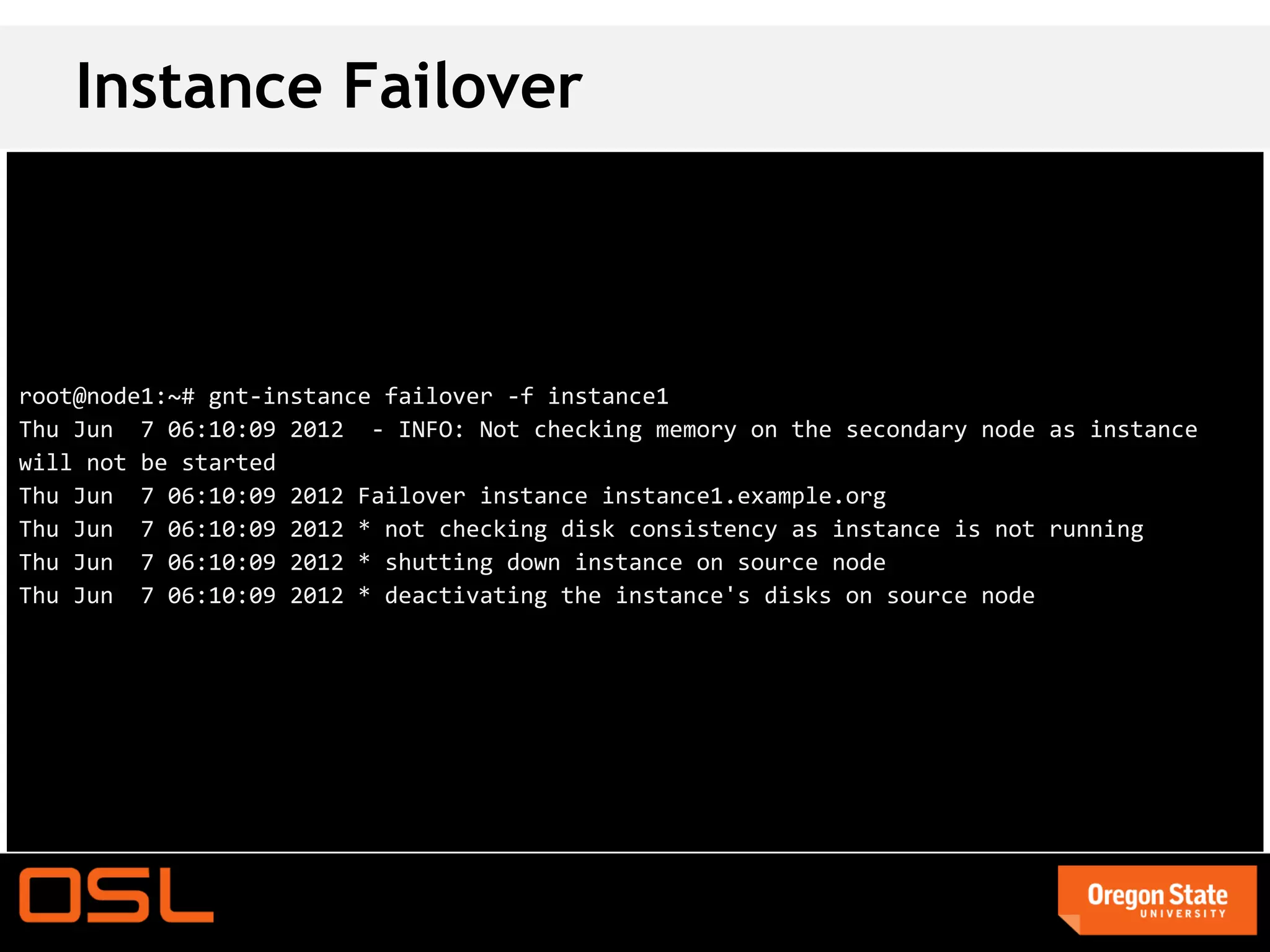
root@node1:~# gnt-instance failover -f instance1
Thu Jun 7 06:10:09 2012 - INFO: Not checking memory on the secondary node as instance
will not be started
Thu Jun 7 06:10:09 2012 Failover instance instance1.example.org
Thu Jun 7 06:10:09 2012 * not checking disk consistency as instance is not running
Thu Jun 7 06:10:09 2012 * shutting down instance on source node
Thu Jun 7 06:10:09 2012 * deactivating the instance's disks on source node
Instance Migration
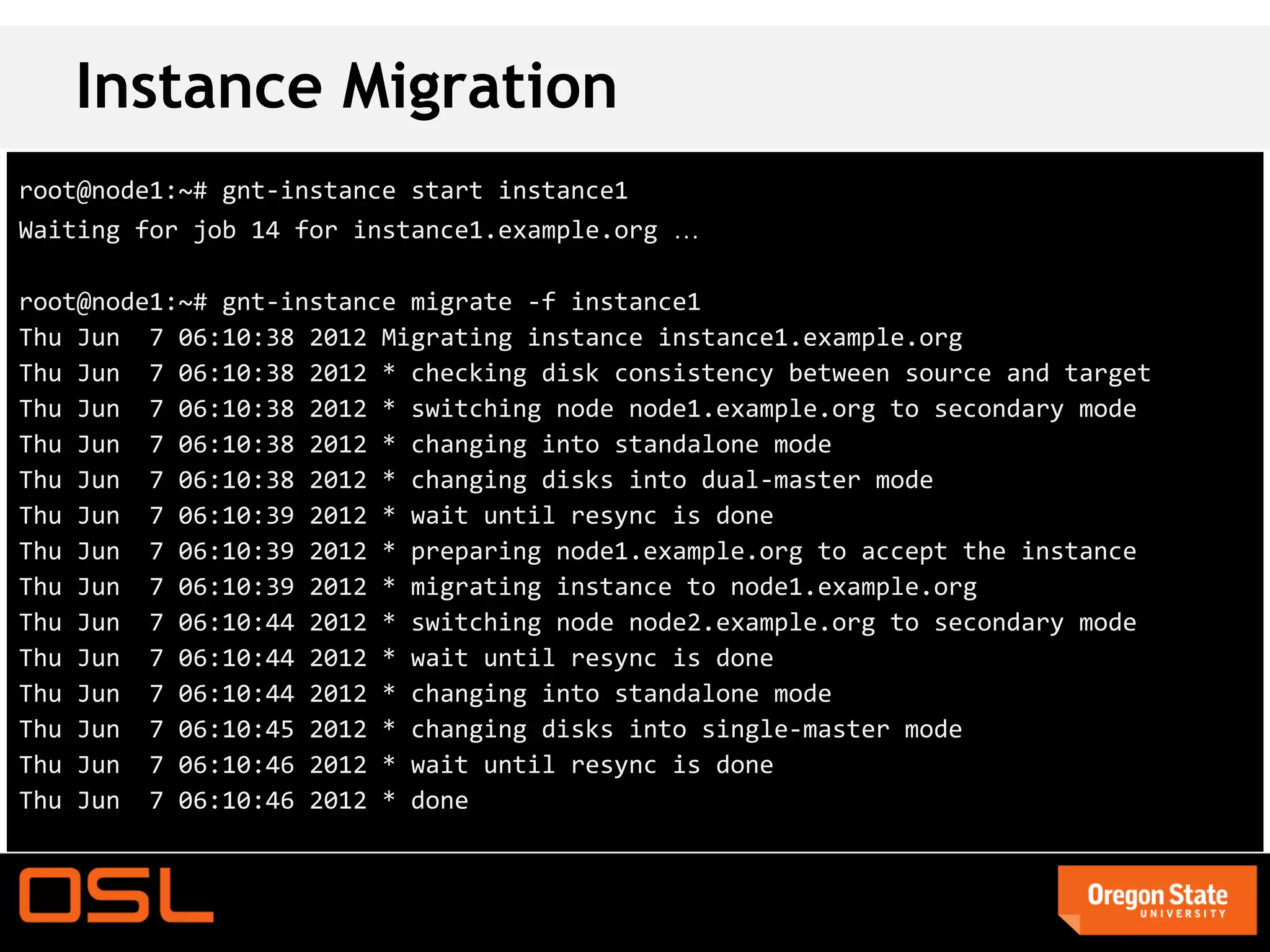
root@node1:~# gnt-instance start instance1
Waiting for job 14 for instance1.example.org …

root@node1:~# gnt-instance migrate -f instance1
Thu Jun 7 06:10:38 2012 Migrating instance instance1.example.org
Thu Jun 7 06:10:38 2012 * checking disk consistency between source and target
Thu Jun 7 06:10:38 2012 * switching node node1.example.org to secondary mode
Thu Jun 7 06:10:38 2012 * changing into standalone mode
Thu Jun 7 06:10:38 2012 * changing disks into dual-master mode
Thu Jun 7 06:10:39 2012 * wait until resync is done
Thu Jun 7 06:10:39 2012 * preparing node1.example.org to accept the instance
Thu Jun 7 06:10:39 2012 * migrating instance to node1.example.org
Thu Jun 7 06:10:44 2012 * switching node node2.example.org to secondary mode
Thu Jun 7 06:10:44 2012 * wait until resync is done
Thu Jun 7 06:10:44 2012 * changing into standalone mode
Thu Jun 7 06:10:45 2012 * changing disks into single-master mode
Thu Jun 7 06:10:46 2012 * wait until resync is done
Thu Jun 7 06:10:46 2012 * done
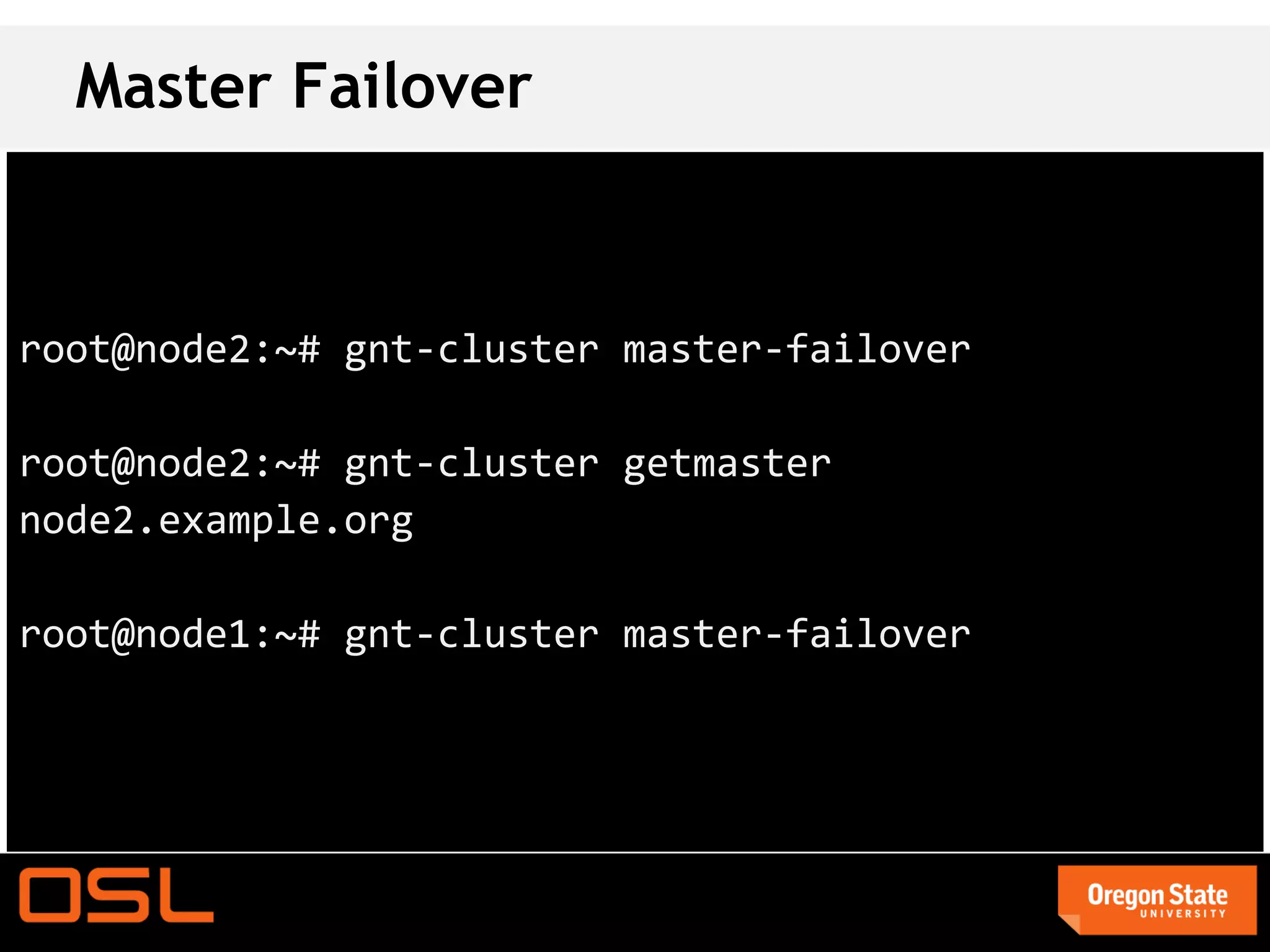
Master Failover


root@node2:~# gnt-cluster master-failover

root@node2:~# gnt-cluster getmaster
node2.example.org

root@node1:~# gnt-cluster master-failover
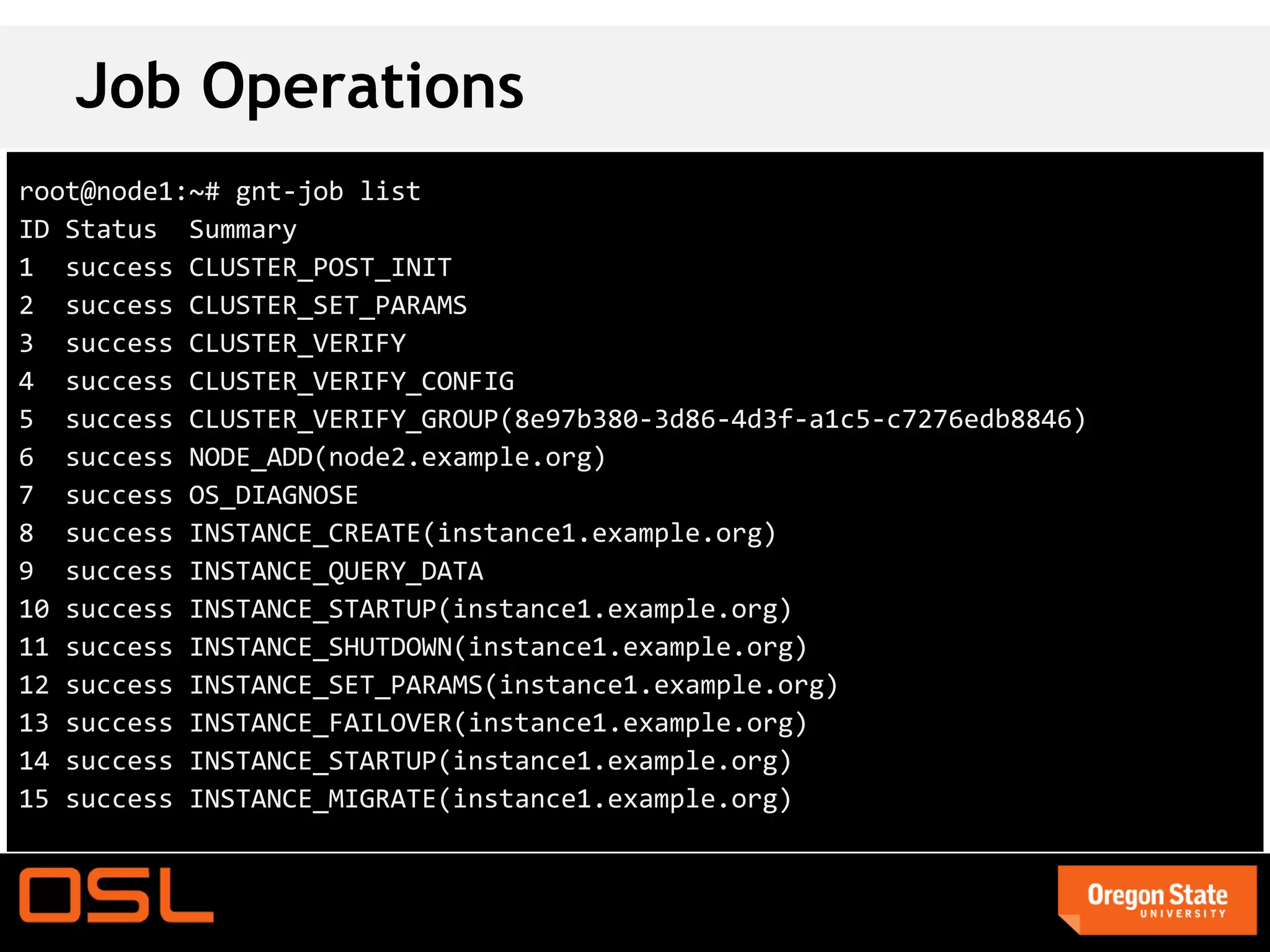
Job Operations
root@node1:~# gnt-job list
ID Status Summary
1 success CLUSTER_POST_INIT
2 success CLUSTER_SET_PARAMS
3 success CLUSTER_VERIFY
4 success CLUSTER_VERIFY_CONFIG
5 success CLUSTER_VERIFY_GROUP(8e97b380-3d86-4d3f-a1c5-c7276edb8846)
6 success NODE_ADD(node2.example.org)
7 success OS_DIAGNOSE
8 success INSTANCE_CREATE(instance1.example.org)
9 success INSTANCE_QUERY_DATA
10 success INSTANCE_STARTUP(instance1.example.org)
11 success INSTANCE_SHUTDOWN(instance1.example.org)
12 success INSTANCE_SET_PARAMS(instance1.example.org)
13 success INSTANCE_FAILOVER(instance1.example.org)
14 success INSTANCE_STARTUP(instance1.example.org)
15 success INSTANCE_MIGRATE(instance1.example.org)
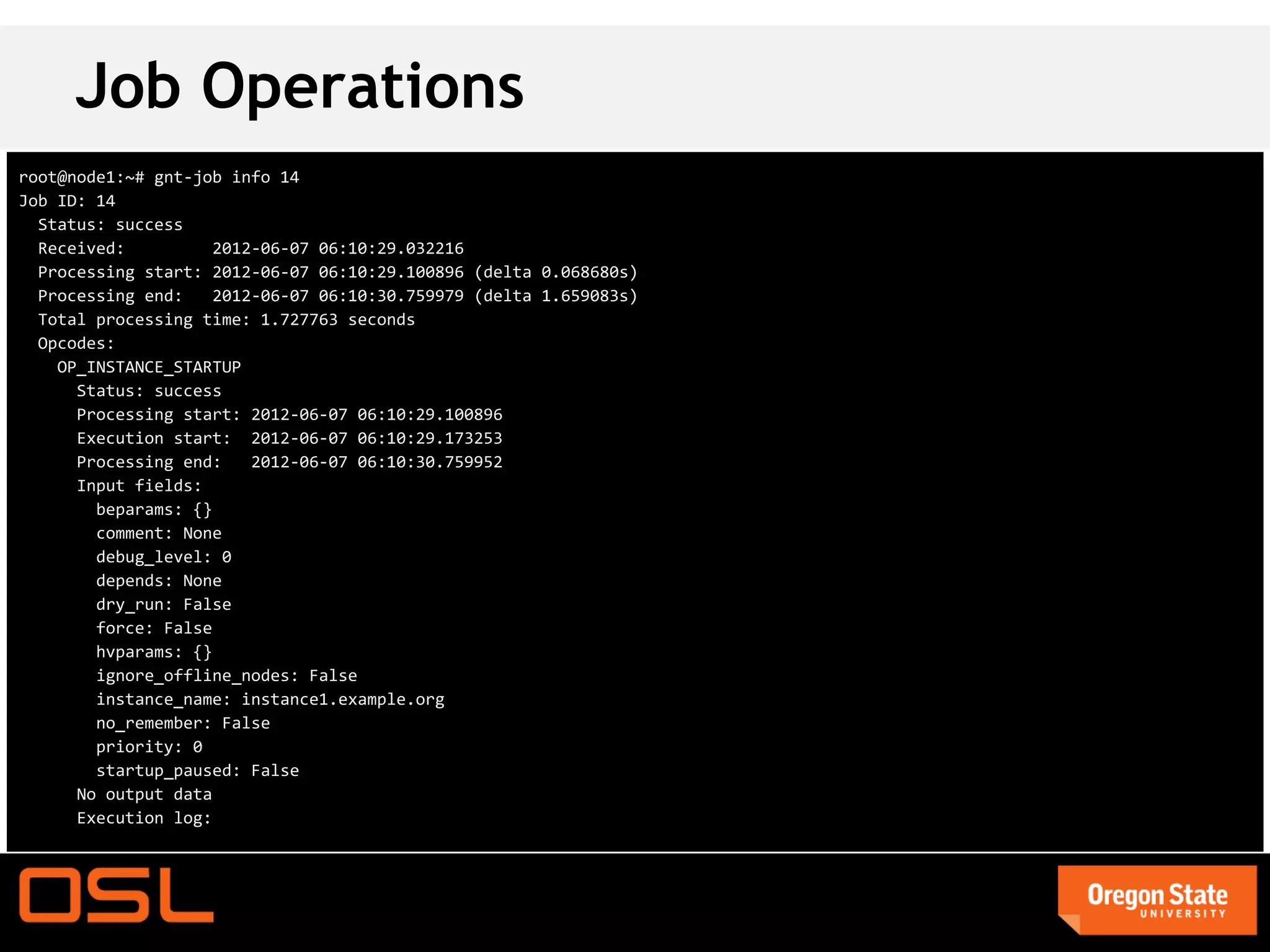
Job Operations
root@node1:~# gnt-job info 14
Job ID: 14
  Status: success
  Received:          2012-06-07 06:10:29.032216
  Processing start: 2012-06-07 06:10:29.100896 (delta 0.068680s)
  Processing end:    2012-06-07 06:10:30.759979 (delta 1.659083s)
  Total processing time: 1.727763 seconds
  Opcodes:
    OP_INSTANCE_STARTUP
      Status: success
      Processing start: 2012-06-07 06:10:29.100896
      Execution start: 2012-06-07 06:10:29.173253
      Processing end:    2012-06-07 06:10:30.759952
      Input fields:
        beparams: {}
        comment: None
        debug_level: 0
        depends: None
        dry_run: False
        force: False
        hvparams: {}
        ignore_offline_nodes: False
        instance_name: instance1.example.org
        no_remember: False
        priority: 0
        startup_paused: False
      No output data
      Execution log:
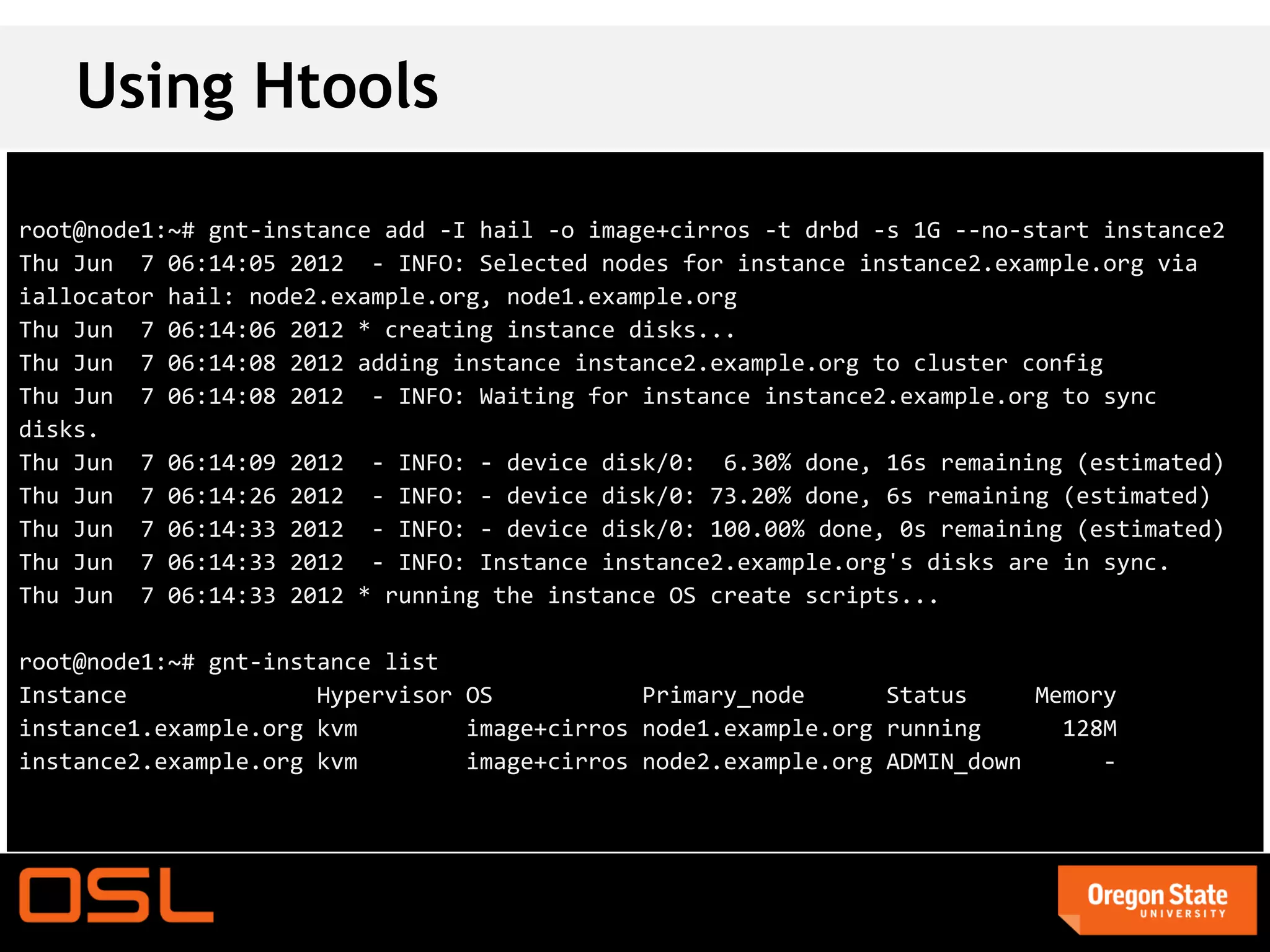
Using Htools

root@node1:~# gnt-instance add -I hail -o image+cirros -t drbd -s 1G --no-start instance2
Thu Jun 7 06:14:05 2012 - INFO: Selected nodes for instance instance2.example.org via
iallocator hail: node2.example.org, node1.example.org
Thu Jun 7 06:14:06 2012 * creating instance disks...
Thu Jun 7 06:14:08 2012 adding instance instance2.example.org to cluster config
Thu Jun 7 06:14:08 2012 - INFO: Waiting for instance instance2.example.org to sync
disks.
Thu Jun 7 06:14:09 2012 - INFO: - device disk/0: 6.30% done, 16s remaining (estimated)
Thu Jun 7 06:14:26 2012 - INFO: - device disk/0: 73.20% done, 6s remaining (estimated)
Thu Jun 7 06:14:33 2012 - INFO: - device disk/0: 100.00% done, 0s remaining (estimated)
Thu Jun 7 06:14:33 2012 - INFO: Instance instance2.example.org's disks are in sync.
Thu Jun 7 06:14:33 2012 * running the instance OS create scripts...

root@node1:~# gnt-instance list
Instance              Hypervisor OS           Primary_node      Status     Memory
instance1.example.org kvm        image+cirros node1.example.org running      128M
instance2.example.org kvm        image+cirros node2.example.org ADMIN_down      -
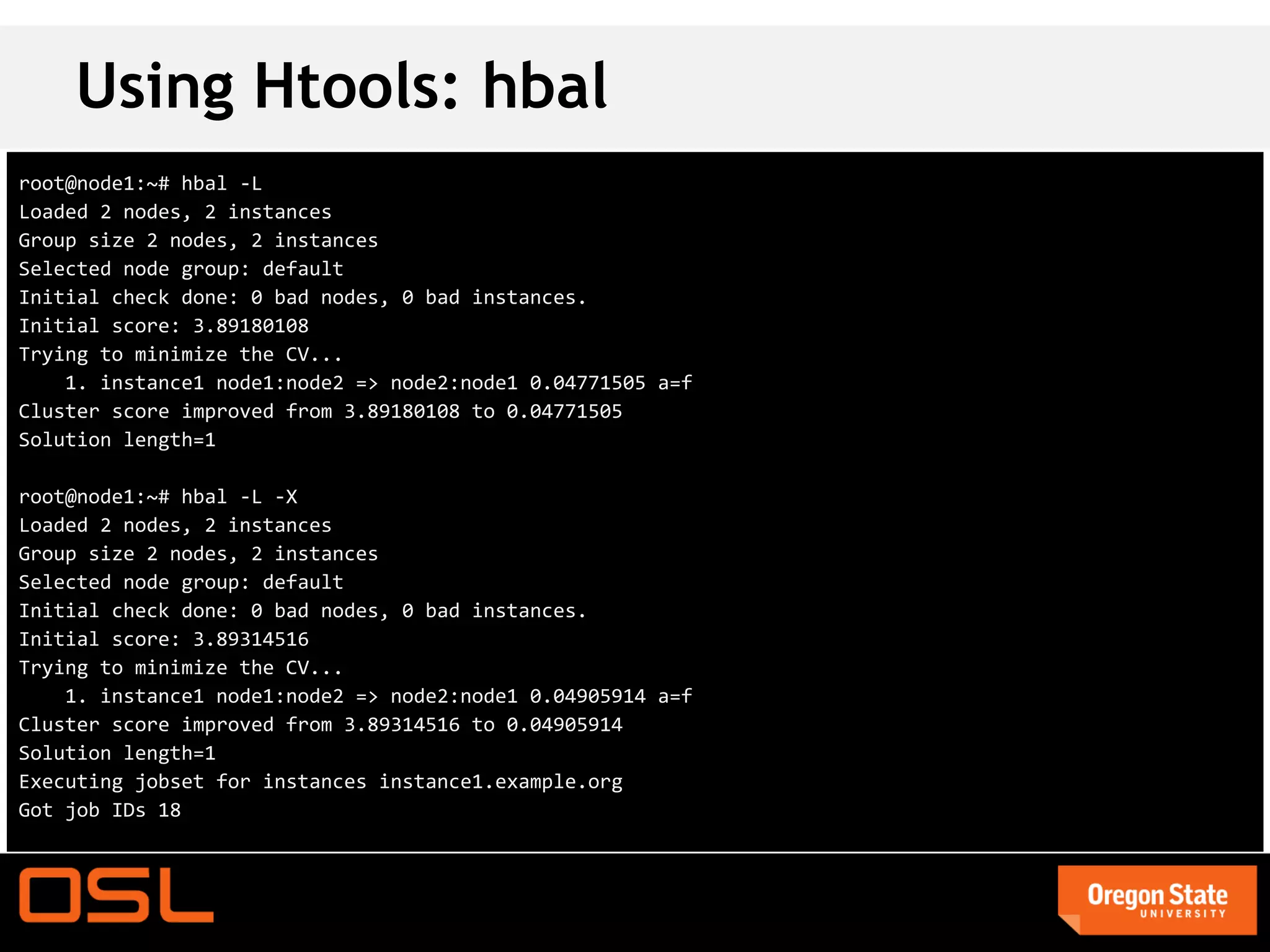
Using Htools: hbal
root@node1:~# hbal -L
Loaded 2 nodes, 2 instances
Group size 2 nodes, 2 instances
Selected node group: default
Initial check done: 0 bad nodes, 0 bad instances.
Initial score: 3.89180108
Trying to minimize the CV...
    1. instance1 node1:node2 => node2:node1 0.04771505 a=f
Cluster score improved from 3.89180108 to 0.04771505
Solution length=1

root@node1:~# hbal -L -X
Loaded 2 nodes, 2 instances
Group size 2 nodes, 2 instances
Selected node group: default
Initial check done: 0 bad nodes, 0 bad instances.
Initial score: 3.89314516
Trying to minimize the CV...
    1. instance1 node1:node2 => node2:node1 0.04905914 a=f
Cluster score improved from 3.89314516 to 0.04905914
Solution length=1
Executing jobset for instances instance1.example.org
Got job IDs 18
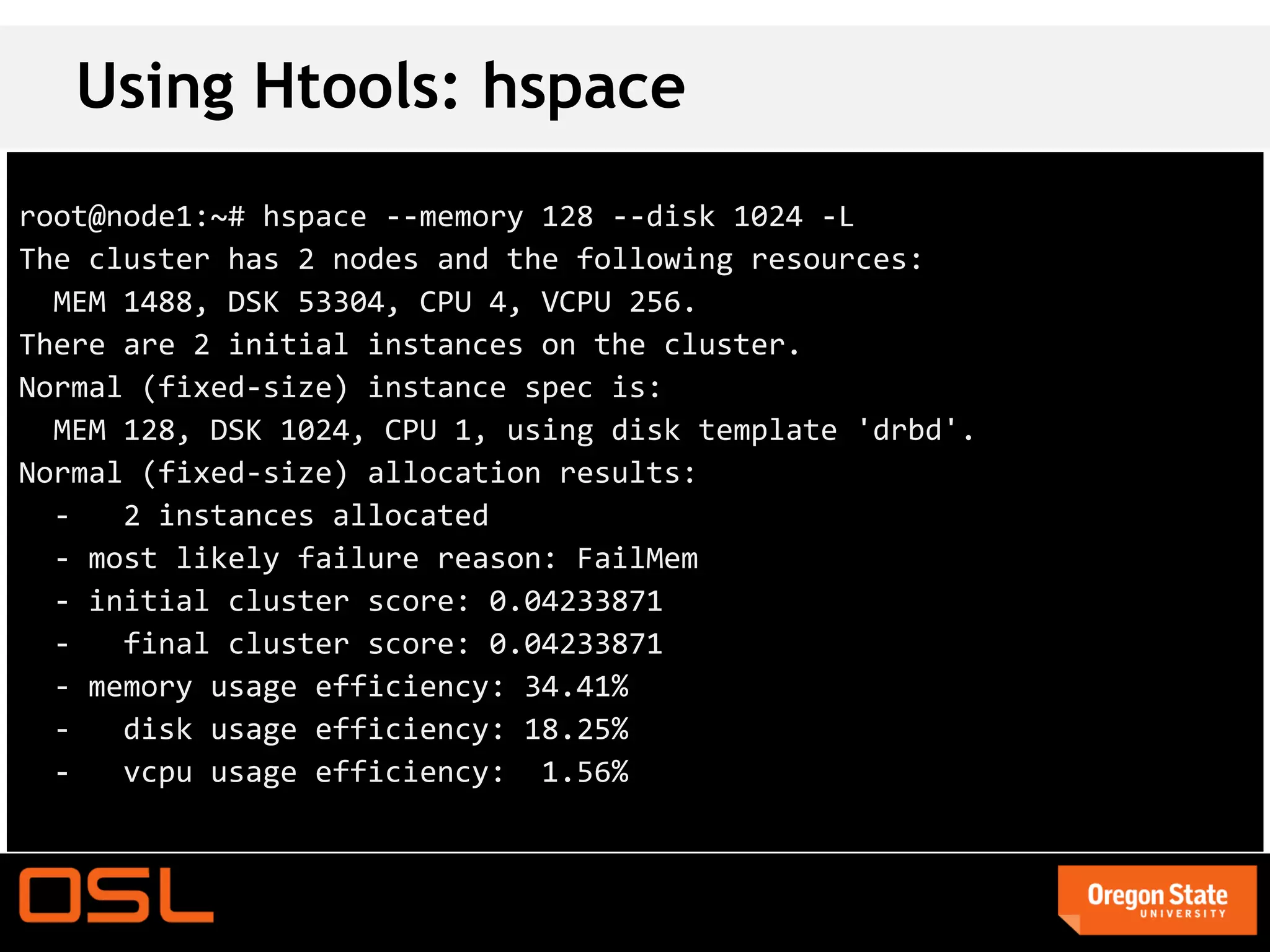
Using Htools: hspace
root@node1:~# hspace --memory 128 --disk 1024 -L
The cluster has 2 nodes and the following resources:
  MEM 1488, DSK 53304, CPU 4, VCPU 256.
There are 2 initial instances on the cluster.
Normal (fixed-size) instance spec is:
  MEM 128, DSK 1024, CPU 1, using disk template 'drbd'.
Normal (fixed-size) allocation results:
  -   2 instances allocated
  - most likely failure reason: FailMem
  - initial cluster score: 0.04233871
  -   final cluster score: 0.04233871
  - memory usage efficiency: 34.41%
  -   disk usage efficiency: 18.25%
  -   vcpu usage efficiency: 1.56%
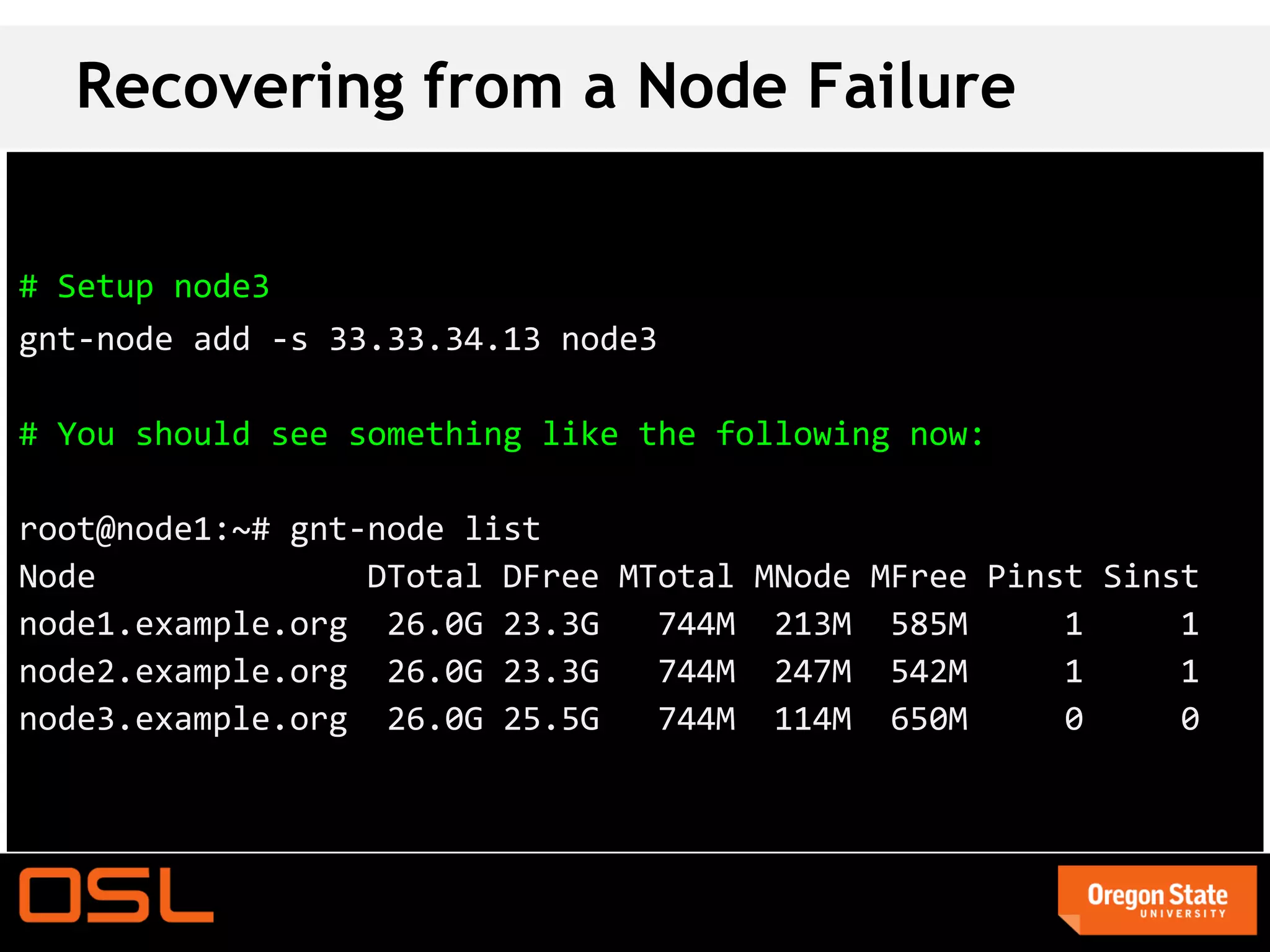
Recovering from a Node Failure

# Setup node3
gnt-node add -s 33.33.34.13 node3

# You should see something like the following now:

root@node1:~# gnt-node list
Node              DTotal DFree MTotal MNode MFree Pinst Sinst
node1.example.org 26.0G 23.3G    744M 213M 585M       1     1
node2.example.org 26.0G 23.3G    744M 247M 542M       1     1
node3.example.org 26.0G 25.5G    744M 114M 650M       0     0
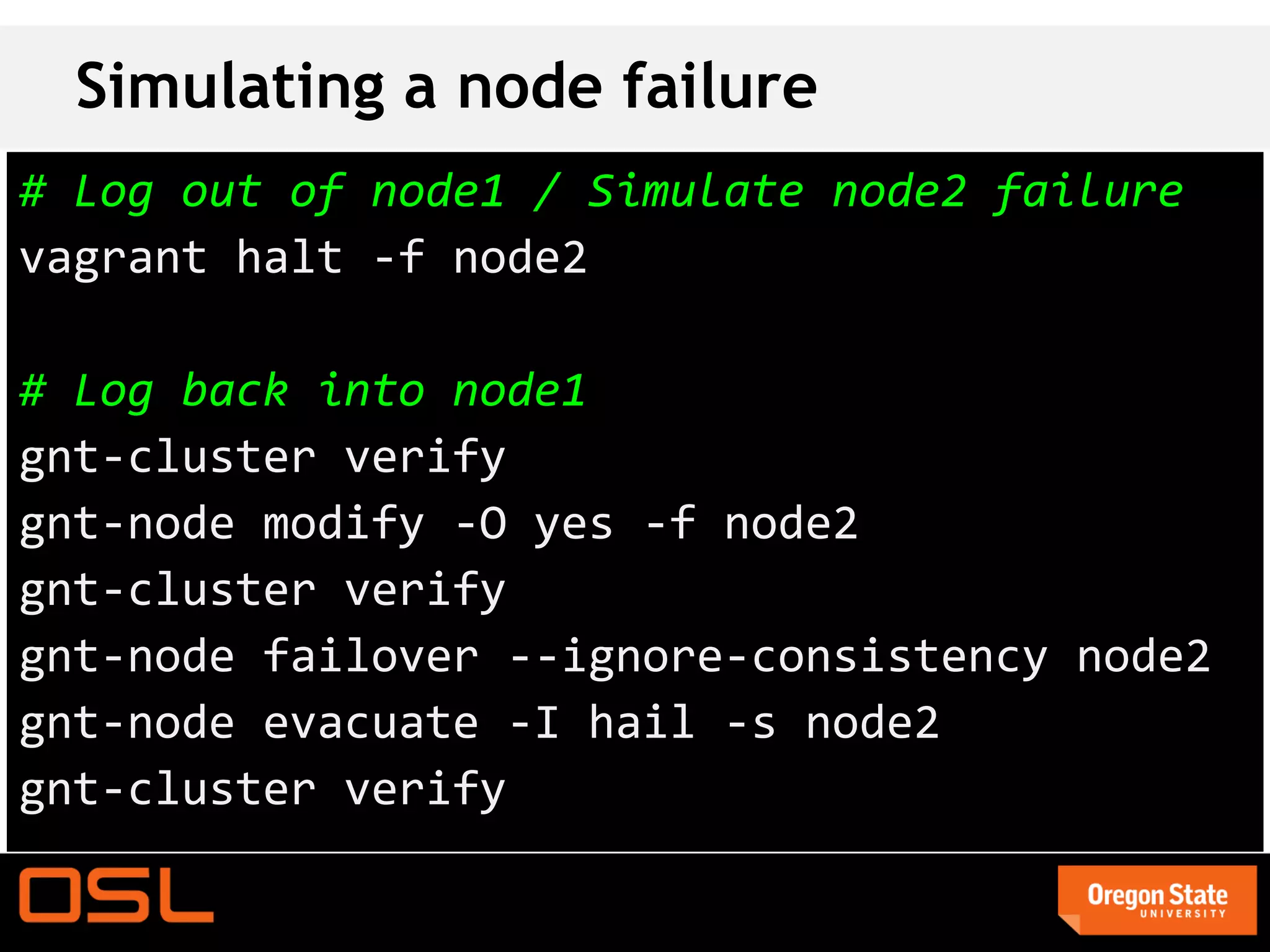
Simulating a node failure
# Log out of node1 / Simulate node2 failure
vagrant halt -f node2

# Log back into node1
gnt-cluster verify
gnt-node modify -O yes -f node2
gnt-cluster verify
gnt-node failover --ignore-consistency node2
gnt-node evacuate -I hail -s node2
gnt-cluster verify
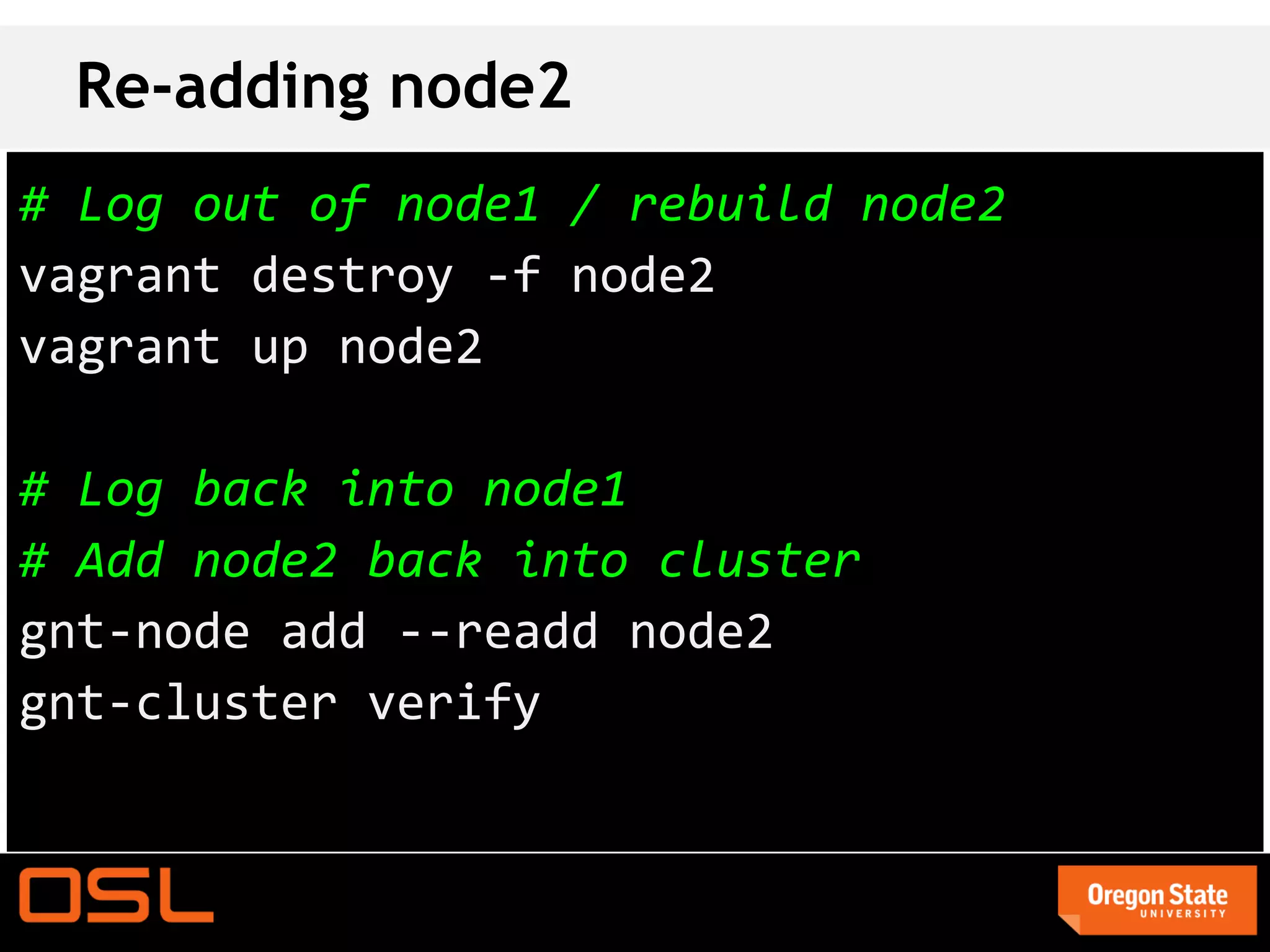
Re-adding node2
# Log out of node1 / rebuild node2
vagrant destroy -f node2
vagrant up node2

# Log back into node1
# Add node2 back into cluster
gnt-node add --readd node2
gnt-cluster verify
Questions?                              (Part 2 Conclusion)
              Lance Albertson
              lance@osuosl.org
                 @ramereth
        http://lancealbertson.com

                  Check it out at: http://code.google.com/p/ganeti/

                              Or just search for "Ganeti"

          Vagrant environment: https://github.com/ramereth/vagrant-ganeti

              Try it. Love it. Improve it. Contribute back (CLA required).


                         © 2009-2012 Oregon State University

Use under CC-by-SA / Some content borrowed/modified from Iustin Pop (with permission)

Ganeti Hands-on Walk-thru (part 2) -- LinuxCon 2012

  • 1.
    Ganeti Setup &Walk- thru Guide (part 2) Lance Albertson @ramereth Associate Director OSU Open Source Lab
  • 2.
    Session Overview (part2) ● Hands on Demo ● Installation and Initialization ● Cluster Management ● Adding instances (VMs) ● Controlling instances ● Auto Allocation ● Dealing with node failures
  • 3.
    Ganeti Setup &Walk-thru Guide ● 3-node cluster using Vagrant & VirtualBox ● Useful for testing ● Try out Ganeti on your laptop! ● Environment configured via puppet ● Installation requirements: ○ git, VirtualBox, & Vagrant
  • 4.
    Repo & VagrantSetup Make sure you have hardware virtualization enabled in your BIOS prior to running VirtualBox. You will get an error from VirtualBox while starting the VM if you don't have it enabled. gem install vagrant git clone git://github.com/ramereth/vagrant- ganeti.git git submodule update --init
  • 5.
    Starting up &accessing the nodes The Vagrantfile is setup to where you can deploy one, two, or three nodes depending on your use case. Node1 will have Ganeti already initialized while the other two will only have Ganeti installed and primed. NOTE: Root password is 'vagrant' on all nodes. # Starting a single node (node1) vagrant up node1 vagrant ssh node1 # Starting node2 vagrant up node2 vagrant ssh node1 gnt-node add -s 33.33.34.12 node2 # Starting node3 vagrant up node3 vagrant ssh node1 gnt-node add -s 33.33.34.13 node3
  • 6.
    What Vagrant willdo for you 1. Install all dependencies required for Ganeti 2. Setup the machine to function as a Ganeti node 3. Install Ganeti, Ganeti Htools, and Ganeti Instance Image 4. Setup and initialize Ganeti (node1 only)
  • 7.
    Installing Ganeti We’ve alreadyinstalled Ganeti for you on the VMs, but here are the steps that we did for documentation purposes. tar -zxvf ganeti-2.*tar.gz cd ganeti-2.* ./configure --localstatedir=/var --sysconfdir=/etc && make && make install && cp doc/examples/ganeti.initd /etc/init.d/ganeti chmod +x /etc/init.d/ganeti update-rc.d ganeti defaults 20 80
  • 8.
    Initialize Ganeti Ganeti willbe already initialized on node1 for you, but here are the steps that we did. Be aware that Ganeti is very picky about extra spaces in the “-H kvm:” line. gnt-cluster init --vg-name=ganeti -s 33.33.34.11 --master-netdev=br0 -I hail -H kvm:kernel_path=/boot/vmlinuz-kvmU, initrd_path=/boot/initrd-kvmU, root_path=/dev/sda2,nic_type=e1000,disk_type=scsi, vnc_bind_address=0.0.0.0, serial_console=true -N link=br0 --enabled-hypervisors=kvm ganeti.example.org
  • 9.
    Testing the cluster:verify root@node1:~# gnt-cluster verify Submitted jobs 4, 5 Waiting for job 4 ... Thu Jun 7 06:03:54 2012 * Verifying cluster config Thu Jun 7 06:03:54 2012 * Verifying cluster certificate files Thu Jun 7 06:03:54 2012 * Verifying hypervisor parameters Thu Jun 7 06:03:54 2012 * Verifying all nodes belong to an existing group Waiting for job 5 ... Thu Jun 7 06:03:54 2012 * Verifying group 'default' Thu Jun 7 06:03:54 2012 * Gathering data (1 nodes) Thu Jun 7 06:03:54 2012 * Gathering disk information (1 nodes) Thu Jun 7 06:03:54 2012 * Verifying configuration file consistency Thu Jun 7 06:03:54 2012 * Verifying node status Thu Jun 7 06:03:54 2012 * Verifying instance status Thu Jun 7 06:03:54 2012 * Verifying orphan volumes Thu Jun 7 06:03:54 2012 * Verifying N+1 Memory redundancy Thu Jun 7 06:03:54 2012 * Other Notes Thu Jun 7 06:03:54 2012 * Hooks Results
  • 10.
    Testing the cluster:list nodes root@node1:~# gnt-node list Node DTotal DFree MTotal MNode MFree Pinst Sinst node1.example.org 26.0G 25.5G 744M 186M 587M 0 0 node2.example.org 26.0G 25.5G 744M 116M 650M 0 0
  • 11.
    Adding an Instance root@node1:~#gnt-os list Name image+cirros image+default root@node1:~# gnt-instance add -n node1 -o image+cirros -t plain -s 1G --no-start instance1 Thu Jun 7 06:05:58 2012 * disk 0, vg ganeti, name 780af428-3942-4fa9-8307-1323de416519. disk0 Thu Jun 7 06:05:58 2012 * creating instance disks... Thu Jun 7 06:05:58 2012 adding instance instance1.example.org to cluster config Thu Jun 7 06:05:58 2012 - INFO: Waiting for instance instance1.example.org to sync disks. Thu Jun 7 06:05:58 2012 - INFO: Instance instance1.example.org's disks are in sync. Thu Jun 7 06:05:58 2012 * running the instance OS create scripts...
  • 12.
    Listing Instance Information root@node1:~#gnt-instance list Instance Hypervisor OS Primary_node Status Memory instance1.example.org kvm image+cirros node1.example.org ADMIN_down -
  • 13.
    Listing Instance Information root@node1:~#gnt-instance info instance1 Instance name: instance1.example.org UUID: bb87da5b-05f9-4dd6-9bc9-48592c1e091f Serial number: 1 Creation time: 2012-06-07 06:05:58 Modification time: 2012-06-07 06:05:58 State: configured to be down, actual state is down Nodes: - primary: node1.example.org - secondaries: Operating system: image+cirros Allocated network port: 11000 Hypervisor: kvm - console connection: vnc to node1.example.org:11000 (display 5100) … Hardware: - VCPUs: 1 - memory: 128MiB - NICs: - nic/0: MAC: aa:00:00:dd:ac:db, IP: None, mode: bridged, link: br0 Disk template: plain Disks: - disk/0: lvm, size 1.0G access mode: rw logical_id: ganeti/780af428-3942-4fa9-8307-1323de416519.disk0 on primary: /dev/ganeti/780af428-3942-4fa9-8307-1323de416519.disk0 (252:1)
  • 14.
    Controlling Instances root@node1:~# gnt-instancestart instance1 Waiting for job 10 for instance1.example.org ... root@node1:~# gnt-instance console instance1 login as 'vagrant' user. default password: 'vagrant'. use 'sudo' for root. cirros login: # Press crtl+] to escape console. root@node1:~# gnt-instance shutdown instance1 Waiting for job 11 for instance1.example.org ...
  • 15.
    Changing the DiskType root@node1:~# gnt-instance shutdown instance1 Waiting for job 11 for instance1.example.org ... root@node1:~# gnt-instance modify -t drbd -n node2 instance1 Thu Jun 7 06:09:07 2012 Converting template to drbd Thu Jun 7 06:09:08 2012 Creating additional volumes... Thu Jun 7 06:09:08 2012 Renaming original volumes... Thu Jun 7 06:09:08 2012 Initializing DRBD devices... Thu Jun 7 06:09:09 2012 - INFO: Waiting for instance instance1.example.org to sync disks. Thu Jun 7 06:09:11 2012 - INFO: - device disk/0: 5.10% done, 20s remaining (estimated) Thu Jun 7 06:09:31 2012 - INFO: - device disk/0: 86.00% done, 3s remaining (estimated) Thu Jun 7 06:09:34 2012 - INFO: - device disk/0: 98.10% done, 0s remaining (estimated) Thu Jun 7 06:09:34 2012 - INFO: Instance instance1.example.org's disks are in sync. Modified instance instance1 - disk_template -> drbd Please don't forget that most parameters take effect only at the next start of the instance.
  • 16.
    Instance Failover root@node1:~# gnt-instancefailover -f instance1 Thu Jun 7 06:10:09 2012 - INFO: Not checking memory on the secondary node as instance will not be started Thu Jun 7 06:10:09 2012 Failover instance instance1.example.org Thu Jun 7 06:10:09 2012 * not checking disk consistency as instance is not running Thu Jun 7 06:10:09 2012 * shutting down instance on source node Thu Jun 7 06:10:09 2012 * deactivating the instance's disks on source node
  • 17.
    Instance Migration root@node1:~# gnt-instancestart instance1 Waiting for job 14 for instance1.example.org … root@node1:~# gnt-instance migrate -f instance1 Thu Jun 7 06:10:38 2012 Migrating instance instance1.example.org Thu Jun 7 06:10:38 2012 * checking disk consistency between source and target Thu Jun 7 06:10:38 2012 * switching node node1.example.org to secondary mode Thu Jun 7 06:10:38 2012 * changing into standalone mode Thu Jun 7 06:10:38 2012 * changing disks into dual-master mode Thu Jun 7 06:10:39 2012 * wait until resync is done Thu Jun 7 06:10:39 2012 * preparing node1.example.org to accept the instance Thu Jun 7 06:10:39 2012 * migrating instance to node1.example.org Thu Jun 7 06:10:44 2012 * switching node node2.example.org to secondary mode Thu Jun 7 06:10:44 2012 * wait until resync is done Thu Jun 7 06:10:44 2012 * changing into standalone mode Thu Jun 7 06:10:45 2012 * changing disks into single-master mode Thu Jun 7 06:10:46 2012 * wait until resync is done Thu Jun 7 06:10:46 2012 * done
  • 18.
    Master Failover root@node2:~# gnt-clustermaster-failover root@node2:~# gnt-cluster getmaster node2.example.org root@node1:~# gnt-cluster master-failover
  • 19.
    Job Operations root@node1:~# gnt-joblist ID Status Summary 1 success CLUSTER_POST_INIT 2 success CLUSTER_SET_PARAMS 3 success CLUSTER_VERIFY 4 success CLUSTER_VERIFY_CONFIG 5 success CLUSTER_VERIFY_GROUP(8e97b380-3d86-4d3f-a1c5-c7276edb8846) 6 success NODE_ADD(node2.example.org) 7 success OS_DIAGNOSE 8 success INSTANCE_CREATE(instance1.example.org) 9 success INSTANCE_QUERY_DATA 10 success INSTANCE_STARTUP(instance1.example.org) 11 success INSTANCE_SHUTDOWN(instance1.example.org) 12 success INSTANCE_SET_PARAMS(instance1.example.org) 13 success INSTANCE_FAILOVER(instance1.example.org) 14 success INSTANCE_STARTUP(instance1.example.org) 15 success INSTANCE_MIGRATE(instance1.example.org)
  • 20.
    Job Operations root@node1:~# gnt-jobinfo 14 Job ID: 14 Status: success Received: 2012-06-07 06:10:29.032216 Processing start: 2012-06-07 06:10:29.100896 (delta 0.068680s) Processing end: 2012-06-07 06:10:30.759979 (delta 1.659083s) Total processing time: 1.727763 seconds Opcodes: OP_INSTANCE_STARTUP Status: success Processing start: 2012-06-07 06:10:29.100896 Execution start: 2012-06-07 06:10:29.173253 Processing end: 2012-06-07 06:10:30.759952 Input fields: beparams: {} comment: None debug_level: 0 depends: None dry_run: False force: False hvparams: {} ignore_offline_nodes: False instance_name: instance1.example.org no_remember: False priority: 0 startup_paused: False No output data Execution log:
  • 21.
    Using Htools root@node1:~# gnt-instanceadd -I hail -o image+cirros -t drbd -s 1G --no-start instance2 Thu Jun 7 06:14:05 2012 - INFO: Selected nodes for instance instance2.example.org via iallocator hail: node2.example.org, node1.example.org Thu Jun 7 06:14:06 2012 * creating instance disks... Thu Jun 7 06:14:08 2012 adding instance instance2.example.org to cluster config Thu Jun 7 06:14:08 2012 - INFO: Waiting for instance instance2.example.org to sync disks. Thu Jun 7 06:14:09 2012 - INFO: - device disk/0: 6.30% done, 16s remaining (estimated) Thu Jun 7 06:14:26 2012 - INFO: - device disk/0: 73.20% done, 6s remaining (estimated) Thu Jun 7 06:14:33 2012 - INFO: - device disk/0: 100.00% done, 0s remaining (estimated) Thu Jun 7 06:14:33 2012 - INFO: Instance instance2.example.org's disks are in sync. Thu Jun 7 06:14:33 2012 * running the instance OS create scripts... root@node1:~# gnt-instance list Instance Hypervisor OS Primary_node Status Memory instance1.example.org kvm image+cirros node1.example.org running 128M instance2.example.org kvm image+cirros node2.example.org ADMIN_down -
  • 22.
    Using Htools: hbal root@node1:~#hbal -L Loaded 2 nodes, 2 instances Group size 2 nodes, 2 instances Selected node group: default Initial check done: 0 bad nodes, 0 bad instances. Initial score: 3.89180108 Trying to minimize the CV... 1. instance1 node1:node2 => node2:node1 0.04771505 a=f Cluster score improved from 3.89180108 to 0.04771505 Solution length=1 root@node1:~# hbal -L -X Loaded 2 nodes, 2 instances Group size 2 nodes, 2 instances Selected node group: default Initial check done: 0 bad nodes, 0 bad instances. Initial score: 3.89314516 Trying to minimize the CV... 1. instance1 node1:node2 => node2:node1 0.04905914 a=f Cluster score improved from 3.89314516 to 0.04905914 Solution length=1 Executing jobset for instances instance1.example.org Got job IDs 18
  • 23.
    Using Htools: hspace root@node1:~#hspace --memory 128 --disk 1024 -L The cluster has 2 nodes and the following resources: MEM 1488, DSK 53304, CPU 4, VCPU 256. There are 2 initial instances on the cluster. Normal (fixed-size) instance spec is: MEM 128, DSK 1024, CPU 1, using disk template 'drbd'. Normal (fixed-size) allocation results: - 2 instances allocated - most likely failure reason: FailMem - initial cluster score: 0.04233871 - final cluster score: 0.04233871 - memory usage efficiency: 34.41% - disk usage efficiency: 18.25% - vcpu usage efficiency: 1.56%
  • 24.
    Recovering from aNode Failure # Setup node3 gnt-node add -s 33.33.34.13 node3 # You should see something like the following now: root@node1:~# gnt-node list Node DTotal DFree MTotal MNode MFree Pinst Sinst node1.example.org 26.0G 23.3G 744M 213M 585M 1 1 node2.example.org 26.0G 23.3G 744M 247M 542M 1 1 node3.example.org 26.0G 25.5G 744M 114M 650M 0 0
  • 25.
    Simulating a nodefailure # Log out of node1 / Simulate node2 failure vagrant halt -f node2 # Log back into node1 gnt-cluster verify gnt-node modify -O yes -f node2 gnt-cluster verify gnt-node failover --ignore-consistency node2 gnt-node evacuate -I hail -s node2 gnt-cluster verify
  • 26.
    Re-adding node2 # Logout of node1 / rebuild node2 vagrant destroy -f node2 vagrant up node2 # Log back into node1 # Add node2 back into cluster gnt-node add --readd node2 gnt-cluster verify
  • 27.
    Questions? (Part 2 Conclusion) Lance Albertson lance@osuosl.org @ramereth http://lancealbertson.com Check it out at: http://code.google.com/p/ganeti/ Or just search for "Ganeti" Vagrant environment: https://github.com/ramereth/vagrant-ganeti Try it. Love it. Improve it. Contribute back (CLA required). © 2009-2012 Oregon State University Use under CC-by-SA / Some content borrowed/modified from Iustin Pop (with permission)