jCardSim – Java Card is simple!
Mikhail Dudarev, CTO of jCardSim.org
JavaOne Moscow, 2013
Agenda
•  Brief history of Java Card
•  Basics standards
•  How is that works?
•  Developer Tools
•  Writing our first real life Java Card application
•  NFC and Java Card
•  jCardSim: real story of real open source project
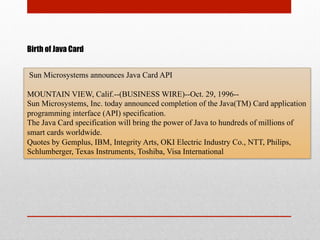
Birth of Java Card
Sun Microsystems announces Java Card API
MOUNTAIN VIEW, Calif.--(BUSINESS WIRE)--Oct. 29, 1996--
Sun Microsystems, Inc. today announced completion of the Java(TM) Card application
programming interface (API) specification.
The Java Card specification will bring the power of Java to hundreds of millions of
smart cards worldwide.
Quotes by Gemplus, IBM, Integrity Arts, OKI Electric Industry Co., NTT, Philips,
Schlumberger, Texas Instruments, Toshiba, Visa International
First steps
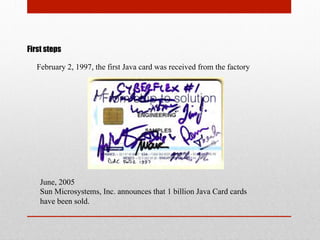
February 2, 1997, the first Java card was received from the factory
June, 2005
Sun Microsystems, Inc. announces that 1 billion Java Card cards
have been sold.
Standardization
12 February, 1997
Leading Smart Card Manufacturers Announce Formation of Java Card Forum -
Industry initiative endorsed by Sun, creator of the Java™ Card API standard
20 October, 1997
Public review on version 2.0 of the Java Card specification
March, 1999
Java Card version 2.1 announced. There are three specifications: Java Card API,
Java Card Runtime Environment, Java Card Virtual Machine
May, 2006
Java Card version 2.2.2 announced. Adds contactless capabilities and biometry
support for smart card chip manufacturers
New Age
March, 2008
Java Card version 3.0 announced. Classic and Connected Editions.
•  Classic Edition is an evolution of the Java Card 2.2.2
•  Connected Edition is a revolution technology for high-end smart cards
Today
•  More than 10 billion Java technology based smart cards have been deployed
•  NFC wallets requires Java Card
•  Secure M2M Solutions
Basic Standards
•  ISO 7816
•  ISO 14443
•  Java Card Specification
•  Global Platform
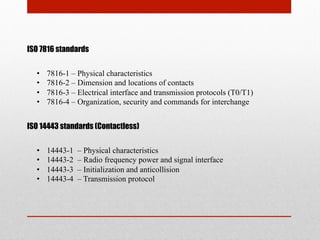
ISO 7816 standards
•  7816-1 – Physical characteristics
•  7816-2 – Dimension and locations of contacts
•  7816-3 – Electrical interface and transmission protocols (T0/T1)
•  7816-4 – Organization, security and commands for interchange
ISO 14443 standards (Contactless)
•  14443-1 – Physical characteristics
•  14443-2 – Radio frequency power and signal interface
•  14443-3 – Initialization and anticollision
•  14443-4 – Transmission protocol
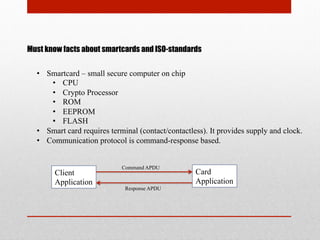
Must know facts about smartcards and ISO-standards
•  Smartcard – small secure computer on chip
•  CPU
•  Crypto Processor
•  ROM
•  EEPROM
•  FLASH
•  Smart card requires terminal (contact/contactless). It provides supply and clock.
•  Communication protocol is command-response based.
Client
Application
Card
Application
Command APDU
Response APDU
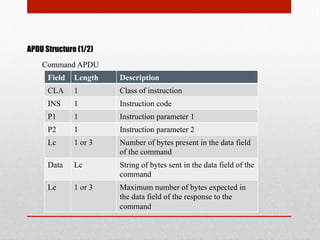
APDU Structure (1/2)
Command APDU
Field Length Description
CLA 1 Class of instruction
INS 1 Instruction code
P1 1 Instruction parameter 1
P2 1 Instruction parameter 2
Lc 1 or 3 Number of bytes present in the data field
of the command
Data Lc String of bytes sent in the data field of the
command
Le 1 or 3 Maximum number of bytes expected in
the data field of the response to the
command
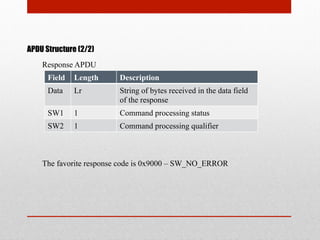
APDU Structure (2/2)
Response APDU
Field Length Description
Data Lr String of bytes received in the data field
of the response
SW1 1 Command processing status
SW2 1 Command processing qualifier
The favorite response code is 0x9000 – SW_NO_ERROR
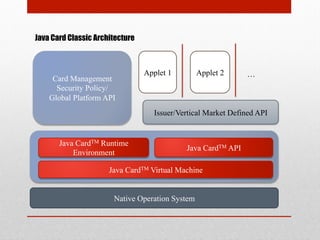
Java Card Classic Architecture
Card Management
Security Policy/
Global Platform API
Issuer/Vertical Market Defined API
Applet 1 Applet 2
Native Operation System
…
Java CardTM Runtime
Environment
Java CardTM API
Java CardTM Virtual Machine
Native Operation System
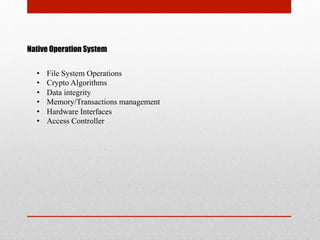
•  File System Operations
•  Crypto Algorithms
•  Data integrity
•  Memory/Transactions management
•  Hardware Interfaces
•  Access Controller
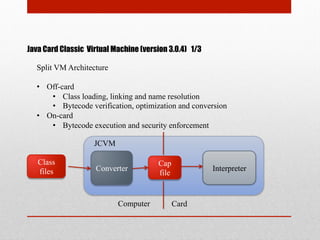
Java Card Classic Virtual Machine (version 3.0.4) 1/3
Split VM Architecture
•  Off-card
•  Class loading, linking and name resolution
•  Bytecode verification, optimization and conversion
•  On-card
•  Bytecode execution and security enforcement
Class
files Converter
Cap
file
Interpreter
CardComputer
JCVM
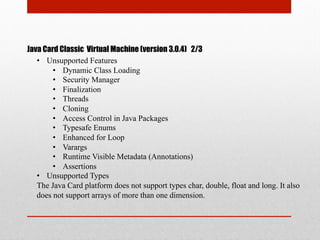
Java Card Classic Virtual Machine (version 3.0.4) 2/3
•  Unsupported Features
•  Dynamic Class Loading
•  Security Manager
•  Finalization
•  Threads
•  Cloning
•  Access Control in Java Packages
•  Typesafe Enums
•  Enhanced for Loop
•  Varargs
•  Runtime Visible Metadata (Annotations)
•  Assertions
•  Unsupported Types
The Java Card platform does not support types char, double, float and long. It also
does not support arrays of more than one dimension.
Java Card Classic Virtual Machine (version 3.0.4) 3/3
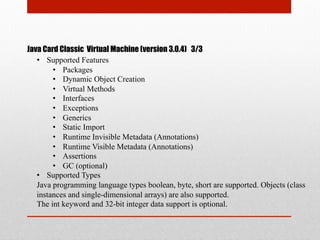
•  Supported Features
•  Packages
•  Dynamic Object Creation
•  Virtual Methods
•  Interfaces
•  Exceptions
•  Generics
•  Static Import
•  Runtime Invisible Metadata (Annotations)
•  Runtime Visible Metadata (Annotations)
•  Assertions
•  GC (optional)
•  Supported Types
Java programming language types boolean, byte, short are supported. Objects (class
instances and single-dimensional arrays) are also supported.
The int keyword and 32-bit integer data support is optional.
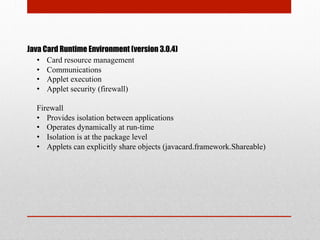
Java Card Runtime Environment (version 3.0.4)
•  Card resource management
•  Communications
•  Applet execution
•  Applet security (firewall)
Firewall
•  Provides isolation between applications
•  Operates dynamically at run-time
•  Isolation is at the package level
•  Applets can explicitly share objects (javacard.framework.Shareable)
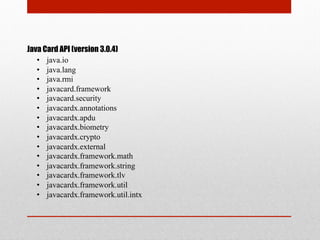
Java Card API (version 3.0.4)
•  java.io
•  java.lang
•  java.rmi
•  javacard.framework
•  javacard.security
•  javacardx.annotations
•  javacardx.apdu
•  javacardx.biometry
•  javacardx.crypto
•  javacardx.external
•  javacardx.framework.math
•  javacardx.framework.string
•  javacardx.framework.tlv
•  javacardx.framework.util
•  javacardx.framework.util.intx
Global Platform
Global Platform Card Specification is a secure, dynamic card and application
management specification
•  Security Domains
•  Secure channels
•  Application Management
•  Card Management
http://www.globalplatform.org/
How is that works ?
•  Application Model
•  Development Workflow
Application Model
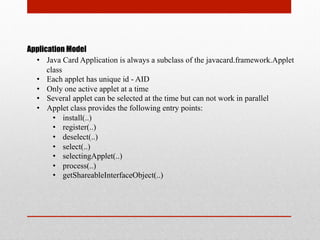
•  Java Card Application is always a subclass of the javacard.framework.Applet
class
•  Each applet has unique id - AID
•  Only one active applet at a time
•  Several applet can be selected at the time but can not work in parallel
•  Applet class provides the following entry points:
•  install(..)
•  register(..)
•  deselect(..)
•  select(..)
•  selectingApplet(..)
•  process(..)
•  getShareableInterfaceObject(..)
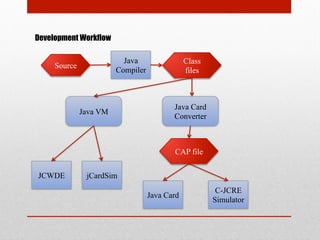
Development Workflow
Source
Java
Compiler
Class
files
Java VM
Java Card
Converter
CAP file
Java Card
C-JCRE
Simulator
JCWDE jCardSim
Developer Tools
•  Java Card Development Kit
•  GPShell
•  JCOP Tools from NXP (IBM)
•  jCardSim
jCardSim (1/3)
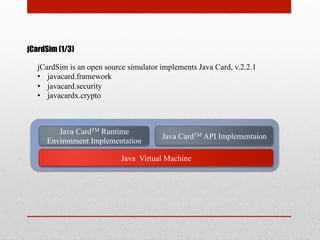
Java CardTM Runtime
Environment Implementation
Java CardTM API Implementaion
Java Virtual Machine
jCardSim is an open source simulator implements Java Card, v.2.2.1
•  javacard.framework
•  javacard.security
•  javacardx.crypto
jCardSim (2/3)
Key Features
•  Rapid application prototyping
•  Ease of writing Unit-tests
•  Emulation of Java Card Terminal, ability to use javax.smartcardio
•  APDU scripting (scripts are compatible with apdutool from Java Card
Development Kit)
•  Ease of verification tests creation
jCardSim (3/3)
What is the difference from JCWDE?
•  Implementation of javacard.security
One of the main differences is the implementation of javacard.security: current
version is analogous with NXP JCOP 31/36k card. For example, in jCardSim we
have support an on-card KeyPair.ALG_EC_F2M/ALG_RSA_CRT-key generation
•  Simulator API
jCardSim has simple and usable API, which allows you to work with simulator like
with real Java Card using javax.smartcardio
•  Cross-platform
jCardSim completely written in Java and can therefore be used at all platforms
which supports Java (Windows, Linux, MacOS, etc)
Writing our first real life
Java Card application
•  PetID – ePassport for home pets
•  Concepts
•  Architecture
•  Implementation Notes
•  Protocol
•  Demo
PetID – ePassport for home pets
Nowadays, one of the main applications of Java Card is electronic identity cards
(i.e. ePassport)
Are pets worse than men?
Lets create Java Card application – ePassport for Pets
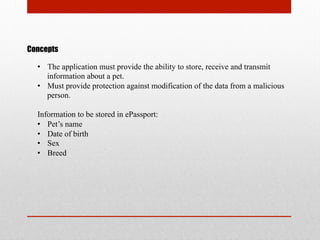
Concepts
•  The application must provide the ability to store, receive and transmit
information about a pet.
•  Must provide protection against modification of the data from a malicious
person.
Information to be stored in ePassport:
•  Pet’s name
•  Date of birth
•  Sex
•  Breed
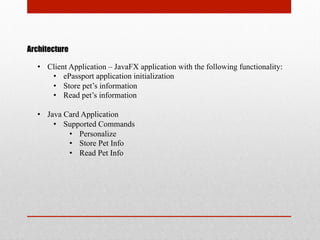
Architecture
•  Client Application – JavaFX application with the following functionality:
•  ePassport application initialization
•  Store pet’s information
•  Read pet’s information
•  Java Card Application
•  Supported Commands
•  Personalize
•  Store Pet Info
•  Read Pet Info
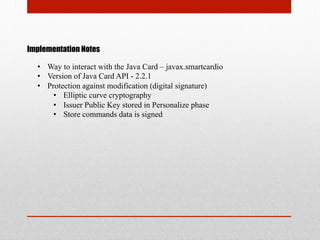
Implementation Notes
•  Way to interact with the Java Card – javax.smartcardio
•  Version of Java Card API - 2.2.1
•  Protection against modification (digital signature)
•  Elliptic curve cryptography
•  Issuer Public Key stored in Personalize phase
•  Store commands data is signed
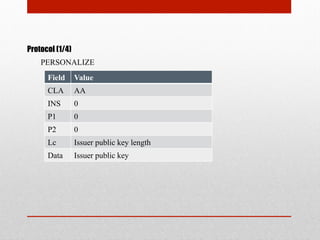
Protocol (1/4)
Field Value
CLA AA
INS 0
P1 0
P2 0
Lc Issuer public key length
Data Issuer public key
PERSONALIZE
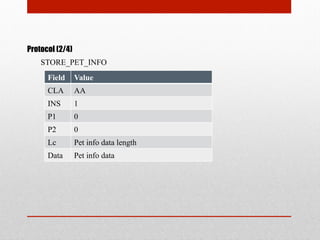
Protocol (2/4)
Field Value
CLA AA
INS 1
P1 0
P2 0
Lc Pet info data length
Data Pet info data
STORE_PET_INFO
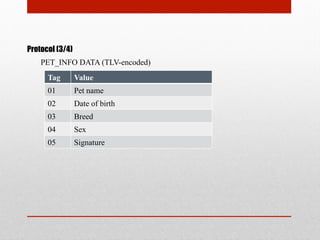
Protocol (3/4)
Tag Value
01 Pet name
02 Date of birth
03 Breed
04 Sex
05 Signature
PET_INFO DATA (TLV-encoded)
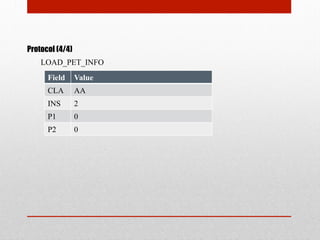
Protocol (4/4)
Field Value
CLA AA
INS 2
P1 0
P2 0
LOAD_PET_INFO
CODING
Source Applet (1/2)
public class PetIDApplet extends Applet {
private final static byte BASE_CLA = (byte) 0xAA;
private final static byte PERSONALIZE_INS = 0x00;
private final static byte STORE_PET_INFO_INS = 0x01;
private final static byte LOAD_PET_INFO_INS = 0x02;
private ECPublicKey issuerPublicKey;
private byte[] petInfoData;
public PetIDApplet () {
petInfoData= new byte[4086];
register();
}
public static void install(byte[] bArray, short bOffset, byte bLength) throws
ISOException {
new PetIDApplet ();
}
Source Applet (2/2)
public void process(APDU apdu) throws ISOException {
if (selectingApplet()) return;
byte[] buffer = apdu.getBuffer();
if (buffer[ISO7816.OFFSET_CLA] != BASE_CLA) {
ISOException.throwIt(ISO7816.SW_CLA_NOT_SUPPORTED);
}
byte ins = buffer[ISO7816.OFFSET_INS];
switch (ins) {
case PERSONALIZE_INS:
personalize(apdu);
break;
case STORE_PET_INFO_INS:
storePetInfo(apdu);
break;
case LOAD_PET_INFO_INS:
loadPetInfo(apdu);
break;
default:
ISOException.throwIt(ISO7816.SW_INS_NOT_SUPPORTED);
}
}
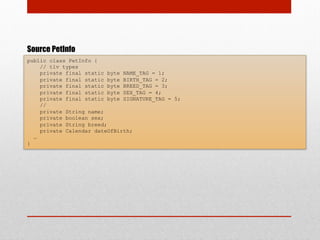
Source PetInfo
public class PetInfo {
// tlv types
private final static byte NAME_TAG = 1;
private final static byte BIRTH_TAG = 2;
private final static byte BREED_TAG = 3;
private final static byte SEX_TAG = 4;
private final static byte SIGNATURE_TAG = 5;
//
private String name;
private boolean sex;
private String breed;
private Calendar dateOfBirth;
…
}
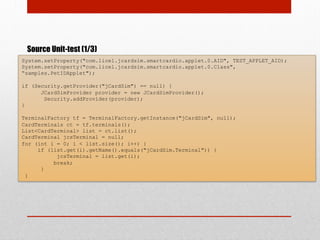
Source Unit-test (1/3)
System.setProperty("com.licel.jcardsim.smartcardio.applet.0.AID", TEST_APPLET_AID);
System.setProperty("com.licel.jcardsim.smartcardio.applet.0.Class",
“samples.PetIDApplet");
if (Security.getProvider("jCardSim") == null) {
JCardSimProvider provider = new JCardSimProvider();
Security.addProvider(provider);
}
TerminalFactory tf = TerminalFactory.getInstance("jCardSim", null);
CardTerminals ct = tf.terminals();
List<CardTerminal> list = ct.list();
CardTerminal jcsTerminal = null;
for (int i = 0; i < list.size(); i++) {
if (list.get(i).getName().equals("jCardSim.Terminal")) {
jcsTerminal = list.get(i);
break;
}
}
Source Unit-test (2/3)
// create applet data = aid len (byte), aid bytes, params lenth (byte), param
byte[] aidBytes = Hex.decode(TEST_APPLET_AID);
CommandAPDU createApplet = new CommandAPDU(0x80, 0xb8, 0, 0);
ResponseAPDU response = jcsChannel.transmit(createApplet);
assertEquals(response.getSW(), 0x9000);
assertEquals(true, Arrays.equals(response.getData(), aidBytes));
// select applet
CommandAPDU selectApplet = new CommandAPDU(ISO7816.CLA_ISO7816, ISO7816.INS_SELECT, 0,
0, Hex.decode(TEST_APPLET_AID));
response = jcsChannel.transmit(selectApplet);
assertEquals(response.getSW(), 0x9000);
// create issuer keys & PERSONALIZE
KeyPairGenerator kpg = KeyPairGenerator.getInstance("EC", "BC");
ECGenParameterSpec ecsp = new ECGenParameterSpec(“sect113r1”);
kpg.initialize(ecsp);
KeyPair kp = kpg.generateKeyPair();
CommandAPDU personalizeApplet = new CommandAPDU(0xAA,0, 0, 0,
kp.getPublic().getEncoded());
response = jcsChannel.transmit(personalizeApplet);
assertEquals(response.getSW(), 0x9000);
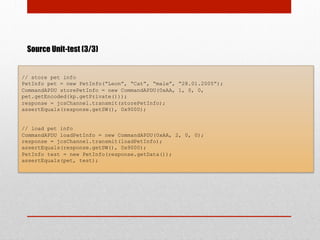
Source Unit-test (3/3)
// store pet info
PetInfo pet = new PetInfo(“Leon”, “Cat”, “male”, “28.01.2005”);
CommandAPDU storePetInfo = new CommandAPDU(0xAA, 1, 0, 0,
pet.getEncoded(kp.getPrivate()));
response = jcsChannel.transmit(storePetInfo);
assertEquals(response.getSW(), 0x9000);
// load pet info
CommandAPDU loadPetInfo = new CommandAPDU(0xAA, 2, 0, 0);
response = jcsChannel.transmit(loadPetInfo);
assertEquals(response.getSW(), 0x9000);
PetInfo test = new PetInfo(response.getData());
assertEquals(pet, test);
DEMO
NFC and Java Card
•  NFC Brief Overview
•  Secure Element
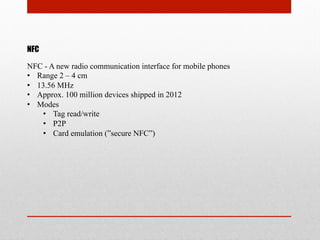
NFC
NFC - A new radio communication interface for mobile phones
•  Range 2 – 4 cm
•  13.56 MHz
•  Approx. 100 million devices shipped in 2012
•  Modes
•  Tag read/write
•  P2P
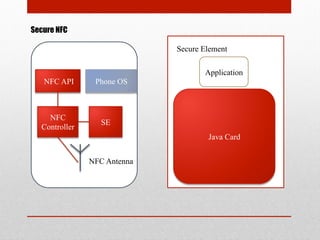
•  Card emulation (”secure NFC”)
Secure NFC
NFC API Phone OS
NFC
Controller
SE
NFC Antenna
Secure Element
Java Card
Application
jCardSim Facts
•  The initial project team consisted of three developers
•  First public release has been announced in December
2011
•  In June 2012 the official site, jcardsim.org, has been
started and available in following languages: English,
Russian, Spanish
•  Main audience of the project is students which are
learning Java Card and professional Java Card developers
jCardSim RoadMap
2Q 2013
•  Shareable Interface Support
•  Service Framework Support
•  Multiple Logical Channels
3Q 2013
•  Application Firewall Support
•  Basic Global Platform functionality
THANKS!
Email: jcardsim@licel.ru
Twitter: @MikhailDudarev
WWW: jcardsim.org

jCardSim – Java Card is simple!

  • 1.
    jCardSim – JavaCard is simple! Mikhail Dudarev, CTO of jCardSim.org JavaOne Moscow, 2013
  • 2.
    Agenda •  Brief historyof Java Card •  Basics standards •  How is that works? •  Developer Tools •  Writing our first real life Java Card application •  NFC and Java Card •  jCardSim: real story of real open source project
  • 3.
    Birth of JavaCard Sun Microsystems announces Java Card API MOUNTAIN VIEW, Calif.--(BUSINESS WIRE)--Oct. 29, 1996-- Sun Microsystems, Inc. today announced completion of the Java(TM) Card application programming interface (API) specification. The Java Card specification will bring the power of Java to hundreds of millions of smart cards worldwide. Quotes by Gemplus, IBM, Integrity Arts, OKI Electric Industry Co., NTT, Philips, Schlumberger, Texas Instruments, Toshiba, Visa International
  • 4.
    First steps February 2,1997, the first Java card was received from the factory June, 2005 Sun Microsystems, Inc. announces that 1 billion Java Card cards have been sold.
  • 5.
    Standardization 12 February, 1997 LeadingSmart Card Manufacturers Announce Formation of Java Card Forum - Industry initiative endorsed by Sun, creator of the Java™ Card API standard 20 October, 1997 Public review on version 2.0 of the Java Card specification March, 1999 Java Card version 2.1 announced. There are three specifications: Java Card API, Java Card Runtime Environment, Java Card Virtual Machine May, 2006 Java Card version 2.2.2 announced. Adds contactless capabilities and biometry support for smart card chip manufacturers
  • 6.
    New Age March, 2008 JavaCard version 3.0 announced. Classic and Connected Editions. •  Classic Edition is an evolution of the Java Card 2.2.2 •  Connected Edition is a revolution technology for high-end smart cards Today •  More than 10 billion Java technology based smart cards have been deployed •  NFC wallets requires Java Card •  Secure M2M Solutions
  • 7.
    Basic Standards •  ISO7816 •  ISO 14443 •  Java Card Specification •  Global Platform
  • 8.
    ISO 7816 standards • 7816-1 – Physical characteristics •  7816-2 – Dimension and locations of contacts •  7816-3 – Electrical interface and transmission protocols (T0/T1) •  7816-4 – Organization, security and commands for interchange ISO 14443 standards (Contactless) •  14443-1 – Physical characteristics •  14443-2 – Radio frequency power and signal interface •  14443-3 – Initialization and anticollision •  14443-4 – Transmission protocol
  • 9.
    Must know factsabout smartcards and ISO-standards •  Smartcard – small secure computer on chip •  CPU •  Crypto Processor •  ROM •  EEPROM •  FLASH •  Smart card requires terminal (contact/contactless). It provides supply and clock. •  Communication protocol is command-response based. Client Application Card Application Command APDU Response APDU
  • 10.
    APDU Structure (1/2) CommandAPDU Field Length Description CLA 1 Class of instruction INS 1 Instruction code P1 1 Instruction parameter 1 P2 1 Instruction parameter 2 Lc 1 or 3 Number of bytes present in the data field of the command Data Lc String of bytes sent in the data field of the command Le 1 or 3 Maximum number of bytes expected in the data field of the response to the command
  • 11.
    APDU Structure (2/2) ResponseAPDU Field Length Description Data Lr String of bytes received in the data field of the response SW1 1 Command processing status SW2 1 Command processing qualifier The favorite response code is 0x9000 – SW_NO_ERROR
  • 12.
    Java Card ClassicArchitecture Card Management Security Policy/ Global Platform API Issuer/Vertical Market Defined API Applet 1 Applet 2 Native Operation System … Java CardTM Runtime Environment Java CardTM API Java CardTM Virtual Machine
  • 13.
    Native Operation System • File System Operations •  Crypto Algorithms •  Data integrity •  Memory/Transactions management •  Hardware Interfaces •  Access Controller
  • 14.
    Java Card ClassicVirtual Machine (version 3.0.4) 1/3 Split VM Architecture •  Off-card •  Class loading, linking and name resolution •  Bytecode verification, optimization and conversion •  On-card •  Bytecode execution and security enforcement Class files Converter Cap file Interpreter CardComputer JCVM
  • 15.
    Java Card ClassicVirtual Machine (version 3.0.4) 2/3 •  Unsupported Features •  Dynamic Class Loading •  Security Manager •  Finalization •  Threads •  Cloning •  Access Control in Java Packages •  Typesafe Enums •  Enhanced for Loop •  Varargs •  Runtime Visible Metadata (Annotations) •  Assertions •  Unsupported Types The Java Card platform does not support types char, double, float and long. It also does not support arrays of more than one dimension.
  • 16.
    Java Card ClassicVirtual Machine (version 3.0.4) 3/3 •  Supported Features •  Packages •  Dynamic Object Creation •  Virtual Methods •  Interfaces •  Exceptions •  Generics •  Static Import •  Runtime Invisible Metadata (Annotations) •  Runtime Visible Metadata (Annotations) •  Assertions •  GC (optional) •  Supported Types Java programming language types boolean, byte, short are supported. Objects (class instances and single-dimensional arrays) are also supported. The int keyword and 32-bit integer data support is optional.
  • 17.
    Java Card RuntimeEnvironment (version 3.0.4) •  Card resource management •  Communications •  Applet execution •  Applet security (firewall) Firewall •  Provides isolation between applications •  Operates dynamically at run-time •  Isolation is at the package level •  Applets can explicitly share objects (javacard.framework.Shareable)
  • 18.
    Java Card API(version 3.0.4) •  java.io •  java.lang •  java.rmi •  javacard.framework •  javacard.security •  javacardx.annotations •  javacardx.apdu •  javacardx.biometry •  javacardx.crypto •  javacardx.external •  javacardx.framework.math •  javacardx.framework.string •  javacardx.framework.tlv •  javacardx.framework.util •  javacardx.framework.util.intx
  • 19.
    Global Platform Global PlatformCard Specification is a secure, dynamic card and application management specification •  Security Domains •  Secure channels •  Application Management •  Card Management http://www.globalplatform.org/
  • 20.
    How is thatworks ? •  Application Model •  Development Workflow
  • 21.
    Application Model •  JavaCard Application is always a subclass of the javacard.framework.Applet class •  Each applet has unique id - AID •  Only one active applet at a time •  Several applet can be selected at the time but can not work in parallel •  Applet class provides the following entry points: •  install(..) •  register(..) •  deselect(..) •  select(..) •  selectingApplet(..) •  process(..) •  getShareableInterfaceObject(..)
  • 22.
    Development Workflow Source Java Compiler Class files Java VM JavaCard Converter CAP file Java Card C-JCRE Simulator JCWDE jCardSim
  • 23.
    Developer Tools •  JavaCard Development Kit •  GPShell •  JCOP Tools from NXP (IBM) •  jCardSim
  • 24.
    jCardSim (1/3) Java CardTMRuntime Environment Implementation Java CardTM API Implementaion Java Virtual Machine jCardSim is an open source simulator implements Java Card, v.2.2.1 •  javacard.framework •  javacard.security •  javacardx.crypto
  • 25.
    jCardSim (2/3) Key Features • Rapid application prototyping •  Ease of writing Unit-tests •  Emulation of Java Card Terminal, ability to use javax.smartcardio •  APDU scripting (scripts are compatible with apdutool from Java Card Development Kit) •  Ease of verification tests creation
  • 26.
    jCardSim (3/3) What isthe difference from JCWDE? •  Implementation of javacard.security One of the main differences is the implementation of javacard.security: current version is analogous with NXP JCOP 31/36k card. For example, in jCardSim we have support an on-card KeyPair.ALG_EC_F2M/ALG_RSA_CRT-key generation •  Simulator API jCardSim has simple and usable API, which allows you to work with simulator like with real Java Card using javax.smartcardio •  Cross-platform jCardSim completely written in Java and can therefore be used at all platforms which supports Java (Windows, Linux, MacOS, etc)
  • 27.
    Writing our firstreal life Java Card application •  PetID – ePassport for home pets •  Concepts •  Architecture •  Implementation Notes •  Protocol •  Demo
  • 28.
    PetID – ePassportfor home pets Nowadays, one of the main applications of Java Card is electronic identity cards (i.e. ePassport) Are pets worse than men? Lets create Java Card application – ePassport for Pets
  • 29.
    Concepts •  The applicationmust provide the ability to store, receive and transmit information about a pet. •  Must provide protection against modification of the data from a malicious person. Information to be stored in ePassport: •  Pet’s name •  Date of birth •  Sex •  Breed
  • 30.
    Architecture •  Client Application– JavaFX application with the following functionality: •  ePassport application initialization •  Store pet’s information •  Read pet’s information •  Java Card Application •  Supported Commands •  Personalize •  Store Pet Info •  Read Pet Info
  • 31.
    Implementation Notes •  Wayto interact with the Java Card – javax.smartcardio •  Version of Java Card API - 2.2.1 •  Protection against modification (digital signature) •  Elliptic curve cryptography •  Issuer Public Key stored in Personalize phase •  Store commands data is signed
  • 32.
    Protocol (1/4) Field Value CLAAA INS 0 P1 0 P2 0 Lc Issuer public key length Data Issuer public key PERSONALIZE
  • 33.
    Protocol (2/4) Field Value CLAAA INS 1 P1 0 P2 0 Lc Pet info data length Data Pet info data STORE_PET_INFO
  • 34.
    Protocol (3/4) Tag Value 01Pet name 02 Date of birth 03 Breed 04 Sex 05 Signature PET_INFO DATA (TLV-encoded)
  • 35.
    Protocol (4/4) Field Value CLAAA INS 2 P1 0 P2 0 LOAD_PET_INFO
  • 36.
  • 37.
    Source Applet (1/2) publicclass PetIDApplet extends Applet { private final static byte BASE_CLA = (byte) 0xAA; private final static byte PERSONALIZE_INS = 0x00; private final static byte STORE_PET_INFO_INS = 0x01; private final static byte LOAD_PET_INFO_INS = 0x02; private ECPublicKey issuerPublicKey; private byte[] petInfoData; public PetIDApplet () { petInfoData= new byte[4086]; register(); } public static void install(byte[] bArray, short bOffset, byte bLength) throws ISOException { new PetIDApplet (); }
  • 38.
    Source Applet (2/2) publicvoid process(APDU apdu) throws ISOException { if (selectingApplet()) return; byte[] buffer = apdu.getBuffer(); if (buffer[ISO7816.OFFSET_CLA] != BASE_CLA) { ISOException.throwIt(ISO7816.SW_CLA_NOT_SUPPORTED); } byte ins = buffer[ISO7816.OFFSET_INS]; switch (ins) { case PERSONALIZE_INS: personalize(apdu); break; case STORE_PET_INFO_INS: storePetInfo(apdu); break; case LOAD_PET_INFO_INS: loadPetInfo(apdu); break; default: ISOException.throwIt(ISO7816.SW_INS_NOT_SUPPORTED); } }
  • 39.
    Source PetInfo public classPetInfo { // tlv types private final static byte NAME_TAG = 1; private final static byte BIRTH_TAG = 2; private final static byte BREED_TAG = 3; private final static byte SEX_TAG = 4; private final static byte SIGNATURE_TAG = 5; // private String name; private boolean sex; private String breed; private Calendar dateOfBirth; … }
  • 40.
    Source Unit-test (1/3) System.setProperty("com.licel.jcardsim.smartcardio.applet.0.AID",TEST_APPLET_AID); System.setProperty("com.licel.jcardsim.smartcardio.applet.0.Class", “samples.PetIDApplet"); if (Security.getProvider("jCardSim") == null) { JCardSimProvider provider = new JCardSimProvider(); Security.addProvider(provider); } TerminalFactory tf = TerminalFactory.getInstance("jCardSim", null); CardTerminals ct = tf.terminals(); List<CardTerminal> list = ct.list(); CardTerminal jcsTerminal = null; for (int i = 0; i < list.size(); i++) { if (list.get(i).getName().equals("jCardSim.Terminal")) { jcsTerminal = list.get(i); break; } }
  • 41.
    Source Unit-test (2/3) //create applet data = aid len (byte), aid bytes, params lenth (byte), param byte[] aidBytes = Hex.decode(TEST_APPLET_AID); CommandAPDU createApplet = new CommandAPDU(0x80, 0xb8, 0, 0); ResponseAPDU response = jcsChannel.transmit(createApplet); assertEquals(response.getSW(), 0x9000); assertEquals(true, Arrays.equals(response.getData(), aidBytes)); // select applet CommandAPDU selectApplet = new CommandAPDU(ISO7816.CLA_ISO7816, ISO7816.INS_SELECT, 0, 0, Hex.decode(TEST_APPLET_AID)); response = jcsChannel.transmit(selectApplet); assertEquals(response.getSW(), 0x9000); // create issuer keys & PERSONALIZE KeyPairGenerator kpg = KeyPairGenerator.getInstance("EC", "BC"); ECGenParameterSpec ecsp = new ECGenParameterSpec(“sect113r1”); kpg.initialize(ecsp); KeyPair kp = kpg.generateKeyPair(); CommandAPDU personalizeApplet = new CommandAPDU(0xAA,0, 0, 0, kp.getPublic().getEncoded()); response = jcsChannel.transmit(personalizeApplet); assertEquals(response.getSW(), 0x9000);
  • 42.
    Source Unit-test (3/3) //store pet info PetInfo pet = new PetInfo(“Leon”, “Cat”, “male”, “28.01.2005”); CommandAPDU storePetInfo = new CommandAPDU(0xAA, 1, 0, 0, pet.getEncoded(kp.getPrivate())); response = jcsChannel.transmit(storePetInfo); assertEquals(response.getSW(), 0x9000); // load pet info CommandAPDU loadPetInfo = new CommandAPDU(0xAA, 2, 0, 0); response = jcsChannel.transmit(loadPetInfo); assertEquals(response.getSW(), 0x9000); PetInfo test = new PetInfo(response.getData()); assertEquals(pet, test);
  • 43.
  • 44.
    NFC and JavaCard •  NFC Brief Overview •  Secure Element
  • 45.
    NFC NFC - Anew radio communication interface for mobile phones •  Range 2 – 4 cm •  13.56 MHz •  Approx. 100 million devices shipped in 2012 •  Modes •  Tag read/write •  P2P •  Card emulation (”secure NFC”)
  • 46.
    Secure NFC NFC APIPhone OS NFC Controller SE NFC Antenna Secure Element Java Card Application
  • 47.
    jCardSim Facts •  Theinitial project team consisted of three developers •  First public release has been announced in December 2011 •  In June 2012 the official site, jcardsim.org, has been started and available in following languages: English, Russian, Spanish •  Main audience of the project is students which are learning Java Card and professional Java Card developers
  • 48.
    jCardSim RoadMap 2Q 2013 • Shareable Interface Support •  Service Framework Support •  Multiple Logical Channels 3Q 2013 •  Application Firewall Support •  Basic Global Platform functionality
  • 49.