Computer Fundamentals
Muhammadamin Daneshwar
School of Engineering
Soran University
Lecture 4
Computer Threats (I)
CONTENTS
• Introduction( Viruses, Bombs, Worms)
• Types of Viruses
• Characteristics of Viruses
• Categories of Viruses
• Computer Security-
–Antivirus Software
–Password, Firewalls
In the beginning, man created
the virus, and it was bad.
• The first computer virus
–Several stories
• Pakistani Brain Virus (1986): This is the first
widely spread IBM Compatible virus. This is
commonly mistaken for the first virus.
• Apple Virus 1 (1981): Boot sector infecting
virus. Possibly created for pirated games.
• Animal (1975) (Univac): “Guess an animal”
game. Copied to other users’ home
directories when run.
1.Introduction
A virus is a program that attaches itself to some
form of host such as legitimate, executable
program.
•Virus lives within the program, which is said
to be ‘infected’.
•Execution of the host program implies
execution of the virus.
•May or may not damage the infected
program.
A virus is able to replicate
•Creates (possibly modified) copies of itself.
Viruses
• Needs to have some form of
distribution
–such as via disks or a computer network.
• Examples: W95.CIH (Chernobyl),
Sampo and Hare
Classifying Viruses: categories
• Boot Sector
• TSR (Terminate and stay resident)
• Multipartite
• Macro
• Companion
• Polymorphic
Boot Sector
• Infects the boot sector on a disk
replaces the original boot sector with itself
• stores the original boot sector somewhere
else or replaces it totally
Virus takes control when the system is
booted from the diskette
may infect other diskettes that are
inserted, unless they are write protected
may also infects hard disks
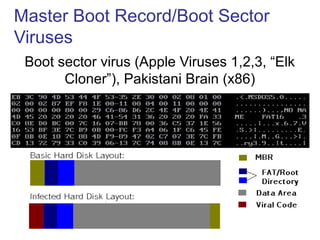
Master Boot Record/Boot Sector
Viruses
Boot sector virus (Apple Viruses 1,2,3, “Elk
Cloner”), Pakistani Brain (x86)
TSR
• A terminate and stay resident (TSR)
virus is a virus that stays active in
memory after the application (or
bootstrapping, or disk mounting) has
terminated.
• TSR viruses can be boot sector infectors
or executable infectors.
• The Brain virus is a TSR virus.
Multipartite
• A multipartite virus is a virus that can infect
either boot sectors or executables.
• Such a virus typically has two parts, one for
each type.
• When it infects an executable, it acts as an
executable infector.
• When it infects a boot sector, it works as a
boot sector infector.
Macro
• A macro virus is a virus composed of a
sequence of instructions that is interpreted
rather than executed directly.
• Macro viruses can infect either
executables (Duff’s shell virus) or data
files (Highland’s Lotus 1-2-3 spreadsheet
virus).
• Duff’s shell virus can execute on any
system that can interpret the instructions
Macro
• Piece of self-replicating code written in an
application's macro language
􀁺 a macro virus requires an auto-execute macro
􀁺 one which is executed in response to some
event e.g opening or closing a file or starting
an application
• once the macro virus is running, it can copy
itself to other documents delete files, etc.
Polymorphic
• A virus may be encrypted to try to disguise itself and
hide what it does
• For an encrypted virus to actually run, it has to
decrypt its code and data
- The portion that does this is referred to as a
decryptor
• Encryption techniques can use random keys to
make the virus code hard to spot
-However the decryptor itself will have a signature
Polymorphic
A polymorphic virus is a randomly
encrypted virus that is also
programmed to randomly vary its
decryption routine
Viruses Types:
• Worms
• Trojan Horse
• Bombs
Computer Worm
• A self-replicating computer program,
similar to a computer virus
• Unlike a virus, it is self-contained and
does not need to be part of another
program to propagate itself
• Often designed to exploit computers’ file
transmission capabilities
Worm
• A program or algorithm that replicates
itself over a computer network or through
e-mail and sometimes performs malicious
actions such as using up the computer
and network resources and possibly
destroying data.
• Examples: Klez, Nimda, Code Red
Computer Worm
• In addition to replication, a worm may
be designed to:
–delete files on a host system
–send documents via email
–carry other executables as a payload
Trojan
• A malicious program disguised as legitimate
software
Cannot replicate itself, in contrast to some
other types of “malware” like worms and
viruses
but they can be contained within a worm.
• Depending on their purpose, a Trojan can be
destructive or a resource hog and is almost
always considered a root compromise.
• Ex: Back Orifice, NetBus, SubSeven
Can legitimate networking tools be
considered Trojans?
Yes! Many applications are installed by
hackers and worms that would be
considered legitimate tools. If they were not
installed by you and are being used for
malicious purposes, they are considered
Trojans … even though your antivirus
software will not detect them as such.
How do viruses work? (Characteristics)
Possible attacks include:
• Replicating itself
• Interrupting system/network use
• Modifying configuration settings
• Flashing BIOS
• Format hard drive/destroy data
• Using computer/network resources
• Distribution of confidential info
• Denial of Service attacks
Once a virus gains access to a computer, its
effects can vary.
Typical methods of infection
• Removable media or drives
• Downloading Internet files
• E-mail attachments
• Unpatched software and services
• Poor Administrator passwords
• Poor shared passwords
Virus prevention
• Patching the operating system
• Patching services
• Patching client software
• Passwords
• Antivirus software
• Firewalls
Computer Security
Passwords
• As discussed earlier when talking about
Trojans, strong passwords are a vital part
of keeping your systems free of infection.
• Antivirus software does not catch the
majority of the Trojans . These Trojans are
typically legitimate networking tools that
were never intended to be used as a
Trojan.
Passwords
• Having strong passwords will deter most
worms and scanners that attempt to crack
passwords as a means of entry.
• The Administrator account and those
users who have Administrator privileges
are at the greatest risk, but all users on
the network should follow the same
password policy.
Virus Detection (Antivirus software)
The primary method of detection of
antivirus software is to check
programs and files on a system for
virus signatures. However, good
antivirus software uses many
methods to search the system for
viruses.
Antivirus Software
• AV software considerations
•Features
•Cost (per workstation/server)
•Frequency of updates
•Ease of update installation
•Server administration
•Certification
Antivirus software options
• Aladdin Knowledge
• Alwil Software
• AVG Antivirus
• Central Command
• Command Software
• Computer Associates
• Data Fellows Corp.
• Dr. Solomon’s
Software
• ESET Software
• Finjan Software
• Frisk Software
• Kaspersky Lab
• McAfee
• Network Associates
• Norman Data
Defense
• Panda Software
• Proland Software
• Sophos
• Symantec
Corporation
• Trend Micro, Inc.
Cleaning viruses
• Cleaning viruses depends entirely on your local
antivirus solution. The virus must be identified
before it can be removed, so it makes sense to
try your antivirus scanner first.
• If your software identifies, but can’t remove the
virus, check the manufacturer’s website for
manual removal instructions.
Perform Basic Computer Safety
Maintenance
• Use an Internet “firewall”
• Update your computer
• Use up-to-date antivirus software
Use an Internet Firewall
• A firewall is software or hardware that
creates a protective barrier between your
computer and potentially damaging content
on the Internet or network.
• The firewall helps to guard your computer
against malicious users, and also against
malicious software such as computer
viruses and worms.
Use an Internet Firewall
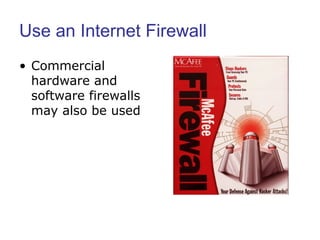
• Commercial
hardware and
software firewalls
may also be used
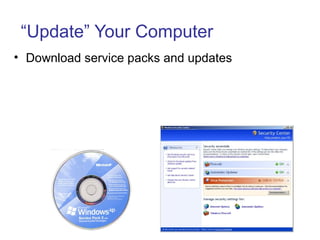
“Update” Your Computer
• Download service packs and updates
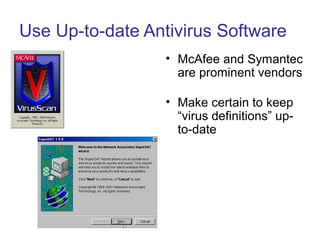
Use Up-to-date Antivirus Software
• McAfee and Symantec
are prominent vendors
• Make certain to keep
“virus definitions” up-
to-date

Computer Virus

  • 1.
    Computer Fundamentals Muhammadamin Daneshwar Schoolof Engineering Soran University Lecture 4 Computer Threats (I)
  • 2.
    CONTENTS • Introduction( Viruses,Bombs, Worms) • Types of Viruses • Characteristics of Viruses • Categories of Viruses • Computer Security- –Antivirus Software –Password, Firewalls
  • 3.
    In the beginning,man created the virus, and it was bad. • The first computer virus –Several stories • Pakistani Brain Virus (1986): This is the first widely spread IBM Compatible virus. This is commonly mistaken for the first virus. • Apple Virus 1 (1981): Boot sector infecting virus. Possibly created for pirated games. • Animal (1975) (Univac): “Guess an animal” game. Copied to other users’ home directories when run.
  • 4.
    1.Introduction A virus isa program that attaches itself to some form of host such as legitimate, executable program. •Virus lives within the program, which is said to be ‘infected’. •Execution of the host program implies execution of the virus. •May or may not damage the infected program. A virus is able to replicate •Creates (possibly modified) copies of itself.
  • 5.
    Viruses • Needs tohave some form of distribution –such as via disks or a computer network. • Examples: W95.CIH (Chernobyl), Sampo and Hare
  • 6.
    Classifying Viruses: categories •Boot Sector • TSR (Terminate and stay resident) • Multipartite • Macro • Companion • Polymorphic
  • 7.
    Boot Sector • Infectsthe boot sector on a disk replaces the original boot sector with itself • stores the original boot sector somewhere else or replaces it totally Virus takes control when the system is booted from the diskette may infect other diskettes that are inserted, unless they are write protected may also infects hard disks
  • 8.
    Master Boot Record/BootSector Viruses Boot sector virus (Apple Viruses 1,2,3, “Elk Cloner”), Pakistani Brain (x86)
  • 9.
    TSR • A terminateand stay resident (TSR) virus is a virus that stays active in memory after the application (or bootstrapping, or disk mounting) has terminated. • TSR viruses can be boot sector infectors or executable infectors. • The Brain virus is a TSR virus.
  • 10.
    Multipartite • A multipartitevirus is a virus that can infect either boot sectors or executables. • Such a virus typically has two parts, one for each type. • When it infects an executable, it acts as an executable infector. • When it infects a boot sector, it works as a boot sector infector.
  • 11.
    Macro • A macrovirus is a virus composed of a sequence of instructions that is interpreted rather than executed directly. • Macro viruses can infect either executables (Duff’s shell virus) or data files (Highland’s Lotus 1-2-3 spreadsheet virus). • Duff’s shell virus can execute on any system that can interpret the instructions
  • 12.
    Macro • Piece ofself-replicating code written in an application's macro language 􀁺 a macro virus requires an auto-execute macro 􀁺 one which is executed in response to some event e.g opening or closing a file or starting an application • once the macro virus is running, it can copy itself to other documents delete files, etc.
  • 13.
    Polymorphic • A virusmay be encrypted to try to disguise itself and hide what it does • For an encrypted virus to actually run, it has to decrypt its code and data - The portion that does this is referred to as a decryptor • Encryption techniques can use random keys to make the virus code hard to spot -However the decryptor itself will have a signature
  • 14.
    Polymorphic A polymorphic virusis a randomly encrypted virus that is also programmed to randomly vary its decryption routine
  • 15.
    Viruses Types: • Worms •Trojan Horse • Bombs
  • 16.
    Computer Worm • Aself-replicating computer program, similar to a computer virus • Unlike a virus, it is self-contained and does not need to be part of another program to propagate itself • Often designed to exploit computers’ file transmission capabilities
  • 17.
    Worm • A programor algorithm that replicates itself over a computer network or through e-mail and sometimes performs malicious actions such as using up the computer and network resources and possibly destroying data. • Examples: Klez, Nimda, Code Red
  • 18.
    Computer Worm • Inaddition to replication, a worm may be designed to: –delete files on a host system –send documents via email –carry other executables as a payload
  • 19.
    Trojan • A maliciousprogram disguised as legitimate software Cannot replicate itself, in contrast to some other types of “malware” like worms and viruses but they can be contained within a worm. • Depending on their purpose, a Trojan can be destructive or a resource hog and is almost always considered a root compromise. • Ex: Back Orifice, NetBus, SubSeven
  • 20.
    Can legitimate networkingtools be considered Trojans? Yes! Many applications are installed by hackers and worms that would be considered legitimate tools. If they were not installed by you and are being used for malicious purposes, they are considered Trojans … even though your antivirus software will not detect them as such.
  • 21.
    How do viruseswork? (Characteristics) Possible attacks include: • Replicating itself • Interrupting system/network use • Modifying configuration settings • Flashing BIOS • Format hard drive/destroy data • Using computer/network resources • Distribution of confidential info • Denial of Service attacks Once a virus gains access to a computer, its effects can vary.
  • 22.
    Typical methods ofinfection • Removable media or drives • Downloading Internet files • E-mail attachments • Unpatched software and services • Poor Administrator passwords • Poor shared passwords
  • 23.
    Virus prevention • Patchingthe operating system • Patching services • Patching client software • Passwords • Antivirus software • Firewalls Computer Security
  • 24.
    Passwords • As discussedearlier when talking about Trojans, strong passwords are a vital part of keeping your systems free of infection. • Antivirus software does not catch the majority of the Trojans . These Trojans are typically legitimate networking tools that were never intended to be used as a Trojan.
  • 25.
    Passwords • Having strongpasswords will deter most worms and scanners that attempt to crack passwords as a means of entry. • The Administrator account and those users who have Administrator privileges are at the greatest risk, but all users on the network should follow the same password policy.
  • 26.
    Virus Detection (Antivirussoftware) The primary method of detection of antivirus software is to check programs and files on a system for virus signatures. However, good antivirus software uses many methods to search the system for viruses.
  • 27.
    Antivirus Software • AVsoftware considerations •Features •Cost (per workstation/server) •Frequency of updates •Ease of update installation •Server administration •Certification
  • 28.
    Antivirus software options •Aladdin Knowledge • Alwil Software • AVG Antivirus • Central Command • Command Software • Computer Associates • Data Fellows Corp. • Dr. Solomon’s Software • ESET Software • Finjan Software • Frisk Software • Kaspersky Lab • McAfee • Network Associates • Norman Data Defense • Panda Software • Proland Software • Sophos • Symantec Corporation • Trend Micro, Inc.
  • 29.
    Cleaning viruses • Cleaningviruses depends entirely on your local antivirus solution. The virus must be identified before it can be removed, so it makes sense to try your antivirus scanner first. • If your software identifies, but can’t remove the virus, check the manufacturer’s website for manual removal instructions.
  • 30.
    Perform Basic ComputerSafety Maintenance • Use an Internet “firewall” • Update your computer • Use up-to-date antivirus software
  • 31.
    Use an InternetFirewall • A firewall is software or hardware that creates a protective barrier between your computer and potentially damaging content on the Internet or network. • The firewall helps to guard your computer against malicious users, and also against malicious software such as computer viruses and worms.
  • 32.
    Use an InternetFirewall • Commercial hardware and software firewalls may also be used
  • 33.
    “Update” Your Computer •Download service packs and updates
  • 34.
    Use Up-to-date AntivirusSoftware • McAfee and Symantec are prominent vendors • Make certain to keep “virus definitions” up- to-date

Editor's Notes

  • #7 Boot Sector Viruses infect the boot sector of a hard disk or floppy disk. They can also affect the Master Boot Record (MBR) of the hard disk. The MBR is the first software loaded onto your computer. The MBR resides on either a hard disk or floppy disk and when your computer is turned on, the hardware locates and runs the MBR. This program then loads the rest of the operating system into memory. Without a boot sector, computer software will not run. A boot sector virus modifies the content of the MBR. It replaces the legitimate contents with its own infected version. A boot sector virus can only infect a machine if it is used to boot up the computer. File Viruses infect program files and device drivers by attaching themselves to the program file or by inserting themselves into the program code. Multipartite Viruses infect the boot sector or Master Boot Record and also infect program files. Macro Viruses infect Word or Excel documents and templates, Lotus AmiPro templates and Access database macro objects. An example is the Melissa Word Virus. Companion Viruses have a name similar to that of an application, but instead of using the “.exe” file extension, it uses “.com.” Polymorphic Viruses change their own code each time they duplicate themselves. In this way, each new copy is a variation of the original virus, in order to evade detection by antivirus software. An example of a Polymorphic virus is Dark Avenger.
  • #17 http://en.wikipedia.org/wiki/Computer_worm
  • #18 Worms don't rely too much on human assistance when spreading from computer to computer, but more on human error (negligent maintenance of systems and opening infected e-mail). Instead of infecting as many files as possible, a worm's goal is to spread to as many computers as possible. Most worms spread via e-mail, through an un-patched vulnerability or through shared drives. Worms spreading through e-mail often attach themselves to personal/confidential documents found on a hard drive and will mail the document to others without your knowledge. When spreading through shared drives, your computer can become infected by a worm from a system half way around the world. It is not limited to your own network. Worms that spread through a network in this manner are often called "network aware."
  • #19 http://en.wikipedia.org/wiki/Computer_worm
  • #20 In most cases a Trojan is an application that may appear useful to the end user, but it also has an underlying malicious intent (for example, it will perform functions the user hadn't intended). An individual wishing to exploit another user's system will often wrap a Trojan in an application or script that the user would want to execute. Trojans are commonly found in games, screen savers and other applications. When the infected file is launched on the system, the Trojan silently installs in the background. Trojans can do anything the user executing the file has privileges to do, including changing, deleting and transferring files; and installing other Trojans, viruses and Distributed Denial of Service (DDOS) Zombies. Trojans often are used by the attacker to look for other remote systems to exploit under the "safety net" of your network. Another use is to install FTP, SMTP and proxy servers on your systems to be used by users on other networks. A new trend is to crack the administrator password of a system and then use that password to log into the administrative share. The Trojan is then dropped in the desired location and started up. By default, all Windows systems using NTFS (NT/2000/XP) will share your hard drives as administrative shares.
  • #21 These applications can be considered Trojans because they often masquerade as legitimate Windows applications and services. They typically are renamed so they very closely resemble something you would expect to see running on your system. As an example, while your Windows shell is named explorer.exe, you may find a Trojan running under the name explore.exe or explored.exe. The Trojan could also duplicate the filename of a valid application you might expect to see running on a system, such as lsass.exe (which is sometimes found to be the firedaemon service). Lsass is the Windows Local Security Authority Service. Some of the legitimate tools we see on hacked systems are: FireDaemon for WinNT/2K/XP - http://www.firedaemon.com/ Serv-U FTP - http://www.serv-u.com/ Dameware - http://www.dameware.com/ PsExec - http://www.sysinternals.com/ntw2k/freeware/psexec.shtml MIRC IRC Client - http://www.mirc.co.uk/ Packetnews – http://www.packetnews.com
  • #22 Once a virus is present on your system, it may do a number of things. The results can range from a nuisance to being detrimental to the functioning of your computer. As programmers become more sophisticated, they are using virus penetration to steal both content and resources from your network. Some of the functions a virus can accomplish once your system is infected: E-mail copies of personal documents from your hard drive to friends and strangers Delete/corrupt system and personal data Allow outsiders to control your system Replace the text of your documents with profanity or other phrases Hamper your ability to navigate or enter text Flash the system BIOS or erase the CMOS leaving the system unbootable Cause system instability Port scan other networks looking for vulnerabilities Deface webpages Install FTP, SMTP and proxy servers Anything within the technical capability of the virus author
  • #29 The following is a partial list of available antivirus software solutions. Compare these to see which might meet the needs of your organization. Aladdin Knowledge Systems - http://www.esafe.com Frisk Software International - http://www.complex.is Alwil Software - http://www.avast.com Kaspersky Lab - http://www.kaspersky.com AVG Antivirus - http://www.grisoft.com McAfee - http://www.mcafee.com Central Command, Inc. - http://www.centralcommand.com Network Associates, Inc. - http://www.nai.com Command Software Systems, Inc. - http://www.commandcom.com Norman Data Defense Sys - http://www.norman.com Computer Associates International - http://www.cai.com Panda Software - http://www.pandasoftware.com Data Fellows Corporation - http://www.datafellows.com Proland Software - http://www.pspl.com Dr. Solomon's Software, Inc. - http://www.drsolomon.com Sophos - http://www.sophos.com ESET Software - http://www.mod32.com Symantec Corporation - http://www.symantec.com Finjan Software - http://www.finjan.com Trend Micro, Inc. - http://www.trendmicro.com
  • #30 If your manufacturer does not provide this information, you may be able to find it on another antivirus vendor’s website or an independent site dedicated to security. Manual removal may not be possible if the virus alters existing files on the hard drive. You can also call MOREnet Security if you need assistance.
  • #35 Adapted from http://www3.uwm.edu/security/