Computer Security & Networks
Dr. Saif Kassim Alfraije Page 1
All cryptosystems use either asymmetric or symmetric encryption
.Symmetric algorithms can be divided into Transposition ciphers and
Substitution ciphers. A substitution cipher is one in which each symbol of the
plaintext is exchanged for another symbol and can be divided into other type like
Monoalphabetic and ployalphabetic .Unlike substitution ciphers that replace letters
with other letters, a transposition cipher keeps the letters the same, but rearranges
their order according to a specific algorithm. Classification the following shows the
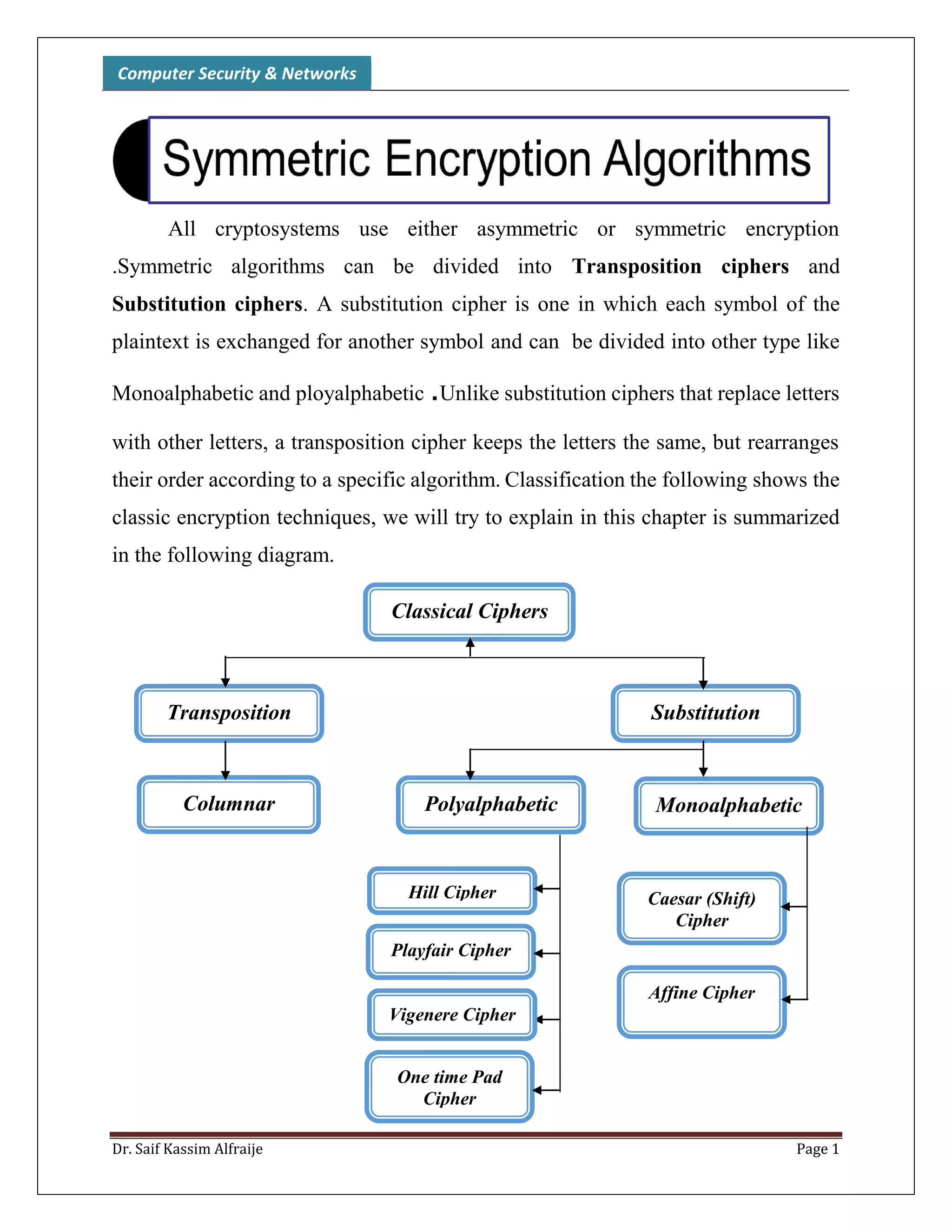
classic encryption techniques, we will try to explain in this chapter is summarized
in the following diagram.
Classical Ciphers
Transposition
Caesar (Shift)
Cipher
Monoalphabetic
Substitution
PolyalphabeticColumnar
Affine Cipher
Playfair Cipher
One time Pad
Cipher
Hill Cipher
Vigenere Cipher
Computer Security & Networks
Dr. Saif Kassim Alfraije Page 2
Monoalphabetic Ciphers
A monoalphabetic cipher uses the same substitution across the entire message. For
example, if you know that the letter A is enciphered as the letter K , the
relationship between a symbol in the plaintext to a symbol in the ciphertext is
always one-to-one.
The simplest monoalphabetic cipher is the additive cipher. This cipher is
sometimes called a shift cipher and sometimes a Caesar cipher, but the term
additive cipher better reveals its mathematical nature.
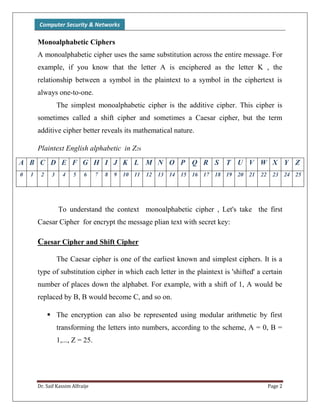
Plaintext English alphabetic in Z26
A B C D E F G H I J K L M N O P Q R S T U V W X Y Z
0 1 2 3 4 5 6 7 8 9 10 11 12 13 14 15 16 17 18 19 20 21 22 23 24 25
To understand the context monoalphabetic cipher , Let's take the first
Caesar Cipher for encrypt the message plian text with secret key:
Caesar Cipher and Shift Cipher
The Caesar cipher is one of the earliest known and simplest ciphers. It is a
type of substitution cipher in which each letter in the plaintext is 'shifted' a certain
number of places down the alphabet. For example, with a shift of 1, A would be
replaced by B, B would become C, and so on.
 The encryption can also be represented using modular arithmetic by first
transforming the letters into numbers, according to the scheme, A = 0, B =
1,..., Z = 25.
Computer Security & Networks
Dr. Saif Kassim Alfraije Page 3
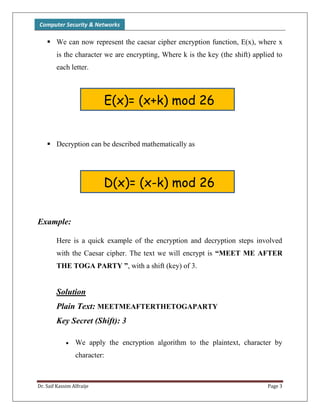
 We can now represent the caesar cipher encryption function, E(x), where x
is the character we are encrypting, Where k is the key (the shift) applied to
each letter.
 Decryption can be described mathematically as
Example:
Here is a quick example of the encryption and decryption steps involved
with the Caesar cipher. The text we will encrypt is “MEET ME AFTER
THE TOGA PARTY ”, with a shift (key) of 3.
Solution
Plain Text: MEETMEAFTERTHETOGAPARTY
Key Secret (Shift): 3
 We apply the encryption algorithm to the plaintext, character by
character:
E(x)= (x+k) mod 26
D(x)= (x-k) mod 26
Computer Security & Networks
Dr. Saif Kassim Alfraije Page 4
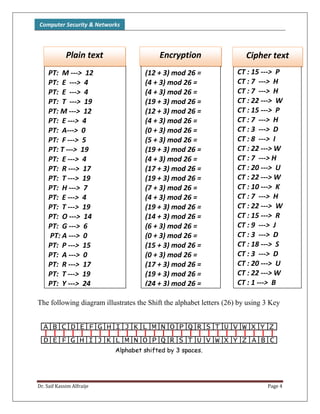
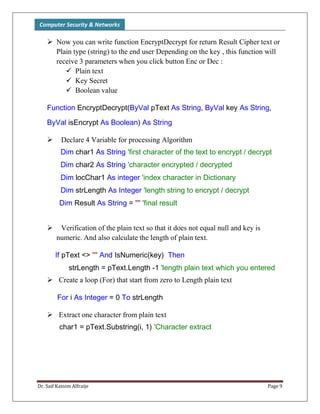
The following diagram illustrates the Shift the alphabet letters (26) by using 3 Key
PT: M ---> 12
PT: E ---> 4
PT: E ---> 4
PT: T ---> 19
PT: M ---> 12
PT: E ---> 4
PT: A---> 0
PT: F ---> 5
PT: T ---> 19
PT: E ---> 4
PT: R ---> 17
PT: T ---> 19
PT: H ---> 7
PT: E ---> 4
PT: T ---> 19
PT: O ---> 14
PT: G ---> 6
PT: A ---> 0
PT: P ---> 15
PT: A ---> 0
PT: R ---> 17
PT: T ---> 19
PT: Y ---> 24
Plain text
(12 + 3) mod 26 =
(4 + 3) mod 26 =
(4 + 3) mod 26 =
(19 + 3) mod 26 =
(12 + 3) mod 26 =
(4 + 3) mod 26 =
(0 + 3) mod 26 =
(5 + 3) mod 26 =
(19 + 3) mod 26 =
(4 + 3) mod 26 =
(17 + 3) mod 26 =
(19 + 3) mod 26 =
(7 + 3) mod 26 =
(4 + 3) mod 26 =
(19 + 3) mod 26 =
(14 + 3) mod 26 =
(6 + 3) mod 26 =
(0 + 3) mod 26 =
(15 + 3) mod 26 =
(0 + 3) mod 26 =
(17 + 3) mod 26 =
(19 + 3) mod 26 =
(24 + 3) mod 26 =
Encryption
CT : 15 ---> P
CT : 7 ---> H
CT : 7 ---> H
CT : 22 ---> W
CT : 15 ---> P
CT : 7 ---> H
CT : 3 ---> D
CT : 8 ---> I
CT : 22 ---> W
CT : 7 ---> H
CT : 20 ---> U
CT : 22 ---> W
CT : 10 ---> K
CT : 7 ---> H
CT : 22 ---> W
CT : 15 ---> R
CT : 9 ---> J
CT : 3 ---> D
CT : 18 ---> S
CT : 3 ---> D
CT : 20 ---> U
CT : 22 ---> W
CT : 1 ---> B
Cipher text
PT: M ---> 12
PT: E ---> 4
PT: E ---> 4
PT: T ---> 19
PT: M ---> 12
PT: E ---> 4
PT: A---> 0
PT: F ---> 5
PT: T ---> 19
PT: E ---> 4
PT: R ---> 17
PT: T ---> 19
PT: H ---> 7
PT: E ---> 4
PT: T ---> 19
PT: O ---> 14
PT: G ---> 6
PT: A ---> 0
PT: P ---> 15
PT: A ---> 0
PT: R ---> 17
PT: T ---> 19
PT: Y ---> 24
Plain text
(12 + 3) mod 26 =
(4 + 3) mod 26 =
(4 + 3) mod 26 =
(19 + 3) mod 26 =
(12 + 3) mod 26 =
(4 + 3) mod 26 =
(0 + 3) mod 26 =
(5 + 3) mod 26 =
(19 + 3) mod 26 =
(4 + 3) mod 26 =
(17 + 3) mod 26 =
(19 + 3) mod 26 =
(7 + 3) mod 26 =
(4 + 3) mod 26 =
(19 + 3) mod 26 =
(14 + 3) mod 26 =
(6 + 3) mod 26 =
(0 + 3) mod 26 =
(15 + 3) mod 26 =
(0 + 3) mod 26 =
(17 + 3) mod 26 =
(19 + 3) mod 26 =
(24 + 3) mod 26 =
Encryption
Computer Security & Networks
Dr. Saif Kassim Alfraije Page 5
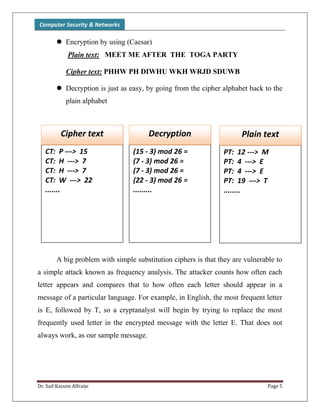
 Encryption by using (Caesar)
Plain text: MEET ME AFTER THE TOGA PARTY
Cipher text: PHHW PH DIWHU WKH WRJD SDUWB
 Decryption is just as easy, by going from the cipher alphabet back to the
plain alphabet
A big problem with simple substitution ciphers is that they are vulnerable to
a simple attack known as frequency analysis. The attacker counts how often each
letter appears and compares that to how often each letter should appear in a
message of a particular language. For example, in English, the most frequent letter
is E, followed by T, so a cryptanalyst will begin by trying to replace the most
frequently used letter in the encrypted message with the letter E. That does not
always work, as our sample message.
CT: P ---> 15
CT: H ---> 7
CT: H ---> 7
CT: W ---> 22
.......
Cipher text
PT: 12 ---> M
PT: 4 ---> E
PT: 4 ---> E
PT: 19 ---> T
........
Plain text
(15 - 3) mod 26 =
(7 - 3) mod 26 =
(7 - 3) mod 26 =
(22 - 3) mod 26 =
.........
Decryption
Computer Security & Networks
Dr. Saif Kassim Alfraije Page 6
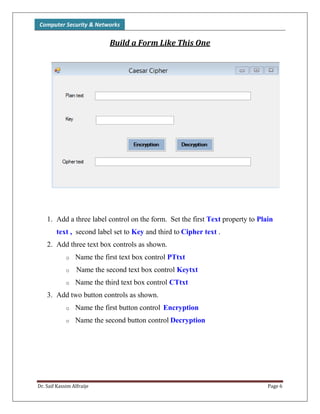
Build a Form Like This One
1. Add a three label control on the form. Set the first Text property to Plain
text , second label set to Key and third to Cipher text .
2. Add three text box controls as shown.
o Name the first text box control PTtxt
o Name the second text box control Keytxt
o Name the third text box control CTtxt
3. Add two button controls as shown.
o Name the first button control Encryption
o Name the second button control Decryption
Computer Security & Networks
Dr. Saif Kassim Alfraije Page 7
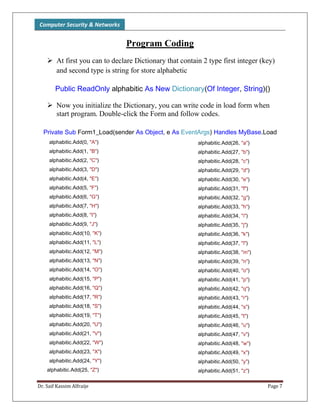
Program Coding
 At first you can to declare Dictionary that contain 2 type first integer (key)
and second type is string for store alphabetic
Public ReadOnly alphabitic As New Dictionary(Of Integer, String)()
 Now you initialize the Dictionary, you can write code in load form when
start program. Double-click the Form and follow codes.
Private Sub Form1_Load(sender As Object, e As EventArgs) Handles MyBase.Load
alphabitic.Add(0, "A")
alphabitic.Add(1, "B")
alphabitic.Add(2, "C")
alphabitic.Add(3, "D")
alphabitic.Add(4, "E")
alphabitic.Add(5, "F")
alphabitic.Add(6, "G")
alphabitic.Add(7, "H")
alphabitic.Add(8, "I")
alphabitic.Add(9, "J")
alphabitic.Add(10, "K")
alphabitic.Add(11, "L")
alphabitic.Add(12, "M")
alphabitic.Add(13, "N")
alphabitic.Add(14, "O")
alphabitic.Add(15, "P")
alphabitic.Add(16, "Q")
alphabitic.Add(17, "R")
alphabitic.Add(18, "S")
alphabitic.Add(19, "T")
alphabitic.Add(20, "U")
alphabitic.Add(21, "V")
alphabitic.Add(22, "W")
alphabitic.Add(23, "X")
alphabitic.Add(24, "Y")
alphabitic.Add(25, "Z")
alphabitic.Add(26, "a")
alphabitic.Add(27, "b")
alphabitic.Add(28, "c")
alphabitic.Add(29, "d")
alphabitic.Add(30, "e")
alphabitic.Add(31, "f")
alphabitic.Add(32, "g")
alphabitic.Add(33, "h")
alphabitic.Add(34, "i")
alphabitic.Add(35, "j")
alphabitic.Add(36, "k")
alphabitic.Add(37, "l")
alphabitic.Add(38, "m")
alphabitic.Add(39, "n")
alphabitic.Add(40, "o")
alphabitic.Add(41, "p")
alphabitic.Add(42, "q")
alphabitic.Add(43, "r")
alphabitic.Add(44, "s")
alphabitic.Add(45, "t")
alphabitic.Add(46, "u")
alphabitic.Add(47, "v")
alphabitic.Add(48, "w")
alphabitic.Add(49, "x")
alphabitic.Add(50, "y")
alphabitic.Add(51, "z")
Computer Security & Networks
Dr. Saif Kassim Alfraije Page 8
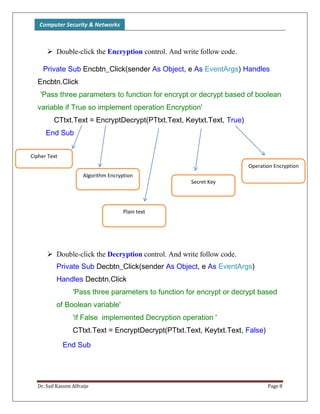
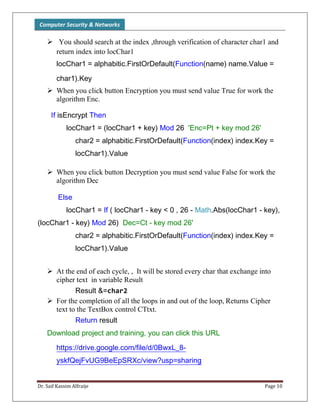
 Double-click the Encryption control. And write follow code.
Private Sub Encbtn_Click(sender As Object, e As EventArgs) Handles
Encbtn.Click
'Pass three parameters to function for encrypt or decrypt based of boolean
variable if True so implement operation Encryption'
CTtxt.Text = EncryptDecrypt(PTtxt.Text, Keytxt.Text, True)
End Sub
 Double-click the Decryption control. And write follow code.
Private Sub Decbtn_Click(sender As Object, e As EventArgs)
Handles Decbtn.Click
'Pass three parameters to function for encrypt or decrypt based
of Boolean variable'
'if False implemented Decryption operation '
CTtxt.Text = EncryptDecrypt(PTtxt.Text, Keytxt.Text, False)
End Sub
Operation Encryption
Secret Key
Plain text
Algorithm Encryption
Cipher Text
Computer Security & Networks
Dr. Saif Kassim Alfraije Page 9
 Now you can write function EncryptDecrypt for return Result Cipher text or
Plain type (string) to the end user Depending on the key , this function will
receive 3 parameters when you click button Enc or Dec :
 Plain text
 Key Secret
 Boolean value
Function EncryptDecrypt(ByVal pText As String, ByVal key As String,
ByVal isEncrypt As Boolean) As String
 Declare 4 Variable for processing Algorithm
Dim char1 As String 'first character of the text to encrypt / decrypt
Dim char2 As String 'character encrypted / decrypted
Dim locChar1 As integer 'index character in Dictionary
Dim strLength As Integer 'length string to encrypt / decrypt
Dim Result As String = "" 'final result
 Verification of the plain text so that it does not equal null and key is
numeric. And also calculate the length of plain text.
If pText <> "" And IsNumeric(key) Then
strLength = pText.Length -1 'length plain text which you entered
 Create a loop (For) that start from zero to Length plain text
For i As Integer = 0 To strLength
 Extract one character from plain text
char1 = pText.Substring(i, 1) 'Character extract
Computer Security & Networks
Dr. Saif Kassim Alfraije Page 10
 You should search at the index ,through verification of character char1 and
return index into locChar1
locChar1 = alphabitic.FirstOrDefault(Function(name) name.Value =
char1).Key
 When you click button Encryption you must send value True for work the
algorithm Enc.
If isEncrypt Then
locChar1 = (locChar1 + key) Mod 26 'Enc=Pt + key mod 26'
char2 = alphabitic.FirstOrDefault(Function(index) index.Key =
locChar1).Value
 When you click button Decryption you must send value False for work the
algorithm Dec
Else
locChar1 = If ( locChar1 - key < 0 , 26 - Math.Abs(locChar1 - key),
(locChar1 - key) Mod 26) Dec=Ct - key mod 26'
char2 = alphabitic.FirstOrDefault(Function(index) index.Key =
locChar1).Value
 At the end of each cycle, , It will be stored every char that exchange into
cipher text in variable Result
Result &=char2
 For the completion of all the loops in and out of the loop, Returns Cipher
text to the TextBox control CTtxt.
Return result
Download project and training, you can click this URL
https://drive.google.com/file/d/0BwxL_8-
yskfQejFvUG9BeEpSRXc/view?usp=sharing
Computer Security & Networks
Dr. Saif Kassim Alfraije Page 11
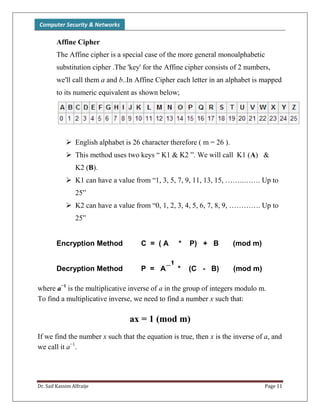
Affine Cipher
The Affine cipher is a special case of the more general monoalphabetic
substitution cipher .The 'key' for the Affine cipher consists of 2 numbers,
we'll call them a and b..In Affine Cipher each letter in an alphabet is mapped
to its numeric equivalent as shown below;
 English alphabet is 26 character therefore ( m = 26 ).
 This method uses two keys “ K1 & K2 ”. We will call K1 (A) &
K2 (B).
 K1 can have a value from “1, 3, 5, 7, 9, 11, 13, 15, ……..……. Up to
25”
 K2 can have a value from “0, 1, 2, 3, 4, 5, 6, 7, 8, 9, …………. Up to
25”
Encryption Method C = ( A * P) + B (mod m)
Decryption Method P = A * (C - B) (mod m)
where a−1
is the multiplicative inverse of a in the group of integers modulo m.
To find a multiplicative inverse, we need to find a number x such that:
ax = 1 (mod m)
If we find the number x such that the equation is true, then x is the inverse of a, and
we call it a−1
.
_1
Computer Security & Networks
Dr. Saif Kassim Alfraije Page 12
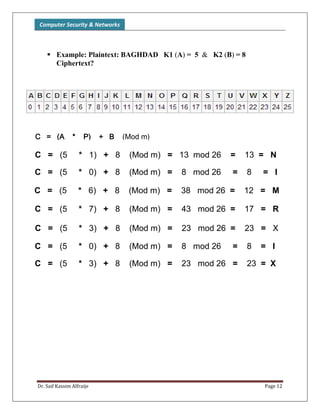
 Example: Plaintext: BAGHDAD K1 (A) = 5 & K2 (B) = 8
Ciphertext?
C = (A * P) + B (Mod m)
C = (5 * 1) + 8 (Mod m) = 13 mod 26 = 13 = N
C = (5 * 0) + 8 (Mod m) = 8 mod 26 = 8 = I
C = (5 * 6) + 8 (Mod m) = 38 mod 26 = 12 = M
C = (5 * 3) + 8 (Mod m) = 23 mod 26 = 23 = X
C = (5 * 7) + 8 (Mod m) = 43 mod 26 = 17 = R
C = (5 * 0) + 8 (Mod m) = 8 mod 26 = 8 = I
C = (5 * 3) + 8 (Mod m) = 23 mod 26 = 23 = X
Computer Security & Networks
Dr. Saif Kassim Alfraije Page 13
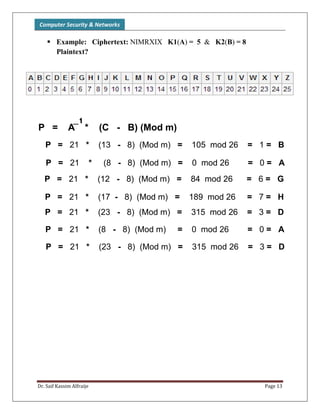
 Example: Ciphertext: NIMRXIX K1(A) = 5 & K2(B) = 8
Plaintext?
P = 21 * (13 - 8) (Mod m) = 105 mod 26 = 1 = B
P = 21 * (8 - 8) (Mod m) = 0 mod 26 = 0 = A
P = 21 * (12 - 8) (Mod m) = 84 mod 26 = 6 = G
P = 21 * (17 - 8) (Mod m) = 189 mod 26 = 7 = H
P = 21 * (23 - 8) (Mod m) = 315 mod 26 = 3 = D
P = 21 * (8 - 8) (Mod m) = 0 mod 26 = 0 = A
P = 21 * (23 - 8) (Mod m) = 315 mod 26 = 3 = D
P = A * (C - B) (Mod m)
_1

Computer Security (Cryptography) Ch02

  • 1.
    Computer Security &Networks Dr. Saif Kassim Alfraije Page 1 All cryptosystems use either asymmetric or symmetric encryption .Symmetric algorithms can be divided into Transposition ciphers and Substitution ciphers. A substitution cipher is one in which each symbol of the plaintext is exchanged for another symbol and can be divided into other type like Monoalphabetic and ployalphabetic .Unlike substitution ciphers that replace letters with other letters, a transposition cipher keeps the letters the same, but rearranges their order according to a specific algorithm. Classification the following shows the classic encryption techniques, we will try to explain in this chapter is summarized in the following diagram. Classical Ciphers Transposition Caesar (Shift) Cipher Monoalphabetic Substitution PolyalphabeticColumnar Affine Cipher Playfair Cipher One time Pad Cipher Hill Cipher Vigenere Cipher
  • 2.
    Computer Security &Networks Dr. Saif Kassim Alfraije Page 2 Monoalphabetic Ciphers A monoalphabetic cipher uses the same substitution across the entire message. For example, if you know that the letter A is enciphered as the letter K , the relationship between a symbol in the plaintext to a symbol in the ciphertext is always one-to-one. The simplest monoalphabetic cipher is the additive cipher. This cipher is sometimes called a shift cipher and sometimes a Caesar cipher, but the term additive cipher better reveals its mathematical nature. Plaintext English alphabetic in Z26 A B C D E F G H I J K L M N O P Q R S T U V W X Y Z 0 1 2 3 4 5 6 7 8 9 10 11 12 13 14 15 16 17 18 19 20 21 22 23 24 25 To understand the context monoalphabetic cipher , Let's take the first Caesar Cipher for encrypt the message plian text with secret key: Caesar Cipher and Shift Cipher The Caesar cipher is one of the earliest known and simplest ciphers. It is a type of substitution cipher in which each letter in the plaintext is 'shifted' a certain number of places down the alphabet. For example, with a shift of 1, A would be replaced by B, B would become C, and so on.  The encryption can also be represented using modular arithmetic by first transforming the letters into numbers, according to the scheme, A = 0, B = 1,..., Z = 25.
  • 3.
    Computer Security &Networks Dr. Saif Kassim Alfraije Page 3  We can now represent the caesar cipher encryption function, E(x), where x is the character we are encrypting, Where k is the key (the shift) applied to each letter.  Decryption can be described mathematically as Example: Here is a quick example of the encryption and decryption steps involved with the Caesar cipher. The text we will encrypt is “MEET ME AFTER THE TOGA PARTY ”, with a shift (key) of 3. Solution Plain Text: MEETMEAFTERTHETOGAPARTY Key Secret (Shift): 3  We apply the encryption algorithm to the plaintext, character by character: E(x)= (x+k) mod 26 D(x)= (x-k) mod 26
  • 4.
    Computer Security &Networks Dr. Saif Kassim Alfraije Page 4 The following diagram illustrates the Shift the alphabet letters (26) by using 3 Key PT: M ---> 12 PT: E ---> 4 PT: E ---> 4 PT: T ---> 19 PT: M ---> 12 PT: E ---> 4 PT: A---> 0 PT: F ---> 5 PT: T ---> 19 PT: E ---> 4 PT: R ---> 17 PT: T ---> 19 PT: H ---> 7 PT: E ---> 4 PT: T ---> 19 PT: O ---> 14 PT: G ---> 6 PT: A ---> 0 PT: P ---> 15 PT: A ---> 0 PT: R ---> 17 PT: T ---> 19 PT: Y ---> 24 Plain text (12 + 3) mod 26 = (4 + 3) mod 26 = (4 + 3) mod 26 = (19 + 3) mod 26 = (12 + 3) mod 26 = (4 + 3) mod 26 = (0 + 3) mod 26 = (5 + 3) mod 26 = (19 + 3) mod 26 = (4 + 3) mod 26 = (17 + 3) mod 26 = (19 + 3) mod 26 = (7 + 3) mod 26 = (4 + 3) mod 26 = (19 + 3) mod 26 = (14 + 3) mod 26 = (6 + 3) mod 26 = (0 + 3) mod 26 = (15 + 3) mod 26 = (0 + 3) mod 26 = (17 + 3) mod 26 = (19 + 3) mod 26 = (24 + 3) mod 26 = Encryption CT : 15 ---> P CT : 7 ---> H CT : 7 ---> H CT : 22 ---> W CT : 15 ---> P CT : 7 ---> H CT : 3 ---> D CT : 8 ---> I CT : 22 ---> W CT : 7 ---> H CT : 20 ---> U CT : 22 ---> W CT : 10 ---> K CT : 7 ---> H CT : 22 ---> W CT : 15 ---> R CT : 9 ---> J CT : 3 ---> D CT : 18 ---> S CT : 3 ---> D CT : 20 ---> U CT : 22 ---> W CT : 1 ---> B Cipher text PT: M ---> 12 PT: E ---> 4 PT: E ---> 4 PT: T ---> 19 PT: M ---> 12 PT: E ---> 4 PT: A---> 0 PT: F ---> 5 PT: T ---> 19 PT: E ---> 4 PT: R ---> 17 PT: T ---> 19 PT: H ---> 7 PT: E ---> 4 PT: T ---> 19 PT: O ---> 14 PT: G ---> 6 PT: A ---> 0 PT: P ---> 15 PT: A ---> 0 PT: R ---> 17 PT: T ---> 19 PT: Y ---> 24 Plain text (12 + 3) mod 26 = (4 + 3) mod 26 = (4 + 3) mod 26 = (19 + 3) mod 26 = (12 + 3) mod 26 = (4 + 3) mod 26 = (0 + 3) mod 26 = (5 + 3) mod 26 = (19 + 3) mod 26 = (4 + 3) mod 26 = (17 + 3) mod 26 = (19 + 3) mod 26 = (7 + 3) mod 26 = (4 + 3) mod 26 = (19 + 3) mod 26 = (14 + 3) mod 26 = (6 + 3) mod 26 = (0 + 3) mod 26 = (15 + 3) mod 26 = (0 + 3) mod 26 = (17 + 3) mod 26 = (19 + 3) mod 26 = (24 + 3) mod 26 = Encryption
  • 5.
    Computer Security &Networks Dr. Saif Kassim Alfraije Page 5  Encryption by using (Caesar) Plain text: MEET ME AFTER THE TOGA PARTY Cipher text: PHHW PH DIWHU WKH WRJD SDUWB  Decryption is just as easy, by going from the cipher alphabet back to the plain alphabet A big problem with simple substitution ciphers is that they are vulnerable to a simple attack known as frequency analysis. The attacker counts how often each letter appears and compares that to how often each letter should appear in a message of a particular language. For example, in English, the most frequent letter is E, followed by T, so a cryptanalyst will begin by trying to replace the most frequently used letter in the encrypted message with the letter E. That does not always work, as our sample message. CT: P ---> 15 CT: H ---> 7 CT: H ---> 7 CT: W ---> 22 ....... Cipher text PT: 12 ---> M PT: 4 ---> E PT: 4 ---> E PT: 19 ---> T ........ Plain text (15 - 3) mod 26 = (7 - 3) mod 26 = (7 - 3) mod 26 = (22 - 3) mod 26 = ......... Decryption
  • 6.
    Computer Security &Networks Dr. Saif Kassim Alfraije Page 6 Build a Form Like This One 1. Add a three label control on the form. Set the first Text property to Plain text , second label set to Key and third to Cipher text . 2. Add three text box controls as shown. o Name the first text box control PTtxt o Name the second text box control Keytxt o Name the third text box control CTtxt 3. Add two button controls as shown. o Name the first button control Encryption o Name the second button control Decryption
  • 7.
    Computer Security &Networks Dr. Saif Kassim Alfraije Page 7 Program Coding  At first you can to declare Dictionary that contain 2 type first integer (key) and second type is string for store alphabetic Public ReadOnly alphabitic As New Dictionary(Of Integer, String)()  Now you initialize the Dictionary, you can write code in load form when start program. Double-click the Form and follow codes. Private Sub Form1_Load(sender As Object, e As EventArgs) Handles MyBase.Load alphabitic.Add(0, "A") alphabitic.Add(1, "B") alphabitic.Add(2, "C") alphabitic.Add(3, "D") alphabitic.Add(4, "E") alphabitic.Add(5, "F") alphabitic.Add(6, "G") alphabitic.Add(7, "H") alphabitic.Add(8, "I") alphabitic.Add(9, "J") alphabitic.Add(10, "K") alphabitic.Add(11, "L") alphabitic.Add(12, "M") alphabitic.Add(13, "N") alphabitic.Add(14, "O") alphabitic.Add(15, "P") alphabitic.Add(16, "Q") alphabitic.Add(17, "R") alphabitic.Add(18, "S") alphabitic.Add(19, "T") alphabitic.Add(20, "U") alphabitic.Add(21, "V") alphabitic.Add(22, "W") alphabitic.Add(23, "X") alphabitic.Add(24, "Y") alphabitic.Add(25, "Z") alphabitic.Add(26, "a") alphabitic.Add(27, "b") alphabitic.Add(28, "c") alphabitic.Add(29, "d") alphabitic.Add(30, "e") alphabitic.Add(31, "f") alphabitic.Add(32, "g") alphabitic.Add(33, "h") alphabitic.Add(34, "i") alphabitic.Add(35, "j") alphabitic.Add(36, "k") alphabitic.Add(37, "l") alphabitic.Add(38, "m") alphabitic.Add(39, "n") alphabitic.Add(40, "o") alphabitic.Add(41, "p") alphabitic.Add(42, "q") alphabitic.Add(43, "r") alphabitic.Add(44, "s") alphabitic.Add(45, "t") alphabitic.Add(46, "u") alphabitic.Add(47, "v") alphabitic.Add(48, "w") alphabitic.Add(49, "x") alphabitic.Add(50, "y") alphabitic.Add(51, "z")
  • 8.
    Computer Security &Networks Dr. Saif Kassim Alfraije Page 8  Double-click the Encryption control. And write follow code. Private Sub Encbtn_Click(sender As Object, e As EventArgs) Handles Encbtn.Click 'Pass three parameters to function for encrypt or decrypt based of boolean variable if True so implement operation Encryption' CTtxt.Text = EncryptDecrypt(PTtxt.Text, Keytxt.Text, True) End Sub  Double-click the Decryption control. And write follow code. Private Sub Decbtn_Click(sender As Object, e As EventArgs) Handles Decbtn.Click 'Pass three parameters to function for encrypt or decrypt based of Boolean variable' 'if False implemented Decryption operation ' CTtxt.Text = EncryptDecrypt(PTtxt.Text, Keytxt.Text, False) End Sub Operation Encryption Secret Key Plain text Algorithm Encryption Cipher Text
  • 9.
    Computer Security &Networks Dr. Saif Kassim Alfraije Page 9  Now you can write function EncryptDecrypt for return Result Cipher text or Plain type (string) to the end user Depending on the key , this function will receive 3 parameters when you click button Enc or Dec :  Plain text  Key Secret  Boolean value Function EncryptDecrypt(ByVal pText As String, ByVal key As String, ByVal isEncrypt As Boolean) As String  Declare 4 Variable for processing Algorithm Dim char1 As String 'first character of the text to encrypt / decrypt Dim char2 As String 'character encrypted / decrypted Dim locChar1 As integer 'index character in Dictionary Dim strLength As Integer 'length string to encrypt / decrypt Dim Result As String = "" 'final result  Verification of the plain text so that it does not equal null and key is numeric. And also calculate the length of plain text. If pText <> "" And IsNumeric(key) Then strLength = pText.Length -1 'length plain text which you entered  Create a loop (For) that start from zero to Length plain text For i As Integer = 0 To strLength  Extract one character from plain text char1 = pText.Substring(i, 1) 'Character extract
  • 10.
    Computer Security &Networks Dr. Saif Kassim Alfraije Page 10  You should search at the index ,through verification of character char1 and return index into locChar1 locChar1 = alphabitic.FirstOrDefault(Function(name) name.Value = char1).Key  When you click button Encryption you must send value True for work the algorithm Enc. If isEncrypt Then locChar1 = (locChar1 + key) Mod 26 'Enc=Pt + key mod 26' char2 = alphabitic.FirstOrDefault(Function(index) index.Key = locChar1).Value  When you click button Decryption you must send value False for work the algorithm Dec Else locChar1 = If ( locChar1 - key < 0 , 26 - Math.Abs(locChar1 - key), (locChar1 - key) Mod 26) Dec=Ct - key mod 26' char2 = alphabitic.FirstOrDefault(Function(index) index.Key = locChar1).Value  At the end of each cycle, , It will be stored every char that exchange into cipher text in variable Result Result &=char2  For the completion of all the loops in and out of the loop, Returns Cipher text to the TextBox control CTtxt. Return result Download project and training, you can click this URL https://drive.google.com/file/d/0BwxL_8- yskfQejFvUG9BeEpSRXc/view?usp=sharing
  • 11.
    Computer Security &Networks Dr. Saif Kassim Alfraije Page 11 Affine Cipher The Affine cipher is a special case of the more general monoalphabetic substitution cipher .The 'key' for the Affine cipher consists of 2 numbers, we'll call them a and b..In Affine Cipher each letter in an alphabet is mapped to its numeric equivalent as shown below;  English alphabet is 26 character therefore ( m = 26 ).  This method uses two keys “ K1 & K2 ”. We will call K1 (A) & K2 (B).  K1 can have a value from “1, 3, 5, 7, 9, 11, 13, 15, ……..……. Up to 25”  K2 can have a value from “0, 1, 2, 3, 4, 5, 6, 7, 8, 9, …………. Up to 25” Encryption Method C = ( A * P) + B (mod m) Decryption Method P = A * (C - B) (mod m) where a−1 is the multiplicative inverse of a in the group of integers modulo m. To find a multiplicative inverse, we need to find a number x such that: ax = 1 (mod m) If we find the number x such that the equation is true, then x is the inverse of a, and we call it a−1 . _1
  • 12.
    Computer Security &Networks Dr. Saif Kassim Alfraije Page 12  Example: Plaintext: BAGHDAD K1 (A) = 5 & K2 (B) = 8 Ciphertext? C = (A * P) + B (Mod m) C = (5 * 1) + 8 (Mod m) = 13 mod 26 = 13 = N C = (5 * 0) + 8 (Mod m) = 8 mod 26 = 8 = I C = (5 * 6) + 8 (Mod m) = 38 mod 26 = 12 = M C = (5 * 3) + 8 (Mod m) = 23 mod 26 = 23 = X C = (5 * 7) + 8 (Mod m) = 43 mod 26 = 17 = R C = (5 * 0) + 8 (Mod m) = 8 mod 26 = 8 = I C = (5 * 3) + 8 (Mod m) = 23 mod 26 = 23 = X
  • 13.
    Computer Security &Networks Dr. Saif Kassim Alfraije Page 13  Example: Ciphertext: NIMRXIX K1(A) = 5 & K2(B) = 8 Plaintext? P = 21 * (13 - 8) (Mod m) = 105 mod 26 = 1 = B P = 21 * (8 - 8) (Mod m) = 0 mod 26 = 0 = A P = 21 * (12 - 8) (Mod m) = 84 mod 26 = 6 = G P = 21 * (17 - 8) (Mod m) = 189 mod 26 = 7 = H P = 21 * (23 - 8) (Mod m) = 315 mod 26 = 3 = D P = 21 * (8 - 8) (Mod m) = 0 mod 26 = 0 = A P = 21 * (23 - 8) (Mod m) = 315 mod 26 = 3 = D P = A * (C - B) (Mod m) _1