Computer performance
Dr. Amit Kumar, Dept of CSE, JUET, Guna
Why Study Performance?
• Make intelligent design choices
• See through the marketing hype
• Key to understanding underlying computer organization
- Why is some hardware faster than others for
different programs?
- What factors of system performance are
hardware related? (e.g., Do we need a new
machine, or a new operating system?)
Dr. Amit Kumar, Dept of CSE, JUET, Guna
Computer performance
Computer performance is characterized by
the amount of useful work accomplished
by a computer system compared to the
time and resources used.
Dr. Amit Kumar, Dept of CSE, JUET, Guna
Computer performance
Depending on the context, good computer
performance may involve one or more of the
following:
• Short response time for a given piece of work
• High throughput (rate of processing work)
• Low utilization of computing resource(s)
• High availability of the computing system or
application
• Fast (or highly compact) data compression and
decompression
• High bandwidth / short data transmission time
Dr. Amit Kumar, Dept of CSE, JUET, Guna
Computer vs H/W Performance
• Latency/Response Time (clocks from input to corresponding
output)
—How long does it take for my program to run?
—How long must I wait after typing return for the result?
• Throughput (How many results per clock)
—How many results can be processed per second?
—What is the average execution rate of my program?
—How much work is getting done?
If we upgrade a machine with a new processor what do we
improve?
Response Time/Latency
If we add a new machine to the lab what do we increase?
Throughput Dr. Amit Kumar, Dept of CSE, JUET, Guna
Design Tradeoffs
• Maximum Performance: measured by the
numbers of instructions executed per
Second
• Minimum Cost: measured by the size of the
circuit.
• Best Performance/Price: measured by the ratio
of MIPS to size. In powersensitive applications
MIPS/Watt is important too.
Dr. Amit Kumar, Dept of CSE, JUET, Guna
Aspect of software quality
Computer software performance,
particularly software application
response time, is an aspect of
software quality that is important
in human–computer interactions.
Dr. Amit Kumar, Dept of CSE, JUET, Guna
Technical and non-technical definitions
The performance of any computer system can be
evaluated in measurable, technical terms, using one or
more of the metrics . This way the performance can be
• compared relative to other systems or the same system
before/after changes
• defined in absolute terms, e.g. for fulfilling a
contractual obligation
Whilst the above definition relates to a scientific,
technical approach, the following definition given by
Arnold Allen would be useful for a non-technical
audience:
The word performance in computer
performance means the same thing that performance
means in other contexts, that is, it means "How well is
the computer doing the work it is supposed to do?"
Dr. Amit Kumar, Dept of CSE, JUET, Guna
Performance Equation
The total amount of time (t) required to execute a
particular benchmark program is
t = N * C/f, or equivalently
P = I * f/N
where
• P = 1/t is "the performance" in terms of time-to-
execute
• N is the number of instructions actually executed
(the instruction path length).
• f is the clock frequency in cycles per second.
• C= is the average cycles per instruction (CPI) for
this benchmark.
• I= is the average instructions per cycle (IPC) for
this benchmark.Dr. Amit Kumar, Dept of CSE, JUET, Guna
Performance Equation
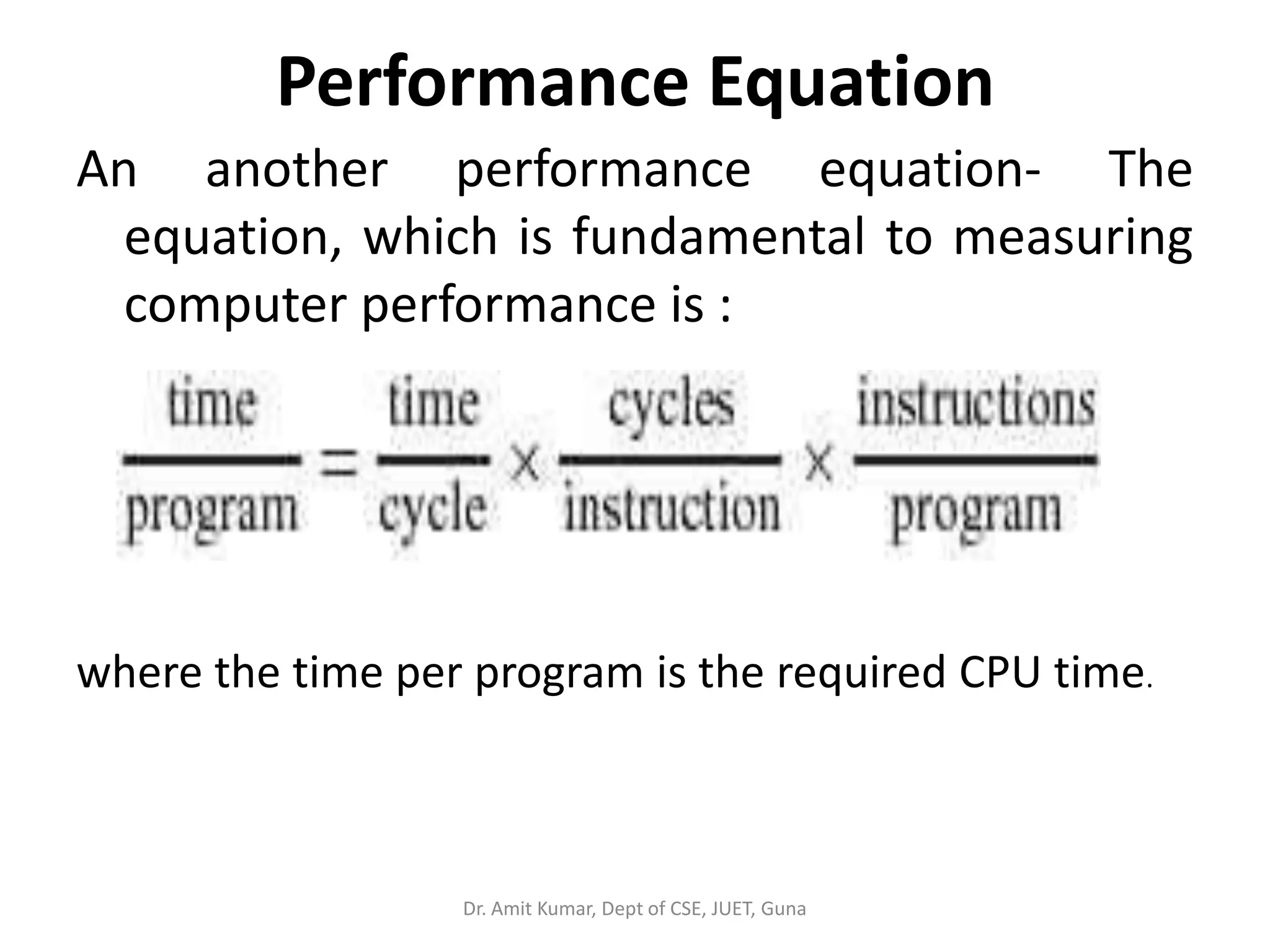
An another performance equation- The
equation, which is fundamental to measuring
computer performance is :
where the time per program is the required CPU time.
Dr. Amit Kumar, Dept of CSE, JUET, Guna
Performance Equation
CPU optimization is not the only way to increase system
performance. Memory and I/O also weigh heavily on
system throughput. The contribution of memory and I/O,
however, is not accounted for in the basic equation. For
increasing the overall performance of a system, we have
the following options:
• CPU optimization-Maximize the speed and efficiency of
operations performed by the CPU (the performance
equation addresses this optimization).
• Memory optimization-Maximize the efficiency of a code's
memory management.
• I/O optimization-Maximize the efficiency of input/output
operations.
Dr. Amit Kumar, Dept of CSE, JUET, Guna
Comparing the performance of two systems
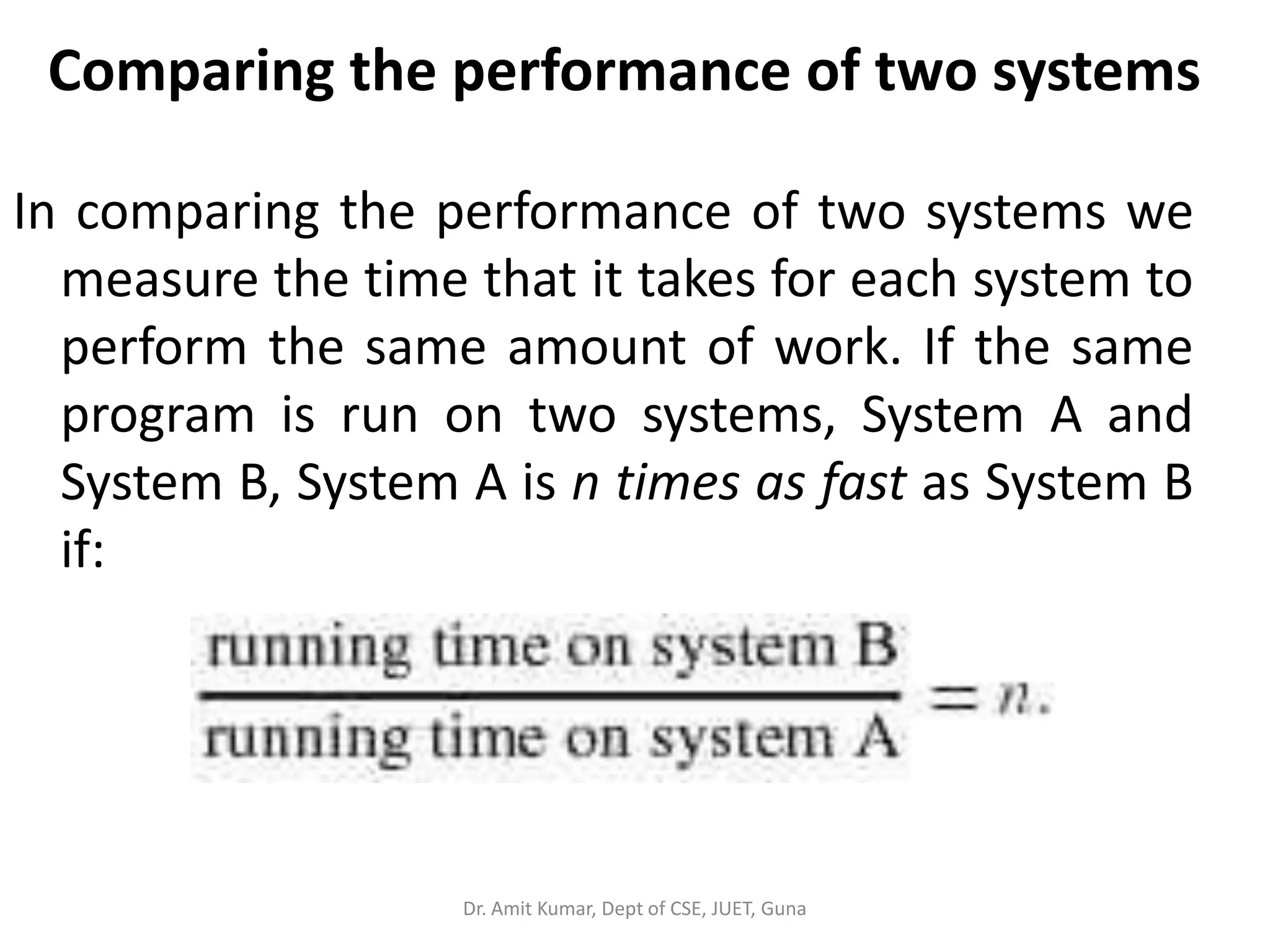
In comparing the performance of two systems we
measure the time that it takes for each system to
perform the same amount of work. If the same
program is run on two systems, System A and
System B, System A is n times as fast as System B
if:
Dr. Amit Kumar, Dept of CSE, JUET, Guna
Comparing the performance of two systems
System A is x% faster than System B if:
These formulas are useful in comparing the
average performance of one system with the
average performance of another.
Dr. Amit Kumar, Dept of CSE, JUET, Guna
Book's Definition of Performance
• For some program running on machine X,
PerformanceX = Program Executions / TimeX (executions/sec)
"X is n times faster than Y"
PerformanceX / PerformanceY = n
• Problem:
Machine A runs a program in 20 seconds
Machine B runs the same program in 25 seconds
PerformanceA = 1/20 PerformanceB = 1/25
Machine A is (1/20)/(1/25) = 1.25 times faster than
Machine B
Dr. Amit Kumar, Dept of CSE, JUET, Guna
Clock Cycles
Instead of reporting execution time in seconds,
we often use cycle counts
Clock “ticks” indicate when to start activities (one abstraction):
clock rate (frequency) = cycles per second (1 Hz. = 1 cycle/sec)
Dr. Amit Kumar, Dept of CSE, JUET, Guna
Execution Time
• Elapsed Time/Wall Clock Time
counts everything (disk and memory accesses, I/O , etc.)
a useful number, but often not good for comparison purposes
• CPU time
Doesn’t include I/O or time spent running other programs can
be broken up into system time, and user time
• Our focus: user CPU time
Time spent executing actual instructions of “our” program
Dr. Amit Kumar, Dept of CSE, JUET, Guna
Computer Performance Measure
Dr. Amit Kumar, Dept of CSE, JUET, Guna
How to Improve Performance?
Dr. Amit Kumar, Dept of CSE, JUET, Guna
Example
Our favorite program runs in 10 seconds on computer A, which
has a 400 Mhz clock. We are trying to help a computer
designer build a new machine B, to run this program in 6
seconds. The designer can use new (or perhaps more
expensive) technology to substantially increase the clock rate,
but has informed us that this increase will affect the rest of
the CPU design, causing machine B to require 1.2 times as
many clock cycles as machine A for the same program. What
clock rate should we tell the designer to target?
Dr. Amit Kumar, Dept of CSE, JUET, Guna
CPI = Clocks per instruction
Dr. Amit Kumar, Dept of CSE, JUET, Guna
Performance metrics
Computer performance metrics include
availability, response time, channel capacity,
latency, completion time, service time,
bandwidth, throughput, relative efficiency,
scalability, performance per watt,
compression ratio, instruction path length and
speed up.
Dr. Amit Kumar, Dept of CSE, JUET, Guna
Technical performance metrics
(Benchmarks)
There are a wide variety of technical performance
metrics that indirectly affect overall computer
performance.
Because there are too many programs to test a
CPU's speed on all of them, benchmarks were
developed. The most famous benchmarks are the
SPECint and SPECfp benchmarks developed by
Standard Performance Evaluation Corporation
and the ConsumerMark benchmark developed by
the Embedded Microprocessor Benchmark
Consortium EEMBC.
Dr. Amit Kumar, Dept of CSE, JUET, Guna
Early Benchmarks
• Whetstone
– Floating point intensive, Originally written in Algol 60 in 1972 at the
National Physics Laboratory (UK)
– Measures primarily floating point performance in WIPS: Whetstone
Instructions Per Second
• Dhrystone
– Integer and character string oriented, Synthetic benchmark developed
in 1984 by Reinhold Weicker
– Measures integer and string operations performance, expressed in
number of iterations, or Dhrystones, per second
• Livermore Fortran Kernels
– “Livermore Loops”, Developed at Lawrence Livermore National
Laboratory in 1970
– Collection of short kernels
• NAS kernel
– 7 Fortran test kernels for aerospace computation, Developed at the
Numerical Aerodynamic Simulation Projects Office at NASA Ames
– Focuses on vector floating point performance
Dr. Amit Kumar, Dept of CSE, JUET, Guna
Technical performance metrics
(Benchmarks)
Some important measurements include:
• Instructions per second – Most consumers pick a
computer architecture (normally Intel
architecture) to be able to run a large base of pre-
existing, pre-compiled software. Being relatively
uninformed on computer benchmarks, some of
them pick a particular CPU based on operating
frequency.
• FLOPS – The number of floating-point operations
per second is often important in selecting
computers for scientific computations.
Dr. Amit Kumar, Dept of CSE, JUET, Guna
Technical performance metrics
(Benchmarks)
• Performance per watt – System designers
building parallel computers, such as Google,
pick CPUs based on their speed per watt of
power, because the cost of powering the CPU
outweighs the cost of the CPU itself.
• Some system designers building parallel
computers pick CPUs based on the speed per
dollar.
Dr. Amit Kumar, Dept of CSE, JUET, Guna
Technical performance metrics
(Benchmarks)
• System designers building real-time
computing systems want to guarantee worst-
case response.
• Computer programmers who program directly
in assembly language want a CPU to support a
full-featured instruction set.
• Low power – For systems with limited power
sources (e.g. solar, batteries, human power).
• Small size or low weight - for portable
embedded systems, systems for spacecraft.Dr. Amit Kumar, Dept of CSE, JUET, Guna
Technical performance metrics
(Benchmarks)
• Environmental impact – Minimizing environmental
impact of computers during manufacturing and
recycling as well as during use. Reducing waste,
reducing hazardous materials.
• Giga-updates per second - a measure of how
frequently the RAM can be updated
Occasionally a CPU designer can find a way to make
a CPU with better overall performance by
improving one of these technical performance
metrics without sacrificing any other (relevant)
technical performance metric—for example,
building the CPU out of better, faster transistors.
Dr. Amit Kumar, Dept of CSE, JUET, Guna
Basic Performance Metrics
• Time related:
– Execution time [seconds]
• wall clock time
• system and user time
– Latency
– Response time
• Rate related:
– Rate of computation
• floating point operations per second [flops]
• integer operations per second [ops]
– Data transfer (I/O) rate [bytes/second]
• Effectiveness:
– Efficiency [%]
– Memory consumption [bytes]
– Productivity [utility/($*second)]
• Modifiers:
– Sustained
– Peak
– Theoretical peak Dr. Amit Kumar, Dept of CSE, JUET, Guna
What Is a Benchmark?
• Benchmark: a standardized problem or test that serves as a
basis for evaluation or comparison (as of computer system
performance) [Merriam-Webster]
• The term “benchmark” also commonly applies to specially-
designed programs used in benchmarking
• A benchmark should:
– be domain specific (the more general the benchmark, the less useful it
is for anything in particular)
– be a distillation of the essential attributes of a workload
– avoid using single metric to express the overall performance
• Computational benchmark kinds
– synthetic: specially-created programs that impose the load on the
specific component in the system
– application: derived from a real-world application program
Dr. Amit Kumar, Dept of CSE, JUET, Guna
Commonly Used Metrics
• Nominal capacity: maximum achievable under ideal conditions
– networks: nominal capacity = bandwidth
• Throughput: requests / unit time (must be high)
• Usable capacity: max throughput for given response time limit
(response time must be low)
• Efficiency: usable capacity / nominal capacity
• Utilization: fraction of time resource busy servicing requests
(normal is best)
• Idle time
• Reliability: probability of error, MTBE
• Availability: fraction of time system servicing requests
• Mean uptime: MTBF
Dr. Amit Kumar, Dept of CSE, JUET, Guna

Computer performance

  • 1.
    Computer performance Dr. AmitKumar, Dept of CSE, JUET, Guna
  • 2.
    Why Study Performance? •Make intelligent design choices • See through the marketing hype • Key to understanding underlying computer organization - Why is some hardware faster than others for different programs? - What factors of system performance are hardware related? (e.g., Do we need a new machine, or a new operating system?) Dr. Amit Kumar, Dept of CSE, JUET, Guna
  • 3.
    Computer performance Computer performanceis characterized by the amount of useful work accomplished by a computer system compared to the time and resources used. Dr. Amit Kumar, Dept of CSE, JUET, Guna
  • 4.
    Computer performance Depending onthe context, good computer performance may involve one or more of the following: • Short response time for a given piece of work • High throughput (rate of processing work) • Low utilization of computing resource(s) • High availability of the computing system or application • Fast (or highly compact) data compression and decompression • High bandwidth / short data transmission time Dr. Amit Kumar, Dept of CSE, JUET, Guna
  • 5.
    Computer vs H/WPerformance • Latency/Response Time (clocks from input to corresponding output) —How long does it take for my program to run? —How long must I wait after typing return for the result? • Throughput (How many results per clock) —How many results can be processed per second? —What is the average execution rate of my program? —How much work is getting done? If we upgrade a machine with a new processor what do we improve? Response Time/Latency If we add a new machine to the lab what do we increase? Throughput Dr. Amit Kumar, Dept of CSE, JUET, Guna
  • 6.
    Design Tradeoffs • MaximumPerformance: measured by the numbers of instructions executed per Second • Minimum Cost: measured by the size of the circuit. • Best Performance/Price: measured by the ratio of MIPS to size. In powersensitive applications MIPS/Watt is important too. Dr. Amit Kumar, Dept of CSE, JUET, Guna
  • 7.
    Aspect of softwarequality Computer software performance, particularly software application response time, is an aspect of software quality that is important in human–computer interactions. Dr. Amit Kumar, Dept of CSE, JUET, Guna
  • 8.
    Technical and non-technicaldefinitions The performance of any computer system can be evaluated in measurable, technical terms, using one or more of the metrics . This way the performance can be • compared relative to other systems or the same system before/after changes • defined in absolute terms, e.g. for fulfilling a contractual obligation Whilst the above definition relates to a scientific, technical approach, the following definition given by Arnold Allen would be useful for a non-technical audience: The word performance in computer performance means the same thing that performance means in other contexts, that is, it means "How well is the computer doing the work it is supposed to do?" Dr. Amit Kumar, Dept of CSE, JUET, Guna
  • 9.
    Performance Equation The totalamount of time (t) required to execute a particular benchmark program is t = N * C/f, or equivalently P = I * f/N where • P = 1/t is "the performance" in terms of time-to- execute • N is the number of instructions actually executed (the instruction path length). • f is the clock frequency in cycles per second. • C= is the average cycles per instruction (CPI) for this benchmark. • I= is the average instructions per cycle (IPC) for this benchmark.Dr. Amit Kumar, Dept of CSE, JUET, Guna
  • 10.
    Performance Equation An anotherperformance equation- The equation, which is fundamental to measuring computer performance is : where the time per program is the required CPU time. Dr. Amit Kumar, Dept of CSE, JUET, Guna
  • 11.
    Performance Equation CPU optimizationis not the only way to increase system performance. Memory and I/O also weigh heavily on system throughput. The contribution of memory and I/O, however, is not accounted for in the basic equation. For increasing the overall performance of a system, we have the following options: • CPU optimization-Maximize the speed and efficiency of operations performed by the CPU (the performance equation addresses this optimization). • Memory optimization-Maximize the efficiency of a code's memory management. • I/O optimization-Maximize the efficiency of input/output operations. Dr. Amit Kumar, Dept of CSE, JUET, Guna
  • 12.
    Comparing the performanceof two systems In comparing the performance of two systems we measure the time that it takes for each system to perform the same amount of work. If the same program is run on two systems, System A and System B, System A is n times as fast as System B if: Dr. Amit Kumar, Dept of CSE, JUET, Guna
  • 13.
    Comparing the performanceof two systems System A is x% faster than System B if: These formulas are useful in comparing the average performance of one system with the average performance of another. Dr. Amit Kumar, Dept of CSE, JUET, Guna
  • 14.
    Book's Definition ofPerformance • For some program running on machine X, PerformanceX = Program Executions / TimeX (executions/sec) "X is n times faster than Y" PerformanceX / PerformanceY = n • Problem: Machine A runs a program in 20 seconds Machine B runs the same program in 25 seconds PerformanceA = 1/20 PerformanceB = 1/25 Machine A is (1/20)/(1/25) = 1.25 times faster than Machine B Dr. Amit Kumar, Dept of CSE, JUET, Guna
  • 15.
    Clock Cycles Instead ofreporting execution time in seconds, we often use cycle counts Clock “ticks” indicate when to start activities (one abstraction): clock rate (frequency) = cycles per second (1 Hz. = 1 cycle/sec) Dr. Amit Kumar, Dept of CSE, JUET, Guna
  • 16.
    Execution Time • ElapsedTime/Wall Clock Time counts everything (disk and memory accesses, I/O , etc.) a useful number, but often not good for comparison purposes • CPU time Doesn’t include I/O or time spent running other programs can be broken up into system time, and user time • Our focus: user CPU time Time spent executing actual instructions of “our” program Dr. Amit Kumar, Dept of CSE, JUET, Guna
  • 17.
    Computer Performance Measure Dr.Amit Kumar, Dept of CSE, JUET, Guna
  • 18.
    How to ImprovePerformance? Dr. Amit Kumar, Dept of CSE, JUET, Guna
  • 19.
    Example Our favorite programruns in 10 seconds on computer A, which has a 400 Mhz clock. We are trying to help a computer designer build a new machine B, to run this program in 6 seconds. The designer can use new (or perhaps more expensive) technology to substantially increase the clock rate, but has informed us that this increase will affect the rest of the CPU design, causing machine B to require 1.2 times as many clock cycles as machine A for the same program. What clock rate should we tell the designer to target? Dr. Amit Kumar, Dept of CSE, JUET, Guna
  • 20.
    CPI = Clocksper instruction Dr. Amit Kumar, Dept of CSE, JUET, Guna
  • 21.
    Dr. Amit Kumar,Dept of CSE, JUET, Guna
  • 22.
    Dr. Amit Kumar,Dept of CSE, JUET, Guna
  • 23.
    Performance metrics Computer performancemetrics include availability, response time, channel capacity, latency, completion time, service time, bandwidth, throughput, relative efficiency, scalability, performance per watt, compression ratio, instruction path length and speed up. Dr. Amit Kumar, Dept of CSE, JUET, Guna
  • 24.
    Technical performance metrics (Benchmarks) Thereare a wide variety of technical performance metrics that indirectly affect overall computer performance. Because there are too many programs to test a CPU's speed on all of them, benchmarks were developed. The most famous benchmarks are the SPECint and SPECfp benchmarks developed by Standard Performance Evaluation Corporation and the ConsumerMark benchmark developed by the Embedded Microprocessor Benchmark Consortium EEMBC. Dr. Amit Kumar, Dept of CSE, JUET, Guna
  • 25.
    Early Benchmarks • Whetstone –Floating point intensive, Originally written in Algol 60 in 1972 at the National Physics Laboratory (UK) – Measures primarily floating point performance in WIPS: Whetstone Instructions Per Second • Dhrystone – Integer and character string oriented, Synthetic benchmark developed in 1984 by Reinhold Weicker – Measures integer and string operations performance, expressed in number of iterations, or Dhrystones, per second • Livermore Fortran Kernels – “Livermore Loops”, Developed at Lawrence Livermore National Laboratory in 1970 – Collection of short kernels • NAS kernel – 7 Fortran test kernels for aerospace computation, Developed at the Numerical Aerodynamic Simulation Projects Office at NASA Ames – Focuses on vector floating point performance Dr. Amit Kumar, Dept of CSE, JUET, Guna
  • 26.
    Technical performance metrics (Benchmarks) Someimportant measurements include: • Instructions per second – Most consumers pick a computer architecture (normally Intel architecture) to be able to run a large base of pre- existing, pre-compiled software. Being relatively uninformed on computer benchmarks, some of them pick a particular CPU based on operating frequency. • FLOPS – The number of floating-point operations per second is often important in selecting computers for scientific computations. Dr. Amit Kumar, Dept of CSE, JUET, Guna
  • 27.
    Technical performance metrics (Benchmarks) •Performance per watt – System designers building parallel computers, such as Google, pick CPUs based on their speed per watt of power, because the cost of powering the CPU outweighs the cost of the CPU itself. • Some system designers building parallel computers pick CPUs based on the speed per dollar. Dr. Amit Kumar, Dept of CSE, JUET, Guna
  • 28.
    Technical performance metrics (Benchmarks) •System designers building real-time computing systems want to guarantee worst- case response. • Computer programmers who program directly in assembly language want a CPU to support a full-featured instruction set. • Low power – For systems with limited power sources (e.g. solar, batteries, human power). • Small size or low weight - for portable embedded systems, systems for spacecraft.Dr. Amit Kumar, Dept of CSE, JUET, Guna
  • 29.
    Technical performance metrics (Benchmarks) •Environmental impact – Minimizing environmental impact of computers during manufacturing and recycling as well as during use. Reducing waste, reducing hazardous materials. • Giga-updates per second - a measure of how frequently the RAM can be updated Occasionally a CPU designer can find a way to make a CPU with better overall performance by improving one of these technical performance metrics without sacrificing any other (relevant) technical performance metric—for example, building the CPU out of better, faster transistors. Dr. Amit Kumar, Dept of CSE, JUET, Guna
  • 30.
    Basic Performance Metrics •Time related: – Execution time [seconds] • wall clock time • system and user time – Latency – Response time • Rate related: – Rate of computation • floating point operations per second [flops] • integer operations per second [ops] – Data transfer (I/O) rate [bytes/second] • Effectiveness: – Efficiency [%] – Memory consumption [bytes] – Productivity [utility/($*second)] • Modifiers: – Sustained – Peak – Theoretical peak Dr. Amit Kumar, Dept of CSE, JUET, Guna
  • 31.
    What Is aBenchmark? • Benchmark: a standardized problem or test that serves as a basis for evaluation or comparison (as of computer system performance) [Merriam-Webster] • The term “benchmark” also commonly applies to specially- designed programs used in benchmarking • A benchmark should: – be domain specific (the more general the benchmark, the less useful it is for anything in particular) – be a distillation of the essential attributes of a workload – avoid using single metric to express the overall performance • Computational benchmark kinds – synthetic: specially-created programs that impose the load on the specific component in the system – application: derived from a real-world application program Dr. Amit Kumar, Dept of CSE, JUET, Guna
  • 32.
    Commonly Used Metrics •Nominal capacity: maximum achievable under ideal conditions – networks: nominal capacity = bandwidth • Throughput: requests / unit time (must be high) • Usable capacity: max throughput for given response time limit (response time must be low) • Efficiency: usable capacity / nominal capacity • Utilization: fraction of time resource busy servicing requests (normal is best) • Idle time • Reliability: probability of error, MTBE • Availability: fraction of time system servicing requests • Mean uptime: MTBF Dr. Amit Kumar, Dept of CSE, JUET, Guna
  • 33.
    Dr. Amit Kumar,Dept of CSE, JUET, Guna
  • 34.
    Dr. Amit Kumar,Dept of CSE, JUET, Guna