Overview of Unit-3
Computer Arithmetic
And
IO Organization
Overview of Unit - 2
• This unit deals with the arithmetic algorithms
for addition, subtraction, multiplication and
division.
• Procedures for implementation of algorithms
are also presented.
• The algorithms are presented by means of
flowcharts that use the RTL to specify the
sequence of micro operation
2
Computer Architecture BCA-203 by Ruby
Dahiya
Overview (contd…)
• The part –ii of this unit deals with the
techniques that computers used to
communicate with I/O devices.
• The procedure for asynchronous transfer of
either parallel or serial data is explained.
• Four modes of transfer are :
Programmed I/O
Interrupt- Initiated Transfer
Direct Memory Access
3
Computer Architecture BCA-203 by Ruby
Dahiya
Preview of the Unit - 3
• Computer Arithmetic
• Addition and Subtraction
• Multiplication Algorithm
• Booth Multiplication Algorithm
• Division Algorithm
• I/O Organization
• I/O versus Memory Bus
• Asynchronous Data Transfer
• Asynchronous Communication
4
Computer Architecture BCA-203 by Ruby
Dahiya
Lecture-23 and 24
Computer Arithmetic
And
Addition & Subtraction
Computer Architecture BCA- 203 by Ruby
Dahiya
6
Introduction
• ALU performs arithmetic and logic operations on data –
everything that we think of as “computing.”
• Everything else in the computer is there to service this unit
• All ALUs handles integers
• Some may handle floating point (real) numbers
• May be separate FPU (math co-processor)
• Execution(Processing) Components
(Arithmetic Logic Unit(ALU) Arithmetic calculations, Logical
computations, Shifts/Rotates)
• Transfer Components (Bus)
• Control Components (Control Unit)
Integer Representation
• We have the smallest possible alphabet: the
symbols 0 & 1 represent everything
• No minus sign
• No period
• Signed-Magnitude
• Two’s complement
7
Computer Architecture BCA- 203 by Ruby
Dahiya
Addition and Subtraction
• For addition use normal binary addition
— 0+0=sum 0 carry 0
— 0+1=sum 1 carry 0
— 1+1=sum 0 carry 1
• Monitor MSB for overflow
— Overflow cannot occur when adding 2 operands with the
different signs
— If 2 operand have same sign and result has a different sign,
overflow has occurred
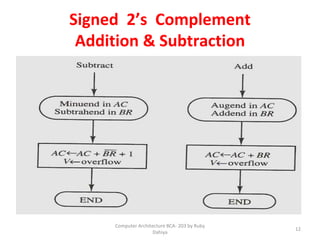
• Subtraction: Take 2’s complement of subtrahend and add to
minuend
— i.e. a - b = a + (-b)
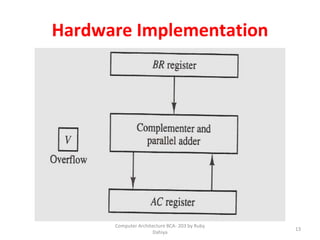
• So we only need addition and complement circuits.
8
Computer Architecture BCA- 203 by Ruby
Dahiya
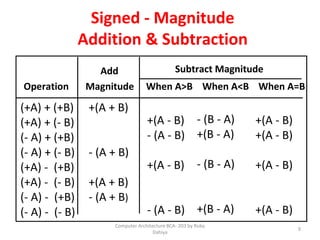
Signed - Magnitude
Addition & Subtraction
(+A) + (+B)
(+A) + (- B)
(- A) + (+B)
(- A) + (- B)
(+A) - (+B)
(+A) - (- B)
(- A) - (+B)
(- A) - (- B)
+(A + B)
- (A + B)
+(A + B)
- (A + B)
+(A - B)
- (A - B)
+(A - B)
- (A - B)
- (B - A)
+(B - A)
- (B - A)
+(B - A)
+(A - B)
+(A - B)
+(A - B)
+(A - B)
Operation Magnitude When A>B When A<B When A=B
Add Subtract Magnitude
9
Computer Architecture BCA- 203 by Ruby
Dahiya
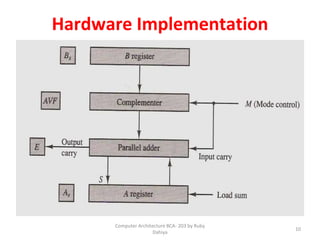
Hardware Implementation
10
Computer Architecture BCA- 203 by Ruby
Dahiya
11
Computer Architecture BCA- 203 by Ruby
Dahiya
Signed 2’s Complement
Addition & Subtraction
12
Computer Architecture BCA- 203 by Ruby
Dahiya
Hardware Implementation
13
Computer Architecture BCA- 203 by Ruby
Dahiya
Lecture-25
Signed –Magnitude
Multiplication
15
Multiplication
• A complex operation compared with
addition and subtraction
• Many algorithms are used, esp. for large
numbers
• Simple algorithm is the same long
multiplication taught in school
✔Compute partial product for each digit
✔Add partial products
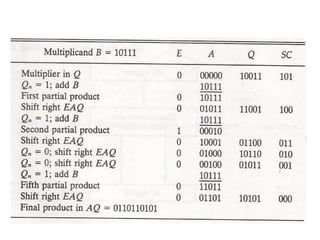
Multiplication Example
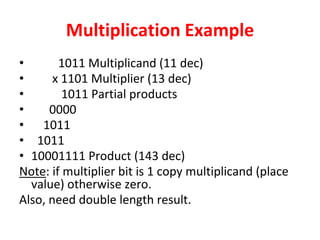
• 1011 Multiplicand (11 dec)
• x 1101 Multiplier (13 dec)
• 1011 Partial products
• 0000
• 1011
• 1011
• 10001111 Product (143 dec)
Note: if multiplier bit is 1 copy multiplicand (place
value) otherwise zero.
Also, need double length result.
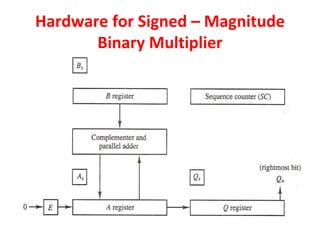
Hardware for Signed – Magnitude
Binary Multiplier
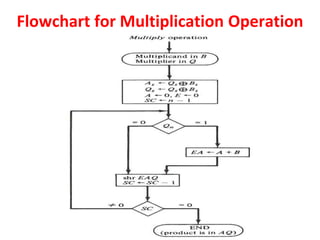
Flowchart for Multiplication Operation
Lecture-26
Booth Multiplication Algorithm
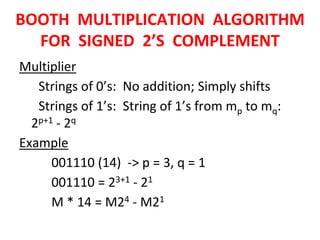
BOOTH MULTIPLICATION ALGORITHM
FOR SIGNED 2’S COMPLEMENT
Multiplier
Strings of 0’s: No addition; Simply shifts
Strings of 1’s: String of 1’s from mp to mq:
2p+1 - 2q
Example
001110 (14) -> p = 3, q = 1
001110 = 23+1 - 21
M * 14 = M24 - M21
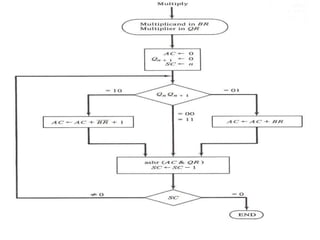
BOOTH MULTIPLICATION ALGORITHM
FOR SIGNED 2’S COMPLEMENT
Algorithm:
[1] Subtract multiplicand for the first least
significant 1 in a string of 1’s in the multiplier
[2] Add multiplicand for the first 0 after the
string of 1’s in the multiplier
[3] Partial Product does not change when the
multiplier bit is identical to the previous bit
110010 = -24 + 22 - 21 = -16 + 4 - 2 = -14
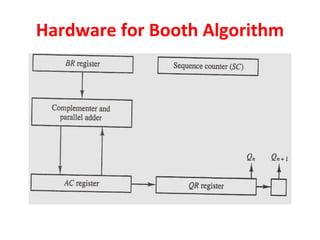
Hardware for Booth Algorithm
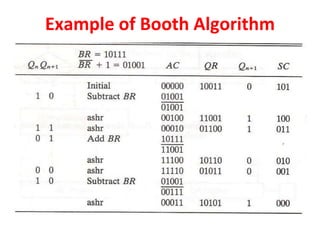
Example of Booth Algorithm
Lecture-27
Array Multiplier
&
Division Algorithm
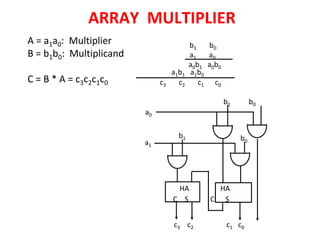
ARRAY MULTIPLIER
A = a1a0: Multiplier
B = b1b0: Multiplicand
C = B * A = c3c2c1c0 c3 c2 c1 c0
b1 b0
a1 a0
a1b1 a1b0
a0
a1
b1 b0
b1 b0
HA HA
C S C S
c3 c2 c1 c0
a0b1 a0b0
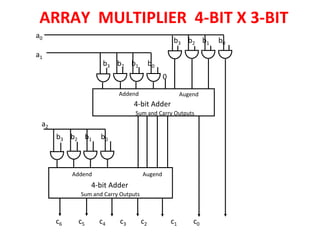
ARRAY MULTIPLIER 4-BIT X 3-BIT
a0
a1
a2
b3 b2 b1 b0
Addend Augend
4-bit Adder
Sum and Carry Outputs
4-bit Adder
Addend Augend
0
c6 c5 c4 c3 c2 c1 c0
b3 b2 b1 b0
b3 b2 b1 b0
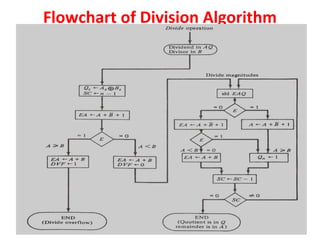
Flowchart of Division Algorithm
DIVISION
Lecture-28 & 29
IO Organization
And
I/O versus Memory Bus
Peripheral Devices
• The equipments that are attached to the computer
system externally i.e., that are not part of the
motherboard are termed as peripheral devices.
• An I/O operation can be divided three areas:
⮚Input/output devices themselves that convert data into
a form.
⮚The interface circuit that actually moves the data into or
out of the computer.
⮚The technique which data is moved in or out of the
computer.
Input/Output (I/O) Interface
• An I/O interface is an entity that controls the
data transfer from external device, main
memory and/ or CPU registers.
• It is responsible for managing the use of all
devices that are peripheral to a computer
system.
• It attempts to make an efficient use of all
available devices while retaining the integrity
of the data.
Problems in I/O Device Management
• Most of the peripheral devices are either
electromechanical or electromagnetic whereas the
computer is an electronic device.
• The data transfer rate of peripherals is usually
slower than thee transfer rate of CPU, so a
synchronization mechanism may be needed.
• Data codes and formats in peripherals differ from
the word format in the CPU and memory.
• The operating modes of peripherals are different
from each other and they need not to disturb the
operation of other peripherals connected to the
CPU.
Aims of I/O Module
• Achieve device independence
• Handle errors
• Speed up transfer of data
• Handle deadlocks
• Enable multi-user systems to use
dedicated devices
Functions of I/O Interface
• Control and timing signals
• Processor Communication
i. Command decoding
ii. Data
iii. Status reporting
iv. Address recognition
• Device communication
• Data buffering
• Error detection
Command Received by an Interface
1. Control command: issued to activate the peripheral
and to inform it what to do.
2. Status command: used to test various status
conditions in the interface and the peripheral.
3. Data output command: transfers the data from the
bus into one of the interface registers.
4. Data input command: forwards the data received
from the peripheral and stored in the buffer register
to the processor by putting it on the data lines.
I/O versus Memory Bus
There are three ways that computer buses
can be used to communicate with memory
and I/O:
1. Use two separate buses, one for memory and the
other for I/O. (IOP)
2. Use one common bus for both memory and I/O
but have separate control lines for each. (Isolated
I/O)
3. Use one common bus for memory and I/O with
common control lines. (Memory-mapped)
Isolated I/O
• A separate address space is used for both
memory and I/O devices.
• The CPU has distinct input and output
instructions.
• It’s advantages are:
a) Small no. of I/O instructions.
b) Commonly usable.
Isolated I/O (cont’d)
• The steps taken for communication are:
a.CPU decodes the operation for i/p or o/p.
b.The address of associated device is placed on
the common address bus.
c. It enables I/O read (for input) and I/O write (
for output).
d.External device now knows that the address
on the bus is meant for the interface and not
for memory.
Memory-Mapped I/O
• It is a single address space for storing both
memory and I/O devices.
• It employs one set of read and write signals
and have no specific input or output
instructions.
• The computer treats an interface register as
being part of the memory system.
• The assigned addresses for interface registers
cannot be used for memory words,
Memory-Mapped I/O (cont’d)
• Advantages:
a) More efficient programming allowed.
b) Single read line and single write lines needed.
• Disadvantages:
a) Valuable memory address space used up.
b) I/O module registers treated as memory
addresses.
c) Same machine instructions used to access
both memory and I/O devices.
Lecture-30
Asynchronous Data Transfer
• Synchronization: Clock pulses are applied
through a common clock generator.
• Two ways to achieve synchronization between
two independent units are:
1. Strobe Control
2. Handshaking
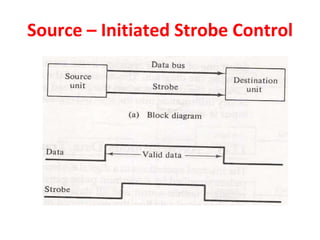
Source – Initiated Strobe Control
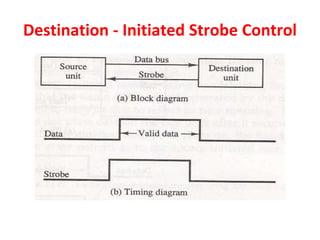
Destination - Initiated Strobe Control
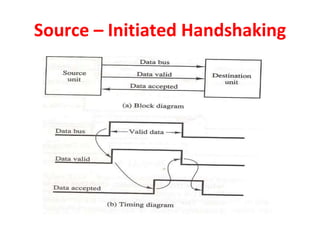
Source – Initiated Handshaking
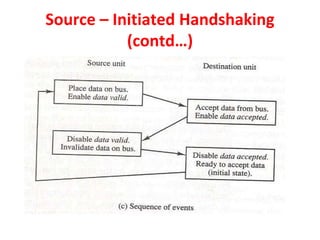
(contd…)
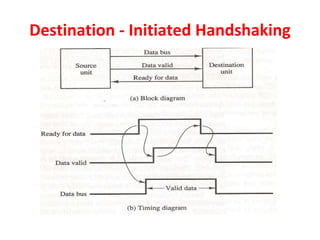
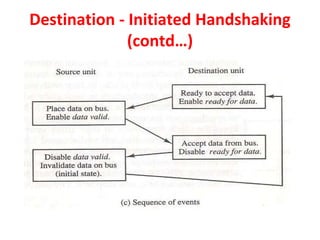
Destination - Initiated Handshaking
(contd…)
Lecture-31to33
Asynchronous Communication
Modes of Transfer
• Data transfer to and from peripherals can be
handled in three ways:
1. Programmed I/O
2. Interrupt-initiated I/O
3. DMA
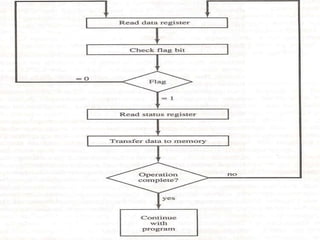
Programmed I/O
• Programmed I/O operations are the result of
I/O instructions written in the computer
program.
• In this method, CPU stays in the program loop
until the I/O unit indicates that it is ready for
data transfer.
• This is time-consuming.
Interrupt-Initiated I/O
• Special commands are used to inform the
interface to issue an interrupt request signal
when the data is available from the device.
• Meanwhile, the CPU can proceed to execute
another program.
• And, the interface keeps monitoring the
device.
Instruction Cycle with Interrupts
Disable interrupts
• Processor will ignore further interrupts whilst
processing one interrupt
• Interrupts remain pending and are checked after
first interrupt has been processed
• Interrupts handled in sequence as they occur
Define priorities
• Low priority interrupts can be interrupted by
higher priority interrupts
• When higher priority interrupt has been
processed, processor returns to previous
interrupt
Priority Interrupts
Polling
• One common branch address for all interrupts.
• Interrupt sources polled in priority sequence.
• If an interrupt signal is ‘on’, control branches to a service
routine for this source.
• The operation can be speed up with a hardware priority-
interrupt unit.
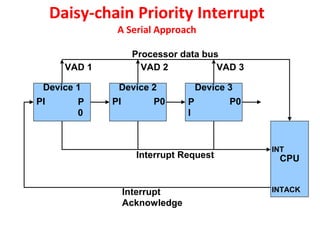
Daisy-Chain Priority
• Hardware solution
• Serial connection of all devices that request interrupts.
• Device with the highest priority takes first position, 2nd
highest takes 2nd position etc.
• Interrupt request line shared by all devices.
Daisy-chain Priority Interrupt
A Serial Approach
CPU
Device 1 Device 2 Device 3
PI P
0
PI P
I
P0 P0
INT
INTACK
Interrupt Request
Interrupt
Acknowledge
Processor data bus
VAD 1 VAD 2 VAD 3
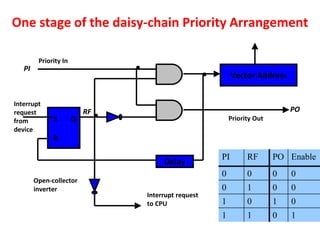
One stage of the daisy-chain Priority Arrangement
PI RF PO Enable
0 0 0 0
0 1 0 0
1 0 1 0
1 1 0 1
S
R
Q
Vector Address
Delay
.
. .
Priority In
PI
Interrupt
request
from
device
Open-collector
inverter
Interrupt request
to CPU
Priority Out
PO
RF
Parallel Priority Interrupt
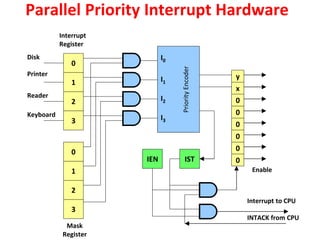
• Uses a register – whose bits are set separately by
the interrupt signal from each device.
• Priority established according to the position of bits
in the interrupt register.
• A mask register is used to control the status of each
interrupt request. Mask bits set programmatically.
• Priority encoder generates low order bits of the
VAD, which is transferred to the CPU.
• Encoder sets an interrupt status flip-flop IST
whenever a non-masked interrupt occurs.
• Interrupt enable flip-flop provides overall control
over the interrupt system.
Parallel Priority Interrupt Hardware
0
1
2
3
I0
I1
I2
I3
Priority
Encoder
0
1
2
3
y
x
0
0
0
0
0
0
IST
IEN
Disk
Printer
Reader
Keyboard
Enable
Interrupt to CPU
INTACK from CPU
Interrupt
Register
Mask
Register
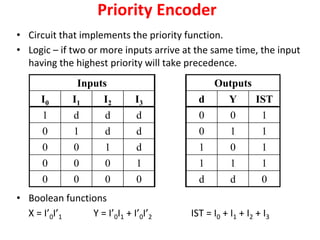
Priority Encoder
• Circuit that implements the priority function.
• Logic – if two or more inputs arrive at the same time, the input
having the highest priority will take precedence.
• Boolean functions
X = I’0I’1 Y = I’0I1 + I’0I’2 IST = I0 + I1 + I2 + I3
Inputs Outputs
I0 I1 I2 I3 d Y IST
1 d d d 0 0 1
0 1 d d 0 1 1
0 0 1 d 1 0 1
0 0 0 1 1 1 1
0 0 0 0 d d 0
Interrupt Cycle
• The Interrupt enable flip-flop (IEN) can be set or cleared by
program instructions.
• A programmer can therefore allow interrupts (clear IEN) or
disallow interrupts (set IEN)
• At the end of each instruction cycle the CPU checks IEN and
IST. If either is equal to zero, control continues with the next
instruction. If both = 1, the interrupt is handled.
• Interrupt micro-operations:
SP🡨SP – 1 (Decrement stack pointer)
M[SP] 🡨 PCc Push PC onto stack
INTACK 🡨 1Enable interrupt acknowledge
PC 🡨VAD Transfer vector address to PC
IEN 🡨0 Disable further interrupts
Go to fetch next instruction
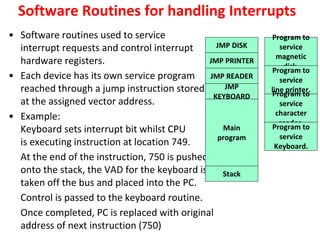
Software Routines for handling Interrupts
• Software routines used to service
interrupt requests and control interrupt
hardware registers.
• Each device has its own service program
reached through a jump instruction stored
at the assigned vector address.
• Example:
Keyboard sets interrupt bit whilst CPU
is executing instruction at location 749.
At the end of the instruction, 750 is pushed
onto the stack, the VAD for the keyboard is
taken off the bus and placed into the PC.
Control is passed to the keyboard routine.
Once completed, PC is replaced with original
address of next instruction (750)
JMP DISK
JMP PRINTER
JMP READER
JMP
KEYBOARD
Main
program
Stack
Program to
service
magnetic
disk.
Program to
service
line printer.
Program to
service
character
reader.
Program to
service
Keyboard.
Computer Organisation and Architecture (COA)

Computer Organisation and Architecture (COA)

  • 1.
    Overview of Unit-3 ComputerArithmetic And IO Organization
  • 2.
    Overview of Unit- 2 • This unit deals with the arithmetic algorithms for addition, subtraction, multiplication and division. • Procedures for implementation of algorithms are also presented. • The algorithms are presented by means of flowcharts that use the RTL to specify the sequence of micro operation 2 Computer Architecture BCA-203 by Ruby Dahiya
  • 3.
    Overview (contd…) • Thepart –ii of this unit deals with the techniques that computers used to communicate with I/O devices. • The procedure for asynchronous transfer of either parallel or serial data is explained. • Four modes of transfer are : Programmed I/O Interrupt- Initiated Transfer Direct Memory Access 3 Computer Architecture BCA-203 by Ruby Dahiya
  • 4.
    Preview of theUnit - 3 • Computer Arithmetic • Addition and Subtraction • Multiplication Algorithm • Booth Multiplication Algorithm • Division Algorithm • I/O Organization • I/O versus Memory Bus • Asynchronous Data Transfer • Asynchronous Communication 4 Computer Architecture BCA-203 by Ruby Dahiya
  • 5.
    Lecture-23 and 24 ComputerArithmetic And Addition & Subtraction
  • 6.
    Computer Architecture BCA-203 by Ruby Dahiya 6 Introduction • ALU performs arithmetic and logic operations on data – everything that we think of as “computing.” • Everything else in the computer is there to service this unit • All ALUs handles integers • Some may handle floating point (real) numbers • May be separate FPU (math co-processor) • Execution(Processing) Components (Arithmetic Logic Unit(ALU) Arithmetic calculations, Logical computations, Shifts/Rotates) • Transfer Components (Bus) • Control Components (Control Unit)
  • 7.
    Integer Representation • Wehave the smallest possible alphabet: the symbols 0 & 1 represent everything • No minus sign • No period • Signed-Magnitude • Two’s complement 7 Computer Architecture BCA- 203 by Ruby Dahiya
  • 8.
    Addition and Subtraction •For addition use normal binary addition — 0+0=sum 0 carry 0 — 0+1=sum 1 carry 0 — 1+1=sum 0 carry 1 • Monitor MSB for overflow — Overflow cannot occur when adding 2 operands with the different signs — If 2 operand have same sign and result has a different sign, overflow has occurred • Subtraction: Take 2’s complement of subtrahend and add to minuend — i.e. a - b = a + (-b) • So we only need addition and complement circuits. 8 Computer Architecture BCA- 203 by Ruby Dahiya
  • 9.
    Signed - Magnitude Addition& Subtraction (+A) + (+B) (+A) + (- B) (- A) + (+B) (- A) + (- B) (+A) - (+B) (+A) - (- B) (- A) - (+B) (- A) - (- B) +(A + B) - (A + B) +(A + B) - (A + B) +(A - B) - (A - B) +(A - B) - (A - B) - (B - A) +(B - A) - (B - A) +(B - A) +(A - B) +(A - B) +(A - B) +(A - B) Operation Magnitude When A>B When A<B When A=B Add Subtract Magnitude 9 Computer Architecture BCA- 203 by Ruby Dahiya
  • 10.
  • 11.
  • 12.
    Signed 2’s Complement Addition& Subtraction 12 Computer Architecture BCA- 203 by Ruby Dahiya
  • 13.
  • 14.
  • 15.
    15 Multiplication • A complexoperation compared with addition and subtraction • Many algorithms are used, esp. for large numbers • Simple algorithm is the same long multiplication taught in school ✔Compute partial product for each digit ✔Add partial products
  • 16.
    Multiplication Example • 1011Multiplicand (11 dec) • x 1101 Multiplier (13 dec) • 1011 Partial products • 0000 • 1011 • 1011 • 10001111 Product (143 dec) Note: if multiplier bit is 1 copy multiplicand (place value) otherwise zero. Also, need double length result.
  • 17.
    Hardware for Signed– Magnitude Binary Multiplier
  • 18.
  • 20.
  • 21.
    BOOTH MULTIPLICATION ALGORITHM FORSIGNED 2’S COMPLEMENT Multiplier Strings of 0’s: No addition; Simply shifts Strings of 1’s: String of 1’s from mp to mq: 2p+1 - 2q Example 001110 (14) -> p = 3, q = 1 001110 = 23+1 - 21 M * 14 = M24 - M21
  • 22.
    BOOTH MULTIPLICATION ALGORITHM FORSIGNED 2’S COMPLEMENT Algorithm: [1] Subtract multiplicand for the first least significant 1 in a string of 1’s in the multiplier [2] Add multiplicand for the first 0 after the string of 1’s in the multiplier [3] Partial Product does not change when the multiplier bit is identical to the previous bit 110010 = -24 + 22 - 21 = -16 + 4 - 2 = -14
  • 23.
  • 25.
  • 26.
  • 27.
    ARRAY MULTIPLIER A =a1a0: Multiplier B = b1b0: Multiplicand C = B * A = c3c2c1c0 c3 c2 c1 c0 b1 b0 a1 a0 a1b1 a1b0 a0 a1 b1 b0 b1 b0 HA HA C S C S c3 c2 c1 c0 a0b1 a0b0
  • 28.
    ARRAY MULTIPLIER 4-BITX 3-BIT a0 a1 a2 b3 b2 b1 b0 Addend Augend 4-bit Adder Sum and Carry Outputs Sum and Carry Outputs 4-bit Adder Addend Augend 0 c6 c5 c4 c3 c2 c1 c0 b3 b2 b1 b0 b3 b2 b1 b0
  • 29.
  • 30.
  • 31.
    Lecture-28 & 29 IOOrganization And I/O versus Memory Bus
  • 32.
    Peripheral Devices • Theequipments that are attached to the computer system externally i.e., that are not part of the motherboard are termed as peripheral devices. • An I/O operation can be divided three areas: ⮚Input/output devices themselves that convert data into a form. ⮚The interface circuit that actually moves the data into or out of the computer. ⮚The technique which data is moved in or out of the computer.
  • 33.
    Input/Output (I/O) Interface •An I/O interface is an entity that controls the data transfer from external device, main memory and/ or CPU registers. • It is responsible for managing the use of all devices that are peripheral to a computer system. • It attempts to make an efficient use of all available devices while retaining the integrity of the data.
  • 34.
    Problems in I/ODevice Management • Most of the peripheral devices are either electromechanical or electromagnetic whereas the computer is an electronic device. • The data transfer rate of peripherals is usually slower than thee transfer rate of CPU, so a synchronization mechanism may be needed. • Data codes and formats in peripherals differ from the word format in the CPU and memory. • The operating modes of peripherals are different from each other and they need not to disturb the operation of other peripherals connected to the CPU.
  • 35.
    Aims of I/OModule • Achieve device independence • Handle errors • Speed up transfer of data • Handle deadlocks • Enable multi-user systems to use dedicated devices
  • 36.
    Functions of I/OInterface • Control and timing signals • Processor Communication i. Command decoding ii. Data iii. Status reporting iv. Address recognition • Device communication • Data buffering • Error detection
  • 37.
    Command Received byan Interface 1. Control command: issued to activate the peripheral and to inform it what to do. 2. Status command: used to test various status conditions in the interface and the peripheral. 3. Data output command: transfers the data from the bus into one of the interface registers. 4. Data input command: forwards the data received from the peripheral and stored in the buffer register to the processor by putting it on the data lines.
  • 38.
    I/O versus MemoryBus There are three ways that computer buses can be used to communicate with memory and I/O: 1. Use two separate buses, one for memory and the other for I/O. (IOP) 2. Use one common bus for both memory and I/O but have separate control lines for each. (Isolated I/O) 3. Use one common bus for memory and I/O with common control lines. (Memory-mapped)
  • 39.
    Isolated I/O • Aseparate address space is used for both memory and I/O devices. • The CPU has distinct input and output instructions. • It’s advantages are: a) Small no. of I/O instructions. b) Commonly usable.
  • 40.
    Isolated I/O (cont’d) •The steps taken for communication are: a.CPU decodes the operation for i/p or o/p. b.The address of associated device is placed on the common address bus. c. It enables I/O read (for input) and I/O write ( for output). d.External device now knows that the address on the bus is meant for the interface and not for memory.
  • 41.
    Memory-Mapped I/O • Itis a single address space for storing both memory and I/O devices. • It employs one set of read and write signals and have no specific input or output instructions. • The computer treats an interface register as being part of the memory system. • The assigned addresses for interface registers cannot be used for memory words,
  • 42.
    Memory-Mapped I/O (cont’d) •Advantages: a) More efficient programming allowed. b) Single read line and single write lines needed. • Disadvantages: a) Valuable memory address space used up. b) I/O module registers treated as memory addresses. c) Same machine instructions used to access both memory and I/O devices.
  • 43.
  • 44.
    Asynchronous Data Transfer •Synchronization: Clock pulses are applied through a common clock generator. • Two ways to achieve synchronization between two independent units are: 1. Strobe Control 2. Handshaking
  • 45.
    Source – InitiatedStrobe Control
  • 46.
  • 47.
  • 48.
    Source – InitiatedHandshaking (contd…)
  • 49.
  • 50.
    Destination - InitiatedHandshaking (contd…)
  • 51.
  • 52.
    Modes of Transfer •Data transfer to and from peripherals can be handled in three ways: 1. Programmed I/O 2. Interrupt-initiated I/O 3. DMA
  • 53.
    Programmed I/O • ProgrammedI/O operations are the result of I/O instructions written in the computer program. • In this method, CPU stays in the program loop until the I/O unit indicates that it is ready for data transfer. • This is time-consuming.
  • 55.
    Interrupt-Initiated I/O • Specialcommands are used to inform the interface to issue an interrupt request signal when the data is available from the device. • Meanwhile, the CPU can proceed to execute another program. • And, the interface keeps monitoring the device.
  • 56.
    Instruction Cycle withInterrupts Disable interrupts • Processor will ignore further interrupts whilst processing one interrupt • Interrupts remain pending and are checked after first interrupt has been processed • Interrupts handled in sequence as they occur Define priorities • Low priority interrupts can be interrupted by higher priority interrupts • When higher priority interrupt has been processed, processor returns to previous interrupt
  • 57.
    Priority Interrupts Polling • Onecommon branch address for all interrupts. • Interrupt sources polled in priority sequence. • If an interrupt signal is ‘on’, control branches to a service routine for this source. • The operation can be speed up with a hardware priority- interrupt unit. Daisy-Chain Priority • Hardware solution • Serial connection of all devices that request interrupts. • Device with the highest priority takes first position, 2nd highest takes 2nd position etc. • Interrupt request line shared by all devices.
  • 58.
    Daisy-chain Priority Interrupt ASerial Approach CPU Device 1 Device 2 Device 3 PI P 0 PI P I P0 P0 INT INTACK Interrupt Request Interrupt Acknowledge Processor data bus VAD 1 VAD 2 VAD 3
  • 59.
    One stage ofthe daisy-chain Priority Arrangement PI RF PO Enable 0 0 0 0 0 1 0 0 1 0 1 0 1 1 0 1 S R Q Vector Address Delay . . . Priority In PI Interrupt request from device Open-collector inverter Interrupt request to CPU Priority Out PO RF
  • 60.
    Parallel Priority Interrupt •Uses a register – whose bits are set separately by the interrupt signal from each device. • Priority established according to the position of bits in the interrupt register. • A mask register is used to control the status of each interrupt request. Mask bits set programmatically. • Priority encoder generates low order bits of the VAD, which is transferred to the CPU. • Encoder sets an interrupt status flip-flop IST whenever a non-masked interrupt occurs. • Interrupt enable flip-flop provides overall control over the interrupt system.
  • 61.
    Parallel Priority InterruptHardware 0 1 2 3 I0 I1 I2 I3 Priority Encoder 0 1 2 3 y x 0 0 0 0 0 0 IST IEN Disk Printer Reader Keyboard Enable Interrupt to CPU INTACK from CPU Interrupt Register Mask Register
  • 62.
    Priority Encoder • Circuitthat implements the priority function. • Logic – if two or more inputs arrive at the same time, the input having the highest priority will take precedence. • Boolean functions X = I’0I’1 Y = I’0I1 + I’0I’2 IST = I0 + I1 + I2 + I3 Inputs Outputs I0 I1 I2 I3 d Y IST 1 d d d 0 0 1 0 1 d d 0 1 1 0 0 1 d 1 0 1 0 0 0 1 1 1 1 0 0 0 0 d d 0
  • 63.
    Interrupt Cycle • TheInterrupt enable flip-flop (IEN) can be set or cleared by program instructions. • A programmer can therefore allow interrupts (clear IEN) or disallow interrupts (set IEN) • At the end of each instruction cycle the CPU checks IEN and IST. If either is equal to zero, control continues with the next instruction. If both = 1, the interrupt is handled. • Interrupt micro-operations: SP🡨SP – 1 (Decrement stack pointer) M[SP] 🡨 PCc Push PC onto stack INTACK 🡨 1Enable interrupt acknowledge PC 🡨VAD Transfer vector address to PC IEN 🡨0 Disable further interrupts Go to fetch next instruction
  • 64.
    Software Routines forhandling Interrupts • Software routines used to service interrupt requests and control interrupt hardware registers. • Each device has its own service program reached through a jump instruction stored at the assigned vector address. • Example: Keyboard sets interrupt bit whilst CPU is executing instruction at location 749. At the end of the instruction, 750 is pushed onto the stack, the VAD for the keyboard is taken off the bus and placed into the PC. Control is passed to the keyboard routine. Once completed, PC is replaced with original address of next instruction (750) JMP DISK JMP PRINTER JMP READER JMP KEYBOARD Main program Stack Program to service magnetic disk. Program to service line printer. Program to service character reader. Program to service Keyboard.