OVERVIEW OF COMPUTER SYSTEMS Parts Of A Computer System. Looking Inside The Machine. Software: Bringing Machine To Life.
 
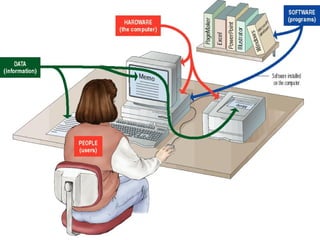
PARTS OF A COMPUTER What is a computer Hardware Software Data  Users
 
WHAT IS A COMPUTER A computer is an electronic device used to process data. A computer can convert data into information that is useful to people. A complete computer system includes four distinct parts: Hardware Software Data User
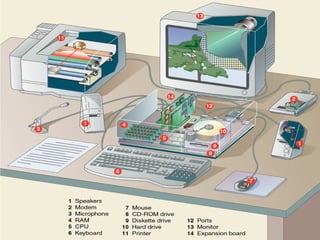
HARDWARE A computer's hardware consists of electronic devices; the parts you can see and touch. The term "device" refers to any piece of hardware used by the computer, such as a keyboard, monitor, modem, mouse, etc.
 
SOFTWARE Software – also called programs – consists of organized sets of instructions for controlling the computer. Some programs exist for the computer's use, to help it manage its own tasks and devices.  Other programs exist for the user, and enable the computer to perform tasks for you, such as creating documents.
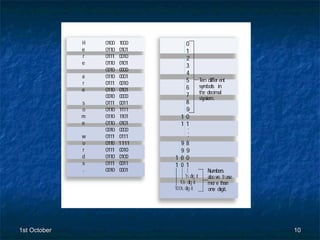
DATA Data consists of raw facts, which the computer can manipulate and process into information that is useful to people.  Computerized data is digital, meaning that it has been reduced to digits, or numbers. The computer stores and reads all data as numbers. Although computers use data in digital form, they convert data into forms that people can understand, such as text, numerals, sounds, and images.
 
USERS People are the computer's operators, or users.  Some types of computers can operate without much intervention from people, but personal computers are designed specifically for use by people.
TYPES OF COMPUTERS Supercomputers  Mainframe Computers  Minicomputers  Microcomputers, or Personal Computers
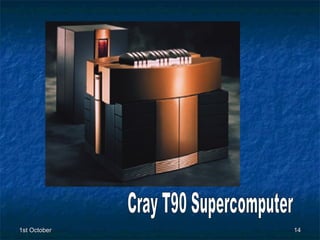
SUPERCOMPUTERS Supercomputers are the most powerful computers. They are used for problems requiring complex calculations. Because of their size and expense, supercomputers are relatively rare. Supercomputers are used by universities, government agencies, and large businesses.
Cray T90 Supercomputer
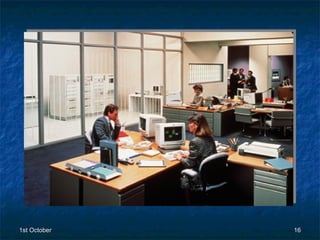
MAINFRAME COMPUTERS Mainframe computers can support hundreds or thousands of users, handling massive amounts of input, output, and storage. Mainframe computers are used in large organizations where many users need access to shared data and programs. Mainframes are also used as e-commerce servers, handling transactions over the Internet .
 
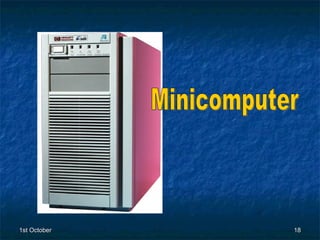
MINI COMPUTERS Minicomputers are smaller than mainframes but larger than microcomputers.  Minicomputers usually have multiple terminals. Minicomputers may be used as network servers and Internet servers.
Minicomputer
MICROCOMPUTERS Microcomputers are more commonly known as personal computers. The term "PC" is applied to IBM-PCs or compatible computers. Full-size desktop computers are the most common type of PC. Notebook (laptop) computers are used by people who need the power of a desktop system, but also portability. Handheld PCs (such as PDAs) lack the power of a desktop or notebook PC, but offer features for users who need limited functions and small size.
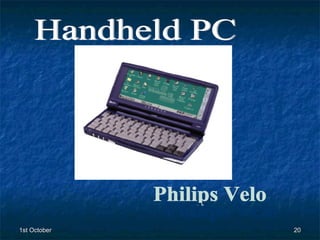
Handheld PC Philips Velo

Computer Lecture 1

  • 1.
    OVERVIEW OF COMPUTERSYSTEMS Parts Of A Computer System. Looking Inside The Machine. Software: Bringing Machine To Life.
  • 2.
  • 3.
    PARTS OF ACOMPUTER What is a computer Hardware Software Data Users
  • 4.
  • 5.
    WHAT IS ACOMPUTER A computer is an electronic device used to process data. A computer can convert data into information that is useful to people. A complete computer system includes four distinct parts: Hardware Software Data User
  • 6.
    HARDWARE A computer'shardware consists of electronic devices; the parts you can see and touch. The term "device" refers to any piece of hardware used by the computer, such as a keyboard, monitor, modem, mouse, etc.
  • 7.
  • 8.
    SOFTWARE Software –also called programs – consists of organized sets of instructions for controlling the computer. Some programs exist for the computer's use, to help it manage its own tasks and devices. Other programs exist for the user, and enable the computer to perform tasks for you, such as creating documents.
  • 9.
    DATA Data consistsof raw facts, which the computer can manipulate and process into information that is useful to people. Computerized data is digital, meaning that it has been reduced to digits, or numbers. The computer stores and reads all data as numbers. Although computers use data in digital form, they convert data into forms that people can understand, such as text, numerals, sounds, and images.
  • 10.
  • 11.
    USERS People arethe computer's operators, or users. Some types of computers can operate without much intervention from people, but personal computers are designed specifically for use by people.
  • 12.
    TYPES OF COMPUTERSSupercomputers Mainframe Computers Minicomputers Microcomputers, or Personal Computers
  • 13.
    SUPERCOMPUTERS Supercomputers arethe most powerful computers. They are used for problems requiring complex calculations. Because of their size and expense, supercomputers are relatively rare. Supercomputers are used by universities, government agencies, and large businesses.
  • 14.
  • 15.
    MAINFRAME COMPUTERS Mainframecomputers can support hundreds or thousands of users, handling massive amounts of input, output, and storage. Mainframe computers are used in large organizations where many users need access to shared data and programs. Mainframes are also used as e-commerce servers, handling transactions over the Internet .
  • 16.
  • 17.
    MINI COMPUTERS Minicomputersare smaller than mainframes but larger than microcomputers. Minicomputers usually have multiple terminals. Minicomputers may be used as network servers and Internet servers.
  • 18.
  • 19.
    MICROCOMPUTERS Microcomputers aremore commonly known as personal computers. The term "PC" is applied to IBM-PCs or compatible computers. Full-size desktop computers are the most common type of PC. Notebook (laptop) computers are used by people who need the power of a desktop system, but also portability. Handheld PCs (such as PDAs) lack the power of a desktop or notebook PC, but offer features for users who need limited functions and small size.
  • 20.