Computer Hardware

    System Unit
Learning Outcome
• Student should be able to:
  – Identify the component of a system unit
  – State the functions of the main components of a
    system unit.
Note     Activity
Note 1    Activity 1

Note 2    Activity 2
Identify the components of a
         system unit

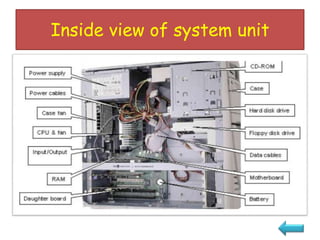
• Inside view of system
  unit
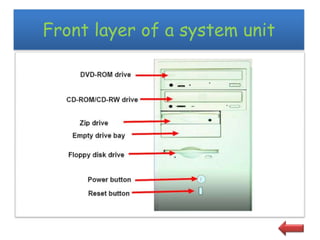
           • Front layer of a
             system unit
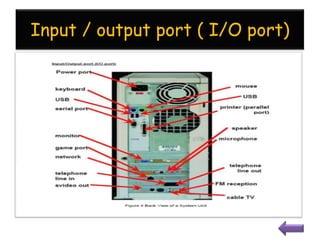
                    •     Input / output port ( I/O port)
Inside view of system unit
Front layer of a system unit
Input / output port ( I/O port)
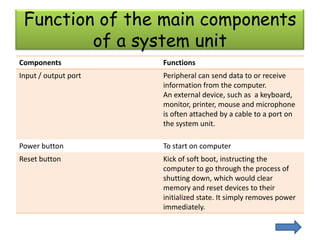
Function of the main components
         of a system unit
Components            Functions
Input / output port   Peripheral can send data to or receive
                      information from the computer.
                      An external device, such as a keyboard,
                      monitor, printer, mouse and microphone
                      is often attached by a cable to a port on
                      the system unit.

Power button          To start on computer
Reset button          Kick of soft boot, instructing the
                      computer to go through the process of
                      shutting down, which would clear
                      memory and reset devices to their
                      initialized state. It simply removes power
                      immediately.
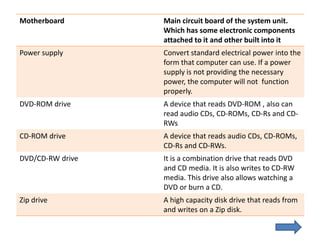
Motherboard       Main circuit board of the system unit.
                  Which has some electronic components
                  attached to it and other built into it
Power supply      Convert standard electrical power into the
                  form that computer can use. If a power
                  supply is not providing the necessary
                  power, the computer will not function
                  properly.
DVD-ROM drive     A device that reads DVD-ROM , also can
                  read audio CDs, CD-ROMs, CD-Rs and CD-
                  RWs
CD-ROM drive      A device that reads audio CDs, CD-ROMs,
                  CD-Rs and CD-RWs.
DVD/CD-RW drive   It is a combination drive that reads DVD
                  and CD media. It is also writes to CD-RW
                  media. This drive also allows watching a
                  DVD or burn a CD.
Zip drive         A high capacity disk drive that reads from
                  and writes on a Zip disk.
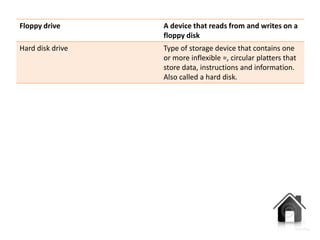
Floppy drive      A device that reads from and writes on a
                  floppy disk
Hard disk drive   Type of storage device that contains one
                  or more inflexible =, circular platters that
                  store data, instructions and information.
                  Also called a hard disk.

Computer hardware ( system unit)

  • 1.
    Computer Hardware System Unit
  • 2.
    Learning Outcome • Studentshould be able to: – Identify the component of a system unit – State the functions of the main components of a system unit.
  • 3.
    Note Activity Note 1 Activity 1 Note 2 Activity 2
  • 4.
    Identify the componentsof a system unit • Inside view of system unit • Front layer of a system unit • Input / output port ( I/O port)
  • 5.
    Inside view ofsystem unit
  • 6.
    Front layer ofa system unit
  • 7.
    Input / outputport ( I/O port)
  • 8.
    Function of themain components of a system unit Components Functions Input / output port Peripheral can send data to or receive information from the computer. An external device, such as a keyboard, monitor, printer, mouse and microphone is often attached by a cable to a port on the system unit. Power button To start on computer Reset button Kick of soft boot, instructing the computer to go through the process of shutting down, which would clear memory and reset devices to their initialized state. It simply removes power immediately.
  • 9.
    Motherboard Main circuit board of the system unit. Which has some electronic components attached to it and other built into it Power supply Convert standard electrical power into the form that computer can use. If a power supply is not providing the necessary power, the computer will not function properly. DVD-ROM drive A device that reads DVD-ROM , also can read audio CDs, CD-ROMs, CD-Rs and CD- RWs CD-ROM drive A device that reads audio CDs, CD-ROMs, CD-Rs and CD-RWs. DVD/CD-RW drive It is a combination drive that reads DVD and CD media. It is also writes to CD-RW media. This drive also allows watching a DVD or burn a CD. Zip drive A high capacity disk drive that reads from and writes on a Zip disk.
  • 10.
    Floppy drive A device that reads from and writes on a floppy disk Hard disk drive Type of storage device that contains one or more inflexible =, circular platters that store data, instructions and information. Also called a hard disk.