


COMPUTER
SYSTEM, DEVICES
AND
PERIPHERALS
As an aspiring computer
technician, it is very important to
know the system that runs your
computer and different devices
attached to it. Each device plays an
important role, without each other
computer system will not work
properly.
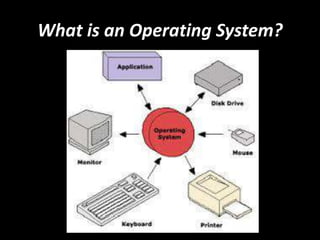
What is an Operating System?
The operating system is the most
important program that runs on a
computer. Operating systems
perform basic tasks, such as
recognizing input from the
keyboard, sending output to the
display screen, keeping track of
files and directories on the disk,
and controlling peripheral devices
such as disk drives and printers.
For large systems, the operating
system has even greater
responsibilities and powers. It is like a
traffic cop -- it makes sure that
different program and users running at
the same time do not interfere with
each other. The operating system is
also responsible for security, ensuring
that unauthorized users do not access
the system.
Operating systems can be
classified as follows:
Multi-user: Allows two or more users to
run programs at the same time. Some
operating systems permit hundreds or
even thousands of concurrent users.
Linux
Unix
Windows 2000
Multiprocessing : Supports running a
program on more than one CPU.
Linux
Unix
Windows 2000
Multitasking : Allows more than one
program to run concurrently.
Unix
Windows 2000 and Windows multi point
Multithreading : Allows different parts of a
single program to run concurrently.
Linux
Unix
Windows 2000 and Windows 7
Real time: Responds to input instantly.
General-purpose operating systems, such as
DOS and UNIX, are not real-time.
What are the devices of a
computer?
The physical, touchable,
electronic and mechanical parts
of a computer are called the
hardware which is composed of
different devices attached to the
computer.
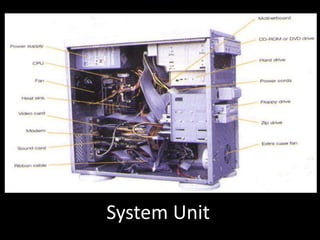
1. System Unit- The main part of
a microcomputer, sometimes
called the chassis. It includes the
following parts: Motherboard,
Microprocessor, Memory Chips,
Buses, Ports, Expansion Slots
and Cards.
System Unit
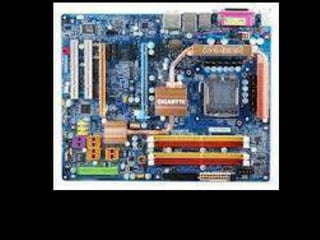
2. Motherboard / Mainboard /
System Board- The main circuit
board of a computer. It contains
all the circuits and components
that run the computer.
Motherboard
3. CPU (Central Processing Unit)
- The processor is the main
“brain” or “heart” of a computer
system. It performs all of the
instructions and calculations that
are needed and manages the
flow of information through a
computer.
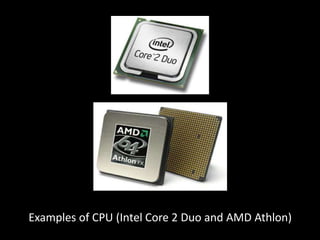
Examples of CPU (Intel Core 2 Duo and AMD Athlon)
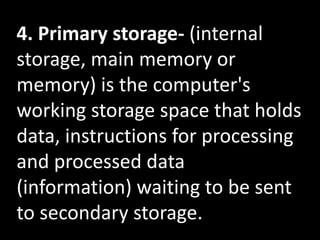
4. Primary storage- (internal
storage, main memory or
memory) is the computer's
working storage space that holds
data, instructions for processing
and processed data
(information) waiting to be sent
to secondary storage.
Two (2) Types of Memory
a. ROM – (Read Only Memory) ROM
is non-volatile, meaning it holds data
even when the power is ON or OFF.
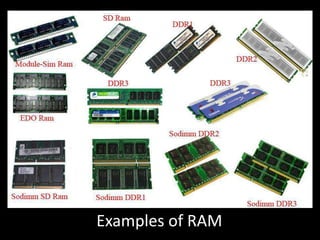
b. RAM – (Random Access Memory)
RAM is volatile, meaning it holds
data only when the power is on.
When the power is off, RAM's
contents are lost.
Examples of RAM
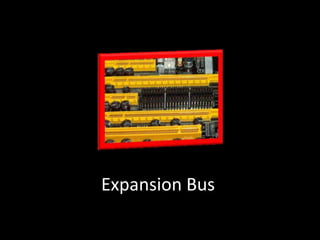
5. Expansion Bus - A bus is a data
pathway between several
hardware components inside or
outside a computer. It does not
only connect the parts of the CPU
to each other, but also links the
CPU with other important
hardware.
Expansion Bus
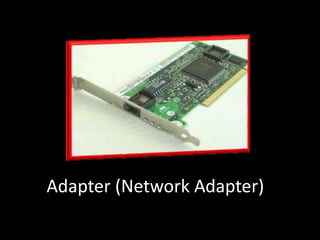
6. Adapters- Printed-circuit
boards (also called interface
cards) that enable the computer
to use a peripheral device for
which it does not have the
necessary connections or circuit
boards. They are often used to
permit upgrading to a new
different hardware.
Adapter (Network Adapter)
7. Power Supply Unit (PSU) -
Installed in the back corner of the
PC case, next to the
motherboard. It converts 120vac
(standard house power) into DC
voltages that are used by other
components in the PC.
Power supply unit (PSU)
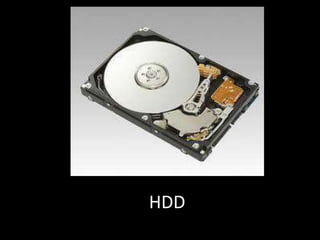
8. Hard Disk Drive (HDD) - Also
known as hard drive, is a magnetic
storage device that is installed inside
the computer. The hard drive is used
as permanent storage for data. In a
Windows computer, the hard drive is
usually configured as the C: drive
and contains the operating system
and applications.
HDD
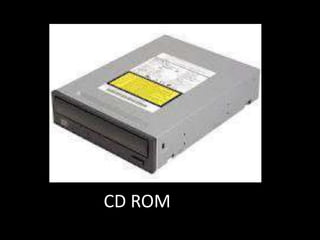
9. Optical Drive- An optical drive is a
storage device that uses lasers to
read data on the optical media.
There are three types of optical
drives: Compact Disc (CD), Digital
Versatile Disc (DVD) and Blu-ray Disc
(BD).
CD ROM
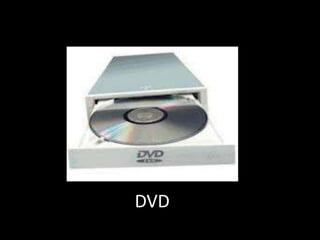
10. Digital Versatile Disc (DVD) -
Designed to optically access data
stored on a DVD. A laser moves back
and forth near the disk surface and
accesses data at a very fast rate.
DVD
What are the input
and output devices
of a computer?
Input Device is composed of a
device that accepts data and
instructions from the user or from
another computer system.
While, Output Device is any piece of
computer hardware that displays
results after the computer has
processed the input data that has
been entered.
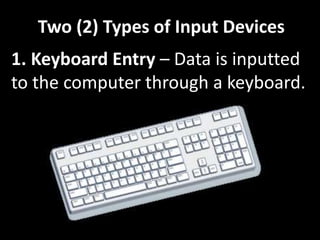
Two (2) Types of Input Devices
1. Keyboard Entry – Data is inputted
to the computer through a keyboard.
Two (2) Types of Input Devices
2. Direct Entry – A form of input that
does not require data to be keyed by
someone sitting at a keyboard.
Three Categories of Direct Entry
Devices
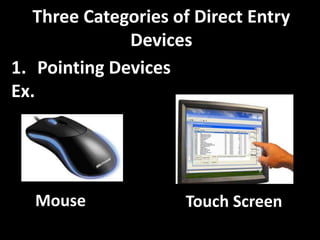
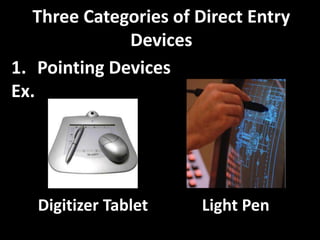
1. Pointing Devices - An input device
used to move the pointer (cursor) on
screen.
Three Categories of Direct Entry
Devices
1. Pointing Devices
Ex.
Mouse Touch Screen
Three Categories of Direct Entry
Devices
1. Pointing Devices
Ex.
Digitizer Tablet Light Pen
Three Categories of Direct Entry
Devices
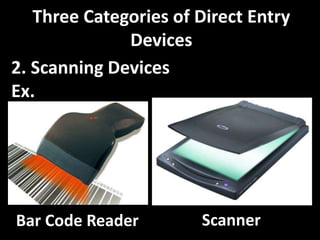
2. Scanning Devices- A device that
can read text or illustrations printed
on paper and translates the
information into a form the
computer can use.
Three Categories of Direct Entry
Devices
2. Scanning Devices
Ex.
Bar Code Reader Scanner
Three Categories of Direct Entry
Devices
3. Voice- Input Devices - Audio input
devices also known as speech or
voice recognition systems that allow
a user to send audio signals to a
computer for processing, recording,
or carrying out commands.
Three Categories of Direct Entry
Devices
3. Voice- Input Devices
Ex.
Microphone
Output Devices
1. Computer Display Monitor- It
displays information in visual form,
using text and graphics. The portion
of the monitor that displays the
information is called the screen or
video display terminal.
Types of Monitor
a. CRT Monitors - Cathode Ray Tubes
(CRT) were the only type of displays for
use with desktop PCs.
b. LCD Monitors – Liquid Crystal Display
(LCD) technology has been used in
laptops for some time.
c. LED Monitors (Light Emitting Diode) -
A display and lighting technology used in
almost every electrical and electronic
product on the market
Output Devices
2. LCD Projectors- utilize two sheets
of polarizing material with a liquid
crystal solution between them. An
electric current passed through the
liquid causes the crystals to align so
that light cannot pass through them.
Output Devices
3. Smart Board - A type of display
screen that has a touch sensitive
transparent panel covering the
screen, which is similar to a touch
screen.
3. Smart Board
Output Devices
4. Printer - A device that prints text
or illustrations on paper.
Types of printer
a) Ink-Jet or Bubble-Jet Printer -
spays ink at a sheet of paper. Ink-jet
printers produce high-quality text
and graphics.
b) Laser Printer - Uses the same
technology as copy machines. Laser
printers produce very high quality
text and graphics.
Types of printer
c) LCD and LED Printer- Similar to a
laser printer, but uses liquid crystals
or light-emitting diodes rather than a
laser to produce an image on the
drum.
Types of printer
d) Line Printer - Contains a chain of
characters or pins that print an
entire line at one time. Line printers
are very fast, but produce low-
quality print.
Types of printer
(e) Thermal Printer- An inexpensive
printer that works by pushing heated
pins against heat-sensitive paper.
Thermal printers are widely used in
calculators and
fax machines.
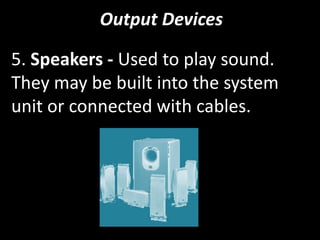
Output Devices
5. Speakers - Used to play sound.
They may be built into the system
unit or connected with cables.

Computer system, devices and peripherals

  • 1.
  • 2.
    As an aspiringcomputer technician, it is very important to know the system that runs your computer and different devices attached to it. Each device plays an important role, without each other computer system will not work properly.
  • 3.
    What is anOperating System?
  • 4.
    The operating systemis the most important program that runs on a computer. Operating systems perform basic tasks, such as recognizing input from the keyboard, sending output to the display screen, keeping track of files and directories on the disk, and controlling peripheral devices such as disk drives and printers.
  • 5.
    For large systems,the operating system has even greater responsibilities and powers. It is like a traffic cop -- it makes sure that different program and users running at the same time do not interfere with each other. The operating system is also responsible for security, ensuring that unauthorized users do not access the system.
  • 6.
    Operating systems canbe classified as follows: Multi-user: Allows two or more users to run programs at the same time. Some operating systems permit hundreds or even thousands of concurrent users. Linux Unix Windows 2000
  • 7.
    Multiprocessing : Supportsrunning a program on more than one CPU. Linux Unix Windows 2000 Multitasking : Allows more than one program to run concurrently. Unix Windows 2000 and Windows multi point
  • 8.
    Multithreading : Allowsdifferent parts of a single program to run concurrently. Linux Unix Windows 2000 and Windows 7 Real time: Responds to input instantly. General-purpose operating systems, such as DOS and UNIX, are not real-time.
  • 9.
    What are thedevices of a computer? The physical, touchable, electronic and mechanical parts of a computer are called the hardware which is composed of different devices attached to the computer.
  • 10.
    1. System Unit-The main part of a microcomputer, sometimes called the chassis. It includes the following parts: Motherboard, Microprocessor, Memory Chips, Buses, Ports, Expansion Slots and Cards.
  • 11.
  • 12.
    2. Motherboard /Mainboard / System Board- The main circuit board of a computer. It contains all the circuits and components that run the computer.
  • 13.
  • 14.
    3. CPU (CentralProcessing Unit) - The processor is the main “brain” or “heart” of a computer system. It performs all of the instructions and calculations that are needed and manages the flow of information through a computer.
  • 15.
    Examples of CPU(Intel Core 2 Duo and AMD Athlon)
  • 16.
    4. Primary storage-(internal storage, main memory or memory) is the computer's working storage space that holds data, instructions for processing and processed data (information) waiting to be sent to secondary storage.
  • 17.
    Two (2) Typesof Memory a. ROM – (Read Only Memory) ROM is non-volatile, meaning it holds data even when the power is ON or OFF. b. RAM – (Random Access Memory) RAM is volatile, meaning it holds data only when the power is on. When the power is off, RAM's contents are lost.
  • 18.
  • 19.
    5. Expansion Bus- A bus is a data pathway between several hardware components inside or outside a computer. It does not only connect the parts of the CPU to each other, but also links the CPU with other important hardware.
  • 20.
  • 21.
    6. Adapters- Printed-circuit boards(also called interface cards) that enable the computer to use a peripheral device for which it does not have the necessary connections or circuit boards. They are often used to permit upgrading to a new different hardware.
  • 22.
  • 23.
    7. Power SupplyUnit (PSU) - Installed in the back corner of the PC case, next to the motherboard. It converts 120vac (standard house power) into DC voltages that are used by other components in the PC.
  • 24.
  • 25.
    8. Hard DiskDrive (HDD) - Also known as hard drive, is a magnetic storage device that is installed inside the computer. The hard drive is used as permanent storage for data. In a Windows computer, the hard drive is usually configured as the C: drive and contains the operating system and applications.
  • 26.
  • 27.
    9. Optical Drive-An optical drive is a storage device that uses lasers to read data on the optical media. There are three types of optical drives: Compact Disc (CD), Digital Versatile Disc (DVD) and Blu-ray Disc (BD).
  • 28.
  • 29.
    10. Digital VersatileDisc (DVD) - Designed to optically access data stored on a DVD. A laser moves back and forth near the disk surface and accesses data at a very fast rate.
  • 30.
  • 31.
    What are theinput and output devices of a computer?
  • 32.
    Input Device iscomposed of a device that accepts data and instructions from the user or from another computer system. While, Output Device is any piece of computer hardware that displays results after the computer has processed the input data that has been entered.
  • 33.
    Two (2) Typesof Input Devices 1. Keyboard Entry – Data is inputted to the computer through a keyboard.
  • 34.
    Two (2) Typesof Input Devices 2. Direct Entry – A form of input that does not require data to be keyed by someone sitting at a keyboard.
  • 35.
    Three Categories ofDirect Entry Devices 1. Pointing Devices - An input device used to move the pointer (cursor) on screen.
  • 36.
    Three Categories ofDirect Entry Devices 1. Pointing Devices Ex. Mouse Touch Screen
  • 37.
    Three Categories ofDirect Entry Devices 1. Pointing Devices Ex. Digitizer Tablet Light Pen
  • 38.
    Three Categories ofDirect Entry Devices 2. Scanning Devices- A device that can read text or illustrations printed on paper and translates the information into a form the computer can use.
  • 39.
    Three Categories ofDirect Entry Devices 2. Scanning Devices Ex. Bar Code Reader Scanner
  • 40.
    Three Categories ofDirect Entry Devices 3. Voice- Input Devices - Audio input devices also known as speech or voice recognition systems that allow a user to send audio signals to a computer for processing, recording, or carrying out commands.
  • 41.
    Three Categories ofDirect Entry Devices 3. Voice- Input Devices Ex. Microphone
  • 42.
    Output Devices 1. ComputerDisplay Monitor- It displays information in visual form, using text and graphics. The portion of the monitor that displays the information is called the screen or video display terminal.
  • 43.
    Types of Monitor a.CRT Monitors - Cathode Ray Tubes (CRT) were the only type of displays for use with desktop PCs. b. LCD Monitors – Liquid Crystal Display (LCD) technology has been used in laptops for some time. c. LED Monitors (Light Emitting Diode) - A display and lighting technology used in almost every electrical and electronic product on the market
  • 45.
    Output Devices 2. LCDProjectors- utilize two sheets of polarizing material with a liquid crystal solution between them. An electric current passed through the liquid causes the crystals to align so that light cannot pass through them.
  • 46.
    Output Devices 3. SmartBoard - A type of display screen that has a touch sensitive transparent panel covering the screen, which is similar to a touch screen.
  • 47.
  • 48.
    Output Devices 4. Printer- A device that prints text or illustrations on paper.
  • 49.
    Types of printer a)Ink-Jet or Bubble-Jet Printer - spays ink at a sheet of paper. Ink-jet printers produce high-quality text and graphics. b) Laser Printer - Uses the same technology as copy machines. Laser printers produce very high quality text and graphics.
  • 50.
    Types of printer c)LCD and LED Printer- Similar to a laser printer, but uses liquid crystals or light-emitting diodes rather than a laser to produce an image on the drum.
  • 51.
    Types of printer d)Line Printer - Contains a chain of characters or pins that print an entire line at one time. Line printers are very fast, but produce low- quality print.
  • 52.
    Types of printer (e)Thermal Printer- An inexpensive printer that works by pushing heated pins against heat-sensitive paper. Thermal printers are widely used in calculators and fax machines.
  • 54.
    Output Devices 5. Speakers- Used to play sound. They may be built into the system unit or connected with cables.